testdriverai 6.0.30-canary.0fed7bc.0 → 6.0.30-canary.ff65ed2.0
This diff represents the content of publicly available package versions that have been released to one of the supported registries. The information contained in this diff is provided for informational purposes only and reflects changes between package versions as they appear in their respective public registries.
|
@@ -1,8 +1,8 @@
|
|
|
1
1
|
---
|
|
2
|
-
title:
|
|
3
|
-
sidebarTitle:
|
|
4
|
-
tag:
|
|
5
|
-
description:
|
|
2
|
+
title: Get Started with TestDriver & Playwright
|
|
3
|
+
sidebarTitle: Playwright
|
|
4
|
+
tag: NEW
|
|
5
|
+
description: In this guide, you'll setup your TestDriver account, create a new Playwright project, and leverage TestDriver's AI to convert tests to natural language.
|
|
6
6
|
icon: "masks-theater"
|
|
7
7
|
---
|
|
8
8
|
|
|
@@ -15,9 +15,9 @@ icon: "masks-theater"
|
|
|
15
15
|
- [Perform actions](#performing-actions-with-testdriver-act) with a prompt
|
|
16
16
|
- Test with an [automated agent](#agentic-tests-with-test-agent)
|
|
17
17
|
|
|
18
|
-
We'll be incrementally converting Playwright's example test from
|
|
18
|
+
We'll be incrementally converting Playwright's example test from imperactive code:
|
|
19
19
|
|
|
20
|
-
```typescript tests/example.spec.ts
|
|
20
|
+
```typescript icon="square-js" title="tests/example.spec.ts"
|
|
21
21
|
// Before
|
|
22
22
|
test("get started link", async ({ page, testdriver }) => {
|
|
23
23
|
await page.goto("https://playwright.dev/");
|
|
@@ -26,9 +26,9 @@ test("get started link", async ({ page, testdriver }) => {
|
|
|
26
26
|
});
|
|
27
27
|
```
|
|
28
28
|
|
|
29
|
-
To using natural language
|
|
29
|
+
To using natural language:
|
|
30
30
|
|
|
31
|
-
```typescript tests/example.spec.ts
|
|
31
|
+
```typescript icon="square-js" title="tests/example.spec.ts"
|
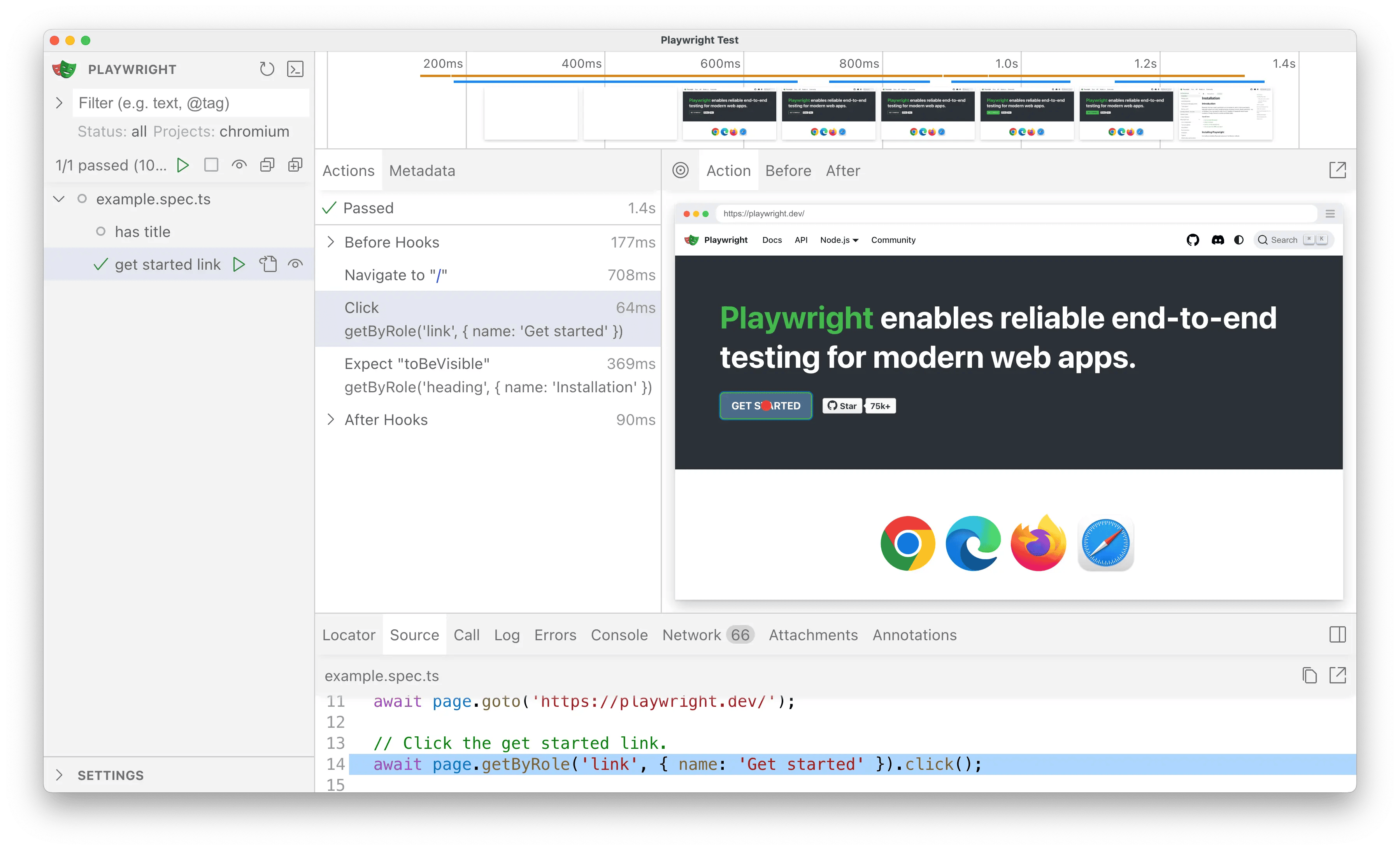
|
32
32
|
// After
|
|
33
33
|
test.describe("get started link", () => {
|
|
34
34
|
test.beforeEach(async ({ page }) => page.goto("https://playwright.dev/"));
|
|
@@ -43,15 +43,21 @@ test.describe("get started link", () => {
|
|
|
43
43
|
|
|
44
44
|
<Steps>
|
|
45
45
|
<Step title="Create a TestDriver Account">
|
|
46
|
-
You will need a [TestDriver Pro](https://app.testdriver.ai/team) account (
|
|
46
|
+
You will need a [TestDriver Pro](https://app.testdriver.ai/team) account ($20/month) to get an API key.
|
|
47
|
+
|
|
48
|
+
<Card
|
|
49
|
+
title="Sign Up for TestDriver"
|
|
50
|
+
icon="user-plus"
|
|
51
|
+
href="https://app.testdriver.ai/team"
|
|
52
|
+
arrow
|
|
53
|
+
horizontal
|
|
54
|
+
/>
|
|
47
55
|
|
|
48
|
-
<Card title="Sign Up for TestDriver" icon="user-plus" horizontal href="https://app.testdriver.ai/team">
|
|
49
|
-
|
|
50
|
-
</Card>
|
|
51
56
|
</Step>
|
|
52
57
|
<Step title="Set up your environment">
|
|
58
|
+
|
|
53
59
|
Copy your API key from [the TestDriver dashboard](https://app.testdriver.ai/team), and set it as an environment variable.
|
|
54
|
-
|
|
60
|
+
|
|
55
61
|
<Tabs>
|
|
56
62
|
<Tab title="macOS / Linux">
|
|
57
63
|
```bash Export an environment variable on macOS or Linux systems
|
|
@@ -59,9 +65,9 @@ test.describe("get started link", () => {
|
|
|
59
65
|
```
|
|
60
66
|
</Tab>
|
|
61
67
|
<Tab title="Windows">
|
|
62
|
-
|
|
63
|
-
|
|
64
|
-
|
|
68
|
+
```powershell Export an environment variable in PowerShell
|
|
69
|
+
setx TD_API_KEY "your_api_key_here"
|
|
70
|
+
```
|
|
65
71
|
</Tab>
|
|
66
72
|
</Tabs>
|
|
67
73
|
</Step>
|
|
@@ -71,11 +77,13 @@ test.describe("get started link", () => {
|
|
|
71
77
|
|
|
72
78
|
<Steps>
|
|
73
79
|
<Step title="Initialize Playwright">
|
|
80
|
+
|
|
74
81
|
<Info>
|
|
75
82
|
This is a condensed version of [Playwright's Installation Instructions](https://playwright.dev/docs/intro).
|
|
76
83
|
|
|
77
84
|
**If you're new to Playwright, you should follow their guide first.**
|
|
78
85
|
</Info>
|
|
86
|
+
|
|
79
87
|
In an new folder or existing run:
|
|
80
88
|
|
|
81
89
|
<Tabs>
|
|
@@ -95,6 +103,7 @@ test.describe("get started link", () => {
|
|
|
95
103
|
```
|
|
96
104
|
</Tab>
|
|
97
105
|
</Tabs>
|
|
106
|
+
|
|
98
107
|
Select the following options when prompted:
|
|
99
108
|
|
|
100
109
|
```console
|
|
@@ -127,13 +136,16 @@ test.describe("get started link", () => {
|
|
|
127
136
|
```
|
|
128
137
|
</Tab>
|
|
129
138
|
</Tabs>
|
|
139
|
+
|
|
130
140
|
</Step>
|
|
131
141
|
</Steps>
|
|
132
142
|
|
|
133
143
|
## Setup `@testdriver.ai/playwright`
|
|
134
144
|
|
|
135
145
|
<Steps>
|
|
146
|
+
|
|
136
147
|
<Step title="Install TestDriver">
|
|
148
|
+
|
|
137
149
|
`@testdriver.ai/playwright` as a backwards-compatible wrapper around `@playwright/test`:
|
|
138
150
|
|
|
139
151
|
<Tabs>
|
|
@@ -153,8 +165,11 @@ test.describe("get started link", () => {
|
|
|
153
165
|
```
|
|
154
166
|
</Tab>
|
|
155
167
|
</Tabs>
|
|
168
|
+
|
|
156
169
|
</Step>
|
|
170
|
+
|
|
157
171
|
<Step title="Run Playwright">
|
|
172
|
+
|
|
158
173
|
Before we start using TestDriver in our tests, run Playwright in [UI Mode](https://playwright.dev/docs/test-ui-mode):
|
|
159
174
|
|
|
160
175
|
<Tabs>
|
|
@@ -174,18 +189,22 @@ test.describe("get started link", () => {
|
|
|
174
189
|
```
|
|
175
190
|
</Tab>
|
|
176
191
|
</Tabs>
|
|
192
|
+
|
|
177
193
|
|
|
178
194
|
|
|
179
195
|
Clicking the ▶️ button should successfully run the tests in the UI,
|
|
180
196
|
just as they did before with `playwright test` in the CLI.
|
|
197
|
+
|
|
181
198
|
</Step>
|
|
199
|
+
|
|
182
200
|
<Step title="Import TestDriver">
|
|
201
|
+
|
|
183
202
|
For the sake of simplicity, we'll be working with one test file for now.
|
|
184
203
|
|
|
185
204
|
Open `tests/example.spec.ts` in your editor & rename the `@playwright/test`
|
|
186
205
|
import to `@testdriver.ai/playwright`:
|
|
187
206
|
|
|
188
|
-
```typescript tests/example.spec.ts
|
|
207
|
+
```typescript icon="square-js" title="tests/example.spec.ts"
|
|
189
208
|
import { test, expect } from '@playwright/test'; // [!code --]
|
|
190
209
|
import { test, expect } from '@testdriver.ai/playwright'; // [!code ++]
|
|
191
210
|
```
|
|
@@ -195,7 +214,9 @@ test.describe("get started link", () => {
|
|
|
195
214
|
<Tip>
|
|
196
215
|
Click the <Icon icon="eye" /> button to automatically re-run tests on save.
|
|
197
216
|
</Tip>
|
|
217
|
+
|
|
198
218
|
</Step>
|
|
219
|
+
|
|
199
220
|
</Steps>
|
|
200
221
|
|
|
201
222
|
## Usage
|
|
@@ -210,7 +231,7 @@ or even having an [agent](#agentic-tests-with-test-agent) test for you!
|
|
|
210
231
|
|
|
211
232
|
Replace `toBeVisible` with `toMatchPrompt` to assert that the element is visible on the screen:
|
|
212
233
|
|
|
213
|
-
```typescript tests/example.spec.ts
|
|
234
|
+
```typescript icon="square-js" title="tests/example.spec.ts"
|
|
214
235
|
// [!code --:2]
|
|
215
236
|
// Expects page to have a heading with the name of Installation.
|
|
216
237
|
await expect(page.getByRole("heading", { name: "Installation" })).toBeVisible();
|
|
@@ -234,7 +255,7 @@ TestDriver can replace `data-testid`s, `getByRole`, and CSS selectors with natur
|
|
|
234
255
|
|
|
235
256
|
First, update your test to get access to the `testdriver` fixture:
|
|
236
257
|
|
|
237
|
-
```typescript tests/example.spec.ts
|
|
258
|
+
```typescript icon="square-js" title="tests/example.spec.ts"
|
|
238
259
|
// [!code --]
|
|
239
260
|
test('get started link', async ({ page, }) => {
|
|
240
261
|
// [!code ++]
|
|
@@ -243,7 +264,7 @@ test('get started link', async ({ page, testdriver }) => {
|
|
|
243
264
|
|
|
244
265
|
Then, replace `getByRole` with `testdriver.locate`:
|
|
245
266
|
|
|
246
|
-
```typescript tests/example.spec.ts
|
|
267
|
+
```typescript icon="square-js" title="tests/example.spec.ts"
|
|
247
268
|
test('get started link', async ({ page, testdriver }) => {
|
|
248
269
|
await page.goto('https://playwright.dev/');
|
|
249
270
|
|
|
@@ -262,21 +283,22 @@ Now, our test uses natural language to both describe & locate the element.
|
|
|
262
283
|
<Tip>
|
|
263
284
|
In the example above, you can still use Playwright to assert that the element is indeed a link for accessibility:
|
|
264
285
|
|
|
265
|
-
|
|
266
|
-
|
|
267
|
-
|
|
268
|
-
|
|
269
|
-
|
|
270
|
-
|
|
286
|
+
```typescript icon="square-js" title="tests/example.spec.ts"
|
|
287
|
+
const link = await testdriver(page).locate("Get started link");
|
|
288
|
+
// [!code ++]
|
|
289
|
+
expect(link).toHaveRole("link");
|
|
290
|
+
await link.click();
|
|
291
|
+
```
|
|
292
|
+
|
|
293
|
+
This way you can write user-centric tests _and_ validate the implementation.
|
|
271
294
|
|
|
272
|
-
This way you can write user-centric tests _and_ validate the implementation.
|
|
273
295
|
</Tip>
|
|
274
296
|
|
|
275
297
|
### Performing actions with `testdriver.act`
|
|
276
298
|
|
|
277
299
|
We can combine `locate` and `click` from the previous example into one line with `testdriver.act`:
|
|
278
300
|
|
|
279
|
-
```typescript tests/example.spec.ts
|
|
301
|
+
```typescript icon="square-js" title="tests/example.spec.ts"
|
|
280
302
|
test("get started link", async ({ page, testdriver }) => {
|
|
281
303
|
await page.goto("https://playwright.dev/");
|
|
282
304
|
|
|
@@ -296,7 +318,7 @@ Now the test uses the page the way a user would!
|
|
|
296
318
|
|
|
297
319
|
TestDriver can automatically perform the entire test for you with an AI agent:
|
|
298
320
|
|
|
299
|
-
```typescript tests/example.spec.ts
|
|
321
|
+
```typescript icon="square-js" title="tests/example.spec.ts"
|
|
300
322
|
// [!code --:6]
|
|
301
323
|
test("get started link", async ({ page, testdriver }) => {
|
|
302
324
|
await page.goto("https://playwright.dev/");
|
|
@@ -318,7 +340,10 @@ Instead of writing the test implementation, we've used [`test.describe`](https:/
|
|
|
318
340
|
but replaced the `test` itself with `test.agent`.
|
|
319
341
|
|
|
320
342
|
<Tip>
|
|
321
|
-
Use
|
|
343
|
+
Use
|
|
344
|
+
[`test.beforEach`](https://playwright.dev/docs/api/class-test#test-after-each)
|
|
345
|
+
to prepare the page for the agent (e.g.
|
|
346
|
+
[`page.goto`](https://playwright.dev/docs/api/class-page#page-goto), calling
|
|
322
347
|
an API to create a user). Use
|
|
323
348
|
[`test.afterEach`](https://playwright.dev/docs/api/class-test#test-after-each)
|
|
324
349
|
to clean up after the agent (e.g. `page.close`) or perform additional logic
|
|
@@ -327,4 +352,4 @@ but replaced the `test` itself with `test.agent`.
|
|
|
327
352
|
|
|
328
353
|
## Conclusion
|
|
329
354
|
|
|
330
|
-
With `@testdriver.ai/playwright`, you can use as much or as little of Playwright's _or_ TestDriver's API as you need to validate correctness. It's up to you!
|
|
355
|
+
With `@testdriver.ai/playwright`, you can use as much or as little of Playwright's _or_ TestDriver's API as you need to validate correctness. It's up to you!
|