termcut 1.0.1 → 1.0.3
This diff represents the content of publicly available package versions that have been released to one of the supported registries. The information contained in this diff is provided for informational purposes only and reflects changes between package versions as they appear in their respective public registries.
- package/README.md +95 -38
- package/package.json +1 -1
- package/src/cli.ts +28 -3
- package/src/config.ts +2 -1
- package/src/live.ts +19 -7
- package/src/promptguess.ts +34 -0
- package/src/recorder.ts +8 -0
- package/src/replies.ts +37 -0
- package/src/scriptgen.ts +10 -3
- package/src/types.ts +2 -1
- package/src/usershell.ts +203 -0
package/README.md
CHANGED
|
@@ -1,38 +1,45 @@
|
|
|
1
1
|
# tcut
|
|
2
2
|
|
|
3
|
-
|
|
3
|
+
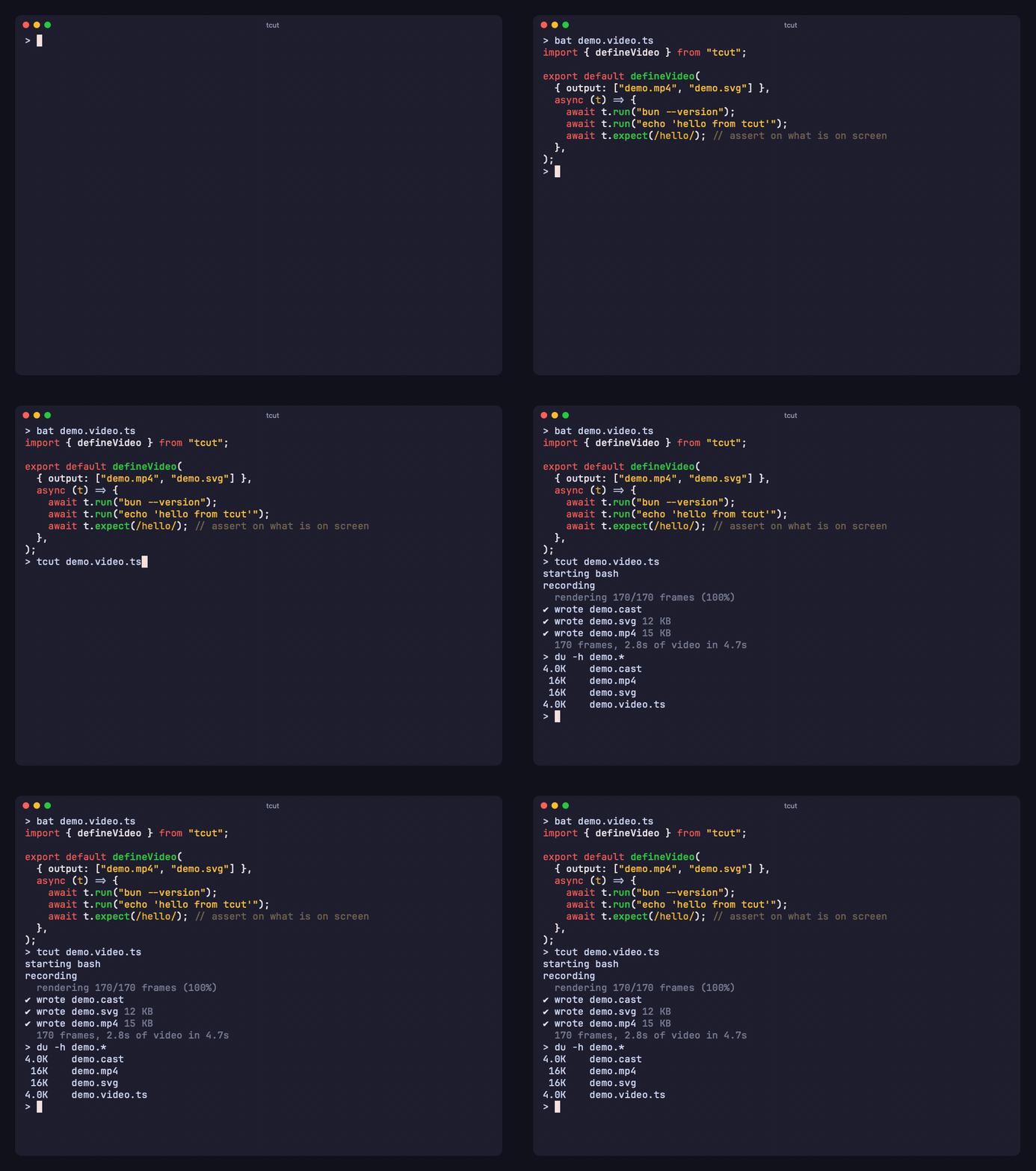
Terminal videos, written in TypeScript. Record a session live or script it, then render it to MP4, GIF, WebM, SVG or HTML — the same recording gives the same pixels every time.
|
|
4
4
|
|
|
5
5
|
|
|
6
6
|
|
|
7
|
+
[tcut.amanv.dev](https://tcut.amanv.dev) · [Reference](https://github.com/AmanVarshney01/tcut/blob/main/packages/tcut/docs/REFERENCE.md) · [Examples](https://github.com/AmanVarshney01/tcut/tree/main/packages/tcut/examples) · [llms.txt](https://tcut.amanv.dev/llms.txt)
|
|
8
|
+
|
|
7
9
|
## Install
|
|
8
10
|
|
|
9
11
|
```sh
|
|
10
|
-
bun add -g termcut
|
|
12
|
+
bun add -g termcut # Bun ≥ 1.4 · installs the `tcut` command
|
|
11
13
|
```
|
|
12
14
|
|
|
13
|
-
|
|
15
|
+
Or a standalone binary for macOS, Linux or Windows from [Releases](https://github.com/AmanVarshney01/tcut/releases) — all three are tested in CI.
|
|
16
|
+
|
|
17
|
+
- MP4, GIF, WebM, WebP need `ffmpeg` on the PATH. SVG, HTML and text outputs need nothing.
|
|
18
|
+
- Linux and Windows render pixels through Chrome or Chromium (`BUN_CHROME_PATH` to point at one).
|
|
14
19
|
|
|
15
|
-
##
|
|
20
|
+
## Record
|
|
16
21
|
|
|
17
|
-
|
|
22
|
+
**Live.** Your own shell opens — prompt, config, aliases; type; `exit`. You get the video, the exact recording (`demo.cast`) and an editable script of what you typed (`demo.video.ts`): it reopens your shell (`shell: "user"`), waits for your prompt (`promptPattern`, detected from the recording) and replays the commands as `run()` calls. `--clean` opens a plain shell with a `>` prompt instead.
|
|
18
23
|
|
|
19
24
|
```sh
|
|
20
|
-
tcut rec -o demo.gif
|
|
21
|
-
tcut rec -o demo.mp4 -- npm create vite
|
|
25
|
+
tcut rec -o demo.gif
|
|
26
|
+
tcut rec -o demo.mp4 -- npm create vite # one command, ends when it exits
|
|
22
27
|
```
|
|
23
28
|
|
|
24
|
-
|
|
29
|
+
`-- command` runs through that same shell, so `tcut rec -- ls` records what *your* `ls` shows — aliases, functions, fish abbreviations and colours included. `--raw` runs the binary directly.
|
|
25
30
|
|
|
26
|
-
|
|
31
|
+
**Scripted.** Plain TypeScript, so loops, helpers and imports work, and the script lives in the repo next to the code it shows.
|
|
27
32
|
|
|
28
33
|
```ts
|
|
29
34
|
// demo.video.ts
|
|
30
35
|
import { defineVideo } from "tcut";
|
|
31
36
|
|
|
32
|
-
export default defineVideo({ output: "demo.gif" }, async (t) => {
|
|
33
|
-
await t.run("bun --version");
|
|
34
|
-
await t.
|
|
35
|
-
await t.
|
|
37
|
+
export default defineVideo({ output: ["demo.mp4", "demo.gif"] }, async (t) => {
|
|
38
|
+
await t.run("bun --version"); // types it, presses Enter, waits for the prompt
|
|
39
|
+
await t.run("ls -la");
|
|
40
|
+
await t.expect(/package\.json/); // asserts on the screen — the demo is a test
|
|
41
|
+
await t.snapshot("files.png"); // a still of this exact moment
|
|
42
|
+
await t.sleep("1.5s");
|
|
36
43
|
});
|
|
37
44
|
```
|
|
38
45
|
|
|
@@ -40,57 +47,107 @@ export default defineVideo({ output: "demo.gif" }, async (t) => {
|
|
|
40
47
|
tcut demo.video.ts
|
|
41
48
|
```
|
|
42
49
|
|
|
43
|
-
|
|
50
|
+
What a script can do, one line each:
|
|
44
51
|
|
|
45
|
-
|
|
46
|
-
|
|
47
|
-
|
|
48
|
-
|
|
49
|
-
|
|
50
|
-
|
|
51
|
-
|
|
52
|
-
|
|
53
|
-
|
|
54
|
-
|
|
52
|
+
| | |
|
|
53
|
+
|---|---|
|
|
54
|
+
| `run(cmd)` | waits for your prompt to come back, not for a timer |
|
|
55
|
+
| `wait(/re/)` · `expect(/re/)` | observe or assert the screen — including lines that already scrolled away (`{ scope: "scrollback" }`) |
|
|
56
|
+
| `type` · `enter` · arrows · `ctrl("c")` · `key("f5")` | keys, sent the way the running program asked for them |
|
|
57
|
+
| `hide(fn)` | runs setup off-camera; the state stays |
|
|
58
|
+
| `snapshot("x.png" \| "x.svg")` | a pixel or vector still of that exact moment, written on every render |
|
|
59
|
+
| `chapter(name)` | mp4 chapters, and cut points for `--chapters` / `--split-chapters` |
|
|
60
|
+
| `print(markdown)` · `title(text)` | captions rendered into the terminal, nothing typed |
|
|
61
|
+
| `zoom({ rows, cols })` | magnifies a region; `keys: true` shows what was pressed |
|
|
62
|
+
| `timelapse(fn, { speed })` | fast-forwards an install or a build, not just the silence |
|
|
63
|
+
| `browser` | a real browser window beside or over the terminal (below) |
|
|
55
64
|
|
|
56
|
-
|
|
65
|
+
The full surface is in the [reference](https://github.com/AmanVarshney01/tcut/blob/main/packages/tcut/docs/REFERENCE.md).
|
|
57
66
|
|
|
58
|
-
|
|
67
|
+
## Render again
|
|
59
68
|
|
|
60
|
-
|
|
69
|
+
Recording and rendering are separate. A recording is an asciicast; frames are computed on a virtual clock. So a new theme, size or format never re-runs a shell — and cuts, joins and chapter splits happen on the recording, which is why they work for SVG as well as MP4.
|
|
61
70
|
|
|
62
71
|
```sh
|
|
63
|
-
tcut render demo.cast --
|
|
64
|
-
tcut render demo.cast --
|
|
72
|
+
tcut render demo.cast --theme "Gruvbox Dark" -o demo.svg -o demo.html
|
|
73
|
+
tcut render demo.cast --width 1280 --height 720 --speed 1.5 -o demo.mp4
|
|
74
|
+
tcut render demo.cast --from 2s --to 10s --shadow --watermark "@you" -o clip.gif
|
|
75
|
+
tcut render demo.cast --split-chapters --margin-fill transparent -o demo.webm
|
|
65
76
|
tcut concat intro.cast demo.cast --gap 500ms -o launch.mp4
|
|
77
|
+
tcut themes # ~600 themes, Ghostty's collection
|
|
66
78
|
```
|
|
67
79
|
|
|
68
|
-
|
|
80
|
+
Outputs by extension: `.mp4` `.gif` `.webm` `.webp` · `.svg` (animated, real text) · `.html` (single-file player) · `.png` `.jpg` (final frame) · `.txt` (final screen) · `.log` (full transcript) · `dir/` (PNG frames).
|
|
81
|
+
|
|
82
|
+
## Faithful to the terminal
|
|
83
|
+
|
|
84
|
+
The emulator is Ghostty's core, so what tcut sees is what your terminal would show — and what it records is what the program actually received.
|
|
85
|
+
|
|
86
|
+
- Arrow keys and pastes arrive exactly as the running program asked: application cursor mode, bracketed paste.
|
|
87
|
+
- Links printed with OSC 8 — including Markdown links in `print()` captions — stay clickable in SVG and HTML.
|
|
88
|
+
- Frames are never torn: synchronized-output blocks are captured whole.
|
|
89
|
+
- Symbols the font lacks (progress blocks, Nerd Font icons) stay on their cell, so status bars never drift.
|
|
90
|
+
- `tcut doctor demo.cast` explains what a recording used, and what cannot be rendered (inline images).
|
|
91
|
+
|
|
92
|
+
## Test it
|
|
69
93
|
|
|
70
94
|
```sh
|
|
71
|
-
tcut
|
|
95
|
+
tcut test demo.video.ts # runs the script with no delays — just the assertions
|
|
96
|
+
tcut diff a.cast b.cast # catches output changes between two recordings
|
|
72
97
|
```
|
|
73
98
|
|
|
74
|
-
|
|
99
|
+
`expect()` makes a demo a test. `tcut test` runs it fast, and exits non-zero when the screen does not match — so the same script that renders your README video can guard it in CI.
|
|
100
|
+
|
|
101
|
+
## A browser next to the terminal
|
|
102
|
+
|
|
103
|
+
For dev-server demos: the page is recorded on the same clock and composited beside or over the terminal.
|
|
104
|
+
|
|
105
|
+
```ts
|
|
106
|
+
defineVideo({ output: "demo.mp4", browser: { position: "overlay" } }, async (t) => {
|
|
107
|
+
await t.run("bun run dev </dev/null >/tmp/dev.log 2>&1 &");
|
|
108
|
+
await t.browser.goto("http://localhost:5173");
|
|
109
|
+
await t.run("sed -i '' 's/Hello/Hi/' src/App.tsx"); // HMR updates the page
|
|
110
|
+
await t.focus("browser");
|
|
111
|
+
});
|
|
112
|
+
```
|
|
113
|
+
|
|
114
|
+
## Share it
|
|
75
115
|
|
|
76
116
|
```sh
|
|
77
|
-
tcut publish --setup # once: your S3-compatible bucket (RustFS, MinIO, R2, S3)
|
|
117
|
+
tcut publish --setup # once: your own S3-compatible bucket (RustFS, MinIO, R2, S3)
|
|
78
118
|
tcut publish demo.gif # → https://…/3f9a1c2b7d4e/demo.gif
|
|
79
119
|
```
|
|
80
120
|
|
|
81
|
-
|
|
121
|
+
There is no hosted service; you bring the bucket.
|
|
122
|
+
|
|
123
|
+
## For agents
|
|
82
124
|
|
|
83
125
|
```sh
|
|
84
|
-
npx skills add AmanVarshney01/tcut #
|
|
126
|
+
npx skills add AmanVarshney01/tcut # skills for Claude Code, Cursor, Codex, …
|
|
85
127
|
```
|
|
86
128
|
|
|
87
|
-
Two skills: `tcut` (record terminal videos) and `tcut-remotion` (compose tcut footage into launch
|
|
129
|
+
Two skills: `tcut` (record terminal videos) and `tcut-remotion` (compose tcut footage into a launch video with [Remotion](https://remotion.dev)). Every command has `--json`, exit codes and no prompts; [llms.txt](https://tcut.amanv.dev/llms.txt) is the condensed guide.
|
|
130
|
+
|
|
131
|
+
## Compared with VHS
|
|
132
|
+
|
|
133
|
+
[VHS](https://github.com/charmbracelet/vhs) is the reference point and the inspiration. Where tcut differs:
|
|
134
|
+
|
|
135
|
+
- **Scripts are TypeScript** — loops, imports, shared scenes, autocomplete — instead of a `.tape` DSL.
|
|
136
|
+
- **Waits on the screen** — `run()` returns when your prompt is back; VHS sleeps for a guessed duration.
|
|
137
|
+
- **Rendering never re-runs the shell** — a new theme, size or format is computed from the recording. VHS screenshots Chrome live, so output depends on machine speed.
|
|
138
|
+
- **Demos are tests** — `expect()` asserts on the screen; `tcut test` runs them in CI.
|
|
139
|
+
- **Same emulator as your terminal** — Ghostty's core in WASM, its themes, plus SVG and HTML outputs that need no ffmpeg or browser.
|
|
140
|
+
|
|
141
|
+
## How it works
|
|
142
|
+
|
|
143
|
+
1. **Record.** `Bun.Terminal` runs your shell in a PTY. Every byte is timestamped into a `.cast`.
|
|
144
|
+
2. **Watch.** The same bytes feed a headless [Ghostty](https://ghostty.org) (via [wterm](https://github.com/vercel-labs/wterm)). That is how `run()` knows the prompt is back and `expect()` sees what you see.
|
|
145
|
+
3. **Render.** The cast replays into the same terminal inside `Bun.WebView`, one frame per tick, straight to ffmpeg. SVG and HTML are built from the terminal grid, no browser involved.
|
|
88
146
|
|
|
89
147
|
## More
|
|
90
148
|
|
|
91
|
-
- [Examples](https://github.com/AmanVarshney01/tcut/tree/main/packages/tcut/examples) — driving an interactive TUI, recording Claude Code
|
|
149
|
+
- [Examples](https://github.com/AmanVarshney01/tcut/tree/main/packages/tcut/examples) — driving an interactive TUI, recording Claude Code and Codex
|
|
92
150
|
- [Reference](https://github.com/AmanVarshney01/tcut/blob/main/packages/tcut/docs/REFERENCE.md) — every CLI flag and script option
|
|
93
|
-
- [llms.txt](https://tcut.amanv.dev/llms.txt) — the same, condensed for coding agents (`--json` gives machine-readable results)
|
|
94
151
|
- [tcut.amanv.dev](https://tcut.amanv.dev)
|
|
95
152
|
|
|
96
153
|
MIT
|
package/package.json
CHANGED
package/src/cli.ts
CHANGED
|
@@ -6,6 +6,8 @@ import { readCast, writeCast } from "./cast";
|
|
|
6
6
|
import { applyOverrides, resolveConfig } from "./config";
|
|
7
7
|
import * as api from "./index";
|
|
8
8
|
import { recordLive } from "./live";
|
|
9
|
+
import { detectPromptPattern } from "./promptguess";
|
|
10
|
+
import { throughShell, userShell } from "./usershell";
|
|
9
11
|
import { ensurePublicBucket, loadPublishConfig, publicUrlFor, publishFiles, savePublishConfig, type PublishConfig, type Published } from "./publish";
|
|
10
12
|
import { diffCasts, type DiffResult } from "./diff";
|
|
11
13
|
import { diagnoseCast, formatDoctorReport, type DoctorReport } from "./doctor";
|
|
@@ -70,6 +72,8 @@ Options (override the script's config):
|
|
|
70
72
|
--gap <dur> concat: still time between parts
|
|
71
73
|
--preset <name> readme | x | youtube | square
|
|
72
74
|
--browser <url> rec: record a browser window too (--browser-position right|left|top|bottom|overlay)
|
|
75
|
+
--clean rec: a clean shell with a plain > prompt instead of your own (also: run -- command bare)
|
|
76
|
+
--raw rec: run -- command as a bare binary, not through your shell (no aliases/functions)
|
|
73
77
|
--at <seconds> diff: compare the screen at this time instead of the end
|
|
74
78
|
--images <dir> diff: also write a.png / b.png
|
|
75
79
|
--cast <path> where to read/write the .cast
|
|
@@ -130,6 +134,8 @@ const { values, positionals } = parseArgs({
|
|
|
130
134
|
cast: { type: "string" },
|
|
131
135
|
"record-only": { type: "boolean" },
|
|
132
136
|
"no-script": { type: "boolean" },
|
|
137
|
+
raw: { type: "boolean" },
|
|
138
|
+
clean: { type: "boolean" },
|
|
133
139
|
force: { type: "boolean" },
|
|
134
140
|
setup: { type: "boolean" },
|
|
135
141
|
open: { type: "boolean" },
|
|
@@ -470,12 +476,29 @@ async function main(): Promise<void> {
|
|
|
470
476
|
const overrides = overridesFromFlags();
|
|
471
477
|
const rawOutputs = overrides.output ?? ["rec.mp4"];
|
|
472
478
|
const outputs = Array.isArray(rawOutputs) ? rawOutputs : [rawOutputs];
|
|
473
|
-
|
|
474
|
-
|
|
479
|
+
// The shell tcut was typed into is the session (your prompt, config, aliases) and what `-- cmd` runs
|
|
480
|
+
// through. --clean / --raw opt out: a plain shell with a `>` prompt, or the bare binary.
|
|
481
|
+
const shell = values.clean || values.raw ? null : userShell();
|
|
482
|
+
const config = resolveConfig({ ...overrides, output: outputs, cast: overrides.cast, ...(rest.length === 0 && shell && { shell: "user" }) });
|
|
483
|
+
let command: string[] | undefined;
|
|
484
|
+
let portable: string[] | undefined;
|
|
485
|
+
if (rest.length > 0) {
|
|
486
|
+
if (shell) {
|
|
487
|
+
const through = throughShell(rest, shell);
|
|
488
|
+
command = through.argv;
|
|
489
|
+
portable = through.portable;
|
|
490
|
+
log(dim(` via ${shell.name} — your aliases and functions apply (--raw runs the binary directly)`));
|
|
491
|
+
} else {
|
|
492
|
+
command = rest;
|
|
493
|
+
}
|
|
494
|
+
} else if (shell) {
|
|
495
|
+
log(dim(` your ${shell.name}, with its config (--clean for a plain shell with a > prompt)`));
|
|
496
|
+
}
|
|
475
497
|
// Size: --cols/--rows if given, else derived from --width/--height, else the terminal tcut runs in.
|
|
476
498
|
const sized = overrides.width !== undefined || overrides.height !== undefined;
|
|
477
499
|
const recording = await recordLive(config, {
|
|
478
500
|
command,
|
|
501
|
+
describe: rest.length > 0 ? rest.join(" ") : shell ? `your ${shell.name}` : undefined,
|
|
479
502
|
log,
|
|
480
503
|
cols: overrides.cols ?? (sized ? config.cols : undefined),
|
|
481
504
|
rows: overrides.rows ?? (sized ? config.rows : undefined),
|
|
@@ -488,7 +511,9 @@ async function main(): Promise<void> {
|
|
|
488
511
|
ok(`wrote ${config.cast}`, `${recording.events.length} events, ${(recording.header.duration ?? 0).toFixed(1)}s`);
|
|
489
512
|
if (!values["no-script"]) {
|
|
490
513
|
const scriptPath = config.cast.replace(/\.cast$/, "") + ".video.ts";
|
|
491
|
-
|
|
514
|
+
// A session in the user's own shell replays with run(): wait for whatever their prompt ends with.
|
|
515
|
+
const promptPattern = !command && config.shell === "user" ? ((await detectPromptPattern(recording, config.core)) ?? undefined) : undefined;
|
|
516
|
+
await Bun.write(scriptPath, generateScript(recording, { output: outputs, cleanShell: !command, command: portable ?? command, castPath: config.cast, promptPattern }));
|
|
492
517
|
ok(`wrote ${scriptPath}`, "editable script — tweak it, then `tcut " + scriptPath + "`");
|
|
493
518
|
}
|
|
494
519
|
if (values["record-only"]) {
|
package/src/config.ts
CHANGED
|
@@ -1,4 +1,5 @@
|
|
|
1
1
|
import path from "node:path";
|
|
2
|
+
import { USER_PROMPT_PATTERN } from "./promptguess";
|
|
2
3
|
import { toMs } from "./duration";
|
|
3
4
|
import { applyPreset } from "./presets";
|
|
4
5
|
import { resolveTheme } from "./themes";
|
|
@@ -83,7 +84,7 @@ export function resolveConfig(input: VideoConfig): ResolvedConfig {
|
|
|
83
84
|
cast: config.cast ?? castDefault,
|
|
84
85
|
shell: config.shell ?? "bash",
|
|
85
86
|
prompt,
|
|
86
|
-
promptPattern: (config.promptPattern ?? defaultPromptPattern(prompt)).source,
|
|
87
|
+
promptPattern: (config.promptPattern ?? (config.shell === "user" ? new RegExp(USER_PROMPT_PATTERN) : defaultPromptPattern(prompt))).source,
|
|
87
88
|
cwd: config.cwd ?? process.cwd(),
|
|
88
89
|
env: config.env ?? {},
|
|
89
90
|
cols: cols ?? 80,
|
package/src/live.ts
CHANGED
|
@@ -1,6 +1,7 @@
|
|
|
1
1
|
import { startBrowserCapture } from "./browser";
|
|
2
2
|
import { MARKER } from "./cast";
|
|
3
3
|
import { shellSetup } from "./recorder";
|
|
4
|
+
import { CURSOR_QUERY, hasCursorReport, stripTerminalReplies } from "./replies";
|
|
4
5
|
import type { CastEvent, Recording, ResolvedConfig } from "./types";
|
|
5
6
|
|
|
6
7
|
/** What live recording needs from a keystroke source: `process.stdin`, or any readable stream (a PassThrough in tests). */
|
|
@@ -24,6 +25,8 @@ export interface LiveOptions {
|
|
|
24
25
|
/** Keystroke source (default: this process's stdin, switched to raw mode when it is a TTY). */
|
|
25
26
|
stdin?: LiveStdin | null;
|
|
26
27
|
log?: (message: string) => void;
|
|
28
|
+
/** How to name the command in status lines (defaults to the argv). */
|
|
29
|
+
describe?: string;
|
|
27
30
|
}
|
|
28
31
|
|
|
29
32
|
/**
|
|
@@ -40,10 +43,11 @@ export async function recordLive(config: ResolvedConfig, opts: LiveOptions = {})
|
|
|
40
43
|
const events: CastEvent[] = [];
|
|
41
44
|
const startedAt = performance.now();
|
|
42
45
|
|
|
43
|
-
const
|
|
44
|
-
|
|
45
|
-
|
|
46
|
-
|
|
46
|
+
const stampAt = (seconds: number): number => (config.quantize ? Math.ceil(seconds * config.fps - 1e-6) / config.fps : Number(seconds.toFixed(6)));
|
|
47
|
+
const elapsed = (): number => (performance.now() - startedAt) / 1000;
|
|
48
|
+
const stamp = (): number => stampAt(elapsed());
|
|
49
|
+
// The program asked where the cursor is: the next position report on stdin is the terminal's answer, not a key.
|
|
50
|
+
let cursorQueried = false;
|
|
47
51
|
const push = (type: CastEvent[1], data: string): void => {
|
|
48
52
|
events.push([stamp(), type, data]);
|
|
49
53
|
};
|
|
@@ -72,6 +76,7 @@ export async function recordLive(config: ResolvedConfig, opts: LiveOptions = {})
|
|
|
72
76
|
data(_terminal, chunk) {
|
|
73
77
|
const text = decoder.decode(chunk, { stream: true });
|
|
74
78
|
if (!text) return;
|
|
79
|
+
if (text.includes(CURSOR_QUERY)) cursorQueried = true;
|
|
75
80
|
stdout.write(chunk);
|
|
76
81
|
push("o", text);
|
|
77
82
|
},
|
|
@@ -88,7 +93,12 @@ export async function recordLive(config: ResolvedConfig, opts: LiveOptions = {})
|
|
|
88
93
|
const onData = (chunk: Buffer | string): void => {
|
|
89
94
|
if (exited || terminal.closed) return;
|
|
90
95
|
terminal.write(chunk);
|
|
91
|
-
|
|
96
|
+
// Everything goes to the program, but only keystrokes are recorded: the terminal's answers to its queries
|
|
97
|
+
// would otherwise show up as key chips and be typed back on replay.
|
|
98
|
+
const text = chunk instanceof Uint8Array ? chunk.toString("utf8") : chunk;
|
|
99
|
+
const keys = stripTerminalReplies(text, { cursorQueried });
|
|
100
|
+
if (cursorQueried && hasCursorReport(text)) cursorQueried = false;
|
|
101
|
+
if (keys) push("i", keys);
|
|
92
102
|
};
|
|
93
103
|
const onResize = (): void => {
|
|
94
104
|
const c = process.stdout.columns ?? cols;
|
|
@@ -104,11 +114,13 @@ export async function recordLive(config: ResolvedConfig, opts: LiveOptions = {})
|
|
|
104
114
|
stdin.on("data", onData);
|
|
105
115
|
}
|
|
106
116
|
process.on("SIGWINCH", onResize);
|
|
107
|
-
log(`recording ${setup.cmd.join(" ")} at ${cols}×${rows} — ${opts.command ? "ends when the command exits" : "type exit to stop"}`);
|
|
117
|
+
log(`recording ${opts.describe ?? setup.cmd.join(" ")} at ${cols}×${rows} — ${opts.command ? "ends when the command exits" : "type exit to stop"}`);
|
|
108
118
|
|
|
109
119
|
try {
|
|
110
120
|
await Promise.race([exitedPromise, proc.exited]);
|
|
111
|
-
|
|
121
|
+
// Hold the final screen for `endPause`, like a scripted recording does — otherwise a command that exits in
|
|
122
|
+
// 20 ms (`tcut rec -- ls`) becomes a three-frame video. The timeline is virtual: stamp it, don't sleep.
|
|
123
|
+
events.push([stampAt(elapsed() + config.endPause / 1000), "m", MARKER.end]);
|
|
112
124
|
} finally {
|
|
113
125
|
await browser?.stop();
|
|
114
126
|
const emitter: NodeJS.EventEmitter = process; // @types/bun's process.off() lacks the signal overload; the generic emitter has it
|
|
@@ -0,0 +1,34 @@
|
|
|
1
|
+
import { loadCore } from "./screen";
|
|
2
|
+
import type { Recording } from "./types";
|
|
3
|
+
|
|
4
|
+
const escapeRegExp = (s: string) => s.replace(/[.*+?^${}()|[\]\\]/g, "\\$&");
|
|
5
|
+
|
|
6
|
+
/** Prompts end in a symbol: what a generated script waits for when the user's own shell is recorded. */
|
|
7
|
+
export const USER_PROMPT_PATTERN = "[❯>$%#»➜λ]\\s*$";
|
|
8
|
+
|
|
9
|
+
/**
|
|
10
|
+
* What the user's prompt ends with, read from the recording: the text up to the cursor just before the first
|
|
11
|
+
* keystroke is the prompt; its final symbol (`❯`, `$`, `%`, …) is what `run()` should wait for. Replaying through
|
|
12
|
+
* the headless core handles right-hand prompts and cursor movement that a plain text scan would misread.
|
|
13
|
+
*/
|
|
14
|
+
export async function detectPromptPattern(rec: Recording, core: "ghostty" | "lite" = "ghostty"): Promise<string | null> {
|
|
15
|
+
const firstInput = rec.events.findIndex((e) => e[1] === "i");
|
|
16
|
+
const before = (firstInput < 0 ? rec.events : rec.events.slice(0, firstInput)).filter((e) => e[1] === "o");
|
|
17
|
+
if (before.length === 0) return null;
|
|
18
|
+
const term = await loadCore(core);
|
|
19
|
+
term.init(rec.header.width, rec.header.height);
|
|
20
|
+
for (const e of before) term.writeString(e[2]);
|
|
21
|
+
const { row, col } = term.getCursor();
|
|
22
|
+
let line = "";
|
|
23
|
+
for (let x = 0; x < col; x++) {
|
|
24
|
+
const cell = term.getCell(row, x);
|
|
25
|
+
if (cell.width === 0) continue;
|
|
26
|
+
line += cell.chars ?? (cell.char === 0 ? " " : String.fromCodePoint(cell.char));
|
|
27
|
+
}
|
|
28
|
+
const trimmed = line.trimEnd();
|
|
29
|
+
if (!trimmed) return null;
|
|
30
|
+
const ender = [...trimmed].at(-1)!;
|
|
31
|
+
// A letter or digit is not a prompt symbol (a bare path, say); fall back to the generic pattern.
|
|
32
|
+
if (/[\p{L}\p{N}]/u.test(ender)) return null;
|
|
33
|
+
return `${escapeRegExp(ender)}\\s*$`;
|
|
34
|
+
}
|
package/src/recorder.ts
CHANGED
|
@@ -1,4 +1,5 @@
|
|
|
1
1
|
import { MarkdownRenderer } from "@wterm/markdown";
|
|
2
|
+
import { userShell } from "./usershell";
|
|
2
3
|
import { startBrowserCapture, type BrowserCapture } from "./browser";
|
|
3
4
|
import { MARKER } from "./cast";
|
|
4
5
|
import { toMs } from "./duration";
|
|
@@ -45,6 +46,13 @@ export function shellSetup(config: ResolvedConfig): ShellSetup {
|
|
|
45
46
|
const { shell, prompt } = config;
|
|
46
47
|
if (Array.isArray(shell)) return { cmd: shell, env: {} };
|
|
47
48
|
switch (shell) {
|
|
49
|
+
case "user": {
|
|
50
|
+
// The user's own shell, interactive + login, so its config, prompt and aliases apply. No known shell
|
|
51
|
+
// (Windows, or tcut launched from something that is not bash/zsh/fish) → the clean bash below.
|
|
52
|
+
const own = userShell();
|
|
53
|
+
if (own) return { cmd: [own.path, "-il"], env: {} };
|
|
54
|
+
return shellSetup({ ...config, shell: "bash" });
|
|
55
|
+
}
|
|
48
56
|
case "bash":
|
|
49
57
|
return {
|
|
50
58
|
cmd: ["bash", "--norc", "--noprofile"],
|
package/src/replies.ts
ADDED
|
@@ -0,0 +1,37 @@
|
|
|
1
|
+
// Answers a terminal sends to a program's queries — device attributes, kitty keyboard flags, colours via OSC,
|
|
2
|
+
// XTGETTCAP via DCS, cursor position reports. In a live recording they arrive on stdin together with the
|
|
3
|
+
// user's keystrokes, but they are not keystrokes: the key overlay must not show them and a replay must not
|
|
4
|
+
// type them (tcut answers the queries itself then).
|
|
5
|
+
|
|
6
|
+
const ESC = String.fromCharCode(0x1b);
|
|
7
|
+
const BEL = String.fromCharCode(0x07);
|
|
8
|
+
|
|
9
|
+
const REPLIES = new RegExp(
|
|
10
|
+
[
|
|
11
|
+
`${ESC}\\[\\?[\\d;]*[cu]`, // primary DA, kitty keyboard flags
|
|
12
|
+
`${ESC}\\[>[\\d;]*c`, // secondary DA
|
|
13
|
+
`${ESC}\\][\\d;]*[^${BEL}${ESC}]*(?:${BEL}|${ESC}\\\\)`, // OSC (colour queries)
|
|
14
|
+
`${ESC}P[^${ESC}]*${ESC}\\\\`, // DCS (XTGETTCAP)
|
|
15
|
+
].join("|"),
|
|
16
|
+
"g",
|
|
17
|
+
);
|
|
18
|
+
|
|
19
|
+
/** Cursor position report `ESC [ row ; col R` — the same bytes as a modified F3 key (`ESC [ 1 ; 2-8 R`). */
|
|
20
|
+
const CPR = new RegExp(`${ESC}\\[\\d+;\\d+R`, "g");
|
|
21
|
+
/** A CPR whose parameters cannot be a modifier-encoded F3: row other than 1, or a "modifier" outside 2–8. */
|
|
22
|
+
const UNAMBIGUOUS_CPR = new RegExp(`${ESC}\\[(?!1;[2-8]R)\\d+;\\d+R`, "g");
|
|
23
|
+
|
|
24
|
+
/** The program asked for the cursor position; the next CPR-shaped input is an answer, not a key. */
|
|
25
|
+
export const CURSOR_QUERY = `${ESC}[6n`;
|
|
26
|
+
|
|
27
|
+
export interface StripOptions {
|
|
28
|
+
/** The program asked `ESC[6n`, so any CPR in this chunk is a reply; without it, only unambiguous reports are removed. */
|
|
29
|
+
cursorQueried?: boolean;
|
|
30
|
+
}
|
|
31
|
+
|
|
32
|
+
export function stripTerminalReplies(input: string, opts: StripOptions = {}): string {
|
|
33
|
+
return input.replace(REPLIES, "").replace(opts.cursorQueried ? CPR : UNAMBIGUOUS_CPR, "");
|
|
34
|
+
}
|
|
35
|
+
|
|
36
|
+
/** Does this input chunk carry a cursor position report (or the look-alike modified F3)? */
|
|
37
|
+
export const hasCursorReport = (input: string): boolean => new RegExp(CPR.source).test(input);
|
package/src/scriptgen.ts
CHANGED
|
@@ -1,4 +1,5 @@
|
|
|
1
1
|
import path from "node:path";
|
|
2
|
+
import { stripTerminalReplies } from "./replies";
|
|
2
3
|
import { keySequence } from "./keys";
|
|
3
4
|
import type { Recording } from "./types";
|
|
4
5
|
|
|
@@ -9,6 +10,8 @@ export interface ScriptGenOptions {
|
|
|
9
10
|
cleanShell: boolean;
|
|
10
11
|
/** The command that was recorded in `-- command` mode (becomes `shell: [...]`). */
|
|
11
12
|
command?: string[];
|
|
13
|
+
/** Regex source `run()` should wait for — detected from the user's prompt when their own shell was recorded. */
|
|
14
|
+
promptPattern?: string;
|
|
12
15
|
/** Gaps between keystrokes longer than this become `sleep()` calls. Default 400 ms. */
|
|
13
16
|
pauseThresholdMs?: number;
|
|
14
17
|
/** Where the cast lives, for the header comment. */
|
|
@@ -128,6 +131,7 @@ function formatMs(ms: number): string {
|
|
|
128
131
|
|
|
129
132
|
const q = (s: string) => JSON.stringify(s);
|
|
130
133
|
|
|
134
|
+
|
|
131
135
|
/** Turn the `i` (input) events of a recording into a list of script operations. */
|
|
132
136
|
export function eventsToOps(rec: Recording, opts: ScriptGenOptions): Op[] {
|
|
133
137
|
const threshold = opts.pauseThresholdMs ?? 400;
|
|
@@ -163,7 +167,7 @@ export function eventsToOps(rec: Recording, opts: ScriptGenOptions): Op[] {
|
|
|
163
167
|
}
|
|
164
168
|
lastTime = time;
|
|
165
169
|
|
|
166
|
-
for (const token of tokenize(data)) {
|
|
170
|
+
for (const token of tokenize(stripTerminalReplies(data))) {
|
|
167
171
|
if (token.length > 1 && token[0]! >= " ") {
|
|
168
172
|
pendingText += token;
|
|
169
173
|
continue;
|
|
@@ -240,6 +244,7 @@ export function generateScript(rec: Recording, opts: ScriptGenOptions): string {
|
|
|
240
244
|
const config: string[] = [`output: ${JSON.stringify(opts.output)}`];
|
|
241
245
|
if (opts.command) config.push(`shell: ${JSON.stringify(opts.command)}`);
|
|
242
246
|
else if (cfg && cfg.shell !== "bash") config.push(`shell: ${JSON.stringify(cfg.shell)}`);
|
|
247
|
+
if (opts.promptPattern) config.push(`promptPattern: /${opts.promptPattern.replace(/\//g, "\\/")}/`);
|
|
243
248
|
config.push(`cols: ${rec.header.width}`, `rows: ${rec.header.height}`);
|
|
244
249
|
if (cfg) {
|
|
245
250
|
if (cfg.theme?.name) config.push(`theme: ${q(cfg.theme.name)}`);
|
|
@@ -251,8 +256,10 @@ export function generateScript(rec: Recording, opts: ScriptGenOptions): string {
|
|
|
251
256
|
const body = ops.length ? ops.map((op) => ` ${opToLine(op)}`).join("\n") : " // (no input was recorded)";
|
|
252
257
|
const castNote = opts.castPath ? ` The exact recording is in ${path.basename(opts.castPath)}.` : "";
|
|
253
258
|
const modeNote = opts.command
|
|
254
|
-
? "It
|
|
255
|
-
:
|
|
259
|
+
? "It opens the same program and replays your keys; waits are the pauses you took, so adjust them if it is slower elsewhere."
|
|
260
|
+
: cfg?.shell === "user"
|
|
261
|
+
? "It opens your own shell; typed commands became run(), which waits for your prompt (promptPattern) instead of guessing."
|
|
262
|
+
: "Typed commands became run(), which waits for the prompt instead of guessing.";
|
|
256
263
|
|
|
257
264
|
return `import { defineVideo } from "tcut";
|
|
258
265
|
|
package/src/types.ts
CHANGED
|
@@ -29,7 +29,8 @@ export interface Theme {
|
|
|
29
29
|
*/
|
|
30
30
|
export type ThemeName = "catppuccin-mocha" | "dracula" | "github-dark" | "tokyo-night" | "one-dark" | (string & {});
|
|
31
31
|
|
|
32
|
-
|
|
32
|
+
/** `user` is the shell tcut was launched from (interactive login, with its config); the others are clean shells with the configured prompt. */
|
|
33
|
+
export type ShellName = "bash" | "zsh" | "fish" | "sh" | "user";
|
|
33
34
|
/** Terminal emulator core: libghostty (full VT, answers queries) or wterm's lite Zig core (faster, fewer features). */
|
|
34
35
|
export type CoreName = "ghostty" | "lite";
|
|
35
36
|
export type WindowBar = "none" | "colorful" | "colorfulRight" | "rings" | "ringsRight";
|
package/src/usershell.ts
ADDED
|
@@ -0,0 +1,203 @@
|
|
|
1
|
+
import path from "node:path";
|
|
2
|
+
|
|
3
|
+
// `tcut rec` should record what the user sees in their own terminal: their shell, with its prompt, aliases,
|
|
4
|
+
// functions, abbreviations and colour settings. Running the bare binary or a clean shell gives none of that
|
|
5
|
+
// ("Executable not found" for an alias, plain output for a coloured one).
|
|
6
|
+
|
|
7
|
+
export interface UserShell {
|
|
8
|
+
path: string;
|
|
9
|
+
/** bash | zsh | fish — the shells whose `-ic <command>` / `-il` forms load the interactive config. */
|
|
10
|
+
name: string;
|
|
11
|
+
}
|
|
12
|
+
|
|
13
|
+
const INTERACTIVE_SHELLS = new Set(["bash", "zsh", "fish"]);
|
|
14
|
+
|
|
15
|
+
interface ParentProcess {
|
|
16
|
+
/** Executable as reported by `ps -o comm=` (login shells show a leading dash: "-fish"). */
|
|
17
|
+
command: string;
|
|
18
|
+
/** Full command line as reported by `ps -o args=`. */
|
|
19
|
+
args: string;
|
|
20
|
+
}
|
|
21
|
+
|
|
22
|
+
/** The process that launched tcut (macOS/Linux `ps`). Null when that cannot be read. */
|
|
23
|
+
function parentProcess(): ParentProcess | null {
|
|
24
|
+
const field = (name: string): string => Bun.spawnSync(["ps", "-o", `${name}=`, "-p", String(process.ppid)], { env: process.env }).stdout.toString().trim();
|
|
25
|
+
try {
|
|
26
|
+
const command = field("comm");
|
|
27
|
+
if (!command) return null;
|
|
28
|
+
return { command, args: field("args") };
|
|
29
|
+
} catch {
|
|
30
|
+
return null;
|
|
31
|
+
}
|
|
32
|
+
}
|
|
33
|
+
|
|
34
|
+
/**
|
|
35
|
+
* Is this shell invocation the user's interactive session, rather than a script runner? A shell running a
|
|
36
|
+
* script (`bash run.sh`) or a one-liner (`bash -c …`) is not the shell the user lives in — its rc files and
|
|
37
|
+
* aliases are the wrong ones — so only flag-only invocations (`fish`, `-zsh`, `/bin/bash -il`) count.
|
|
38
|
+
*/
|
|
39
|
+
export function isInteractiveInvocation(comm: string, args: string): boolean {
|
|
40
|
+
if (comm.startsWith("-")) return true; // login shell
|
|
41
|
+
const words = args.split(/\s+/).filter(Boolean);
|
|
42
|
+
const rest = words[0] && !words[0].startsWith("-") ? words.slice(1) : words; // drop argv[0] if present
|
|
43
|
+
for (const w of rest) {
|
|
44
|
+
if (w === "-c" || !w.startsWith("-")) return false;
|
|
45
|
+
}
|
|
46
|
+
return true;
|
|
47
|
+
}
|
|
48
|
+
|
|
49
|
+
/**
|
|
50
|
+
* The shell the user typed tcut into: the parent process when it is an interactive bash/zsh/fish, else $SHELL.
|
|
51
|
+
* Null on Windows or when neither is a known shell.
|
|
52
|
+
*/
|
|
53
|
+
export function userShell(): UserShell | null {
|
|
54
|
+
if (process.platform === "win32") return null;
|
|
55
|
+
const candidates: string[] = [];
|
|
56
|
+
const parent = parentProcess();
|
|
57
|
+
if (parent) {
|
|
58
|
+
const comm = parent.command.replace(/^-/, "");
|
|
59
|
+
if (INTERACTIVE_SHELLS.has(path.basename(comm)) && isInteractiveInvocation(parent.command, parent.args)) candidates.push(comm);
|
|
60
|
+
}
|
|
61
|
+
if (process.env.SHELL) candidates.push(process.env.SHELL);
|
|
62
|
+
for (const candidate of candidates) {
|
|
63
|
+
const name = path.basename(candidate);
|
|
64
|
+
if (!INTERACTIVE_SHELLS.has(name)) continue;
|
|
65
|
+
const resolved = candidate.includes("/") ? candidate : Bun.which(candidate);
|
|
66
|
+
if (resolved) return { path: resolved, name };
|
|
67
|
+
}
|
|
68
|
+
return null;
|
|
69
|
+
}
|
|
70
|
+
|
|
71
|
+
/** One argument, single-quoted for the given shell. POSIX shells take everything literally; fish reads `\'` and `\\`. */
|
|
72
|
+
export function quoteArg(arg: string, shellName: string): string {
|
|
73
|
+
if (/^[A-Za-z0-9_@%+=:,./-]+$/.test(arg)) return arg;
|
|
74
|
+
const inner = shellName === "fish" ? arg.replace(/\\/g, "\\\\").replace(/'/g, "\\'") : arg.replace(/'/g, `'\\''`);
|
|
75
|
+
return `'${inner}'`;
|
|
76
|
+
}
|
|
77
|
+
|
|
78
|
+
export function shellQuote(args: string[], shellName: string): string {
|
|
79
|
+
return args.map((a) => quoteArg(a, shellName)).join(" ");
|
|
80
|
+
}
|
|
81
|
+
|
|
82
|
+
export interface FishAbbreviation {
|
|
83
|
+
name: string;
|
|
84
|
+
expansion: string;
|
|
85
|
+
}
|
|
86
|
+
|
|
87
|
+
/** Fish's own quoting, as `abbr --show` prints it: bare, '…' (escapes \' \\) or "…" (escapes \" \\ \$). */
|
|
88
|
+
function fishTokens(line: string): string[] {
|
|
89
|
+
const out: string[] = [];
|
|
90
|
+
let cur = "";
|
|
91
|
+
let quote: "'" | '"' | null = null;
|
|
92
|
+
let inWord = false;
|
|
93
|
+
for (let i = 0; i < line.length; i++) {
|
|
94
|
+
const ch = line[i]!;
|
|
95
|
+
if (quote) {
|
|
96
|
+
if (ch === "\\" && i + 1 < line.length) {
|
|
97
|
+
const next = line[i + 1]!;
|
|
98
|
+
const escapable = quote === "'" ? "\\'" : '\\"$';
|
|
99
|
+
if (escapable.includes(next)) {
|
|
100
|
+
cur += next;
|
|
101
|
+
i++;
|
|
102
|
+
continue;
|
|
103
|
+
}
|
|
104
|
+
}
|
|
105
|
+
if (ch === quote) quote = null;
|
|
106
|
+
else cur += ch;
|
|
107
|
+
continue;
|
|
108
|
+
}
|
|
109
|
+
if (ch === "'" || ch === '"') {
|
|
110
|
+
quote = ch;
|
|
111
|
+
inWord = true;
|
|
112
|
+
continue;
|
|
113
|
+
}
|
|
114
|
+
if (/\s/.test(ch)) {
|
|
115
|
+
if (inWord) out.push(cur);
|
|
116
|
+
cur = "";
|
|
117
|
+
inWord = false;
|
|
118
|
+
continue;
|
|
119
|
+
}
|
|
120
|
+
cur += ch;
|
|
121
|
+
inWord = true;
|
|
122
|
+
}
|
|
123
|
+
if (inWord) out.push(cur);
|
|
124
|
+
return out;
|
|
125
|
+
}
|
|
126
|
+
|
|
127
|
+
/**
|
|
128
|
+
* One `abbr --show` line → the abbreviation it declares, or null for the kinds that cannot be expanded up
|
|
129
|
+
* front (regex names, function-computed expansions, anywhere-position). `--set-cursor` markers are removed.
|
|
130
|
+
*/
|
|
131
|
+
export function parseAbbrLine(line: string): FishAbbreviation | null {
|
|
132
|
+
const tokens = fishTokens(line.trim());
|
|
133
|
+
if (tokens[0] !== "abbr") return null;
|
|
134
|
+
let cursorMarker: string | null = null;
|
|
135
|
+
let i = 1;
|
|
136
|
+
for (; i < tokens.length; i++) {
|
|
137
|
+
const t = tokens[i]!;
|
|
138
|
+
if (t === "--") {
|
|
139
|
+
i++;
|
|
140
|
+
break;
|
|
141
|
+
}
|
|
142
|
+
if (t === "-a" || t === "--add" || t === "-g" || t === "--global" || t === "-U" || t === "--universal") continue;
|
|
143
|
+
if (t === "--regex" || t === "--function" || t === "-f" || t === "--command") return null;
|
|
144
|
+
if (t === "--position") {
|
|
145
|
+
if (tokens[i + 1] !== "command") return null;
|
|
146
|
+
i++;
|
|
147
|
+
continue;
|
|
148
|
+
}
|
|
149
|
+
if (t.startsWith("--position=")) {
|
|
150
|
+
if (t !== "--position=command") return null;
|
|
151
|
+
continue;
|
|
152
|
+
}
|
|
153
|
+
if (t === "--set-cursor") {
|
|
154
|
+
cursorMarker = "%";
|
|
155
|
+
continue;
|
|
156
|
+
}
|
|
157
|
+
if (t.startsWith("--set-cursor=")) {
|
|
158
|
+
cursorMarker = t.slice("--set-cursor=".length) || "%";
|
|
159
|
+
continue;
|
|
160
|
+
}
|
|
161
|
+
if (t.startsWith("--regex=") || t.startsWith("--function=") || t.startsWith("--command=")) return null;
|
|
162
|
+
if (t.startsWith("-")) continue; // unknown flag: ignore
|
|
163
|
+
break; // name without a `--` separator (older fish)
|
|
164
|
+
}
|
|
165
|
+
const name = tokens[i];
|
|
166
|
+
const expansion = tokens[i + 1];
|
|
167
|
+
if (!name || expansion === undefined) return null;
|
|
168
|
+
return { name, expansion: cursorMarker ? expansion.split(cursorMarker).join("") : expansion };
|
|
169
|
+
}
|
|
170
|
+
|
|
171
|
+
/**
|
|
172
|
+
* fish abbreviations expand only at the prompt, never in `fish -c`; expand a leading one ourselves. The list is
|
|
173
|
+
* read from an interactive fish, because the stock config.fish declares them inside `if status is-interactive`.
|
|
174
|
+
*/
|
|
175
|
+
export function fishAbbreviation(shell: UserShell, word: string): string | null {
|
|
176
|
+
if (shell.name !== "fish") return null;
|
|
177
|
+
try {
|
|
178
|
+
// env is passed explicitly: Bun.spawnSync otherwise uses the environment as it was at startup.
|
|
179
|
+
const r = Bun.spawnSync([shell.path, "-ic", "abbr --show"], { stdin: "ignore", env: process.env });
|
|
180
|
+
for (const line of r.stdout.toString().split("\n")) {
|
|
181
|
+
const abbr = parseAbbrLine(line);
|
|
182
|
+
if (abbr && abbr.name === word) return abbr.expansion;
|
|
183
|
+
}
|
|
184
|
+
} catch {
|
|
185
|
+
/* no abbreviations available */
|
|
186
|
+
}
|
|
187
|
+
return null;
|
|
188
|
+
}
|
|
189
|
+
|
|
190
|
+
export interface ShellCommand {
|
|
191
|
+
/** What to spawn. */
|
|
192
|
+
argv: string[];
|
|
193
|
+
/** The same command with the shell by name, for scripts that should run on other machines. */
|
|
194
|
+
portable: string[];
|
|
195
|
+
}
|
|
196
|
+
|
|
197
|
+
/** `args` the way the user's shell runs them when typed: interactive, so aliases, functions and abbreviations apply. */
|
|
198
|
+
export function throughShell(args: string[], shell: UserShell): ShellCommand {
|
|
199
|
+
const [first, ...rest] = args;
|
|
200
|
+
const expanded = first ? fishAbbreviation(shell, first) : null;
|
|
201
|
+
const line = expanded ? `${expanded} ${shellQuote(rest, shell.name)}`.trim() : shellQuote(args, shell.name);
|
|
202
|
+
return { argv: [shell.path, "-ic", line], portable: [shell.name, "-ic", line] };
|
|
203
|
+
}
|