termcut 0.1.0 → 0.2.0
This diff represents the content of publicly available package versions that have been released to one of the supported registries. The information contained in this diff is provided for informational purposes only and reflects changes between package versions as they appear in their respective public registries.
- package/README.md +121 -131
- package/package.json +3 -2
- package/src/cli.ts +22 -0
- package/src/index.ts +2 -0
- package/src/live.ts +130 -0
- package/src/recorder.ts +3 -2
- package/LICENSE +0 -21
package/README.md
CHANGED
|
@@ -1,186 +1,176 @@
|
|
|
1
1
|
# tcut
|
|
2
2
|
|
|
3
|
-
|
|
3
|
+
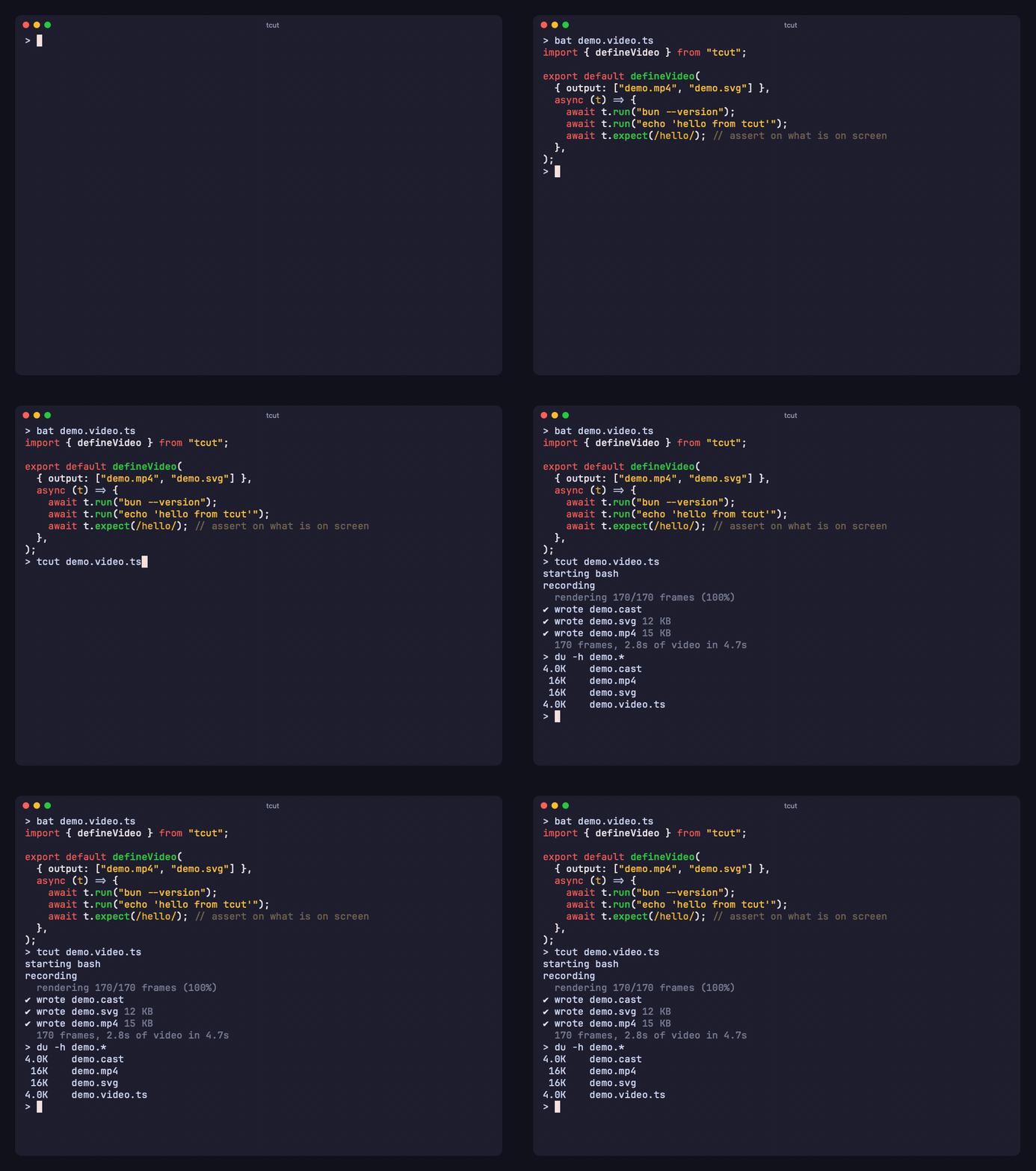
**Turn a terminal session into a video.** Record it live or script it in TypeScript; render it to MP4, GIF, WebM, SVG, HTML or PNG — identical every time.
|
|
4
|
+
|
|
4
5
|
[](https://www.npmjs.com/package/termcut)
|
|
6
|
+
[](https://github.com/AmanVarshney01/tcut/actions/workflows/ci.yml)
|
|
5
7
|
[](LICENSE)
|
|
6
8
|
|
|
7
|
-
|
|
9
|
+
|
|
10
|
+
|
|
11
|
+
Website: **[tcut.amanv.dev](https://tcut.amanv.dev)**
|
|
12
|
+
|
|
13
|
+
## Install
|
|
14
|
+
|
|
15
|
+
```sh
|
|
16
|
+
bun add -g termcut # installs the `tcut` command (needs Bun ≥ 1.4)
|
|
17
|
+
bunx termcut --help # or run it without installing
|
|
18
|
+
```
|
|
19
|
+
|
|
20
|
+
No Bun? Grab a standalone binary from [Releases](https://github.com/AmanVarshney01/tcut/releases) (macOS, Linux, Windows):
|
|
21
|
+
|
|
22
|
+
```sh
|
|
23
|
+
curl -fsSL https://github.com/AmanVarshney01/tcut/releases/latest/download/tcut-0.2.0-darwin-arm64 -o tcut && chmod +x tcut
|
|
24
|
+
```
|
|
25
|
+
|
|
26
|
+
For `.mp4` / `.gif` / `.webm` you also need `ffmpeg` (`brew install ffmpeg`, `apt install ffmpeg`). SVG, HTML and PNG need nothing else.
|
|
8
27
|
|
|
9
|
-
|
|
10
|
-
`Bun.Image` for stills, `bun build --compile` for a single binary — plus [wterm](https://github.com/vercel-labs/wterm)'s
|
|
11
|
-
libghostty WASM core as the terminal emulator. Inspired by [VHS](https://github.com/charmbracelet/vhs); scripts are
|
|
12
|
-
code, and recording is separate from rendering.
|
|
28
|
+
## Record a session
|
|
13
29
|
|
|
14
|
-
|
|
30
|
+
### Live — just do it, tcut records it
|
|
31
|
+
|
|
32
|
+
```sh
|
|
33
|
+
tcut rec -o demo.gif
|
|
34
|
+
```
|
|
15
35
|
|
|
16
|
-
|
|
36
|
+
A clean shell opens in your terminal. Type whatever you want to show; when you `exit`, tcut renders `demo.gif`.
|
|
37
|
+
Everything is captured — output, timing, colours, arrow keys in TUIs, window resizes.
|
|
38
|
+
|
|
39
|
+
```sh
|
|
40
|
+
tcut rec -o demo.mp4 -- bun create better-t-stack # record just one command (you still drive it)
|
|
41
|
+
tcut rec -o demo.svg -o demo.gif # several formats from one session
|
|
42
|
+
```
|
|
43
|
+
|
|
44
|
+
### Scripted — write it once, re-record forever
|
|
17
45
|
|
|
18
46
|
```ts
|
|
19
47
|
// demo.video.ts
|
|
20
48
|
import { defineVideo } from "tcut";
|
|
21
49
|
|
|
22
50
|
export default defineVideo(
|
|
23
|
-
{
|
|
24
|
-
output: ["out/demo.mp4", "out/demo.gif", "out/demo.svg"],
|
|
25
|
-
theme: "catppuccin-mocha",
|
|
26
|
-
cols: 80, rows: 20,
|
|
27
|
-
typingSpeed: "40ms", typingJitter: 0.4, // jitter is seeded → reproducible
|
|
28
|
-
windowBar: "colorful", title: "tcut", margin: 32, borderRadius: 12,
|
|
29
|
-
},
|
|
51
|
+
{ output: ["demo.mp4", "demo.gif"], theme: "catppuccin-mocha", cols: 80, rows: 20 },
|
|
30
52
|
async (t) => {
|
|
31
|
-
await t.
|
|
32
|
-
|
|
33
|
-
await t.run("echo 'Hello 👋'"); // type + Enter + wait for the prompt to come back
|
|
53
|
+
await t.run("bun --version"); // types it, presses Enter, waits for the prompt
|
|
34
54
|
await t.run("ls -la");
|
|
35
|
-
await t.expect(/
|
|
36
|
-
await t.screenshot("out/ls.png");
|
|
55
|
+
await t.expect(/package\.json/); // assert on the screen — the demo is also a test
|
|
37
56
|
await t.sleep("1.5s");
|
|
38
57
|
},
|
|
39
58
|
);
|
|
40
59
|
```
|
|
41
60
|
|
|
42
|
-
## Install
|
|
43
|
-
|
|
44
|
-
**With Bun (recommended)** — Bun ≥ 1.4. The npm package is **`termcut`** (npm's typosquat filter blocks the
|
|
45
|
-
4-letter name); the command it installs is `tcut`:
|
|
46
|
-
|
|
47
61
|
```sh
|
|
48
|
-
|
|
49
|
-
|
|
62
|
+
tcut demo.video.ts # record + render
|
|
63
|
+
tcut init demo # scaffold a script to start from
|
|
50
64
|
```
|
|
51
65
|
|
|
52
|
-
|
|
53
|
-
|
|
66
|
+
Scripts are plain TypeScript: loops, helpers, imports, whatever you need. All output in the video comes from the
|
|
67
|
+
real programs; the script only provides the key presses a person would make.
|
|
54
68
|
|
|
55
|
-
|
|
56
|
-
curl -fsSL https://github.com/AmanVarshney01/tcut/releases/latest/download/tcut-0.1.0-darwin-arm64 -o tcut
|
|
57
|
-
chmod +x tcut && ./tcut init demo
|
|
58
|
-
```
|
|
69
|
+
## Render again, differently
|
|
59
70
|
|
|
60
|
-
|
|
61
|
-
so no `node_modules` is needed next to your script. If you add `termcut` to a project, `import … from "termcut"`
|
|
62
|
-
also works and gives your editor the types.
|
|
63
|
-
|
|
64
|
-
**From source**
|
|
71
|
+
Recording and rendering are separate. Every recording is saved as a standard [asciicast](https://docs.asciinema.org/manual/asciicast/v2/) (`demo.cast`) and frames are computed on a virtual clock, so the same cast renders to the same pixels on any machine — and you can re-render without re-running anything:
|
|
65
72
|
|
|
66
73
|
```sh
|
|
67
|
-
|
|
68
|
-
|
|
74
|
+
tcut render demo.cast --theme dracula -o demo.gif # new theme
|
|
75
|
+
tcut render demo.cast -o demo.svg -o demo.html # animated SVG for a README, single-file HTML player
|
|
76
|
+
tcut render demo.cast --font-size 24 --speed 1.5 -o demo.mp4
|
|
69
77
|
```
|
|
70
78
|
|
|
71
|
-
|
|
79
|
+
| Output | Needs | |
|
|
80
|
+
|---|---|---|
|
|
81
|
+
| `.mp4` `.webm` | ffmpeg | H.264 / VP9 |
|
|
82
|
+
| `.gif` `.webp` | ffmpeg | animated, palette-optimised |
|
|
83
|
+
| `.svg` | nothing | animated vector — crisp at any size, ~20 KB, renders on GitHub |
|
|
84
|
+
| `.html` | nothing | self-contained player with play / pause / loop |
|
|
85
|
+
| `.png` `.jpg` | — | the final frame (`t.screenshot()` for any moment) |
|
|
86
|
+
| `frames/` | — | one PNG per frame |
|
|
72
87
|
|
|
73
|
-
|
|
88
|
+
## Examples
|
|
89
|
+
|
|
90
|
+
| | |
|
|
74
91
|
|---|---|
|
|
75
|
-
|
|
|
76
|
-
|
|
|
77
|
-
|
|
|
78
|
-
| render `.png` / `.jpg` / `frames/` | a WebView: **macOS → nothing** (system WebKit). **Linux / Windows → Chrome, Chromium, Edge or Brave** installed (Windows ships Edge) |
|
|
79
|
-
| render `.mp4` / `.gif` / `.webm` | the WebView above **+ ffmpeg** — `brew install ffmpeg` · `apt install ffmpeg` · `winget install ffmpeg` |
|
|
80
|
-
| render `.webp` | an ffmpeg with libwebp — Homebrew: `brew install ffmpeg-full` (tcut finds it automatically; see below) |
|
|
81
|
-
| your chosen font | `font.family` must be installed (default stack: JetBrains Mono → Menlo → monospace). SVG output uses the *viewer's* fonts |
|
|
82
|
-
|
|
83
|
-
Notes
|
|
84
|
-
- tcut looks for ffmpeg in this order: `$TCUT_FFMPEG`, `ffmpeg` on PATH, Homebrew's keg-only `ffmpeg-full`. It picks the first one that has the encoder a given output needs.
|
|
85
|
-
- Verified on macOS (Apple Silicon, CI on GitHub's macOS runners). Linux and Windows binaries are cross-compiled but not yet exercised in CI; recording should work everywhere, rendering depends on the WebView backend above.
|
|
86
|
-
- Rendering throughput is ~30 output frames/s; idle stretches are free (unchanged frames are reused). A 60 fps, 10 s clip renders in a few seconds.
|
|
87
|
-
|
|
88
|
-
## Why not VHS?
|
|
89
|
-
|
|
90
|
-
| | VHS | tcut |
|
|
91
|
-
|---|---|---|
|
|
92
|
-
| Script format | `.tape` DSL | TypeScript: loops, imports, shared scenes, assertions |
|
|
93
|
-
| Wait for output | `Wait` regex on raw bytes | `wait()` / `expect()` / `run()` read the **rendered screen** (headless Ghostty) |
|
|
94
|
-
| Determinism | live screenshots, machine-speed dependent | record once to `.cast`, render on a virtual clock → identical frames anywhere |
|
|
95
|
-
| Re-theme | re-run everything | `tcut render demo.cast --theme dracula` — no shell is spawned |
|
|
96
|
-
| Outputs | mp4 / gif / webm / png frames | + **animated SVG**, **single-file HTML player**, PNG/JPG stills — SVG/HTML need no ffmpeg or browser |
|
|
97
|
-
| As tests | — | `tcut test` runs scripts in fast mode, exit code reflects `expect()` |
|
|
98
|
-
| Stack | ttyd + Chrome + ffmpeg | Bun + wterm (JS/WASM) + ffmpeg (only for video containers) |
|
|
92
|
+
| **Driving an interactive TUI** — answers `bun create better-t-stack` with arrow keys, picks options by reading the screen. [`better-t-stack.ts`](packages/tcut/examples/better-t-stack.ts) | 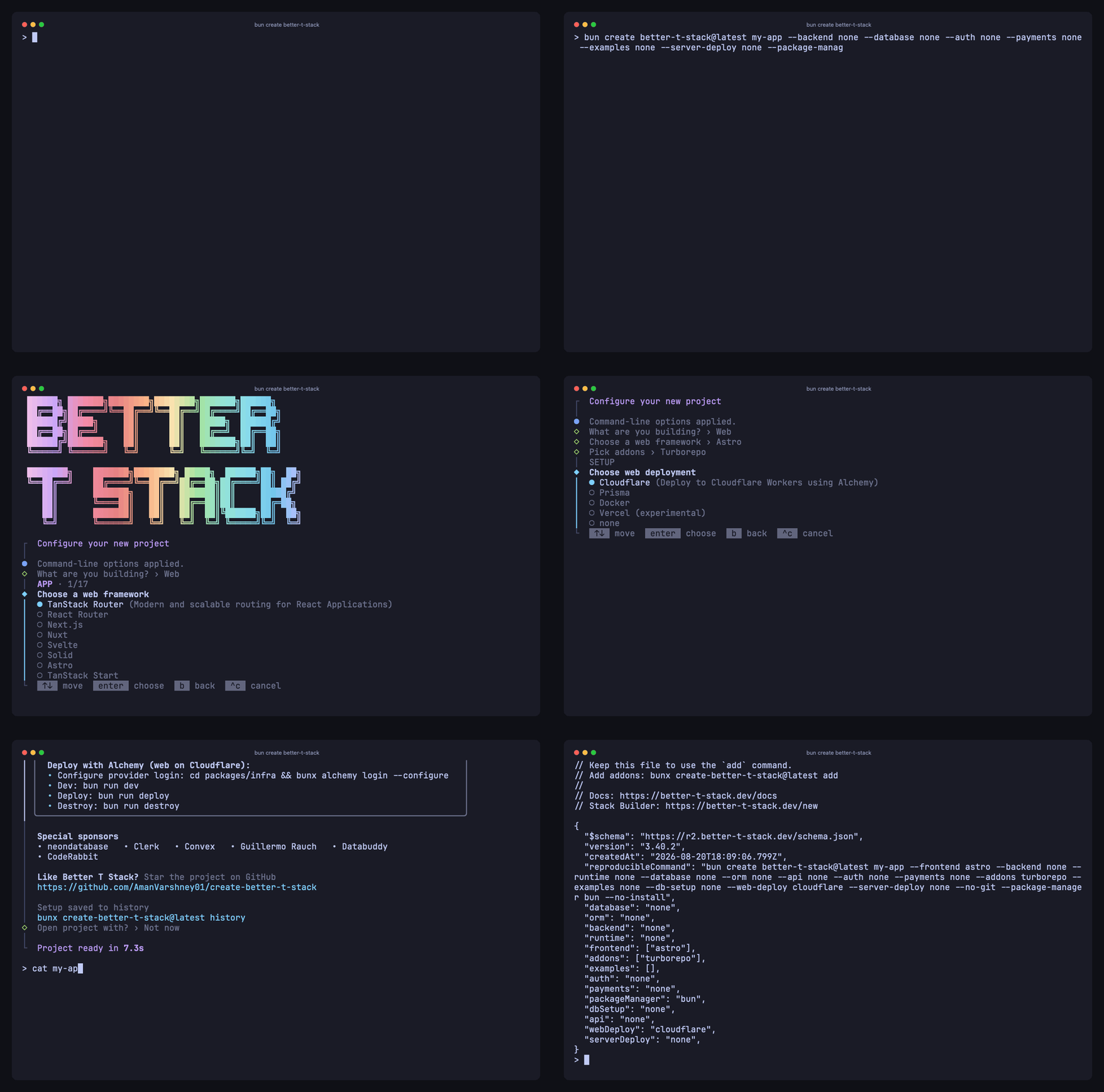 |
|
|
93
|
+
| **Recording AI agents** — `claude -p` explains a file, `codex exec` edits it. [`ai-agents.ts`](packages/tcut/examples/ai-agents.ts) | 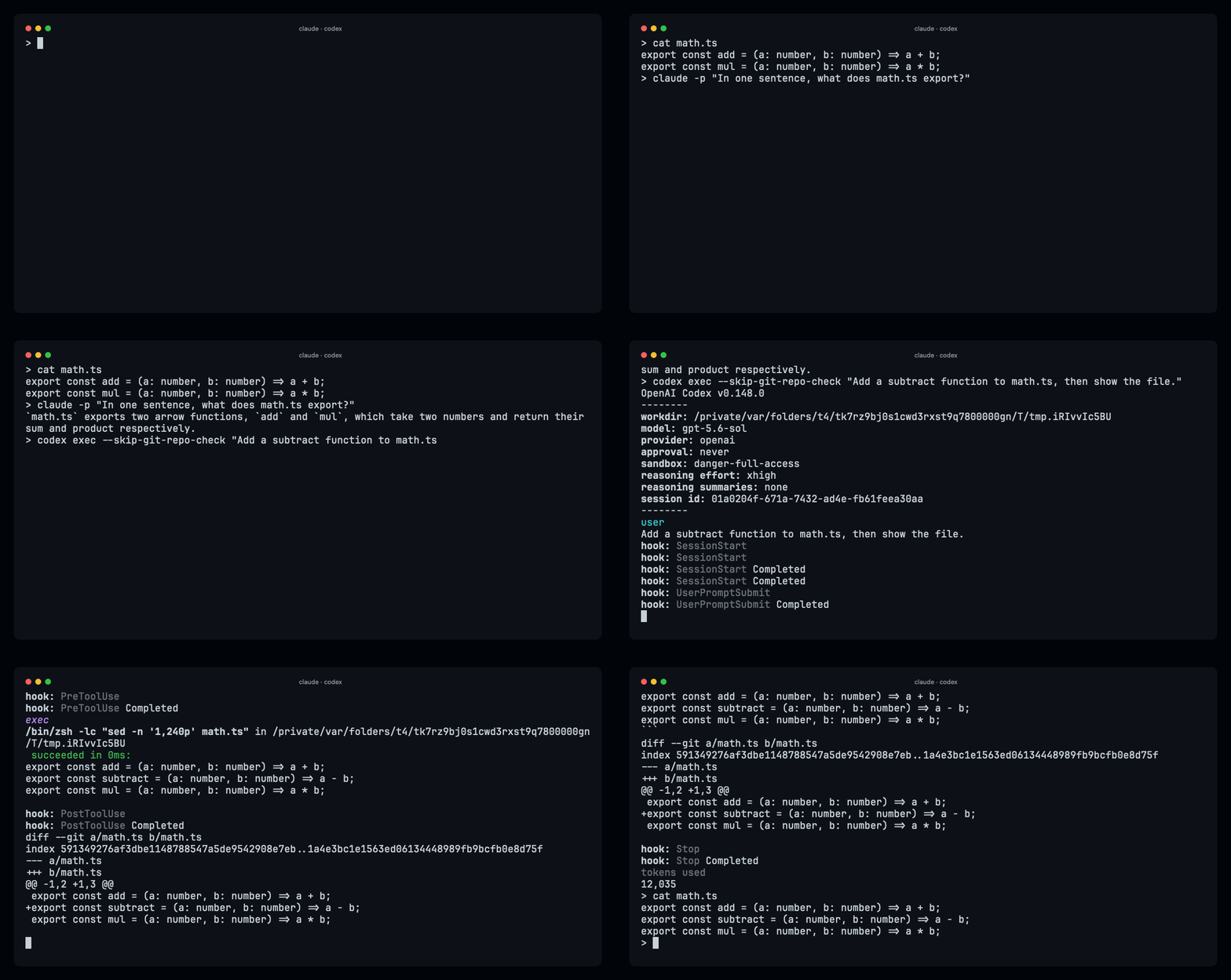 |
|
|
94
|
+
| **README media** — the GIF at the top of this page. [`readme.ts`](packages/tcut/examples/readme.ts) | |
|
|
99
95
|
|
|
100
|
-
|
|
96
|
+
More in [`packages/tcut/examples/`](packages/tcut/examples).
|
|
101
97
|
|
|
102
|
-
|
|
103
|
-
|
|
104
|
-
|
|
105
|
-
|
|
106
|
-
Ghostty core for wait/expect └─ cast + lite core → self-contained HTML
|
|
98
|
+
## Use scripts as tests
|
|
99
|
+
|
|
100
|
+
```sh
|
|
101
|
+
tcut test examples/
|
|
107
102
|
```
|
|
108
103
|
|
|
109
|
-
|
|
110
|
-
|
|
111
|
-
prompt is back and `expect()` sees what a human would see. Terminal queries (e.g. from vim) are answered.
|
|
112
|
-
- **Render** replays the cast: frame *N* is the screen at *N / fps*. Hidden sections are cut, playback speed is
|
|
113
|
-
applied, cursor blink is driven by the render clock. Unchanged frames are reused, so idle time is free.
|
|
114
|
-
- **Cache**: re-running an unchanged script reuses the cast (`--force` to re-record). `quantize: true` snaps
|
|
115
|
-
timestamps to the frame grid for byte-stable casts.
|
|
104
|
+
Runs every script in fast mode (no typing delay, no sleeps), renders nothing, and exits non-zero if any
|
|
105
|
+
`expect()` fails — so the demo in your README is also the integration test for your CLI.
|
|
116
106
|
|
|
117
107
|
## CLI
|
|
118
108
|
|
|
119
109
|
```
|
|
120
|
-
tcut <script.ts>
|
|
121
|
-
tcut
|
|
122
|
-
tcut
|
|
123
|
-
tcut
|
|
124
|
-
tcut
|
|
125
|
-
tcut
|
|
126
|
-
|
|
127
|
-
|
|
128
|
-
|
|
129
|
-
|
|
130
|
-
|
|
131
|
-
|
|
132
|
-
|
|
133
|
-
|
|
110
|
+
tcut <script.ts> record + render
|
|
111
|
+
tcut rec [-- command…] record a live session, then render
|
|
112
|
+
tcut record <script.ts> record only (.cast)
|
|
113
|
+
tcut render <file.cast> render a cast (tcut's or asciinema's)
|
|
114
|
+
tcut test <paths…> run scripts as tests
|
|
115
|
+
tcut init [name] [--template basic|tour|test]
|
|
116
|
+
tcut themes
|
|
117
|
+
|
|
118
|
+
-o, --output <path> repeatable: .mp4 .webm .gif .webp .svg .html .png .jpg or a directory/
|
|
119
|
+
--theme <name> catppuccin-mocha · dracula · github-dark · tokyo-night · one-dark
|
|
120
|
+
--font <family> --font-size <px> --line-height <x> --letter-spacing <px>
|
|
121
|
+
--fps <n> --speed <x> --padding <px> --margin <px> --margin-fill <color> --radius <px>
|
|
122
|
+
--window-bar <none|colorful|colorfulRight|rings|ringsRight> --title <text> --no-blink
|
|
123
|
+
--core <ghostty|lite> --cast <path> --record-only --force -q
|
|
134
124
|
```
|
|
135
125
|
|
|
136
|
-
## Script
|
|
126
|
+
## Script reference
|
|
137
127
|
|
|
138
128
|
`defineVideo(config, async (t) => { … })`
|
|
139
129
|
|
|
140
|
-
|
|
130
|
+
**Config** (all optional except `output`)
|
|
131
|
+
|
|
132
|
+
| | default | |
|
|
141
133
|
|---|---|---|
|
|
142
|
-
| `output` | — | string or
|
|
143
|
-
| `shell` | `"bash"` | `
|
|
144
|
-
| `prompt`
|
|
145
|
-
| `cols`
|
|
146
|
-
| `typingSpeed`
|
|
147
|
-
| `
|
|
148
|
-
| `
|
|
149
|
-
| `
|
|
150
|
-
| `font` | JetBrains Mono 20px, lh 1.2 | `{ family, size, lineHeight, letterSpacing }` |
|
|
151
|
-
| `theme` | `"catppuccin-mocha"` | name or a full `Theme` object |
|
|
134
|
+
| `output` | — | string or array; extension picks the format |
|
|
135
|
+
| `shell` | `"bash"` | `bash` · `zsh` · `fish` · `sh` · or a `string[]` command |
|
|
136
|
+
| `prompt` | `"> "` | prompt of the clean shell; `run()` waits for it |
|
|
137
|
+
| `cols` · `rows` · `fps` | 80 · 24 · 60 | |
|
|
138
|
+
| `typingSpeed` · `typingJitter` · `seed` | `"50ms"` · 0 · 1 | jitter is seeded, so it's reproducible |
|
|
139
|
+
| `theme` | `"catppuccin-mocha"` | a name or a full theme object |
|
|
140
|
+
| `font` | JetBrains Mono 20 px | `{ family, size, lineHeight, letterSpacing }` |
|
|
141
|
+
| `windowBar` · `title` · `padding` · `margin` · `marginFill` · `borderRadius` | `"none"` · `""` · 24 · 0 · bg · 0 | window chrome |
|
|
152
142
|
| `cursor` | `{ blink: true, period: 1000 }` | |
|
|
153
|
-
| `
|
|
154
|
-
| `
|
|
143
|
+
| `playbackSpeed` · `waitTimeout` · `endPause` | 1 · `"15s"` · `"1s"` | |
|
|
144
|
+
| `cache` · `quantize` · `core` | true · false · `"ghostty"` | skip re-recording when unchanged · frame-grid timestamps · emulator |
|
|
155
145
|
|
|
156
|
-
|
|
146
|
+
**`t`**
|
|
157
147
|
|
|
158
|
-
-
|
|
159
|
-
|
|
160
|
-
|
|
161
|
-
-
|
|
162
|
-
-
|
|
163
|
-
- Structure: `hide(async () => …)`, `screenshot(path)`, `marker(name)`, `resize(cols, rows)`, `clear()`
|
|
164
|
-
- Introspection: `screen()`, `line()`, `cursor()`, `cols`, `rows`, `config`
|
|
148
|
+
- Type: `run(cmd)` · `type(text)` · `paste(text)` · `enter()` `tab()` `backspace()` `escape()` `space()` `up()` `down()` `left()` `right()` `home()` `end()` `pageUp()` `pageDown()` (all take a count) · `ctrl("c")` · `alt("b")` · `key("f5")` · `raw(bytes)`
|
|
149
|
+
- Wait: `sleep("500ms")` · `wait(/re/, { scope: "line" | "screen" })` — default waits for the prompt
|
|
150
|
+
- Assert: `expect(/re/)` — throws with a screen dump
|
|
151
|
+
- Shape the video: `hide(async () => …)` cuts a section · `screenshot("x.png")` · `marker("name")` · `resize(cols, rows)` · `clear()`
|
|
152
|
+
- Look: `screen()` · `line()` · `cursor()` · `cols` · `rows`
|
|
165
153
|
|
|
166
|
-
Durations accept
|
|
154
|
+
Durations accept `500`, `"500ms"`, `"1.5s"`, `"2m"`.
|
|
167
155
|
|
|
168
|
-
|
|
169
|
-
`renderCast(file, { output })`, `buildSvg(rec, config)`, `runScriptTests(paths)`.
|
|
156
|
+
## Requirements
|
|
170
157
|
|
|
171
|
-
|
|
158
|
+
| To… | You need |
|
|
159
|
+
|---|---|
|
|
160
|
+
| run tcut | Bun ≥ 1.4, or the standalone binary |
|
|
161
|
+
| record (`rec`, scripts, `test`) | a shell — nothing else |
|
|
162
|
+
| render `.svg` / `.html` | nothing else |
|
|
163
|
+
| render `.png` / `frames/` | macOS: nothing (built-in WebKit) · Linux / Windows: Chrome, Chromium, Edge or Brave |
|
|
164
|
+
| render `.mp4` / `.gif` / `.webm` | the above + ffmpeg |
|
|
165
|
+
| render `.webp` | ffmpeg with libwebp (`brew install ffmpeg-full`; found automatically) |
|
|
172
166
|
|
|
173
|
-
|
|
174
|
-
|
|
175
|
-
|
|
176
|
-
bun src/cli.ts examples/demo.ts
|
|
177
|
-
bun run build # dist/tcut single binary with embedded renderer assets
|
|
178
|
-
bun run build:all # cross-compile all platforms into dist/ + SHA256SUMS
|
|
179
|
-
```
|
|
167
|
+
Verified on macOS. Linux and Windows binaries are cross-compiled and not yet exercised in CI.
|
|
168
|
+
|
|
169
|
+
## How it works, briefly
|
|
180
170
|
|
|
181
|
-
|
|
182
|
-
|
|
183
|
-
|
|
171
|
+
`Bun.Terminal` runs your shell in a PTY. Output is timestamped into the cast and also fed to a headless
|
|
172
|
+
[Ghostty](https://ghostty.org) terminal (via [wterm](https://github.com/vercel-labs/wterm)), which is how `run()` knows the prompt is back and
|
|
173
|
+
`expect()` sees what you see. Rendering replays the cast into that terminal inside `Bun.WebView` one frame at a time and hands the
|
|
174
|
+
frames to ffmpeg; SVG and HTML are built straight from the terminal grid. Inspired by [VHS](https://github.com/charmbracelet/vhs).
|
|
184
175
|
|
|
185
|
-
|
|
186
|
-
and measurements are in `PLAN.md`.
|
|
176
|
+
Contributing: see [CONTRIBUTING.md](CONTRIBUTING.md). MIT.
|
package/package.json
CHANGED
|
@@ -1,13 +1,14 @@
|
|
|
1
1
|
{
|
|
2
2
|
"name": "termcut",
|
|
3
|
-
"version": "0.
|
|
3
|
+
"version": "0.2.0",
|
|
4
4
|
"description": "Script terminal sessions in TypeScript, render them to reproducible MP4/GIF/WebM/SVG/HTML with Bun.",
|
|
5
5
|
"license": "MIT",
|
|
6
6
|
"author": "Aman Varshney",
|
|
7
7
|
"homepage": "https://github.com/AmanVarshney01/tcut#readme",
|
|
8
8
|
"repository": {
|
|
9
9
|
"type": "git",
|
|
10
|
-
"url": "git+https://github.com/AmanVarshney01/tcut.git"
|
|
10
|
+
"url": "git+https://github.com/AmanVarshney01/tcut.git",
|
|
11
|
+
"directory": "packages/tcut"
|
|
11
12
|
},
|
|
12
13
|
"bugs": {
|
|
13
14
|
"url": "https://github.com/AmanVarshney01/tcut/issues"
|
package/src/cli.ts
CHANGED
|
@@ -1,7 +1,12 @@
|
|
|
1
1
|
#!/usr/bin/env bun
|
|
2
|
+
import { mkdir } from "node:fs/promises";
|
|
2
3
|
import path from "node:path";
|
|
3
4
|
import { parseArgs } from "node:util";
|
|
5
|
+
import { writeCast } from "./cast";
|
|
6
|
+
import { resolveConfig } from "./config";
|
|
4
7
|
import * as api from "./index";
|
|
8
|
+
import { recordLive } from "./live";
|
|
9
|
+
import { renderOutputs } from "./render";
|
|
5
10
|
import { runScriptTests } from "./testing";
|
|
6
11
|
import { themeNames } from "./themes";
|
|
7
12
|
import type { CoreName, ThemeName, VideoConfig, WindowBar } from "./types";
|
|
@@ -23,6 +28,7 @@ const HELP = `tcut — script terminal sessions in TypeScript, render them to vi
|
|
|
23
28
|
|
|
24
29
|
Usage:
|
|
25
30
|
tcut <script.ts> [options] record + render
|
|
31
|
+
tcut rec [options] [-- command…] record a LIVE session you drive yourself (no script), then render
|
|
26
32
|
tcut record <script.ts> [options] record only (writes the .cast)
|
|
27
33
|
tcut render <file.cast> [options] render an existing .cast (tcut or asciinema)
|
|
28
34
|
tcut test <path...> run scripts in fast mode as tests (no video)
|
|
@@ -276,6 +282,22 @@ async function main(): Promise<void> {
|
|
|
276
282
|
console.log(`created ${file}\n\nrun it with:\n ${template === "test" ? `tcut test ${file}` : `tcut ${file}`}`);
|
|
277
283
|
return;
|
|
278
284
|
}
|
|
285
|
+
case "rec": {
|
|
286
|
+
// Live mode: the user (or a pipe) drives the PTY; everything after `--` is the command to run.
|
|
287
|
+
const overrides = overridesFromFlags();
|
|
288
|
+
const outputs = overrides.output ?? ["rec.mp4"];
|
|
289
|
+
const config = resolveConfig({ ...overrides, output: outputs, cast: overrides.cast });
|
|
290
|
+
const command = rest.length > 0 ? rest : undefined;
|
|
291
|
+
const recording = await recordLive(config, { command, log });
|
|
292
|
+
await mkdir(path.dirname(path.resolve(config.cast)), { recursive: true });
|
|
293
|
+
await writeCast(config.cast, recording);
|
|
294
|
+
log(`\n✔ wrote ${config.cast} (${recording.events.length} events, ${(recording.header.duration ?? 0).toFixed(1)}s)`);
|
|
295
|
+
if (values["record-only"]) return;
|
|
296
|
+
const result = await renderOutputs(recording, config, progressReporter());
|
|
297
|
+
await reportOutputs(result.outputs, result.screenshots);
|
|
298
|
+
log(` ${result.frames} frames, ${result.durationSeconds.toFixed(1)}s of video in ${elapsed()}`);
|
|
299
|
+
return;
|
|
300
|
+
}
|
|
279
301
|
case "record": {
|
|
280
302
|
if (!rest[0]) fail("record needs a script file");
|
|
281
303
|
const video = await loadVideo(rest[0]);
|
package/src/index.ts
CHANGED
|
@@ -1,6 +1,8 @@
|
|
|
1
1
|
export { defineVideo, Video, renderCast, isVideo } from "./video";
|
|
2
2
|
export type { RunOptions as VideoRunOptions, RunResult, VideoRecordOptions } from "./video";
|
|
3
3
|
export { renderOutputs } from "./render";
|
|
4
|
+
export { recordLive } from "./live";
|
|
5
|
+
export type { LiveOptions } from "./live";
|
|
4
6
|
export { buildSvg } from "./export/svg";
|
|
5
7
|
export { buildHtml } from "./export/html";
|
|
6
8
|
export { replayFrames } from "./export/frames";
|
package/src/live.ts
ADDED
|
@@ -0,0 +1,130 @@
|
|
|
1
|
+
import { MARKER } from "./cast";
|
|
2
|
+
import { shellSetup } from "./recorder";
|
|
3
|
+
import type { CastEvent, Recording, ResolvedConfig } from "./types";
|
|
4
|
+
|
|
5
|
+
export interface LiveOptions {
|
|
6
|
+
/** Run this command instead of the configured clean shell. */
|
|
7
|
+
command?: string[];
|
|
8
|
+
/** Terminal size; defaults to the size of the terminal tcut is running in, then the config. */
|
|
9
|
+
cols?: number;
|
|
10
|
+
rows?: number;
|
|
11
|
+
/** Where to mirror the session (default: this process's stdout). */
|
|
12
|
+
stdout?: { write(data: Uint8Array | string): unknown };
|
|
13
|
+
/** Keystroke source (default: this process's stdin, switched to raw mode when it is a TTY). */
|
|
14
|
+
stdin?: NodeJS.ReadStream | null;
|
|
15
|
+
log?: (message: string) => void;
|
|
16
|
+
}
|
|
17
|
+
|
|
18
|
+
/**
|
|
19
|
+
* Record a *live* session: the user (or a pipe) drives the PTY, tcut mirrors it to the terminal and captures
|
|
20
|
+
* every byte with timestamps. No script, no waits — whatever happened is what gets rendered.
|
|
21
|
+
*/
|
|
22
|
+
export async function recordLive(config: ResolvedConfig, opts: LiveOptions = {}): Promise<Recording> {
|
|
23
|
+
const log = opts.log ?? (() => {});
|
|
24
|
+
const stdin = opts.stdin === undefined ? process.stdin : opts.stdin;
|
|
25
|
+
const stdout = opts.stdout ?? { write: (d: Uint8Array | string) => process.stdout.write(d) };
|
|
26
|
+
const cols = opts.cols ?? process.stdout.columns ?? config.cols;
|
|
27
|
+
const rows = opts.rows ?? process.stdout.rows ?? config.rows;
|
|
28
|
+
const decoder = new TextDecoder("utf-8");
|
|
29
|
+
const events: CastEvent[] = [];
|
|
30
|
+
const startedAt = performance.now();
|
|
31
|
+
|
|
32
|
+
const stamp = (): number => {
|
|
33
|
+
const t = (performance.now() - startedAt) / 1000;
|
|
34
|
+
return config.quantize ? Math.ceil(t * config.fps - 1e-6) / config.fps : Number(t.toFixed(6));
|
|
35
|
+
};
|
|
36
|
+
const push = (type: CastEvent[1], data: string): void => {
|
|
37
|
+
events.push([stamp(), type, data]);
|
|
38
|
+
};
|
|
39
|
+
|
|
40
|
+
const setup = opts.command ? { cmd: opts.command, env: {} } : shellSetup(config);
|
|
41
|
+
const env: Record<string, string> = {
|
|
42
|
+
...process.env,
|
|
43
|
+
TERM: "xterm-256color",
|
|
44
|
+
COLORTERM: "truecolor",
|
|
45
|
+
...setup.env,
|
|
46
|
+
...config.env,
|
|
47
|
+
};
|
|
48
|
+
|
|
49
|
+
let exited = false;
|
|
50
|
+
let resolveExit!: () => void;
|
|
51
|
+
const exitedPromise = new Promise<void>((r) => (resolveExit = r));
|
|
52
|
+
|
|
53
|
+
const proc = Bun.spawn(setup.cmd, {
|
|
54
|
+
cwd: config.cwd,
|
|
55
|
+
env,
|
|
56
|
+
terminal: {
|
|
57
|
+
cols,
|
|
58
|
+
rows,
|
|
59
|
+
name: "xterm-256color",
|
|
60
|
+
data(_terminal, chunk) {
|
|
61
|
+
const text = decoder.decode(chunk, { stream: true });
|
|
62
|
+
if (!text) return;
|
|
63
|
+
stdout.write(chunk);
|
|
64
|
+
push("o", text);
|
|
65
|
+
},
|
|
66
|
+
exit() {
|
|
67
|
+
exited = true;
|
|
68
|
+
resolveExit();
|
|
69
|
+
},
|
|
70
|
+
},
|
|
71
|
+
});
|
|
72
|
+
const terminal = proc.terminal;
|
|
73
|
+
if (!terminal) throw new Error("Bun.spawn did not return a terminal. Is this Bun >= 1.4?");
|
|
74
|
+
|
|
75
|
+
const isTTY = Boolean(stdin && (stdin as NodeJS.ReadStream).isTTY);
|
|
76
|
+
const onData = (chunk: Buffer | string): void => {
|
|
77
|
+
if (exited || terminal.closed) return;
|
|
78
|
+
terminal.write(chunk);
|
|
79
|
+
push("i", typeof chunk === "string" ? chunk : chunk.toString("utf8"));
|
|
80
|
+
};
|
|
81
|
+
const onResize = (): void => {
|
|
82
|
+
const c = process.stdout.columns ?? cols;
|
|
83
|
+
const r = process.stdout.rows ?? rows;
|
|
84
|
+
if (exited || terminal.closed) return;
|
|
85
|
+
terminal.resize(c, r);
|
|
86
|
+
push("r", `${c}x${r}`);
|
|
87
|
+
};
|
|
88
|
+
|
|
89
|
+
if (stdin) {
|
|
90
|
+
if (isTTY) stdin.setRawMode(true);
|
|
91
|
+
stdin.resume();
|
|
92
|
+
stdin.on("data", onData);
|
|
93
|
+
}
|
|
94
|
+
process.on("SIGWINCH", onResize);
|
|
95
|
+
log(`recording ${setup.cmd.join(" ")} at ${cols}x${rows} — exit the shell to stop`);
|
|
96
|
+
|
|
97
|
+
try {
|
|
98
|
+
await Promise.race([exitedPromise, proc.exited]);
|
|
99
|
+
push("m", MARKER.end);
|
|
100
|
+
} finally {
|
|
101
|
+
process.off("SIGWINCH", onResize);
|
|
102
|
+
if (stdin) {
|
|
103
|
+
stdin.off("data", onData);
|
|
104
|
+
if (isTTY) stdin.setRawMode(false);
|
|
105
|
+
stdin.pause();
|
|
106
|
+
}
|
|
107
|
+
try {
|
|
108
|
+
terminal.close();
|
|
109
|
+
} catch {
|
|
110
|
+
/* already closed */
|
|
111
|
+
}
|
|
112
|
+
if (!exited) proc.kill();
|
|
113
|
+
await proc.exited.catch(() => undefined);
|
|
114
|
+
}
|
|
115
|
+
|
|
116
|
+
const duration = events.length > 0 ? events[events.length - 1]![0] : 0;
|
|
117
|
+
return {
|
|
118
|
+
header: {
|
|
119
|
+
version: 2,
|
|
120
|
+
width: cols,
|
|
121
|
+
height: rows,
|
|
122
|
+
timestamp: Math.floor(Date.now() / 1000),
|
|
123
|
+
duration,
|
|
124
|
+
title: config.title || undefined,
|
|
125
|
+
env: { TERM: "xterm-256color", SHELL: setup.cmd[0]! },
|
|
126
|
+
bunVideo: { ...config, cols, rows },
|
|
127
|
+
},
|
|
128
|
+
events,
|
|
129
|
+
};
|
|
130
|
+
}
|
package/src/recorder.ts
CHANGED
|
@@ -42,12 +42,13 @@ function mulberry32(seed: number): () => number {
|
|
|
42
42
|
};
|
|
43
43
|
}
|
|
44
44
|
|
|
45
|
-
interface ShellSetup {
|
|
45
|
+
export interface ShellSetup {
|
|
46
46
|
cmd: string[];
|
|
47
47
|
env: Record<string, string>;
|
|
48
48
|
}
|
|
49
49
|
|
|
50
|
-
|
|
50
|
+
/** Command + environment for a clean, rc-free shell with the configured prompt. */
|
|
51
|
+
export function shellSetup(config: ResolvedConfig): ShellSetup {
|
|
51
52
|
const { shell, prompt } = config;
|
|
52
53
|
if (Array.isArray(shell)) return { cmd: shell, env: {} };
|
|
53
54
|
switch (shell) {
|
package/LICENSE
DELETED
|
@@ -1,21 +0,0 @@
|
|
|
1
|
-
MIT License
|
|
2
|
-
|
|
3
|
-
Copyright (c) 2026 Aman Varshney
|
|
4
|
-
|
|
5
|
-
Permission is hereby granted, free of charge, to any person obtaining a copy
|
|
6
|
-
of this software and associated documentation files (the "Software"), to deal
|
|
7
|
-
in the Software without restriction, including without limitation the rights
|
|
8
|
-
to use, copy, modify, merge, publish, distribute, sublicense, and/or sell
|
|
9
|
-
copies of the Software, and to permit persons to whom the Software is
|
|
10
|
-
furnished to do so, subject to the following conditions:
|
|
11
|
-
|
|
12
|
-
The above copyright notice and this permission notice shall be included in all
|
|
13
|
-
copies or substantial portions of the Software.
|
|
14
|
-
|
|
15
|
-
THE SOFTWARE IS PROVIDED "AS IS", WITHOUT WARRANTY OF ANY KIND, EXPRESS OR
|
|
16
|
-
IMPLIED, INCLUDING BUT NOT LIMITED TO THE WARRANTIES OF MERCHANTABILITY,
|
|
17
|
-
FITNESS FOR A PARTICULAR PURPOSE AND NONINFRINGEMENT. IN NO EVENT SHALL THE
|
|
18
|
-
AUTHORS OR COPYRIGHT HOLDERS BE LIABLE FOR ANY CLAIM, DAMAGES OR OTHER
|
|
19
|
-
LIABILITY, WHETHER IN AN ACTION OF CONTRACT, TORT OR OTHERWISE, ARISING FROM,
|
|
20
|
-
OUT OF OR IN CONNECTION WITH THE SOFTWARE OR THE USE OR OTHER DEALINGS IN THE
|
|
21
|
-
SOFTWARE.
|