terabox-upload-tool 1.3.1 → 1.4.1
This diff represents the content of publicly available package versions that have been released to one of the supported registries. The information contained in this diff is provided for informational purposes only and reflects changes between package versions as they appear in their respective public registries.
- package/README.md +43 -205
- package/lib/helpers/download/download.js +16 -33
- package/lib/helpers/download/downloadHelper.js +40 -120
- package/lib/helpers/fileDelete.js +4 -17
- package/lib/helpers/fileMove.js +4 -17
- package/lib/helpers/getShortUrl.js +30 -44
- package/lib/helpers/utils.js +9 -29
- package/lib/index.js +96 -162
- package/package.json +1 -1
- package/test_all.js +79 -0
- package/examples/createfolder.js +0 -27
- package/examples/dl-test.js +0 -97
- package/examples/example.js +0 -59
package/README.md
CHANGED
|
@@ -1,237 +1,75 @@
|
|
|
1
1
|
# Terabox Upload Tool
|
|
2
2
|
|
|
3
|
-
|
|
4
|
-
|
|
5
|
-
Supercharge your Node.js applications with the TeraBox Upload Tool — a powerful library for seamless integration with [TeraBox](https://www.terabox.com/wap), the leading cloud storage platform with 1TB of free space.
|
|
6
|
-
|
|
7
|
-
✅ Effortlessly:
|
|
8
|
-
|
|
9
|
-
- Upload, download, retrieve, and delete files
|
|
10
|
-
- Manage directories with ease
|
|
11
|
-
- Fetch file lists for better organization
|
|
12
|
-
|
|
13
|
-
Ideal for developers and automation enthusiasts looking for an efficient cloud storage solution in Node.js.
|
|
3
|
+
A robust Node.js library for seamless integration with TeraBox. Effortlessly upload, download, manage files and directories, and retrieve file lists.
|
|
14
4
|
|
|
15
5
|
## Features
|
|
16
|
-
|
|
17
|
-
- File
|
|
18
|
-
-
|
|
19
|
-
-
|
|
20
|
-
-
|
|
21
|
-
- Download your Files: Get direct file download link.
|
|
22
|
-
- Delete or move your files from any directory.
|
|
23
|
-
|
|
24
|
-
## Coming Soon (Open for Collaboration)
|
|
25
|
-
|
|
26
|
-
- Video Streaming: Support for streaming videos.
|
|
27
|
-
- Fetch Upload History
|
|
28
|
-
- Fetch Download History
|
|
29
|
-
- Restructure code and files
|
|
6
|
+
- **Automated Upload Flow**: Handles `precreate`, MD5 calculation, and finalization automatically.
|
|
7
|
+
- **File Management**: Create directories, move, rename, and delete files.
|
|
8
|
+
- **Downloads**: Generate direct download links (`dlink`).
|
|
9
|
+
- **Sharing**: Generate short URLs for file sharing.
|
|
10
|
+
- **Latest API Support**: Includes `jsToken`, `dp-logid`, and `appId` support to bypass modern restrictions.
|
|
30
11
|
|
|
31
12
|
## Installation
|
|
32
|
-
|
|
33
|
-
Install the package using npm:
|
|
34
|
-
|
|
35
13
|
```bash
|
|
36
14
|
npm install terabox-upload-tool
|
|
37
15
|
```
|
|
38
16
|
|
|
39
|
-
##
|
|
17
|
+
## Setup & Credentials
|
|
40
18
|
|
|
41
|
-
|
|
19
|
+
To use this library, you need to extract three key parameters from your browser while logged into TeraBox:
|
|
42
20
|
|
|
43
|
-
|
|
44
|
-
|
|
21
|
+
1. **ndus**: Found in your Browser Cookies (`Application` -> `Cookies` -> `https://www.terabox.com`).
|
|
22
|
+
2. **jsToken**: Found in the response or query parameters of API calls (e.g., `api/list` or `api/home/info`) in the `Network` tab.
|
|
23
|
+
3. **appId**: Usually `250528`, but verify by looking at the `app_id` parameter in any API request in the `Network` tab.
|
|
45
24
|
|
|
46
|
-
|
|
47
|
-
ndus: "valid_ndus", //Required: Get this from your session (See guide below)
|
|
48
|
-
appId: "valid_appId", //Required: Get this from your session (See guide below)
|
|
49
|
-
uploadId: "valid_uploadId", //Required: Get this from your session (See guide below)
|
|
50
|
-
jsToken: "valid_jsToken", //Required: Get this from your session (See guide below)
|
|
51
|
-
browserId: "valid_browserId", //Required: Get this from your session (See guide below)
|
|
52
|
-
};
|
|
25
|
+
## Usage
|
|
53
26
|
|
|
54
|
-
|
|
27
|
+
### Initialization
|
|
28
|
+
```javascript
|
|
29
|
+
const TeraboxUploader = require('terabox-upload-tool');
|
|
30
|
+
|
|
31
|
+
const uploader = new TeraboxUploader({
|
|
32
|
+
ndus: "YOUR_NDUS",
|
|
33
|
+
jsToken: "YOUR_JS_TOKEN",
|
|
34
|
+
appId: "250528",
|
|
35
|
+
bdstoken: "OPTIONAL",
|
|
36
|
+
browserId: "OPTIONAL"
|
|
37
|
+
});
|
|
55
38
|
```
|
|
56
39
|
|
|
57
|
-
###
|
|
58
|
-
|
|
59
|
-
To upload a file, use the instance of TeraboxUploader and specify the file path.
|
|
60
|
-
|
|
61
|
-
#### Example: Save File to a Specific Directory
|
|
40
|
+
### API Methods
|
|
62
41
|
|
|
42
|
+
#### Upload File
|
|
63
43
|
```javascript
|
|
64
|
-
|
|
65
|
-
|
|
66
|
-
|
|
67
|
-
const result = await uploader.uploadFile(
|
|
68
|
-
filePath,
|
|
69
|
-
showProgress,
|
|
70
|
-
"/myUploads"
|
|
71
|
-
);
|
|
72
|
-
if (result.success) {
|
|
73
|
-
console.log("File uploaded successfully!");
|
|
74
|
-
console.log("File details:", result.fileDetails);
|
|
75
|
-
} else {
|
|
76
|
-
console.log("Upload failed:", result.message);
|
|
77
|
-
}
|
|
78
|
-
} catch (error) {
|
|
79
|
-
console.log("An error occurred during the upload:", error.message);
|
|
80
|
-
}
|
|
81
|
-
}
|
|
44
|
+
const result = await uploader.uploadFile('./myfile.txt', (loaded, total) => {
|
|
45
|
+
console.log(`Progress: ${Math.round((loaded / total) * 100)}%`);
|
|
46
|
+
}, '/remote/dir');
|
|
82
47
|
```
|
|
83
48
|
|
|
84
|
-
|
|
85
|
-
|
|
86
|
-
Fetch the files in a directory
|
|
87
|
-
|
|
88
|
-
#### Example: Fetch a list of files from Terabox
|
|
89
|
-
|
|
49
|
+
#### Download File
|
|
90
50
|
```javascript
|
|
91
|
-
|
|
92
|
-
|
|
93
|
-
const fileList = await uploader.fetchFileList("/myUploads"); //fetching files from 'myuplods' directory, default is '/' directory.
|
|
94
|
-
console.log("Files in your directory:", fileList);
|
|
95
|
-
} catch (error) {
|
|
96
|
-
console.log("Error fetching file list:", error.message);
|
|
97
|
-
}
|
|
98
|
-
}
|
|
51
|
+
const result = await uploader.downloadFile(fs_id);
|
|
52
|
+
console.log('Download Link:', result.downloadLink);
|
|
99
53
|
```
|
|
100
54
|
|
|
101
|
-
|
|
102
|
-
|
|
103
|
-
Download a file by it's fs_id aka fileId
|
|
104
|
-
|
|
55
|
+
#### File List
|
|
105
56
|
```javascript
|
|
106
|
-
|
|
107
|
-
|
|
108
|
-
const res = await uploader.downloadFile(fileId);
|
|
109
|
-
console.log(res);
|
|
110
|
-
} catch (error) {
|
|
111
|
-
console.log(error);
|
|
112
|
-
}
|
|
113
|
-
}
|
|
57
|
+
const result = await uploader.fetchFileList('/remote/dir');
|
|
58
|
+
console.log(result.data.list);
|
|
114
59
|
```
|
|
115
60
|
|
|
116
|
-
|
|
117
|
-
|
|
118
|
-
Delete a list of files, provide an array of path of files to delete
|
|
119
|
-
|
|
61
|
+
#### Directory Operations
|
|
120
62
|
```javascript
|
|
121
|
-
|
|
122
|
-
|
|
123
|
-
|
|
124
|
-
"/FliqloScr.zip",
|
|
125
|
-
"/Consent Letter.docx",
|
|
126
|
-
]);
|
|
127
|
-
console.log(deleteD);
|
|
128
|
-
} catch (error) {
|
|
129
|
-
console.error("Error fetching file list:", error.message);
|
|
130
|
-
}
|
|
131
|
-
}
|
|
63
|
+
await uploader.createDirectory('/new_folder');
|
|
64
|
+
await uploader.moveFiles('/old/path.txt', '/new/dir', 'newname.txt');
|
|
65
|
+
await uploader.deleteFiles(['/file_to_delete.txt', '/folder_to_delete']);
|
|
132
66
|
```
|
|
133
67
|
|
|
134
|
-
|
|
135
|
-
|
|
136
|
-
Moves a file from one location to another with a new name.
|
|
137
|
-
|
|
68
|
+
#### Sharing
|
|
138
69
|
```javascript
|
|
139
|
-
|
|
140
|
-
|
|
141
|
-
const moved = await uploader.moveFiles('/sample_960x540.mkv', '/uploads', 'sample.mkv') //old path, new path, new name
|
|
142
|
-
console.log(moved);
|
|
143
|
-
}catch(error){
|
|
144
|
-
console.log(error);
|
|
145
|
-
}
|
|
146
|
-
}
|
|
70
|
+
const result = await uploader.generateShortUrl('/path/file.txt', fs_id);
|
|
71
|
+
console.log('Short URL:', result.shortUrl);
|
|
147
72
|
```
|
|
148
73
|
|
|
149
|
-
|
|
150
|
-
|
|
151
|
-
|
|
152
|
-
We are actively seeking contributors to add the following features:
|
|
153
|
-
|
|
154
|
-
1. **Error Handling Enhancements:**
|
|
155
|
-
|
|
156
|
-
- Improve error messages for easier debugging and user guidance.
|
|
157
|
-
|
|
158
|
-
2. **Automated Tests:**
|
|
159
|
-
|
|
160
|
-
- Add test cases to ensure reliability and robustness.
|
|
161
|
-
|
|
162
|
-
3. **Documentation Updates:**
|
|
163
|
-
|
|
164
|
-
- Expand guides with screenshots and example workflows.
|
|
165
|
-
|
|
166
|
-
4. **Restructure Code and Files:**
|
|
167
|
-
|
|
168
|
-
- Restructure the existing code and files
|
|
169
|
-
|
|
170
|
-
5. **New Features Addition:**
|
|
171
|
-
- Addition of new features and enhancements
|
|
172
|
-
|
|
173
|
-
## Contribution Guidelines
|
|
174
|
-
|
|
175
|
-
We welcome contributions from the community! Here’s how you can get started:
|
|
176
|
-
|
|
177
|
-
1. Fork the repository and create a new branch for your feature or bugfix.
|
|
178
|
-
2. Make your changes and ensure the code adheres to the project's style guide.
|
|
179
|
-
3. Submit a pull request detailing your changes and their purpose.
|
|
180
|
-
4. Feel free to open issues for feature requests or bug reports.
|
|
181
|
-
|
|
182
|
-
## Resources for Developers
|
|
183
|
-
|
|
184
|
-
- [Node.js File System Documentation](https://nodejs.org/api/fs.html)
|
|
185
|
-
- [Chrome Dev-Tools (Networks)](https://developer.chrome.com/docs/devtools/network)
|
|
186
|
-
|
|
187
|
-
<br>
|
|
188
|
-
|
|
189
|
-
Terabox Node.js Library
|
|
190
|
-
|
|
191
|
-
Upload Files to Terabox
|
|
192
|
-
|
|
193
|
-
Terabox API Integration
|
|
194
|
-
|
|
195
|
-
Terabox File Management
|
|
196
|
-
|
|
197
|
-
Node.js Terabox SDK
|
|
198
|
-
|
|
199
|
-
## Guide
|
|
200
|
-
|
|
201
|
-
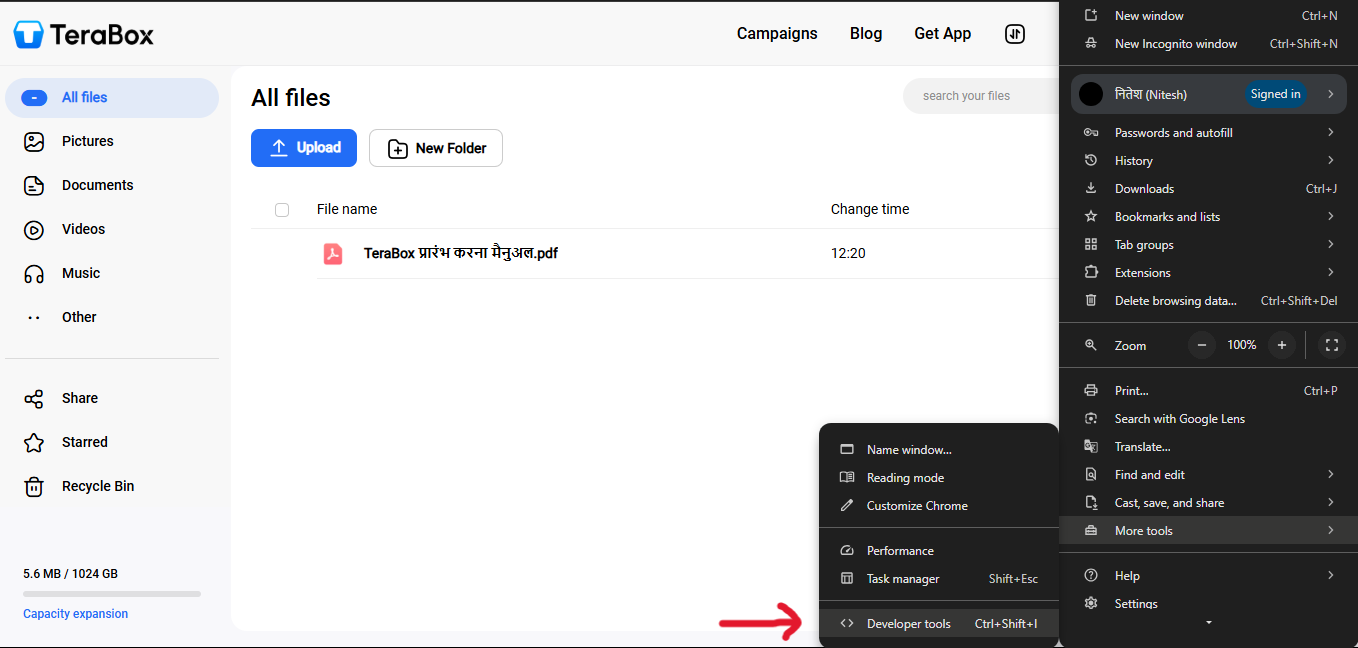
For getting your credentials, go to the terabox, create an account and follow the steps:
|
|
202
|
-
|
|
203
|
-
|
|
204
|
-
Login you account and open the developer tools
|
|
205
|
-
<br>
|
|
206
|
-
<br>
|
|
207
|
-
<br>
|
|
208
|
-
|
|
209
|
-
|
|
210
|
-
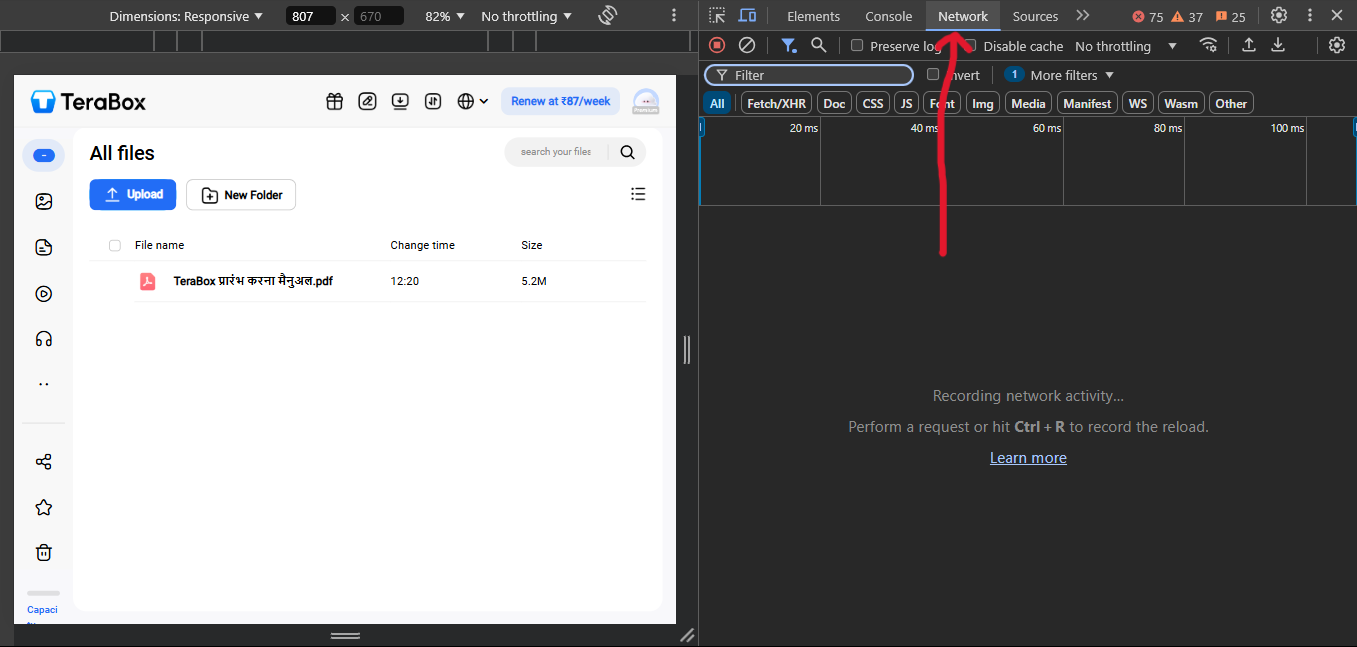
Go to network tab
|
|
211
|
-
<br>
|
|
212
|
-
<br>
|
|
213
|
-
<br>
|
|
214
|
-
|
|
215
|
-
|
|
216
|
-
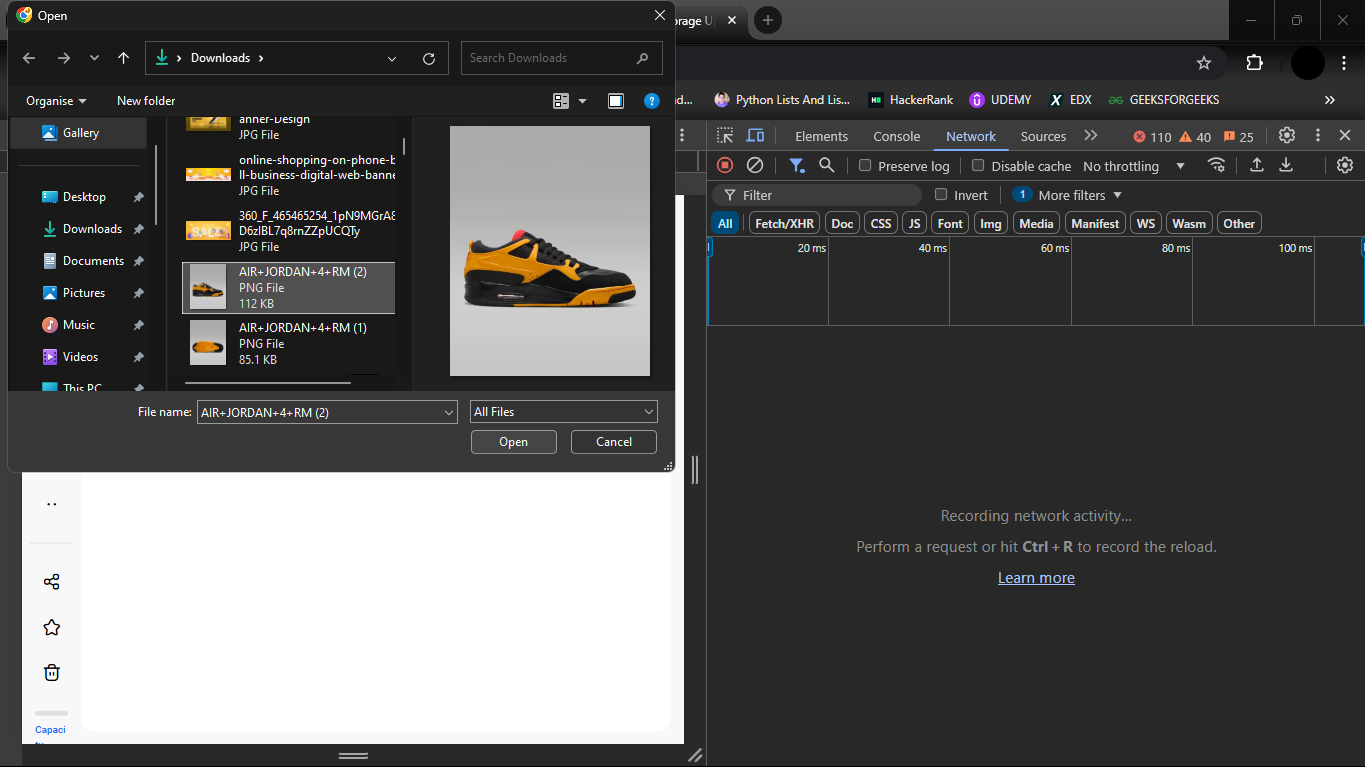
Upload an image from left of your screen
|
|
217
|
-
<br>
|
|
218
|
-
<br>
|
|
219
|
-
<br>
|
|
220
|
-
|
|
221
|
-
|
|
222
|
-
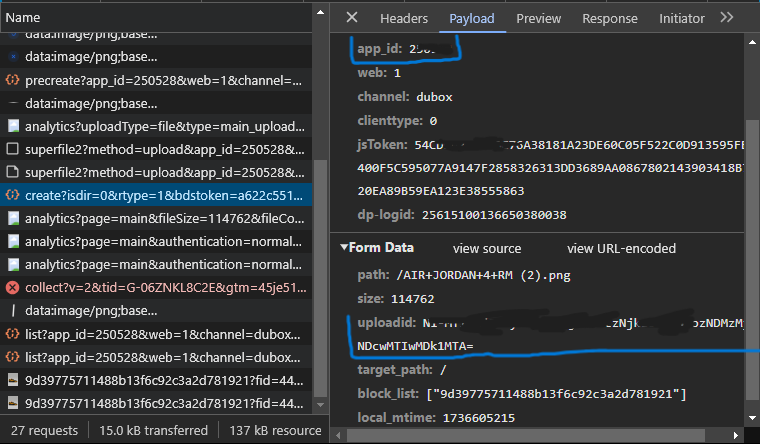
Look for 'appId' and 'uploadId' from following request
|
|
223
|
-
<br>
|
|
224
|
-
<br>
|
|
225
|
-
<br>
|
|
226
|
-
|
|
227
|
-
|
|
228
|
-
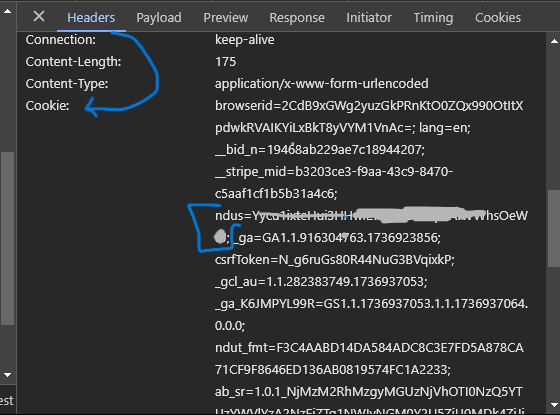
Get the 'ndus' from cookies in the header section
|
|
229
|
-
<br>
|
|
230
|
-
<br>
|
|
231
|
-
<br>
|
|
232
|
-
|
|
233
|
-
## Licence
|
|
234
|
-
|
|
235
|
-
This project is licensed under the [MIT License.](./LICENSE)
|
|
236
|
-
|
|
237
|
-
[Github](https://github.com/Pahadi10/terabox-upload-tool)
|
|
74
|
+
## License
|
|
75
|
+
MIT
|
|
@@ -1,41 +1,24 @@
|
|
|
1
1
|
const { generateSign, fetchHomeInfo, generateDownload } = require('./downloadHelper');
|
|
2
2
|
|
|
3
|
-
|
|
4
|
-
|
|
5
|
-
|
|
6
|
-
|
|
7
|
-
|
|
8
|
-
|
|
9
|
-
async function getDownloadLink(ndus, fid) {
|
|
10
|
-
try {
|
|
11
|
-
// Fetch home information to retrieve necessary parameters for signing
|
|
12
|
-
const homeInfo = await fetchHomeInfo(ndus);
|
|
13
|
-
|
|
14
|
-
if (!homeInfo || !homeInfo.data.sign3 || !homeInfo.data.sign1 || !homeInfo.data.timestamp) {
|
|
15
|
-
return { success: false, message: "Invalid home information received." };
|
|
16
|
-
}
|
|
17
|
-
|
|
18
|
-
const sign1 = homeInfo.data.sign3;
|
|
19
|
-
const sign2 = homeInfo.data.sign1;
|
|
20
|
-
const timestamp = homeInfo.data.timestamp;
|
|
21
|
-
|
|
22
|
-
// Generate the required sign using sign1 and sign2
|
|
23
|
-
const sign = generateSign(sign1, sign2);
|
|
24
|
-
if (!sign) {
|
|
25
|
-
return { success: false, message: "Failed to generate sign." };
|
|
26
|
-
}
|
|
3
|
+
async function getDownloadLink(ndus, fid, appId, jsToken, dpLogId) {
|
|
4
|
+
try {
|
|
5
|
+
const homeInfo = await fetchHomeInfo(ndus);
|
|
6
|
+
if (!homeInfo || !homeInfo.data.sign3 || !homeInfo.data.sign1 || !homeInfo.data.timestamp) {
|
|
7
|
+
return { success: false, message: "Invalid home information received." };
|
|
8
|
+
}
|
|
27
9
|
|
|
28
|
-
|
|
29
|
-
|
|
30
|
-
if (!responseDownload || !responseDownload.downloadLink[0]?.dlink) {
|
|
31
|
-
return { success: false, message: "Failed to retrieve download link." };
|
|
32
|
-
}
|
|
10
|
+
const sign = generateSign(homeInfo.data.sign3, homeInfo.data.sign1);
|
|
11
|
+
if (!sign) return { success: false, message: "Failed to generate sign." };
|
|
33
12
|
|
|
34
|
-
|
|
35
|
-
|
|
36
|
-
|
|
37
|
-
return { success: false, message: error.message || "Unknown error occurred while fetching download link." };
|
|
13
|
+
const res = await generateDownload(sign, fid, homeInfo.data.timestamp, ndus, appId, jsToken, dpLogId);
|
|
14
|
+
if (!res || !res.downloadLink[0]?.dlink) {
|
|
15
|
+
return { success: false, message: res.message || "Failed to retrieve download link." };
|
|
38
16
|
}
|
|
17
|
+
|
|
18
|
+
return { success: true, message: "Download link retrieved successfully.", downloadLink: res.downloadLink[0].dlink };
|
|
19
|
+
} catch (error) {
|
|
20
|
+
return { success: false, message: error.message || "Unknown error occurred." };
|
|
21
|
+
}
|
|
39
22
|
}
|
|
40
23
|
|
|
41
24
|
module.exports = getDownloadLink;
|
|
@@ -1,131 +1,51 @@
|
|
|
1
1
|
const axios = require('axios');
|
|
2
2
|
|
|
3
|
-
/**
|
|
4
|
-
* Generates a cryptographic sign using RC4-like encryption.
|
|
5
|
-
* @param {string} s1 - First input string (key).
|
|
6
|
-
* @param {string} s2 - Second input string (data).
|
|
7
|
-
* @returns {string} - Base64 encoded signed string.
|
|
8
|
-
*/
|
|
9
3
|
function generateSign(s1, s2) {
|
|
10
|
-
|
|
11
|
-
|
|
12
|
-
|
|
13
|
-
|
|
14
|
-
|
|
15
|
-
|
|
16
|
-
|
|
17
|
-
|
|
18
|
-
|
|
19
|
-
|
|
20
|
-
|
|
21
|
-
|
|
22
|
-
|
|
23
|
-
|
|
24
|
-
|
|
25
|
-
|
|
26
|
-
|
|
27
|
-
[p[i], p[j]] = [p[j], p[i]];
|
|
28
|
-
}
|
|
29
|
-
|
|
30
|
-
let i = 0;
|
|
31
|
-
j = 0;
|
|
32
|
-
for (let q = 0; q < s2.length; q++) {
|
|
33
|
-
i = (i + 1) % 256;
|
|
34
|
-
j = (j + p[i]) % 256;
|
|
35
|
-
[p[i], p[j]] = [p[j], p[i]];
|
|
36
|
-
const k = p[(p[i] + p[j]) % 256];
|
|
37
|
-
result.push(s2.charCodeAt(q) ^ k);
|
|
38
|
-
}
|
|
39
|
-
|
|
40
|
-
return Buffer.from(result).toString('base64');
|
|
41
|
-
} catch (error) {
|
|
42
|
-
console.error("Error generating sign:", error.message);
|
|
43
|
-
return null;
|
|
4
|
+
try {
|
|
5
|
+
const p = new Uint8Array(256), a = new Uint8Array(256), result = [];
|
|
6
|
+
for (let i = 0; i < 256; i++) {
|
|
7
|
+
a[i] = s1.charCodeAt(i % s1.length);
|
|
8
|
+
p[i] = i;
|
|
9
|
+
}
|
|
10
|
+
let j = 0;
|
|
11
|
+
for (let i = 0; i < 256; i++) {
|
|
12
|
+
j = (j + p[i] + a[i]) % 256;
|
|
13
|
+
[p[i], p[j]] = [p[j], p[i]];
|
|
14
|
+
}
|
|
15
|
+
let i = 0; j = 0;
|
|
16
|
+
for (let q = 0; q < s2.length; q++) {
|
|
17
|
+
i = (i + 1) % 256;
|
|
18
|
+
j = (j + p[i]) % 256;
|
|
19
|
+
[p[i], p[j]] = [p[j], p[i]];
|
|
20
|
+
result.push(s2.charCodeAt(q) ^ p[(p[i] + p[j]) % 256]);
|
|
44
21
|
}
|
|
22
|
+
return Buffer.from(result).toString('base64');
|
|
23
|
+
} catch (e) { return null; }
|
|
45
24
|
}
|
|
46
25
|
|
|
47
|
-
/**
|
|
48
|
-
* Fetches home information from Terabox API.
|
|
49
|
-
* @param {string} ndus - User authentication token.
|
|
50
|
-
* @returns {Promise<{success: boolean, message: string, data?: object}>} - The response data from the API.
|
|
51
|
-
*/
|
|
52
26
|
async function fetchHomeInfo(ndus) {
|
|
53
|
-
|
|
54
|
-
|
|
55
|
-
|
|
56
|
-
|
|
57
|
-
|
|
58
|
-
|
|
59
|
-
|
|
60
|
-
const response = await axios.get(url, {
|
|
61
|
-
params: {
|
|
62
|
-
app_id: "250528",
|
|
63
|
-
web: "1",
|
|
64
|
-
channel: "dubox",
|
|
65
|
-
clienttype: "0",
|
|
66
|
-
},
|
|
67
|
-
headers: {
|
|
68
|
-
"User-Agent": "Mozilla/5.0",
|
|
69
|
-
"Accept": "application/json",
|
|
70
|
-
"Cookie": `ndus=${ndus}`,
|
|
71
|
-
},
|
|
72
|
-
});
|
|
73
|
-
return { success: true, message: "Home info retrieved successfully.", data: response.data.data };
|
|
74
|
-
} catch (error) {
|
|
75
|
-
console.error("Error fetching home info:", error.response?.data || error.message);
|
|
76
|
-
return { success: false, message: error.message || "Failed to fetch home info." };
|
|
77
|
-
}
|
|
27
|
+
try {
|
|
28
|
+
const res = await axios.get("https://www.1024terabox.com/api/home/info", {
|
|
29
|
+
params: { app_id: "250528", web: "1", channel: "dubox", clienttype: "0" },
|
|
30
|
+
headers: { "Cookie": `ndus=${ndus}` }
|
|
31
|
+
});
|
|
32
|
+
return { success: true, data: res.data.data };
|
|
33
|
+
} catch (e) { return { success: false, message: e.message }; }
|
|
78
34
|
}
|
|
79
35
|
|
|
80
|
-
|
|
81
|
-
|
|
82
|
-
|
|
83
|
-
|
|
84
|
-
|
|
85
|
-
|
|
86
|
-
|
|
87
|
-
|
|
88
|
-
|
|
89
|
-
|
|
90
|
-
|
|
91
|
-
|
|
92
|
-
|
|
93
|
-
return { success: false, message: "Missing required parameters for generating download link." };
|
|
94
|
-
}
|
|
95
|
-
|
|
96
|
-
const response = await axios.get(url, {
|
|
97
|
-
params: {
|
|
98
|
-
app_id: "250528",
|
|
99
|
-
web: "1",
|
|
100
|
-
channel: "dubox",
|
|
101
|
-
clienttype: "0",
|
|
102
|
-
fidlist: `[${fid}]`,
|
|
103
|
-
type: "dlink",
|
|
104
|
-
vip: "2",
|
|
105
|
-
sign,
|
|
106
|
-
timestamp,
|
|
107
|
-
need_speed: "0",
|
|
108
|
-
},
|
|
109
|
-
headers: {
|
|
110
|
-
"User-Agent": "Mozilla/5.0",
|
|
111
|
-
"Accept": "application/json",
|
|
112
|
-
"Cookie": `ndus=${ndus}`,
|
|
113
|
-
},
|
|
114
|
-
});
|
|
115
|
-
|
|
116
|
-
if (!response.data.dlink) {
|
|
117
|
-
return { success: false, message: "No download link received." };
|
|
118
|
-
}
|
|
119
|
-
|
|
120
|
-
return { success: true, message: "Download link generated successfully.", downloadLink: response.data.dlink };
|
|
121
|
-
} catch (error) {
|
|
122
|
-
console.error("Error generating download link:", error.response?.data || error.message);
|
|
123
|
-
return { success: false, message: error.message || "Failed to generate download link." };
|
|
124
|
-
}
|
|
36
|
+
async function generateDownload(sign, fid, timestamp, ndus, appId, jsToken, dpLogId) {
|
|
37
|
+
try {
|
|
38
|
+
const res = await axios.get("https://www.1024terabox.com/api/download", {
|
|
39
|
+
params: {
|
|
40
|
+
app_id: appId || "250528", web: "1", channel: "dubox", clienttype: "0",
|
|
41
|
+
jsToken, "dp-logid": dpLogId, fidlist: `[${fid}]`, type: "dlink",
|
|
42
|
+
vip: "2", sign, timestamp, need_speed: "0"
|
|
43
|
+
},
|
|
44
|
+
headers: { "Cookie": `ndus=${ndus}` }
|
|
45
|
+
});
|
|
46
|
+
if (!res.data.dlink) return { success: false, message: res.data.errmsg };
|
|
47
|
+
return { success: true, downloadLink: res.data.dlink };
|
|
48
|
+
} catch (e) { return { success: false, message: e.message }; }
|
|
125
49
|
}
|
|
126
50
|
|
|
127
|
-
module.exports = {
|
|
128
|
-
generateSign,
|
|
129
|
-
fetchHomeInfo,
|
|
130
|
-
generateDownload,
|
|
131
|
-
};
|
|
51
|
+
module.exports = { generateSign, fetchHomeInfo, generateDownload };
|
|
@@ -1,45 +1,32 @@
|
|
|
1
1
|
const axios = require("axios");
|
|
2
2
|
|
|
3
|
-
// ファイル削除APIリクエスト関数
|
|
4
3
|
const deleteFile = async (filelist, config) => {
|
|
5
|
-
|
|
6
|
-
const
|
|
7
|
-
const url = "https://www.1024terabox.com/api/filemanager"; // URLを変更
|
|
4
|
+
const { appId, jsToken, browserId, ndus, dpLogId } = config.credentials || config;
|
|
5
|
+
const url = "https://www.1024terabox.com/api/filemanager";
|
|
8
6
|
|
|
9
|
-
// クエリパラメータを設定
|
|
10
7
|
const params = {
|
|
11
8
|
opera: "delete",
|
|
12
9
|
app_id: appId,
|
|
13
10
|
jsToken: jsToken,
|
|
11
|
+
"dp-logid": dpLogId,
|
|
14
12
|
};
|
|
15
13
|
|
|
16
|
-
// URLSearchParamsは自動的にエンコードしますが、
|
|
17
|
-
// さらに明示的にエンコードしたい場合は encodeURIComponent を使います。
|
|
18
14
|
const data = new URLSearchParams();
|
|
19
|
-
// JSON形式の filelist をエンコードして追加
|
|
20
15
|
data.append("filelist", JSON.stringify(filelist));
|
|
21
16
|
|
|
22
|
-
// ヘッダー情報を設定
|
|
23
17
|
const headers = {
|
|
24
18
|
"Cookie": `browserid=${browserId}; ndus=${ndus};`,
|
|
25
19
|
};
|
|
26
20
|
|
|
27
21
|
try {
|
|
28
|
-
// APIリクエストを送信
|
|
29
22
|
const response = await axios.post(url, data.toString(), {
|
|
30
23
|
headers,
|
|
31
24
|
params,
|
|
32
25
|
});
|
|
33
|
-
|
|
34
|
-
// レスポンスを返す
|
|
35
26
|
return response.data;
|
|
36
27
|
} catch (error) {
|
|
37
|
-
// エラーを投げる
|
|
38
28
|
throw error.response ? error.response.data : error.message;
|
|
39
29
|
}
|
|
40
30
|
};
|
|
41
31
|
|
|
42
|
-
|
|
43
|
-
module.exports = {
|
|
44
|
-
deleteFile,
|
|
45
|
-
};
|
|
32
|
+
module.exports = { deleteFile };
|
package/lib/helpers/fileMove.js
CHANGED
|
@@ -1,46 +1,33 @@
|
|
|
1
1
|
const axios = require("axios");
|
|
2
2
|
|
|
3
|
-
// ファイル移動APIリクエスト関数
|
|
4
3
|
const moveFile = async (filelist, config) => {
|
|
5
|
-
|
|
6
|
-
const
|
|
7
|
-
const url = "https://www.1024terabox.com/api/filemanager"; // URLを変更
|
|
4
|
+
const { appId, jsToken, browserId, ndus, dpLogId } = config.credentials || config;
|
|
5
|
+
const url = "https://www.1024terabox.com/api/filemanager";
|
|
8
6
|
|
|
9
|
-
// クエリパラメータを設定(operaの値を "move" に変更)
|
|
10
7
|
const params = {
|
|
11
8
|
opera: "move",
|
|
12
9
|
app_id: appId,
|
|
13
10
|
jsToken: jsToken,
|
|
11
|
+
"dp-logid": dpLogId,
|
|
14
12
|
};
|
|
15
13
|
|
|
16
|
-
// URLSearchParamsを使用してForm dataを作成
|
|
17
14
|
const data = new URLSearchParams();
|
|
18
|
-
// JSON形式の filelist をエンコードして追加
|
|
19
|
-
// 例: [{"path":"/b","dest":"/a","newname":"c"}]
|
|
20
15
|
data.append("filelist", JSON.stringify(filelist));
|
|
21
16
|
|
|
22
|
-
// ヘッダー情報を設定
|
|
23
17
|
const headers = {
|
|
24
18
|
"Cookie": `browserid=${browserId}; ndus=${ndus};`,
|
|
25
19
|
"Content-Type": "application/x-www-form-urlencoded",
|
|
26
20
|
};
|
|
27
21
|
|
|
28
22
|
try {
|
|
29
|
-
// APIリクエストを送信
|
|
30
23
|
const response = await axios.post(url, data.toString(), {
|
|
31
24
|
headers,
|
|
32
25
|
params,
|
|
33
26
|
});
|
|
34
|
-
|
|
35
|
-
// レスポンスを返す
|
|
36
27
|
return response.data;
|
|
37
28
|
} catch (error) {
|
|
38
|
-
// エラーを投げる
|
|
39
29
|
throw error.response ? error.response.data : error.message;
|
|
40
30
|
}
|
|
41
31
|
};
|
|
42
32
|
|
|
43
|
-
|
|
44
|
-
module.exports = {
|
|
45
|
-
moveFile,
|
|
46
|
-
};
|
|
33
|
+
module.exports = { moveFile };
|