terabox-upload-tool 1.0.0
This diff represents the content of publicly available package versions that have been released to one of the supported registries. The information contained in this diff is provided for informational purposes only and reflects changes between package versions as they appear in their respective public registries.
- package/README.md +157 -0
- package/examples/example.js +24 -0
- package/lib/index.js +81 -0
- package/lib/utils.js +20 -0
- package/package.json +22 -0
package/README.md
ADDED
|
@@ -0,0 +1,157 @@
|
|
|
1
|
+
# Terabox Upload Tool
|
|
2
|
+
|
|
3
|
+
A simple and efficient Node.js library for uploading files to [TeraBox](https://www.terabox.com/wap) storage. This tool streamlines the process of file uploads while offering customization options such as directory selection.
|
|
4
|
+
|
|
5
|
+
## Features
|
|
6
|
+
|
|
7
|
+
* File Upload: Easily upload files to Terabox storage.
|
|
8
|
+
* Custom Directory Support: Specify the directory where the file should be uploaded.
|
|
9
|
+
* Progress Tracking: Monitor the upload progress in real-time.
|
|
10
|
+
|
|
11
|
+
|
|
12
|
+
## Coming Soon (Open for Collaboration)
|
|
13
|
+
|
|
14
|
+
* Fetch Files: Retrieve the files stored in your Terabox account.
|
|
15
|
+
* Delete Files: Remove files from your Terabox storage directly using this library.
|
|
16
|
+
|
|
17
|
+
|
|
18
|
+
|
|
19
|
+
## Installation
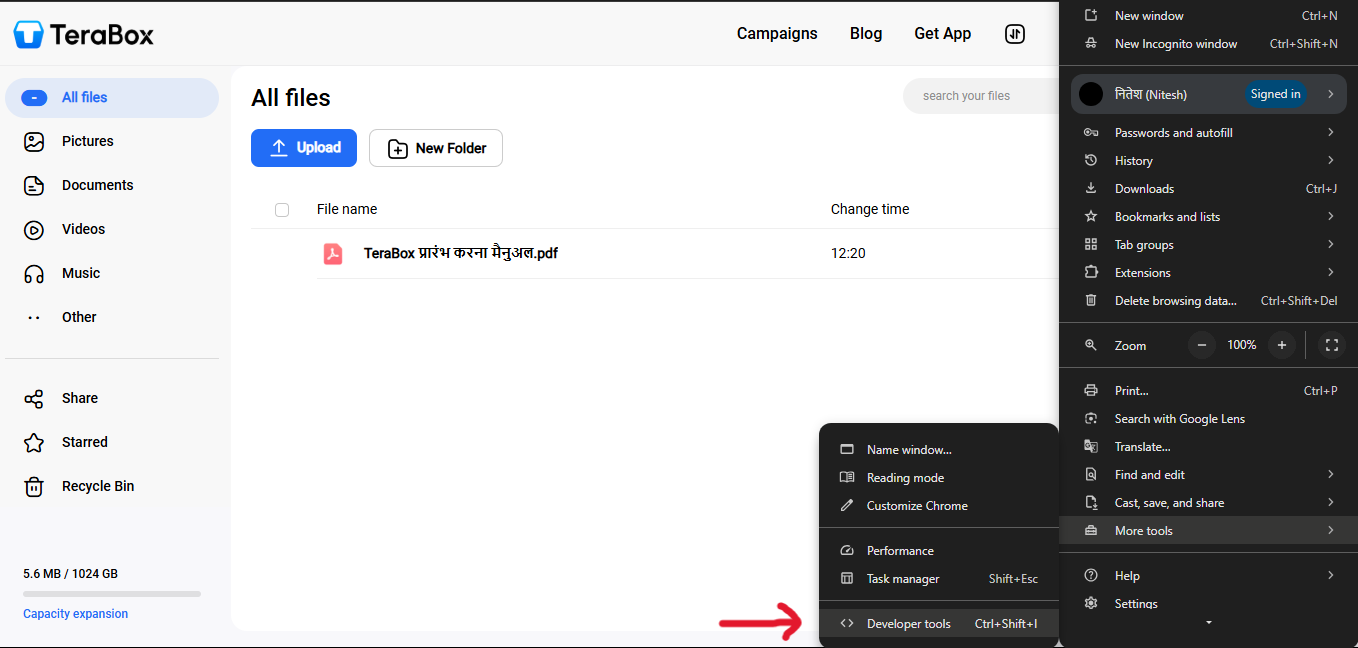
|
|
20
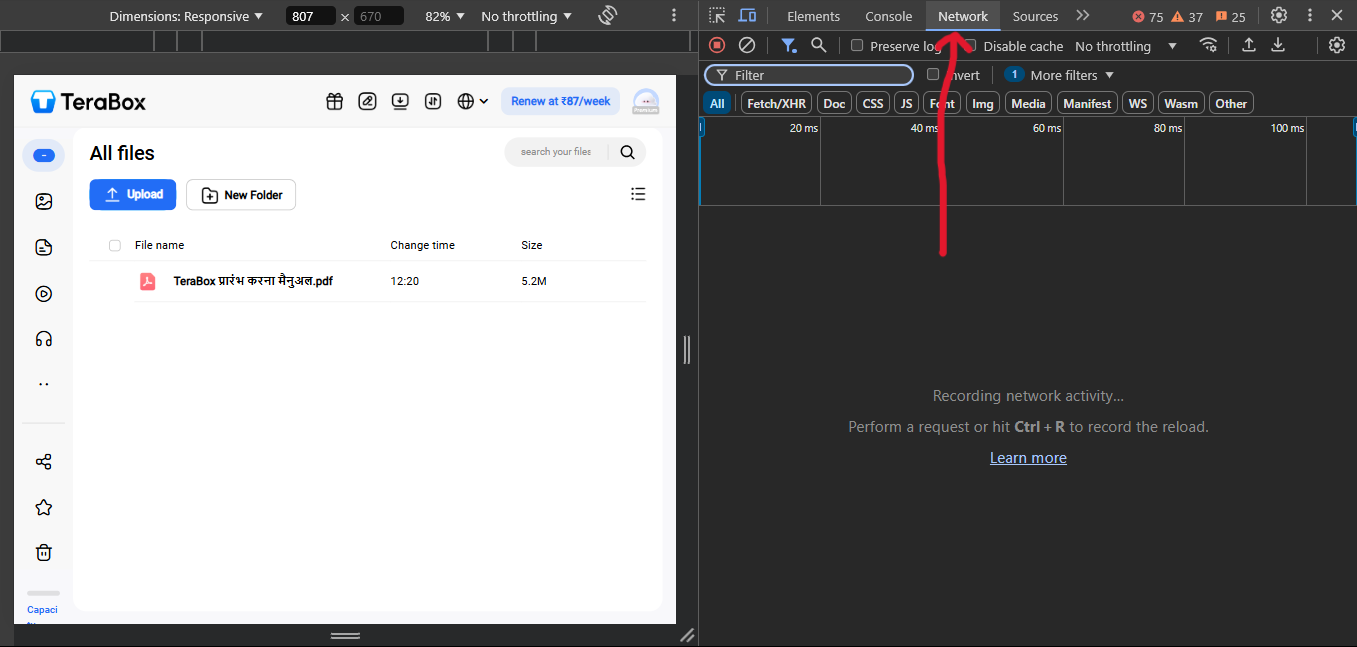
|
+
|
|
21
|
+
Install the package using npm:
|
|
22
|
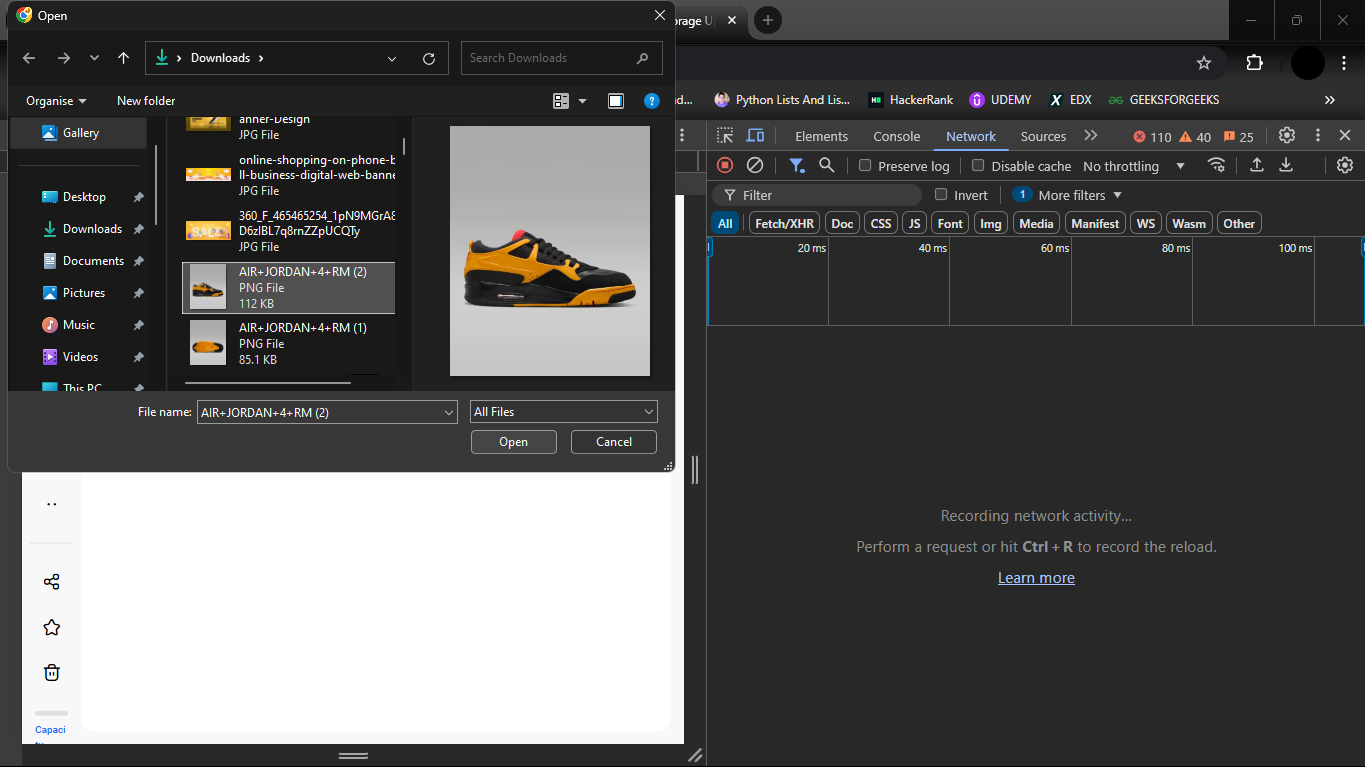
+
|
|
23
|
+
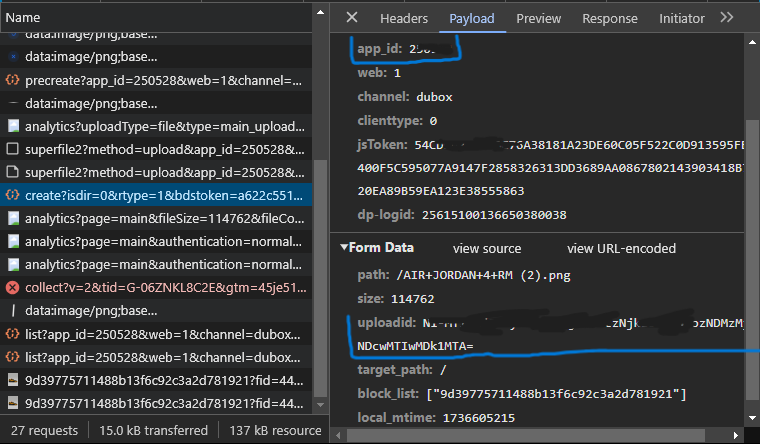
```bash
|
|
24
|
+
npm install terabox-upload-tool
|
|
25
|
+
|
|
26
|
+
```
|
|
27
|
+
|
|
28
|
+
## Getting Started
|
|
29
|
+
|
|
30
|
+
### Setting up credentials
|
|
31
|
+
|
|
32
|
+
```javascript
|
|
33
|
+
const TeraboxUploader = require('terabox-upload-tool');
|
|
34
|
+
|
|
35
|
+
const credentials = {
|
|
36
|
+
ndus: 'valid_ndus', //Required: Get this from your session (See guide below)
|
|
37
|
+
appId: 'valid_appId', //Get from session (See attached screenshots)
|
|
38
|
+
uploadId: 'valid_uploadId' //Get from session (See attached screenshots)
|
|
39
|
+
};
|
|
40
|
+
|
|
41
|
+
```
|
|
42
|
+
### Uploading a File
|
|
43
|
+
To upload a file, create an instance of TeraboxUploader and specify the file path.
|
|
44
|
+
|
|
45
|
+
#### Example: Save File to a Specific Directory
|
|
46
|
+
|
|
47
|
+
```javascript
|
|
48
|
+
const uploader = new TeraboxUploader(credentials);
|
|
49
|
+
|
|
50
|
+
const filePath = './path/to/your/file.jpg';
|
|
51
|
+
|
|
52
|
+
// Uploads to '/my-uploads'
|
|
53
|
+
uploader.uploadFile(filePath, (uploaded, total) => {
|
|
54
|
+
console.log(`Progress: ${(uploaded / total * 100).toFixed(2)}%`);
|
|
55
|
+
}, '/my-uploads');
|
|
56
|
+
```
|
|
57
|
+
|
|
58
|
+
#### Example: Save File to Root Directly
|
|
59
|
+
|
|
60
|
+
```javascript
|
|
61
|
+
|
|
62
|
+
// Uploads to '/'
|
|
63
|
+
uploader.uploadFile(filePath, (uploaded, total) => {
|
|
64
|
+
console.log(`Progress: ${(uploaded / total * 100).toFixed(2)}%`);
|
|
65
|
+
}, '/my-uploads');
|
|
66
|
+
```
|
|
67
|
+
|
|
68
|
+
## Future Enhancements (Open Collaboration)
|
|
69
|
+
We are actively seeking contributors to add the following features:
|
|
70
|
+
|
|
71
|
+
1. Fetch Files:
|
|
72
|
+
* Implement functionality to list files stored in Terabox directories.
|
|
73
|
+
* Provide options to filter by file types, size, or date modified.
|
|
74
|
+
|
|
75
|
+
2. Delete Files:
|
|
76
|
+
* Enable users to delete specific files or directories from their Terabox storage.
|
|
77
|
+
* Include safeguards like confirmation prompts before deletion.
|
|
78
|
+
|
|
79
|
+
3. Error Handling Enhancements:
|
|
80
|
+
* Improve error messages for easier debugging and user guidance.
|
|
81
|
+
|
|
82
|
+
4. Automated Tests:
|
|
83
|
+
* Add test cases to ensure reliability and robustness.
|
|
84
|
+
|
|
85
|
+
5. Documentation Updates:
|
|
86
|
+
|
|
87
|
+
* Expand guides with screenshots and example workflows.
|
|
88
|
+
|
|
89
|
+
## Contribution Guidelines
|
|
90
|
+
|
|
91
|
+
We welcome contributions from the community! Here’s how you can get started:
|
|
92
|
+
|
|
93
|
+
1. Fork the repository and create a new branch for your feature or bugfix.
|
|
94
|
+
2. Make your changes and ensure the code adheres to the project's style guide.
|
|
95
|
+
3. Submit a pull request detailing your changes and their purpose.
|
|
96
|
+
4. Feel free to open issues for feature requests or bug reports.
|
|
97
|
+
|
|
98
|
+
## Resources for Developers
|
|
99
|
+
* [Node.js File System Documentation](https://nodejs.org/api/fs.html)
|
|
100
|
+
* [Chrome Dev-Tools (Networks)](https://developer.chrome.com/docs/devtools/network)
|
|
101
|
+
|
|
102
|
+
|
|
103
|
+
<br>
|
|
104
|
+
|
|
105
|
+
Terabox Node.js Library
|
|
106
|
+
|
|
107
|
+
Upload Files to Terabox
|
|
108
|
+
|
|
109
|
+
Terabox API Integration
|
|
110
|
+
|
|
111
|
+
Terabox File Management
|
|
112
|
+
|
|
113
|
+
Node.js Terabox SDK
|
|
114
|
+
|
|
115
|
+
## Screenshots
|
|
116
|
+
|
|
117
|
+
For getting your credentials, go to the terabox, create an account and follow the steps:
|
|
118
|
+
|
|
119
|
+
|
|
120
|
+
Login you account and open the developer tools
|
|
121
|
+
<br>
|
|
122
|
+
<br>
|
|
123
|
+
<br>
|
|
124
|
+
|
|
125
|
+
|
|
126
|
+
Go to network tab
|
|
127
|
+
<br>
|
|
128
|
+
<br>
|
|
129
|
+
<br>
|
|
130
|
+
|
|
131
|
+
|
|
132
|
+
Upload an image from left of your screen
|
|
133
|
+
<br>
|
|
134
|
+
<br>
|
|
135
|
+
<br>
|
|
136
|
+
|
|
137
|
+
|
|
138
|
+
Look for 'appId' and 'uploadId' from following request
|
|
139
|
+
<br>
|
|
140
|
+
<br>
|
|
141
|
+
<br>
|
|
142
|
+
|
|
143
|
+
|
|
144
|
+
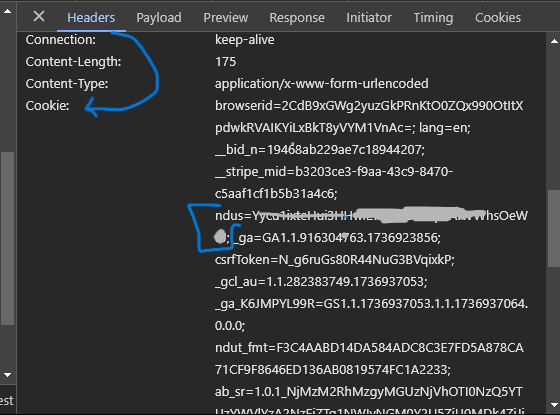
Get the 'ndus' from cookies in the header section
|
|
145
|
+
<br>
|
|
146
|
+
<br>
|
|
147
|
+
<br>
|
|
148
|
+
|
|
149
|
+
|
|
150
|
+
|
|
151
|
+
|
|
152
|
+
## Licence
|
|
153
|
+
|
|
154
|
+
This project is licensed under the [MIT License.]()
|
|
155
|
+
|
|
156
|
+
|
|
157
|
+
|
|
@@ -0,0 +1,24 @@
|
|
|
1
|
+
const TeraboxUploader = require('terabox-upload-tool');
|
|
2
|
+
|
|
3
|
+
// Set up credentials for your account
|
|
4
|
+
const credentials = {
|
|
5
|
+
ndus: 'valid_ndus',
|
|
6
|
+
appId: 'valid_appId',
|
|
7
|
+
uploadId: 'valid_uploadId'
|
|
8
|
+
};
|
|
9
|
+
|
|
10
|
+
const uploader = new TeraboxUploader(credentials);
|
|
11
|
+
|
|
12
|
+
// Upload a file
|
|
13
|
+
const filePath = './path/to/your/file.jpg';
|
|
14
|
+
|
|
15
|
+
|
|
16
|
+
// Save file in a specific directory, e.g., '/my-uploads'
|
|
17
|
+
uploader.uploadFile(filePath, (uploaded, total) => {
|
|
18
|
+
console.log(`Progress: ${(uploaded / total * 100).toFixed(2)}%`);
|
|
19
|
+
}, '/my-uploads');
|
|
20
|
+
|
|
21
|
+
// Save file in the root directory (default behavior)
|
|
22
|
+
uploader.uploadFile(filePath, (uploaded, total) => {
|
|
23
|
+
console.log(`Progress: ${(uploaded / total * 100).toFixed(2)}%`);
|
|
24
|
+
});
|
package/lib/index.js
ADDED
|
@@ -0,0 +1,81 @@
|
|
|
1
|
+
const axios = require('axios');
|
|
2
|
+
const path = require('path');
|
|
3
|
+
const fs = require('fs');
|
|
4
|
+
const FormData = require('form-data');
|
|
5
|
+
const { buildUploadUrl, buildCreateUrl } = require('./utils');
|
|
6
|
+
|
|
7
|
+
/**
|
|
8
|
+
* Class to handle Terabox file upload
|
|
9
|
+
*/
|
|
10
|
+
class TeraboxUploader {
|
|
11
|
+
constructor(credentials) {
|
|
12
|
+
if (!credentials || !credentials.ndus || !credentials.appId || !credentials.uploadId) {
|
|
13
|
+
throw new Error("Credentials are required (ndus, appId, uploadId).");
|
|
14
|
+
}
|
|
15
|
+
|
|
16
|
+
this.credentials = {
|
|
17
|
+
ndus: credentials.ndus,
|
|
18
|
+
cookies: `browserid=3BeB9xGWg2yuzOuPRnKtO0ZQx990OtItXpdwkRVAIKYiLxBkT8yVYM3TnVr=; lang=en; ndus=${credentials.ndus};`,
|
|
19
|
+
appId: credentials.appId,
|
|
20
|
+
uploadId: credentials.uploadId,
|
|
21
|
+
};
|
|
22
|
+
}
|
|
23
|
+
|
|
24
|
+
/**
|
|
25
|
+
* Uploads a file to Terabox
|
|
26
|
+
* @param {string} filePath - Path to the file to be uploaded
|
|
27
|
+
* @param {function} progressCallback - Optional callback to track upload progress
|
|
28
|
+
* @param {string} [directory='/'] - Optional directory where the file will be saved on Terabox
|
|
29
|
+
*/
|
|
30
|
+
async uploadFile(filePath, progressCallback, directory = '/') {
|
|
31
|
+
try {
|
|
32
|
+
const fileName = path.basename(filePath);
|
|
33
|
+
const fileSize = fs.statSync(filePath).size;
|
|
34
|
+
const uploadUrl = buildUploadUrl(fileName, this.credentials.uploadId, this.credentials.appId);
|
|
35
|
+
|
|
36
|
+
// Preflight request (OPTIONS)
|
|
37
|
+
await axios.options(uploadUrl, { headers: { Origin: 'https://www.1024terabox.com' } });
|
|
38
|
+
|
|
39
|
+
// Upload the file as form data (POST)
|
|
40
|
+
const formData = new FormData();
|
|
41
|
+
formData.append('file', fs.createReadStream(filePath));
|
|
42
|
+
|
|
43
|
+
const postResponse = await axios.post(uploadUrl, formData, {
|
|
44
|
+
headers: {
|
|
45
|
+
...formData.getHeaders(),
|
|
46
|
+
Origin: 'https://www.1024terabox.com',
|
|
47
|
+
Cookie: this.credentials.cookies,
|
|
48
|
+
},
|
|
49
|
+
onUploadProgress: (progressEvent) => {
|
|
50
|
+
if (progressCallback) {
|
|
51
|
+
progressCallback(progressEvent.loaded, progressEvent.total);
|
|
52
|
+
}
|
|
53
|
+
},
|
|
54
|
+
});
|
|
55
|
+
|
|
56
|
+
console.log('File chunk upload response:', postResponse.data);
|
|
57
|
+
|
|
58
|
+
// Finalize the upload (Create call)
|
|
59
|
+
const createUrl = buildCreateUrl();
|
|
60
|
+
const createResponse = await axios.post(createUrl, new URLSearchParams({
|
|
61
|
+
path: `${directory}/${fileName}`,
|
|
62
|
+
size: fileSize,
|
|
63
|
+
uploadid: this.credentials.uploadId,
|
|
64
|
+
target_path: directory,
|
|
65
|
+
block_list: JSON.stringify([postResponse.headers['content-md5']]),
|
|
66
|
+
local_mtime: Math.floor(Date.now() / 1000),
|
|
67
|
+
}).toString(), {
|
|
68
|
+
headers: {
|
|
69
|
+
'Content-Type': 'application/x-www-form-urlencoded',
|
|
70
|
+
Cookie: this.credentials.cookies,
|
|
71
|
+
},
|
|
72
|
+
});
|
|
73
|
+
|
|
74
|
+
console.log('Create response:', createResponse.data);
|
|
75
|
+
} catch (error) {
|
|
76
|
+
console.error('Error during upload process:', error.response?.data || error.message);
|
|
77
|
+
}
|
|
78
|
+
}
|
|
79
|
+
}
|
|
80
|
+
|
|
81
|
+
module.exports = TeraboxUploader;
|
package/lib/utils.js
ADDED
|
@@ -0,0 +1,20 @@
|
|
|
1
|
+
/**
|
|
2
|
+
* Builds the URL for uploading a file chunk.
|
|
3
|
+
* @param {string} fileName - The name of the file being uploaded
|
|
4
|
+
* @param {string} uploadId - The unique ID for the upload session (optional)
|
|
5
|
+
* @param {string} appId - The application ID (required)
|
|
6
|
+
* @returns {string} - The upload URL
|
|
7
|
+
*/
|
|
8
|
+
function buildUploadUrl(fileName, uploadId, appId) {
|
|
9
|
+
return `https://c-jp.1024terabox.com/rest/2.0/pcs/superfile2?method=upload&app_id=${appId}&channel=dubox&clienttype=0&web=1&path=%2F${encodeURIComponent(fileName)}&uploadid=${uploadId}&uploadsign=0&partseq=0`;
|
|
10
|
+
}
|
|
11
|
+
|
|
12
|
+
/**
|
|
13
|
+
* Builds the URL for the final create call.
|
|
14
|
+
* @returns {string} - The create URL
|
|
15
|
+
*/
|
|
16
|
+
function buildCreateUrl() {
|
|
17
|
+
return 'https://www.1024terabox.com/api/create';
|
|
18
|
+
}
|
|
19
|
+
|
|
20
|
+
module.exports = { buildUploadUrl, buildCreateUrl };
|
package/package.json
ADDED
|
@@ -0,0 +1,22 @@
|
|
|
1
|
+
{
|
|
2
|
+
"name": "terabox-upload-tool",
|
|
3
|
+
"version": "1.0.0",
|
|
4
|
+
"description": "A Node.js library to upload files to Terabox",
|
|
5
|
+
"main": "lib/index.js",
|
|
6
|
+
"scripts": {
|
|
7
|
+
"test": "echo \"Error: no test specified\" && exit 1"
|
|
8
|
+
},
|
|
9
|
+
"keywords": [
|
|
10
|
+
"terabox",
|
|
11
|
+
"upload",
|
|
12
|
+
"file",
|
|
13
|
+
"storage",
|
|
14
|
+
"node"
|
|
15
|
+
],
|
|
16
|
+
"author": "Nitesh Singh Bhandari",
|
|
17
|
+
"license": "MIT",
|
|
18
|
+
"dependencies": {
|
|
19
|
+
"axios": "^1.7.9",
|
|
20
|
+
"form-data": "^4.0.1"
|
|
21
|
+
}
|
|
22
|
+
}
|