tencentcloud-sdk-nodejs 4.0.879 → 4.0.881
This diff represents the content of publicly available package versions that have been released to one of the supported registries. The information contained in this diff is provided for informational purposes only and reflects changes between package versions as they appear in their respective public registries.
- package/CHANGELOG.md +454 -0
- package/SERVICE_CHANGELOG.md +442 -271
- package/package.json +1 -1
- package/products.md +27 -27
- package/src/common/sdk_version.ts +1 -1
- package/src/services/ams/index.ts +2 -2
- package/src/services/asr/v20190614/asr_models.ts +1 -1
- package/src/services/billing/v20180709/billing_models.ts +5 -0
- package/src/services/bma/index.ts +2 -2
- package/src/services/cam/v20190116/cam_models.ts +22 -8
- package/src/services/cdb/v20170320/cdb_client.ts +21 -5
- package/src/services/cdb/v20170320/cdb_models.ts +180 -44
- package/src/services/chdfs/index.ts +2 -2
- package/src/services/cls/v20201016/cls_models.ts +14 -8
- package/src/services/cmq/v20190304/cmq_client.ts +1 -1
- package/src/services/cmq/v20190304/cmq_models.ts +16 -16
- package/src/services/cynosdb/v20190107/cynosdb_client.ts +18 -6
- package/src/services/cynosdb/v20190107/cynosdb_models.ts +57 -0
- package/src/services/dbbrain/index.ts +2 -2
- package/src/services/dlc/v20210125/dlc_client.ts +20 -7
- package/src/services/dlc/v20210125/dlc_models.ts +83 -5
- package/src/services/dsgc/v20190723/dsgc_models.ts +6 -6
- package/src/services/dts/v20180330/dts_client.ts +3 -18
- package/src/services/dts/v20180330/dts_models.ts +63 -117
- package/src/services/emr/v20190103/emr_models.ts +2 -2
- package/src/services/ess/v20201111/ess_client.ts +864 -827
- package/src/services/ess/v20201111/ess_models.ts +162 -84
- package/src/services/essbasic/index.ts +2 -2
- package/src/services/essbasic/v20210526/essbasic_client.ts +38 -3
- package/src/services/essbasic/v20210526/essbasic_models.ts +191 -114
- package/src/services/facefusion/index.ts +2 -2
- package/src/services/facefusion/v20181201/facefusion_models.ts +6 -6
- package/src/services/iai/index.ts +2 -2
- package/src/services/ims/index.ts +2 -2
- package/src/services/iotexplorer/v20190423/iotexplorer_models.ts +4 -4
- package/src/services/iotvideo/index.ts +2 -2
- package/src/services/irp/index.ts +2 -2
- package/src/services/lcic/v20220817/lcic_models.ts +4 -4
- package/src/services/lighthouse/v20200324/lighthouse_models.ts +1 -1
- package/src/services/lke/v20231130/lke_client.ts +17 -9
- package/src/services/lke/v20231130/lke_models.ts +181 -70
- package/src/services/mgobe/index.ts +2 -2
- package/src/services/mongodb/index.ts +2 -2
- package/src/services/mongodb/v20190725/mongodb_client.ts +19 -6
- package/src/services/mongodb/v20190725/mongodb_models.ts +56 -0
- package/src/services/mps/v20190612/mps_models.ts +69 -8
- package/src/services/ocr/v20181119/ocr_client.ts +13 -10
- package/src/services/ocr/v20181119/ocr_models.ts +361 -169
- package/src/services/organization/v20210331/organization_client.ts +32 -8
- package/src/services/organization/v20210331/organization_models.ts +70 -30
- package/src/services/ses/v20201002/ses_client.ts +2 -3
- package/src/services/ses/v20201002/ses_models.ts +8 -0
- package/src/services/sms/index.ts +2 -2
- package/src/services/tbp/index.ts +2 -2
- package/src/services/tdmq/v20200217/tdmq_client.ts +115 -19
- package/src/services/tdmq/v20200217/tdmq_models.ts +391 -86
- package/src/services/thpc/index.ts +4 -4
- package/src/services/tke/index.ts +2 -2
- package/src/services/tke/v20180525/tke_models.ts +4 -4
- package/src/services/tms/index.ts +2 -2
- package/src/services/trro/v20220325/trro_models.ts +6 -6
- package/src/services/trtc/v20190722/trtc_models.ts +4 -1
- package/src/services/tsf/v20180326/tsf_models.ts +32 -27
- package/src/services/vm/index.ts +2 -2
- package/tencentcloud/common/sdk_version.d.ts +1 -1
- package/tencentcloud/common/sdk_version.js +1 -1
- package/tencentcloud/services/ams/index.d.ts +4 -4
- package/tencentcloud/services/ams/index.js +2 -2
- package/tencentcloud/services/asr/v20190614/asr_models.d.ts +1 -1
- package/tencentcloud/services/billing/v20180709/billing_models.d.ts +5 -0
- package/tencentcloud/services/bma/index.d.ts +4 -4
- package/tencentcloud/services/bma/index.js +2 -2
- package/tencentcloud/services/cam/v20190116/cam_models.d.ts +22 -8
- package/tencentcloud/services/cdb/v20170320/cdb_client.d.ts +5 -1
- package/tencentcloud/services/cdb/v20170320/cdb_client.js +6 -0
- package/tencentcloud/services/cdb/v20170320/cdb_models.d.ts +173 -43
- package/tencentcloud/services/chdfs/index.d.ts +4 -4
- package/tencentcloud/services/chdfs/index.js +2 -2
- package/tencentcloud/services/cls/v20201016/cls_models.d.ts +14 -8
- package/tencentcloud/services/cmq/v20190304/cmq_client.d.ts +1 -1
- package/tencentcloud/services/cmq/v20190304/cmq_client.js +1 -1
- package/tencentcloud/services/cmq/v20190304/cmq_models.d.ts +16 -16
- package/tencentcloud/services/cynosdb/v20190107/cynosdb_client.d.ts +7 -3
- package/tencentcloud/services/cynosdb/v20190107/cynosdb_client.js +9 -3
- package/tencentcloud/services/cynosdb/v20190107/cynosdb_models.d.ts +55 -0
- package/tencentcloud/services/dbbrain/index.d.ts +4 -4
- package/tencentcloud/services/dbbrain/index.js +2 -2
- package/tencentcloud/services/dlc/v20210125/dlc_client.d.ts +8 -4
- package/tencentcloud/services/dlc/v20210125/dlc_client.js +9 -3
- package/tencentcloud/services/dlc/v20210125/dlc_models.d.ts +80 -5
- package/tencentcloud/services/dsgc/v20190723/dsgc_models.d.ts +6 -6
- package/tencentcloud/services/dts/v20180330/dts_client.d.ts +1 -7
- package/tencentcloud/services/dts/v20180330/dts_client.js +0 -8
- package/tencentcloud/services/dts/v20180330/dts_models.d.ts +63 -114
- package/tencentcloud/services/emr/v20190103/emr_models.d.ts +2 -2
- package/tencentcloud/services/ess/v20201111/ess_client.d.ts +517 -496
- package/tencentcloud/services/ess/v20201111/ess_client.js +620 -595
- package/tencentcloud/services/ess/v20201111/ess_models.d.ts +158 -84
- package/tencentcloud/services/essbasic/index.d.ts +4 -4
- package/tencentcloud/services/essbasic/index.js +2 -2
- package/tencentcloud/services/essbasic/v20210526/essbasic_client.d.ts +20 -1
- package/tencentcloud/services/essbasic/v20210526/essbasic_client.js +23 -0
- package/tencentcloud/services/essbasic/v20210526/essbasic_models.d.ts +187 -114
- package/tencentcloud/services/facefusion/index.d.ts +4 -4
- package/tencentcloud/services/facefusion/index.js +2 -2
- package/tencentcloud/services/facefusion/v20181201/facefusion_models.d.ts +6 -6
- package/tencentcloud/services/iai/index.d.ts +4 -4
- package/tencentcloud/services/iai/index.js +2 -2
- package/tencentcloud/services/ims/index.d.ts +4 -4
- package/tencentcloud/services/ims/index.js +2 -2
- package/tencentcloud/services/iotexplorer/v20190423/iotexplorer_models.d.ts +4 -4
- package/tencentcloud/services/iotvideo/index.d.ts +4 -4
- package/tencentcloud/services/iotvideo/index.js +2 -2
- package/tencentcloud/services/irp/index.d.ts +4 -4
- package/tencentcloud/services/irp/index.js +2 -2
- package/tencentcloud/services/lcic/v20220817/lcic_models.d.ts +4 -4
- package/tencentcloud/services/lighthouse/v20200324/lighthouse_models.d.ts +1 -1
- package/tencentcloud/services/lke/v20231130/lke_client.d.ts +11 -5
- package/tencentcloud/services/lke/v20231130/lke_client.js +11 -5
- package/tencentcloud/services/lke/v20231130/lke_models.d.ts +179 -70
- package/tencentcloud/services/mgobe/index.d.ts +4 -4
- package/tencentcloud/services/mgobe/index.js +2 -2
- package/tencentcloud/services/mongodb/index.d.ts +4 -4
- package/tencentcloud/services/mongodb/index.js +2 -2
- package/tencentcloud/services/mongodb/v20190725/mongodb_client.d.ts +7 -3
- package/tencentcloud/services/mongodb/v20190725/mongodb_client.js +9 -3
- package/tencentcloud/services/mongodb/v20190725/mongodb_models.d.ts +53 -0
- package/tencentcloud/services/mps/v20190612/mps_models.d.ts +69 -8
- package/tencentcloud/services/ocr/v20181119/ocr_client.d.ts +1 -1
- package/tencentcloud/services/ocr/v20181119/ocr_models.d.ts +356 -167
- package/tencentcloud/services/organization/v20210331/organization_client.d.ts +11 -3
- package/tencentcloud/services/organization/v20210331/organization_client.js +15 -3
- package/tencentcloud/services/organization/v20210331/organization_models.d.ts +66 -30
- package/tencentcloud/services/ses/v20201002/ses_client.d.ts +0 -1
- package/tencentcloud/services/ses/v20201002/ses_client.js +0 -1
- package/tencentcloud/services/ses/v20201002/ses_models.d.ts +8 -0
- package/tencentcloud/services/sms/index.d.ts +4 -4
- package/tencentcloud/services/sms/index.js +2 -2
- package/tencentcloud/services/tbp/index.d.ts +4 -4
- package/tencentcloud/services/tbp/index.js +2 -2
- package/tencentcloud/services/tdmq/v20200217/tdmq_client.d.ts +38 -6
- package/tencentcloud/services/tdmq/v20200217/tdmq_client.js +55 -7
- package/tencentcloud/services/tdmq/v20200217/tdmq_models.d.ts +375 -86
- package/tencentcloud/services/thpc/index.d.ts +6 -6
- package/tencentcloud/services/thpc/index.js +4 -4
- package/tencentcloud/services/tke/index.d.ts +4 -4
- package/tencentcloud/services/tke/index.js +2 -2
- package/tencentcloud/services/tke/v20180525/tke_models.d.ts +4 -4
- package/tencentcloud/services/tms/index.d.ts +4 -4
- package/tencentcloud/services/tms/index.js +2 -2
- package/tencentcloud/services/trro/v20220325/trro_models.d.ts +6 -6
- package/tencentcloud/services/trtc/v20190722/trtc_models.d.ts +4 -1
- package/tencentcloud/services/tsf/v20180326/tsf_models.d.ts +32 -27
- package/tencentcloud/services/vm/index.d.ts +4 -4
- package/tencentcloud/services/vm/index.js +2 -2
- package/test/cdb.v20170320.test.js +10 -0
- package/test/cynosdb.v20190107.test.js +12 -2
- package/test/dlc.v20210125.test.js +12 -2
- package/test/dts.v20180330.test.js +0 -10
- package/test/ess.v20201111.test.js +182 -162
- package/test/essbasic.v20210526.test.js +20 -0
- package/test/mongodb.v20190725.test.js +12 -2
- package/test/organization.v20210331.test.js +22 -2
- package/test/tdmq.v20200217.test.js +84 -4
|
@@ -31,7 +31,7 @@ import {
|
|
|
31
31
|
UpdateIntegrationEmployeesResponse,
|
|
32
32
|
Department,
|
|
33
33
|
CreatePreparedPersonalEsignRequest,
|
|
34
|
-
|
|
34
|
+
CreateLegalSealQrCodeResponse,
|
|
35
35
|
DescribeIntegrationDepartmentsResponse,
|
|
36
36
|
DeleteExtendedServiceAuthInfosResponse,
|
|
37
37
|
CreateFlowApproversResponse,
|
|
@@ -55,7 +55,7 @@ import {
|
|
|
55
55
|
BindEmployeeUserIdWithClientOpenIdResponse,
|
|
56
56
|
CreateIntegrationEmployeesRequest,
|
|
57
57
|
CreateFlowOption,
|
|
58
|
-
|
|
58
|
+
FilledComponent,
|
|
59
59
|
DescribeIntegrationRolesRequest,
|
|
60
60
|
FlowBatchApproverInfo,
|
|
61
61
|
CreateFlowEvidenceReportRequest,
|
|
@@ -63,6 +63,7 @@ import {
|
|
|
63
63
|
SealInfo,
|
|
64
64
|
StaffRole,
|
|
65
65
|
GroupOrganization,
|
|
66
|
+
OrganizationInfo,
|
|
66
67
|
CreateOrganizationAuthUrlRequest,
|
|
67
68
|
CreateBatchQuickSignUrlResponse,
|
|
68
69
|
CreateIntegrationRoleRequest,
|
|
@@ -111,7 +112,7 @@ import {
|
|
|
111
112
|
DescribeFlowTemplatesRequest,
|
|
112
113
|
CreateIntegrationSubOrganizationActiveRecordResponse,
|
|
113
114
|
DeleteSealPoliciesResponse,
|
|
114
|
-
|
|
115
|
+
CreateLegalSealQrCodeRequest,
|
|
115
116
|
DescribeUserAutoSignStatusResponse,
|
|
116
117
|
CreateUserAutoSignSealUrlResponse,
|
|
117
118
|
FillApproverInfo,
|
|
@@ -156,6 +157,7 @@ import {
|
|
|
156
157
|
DescribeUserVerifyStatusRequest,
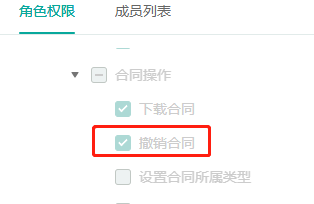
|
|
157
158
|
AuthorizedUser,
|
|
158
159
|
Intention,
|
|
160
|
+
CreateFlowBlockchainEvidenceUrlResponse,
|
|
159
161
|
CreateDocumentRequest,
|
|
160
162
|
RemindFlowRecords,
|
|
161
163
|
CreatePreparedPersonalEsignResponse,
|
|
@@ -210,6 +212,7 @@ import {
|
|
|
210
212
|
ModifyIntegrationDepartmentResponse,
|
|
211
213
|
GetTaskResultApiResponse,
|
|
212
214
|
SubOrgBillSummary,
|
|
215
|
+
DeleteStaffsResult,
|
|
213
216
|
CancelMultiFlowSignQRCodeRequest,
|
|
214
217
|
DeleteIntegrationDepartmentRequest,
|
|
215
218
|
UserFlowType,
|
|
@@ -245,6 +248,7 @@ import {
|
|
|
245
248
|
SignUrl,
|
|
246
249
|
ModifyIntegrationRoleResponse,
|
|
247
250
|
VerifyPdfResponse,
|
|
251
|
+
ReleasedApprover,
|
|
248
252
|
CreateFlowGroupSignReviewRequest,
|
|
249
253
|
DescribeBillUsageDetailRequest,
|
|
250
254
|
Admin,
|
|
@@ -268,7 +272,7 @@ import {
|
|
|
268
272
|
CancelMultiFlowSignQRCodeResponse,
|
|
269
273
|
CreateFlowResponse,
|
|
270
274
|
CreateIntegrationSubOrganizationActiveRecordRequest,
|
|
271
|
-
|
|
275
|
+
CreateFlowBlockchainEvidenceUrlRequest,
|
|
272
276
|
CreateBatchQuickSignUrlRequest,
|
|
273
277
|
FileUrl,
|
|
274
278
|
CreateOrganizationInfoChangeUrlRequest,
|
|
@@ -288,49 +292,6 @@ export class Client extends AbstractClient {
|
|
|
288
292
|
super("ess.tencentcloudapi.com", "2020-11-11", clientConfig)
|
|
289
293
|
}
|
|
290
294
|
|
|
291
|
-
/**
|
|
292
|
-
* 该接口用于发起合同后,生成个人用户的批量签署链接, 暂时不支持企业端签署。
|
|
293
|
-
**注意:**
|
|
294
|
-
1. 该接口目前仅支持签署人类型是**个人签署方的批量签署场景**(ApproverType=1)。
|
|
295
|
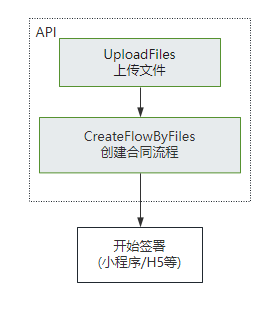
-
2. 该接口可生成批量签署链接的C端签署人**必须仅有手写签名(控件类型为SIGN_SIGNATURE)和时间类型的签署控件**,**不支持填写控件** 。
|
|
296
|
-
3. 请确保C端签署人在批量签署合同中**为待签署状态**,如需顺序签署请待前一位参与人签署完成后,再创建该C端用户的签署链接。
|
|
297
|
-
4. 该签署链接**有效期为30分钟**,过期后将失效,如需签署可重新创建批量签署链接 。
|
|
298
|
-
5. 该接口返回的签署链接适用于APP集成的场景,支持APP打开或浏览器直接打开,**不支持微信小程序嵌入**。
|
|
299
|
-
跳转到小程序的实现,参考微信官方文档(分为<a href="https://developers.weixin.qq.com/miniprogram/dev/api/navigate/wx.navigateToMiniProgram.html">全屏</a>、<a href="https://developers.weixin.qq.com/miniprogram/dev/framework/open-ability/openEmbeddedMiniProgram.html">半屏</a>两种方式),如何配置也可以请参考: <a href="https://qian.tencent.com/developers/company/openwxminiprogram">跳转电子签小程序配置</a>。
|
|
300
|
-
6. 因h5涉及人脸身份认证能力基于慧眼人脸核身,对Android和iOS系统均有一定要求, 因此<font color='red'>App嵌入H5签署合同需要按照慧眼提供的<a href="https://cloud.tencent.com/document/product/1007/61076">慧眼人脸核身兼容性文档</a>做兼容性适配</font>。
|
|
301
|
-
*/
|
|
302
|
-
async CreateBatchQuickSignUrl(
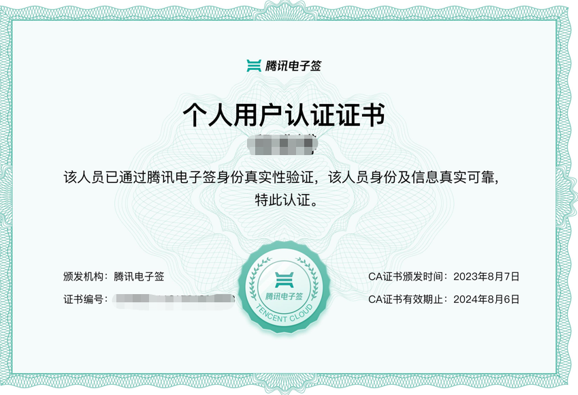
|
|
303
|
-
req: CreateBatchQuickSignUrlRequest,
|
|
304
|
-
cb?: (error: string, rep: CreateBatchQuickSignUrlResponse) => void
|
|
305
|
-
): Promise<CreateBatchQuickSignUrlResponse> {
|
|
306
|
-
return this.request("CreateBatchQuickSignUrl", req, cb)
|
|
307
|
-
}
|
|
308
|
-
|
|
309
|
-
/**
|
|
310
|
-
* 此接口用于查询合同流程的详情信息,支持查询多个(数量不能超过100)。
|
|
311
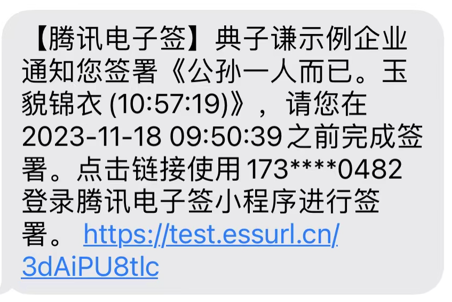
|
-
|
|
312
|
-
适用场景:可用于主动查询某个合同详情信息。
|
|
313
|
-
*/
|
|
314
|
-
async DescribeFlowInfo(
|
|
315
|
-
req: DescribeFlowInfoRequest,
|
|
316
|
-
cb?: (error: string, rep: DescribeFlowInfoResponse) => void
|
|
317
|
-
): Promise<DescribeFlowInfoResponse> {
|
|
318
|
-
return this.request("DescribeFlowInfo", req, cb)
|
|
319
|
-
}
|
|
320
|
-
|
|
321
|
-
/**
|
|
322
|
-
* 新增/删除企业应用集成中的回调配置。
|
|
323
|
-
新增回调配置只会增加不存在的CallbackUrl;删除操作将针对找到的相同CallbackUrl的配置进行删除。
|
|
324
|
-
请确保回调地址能够接收并处理 HTTP POST 请求,并返回状态码 200 以表示处理正常。
|
|
325
|
-
更多回调相关的说明参考文档[回调通知能力](https://qian.tencent.com/developers/company/callback_types_v2)
|
|
326
|
-
*/
|
|
327
|
-
async ModifyApplicationCallbackInfo(
|
|
328
|
-
req: ModifyApplicationCallbackInfoRequest,
|
|
329
|
-
cb?: (error: string, rep: ModifyApplicationCallbackInfoResponse) => void
|
|
330
|
-
): Promise<ModifyApplicationCallbackInfoResponse> {
|
|
331
|
-
return this.request("ModifyApplicationCallbackInfo", req, cb)
|
|
332
|
-
}
|
|
333
|
-
|
|
334
295
|
/**
|
|
335
296
|
* 此接口用于启动流程。它是模板发起合同的最后一步。
|
|
336
297
|
在[创建签署流程](https://qian.tencent.com/developers/companyApis/startFlows/CreateFlow)和[创建电子文档](https://qian.tencent.com/developers/companyApis/startFlows/CreateDocument)之后,用于开始整个合同流程, 推进流程进入到签署环节。
|
|
@@ -351,40 +312,6 @@ export class Client extends AbstractClient {
|
|
|
351
312
|
return this.request("StartFlow", req, cb)
|
|
352
313
|
}
|
|
353
314
|
|
|
354
|
-
/**
|
|
355
|
-
* 该接口会生成一个手机号变更的链接,用户可以通过该链接进入电子签系统进行手机号的变更。
|
|
356
|
-
该接口支持员工和个人端手机号的变更。
|
|
357
|
-
*/
|
|
358
|
-
async CreateUserMobileChangeUrl(
|
|
359
|
-
req: CreateUserMobileChangeUrlRequest,
|
|
360
|
-
cb?: (error: string, rep: CreateUserMobileChangeUrlResponse) => void
|
|
361
|
-
): Promise<CreateUserMobileChangeUrlResponse> {
|
|
362
|
-
return this.request("CreateUserMobileChangeUrl", req, cb)
|
|
363
|
-
}
|
|
364
|
-
|
|
365
|
-
/**
|
|
366
|
-
* 用于撤销合同流程<br/>
|
|
367
|
-
适用场景:如果某个合同流程当前至少还有一方没有签署,则可通过该接口取消该合同流程。常用于合同发错、内容填错,需要及时撤销的场景。<br/>
|
|
368
|
-
- **可撤回合同状态**:未全部签署完成
|
|
369
|
-
- **不撤回合同状态**:已全部签署完成、已拒签、已过期、已撤回、拒绝填写、已解除等合同状态。
|
|
370
|
-
|
|
371
|
-
注:
|
|
372
|
-
1. 如果合同流程中的参与方均已签署完毕,则无法通过该接口撤销合同,签署完毕的合同需要双方走解除流程将合同作废,可以参考<a href="https://qian.tencent.com/developers/companyApis/operateFlows/CreateReleaseFlow" target="_blank">发起解除合同流程</a>接口。
|
|
373
|
-
|
|
374
|
-
2. 有对应合同撤销权限的人: <font color='red'>合同的发起人(并已经授予撤销权限)或者发起人所在企业的超管、法人</font>
|
|
375
|
-
|
|
376
|
-
|
|
377
|
-
3. <font color='red'>只有撤销没有参与方签署过或只有自动签署签署过的合同,才会返还合同额度。</font>
|
|
378
|
-
|
|
379
|
-
4. 撤销后可以看合同PDF内容的人员: 发起方的超管, 发起方自己,发起方撤销合同的操作人员,已经签署合同、已经填写合同、邀请填写已经补充信息的参与人员
|
|
380
|
-
*/
|
|
381
|
-
async CancelFlow(
|
|
382
|
-
req: CancelFlowRequest,
|
|
383
|
-
cb?: (error: string, rep: CancelFlowResponse) => void
|
|
384
|
-
): Promise<CancelFlowResponse> {
|
|
385
|
-
return this.request("CancelFlow", req, cb)
|
|
386
|
-
}
|
|
387
|
-
|
|
388
315
|
/**
|
|
389
316
|
* 此接口(DescribeFlowTemplates)用于查询本企业模板列表信息。
|
|
390
317
|
|
|
@@ -412,44 +339,6 @@ export class Client extends AbstractClient {
|
|
|
412
339
|
return this.request("DescribeFlowTemplates", req, cb)
|
|
413
340
|
}
|
|
414
341
|
|
|
415
|
-
/**
|
|
416
|
-
* 本接口(DeleteSealPolicies)用于撤销企业员工持有的印章权限
|
|
417
|
-
*/
|
|
418
|
-
async DeleteSealPolicies(
|
|
419
|
-
req: DeleteSealPoliciesRequest,
|
|
420
|
-
cb?: (error: string, rep: DeleteSealPoliciesResponse) => void
|
|
421
|
-
): Promise<DeleteSealPoliciesResponse> {
|
|
422
|
-
return this.request("DeleteSealPolicies", req, cb)
|
|
423
|
-
}
|
|
424
|
-
|
|
425
|
-
/**
|
|
426
|
-
* 本接口(DescribeFileUrls)用于查询文件的下载URL。
|
|
427
|
-
适用场景:通过传参合同流程编号,下载对应的合同PDF文件流到本地。
|
|
428
|
-
*/
|
|
429
|
-
async DescribeFileUrls(
|
|
430
|
-
req: DescribeFileUrlsRequest,
|
|
431
|
-
cb?: (error: string, rep: DescribeFileUrlsResponse) => void
|
|
432
|
-
): Promise<DescribeFileUrlsResponse> {
|
|
433
|
-
return this.request("DescribeFileUrls", req, cb)
|
|
434
|
-
}
|
|
435
|
-
|
|
436
|
-
/**
|
|
437
|
-
* 获取设置自动签印章小程序链接。
|
|
438
|
-
|
|
439
|
-
注意:
|
|
440
|
-
<ul><li>需要<code>企业开通自动签</code>后使用。</li>
|
|
441
|
-
<li>仅支持<code>已经开通了自动签的个人</code>更换自动签印章。</li>
|
|
442
|
-
<li>链接有效期默认7天,<code>最多30天</code>。</li>
|
|
443
|
-
<li>该接口的链接适用于<code>小程序</code>端。</li>
|
|
444
|
-
<li>该接口不会扣除您的合同套餐,暂不参与计费。</li></ul>
|
|
445
|
-
*/
|
|
446
|
-
async CreateUserAutoSignSealUrl(
|
|
447
|
-
req: CreateUserAutoSignSealUrlRequest,
|
|
448
|
-
cb?: (error: string, rep: CreateUserAutoSignSealUrlResponse) => void
|
|
449
|
-
): Promise<CreateUserAutoSignSealUrlResponse> {
|
|
450
|
-
return this.request("CreateUserAutoSignSealUrl", req, cb)
|
|
451
|
-
}
|
|
452
|
-
|
|
453
342
|
/**
|
|
454
343
|
* 获取个人用户自动签的开通链接。
|
|
455
344
|
|
|
@@ -479,18 +368,6 @@ export class Client extends AbstractClient {
|
|
|
479
368
|
return this.request("CreateFlowGroupSignReview", req, cb)
|
|
480
369
|
}
|
|
481
370
|
|
|
482
|
-
/**
|
|
483
|
-
* 此接口(UnbindEmployeeUserIdWithClientOpenId)用于解除电子签系统员工UserId与客户系统员工OpenId之间的绑定关系。
|
|
484
|
-
|
|
485
|
-
注:`在调用此接口时,需确保OpenId已通过调用`<a href="https://qian.tencent.com/developers/companyApis/staffs/BindEmployeeUserIdWithClientOpenId" target="_blank">BindEmployeeUserIdWithClientOpenId</a>`接口与电子签系统的UserId绑定过。若OpenId未经过绑定,则无法使用此接口进行解绑操作。`
|
|
486
|
-
*/
|
|
487
|
-
async UnbindEmployeeUserIdWithClientOpenId(
|
|
488
|
-
req: UnbindEmployeeUserIdWithClientOpenIdRequest,
|
|
489
|
-
cb?: (error: string, rep: UnbindEmployeeUserIdWithClientOpenIdResponse) => void
|
|
490
|
-
): Promise<UnbindEmployeeUserIdWithClientOpenIdResponse> {
|
|
491
|
-
return this.request("UnbindEmployeeUserIdWithClientOpenId", req, cb)
|
|
492
|
-
}
|
|
493
|
-
|
|
494
371
|
/**
|
|
495
372
|
* 客户可以主动调用生成实名链接去做C端用户实名,会对实名的用户进行打标记为调用链接客户的用户
|
|
496
373
|
使用场景:
|
|
@@ -522,45 +399,6 @@ export class Client extends AbstractClient {
|
|
|
522
399
|
return this.request("CreateEmbedWebUrl", req, cb)
|
|
523
400
|
}
|
|
524
401
|
|
|
525
|
-
/**
|
|
526
|
-
* 对合同流程文件进行数字签名验证,判断数字签名是否有效,合同文件内容是否被篡改。
|
|
527
|
-
*/
|
|
528
|
-
async VerifyPdf(
|
|
529
|
-
req: VerifyPdfRequest,
|
|
530
|
-
cb?: (error: string, rep: VerifyPdfResponse) => void
|
|
531
|
-
): Promise<VerifyPdfResponse> {
|
|
532
|
-
return this.request("VerifyPdf", req, cb)
|
|
533
|
-
}
|
|
534
|
-
|
|
535
|
-
/**
|
|
536
|
-
* 管理企业扩展服务 ,企业经办人需要是企业超管或者法人。
|
|
537
|
-
|
|
538
|
-
跳转小程序的几种方式:主要是设置不同的EndPoint
|
|
539
|
-
1. 通过链接Url直接跳转到小程序,不需要返回
|
|
540
|
-
设置EndPoint为WEIXINAPP,得到链接打开即可。
|
|
541
|
-
|
|
542
|
-
2. 客户App直接跳转到小程序-->腾讯电子签小程序操作完成-->返回App
|
|
543
|
-
跳转到小程序的实现,参考官方文档<a href="https://developers.weixin.qq.com/miniprogram/dev/framework/open-ability/launchApp.html">打开 App</a>
|
|
544
|
-
设置EndPoint为APP,得到path。
|
|
545
|
-
|
|
546
|
-
3. 客户小程序直接跳到电子签小程序-->腾讯电子签小程序操作完成--->回到客户小程序
|
|
547
|
-
跳转到小程序的实现,参考官方文档(分为<a href="https://developers.weixin.qq.com/miniprogram/dev/api/navigate/wx.navigateToMiniProgram.html">全屏</a>、<a href="https://developers.weixin.qq.com/miniprogram/dev/framework/open-ability/openEmbeddedMiniProgram.html">半屏</a>两种方式),如何配置也可以请参考: <a href="https://qian.tencent.com/developers/company/openwxminiprogram">跳转电子签小程序配置</a>
|
|
548
|
-
设置EndPoint为APP,得到path。
|
|
549
|
-
|
|
550
|
-
4.其中小程序的原始Id如下,或者查看小程序信息自助获取。
|
|
551
|
-
|
|
552
|
-
| 小程序 | AppID | 原始ID |
|
|
553
|
-
| ------------ | ------------ | ------------ |
|
|
554
|
-
| 腾讯电子签(正式版) | wxa023b292fd19d41d | gh_da88f6188665 |
|
|
555
|
-
| 腾讯电子签Demo | wx371151823f6f3edf | gh_39a5d3de69fa |
|
|
556
|
-
*/
|
|
557
|
-
async ModifyExtendedService(
|
|
558
|
-
req: ModifyExtendedServiceRequest,
|
|
559
|
-
cb?: (error: string, rep: ModifyExtendedServiceResponse) => void
|
|
560
|
-
): Promise<ModifyExtendedServiceResponse> {
|
|
561
|
-
return this.request("ModifyExtendedService", req, cb)
|
|
562
|
-
}
|
|
563
|
-
|
|
564
402
|
/**
|
|
565
403
|
* 此接口用于获取企业批量认证异步任务的状态及结果。
|
|
566
404
|
|
|
@@ -575,54 +413,6 @@ export class Client extends AbstractClient {
|
|
|
575
413
|
return this.request("DescribeBatchOrganizationRegistrationUrls", req, cb)
|
|
576
414
|
}
|
|
577
415
|
|
|
578
|
-
/**
|
|
579
|
-
* 指定需要批量撤回的签署流程Id,以获取批量撤销链接。
|
|
580
|
-
客户需指定要撤回的签署流程Id,最多可指定100个,超过100则不处理。
|
|
581
|
-
接口调用成功后,将返回批量撤回合同的链接。通过点击链接,可跳转至电子签小程序完成批量撤回操作。
|
|
582
|
-
|
|
583
|
-
- **可撤回合同状态**:未全部签署完成
|
|
584
|
-
- **不撤回合同状态**:已全部签署完成、已拒签、已过期、已撤回、拒绝填写、已解除等合同状态。
|
|
585
|
-
|
|
586
|
-
批量撤销结果可以通过接口返回的TaskId关联[批量撤销任务结果回调](https://qian.tencent.com/developers/company/callback_types_contracts_sign#%E4%B9%9D-%E6%89%B9%E9%87%8F%E6%92%A4%E9%94%80%E7%BB%93%E6%9E%9C%E5%9B%9E%E8%B0%83)或通过接口[查询批量撤销签署流程任务结果](https://qian.tencent.com/developers/companyApis/operateFlows/CreateBatchCancelFlowUrl)
|
|
587
|
-
|
|
588
|
-
|
|
589
|
-
注:
|
|
590
|
-
1. 如果合同流程中的参与方均已签署完毕,则无法通过该接口撤销合同,签署完毕的合同需要双方走解除流程将合同作废,可以参考<a href="https://qian.tencent.com/developers/companyApis/operateFlows/CreateReleaseFlow" target="_blank">发起解除合同流程</a>接口。
|
|
591
|
-
|
|
592
|
-
2. 有对应合同撤销权限的人: <font color='red'>合同的发起人(并已经授予撤销权限)或者发起人所在企业的超管、法人</font>
|
|
593
|
-

|
|
594
|
-
|
|
595
|
-
3. <font color='red'>只有撤销没有参与方签署过或只有自动签署签署过的合同,才会返还合同额度。</font>
|
|
596
|
-
*/
|
|
597
|
-
async CreateBatchCancelFlowUrl(
|
|
598
|
-
req: CreateBatchCancelFlowUrlRequest,
|
|
599
|
-
cb?: (error: string, rep: CreateBatchCancelFlowUrlResponse) => void
|
|
600
|
-
): Promise<CreateBatchCancelFlowUrlResponse> {
|
|
601
|
-
return this.request("CreateBatchCancelFlowUrl", req, cb)
|
|
602
|
-
}
|
|
603
|
-
|
|
604
|
-
/**
|
|
605
|
-
* 此接口(DeleteIntegrationDepartment)用于删除企业的部门信息。
|
|
606
|
-
*/
|
|
607
|
-
async DeleteIntegrationDepartment(
|
|
608
|
-
req: DeleteIntegrationDepartmentRequest,
|
|
609
|
-
cb?: (error: string, rep: DeleteIntegrationDepartmentResponse) => void
|
|
610
|
-
): Promise<DeleteIntegrationDepartmentResponse> {
|
|
611
|
-
return this.request("DeleteIntegrationDepartment", req, cb)
|
|
612
|
-
}
|
|
613
|
-
|
|
614
|
-
/**
|
|
615
|
-
* 此接口(BindEmployeeUserIdWithClientOpenId)用于将电子签系统员工UserId与客户系统员工OpenId进行绑定。
|
|
616
|
-
|
|
617
|
-
此OpenId只在 [更新企业员工信息 ](https://qian.tencent.com/developers/companyApis/staffs/UpdateIntegrationEmployees)、[移除企业员工](https://qian.tencent.com/developers/companyApis/staffs/DeleteIntegrationEmployees) 等场景下可以使用
|
|
618
|
-
*/
|
|
619
|
-
async BindEmployeeUserIdWithClientOpenId(
|
|
620
|
-
req: BindEmployeeUserIdWithClientOpenIdRequest,
|
|
621
|
-
cb?: (error: string, rep: BindEmployeeUserIdWithClientOpenIdResponse) => void
|
|
622
|
-
): Promise<BindEmployeeUserIdWithClientOpenIdResponse> {
|
|
623
|
-
return this.request("BindEmployeeUserIdWithClientOpenId", req, cb)
|
|
624
|
-
}
|
|
625
|
-
|
|
626
416
|
/**
|
|
627
417
|
* 本接口(CreatePreparedPersonalEsign)用于创建导入个人印章(处方单场景专用,使用此接口请与客户经理确认)。
|
|
628
418
|
*/
|
|
@@ -633,56 +423,6 @@ export class Client extends AbstractClient {
|
|
|
633
423
|
return this.request("CreatePreparedPersonalEsign", req, cb)
|
|
634
424
|
}
|
|
635
425
|
|
|
636
|
-
/**
|
|
637
|
-
* 适用场景: 当通过模板或文件发起合同时,若未指定企业签署人信息,则可调用此接口补充或添加签署人。同一签署人可补充多个员工作为或签署人,最终实际签署人取决于谁先领取合同完成签署。
|
|
638
|
-
|
|
639
|
-
限制条件:
|
|
640
|
-
|
|
641
|
-
1.本企业(发起方企业)企业微信签署人仅支持通过企业微信UserId或姓名+手机号进行补充。
|
|
642
|
-
2.本企业(发起方企业)非企业微信签署人仅支持通过姓名+手机号进行补充。
|
|
643
|
-
3.他方企业仅支持通过姓名+手机号进行补充。
|
|
644
|
-
4.个人签署人支持通过姓名+手机号进行补充,补充动态签署人时:若个人用户已完成实名,则可通过姓名+证件号码进行补充。
|
|
645
|
-
*/
|
|
646
|
-
async CreateFlowApprovers(
|
|
647
|
-
req: CreateFlowApproversRequest,
|
|
648
|
-
cb?: (error: string, rep: CreateFlowApproversResponse) => void
|
|
649
|
-
): Promise<CreateFlowApproversResponse> {
|
|
650
|
-
return this.request("CreateFlowApprovers", req, cb)
|
|
651
|
-
}
|
|
652
|
-
|
|
653
|
-
/**
|
|
654
|
-
* 通过[获取批量撤销签署流程腾讯电子签小程序链接](https://qian.tencent.com/developers/companyApis/operateFlows/CreateBatchCancelFlowUrl)发起批量撤销任务后,可通过此接口查询批量撤销任务的结果。
|
|
655
|
-
*/
|
|
656
|
-
async DescribeCancelFlowsTask(
|
|
657
|
-
req: DescribeCancelFlowsTaskRequest,
|
|
658
|
-
cb?: (error: string, rep: DescribeCancelFlowsTaskResponse) => void
|
|
659
|
-
): Promise<DescribeCancelFlowsTaskResponse> {
|
|
660
|
-
return this.request("DescribeCancelFlowsTask", req, cb)
|
|
661
|
-
}
|
|
662
|
-
|
|
663
|
-
/**
|
|
664
|
-
* 本接口(CreateOrganizationAuthUrl)用于生成创建企业认证链接。
|
|
665
|
-
用于业务方系统自己生成认证链接进行跳转.而不用电子签自带的生成链接
|
|
666
|
-
|
|
667
|
-
注: **此接口需要购买单独的实名套餐包方可调用,如有需求请联系对接人员评估**
|
|
668
|
-
*/
|
|
669
|
-
async CreateOrganizationAuthUrl(
|
|
670
|
-
req: CreateOrganizationAuthUrlRequest,
|
|
671
|
-
cb?: (error: string, rep: CreateOrganizationAuthUrlResponse) => void
|
|
672
|
-
): Promise<CreateOrganizationAuthUrlResponse> {
|
|
673
|
-
return this.request("CreateOrganizationAuthUrl", req, cb)
|
|
674
|
-
}
|
|
675
|
-
|
|
676
|
-
/**
|
|
677
|
-
* 解绑员工与对应角色的关系,如需绑定请使用 CreateIntegrationUserRoles 接口。
|
|
678
|
-
*/
|
|
679
|
-
async DeleteIntegrationRoleUsers(
|
|
680
|
-
req: DeleteIntegrationRoleUsersRequest,
|
|
681
|
-
cb?: (error: string, rep: DeleteIntegrationRoleUsersResponse) => void
|
|
682
|
-
): Promise<DeleteIntegrationRoleUsersResponse> {
|
|
683
|
-
return this.request("DeleteIntegrationRoleUsers", req, cb)
|
|
684
|
-
}
|
|
685
|
-
|
|
686
426
|
/**
|
|
687
427
|
* 提交企业流程审批结果
|
|
688
428
|
**当前存在两种审核操作:**
|
|
@@ -722,18 +462,6 @@ export class Client extends AbstractClient {
|
|
|
722
462
|
return this.request("CreateFlowSignReview", req, cb)
|
|
723
463
|
}
|
|
724
464
|
|
|
725
|
-
/**
|
|
726
|
-
* 创建发起流程web页面
|
|
727
|
-
<br/>适用场景:通过该接口(CreatePrepareFlow)传入合同文件/模板编号及签署人信息,可获得发起流程的可嵌入页面,在页面完成签署控件等信息的编辑与确认后,快速发起流程。
|
|
728
|
-
<br/>注:该接口包含模板/文件发起流程的全部功能,调用接口后不会立即发起,需在可嵌入页面点击按钮进行发起流程。
|
|
729
|
-
*/
|
|
730
|
-
async CreatePrepareFlow(
|
|
731
|
-
req: CreatePrepareFlowRequest,
|
|
732
|
-
cb?: (error: string, rep: CreatePrepareFlowResponse) => void
|
|
733
|
-
): Promise<CreatePrepareFlowResponse> {
|
|
734
|
-
return this.request("CreatePrepareFlow", req, cb)
|
|
735
|
-
}
|
|
736
|
-
|
|
737
465
|
/**
|
|
738
466
|
* 创建签署流程电子文档<br />
|
|
739
467
|
|
|
@@ -784,52 +512,64 @@ export class Client extends AbstractClient {
|
|
|
784
512
|
}
|
|
785
513
|
|
|
786
514
|
/**
|
|
787
|
-
*
|
|
515
|
+
* 查询企业扩展服务的开通和授权情况,当前支持查询以下内容:
|
|
788
516
|
|
|
789
|
-
|
|
790
|
-
|
|
517
|
+
1. **企业自动签署**
|
|
518
|
+
2. **批量签署授权**
|
|
519
|
+
3. **企业与港澳台居民签署合同**
|
|
520
|
+
4. **拓宽签署方年龄限制**
|
|
521
|
+
5. **个人签署方仅校验手机号**
|
|
522
|
+
6. **隐藏合同经办人姓名**
|
|
523
|
+
7. **正楷临摹签名失败后更换其他签名类型**
|
|
524
|
+
8. **短信通知签署方**
|
|
525
|
+
9. **个人签署方手动签字**
|
|
526
|
+
10. **骑缝章**
|
|
527
|
+
11. **签署密码开通引导**
|
|
791
528
|
|
|
792
|
-
**注意**:
|
|
793
|
-
1. 本接口适用于**发起方没有填写控件的 B2C或者单C模板**, 若是B2C模板,还要满足以下任意一个条件
|
|
794
|
-
- 模板中配置的签署顺序是无序
|
|
795
|
-
- B端企业的签署方式是静默签署
|
|
796
|
-
- B端企业是非首位签署
|
|
797
|
-
2. 通过一码多签签署码发起的合同,合同涉及到的回调消息可参考文档[合同发起及签署相关回调
|
|
798
|
-
]( https://qian.tencent.com/developers/company/callback_types_contracts_sign)
|
|
799
|
-
3. 用户通过一码多签签署码发起合同时,因企业额度不足导致失败 会触发签署二维码相关回调,具体参考文档[签署二维码相关回调](https://qian.tencent.com/developers/company/callback_types_commons#%E7%AD%BE%E7%BD%B2%E4%BA%8C%E7%BB%B4%E7%A0%81%E7%9B%B8%E5%85%B3%E5%9B%9E%E8%B0%83)
|
|
800
529
|
|
|
801
|
-
|
|
530
|
+
对应能力开通页面在Web控制台-更多-企业设置-拓展服务,如下图所示:
|
|
802
531
|
|
|
803
|
-

|
|
533
|
+
|
|
534
|
+
注: <font color='red'>所在企业的超管、法人才有权限调用此接口</font>(Operator.UserId需要传递超管或者法人的UserId)
|
|
804
535
|
*/
|
|
805
|
-
async
|
|
806
|
-
req:
|
|
807
|
-
cb?: (error: string, rep:
|
|
808
|
-
): Promise<
|
|
809
|
-
return this.request("
|
|
536
|
+
async DescribeExtendedServiceAuthInfos(
|
|
537
|
+
req: DescribeExtendedServiceAuthInfosRequest,
|
|
538
|
+
cb?: (error: string, rep: DescribeExtendedServiceAuthInfosResponse) => void
|
|
539
|
+
): Promise<DescribeExtendedServiceAuthInfosResponse> {
|
|
540
|
+
return this.request("DescribeExtendedServiceAuthInfos", req, cb)
|
|
810
541
|
}
|
|
811
542
|
|
|
812
543
|
/**
|
|
813
|
-
*
|
|
544
|
+
* 通过此接口获取个人用户自动签的开通状态。
|
|
814
545
|
|
|
815
|
-
|
|
816
|
-
|
|
817
|
-
|
|
818
|
-
|
|
819
|
-
|
|
546
|
+
注意: `处方单等特殊场景专用,此接口为白名单功能,使用前请联系对接的客户经理沟通。`
|
|
547
|
+
*/
|
|
548
|
+
async DescribeUserAutoSignStatus(
|
|
549
|
+
req: DescribeUserAutoSignStatusRequest,
|
|
550
|
+
cb?: (error: string, rep: DescribeUserAutoSignStatusResponse) => void
|
|
551
|
+
): Promise<DescribeUserAutoSignStatusResponse> {
|
|
552
|
+
return this.request("DescribeUserAutoSignStatus", req, cb)
|
|
553
|
+
}
|
|
820
554
|
|
|
821
|
-
|
|
555
|
+
/**
|
|
556
|
+
* 此接口(CreateFlowGroupByTemplates)可用于通过多个模板创建合同组签署流程。
|
|
557
|
+
|
|
558
|
+
适用场景:该接口适用于需要一次性完成多份合同签署的情况,多份合同一般具有关联性,用户以目录的形式查看合同。
|
|
559
|
+
|
|
560
|
+
注:`合同发起后就会扣减合同的额度, 如果未签署完成时撤销合同会返还此额度(过期,拒签,签署完成,解除完成等状态不会返还额度),合同组中每个合同会扣减一个合同额度`
|
|
822
561
|
*/
|
|
823
|
-
async
|
|
824
|
-
req:
|
|
825
|
-
cb?: (error: string, rep:
|
|
826
|
-
): Promise<
|
|
827
|
-
return this.request("
|
|
562
|
+
async CreateFlowGroupByTemplates(
|
|
563
|
+
req: CreateFlowGroupByTemplatesRequest,
|
|
564
|
+
cb?: (error: string, rep: CreateFlowGroupByTemplatesResponse) => void
|
|
565
|
+
): Promise<CreateFlowGroupByTemplatesResponse> {
|
|
566
|
+
return this.request("CreateFlowGroupByTemplates", req, cb)
|
|
828
567
|
}
|
|
829
568
|
|
|
830
569
|
/**
|
|
831
|
-
*
|
|
832
|
-
|
|
570
|
+
* 此接口(CreateFlowByFiles)用来通过上传后的pdf资源编号来创建待签署的合同流程。<br/>
|
|
571
|
+
适用场景:适用非制式的合同文件签署。一般开发者自己有完整的签署文件,可以通过该接口传入完整的PDF文件及流程信息生成待签署的合同流程。<br/>
|
|
572
|
+
|
|
833
573
|
<table>
|
|
834
574
|
<thead>
|
|
835
575
|
<tr>
|
|
@@ -858,228 +598,273 @@ export class Client extends AbstractClient {
|
|
|
858
598
|
</table>
|
|
859
599
|
|
|
860
600
|
|
|
861
|
-
注:配合<a href="https://qian.tencent.com/developers/companyApis/startFlows/CreateDocument" target="_blank">创建电子文档</a>和<a href="https://qian.tencent.com/developers/companyApis/startFlows/StartFlow" target="_blank">发起签署流程</a>接口使用。整体的逻辑如下图
|
|
862
601
|
|
|
863
|
-
|
|
602
|
+
该接口需要依赖[上传文件](https://qian.tencent.com/developers/companyApis/templatesAndFiles/UploadFiles)接口生成pdf资源编号(FileIds)进行使用。(如果非pdf文件需要调用[创建文件转换任务](https://qian.tencent.com/developers/companyApis/templatesAndFiles/CreateConvertTaskApi)接口转换成pdf资源)<br/>
|
|
603
|
+
|
|
604
|
+
|
|
605
|
+
|
|
606
|
+
|
|
607
|
+
注:
|
|
608
|
+
- 合同**发起后就会扣减合同的额度**, 只有撤销没有参与方签署过或只有自动签署签署过的合同,才会返还合同额度。(**过期,拒签,签署完成,解除完成等状态不会返还额度**)
|
|
609
|
+
- **静默(自动)签署不支持合同签署方存在填写**功能
|
|
864
610
|
|
|
865
|
-
注:**静默(自动)签署不支持合同签署方存在填写**功能
|
|
866
|
-
<br>
|
|
867
611
|
|
|
868
612
|
<font color="red">相关视频指引</font> <br>
|
|
869
|
-
1. <a href="https://dyn.ess.tencent.cn/guide/apivideo/
|
|
870
|
-
2.
|
|
613
|
+
1. <a href="https://dyn.ess.tencent.cn/guide/apivideo/ess_uploadfiles.mp4" target="_blank">上传用于合同发起的PDF文件代码编写示例</a><br>
|
|
614
|
+
2. <a href="https://dyn.ess.tencent.cn/guide/apivideo/ess-CreateFlowByFiles.mp4" target="_blank">用PDF文件创建签署流程编写示例</a><br>
|
|
871
615
|
*/
|
|
872
|
-
async
|
|
873
|
-
req:
|
|
874
|
-
cb?: (error: string, rep:
|
|
875
|
-
): Promise<
|
|
876
|
-
return this.request("
|
|
616
|
+
async CreateFlowByFiles(
|
|
617
|
+
req: CreateFlowByFilesRequest,
|
|
618
|
+
cb?: (error: string, rep: CreateFlowByFilesResponse) => void
|
|
619
|
+
): Promise<CreateFlowByFilesResponse> {
|
|
620
|
+
return this.request("CreateFlowByFiles", req, cb)
|
|
877
621
|
}
|
|
878
622
|
|
|
879
623
|
/**
|
|
880
|
-
|
|
881
|
-
|
|
882
|
-
|
|
883
|
-
|
|
624
|
+
* 此接口(DescribeIntegrationRoles)用于分页查询企业角色列表,列表按照角色创建时间升序排列。
|
|
625
|
+
*/
|
|
626
|
+
async DescribeIntegrationRoles(
|
|
627
|
+
req: DescribeIntegrationRolesRequest,
|
|
628
|
+
cb?: (error: string, rep: DescribeIntegrationRolesResponse) => void
|
|
629
|
+
): Promise<DescribeIntegrationRolesResponse> {
|
|
630
|
+
return this.request("DescribeIntegrationRoles", req, cb)
|
|
631
|
+
}
|
|
884
632
|
|
|
885
|
-
|
|
886
|
-
|
|
887
|
-
|
|
888
|
-
|
|
633
|
+
/**
|
|
634
|
+
* 此接口(DescribeIntegrationEmployees)用于分页查询企业员工信息列表,支持设置过滤条件以筛选员工查询结果。
|
|
635
|
+
*/
|
|
636
|
+
async DescribeIntegrationEmployees(
|
|
637
|
+
req: DescribeIntegrationEmployeesRequest,
|
|
638
|
+
cb?: (error: string, rep: DescribeIntegrationEmployeesResponse) => void
|
|
639
|
+
): Promise<DescribeIntegrationEmployeesResponse> {
|
|
640
|
+
return this.request("DescribeIntegrationEmployees", req, cb)
|
|
641
|
+
}
|
|
889
642
|
|
|
890
|
-
|
|
643
|
+
/**
|
|
644
|
+
* 获取个人用户认证证书图片下载URL
|
|
891
645
|
|
|
892
|
-
|
|
893
|
-
|
|
894
|
-
2. 如果生成的链接是APP链接,跳转到小程序的实现,参考微信官方文档(分为<a href="https://developers.weixin.qq.com/miniprogram/dev/api/navigate/wx.navigateToMiniProgram.html">全屏</a>、<a href="https://developers.weixin.qq.com/miniprogram/dev/framework/open-ability/openEmbeddedMiniProgram.html">半屏</a>两种方式),如何配置也可以请参考: <a href="https://qian.tencent.com/developers/company/openwxminiprogram">跳转电子签小程序配置</a>
|
|
895
|
-
|
|
646
|
+
个人用户认证证书图片样式如下图
|
|
896
647
|
|
|
897
|
-
|
|
648
|
+
|
|
898
649
|
|
|
899
|
-
|
|
900
|
-
|
|
901
|
-
|
|
902
|
-
|
|
650
|
+
注:
|
|
651
|
+
<ul>
|
|
652
|
+
<li>只能获取个人用户证明图片, 企业员工的暂不支持</li>
|
|
653
|
+
<li>处方单等特殊场景专用,此接口为白名单功能,使用前请联系对接的客户经理沟通。 </li>
|
|
654
|
+
</ul>
|
|
903
655
|
*/
|
|
904
|
-
async
|
|
905
|
-
req:
|
|
906
|
-
cb?: (error: string, rep:
|
|
907
|
-
): Promise<
|
|
908
|
-
return this.request("
|
|
656
|
+
async CreatePersonAuthCertificateImage(
|
|
657
|
+
req: CreatePersonAuthCertificateImageRequest,
|
|
658
|
+
cb?: (error: string, rep: CreatePersonAuthCertificateImageResponse) => void
|
|
659
|
+
): Promise<CreatePersonAuthCertificateImageResponse> {
|
|
660
|
+
return this.request("CreatePersonAuthCertificateImage", req, cb)
|
|
909
661
|
}
|
|
910
662
|
|
|
911
663
|
/**
|
|
912
|
-
|
|
913
|
-
|
|
914
|
-
|
|
915
|
-
|
|
916
|
-
|
|
917
|
-
|
|
918
|
-
|
|
919
|
-
return this.request("DescribeUserVerifyStatus", req, cb)
|
|
664
|
+
* 此接口用于赋予员工指定的角色权限,如需解绑请使用 DeleteIntegrationRoleUsers 接口。
|
|
665
|
+
*/
|
|
666
|
+
async CreateIntegrationUserRoles(
|
|
667
|
+
req: CreateIntegrationUserRolesRequest,
|
|
668
|
+
cb?: (error: string, rep: CreateIntegrationUserRolesResponse) => void
|
|
669
|
+
): Promise<CreateIntegrationUserRolesResponse> {
|
|
670
|
+
return this.request("CreateIntegrationUserRoles", req, cb)
|
|
920
671
|
}
|
|
921
672
|
|
|
922
673
|
/**
|
|
923
|
-
*
|
|
924
|
-
解除协议的模板是官方提供 ,经过提供法务审核,暂不支持自定义。
|
|
674
|
+
* 通过此接口,可以创建小程序批量签署链接,个人/企业员工可通过此链接跳转至小程序进行批量签署。请确保生成链接时的身份信息与签署合同参与方的信息保持一致。
|
|
925
675
|
|
|
926
|
-
|
|
927
|
-
<
|
|
928
|
-
|
|
929
|
-
|
|
930
|
-
|
|
931
|
-
<li>发起解除协议同发起其他企业合同一样,也会参与合同<code>扣费</code>,扣费标准同其他类型合同。</li>
|
|
932
|
-
<li>在解除协议签署完毕后,原合同及解除协议均变为已解除状态。</li>
|
|
933
|
-
<li>非原合同企业参与人发起解除协议时,需要有<code>解除合同的权限</code>。</li>
|
|
934
|
-
</ul>
|
|
676
|
+
注意事项:
|
|
677
|
+
- 使用此接口生成链接,需要贵企业先开通 <font color="red">使用手机号验证签署方身份 </font>功能。您可以在 <b>【腾讯电子签网页端】->【企业设置】->【拓展服务】</b>中找到该功能。
|
|
678
|
+
- 生成批量签署链接时,<font color="red">合同目标参与方的状态必须为<b>待签署</b>状态</font>。签署人点击链接后需要输入短信验证码才能查看合同内容。
|
|
679
|
+
- 企业员工批量签署链接:需要传入签署方所在企业名称,用户名字和手机号(或者身份证件信息)参数来生成签署链接。<font color="red">该签署方企业必须已完成腾讯电子签企业认证</font>
|
|
680
|
+
- 个人批量签署链接:需要传入签署方用户名字和手机号(或者身份证件信息)参数来生成签署链接。个人批量签署进行的合同的签名区, 全部变成<font color="red">手写签名</font>(不管合同里边设置的签名限制)来进行。
|
|
935
681
|
*/
|
|
936
|
-
async
|
|
937
|
-
req:
|
|
938
|
-
cb?: (error: string, rep:
|
|
939
|
-
): Promise<
|
|
940
|
-
return this.request("
|
|
682
|
+
async CreateBatchSignUrl(
|
|
683
|
+
req: CreateBatchSignUrlRequest,
|
|
684
|
+
cb?: (error: string, rep: CreateBatchSignUrlResponse) => void
|
|
685
|
+
): Promise<CreateBatchSignUrlResponse> {
|
|
686
|
+
return this.request("CreateBatchSignUrl", req, cb)
|
|
941
687
|
}
|
|
942
688
|
|
|
943
689
|
/**
|
|
944
|
-
*
|
|
945
|
-
|
|
946
|
-
适用场景:如果需要签署人在自己的APP、小程序、H5应用中签署,可以通过此接口获取跳转腾讯电子签小程序的签署跳转链接。
|
|
690
|
+
* 指定需要批量催办的签署流程ID,批量催办合同,最多100个。需要符合以下条件的合同才可被催办:
|
|
947
691
|
|
|
948
|
-
|
|
692
|
+
1. 发起合同时,**签署人的NotifyType需设置为sms**
|
|
693
|
+
2. 合同中当前状态为 **待签署** 的签署人是催办的对象
|
|
694
|
+
3. **每个合同只能催办一次**
|
|
949
695
|
|
|
950
|
-
|
|
951
|
-
<ul><li>1. 如果签署人是在PC端扫码签署,可以通过生成跳转链接自主转换成二维码,让签署人在PC端扫码签署</li>
|
|
952
|
-
<li>2. 签署链接的有效期为<font color="red">90天</font>,超过有效期链接不可用</li>
|
|
953
|
-
<li>3. 如果需跳转详情页(即PathType值为1)进行填写或签署合同,需指定签署方信息:姓名、手机号码、企业名称等,才能生成正确的跳转链接</li>
|
|
954
|
-
<li>4. <font color="red">生成的链路后面不能再增加参数</font>(会出现覆盖链接中已有参数导致错误)</li></ul>
|
|
696
|
+
**催办的效果**: 对方会收到如下的短信通知
|
|
955
697
|
|
|
956
|
-
|
|
698
|
+
|
|
957
699
|
|
|
958
|
-
|
|
959
|
-
| ------------ | ------------ | ------------ |
|
|
960
|
-
| 腾讯电子签(正式版) | wxa023b292fd19d41d | gh_da88f6188665 |
|
|
961
|
-
| 腾讯电子签Demo | wx371151823f6f3edf | gh_39a5d3de69fa |
|
|
700
|
+
注:`合同催办是白名单功能,请联系客户经理申请开白后使用`
|
|
962
701
|
*/
|
|
963
|
-
async
|
|
964
|
-
req:
|
|
965
|
-
cb?: (error: string, rep:
|
|
966
|
-
): Promise<
|
|
967
|
-
return this.request("
|
|
968
|
-
}
|
|
969
|
-
|
|
970
|
-
/**
|
|
971
|
-
* 通过此接口获取个人用户自动签的开通状态。
|
|
702
|
+
async CreateFlowReminds(
|
|
703
|
+
req: CreateFlowRemindsRequest,
|
|
704
|
+
cb?: (error: string, rep: CreateFlowRemindsResponse) => void
|
|
705
|
+
): Promise<CreateFlowRemindsResponse> {
|
|
706
|
+
return this.request("CreateFlowReminds", req, cb)
|
|
707
|
+
}
|
|
972
708
|
|
|
973
|
-
|
|
974
|
-
|
|
975
|
-
|
|
976
|
-
|
|
977
|
-
|
|
978
|
-
|
|
979
|
-
|
|
709
|
+
/**
|
|
710
|
+
* 此接口(DescribePersonCertificate)用于查询个人数字证书信息。<br />注:`1.目前仅用于查询开通了医疗自动签署功能的个人数字证书。`<br />`2.调用此接口需要开通白名单,使用前请联系相关人员开通白名单。`
|
|
711
|
+
*/
|
|
712
|
+
async DescribePersonCertificate(
|
|
713
|
+
req: DescribePersonCertificateRequest,
|
|
714
|
+
cb?: (error: string, rep: DescribePersonCertificateResponse) => void
|
|
715
|
+
): Promise<DescribePersonCertificateResponse> {
|
|
716
|
+
return this.request("DescribePersonCertificate", req, cb)
|
|
980
717
|
}
|
|
981
718
|
|
|
982
719
|
/**
|
|
983
|
-
*
|
|
720
|
+
* 通过此接口可以关闭个人用户自动签功能。
|
|
721
|
+
无需对应的用户刷脸等方式同意即可关闭。
|
|
984
722
|
|
|
985
|
-
|
|
723
|
+
注意:
|
|
986
724
|
|
|
987
|
-
|
|
725
|
+
<ul><li>处方单等特殊场景专用,此接口为白名单功能,使用前请联系对接的客户经理沟通。</li>
|
|
726
|
+
<li>如果此用户在开通时候绑定过个人自动签账号许可, 关闭此用户的自动签不会归还个人自动签账号许可的额度。</li></ul>
|
|
988
727
|
*/
|
|
989
|
-
async
|
|
990
|
-
req:
|
|
991
|
-
cb?: (error: string, rep:
|
|
992
|
-
): Promise<
|
|
993
|
-
return this.request("
|
|
728
|
+
async DisableUserAutoSign(
|
|
729
|
+
req: DisableUserAutoSignRequest,
|
|
730
|
+
cb?: (error: string, rep: DisableUserAutoSignResponse) => void
|
|
731
|
+
): Promise<DisableUserAutoSignResponse> {
|
|
732
|
+
return this.request("DisableUserAutoSign", req, cb)
|
|
994
733
|
}
|
|
995
734
|
|
|
996
735
|
/**
|
|
997
|
-
*
|
|
736
|
+
* 该接口(DeleteIntegrationEmployees)用于离职本企业员工,同时可选择是否进行离职交接。
|
|
998
737
|
|
|
999
|
-
1. **企业自动签署**
|
|
1000
|
-
2. **批量签署授权**
|
|
1001
|
-
3. **企业与港澳台居民签署合同**
|
|
1002
|
-
4. **拓宽签署方年龄限制**
|
|
1003
|
-
5. **个人签署方仅校验手机号**
|
|
1004
|
-
6. **隐藏合同经办人姓名**
|
|
1005
|
-
7. **正楷临摹签名失败后更换其他签名类型**
|
|
1006
|
-
8. **短信通知签署方**
|
|
1007
|
-
9. **个人签署方手动签字**
|
|
1008
|
-
10. **骑缝章**
|
|
1009
|
-
11. **签署密码开通引导**
|
|
1010
738
|
|
|
739
|
+
- 如果该员工没有未处理的合同,可不设置交接人的ReceiveUserId或ReceiveOpenId进行离职操作。
|
|
740
|
+
- 如果该员工有未处理的合同,需要设置ReceiveUserId或ReceiveOpenId表示交接的负责人,交接后员工会进行离职操作。
|
|
1011
741
|
|
|
1012
|
-
|
|
742
|
+
未处理的合同包括以下:
|
|
1013
743
|
|
|
1014
|
-
|
|
744
|
+
- 待签署的合同(包括顺序签署还没有轮到的合同,此类合同某些情况可能不会出现在用户的列表中)。
|
|
745
|
+
- 待填写的合同。
|
|
746
|
+
- 待解除的合同等。
|
|
1015
747
|
|
|
1016
|
-
|
|
748
|
+
注:
|
|
749
|
+
1. <font color="red">超管或法人身份的员工不能被离职</font>, 需要在控制台或小程序更换法人和超管后进行离职删除。
|
|
750
|
+
2. <font color="red">员工存在待处理合同时必须交接</font>后才能离职无人交接时不能被离职删除。
|
|
751
|
+
3. 未实名的员工可以直接离职,不用交接合同
|
|
1017
752
|
*/
|
|
1018
|
-
async
|
|
1019
|
-
req:
|
|
1020
|
-
cb?: (error: string, rep:
|
|
1021
|
-
): Promise<
|
|
1022
|
-
return this.request("
|
|
753
|
+
async DeleteIntegrationEmployees(
|
|
754
|
+
req: DeleteIntegrationEmployeesRequest,
|
|
755
|
+
cb?: (error: string, rep: DeleteIntegrationEmployeesResponse) => void
|
|
756
|
+
): Promise<DeleteIntegrationEmployeesResponse> {
|
|
757
|
+
return this.request("DeleteIntegrationEmployees", req, cb)
|
|
1023
758
|
}
|
|
1024
759
|
|
|
1025
760
|
/**
|
|
1026
|
-
*
|
|
1027
|
-
|
|
761
|
+
* 获取设置自动签印章小程序链接。
|
|
762
|
+
|
|
763
|
+
注意:
|
|
764
|
+
<ul><li>需要<code>企业开通自动签</code>后使用。</li>
|
|
765
|
+
<li>仅支持<code>已经开通了自动签的个人</code>更换自动签印章。</li>
|
|
766
|
+
<li>链接有效期默认7天,<code>最多30天</code>。</li>
|
|
767
|
+
<li>该接口的链接适用于<code>小程序</code>端。</li>
|
|
768
|
+
<li>该接口不会扣除您的合同套餐,暂不参与计费。</li></ul>
|
|
1028
769
|
*/
|
|
1029
|
-
async
|
|
1030
|
-
req:
|
|
1031
|
-
cb?: (error: string, rep:
|
|
1032
|
-
): Promise<
|
|
1033
|
-
return this.request("
|
|
770
|
+
async CreateUserAutoSignSealUrl(
|
|
771
|
+
req: CreateUserAutoSignSealUrlRequest,
|
|
772
|
+
cb?: (error: string, rep: CreateUserAutoSignSealUrlResponse) => void
|
|
773
|
+
): Promise<CreateUserAutoSignSealUrlResponse> {
|
|
774
|
+
return this.request("CreateUserAutoSignSealUrl", req, cb)
|
|
1034
775
|
}
|
|
1035
776
|
|
|
1036
777
|
/**
|
|
1037
|
-
*
|
|
778
|
+
* 给医疗个人自动签许可续期。续期成功后,可对医疗自动签许可追加一年有效期,只可续期一次。
|
|
1038
779
|
|
|
1039
|
-
|
|
1040
|
-
|
|
1041
|
-
|
|
780
|
+
注意: `处方单等特殊场景专用,此接口为白名单功能,使用前请联系对接的客户经理沟通。`
|
|
781
|
+
*/
|
|
782
|
+
async RenewAutoSignLicense(
|
|
783
|
+
req: RenewAutoSignLicenseRequest,
|
|
784
|
+
cb?: (error: string, rep: RenewAutoSignLicenseResponse) => void
|
|
785
|
+
): Promise<RenewAutoSignLicenseResponse> {
|
|
786
|
+
return this.request("RenewAutoSignLicense", req, cb)
|
|
787
|
+
}
|
|
1042
788
|
|
|
1043
|
-
|
|
1044
|
-
|
|
1045
|
-
|
|
1046
|
-
|
|
1047
|
-
|
|
1048
|
-
|
|
1049
|
-
|
|
789
|
+
/**
|
|
790
|
+
* 对合同流程文件进行数字签名验证,判断数字签名是否有效,合同文件内容是否被篡改。
|
|
791
|
+
*/
|
|
792
|
+
async VerifyPdf(
|
|
793
|
+
req: VerifyPdfRequest,
|
|
794
|
+
cb?: (error: string, rep: VerifyPdfResponse) => void
|
|
795
|
+
): Promise<VerifyPdfResponse> {
|
|
796
|
+
return this.request("VerifyPdf", req, cb)
|
|
797
|
+
}
|
|
1050
798
|
|
|
1051
|
-
|
|
1052
|
-
|
|
799
|
+
/**
|
|
800
|
+
* 此接口(BindEmployeeUserIdWithClientOpenId)用于将电子签系统员工UserId与客户系统员工OpenId进行绑定。
|
|
801
|
+
|
|
802
|
+
此OpenId只在 [更新企业员工信息 ](https://qian.tencent.com/developers/companyApis/staffs/UpdateIntegrationEmployees)、[移除企业员工](https://qian.tencent.com/developers/companyApis/staffs/DeleteIntegrationEmployees) 等场景下可以使用
|
|
1053
803
|
*/
|
|
1054
|
-
async
|
|
1055
|
-
req:
|
|
1056
|
-
cb?: (error: string, rep:
|
|
1057
|
-
): Promise<
|
|
1058
|
-
return this.request("
|
|
804
|
+
async BindEmployeeUserIdWithClientOpenId(
|
|
805
|
+
req: BindEmployeeUserIdWithClientOpenIdRequest,
|
|
806
|
+
cb?: (error: string, rep: BindEmployeeUserIdWithClientOpenIdResponse) => void
|
|
807
|
+
): Promise<BindEmployeeUserIdWithClientOpenIdResponse> {
|
|
808
|
+
return this.request("BindEmployeeUserIdWithClientOpenId", req, cb)
|
|
1059
809
|
}
|
|
1060
810
|
|
|
1061
811
|
/**
|
|
1062
|
-
|
|
812
|
+
* 解绑员工与对应角色的关系,如需绑定请使用 CreateIntegrationUserRoles 接口。
|
|
813
|
+
*/
|
|
814
|
+
async DeleteIntegrationRoleUsers(
|
|
815
|
+
req: DeleteIntegrationRoleUsersRequest,
|
|
816
|
+
cb?: (error: string, rep: DeleteIntegrationRoleUsersResponse) => void
|
|
817
|
+
): Promise<DeleteIntegrationRoleUsersResponse> {
|
|
818
|
+
return this.request("DeleteIntegrationRoleUsers", req, cb)
|
|
819
|
+
}
|
|
820
|
+
|
|
821
|
+
/**
|
|
822
|
+
* 此接口(CreateFlowGroupByFiles)可用于通过多个文件创建合同组签署流程。
|
|
823
|
+
|
|
824
|
+
适用场景:该接口适用于需要一次性完成多份合同签署的情况,多份合同一般具有关联性,用户以目录的形式查看合同。
|
|
825
|
+
|
|
826
|
+
注意事项:使用该接口需要先依赖[多文件上传](https://qian.tencent.com/developers/companyApis/templatesAndFiles/UploadFiles)接口返回的FileIds。
|
|
827
|
+
|
|
828
|
+
注:`合同发起后就会扣减合同的额度, 如果未签署完成时撤销合同会返还此额度(过期,拒签,签署完成,解除完成等状态不会返还额度),合同组中每个合同会扣减一个合同额度`
|
|
829
|
+
*/
|
|
830
|
+
async CreateFlowGroupByFiles(
|
|
831
|
+
req: CreateFlowGroupByFilesRequest,
|
|
832
|
+
cb?: (error: string, rep: CreateFlowGroupByFilesResponse) => void
|
|
833
|
+
): Promise<CreateFlowGroupByFilesResponse> {
|
|
834
|
+
return this.request("CreateFlowGroupByFiles", req, cb)
|
|
835
|
+
}
|
|
1063
836
|
|
|
837
|
+
/**
|
|
838
|
+
* 此接口(CreateIntegrationDepartment)用于创建企业的部门信息,支持绑定客户系统部门ID。
|
|
839
|
+
*/
|
|
840
|
+
async CreateIntegrationDepartment(
|
|
841
|
+
req: CreateIntegrationDepartmentRequest,
|
|
842
|
+
cb?: (error: string, rep: CreateIntegrationDepartmentResponse) => void
|
|
843
|
+
): Promise<CreateIntegrationDepartmentResponse> {
|
|
844
|
+
return this.request("CreateIntegrationDepartment", req, cb)
|
|
845
|
+
}
|
|
1064
846
|
|
|
847
|
+
/**
|
|
848
|
+
* 提交申请出证报告任务并返回报告ID。
|
|
1065
849
|
|
|
1066
850
|
注意:
|
|
1067
851
|
<ul><li>使用此功能`需搭配出证套餐` ,使用前请联系对接的客户经理沟通。</li>
|
|
1068
|
-
<li
|
|
852
|
+
<li>操作人必须是`发起方或者签署方企业的(非走授权书认证)法人或者超管`。</li>
|
|
853
|
+
<li>合同流程必须所有参与方`已经签署完成`。</li>
|
|
854
|
+
<li>出证过程需一定时间,建议在`提交出证任务后的24小时之后`,通过<a href="https://qian.tencent.com/developers/companyApis/certificate/DescribeFlowEvidenceReport" target="_blank">获取出证报告任务执行结果</a>接口进行查询执行结果和出证报告的下载URL。</li></ul>
|
|
1069
855
|
|
|
1070
856
|
<svg id="SvgjsSvg1006" width="262" height="229" xmlns="http://www.w3.org/2000/svg" version="1.1" xmlns:xlink="http://www.w3.org/1999/xlink" xmlns:svgjs="http://svgjs.com/svgjs"><defs id="SvgjsDefs1007"><pattern patternUnits="userSpaceOnUse" id="pattern_mark_0" width="300" height="300"><text x="150" y="100" fill="rgba(229,229,229,0.8)" font-size="18" transform="rotate(-45, 150, 150)" style="dominant-baseline: middle; text-anchor: middle;"></text></pattern><pattern patternUnits="userSpaceOnUse" id="pattern_mark_1" width="300" height="300"><text x="150" y="200" fill="rgba(229,229,229,0.8)" font-size="18" transform="rotate(-45, 150, 150)" style="dominant-baseline: middle; text-anchor: middle;"></text></pattern><marker id="SvgjsMarker1021" markerWidth="12" markerHeight="8" refX="9" refY="4" viewBox="0 0 12 8" orient="auto" markerUnits="userSpaceOnUse" stroke-dasharray="0,0"><path id="SvgjsPath1022" d="M0,0 L12,4 L0,8 L0,0" fill="#323232" stroke="#323232" stroke-width="1"></path></marker></defs><rect id="svgbackgroundid" width="262" height="229" fill="transparent"></rect><rect id="SvgjsRect1009" width="262" height="229" fill="url(#pattern_mark_0)"></rect><rect id="SvgjsRect1010" width="262" height="229" fill="url(#pattern_mark_1)"></rect><g id="SvgjsG1011" transform="translate(31.75,25)"><path id="SvgjsPath1012" d="M 0 0L 198 0L 198 59L 0 59Z" stroke="rgba(86,146,48,1)" stroke-width="1" fill-opacity="1" fill="#e7ebed"></path><g id="SvgjsG1013"><text id="SvgjsText1014" font-family="微软雅黑" text-anchor="middle" font-size="13px" width="178px" fill="#323232" font-weight="400" align="middle" lineHeight="125%" anchor="middle" family="微软雅黑" size="13px" weight="400" font-style="" opacity="1" y="10.375" transform="rotate(0)"><tspan id="SvgjsTspan1015" dy="16" x="99"><tspan id="SvgjsTspan1016" style="text-decoration:;fill: rgb(28, 30, 33);">CreateFlowEvidenceReport</tspan></tspan><tspan id="SvgjsTspan1017" dy="16" x="99"><tspan id="SvgjsTspan1018" style="text-decoration:;fill: rgb(51, 51, 51);">提交申请出证报告任务</tspan></tspan></text></g></g><g id="SvgjsG1019"><path id="SvgjsPath1020" d="M130.75 84.5L130.75 114.5L130.75 114.5L130.75 143.2" stroke="#323232" stroke-width="1" fill="none" marker-end="url(#SvgjsMarker1021)"></path></g><g id="SvgjsG1023" transform="translate(25,145)"><path id="SvgjsPath1024" d="M 0 0L 211.5 0L 211.5 59L 0 59Z" stroke="rgba(86,146,48,1)" stroke-width="1" fill-opacity="1" fill="#e7ebed"></path><g id="SvgjsG1025"><text id="SvgjsText1026" font-family="微软雅黑" text-anchor="middle" font-size="13px" width="192px" fill="#323232" font-weight="400" align="middle" lineHeight="125%" anchor="middle" family="微软雅黑" size="13px" weight="400" font-style="" opacity="1" y="10.375" transform="rotate(0)"><tspan id="SvgjsTspan1027" dy="16" x="106"><tspan id="SvgjsTspan1028" style="text-decoration:;fill: rgb(28, 30, 33);">DescribeFlowEvidenceReport</tspan></tspan><tspan id="SvgjsTspan1029" dy="16" x="106"><tspan id="SvgjsTspan1030" style="text-decoration:;fill: rgb(51, 51, 51);">获取出证报告任务执行结果</tspan></tspan></text></g></g></svg>
|
|
1071
857
|
*/
|
|
1072
|
-
async
|
|
1073
|
-
req:
|
|
1074
|
-
cb?: (error: string, rep:
|
|
1075
|
-
): Promise<
|
|
1076
|
-
return this.request("
|
|
858
|
+
async CreateFlowEvidenceReport(
|
|
859
|
+
req: CreateFlowEvidenceReportRequest,
|
|
860
|
+
cb?: (error: string, rep: CreateFlowEvidenceReportResponse) => void
|
|
861
|
+
): Promise<CreateFlowEvidenceReportResponse> {
|
|
862
|
+
return this.request("CreateFlowEvidenceReport", req, cb)
|
|
1077
863
|
}
|
|
1078
864
|
|
|
1079
865
|
/**
|
|
1080
|
-
*
|
|
1081
|
-
|
|
1082
|
-
|
|
866
|
+
* 通过模板创建签署流程<br/>
|
|
867
|
+
适用场景:在标准制式的合同场景中,可通过提前预制好模板文件,每次调用模板文件的id,补充合同内容信息及签署信息生成电子合同。
|
|
1083
868
|
<table>
|
|
1084
869
|
<thead>
|
|
1085
870
|
<tr>
|
|
@@ -1108,42 +893,56 @@ httpProfile.setEndpoint("file.test.ess.tencent.cn");
|
|
|
1108
893
|
</table>
|
|
1109
894
|
|
|
1110
895
|
|
|
896
|
+
注:配合<a href="https://qian.tencent.com/developers/companyApis/startFlows/CreateDocument" target="_blank">创建电子文档</a>和<a href="https://qian.tencent.com/developers/companyApis/startFlows/StartFlow" target="_blank">发起签署流程</a>接口使用。整体的逻辑如下图
|
|
1111
897
|
|
|
1112
|
-
|
|
1113
|
-
|
|
898
|
+
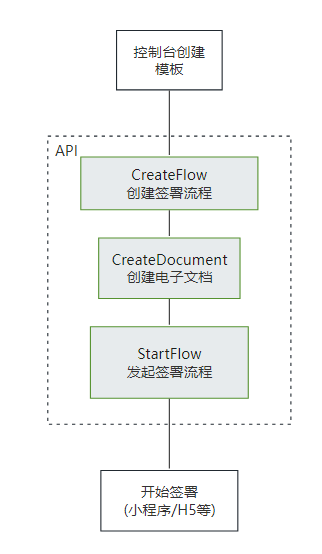
|
|
1114
899
|
|
|
1115
|
-
|
|
900
|
+
注:**静默(自动)签署不支持合同签署方存在填写**功能
|
|
901
|
+
<br>
|
|
1116
902
|
|
|
1117
|
-
|
|
1118
|
-
|
|
1119
|
-
|
|
903
|
+
<font color="red">相关视频指引</font> <br>
|
|
904
|
+
1. <a href="https://dyn.ess.tencent.cn/guide/apivideo/createflow_seversign.mp4" target="_blank">创建静默(自动)签署模板和开通自动签署</a><br>
|
|
905
|
+
2. <a href="https://dyn.ess.tencent.cn/guide/apivideo/flow_document_start.mp4" target="_blank">用模板创建发起合同</a><br>
|
|
906
|
+
*/
|
|
907
|
+
async CreateFlow(
|
|
908
|
+
req: CreateFlowRequest,
|
|
909
|
+
cb?: (error: string, rep: CreateFlowResponse) => void
|
|
910
|
+
): Promise<CreateFlowResponse> {
|
|
911
|
+
return this.request("CreateFlow", req, cb)
|
|
912
|
+
}
|
|
1120
913
|
|
|
914
|
+
/**
|
|
915
|
+
* 发起解除协议的主要应用场景为:基于一份已经签署的合同(签署流程),进行解除操作。
|
|
916
|
+
解除协议的模板是官方提供 ,经过提供法务审核,暂不支持自定义。
|
|
1121
917
|
|
|
1122
|
-
|
|
1123
|
-
|
|
1124
|
-
|
|
918
|
+
注意:
|
|
919
|
+
<ul><li><code>原合同必须签署完</code>成后才能发起解除协议。</li>
|
|
920
|
+
<li>只有原合同企业类型的参与人才能发起解除协议,<code>个人参与方不能发起解除协议</code>。</li>
|
|
921
|
+
<li>原合同个人类型参与人必须是解除协议的参与人,<code>不能更换其他第三方个人</code>参与解除协议。</li>
|
|
922
|
+
<li>如果原合同企业参与人无法参与解除协议,可以指定同企业具有同等权限的<code>企业员工代为处理</code>。</li>
|
|
923
|
+
<li>发起解除协议同发起其他企业合同一样,也会参与合同<code>扣费</code>,扣费标准同其他类型合同。</li>
|
|
924
|
+
<li>在解除协议签署完毕后,原合同及解除协议均变为已解除状态。</li>
|
|
925
|
+
<li>非原合同企业参与人发起解除协议时,需要有<code>解除合同的权限</code>。</li>
|
|
926
|
+
</ul>
|
|
1125
927
|
*/
|
|
1126
|
-
async
|
|
1127
|
-
req:
|
|
1128
|
-
cb?: (error: string, rep:
|
|
1129
|
-
): Promise<
|
|
1130
|
-
return this.request("
|
|
928
|
+
async CreateReleaseFlow(
|
|
929
|
+
req: CreateReleaseFlowRequest,
|
|
930
|
+
cb?: (error: string, rep: CreateReleaseFlowResponse) => void
|
|
931
|
+
): Promise<CreateReleaseFlowResponse> {
|
|
932
|
+
return this.request("CreateReleaseFlow", req, cb)
|
|
1131
933
|
}
|
|
1132
934
|
|
|
1133
935
|
/**
|
|
1134
|
-
*
|
|
1135
|
-
激活子企业时请保证子企业 lisence 充足。
|
|
1136
|
-
这个操作与页面端激活成员企业操作类似
|
|
1137
|
-
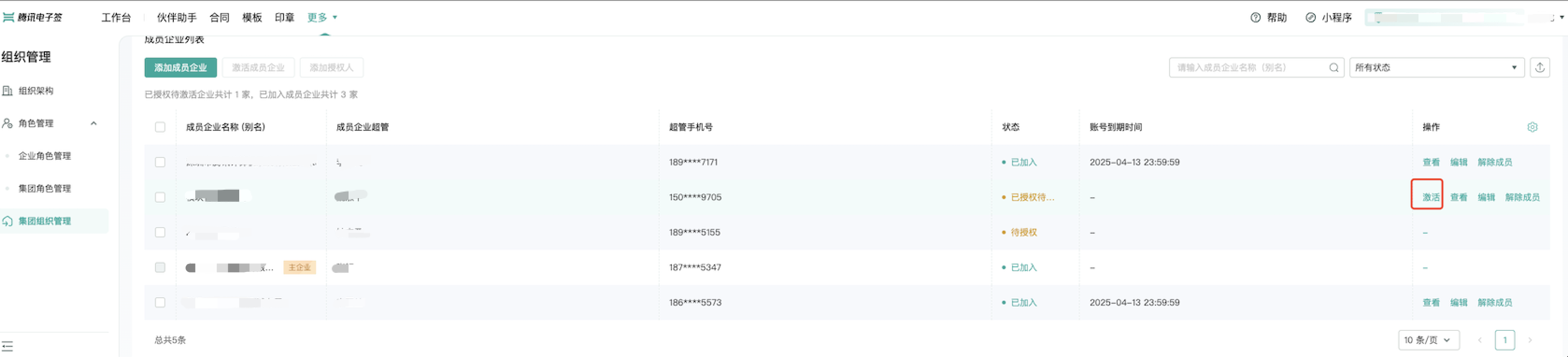
|
|
936
|
+
* 该接口用于获取创建法人章的二维码<br/>
|
|
1138
937
|
|
|
1139
|
-
|
|
1140
|
-
|
|
938
|
+
**注意**
|
|
939
|
+
1. 该二维码**有效期为7天**,过期后将失效,可重新创建 。
|
|
1141
940
|
*/
|
|
1142
|
-
async
|
|
1143
|
-
req:
|
|
1144
|
-
cb?: (error: string, rep:
|
|
1145
|
-
): Promise<
|
|
1146
|
-
return this.request("
|
|
941
|
+
async CreateLegalSealQrCode(
|
|
942
|
+
req: CreateLegalSealQrCodeRequest,
|
|
943
|
+
cb?: (error: string, rep: CreateLegalSealQrCodeResponse) => void
|
|
944
|
+
): Promise<CreateLegalSealQrCodeResponse> {
|
|
945
|
+
return this.request("CreateLegalSealQrCode", req, cb)
|
|
1147
946
|
}
|
|
1148
947
|
|
|
1149
948
|
/**
|
|
@@ -1162,38 +961,29 @@ p.s.
|
|
|
1162
961
|
}
|
|
1163
962
|
|
|
1164
963
|
/**
|
|
1165
|
-
|
|
1166
|
-
*/
|
|
1167
|
-
async DescribeIntegrationRoles(
|
|
1168
|
-
req: DescribeIntegrationRolesRequest,
|
|
1169
|
-
cb?: (error: string, rep: DescribeIntegrationRolesResponse) => void
|
|
1170
|
-
): Promise<DescribeIntegrationRolesResponse> {
|
|
1171
|
-
return this.request("DescribeIntegrationRoles", req, cb)
|
|
1172
|
-
}
|
|
964
|
+
* 此接口(CreateMultiFlowSignQRCode)用于创建一码多签签署码。
|
|
1173
965
|
|
|
1174
|
-
|
|
1175
|
-
|
|
1176
|
-
*/
|
|
1177
|
-
async CreateIntegrationDepartment(
|
|
1178
|
-
req: CreateIntegrationDepartmentRequest,
|
|
1179
|
-
cb?: (error: string, rep: CreateIntegrationDepartmentResponse) => void
|
|
1180
|
-
): Promise<CreateIntegrationDepartmentResponse> {
|
|
1181
|
-
return this.request("CreateIntegrationDepartment", req, cb)
|
|
1182
|
-
}
|
|
966
|
+
**适用场景**:
|
|
967
|
+
签署人可通过扫描二维码补充签署信息进行实名签署。常用于提前不知道签署人的身份信息场景,例如:劳务工招工、大批量员工入职等场景。
|
|
1183
968
|
|
|
1184
|
-
|
|
1185
|
-
|
|
1186
|
-
|
|
969
|
+
**注意**:
|
|
970
|
+
1. 本接口适用于**发起方没有填写控件的 B2C或者单C模板**, 若是B2C模板,还要满足以下任意一个条件
|
|
971
|
+
- 模板中配置的签署顺序是无序
|
|
972
|
+
- B端企业的签署方式是静默签署
|
|
973
|
+
- B端企业是非首位签署
|
|
974
|
+
2. 通过一码多签签署码发起的合同,合同涉及到的回调消息可参考文档[合同发起及签署相关回调
|
|
975
|
+
]( https://qian.tencent.com/developers/company/callback_types_contracts_sign)
|
|
976
|
+
3. 用户通过一码多签签署码发起合同时,因企业额度不足导致失败 会触发签署二维码相关回调,具体参考文档[签署二维码相关回调](https://qian.tencent.com/developers/company/callback_types_commons#%E7%AD%BE%E7%BD%B2%E4%BA%8C%E7%BB%B4%E7%A0%81%E7%9B%B8%E5%85%B3%E5%9B%9E%E8%B0%83)
|
|
1187
977
|
|
|
1188
|
-
|
|
1189
|
-
|
|
1190
|
-
|
|
978
|
+
签署码的样式如下图:
|
|
979
|
+
|
|
980
|
+
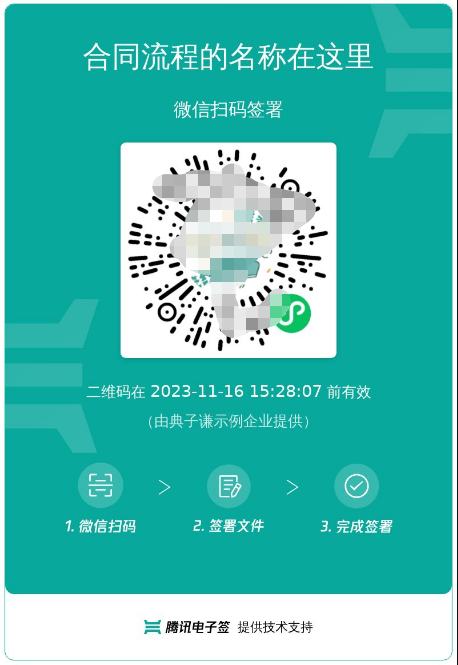
|
|
1191
981
|
*/
|
|
1192
|
-
async
|
|
1193
|
-
req:
|
|
1194
|
-
cb?: (error: string, rep:
|
|
1195
|
-
): Promise<
|
|
1196
|
-
return this.request("
|
|
982
|
+
async CreateMultiFlowSignQRCode(
|
|
983
|
+
req: CreateMultiFlowSignQRCodeRequest,
|
|
984
|
+
cb?: (error: string, rep: CreateMultiFlowSignQRCodeResponse) => void
|
|
985
|
+
): Promise<CreateMultiFlowSignQRCodeResponse> {
|
|
986
|
+
return this.request("CreateMultiFlowSignQRCode", req, cb)
|
|
1197
987
|
}
|
|
1198
988
|
|
|
1199
989
|
/**
|
|
@@ -1211,39 +1001,6 @@ p.s.
|
|
|
1211
1001
|
return this.request("DescribeExtendedServiceAuthDetail", req, cb)
|
|
1212
1002
|
}
|
|
1213
1003
|
|
|
1214
|
-
/**
|
|
1215
|
-
* 通过此接口(DescribeBillUsage)查询该企业的套餐套餐使用情况。
|
|
1216
|
-
*/
|
|
1217
|
-
async DescribeBillUsage(
|
|
1218
|
-
req: DescribeBillUsageRequest,
|
|
1219
|
-
cb?: (error: string, rep: DescribeBillUsageResponse) => void
|
|
1220
|
-
): Promise<DescribeBillUsageResponse> {
|
|
1221
|
-
return this.request("DescribeBillUsage", req, cb)
|
|
1222
|
-
}
|
|
1223
|
-
|
|
1224
|
-
/**
|
|
1225
|
-
* 此接口(ModifyIntegrationDepartment)用于更新企业的部门信息,支持更新部门名称、客户系统部门ID和部门序号等信息。
|
|
1226
|
-
*/
|
|
1227
|
-
async ModifyIntegrationDepartment(
|
|
1228
|
-
req: ModifyIntegrationDepartmentRequest,
|
|
1229
|
-
cb?: (error: string, rep: ModifyIntegrationDepartmentResponse) => void
|
|
1230
|
-
): Promise<ModifyIntegrationDepartmentResponse> {
|
|
1231
|
-
return this.request("ModifyIntegrationDepartment", req, cb)
|
|
1232
|
-
}
|
|
1233
|
-
|
|
1234
|
-
/**
|
|
1235
|
-
* 创建企业扩展服务授权,当前仅支持授权 “企业自动签” 和 “批量签署” 给企业员工。
|
|
1236
|
-
该接口作用和电子签控制台 企业设置-扩展服务-企业自动签署和批量签署授权 两个模块功能相同,可通过该接口授权给企业员工。
|
|
1237
|
-
|
|
1238
|
-
注:“企业自动签授权”支持集团代子企业操作,请联系运营开通此功能。
|
|
1239
|
-
*/
|
|
1240
|
-
async CreateExtendedServiceAuthInfos(
|
|
1241
|
-
req: CreateExtendedServiceAuthInfosRequest,
|
|
1242
|
-
cb?: (error: string, rep: CreateExtendedServiceAuthInfosResponse) => void
|
|
1243
|
-
): Promise<CreateExtendedServiceAuthInfosResponse> {
|
|
1244
|
-
return this.request("CreateExtendedServiceAuthInfos", req, cb)
|
|
1245
|
-
}
|
|
1246
|
-
|
|
1247
1004
|
/**
|
|
1248
1005
|
* 此接口(CancelMultiFlowSignQRCode)用于废除一码多签签署码。
|
|
1249
1006
|
该接口所需的二维码ID,源自[创建一码多签签署码](https://qian.tencent.com/developers/companyApis/startFlows/CreateMultiFlowSignQRCode)生成的。
|
|
@@ -1257,13 +1014,32 @@ p.s.
|
|
|
1257
1014
|
}
|
|
1258
1015
|
|
|
1259
1016
|
/**
|
|
1260
|
-
|
|
1261
|
-
|
|
1262
|
-
|
|
1263
|
-
|
|
1264
|
-
|
|
1265
|
-
|
|
1266
|
-
|
|
1017
|
+
* 查询流程基础信息
|
|
1018
|
+
适用场景:可用于主动查询某个合同流程的签署状态信息。可以配合回调通知使用。
|
|
1019
|
+
|
|
1020
|
+
注: `每个企业限制日调用量限制:100W,当日超过此限制后再调用接口返回错误`
|
|
1021
|
+
*/
|
|
1022
|
+
async DescribeFlowBriefs(
|
|
1023
|
+
req: DescribeFlowBriefsRequest,
|
|
1024
|
+
cb?: (error: string, rep: DescribeFlowBriefsResponse) => void
|
|
1025
|
+
): Promise<DescribeFlowBriefsResponse> {
|
|
1026
|
+
return this.request("DescribeFlowBriefs", req, cb)
|
|
1027
|
+
}
|
|
1028
|
+
|
|
1029
|
+
/**
|
|
1030
|
+
* 该接口用于在使用视频认证方式签署合同后,获取用户的签署人脸认证视频。
|
|
1031
|
+
|
|
1032
|
+
1. 该接口**仅适用于在H5端签署**的合同,**在通过视频认证后**获取人脸图片。
|
|
1033
|
+
2. 该接口**不支持小程序端**的签署人脸图片获取。
|
|
1034
|
+
3. 请在**签署完成后的三天内**获取人脸图片,**过期后将无法获取**。
|
|
1035
|
+
|
|
1036
|
+
**注意:该接口需要开通白名单,请联系客户经理开通后使用。**
|
|
1037
|
+
*/
|
|
1038
|
+
async DescribeSignFaceVideo(
|
|
1039
|
+
req: DescribeSignFaceVideoRequest,
|
|
1040
|
+
cb?: (error: string, rep: DescribeSignFaceVideoResponse) => void
|
|
1041
|
+
): Promise<DescribeSignFaceVideoResponse> {
|
|
1042
|
+
return this.request("DescribeSignFaceVideo", req, cb)
|
|
1267
1043
|
}
|
|
1268
1044
|
|
|
1269
1045
|
/**
|
|
@@ -1283,53 +1059,90 @@ p.s.
|
|
|
1283
1059
|
}
|
|
1284
1060
|
|
|
1285
1061
|
/**
|
|
1286
|
-
*
|
|
1062
|
+
* 用来撤销<a href="https://qian.tencent.com/developers/companyApis/users/CreateUserAutoSignEnableUrl" target="_blank">获取个人用户自动签的开通状态</a>生成的开通链接,撤销生成的链接失效。
|
|
1287
1063
|
|
|
1288
|
-
|
|
1064
|
+
注:
|
|
1065
|
+
<ul><li>若个人用户已经用生成的完成自动签署的开通,撤销链接无效不会对开通结果产生影响(此情况接口会报错)。</li>
|
|
1066
|
+
<li>处方单等特殊场景专用,此接口为白名单功能,使用前请联系对接的客户经理沟通。</li></ul>
|
|
1067
|
+
*/
|
|
1068
|
+
async CancelUserAutoSignEnableUrl(
|
|
1069
|
+
req: CancelUserAutoSignEnableUrlRequest,
|
|
1070
|
+
cb?: (error: string, rep: CancelUserAutoSignEnableUrlResponse) => void
|
|
1071
|
+
): Promise<CancelUserAutoSignEnableUrlResponse> {
|
|
1072
|
+
return this.request("CancelUserAutoSignEnableUrl", req, cb)
|
|
1073
|
+
}
|
|
1289
1074
|
|
|
1290
|
-
|
|
1075
|
+
/**
|
|
1076
|
+
* 通过此接口(DescribeBillUsageDetail)查询该企业的套餐消耗详情。
|
|
1077
|
+
*/
|
|
1078
|
+
async DescribeBillUsageDetail(
|
|
1079
|
+
req: DescribeBillUsageDetailRequest,
|
|
1080
|
+
cb?: (error: string, rep: DescribeBillUsageDetailResponse) => void
|
|
1081
|
+
): Promise<DescribeBillUsageDetailResponse> {
|
|
1082
|
+
return this.request("DescribeBillUsageDetail", req, cb)
|
|
1083
|
+
}
|
|
1291
1084
|
|
|
1292
|
-
|
|
1293
|
-
|
|
1294
|
-
|
|
1295
|
-
|
|
1296
|
-
|
|
1085
|
+
/**
|
|
1086
|
+
* 此接口(DescribeIntegrationDepartments)用于查询企业的部门信息列表,支持查询单个部门节点或单个部门节点及一级子节点部门列表。
|
|
1087
|
+
*/
|
|
1088
|
+
async DescribeIntegrationDepartments(
|
|
1089
|
+
req: DescribeIntegrationDepartmentsRequest,
|
|
1090
|
+
cb?: (error: string, rep: DescribeIntegrationDepartmentsResponse) => void
|
|
1091
|
+
): Promise<DescribeIntegrationDepartmentsResponse> {
|
|
1092
|
+
return this.request("DescribeIntegrationDepartments", req, cb)
|
|
1093
|
+
}
|
|
1094
|
+
|
|
1095
|
+
/**
|
|
1096
|
+
* 此接口(ModifyIntegrationDepartment)用于更新企业的部门信息,支持更新部门名称、客户系统部门ID和部门序号等信息。
|
|
1097
|
+
*/
|
|
1098
|
+
async ModifyIntegrationDepartment(
|
|
1099
|
+
req: ModifyIntegrationDepartmentRequest,
|
|
1100
|
+
cb?: (error: string, rep: ModifyIntegrationDepartmentResponse) => void
|
|
1101
|
+
): Promise<ModifyIntegrationDepartmentResponse> {
|
|
1102
|
+
return this.request("ModifyIntegrationDepartment", req, cb)
|
|
1103
|
+
}
|
|
1104
|
+
|
|
1105
|
+
/**
|
|
1106
|
+
* 此API接口用来查询加入集团的成员企业信息
|
|
1107
|
+
适用场景:子企业在加入集团后,主企业可能通过此接口获取到所有的子企业列表,方便进行展示和统计
|
|
1297
1108
|
*/
|
|
1298
|
-
async
|
|
1299
|
-
req:
|
|
1300
|
-
cb?: (error: string, rep:
|
|
1301
|
-
): Promise<
|
|
1302
|
-
return this.request("
|
|
1109
|
+
async DescribeOrganizationGroupOrganizations(
|
|
1110
|
+
req: DescribeOrganizationGroupOrganizationsRequest,
|
|
1111
|
+
cb?: (error: string, rep: DescribeOrganizationGroupOrganizationsResponse) => void
|
|
1112
|
+
): Promise<DescribeOrganizationGroupOrganizationsResponse> {
|
|
1113
|
+
return this.request("DescribeOrganizationGroupOrganizations", req, cb)
|
|
1303
1114
|
}
|
|
1304
1115
|
|
|
1305
1116
|
/**
|
|
1306
|
-
*
|
|
1307
|
-
|
|
1308
|
-
适用场景1:已经上传了一个word文件,希望将该word文件转换成pdf文件后发起合同
|
|
1309
|
-
适用场景2:已经上传了一个jpg图片文件,希望将该图片文件转换成pdf文件后发起合同<br />
|
|
1310
|
-
转换文件是一个耗时操作,若想查看转换任务是否完成,可以通过<a href="https://qian.tencent.com/developers/companyApis/templatesAndFiles/GetTaskResultApi" target="_blank">查询转换任务状态</a>接口获取任务状态。<br />
|
|
1311
|
-
注:
|
|
1312
|
-
1. `支持的文件类型有doc、docx、xls、xlsx、html、jpg、jpeg、png、bmp、txt`
|
|
1313
|
-
2. `可通过发起合同时设置预览来检查转换文件是否达到预期效果`
|
|
1117
|
+
* 该接口会生成一个手机号变更的链接,用户可以通过该链接进入电子签系统进行手机号的变更。
|
|
1118
|
+
该接口支持员工和个人端手机号的变更。
|
|
1314
1119
|
*/
|
|
1315
|
-
async
|
|
1316
|
-
req:
|
|
1317
|
-
cb?: (error: string, rep:
|
|
1318
|
-
): Promise<
|
|
1319
|
-
return this.request("
|
|
1120
|
+
async CreateUserMobileChangeUrl(
|
|
1121
|
+
req: CreateUserMobileChangeUrlRequest,
|
|
1122
|
+
cb?: (error: string, rep: CreateUserMobileChangeUrlResponse) => void
|
|
1123
|
+
): Promise<CreateUserMobileChangeUrlResponse> {
|
|
1124
|
+
return this.request("CreateUserMobileChangeUrl", req, cb)
|
|
1320
1125
|
}
|
|
1321
1126
|
|
|
1322
1127
|
/**
|
|
1323
|
-
|
|
1324
|
-
|
|
1128
|
+
* 本接口(DeleteSealPolicies)用于撤销企业员工持有的印章权限
|
|
1129
|
+
*/
|
|
1130
|
+
async DeleteSealPolicies(
|
|
1131
|
+
req: DeleteSealPoliciesRequest,
|
|
1132
|
+
cb?: (error: string, rep: DeleteSealPoliciesResponse) => void
|
|
1133
|
+
): Promise<DeleteSealPoliciesResponse> {
|
|
1134
|
+
return this.request("DeleteSealPolicies", req, cb)
|
|
1135
|
+
}
|
|
1325
1136
|
|
|
1326
|
-
|
|
1137
|
+
/**
|
|
1138
|
+
* 本接口(DescribeFileUrls)用于查询文件的下载URL。
|
|
1139
|
+
适用场景:通过传参合同流程编号,下载对应的合同PDF文件流到本地。
|
|
1327
1140
|
*/
|
|
1328
|
-
async
|
|
1329
|
-
req:
|
|
1330
|
-
cb?: (error: string, rep:
|
|
1331
|
-
): Promise<
|
|
1332
|
-
return this.request("
|
|
1141
|
+
async DescribeFileUrls(
|
|
1142
|
+
req: DescribeFileUrlsRequest,
|
|
1143
|
+
cb?: (error: string, rep: DescribeFileUrlsResponse) => void
|
|
1144
|
+
): Promise<DescribeFileUrlsResponse> {
|
|
1145
|
+
return this.request("DescribeFileUrls", req, cb)
|
|
1333
1146
|
}
|
|
1334
1147
|
|
|
1335
1148
|
/**
|
|
@@ -1353,213 +1166,148 @@ p.s.
|
|
|
1353
1166
|
}
|
|
1354
1167
|
|
|
1355
1168
|
/**
|
|
1356
|
-
|
|
1357
|
-
*/
|
|
1358
|
-
async CreateIntegrationUserRoles(
|
|
1359
|
-
req: CreateIntegrationUserRolesRequest,
|
|
1360
|
-
cb?: (error: string, rep: CreateIntegrationUserRolesResponse) => void
|
|
1361
|
-
): Promise<CreateIntegrationUserRolesResponse> {
|
|
1362
|
-
return this.request("CreateIntegrationUserRoles", req, cb)
|
|
1363
|
-
}
|
|
1169
|
+
* 管理企业扩展服务 ,企业经办人需要是企业超管或者法人。
|
|
1364
1170
|
|
|
1365
|
-
|
|
1366
|
-
|
|
1171
|
+
跳转小程序的几种方式:主要是设置不同的EndPoint
|
|
1172
|
+
1. 通过链接Url直接跳转到小程序,不需要返回
|
|
1173
|
+
设置EndPoint为WEIXINAPP,得到链接打开即可。
|
|
1367
1174
|
|
|
1368
|
-
|
|
1369
|
-
|
|
1370
|
-
|
|
1175
|
+
2. 客户App直接跳转到小程序-->腾讯电子签小程序操作完成-->返回App
|
|
1176
|
+
跳转到小程序的实现,参考官方文档<a href="https://developers.weixin.qq.com/miniprogram/dev/framework/open-ability/launchApp.html">打开 App</a>
|
|
1177
|
+
设置EndPoint为APP,得到path。
|
|
1371
1178
|
|
|
1372
|
-
|
|
1179
|
+
3. 客户小程序直接跳到电子签小程序-->腾讯电子签小程序操作完成--->回到客户小程序
|
|
1180
|
+
跳转到小程序的实现,参考官方文档(分为<a href="https://developers.weixin.qq.com/miniprogram/dev/api/navigate/wx.navigateToMiniProgram.html">全屏</a>、<a href="https://developers.weixin.qq.com/miniprogram/dev/framework/open-ability/openEmbeddedMiniProgram.html">半屏</a>两种方式),如何配置也可以请参考: <a href="https://qian.tencent.com/developers/company/openwxminiprogram">跳转电子签小程序配置</a>
|
|
1181
|
+
设置EndPoint为APP,得到path。
|
|
1182
|
+
|
|
1183
|
+
4.其中小程序的原始Id如下,或者查看小程序信息自助获取。
|
|
1184
|
+
|
|
1185
|
+
| 小程序 | AppID | 原始ID |
|
|
1186
|
+
| ------------ | ------------ | ------------ |
|
|
1187
|
+
| 腾讯电子签(正式版) | wxa023b292fd19d41d | gh_da88f6188665 |
|
|
1188
|
+
| 腾讯电子签Demo | wx371151823f6f3edf | gh_39a5d3de69fa |
|
|
1373
1189
|
*/
|
|
1374
|
-
async
|
|
1375
|
-
req:
|
|
1376
|
-
cb?: (error: string, rep:
|
|
1377
|
-
): Promise<
|
|
1378
|
-
return this.request("
|
|
1190
|
+
async ModifyExtendedService(
|
|
1191
|
+
req: ModifyExtendedServiceRequest,
|
|
1192
|
+
cb?: (error: string, rep: ModifyExtendedServiceResponse) => void
|
|
1193
|
+
): Promise<ModifyExtendedServiceResponse> {
|
|
1194
|
+
return this.request("ModifyExtendedService", req, cb)
|
|
1379
1195
|
}
|
|
1380
1196
|
|
|
1381
1197
|
/**
|
|
1382
|
-
*
|
|
1383
|
-
|
|
1384
|
-
|
|
1385
|
-
|
|
1386
|
-
适用场景2:更新当前企业的自定义SaaS角色或集团角色,并且更新时进行角色中权限的设置(PermissionGroups 参数要传),权限树内容 PermissionGroups 可参考接口 DescribeIntegrationRoles 的输出。此处注意权限树内容可能会更新,需尽量拉取最新的权限树内容,并且权限树内容 PermissionGroups 必须是一颗完整的权限树。
|
|
1387
|
-
|
|
1388
|
-
适用场景3:更新集团角色管理的子企业列表,可通过设置 SubOrganizationIds 参数达到此效果。
|
|
1389
|
-
|
|
1390
|
-
适用场景4:主企业代理子企业操作的场景,需要设置Agent参数,并且ProxyOrganizationId设置为子企业的id即可。
|
|
1198
|
+
* 在已发起的签署流程中,支持对签署截止日期进行延期操作,主要涉及以下两个维度:
|
|
1199
|
+
1. 合同(流程)维度:只需要传递签署流程ID。这将对签署流程和发起时未单独设定签署截止时间的签署人进行延期操作。
|
|
1200
|
+
2. 签署人维度:需要传递流程ID和签署人ID。此操作将对签署人进行延期操作,尤其对于有序的合同(流程),签署截止时间不能超过后一位合同(流程)签署人的流程截止时间。
|
|
1391
1201
|
|
|
1392
|
-
|
|
1202
|
+
此接口有如下限制条件:
|
|
1203
|
+
1. 执行操作的员工需为发起方企业的超级管理员、法定代表人或签署流程的发起人。
|
|
1204
|
+
2. 在延长整个签署流程时,签署流程应至少还有一方未签署(即签署流程不能处于已全部签署完成、已拒签、已过期、已撤回、拒绝填写、已解除等合同状态)。
|
|
1205
|
+
3. 在延长整个签署流程时,新的签署截止日期应晚于合同已设定的签署截止日期和当前日期。
|
|
1206
|
+
4. 在延长签署方的截止时间时,签署方不能处于流程完结或已终止状态(即签署人不能处于已签署、已拒签、已过期、已撤回、拒绝填写、已解除等状态)。
|
|
1207
|
+
5. 在延长签署方的截止时间时,签署方的新签署截止日期应晚于当前日期和签署方已设定的截止日期。若为有序合同,还应早于或等于下一签署人的截止日期,且早于签署流程整体的截止日期。
|
|
1208
|
+
6. 不支持操作合同组合同。
|
|
1393
1209
|
*/
|
|
1394
|
-
async
|
|
1395
|
-
req:
|
|
1396
|
-
cb?: (error: string, rep:
|
|
1397
|
-
): Promise<
|
|
1398
|
-
return this.request("
|
|
1210
|
+
async ModifyFlowDeadline(
|
|
1211
|
+
req: ModifyFlowDeadlineRequest,
|
|
1212
|
+
cb?: (error: string, rep: ModifyFlowDeadlineResponse) => void
|
|
1213
|
+
): Promise<ModifyFlowDeadlineResponse> {
|
|
1214
|
+
return this.request("ModifyFlowDeadline", req, cb)
|
|
1399
1215
|
}
|
|
1400
1216
|
|
|
1401
1217
|
/**
|
|
1402
|
-
*
|
|
1218
|
+
* 获取区块链存证报告查看链接/二维码接口
|
|
1403
1219
|
|
|
1404
|
-
|
|
1405
|
-
|
|
1406
|
-
-
|
|
1407
|
-
|
|
1408
|
-
|
|
1220
|
+
适用场景:企业员工可以通过此接口生成合同区块链存证报告的查看链接/二维码,以供他人扫码打开腾讯电子签小程序查看。
|
|
1221
|
+
|
|
1222
|
+
[点击查看区块链存证报告样式](https://qcloudimg.tencent-cloud.cn/raw/47d5e9c2ffa90ad4e27b3cd14095aa08.jpg)
|
|
1223
|
+
|
|
1224
|
+
注:
|
|
1225
|
+
<ul><li>1. 二维码下载链接过期时间为5分钟,请尽快下载保存。二维码/短链的过期时间为<font color="red">7天</font>,超过有效期则不可用。</li>
|
|
1226
|
+
<li>2. 合同状态需为<font color="red">签署完成</font> 、<font color="red">已解除</font>才能生成报告查看二维码/短链。</li>
|
|
1227
|
+
<li>3. 调用接口时,需确保接口调用身份拥有此合同的访问数据权限或为合同参与方。</li>
|
|
1228
|
+
<li>4. 通过扫码或者点击链接,用户无需登录或者鉴权即可查看对应合同的区块链存证报告,请妥善保管好二维码或链接。</li></ul>
|
|
1409
1229
|
*/
|
|
1410
|
-
async
|
|
1411
|
-
req:
|
|
1412
|
-
cb?: (error: string, rep:
|
|
1413
|
-
): Promise<
|
|
1414
|
-
return this.request("
|
|
1230
|
+
async CreateFlowBlockchainEvidenceUrl(
|
|
1231
|
+
req: CreateFlowBlockchainEvidenceUrlRequest,
|
|
1232
|
+
cb?: (error: string, rep: CreateFlowBlockchainEvidenceUrlResponse) => void
|
|
1233
|
+
): Promise<CreateFlowBlockchainEvidenceUrlResponse> {
|
|
1234
|
+
return this.request("CreateFlowBlockchainEvidenceUrl", req, cb)
|
|
1415
1235
|
}
|
|
1416
1236
|
|
|
1417
1237
|
/**
|
|
1418
|
-
*
|
|
1419
|
-
|
|
1420
|
-
- 员工必须需作为批量签署合同的签署方,or或签合同的候选人之一。
|
|
1421
|
-
- 对于本方企业:如有UserId,应以UserId为主要标识;如果没有UserId,则必须填写Name和Mobile信息。
|
|
1422
|
-
- 若要生成他发企业签署链接:应传RecipientIds,且制定的合同必须是接口调用方发起的。
|
|
1423
|
-
- 支持待签署、待填写状态的合同生成签署链接。
|
|
1238
|
+
* 用于客户企业在调用生成[C端用户实名链接(CreateUserVerifyUrl)](https://qian.tencent.com/developers/companyApis/users/CreateUserVerifyUrl)接口之前判断C端用户是否实名,如果已经实名,就不需要再次调用生成C端链接接口去实名
|
|
1239
|
+
注意:此接口仅会返回当前员工是否通过[C端用户实名链接(CreateUserVerifyUrl)](https://qian.tencent.com/developers/companyApis/users/CreateUserVerifyUrl)所实名的员工是否实名,并不会返回个人用户自己在电子签进行实名的状况
|
|
1424
1240
|
*/
|
|
1425
|
-
async
|
|
1426
|
-
req:
|
|
1427
|
-
cb?: (error: string, rep:
|
|
1428
|
-
): Promise<
|
|
1429
|
-
return this.request("
|
|
1241
|
+
async DescribeUserVerifyStatus(
|
|
1242
|
+
req: DescribeUserVerifyStatusRequest,
|
|
1243
|
+
cb?: (error: string, rep: DescribeUserVerifyStatusResponse) => void
|
|
1244
|
+
): Promise<DescribeUserVerifyStatusResponse> {
|
|
1245
|
+
return this.request("DescribeUserVerifyStatus", req, cb)
|
|
1430
1246
|
}
|
|
1431
1247
|
|
|
1432
1248
|
/**
|
|
1433
|
-
*
|
|
1434
|
-
|
|
1435
|
-
1. 发起合同时,**签署人的NotifyType需设置为sms**
|
|
1436
|
-
2. 合同中当前状态为 **待签署** 的签署人是催办的对象
|
|
1437
|
-
3. **每个合同只能催办一次**
|
|
1438
|
-
|
|
1439
|
-
**催办的效果**: 对方会收到如下的短信通知
|
|
1440
|
-
|
|
1441
|
-

|
|
1249
|
+
* 此接口(ModifyIntegrationRole)用来更新企业自定义的SaaS角色或集团角色。
|
|
1442
1250
|
|
|
1443
|
-
|
|
1444
|
-
*/
|
|
1445
|
-
async CreateFlowReminds(
|
|
1446
|
-
req: CreateFlowRemindsRequest,
|
|
1447
|
-
cb?: (error: string, rep: CreateFlowRemindsResponse) => void
|
|
1448
|
-
): Promise<CreateFlowRemindsResponse> {
|
|
1449
|
-
return this.request("CreateFlowReminds", req, cb)
|
|
1450
|
-
}
|
|
1251
|
+
适用场景1:更新当前企业的自定义SaaS角色或集团角色,并且更新时不进行角色中权限的更新(PermissionGroups 参数不传)。
|
|
1451
1252
|
|
|
1452
|
-
|
|
1453
|
-
* 查询流程填写控件内容,可以根据合同流程ID查询该合同流程相关联的填写控件信息和填写内容。
|
|
1454
|
-
*/
|
|
1455
|
-
async DescribeFlowComponents(
|
|
1456
|
-
req: DescribeFlowComponentsRequest,
|
|
1457
|
-
cb?: (error: string, rep: DescribeFlowComponentsResponse) => void
|
|
1458
|
-
): Promise<DescribeFlowComponentsResponse> {
|
|
1459
|
-
return this.request("DescribeFlowComponents", req, cb)
|
|
1460
|
-
}
|
|
1253
|
+
适用场景2:更新当前企业的自定义SaaS角色或集团角色,并且更新时进行角色中权限的设置(PermissionGroups 参数要传),权限树内容 PermissionGroups 可参考接口 DescribeIntegrationRoles 的输出。此处注意权限树内容可能会更新,需尽量拉取最新的权限树内容,并且权限树内容 PermissionGroups 必须是一颗完整的权限树。
|
|
1461
1254
|
|
|
1462
|
-
|
|
1463
|
-
* 通过此接口可以关闭个人用户自动签功能。
|
|
1464
|
-
无需对应的用户刷脸等方式同意即可关闭。
|
|
1255
|
+
适用场景3:更新集团角色管理的子企业列表,可通过设置 SubOrganizationIds 参数达到此效果。
|
|
1465
1256
|
|
|
1466
|
-
|
|
1257
|
+
适用场景4:主企业代理子企业操作的场景,需要设置Agent参数,并且ProxyOrganizationId设置为子企业的id即可。
|
|
1467
1258
|
|
|
1468
|
-
|
|
1469
|
-
<li>如果此用户在开通时候绑定过个人自动签账号许可, 关闭此用户的自动签不会归还个人自动签账号许可的额度。</li></ul>
|
|
1259
|
+
注意事项:SaaS角色和集团角色对应的权限树是不一样的。
|
|
1470
1260
|
*/
|
|
1471
|
-
async
|
|
1472
|
-
req:
|
|
1473
|
-
cb?: (error: string, rep:
|
|
1474
|
-
): Promise<
|
|
1475
|
-
return this.request("
|
|
1476
|
-
}
|
|
1477
|
-
|
|
1478
|
-
/**
|
|
1479
|
-
* 此接口(DescribePersonCertificate)用于查询个人数字证书信息。<br />注:`1.目前仅用于查询开通了医疗自动签署功能的个人数字证书。`<br />`2.调用此接口需要开通白名单,使用前请联系相关人员开通白名单。`
|
|
1480
|
-
*/
|
|
1481
|
-
async DescribePersonCertificate(
|
|
1482
|
-
req: DescribePersonCertificateRequest,
|
|
1483
|
-
cb?: (error: string, rep: DescribePersonCertificateResponse) => void
|
|
1484
|
-
): Promise<DescribePersonCertificateResponse> {
|
|
1485
|
-
return this.request("DescribePersonCertificate", req, cb)
|
|
1261
|
+
async ModifyIntegrationRole(
|
|
1262
|
+
req: ModifyIntegrationRoleRequest,
|
|
1263
|
+
cb?: (error: string, rep: ModifyIntegrationRoleResponse) => void
|
|
1264
|
+
): Promise<ModifyIntegrationRoleResponse> {
|
|
1265
|
+
return this.request("ModifyIntegrationRole", req, cb)
|
|
1486
1266
|
}
|
|
1487
1267
|
|
|
1488
1268
|
/**
|
|
1489
|
-
*
|
|
1490
|
-
|
|
1269
|
+
* 本接口(CreateBatchOrganizationRegistrationTasks)用于批量创建企业认证链接
|
|
1270
|
+
该接口为异步提交任务接口,需要跟查询企业批量认证链接(DescribeBatchOrganizationRegistrationUrls) 配合使用.
|
|
1491
1271
|
|
|
1492
|
-
|
|
1493
|
-
<ul>
|
|
1494
|
-
<li>此接口为合作引流场景使用,使用`有白名单限制`,使用前请联系对接的客户经理沟通。</li>
|
|
1495
|
-
<li>`AuthCode 只能使用一次`,查询一次再次查询会返回错误</li>
|
|
1496
|
-
</ul>
|
|
1497
|
-
*/
|
|
1498
|
-
async DescribeThirdPartyAuthCode(
|
|
1499
|
-
req: DescribeThirdPartyAuthCodeRequest,
|
|
1500
|
-
cb?: (error: string, rep: DescribeThirdPartyAuthCodeResponse) => void
|
|
1501
|
-
): Promise<DescribeThirdPartyAuthCodeResponse> {
|
|
1502
|
-
return this.request("DescribeThirdPartyAuthCode", req, cb)
|
|
1503
|
-
}
|
|
1272
|
+
批量创建链接有以下限制:
|
|
1504
1273
|
|
|
1505
|
-
|
|
1506
|
-
|
|
1274
|
+
1. 单次最多创建10个企业。
|
|
1275
|
+
2. 一天同一家企业最多创建8000家企业。
|
|
1276
|
+
3. 同一批创建的企业不能重复 其中包括 企业名称,企业统一信用代码
|
|
1277
|
+
4. 跳转到小程序的实现,参考微信官方文档(分为全屏、半屏两种方式),如何配置也可以请参考: 跳转电子签小程序配置
|
|
1507
1278
|
|
|
1508
|
-
|
|
1509
|
-
*/
|
|
1510
|
-
async RenewAutoSignLicense(
|
|
1511
|
-
req: RenewAutoSignLicenseRequest,
|
|
1512
|
-
cb?: (error: string, rep: RenewAutoSignLicenseResponse) => void
|
|
1513
|
-
): Promise<RenewAutoSignLicenseResponse> {
|
|
1514
|
-
return this.request("RenewAutoSignLicense", req, cb)
|
|
1515
|
-
}
|
|
1279
|
+
注:
|
|
1516
1280
|
|
|
1517
|
-
|
|
1518
|
-
|
|
1281
|
+
1. **此接口需要购买单独的实名套餐包方可调用,如有需求请联系对接人员评估**
|
|
1282
|
+
|
|
1283
|
+
2. 如果生成的链接是APP链接,跳转到小程序的实现,参考微信官方文档(分为<a href="https://developers.weixin.qq.com/miniprogram/dev/api/navigate/wx.navigateToMiniProgram.html">全屏</a>、<a href="https://developers.weixin.qq.com/miniprogram/dev/framework/open-ability/openEmbeddedMiniProgram.html">半屏</a>两种方式),如何配置也可以请参考: <a href="https://qian.tencent.com/developers/company/openwxminiprogram">跳转电子签小程序配置</a>
|
|
1284
|
+
|
|
1519
1285
|
|
|
1520
|
-
|
|
1521
|
-
*/
|
|
1522
|
-
async CreateWebThemeConfig(
|
|
1523
|
-
req: CreateWebThemeConfigRequest,
|
|
1524
|
-
cb?: (error: string, rep: CreateWebThemeConfigResponse) => void
|
|
1525
|
-
): Promise<CreateWebThemeConfigResponse> {
|
|
1526
|
-
return this.request("CreateWebThemeConfig", req, cb)
|
|
1527
|
-
}
|
|
1286
|
+
**腾讯电子签小程序的AppID 和 原始Id如下:**
|
|
1528
1287
|
|
|
1529
|
-
|
|
1530
|
-
|
|
1531
|
-
|
|
1288
|
+
| 小程序 | AppID | 原始ID |
|
|
1289
|
+
| --- | --- | --- |
|
|
1290
|
+
| 腾讯电子签(正式版) | wxa023b292fd19d41d | gh_da88f6188665 |
|
|
1291
|
+
| 腾讯电子签Demo | wx371151823f6f3edf | gh_39a5d3de69fa |
|
|
1532
1292
|
*/
|
|
1533
|
-
async
|
|
1534
|
-
req:
|
|
1535
|
-
cb?: (error: string, rep:
|
|
1536
|
-
): Promise<
|
|
1537
|
-
return this.request("
|
|
1293
|
+
async CreateBatchOrganizationRegistrationTasks(
|
|
1294
|
+
req: CreateBatchOrganizationRegistrationTasksRequest,
|
|
1295
|
+
cb?: (error: string, rep: CreateBatchOrganizationRegistrationTasksResponse) => void
|
|
1296
|
+
): Promise<CreateBatchOrganizationRegistrationTasksResponse> {
|
|
1297
|
+
return this.request("CreateBatchOrganizationRegistrationTasks", req, cb)
|
|
1538
1298
|
}
|
|
1539
1299
|
|
|
1540
1300
|
/**
|
|
1541
|
-
*
|
|
1542
|
-
|
|
1543
|
-
|
|
1544
|
-
- 如果该员工没有未处理的合同,可不设置交接人的ReceiveUserId或ReceiveOpenId进行离职操作。
|
|
1545
|
-
- 如果该员工有未处理的合同,需要设置ReceiveUserId或ReceiveOpenId表示交接的负责人,交接后员工会进行离职操作。
|
|
1546
|
-
|
|
1547
|
-
未处理的合同包括以下:
|
|
1548
|
-
|
|
1549
|
-
- 待签署的合同(包括顺序签署还没有轮到的合同,此类合同某些情况可能不会出现在用户的列表中)。
|
|
1550
|
-
- 待填写的合同。
|
|
1551
|
-
- 待解除的合同等。
|
|
1301
|
+
* 创建企业扩展服务授权,当前仅支持授权 “企业自动签” 和 “批量签署” 给企业员工。
|
|
1302
|
+
该接口作用和电子签控制台 企业设置-扩展服务-企业自动签署和批量签署授权 两个模块功能相同,可通过该接口授权给企业员工。
|
|
1552
1303
|
|
|
1553
|
-
|
|
1554
|
-
1. <font color="red">超管或法人身份的员工不能被离职</font>, 需要在控制台或小程序更换法人和超管后进行离职删除。
|
|
1555
|
-
2. <font color="red">员工存在待处理合同时必须交接</font>后才能离职无人交接时不能被离职删除。
|
|
1556
|
-
3. 未实名的员工可以直接离职,不用交接合同
|
|
1304
|
+
注:“企业自动签授权”支持集团代子企业操作,请联系运营开通此功能。
|
|
1557
1305
|
*/
|
|
1558
|
-
async
|
|
1559
|
-
req:
|
|
1560
|
-
cb?: (error: string, rep:
|
|
1561
|
-
): Promise<
|
|
1562
|
-
return this.request("
|
|
1306
|
+
async CreateExtendedServiceAuthInfos(
|
|
1307
|
+
req: CreateExtendedServiceAuthInfosRequest,
|
|
1308
|
+
cb?: (error: string, rep: CreateExtendedServiceAuthInfosResponse) => void
|
|
1309
|
+
): Promise<CreateExtendedServiceAuthInfosResponse> {
|
|
1310
|
+
return this.request("CreateExtendedServiceAuthInfos", req, cb)
|
|
1563
1311
|
}
|
|
1564
1312
|
|
|
1565
1313
|
/**
|
|
@@ -1606,87 +1354,96 @@ p.s.
|
|
|
1606
1354
|
}
|
|
1607
1355
|
|
|
1608
1356
|
/**
|
|
1609
|
-
*
|
|
1610
|
-
|
|
1611
|
-
|
|
1612
|
-
|
|
1613
|
-
|
|
1357
|
+
* 此接口(CreateConvertTaskApi)用来将word、excel、html、图片、txt类型文件转换为PDF文件。<br />
|
|
1358
|
+
前提条件:源文件已经通过 <a href="https://qian.tencent.com/developers/companyApis/templatesAndFiles/UploadFiles" target="_blank">文件上传接口</a>完成上传,并得到了源文件的资源Id。<br />
|
|
1359
|
+
适用场景1:已经上传了一个word文件,希望将该word文件转换成pdf文件后发起合同
|
|
1360
|
+
适用场景2:已经上传了一个jpg图片文件,希望将该图片文件转换成pdf文件后发起合同<br />
|
|
1361
|
+
转换文件是一个耗时操作,若想查看转换任务是否完成,可以通过<a href="https://qian.tencent.com/developers/companyApis/templatesAndFiles/GetTaskResultApi" target="_blank">查询转换任务状态</a>接口获取任务状态。<br />
|
|
1362
|
+
注:
|
|
1363
|
+
1. `支持的文件类型有doc、docx、xls、xlsx、html、jpg、jpeg、png、bmp、txt`
|
|
1364
|
+
2. `可通过发起合同时设置预览来检查转换文件是否达到预期效果`
|
|
1614
1365
|
*/
|
|
1615
|
-
async
|
|
1616
|
-
req:
|
|
1617
|
-
cb?: (error: string, rep:
|
|
1618
|
-
): Promise<
|
|
1619
|
-
return this.request("
|
|
1366
|
+
async CreateConvertTaskApi(
|
|
1367
|
+
req: CreateConvertTaskApiRequest,
|
|
1368
|
+
cb?: (error: string, rep: CreateConvertTaskApiResponse) => void
|
|
1369
|
+
): Promise<CreateConvertTaskApiResponse> {
|
|
1370
|
+
return this.request("CreateConvertTaskApi", req, cb)
|
|
1620
1371
|
}
|
|
1621
1372
|
|
|
1622
1373
|
/**
|
|
1623
|
-
|
|
1624
|
-
|
|
1625
|
-
|
|
1626
|
-
|
|
1627
|
-
|
|
1628
|
-
|
|
1629
|
-
|
|
1374
|
+
* 本接口(CreateOrganizationAuthUrl)用于生成创建企业认证链接。
|
|
1375
|
+
用于业务方系统自己生成认证链接进行跳转.而不用电子签自带的生成链接
|
|
1376
|
+
|
|
1377
|
+
注: **此接口需要购买单独的实名套餐包方可调用,如有需求请联系对接人员评估**
|
|
1378
|
+
*/
|
|
1379
|
+
async CreateOrganizationAuthUrl(
|
|
1380
|
+
req: CreateOrganizationAuthUrlRequest,
|
|
1381
|
+
cb?: (error: string, rep: CreateOrganizationAuthUrlResponse) => void
|
|
1382
|
+
): Promise<CreateOrganizationAuthUrlResponse> {
|
|
1383
|
+
return this.request("CreateOrganizationAuthUrl", req, cb)
|
|
1630
1384
|
}
|
|
1631
1385
|
|
|
1632
1386
|
/**
|
|
1633
|
-
|
|
1634
|
-
*/
|
|
1635
|
-
async DescribeIntegrationDepartments(
|
|
1636
|
-
req: DescribeIntegrationDepartmentsRequest,
|
|
1637
|
-
cb?: (error: string, rep: DescribeIntegrationDepartmentsResponse) => void
|
|
1638
|
-
): Promise<DescribeIntegrationDepartmentsResponse> {
|
|
1639
|
-
return this.request("DescribeIntegrationDepartments", req, cb)
|
|
1640
|
-
}
|
|
1641
|
-
|
|
1642
|
-
/**
|
|
1643
|
-
* 此接口(CreateFlowGroupByFiles)可用于通过多个文件创建合同组签署流程。
|
|
1387
|
+
* 此接口(UploadFiles)文件上传。<br/>
|
|
1644
1388
|
|
|
1645
|
-
|
|
1389
|
+
适用场景:用于合同,印章的文件上传。文件上传以后,
|
|
1390
|
+
如果是PDF格式文件可配合<a href="https://qian.tencent.com/developers/companyApis/startFlows/CreateFlowByFiles" target="_blank">用PDF文件创建签署流程</a>接口进行合同流程的发起
|
|
1391
|
+
如果是其他类型可以配合<a href="https://qian.tencent.com/developers/companyApis/templatesAndFiles/CreateConvertTaskApi" target="_blank">创建文件转换任务</a>接口转换成PDF文件
|
|
1646
1392
|
|
|
1647
|
-
|
|
1393
|
+
注:
|
|
1394
|
+
1. 图片类型(png/jpg/jpeg)限制大小为5M以下, PDF/word/excel等其他格式限制大小为60M以下
|
|
1395
|
+
2. 调用此接口时需要设置单独的Domain请求域名,<font color="red">联调开发环境为: file.test.ess.tencent.cn,正式环境需要设置为:file.ess.tencent.cn</font>,代码示例
|
|
1396
|
+
```
|
|
1397
|
+
HttpProfile httpProfile = new HttpProfile();
|
|
1398
|
+
httpProfile.setEndpoint("file.test.ess.tencent.cn");
|
|
1399
|
+
```
|
|
1648
1400
|
|
|
1649
|
-
|
|
1401
|
+
<font color="red">相关视频指引</font> <br>
|
|
1402
|
+
1. <a href="https://dyn.ess.tencent.cn/guide/apivideo/ess_uploadfiles.mp4" target="_blank">上传用于合同发起的PDF文件代码编写示例</a><br>
|
|
1650
1403
|
*/
|
|
1651
|
-
async
|
|
1652
|
-
req:
|
|
1653
|
-
cb?: (error: string, rep:
|
|
1654
|
-
): Promise<
|
|
1655
|
-
return this.request("
|
|
1404
|
+
async UploadFiles(
|
|
1405
|
+
req: UploadFilesRequest,
|
|
1406
|
+
cb?: (error: string, rep: UploadFilesResponse) => void
|
|
1407
|
+
): Promise<UploadFilesResponse> {
|
|
1408
|
+
return this.request("UploadFiles", req, cb)
|
|
1656
1409
|
}
|
|
1657
1410
|
|
|
1658
1411
|
/**
|
|
1659
|
-
*
|
|
1660
|
-
|
|
1412
|
+
* 通过此接口,创建子企业激活记录,集团企业管理员可针对未激活的成员企业进行激活。
|
|
1413
|
+
激活子企业时请保证子企业 lisence 充足。
|
|
1414
|
+
这个操作与页面端激活成员企业操作类似
|
|
1415
|
+

|
|
1416
|
+
|
|
1417
|
+
p.s.
|
|
1418
|
+
此接口只能用于激活,不能用于续期。
|
|
1661
1419
|
*/
|
|
1662
|
-
async
|
|
1663
|
-
req:
|
|
1664
|
-
cb?: (error: string, rep:
|
|
1665
|
-
): Promise<
|
|
1666
|
-
return this.request("
|
|
1420
|
+
async CreateIntegrationSubOrganizationActiveRecord(
|
|
1421
|
+
req: CreateIntegrationSubOrganizationActiveRecordRequest,
|
|
1422
|
+
cb?: (error: string, rep: CreateIntegrationSubOrganizationActiveRecordResponse) => void
|
|
1423
|
+
): Promise<CreateIntegrationSubOrganizationActiveRecordResponse> {
|
|
1424
|
+
return this.request("CreateIntegrationSubOrganizationActiveRecord", req, cb)
|
|
1667
1425
|
}
|
|
1668
1426
|
|
|
1669
1427
|
/**
|
|
1670
|
-
*
|
|
1428
|
+
* 查询流程填写控件内容,可以根据合同流程ID查询该合同流程相关联的填写控件信息和填写内容。
|
|
1671
1429
|
*/
|
|
1672
|
-
async
|
|
1673
|
-
req:
|
|
1674
|
-
cb?: (error: string, rep:
|
|
1675
|
-
): Promise<
|
|
1676
|
-
return this.request("
|
|
1430
|
+
async DescribeFlowComponents(
|
|
1431
|
+
req: DescribeFlowComponentsRequest,
|
|
1432
|
+
cb?: (error: string, rep: DescribeFlowComponentsResponse) => void
|
|
1433
|
+
): Promise<DescribeFlowComponentsResponse> {
|
|
1434
|
+
return this.request("DescribeFlowComponents", req, cb)
|
|
1677
1435
|
}
|
|
1678
1436
|
|
|
1679
1437
|
/**
|
|
1680
|
-
*
|
|
1681
|
-
该接口作用和电子签控制台 企业设置-扩展服务-企业自动签署和批量签署授权 两个模块功能相同,可通过该接口取消企业员工授权。
|
|
1438
|
+
* 用来设置本企业嵌入式页面个性化主题配置(例如是否展示电子签logo、定义主题色等),设置后获取的web签署界面都会使用此配置进行展示。
|
|
1682
1439
|
|
|
1683
|
-
|
|
1440
|
+
如果多次调用,会以最后一次的配置为准
|
|
1684
1441
|
*/
|
|
1685
|
-
async
|
|
1686
|
-
req:
|
|
1687
|
-
cb?: (error: string, rep:
|
|
1688
|
-
): Promise<
|
|
1689
|
-
return this.request("
|
|
1442
|
+
async CreateWebThemeConfig(
|
|
1443
|
+
req: CreateWebThemeConfigRequest,
|
|
1444
|
+
cb?: (error: string, rep: CreateWebThemeConfigResponse) => void
|
|
1445
|
+
): Promise<CreateWebThemeConfigResponse> {
|
|
1446
|
+
return this.request("CreateWebThemeConfig", req, cb)
|
|
1690
1447
|
}
|
|
1691
1448
|
|
|
1692
1449
|
/**
|
|
@@ -1738,6 +1495,223 @@ p.s.
|
|
|
1738
1495
|
return this.request("CreateIntegrationEmployees", req, cb)
|
|
1739
1496
|
}
|
|
1740
1497
|
|
|
1498
|
+
/**
|
|
1499
|
+
* 该接口用于发起合同后,生成个人用户的批量签署链接, 暂时不支持企业端签署。
|
|
1500
|
+
**注意:**
|
|
1501
|
+
1. 该接口目前仅支持签署人类型是**个人签署方的批量签署场景**(ApproverType=1)。
|
|
1502
|
+
2. 该接口可生成批量签署链接的C端签署人**必须仅有手写签名(控件类型为SIGN_SIGNATURE)和时间类型的签署控件**,**不支持填写控件** 。
|
|
1503
|
+
3. 请确保C端签署人在批量签署合同中**为待签署状态**,如需顺序签署请待前一位参与人签署完成后,再创建该C端用户的签署链接。
|
|
1504
|
+
4. 该签署链接**有效期为30分钟**,过期后将失效,如需签署可重新创建批量签署链接 。
|
|
1505
|
+
5. 该接口返回的签署链接适用于APP集成的场景,支持APP打开或浏览器直接打开,**不支持微信小程序嵌入**。
|
|
1506
|
+
跳转到小程序的实现,参考微信官方文档(分为<a href="https://developers.weixin.qq.com/miniprogram/dev/api/navigate/wx.navigateToMiniProgram.html">全屏</a>、<a href="https://developers.weixin.qq.com/miniprogram/dev/framework/open-ability/openEmbeddedMiniProgram.html">半屏</a>两种方式),如何配置也可以请参考: <a href="https://qian.tencent.com/developers/company/openwxminiprogram">跳转电子签小程序配置</a>。
|
|
1507
|
+
6. 因h5涉及人脸身份认证能力基于慧眼人脸核身,对Android和iOS系统均有一定要求, 因此<font color='red'>App嵌入H5签署合同需要按照慧眼提供的<a href="https://cloud.tencent.com/document/product/1007/61076">慧眼人脸核身兼容性文档</a>做兼容性适配</font>。
|
|
1508
|
+
*/
|
|
1509
|
+
async CreateBatchQuickSignUrl(
|
|
1510
|
+
req: CreateBatchQuickSignUrlRequest,
|
|
1511
|
+
cb?: (error: string, rep: CreateBatchQuickSignUrlResponse) => void
|
|
1512
|
+
): Promise<CreateBatchQuickSignUrlResponse> {
|
|
1513
|
+
return this.request("CreateBatchQuickSignUrl", req, cb)
|
|
1514
|
+
}
|
|
1515
|
+
|
|
1516
|
+
/**
|
|
1517
|
+
* 新增/删除企业应用集成中的回调配置。
|
|
1518
|
+
新增回调配置只会增加不存在的CallbackUrl;删除操作将针对找到的相同CallbackUrl的配置进行删除。
|
|
1519
|
+
请确保回调地址能够接收并处理 HTTP POST 请求,并返回状态码 200 以表示处理正常。
|
|
1520
|
+
更多回调相关的说明参考文档[回调通知能力](https://qian.tencent.com/developers/company/callback_types_v2)
|
|
1521
|
+
*/
|
|
1522
|
+
async ModifyApplicationCallbackInfo(
|
|
1523
|
+
req: ModifyApplicationCallbackInfoRequest,
|
|
1524
|
+
cb?: (error: string, rep: ModifyApplicationCallbackInfoResponse) => void
|
|
1525
|
+
): Promise<ModifyApplicationCallbackInfoResponse> {
|
|
1526
|
+
return this.request("ModifyApplicationCallbackInfo", req, cb)
|
|
1527
|
+
}
|
|
1528
|
+
|
|
1529
|
+
/**
|
|
1530
|
+
* 用于撤销合同流程<br/>
|
|
1531
|
+
适用场景:如果某个合同流程当前至少还有一方没有签署,则可通过该接口取消该合同流程。常用于合同发错、内容填错,需要及时撤销的场景。<br/>
|
|
1532
|
+
- **可撤回合同状态**:未全部签署完成
|
|
1533
|
+
- **不撤回合同状态**:已全部签署完成、已拒签、已过期、已撤回、拒绝填写、已解除等合同状态。
|
|
1534
|
+
|
|
1535
|
+
注:
|
|
1536
|
+
1. 如果合同流程中的参与方均已签署完毕,则无法通过该接口撤销合同,签署完毕的合同需要双方走解除流程将合同作废,可以参考<a href="https://qian.tencent.com/developers/companyApis/operateFlows/CreateReleaseFlow" target="_blank">发起解除合同流程</a>接口。
|
|
1537
|
+
|
|
1538
|
+
2. 有对应合同撤销权限的人: <font color='red'>合同的发起人(并已经授予撤销权限)或者发起人所在企业的超管、法人</font>
|
|
1539
|
+

|
|
1540
|
+
|
|
1541
|
+
3. <font color='red'>只有撤销没有参与方签署过或只有自动签署签署过的合同,才会返还合同额度。</font>
|
|
1542
|
+
|
|
1543
|
+
4. 撤销后可以看合同PDF内容的人员: 发起方的超管, 发起方自己,发起方撤销合同的操作人员,已经签署合同、已经填写合同、邀请填写已经补充信息的参与人员
|
|
1544
|
+
*/
|
|
1545
|
+
async CancelFlow(
|
|
1546
|
+
req: CancelFlowRequest,
|
|
1547
|
+
cb?: (error: string, rep: CancelFlowResponse) => void
|
|
1548
|
+
): Promise<CancelFlowResponse> {
|
|
1549
|
+
return this.request("CancelFlow", req, cb)
|
|
1550
|
+
}
|
|
1551
|
+
|
|
1552
|
+
/**
|
|
1553
|
+
* 此接口(UnbindEmployeeUserIdWithClientOpenId)用于解除电子签系统员工UserId与客户系统员工OpenId之间的绑定关系。
|
|
1554
|
+
|
|
1555
|
+
注:`在调用此接口时,需确保OpenId已通过调用`<a href="https://qian.tencent.com/developers/companyApis/staffs/BindEmployeeUserIdWithClientOpenId" target="_blank">BindEmployeeUserIdWithClientOpenId</a>`接口与电子签系统的UserId绑定过。若OpenId未经过绑定,则无法使用此接口进行解绑操作。`
|
|
1556
|
+
*/
|
|
1557
|
+
async UnbindEmployeeUserIdWithClientOpenId(
|
|
1558
|
+
req: UnbindEmployeeUserIdWithClientOpenIdRequest,
|
|
1559
|
+
cb?: (error: string, rep: UnbindEmployeeUserIdWithClientOpenIdResponse) => void
|
|
1560
|
+
): Promise<UnbindEmployeeUserIdWithClientOpenIdResponse> {
|
|
1561
|
+
return this.request("UnbindEmployeeUserIdWithClientOpenId", req, cb)
|
|
1562
|
+
}
|
|
1563
|
+
|
|
1564
|
+
/**
|
|
1565
|
+
* 指定需要批量撤回的签署流程Id,以获取批量撤销链接。
|
|
1566
|
+
客户需指定要撤回的签署流程Id,最多可指定100个,超过100则不处理。
|
|
1567
|
+
接口调用成功后,将返回批量撤回合同的链接。通过点击链接,可跳转至电子签小程序完成批量撤回操作。
|
|
1568
|
+
|
|
1569
|
+
- **可撤回合同状态**:未全部签署完成
|
|
1570
|
+
- **不撤回合同状态**:已全部签署完成、已拒签、已过期、已撤回、拒绝填写、已解除等合同状态。
|
|
1571
|
+
|
|
1572
|
+
批量撤销结果可以通过接口返回的TaskId关联[批量撤销任务结果回调](https://qian.tencent.com/developers/company/callback_types_contracts_sign#%E4%B9%9D-%E6%89%B9%E9%87%8F%E6%92%A4%E9%94%80%E7%BB%93%E6%9E%9C%E5%9B%9E%E8%B0%83)或通过接口[查询批量撤销签署流程任务结果](https://qian.tencent.com/developers/companyApis/operateFlows/CreateBatchCancelFlowUrl)
|
|
1573
|
+
|
|
1574
|
+
|
|
1575
|
+
注:
|
|
1576
|
+
1. 如果合同流程中的参与方均已签署完毕,则无法通过该接口撤销合同,签署完毕的合同需要双方走解除流程将合同作废,可以参考<a href="https://qian.tencent.com/developers/companyApis/operateFlows/CreateReleaseFlow" target="_blank">发起解除合同流程</a>接口。
|
|
1577
|
+
|
|
1578
|
+
2. 有对应合同撤销权限的人: <font color='red'>合同的发起人(并已经授予撤销权限)或者发起人所在企业的超管、法人</font>
|
|
1579
|
+

|
|
1580
|
+
|
|
1581
|
+
3. <font color='red'>只有撤销没有参与方签署过或只有自动签署签署过的合同,才会返还合同额度。</font>
|
|
1582
|
+
*/
|
|
1583
|
+
async CreateBatchCancelFlowUrl(
|
|
1584
|
+
req: CreateBatchCancelFlowUrlRequest,
|
|
1585
|
+
cb?: (error: string, rep: CreateBatchCancelFlowUrlResponse) => void
|
|
1586
|
+
): Promise<CreateBatchCancelFlowUrlResponse> {
|
|
1587
|
+
return this.request("CreateBatchCancelFlowUrl", req, cb)
|
|
1588
|
+
}
|
|
1589
|
+
|
|
1590
|
+
/**
|
|
1591
|
+
* 此接口(DeleteIntegrationDepartment)用于删除企业的部门信息。
|
|
1592
|
+
*/
|
|
1593
|
+
async DeleteIntegrationDepartment(
|
|
1594
|
+
req: DeleteIntegrationDepartmentRequest,
|
|
1595
|
+
cb?: (error: string, rep: DeleteIntegrationDepartmentResponse) => void
|
|
1596
|
+
): Promise<DeleteIntegrationDepartmentResponse> {
|
|
1597
|
+
return this.request("DeleteIntegrationDepartment", req, cb)
|
|
1598
|
+
}
|
|
1599
|
+
|
|
1600
|
+
/**
|
|
1601
|
+
* 适用场景: 当通过模板或文件发起合同时,若未指定企业签署人信息,则可调用此接口补充或添加签署人。同一签署人可补充多个员工作为或签署人,最终实际签署人取决于谁先领取合同完成签署。
|
|
1602
|
+
|
|
1603
|
+
限制条件:
|
|
1604
|
+
|
|
1605
|
+
1.本企业(发起方企业)企业微信签署人仅支持通过企业微信UserId或姓名+手机号进行补充。
|
|
1606
|
+
2.本企业(发起方企业)非企业微信签署人仅支持通过姓名+手机号进行补充。
|
|
1607
|
+
3.他方企业仅支持通过姓名+手机号进行补充。
|
|
1608
|
+
4.个人签署人支持通过姓名+手机号进行补充,补充动态签署人时:若个人用户已完成实名,则可通过姓名+证件号码进行补充。
|
|
1609
|
+
*/
|
|
1610
|
+
async CreateFlowApprovers(
|
|
1611
|
+
req: CreateFlowApproversRequest,
|
|
1612
|
+
cb?: (error: string, rep: CreateFlowApproversResponse) => void
|
|
1613
|
+
): Promise<CreateFlowApproversResponse> {
|
|
1614
|
+
return this.request("CreateFlowApprovers", req, cb)
|
|
1615
|
+
}
|
|
1616
|
+
|
|
1617
|
+
/**
|
|
1618
|
+
* 创建发起流程web页面
|
|
1619
|
+
<br/>适用场景:通过该接口(CreatePrepareFlow)传入合同文件/模板编号及签署人信息,可获得发起流程的可嵌入页面,在页面完成签署控件等信息的编辑与确认后,快速发起流程。
|
|
1620
|
+
<br/>注:该接口包含模板/文件发起流程的全部功能,调用接口后不会立即发起,需在可嵌入页面点击按钮进行发起流程。
|
|
1621
|
+
*/
|
|
1622
|
+
async CreatePrepareFlow(
|
|
1623
|
+
req: CreatePrepareFlowRequest,
|
|
1624
|
+
cb?: (error: string, rep: CreatePrepareFlowResponse) => void
|
|
1625
|
+
): Promise<CreatePrepareFlowResponse> {
|
|
1626
|
+
return this.request("CreatePrepareFlow", req, cb)
|
|
1627
|
+
}
|
|
1628
|
+
|
|
1629
|
+
/**
|
|
1630
|
+
* 通过此接口(DescribeBillUsage)查询该企业的套餐套餐使用情况。
|
|
1631
|
+
*/
|
|
1632
|
+
async DescribeBillUsage(
|
|
1633
|
+
req: DescribeBillUsageRequest,
|
|
1634
|
+
cb?: (error: string, rep: DescribeBillUsageResponse) => void
|
|
1635
|
+
): Promise<DescribeBillUsageResponse> {
|
|
1636
|
+
return this.request("DescribeBillUsage", req, cb)
|
|
1637
|
+
}
|
|
1638
|
+
|
|
1639
|
+
/**
|
|
1640
|
+
* 此接口用于查询合同流程的详情信息,支持查询多个(数量不能超过100)。
|
|
1641
|
+
|
|
1642
|
+
适用场景:可用于主动查询某个合同详情信息。
|
|
1643
|
+
*/
|
|
1644
|
+
async DescribeFlowInfo(
|
|
1645
|
+
req: DescribeFlowInfoRequest,
|
|
1646
|
+
cb?: (error: string, rep: DescribeFlowInfoResponse) => void
|
|
1647
|
+
): Promise<DescribeFlowInfoResponse> {
|
|
1648
|
+
return this.request("DescribeFlowInfo", req, cb)
|
|
1649
|
+
}
|
|
1650
|
+
|
|
1651
|
+
/**
|
|
1652
|
+
* 本接口(CreateSealPolicy)用于对企业员工进行印章授权
|
|
1653
|
+
*/
|
|
1654
|
+
async CreateSealPolicy(
|
|
1655
|
+
req: CreateSealPolicyRequest,
|
|
1656
|
+
cb?: (error: string, rep: CreateSealPolicyResponse) => void
|
|
1657
|
+
): Promise<CreateSealPolicyResponse> {
|
|
1658
|
+
return this.request("CreateSealPolicy", req, cb)
|
|
1659
|
+
}
|
|
1660
|
+
|
|
1661
|
+
/**
|
|
1662
|
+
* 通过[获取批量撤销签署流程腾讯电子签小程序链接](https://qian.tencent.com/developers/companyApis/operateFlows/CreateBatchCancelFlowUrl)发起批量撤销任务后,可通过此接口查询批量撤销任务的结果。
|
|
1663
|
+
*/
|
|
1664
|
+
async DescribeCancelFlowsTask(
|
|
1665
|
+
req: DescribeCancelFlowsTaskRequest,
|
|
1666
|
+
cb?: (error: string, rep: DescribeCancelFlowsTaskResponse) => void
|
|
1667
|
+
): Promise<DescribeCancelFlowsTaskResponse> {
|
|
1668
|
+
return this.request("DescribeCancelFlowsTask", req, cb)
|
|
1669
|
+
}
|
|
1670
|
+
|
|
1671
|
+
/**
|
|
1672
|
+
* 生成集团加入链接,分享至子企业超管或者法人,子企业管理员可通过链接加入集团。
|
|
1673
|
+
注意:调用当前接口的企业 必须为集团企业。如何成为集团企业可以参考下面的文档[集团操作文档](https://qian.tencent.com/document/86707)
|
|
1674
|
+
*/
|
|
1675
|
+
async CreateOrganizationGroupInvitationLink(
|
|
1676
|
+
req: CreateOrganizationGroupInvitationLinkRequest,
|
|
1677
|
+
cb?: (error: string, rep: CreateOrganizationGroupInvitationLinkResponse) => void
|
|
1678
|
+
): Promise<CreateOrganizationGroupInvitationLinkResponse> {
|
|
1679
|
+
return this.request("CreateOrganizationGroupInvitationLink", req, cb)
|
|
1680
|
+
}
|
|
1681
|
+
|
|
1682
|
+
/**
|
|
1683
|
+
* 获取出证报告任务执行结果,返回报告 URL。
|
|
1684
|
+
|
|
1685
|
+
|
|
1686
|
+
|
|
1687
|
+
注意:
|
|
1688
|
+
<ul><li>使用此功能`需搭配出证套餐` ,使用前请联系对接的客户经理沟通。</li>
|
|
1689
|
+
<li>需调用创建并返回出证报告接口<a href="https://qian.tencent.com/developers/companyApis/certificate/CreateFlowEvidenceReport" target="_blank">提交申请出证报告任务</a>获取报告编号后调用当前接口获取报告链接。</li></ul>
|
|
1690
|
+
|
|
1691
|
+
<svg id="SvgjsSvg1006" width="262" height="229" xmlns="http://www.w3.org/2000/svg" version="1.1" xmlns:xlink="http://www.w3.org/1999/xlink" xmlns:svgjs="http://svgjs.com/svgjs"><defs id="SvgjsDefs1007"><pattern patternUnits="userSpaceOnUse" id="pattern_mark_0" width="300" height="300"><text x="150" y="100" fill="rgba(229,229,229,0.8)" font-size="18" transform="rotate(-45, 150, 150)" style="dominant-baseline: middle; text-anchor: middle;"></text></pattern><pattern patternUnits="userSpaceOnUse" id="pattern_mark_1" width="300" height="300"><text x="150" y="200" fill="rgba(229,229,229,0.8)" font-size="18" transform="rotate(-45, 150, 150)" style="dominant-baseline: middle; text-anchor: middle;"></text></pattern><marker id="SvgjsMarker1021" markerWidth="12" markerHeight="8" refX="9" refY="4" viewBox="0 0 12 8" orient="auto" markerUnits="userSpaceOnUse" stroke-dasharray="0,0"><path id="SvgjsPath1022" d="M0,0 L12,4 L0,8 L0,0" fill="#323232" stroke="#323232" stroke-width="1"></path></marker></defs><rect id="svgbackgroundid" width="262" height="229" fill="transparent"></rect><rect id="SvgjsRect1009" width="262" height="229" fill="url(#pattern_mark_0)"></rect><rect id="SvgjsRect1010" width="262" height="229" fill="url(#pattern_mark_1)"></rect><g id="SvgjsG1011" transform="translate(31.75,25)"><path id="SvgjsPath1012" d="M 0 0L 198 0L 198 59L 0 59Z" stroke="rgba(86,146,48,1)" stroke-width="1" fill-opacity="1" fill="#e7ebed"></path><g id="SvgjsG1013"><text id="SvgjsText1014" font-family="微软雅黑" text-anchor="middle" font-size="13px" width="178px" fill="#323232" font-weight="400" align="middle" lineHeight="125%" anchor="middle" family="微软雅黑" size="13px" weight="400" font-style="" opacity="1" y="10.375" transform="rotate(0)"><tspan id="SvgjsTspan1015" dy="16" x="99"><tspan id="SvgjsTspan1016" style="text-decoration:;fill: rgb(28, 30, 33);">CreateFlowEvidenceReport</tspan></tspan><tspan id="SvgjsTspan1017" dy="16" x="99"><tspan id="SvgjsTspan1018" style="text-decoration:;fill: rgb(51, 51, 51);">提交申请出证报告任务</tspan></tspan></text></g></g><g id="SvgjsG1019"><path id="SvgjsPath1020" d="M130.75 84.5L130.75 114.5L130.75 114.5L130.75 143.2" stroke="#323232" stroke-width="1" fill="none" marker-end="url(#SvgjsMarker1021)"></path></g><g id="SvgjsG1023" transform="translate(25,145)"><path id="SvgjsPath1024" d="M 0 0L 211.5 0L 211.5 59L 0 59Z" stroke="rgba(86,146,48,1)" stroke-width="1" fill-opacity="1" fill="#e7ebed"></path><g id="SvgjsG1025"><text id="SvgjsText1026" font-family="微软雅黑" text-anchor="middle" font-size="13px" width="192px" fill="#323232" font-weight="400" align="middle" lineHeight="125%" anchor="middle" family="微软雅黑" size="13px" weight="400" font-style="" opacity="1" y="10.375" transform="rotate(0)"><tspan id="SvgjsTspan1027" dy="16" x="106"><tspan id="SvgjsTspan1028" style="text-decoration:;fill: rgb(28, 30, 33);">DescribeFlowEvidenceReport</tspan></tspan><tspan id="SvgjsTspan1029" dy="16" x="106"><tspan id="SvgjsTspan1030" style="text-decoration:;fill: rgb(51, 51, 51);">获取出证报告任务执行结果</tspan></tspan></text></g></g></svg>
|
|
1692
|
+
*/
|
|
1693
|
+
async DescribeFlowEvidenceReport(
|
|
1694
|
+
req: DescribeFlowEvidenceReportRequest,
|
|
1695
|
+
cb?: (error: string, rep: DescribeFlowEvidenceReportResponse) => void
|
|
1696
|
+
): Promise<DescribeFlowEvidenceReportResponse> {
|
|
1697
|
+
return this.request("DescribeFlowEvidenceReport", req, cb)
|
|
1698
|
+
}
|
|
1699
|
+
|
|
1700
|
+
/**
|
|
1701
|
+
* 此接口(GetTaskResultApi)用来查询转换任务的状态。如需发起转换任务,请使用<a href="https://qian.tencent.com/developers/companyApis/templatesAndFiles/CreateConvertTaskApi" target="_blank">创建文件转换任务接口</a>进行资源文件的转换操作<br />
|
|
1702
|
+
前提条件:已调用 <a href="https://qian.tencent.com/developers/companyApis/templatesAndFiles/CreateConvertTaskApi" target="_blank">创建文件转换任务接口</a>进行文件转换,并得到了返回的转换任务Id。<br />
|
|
1703
|
+
|
|
1704
|
+
适用场景:已创建一个文件转换任务,想查询该文件转换任务的状态,或获取转换后的文件资源Id。<br />
|
|
1705
|
+
注:
|
|
1706
|
+
1. `大文件转换所需的时间可能会比较长`
|
|
1707
|
+
*/
|
|
1708
|
+
async GetTaskResultApi(
|
|
1709
|
+
req: GetTaskResultApiRequest,
|
|
1710
|
+
cb?: (error: string, rep: GetTaskResultApiResponse) => void
|
|
1711
|
+
): Promise<GetTaskResultApiResponse> {
|
|
1712
|
+
return this.request("GetTaskResultApi", req, cb)
|
|
1713
|
+
}
|
|
1714
|
+
|
|
1741
1715
|
/**
|
|
1742
1716
|
* 此接口(UpdateIntegrationEmployees)<font color="red"><b>用于修改未实名企业员工信息(姓名,手机号,邮件、部门)</b></font>。
|
|
1743
1717
|
如果企业员工已经实名, 姓名,手机号,邮件等需要企业员工到小程序或者控制台自己修改, 部门则需要超管到控制台分配
|
|
@@ -1780,22 +1754,85 @@ p.s.
|
|
|
1780
1754
|
}
|
|
1781
1755
|
|
|
1782
1756
|
/**
|
|
1783
|
-
*
|
|
1784
|
-
|
|
1785
|
-
|
|
1757
|
+
* 使用此接口,您可以创建企业批量签署链接,员工只需点击链接即可跳转至控制台进行批量签署。<br/>
|
|
1758
|
+
附注:
|
|
1759
|
+
- 员工必须需作为批量签署合同的签署方,or或签合同的候选人之一。
|
|
1760
|
+
- 对于本方企业:如有UserId,应以UserId为主要标识;如果没有UserId,则必须填写Name和Mobile信息。
|
|
1761
|
+
- 若要生成他发企业签署链接:应传RecipientIds,且制定的合同必须是接口调用方发起的。
|
|
1762
|
+
- 支持待签署、待填写状态的合同生成签署链接。
|
|
1763
|
+
*/
|
|
1764
|
+
async CreateOrganizationBatchSignUrl(
|
|
1765
|
+
req: CreateOrganizationBatchSignUrlRequest,
|
|
1766
|
+
cb?: (error: string, rep: CreateOrganizationBatchSignUrlResponse) => void
|
|
1767
|
+
): Promise<CreateOrganizationBatchSignUrlResponse> {
|
|
1768
|
+
return this.request("CreateOrganizationBatchSignUrl", req, cb)
|
|
1769
|
+
}
|
|
1786
1770
|
|
|
1787
|
-
|
|
1788
|
-
|
|
1789
|
-
|
|
1790
|
-
|
|
1791
|
-
|
|
1792
|
-
|
|
1793
|
-
|
|
1771
|
+
/**
|
|
1772
|
+
* 通过AuthCode查询个人用户是否实名
|
|
1773
|
+
|
|
1774
|
+
|
|
1775
|
+
注意:
|
|
1776
|
+
<ul>
|
|
1777
|
+
<li>此接口为合作引流场景使用,使用`有白名单限制`,使用前请联系对接的客户经理沟通。</li>
|
|
1778
|
+
<li>`AuthCode 只能使用一次`,查询一次再次查询会返回错误</li>
|
|
1779
|
+
</ul>
|
|
1794
1780
|
*/
|
|
1795
|
-
async
|
|
1796
|
-
req:
|
|
1797
|
-
cb?: (error: string, rep:
|
|
1798
|
-
): Promise<
|
|
1799
|
-
return this.request("
|
|
1781
|
+
async DescribeThirdPartyAuthCode(
|
|
1782
|
+
req: DescribeThirdPartyAuthCodeRequest,
|
|
1783
|
+
cb?: (error: string, rep: DescribeThirdPartyAuthCodeResponse) => void
|
|
1784
|
+
): Promise<DescribeThirdPartyAuthCodeResponse> {
|
|
1785
|
+
return this.request("DescribeThirdPartyAuthCode", req, cb)
|
|
1786
|
+
}
|
|
1787
|
+
|
|
1788
|
+
/**
|
|
1789
|
+
* 查询企业印章的列表,需要操作者具有查询印章权限
|
|
1790
|
+
客户指定需要获取的印章数量和偏移量,数量最多100,超过100按100处理;入参InfoType控制印章是否携带授权人信息,为1则携带,为0则返回的授权人信息为空数组。接口调用成功返回印章的信息列表还有企业印章的总数。
|
|
1791
|
+
*/
|
|
1792
|
+
async DescribeOrganizationSeals(
|
|
1793
|
+
req: DescribeOrganizationSealsRequest,
|
|
1794
|
+
cb?: (error: string, rep: DescribeOrganizationSealsResponse) => void
|
|
1795
|
+
): Promise<DescribeOrganizationSealsResponse> {
|
|
1796
|
+
return this.request("DescribeOrganizationSeals", req, cb)
|
|
1797
|
+
}
|
|
1798
|
+
|
|
1799
|
+
/**
|
|
1800
|
+
* 获取跳转至腾讯电子签小程序的签署链接
|
|
1801
|
+
|
|
1802
|
+
适用场景:如果需要签署人在自己的APP、小程序、H5应用中签署,可以通过此接口获取跳转腾讯电子签小程序的签署跳转链接。
|
|
1803
|
+
|
|
1804
|
+
跳转到小程序的实现,参考微信官方文档(分为<a href="https://developers.weixin.qq.com/miniprogram/dev/api/navigate/wx.navigateToMiniProgram.html">全屏</a>、<a href="https://developers.weixin.qq.com/miniprogram/dev/framework/open-ability/openEmbeddedMiniProgram.html">半屏</a>两种方式),如何配置也可以请参考: <a href="https://qian.tencent.com/developers/company/openwxminiprogram">跳转电子签小程序配置</a>
|
|
1805
|
+
|
|
1806
|
+
注:
|
|
1807
|
+
<ul><li>1. 如果签署人是在PC端扫码签署,可以通过生成跳转链接自主转换成二维码,让签署人在PC端扫码签署</li>
|
|
1808
|
+
<li>2. 签署链接的有效期为<font color="red">90天</font>,超过有效期链接不可用</li>
|
|
1809
|
+
<li>3. 如果需跳转详情页(即PathType值为1)进行填写或签署合同,需指定签署方信息:姓名、手机号码、企业名称等,才能生成正确的跳转链接</li>
|
|
1810
|
+
<li>4. <font color="red">生成的链路后面不能再增加参数</font>(会出现覆盖链接中已有参数导致错误)</li></ul>
|
|
1811
|
+
|
|
1812
|
+
其中小程序的原始Id如下,或者查看小程序信息自助获取。
|
|
1813
|
+
|
|
1814
|
+
| 小程序 | AppID | 原始ID |
|
|
1815
|
+
| ------------ | ------------ | ------------ |
|
|
1816
|
+
| 腾讯电子签(正式版) | wxa023b292fd19d41d | gh_da88f6188665 |
|
|
1817
|
+
| 腾讯电子签Demo | wx371151823f6f3edf | gh_39a5d3de69fa |
|
|
1818
|
+
*/
|
|
1819
|
+
async CreateSchemeUrl(
|
|
1820
|
+
req: CreateSchemeUrlRequest,
|
|
1821
|
+
cb?: (error: string, rep: CreateSchemeUrlResponse) => void
|
|
1822
|
+
): Promise<CreateSchemeUrlResponse> {
|
|
1823
|
+
return this.request("CreateSchemeUrl", req, cb)
|
|
1824
|
+
}
|
|
1825
|
+
|
|
1826
|
+
/**
|
|
1827
|
+
* 删除企业扩展服务授权,当前仅支持 “企业自动签” 和“批量签署” 的取消授权。
|
|
1828
|
+
该接口作用和电子签控制台 企业设置-扩展服务-企业自动签署和批量签署授权 两个模块功能相同,可通过该接口取消企业员工授权。
|
|
1829
|
+
|
|
1830
|
+
注:支持集团代子企业操作,请联系运营开通此功能。
|
|
1831
|
+
*/
|
|
1832
|
+
async DeleteExtendedServiceAuthInfos(
|
|
1833
|
+
req: DeleteExtendedServiceAuthInfosRequest,
|
|
1834
|
+
cb?: (error: string, rep: DeleteExtendedServiceAuthInfosResponse) => void
|
|
1835
|
+
): Promise<DeleteExtendedServiceAuthInfosResponse> {
|
|
1836
|
+
return this.request("DeleteExtendedServiceAuthInfos", req, cb)
|
|
1800
1837
|
}
|
|
1801
1838
|
}
|