tencentcloud-sdk-nodejs 4.0.791 → 4.0.792
This diff represents the content of publicly available package versions that have been released to one of the supported registries. The information contained in this diff is provided for informational purposes only and reflects changes between package versions as they appear in their respective public registries.
- package/CHANGELOG.md +52 -0
- package/SERVICE_CHANGELOG.md +62 -362
- package/package.json +1 -1
- package/products.md +2 -2
- package/src/common/sdk_version.ts +1 -1
- package/src/services/ess/v20201111/ess_client.ts +32 -1
- package/src/services/ess/v20201111/ess_models.ts +12 -0
- package/src/services/essbasic/v20210526/essbasic_client.ts +34 -3
- package/src/services/essbasic/v20210526/essbasic_models.ts +14 -0
- package/tencentcloud/common/sdk_version.d.ts +1 -1
- package/tencentcloud/common/sdk_version.js +1 -1
- package/tencentcloud/services/ess/v20201111/ess_client.d.ts +32 -1
- package/tencentcloud/services/ess/v20201111/ess_client.js +32 -1
- package/tencentcloud/services/ess/v20201111/ess_models.d.ts +12 -0
- package/tencentcloud/services/essbasic/v20210526/essbasic_client.d.ts +34 -3
- package/tencentcloud/services/essbasic/v20210526/essbasic_client.js +34 -3
- package/tencentcloud/services/essbasic/v20210526/essbasic_models.d.ts +14 -0
package/CHANGELOG.md
CHANGED
|
@@ -1,3 +1,55 @@
|
|
|
1
|
+
# Release 4.0.792
|
|
2
|
+
|
|
3
|
+
## 腾讯电子签企业版(ess) 版本:2020-11-11
|
|
4
|
+
|
|
5
|
+
### 第 149 次发布
|
|
6
|
+
|
|
7
|
+
发布时间:2024-01-31 11:46:30
|
|
8
|
+
|
|
9
|
+
本次发布包含了以下内容:
|
|
10
|
+
|
|
11
|
+
改善已有的文档。
|
|
12
|
+
|
|
13
|
+
修改接口:
|
|
14
|
+
|
|
15
|
+
* [CreateFlowEvidenceReport](https://cloud.tencent.com/document/api/1323/79686)
|
|
16
|
+
|
|
17
|
+
* 新增入参:ReportType
|
|
18
|
+
|
|
19
|
+
* [DescribeFlowEvidenceReport](https://cloud.tencent.com/document/api/1323/83441)
|
|
20
|
+
|
|
21
|
+
* 新增入参:ReportType
|
|
22
|
+
|
|
23
|
+
|
|
24
|
+
|
|
25
|
+
|
|
26
|
+
## 腾讯电子签(基础版)(essbasic) 版本:2021-05-26
|
|
27
|
+
|
|
28
|
+
### 第 151 次发布
|
|
29
|
+
|
|
30
|
+
发布时间:2024-01-31 11:46:10
|
|
31
|
+
|
|
32
|
+
本次发布包含了以下内容:
|
|
33
|
+
|
|
34
|
+
改善已有的文档。
|
|
35
|
+
|
|
36
|
+
修改接口:
|
|
37
|
+
|
|
38
|
+
* [CreateChannelFlowEvidenceReport](https://cloud.tencent.com/document/api/1420/79688)
|
|
39
|
+
|
|
40
|
+
* 新增入参:ReportType
|
|
41
|
+
|
|
42
|
+
* [DescribeChannelFlowEvidenceReport](https://cloud.tencent.com/document/api/1420/83442)
|
|
43
|
+
|
|
44
|
+
* 新增入参:ReportType
|
|
45
|
+
|
|
46
|
+
|
|
47
|
+
|
|
48
|
+
|
|
49
|
+
## 腾讯电子签(基础版)(essbasic) 版本:2020-12-22
|
|
50
|
+
|
|
51
|
+
|
|
52
|
+
|
|
1
53
|
# Release 4.0.791
|
|
2
54
|
|
|
3
55
|
## API 网关(apigateway) 版本:2018-08-08
|
package/SERVICE_CHANGELOG.md
CHANGED
|
@@ -1,310 +1,10 @@
|
|
|
1
1
|
# 本版本更新包含以下内容:
|
|
2
2
|
|
|
3
|
-
##
|
|
4
|
-
|
|
5
|
-
### 第 48 次发布
|
|
6
|
-
|
|
7
|
-
发布时间:2024-01-31 01:06:22
|
|
8
|
-
|
|
9
|
-
本次发布包含了以下内容:
|
|
10
|
-
|
|
11
|
-
改善已有的文档。
|
|
12
|
-
|
|
13
|
-
修改数据结构:
|
|
14
|
-
|
|
15
|
-
* [Environment](https://cloud.tencent.com/document/api/628/45244#Environment)
|
|
16
|
-
|
|
17
|
-
* 新增成员:CreateTime
|
|
18
|
-
|
|
19
|
-
|
|
20
|
-
|
|
21
|
-
|
|
22
|
-
## 弹性伸缩(as) 版本:2018-04-19
|
|
23
|
-
|
|
24
|
-
### 第 70 次发布
|
|
25
|
-
|
|
26
|
-
发布时间:2024-01-31 01:06:41
|
|
27
|
-
|
|
28
|
-
本次发布包含了以下内容:
|
|
29
|
-
|
|
30
|
-
改善已有的文档。
|
|
31
|
-
|
|
32
|
-
修改数据结构:
|
|
33
|
-
|
|
34
|
-
* [LaunchConfiguration](https://cloud.tencent.com/document/api/377/20453#LaunchConfiguration)
|
|
35
|
-
|
|
36
|
-
* 新增成员:DisasterRecoverGroupIds
|
|
37
|
-
|
|
38
|
-
|
|
39
|
-
|
|
40
|
-
|
|
41
|
-
## 商业智能分析 BI(bi) 版本:2022-01-05
|
|
42
|
-
|
|
43
|
-
### 第 9 次发布
|
|
44
|
-
|
|
45
|
-
发布时间:2024-01-31 01:07:03
|
|
46
|
-
|
|
47
|
-
本次发布包含了以下内容:
|
|
48
|
-
|
|
49
|
-
改善已有的文档。
|
|
50
|
-
|
|
51
|
-
修改接口:
|
|
52
|
-
|
|
53
|
-
* [ApplyEmbedInterval](https://cloud.tencent.com/document/api/590/73725)
|
|
54
|
-
|
|
55
|
-
* 新增出参:ErrorInfo
|
|
56
|
-
|
|
57
|
-
* [CreateDatasource](https://cloud.tencent.com/document/api/590/98854)
|
|
58
|
-
|
|
59
|
-
* 新增出参:ErrorInfo
|
|
60
|
-
|
|
61
|
-
* [CreateDatasourceCloud](https://cloud.tencent.com/document/api/590/98853)
|
|
62
|
-
|
|
63
|
-
* 新增出参:ErrorInfo
|
|
64
|
-
|
|
65
|
-
* [CreateEmbedToken](https://cloud.tencent.com/document/api/590/73724)
|
|
66
|
-
|
|
67
|
-
* 新增出参:ErrorInfo
|
|
68
|
-
|
|
69
|
-
* [CreateProject](https://cloud.tencent.com/document/api/590/98838)
|
|
70
|
-
|
|
71
|
-
* 新增出参:ErrorInfo
|
|
72
|
-
|
|
73
|
-
* [CreateUserRole](https://cloud.tencent.com/document/api/590/98848)
|
|
74
|
-
|
|
75
|
-
* 新增出参:ErrorInfo
|
|
76
|
-
|
|
77
|
-
* [CreateUserRoleProject](https://cloud.tencent.com/document/api/590/98847)
|
|
78
|
-
|
|
79
|
-
* 新增出参:ErrorInfo
|
|
80
|
-
|
|
81
|
-
* [DeleteDatasource](https://cloud.tencent.com/document/api/590/98852)
|
|
82
|
-
|
|
83
|
-
* 新增出参:ErrorInfo
|
|
84
|
-
|
|
85
|
-
* [DeleteProject](https://cloud.tencent.com/document/api/590/98837)
|
|
86
|
-
|
|
87
|
-
* 新增出参:ErrorInfo
|
|
88
|
-
|
|
89
|
-
* [DeleteUserRole](https://cloud.tencent.com/document/api/590/98846)
|
|
90
|
-
|
|
91
|
-
* 新增出参:ErrorInfo
|
|
92
|
-
|
|
93
|
-
* [DeleteUserRoleProject](https://cloud.tencent.com/document/api/590/98845)
|
|
94
|
-
|
|
95
|
-
* 新增出参:ErrorInfo
|
|
96
|
-
|
|
97
|
-
* [DescribeDatasourceList](https://cloud.tencent.com/document/api/590/98840)
|
|
98
|
-
|
|
99
|
-
* 新增出参:ErrorInfo
|
|
100
|
-
|
|
101
|
-
* [DescribeProjectInfo](https://cloud.tencent.com/document/api/590/98836)
|
|
102
|
-
|
|
103
|
-
* 新增出参:ErrorInfo
|
|
104
|
-
|
|
105
|
-
* [DescribeProjectList](https://cloud.tencent.com/document/api/590/98835)
|
|
106
|
-
|
|
107
|
-
* 新增出参:ErrorInfo
|
|
108
|
-
|
|
109
|
-
* [DescribeUserProjectList](https://cloud.tencent.com/document/api/590/98844)
|
|
110
|
-
|
|
111
|
-
* 新增出参:ErrorInfo
|
|
112
|
-
|
|
113
|
-
* [DescribeUserRoleList](https://cloud.tencent.com/document/api/590/98843)
|
|
114
|
-
|
|
115
|
-
* 新增入参:IsOnlyBindAppUser
|
|
116
|
-
|
|
117
|
-
* 新增出参:ErrorInfo
|
|
118
|
-
|
|
119
|
-
* [DescribeUserRoleProjectList](https://cloud.tencent.com/document/api/590/100532)
|
|
120
|
-
|
|
121
|
-
* 新增入参:IsOnlyBindAppUser
|
|
122
|
-
|
|
123
|
-
* 新增出参:ErrorInfo
|
|
124
|
-
|
|
125
|
-
* [ModifyDatasource](https://cloud.tencent.com/document/api/590/98851)
|
|
126
|
-
|
|
127
|
-
* 新增出参:ErrorInfo
|
|
128
|
-
|
|
129
|
-
* [ModifyDatasourceCloud](https://cloud.tencent.com/document/api/590/98850)
|
|
130
|
-
|
|
131
|
-
* 新增出参:ErrorInfo
|
|
132
|
-
|
|
133
|
-
* [ModifyProject](https://cloud.tencent.com/document/api/590/98834)
|
|
134
|
-
|
|
135
|
-
* 新增出参:ErrorInfo
|
|
136
|
-
|
|
137
|
-
* [ModifyUserRole](https://cloud.tencent.com/document/api/590/98878)
|
|
138
|
-
|
|
139
|
-
* 新增入参:AppUserId
|
|
140
|
-
|
|
141
|
-
* 新增出参:ErrorInfo
|
|
142
|
-
|
|
143
|
-
* [ModifyUserRoleProject](https://cloud.tencent.com/document/api/590/98842)
|
|
144
|
-
|
|
145
|
-
* 新增入参:AppUserId
|
|
146
|
-
|
|
147
|
-
* 新增出参:ErrorInfo
|
|
148
|
-
|
|
149
|
-
|
|
150
|
-
新增数据结构:
|
|
151
|
-
|
|
152
|
-
* [ErrorInfo](https://cloud.tencent.com/document/api/590/73726#ErrorInfo)
|
|
153
|
-
|
|
154
|
-
修改数据结构:
|
|
155
|
-
|
|
156
|
-
* [UserIdAndUserName](https://cloud.tencent.com/document/api/590/73726#UserIdAndUserName)
|
|
157
|
-
|
|
158
|
-
* 新增成员:AppId, AppUserId, AppUserAliasName, AppUserName, InValidateAppRange
|
|
159
|
-
|
|
160
|
-
* [UserRoleListDataUserRoleInfo](https://cloud.tencent.com/document/api/590/73726#UserRoleListDataUserRoleInfo)
|
|
161
|
-
|
|
162
|
-
* 新增成员:AppUserId, AppUserAliasName, AppUserName, InValidateAppRange
|
|
163
|
-
|
|
164
|
-
* <font color="#dd0000">**修改成员**:</font>CorpAdmin
|
|
165
|
-
|
|
166
|
-
|
|
167
|
-
|
|
168
|
-
|
|
169
|
-
## 日志服务(cls) 版本:2020-10-16
|
|
170
|
-
|
|
171
|
-
### 第 80 次发布
|
|
172
|
-
|
|
173
|
-
发布时间:2024-01-31 01:10:12
|
|
174
|
-
|
|
175
|
-
本次发布包含了以下内容:
|
|
176
|
-
|
|
177
|
-
改善已有的文档。
|
|
178
|
-
|
|
179
|
-
新增接口:
|
|
180
|
-
|
|
181
|
-
* [CreateAlarmShield](https://cloud.tencent.com/document/api/614/103652)
|
|
182
|
-
* [DeleteAlarmShield](https://cloud.tencent.com/document/api/614/103651)
|
|
183
|
-
* [DescribeAlarmShields](https://cloud.tencent.com/document/api/614/103650)
|
|
184
|
-
* [ModifyAlarmShield](https://cloud.tencent.com/document/api/614/103649)
|
|
185
|
-
|
|
186
|
-
新增数据结构:
|
|
187
|
-
|
|
188
|
-
* [AlarmShieldInfo](https://cloud.tencent.com/document/api/614/56471#AlarmShieldInfo)
|
|
189
|
-
|
|
190
|
-
|
|
191
|
-
|
|
192
|
-
## 云安全一体化平台(csip) 版本:2022-11-21
|
|
193
|
-
|
|
194
|
-
### 第 30 次发布
|
|
195
|
-
|
|
196
|
-
发布时间:2024-01-31 01:10:44
|
|
197
|
-
|
|
198
|
-
本次发布包含了以下内容:
|
|
199
|
-
|
|
200
|
-
改善已有的文档。
|
|
201
|
-
|
|
202
|
-
新增数据结构:
|
|
203
|
-
|
|
204
|
-
* [PortRiskAdvanceCFGParamItem](https://cloud.tencent.com/document/api/664/90825#PortRiskAdvanceCFGParamItem)
|
|
205
|
-
|
|
206
|
-
修改数据结构:
|
|
207
|
-
|
|
208
|
-
* [TaskAdvanceCFG](https://cloud.tencent.com/document/api/664/90825#TaskAdvanceCFG)
|
|
209
|
-
|
|
210
|
-
* 新增成员:PortRisk
|
|
211
|
-
|
|
212
|
-
|
|
213
|
-
|
|
214
|
-
|
|
215
|
-
## 主机安全(cwp) 版本:2018-02-28
|
|
216
|
-
|
|
217
|
-
### 第 107 次发布
|
|
218
|
-
|
|
219
|
-
发布时间:2024-01-31 01:11:09
|
|
220
|
-
|
|
221
|
-
本次发布包含了以下内容:
|
|
222
|
-
|
|
223
|
-
改善已有的文档。
|
|
224
|
-
|
|
225
|
-
<font color="#dd0000">**预下线接口**:</font>
|
|
226
|
-
|
|
227
|
-
* DescribeAttackLogInfo
|
|
228
|
-
|
|
229
|
-
|
|
230
|
-
|
|
231
|
-
## 物联网通信(iotcloud) 版本:2021-04-08
|
|
232
|
-
|
|
233
|
-
### 第 10 次发布
|
|
234
|
-
|
|
235
|
-
发布时间:2024-01-31 01:16:26
|
|
236
|
-
|
|
237
|
-
本次发布包含了以下内容:
|
|
238
|
-
|
|
239
|
-
改善已有的文档。
|
|
240
|
-
|
|
241
|
-
新增接口:
|
|
242
|
-
|
|
243
|
-
* [UpdateOtaTaskStatus](https://cloud.tencent.com/document/api/634/103653)
|
|
244
|
-
|
|
245
|
-
修改接口:
|
|
246
|
-
|
|
247
|
-
* [BatchUpdateFirmware](https://cloud.tencent.com/document/api/634/73637)
|
|
248
|
-
|
|
249
|
-
* 新增入参:Type
|
|
250
|
-
|
|
251
|
-
* [EditFirmware](https://cloud.tencent.com/document/api/634/73623)
|
|
252
|
-
|
|
253
|
-
* 新增入参:FirmwareUserDefined
|
|
254
|
-
|
|
255
|
-
* [UploadFirmware](https://cloud.tencent.com/document/api/634/73621)
|
|
256
|
-
|
|
257
|
-
* 新增入参:FirmwareUserDefined
|
|
258
|
-
|
|
259
|
-
|
|
260
|
-
|
|
261
|
-
|
|
262
|
-
## 物联网通信(iotcloud) 版本:2018-06-14
|
|
263
|
-
|
|
264
|
-
|
|
265
|
-
|
|
266
|
-
## 实时互动-教育版(lcic) 版本:2022-08-17
|
|
267
|
-
|
|
268
|
-
### 第 50 次发布
|
|
269
|
-
|
|
270
|
-
发布时间:2024-01-31 01:17:54
|
|
271
|
-
|
|
272
|
-
本次发布包含了以下内容:
|
|
273
|
-
|
|
274
|
-
改善已有的文档。
|
|
275
|
-
|
|
276
|
-
修改接口:
|
|
277
|
-
|
|
278
|
-
* [DescribeRoom](https://cloud.tencent.com/document/api/1639/80941)
|
|
279
|
-
|
|
280
|
-
* 新增入参:RTMPStreamingURL
|
|
281
|
-
|
|
282
|
-
* 新增出参:RTMPStreamingURL
|
|
283
|
-
|
|
284
|
-
|
|
285
|
-
|
|
286
|
-
|
|
287
|
-
## 前端性能监控(rum) 版本:2021-06-22
|
|
288
|
-
|
|
289
|
-
### 第 33 次发布
|
|
290
|
-
|
|
291
|
-
发布时间:2024-01-31 01:20:58
|
|
292
|
-
|
|
293
|
-
本次发布包含了以下内容:
|
|
294
|
-
|
|
295
|
-
改善已有的文档。
|
|
296
|
-
|
|
297
|
-
<font color="#dd0000">**删除接口**:</font>
|
|
298
|
-
|
|
299
|
-
* DescribeDataPerformanceProject
|
|
300
|
-
|
|
301
|
-
|
|
302
|
-
|
|
303
|
-
## 远程实时操控(trro) 版本:2022-03-25
|
|
3
|
+
## 腾讯电子签企业版(ess) 版本:2020-11-11
|
|
304
4
|
|
|
305
|
-
### 第
|
|
5
|
+
### 第 149 次发布
|
|
306
6
|
|
|
307
|
-
发布时间:2024-01-31
|
|
7
|
+
发布时间:2024-01-31 11:46:30
|
|
308
8
|
|
|
309
9
|
本次发布包含了以下内容:
|
|
310
10
|
|
|
@@ -312,31 +12,22 @@
|
|
|
312
12
|
|
|
313
13
|
修改接口:
|
|
314
14
|
|
|
315
|
-
* [
|
|
316
|
-
|
|
317
|
-
* 新增出参:MonthlyExpire
|
|
318
|
-
|
|
319
|
-
* [GetLicenses](https://cloud.tencent.com/document/api/1584/89900)
|
|
320
|
-
|
|
321
|
-
* 新增入参:Status
|
|
322
|
-
|
|
15
|
+
* [CreateFlowEvidenceReport](https://cloud.tencent.com/document/api/1323/79686)
|
|
323
16
|
|
|
324
|
-
|
|
17
|
+
* 新增入参:ReportType
|
|
325
18
|
|
|
326
|
-
* [
|
|
327
|
-
|
|
328
|
-
* 新增成员:MonthlyRemainTime
|
|
19
|
+
* [DescribeFlowEvidenceReport](https://cloud.tencent.com/document/api/1323/83441)
|
|
329
20
|
|
|
330
|
-
*
|
|
21
|
+
* 新增入参:ReportType
|
|
331
22
|
|
|
332
23
|
|
|
333
24
|
|
|
334
25
|
|
|
335
|
-
##
|
|
26
|
+
## 腾讯电子签(基础版)(essbasic) 版本:2021-05-26
|
|
336
27
|
|
|
337
|
-
### 第
|
|
28
|
+
### 第 151 次发布
|
|
338
29
|
|
|
339
|
-
发布时间:2024-01-31
|
|
30
|
+
发布时间:2024-01-31 11:46:10
|
|
340
31
|
|
|
341
32
|
本次发布包含了以下内容:
|
|
342
33
|
|
|
@@ -344,47 +35,18 @@
|
|
|
344
35
|
|
|
345
36
|
修改接口:
|
|
346
37
|
|
|
347
|
-
* [
|
|
348
|
-
|
|
349
|
-
* 新增出参:Result
|
|
350
|
-
|
|
351
|
-
|
|
352
|
-
新增数据结构:
|
|
353
|
-
|
|
354
|
-
* [CreatePublicNetworkResult](https://cloud.tencent.com/document/api/1364/54942#CreatePublicNetworkResult)
|
|
355
|
-
|
|
356
|
-
修改数据结构:
|
|
357
|
-
|
|
358
|
-
* [CloudNativeAPIGatewayStrategyAutoScalerConfig](https://cloud.tencent.com/document/api/1364/54942#CloudNativeAPIGatewayStrategyAutoScalerConfig)
|
|
359
|
-
|
|
360
|
-
* [CloudNativeAPIGatewayStrategyCronScalerConfig](https://cloud.tencent.com/document/api/1364/54942#CloudNativeAPIGatewayStrategyCronScalerConfig)
|
|
361
|
-
|
|
362
|
-
|
|
363
|
-
|
|
364
|
-
|
|
365
|
-
## 微瓴同业开放平台(weilingwith) 版本:2023-04-27
|
|
366
|
-
|
|
367
|
-
### 第 7 次发布
|
|
368
|
-
|
|
369
|
-
发布时间:2024-01-31 01:28:56
|
|
370
|
-
|
|
371
|
-
本次发布包含了以下内容:
|
|
372
|
-
|
|
373
|
-
改善已有的文档。
|
|
374
|
-
|
|
375
|
-
修改接口:
|
|
38
|
+
* [CreateChannelFlowEvidenceReport](https://cloud.tencent.com/document/api/1420/79688)
|
|
376
39
|
|
|
377
|
-
*
|
|
40
|
+
* 新增入参:ReportType
|
|
378
41
|
|
|
379
|
-
|
|
42
|
+
* [DescribeChannelFlowEvidenceReport](https://cloud.tencent.com/document/api/1420/83442)
|
|
380
43
|
|
|
44
|
+
* 新增入参:ReportType
|
|
381
45
|
|
|
382
|
-
修改数据结构:
|
|
383
46
|
|
|
384
|
-
* [DeviceDataInfo](https://cloud.tencent.com/document/api/1693/97961#DeviceDataInfo)
|
|
385
47
|
|
|
386
|
-
* 新增成员:DeviceStatus, Status
|
|
387
48
|
|
|
49
|
+
## 腾讯电子签(基础版)(essbasic) 版本:2020-12-22
|
|
388
50
|
|
|
389
51
|
|
|
390
52
|
|
|
@@ -8865,7 +8527,7 @@
|
|
|
8865
8527
|
|
|
8866
8528
|
新增数据结构:
|
|
8867
8529
|
|
|
8868
|
-
* [
|
|
8530
|
+
* [ErrorInfo](https://cloud.tencent.com/document/api/590/73726#ErrorInfo)
|
|
8869
8531
|
|
|
8870
8532
|
修改数据结构:
|
|
8871
8533
|
|
|
@@ -30178,14 +29840,14 @@
|
|
|
30178
29840
|
|
|
30179
29841
|
新增接口:
|
|
30180
29842
|
|
|
30181
|
-
* [
|
|
30182
|
-
* [
|
|
30183
|
-
* [
|
|
30184
|
-
* [
|
|
29843
|
+
* [CreateAlarmShield](https://cloud.tencent.com/document/api/614/103652)
|
|
29844
|
+
* [DeleteAlarmShield](https://cloud.tencent.com/document/api/614/103651)
|
|
29845
|
+
* [DescribeAlarmShields](https://cloud.tencent.com/document/api/614/103650)
|
|
29846
|
+
* [ModifyAlarmShield](https://cloud.tencent.com/document/api/614/103649)
|
|
30185
29847
|
|
|
30186
29848
|
新增数据结构:
|
|
30187
29849
|
|
|
30188
|
-
* [
|
|
29850
|
+
* [AlarmShieldInfo](https://cloud.tencent.com/document/api/614/56471#AlarmShieldInfo)
|
|
30189
29851
|
|
|
30190
29852
|
### 第 79 次发布
|
|
30191
29853
|
|
|
@@ -36380,7 +36042,7 @@
|
|
|
36380
36042
|
|
|
36381
36043
|
新增数据结构:
|
|
36382
36044
|
|
|
36383
|
-
* [
|
|
36045
|
+
* [PortRiskAdvanceCFGParamItem](https://cloud.tencent.com/document/api/664/90825#PortRiskAdvanceCFGParamItem)
|
|
36384
36046
|
|
|
36385
36047
|
修改数据结构:
|
|
36386
36048
|
|
|
@@ -58185,6 +57847,25 @@
|
|
|
58185
57847
|
|
|
58186
57848
|
## 腾讯电子签企业版(ess) 版本:2020-11-11
|
|
58187
57849
|
|
|
57850
|
+
### 第 149 次发布
|
|
57851
|
+
|
|
57852
|
+
发布时间:2024-01-31 11:46:30
|
|
57853
|
+
|
|
57854
|
+
本次发布包含了以下内容:
|
|
57855
|
+
|
|
57856
|
+
改善已有的文档。
|
|
57857
|
+
|
|
57858
|
+
修改接口:
|
|
57859
|
+
|
|
57860
|
+
* [CreateFlowEvidenceReport](https://cloud.tencent.com/document/api/1323/79686)
|
|
57861
|
+
|
|
57862
|
+
* 新增入参:ReportType
|
|
57863
|
+
|
|
57864
|
+
* [DescribeFlowEvidenceReport](https://cloud.tencent.com/document/api/1323/83441)
|
|
57865
|
+
|
|
57866
|
+
* 新增入参:ReportType
|
|
57867
|
+
|
|
57868
|
+
|
|
58188
57869
|
### 第 148 次发布
|
|
58189
57870
|
|
|
58190
57871
|
发布时间:2024-01-26 01:13:26
|
|
@@ -61063,6 +60744,25 @@
|
|
|
61063
60744
|
|
|
61064
60745
|
## 腾讯电子签(基础版)(essbasic) 版本:2021-05-26
|
|
61065
60746
|
|
|
60747
|
+
### 第 151 次发布
|
|
60748
|
+
|
|
60749
|
+
发布时间:2024-01-31 11:46:10
|
|
60750
|
+
|
|
60751
|
+
本次发布包含了以下内容:
|
|
60752
|
+
|
|
60753
|
+
改善已有的文档。
|
|
60754
|
+
|
|
60755
|
+
修改接口:
|
|
60756
|
+
|
|
60757
|
+
* [CreateChannelFlowEvidenceReport](https://cloud.tencent.com/document/api/1420/79688)
|
|
60758
|
+
|
|
60759
|
+
* 新增入参:ReportType
|
|
60760
|
+
|
|
60761
|
+
* [DescribeChannelFlowEvidenceReport](https://cloud.tencent.com/document/api/1420/83442)
|
|
60762
|
+
|
|
60763
|
+
* 新增入参:ReportType
|
|
60764
|
+
|
|
60765
|
+
|
|
61066
60766
|
### 第 150 次发布
|
|
61067
60767
|
|
|
61068
60768
|
发布时间:2024-01-26 01:13:42
|
|
@@ -71723,7 +71423,7 @@
|
|
|
71723
71423
|
|
|
71724
71424
|
新增接口:
|
|
71725
71425
|
|
|
71726
|
-
* [
|
|
71426
|
+
* [UpdateOtaTaskStatus](https://cloud.tencent.com/document/api/634/103653)
|
|
71727
71427
|
|
|
71728
71428
|
修改接口:
|
|
71729
71429
|
|
|
@@ -130508,7 +130208,7 @@
|
|
|
130508
130208
|
|
|
130509
130209
|
新增数据结构:
|
|
130510
130210
|
|
|
130511
|
-
* [
|
|
130211
|
+
* [CreatePublicNetworkResult](https://cloud.tencent.com/document/api/1364/54942#CreatePublicNetworkResult)
|
|
130512
130212
|
|
|
130513
130213
|
修改数据结构:
|
|
130514
130214
|
|
package/package.json
CHANGED
package/products.md
CHANGED
|
@@ -96,8 +96,8 @@
|
|
|
96
96
|
| eis | [数据连接器](https://cloud.tencent.com/document/product/1270) | 2023-08-10 01:17:44 |
|
|
97
97
|
| emr | [弹性 MapReduce](https://cloud.tencent.com/document/product/589) | 2024-01-31 01:14:36 |
|
|
98
98
|
| es | [Elasticsearch Service](https://cloud.tencent.com/document/product/845) | 2024-01-25 01:13:20 |
|
|
99
|
-
| ess | [腾讯电子签企业版](https://cloud.tencent.com/document/product/1323) | 2024-01-
|
|
100
|
-
| essbasic | [腾讯电子签(基础版)](https://cloud.tencent.com/document/product/1420) | 2024-01-31
|
|
99
|
+
| ess | [腾讯电子签企业版](https://cloud.tencent.com/document/product/1323) | 2024-01-31 11:46:30 |
|
|
100
|
+
| essbasic | [腾讯电子签(基础版)](https://cloud.tencent.com/document/product/1420) | 2024-01-31 11:46:10 |
|
|
101
101
|
| facefusion | [人脸融合](https://cloud.tencent.com/document/product/670) | 2023-12-15 19:41:44 |
|
|
102
102
|
| faceid | [人脸核身](https://cloud.tencent.com/document/product/1007) | 2024-01-12 01:15:37 |
|
|
103
103
|
| fmu | [人脸试妆](https://cloud.tencent.com/document/product/1172) | 2023-12-25 00:11:01 |
|
|
@@ -1 +1 @@
|
|
|
1
|
-
export const sdkVersion = "4.0.
|
|
1
|
+
export const sdkVersion = "4.0.792"
|
|
@@ -633,9 +633,40 @@ export class Client extends AbstractClient {
|
|
|
633
633
|
/**
|
|
634
634
|
* 创建签署流程电子文档<br />
|
|
635
635
|
|
|
636
|
-
|
|
636
|
+
### 调用流程
|
|
637
|
+
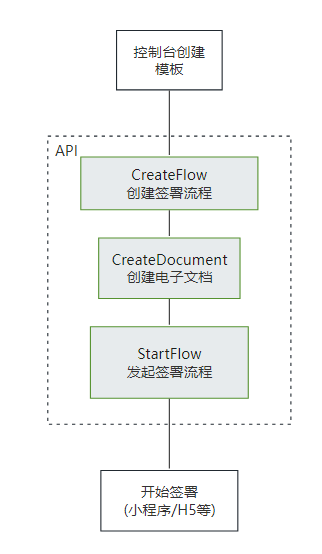
该接口需要给对应的流程指定一个模板id,并且填充该模板中需要补充的信息。需要配置<a href="https://qian.tencent.com/developers/companyApis/startFlows/CreateFlow" target="_blank">创建签署流程</a>和<a href="https://qian.tencent.com/developers/companyApis/startFlows/StartFlow" target="_blank">发起签署流程</a>接口使用。具体逻辑可以参考下图:
|
|
637
638
|
|
|
638
639
|
|
|
640
|
+
|
|
641
|
+
|
|
642
|
+
### 填充模版中定义的填写控件
|
|
643
|
+
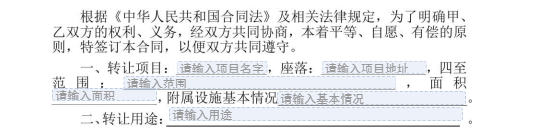
模版中配置的<font color="red">发起人填充控件</font>可以通过本接口的**FormFields数组**字段填充
|
|
644
|
+
|
|
645
|
+
填充的传参示例如下
|
|
646
|
+
```
|
|
647
|
+
request.FormFields = [{
|
|
648
|
+
"ComponentName": "项目的名字",
|
|
649
|
+
"ComponentValue": "休闲山庄"
|
|
650
|
+
}, {
|
|
651
|
+
"ComponentName": "项目的地址",
|
|
652
|
+
"ComponentValue": "凤凰山北侧",
|
|
653
|
+
}, {
|
|
654
|
+
"ComponentName": "范围",
|
|
655
|
+
"ComponentValue": "凤凰山至107国道",
|
|
656
|
+
}, {
|
|
657
|
+
"ComponentName": "面积",
|
|
658
|
+
"ComponentValue": "100亩",
|
|
659
|
+
}, {
|
|
660
|
+
"ComponentName": "基本情况",
|
|
661
|
+
"ComponentValue": "完好",
|
|
662
|
+
}, , {
|
|
663
|
+
"ComponentName": "用途",
|
|
664
|
+
"ComponentValue": "经营农家乐",
|
|
665
|
+
}
|
|
666
|
+
]
|
|
667
|
+
```
|
|
668
|
+
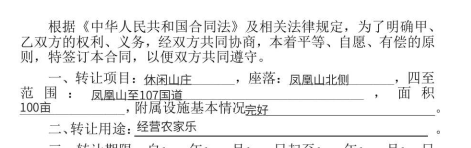
合成后合同样子示例
|
|
669
|
+
|
|
639
670
|
*/
|
|
640
671
|
async CreateDocument(
|
|
641
672
|
req: CreateDocumentRequest,
|
|
@@ -985,6 +985,12 @@ export interface CreateFlowEvidenceReportRequest {
|
|
|
985
985
|
在集团企业代理子企业操作的场景中,需设置此参数。在此情境下,ProxyOrganizationId(子企业的组织ID)为必填项。
|
|
986
986
|
*/
|
|
987
987
|
Agent?: Agent
|
|
988
|
+
/**
|
|
989
|
+
* 指定申请的报告类型,可选类型如下:
|
|
990
|
+
<ul><li> **0** :合同签署报告(默认)</li>
|
|
991
|
+
<li> **1** :公证处核验报告</li></ul>
|
|
992
|
+
*/
|
|
993
|
+
ReportType?: number
|
|
988
994
|
}
|
|
989
995
|
|
|
990
996
|
/**
|
|
@@ -5160,6 +5166,12 @@ export interface DescribeFlowEvidenceReportRequest {
|
|
|
5160
5166
|
在集团企业代理子企业操作的场景中,需设置此参数。在此情境下,ProxyOrganizationId(子企业的组织ID)为必填项。
|
|
5161
5167
|
*/
|
|
5162
5168
|
Agent?: Agent
|
|
5169
|
+
/**
|
|
5170
|
+
* 指定申请的报告类型,可选类型如下:
|
|
5171
|
+
<ul><li> **0** :合同签署报告(默认)</li>
|
|
5172
|
+
<li> **1** :公证处核验报告</li></ul>
|
|
5173
|
+
*/
|
|
5174
|
+
ReportType?: number
|
|
5163
5175
|
}
|
|
5164
5176
|
|
|
5165
5177
|
/**
|
|
@@ -632,11 +632,11 @@ export class Client extends AbstractClient {
|
|
|
632
632
|
如若在模板中配置了动态表格, 上传的附件必须为A4大小
|
|
633
633
|
合同发起人必须在电子签已经进行实名。
|
|
634
634
|
|
|
635
|
-
|
|
635
|
+
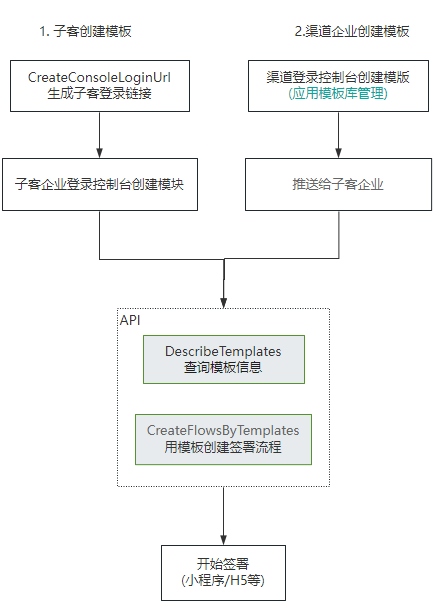
### 一. 整体的逻辑如下
|
|
636
636
|
|
|
637
637
|
|
|
638
638
|
|
|
639
|
-
|
|
639
|
+
### 二. 可以作为发起方和签署方的角色列表
|
|
640
640
|
<table>
|
|
641
641
|
<thead>
|
|
642
642
|
<tr>
|
|
@@ -679,7 +679,38 @@ export class Client extends AbstractClient {
|
|
|
679
679
|
</tbody>
|
|
680
680
|
</table>
|
|
681
681
|
|
|
682
|
-
|
|
682
|
+
### 三. 填充模版中定义的填写控件
|
|
683
|
+
模版中配置的<font color="red">发起人填充控件</font>可以通过本接口的**FormFields数组**字段填充
|
|
684
|
+

|
|
685
|
+
填充的传参示例如下
|
|
686
|
+
```
|
|
687
|
+
request.FormFields = [{
|
|
688
|
+
"ComponentName": "项目的名字",
|
|
689
|
+
"ComponentValue": "休闲山庄"
|
|
690
|
+
}, {
|
|
691
|
+
"ComponentName": "项目的地址",
|
|
692
|
+
"ComponentValue": "凤凰山北侧",
|
|
693
|
+
}, {
|
|
694
|
+
"ComponentName": "范围",
|
|
695
|
+
"ComponentValue": "凤凰山至107国道",
|
|
696
|
+
}, {
|
|
697
|
+
"ComponentName": "面积",
|
|
698
|
+
"ComponentValue": "100亩",
|
|
699
|
+
}, {
|
|
700
|
+
"ComponentName": "基本情况",
|
|
701
|
+
"ComponentValue": "完好",
|
|
702
|
+
}, , {
|
|
703
|
+
"ComponentName": "用途",
|
|
704
|
+
"ComponentValue": "经营农家乐",
|
|
705
|
+
}
|
|
706
|
+
]
|
|
707
|
+
```
|
|
708
|
+
合成后合同样子示例
|
|
709
|
+

|
|
710
|
+
|
|
711
|
+
|
|
712
|
+
|
|
713
|
+
### 四. 注意
|
|
683
714
|
1. 发起合同时候, 作为<font color="red">发起方的第三方子企业A员工的企业和员工必须经过实名</font>, 而作为签署方的第三方子企业A员工/个人/自然人/SaaS平台企业员工/第三方子企业B员工企业中的企业和个人/员工可以未实名
|
|
684
715
|
|
|
685
716
|
2. 不同类型的签署方传参不同, 可以参考开发者中心的FlowApproverInfo结构体说明
|
|
@@ -2911,6 +2911,12 @@ export interface CreateChannelFlowEvidenceReportRequest {
|
|
|
2911
2911
|
* @deprecated
|
|
2912
2912
|
*/
|
|
2913
2913
|
Operator?: UserInfo
|
|
2914
|
+
/**
|
|
2915
|
+
* 指定申请的报告类型,可选类型如下:
|
|
2916
|
+
<ul><li> **0** :合同签署报告(默认)</li>
|
|
2917
|
+
<li> **1** :公证处核验报告</li></ul>
|
|
2918
|
+
*/
|
|
2919
|
+
ReportType?: number
|
|
2914
2920
|
}
|
|
2915
2921
|
|
|
2916
2922
|
/**
|
|
@@ -4552,6 +4558,8 @@ export interface CreateSignUrlsRequest {
|
|
|
4552
4558
|
<li> **APP** :第三方App或小程序跳转电子签小程序的path, App或者小程序跳转适合此类型</li>
|
|
4553
4559
|
<li> **LONGURL2WEIXINAPP** :跳转电子签小程序的链接, H5跳转适合此类型,此时返回长链</li></ul>
|
|
4554
4560
|
|
|
4561
|
+
**注:**动态签署人场景,如果签署链接类型设置为`APP`,则仅支持跳转到封面页。
|
|
4562
|
+
|
|
4555
4563
|
详细使用场景可以参数接口说明中的 **主要使用场景可以更加EndPoint分类如下**
|
|
4556
4564
|
*/
|
|
4557
4565
|
Endpoint?: string
|
|
@@ -5389,6 +5397,12 @@ export interface DescribeChannelFlowEvidenceReportRequest {
|
|
|
5389
5397
|
* @deprecated
|
|
5390
5398
|
*/
|
|
5391
5399
|
Operator?: UserInfo
|
|
5400
|
+
/**
|
|
5401
|
+
* 指定申请的报告类型,可选类型如下:
|
|
5402
|
+
<ul><li> **0** :合同签署报告(默认)</li>
|
|
5403
|
+
<li> **1** :公证处核验报告</li></ul>
|
|
5404
|
+
*/
|
|
5405
|
+
ReportType?: number
|
|
5392
5406
|
}
|
|
5393
5407
|
|
|
5394
5408
|
/**
|
|
@@ -1 +1 @@
|
|
|
1
|
-
export declare const sdkVersion = "4.0.
|
|
1
|
+
export declare const sdkVersion = "4.0.792";
|
|
@@ -252,9 +252,40 @@ export declare class Client extends AbstractClient {
|
|
|
252
252
|
/**
|
|
253
253
|
* 创建签署流程电子文档<br />
|
|
254
254
|
|
|
255
|
-
|
|
255
|
+
### 调用流程
|
|
256
|
+
该接口需要给对应的流程指定一个模板id,并且填充该模板中需要补充的信息。需要配置<a href="https://qian.tencent.com/developers/companyApis/startFlows/CreateFlow" target="_blank">创建签署流程</a>和<a href="https://qian.tencent.com/developers/companyApis/startFlows/StartFlow" target="_blank">发起签署流程</a>接口使用。具体逻辑可以参考下图:
|
|
256
257
|
|
|
257
258
|

|
|
259
|
+
|
|
260
|
+
|
|
261
|
+
### 填充模版中定义的填写控件
|
|
262
|
+
模版中配置的<font color="red">发起人填充控件</font>可以通过本接口的**FormFields数组**字段填充
|
|
263
|
+

|
|
264
|
+
填充的传参示例如下
|
|
265
|
+
```
|
|
266
|
+
request.FormFields = [{
|
|
267
|
+
"ComponentName": "项目的名字",
|
|
268
|
+
"ComponentValue": "休闲山庄"
|
|
269
|
+
}, {
|
|
270
|
+
"ComponentName": "项目的地址",
|
|
271
|
+
"ComponentValue": "凤凰山北侧",
|
|
272
|
+
}, {
|
|
273
|
+
"ComponentName": "范围",
|
|
274
|
+
"ComponentValue": "凤凰山至107国道",
|
|
275
|
+
}, {
|
|
276
|
+
"ComponentName": "面积",
|
|
277
|
+
"ComponentValue": "100亩",
|
|
278
|
+
}, {
|
|
279
|
+
"ComponentName": "基本情况",
|
|
280
|
+
"ComponentValue": "完好",
|
|
281
|
+
}, , {
|
|
282
|
+
"ComponentName": "用途",
|
|
283
|
+
"ComponentValue": "经营农家乐",
|
|
284
|
+
}
|
|
285
|
+
]
|
|
286
|
+
```
|
|
287
|
+
合成后合同样子示例
|
|
288
|
+

|
|
258
289
|
*/
|
|
259
290
|
CreateDocument(req: CreateDocumentRequest, cb?: (error: string, rep: CreateDocumentResponse) => void): Promise<CreateDocumentResponse>;
|
|
260
291
|
/**
|
|
@@ -320,9 +320,40 @@ class Client extends abstract_client_1.AbstractClient {
|
|
|
320
320
|
/**
|
|
321
321
|
* 创建签署流程电子文档<br />
|
|
322
322
|
|
|
323
|
-
|
|
323
|
+
### 调用流程
|
|
324
|
+
该接口需要给对应的流程指定一个模板id,并且填充该模板中需要补充的信息。需要配置<a href="https://qian.tencent.com/developers/companyApis/startFlows/CreateFlow" target="_blank">创建签署流程</a>和<a href="https://qian.tencent.com/developers/companyApis/startFlows/StartFlow" target="_blank">发起签署流程</a>接口使用。具体逻辑可以参考下图:
|
|
324
325
|
|
|
325
326
|

|
|
327
|
+
|
|
328
|
+
|
|
329
|
+
### 填充模版中定义的填写控件
|
|
330
|
+
模版中配置的<font color="red">发起人填充控件</font>可以通过本接口的**FormFields数组**字段填充
|
|
331
|
+

|
|
332
|
+
填充的传参示例如下
|
|
333
|
+
```
|
|
334
|
+
request.FormFields = [{
|
|
335
|
+
"ComponentName": "项目的名字",
|
|
336
|
+
"ComponentValue": "休闲山庄"
|
|
337
|
+
}, {
|
|
338
|
+
"ComponentName": "项目的地址",
|
|
339
|
+
"ComponentValue": "凤凰山北侧",
|
|
340
|
+
}, {
|
|
341
|
+
"ComponentName": "范围",
|
|
342
|
+
"ComponentValue": "凤凰山至107国道",
|
|
343
|
+
}, {
|
|
344
|
+
"ComponentName": "面积",
|
|
345
|
+
"ComponentValue": "100亩",
|
|
346
|
+
}, {
|
|
347
|
+
"ComponentName": "基本情况",
|
|
348
|
+
"ComponentValue": "完好",
|
|
349
|
+
}, , {
|
|
350
|
+
"ComponentName": "用途",
|
|
351
|
+
"ComponentValue": "经营农家乐",
|
|
352
|
+
}
|
|
353
|
+
]
|
|
354
|
+
```
|
|
355
|
+
合成后合同样子示例
|
|
356
|
+

|
|
326
357
|
*/
|
|
327
358
|
async CreateDocument(req, cb) {
|
|
328
359
|
return this.request("CreateDocument", req, cb);
|
|
@@ -937,6 +937,12 @@ export interface CreateFlowEvidenceReportRequest {
|
|
|
937
937
|
在集团企业代理子企业操作的场景中,需设置此参数。在此情境下,ProxyOrganizationId(子企业的组织ID)为必填项。
|
|
938
938
|
*/
|
|
939
939
|
Agent?: Agent;
|
|
940
|
+
/**
|
|
941
|
+
* 指定申请的报告类型,可选类型如下:
|
|
942
|
+
<ul><li> **0** :合同签署报告(默认)</li>
|
|
943
|
+
<li> **1** :公证处核验报告</li></ul>
|
|
944
|
+
*/
|
|
945
|
+
ReportType?: number;
|
|
940
946
|
}
|
|
941
947
|
/**
|
|
942
948
|
* StartFlow返回参数结构体
|
|
@@ -5003,6 +5009,12 @@ export interface DescribeFlowEvidenceReportRequest {
|
|
|
5003
5009
|
在集团企业代理子企业操作的场景中,需设置此参数。在此情境下,ProxyOrganizationId(子企业的组织ID)为必填项。
|
|
5004
5010
|
*/
|
|
5005
5011
|
Agent?: Agent;
|
|
5012
|
+
/**
|
|
5013
|
+
* 指定申请的报告类型,可选类型如下:
|
|
5014
|
+
<ul><li> **0** :合同签署报告(默认)</li>
|
|
5015
|
+
<li> **1** :公证处核验报告</li></ul>
|
|
5016
|
+
*/
|
|
5017
|
+
ReportType?: number;
|
|
5006
5018
|
}
|
|
5007
5019
|
/**
|
|
5008
5020
|
* 绑定角色失败信息
|
|
@@ -286,11 +286,11 @@ export declare class Client extends AbstractClient {
|
|
|
286
286
|
如若在模板中配置了动态表格, 上传的附件必须为A4大小
|
|
287
287
|
合同发起人必须在电子签已经进行实名。
|
|
288
288
|
|
|
289
|
-
|
|
289
|
+
### 一. 整体的逻辑如下
|
|
290
290
|
|
|
291
291
|

|
|
292
292
|
|
|
293
|
-
|
|
293
|
+
### 二. 可以作为发起方和签署方的角色列表
|
|
294
294
|
<table>
|
|
295
295
|
<thead>
|
|
296
296
|
<tr>
|
|
@@ -333,7 +333,38 @@ export declare class Client extends AbstractClient {
|
|
|
333
333
|
</tbody>
|
|
334
334
|
</table>
|
|
335
335
|
|
|
336
|
-
|
|
336
|
+
### 三. 填充模版中定义的填写控件
|
|
337
|
+
模版中配置的<font color="red">发起人填充控件</font>可以通过本接口的**FormFields数组**字段填充
|
|
338
|
+

|
|
339
|
+
填充的传参示例如下
|
|
340
|
+
```
|
|
341
|
+
request.FormFields = [{
|
|
342
|
+
"ComponentName": "项目的名字",
|
|
343
|
+
"ComponentValue": "休闲山庄"
|
|
344
|
+
}, {
|
|
345
|
+
"ComponentName": "项目的地址",
|
|
346
|
+
"ComponentValue": "凤凰山北侧",
|
|
347
|
+
}, {
|
|
348
|
+
"ComponentName": "范围",
|
|
349
|
+
"ComponentValue": "凤凰山至107国道",
|
|
350
|
+
}, {
|
|
351
|
+
"ComponentName": "面积",
|
|
352
|
+
"ComponentValue": "100亩",
|
|
353
|
+
}, {
|
|
354
|
+
"ComponentName": "基本情况",
|
|
355
|
+
"ComponentValue": "完好",
|
|
356
|
+
}, , {
|
|
357
|
+
"ComponentName": "用途",
|
|
358
|
+
"ComponentValue": "经营农家乐",
|
|
359
|
+
}
|
|
360
|
+
]
|
|
361
|
+
```
|
|
362
|
+
合成后合同样子示例
|
|
363
|
+

|
|
364
|
+
|
|
365
|
+
|
|
366
|
+
|
|
367
|
+
### 四. 注意
|
|
337
368
|
1. 发起合同时候, 作为<font color="red">发起方的第三方子企业A员工的企业和员工必须经过实名</font>, 而作为签署方的第三方子企业A员工/个人/自然人/SaaS平台企业员工/第三方子企业B员工企业中的企业和个人/员工可以未实名
|
|
338
369
|
|
|
339
370
|
2. 不同类型的签署方传参不同, 可以参考开发者中心的FlowApproverInfo结构体说明
|
|
@@ -344,11 +344,11 @@ class Client extends abstract_client_1.AbstractClient {
|
|
|
344
344
|
如若在模板中配置了动态表格, 上传的附件必须为A4大小
|
|
345
345
|
合同发起人必须在电子签已经进行实名。
|
|
346
346
|
|
|
347
|
-
|
|
347
|
+
### 一. 整体的逻辑如下
|
|
348
348
|
|
|
349
349
|

|
|
350
350
|
|
|
351
|
-
|
|
351
|
+
### 二. 可以作为发起方和签署方的角色列表
|
|
352
352
|
<table>
|
|
353
353
|
<thead>
|
|
354
354
|
<tr>
|
|
@@ -391,7 +391,38 @@ class Client extends abstract_client_1.AbstractClient {
|
|
|
391
391
|
</tbody>
|
|
392
392
|
</table>
|
|
393
393
|
|
|
394
|
-
|
|
394
|
+
### 三. 填充模版中定义的填写控件
|
|
395
|
+
模版中配置的<font color="red">发起人填充控件</font>可以通过本接口的**FormFields数组**字段填充
|
|
396
|
+

|
|
397
|
+
填充的传参示例如下
|
|
398
|
+
```
|
|
399
|
+
request.FormFields = [{
|
|
400
|
+
"ComponentName": "项目的名字",
|
|
401
|
+
"ComponentValue": "休闲山庄"
|
|
402
|
+
}, {
|
|
403
|
+
"ComponentName": "项目的地址",
|
|
404
|
+
"ComponentValue": "凤凰山北侧",
|
|
405
|
+
}, {
|
|
406
|
+
"ComponentName": "范围",
|
|
407
|
+
"ComponentValue": "凤凰山至107国道",
|
|
408
|
+
}, {
|
|
409
|
+
"ComponentName": "面积",
|
|
410
|
+
"ComponentValue": "100亩",
|
|
411
|
+
}, {
|
|
412
|
+
"ComponentName": "基本情况",
|
|
413
|
+
"ComponentValue": "完好",
|
|
414
|
+
}, , {
|
|
415
|
+
"ComponentName": "用途",
|
|
416
|
+
"ComponentValue": "经营农家乐",
|
|
417
|
+
}
|
|
418
|
+
]
|
|
419
|
+
```
|
|
420
|
+
合成后合同样子示例
|
|
421
|
+

|
|
422
|
+
|
|
423
|
+
|
|
424
|
+
|
|
425
|
+
### 四. 注意
|
|
395
426
|
1. 发起合同时候, 作为<font color="red">发起方的第三方子企业A员工的企业和员工必须经过实名</font>, 而作为签署方的第三方子企业A员工/个人/自然人/SaaS平台企业员工/第三方子企业B员工企业中的企业和个人/员工可以未实名
|
|
396
427
|
|
|
397
428
|
2. 不同类型的签署方传参不同, 可以参考开发者中心的FlowApproverInfo结构体说明
|
|
@@ -2822,6 +2822,12 @@ export interface CreateChannelFlowEvidenceReportRequest {
|
|
|
2822
2822
|
* @deprecated
|
|
2823
2823
|
*/
|
|
2824
2824
|
Operator?: UserInfo;
|
|
2825
|
+
/**
|
|
2826
|
+
* 指定申请的报告类型,可选类型如下:
|
|
2827
|
+
<ul><li> **0** :合同签署报告(默认)</li>
|
|
2828
|
+
<li> **1** :公证处核验报告</li></ul>
|
|
2829
|
+
*/
|
|
2830
|
+
ReportType?: number;
|
|
2825
2831
|
}
|
|
2826
2832
|
/**
|
|
2827
2833
|
* ChannelDescribeBillUsageDetail请求参数结构体
|
|
@@ -4420,6 +4426,8 @@ export interface CreateSignUrlsRequest {
|
|
|
4420
4426
|
<li> **APP** :第三方App或小程序跳转电子签小程序的path, App或者小程序跳转适合此类型</li>
|
|
4421
4427
|
<li> **LONGURL2WEIXINAPP** :跳转电子签小程序的链接, H5跳转适合此类型,此时返回长链</li></ul>
|
|
4422
4428
|
|
|
4429
|
+
**注:**动态签署人场景,如果签署链接类型设置为`APP`,则仅支持跳转到封面页。
|
|
4430
|
+
|
|
4423
4431
|
详细使用场景可以参数接口说明中的 **主要使用场景可以更加EndPoint分类如下**
|
|
4424
4432
|
*/
|
|
4425
4433
|
Endpoint?: string;
|
|
@@ -5244,6 +5252,12 @@ export interface DescribeChannelFlowEvidenceReportRequest {
|
|
|
5244
5252
|
* @deprecated
|
|
5245
5253
|
*/
|
|
5246
5254
|
Operator?: UserInfo;
|
|
5255
|
+
/**
|
|
5256
|
+
* 指定申请的报告类型,可选类型如下:
|
|
5257
|
+
<ul><li> **0** :合同签署报告(默认)</li>
|
|
5258
|
+
<li> **1** :公证处核验报告</li></ul>
|
|
5259
|
+
*/
|
|
5260
|
+
ReportType?: number;
|
|
5247
5261
|
}
|
|
5248
5262
|
/**
|
|
5249
5263
|
* ChannelCreateRole返回参数结构体
|