tencentcloud-sdk-nodejs 4.0.722 → 4.0.723
This diff represents the content of publicly available package versions that have been released to one of the supported registries. The information contained in this diff is provided for informational purposes only and reflects changes between package versions as they appear in their respective public registries.
- package/CHANGELOG.md +123 -0
- package/SERVICE_CHANGELOG.md +144 -51
- package/package.json +1 -1
- package/products.md +15 -15
- package/src/common/sdk_version.ts +1 -1
- package/src/services/aiart/v20221229/aiart_models.ts +13 -5
- package/src/services/ccc/v20200210/ccc_models.ts +6 -2
- package/src/services/ckafka/v20190819/ckafka_models.ts +1 -1
- package/src/services/clb/v20180317/clb_models.ts +4 -6
- package/src/services/ess/v20201111/ess_client.ts +7 -3
- package/src/services/ess/v20201111/ess_models.ts +38 -30
- package/src/services/essbasic/v20210526/essbasic_client.ts +25 -11
- package/src/services/essbasic/v20210526/essbasic_models.ts +112 -63
- package/src/services/lighthouse/v20200324/lighthouse_client.ts +29 -2
- package/src/services/lighthouse/v20200324/lighthouse_models.ts +98 -50
- package/src/services/ses/v20201002/ses_models.ts +5 -1
- package/src/services/tione/v20211111/tione_models.ts +1 -1
- package/src/services/waf/v20180125/waf_client.ts +19 -6
- package/src/services/waf/v20180125/waf_models.ts +92 -0
- package/src/services/wedata/v20210820/wedata_models.ts +14 -2
- package/tencentcloud/common/sdk_version.d.ts +1 -1
- package/tencentcloud/common/sdk_version.js +1 -1
- package/tencentcloud/services/aiart/v20221229/aiart_models.d.ts +13 -5
- package/tencentcloud/services/ccc/v20200210/ccc_models.d.ts +6 -2
- package/tencentcloud/services/ckafka/v20190819/ckafka_models.d.ts +1 -1
- package/tencentcloud/services/clb/v20180317/clb_models.d.ts +4 -6
- package/tencentcloud/services/ess/v20201111/ess_client.d.ts +7 -3
- package/tencentcloud/services/ess/v20201111/ess_client.js +7 -3
- package/tencentcloud/services/ess/v20201111/ess_models.d.ts +38 -30
- package/tencentcloud/services/essbasic/v20210526/essbasic_client.d.ts +24 -10
- package/tencentcloud/services/essbasic/v20210526/essbasic_client.js +24 -10
- package/tencentcloud/services/essbasic/v20210526/essbasic_models.d.ts +112 -63
- package/tencentcloud/services/lighthouse/v20200324/lighthouse_client.d.ts +12 -1
- package/tencentcloud/services/lighthouse/v20200324/lighthouse_client.js +15 -0
- package/tencentcloud/services/lighthouse/v20200324/lighthouse_models.d.ts +94 -50
- package/tencentcloud/services/ses/v20201002/ses_models.d.ts +6 -1
- package/tencentcloud/services/tione/v20211111/tione_models.d.ts +1 -1
- package/tencentcloud/services/waf/v20180125/waf_client.d.ts +7 -3
- package/tencentcloud/services/waf/v20180125/waf_client.js +9 -3
- package/tencentcloud/services/waf/v20180125/waf_models.d.ts +89 -0
- package/tencentcloud/services/wedata/v20210820/wedata_models.d.ts +14 -2
- package/test/lighthouse.v20200324.test.js +20 -0
- package/test/waf.v20180125.test.js +12 -2
|
@@ -55,6 +55,8 @@ export declare class Client extends AbstractClient {
|
|
|
55
55
|
>- 签署控件 SignComponents
|
|
56
56
|
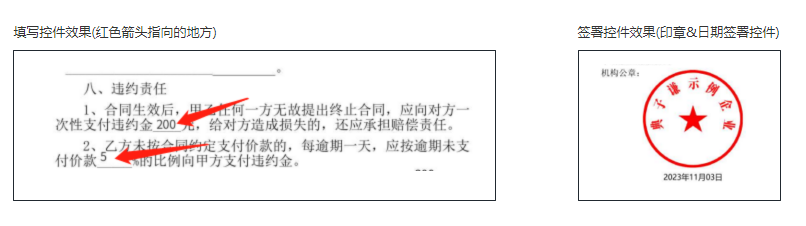
>- 生成模板的文件基础信息 FileInfos
|
|
57
57
|
|
|
58
|
+
|
|
59
|
+
|
|
58
60
|
当模板较多或模板中的控件较多时,可以通过查询模板接口更方便的获取模板列表,以及每个模板内的控件信息。
|
|
59
61
|
|
|
60
62
|
适用场景:
|
|
@@ -338,9 +340,10 @@ httpProfile.setEndpoint("file.test.ess.tencent.cn");
|
|
|
338
340
|
*/
|
|
339
341
|
GetTaskResultApi(req: GetTaskResultApiRequest, cb?: (error: string, rep: GetTaskResultApiResponse) => void): Promise<GetTaskResultApiResponse>;
|
|
340
342
|
/**
|
|
341
|
-
* 创建企业扩展服务授权,当前仅支持授权 “企业自动签” 给企业员工。
|
|
343
|
+
* 创建企业扩展服务授权,当前仅支持授权 “企业自动签” 和 “批量签署” 给企业员工。
|
|
344
|
+
该接口作用和电子签控制台 企业设置-扩展服务-企业自动签署和批量签署授权 两个模块功能相同,可通过该接口授权给企业员工。
|
|
342
345
|
|
|
343
|
-
|
|
346
|
+
注:“企业自动签授权”支持集团代子企业操作,请联系运营开通此功能。
|
|
344
347
|
*/
|
|
345
348
|
CreateExtendedServiceAuthInfos(req: CreateExtendedServiceAuthInfosRequest, cb?: (error: string, rep: CreateExtendedServiceAuthInfosResponse) => void): Promise<CreateExtendedServiceAuthInfosResponse>;
|
|
346
349
|
/**
|
|
@@ -556,7 +559,8 @@ httpProfile.setEndpoint("file.test.ess.tencent.cn");
|
|
|
556
559
|
*/
|
|
557
560
|
CreateSealPolicy(req: CreateSealPolicyRequest, cb?: (error: string, rep: CreateSealPolicyResponse) => void): Promise<CreateSealPolicyResponse>;
|
|
558
561
|
/**
|
|
559
|
-
* 删除企业扩展服务授权,当前仅支持 “企业自动签”
|
|
562
|
+
* 删除企业扩展服务授权,当前仅支持 “企业自动签” 和“批量签署” 的取消授权。
|
|
563
|
+
该接口作用和电子签控制台 企业设置-扩展服务-企业自动签署和批量签署授权 两个模块功能相同,可通过该接口取消企业员工授权。
|
|
560
564
|
|
|
561
565
|
注:支持集团代子企业操作,请联系运营开通此功能。
|
|
562
566
|
*/
|
|
@@ -85,6 +85,8 @@ class Client extends abstract_client_1.AbstractClient {
|
|
|
85
85
|
>- 签署控件 SignComponents
|
|
86
86
|
>- 生成模板的文件基础信息 FileInfos
|
|
87
87
|
|
|
88
|
+

|
|
89
|
+
|
|
88
90
|
当模板较多或模板中的控件较多时,可以通过查询模板接口更方便的获取模板列表,以及每个模板内的控件信息。
|
|
89
91
|
|
|
90
92
|
适用场景:
|
|
@@ -436,9 +438,10 @@ httpProfile.setEndpoint("file.test.ess.tencent.cn");
|
|
|
436
438
|
return this.request("GetTaskResultApi", req, cb);
|
|
437
439
|
}
|
|
438
440
|
/**
|
|
439
|
-
* 创建企业扩展服务授权,当前仅支持授权 “企业自动签” 给企业员工。
|
|
441
|
+
* 创建企业扩展服务授权,当前仅支持授权 “企业自动签” 和 “批量签署” 给企业员工。
|
|
442
|
+
该接口作用和电子签控制台 企业设置-扩展服务-企业自动签署和批量签署授权 两个模块功能相同,可通过该接口授权给企业员工。
|
|
440
443
|
|
|
441
|
-
|
|
444
|
+
注:“企业自动签授权”支持集团代子企业操作,请联系运营开通此功能。
|
|
442
445
|
*/
|
|
443
446
|
async CreateExtendedServiceAuthInfos(req, cb) {
|
|
444
447
|
return this.request("CreateExtendedServiceAuthInfos", req, cb);
|
|
@@ -704,7 +707,8 @@ httpProfile.setEndpoint("file.test.ess.tencent.cn");
|
|
|
704
707
|
return this.request("CreateSealPolicy", req, cb);
|
|
705
708
|
}
|
|
706
709
|
/**
|
|
707
|
-
* 删除企业扩展服务授权,当前仅支持 “企业自动签”
|
|
710
|
+
* 删除企业扩展服务授权,当前仅支持 “企业自动签” 和“批量签署” 的取消授权。
|
|
711
|
+
该接口作用和电子签控制台 企业设置-扩展服务-企业自动签署和批量签署授权 两个模块功能相同,可通过该接口取消企业员工授权。
|
|
708
712
|
|
|
709
713
|
注:支持集团代子企业操作,请联系运营开通此功能。
|
|
710
714
|
*/
|
|
@@ -332,12 +332,10 @@ export interface CreateExtendedServiceAuthInfosRequest {
|
|
|
332
332
|
*/
|
|
333
333
|
UserIds: Array<string>;
|
|
334
334
|
/**
|
|
335
|
-
*
|
|
336
|
-
默认为空,即查询当前支持的所有扩展服务信息。
|
|
337
|
-
若需查询单个扩展服务的开通情况,请传递相应的值,如下所示:
|
|
335
|
+
* 取值
|
|
338
336
|
<ul><li>OPEN_SERVER_SIGN:企业自动签</li>
|
|
337
|
+
<li>BATCH_SIGN:批量签署</li>
|
|
339
338
|
</ul>
|
|
340
|
-
|
|
341
339
|
*/
|
|
342
340
|
ExtendServiceType?: string;
|
|
343
341
|
/**
|
|
@@ -373,36 +371,38 @@ export interface CreateMultiFlowSignQRCodeResponse {
|
|
|
373
371
|
RequestId?: string;
|
|
374
372
|
}
|
|
375
373
|
/**
|
|
376
|
-
*
|
|
374
|
+
* 签署链接信息。
|
|
377
375
|
*/
|
|
378
376
|
export interface FlowApproverUrlInfo {
|
|
379
377
|
/**
|
|
380
|
-
*
|
|
381
|
-
|
|
378
|
+
* 签署短链接。</br>
|
|
379
|
+
注意:
|
|
380
|
+
- 该链接有效期为**30分钟**,同时需要注意保密,不要外泄给无关用户。
|
|
381
|
+
- 该链接不支持小程序嵌入,仅支持**移动端浏览器**打开。
|
|
382
382
|
注意:此字段可能返回 null,表示取不到有效值。
|
|
383
383
|
*/
|
|
384
384
|
SignUrl?: string;
|
|
385
385
|
/**
|
|
386
|
-
*
|
|
387
|
-
|
|
388
|
-
|
|
389
|
-
注: `现在仅支持个人参与方`
|
|
386
|
+
* 签署人类型。
|
|
387
|
+
- **1**: 个人
|
|
390
388
|
注意:此字段可能返回 null,表示取不到有效值。
|
|
391
389
|
*/
|
|
392
390
|
ApproverType?: number;
|
|
393
391
|
/**
|
|
394
|
-
*
|
|
392
|
+
* 签署人姓名。
|
|
395
393
|
注意:此字段可能返回 null,表示取不到有效值。
|
|
396
394
|
*/
|
|
397
395
|
ApproverName?: string;
|
|
398
396
|
/**
|
|
399
|
-
*
|
|
397
|
+
* 签署人手机号。
|
|
400
398
|
注意:此字段可能返回 null,表示取不到有效值。
|
|
401
399
|
*/
|
|
402
400
|
ApproverMobile?: string;
|
|
403
401
|
/**
|
|
404
|
-
*
|
|
405
|
-
|
|
402
|
+
* 签署长链接。</br>
|
|
403
|
+
注意:
|
|
404
|
+
- 该链接有效期为**30分钟**,同时需要注意保密,不要外泄给无关用户。
|
|
405
|
+
- 该链接不支持小程序嵌入,仅支持**移动端浏览器**打开。
|
|
406
406
|
注意:此字段可能返回 null,表示取不到有效值。
|
|
407
407
|
*/
|
|
408
408
|
LongUrl?: string;
|
|
@@ -2294,47 +2294,57 @@ export interface PdfVerifyResult {
|
|
|
2294
2294
|
*/
|
|
2295
2295
|
VerifyResult?: number;
|
|
2296
2296
|
/**
|
|
2297
|
-
*
|
|
2297
|
+
* 签署平台
|
|
2298
|
+
如果文件是在腾讯电子签平台签署,则为**腾讯电子签**,
|
|
2299
|
+
如果文件不在腾讯电子签平台签署,则为**其他平台**。
|
|
2298
2300
|
*/
|
|
2299
2301
|
SignPlatform?: string;
|
|
2300
2302
|
/**
|
|
2301
|
-
*
|
|
2303
|
+
* 申请证书的主体的名字
|
|
2304
|
+
|
|
2305
|
+
如果是在腾讯电子签平台签署, 则对应的主体的名字个数如下
|
|
2306
|
+
**企业**: ESS@企业名称@编码
|
|
2307
|
+
**个人**: ESS@个人姓名@证件号@808854
|
|
2308
|
+
|
|
2309
|
+
如果在其他平台签署的, 主体的名字参考其他平台的说明
|
|
2302
2310
|
*/
|
|
2303
2311
|
SignerName?: string;
|
|
2304
2312
|
/**
|
|
2305
|
-
*
|
|
2313
|
+
* 签署时间的Unix时间戳,单位毫秒
|
|
2306
2314
|
*/
|
|
2307
2315
|
SignTime?: number;
|
|
2308
2316
|
/**
|
|
2309
|
-
*
|
|
2317
|
+
* 证书签名算法, 如SHA1withRSA等算法
|
|
2310
2318
|
*/
|
|
2311
2319
|
SignAlgorithm?: string;
|
|
2312
2320
|
/**
|
|
2313
|
-
*
|
|
2321
|
+
* CA供应商下发给用户的证书编号
|
|
2322
|
+
|
|
2323
|
+
注意:`腾讯电子签接入多家CA供应商以提供容灾能力,不同CA下发的证书编号区别较大,但基本都是由数字和字母组成,长度在200以下`。
|
|
2314
2324
|
*/
|
|
2315
2325
|
CertSn?: string;
|
|
2316
2326
|
/**
|
|
2317
|
-
*
|
|
2327
|
+
* 证书起始时间的Unix时间戳,单位毫秒
|
|
2318
2328
|
*/
|
|
2319
2329
|
CertNotBefore?: number;
|
|
2320
2330
|
/**
|
|
2321
|
-
*
|
|
2331
|
+
* 证书过期时间的时间戳,单位毫秒
|
|
2322
2332
|
*/
|
|
2323
2333
|
CertNotAfter?: number;
|
|
2324
2334
|
/**
|
|
2325
|
-
* 签名域横坐标,单位
|
|
2335
|
+
* 签名域横坐标,单位px
|
|
2326
2336
|
*/
|
|
2327
2337
|
ComponentPosX?: number;
|
|
2328
2338
|
/**
|
|
2329
|
-
* 签名域纵坐标,单位
|
|
2339
|
+
* 签名域纵坐标,单位px
|
|
2330
2340
|
*/
|
|
2331
2341
|
ComponentPosY?: number;
|
|
2332
2342
|
/**
|
|
2333
|
-
* 签名域宽度,单位
|
|
2343
|
+
* 签名域宽度,单位px
|
|
2334
2344
|
*/
|
|
2335
2345
|
ComponentWidth?: number;
|
|
2336
2346
|
/**
|
|
2337
|
-
* 签名域高度,单位
|
|
2347
|
+
* 签名域高度,单位px
|
|
2338
2348
|
*/
|
|
2339
2349
|
ComponentHeight?: number;
|
|
2340
2350
|
/**
|
|
@@ -6422,12 +6432,10 @@ export interface DeleteExtendedServiceAuthInfosRequest {
|
|
|
6422
6432
|
*/
|
|
6423
6433
|
UserIds: Array<string>;
|
|
6424
6434
|
/**
|
|
6425
|
-
*
|
|
6426
|
-
默认为空,即查询当前支持的所有扩展服务信息。
|
|
6427
|
-
若需查询单个扩展服务的开通情况,请传递相应的值,如下所示:
|
|
6435
|
+
* 取值如下所示:
|
|
6428
6436
|
<ul><li>OPEN_SERVER_SIGN:企业自动签</li>
|
|
6437
|
+
<li>BATCH_SIGN:批量签署</li>
|
|
6429
6438
|
</ul>
|
|
6430
|
-
|
|
6431
6439
|
*/
|
|
6432
6440
|
ExtendServiceType?: string;
|
|
6433
6441
|
/**
|
|
@@ -307,6 +307,8 @@ https://developers.weixin.qq.com/miniprogram/dev/framework/open-ability/launchAp
|
|
|
307
307
|
- 发起方和签署方的填写控件 Components
|
|
308
308
|
- 签署方的签署控件 SignComponents
|
|
309
309
|
|
|
310
|
+

|
|
311
|
+
|
|
310
312
|
**适用场景**
|
|
311
313
|
该接口常用来配合<a href="https://qian.tencent.com/developers/partnerApis/startFlows/CreateFlowsByTemplates" target="_blank">用模板创建签署流程</a>和<a href="https://qian.tencent.com/developers/partnerApis/startFlows/ChannelCreateFlowGroupByTemplates" target="_blank">通过多模板创建合同组签署流程</a>接口,作为创建合同的前置接口使用。
|
|
312
314
|
通过此接口查询到模板信息后,再通过调用创建合同的接口,指定模板ID,指定模板中需要的填写控件内容等,完成合同文档的的创建。
|
|
@@ -423,12 +425,13 @@ Web链接访问后,会根据子客企业(**Agent中ProxyOrganizationOpenId表
|
|
|
423
425
|
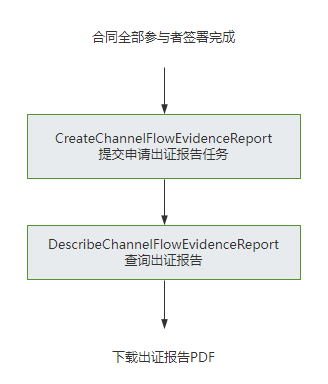
* 提交申请出证报告任务并返回报告ID。
|
|
424
426
|
|
|
425
427
|
注意:
|
|
426
|
-
|
|
427
|
-
|
|
428
|
-
|
|
429
|
-
|
|
428
|
+
- 使用此功能**需搭配出证套餐** ,使用前请联系对接的客户经理沟通。
|
|
429
|
+
- 操作人必须是**发起方或者签署方企业的(非走授权书认证)法人或者超管**。
|
|
430
|
+
- 合同流程必须**所有参与方已经签署完成**。
|
|
431
|
+
- 出证过程需一定时间,建议在**提交出证任务后的24小时之后**,通过<a href="https://qian.tencent.com/developers/partnerApis/certificate/DescribeChannelFlowEvidenceReport" target="_blank">获取出证报告任务执行结果</a>接口进行查询执行结果和出证报告的下载URL。
|
|
432
|
+
|
|
430
433
|
|
|
431
|
-
|
|
434
|
+
|
|
432
435
|
*/
|
|
433
436
|
CreateChannelFlowEvidenceReport(req: CreateChannelFlowEvidenceReportRequest, cb?: (error: string, rep: CreateChannelFlowEvidenceReportResponse) => void): Promise<CreateChannelFlowEvidenceReportResponse>;
|
|
434
437
|
/**
|
|
@@ -476,10 +479,14 @@ Web链接访问后,会根据子客企业(**Agent中ProxyOrganizationOpenId表
|
|
|
476
479
|
*/
|
|
477
480
|
ChannelCreateWebThemeConfig(req: ChannelCreateWebThemeConfigRequest, cb?: (error: string, rep: ChannelCreateWebThemeConfigResponse) => void): Promise<ChannelCreateWebThemeConfigResponse>;
|
|
478
481
|
/**
|
|
479
|
-
*
|
|
480
|
-
|
|
481
|
-
|
|
482
|
-
|
|
482
|
+
* 该接口用于发起合同后,生成个人用户的签署链接, 暂时不支持企业端签署。 <br/>
|
|
483
|
+
|
|
484
|
+
`注意:`<br/>
|
|
485
|
+
`1. 该接口目前仅支持签署人类型是个人签署方的场景(PERSON)。` <br/>
|
|
486
|
+
`2. 该接口可生成签署链接的C端签署人必须仅有手写签名和时间类型的签署控件,不支持填写控件 。` <br/>
|
|
487
|
+
`3. 该签署链接有效期为30分钟,过期后将失效,如需签署可重新创建签署链接 。` <br/>
|
|
488
|
+
`4. 该接口返回的签署链接适用于APP集成的场景,支持APP打开或浏览器直接打开,不支持微信小程序嵌入`。<br/>
|
|
489
|
+
跳转到小程序的实现,参考微信官方文档(分为<a href="https://developers.weixin.qq.com/miniprogram/dev/api/navigate/wx.navigateToMiniProgram.html">全屏</a>、<a href="https://developers.weixin.qq.com/miniprogram/dev/framework/open-ability/openEmbeddedMiniProgram.html">半屏</a>两种方式),如何配置也可以请参考: <a href="https://qian.tencent.com/developers/company/openwxminiprogram">跳转电子签小程序配置</a>
|
|
483
490
|
*/
|
|
484
491
|
ChannelCreateFlowSignUrl(req: ChannelCreateFlowSignUrlRequest, cb?: (error: string, rep: ChannelCreateFlowSignUrlResponse) => void): Promise<ChannelCreateFlowSignUrlResponse>;
|
|
485
492
|
/**
|
|
@@ -715,7 +722,14 @@ httpProfile.setEndpoint("file.test.ess.tencent.cn");
|
|
|
715
722
|
*/
|
|
716
723
|
SyncProxyOrganizationOperators(req: SyncProxyOrganizationOperatorsRequest, cb?: (error: string, rep: SyncProxyOrganizationOperatorsResponse) => void): Promise<SyncProxyOrganizationOperatorsResponse>;
|
|
717
724
|
/**
|
|
718
|
-
*
|
|
725
|
+
* 获取出证报告任务执行结果,返回报告 URL。
|
|
726
|
+
|
|
727
|
+
注意:
|
|
728
|
+
|
|
729
|
+
- 使用此功能`需搭配出证套餐` ,使用前请联系对接的客户经理沟通。
|
|
730
|
+
- 需调用创建并返回出证报告接口<a href="https://qian.tencent.com/developers/partnerApis/certificate/CreateChannelFlowEvidenceReport" target="_blank">提交申请出证报告任务</a>获取报告编号后调用当前接口获取报告链接。
|
|
731
|
+
|
|
732
|
+

|
|
719
733
|
*/
|
|
720
734
|
DescribeChannelFlowEvidenceReport(req: DescribeChannelFlowEvidenceReportRequest, cb?: (error: string, rep: DescribeChannelFlowEvidenceReportResponse) => void): Promise<DescribeChannelFlowEvidenceReportResponse>;
|
|
721
735
|
/**
|
|
@@ -367,6 +367,8 @@ https://developers.weixin.qq.com/miniprogram/dev/framework/open-ability/launchAp
|
|
|
367
367
|
- 发起方和签署方的填写控件 Components
|
|
368
368
|
- 签署方的签署控件 SignComponents
|
|
369
369
|
|
|
370
|
+

|
|
371
|
+
|
|
370
372
|
**适用场景**
|
|
371
373
|
该接口常用来配合<a href="https://qian.tencent.com/developers/partnerApis/startFlows/CreateFlowsByTemplates" target="_blank">用模板创建签署流程</a>和<a href="https://qian.tencent.com/developers/partnerApis/startFlows/ChannelCreateFlowGroupByTemplates" target="_blank">通过多模板创建合同组签署流程</a>接口,作为创建合同的前置接口使用。
|
|
372
374
|
通过此接口查询到模板信息后,再通过调用创建合同的接口,指定模板ID,指定模板中需要的填写控件内容等,完成合同文档的的创建。
|
|
@@ -499,12 +501,13 @@ Web链接访问后,会根据子客企业(**Agent中ProxyOrganizationOpenId表
|
|
|
499
501
|
* 提交申请出证报告任务并返回报告ID。
|
|
500
502
|
|
|
501
503
|
注意:
|
|
502
|
-
|
|
503
|
-
|
|
504
|
-
|
|
505
|
-
|
|
504
|
+
- 使用此功能**需搭配出证套餐** ,使用前请联系对接的客户经理沟通。
|
|
505
|
+
- 操作人必须是**发起方或者签署方企业的(非走授权书认证)法人或者超管**。
|
|
506
|
+
- 合同流程必须**所有参与方已经签署完成**。
|
|
507
|
+
- 出证过程需一定时间,建议在**提交出证任务后的24小时之后**,通过<a href="https://qian.tencent.com/developers/partnerApis/certificate/DescribeChannelFlowEvidenceReport" target="_blank">获取出证报告任务执行结果</a>接口进行查询执行结果和出证报告的下载URL。
|
|
508
|
+
|
|
506
509
|
|
|
507
|
-
|
|
510
|
+

|
|
508
511
|
*/
|
|
509
512
|
async CreateChannelFlowEvidenceReport(req, cb) {
|
|
510
513
|
return this.request("CreateChannelFlowEvidenceReport", req, cb);
|
|
@@ -568,10 +571,14 @@ Web链接访问后,会根据子客企业(**Agent中ProxyOrganizationOpenId表
|
|
|
568
571
|
return this.request("ChannelCreateWebThemeConfig", req, cb);
|
|
569
572
|
}
|
|
570
573
|
/**
|
|
571
|
-
*
|
|
572
|
-
|
|
573
|
-
|
|
574
|
-
|
|
574
|
+
* 该接口用于发起合同后,生成个人用户的签署链接, 暂时不支持企业端签署。 <br/>
|
|
575
|
+
|
|
576
|
+
`注意:`<br/>
|
|
577
|
+
`1. 该接口目前仅支持签署人类型是个人签署方的场景(PERSON)。` <br/>
|
|
578
|
+
`2. 该接口可生成签署链接的C端签署人必须仅有手写签名和时间类型的签署控件,不支持填写控件 。` <br/>
|
|
579
|
+
`3. 该签署链接有效期为30分钟,过期后将失效,如需签署可重新创建签署链接 。` <br/>
|
|
580
|
+
`4. 该接口返回的签署链接适用于APP集成的场景,支持APP打开或浏览器直接打开,不支持微信小程序嵌入`。<br/>
|
|
581
|
+
跳转到小程序的实现,参考微信官方文档(分为<a href="https://developers.weixin.qq.com/miniprogram/dev/api/navigate/wx.navigateToMiniProgram.html">全屏</a>、<a href="https://developers.weixin.qq.com/miniprogram/dev/framework/open-ability/openEmbeddedMiniProgram.html">半屏</a>两种方式),如何配置也可以请参考: <a href="https://qian.tencent.com/developers/company/openwxminiprogram">跳转电子签小程序配置</a>
|
|
575
582
|
*/
|
|
576
583
|
async ChannelCreateFlowSignUrl(req, cb) {
|
|
577
584
|
return this.request("ChannelCreateFlowSignUrl", req, cb);
|
|
@@ -841,7 +848,14 @@ httpProfile.setEndpoint("file.test.ess.tencent.cn");
|
|
|
841
848
|
return this.request("SyncProxyOrganizationOperators", req, cb);
|
|
842
849
|
}
|
|
843
850
|
/**
|
|
844
|
-
*
|
|
851
|
+
* 获取出证报告任务执行结果,返回报告 URL。
|
|
852
|
+
|
|
853
|
+
注意:
|
|
854
|
+
|
|
855
|
+
- 使用此功能`需搭配出证套餐` ,使用前请联系对接的客户经理沟通。
|
|
856
|
+
- 需调用创建并返回出证报告接口<a href="https://qian.tencent.com/developers/partnerApis/certificate/CreateChannelFlowEvidenceReport" target="_blank">提交申请出证报告任务</a>获取报告编号后调用当前接口获取报告链接。
|
|
857
|
+
|
|
858
|
+

|
|
845
859
|
*/
|
|
846
860
|
async DescribeChannelFlowEvidenceReport(req, cb) {
|
|
847
861
|
return this.request("DescribeChannelFlowEvidenceReport", req, cb);
|