tencentcloud-sdk-nodejs-essbasic 4.1.304 → 4.1.306
This diff represents the content of publicly available package versions that have been released to one of the supported registries. The information contained in this diff is provided for informational purposes only and reflects changes between package versions as they appear in their respective public registries.
- package/es/services/essbasic/index.js +2 -2
- package/package.json +1 -1
- package/tencentcloud/services/essbasic/index.d.ts +4 -4
- package/tencentcloud/services/essbasic/index.js +2 -2
- package/tencentcloud/services/essbasic/v20210526/essbasic_client.d.ts +46 -63
- package/tencentcloud/services/essbasic/v20210526/essbasic_client.js +46 -63
- package/tencentcloud/services/essbasic/v20210526/essbasic_models.d.ts +4 -0
package/package.json
CHANGED
|
@@ -1,10 +1,10 @@
|
|
|
1
1
|
export declare const essbasic: {
|
|
2
|
-
v20201222: {
|
|
3
|
-
Client: typeof import("./v20201222/essbasic_client").Client;
|
|
4
|
-
Models: typeof import("./v20201222/essbasic_models");
|
|
5
|
-
};
|
|
6
2
|
v20210526: {
|
|
7
3
|
Client: typeof import("./v20210526/essbasic_client").Client;
|
|
8
4
|
Models: typeof import("./v20210526/essbasic_models");
|
|
9
5
|
};
|
|
6
|
+
v20201222: {
|
|
7
|
+
Client: typeof import("./v20201222/essbasic_client").Client;
|
|
8
|
+
Models: typeof import("./v20201222/essbasic_models");
|
|
9
|
+
};
|
|
10
10
|
};
|
|
@@ -1,9 +1,9 @@
|
|
|
1
1
|
"use strict";
|
|
2
2
|
Object.defineProperty(exports, "__esModule", { value: true });
|
|
3
3
|
exports.essbasic = void 0;
|
|
4
|
-
const v20201222_1 = require("./v20201222");
|
|
5
4
|
const v20210526_1 = require("./v20210526");
|
|
5
|
+
const v20201222_1 = require("./v20201222");
|
|
6
6
|
exports.essbasic = {
|
|
7
|
-
v20201222: v20201222_1.v20201222,
|
|
8
7
|
v20210526: v20210526_1.v20210526,
|
|
8
|
+
v20201222: v20201222_1.v20201222,
|
|
9
9
|
};
|
|
@@ -327,34 +327,33 @@ export declare class Client extends TencentCloudCommon.AbstractClient {
|
|
|
327
327
|
*/
|
|
328
328
|
ChannelCreatePreparedPersonalEsign(req: ChannelCreatePreparedPersonalEsignRequest, cb?: (error: string, rep: ChannelCreatePreparedPersonalEsignResponse) => void): Promise<ChannelCreatePreparedPersonalEsignResponse>;
|
|
329
329
|
/**
|
|
330
|
-
*
|
|
330
|
+
* 本接口(ChannelCreateFlowByFiles)用于通过**已上传的 PDF 资源编号**创建待签署的合同流程。
|
|
331
331
|
|
|
332
|
-
|
|
332
|
+
**适用场景**:适用于非制式的合同文件签署。当开发者已拥有每个签署流程完整的 PDF 文件时,可通过本接口传入完整的 PDF 文件及流程信息,生成待签署的合同流程。
|
|
333
333
|
|
|
334
|
-
|
|
335
|
-
<ul>
|
|
336
|
-
<li>此接口静默签(企业自动签)能力为白名单功能,使用前请联系对接的客户经理沟通。</li>
|
|
337
|
-
<li>此接口需要依赖<a href="https://qian.tencent.com/developers/partnerApis/files/UploadFiles" target="_blank">文件上传接口</a>生成pdf资源编号(FileIds)进行使用。整体的逻辑如下图</li>
|
|
338
|
-
</ul>
|
|
334
|
+
### 1.1 调用依赖
|
|
339
335
|
|
|
340
|
-
|
|
341
|
-
|
|
342
|
-
**可以作为发起方和签署方的角色列表**
|
|
343
|
-
<table> <thead> <tr> <th>场景编号</th> <th>发起方</th> <th>签署方</th> <th>补充</th> </tr> </thead> <tbody> <tr> <td>场景一</td> <td>子企业A的员工</td> <td>子企业A的员工</td> <td>子企业是通过<a href="https://qian.tencent.com/developers/partnerApis/accounts/CreateConsoleLoginUrl" target="_blank">CreateConsoleLoginUrl</a>生成子客登录链接注册的企业</td> </tr> <tr> <td>场景二</td> <td>子企业A的员工</td> <td>子企业B(不指定经办人走领取逻辑)</td> <td>领取的逻辑可以参考文档<a href="https://qian.tencent.com/developers/partner/dynamic_signer" target="_blank">动态签署方</a> </td> </tr> <tr> <td>场景三</td> <td>子企业A的员工</td> <td>子企业B的员工</td> <td>-</td> </tr> <tr> <td>场景四</td> <td>子企业A的员工</td> <td>个人</td> <td>就是自然人,不是企业员工</td> </tr> <tr> <td>场景五</td> <td>子企业A的员工</td> <td>SaaS平台企业员工</td> <td>SaaS平台企业是通过<a href="https://qian.tencent.cn/console/company-register" target="_blank">https://qian.tencent.cn/console/company-register</a>链接注册的企业</td> </tr> </tbody> </table>
|
|
336
|
+
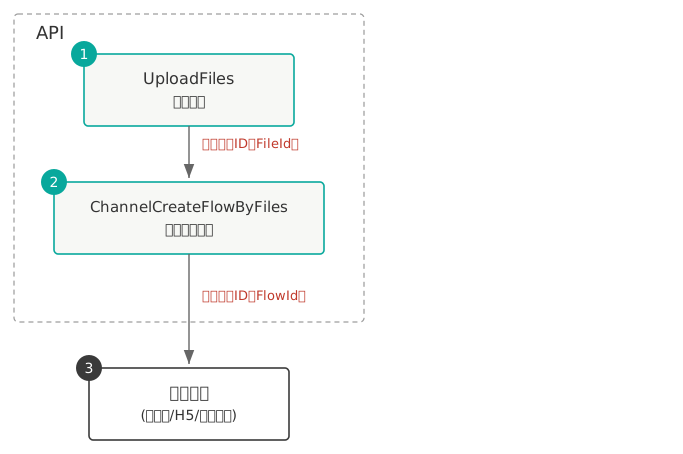
本接口需依赖[文件上传接口](https://qian.tencent.com/developers/partnerApis/files/UploadFiles)生成 PDF 资源编号(FileId)后使用,整体逻辑如下图:
|
|
344
337
|
|
|
338
|
+
|
|
345
339
|
|
|
346
|
-
|
|
347
|
-
|
|
340
|
+
### 1.2 发起方和签署方
|
|
341
|
+
<table> <thead> <tr> <th>场景编号</th> <th>发起方</th> <th>签署方</th> <th>补充</th> </tr> </thead> <tbody> <tr> <td>场景一</td> <td>子企业A的员工</td> <td>子企业A的员工</td> <td>子企业是通过<a href="https://qian.tencent.com/developers/partnerApis/accounts/CreateConsoleLoginUrl" target="_blank">CreateConsoleLoginUrl</a>生成子客登录链接注册的企业</td> </tr> <tr> <td>场景二</td> <td>子企业A的员工</td> <td>子企业B(不指定经办人走领取逻辑)</td> <td>领取的逻辑可以参考文档<a href="https://qian.tencent.com/developers/partner/dynamic_signer" target="_blank">动态签署方</a> </td> </tr> <tr> <td>场景三</td> <td>子企业A的员工</td> <td>子企业B的员工</td> <td>-</td> </tr> <tr> <td>场景四</td> <td>子企业A的员工</td> <td>个人</td> <td>就是自然人,不是企业员工</td> </tr> <tr> <td>场景五</td> <td>子企业A的员工</td> <td>SaaS平台企业员工</td> <td>SaaS平台企业是通过<a href="https://qian.tencent.cn/console/company-register" target="_blank">https://qian.tencent.cn/console/company-register</a>链接注册的企业</td> </tr> </tbody> </table>
|
|
348
342
|
|
|
349
|
-
`2. 不同类型的签署方传参不同, 可以参考开发者中心的FlowApproverInfo结构体说明`
|
|
350
343
|
|
|
351
|
-
|
|
344
|
+
<font color="red">发起方(第三方子企业 A 的企业与员工)必须完成实名</font>;作为 **签署方** 的第三方子企业 A 员工 / 个人自然人 / SaaS 平台企业员工 / 第三方子企业 B 员工等,其企业和个人可以未实名。
|
|
352
345
|
|
|
353
|
-
|
|
346
|
+
### 1.3 注意事项
|
|
347
|
+
- 合同<font color="red">发起后就会扣减合同的额度</font> , 只有撤销没有参与方签署过或只有自动签署签署过的合同,且<font color="red">有撤销合同额度</font>的情形下,才会返还合同额度。(**过期,拒签,签署完成,解除完成等状态不会返还额度**)。具体可以参考 [合同撤销返还额度说明](https://qian.tencent.com/developers/partner/contract_cancel_quota) 。
|
|
348
|
+
- <font color="red">支持的证件类型</font>可以参考 [支持的证件类型](https://qian.tencent.com/developers/partner/id_card_support) 。
|
|
349
|
+
- <font color="red">不同类型的签署方传参不同</font>,各类型签署方的信息传递方式详见 [签署方入参指引](https://qian.tencent.com/developers/partner/flow_approver) 。
|
|
350
|
+
- 如果合同正式发起前如需<font color="red">预览</font>效果,可参考 [使用文件发起的预览](https://qian.tencent.com/developers/partner/preview_guide#%E4%B8%80%E4%BD%BF%E7%94%A8%E6%96%87%E4%BB%B6%E5%8F%91%E8%B5%B7%E7%9A%84%E9%A2%84%E8%A7%88)
|
|
351
|
+
- 关于填写方与签署方的<font color="red">填写、签署先后顺序</font>设置,详见 [填写与签署顺序说明](https://qian.tencent.com/developers/partner/fill_sign_order)。
|
|
352
|
+
- 关于<font color="red">本企业自动签署与其他企业自动签署</font>的配置与使用,详见 [自动签署](https://qian.tencent.com/developers/partner/autosign_guide)。
|
|
354
353
|
|
|
355
|
-
|
|
356
|
-
1. <a href="https://dyn.ess.tencent.cn/guide/apivideo/essbasic-UploadFiles.mp4" target="_blank">【上传文件代码】编写示例</a
|
|
357
|
-
|
|
354
|
+
### 1.4 视频教程
|
|
355
|
+
1. <a href="https://dyn.ess.tencent.cn/guide/apivideo/essbasic-UploadFiles.mp4" target="_blank">【上传文件代码】编写示例</a>
|
|
356
|
+
2. <a href="https://dyn.ess.tencent.cn/guide/apivideo/essbasic-ChannelCreateFlowByFiles.mp4" target="_blank">【用PDF文件创建签署流程】编写示例</a>
|
|
358
357
|
*/
|
|
359
358
|
ChannelCreateFlowByFiles(req: ChannelCreateFlowByFilesRequest, cb?: (error: string, rep: ChannelCreateFlowByFilesResponse) => void): Promise<ChannelCreateFlowByFilesResponse>;
|
|
360
359
|
/**
|
|
@@ -406,70 +405,54 @@ export declare class Client extends TencentCloudCommon.AbstractClient {
|
|
|
406
405
|
*/
|
|
407
406
|
ChannelCancelFlow(req: ChannelCancelFlowRequest, cb?: (error: string, rep: ChannelCancelFlowResponse) => void): Promise<ChannelCancelFlowResponse>;
|
|
408
407
|
/**
|
|
409
|
-
*
|
|
410
|
-
如若在模板中配置了动态表格, 上传的附件必须为A4大小
|
|
411
|
-
合同发起人必须在电子签已经进行实名。
|
|
408
|
+
* 本接口(CreateFlowsByTemplates)用于**使用模板批量创建签署流程**,当前单次可批量发起合同(签署流程)数量为 1~20 个。
|
|
412
409
|
|
|
413
|
-
### 一. 整体的逻辑如下
|
|
414
410
|
|
|
415
|
-
|
|
411
|
+
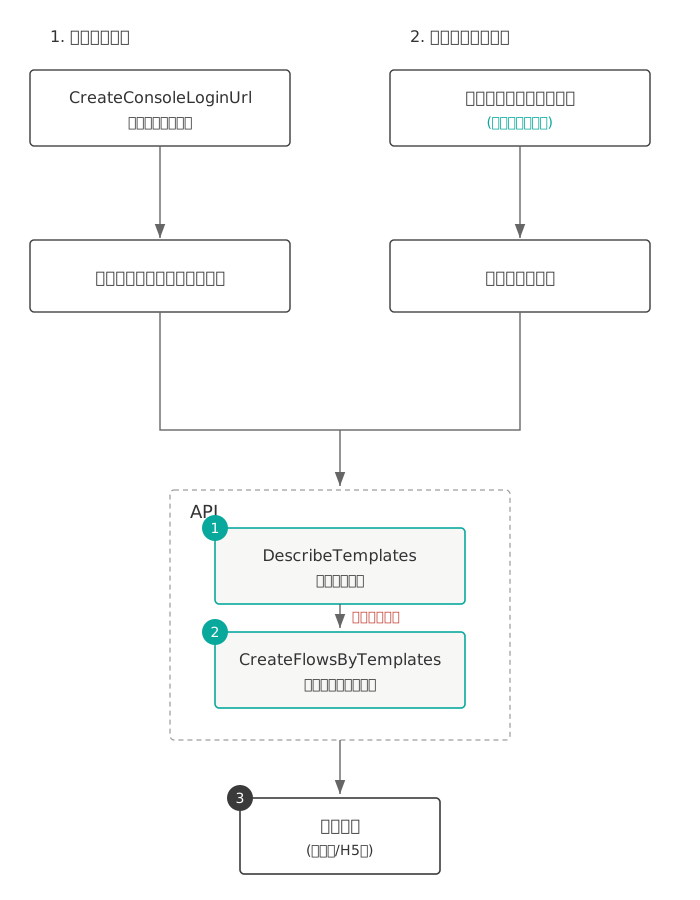
### 1.1 整体逻辑如下
|
|
416
412
|
|
|
417
|
-
|
|
413
|
+
|
|
414
|
+
|
|
415
|
+
### 1.2 发起方和签署方
|
|
418
416
|
|
|
419
417
|
<table> <thead> <tr> <th>场景编号</th> <th>发起方</th> <th>签署方</th> <th>补充</th> </tr> </thead> <tbody> <tr> <td>场景一</td> <td>子企业A的员工</td> <td>子企业A的员工</td> <td>子企业是通过<a href="https://qian.tencent.com/developers/partnerApis/accounts/CreateConsoleLoginUrl" target="_blank">CreateConsoleLoginUrl</a>生成子客登录链接注册的企业</td> </tr> <tr> <td>场景二</td> <td>子企业A的员工</td> <td>子企业B(不指定经办人走领取逻辑)</td> <td>领取的逻辑可以参考文档<a href="https://qian.tencent.com/developers/partner/dynamic_signer" target="_blank">动态签署方</a> </td> </tr> <tr> <td>场景三</td> <td>子企业A的员工</td> <td>子企业B的员工</td> <td>-</td> </tr> <tr> <td>场景四</td> <td>子企业A的员工</td> <td>个人</td> <td>就是自然人,不是企业员工</td> </tr> <tr> <td>场景五</td> <td>子企业A的员工</td> <td>SaaS平台企业员工</td> <td>SaaS平台企业是通过<a href="https://qian.tencent.cn/console/company-register" target="_blank">https://qian.tencent.cn/console/company-register</a>链接注册的企业</td> </tr> </tbody> </table>
|
|
420
418
|
|
|
419
|
+
<font color="red">发起方(第三方子企业 A 的企业与员工)必须完成实名</font>;作为 **签署方** 的第三方子企业 A 员工 / 个人自然人 / SaaS 平台企业员工 / 第三方子企业 B 员工等,其企业和个人可以未实名。
|
|
421
420
|
|
|
422
421
|
|
|
422
|
+
### 1.3 填充模板中定义的发起人填写控件
|
|
423
423
|
|
|
424
|
-
|
|
425
|
-
模板中配置的<font color="red">发起人填充控件</font>可以通过本接口的**FormFields数组**字段填充
|
|
424
|
+
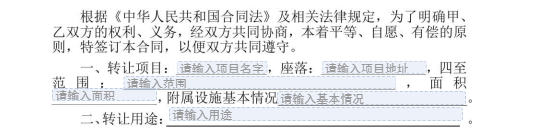
模板中配置的 **发起人填充控件** 可以通过本接口的 **FormFields 数组** 字段填充。<font color="red">只能填充分配给发起方的填写控件,不能填充分配给签署方的签署控件</font> ,分配给签署方的签署控件需要签署方在签署环节填充。
|
|
426
425
|
|
|
427
426
|
|
|
428
427
|
填充的传参示例如下
|
|
429
428
|
|
|
430
429
|
```
|
|
431
|
-
request.FormFields = [
|
|
432
|
-
|
|
433
|
-
|
|
434
|
-
|
|
435
|
-
|
|
436
|
-
|
|
437
|
-
|
|
438
|
-
|
|
439
|
-
"ComponentValue": "凤凰山至107国道",
|
|
440
|
-
}, {
|
|
441
|
-
"ComponentName": "面积",
|
|
442
|
-
"ComponentValue": "100亩",
|
|
443
|
-
}, {
|
|
444
|
-
"ComponentName": "基本情况",
|
|
445
|
-
"ComponentValue": "完好",
|
|
446
|
-
}, , {
|
|
447
|
-
"ComponentName": "用途",
|
|
448
|
-
"ComponentValue": "经营农家乐",
|
|
449
|
-
}
|
|
450
|
-
]
|
|
430
|
+
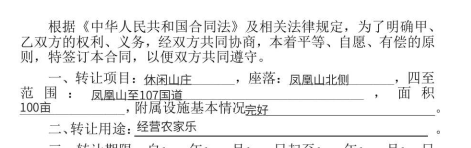
request.FormFields = [
|
|
431
|
+
{ "ComponentName": "项目的名字", "ComponentValue": "休闲山庄" },
|
|
432
|
+
{ "ComponentName": "项目的地址", "ComponentValue": "凤凰山北侧" },
|
|
433
|
+
{ "ComponentName": "范围", "ComponentValue": "凤凰山至107国道" },
|
|
434
|
+
{ "ComponentName": "面积", "ComponentValue": "100亩" },
|
|
435
|
+
{ "ComponentName": "基本情况", "ComponentValue": "完好" },
|
|
436
|
+
{ "ComponentName": "用途", "ComponentValue": "经营农家乐" }
|
|
437
|
+
]
|
|
451
438
|
```
|
|
452
|
-
|
|
439
|
+
合成后合同样子
|
|
453
440
|
|
|
454
441
|
|
|
455
442
|
|
|
443
|
+
### 1.4 注意事项
|
|
444
|
+
- 合同<font color="red">发起后就会扣减合同的额度</font> , 只有撤销没有参与方签署过或只有自动签署签署过的合同,且<font color="red">有撤销合同额度</font>的情形下,才会返还合同额度。(**过期,拒签,签署完成,解除完成等状态不会返还额度**)。具体可以参考 [合同撤销返还额度说明](https://qian.tencent.com/developers/partner/contract_cancel_quota) 。
|
|
445
|
+
- <font color="red">支持的证件类型</font>可以参考 [支持的证件类型](https://qian.tencent.com/developers/partner/id_card_support) 。
|
|
446
|
+
- <font color="red">不同类型的签署方传参不同</font>,各类型签署方的信息传递方式详见 [签署方入参指引](https://qian.tencent.com/developers/partner/flow_approver) 。
|
|
447
|
+
- 如果合同正式发起前如需<font color="red">预览</font>效果,可参考 [使用模板发起的预览](https://qian.tencent.com/developers/partner/preview_guide/#%E4%BA%8C%E4%BD%BF%E7%94%A8%E6%A8%A1%E6%9D%BF%E5%8F%91%E8%B5%B7%E7%9A%84%E9%A2%84%E8%A7%88)
|
|
448
|
+
- 关于填写方与签署方的<font color="red">填写、签署先后顺序</font>设置,详见 [填写与签署顺序说明](https://qian.tencent.com/developers/partner/fill_sign_order)。
|
|
449
|
+
- 关于<font color="red">本企业自动签署与其他企业自动签署</font>的配置与使用,详见 [自动签署](https://qian.tencent.com/developers/partner/autosign_guide)。
|
|
450
|
+
- 如若在模板中配置了[动态表格](https://qian.tencent.com/developers/partner/dynamic_table), 如果模板中配有附件控件,上传的附件必须为A4尺寸的PDF。
|
|
456
451
|
|
|
452
|
+
### 1.5 视频教程
|
|
457
453
|
|
|
458
|
-
|
|
459
|
-
|
|
460
|
-
|
|
461
|
-
2. 不同类型的签署方传参不同, 可以参考开发者中心的FlowApproverInfo结构体说明
|
|
462
|
-
|
|
463
|
-
3. <font color="red">调用接口发起合同成功就会扣减合同的额度</font>, 只有撤销没有参与方签署过或只有自动签署签署过的合同,才会返还合同额度。(过期,拒签,签署完成,解除完成等状态不会返还额度)
|
|
464
|
-
|
|
465
|
-
4. <font color="red">静默(自动)签署不支持合同签署方存在填写</font>
|
|
466
|
-
|
|
467
|
-
5. <font color="red">在下一步创建签署链接前,建议等待DocumentFill </font> <a href="https://qian.tencent.com/developers/partner/callback_types_file_resources">PDF合成完成的回调</a>或者睡眠几秒,尤其是当模板中存在动态表格等复杂填写控件时,因为合成过程可能会耗费秒级别的时间。
|
|
468
|
-
|
|
469
|
-
|
|
470
|
-
<font color="red">相关视频指引</font> <br>
|
|
471
|
-
1. <a href="https://dyn.ess.tencent.cn/guide/apivideo/essbasic-CreateTemplates.mp4" target="_blank">创建模板&设置成本企业自动签署</a><br>
|
|
472
|
-
2. <a href="https://dyn.ess.tencent.cn/guide/apivideo/essbasic-CreateFlowsByTemplates.mp4" target="_blank">【用模板创建签署流程】编写示例视频教程</a><br>
|
|
454
|
+
1. <a href="https://dyn.ess.tencent.cn/guide/apivideo/essbasic-CreateTemplates.mp4" target="_blank">创建模板 & 设置成本企业自动签署</a>
|
|
455
|
+
2. <a href="https://dyn.ess.tencent.cn/guide/apivideo/essbasic-CreateFlowsByTemplates.mp4" target="_blank">【用模板创建签署流程】编写示例视频教程</a>
|
|
473
456
|
*/
|
|
474
457
|
CreateFlowsByTemplates(req: CreateFlowsByTemplatesRequest, cb?: (error: string, rep: CreateFlowsByTemplatesResponse) => void): Promise<CreateFlowsByTemplatesResponse>;
|
|
475
458
|
/**
|
|
@@ -393,34 +393,33 @@ class Client extends TencentCloudCommon.AbstractClient {
|
|
|
393
393
|
return this.request("ChannelCreatePreparedPersonalEsign", req, cb);
|
|
394
394
|
}
|
|
395
395
|
/**
|
|
396
|
-
*
|
|
396
|
+
* 本接口(ChannelCreateFlowByFiles)用于通过**已上传的 PDF 资源编号**创建待签署的合同流程。
|
|
397
397
|
|
|
398
|
-
|
|
398
|
+
**适用场景**:适用于非制式的合同文件签署。当开发者已拥有每个签署流程完整的 PDF 文件时,可通过本接口传入完整的 PDF 文件及流程信息,生成待签署的合同流程。
|
|
399
399
|
|
|
400
|
-
|
|
401
|
-
<ul>
|
|
402
|
-
<li>此接口静默签(企业自动签)能力为白名单功能,使用前请联系对接的客户经理沟通。</li>
|
|
403
|
-
<li>此接口需要依赖<a href="https://qian.tencent.com/developers/partnerApis/files/UploadFiles" target="_blank">文件上传接口</a>生成pdf资源编号(FileIds)进行使用。整体的逻辑如下图</li>
|
|
404
|
-
</ul>
|
|
400
|
+
### 1.1 调用依赖
|
|
405
401
|
|
|
406
|
-
|
|
407
|
-
|
|
408
|
-
**可以作为发起方和签署方的角色列表**
|
|
409
|
-
<table> <thead> <tr> <th>场景编号</th> <th>发起方</th> <th>签署方</th> <th>补充</th> </tr> </thead> <tbody> <tr> <td>场景一</td> <td>子企业A的员工</td> <td>子企业A的员工</td> <td>子企业是通过<a href="https://qian.tencent.com/developers/partnerApis/accounts/CreateConsoleLoginUrl" target="_blank">CreateConsoleLoginUrl</a>生成子客登录链接注册的企业</td> </tr> <tr> <td>场景二</td> <td>子企业A的员工</td> <td>子企业B(不指定经办人走领取逻辑)</td> <td>领取的逻辑可以参考文档<a href="https://qian.tencent.com/developers/partner/dynamic_signer" target="_blank">动态签署方</a> </td> </tr> <tr> <td>场景三</td> <td>子企业A的员工</td> <td>子企业B的员工</td> <td>-</td> </tr> <tr> <td>场景四</td> <td>子企业A的员工</td> <td>个人</td> <td>就是自然人,不是企业员工</td> </tr> <tr> <td>场景五</td> <td>子企业A的员工</td> <td>SaaS平台企业员工</td> <td>SaaS平台企业是通过<a href="https://qian.tencent.cn/console/company-register" target="_blank">https://qian.tencent.cn/console/company-register</a>链接注册的企业</td> </tr> </tbody> </table>
|
|
402
|
+
本接口需依赖[文件上传接口](https://qian.tencent.com/developers/partnerApis/files/UploadFiles)生成 PDF 资源编号(FileId)后使用,整体逻辑如下图:
|
|
410
403
|
|
|
404
|
+

|
|
411
405
|
|
|
412
|
-
|
|
413
|
-
|
|
406
|
+
### 1.2 发起方和签署方
|
|
407
|
+
<table> <thead> <tr> <th>场景编号</th> <th>发起方</th> <th>签署方</th> <th>补充</th> </tr> </thead> <tbody> <tr> <td>场景一</td> <td>子企业A的员工</td> <td>子企业A的员工</td> <td>子企业是通过<a href="https://qian.tencent.com/developers/partnerApis/accounts/CreateConsoleLoginUrl" target="_blank">CreateConsoleLoginUrl</a>生成子客登录链接注册的企业</td> </tr> <tr> <td>场景二</td> <td>子企业A的员工</td> <td>子企业B(不指定经办人走领取逻辑)</td> <td>领取的逻辑可以参考文档<a href="https://qian.tencent.com/developers/partner/dynamic_signer" target="_blank">动态签署方</a> </td> </tr> <tr> <td>场景三</td> <td>子企业A的员工</td> <td>子企业B的员工</td> <td>-</td> </tr> <tr> <td>场景四</td> <td>子企业A的员工</td> <td>个人</td> <td>就是自然人,不是企业员工</td> </tr> <tr> <td>场景五</td> <td>子企业A的员工</td> <td>SaaS平台企业员工</td> <td>SaaS平台企业是通过<a href="https://qian.tencent.cn/console/company-register" target="_blank">https://qian.tencent.cn/console/company-register</a>链接注册的企业</td> </tr> </tbody> </table>
|
|
414
408
|
|
|
415
|
-
`2. 不同类型的签署方传参不同, 可以参考开发者中心的FlowApproverInfo结构体说明`
|
|
416
409
|
|
|
417
|
-
|
|
410
|
+
<font color="red">发起方(第三方子企业 A 的企业与员工)必须完成实名</font>;作为 **签署方** 的第三方子企业 A 员工 / 个人自然人 / SaaS 平台企业员工 / 第三方子企业 B 员工等,其企业和个人可以未实名。
|
|
418
411
|
|
|
419
|
-
|
|
412
|
+
### 1.3 注意事项
|
|
413
|
+
- 合同<font color="red">发起后就会扣减合同的额度</font> , 只有撤销没有参与方签署过或只有自动签署签署过的合同,且<font color="red">有撤销合同额度</font>的情形下,才会返还合同额度。(**过期,拒签,签署完成,解除完成等状态不会返还额度**)。具体可以参考 [合同撤销返还额度说明](https://qian.tencent.com/developers/partner/contract_cancel_quota) 。
|
|
414
|
+
- <font color="red">支持的证件类型</font>可以参考 [支持的证件类型](https://qian.tencent.com/developers/partner/id_card_support) 。
|
|
415
|
+
- <font color="red">不同类型的签署方传参不同</font>,各类型签署方的信息传递方式详见 [签署方入参指引](https://qian.tencent.com/developers/partner/flow_approver) 。
|
|
416
|
+
- 如果合同正式发起前如需<font color="red">预览</font>效果,可参考 [使用文件发起的预览](https://qian.tencent.com/developers/partner/preview_guide#%E4%B8%80%E4%BD%BF%E7%94%A8%E6%96%87%E4%BB%B6%E5%8F%91%E8%B5%B7%E7%9A%84%E9%A2%84%E8%A7%88)
|
|
417
|
+
- 关于填写方与签署方的<font color="red">填写、签署先后顺序</font>设置,详见 [填写与签署顺序说明](https://qian.tencent.com/developers/partner/fill_sign_order)。
|
|
418
|
+
- 关于<font color="red">本企业自动签署与其他企业自动签署</font>的配置与使用,详见 [自动签署](https://qian.tencent.com/developers/partner/autosign_guide)。
|
|
420
419
|
|
|
421
|
-
|
|
422
|
-
1. <a href="https://dyn.ess.tencent.cn/guide/apivideo/essbasic-UploadFiles.mp4" target="_blank">【上传文件代码】编写示例</a
|
|
423
|
-
|
|
420
|
+
### 1.4 视频教程
|
|
421
|
+
1. <a href="https://dyn.ess.tencent.cn/guide/apivideo/essbasic-UploadFiles.mp4" target="_blank">【上传文件代码】编写示例</a>
|
|
422
|
+
2. <a href="https://dyn.ess.tencent.cn/guide/apivideo/essbasic-ChannelCreateFlowByFiles.mp4" target="_blank">【用PDF文件创建签署流程】编写示例</a>
|
|
424
423
|
*/
|
|
425
424
|
async ChannelCreateFlowByFiles(req, cb) {
|
|
426
425
|
return this.request("ChannelCreateFlowByFiles", req, cb);
|
|
@@ -482,70 +481,54 @@ class Client extends TencentCloudCommon.AbstractClient {
|
|
|
482
481
|
return this.request("ChannelCancelFlow", req, cb);
|
|
483
482
|
}
|
|
484
483
|
/**
|
|
485
|
-
*
|
|
486
|
-
如若在模板中配置了动态表格, 上传的附件必须为A4大小
|
|
487
|
-
合同发起人必须在电子签已经进行实名。
|
|
484
|
+
* 本接口(CreateFlowsByTemplates)用于**使用模板批量创建签署流程**,当前单次可批量发起合同(签署流程)数量为 1~20 个。
|
|
488
485
|
|
|
489
|
-
### 一. 整体的逻辑如下
|
|
490
486
|
|
|
491
|
-
|
|
487
|
+
### 1.1 整体逻辑如下
|
|
492
488
|
|
|
493
|
-
|
|
489
|
+

|
|
490
|
+
|
|
491
|
+
### 1.2 发起方和签署方
|
|
494
492
|
|
|
495
493
|
<table> <thead> <tr> <th>场景编号</th> <th>发起方</th> <th>签署方</th> <th>补充</th> </tr> </thead> <tbody> <tr> <td>场景一</td> <td>子企业A的员工</td> <td>子企业A的员工</td> <td>子企业是通过<a href="https://qian.tencent.com/developers/partnerApis/accounts/CreateConsoleLoginUrl" target="_blank">CreateConsoleLoginUrl</a>生成子客登录链接注册的企业</td> </tr> <tr> <td>场景二</td> <td>子企业A的员工</td> <td>子企业B(不指定经办人走领取逻辑)</td> <td>领取的逻辑可以参考文档<a href="https://qian.tencent.com/developers/partner/dynamic_signer" target="_blank">动态签署方</a> </td> </tr> <tr> <td>场景三</td> <td>子企业A的员工</td> <td>子企业B的员工</td> <td>-</td> </tr> <tr> <td>场景四</td> <td>子企业A的员工</td> <td>个人</td> <td>就是自然人,不是企业员工</td> </tr> <tr> <td>场景五</td> <td>子企业A的员工</td> <td>SaaS平台企业员工</td> <td>SaaS平台企业是通过<a href="https://qian.tencent.cn/console/company-register" target="_blank">https://qian.tencent.cn/console/company-register</a>链接注册的企业</td> </tr> </tbody> </table>
|
|
496
494
|
|
|
495
|
+
<font color="red">发起方(第三方子企业 A 的企业与员工)必须完成实名</font>;作为 **签署方** 的第三方子企业 A 员工 / 个人自然人 / SaaS 平台企业员工 / 第三方子企业 B 员工等,其企业和个人可以未实名。
|
|
497
496
|
|
|
498
497
|
|
|
498
|
+
### 1.3 填充模板中定义的发起人填写控件
|
|
499
499
|
|
|
500
|
-
|
|
501
|
-
模板中配置的<font color="red">发起人填充控件</font>可以通过本接口的**FormFields数组**字段填充
|
|
500
|
+
模板中配置的 **发起人填充控件** 可以通过本接口的 **FormFields 数组** 字段填充。<font color="red">只能填充分配给发起方的填写控件,不能填充分配给签署方的签署控件</font> ,分配给签署方的签署控件需要签署方在签署环节填充。
|
|
502
501
|
|
|
503
502
|

|
|
504
503
|
填充的传参示例如下
|
|
505
504
|
|
|
506
505
|
```
|
|
507
|
-
request.FormFields = [
|
|
508
|
-
|
|
509
|
-
|
|
510
|
-
|
|
511
|
-
|
|
512
|
-
|
|
513
|
-
|
|
514
|
-
|
|
515
|
-
"ComponentValue": "凤凰山至107国道",
|
|
516
|
-
}, {
|
|
517
|
-
"ComponentName": "面积",
|
|
518
|
-
"ComponentValue": "100亩",
|
|
519
|
-
}, {
|
|
520
|
-
"ComponentName": "基本情况",
|
|
521
|
-
"ComponentValue": "完好",
|
|
522
|
-
}, , {
|
|
523
|
-
"ComponentName": "用途",
|
|
524
|
-
"ComponentValue": "经营农家乐",
|
|
525
|
-
}
|
|
526
|
-
]
|
|
506
|
+
request.FormFields = [
|
|
507
|
+
{ "ComponentName": "项目的名字", "ComponentValue": "休闲山庄" },
|
|
508
|
+
{ "ComponentName": "项目的地址", "ComponentValue": "凤凰山北侧" },
|
|
509
|
+
{ "ComponentName": "范围", "ComponentValue": "凤凰山至107国道" },
|
|
510
|
+
{ "ComponentName": "面积", "ComponentValue": "100亩" },
|
|
511
|
+
{ "ComponentName": "基本情况", "ComponentValue": "完好" },
|
|
512
|
+
{ "ComponentName": "用途", "ComponentValue": "经营农家乐" }
|
|
513
|
+
]
|
|
527
514
|
```
|
|
528
|
-
|
|
515
|
+
合成后合同样子
|
|
529
516
|
|
|
530
517
|

|
|
531
518
|
|
|
519
|
+
### 1.4 注意事项
|
|
520
|
+
- 合同<font color="red">发起后就会扣减合同的额度</font> , 只有撤销没有参与方签署过或只有自动签署签署过的合同,且<font color="red">有撤销合同额度</font>的情形下,才会返还合同额度。(**过期,拒签,签署完成,解除完成等状态不会返还额度**)。具体可以参考 [合同撤销返还额度说明](https://qian.tencent.com/developers/partner/contract_cancel_quota) 。
|
|
521
|
+
- <font color="red">支持的证件类型</font>可以参考 [支持的证件类型](https://qian.tencent.com/developers/partner/id_card_support) 。
|
|
522
|
+
- <font color="red">不同类型的签署方传参不同</font>,各类型签署方的信息传递方式详见 [签署方入参指引](https://qian.tencent.com/developers/partner/flow_approver) 。
|
|
523
|
+
- 如果合同正式发起前如需<font color="red">预览</font>效果,可参考 [使用模板发起的预览](https://qian.tencent.com/developers/partner/preview_guide/#%E4%BA%8C%E4%BD%BF%E7%94%A8%E6%A8%A1%E6%9D%BF%E5%8F%91%E8%B5%B7%E7%9A%84%E9%A2%84%E8%A7%88)
|
|
524
|
+
- 关于填写方与签署方的<font color="red">填写、签署先后顺序</font>设置,详见 [填写与签署顺序说明](https://qian.tencent.com/developers/partner/fill_sign_order)。
|
|
525
|
+
- 关于<font color="red">本企业自动签署与其他企业自动签署</font>的配置与使用,详见 [自动签署](https://qian.tencent.com/developers/partner/autosign_guide)。
|
|
526
|
+
- 如若在模板中配置了[动态表格](https://qian.tencent.com/developers/partner/dynamic_table), 如果模板中配有附件控件,上传的附件必须为A4尺寸的PDF。
|
|
532
527
|
|
|
528
|
+
### 1.5 视频教程
|
|
533
529
|
|
|
534
|
-
|
|
535
|
-
|
|
536
|
-
|
|
537
|
-
2. 不同类型的签署方传参不同, 可以参考开发者中心的FlowApproverInfo结构体说明
|
|
538
|
-
|
|
539
|
-
3. <font color="red">调用接口发起合同成功就会扣减合同的额度</font>, 只有撤销没有参与方签署过或只有自动签署签署过的合同,才会返还合同额度。(过期,拒签,签署完成,解除完成等状态不会返还额度)
|
|
540
|
-
|
|
541
|
-
4. <font color="red">静默(自动)签署不支持合同签署方存在填写</font>
|
|
542
|
-
|
|
543
|
-
5. <font color="red">在下一步创建签署链接前,建议等待DocumentFill </font> <a href="https://qian.tencent.com/developers/partner/callback_types_file_resources">PDF合成完成的回调</a>或者睡眠几秒,尤其是当模板中存在动态表格等复杂填写控件时,因为合成过程可能会耗费秒级别的时间。
|
|
544
|
-
|
|
545
|
-
|
|
546
|
-
<font color="red">相关视频指引</font> <br>
|
|
547
|
-
1. <a href="https://dyn.ess.tencent.cn/guide/apivideo/essbasic-CreateTemplates.mp4" target="_blank">创建模板&设置成本企业自动签署</a><br>
|
|
548
|
-
2. <a href="https://dyn.ess.tencent.cn/guide/apivideo/essbasic-CreateFlowsByTemplates.mp4" target="_blank">【用模板创建签署流程】编写示例视频教程</a><br>
|
|
530
|
+
1. <a href="https://dyn.ess.tencent.cn/guide/apivideo/essbasic-CreateTemplates.mp4" target="_blank">创建模板 & 设置成本企业自动签署</a>
|
|
531
|
+
2. <a href="https://dyn.ess.tencent.cn/guide/apivideo/essbasic-CreateFlowsByTemplates.mp4" target="_blank">【用模板创建签署流程】编写示例视频教程</a>
|
|
549
532
|
*/
|
|
550
533
|
async CreateFlowsByTemplates(req, cb) {
|
|
551
534
|
return this.request("CreateFlowsByTemplates", req, cb);
|
|
@@ -7403,6 +7403,10 @@ export interface ApproverOption {
|
|
|
7403
7403
|
* <p>签署人手机号传参模式</p><p>枚举值:</p><ul><li>REPLACE: 接受已有认证手机号并替换</li><li>GIVEN: 以客户入参输入手机号为主</li><li>VALIDATE: 若与认证手机号不一致则报错</li><li>"": 不走手机号传参模式</li></ul><p>默认值:""</p><p>会触发手机号传参模式的前提是:签署人是指定了具体身份信息的</p><ul><li>渠道方签署人不会触发</li><li>非渠道方签署人在指定签署人姓名,证件号的情况下会触发</li></ul>
|
|
7404
7404
|
*/
|
|
7405
7405
|
ApproverMobileMode?: string;
|
|
7406
|
+
/**
|
|
7407
|
+
* <p>【仅 SignBeanTag=1 时有效】 签署方自行添加签署印章类控件(SIGN_SEAL、SIGN_PAGING_SEAL、SIGN_LEGAL_PERSON_SEAL)时,「盖章区适配签署方印章尺寸」开关的控制策略</p><p>枚举值:</p><ul><li>0: 默认关闭,可开启。与现网一致</li><li>1: 关闭且置灰——按控件默认的4.2cm尺寸盖章,签署方无法开启开关</li><li>2: 默认开启且可修改——默认按印章实际尺寸盖章,签署方可手动关闭</li><li>3: 开启且置灰——强制按印章实际尺寸盖章,签署方不可修改</li></ul>
|
|
7408
|
+
*/
|
|
7409
|
+
AddSignComponentUseSealSize?: number;
|
|
7406
7410
|
}
|
|
7407
7411
|
/**
|
|
7408
7412
|
* ChannelCreatePrepareFlowGroup返回参数结构体
|