tencentcloud-sdk-nodejs-ess 4.0.791 → 4.0.792
This diff represents the content of publicly available package versions that have been released to one of the supported registries. The information contained in this diff is provided for informational purposes only and reflects changes between package versions as they appear in their respective public registries.
- package/package.json +1 -1
- package/products.md +2 -2
- package/src/services/ess/v20201111/ess_client.ts +32 -1
- package/src/services/ess/v20201111/ess_models.ts +12 -0
- package/tencentcloud/services/ess/v20201111/ess_client.d.ts +32 -1
- package/tencentcloud/services/ess/v20201111/ess_client.js +32 -1
- package/tencentcloud/services/ess/v20201111/ess_models.d.ts +12 -0
package/package.json
CHANGED
package/products.md
CHANGED
|
@@ -96,8 +96,8 @@
|
|
|
96
96
|
| eis | [数据连接器](https://cloud.tencent.com/document/product/1270) | 2023-08-10 01:17:44 |
|
|
97
97
|
| emr | [弹性 MapReduce](https://cloud.tencent.com/document/product/589) | 2024-01-31 01:14:36 |
|
|
98
98
|
| es | [Elasticsearch Service](https://cloud.tencent.com/document/product/845) | 2024-01-25 01:13:20 |
|
|
99
|
-
| ess | [腾讯电子签企业版](https://cloud.tencent.com/document/product/1323) | 2024-01-
|
|
100
|
-
| essbasic | [腾讯电子签(基础版)](https://cloud.tencent.com/document/product/1420) | 2024-01-31
|
|
99
|
+
| ess | [腾讯电子签企业版](https://cloud.tencent.com/document/product/1323) | 2024-01-31 11:46:30 |
|
|
100
|
+
| essbasic | [腾讯电子签(基础版)](https://cloud.tencent.com/document/product/1420) | 2024-01-31 11:46:10 |
|
|
101
101
|
| facefusion | [人脸融合](https://cloud.tencent.com/document/product/670) | 2023-12-15 19:41:44 |
|
|
102
102
|
| faceid | [人脸核身](https://cloud.tencent.com/document/product/1007) | 2024-01-12 01:15:37 |
|
|
103
103
|
| fmu | [人脸试妆](https://cloud.tencent.com/document/product/1172) | 2023-12-25 00:11:01 |
|
|
@@ -632,9 +632,40 @@ export class Client extends TencentCloudCommon.AbstractClient {
|
|
|
632
632
|
/**
|
|
633
633
|
* 创建签署流程电子文档<br />
|
|
634
634
|
|
|
635
|
-
|
|
635
|
+
### 调用流程
|
|
636
|
+
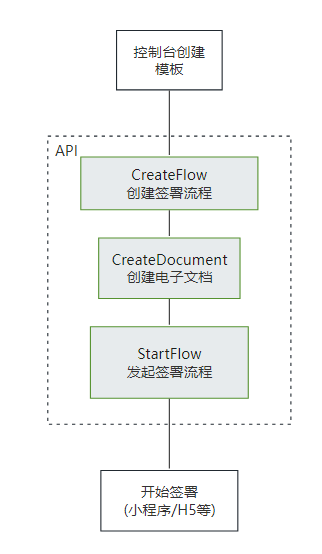
该接口需要给对应的流程指定一个模板id,并且填充该模板中需要补充的信息。需要配置<a href="https://qian.tencent.com/developers/companyApis/startFlows/CreateFlow" target="_blank">创建签署流程</a>和<a href="https://qian.tencent.com/developers/companyApis/startFlows/StartFlow" target="_blank">发起签署流程</a>接口使用。具体逻辑可以参考下图:
|
|
636
637
|
|
|
637
638
|
|
|
639
|
+
|
|
640
|
+
|
|
641
|
+
### 填充模版中定义的填写控件
|
|
642
|
+
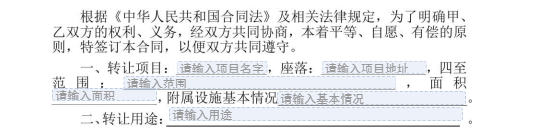
模版中配置的<font color="red">发起人填充控件</font>可以通过本接口的**FormFields数组**字段填充
|
|
643
|
+
|
|
644
|
+
填充的传参示例如下
|
|
645
|
+
```
|
|
646
|
+
request.FormFields = [{
|
|
647
|
+
"ComponentName": "项目的名字",
|
|
648
|
+
"ComponentValue": "休闲山庄"
|
|
649
|
+
}, {
|
|
650
|
+
"ComponentName": "项目的地址",
|
|
651
|
+
"ComponentValue": "凤凰山北侧",
|
|
652
|
+
}, {
|
|
653
|
+
"ComponentName": "范围",
|
|
654
|
+
"ComponentValue": "凤凰山至107国道",
|
|
655
|
+
}, {
|
|
656
|
+
"ComponentName": "面积",
|
|
657
|
+
"ComponentValue": "100亩",
|
|
658
|
+
}, {
|
|
659
|
+
"ComponentName": "基本情况",
|
|
660
|
+
"ComponentValue": "完好",
|
|
661
|
+
}, , {
|
|
662
|
+
"ComponentName": "用途",
|
|
663
|
+
"ComponentValue": "经营农家乐",
|
|
664
|
+
}
|
|
665
|
+
]
|
|
666
|
+
```
|
|
667
|
+
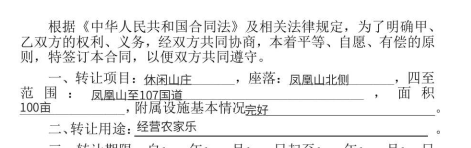
合成后合同样子示例
|
|
668
|
+
|
|
638
669
|
*/
|
|
639
670
|
async CreateDocument(
|
|
640
671
|
req: CreateDocumentRequest,
|
|
@@ -985,6 +985,12 @@ export interface CreateFlowEvidenceReportRequest {
|
|
|
985
985
|
在集团企业代理子企业操作的场景中,需设置此参数。在此情境下,ProxyOrganizationId(子企业的组织ID)为必填项。
|
|
986
986
|
*/
|
|
987
987
|
Agent?: Agent
|
|
988
|
+
/**
|
|
989
|
+
* 指定申请的报告类型,可选类型如下:
|
|
990
|
+
<ul><li> **0** :合同签署报告(默认)</li>
|
|
991
|
+
<li> **1** :公证处核验报告</li></ul>
|
|
992
|
+
*/
|
|
993
|
+
ReportType?: number
|
|
988
994
|
}
|
|
989
995
|
|
|
990
996
|
/**
|
|
@@ -5160,6 +5166,12 @@ export interface DescribeFlowEvidenceReportRequest {
|
|
|
5160
5166
|
在集团企业代理子企业操作的场景中,需设置此参数。在此情境下,ProxyOrganizationId(子企业的组织ID)为必填项。
|
|
5161
5167
|
*/
|
|
5162
5168
|
Agent?: Agent
|
|
5169
|
+
/**
|
|
5170
|
+
* 指定申请的报告类型,可选类型如下:
|
|
5171
|
+
<ul><li> **0** :合同签署报告(默认)</li>
|
|
5172
|
+
<li> **1** :公证处核验报告</li></ul>
|
|
5173
|
+
*/
|
|
5174
|
+
ReportType?: number
|
|
5163
5175
|
}
|
|
5164
5176
|
|
|
5165
5177
|
/**
|
|
@@ -251,9 +251,40 @@ export declare class Client extends TencentCloudCommon.AbstractClient {
|
|
|
251
251
|
/**
|
|
252
252
|
* 创建签署流程电子文档<br />
|
|
253
253
|
|
|
254
|
-
|
|
254
|
+
### 调用流程
|
|
255
|
+
该接口需要给对应的流程指定一个模板id,并且填充该模板中需要补充的信息。需要配置<a href="https://qian.tencent.com/developers/companyApis/startFlows/CreateFlow" target="_blank">创建签署流程</a>和<a href="https://qian.tencent.com/developers/companyApis/startFlows/StartFlow" target="_blank">发起签署流程</a>接口使用。具体逻辑可以参考下图:
|
|
255
256
|
|
|
256
257
|

|
|
258
|
+
|
|
259
|
+
|
|
260
|
+
### 填充模版中定义的填写控件
|
|
261
|
+
模版中配置的<font color="red">发起人填充控件</font>可以通过本接口的**FormFields数组**字段填充
|
|
262
|
+

|
|
263
|
+
填充的传参示例如下
|
|
264
|
+
```
|
|
265
|
+
request.FormFields = [{
|
|
266
|
+
"ComponentName": "项目的名字",
|
|
267
|
+
"ComponentValue": "休闲山庄"
|
|
268
|
+
}, {
|
|
269
|
+
"ComponentName": "项目的地址",
|
|
270
|
+
"ComponentValue": "凤凰山北侧",
|
|
271
|
+
}, {
|
|
272
|
+
"ComponentName": "范围",
|
|
273
|
+
"ComponentValue": "凤凰山至107国道",
|
|
274
|
+
}, {
|
|
275
|
+
"ComponentName": "面积",
|
|
276
|
+
"ComponentValue": "100亩",
|
|
277
|
+
}, {
|
|
278
|
+
"ComponentName": "基本情况",
|
|
279
|
+
"ComponentValue": "完好",
|
|
280
|
+
}, , {
|
|
281
|
+
"ComponentName": "用途",
|
|
282
|
+
"ComponentValue": "经营农家乐",
|
|
283
|
+
}
|
|
284
|
+
]
|
|
285
|
+
```
|
|
286
|
+
合成后合同样子示例
|
|
287
|
+

|
|
257
288
|
*/
|
|
258
289
|
CreateDocument(req: CreateDocumentRequest, cb?: (error: string, rep: CreateDocumentResponse) => void): Promise<CreateDocumentResponse>;
|
|
259
290
|
/**
|
|
@@ -320,9 +320,40 @@ class Client extends TencentCloudCommon.AbstractClient {
|
|
|
320
320
|
/**
|
|
321
321
|
* 创建签署流程电子文档<br />
|
|
322
322
|
|
|
323
|
-
|
|
323
|
+
### 调用流程
|
|
324
|
+
该接口需要给对应的流程指定一个模板id,并且填充该模板中需要补充的信息。需要配置<a href="https://qian.tencent.com/developers/companyApis/startFlows/CreateFlow" target="_blank">创建签署流程</a>和<a href="https://qian.tencent.com/developers/companyApis/startFlows/StartFlow" target="_blank">发起签署流程</a>接口使用。具体逻辑可以参考下图:
|
|
324
325
|
|
|
325
326
|

|
|
327
|
+
|
|
328
|
+
|
|
329
|
+
### 填充模版中定义的填写控件
|
|
330
|
+
模版中配置的<font color="red">发起人填充控件</font>可以通过本接口的**FormFields数组**字段填充
|
|
331
|
+

|
|
332
|
+
填充的传参示例如下
|
|
333
|
+
```
|
|
334
|
+
request.FormFields = [{
|
|
335
|
+
"ComponentName": "项目的名字",
|
|
336
|
+
"ComponentValue": "休闲山庄"
|
|
337
|
+
}, {
|
|
338
|
+
"ComponentName": "项目的地址",
|
|
339
|
+
"ComponentValue": "凤凰山北侧",
|
|
340
|
+
}, {
|
|
341
|
+
"ComponentName": "范围",
|
|
342
|
+
"ComponentValue": "凤凰山至107国道",
|
|
343
|
+
}, {
|
|
344
|
+
"ComponentName": "面积",
|
|
345
|
+
"ComponentValue": "100亩",
|
|
346
|
+
}, {
|
|
347
|
+
"ComponentName": "基本情况",
|
|
348
|
+
"ComponentValue": "完好",
|
|
349
|
+
}, , {
|
|
350
|
+
"ComponentName": "用途",
|
|
351
|
+
"ComponentValue": "经营农家乐",
|
|
352
|
+
}
|
|
353
|
+
]
|
|
354
|
+
```
|
|
355
|
+
合成后合同样子示例
|
|
356
|
+

|
|
326
357
|
*/
|
|
327
358
|
async CreateDocument(req, cb) {
|
|
328
359
|
return this.request("CreateDocument", req, cb);
|
|
@@ -937,6 +937,12 @@ export interface CreateFlowEvidenceReportRequest {
|
|
|
937
937
|
在集团企业代理子企业操作的场景中,需设置此参数。在此情境下,ProxyOrganizationId(子企业的组织ID)为必填项。
|
|
938
938
|
*/
|
|
939
939
|
Agent?: Agent;
|
|
940
|
+
/**
|
|
941
|
+
* 指定申请的报告类型,可选类型如下:
|
|
942
|
+
<ul><li> **0** :合同签署报告(默认)</li>
|
|
943
|
+
<li> **1** :公证处核验报告</li></ul>
|
|
944
|
+
*/
|
|
945
|
+
ReportType?: number;
|
|
940
946
|
}
|
|
941
947
|
/**
|
|
942
948
|
* StartFlow返回参数结构体
|
|
@@ -5003,6 +5009,12 @@ export interface DescribeFlowEvidenceReportRequest {
|
|
|
5003
5009
|
在集团企业代理子企业操作的场景中,需设置此参数。在此情境下,ProxyOrganizationId(子企业的组织ID)为必填项。
|
|
5004
5010
|
*/
|
|
5005
5011
|
Agent?: Agent;
|
|
5012
|
+
/**
|
|
5013
|
+
* 指定申请的报告类型,可选类型如下:
|
|
5014
|
+
<ul><li> **0** :合同签署报告(默认)</li>
|
|
5015
|
+
<li> **1** :公证处核验报告</li></ul>
|
|
5016
|
+
*/
|
|
5017
|
+
ReportType?: number;
|
|
5006
5018
|
}
|
|
5007
5019
|
/**
|
|
5008
5020
|
* 绑定角色失败信息
|