tencentcloud-sdk-nodejs-ess 4.0.765 → 4.0.767
This diff represents the content of publicly available package versions that have been released to one of the supported registries. The information contained in this diff is provided for informational purposes only and reflects changes between package versions as they appear in their respective public registries.
- package/package.json +1 -1
- package/products.md +21 -21
- package/src/services/ess/v20201111/ess_client.ts +65 -18
- package/src/services/ess/v20201111/ess_models.ts +133 -26
- package/tencentcloud/services/ess/v20201111/ess_client.d.ts +52 -14
- package/tencentcloud/services/ess/v20201111/ess_client.js +54 -14
- package/tencentcloud/services/ess/v20201111/ess_models.d.ts +130 -26
package/package.json
CHANGED
package/products.md
CHANGED
|
@@ -23,7 +23,7 @@
|
|
|
23
23
|
| batch | [批量计算](https://cloud.tencent.com/document/product/599) | 2023-12-15 19:00:41 |
|
|
24
24
|
| bda | [人体分析](https://cloud.tencent.com/document/product/1208) | 2023-10-11 01:10:01 |
|
|
25
25
|
| bi | [商业智能分析 BI](https://cloud.tencent.com/document/product/590) | 2023-12-22 01:07:03 |
|
|
26
|
-
| billing | [费用中心](https://cloud.tencent.com/document/product/555) | 2023-12-
|
|
26
|
+
| billing | [费用中心](https://cloud.tencent.com/document/product/555) | 2023-12-27 01:07:34 |
|
|
27
27
|
| bizlive | [商业直播](https://cloud.tencent.com/document/product) | 2020-03-10 01:08:07 |
|
|
28
28
|
| bm | [黑石物理服务器CPM](https://cloud.tencent.com/document/product/386) | 2023-10-18 01:14:30 |
|
|
29
29
|
| bma | [品牌经营管家](https://cloud.tencent.com/document/product/1296) | 2023-08-31 01:07:17 |
|
|
@@ -37,15 +37,15 @@
|
|
|
37
37
|
| cam | [访问管理](https://cloud.tencent.com/document/product/598) | 2023-12-11 00:09:38 |
|
|
38
38
|
| captcha | [验证码](https://cloud.tencent.com/document/product/1110) | 2023-12-01 01:09:01 |
|
|
39
39
|
| car | [应用云渲染](https://cloud.tencent.com/document/product/1547) | 2023-12-05 01:14:32 |
|
|
40
|
-
| cat | [云拨测](https://cloud.tencent.com/document/product/280) | 2023-12-
|
|
41
|
-
| cbs | [云硬盘](https://cloud.tencent.com/document/product/362) | 2023-
|
|
40
|
+
| cat | [云拨测](https://cloud.tencent.com/document/product/280) | 2023-12-26 01:07:57 |
|
|
41
|
+
| cbs | [云硬盘](https://cloud.tencent.com/document/product/362) | 2023-12-27 01:08:57 |
|
|
42
42
|
| ccc | [云联络中心](https://cloud.tencent.com/document/product/679) | 2023-12-22 01:08:08 |
|
|
43
43
|
| cdb | [云数据库 MySQL](https://cloud.tencent.com/document/product/236) | 2023-12-22 01:08:53 |
|
|
44
44
|
| cdc | [本地专用集群](https://cloud.tencent.com/document/product/1346) | 2023-12-05 01:17:51 |
|
|
45
45
|
| cdn | [内容分发网络 CDN](https://cloud.tencent.com/document/product/228) | 2023-10-27 01:17:34 |
|
|
46
46
|
| cds | [T-Sec-数据安全审计(DSA)](https://cloud.tencent.com/document/product/856) | 2023-08-17 01:43:06 |
|
|
47
47
|
| cdwch | [云数据仓库 ClickHouse](https://cloud.tencent.com/document/product/1299) | 2023-12-11 00:15:21 |
|
|
48
|
-
| cdwdoris | [腾讯云数据仓库 TCHouse-D](https://cloud.tencent.com/document/product/1387) | 2023-12-
|
|
48
|
+
| cdwdoris | [腾讯云数据仓库 TCHouse-D](https://cloud.tencent.com/document/product/1387) | 2023-12-26 01:09:04 |
|
|
49
49
|
| cdwpg | [云数据仓库 PostgreSQL](https://cloud.tencent.com/document/product/878) | 2023-12-15 19:11:22 |
|
|
50
50
|
| cfg | [混沌演练平台](https://cloud.tencent.com/document/product/1500) | 2023-11-24 01:09:00 |
|
|
51
51
|
| cfs | [文件存储](https://cloud.tencent.com/document/product/582) | 2023-11-10 01:10:02 |
|
|
@@ -60,7 +60,7 @@
|
|
|
60
60
|
| cloudaudit | [操作审计](https://cloud.tencent.com/document/product/629) | 2023-12-15 19:16:07 |
|
|
61
61
|
| cloudhsm | [云加密机](https://cloud.tencent.com/document/product/639) | 2023-08-17 01:57:08 |
|
|
62
62
|
| cloudstudio | [Cloud Studio(云端 IDE)](https://cloud.tencent.com/document/product/1039) | 2023-08-03 01:03:28 |
|
|
63
|
-
| cls | [日志服务](https://cloud.tencent.com/document/product/614) | 2023-12-
|
|
63
|
+
| cls | [日志服务](https://cloud.tencent.com/document/product/614) | 2023-12-26 01:10:29 |
|
|
64
64
|
| cme | [多媒体创作引擎](https://cloud.tencent.com/document/product/1156) | 2023-12-05 01:27:33 |
|
|
65
65
|
| cmq | [消息队列 CMQ](https://cloud.tencent.com/document/product/406) | 2023-08-17 02:03:39 |
|
|
66
66
|
| cms | [内容安全](https://cloud.tencent.com/document/product/669) | 2023-08-24 01:10:10 |
|
|
@@ -70,7 +70,7 @@
|
|
|
70
70
|
| csip | [云安全一体化平台](https://cloud.tencent.com/document/product/664) | 2023-12-19 01:25:03 |
|
|
71
71
|
| csxg | [5G入云服务](https://cloud.tencent.com/document/product/1687) | 2023-05-19 11:26:14 |
|
|
72
72
|
| cvm | [云服务器](https://cloud.tencent.com/document/product/213) | 2023-12-22 01:11:31 |
|
|
73
|
-
| cwp | [主机安全](https://cloud.tencent.com/document/product/296) | 2023-
|
|
73
|
+
| cwp | [主机安全](https://cloud.tencent.com/document/product/296) | 2023-12-27 01:12:48 |
|
|
74
74
|
| cws | [漏洞扫描服务](https://cloud.tencent.com/document/product) | 2019-11-22 12:16:15 |
|
|
75
75
|
| cynosdb | [TDSQL-C MySQL 版](https://cloud.tencent.com/document/product/1003) | 2023-12-15 19:25:23 |
|
|
76
76
|
| dasb | [T-Sec-堡垒机(BH)](https://cloud.tencent.com/document/product/1025) | 2023-11-17 01:12:46 |
|
|
@@ -87,7 +87,7 @@
|
|
|
87
87
|
| ds | [文档服务](https://cloud.tencent.com/document/product/869) | 2023-08-17 02:59:40 |
|
|
88
88
|
| dsgc | [数据安全治理中心](https://cloud.tencent.com/document/product/1087) | 2023-11-29 01:53:04 |
|
|
89
89
|
| dtf | [分布式事务](https://cloud.tencent.com/document/product/1224) | 2022-04-04 06:38:57 |
|
|
90
|
-
| dts | [数据传输服务](https://cloud.tencent.com/document/product/571) | 2023-12-
|
|
90
|
+
| dts | [数据传输服务](https://cloud.tencent.com/document/product/571) | 2023-12-27 01:17:28 |
|
|
91
91
|
| eb | [事件总线](https://cloud.tencent.com/document/product/1359) | 2023-12-15 19:35:27 |
|
|
92
92
|
| ecc | [英文作文批改](https://cloud.tencent.com/document/product/1076) | 2023-09-13 01:42:58 |
|
|
93
93
|
| ecdn | [全站加速网络](https://cloud.tencent.com/document/product/570) | 2023-08-17 03:03:04 |
|
|
@@ -96,10 +96,10 @@
|
|
|
96
96
|
| eis | [数据连接器](https://cloud.tencent.com/document/product/1270) | 2023-08-10 01:17:44 |
|
|
97
97
|
| emr | [弹性 MapReduce](https://cloud.tencent.com/document/product/589) | 2023-12-25 00:10:01 |
|
|
98
98
|
| es | [Elasticsearch Service](https://cloud.tencent.com/document/product/845) | 2023-12-05 01:46:13 |
|
|
99
|
-
| ess | [腾讯电子签企业版](https://cloud.tencent.com/document/product/1323) | 2023-12-
|
|
100
|
-
| essbasic | [腾讯电子签(基础版)](https://cloud.tencent.com/document/product/1420) | 2023-12-
|
|
99
|
+
| ess | [腾讯电子签企业版](https://cloud.tencent.com/document/product/1323) | 2023-12-27 01:19:02 |
|
|
100
|
+
| essbasic | [腾讯电子签(基础版)](https://cloud.tencent.com/document/product/1420) | 2023-12-27 01:19:26 |
|
|
101
101
|
| facefusion | [人脸融合](https://cloud.tencent.com/document/product/670) | 2023-12-15 19:41:44 |
|
|
102
|
-
| faceid | [人脸核身](https://cloud.tencent.com/document/product/1007) | 2023-12-
|
|
102
|
+
| faceid | [人脸核身](https://cloud.tencent.com/document/product/1007) | 2023-12-27 01:19:47 |
|
|
103
103
|
| fmu | [人脸试妆](https://cloud.tencent.com/document/product/1172) | 2023-12-25 00:11:01 |
|
|
104
104
|
| ft | [人像变换](https://cloud.tencent.com/document/product/1202) | 2023-08-17 03:12:58 |
|
|
105
105
|
| gaap | [全球应用加速](https://cloud.tencent.com/document/product/608) | 2023-11-14 01:16:54 |
|
|
@@ -128,12 +128,12 @@
|
|
|
128
128
|
| iotvideo | [物联网智能视频服务](https://cloud.tencent.com/document/product/1131) | 2023-11-29 01:57:28 |
|
|
129
129
|
| iotvideoindustry | [物联网智能视频服务(行业版)](https://cloud.tencent.com/document/product/1361) | 2023-08-17 03:44:44 |
|
|
130
130
|
| irp | [智能推荐平台](https://cloud.tencent.com/document/product/1541) | 2023-09-22 02:00:51 |
|
|
131
|
-
| iss | [智能视图计算平台](https://cloud.tencent.com/document/product/1344) | 2023-
|
|
131
|
+
| iss | [智能视图计算平台](https://cloud.tencent.com/document/product/1344) | 2023-12-27 01:22:46 |
|
|
132
132
|
| ivld | [媒体智能标签](https://cloud.tencent.com/document/product/1509) | 2023-05-18 01:35:21 |
|
|
133
133
|
| keewidb | [云数据库 KeeWiDB](https://cloud.tencent.com/document/product/1520) | 2023-11-30 04:52:16 |
|
|
134
134
|
| kms | [密钥管理系统](https://cloud.tencent.com/document/product/573) | 2023-08-17 03:51:31 |
|
|
135
135
|
| lcic | [实时互动-教育版](https://cloud.tencent.com/document/product/1639) | 2023-12-21 01:48:52 |
|
|
136
|
-
| lighthouse | [轻量应用服务器](https://cloud.tencent.com/document/product/1207) | 2023-12-
|
|
136
|
+
| lighthouse | [轻量应用服务器](https://cloud.tencent.com/document/product/1207) | 2023-12-26 01:18:52 |
|
|
137
137
|
| live | [云直播CSS](https://cloud.tencent.com/document/product/267) | 2023-12-19 01:53:39 |
|
|
138
138
|
| lowcode | [云开发低码](https://cloud.tencent.com/document/product/1301) | 2022-04-04 06:56:51 |
|
|
139
139
|
| lp | [登录保护](https://cloud.tencent.com/document/product/1190) | 2022-04-04 06:56:52 |
|
|
@@ -144,8 +144,8 @@
|
|
|
144
144
|
| mgobe | [游戏联机对战引擎](https://cloud.tencent.com/document/product/1038) | 2022-07-08 06:11:32 |
|
|
145
145
|
| mmps | [小程序安全](https://cloud.tencent.com/document/product/1223) | 2023-05-18 01:39:20 |
|
|
146
146
|
| mna | [多网聚合加速](https://cloud.tencent.com/document/product/1385) | 2023-12-01 01:19:47 |
|
|
147
|
-
| mongodb | [云数据库 MongoDB](https://cloud.tencent.com/document/product/240) | 2023-
|
|
148
|
-
| monitor | [腾讯云可观测平台](https://cloud.tencent.com/document/product/248) | 2023-12-
|
|
147
|
+
| mongodb | [云数据库 MongoDB](https://cloud.tencent.com/document/product/240) | 2023-12-27 01:26:46 |
|
|
148
|
+
| monitor | [腾讯云可观测平台](https://cloud.tencent.com/document/product/248) | 2023-12-27 01:26:59 |
|
|
149
149
|
| mps | [媒体处理](https://cloud.tencent.com/document/product/862) | 2023-12-06 20:13:59 |
|
|
150
150
|
| mrs | [医疗报告结构化](https://cloud.tencent.com/document/product/1314) | 2023-12-08 02:10:30 |
|
|
151
151
|
| ms | [移动应用安全](https://cloud.tencent.com/document/product/283) | 2023-12-05 02:07:42 |
|
|
@@ -176,7 +176,7 @@
|
|
|
176
176
|
| sms | [短信](https://cloud.tencent.com/document/product/382) | 2023-11-28 01:23:01 |
|
|
177
177
|
| soe | [智聆口语评测](https://cloud.tencent.com/document/product/884) | 2023-10-16 01:23:02 |
|
|
178
178
|
| solar | [智汇零售](https://cloud.tencent.com/document/product) | 2020-03-19 08:01:59 |
|
|
179
|
-
| sqlserver | [云数据库 SQL Server](https://cloud.tencent.com/document/product/238) | 2023-12-
|
|
179
|
+
| sqlserver | [云数据库 SQL Server](https://cloud.tencent.com/document/product/238) | 2023-12-27 01:30:20 |
|
|
180
180
|
| ssa | [安全运营中心](https://cloud.tencent.com/document/product/664) | 2023-11-15 02:18:28 |
|
|
181
181
|
| ssl | [SSL 证书](https://cloud.tencent.com/document/product/400) | 2023-12-20 02:05:02 |
|
|
182
182
|
| sslpod | [证书监控 SSLPod](https://cloud.tencent.com/document/product/1084) | 2023-08-17 04:46:28 |
|
|
@@ -191,7 +191,7 @@
|
|
|
191
191
|
| tbm | [](https://cloud.tencent.com/document/product) | 2019-03-29 14:49:11 |
|
|
192
192
|
| tbp | [腾讯智能对话平台](https://cloud.tencent.com/document/product/1060) | 2023-08-17 04:48:55 |
|
|
193
193
|
| tcaplusdb | [游戏数据库 TcaplusDB](https://cloud.tencent.com/document/product/596) | 2023-09-25 01:25:42 |
|
|
194
|
-
| tcb | [云开发 CloudBase](https://cloud.tencent.com/document/product/876) | 2023-
|
|
194
|
+
| tcb | [云开发 CloudBase](https://cloud.tencent.com/document/product/876) | 2023-12-27 01:32:04 |
|
|
195
195
|
| tcbr | [云托管 CloudBase Run](https://cloud.tencent.com/document/product/1243) | 2023-05-18 01:51:15 |
|
|
196
196
|
| tcex | [腾讯云释义](https://cloud.tencent.com/document/product/1266) | 2022-07-21 06:17:29 |
|
|
197
197
|
| tchd | [腾讯云健康看板](https://cloud.tencent.com/document/product/1688) | 2023-11-28 01:24:39 |
|
|
@@ -214,7 +214,7 @@
|
|
|
214
214
|
| tiia | [图像分析](https://cloud.tencent.com/document/product/865) | 2023-09-01 01:23:47 |
|
|
215
215
|
| tione | [TI-ONE 训练平台](https://cloud.tencent.com/document/product/851) | 2023-12-21 02:14:50 |
|
|
216
216
|
| tiw | [互动白板](https://cloud.tencent.com/document/product/1137) | 2023-12-01 01:26:06 |
|
|
217
|
-
| tke | [容器服务](https://cloud.tencent.com/document/product/457) | 2023-12-
|
|
217
|
+
| tke | [容器服务](https://cloud.tencent.com/document/product/457) | 2023-12-26 01:27:04 |
|
|
218
218
|
| tkgdq | [腾讯知识图谱数据查询](https://cloud.tencent.com/document/product) | 2020-03-10 00:51:44 |
|
|
219
219
|
| tms | [文本内容安全](https://cloud.tencent.com/document/product/1124) | 2023-11-28 01:28:13 |
|
|
220
220
|
| tmt | [机器翻译](https://cloud.tencent.com/document/product/551) | 2023-12-07 02:40:15 |
|
|
@@ -231,15 +231,15 @@
|
|
|
231
231
|
| ump | [客流数字化平台](https://cloud.tencent.com/document/product/1320) | 2023-08-17 05:50:27 |
|
|
232
232
|
| vm | [视频内容安全](https://cloud.tencent.com/document/product/1265) | 2023-12-22 01:27:31 |
|
|
233
233
|
| vms | [语音消息](https://cloud.tencent.com/document/product/1128) | 2023-08-17 05:50:56 |
|
|
234
|
-
| vod | [云点播](https://cloud.tencent.com/document/product/266) | 2023-12-
|
|
235
|
-
| vpc | [私有网络](https://cloud.tencent.com/document/product/215) | 2023-12-
|
|
234
|
+
| vod | [云点播](https://cloud.tencent.com/document/product/266) | 2023-12-27 01:37:29 |
|
|
235
|
+
| vpc | [私有网络](https://cloud.tencent.com/document/product/215) | 2023-12-27 01:44:26 |
|
|
236
236
|
| vrs | [声音复刻](https://cloud.tencent.com/document/product/1283) | 2023-11-27 00:23:42 |
|
|
237
|
-
| waf | [Web 应用防火墙](https://cloud.tencent.com/document/product/627) | 2023-12-
|
|
237
|
+
| waf | [Web 应用防火墙](https://cloud.tencent.com/document/product/627) | 2023-12-26 02:05:35 |
|
|
238
238
|
| wav | [企业微信汽车行业版](https://cloud.tencent.com/document/product/1318) | 2023-11-15 02:42:49 |
|
|
239
239
|
| wedata | [数据开发治理平台 WeData](https://cloud.tencent.com/document/product/1267) | 2023-12-22 01:29:59 |
|
|
240
240
|
| weilingwith | [微瓴同业开放平台](https://cloud.tencent.com/document/product/1693) | 2023-12-14 02:56:46 |
|
|
241
241
|
| wss | [SSL证书管理服务](https://cloud.tencent.com/document/product) | 2020-04-01 08:53:44 |
|
|
242
|
-
| yinsuda | [音速达直播音乐版权引擎](https://cloud.tencent.com/document/product/1592) | 2023-
|
|
242
|
+
| yinsuda | [音速达直播音乐版权引擎](https://cloud.tencent.com/document/product/1592) | 2023-12-26 02:06:57 |
|
|
243
243
|
| youmall | [](https://cloud.tencent.com/document/product) | 2019-01-11 11:24:15 |
|
|
244
244
|
| yunjing | [主机安全](https://cloud.tencent.com/document/product) | 2020-09-15 08:08:47 |
|
|
245
245
|
| yunsou | [腾讯云搜TCS](https://cloud.tencent.com/document/product/270) | 2023-08-17 06:52:26 |
|
|
@@ -26,6 +26,7 @@ import {
|
|
|
26
26
|
UpdateIntegrationEmployeesResponse,
|
|
27
27
|
Department,
|
|
28
28
|
CreatePreparedPersonalEsignRequest,
|
|
29
|
+
DeleteStaffsResult,
|
|
29
30
|
DescribeIntegrationDepartmentsResponse,
|
|
30
31
|
DeleteExtendedServiceAuthInfosResponse,
|
|
31
32
|
CreateFlowApproversResponse,
|
|
@@ -55,6 +56,8 @@ import {
|
|
|
55
56
|
DeleteIntegrationRoleUsersResponse,
|
|
56
57
|
CreateConvertTaskApiRequest,
|
|
57
58
|
DeleteIntegrationEmployeesResponse,
|
|
59
|
+
NeedReviewApproverInfo,
|
|
60
|
+
CreateFlowGroupSignReviewResponse,
|
|
58
61
|
CreateBatchSignUrlResponse,
|
|
59
62
|
CreateFlowRemindsResponse,
|
|
60
63
|
DescribeOrganizationGroupOrganizationsRequest,
|
|
@@ -199,7 +202,7 @@ import {
|
|
|
199
202
|
CreateUserAutoSignEnableUrlResponse,
|
|
200
203
|
SignUrl,
|
|
201
204
|
VerifyPdfResponse,
|
|
202
|
-
|
|
205
|
+
CreateFlowGroupSignReviewRequest,
|
|
203
206
|
DescribeBillUsageDetailRequest,
|
|
204
207
|
Admin,
|
|
205
208
|
Caller,
|
|
@@ -240,7 +243,7 @@ export class Client extends TencentCloudCommon.AbstractClient {
|
|
|
240
243
|
* 该接口用于发起合同后,生成个人用户的批量签署链接, 暂时不支持企业端签署。
|
|
241
244
|
**注意:**
|
|
242
245
|
1. 该接口目前仅支持签署人类型是**个人签署方的批量签署场景**(ApproverType=1)。
|
|
243
|
-
2. 该接口可生成批量签署链接的C
|
|
246
|
+
2. 该接口可生成批量签署链接的C端签署人**必须仅有手写签名(控件类型为SIGN_SIGNATURE)和时间类型的签署控件**,**不支持填写控件** 。
|
|
244
247
|
3. 请确保C端签署人在批量签署合同中**为待签署状态**,如需顺序签署请待前一位参与人签署完成后,再创建该C端用户的签署链接。
|
|
245
248
|
4. 该签署链接**有效期为30分钟**,过期后将失效,如需签署可重新创建批量签署链接 。
|
|
246
249
|
5. 该接口返回的签署链接适用于APP集成的场景,支持APP打开或浏览器直接打开,**不支持微信小程序嵌入**。
|
|
@@ -388,23 +391,20 @@ export class Client extends TencentCloudCommon.AbstractClient {
|
|
|
388
391
|
}
|
|
389
392
|
|
|
390
393
|
/**
|
|
391
|
-
*
|
|
392
|
-
|
|
393
|
-
适用场景1:创建当前企业的自定义SaaS角色或集团角色,并且创建时不进行权限的设置(PermissionGroups 参数不传),角色中的权限内容可通过控制台编辑角色或通过接口 ModifyIntegrationRole 完成更新。
|
|
394
|
-
|
|
395
|
-
适用场景2:创建当前企业的自定义SaaS角色或集团角色,并且创建时进行权限的设置(PermissionGroups 参数要传),权限树内容 PermissionGroups 可参考接口 DescribeIntegrationRoles 的输出。此处注意权限树内容可能会更新,需尽量拉取最新的权限树内容,并且权限树内容 PermissionGroups 必须是一颗完整的权限树。
|
|
394
|
+
* 提交合同组签署流程审批结果的适用场景包括:
|
|
396
395
|
|
|
397
|
-
|
|
396
|
+
1. 在使用[通过多文件创建合同组签署流程](https://qian.tencent.com/developers/companyApis/startFlows/CreateFlowGroupByFiles)或[通过多模板创建合同组签署流程](https://qian.tencent.com/developers/companyApis/startFlows/CreateFlowGroupByTemplates)创建合同组签署流程时,若指定了以下参数 为true,则可以调用此接口提交企业内部签署审批结果。即使是自动签署也需要进行审核通过才会进行签署。
|
|
397
|
+
- [FlowGroupInfo.NeedSignReview](https://qian.tencent.com/developers/companyApis/dataTypes/#flowgroupinfo)
|
|
398
|
+
- [ApproverInfo.ApproverNeedSignReview](https://qian.tencent.com/developers/companyApis/dataTypes/#approverinfo)
|
|
398
399
|
|
|
399
|
-
适用场景4:主企业代理子企业操作的场景,需要设置Agent参数,并且ProxyOrganizationId设置为子企业的id即可。
|
|
400
400
|
|
|
401
|
-
|
|
401
|
+
2. 同一合同组,同一签署人可以多次提交签署审批结果,签署时的最后一个“审批结果”有效。
|
|
402
402
|
*/
|
|
403
|
-
async
|
|
404
|
-
req:
|
|
405
|
-
cb?: (error: string, rep:
|
|
406
|
-
): Promise<
|
|
407
|
-
return this.request("
|
|
403
|
+
async CreateFlowGroupSignReview(
|
|
404
|
+
req: CreateFlowGroupSignReviewRequest,
|
|
405
|
+
cb?: (error: string, rep: CreateFlowGroupSignReviewResponse) => void
|
|
406
|
+
): Promise<CreateFlowGroupSignReviewResponse> {
|
|
407
|
+
return this.request("CreateFlowGroupSignReview", req, cb)
|
|
408
408
|
}
|
|
409
409
|
|
|
410
410
|
/**
|
|
@@ -525,9 +525,36 @@ export class Client extends TencentCloudCommon.AbstractClient {
|
|
|
525
525
|
}
|
|
526
526
|
|
|
527
527
|
/**
|
|
528
|
-
*
|
|
529
|
-
|
|
530
|
-
|
|
528
|
+
* 提交企业流程审批结果
|
|
529
|
+
**当前存在两种审核操作:**
|
|
530
|
+
<ul>
|
|
531
|
+
<li>签署审核
|
|
532
|
+
<ul>
|
|
533
|
+
<li>在通过接口<ul>
|
|
534
|
+
<li>CreateFlowByFiles</li>
|
|
535
|
+
<li>CreateFlow</li>
|
|
536
|
+
<li>CreateFlowGroupByTemplates</li>
|
|
537
|
+
<li>CreateFlowGroupByFiles</li>
|
|
538
|
+
<li>CreatePrepareFlow</li>
|
|
539
|
+
</ul>
|
|
540
|
+
发起签署流程时,通过指定NeedSignReview为true,则可以调用此接口,并指定operate=SignReview,以提交企业内部签署审批结果</li>
|
|
541
|
+
<li>在通过接口
|
|
542
|
+
<ul>
|
|
543
|
+
<li>CreateFlowByFiles</li>
|
|
544
|
+
<li>CreateFlow</li>
|
|
545
|
+
<li>CreateFlowGroupByTemplates</li>
|
|
546
|
+
<li>CreateFlowGroupByFiles</li>
|
|
547
|
+
</ul>
|
|
548
|
+
发起签署流程时,通过指定签署人ApproverNeedSignReview为true,则可以调用此接口,并指定operate=SignReview,并指定RecipientId,以提交企业内部签署审批结果</li>
|
|
549
|
+
</ul>
|
|
550
|
+
</li>
|
|
551
|
+
<li>发起审核
|
|
552
|
+
<ul>
|
|
553
|
+
<li>通过接口CreatePrepareFlow指定发起后需要审核,那么可以调用此接口,并指定operate=CreateReview,以提交企业内部审批结果。可以多次提交审批结果,但一旦审批通过,后续提交的结果将无效
|
|
554
|
+
</li>
|
|
555
|
+
</ul>
|
|
556
|
+
</li>
|
|
557
|
+
</ul>
|
|
531
558
|
*/
|
|
532
559
|
async CreateFlowSignReview(
|
|
533
560
|
req: CreateFlowSignReviewRequest,
|
|
@@ -996,6 +1023,26 @@ httpProfile.setEndpoint("file.test.ess.tencent.cn");
|
|
|
996
1023
|
return this.request("DescribeFlowBriefs", req, cb)
|
|
997
1024
|
}
|
|
998
1025
|
|
|
1026
|
+
/**
|
|
1027
|
+
* 此接口(CreateIntegrationRole)用来创建企业自定义的SaaS角色或集团角色。
|
|
1028
|
+
|
|
1029
|
+
适用场景1:创建当前企业的自定义SaaS角色或集团角色,并且创建时不进行权限的设置(PermissionGroups 参数不传),角色中的权限内容可通过控制台编辑角色或通过接口 ModifyIntegrationRole 完成更新。
|
|
1030
|
+
|
|
1031
|
+
适用场景2:创建当前企业的自定义SaaS角色或集团角色,并且创建时进行权限的设置(PermissionGroups 参数要传),权限树内容 PermissionGroups 可参考接口 DescribeIntegrationRoles 的输出。此处注意权限树内容可能会更新,需尽量拉取最新的权限树内容,并且权限树内容 PermissionGroups 必须是一颗完整的权限树。
|
|
1032
|
+
|
|
1033
|
+
适用场景3:创建集团角色时可同时设置角色管理的子企业列表,可通过设置 SubOrganizationIds 参数达到此效果。
|
|
1034
|
+
|
|
1035
|
+
适用场景4:主企业代理子企业操作的场景,需要设置Agent参数,并且ProxyOrganizationId设置为子企业的id即可。
|
|
1036
|
+
|
|
1037
|
+
注意事项:SaaS角色和集团角色对应的权限树是不一样的。
|
|
1038
|
+
*/
|
|
1039
|
+
async CreateIntegrationRole(
|
|
1040
|
+
req: CreateIntegrationRoleRequest,
|
|
1041
|
+
cb?: (error: string, rep: CreateIntegrationRoleResponse) => void
|
|
1042
|
+
): Promise<CreateIntegrationRoleResponse> {
|
|
1043
|
+
return this.request("CreateIntegrationRole", req, cb)
|
|
1044
|
+
}
|
|
1045
|
+
|
|
999
1046
|
/**
|
|
1000
1047
|
* 此接口用于赋予员工指定的角色权限,如需解绑请使用 DeleteIntegrationRoleUsers 接口。
|
|
1001
1048
|
*/
|
|
@@ -382,6 +382,22 @@ BLUE 蓝色。
|
|
|
382
382
|
SceneKey?: string
|
|
383
383
|
}
|
|
384
384
|
|
|
385
|
+
/**
|
|
386
|
+
* 删除员工结果
|
|
387
|
+
*/
|
|
388
|
+
export interface DeleteStaffsResult {
|
|
389
|
+
/**
|
|
390
|
+
* 删除员工的成功数据
|
|
391
|
+
注意:此字段可能返回 null,表示取不到有效值。
|
|
392
|
+
*/
|
|
393
|
+
SuccessEmployeeData: Array<SuccessDeleteStaffData>
|
|
394
|
+
/**
|
|
395
|
+
* 删除员工的失败数据
|
|
396
|
+
注意:此字段可能返回 null,表示取不到有效值。
|
|
397
|
+
*/
|
|
398
|
+
FailedEmployeeData: Array<FailedDeleteStaffData>
|
|
399
|
+
}
|
|
400
|
+
|
|
385
401
|
/**
|
|
386
402
|
* DescribeIntegrationDepartments返回参数结构体
|
|
387
403
|
*/
|
|
@@ -1098,6 +1114,61 @@ export interface DeleteIntegrationEmployeesResponse {
|
|
|
1098
1114
|
RequestId?: string
|
|
1099
1115
|
}
|
|
1100
1116
|
|
|
1117
|
+
/**
|
|
1118
|
+
* 需要进行签署审核的签署人信息
|
|
1119
|
+
*/
|
|
1120
|
+
export interface NeedReviewApproverInfo {
|
|
1121
|
+
/**
|
|
1122
|
+
* 签署方经办人的类型,支持以下类型
|
|
1123
|
+
<ul><li> ORGANIZATION 企业(含企业自动签)</li>
|
|
1124
|
+
<li>PERSON 个人(含个人自动签)</li></ul>
|
|
1125
|
+
*/
|
|
1126
|
+
ApproverType: string
|
|
1127
|
+
/**
|
|
1128
|
+
* 签署方经办人的姓名。 经办人的姓名将用于身份认证和电子签名,请确保填写的姓名为签署方的真实姓名,而非昵称等代名。
|
|
1129
|
+
*/
|
|
1130
|
+
ApproverName: string
|
|
1131
|
+
/**
|
|
1132
|
+
* 签署方经办人手机号码, 支持国内手机号11位数字(无需加+86前缀或其他字符)。 请确认手机号所有方为此合同签署方。
|
|
1133
|
+
*/
|
|
1134
|
+
ApproverMobile?: string
|
|
1135
|
+
/**
|
|
1136
|
+
* 签署方经办人的证件类型,支持以下类型
|
|
1137
|
+
<ul><li>ID_CARD 居民身份证 (默认值)</li>
|
|
1138
|
+
<li>HONGKONG_AND_MACAO 港澳居民来往内地通行证</li>
|
|
1139
|
+
<li>HONGKONG_MACAO_AND_TAIWAN 港澳台居民居住证(格式同居民身份证)</li>
|
|
1140
|
+
<li>OTHER_CARD_TYPE 其他证件</li></ul>
|
|
1141
|
+
|
|
1142
|
+
注: `其他证件类型为白名单功能,使用前请联系对接的客户经理沟通。`
|
|
1143
|
+
*/
|
|
1144
|
+
ApproverIdCardType?: string
|
|
1145
|
+
/**
|
|
1146
|
+
* 签署方经办人的证件号码,应符合以下规则
|
|
1147
|
+
<ul><li>居民身份证号码应为18位字符串,由数字和大写字母X组成(如存在X,请大写)。</li>
|
|
1148
|
+
<li>港澳居民来往内地通行证号码应为9位字符串,第1位为“C”,第2位为英文字母(但“I”、“O”除外),后7位为阿拉伯数字。</li>
|
|
1149
|
+
<li>港澳台居民居住证号码编码规则与中国大陆身份证相同,应为18位字符串。</li></ul>
|
|
1150
|
+
*/
|
|
1151
|
+
ApproverIdCardNumber?: string
|
|
1152
|
+
/**
|
|
1153
|
+
* 组织机构名称。
|
|
1154
|
+
请确认该名称与企业营业执照中注册的名称一致。
|
|
1155
|
+
如果名称中包含英文括号(),请使用中文括号()代替。
|
|
1156
|
+
如果签署方是企业签署方(approverType = 0 或者 approverType = 3), 则企业名称必填。
|
|
1157
|
+
|
|
1158
|
+
*/
|
|
1159
|
+
OrganizationName?: string
|
|
1160
|
+
}
|
|
1161
|
+
|
|
1162
|
+
/**
|
|
1163
|
+
* CreateFlowGroupSignReview返回参数结构体
|
|
1164
|
+
*/
|
|
1165
|
+
export interface CreateFlowGroupSignReviewResponse {
|
|
1166
|
+
/**
|
|
1167
|
+
* 唯一请求 ID,每次请求都会返回。定位问题时需要提供该次请求的 RequestId。
|
|
1168
|
+
*/
|
|
1169
|
+
RequestId?: string
|
|
1170
|
+
}
|
|
1171
|
+
|
|
1101
1172
|
/**
|
|
1102
1173
|
* CreateBatchSignUrl返回参数结构体
|
|
1103
1174
|
*/
|
|
@@ -2807,31 +2878,24 @@ export interface CreateFlowSignReviewRequest {
|
|
|
2807
2878
|
Operator: UserInfo
|
|
2808
2879
|
/**
|
|
2809
2880
|
* 合同流程ID,为32位字符串。
|
|
2810
|
-
|
|
2811
|
-
|
|
2881
|
+
<ul><li>建议开发者妥善保存此流程ID,以便于顺利进行后续操作。</li>
|
|
2882
|
+
<li>可登录腾讯电子签控制台,在 "合同"->"合同中心" 中查看某个合同的FlowId(在页面中展示为合同ID)。</li></ul>
|
|
2812
2883
|
*/
|
|
2813
2884
|
FlowId: string
|
|
2814
2885
|
/**
|
|
2815
|
-
*
|
|
2816
|
-
<ul><li>PASS:
|
|
2817
|
-
<li>REJECT:
|
|
2886
|
+
* 企业内部审核结果
|
|
2887
|
+
<ul><li>PASS: 审核通过</li>
|
|
2888
|
+
<li>REJECT: 审核拒绝</li>
|
|
2889
|
+
<li>SIGN_REJECT:拒签(流程结束)</li></ul>
|
|
2818
2890
|
*/
|
|
2819
2891
|
ReviewType: string
|
|
2820
|
-
/**
|
|
2821
|
-
* 审核结果原因,
|
|
2822
|
-
字符串长度不超过200
|
|
2823
|
-
当ReviewType 是拒绝(REJECT) 时此字段必填。
|
|
2824
|
-
|
|
2825
|
-
*/
|
|
2826
|
-
ReviewMessage?: string
|
|
2827
2892
|
/**
|
|
2828
2893
|
* 代理相关应用信息,如集团主企业代子企业操作的场景中ProxyOrganizationId必填
|
|
2829
2894
|
*/
|
|
2830
2895
|
Agent?: Agent
|
|
2831
2896
|
/**
|
|
2832
|
-
*
|
|
2833
|
-
|
|
2834
|
-
如果签署审核节点是个人, 此参数必填。
|
|
2897
|
+
* 审核节点的签署人标志,用于指定当前审核的签署方
|
|
2898
|
+
<ul><li>**如果签署审核节点是个人, 此参数必填**。</li></ul>
|
|
2835
2899
|
*/
|
|
2836
2900
|
RecipientId?: string
|
|
2837
2901
|
/**
|
|
@@ -2843,6 +2907,15 @@ export interface CreateFlowSignReviewRequest {
|
|
|
2843
2907
|
如果审核节点是个人,则操作类型只能为SignReview。
|
|
2844
2908
|
*/
|
|
2845
2909
|
OperateType?: string
|
|
2910
|
+
/**
|
|
2911
|
+
* 审核结果原因
|
|
2912
|
+
<ul><li>字符串长度不超过200</li>
|
|
2913
|
+
<li>当ReviewType 是拒绝(REJECT) 时此字段必填。</li>
|
|
2914
|
+
<li>当ReviewType 是拒绝(SIGN_REJECT) 时此字段必填。</li></ul>
|
|
2915
|
+
|
|
2916
|
+
|
|
2917
|
+
*/
|
|
2918
|
+
ReviewMessage?: string
|
|
2846
2919
|
}
|
|
2847
2920
|
|
|
2848
2921
|
/**
|
|
@@ -3287,7 +3360,8 @@ FormField输入示例:
|
|
|
3287
3360
|
}
|
|
3288
3361
|
```
|
|
3289
3362
|
|
|
3290
|
-
当控件的 ComponentType='ATTACHMENT'时,FormField.ComponentValue
|
|
3363
|
+
当控件的 ComponentType='ATTACHMENT'时,FormField.ComponentValue支持填入附件图片或者文件的资源ID列表,以逗号分隔,单个附件控件最多支持6个资源ID;
|
|
3364
|
+
支持的文件类型包括doc、docx、xls、xlsx、html、jpg、jpeg、png、bmp、txt、pdf
|
|
3291
3365
|
|
|
3292
3366
|
```
|
|
3293
3367
|
FormField输入示例:
|
|
@@ -4175,6 +4249,7 @@ export interface CreateDocumentRequest {
|
|
|
4175
4249
|
* 电子文档的填写控件的填充内容。具体方式可以参考[FormField](https://qian.tencent.com/developers/companyApis/dataTypes/#formfield)结构体的定义。
|
|
4176
4250
|
<ul>
|
|
4177
4251
|
<li>支持自动签传递印章,可通过指定自动签控件id,指定印章id来完成</li>
|
|
4252
|
+
<li>附件控件支持传入图片、文件资源id,并将内容合成到合同文件中。支持的文件类型有doc、docx、xls、xlsx、html、jpg、jpeg、png、bmp、txt、pdf。需要注意如果传入的资源类型都是图片类型,图片资源会放置在合同文件的末尾,如果传入的资源有非图片类型资源,会将资源放置在附件控件所在页面的下一页。</li>
|
|
4178
4253
|
</ul>
|
|
4179
4254
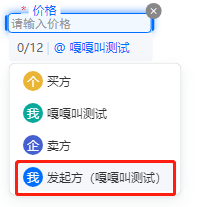
|
注:只有在控制台编辑模板时,<font color="red">归属给发起方</font>的填写控件(如下图)才能在创建文档的时候进行内容填充。
|
|
4180
4255
|
|
|
@@ -5048,7 +5123,8 @@ export interface ApproverInfo {
|
|
|
5048
5123
|
/**
|
|
5049
5124
|
* 签署人userId,仅支持本企业的员工userid, 可在控制台组织管理处获得
|
|
5050
5125
|
|
|
5051
|
-
|
|
5126
|
+
注:
|
|
5127
|
+
如果传进来的<font color="red">UserId已经实名, 则忽略ApproverName,ApproverIdCardType,ApproverIdCardNumber,ApproverMobile这四个入参</font>(会用此UserId实名的身份证和登录的手机号覆盖)
|
|
5052
5128
|
*/
|
|
5053
5129
|
UserId?: string
|
|
5054
5130
|
/**
|
|
@@ -6640,19 +6716,48 @@ export interface VerifyPdfResponse {
|
|
|
6640
6716
|
}
|
|
6641
6717
|
|
|
6642
6718
|
/**
|
|
6643
|
-
*
|
|
6719
|
+
* CreateFlowGroupSignReview请求参数结构体
|
|
6644
6720
|
*/
|
|
6645
|
-
export interface
|
|
6721
|
+
export interface CreateFlowGroupSignReviewRequest {
|
|
6646
6722
|
/**
|
|
6647
|
-
*
|
|
6648
|
-
|
|
6723
|
+
* 执行本接口操作的员工信息。
|
|
6724
|
+
注: `在调用此接口时,请确保指定的员工已获得所需的接口调用权限,并具备接口传入的相应资源的数据权限。`
|
|
6649
6725
|
*/
|
|
6650
|
-
|
|
6726
|
+
Operator: UserInfo
|
|
6651
6727
|
/**
|
|
6652
|
-
*
|
|
6653
|
-
注意:此字段可能返回 null,表示取不到有效值。
|
|
6728
|
+
* 合同(流程)组的合同组Id,为32位字符串,通过接口[通过多文件创建合同组签署流程](https://qian.tencent.com/developers/companyApis/startFlows/CreateFlowGroupByFiles) 或[通过多模板创建合同组签署流程](https://qian.tencent.com/developers/companyApis/startFlows/CreateFlowGroupByTemplates)创建合同组签署流程时返回。
|
|
6654
6729
|
*/
|
|
6655
|
-
|
|
6730
|
+
FlowGroupId: string
|
|
6731
|
+
/**
|
|
6732
|
+
* 提交的审核结果,审核结果有下面三种情况
|
|
6733
|
+
<ul><li><b>PASS</b>: 审核通过,合同流程可以继续执行签署等操作</li>
|
|
6734
|
+
<li><b>REJECT</b>: 审核拒绝,合同流程不会变动</li>
|
|
6735
|
+
<li><b>SIGN_REJECT</b>:拒签,合同流程直接结束,合同状态变为**合同拒签**</li></ul>
|
|
6736
|
+
*/
|
|
6737
|
+
ReviewType: string
|
|
6738
|
+
/**
|
|
6739
|
+
* 需要进行签署审核的签署人的个人信息或企业信息,签署方的匹配方式按照以下规则:
|
|
6740
|
+
|
|
6741
|
+
个人:二选一(选择其中任意信息组合即可)
|
|
6742
|
+
<ul><li>姓名+证件类型+证件号</li>
|
|
6743
|
+
<li>姓名+手机号</li></ul>
|
|
6744
|
+
|
|
6745
|
+
企业:二选一 (选择其中任意信息组合即可)
|
|
6746
|
+
<ul><li>企业名+姓名+证件类型+证件号</li>
|
|
6747
|
+
<li>企业名+姓名+手机号</li></ul>
|
|
6748
|
+
*/
|
|
6749
|
+
ApproverInfo: NeedReviewApproverInfo
|
|
6750
|
+
/**
|
|
6751
|
+
* 代理相关应用信息,如集团主企业代子企业操作的场景中ProxyOrganizationId必填
|
|
6752
|
+
*/
|
|
6753
|
+
Agent?: Agent
|
|
6754
|
+
/**
|
|
6755
|
+
* 审核不通过的原因,该字段的字符串长度不超过200个字符。
|
|
6756
|
+
|
|
6757
|
+
注:`当审核类型(ReviewType)为审核拒绝(REJECT)或拒签(SIGN_REJECT)时,审核结果原因字段必须填写`
|
|
6758
|
+
|
|
6759
|
+
*/
|
|
6760
|
+
ReviewMessage?: string
|
|
6656
6761
|
}
|
|
6657
6762
|
|
|
6658
6763
|
/**
|
|
@@ -7253,7 +7358,9 @@ export interface CreateBatchQuickSignUrlRequest {
|
|
|
7253
7358
|
<li>**4**:系统签名</li></ul>
|
|
7254
7359
|
注:
|
|
7255
7360
|
<ul><li>默认情况下,签名类型为手写签名</li>
|
|
7256
|
-
<li>您可以传递多种值,表示可用多种签名类型。</li
|
|
7361
|
+
<li>您可以传递多种值,表示可用多种签名类型。</li>
|
|
7362
|
+
<li>该参数会覆盖您合同中的签名类型,若您在发起合同时限定了签名类型(赋值签名类型给ComponentTypeLimit),请将这些签名类型赋予此参数</li>
|
|
7363
|
+
</ul>
|
|
7257
7364
|
*/
|
|
7258
7365
|
SignatureTypes?: Array<number | bigint>
|
|
7259
7366
|
/**
|
|
@@ -1,5 +1,5 @@
|
|
|
1
1
|
import * as TencentCloudCommon from "tencentcloud-sdk-nodejs-common";
|
|
2
|
-
import { DescribePersonCertificateResponse, CreateSealRequest, ModifyIntegrationDepartmentResponse, CancelFlowResponse, DescribeExtendedServiceAuthDetailResponse, UpdateIntegrationEmployeesResponse, CreatePreparedPersonalEsignRequest, DescribeIntegrationDepartmentsResponse, DeleteExtendedServiceAuthInfosResponse, CreateFlowApproversResponse, DescribeFileUrlsResponse, CreateExtendedServiceAuthInfosRequest, ModifyApplicationCallbackInfoResponse, CreateMultiFlowSignQRCodeResponse, DescribeThirdPartyAuthCodeResponse, DisableUserAutoSignResponse, CancelUserAutoSignEnableUrlResponse, BindEmployeeUserIdWithClientOpenIdResponse, CreateIntegrationEmployeesRequest, DescribeIntegrationRolesRequest, CreateFlowEvidenceReportRequest, StartFlowResponse, CreateBatchQuickSignUrlResponse, CreateIntegrationRoleRequest, DeleteIntegrationRoleUsersResponse, CreateConvertTaskApiRequest, DeleteIntegrationEmployeesResponse, CreateBatchSignUrlResponse, CreateFlowRemindsResponse, DescribeOrganizationGroupOrganizationsRequest, CreateFlowGroupByFilesRequest, DescribeFlowComponentsResponse, DescribeFlowEvidenceReportResponse, DeleteSealPoliciesRequest, CreateFlowGroupByTemplatesResponse, CreateDocumentResponse, DescribeIntegrationEmployeesRequest, CreateIntegrationUserRolesResponse, CreateFlowRequest, CreateSchemeUrlRequest, DeleteIntegrationDepartmentResponse, DescribeThirdPartyAuthCodeRequest, UnbindEmployeeUserIdWithClientOpenIdResponse, CreateReleaseFlowResponse, CreateWebThemeConfigResponse, BindEmployeeUserIdWithClientOpenIdRequest, CreateOrganizationInfoChangeUrlResponse, DescribeExtendedServiceAuthDetailRequest, CreateIntegrationDepartmentResponse, DescribeFlowTemplatesRequest, DeleteSealPoliciesResponse, DescribeUserAutoSignStatusResponse, CreateUserAutoSignSealUrlResponse, CreatePersonAuthCertificateImageResponse, CreateBatchCancelFlowUrlResponse, CreateSealPolicyResponse, DisableUserAutoSignRequest, DescribeIntegrationEmployeesResponse, CreateConvertTaskApiResponse, CreateFlowSignReviewRequest, UnbindEmployeeUserIdWithClientOpenIdRequest, CreateSchemeUrlResponse, CreateFlowByFilesRequest, CreateFlowSignUrlResponse, DescribeFileUrlsRequest, CreateUserAutoSignSealUrlRequest, CreateFlowApproversRequest, ModifyIntegrationRoleResponse, CreateFlowEvidenceReportResponse, CreateIntegrationRoleResponse, DescribeFlowComponentsRequest, CreateIntegrationDepartmentRequest, CreateDocumentRequest, CreatePreparedPersonalEsignResponse, DescribeOrganizationSealsResponse, CreateEmbedWebUrlRequest, DeleteIntegrationEmployeesRequest, GetTaskResultApiRequest, DescribeFlowBriefsResponse, ModifyIntegrationRoleRequest, CreateFlowGroupByFilesResponse, CreateIntegrationEmployeesResponse, DeleteIntegrationRoleUsersRequest, CreateFlowSignUrlRequest, CreateReleaseFlowRequest, CreateIntegrationUserRolesRequest, CreatePersonAuthCertificateImageRequest, CreateFlowByFilesResponse, UploadFilesResponse, DescribeFlowEvidenceReportRequest, CreateFlowSignReviewResponse, ModifyIntegrationDepartmentRequest, CreateUserAutoSignEnableUrlRequest, CreateOrganizationBatchSignUrlResponse, CancelUserAutoSignEnableUrlRequest, CreateExtendedServiceAuthInfosResponse, CreateWebThemeConfigRequest, CreateOrganizationBatchSignUrlRequest, CreatePrepareFlowResponse, GetTaskResultApiResponse, CancelMultiFlowSignQRCodeRequest, DeleteIntegrationDepartmentRequest, ModifyApplicationCallbackInfoRequest, StartFlowRequest, CreateSealResponse, CreatePrepareFlowRequest, CreateEmbedWebUrlResponse, CreateSealPolicyRequest, DescribeOrganizationSealsRequest, CancelFlowRequest, DescribeExtendedServiceAuthInfosRequest, DescribeIntegrationRolesResponse, CreateBatchSignUrlRequest, CreateFlowRemindsRequest, UpdateIntegrationEmployeesRequest, DescribeFlowBriefsRequest, CreateFlowGroupByTemplatesRequest, DescribeBillUsageDetailResponse, CreateUserAutoSignEnableUrlResponse, VerifyPdfResponse, DescribeBillUsageDetailRequest, DescribeFlowTemplatesResponse, UploadFilesRequest, DescribePersonCertificateRequest, CreateBatchCancelFlowUrlRequest, CreateMultiFlowSignQRCodeRequest, VerifyPdfRequest, DescribeFlowInfoRequest, DeleteExtendedServiceAuthInfosRequest, DescribeIntegrationDepartmentsRequest, DescribeFlowInfoResponse, CancelMultiFlowSignQRCodeResponse, CreateFlowResponse, DescribeUserAutoSignStatusRequest, CreateBatchQuickSignUrlRequest, CreateOrganizationInfoChangeUrlRequest, DescribeOrganizationGroupOrganizationsResponse, DescribeExtendedServiceAuthInfosResponse } from "./ess_models";
|
|
2
|
+
import { DescribePersonCertificateResponse, CreateSealRequest, ModifyIntegrationDepartmentResponse, CancelFlowResponse, DescribeExtendedServiceAuthDetailResponse, UpdateIntegrationEmployeesResponse, CreatePreparedPersonalEsignRequest, DescribeIntegrationDepartmentsResponse, DeleteExtendedServiceAuthInfosResponse, CreateFlowApproversResponse, DescribeFileUrlsResponse, CreateExtendedServiceAuthInfosRequest, ModifyApplicationCallbackInfoResponse, CreateMultiFlowSignQRCodeResponse, DescribeThirdPartyAuthCodeResponse, DisableUserAutoSignResponse, CancelUserAutoSignEnableUrlResponse, BindEmployeeUserIdWithClientOpenIdResponse, CreateIntegrationEmployeesRequest, DescribeIntegrationRolesRequest, CreateFlowEvidenceReportRequest, StartFlowResponse, CreateBatchQuickSignUrlResponse, CreateIntegrationRoleRequest, DeleteIntegrationRoleUsersResponse, CreateConvertTaskApiRequest, DeleteIntegrationEmployeesResponse, CreateFlowGroupSignReviewResponse, CreateBatchSignUrlResponse, CreateFlowRemindsResponse, DescribeOrganizationGroupOrganizationsRequest, CreateFlowGroupByFilesRequest, DescribeFlowComponentsResponse, DescribeFlowEvidenceReportResponse, DeleteSealPoliciesRequest, CreateFlowGroupByTemplatesResponse, CreateDocumentResponse, DescribeIntegrationEmployeesRequest, CreateIntegrationUserRolesResponse, CreateFlowRequest, CreateSchemeUrlRequest, DeleteIntegrationDepartmentResponse, DescribeThirdPartyAuthCodeRequest, UnbindEmployeeUserIdWithClientOpenIdResponse, CreateReleaseFlowResponse, CreateWebThemeConfigResponse, BindEmployeeUserIdWithClientOpenIdRequest, CreateOrganizationInfoChangeUrlResponse, DescribeExtendedServiceAuthDetailRequest, CreateIntegrationDepartmentResponse, DescribeFlowTemplatesRequest, DeleteSealPoliciesResponse, DescribeUserAutoSignStatusResponse, CreateUserAutoSignSealUrlResponse, CreatePersonAuthCertificateImageResponse, CreateBatchCancelFlowUrlResponse, CreateSealPolicyResponse, DisableUserAutoSignRequest, DescribeIntegrationEmployeesResponse, CreateConvertTaskApiResponse, CreateFlowSignReviewRequest, UnbindEmployeeUserIdWithClientOpenIdRequest, CreateSchemeUrlResponse, CreateFlowByFilesRequest, CreateFlowSignUrlResponse, DescribeFileUrlsRequest, CreateUserAutoSignSealUrlRequest, CreateFlowApproversRequest, ModifyIntegrationRoleResponse, CreateFlowEvidenceReportResponse, CreateIntegrationRoleResponse, DescribeFlowComponentsRequest, CreateIntegrationDepartmentRequest, CreateDocumentRequest, CreatePreparedPersonalEsignResponse, DescribeOrganizationSealsResponse, CreateEmbedWebUrlRequest, DeleteIntegrationEmployeesRequest, GetTaskResultApiRequest, DescribeFlowBriefsResponse, ModifyIntegrationRoleRequest, CreateFlowGroupByFilesResponse, CreateIntegrationEmployeesResponse, DeleteIntegrationRoleUsersRequest, CreateFlowSignUrlRequest, CreateReleaseFlowRequest, CreateIntegrationUserRolesRequest, CreatePersonAuthCertificateImageRequest, CreateFlowByFilesResponse, UploadFilesResponse, DescribeFlowEvidenceReportRequest, CreateFlowSignReviewResponse, ModifyIntegrationDepartmentRequest, CreateUserAutoSignEnableUrlRequest, CreateOrganizationBatchSignUrlResponse, CancelUserAutoSignEnableUrlRequest, CreateExtendedServiceAuthInfosResponse, CreateWebThemeConfigRequest, CreateOrganizationBatchSignUrlRequest, CreatePrepareFlowResponse, GetTaskResultApiResponse, CancelMultiFlowSignQRCodeRequest, DeleteIntegrationDepartmentRequest, ModifyApplicationCallbackInfoRequest, StartFlowRequest, CreateSealResponse, CreatePrepareFlowRequest, CreateEmbedWebUrlResponse, CreateSealPolicyRequest, DescribeOrganizationSealsRequest, CancelFlowRequest, DescribeExtendedServiceAuthInfosRequest, DescribeIntegrationRolesResponse, CreateBatchSignUrlRequest, CreateFlowRemindsRequest, UpdateIntegrationEmployeesRequest, DescribeFlowBriefsRequest, CreateFlowGroupByTemplatesRequest, DescribeBillUsageDetailResponse, CreateUserAutoSignEnableUrlResponse, VerifyPdfResponse, CreateFlowGroupSignReviewRequest, DescribeBillUsageDetailRequest, DescribeFlowTemplatesResponse, UploadFilesRequest, DescribePersonCertificateRequest, CreateBatchCancelFlowUrlRequest, CreateMultiFlowSignQRCodeRequest, VerifyPdfRequest, DescribeFlowInfoRequest, DeleteExtendedServiceAuthInfosRequest, DescribeIntegrationDepartmentsRequest, DescribeFlowInfoResponse, CancelMultiFlowSignQRCodeResponse, CreateFlowResponse, DescribeUserAutoSignStatusRequest, CreateBatchQuickSignUrlRequest, CreateOrganizationInfoChangeUrlRequest, DescribeOrganizationGroupOrganizationsResponse, DescribeExtendedServiceAuthInfosResponse } from "./ess_models";
|
|
3
3
|
/**
|
|
4
4
|
* ess client
|
|
5
5
|
* @class
|
|
@@ -10,7 +10,7 @@ export declare class Client extends TencentCloudCommon.AbstractClient {
|
|
|
10
10
|
* 该接口用于发起合同后,生成个人用户的批量签署链接, 暂时不支持企业端签署。
|
|
11
11
|
**注意:**
|
|
12
12
|
1. 该接口目前仅支持签署人类型是**个人签署方的批量签署场景**(ApproverType=1)。
|
|
13
|
-
2. 该接口可生成批量签署链接的C
|
|
13
|
+
2. 该接口可生成批量签署链接的C端签署人**必须仅有手写签名(控件类型为SIGN_SIGNATURE)和时间类型的签署控件**,**不支持填写控件** 。
|
|
14
14
|
3. 请确保C端签署人在批量签署合同中**为待签署状态**,如需顺序签署请待前一位参与人签署完成后,再创建该C端用户的签署链接。
|
|
15
15
|
4. 该签署链接**有效期为30分钟**,过期后将失效,如需签署可重新创建批量签署链接 。
|
|
16
16
|
5. 该接口返回的签署链接适用于APP集成的场景,支持APP打开或浏览器直接打开,**不支持微信小程序嵌入**。
|
|
@@ -98,19 +98,16 @@ export declare class Client extends TencentCloudCommon.AbstractClient {
|
|
|
98
98
|
*/
|
|
99
99
|
CreateUserAutoSignEnableUrl(req: CreateUserAutoSignEnableUrlRequest, cb?: (error: string, rep: CreateUserAutoSignEnableUrlResponse) => void): Promise<CreateUserAutoSignEnableUrlResponse>;
|
|
100
100
|
/**
|
|
101
|
-
*
|
|
101
|
+
* 提交合同组签署流程审批结果的适用场景包括:
|
|
102
102
|
|
|
103
|
-
|
|
103
|
+
1. 在使用[通过多文件创建合同组签署流程](https://qian.tencent.com/developers/companyApis/startFlows/CreateFlowGroupByFiles)或[通过多模板创建合同组签署流程](https://qian.tencent.com/developers/companyApis/startFlows/CreateFlowGroupByTemplates)创建合同组签署流程时,若指定了以下参数 为true,则可以调用此接口提交企业内部签署审批结果。即使是自动签署也需要进行审核通过才会进行签署。
|
|
104
|
+
- [FlowGroupInfo.NeedSignReview](https://qian.tencent.com/developers/companyApis/dataTypes/#flowgroupinfo)
|
|
105
|
+
- [ApproverInfo.ApproverNeedSignReview](https://qian.tencent.com/developers/companyApis/dataTypes/#approverinfo)
|
|
104
106
|
|
|
105
|
-
适用场景2:创建当前企业的自定义SaaS角色或集团角色,并且创建时进行权限的设置(PermissionGroups 参数要传),权限树内容 PermissionGroups 可参考接口 DescribeIntegrationRoles 的输出。此处注意权限树内容可能会更新,需尽量拉取最新的权限树内容,并且权限树内容 PermissionGroups 必须是一颗完整的权限树。
|
|
106
|
-
|
|
107
|
-
适用场景3:创建集团角色时可同时设置角色管理的子企业列表,可通过设置 SubOrganizationIds 参数达到此效果。
|
|
108
107
|
|
|
109
|
-
|
|
110
|
-
|
|
111
|
-
注意事项:SaaS角色和集团角色对应的权限树是不一样的。
|
|
108
|
+
2. 同一合同组,同一签署人可以多次提交签署审批结果,签署时的最后一个“审批结果”有效。
|
|
112
109
|
*/
|
|
113
|
-
|
|
110
|
+
CreateFlowGroupSignReview(req: CreateFlowGroupSignReviewRequest, cb?: (error: string, rep: CreateFlowGroupSignReviewResponse) => void): Promise<CreateFlowGroupSignReviewResponse>;
|
|
114
111
|
/**
|
|
115
112
|
* 本接口(CreateEmbedWebUrl)用于创建嵌入Web的链接,支持以下类型的Web链接创建:
|
|
116
113
|
1. 创建印章
|
|
@@ -169,9 +166,36 @@ export declare class Client extends TencentCloudCommon.AbstractClient {
|
|
|
169
166
|
*/
|
|
170
167
|
DeleteIntegrationRoleUsers(req: DeleteIntegrationRoleUsersRequest, cb?: (error: string, rep: DeleteIntegrationRoleUsersResponse) => void): Promise<DeleteIntegrationRoleUsersResponse>;
|
|
171
168
|
/**
|
|
172
|
-
*
|
|
173
|
-
|
|
174
|
-
|
|
169
|
+
* 提交企业流程审批结果
|
|
170
|
+
**当前存在两种审核操作:**
|
|
171
|
+
<ul>
|
|
172
|
+
<li>签署审核
|
|
173
|
+
<ul>
|
|
174
|
+
<li>在通过接口<ul>
|
|
175
|
+
<li>CreateFlowByFiles</li>
|
|
176
|
+
<li>CreateFlow</li>
|
|
177
|
+
<li>CreateFlowGroupByTemplates</li>
|
|
178
|
+
<li>CreateFlowGroupByFiles</li>
|
|
179
|
+
<li>CreatePrepareFlow</li>
|
|
180
|
+
</ul>
|
|
181
|
+
发起签署流程时,通过指定NeedSignReview为true,则可以调用此接口,并指定operate=SignReview,以提交企业内部签署审批结果</li>
|
|
182
|
+
<li>在通过接口
|
|
183
|
+
<ul>
|
|
184
|
+
<li>CreateFlowByFiles</li>
|
|
185
|
+
<li>CreateFlow</li>
|
|
186
|
+
<li>CreateFlowGroupByTemplates</li>
|
|
187
|
+
<li>CreateFlowGroupByFiles</li>
|
|
188
|
+
</ul>
|
|
189
|
+
发起签署流程时,通过指定签署人ApproverNeedSignReview为true,则可以调用此接口,并指定operate=SignReview,并指定RecipientId,以提交企业内部签署审批结果</li>
|
|
190
|
+
</ul>
|
|
191
|
+
</li>
|
|
192
|
+
<li>发起审核
|
|
193
|
+
<ul>
|
|
194
|
+
<li>通过接口CreatePrepareFlow指定发起后需要审核,那么可以调用此接口,并指定operate=CreateReview,以提交企业内部审批结果。可以多次提交审批结果,但一旦审批通过,后续提交的结果将无效
|
|
195
|
+
</li>
|
|
196
|
+
</ul>
|
|
197
|
+
</li>
|
|
198
|
+
</ul>
|
|
175
199
|
*/
|
|
176
200
|
CreateFlowSignReview(req: CreateFlowSignReviewRequest, cb?: (error: string, rep: CreateFlowSignReviewResponse) => void): Promise<CreateFlowSignReviewResponse>;
|
|
177
201
|
/**
|
|
@@ -484,6 +508,20 @@ export declare class Client extends TencentCloudCommon.AbstractClient {
|
|
|
484
508
|
注: `每个企业限制日调用量限制:100W,当日超过此限制后再调用接口返回错误`
|
|
485
509
|
*/
|
|
486
510
|
DescribeFlowBriefs(req: DescribeFlowBriefsRequest, cb?: (error: string, rep: DescribeFlowBriefsResponse) => void): Promise<DescribeFlowBriefsResponse>;
|
|
511
|
+
/**
|
|
512
|
+
* 此接口(CreateIntegrationRole)用来创建企业自定义的SaaS角色或集团角色。
|
|
513
|
+
|
|
514
|
+
适用场景1:创建当前企业的自定义SaaS角色或集团角色,并且创建时不进行权限的设置(PermissionGroups 参数不传),角色中的权限内容可通过控制台编辑角色或通过接口 ModifyIntegrationRole 完成更新。
|
|
515
|
+
|
|
516
|
+
适用场景2:创建当前企业的自定义SaaS角色或集团角色,并且创建时进行权限的设置(PermissionGroups 参数要传),权限树内容 PermissionGroups 可参考接口 DescribeIntegrationRoles 的输出。此处注意权限树内容可能会更新,需尽量拉取最新的权限树内容,并且权限树内容 PermissionGroups 必须是一颗完整的权限树。
|
|
517
|
+
|
|
518
|
+
适用场景3:创建集团角色时可同时设置角色管理的子企业列表,可通过设置 SubOrganizationIds 参数达到此效果。
|
|
519
|
+
|
|
520
|
+
适用场景4:主企业代理子企业操作的场景,需要设置Agent参数,并且ProxyOrganizationId设置为子企业的id即可。
|
|
521
|
+
|
|
522
|
+
注意事项:SaaS角色和集团角色对应的权限树是不一样的。
|
|
523
|
+
*/
|
|
524
|
+
CreateIntegrationRole(req: CreateIntegrationRoleRequest, cb?: (error: string, rep: CreateIntegrationRoleResponse) => void): Promise<CreateIntegrationRoleResponse>;
|
|
487
525
|
/**
|
|
488
526
|
* 此接口用于赋予员工指定的角色权限,如需解绑请使用 DeleteIntegrationRoleUsers 接口。
|
|
489
527
|
*/
|
|
@@ -31,7 +31,7 @@ class Client extends TencentCloudCommon.AbstractClient {
|
|
|
31
31
|
* 该接口用于发起合同后,生成个人用户的批量签署链接, 暂时不支持企业端签署。
|
|
32
32
|
**注意:**
|
|
33
33
|
1. 该接口目前仅支持签署人类型是**个人签署方的批量签署场景**(ApproverType=1)。
|
|
34
|
-
2. 该接口可生成批量签署链接的C
|
|
34
|
+
2. 该接口可生成批量签署链接的C端签署人**必须仅有手写签名(控件类型为SIGN_SIGNATURE)和时间类型的签署控件**,**不支持填写控件** 。
|
|
35
35
|
3. 请确保C端签署人在批量签署合同中**为待签署状态**,如需顺序签署请待前一位参与人签署完成后,再创建该C端用户的签署链接。
|
|
36
36
|
4. 该签署链接**有效期为30分钟**,过期后将失效,如需签署可重新创建批量签署链接 。
|
|
37
37
|
5. 该接口返回的签署链接适用于APP集成的场景,支持APP打开或浏览器直接打开,**不支持微信小程序嵌入**。
|
|
@@ -139,20 +139,17 @@ class Client extends TencentCloudCommon.AbstractClient {
|
|
|
139
139
|
return this.request("CreateUserAutoSignEnableUrl", req, cb);
|
|
140
140
|
}
|
|
141
141
|
/**
|
|
142
|
-
*
|
|
143
|
-
|
|
144
|
-
适用场景1:创建当前企业的自定义SaaS角色或集团角色,并且创建时不进行权限的设置(PermissionGroups 参数不传),角色中的权限内容可通过控制台编辑角色或通过接口 ModifyIntegrationRole 完成更新。
|
|
145
|
-
|
|
146
|
-
适用场景2:创建当前企业的自定义SaaS角色或集团角色,并且创建时进行权限的设置(PermissionGroups 参数要传),权限树内容 PermissionGroups 可参考接口 DescribeIntegrationRoles 的输出。此处注意权限树内容可能会更新,需尽量拉取最新的权限树内容,并且权限树内容 PermissionGroups 必须是一颗完整的权限树。
|
|
142
|
+
* 提交合同组签署流程审批结果的适用场景包括:
|
|
147
143
|
|
|
148
|
-
|
|
144
|
+
1. 在使用[通过多文件创建合同组签署流程](https://qian.tencent.com/developers/companyApis/startFlows/CreateFlowGroupByFiles)或[通过多模板创建合同组签署流程](https://qian.tencent.com/developers/companyApis/startFlows/CreateFlowGroupByTemplates)创建合同组签署流程时,若指定了以下参数 为true,则可以调用此接口提交企业内部签署审批结果。即使是自动签署也需要进行审核通过才会进行签署。
|
|
145
|
+
- [FlowGroupInfo.NeedSignReview](https://qian.tencent.com/developers/companyApis/dataTypes/#flowgroupinfo)
|
|
146
|
+
- [ApproverInfo.ApproverNeedSignReview](https://qian.tencent.com/developers/companyApis/dataTypes/#approverinfo)
|
|
149
147
|
|
|
150
|
-
适用场景4:主企业代理子企业操作的场景,需要设置Agent参数,并且ProxyOrganizationId设置为子企业的id即可。
|
|
151
148
|
|
|
152
|
-
|
|
149
|
+
2. 同一合同组,同一签署人可以多次提交签署审批结果,签署时的最后一个“审批结果”有效。
|
|
153
150
|
*/
|
|
154
|
-
async
|
|
155
|
-
return this.request("
|
|
151
|
+
async CreateFlowGroupSignReview(req, cb) {
|
|
152
|
+
return this.request("CreateFlowGroupSignReview", req, cb);
|
|
156
153
|
}
|
|
157
154
|
/**
|
|
158
155
|
* 本接口(CreateEmbedWebUrl)用于创建嵌入Web的链接,支持以下类型的Web链接创建:
|
|
@@ -232,9 +229,36 @@ class Client extends TencentCloudCommon.AbstractClient {
|
|
|
232
229
|
return this.request("DeleteIntegrationRoleUsers", req, cb);
|
|
233
230
|
}
|
|
234
231
|
/**
|
|
235
|
-
*
|
|
236
|
-
|
|
237
|
-
|
|
232
|
+
* 提交企业流程审批结果
|
|
233
|
+
**当前存在两种审核操作:**
|
|
234
|
+
<ul>
|
|
235
|
+
<li>签署审核
|
|
236
|
+
<ul>
|
|
237
|
+
<li>在通过接口<ul>
|
|
238
|
+
<li>CreateFlowByFiles</li>
|
|
239
|
+
<li>CreateFlow</li>
|
|
240
|
+
<li>CreateFlowGroupByTemplates</li>
|
|
241
|
+
<li>CreateFlowGroupByFiles</li>
|
|
242
|
+
<li>CreatePrepareFlow</li>
|
|
243
|
+
</ul>
|
|
244
|
+
发起签署流程时,通过指定NeedSignReview为true,则可以调用此接口,并指定operate=SignReview,以提交企业内部签署审批结果</li>
|
|
245
|
+
<li>在通过接口
|
|
246
|
+
<ul>
|
|
247
|
+
<li>CreateFlowByFiles</li>
|
|
248
|
+
<li>CreateFlow</li>
|
|
249
|
+
<li>CreateFlowGroupByTemplates</li>
|
|
250
|
+
<li>CreateFlowGroupByFiles</li>
|
|
251
|
+
</ul>
|
|
252
|
+
发起签署流程时,通过指定签署人ApproverNeedSignReview为true,则可以调用此接口,并指定operate=SignReview,并指定RecipientId,以提交企业内部签署审批结果</li>
|
|
253
|
+
</ul>
|
|
254
|
+
</li>
|
|
255
|
+
<li>发起审核
|
|
256
|
+
<ul>
|
|
257
|
+
<li>通过接口CreatePrepareFlow指定发起后需要审核,那么可以调用此接口,并指定operate=CreateReview,以提交企业内部审批结果。可以多次提交审批结果,但一旦审批通过,后续提交的结果将无效
|
|
258
|
+
</li>
|
|
259
|
+
</ul>
|
|
260
|
+
</li>
|
|
261
|
+
</ul>
|
|
238
262
|
*/
|
|
239
263
|
async CreateFlowSignReview(req, cb) {
|
|
240
264
|
return this.request("CreateFlowSignReview", req, cb);
|
|
@@ -599,6 +623,22 @@ class Client extends TencentCloudCommon.AbstractClient {
|
|
|
599
623
|
async DescribeFlowBriefs(req, cb) {
|
|
600
624
|
return this.request("DescribeFlowBriefs", req, cb);
|
|
601
625
|
}
|
|
626
|
+
/**
|
|
627
|
+
* 此接口(CreateIntegrationRole)用来创建企业自定义的SaaS角色或集团角色。
|
|
628
|
+
|
|
629
|
+
适用场景1:创建当前企业的自定义SaaS角色或集团角色,并且创建时不进行权限的设置(PermissionGroups 参数不传),角色中的权限内容可通过控制台编辑角色或通过接口 ModifyIntegrationRole 完成更新。
|
|
630
|
+
|
|
631
|
+
适用场景2:创建当前企业的自定义SaaS角色或集团角色,并且创建时进行权限的设置(PermissionGroups 参数要传),权限树内容 PermissionGroups 可参考接口 DescribeIntegrationRoles 的输出。此处注意权限树内容可能会更新,需尽量拉取最新的权限树内容,并且权限树内容 PermissionGroups 必须是一颗完整的权限树。
|
|
632
|
+
|
|
633
|
+
适用场景3:创建集团角色时可同时设置角色管理的子企业列表,可通过设置 SubOrganizationIds 参数达到此效果。
|
|
634
|
+
|
|
635
|
+
适用场景4:主企业代理子企业操作的场景,需要设置Agent参数,并且ProxyOrganizationId设置为子企业的id即可。
|
|
636
|
+
|
|
637
|
+
注意事项:SaaS角色和集团角色对应的权限树是不一样的。
|
|
638
|
+
*/
|
|
639
|
+
async CreateIntegrationRole(req, cb) {
|
|
640
|
+
return this.request("CreateIntegrationRole", req, cb);
|
|
641
|
+
}
|
|
602
642
|
/**
|
|
603
643
|
* 此接口用于赋予员工指定的角色权限,如需解绑请使用 DeleteIntegrationRoleUsers 接口。
|
|
604
644
|
*/
|
|
@@ -356,6 +356,21 @@ export interface CreatePreparedPersonalEsignRequest {
|
|
|
356
356
|
*/
|
|
357
357
|
SceneKey?: string;
|
|
358
358
|
}
|
|
359
|
+
/**
|
|
360
|
+
* 删除员工结果
|
|
361
|
+
*/
|
|
362
|
+
export interface DeleteStaffsResult {
|
|
363
|
+
/**
|
|
364
|
+
* 删除员工的成功数据
|
|
365
|
+
注意:此字段可能返回 null,表示取不到有效值。
|
|
366
|
+
*/
|
|
367
|
+
SuccessEmployeeData: Array<SuccessDeleteStaffData>;
|
|
368
|
+
/**
|
|
369
|
+
* 删除员工的失败数据
|
|
370
|
+
注意:此字段可能返回 null,表示取不到有效值。
|
|
371
|
+
*/
|
|
372
|
+
FailedEmployeeData: Array<FailedDeleteStaffData>;
|
|
373
|
+
}
|
|
359
374
|
/**
|
|
360
375
|
* DescribeIntegrationDepartments返回参数结构体
|
|
361
376
|
*/
|
|
@@ -1043,6 +1058,59 @@ export interface DeleteIntegrationEmployeesResponse {
|
|
|
1043
1058
|
*/
|
|
1044
1059
|
RequestId?: string;
|
|
1045
1060
|
}
|
|
1061
|
+
/**
|
|
1062
|
+
* 需要进行签署审核的签署人信息
|
|
1063
|
+
*/
|
|
1064
|
+
export interface NeedReviewApproverInfo {
|
|
1065
|
+
/**
|
|
1066
|
+
* 签署方经办人的类型,支持以下类型
|
|
1067
|
+
<ul><li> ORGANIZATION 企业(含企业自动签)</li>
|
|
1068
|
+
<li>PERSON 个人(含个人自动签)</li></ul>
|
|
1069
|
+
*/
|
|
1070
|
+
ApproverType: string;
|
|
1071
|
+
/**
|
|
1072
|
+
* 签署方经办人的姓名。 经办人的姓名将用于身份认证和电子签名,请确保填写的姓名为签署方的真实姓名,而非昵称等代名。
|
|
1073
|
+
*/
|
|
1074
|
+
ApproverName: string;
|
|
1075
|
+
/**
|
|
1076
|
+
* 签署方经办人手机号码, 支持国内手机号11位数字(无需加+86前缀或其他字符)。 请确认手机号所有方为此合同签署方。
|
|
1077
|
+
*/
|
|
1078
|
+
ApproverMobile?: string;
|
|
1079
|
+
/**
|
|
1080
|
+
* 签署方经办人的证件类型,支持以下类型
|
|
1081
|
+
<ul><li>ID_CARD 居民身份证 (默认值)</li>
|
|
1082
|
+
<li>HONGKONG_AND_MACAO 港澳居民来往内地通行证</li>
|
|
1083
|
+
<li>HONGKONG_MACAO_AND_TAIWAN 港澳台居民居住证(格式同居民身份证)</li>
|
|
1084
|
+
<li>OTHER_CARD_TYPE 其他证件</li></ul>
|
|
1085
|
+
|
|
1086
|
+
注: `其他证件类型为白名单功能,使用前请联系对接的客户经理沟通。`
|
|
1087
|
+
*/
|
|
1088
|
+
ApproverIdCardType?: string;
|
|
1089
|
+
/**
|
|
1090
|
+
* 签署方经办人的证件号码,应符合以下规则
|
|
1091
|
+
<ul><li>居民身份证号码应为18位字符串,由数字和大写字母X组成(如存在X,请大写)。</li>
|
|
1092
|
+
<li>港澳居民来往内地通行证号码应为9位字符串,第1位为“C”,第2位为英文字母(但“I”、“O”除外),后7位为阿拉伯数字。</li>
|
|
1093
|
+
<li>港澳台居民居住证号码编码规则与中国大陆身份证相同,应为18位字符串。</li></ul>
|
|
1094
|
+
*/
|
|
1095
|
+
ApproverIdCardNumber?: string;
|
|
1096
|
+
/**
|
|
1097
|
+
* 组织机构名称。
|
|
1098
|
+
请确认该名称与企业营业执照中注册的名称一致。
|
|
1099
|
+
如果名称中包含英文括号(),请使用中文括号()代替。
|
|
1100
|
+
如果签署方是企业签署方(approverType = 0 或者 approverType = 3), 则企业名称必填。
|
|
1101
|
+
|
|
1102
|
+
*/
|
|
1103
|
+
OrganizationName?: string;
|
|
1104
|
+
}
|
|
1105
|
+
/**
|
|
1106
|
+
* CreateFlowGroupSignReview返回参数结构体
|
|
1107
|
+
*/
|
|
1108
|
+
export interface CreateFlowGroupSignReviewResponse {
|
|
1109
|
+
/**
|
|
1110
|
+
* 唯一请求 ID,每次请求都会返回。定位问题时需要提供该次请求的 RequestId。
|
|
1111
|
+
*/
|
|
1112
|
+
RequestId?: string;
|
|
1113
|
+
}
|
|
1046
1114
|
/**
|
|
1047
1115
|
* CreateBatchSignUrl返回参数结构体
|
|
1048
1116
|
*/
|
|
@@ -2704,31 +2772,24 @@ export interface CreateFlowSignReviewRequest {
|
|
|
2704
2772
|
Operator: UserInfo;
|
|
2705
2773
|
/**
|
|
2706
2774
|
* 合同流程ID,为32位字符串。
|
|
2707
|
-
|
|
2708
|
-
|
|
2775
|
+
<ul><li>建议开发者妥善保存此流程ID,以便于顺利进行后续操作。</li>
|
|
2776
|
+
<li>可登录腾讯电子签控制台,在 "合同"->"合同中心" 中查看某个合同的FlowId(在页面中展示为合同ID)。</li></ul>
|
|
2709
2777
|
*/
|
|
2710
2778
|
FlowId: string;
|
|
2711
2779
|
/**
|
|
2712
|
-
*
|
|
2713
|
-
<ul><li>PASS:
|
|
2714
|
-
<li>REJECT:
|
|
2780
|
+
* 企业内部审核结果
|
|
2781
|
+
<ul><li>PASS: 审核通过</li>
|
|
2782
|
+
<li>REJECT: 审核拒绝</li>
|
|
2783
|
+
<li>SIGN_REJECT:拒签(流程结束)</li></ul>
|
|
2715
2784
|
*/
|
|
2716
2785
|
ReviewType: string;
|
|
2717
|
-
/**
|
|
2718
|
-
* 审核结果原因,
|
|
2719
|
-
字符串长度不超过200
|
|
2720
|
-
当ReviewType 是拒绝(REJECT) 时此字段必填。
|
|
2721
|
-
|
|
2722
|
-
*/
|
|
2723
|
-
ReviewMessage?: string;
|
|
2724
2786
|
/**
|
|
2725
2787
|
* 代理相关应用信息,如集团主企业代子企业操作的场景中ProxyOrganizationId必填
|
|
2726
2788
|
*/
|
|
2727
2789
|
Agent?: Agent;
|
|
2728
2790
|
/**
|
|
2729
|
-
*
|
|
2730
|
-
|
|
2731
|
-
如果签署审核节点是个人, 此参数必填。
|
|
2791
|
+
* 审核节点的签署人标志,用于指定当前审核的签署方
|
|
2792
|
+
<ul><li>**如果签署审核节点是个人, 此参数必填**。</li></ul>
|
|
2732
2793
|
*/
|
|
2733
2794
|
RecipientId?: string;
|
|
2734
2795
|
/**
|
|
@@ -2740,6 +2801,15 @@ export interface CreateFlowSignReviewRequest {
|
|
|
2740
2801
|
如果审核节点是个人,则操作类型只能为SignReview。
|
|
2741
2802
|
*/
|
|
2742
2803
|
OperateType?: string;
|
|
2804
|
+
/**
|
|
2805
|
+
* 审核结果原因
|
|
2806
|
+
<ul><li>字符串长度不超过200</li>
|
|
2807
|
+
<li>当ReviewType 是拒绝(REJECT) 时此字段必填。</li>
|
|
2808
|
+
<li>当ReviewType 是拒绝(SIGN_REJECT) 时此字段必填。</li></ul>
|
|
2809
|
+
|
|
2810
|
+
|
|
2811
|
+
*/
|
|
2812
|
+
ReviewMessage?: string;
|
|
2743
2813
|
}
|
|
2744
2814
|
/**
|
|
2745
2815
|
* UnbindEmployeeUserIdWithClientOpenId请求参数结构体
|
|
@@ -3176,7 +3246,8 @@ FormField输入示例:
|
|
|
3176
3246
|
}
|
|
3177
3247
|
```
|
|
3178
3248
|
|
|
3179
|
-
当控件的 ComponentType='ATTACHMENT'时,FormField.ComponentValue
|
|
3249
|
+
当控件的 ComponentType='ATTACHMENT'时,FormField.ComponentValue支持填入附件图片或者文件的资源ID列表,以逗号分隔,单个附件控件最多支持6个资源ID;
|
|
3250
|
+
支持的文件类型包括doc、docx、xls、xlsx、html、jpg、jpeg、png、bmp、txt、pdf
|
|
3180
3251
|
|
|
3181
3252
|
```
|
|
3182
3253
|
FormField输入示例:
|
|
@@ -4048,6 +4119,7 @@ export interface CreateDocumentRequest {
|
|
|
4048
4119
|
* 电子文档的填写控件的填充内容。具体方式可以参考[FormField](https://qian.tencent.com/developers/companyApis/dataTypes/#formfield)结构体的定义。
|
|
4049
4120
|
<ul>
|
|
4050
4121
|
<li>支持自动签传递印章,可通过指定自动签控件id,指定印章id来完成</li>
|
|
4122
|
+
<li>附件控件支持传入图片、文件资源id,并将内容合成到合同文件中。支持的文件类型有doc、docx、xls、xlsx、html、jpg、jpeg、png、bmp、txt、pdf。需要注意如果传入的资源类型都是图片类型,图片资源会放置在合同文件的末尾,如果传入的资源有非图片类型资源,会将资源放置在附件控件所在页面的下一页。</li>
|
|
4051
4123
|
</ul>
|
|
4052
4124
|
注:只有在控制台编辑模板时,<font color="red">归属给发起方</font>的填写控件(如下图)才能在创建文档的时候进行内容填充。
|
|
4053
4125
|

|
|
@@ -4894,7 +4966,8 @@ export interface ApproverInfo {
|
|
|
4894
4966
|
/**
|
|
4895
4967
|
* 签署人userId,仅支持本企业的员工userid, 可在控制台组织管理处获得
|
|
4896
4968
|
|
|
4897
|
-
|
|
4969
|
+
注:
|
|
4970
|
+
如果传进来的<font color="red">UserId已经实名, 则忽略ApproverName,ApproverIdCardType,ApproverIdCardNumber,ApproverMobile这四个入参</font>(会用此UserId实名的身份证和登录的手机号覆盖)
|
|
4898
4971
|
*/
|
|
4899
4972
|
UserId?: string;
|
|
4900
4973
|
/**
|
|
@@ -6441,19 +6514,48 @@ export interface VerifyPdfResponse {
|
|
|
6441
6514
|
RequestId?: string;
|
|
6442
6515
|
}
|
|
6443
6516
|
/**
|
|
6444
|
-
*
|
|
6517
|
+
* CreateFlowGroupSignReview请求参数结构体
|
|
6445
6518
|
*/
|
|
6446
|
-
export interface
|
|
6519
|
+
export interface CreateFlowGroupSignReviewRequest {
|
|
6447
6520
|
/**
|
|
6448
|
-
*
|
|
6449
|
-
|
|
6521
|
+
* 执行本接口操作的员工信息。
|
|
6522
|
+
注: `在调用此接口时,请确保指定的员工已获得所需的接口调用权限,并具备接口传入的相应资源的数据权限。`
|
|
6450
6523
|
*/
|
|
6451
|
-
|
|
6524
|
+
Operator: UserInfo;
|
|
6452
6525
|
/**
|
|
6453
|
-
*
|
|
6454
|
-
注意:此字段可能返回 null,表示取不到有效值。
|
|
6526
|
+
* 合同(流程)组的合同组Id,为32位字符串,通过接口[通过多文件创建合同组签署流程](https://qian.tencent.com/developers/companyApis/startFlows/CreateFlowGroupByFiles) 或[通过多模板创建合同组签署流程](https://qian.tencent.com/developers/companyApis/startFlows/CreateFlowGroupByTemplates)创建合同组签署流程时返回。
|
|
6455
6527
|
*/
|
|
6456
|
-
|
|
6528
|
+
FlowGroupId: string;
|
|
6529
|
+
/**
|
|
6530
|
+
* 提交的审核结果,审核结果有下面三种情况
|
|
6531
|
+
<ul><li><b>PASS</b>: 审核通过,合同流程可以继续执行签署等操作</li>
|
|
6532
|
+
<li><b>REJECT</b>: 审核拒绝,合同流程不会变动</li>
|
|
6533
|
+
<li><b>SIGN_REJECT</b>:拒签,合同流程直接结束,合同状态变为**合同拒签**</li></ul>
|
|
6534
|
+
*/
|
|
6535
|
+
ReviewType: string;
|
|
6536
|
+
/**
|
|
6537
|
+
* 需要进行签署审核的签署人的个人信息或企业信息,签署方的匹配方式按照以下规则:
|
|
6538
|
+
|
|
6539
|
+
个人:二选一(选择其中任意信息组合即可)
|
|
6540
|
+
<ul><li>姓名+证件类型+证件号</li>
|
|
6541
|
+
<li>姓名+手机号</li></ul>
|
|
6542
|
+
|
|
6543
|
+
企业:二选一 (选择其中任意信息组合即可)
|
|
6544
|
+
<ul><li>企业名+姓名+证件类型+证件号</li>
|
|
6545
|
+
<li>企业名+姓名+手机号</li></ul>
|
|
6546
|
+
*/
|
|
6547
|
+
ApproverInfo: NeedReviewApproverInfo;
|
|
6548
|
+
/**
|
|
6549
|
+
* 代理相关应用信息,如集团主企业代子企业操作的场景中ProxyOrganizationId必填
|
|
6550
|
+
*/
|
|
6551
|
+
Agent?: Agent;
|
|
6552
|
+
/**
|
|
6553
|
+
* 审核不通过的原因,该字段的字符串长度不超过200个字符。
|
|
6554
|
+
|
|
6555
|
+
注:`当审核类型(ReviewType)为审核拒绝(REJECT)或拒签(SIGN_REJECT)时,审核结果原因字段必须填写`
|
|
6556
|
+
|
|
6557
|
+
*/
|
|
6558
|
+
ReviewMessage?: string;
|
|
6457
6559
|
}
|
|
6458
6560
|
/**
|
|
6459
6561
|
* DescribeBillUsageDetail请求参数结构体
|
|
@@ -7034,7 +7136,9 @@ export interface CreateBatchQuickSignUrlRequest {
|
|
|
7034
7136
|
<li>**4**:系统签名</li></ul>
|
|
7035
7137
|
注:
|
|
7036
7138
|
<ul><li>默认情况下,签名类型为手写签名</li>
|
|
7037
|
-
<li>您可以传递多种值,表示可用多种签名类型。</li
|
|
7139
|
+
<li>您可以传递多种值,表示可用多种签名类型。</li>
|
|
7140
|
+
<li>该参数会覆盖您合同中的签名类型,若您在发起合同时限定了签名类型(赋值签名类型给ComponentTypeLimit),请将这些签名类型赋予此参数</li>
|
|
7141
|
+
</ul>
|
|
7038
7142
|
*/
|
|
7039
7143
|
SignatureTypes?: Array<number | bigint>;
|
|
7040
7144
|
/**
|