tencentcloud-sdk-nodejs-ess 4.0.764 → 4.0.766
This diff represents the content of publicly available package versions that have been released to one of the supported registries. The information contained in this diff is provided for informational purposes only and reflects changes between package versions as they appear in their respective public registries.
- package/package.json +1 -1
- package/products.md +19 -19
- package/src/services/ess/v20201111/ess_client.ts +1 -1
- package/src/services/ess/v20201111/ess_models.ts +35 -29
- package/tencentcloud/services/ess/v20201111/ess_client.d.ts +1 -1
- package/tencentcloud/services/ess/v20201111/ess_client.js +1 -1
- package/tencentcloud/services/ess/v20201111/ess_models.d.ts +35 -29
package/package.json
CHANGED
package/products.md
CHANGED
|
@@ -37,7 +37,7 @@
|
|
|
37
37
|
| cam | [访问管理](https://cloud.tencent.com/document/product/598) | 2023-12-11 00:09:38 |
|
|
38
38
|
| captcha | [验证码](https://cloud.tencent.com/document/product/1110) | 2023-12-01 01:09:01 |
|
|
39
39
|
| car | [应用云渲染](https://cloud.tencent.com/document/product/1547) | 2023-12-05 01:14:32 |
|
|
40
|
-
| cat | [云拨测](https://cloud.tencent.com/document/product/280) | 2023-12-
|
|
40
|
+
| cat | [云拨测](https://cloud.tencent.com/document/product/280) | 2023-12-26 01:07:57 |
|
|
41
41
|
| cbs | [云硬盘](https://cloud.tencent.com/document/product/362) | 2023-11-01 01:07:57 |
|
|
42
42
|
| ccc | [云联络中心](https://cloud.tencent.com/document/product/679) | 2023-12-22 01:08:08 |
|
|
43
43
|
| cdb | [云数据库 MySQL](https://cloud.tencent.com/document/product/236) | 2023-12-22 01:08:53 |
|
|
@@ -45,7 +45,7 @@
|
|
|
45
45
|
| cdn | [内容分发网络 CDN](https://cloud.tencent.com/document/product/228) | 2023-10-27 01:17:34 |
|
|
46
46
|
| cds | [T-Sec-数据安全审计(DSA)](https://cloud.tencent.com/document/product/856) | 2023-08-17 01:43:06 |
|
|
47
47
|
| cdwch | [云数据仓库 ClickHouse](https://cloud.tencent.com/document/product/1299) | 2023-12-11 00:15:21 |
|
|
48
|
-
| cdwdoris | [腾讯云数据仓库 TCHouse-D](https://cloud.tencent.com/document/product/1387) | 2023-12-
|
|
48
|
+
| cdwdoris | [腾讯云数据仓库 TCHouse-D](https://cloud.tencent.com/document/product/1387) | 2023-12-26 01:09:04 |
|
|
49
49
|
| cdwpg | [云数据仓库 PostgreSQL](https://cloud.tencent.com/document/product/878) | 2023-12-15 19:11:22 |
|
|
50
50
|
| cfg | [混沌演练平台](https://cloud.tencent.com/document/product/1500) | 2023-11-24 01:09:00 |
|
|
51
51
|
| cfs | [文件存储](https://cloud.tencent.com/document/product/582) | 2023-11-10 01:10:02 |
|
|
@@ -60,7 +60,7 @@
|
|
|
60
60
|
| cloudaudit | [操作审计](https://cloud.tencent.com/document/product/629) | 2023-12-15 19:16:07 |
|
|
61
61
|
| cloudhsm | [云加密机](https://cloud.tencent.com/document/product/639) | 2023-08-17 01:57:08 |
|
|
62
62
|
| cloudstudio | [Cloud Studio(云端 IDE)](https://cloud.tencent.com/document/product/1039) | 2023-08-03 01:03:28 |
|
|
63
|
-
| cls | [日志服务](https://cloud.tencent.com/document/product/614) | 2023-12-
|
|
63
|
+
| cls | [日志服务](https://cloud.tencent.com/document/product/614) | 2023-12-26 01:10:29 |
|
|
64
64
|
| cme | [多媒体创作引擎](https://cloud.tencent.com/document/product/1156) | 2023-12-05 01:27:33 |
|
|
65
65
|
| cmq | [消息队列 CMQ](https://cloud.tencent.com/document/product/406) | 2023-08-17 02:03:39 |
|
|
66
66
|
| cms | [内容安全](https://cloud.tencent.com/document/product/669) | 2023-08-24 01:10:10 |
|
|
@@ -94,13 +94,13 @@
|
|
|
94
94
|
| ecm | [边缘计算机器](https://cloud.tencent.com/document/product/1108) | 2023-12-20 01:36:00 |
|
|
95
95
|
| eiam | [数字身份管控平台(员工版)](https://cloud.tencent.com/document/product/1442) | 2023-05-18 01:25:40 |
|
|
96
96
|
| eis | [数据连接器](https://cloud.tencent.com/document/product/1270) | 2023-08-10 01:17:44 |
|
|
97
|
-
| emr | [弹性 MapReduce](https://cloud.tencent.com/document/product/589) | 2023-12-
|
|
97
|
+
| emr | [弹性 MapReduce](https://cloud.tencent.com/document/product/589) | 2023-12-25 00:10:01 |
|
|
98
98
|
| es | [Elasticsearch Service](https://cloud.tencent.com/document/product/845) | 2023-12-05 01:46:13 |
|
|
99
|
-
| ess | [腾讯电子签企业版](https://cloud.tencent.com/document/product/1323) | 2023-12-
|
|
100
|
-
| essbasic | [腾讯电子签(基础版)](https://cloud.tencent.com/document/product/1420) | 2023-12-
|
|
99
|
+
| ess | [腾讯电子签企业版](https://cloud.tencent.com/document/product/1323) | 2023-12-26 01:15:22 |
|
|
100
|
+
| essbasic | [腾讯电子签(基础版)](https://cloud.tencent.com/document/product/1420) | 2023-12-26 01:15:49 |
|
|
101
101
|
| facefusion | [人脸融合](https://cloud.tencent.com/document/product/670) | 2023-12-15 19:41:44 |
|
|
102
|
-
| faceid | [人脸核身](https://cloud.tencent.com/document/product/1007) | 2023-12-
|
|
103
|
-
| fmu | [人脸试妆](https://cloud.tencent.com/document/product/1172) | 2023-
|
|
102
|
+
| faceid | [人脸核身](https://cloud.tencent.com/document/product/1007) | 2023-12-26 01:16:06 |
|
|
103
|
+
| fmu | [人脸试妆](https://cloud.tencent.com/document/product/1172) | 2023-12-25 00:11:01 |
|
|
104
104
|
| ft | [人像变换](https://cloud.tencent.com/document/product/1202) | 2023-08-17 03:12:58 |
|
|
105
105
|
| gaap | [全球应用加速](https://cloud.tencent.com/document/product/608) | 2023-11-14 01:16:54 |
|
|
106
106
|
| gme | [游戏多媒体引擎](https://cloud.tencent.com/document/product/607) | 2023-12-06 01:51:28 |
|
|
@@ -133,7 +133,7 @@
|
|
|
133
133
|
| keewidb | [云数据库 KeeWiDB](https://cloud.tencent.com/document/product/1520) | 2023-11-30 04:52:16 |
|
|
134
134
|
| kms | [密钥管理系统](https://cloud.tencent.com/document/product/573) | 2023-08-17 03:51:31 |
|
|
135
135
|
| lcic | [实时互动-教育版](https://cloud.tencent.com/document/product/1639) | 2023-12-21 01:48:52 |
|
|
136
|
-
| lighthouse | [轻量应用服务器](https://cloud.tencent.com/document/product/1207) | 2023-12-
|
|
136
|
+
| lighthouse | [轻量应用服务器](https://cloud.tencent.com/document/product/1207) | 2023-12-26 01:18:52 |
|
|
137
137
|
| live | [云直播CSS](https://cloud.tencent.com/document/product/267) | 2023-12-19 01:53:39 |
|
|
138
138
|
| lowcode | [云开发低码](https://cloud.tencent.com/document/product/1301) | 2022-04-04 06:56:51 |
|
|
139
139
|
| lp | [登录保护](https://cloud.tencent.com/document/product/1190) | 2022-04-04 06:56:52 |
|
|
@@ -144,8 +144,8 @@
|
|
|
144
144
|
| mgobe | [游戏联机对战引擎](https://cloud.tencent.com/document/product/1038) | 2022-07-08 06:11:32 |
|
|
145
145
|
| mmps | [小程序安全](https://cloud.tencent.com/document/product/1223) | 2023-05-18 01:39:20 |
|
|
146
146
|
| mna | [多网聚合加速](https://cloud.tencent.com/document/product/1385) | 2023-12-01 01:19:47 |
|
|
147
|
-
| mongodb | [云数据库 MongoDB](https://cloud.tencent.com/document/product/240) | 2023-
|
|
148
|
-
| monitor | [腾讯云可观测平台](https://cloud.tencent.com/document/product/248) | 2023-12-
|
|
147
|
+
| mongodb | [云数据库 MongoDB](https://cloud.tencent.com/document/product/240) | 2023-12-26 01:20:00 |
|
|
148
|
+
| monitor | [腾讯云可观测平台](https://cloud.tencent.com/document/product/248) | 2023-12-26 01:20:10 |
|
|
149
149
|
| mps | [媒体处理](https://cloud.tencent.com/document/product/862) | 2023-12-06 20:13:59 |
|
|
150
150
|
| mrs | [医疗报告结构化](https://cloud.tencent.com/document/product/1314) | 2023-12-08 02:10:30 |
|
|
151
151
|
| ms | [移动应用安全](https://cloud.tencent.com/document/product/283) | 2023-12-05 02:07:42 |
|
|
@@ -156,7 +156,7 @@
|
|
|
156
156
|
| oceanus | [流计算 Oceanus](https://cloud.tencent.com/document/product/849) | 2023-12-20 01:57:04 |
|
|
157
157
|
| ocr | [文字识别](https://cloud.tencent.com/document/product/866) | 2023-12-21 01:56:34 |
|
|
158
158
|
| omics | [腾讯健康组学平台](https://cloud.tencent.com/document/product/1643) | 2023-12-13 02:14:02 |
|
|
159
|
-
| organization | [集团账号管理](https://cloud.tencent.com/document/product/850) | 2023-
|
|
159
|
+
| organization | [集团账号管理](https://cloud.tencent.com/document/product/850) | 2023-12-25 00:15:53 |
|
|
160
160
|
| partners | [渠道合作伙伴](https://cloud.tencent.com/document/product/563) | 2023-08-17 04:23:46 |
|
|
161
161
|
| pds | [私域安全](https://cloud.tencent.com/document/product/1473) | 2023-05-18 01:44:14 |
|
|
162
162
|
| postgres | [云数据库 PostgreSQL](https://cloud.tencent.com/document/product/409) | 2023-11-14 01:22:46 |
|
|
@@ -165,11 +165,11 @@
|
|
|
165
165
|
| rce | [全栈式风控引擎](https://cloud.tencent.com/document/product/1343) | 2023-11-24 01:21:07 |
|
|
166
166
|
| redis | [云数据库Redis](https://cloud.tencent.com/document/product/239) | 2023-12-22 01:21:35 |
|
|
167
167
|
| region | [地域管理系统](https://cloud.tencent.com/document/product/1596) | 2023-10-13 01:22:28 |
|
|
168
|
-
| rkp | [风险探针](https://cloud.tencent.com/document/product/1169) | 2023-
|
|
168
|
+
| rkp | [风险探针](https://cloud.tencent.com/document/product/1169) | 2023-12-25 00:16:39 |
|
|
169
169
|
| rp | [注册保护](https://cloud.tencent.com/document/product/1191) | 2022-04-04 07:04:06 |
|
|
170
170
|
| rum | [前端性能监控](https://cloud.tencent.com/document/product/1464) | 2023-10-13 01:22:31 |
|
|
171
171
|
| scf | [云函数](https://cloud.tencent.com/document/product/583) | 2023-11-30 05:41:26 |
|
|
172
|
-
| ses | [邮件推送](https://cloud.tencent.com/document/product/1288) | 2023-
|
|
172
|
+
| ses | [邮件推送](https://cloud.tencent.com/document/product/1288) | 2023-12-25 00:16:59 |
|
|
173
173
|
| smh | [智能媒资托管](https://cloud.tencent.com/document/product/1339) | 2023-07-11 01:37:49 |
|
|
174
174
|
| smop | [腾讯安心用户运营平台](https://cloud.tencent.com/document/product/1310) | 2023-05-18 01:47:59 |
|
|
175
175
|
| smpn | [营销号码安全](https://cloud.tencent.com/document/product/1127) | 2023-08-17 04:38:34 |
|
|
@@ -214,7 +214,7 @@
|
|
|
214
214
|
| tiia | [图像分析](https://cloud.tencent.com/document/product/865) | 2023-09-01 01:23:47 |
|
|
215
215
|
| tione | [TI-ONE 训练平台](https://cloud.tencent.com/document/product/851) | 2023-12-21 02:14:50 |
|
|
216
216
|
| tiw | [互动白板](https://cloud.tencent.com/document/product/1137) | 2023-12-01 01:26:06 |
|
|
217
|
-
| tke | [容器服务](https://cloud.tencent.com/document/product/457) | 2023-12-
|
|
217
|
+
| tke | [容器服务](https://cloud.tencent.com/document/product/457) | 2023-12-26 01:27:04 |
|
|
218
218
|
| tkgdq | [腾讯知识图谱数据查询](https://cloud.tencent.com/document/product) | 2020-03-10 00:51:44 |
|
|
219
219
|
| tms | [文本内容安全](https://cloud.tencent.com/document/product/1124) | 2023-11-28 01:28:13 |
|
|
220
220
|
| tmt | [机器翻译](https://cloud.tencent.com/document/product/551) | 2023-12-07 02:40:15 |
|
|
@@ -231,15 +231,15 @@
|
|
|
231
231
|
| ump | [客流数字化平台](https://cloud.tencent.com/document/product/1320) | 2023-08-17 05:50:27 |
|
|
232
232
|
| vm | [视频内容安全](https://cloud.tencent.com/document/product/1265) | 2023-12-22 01:27:31 |
|
|
233
233
|
| vms | [语音消息](https://cloud.tencent.com/document/product/1128) | 2023-08-17 05:50:56 |
|
|
234
|
-
| vod | [云点播](https://cloud.tencent.com/document/product/266) | 2023-12-
|
|
235
|
-
| vpc | [私有网络](https://cloud.tencent.com/document/product/215) | 2023-12-
|
|
234
|
+
| vod | [云点播](https://cloud.tencent.com/document/product/266) | 2023-12-26 01:28:48 |
|
|
235
|
+
| vpc | [私有网络](https://cloud.tencent.com/document/product/215) | 2023-12-26 01:32:32 |
|
|
236
236
|
| vrs | [声音复刻](https://cloud.tencent.com/document/product/1283) | 2023-11-27 00:23:42 |
|
|
237
|
-
| waf | [Web 应用防火墙](https://cloud.tencent.com/document/product/627) | 2023-12-
|
|
237
|
+
| waf | [Web 应用防火墙](https://cloud.tencent.com/document/product/627) | 2023-12-26 02:05:35 |
|
|
238
238
|
| wav | [企业微信汽车行业版](https://cloud.tencent.com/document/product/1318) | 2023-11-15 02:42:49 |
|
|
239
239
|
| wedata | [数据开发治理平台 WeData](https://cloud.tencent.com/document/product/1267) | 2023-12-22 01:29:59 |
|
|
240
240
|
| weilingwith | [微瓴同业开放平台](https://cloud.tencent.com/document/product/1693) | 2023-12-14 02:56:46 |
|
|
241
241
|
| wss | [SSL证书管理服务](https://cloud.tencent.com/document/product) | 2020-04-01 08:53:44 |
|
|
242
|
-
| yinsuda | [音速达直播音乐版权引擎](https://cloud.tencent.com/document/product/1592) | 2023-
|
|
242
|
+
| yinsuda | [音速达直播音乐版权引擎](https://cloud.tencent.com/document/product/1592) | 2023-12-26 02:06:57 |
|
|
243
243
|
| youmall | [](https://cloud.tencent.com/document/product) | 2019-01-11 11:24:15 |
|
|
244
244
|
| yunjing | [主机安全](https://cloud.tencent.com/document/product) | 2020-09-15 08:08:47 |
|
|
245
245
|
| yunsou | [腾讯云搜TCS](https://cloud.tencent.com/document/product/270) | 2023-08-17 06:52:26 |
|
|
@@ -240,7 +240,7 @@ export class Client extends TencentCloudCommon.AbstractClient {
|
|
|
240
240
|
* 该接口用于发起合同后,生成个人用户的批量签署链接, 暂时不支持企业端签署。
|
|
241
241
|
**注意:**
|
|
242
242
|
1. 该接口目前仅支持签署人类型是**个人签署方的批量签署场景**(ApproverType=1)。
|
|
243
|
-
2. 该接口可生成批量签署链接的C
|
|
243
|
+
2. 该接口可生成批量签署链接的C端签署人**必须仅有手写签名(控件类型为SIGN_SIGNATURE)和时间类型的签署控件**,**不支持填写控件** 。
|
|
244
244
|
3. 请确保C端签署人在批量签署合同中**为待签署状态**,如需顺序签署请待前一位参与人签署完成后,再创建该C端用户的签署链接。
|
|
245
245
|
4. 该签署链接**有效期为30分钟**,过期后将失效,如需签署可重新创建批量签署链接 。
|
|
246
246
|
5. 该接口返回的签署链接适用于APP集成的场景,支持APP打开或浏览器直接打开,**不支持微信小程序嵌入**。
|
|
@@ -4175,7 +4175,10 @@ export interface CreateDocumentRequest {
|
|
|
4175
4175
|
* 电子文档的填写控件的填充内容。具体方式可以参考[FormField](https://qian.tencent.com/developers/companyApis/dataTypes/#formfield)结构体的定义。
|
|
4176
4176
|
<ul>
|
|
4177
4177
|
<li>支持自动签传递印章,可通过指定自动签控件id,指定印章id来完成</li>
|
|
4178
|
+
<li>附件控件支持传入图片、文件资源id,并将内容合成到合同文件中。支持的文件类型有doc、docx、xls、xlsx、html、jpg、jpeg、png、bmp、txt、pdf。需要注意如果传入的资源类型都是图片类型,图片资源会放置在合同文件的末尾,如果传入的资源有非图片类型资源,会将资源放置在附件控件所在页面的下一页。</li>
|
|
4178
4179
|
</ul>
|
|
4180
|
+
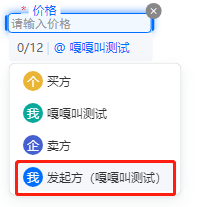
注:只有在控制台编辑模板时,<font color="red">归属给发起方</font>的填写控件(如下图)才能在创建文档的时候进行内容填充。
|
|
4181
|
+
|
|
4179
4182
|
*/
|
|
4180
4183
|
FormFields?: Array<FormField>
|
|
4181
4184
|
/**
|
|
@@ -4275,8 +4278,8 @@ export interface CreateEmbedWebUrlRequest {
|
|
|
4275
4278
|
<li>PREVIEW_SEAL_LIST:生成预览印章列表的嵌入页面</li>
|
|
4276
4279
|
<li>PREVIEW_SEAL_DETAIL:生成预览印章详情的嵌入页面</li>
|
|
4277
4280
|
<li>EXTEND_SERVICE:生成拓展服务的嵌入页面</li>
|
|
4278
|
-
<li>PREVIEW_FLOW
|
|
4279
|
-
<li>PREVIEW_FLOW_DETAIL
|
|
4281
|
+
<li>PREVIEW_FLOW:生成预览合同的嵌入页面(支持移动端)</li>
|
|
4282
|
+
<li>PREVIEW_FLOW_DETAIL:生成查看合同详情的嵌入页面(仅支持PC端)</li></ul>
|
|
4280
4283
|
*/
|
|
4281
4284
|
EmbedType: string
|
|
4282
4285
|
/**
|
|
@@ -5046,7 +5049,8 @@ export interface ApproverInfo {
|
|
|
5046
5049
|
/**
|
|
5047
5050
|
* 签署人userId,仅支持本企业的员工userid, 可在控制台组织管理处获得
|
|
5048
5051
|
|
|
5049
|
-
|
|
5052
|
+
注:
|
|
5053
|
+
如果传进来的<font color="red">UserId已经实名, 则忽略ApproverName,ApproverIdCardType,ApproverIdCardNumber,ApproverMobile这四个入参</font>(会用此UserId实名的身份证和登录的手机号覆盖)
|
|
5050
5054
|
*/
|
|
5051
5055
|
UserId?: string
|
|
5052
5056
|
/**
|
|
@@ -6044,10 +6048,6 @@ export interface Component {
|
|
|
6044
6048
|
注:` 表单域的控件不能作为印章和签名控件`
|
|
6045
6049
|
*/
|
|
6046
6050
|
ComponentType: string
|
|
6047
|
-
/**
|
|
6048
|
-
* <font color="red">【暂未使用】</font>控件所属文件的序号(取值为:0-N)。 目前单文件的情况下,值一直为0
|
|
6049
|
-
*/
|
|
6050
|
-
FileIndex: number
|
|
6051
6051
|
/**
|
|
6052
6052
|
* **在绝对定位方式和关键字定位方式下**,指定控件的高度, 控件高度是指控件在PDF文件中的高度,单位为pt(点)。
|
|
6053
6053
|
|
|
@@ -6074,6 +6074,17 @@ export interface Component {
|
|
|
6074
6074
|
* **在绝对定位方式和关键字定位方式下**,可以指定控件纵向位置的位置,单位为pt(点)。
|
|
6075
6075
|
*/
|
|
6076
6076
|
ComponentPosY: number
|
|
6077
|
+
/**
|
|
6078
|
+
* <font color="red">【暂未使用】</font>控件所属文件的序号(取值为:0-N)。 目前单文件的情况下,值一直为0
|
|
6079
|
+
*/
|
|
6080
|
+
FileIndex: number
|
|
6081
|
+
/**
|
|
6082
|
+
* 控件生成的方式:
|
|
6083
|
+
<ul><li> <b>NORMAL</b> : 绝对定位控件</li>
|
|
6084
|
+
<li> <b>FIELD</b> : 表单域</li>
|
|
6085
|
+
<li> <b>KEYWORD</b> : 关键字(设置关键字时,请确保PDF原始文件内是关键字以文字形式保存在PDF文件中,不支持对图片内文字进行关键字查找)</li></ul>
|
|
6086
|
+
*/
|
|
6087
|
+
GenerateMode?: string
|
|
6077
6088
|
/**
|
|
6078
6089
|
* 控件唯一ID。
|
|
6079
6090
|
|
|
@@ -6175,21 +6186,6 @@ export interface Component {
|
|
|
6175
6186
|
注: `部分特殊控件需要在控制台配置模板形式创建`
|
|
6176
6187
|
*/
|
|
6177
6188
|
ComponentValue?: string
|
|
6178
|
-
/**
|
|
6179
|
-
* 控件生成的方式:
|
|
6180
|
-
<ul><li> <b>NORMAL</b> : 绝对定位控件</li>
|
|
6181
|
-
<li> <b>FIELD</b> : 表单域</li>
|
|
6182
|
-
<li> <b>KEYWORD</b> : 关键字(设置关键字时,请确保PDF原始文件内是关键字以文字形式保存在PDF文件中,不支持对图片内文字进行关键字查找)</li></ul>
|
|
6183
|
-
*/
|
|
6184
|
-
GenerateMode?: string
|
|
6185
|
-
/**
|
|
6186
|
-
* <font color="red">【暂未使用】</font>日期签署控件的字号,默认为 12
|
|
6187
|
-
*/
|
|
6188
|
-
ComponentDateFontSize?: number
|
|
6189
|
-
/**
|
|
6190
|
-
* <font color="red">【暂未使用】</font>第三方应用集成平台模板控件 ID 标识
|
|
6191
|
-
*/
|
|
6192
|
-
ChannelComponentId?: string
|
|
6193
6189
|
/**
|
|
6194
6190
|
* **如果控件是关键字定位方式**,可以对关键字定位出来的区域进行横坐标方向的调整,单位为pt(点)。例如,如果关键字定位出来的区域偏左或偏右,可以通过调整横坐标方向的参数来使控件位置更加准确。
|
|
6195
6191
|
注意: `向左调整设置为负数, 向右调整设置成正数`
|
|
@@ -6202,12 +6198,6 @@ export interface Component {
|
|
|
6202
6198
|
注意:此字段可能返回 null,表示取不到有效值。
|
|
6203
6199
|
*/
|
|
6204
6200
|
OffsetY?: number
|
|
6205
|
-
/**
|
|
6206
|
-
* <font color="red">【暂未使用】</font>第三方应用集成中子客企业控件来源。
|
|
6207
|
-
<ul><li> <b>0</b> :平台指定;</li>
|
|
6208
|
-
<li> <b>1</b> :用户自定义</li></ul>
|
|
6209
|
-
*/
|
|
6210
|
-
ChannelComponentSource?: number
|
|
6211
6201
|
/**
|
|
6212
6202
|
* **如果控件是关键字定位方式**,指定关键字排序规则时,可以选择Positive或Reverse两种排序方式。
|
|
6213
6203
|
<ul><li> <b>Positive</b> :表示正序,即根据关键字在PDF文件内的顺序进行排列</li>
|
|
@@ -6250,6 +6240,20 @@ export interface Component {
|
|
|
6250
6240
|
注意:此字段可能返回 null,表示取不到有效值。
|
|
6251
6241
|
*/
|
|
6252
6242
|
ForbidMoveAndDelete?: boolean
|
|
6243
|
+
/**
|
|
6244
|
+
* <font color="red">【暂未使用】</font>日期签署控件的字号,默认为 12
|
|
6245
|
+
*/
|
|
6246
|
+
ComponentDateFontSize?: number
|
|
6247
|
+
/**
|
|
6248
|
+
* <font color="red">【暂未使用】</font>第三方应用集成平台模板控件 ID 标识
|
|
6249
|
+
*/
|
|
6250
|
+
ChannelComponentId?: string
|
|
6251
|
+
/**
|
|
6252
|
+
* <font color="red">【暂未使用】</font>第三方应用集成中子客企业控件来源。
|
|
6253
|
+
<ul><li> <b>0</b> :平台指定;</li>
|
|
6254
|
+
<li> <b>1</b> :用户自定义</li></ul>
|
|
6255
|
+
*/
|
|
6256
|
+
ChannelComponentSource?: number
|
|
6253
6257
|
}
|
|
6254
6258
|
|
|
6255
6259
|
/**
|
|
@@ -7251,7 +7255,9 @@ export interface CreateBatchQuickSignUrlRequest {
|
|
|
7251
7255
|
<li>**4**:系统签名</li></ul>
|
|
7252
7256
|
注:
|
|
7253
7257
|
<ul><li>默认情况下,签名类型为手写签名</li>
|
|
7254
|
-
<li>您可以传递多种值,表示可用多种签名类型。</li
|
|
7258
|
+
<li>您可以传递多种值,表示可用多种签名类型。</li>
|
|
7259
|
+
<li>该参数会覆盖您合同中的签名类型,若您在发起合同时限定了签名类型(赋值签名类型给ComponentTypeLimit),请将这些签名类型赋予此参数</li>
|
|
7260
|
+
</ul>
|
|
7255
7261
|
*/
|
|
7256
7262
|
SignatureTypes?: Array<number | bigint>
|
|
7257
7263
|
/**
|
|
@@ -10,7 +10,7 @@ export declare class Client extends TencentCloudCommon.AbstractClient {
|
|
|
10
10
|
* 该接口用于发起合同后,生成个人用户的批量签署链接, 暂时不支持企业端签署。
|
|
11
11
|
**注意:**
|
|
12
12
|
1. 该接口目前仅支持签署人类型是**个人签署方的批量签署场景**(ApproverType=1)。
|
|
13
|
-
2. 该接口可生成批量签署链接的C
|
|
13
|
+
2. 该接口可生成批量签署链接的C端签署人**必须仅有手写签名(控件类型为SIGN_SIGNATURE)和时间类型的签署控件**,**不支持填写控件** 。
|
|
14
14
|
3. 请确保C端签署人在批量签署合同中**为待签署状态**,如需顺序签署请待前一位参与人签署完成后,再创建该C端用户的签署链接。
|
|
15
15
|
4. 该签署链接**有效期为30分钟**,过期后将失效,如需签署可重新创建批量签署链接 。
|
|
16
16
|
5. 该接口返回的签署链接适用于APP集成的场景,支持APP打开或浏览器直接打开,**不支持微信小程序嵌入**。
|
|
@@ -31,7 +31,7 @@ class Client extends TencentCloudCommon.AbstractClient {
|
|
|
31
31
|
* 该接口用于发起合同后,生成个人用户的批量签署链接, 暂时不支持企业端签署。
|
|
32
32
|
**注意:**
|
|
33
33
|
1. 该接口目前仅支持签署人类型是**个人签署方的批量签署场景**(ApproverType=1)。
|
|
34
|
-
2. 该接口可生成批量签署链接的C
|
|
34
|
+
2. 该接口可生成批量签署链接的C端签署人**必须仅有手写签名(控件类型为SIGN_SIGNATURE)和时间类型的签署控件**,**不支持填写控件** 。
|
|
35
35
|
3. 请确保C端签署人在批量签署合同中**为待签署状态**,如需顺序签署请待前一位参与人签署完成后,再创建该C端用户的签署链接。
|
|
36
36
|
4. 该签署链接**有效期为30分钟**,过期后将失效,如需签署可重新创建批量签署链接 。
|
|
37
37
|
5. 该接口返回的签署链接适用于APP集成的场景,支持APP打开或浏览器直接打开,**不支持微信小程序嵌入**。
|
|
@@ -4048,7 +4048,10 @@ export interface CreateDocumentRequest {
|
|
|
4048
4048
|
* 电子文档的填写控件的填充内容。具体方式可以参考[FormField](https://qian.tencent.com/developers/companyApis/dataTypes/#formfield)结构体的定义。
|
|
4049
4049
|
<ul>
|
|
4050
4050
|
<li>支持自动签传递印章,可通过指定自动签控件id,指定印章id来完成</li>
|
|
4051
|
+
<li>附件控件支持传入图片、文件资源id,并将内容合成到合同文件中。支持的文件类型有doc、docx、xls、xlsx、html、jpg、jpeg、png、bmp、txt、pdf。需要注意如果传入的资源类型都是图片类型,图片资源会放置在合同文件的末尾,如果传入的资源有非图片类型资源,会将资源放置在附件控件所在页面的下一页。</li>
|
|
4051
4052
|
</ul>
|
|
4053
|
+
注:只有在控制台编辑模板时,<font color="red">归属给发起方</font>的填写控件(如下图)才能在创建文档的时候进行内容填充。
|
|
4054
|
+

|
|
4052
4055
|
*/
|
|
4053
4056
|
FormFields?: Array<FormField>;
|
|
4054
4057
|
/**
|
|
@@ -4144,8 +4147,8 @@ export interface CreateEmbedWebUrlRequest {
|
|
|
4144
4147
|
<li>PREVIEW_SEAL_LIST:生成预览印章列表的嵌入页面</li>
|
|
4145
4148
|
<li>PREVIEW_SEAL_DETAIL:生成预览印章详情的嵌入页面</li>
|
|
4146
4149
|
<li>EXTEND_SERVICE:生成拓展服务的嵌入页面</li>
|
|
4147
|
-
<li>PREVIEW_FLOW
|
|
4148
|
-
<li>PREVIEW_FLOW_DETAIL
|
|
4150
|
+
<li>PREVIEW_FLOW:生成预览合同的嵌入页面(支持移动端)</li>
|
|
4151
|
+
<li>PREVIEW_FLOW_DETAIL:生成查看合同详情的嵌入页面(仅支持PC端)</li></ul>
|
|
4149
4152
|
*/
|
|
4150
4153
|
EmbedType: string;
|
|
4151
4154
|
/**
|
|
@@ -4892,7 +4895,8 @@ export interface ApproverInfo {
|
|
|
4892
4895
|
/**
|
|
4893
4896
|
* 签署人userId,仅支持本企业的员工userid, 可在控制台组织管理处获得
|
|
4894
4897
|
|
|
4895
|
-
|
|
4898
|
+
注:
|
|
4899
|
+
如果传进来的<font color="red">UserId已经实名, 则忽略ApproverName,ApproverIdCardType,ApproverIdCardNumber,ApproverMobile这四个入参</font>(会用此UserId实名的身份证和登录的手机号覆盖)
|
|
4896
4900
|
*/
|
|
4897
4901
|
UserId?: string;
|
|
4898
4902
|
/**
|
|
@@ -5858,10 +5862,6 @@ export interface Component {
|
|
|
5858
5862
|
注:` 表单域的控件不能作为印章和签名控件`
|
|
5859
5863
|
*/
|
|
5860
5864
|
ComponentType: string;
|
|
5861
|
-
/**
|
|
5862
|
-
* <font color="red">【暂未使用】</font>控件所属文件的序号(取值为:0-N)。 目前单文件的情况下,值一直为0
|
|
5863
|
-
*/
|
|
5864
|
-
FileIndex: number;
|
|
5865
5865
|
/**
|
|
5866
5866
|
* **在绝对定位方式和关键字定位方式下**,指定控件的高度, 控件高度是指控件在PDF文件中的高度,单位为pt(点)。
|
|
5867
5867
|
|
|
@@ -5888,6 +5888,17 @@ export interface Component {
|
|
|
5888
5888
|
* **在绝对定位方式和关键字定位方式下**,可以指定控件纵向位置的位置,单位为pt(点)。
|
|
5889
5889
|
*/
|
|
5890
5890
|
ComponentPosY: number;
|
|
5891
|
+
/**
|
|
5892
|
+
* <font color="red">【暂未使用】</font>控件所属文件的序号(取值为:0-N)。 目前单文件的情况下,值一直为0
|
|
5893
|
+
*/
|
|
5894
|
+
FileIndex: number;
|
|
5895
|
+
/**
|
|
5896
|
+
* 控件生成的方式:
|
|
5897
|
+
<ul><li> <b>NORMAL</b> : 绝对定位控件</li>
|
|
5898
|
+
<li> <b>FIELD</b> : 表单域</li>
|
|
5899
|
+
<li> <b>KEYWORD</b> : 关键字(设置关键字时,请确保PDF原始文件内是关键字以文字形式保存在PDF文件中,不支持对图片内文字进行关键字查找)</li></ul>
|
|
5900
|
+
*/
|
|
5901
|
+
GenerateMode?: string;
|
|
5891
5902
|
/**
|
|
5892
5903
|
* 控件唯一ID。
|
|
5893
5904
|
|
|
@@ -5989,21 +6000,6 @@ export interface Component {
|
|
|
5989
6000
|
注: `部分特殊控件需要在控制台配置模板形式创建`
|
|
5990
6001
|
*/
|
|
5991
6002
|
ComponentValue?: string;
|
|
5992
|
-
/**
|
|
5993
|
-
* 控件生成的方式:
|
|
5994
|
-
<ul><li> <b>NORMAL</b> : 绝对定位控件</li>
|
|
5995
|
-
<li> <b>FIELD</b> : 表单域</li>
|
|
5996
|
-
<li> <b>KEYWORD</b> : 关键字(设置关键字时,请确保PDF原始文件内是关键字以文字形式保存在PDF文件中,不支持对图片内文字进行关键字查找)</li></ul>
|
|
5997
|
-
*/
|
|
5998
|
-
GenerateMode?: string;
|
|
5999
|
-
/**
|
|
6000
|
-
* <font color="red">【暂未使用】</font>日期签署控件的字号,默认为 12
|
|
6001
|
-
*/
|
|
6002
|
-
ComponentDateFontSize?: number;
|
|
6003
|
-
/**
|
|
6004
|
-
* <font color="red">【暂未使用】</font>第三方应用集成平台模板控件 ID 标识
|
|
6005
|
-
*/
|
|
6006
|
-
ChannelComponentId?: string;
|
|
6007
6003
|
/**
|
|
6008
6004
|
* **如果控件是关键字定位方式**,可以对关键字定位出来的区域进行横坐标方向的调整,单位为pt(点)。例如,如果关键字定位出来的区域偏左或偏右,可以通过调整横坐标方向的参数来使控件位置更加准确。
|
|
6009
6005
|
注意: `向左调整设置为负数, 向右调整设置成正数`
|
|
@@ -6016,12 +6012,6 @@ export interface Component {
|
|
|
6016
6012
|
注意:此字段可能返回 null,表示取不到有效值。
|
|
6017
6013
|
*/
|
|
6018
6014
|
OffsetY?: number;
|
|
6019
|
-
/**
|
|
6020
|
-
* <font color="red">【暂未使用】</font>第三方应用集成中子客企业控件来源。
|
|
6021
|
-
<ul><li> <b>0</b> :平台指定;</li>
|
|
6022
|
-
<li> <b>1</b> :用户自定义</li></ul>
|
|
6023
|
-
*/
|
|
6024
|
-
ChannelComponentSource?: number;
|
|
6025
6015
|
/**
|
|
6026
6016
|
* **如果控件是关键字定位方式**,指定关键字排序规则时,可以选择Positive或Reverse两种排序方式。
|
|
6027
6017
|
<ul><li> <b>Positive</b> :表示正序,即根据关键字在PDF文件内的顺序进行排列</li>
|
|
@@ -6064,6 +6054,20 @@ export interface Component {
|
|
|
6064
6054
|
注意:此字段可能返回 null,表示取不到有效值。
|
|
6065
6055
|
*/
|
|
6066
6056
|
ForbidMoveAndDelete?: boolean;
|
|
6057
|
+
/**
|
|
6058
|
+
* <font color="red">【暂未使用】</font>日期签署控件的字号,默认为 12
|
|
6059
|
+
*/
|
|
6060
|
+
ComponentDateFontSize?: number;
|
|
6061
|
+
/**
|
|
6062
|
+
* <font color="red">【暂未使用】</font>第三方应用集成平台模板控件 ID 标识
|
|
6063
|
+
*/
|
|
6064
|
+
ChannelComponentId?: string;
|
|
6065
|
+
/**
|
|
6066
|
+
* <font color="red">【暂未使用】</font>第三方应用集成中子客企业控件来源。
|
|
6067
|
+
<ul><li> <b>0</b> :平台指定;</li>
|
|
6068
|
+
<li> <b>1</b> :用户自定义</li></ul>
|
|
6069
|
+
*/
|
|
6070
|
+
ChannelComponentSource?: number;
|
|
6067
6071
|
}
|
|
6068
6072
|
/**
|
|
6069
6073
|
* 部门信息
|
|
@@ -7032,7 +7036,9 @@ export interface CreateBatchQuickSignUrlRequest {
|
|
|
7032
7036
|
<li>**4**:系统签名</li></ul>
|
|
7033
7037
|
注:
|
|
7034
7038
|
<ul><li>默认情况下,签名类型为手写签名</li>
|
|
7035
|
-
<li>您可以传递多种值,表示可用多种签名类型。</li
|
|
7039
|
+
<li>您可以传递多种值,表示可用多种签名类型。</li>
|
|
7040
|
+
<li>该参数会覆盖您合同中的签名类型,若您在发起合同时限定了签名类型(赋值签名类型给ComponentTypeLimit),请将这些签名类型赋予此参数</li>
|
|
7041
|
+
</ul>
|
|
7036
7042
|
*/
|
|
7037
7043
|
SignatureTypes?: Array<number | bigint>;
|
|
7038
7044
|
/**
|