tencentcloud-sdk-nodejs-ess 4.0.1054 → 4.1.1
This diff represents the content of publicly available package versions that have been released to one of the supported registries. The information contained in this diff is provided for informational purposes only and reflects changes between package versions as they appear in their respective public registries.
- package/README.md +18 -4
- package/es/index.js +1 -0
- package/es/services/ess/index.js +4 -0
- package/es/services/ess/v20201111/ess_client.js +312 -0
- package/es/services/ess/v20201111/ess_models.js +0 -0
- package/es/services/ess/v20201111/index.js +6 -0
- package/es/services/index.js +1 -0
- package/package.json +16 -5
- package/tencentcloud/services/ess/v20201111/ess_client.js +2 -1
- package/tencentcloud/services/ess/v20201111/ess_models.d.ts +2 -1
- package/tencentcloud/services/ess/v20201111/index.js +2 -1
- package/index.d.ts +0 -2
- package/index.js +0 -6
- package/prettier.config.js +0 -38
- package/src/index.ts +0 -1
- package/src/services/ess/index.ts +0 -5
- package/src/services/ess/v20201111/ess_client.ts +0 -2271
- package/src/services/ess/v20201111/ess_models.ts +0 -10471
- package/src/services/ess/v20201111/index.ts +0 -6
- package/src/services/index.ts +0 -1
- package/tsconfig.json +0 -33
- package/typings/index.d.ts +0 -2
|
@@ -1,2271 +0,0 @@
|
|
|
1
|
-
/* eslint-disable @typescript-eslint/no-unused-vars */
|
|
2
|
-
/*
|
|
3
|
-
* Copyright (c) 2018 THL A29 Limited, a Tencent company. All Rights Reserved.
|
|
4
|
-
*
|
|
5
|
-
* Licensed under the Apache License, Version 2.0 (the "License");
|
|
6
|
-
* you may not use this file except in compliance with the License.
|
|
7
|
-
* You may obtain a copy of the License at
|
|
8
|
-
*
|
|
9
|
-
* http://www.apache.org/licenses/LICENSE-2.0
|
|
10
|
-
*
|
|
11
|
-
* Unless required by applicable law or agreed to in writing,
|
|
12
|
-
* software distributed under the License is distributed on an
|
|
13
|
-
* "AS IS" BASIS, WITHOUT WARRANTIES OR CONDITIONS OF ANY
|
|
14
|
-
* KIND, either express or implied. See the License for the
|
|
15
|
-
* specific language governing permissions and limitations
|
|
16
|
-
* under the License.
|
|
17
|
-
*/
|
|
18
|
-
import * as TencentCloudCommon from "tencentcloud-sdk-nodejs-common"
|
|
19
|
-
import {
|
|
20
|
-
DescribePersonCertificateResponse,
|
|
21
|
-
CreateOrganizationGroupInvitationLinkRequest,
|
|
22
|
-
FlowBatchUrlInfo,
|
|
23
|
-
BillUsageDetail,
|
|
24
|
-
DescribeCancelFlowsTaskResponse,
|
|
25
|
-
IntentionActionResult,
|
|
26
|
-
DescribeUserFlowTypeResponse,
|
|
27
|
-
DescribeFileCounterSignResultRequest,
|
|
28
|
-
CreateSealRequest,
|
|
29
|
-
FlowGroupUrlInfo,
|
|
30
|
-
CancelFlowResponse,
|
|
31
|
-
DescribeExtendedServiceAuthDetailResponse,
|
|
32
|
-
UpdateIntegrationEmployeesResponse,
|
|
33
|
-
Department,
|
|
34
|
-
CreatePreparedPersonalEsignRequest,
|
|
35
|
-
CreateLegalSealQrCodeResponse,
|
|
36
|
-
DescribeIntegrationDepartmentsResponse,
|
|
37
|
-
CreateFileCounterSignRequest,
|
|
38
|
-
FileInfo,
|
|
39
|
-
DescribeOrganizationVerifyStatusResponse,
|
|
40
|
-
DeleteExtendedServiceAuthInfosResponse,
|
|
41
|
-
CreateFlowForwardsRequest,
|
|
42
|
-
CreateDynamicFlowApproverRequest,
|
|
43
|
-
CreateFlowApproversResponse,
|
|
44
|
-
DescribeFileUrlsResponse,
|
|
45
|
-
CreateFlowRemindsRequest,
|
|
46
|
-
IntentionQuestionResult,
|
|
47
|
-
CancelUserAutoSignEnableUrlRequest,
|
|
48
|
-
AuthInfoDetail,
|
|
49
|
-
DeleteOrganizationAuthorizationInfo,
|
|
50
|
-
ModifyApplicationCallbackInfoResponse,
|
|
51
|
-
CreateMultiFlowSignQRCodeResponse,
|
|
52
|
-
DescribeIntegrationDepartmentsRequest,
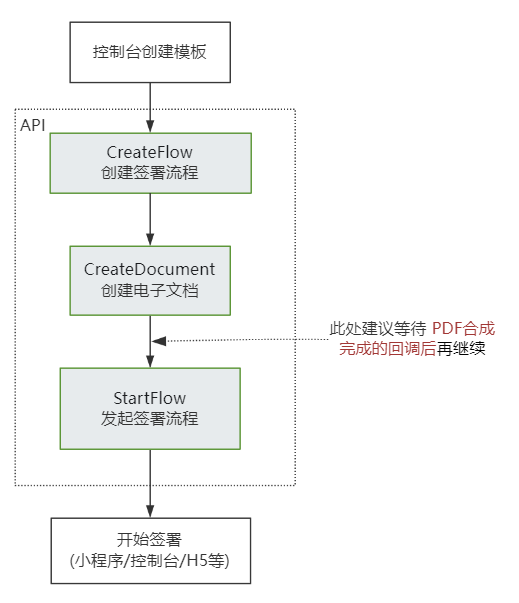
|
|
53
|
-
ReviewerInfo,
|
|
54
|
-
FlowBrief,
|
|
55
|
-
DescribeThirdPartyAuthCodeResponse,
|
|
56
|
-
DescribeUserVerifyStatusResponse,
|
|
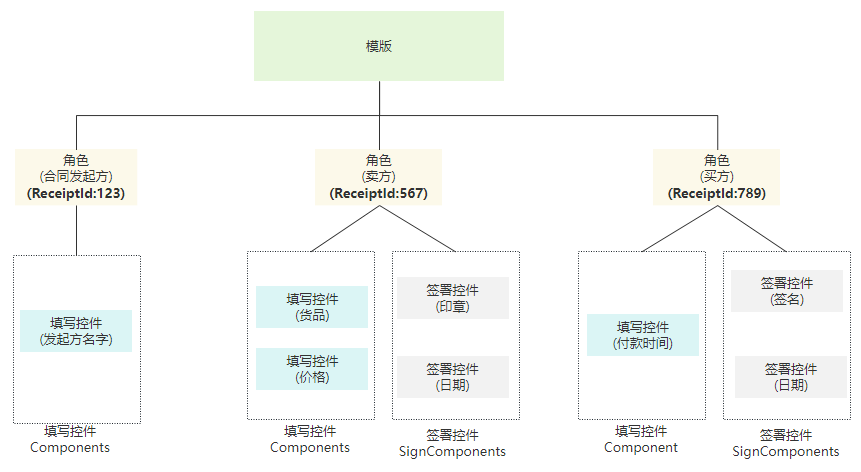
57
|
-
HasAuthUser,
|
|
58
|
-
DisableUserAutoSignResponse,
|
|
59
|
-
OrgBillSummary,
|
|
60
|
-
ModifyExtendedServiceRequest,
|
|
61
|
-
IntentionAction,
|
|
62
|
-
CreateBatchInitOrganizationUrlResponse,
|
|
63
|
-
BindEmployeeUserIdWithClientOpenIdResponse,
|
|
64
|
-
CreateIntegrationEmployeesRequest,
|
|
65
|
-
CreateFlowOption,
|
|
66
|
-
CreateOrganizationAuthFileResponse,
|
|
67
|
-
FilledComponent,
|
|
68
|
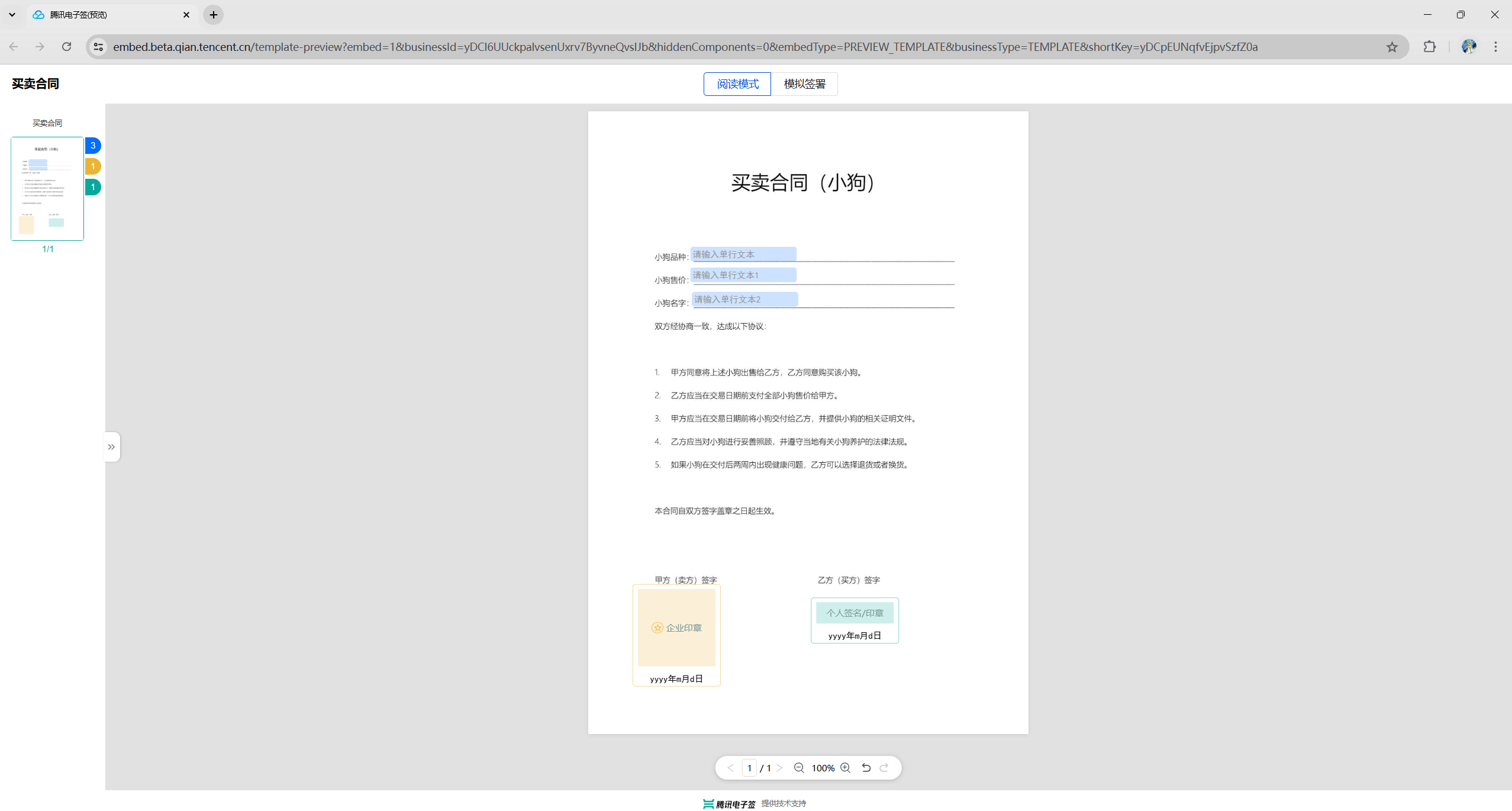
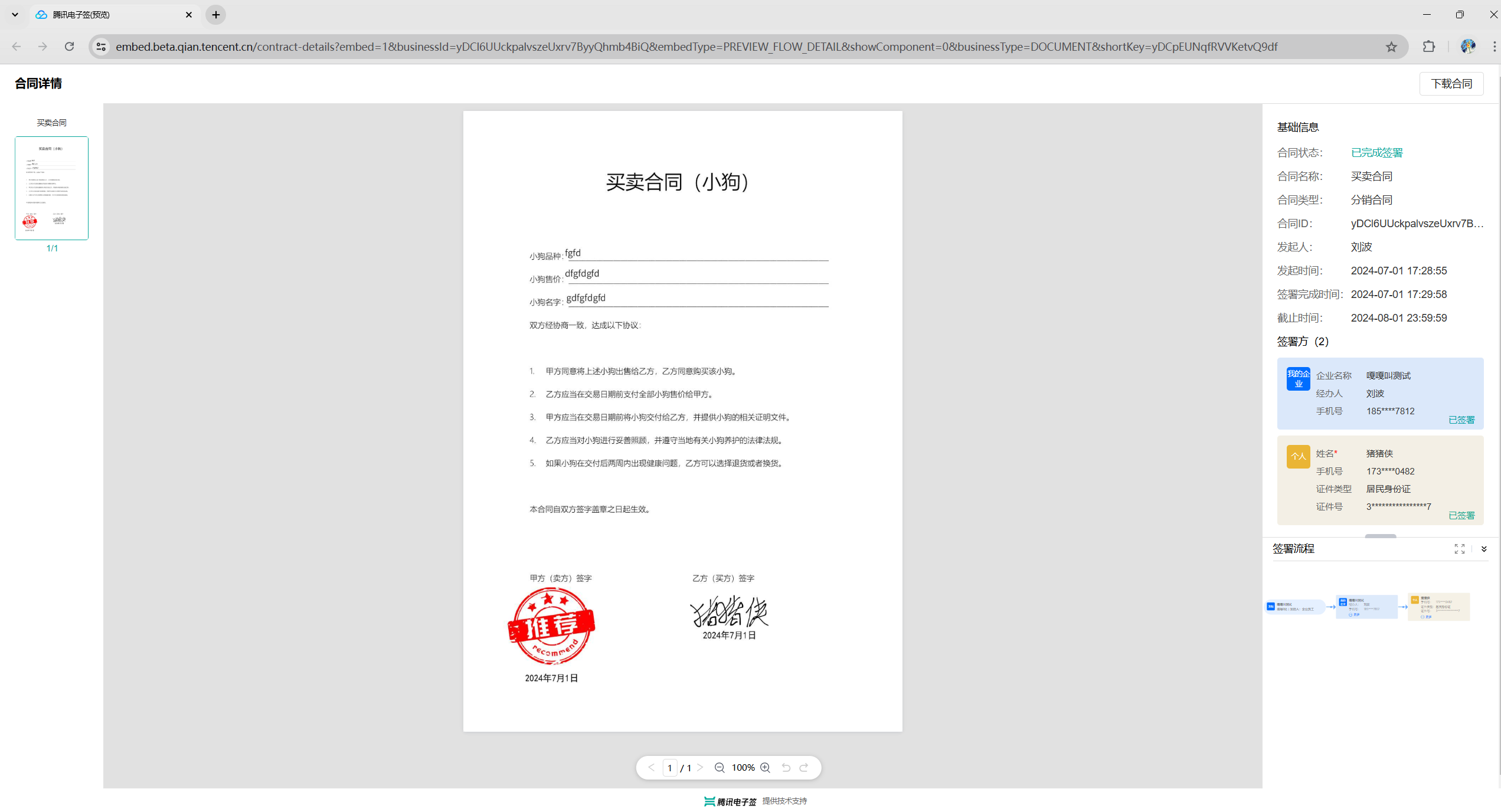
-
DescribeIntegrationRolesRequest,
|
|
69
|
-
FlowBatchApproverInfo,
|
|
70
|
-
CreateFlowEvidenceReportRequest,
|
|
71
|
-
StartFlowResponse,
|
|
72
|
-
SealInfo,
|
|
73
|
-
StaffRole,
|
|
74
|
-
GroupOrganization,
|
|
75
|
-
OrganizationInfo,
|
|
76
|
-
ArchiveDynamicApproverData,
|
|
77
|
-
CreateOrganizationAuthUrlRequest,
|
|
78
|
-
CreateBatchQuickSignUrlResponse,
|
|
79
|
-
CreateIntegrationRoleRequest,
|
|
80
|
-
DeleteIntegrationRoleUsersResponse,
|
|
81
|
-
CreateConvertTaskApiRequest,
|
|
82
|
-
DeleteIntegrationEmployeesResponse,
|
|
83
|
-
NeedReviewApproverInfo,
|
|
84
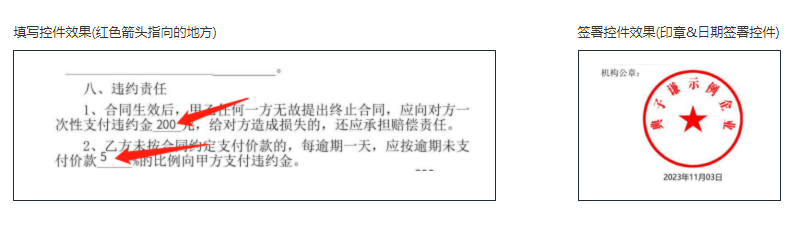
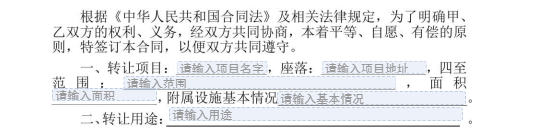
|
-
CreateFlowGroupSignReviewResponse,
|
|
85
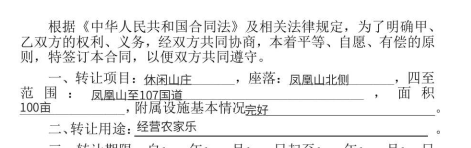
|
-
CreateBatchSignUrlResponse,
|
|
86
|
-
CreateFlowRemindsResponse,
|
|
87
|
-
DescribeOrganizationGroupOrganizationsRequest,
|
|
88
|
-
Agent,
|
|
89
|
-
DescribeUserAutoSignStatusResponse,
|
|
90
|
-
FlowApproverDetail,
|
|
91
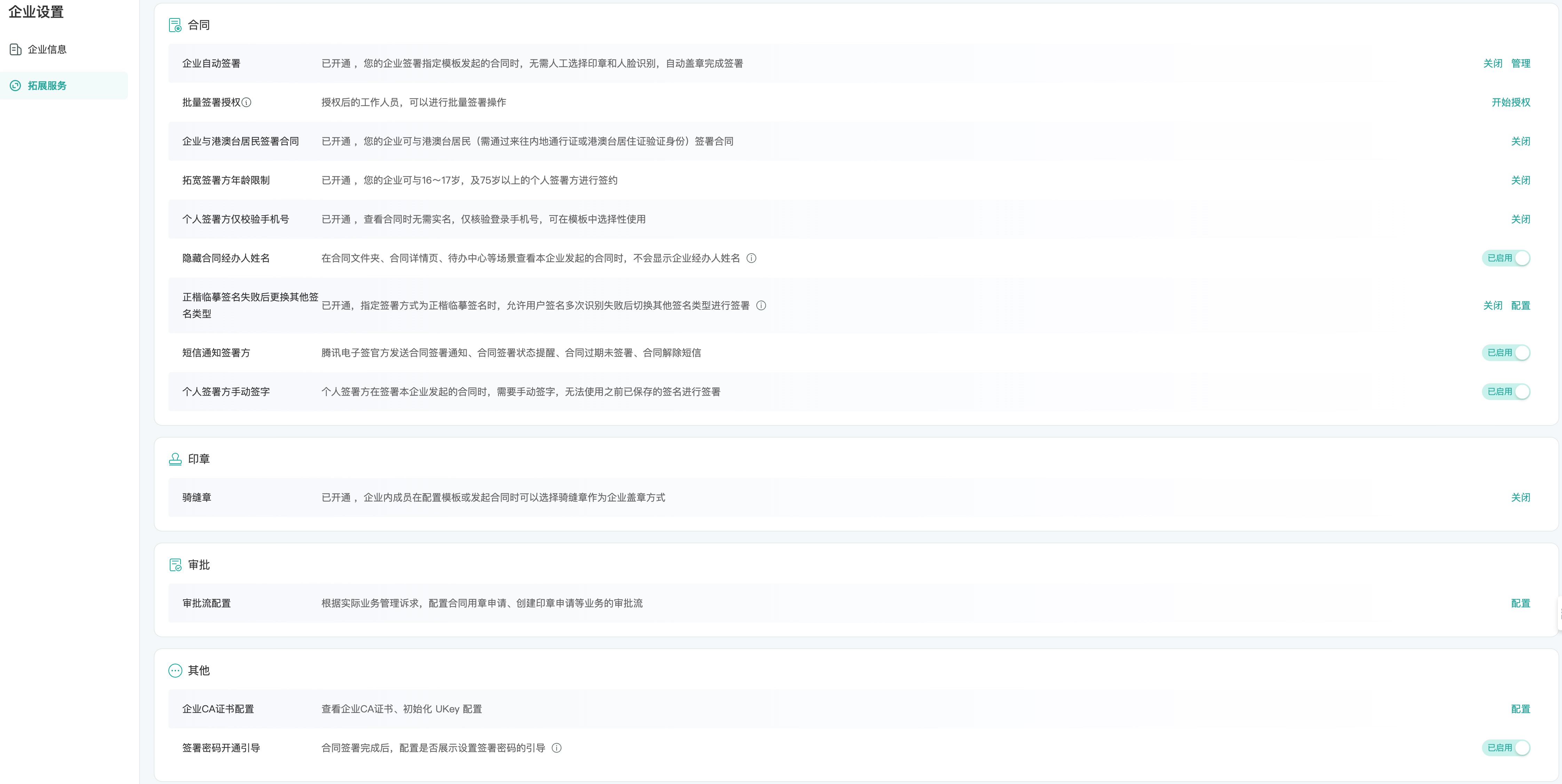
|
-
CreateFlowGroupByFilesRequest,
|
|
92
|
-
DescribeFlowComponentsResponse,
|
|
93
|
-
DescribeFlowEvidenceReportResponse,
|
|
94
|
-
CreateWebThemeConfigRequest,
|
|
95
|
-
CallbackInfo,
|
|
96
|
-
DescribeSignFaceVideoRequest,
|
|
97
|
-
CreateEmployeeQualificationSealQrCodeResponse,
|
|
98
|
-
CreateFlowGroupByTemplatesResponse,
|
|
99
|
-
CancelFailureFlow,
|
|
100
|
-
PdfVerifyResult,
|
|
101
|
-
CreateUserVerifyUrlResponse,
|
|
102
|
-
DescribeBatchOrganizationRegistrationUrlsRequest,
|
|
103
|
-
TemplateInfo,
|
|
104
|
-
SignQrCode,
|
|
105
|
-
CreateDocumentResponse,
|
|
106
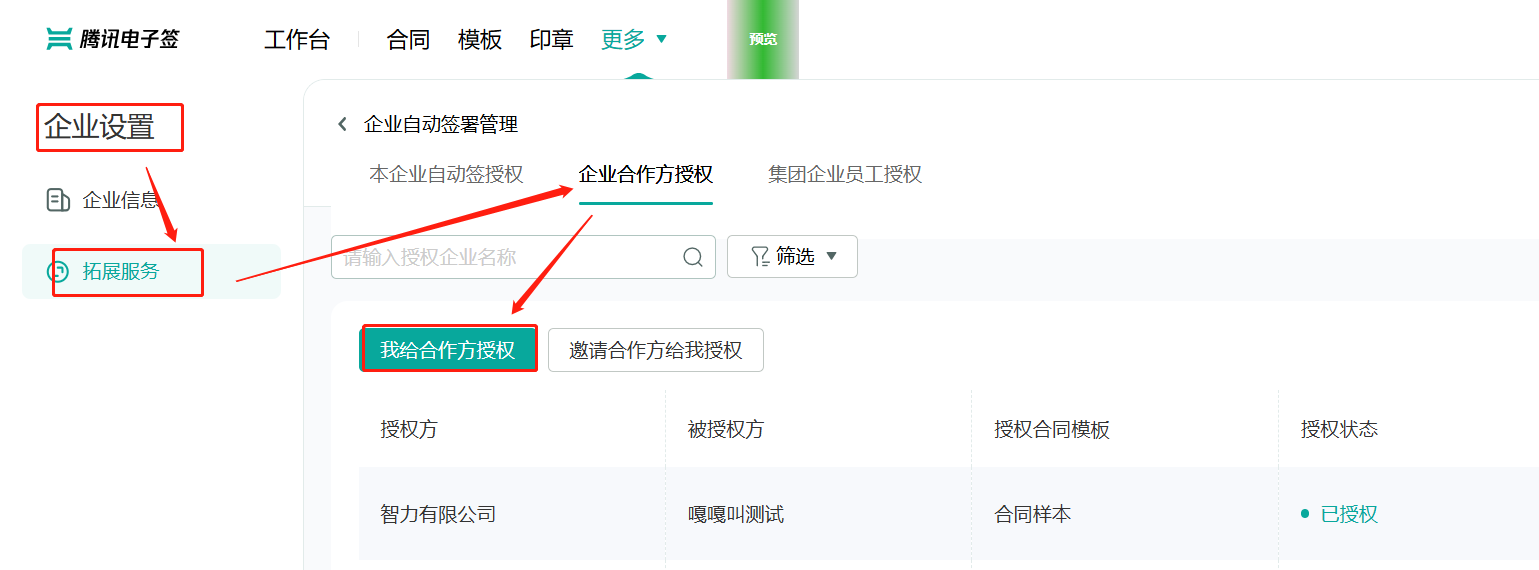
|
-
DescribeIntegrationEmployeesRequest,
|
|
107
|
-
SignComponentConfig,
|
|
108
|
-
UnbindEmployeeUserIdWithClientOpenIdResponse,
|
|
109
|
-
CreateIntegrationUserRolesResponse,
|
|
110
|
-
CreateFlowRequest,
|
|
111
|
-
CreateSchemeUrlRequest,
|
|
112
|
-
DeleteIntegrationDepartmentResponse,
|
|
113
|
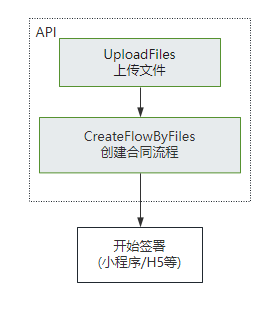
-
AutoSignConfig,
|
|
114
|
-
DescribeThirdPartyAuthCodeRequest,
|
|
115
|
-
CreateDynamicFlowApproverResponse,
|
|
116
|
-
CreateBatchOrganizationRegistrationTasksResponse,
|
|
117
|
-
CreateReleaseFlowResponse,
|
|
118
|
-
CreateBatchInitOrganizationUrlRequest,
|
|
119
|
-
CreateWebThemeConfigResponse,
|
|
120
|
-
BindEmployeeUserIdWithClientOpenIdRequest,
|
|
121
|
-
CreateOrganizationInfoChangeUrlResponse,
|
|
122
|
-
DeleteOrganizationAuthorizationsResponse,
|
|
123
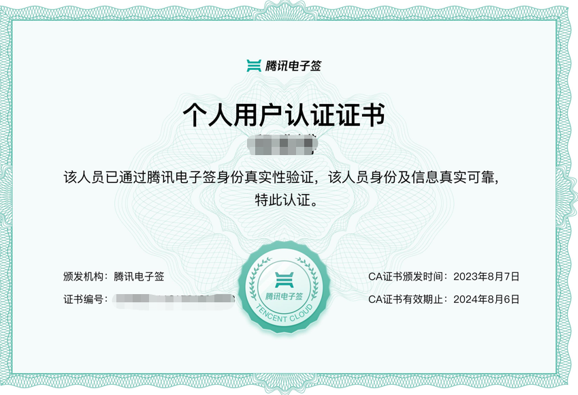
|
-
DescribeExtendedServiceAuthDetailRequest,
|
|
124
|
-
CreateOrganizationAuthFileRequest,
|
|
125
|
-
Staff,
|
|
126
|
-
ComponentLimit,
|
|
127
|
-
CreateIntegrationDepartmentResponse,
|
|
128
|
-
DescribeFlowTemplatesRequest,
|
|
129
|
-
OrganizationCommonInfo,
|
|
130
|
-
CreateIntegrationSubOrganizationActiveRecordResponse,
|
|
131
|
-
ArchiveDynamicFlowResponse,
|
|
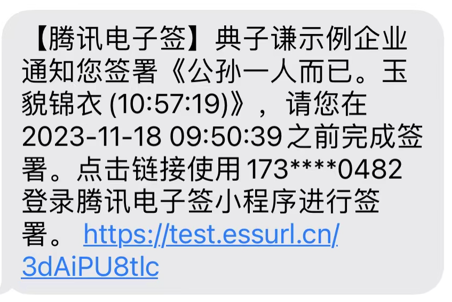
132
|
-
DeleteSealPoliciesResponse,
|
|
133
|
-
Permission,
|
|
134
|
-
CreateLegalSealQrCodeRequest,
|
|
135
|
-
DescribeOrganizationAuthStatusResponse,
|
|
136
|
-
CreateUserAutoSignSealUrlResponse,
|
|
137
|
-
FillApproverInfo,
|
|
138
|
-
OccupiedSeal,
|
|
139
|
-
IntentionActionResultDetail,
|
|
140
|
-
CreateEmployeeQualificationSealQrCodeRequest,
|
|
141
|
-
CreatePersonAuthCertificateImageResponse,
|
|
142
|
-
FailedDeleteStaffData,
|
|
143
|
-
FlowForwardResult,
|
|
144
|
-
CreateBatchCancelFlowUrlResponse,
|
|
145
|
-
UserThreeFactor,
|
|
146
|
-
OrganizationAuthUrl,
|
|
147
|
-
AuthRecord,
|
|
148
|
-
CreateSealPolicyResponse,
|
|
149
|
-
DeleteSealPoliciesRequest,
|
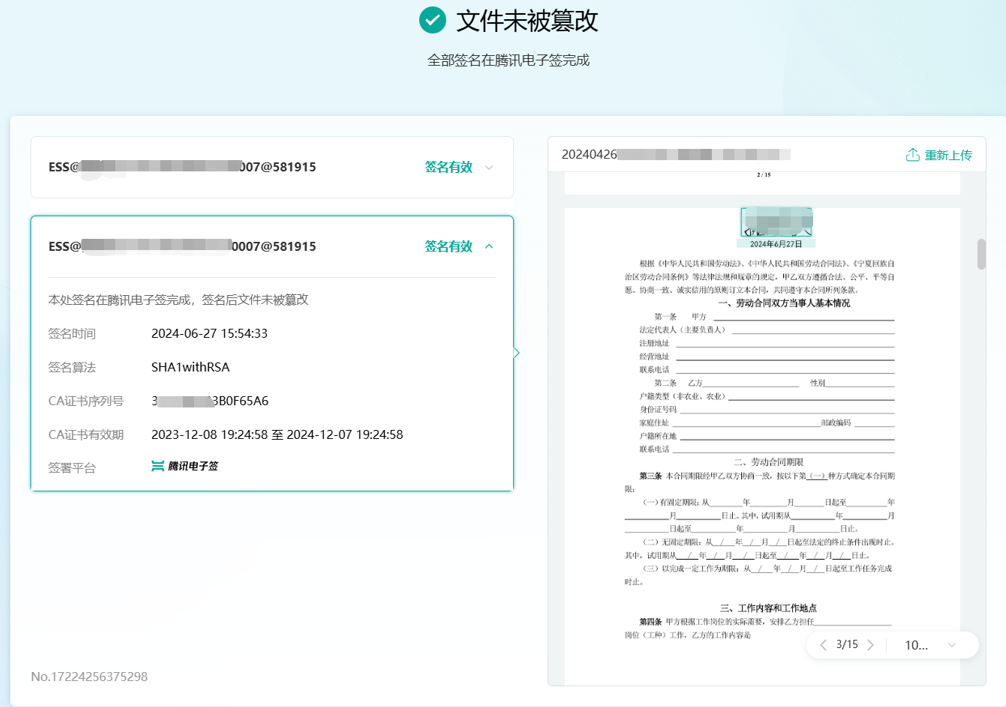
|
150
|
-
FlowApproverUrlInfo,
|
|
151
|
-
DisableUserAutoSignRequest,
|
|
152
|
-
DescribeIntegrationEmployeesResponse,
|
|
153
|
-
SuccessDeleteStaffData,
|
|
154
|
-
CreateEmployeeChangeUrlResponse,
|
|
155
|
-
CreateConvertTaskApiResponse,
|
|
156
|
-
CreateFlowSignReviewRequest,
|
|
157
|
-
CreateOrganizationAuthUrlResponse,
|
|
158
|
-
DescribeOrganizationAuthStatusRequest,
|
|
159
|
-
CreateSchemeUrlResponse,
|
|
160
|
-
CreateFlowByFilesRequest,
|
|
161
|
-
FlowGroupInfo,
|
|
162
|
-
TemplateUserFlowType,
|
|
163
|
-
CreateFlowSignUrlResponse,
|
|
164
|
-
RegisterInfo,
|
|
165
|
-
DescribeFileUrlsRequest,
|
|
166
|
-
FormField,
|
|
167
|
-
CreatePartnerAutoSignAuthUrlResponse,
|
|
168
|
-
ArchiveDynamicFlowRequest,
|
|
169
|
-
CreateUserAutoSignSealUrlRequest,
|
|
170
|
-
ModifyFlowDeadlineRequest,
|
|
171
|
-
UserInfo,
|
|
172
|
-
CreateFlowApproversRequest,
|
|
173
|
-
ModifyFlowDeadlineResponse,
|
|
174
|
-
ExtendAuthInfo,
|
|
175
|
-
FlowCreateApprover,
|
|
176
|
-
ApproverComponentLimitType,
|
|
177
|
-
HasAuthOrganization,
|
|
178
|
-
RecipientComponentInfo,
|
|
179
|
-
CreateFlowEvidenceReportResponse,
|
|
180
|
-
CreateIntegrationRoleResponse,
|
|
181
|
-
DetectInfoVideoData,
|
|
182
|
-
DescribeFlowComponentsRequest,
|
|
183
|
-
CreateIntegrationDepartmentRequest,
|
|
184
|
-
DescribeUserVerifyStatusRequest,
|
|
185
|
-
AuthorizedUser,
|
|
186
|
-
Intention,
|
|
187
|
-
CreateFlowBlockchainEvidenceUrlResponse,
|
|
188
|
-
CreateDocumentRequest,
|
|
189
|
-
RemindFlowRecords,
|
|
190
|
-
CreatePreparedPersonalEsignResponse,
|
|
191
|
-
VerifyDigitFileResponse,
|
|
192
|
-
DescribeOrganizationSealsResponse,
|
|
193
|
-
CreateUserMobileChangeUrlRequest,
|
|
194
|
-
RegistrationOrganizationInfo,
|
|
195
|
-
CreateEmbedWebUrlRequest,
|
|
196
|
-
DeleteIntegrationEmployeesRequest,
|
|
197
|
-
DescribeUserAutoSignStatusRequest,
|
|
198
|
-
GetTaskResultApiRequest,
|
|
199
|
-
FlowGroupOptions,
|
|
200
|
-
DescribeFlowBriefsResponse,
|
|
201
|
-
ModifyIntegrationRoleRequest,
|
|
202
|
-
CreateFlowGroupByFilesResponse,
|
|
203
|
-
CreateReleaseFlowRequest,
|
|
204
|
-
FillError,
|
|
205
|
-
DeleteIntegrationRoleUsersRequest,
|
|
206
|
-
CreateFlowSignUrlRequest,
|
|
207
|
-
CreateIntegrationEmployeesResponse,
|
|
208
|
-
CreateIntegrationUserRolesRequest,
|
|
209
|
-
FlowDetailInfo,
|
|
210
|
-
SuccessUpdateStaffData,
|
|
211
|
-
CreatePersonAuthCertificateImageRequest,
|
|
212
|
-
CreateFlowByFilesResponse,
|
|
213
|
-
UploadFilesResponse,
|
|
214
|
-
SuccessCreateStaffData,
|
|
215
|
-
Recipient,
|
|
216
|
-
DescribeFlowEvidenceReportRequest,
|
|
217
|
-
FailedCreateRoleData,
|
|
218
|
-
CreateEmployeeChangeUrlRequest,
|
|
219
|
-
ExtendScene,
|
|
220
|
-
DescribeBillUsageResponse,
|
|
221
|
-
ApproverInfo,
|
|
222
|
-
CreateFlowSignReviewResponse,
|
|
223
|
-
ModifyIntegrationDepartmentRequest,
|
|
224
|
-
RenewAutoSignLicenseRequest,
|
|
225
|
-
Filter,
|
|
226
|
-
CreateStaffResult,
|
|
227
|
-
CreateUserAutoSignEnableUrlRequest,
|
|
228
|
-
CreateOrganizationBatchSignUrlResponse,
|
|
229
|
-
DynamicFlowApproverResult,
|
|
230
|
-
UnbindEmployeeUserIdWithClientOpenIdRequest,
|
|
231
|
-
DeleteOrganizationAuthorizationsRequest,
|
|
232
|
-
CreateBatchOrganizationRegistrationTasksRequest,
|
|
233
|
-
CreateUserVerifyUrlRequest,
|
|
234
|
-
CreatePartnerAutoSignAuthUrlRequest,
|
|
235
|
-
FailedCreateStaffData,
|
|
236
|
-
CreateExtendedServiceAuthInfosResponse,
|
|
237
|
-
SubOrgBillUsage,
|
|
238
|
-
ApproverRestriction,
|
|
239
|
-
CreateFlowForwardsResponse,
|
|
240
|
-
ApproverItem,
|
|
241
|
-
CreateOrganizationBatchSignUrlRequest,
|
|
242
|
-
FlowForwardInfo,
|
|
243
|
-
IntegrateRole,
|
|
244
|
-
CreatePrepareFlowResponse,
|
|
245
|
-
ModifyIntegrationDepartmentResponse,
|
|
246
|
-
GetTaskResultApiResponse,
|
|
247
|
-
FailedUpdateStaffData,
|
|
248
|
-
DescribeOrganizationVerifyStatusRequest,
|
|
249
|
-
SubOrgBillSummary,
|
|
250
|
-
DescribeBillUsageRequest,
|
|
251
|
-
DeleteStaffsResult,
|
|
252
|
-
CancelMultiFlowSignQRCodeRequest,
|
|
253
|
-
DeleteIntegrationDepartmentRequest,
|
|
254
|
-
CancelUserAutoSignEnableUrlResponse,
|
|
255
|
-
ModifyApplicationCallbackInfoRequest,
|
|
256
|
-
CreateFileCounterSignResponse,
|
|
257
|
-
VerifyDigitFileResult,
|
|
258
|
-
StartFlowRequest,
|
|
259
|
-
CreateSealResponse,
|
|
260
|
-
CreatePrepareFlowRequest,
|
|
261
|
-
DescribeUserFlowTypeRequest,
|
|
262
|
-
ApproverOption,
|
|
263
|
-
DescribeCancelFlowsTaskRequest,
|
|
264
|
-
CreateEmbedWebUrlResponse,
|
|
265
|
-
ModifyExtendedServiceResponse,
|
|
266
|
-
CreateFlowGroupByTemplatesRequest,
|
|
267
|
-
FlowGroupApproverInfo,
|
|
268
|
-
DescribeFileCounterSignResultResponse,
|
|
269
|
-
PermissionGroup,
|
|
270
|
-
CancelFlowRequest,
|
|
271
|
-
UploadFile,
|
|
272
|
-
Component,
|
|
273
|
-
IntegrationDepartment,
|
|
274
|
-
DescribeExtendedServiceAuthInfosRequest,
|
|
275
|
-
DescribeIntegrationRolesResponse,
|
|
276
|
-
CreateBatchSignUrlRequest,
|
|
277
|
-
CreateExtendedServiceAuthInfosRequest,
|
|
278
|
-
VerifyDigitFileRequest,
|
|
279
|
-
UpdateIntegrationEmployeesRequest,
|
|
280
|
-
FlowGroupApprovers,
|
|
281
|
-
DescribeFlowBriefsRequest,
|
|
282
|
-
CreateSealPolicyRequest,
|
|
283
|
-
DescribeBillUsageDetailResponse,
|
|
284
|
-
CreateUserMobileChangeUrlResponse,
|
|
285
|
-
CreateUserAutoSignEnableUrlResponse,
|
|
286
|
-
DescribeSignFaceVideoResponse,
|
|
287
|
-
SignUrl,
|
|
288
|
-
ModifyIntegrationRoleResponse,
|
|
289
|
-
VerifyPdfResponse,
|
|
290
|
-
ReleasedApprover,
|
|
291
|
-
CreateFlowGroupSignReviewRequest,
|
|
292
|
-
DescribeBillUsageDetailRequest,
|
|
293
|
-
Admin,
|
|
294
|
-
Caller,
|
|
295
|
-
DescribeFlowTemplatesResponse,
|
|
296
|
-
DescribeBatchOrganizationRegistrationUrlsResponse,
|
|
297
|
-
UploadFilesRequest,
|
|
298
|
-
DescribeOrganizationSealsRequest,
|
|
299
|
-
DescribePersonCertificateRequest,
|
|
300
|
-
RelieveInfo,
|
|
301
|
-
UserFlowType,
|
|
302
|
-
EmbedUrlOption,
|
|
303
|
-
CreateBatchOrganizationAuthorizationUrlRequest,
|
|
304
|
-
CreateBatchCancelFlowUrlRequest,
|
|
305
|
-
WebThemeConfig,
|
|
306
|
-
CreateMultiFlowSignQRCodeRequest,
|
|
307
|
-
VerifyPdfRequest,
|
|
308
|
-
DescribeFlowInfoRequest,
|
|
309
|
-
DeleteExtendedServiceAuthInfosRequest,
|
|
310
|
-
DescribeExtendedServiceAuthInfosResponse,
|
|
311
|
-
CreateBatchOrganizationAuthorizationUrlResponse,
|
|
312
|
-
DescribeFlowInfoResponse,
|
|
313
|
-
RenewAutoSignLicenseResponse,
|
|
314
|
-
CancelMultiFlowSignQRCodeResponse,
|
|
315
|
-
CreateFlowResponse,
|
|
316
|
-
CreateIntegrationSubOrganizationActiveRecordRequest,
|
|
317
|
-
CreateFlowBlockchainEvidenceUrlRequest,
|
|
318
|
-
CreateBatchQuickSignUrlRequest,
|
|
319
|
-
FileUrl,
|
|
320
|
-
CreateOrganizationInfoChangeUrlRequest,
|
|
321
|
-
DescribeOrganizationGroupOrganizationsResponse,
|
|
322
|
-
CreateOrganizationGroupInvitationLinkResponse,
|
|
323
|
-
CcInfo,
|
|
324
|
-
IntentionQuestion,
|
|
325
|
-
CreateResultPageConfig,
|
|
326
|
-
} from "./ess_models"
|
|
327
|
-
|
|
328
|
-
/**
|
|
329
|
-
* ess client
|
|
330
|
-
* @class
|
|
331
|
-
*/
|
|
332
|
-
export class Client extends TencentCloudCommon.AbstractClient {
|
|
333
|
-
constructor(clientConfig: TencentCloudCommon.ClientConfig) {
|
|
334
|
-
super("ess.tencentcloudapi.com", "2020-11-11", clientConfig)
|
|
335
|
-
}
|
|
336
|
-
|
|
337
|
-
/**
|
|
338
|
-
* 此接口用于启动流程。它是模板发起合同的最后一步。
|
|
339
|
-
在[创建签署流程](https://qian.tencent.com/developers/companyApis/startFlows/CreateFlow)和[创建电子文档](https://qian.tencent.com/developers/companyApis/startFlows/CreateDocument)之后,用于开始整个合同流程, 推进流程进入到签署环节。
|
|
340
|
-
|
|
341
|
-
|
|
342
|
-
|
|
343
|
-
注:
|
|
344
|
-
1.<font color="red">合同发起后就会扣减合同的额度</font>, 只有撤销没有参与方签署过或只有自动签署签署过的合同,才会返还合同额度。(过期,拒签,签署完成,解除完成等状态不会返还额度)
|
|
345
|
-
|
|
346
|
-
2.<font color="red">静默(自动)签署不支持非本企业合同签署方存在填写</font>功能
|
|
347
|
-
|
|
348
|
-
3.<font color="red">在发起签署流程之前,建议等待 [PDF合成完成的回调](https://qian.tencent.com/developers/company/callback_types_file_resources)</font>,尤其是当模板中存在动态表格等复杂填写控件时,因为合成过程可能会耗费秒级别的时间。
|
|
349
|
-
*/
|
|
350
|
-
async StartFlow(
|
|
351
|
-
req: StartFlowRequest,
|
|
352
|
-
cb?: (error: string, rep: StartFlowResponse) => void
|
|
353
|
-
): Promise<StartFlowResponse> {
|
|
354
|
-
return this.request("StartFlow", req, cb)
|
|
355
|
-
}
|
|
356
|
-
|
|
357
|
-
/**
|
|
358
|
-
* 此接口(DescribeFlowTemplates)用于查询本企业模板列表信息。
|
|
359
|
-
|
|
360
|
-
|
|
361
|
-
**适用场景**
|
|
362
|
-
该接口常用来配合<a href="https://qian.tencent.com/developers/companyApis/startFlows/CreateDocument" target="_blank">模板发起合同-创建电子文档</a>接口,作为创建电子文档的前置接口使用。
|
|
363
|
-
通过此接口查询到模板信息后,再通过调用创建电子文档接口,指定模板ID,指定模板中需要的填写控件内容等,完成电子文档的创建。
|
|
364
|
-
|
|
365
|
-
**一个模板通常会包含以下结构信息**
|
|
366
|
-
|
|
367
|
-
- 模板模板ID, 模板名字等基本信息
|
|
368
|
-
- 发起方参与信息Promoter、签署参与方 Recipients,后者会在模板发起合同时用于指定参与方
|
|
369
|
-
- 发起方和签署方的填写控件 Components
|
|
370
|
-
- 签署方的签署控件 SignComponents
|
|
371
|
-
|
|
372
|
-
|
|
373
|
-
|
|
374
|
-
模板中各元素的层级关系, 所有的填写控件和签署控件都归属某一个角色(通过控件的ComponentRecipientId来关联)
|
|
375
|
-
|
|
376
|
-
*/
|
|
377
|
-
async DescribeFlowTemplates(
|
|
378
|
-
req: DescribeFlowTemplatesRequest,
|
|
379
|
-
cb?: (error: string, rep: DescribeFlowTemplatesResponse) => void
|
|
380
|
-
): Promise<DescribeFlowTemplatesResponse> {
|
|
381
|
-
return this.request("DescribeFlowTemplates", req, cb)
|
|
382
|
-
}
|
|
383
|
-
|
|
384
|
-
/**
|
|
385
|
-
* 获取个人用户自动签的开通链接。
|
|
386
|
-
|
|
387
|
-
注意: `处方单等特殊场景专用,此接口为白名单功能,使用前请联系对接的客户经理沟通。`
|
|
388
|
-
*/
|
|
389
|
-
async CreateUserAutoSignEnableUrl(
|
|
390
|
-
req: CreateUserAutoSignEnableUrlRequest,
|
|
391
|
-
cb?: (error: string, rep: CreateUserAutoSignEnableUrlResponse) => void
|
|
392
|
-
): Promise<CreateUserAutoSignEnableUrlResponse> {
|
|
393
|
-
return this.request("CreateUserAutoSignEnableUrl", req, cb)
|
|
394
|
-
}
|
|
395
|
-
|
|
396
|
-
/**
|
|
397
|
-
* 提交合同组签署流程审批结果的适用场景包括:
|
|
398
|
-
|
|
399
|
-
1. 在使用[通过多文件创建合同组签署流程](https://qian.tencent.com/developers/companyApis/startFlows/CreateFlowGroupByFiles)或[通过多模板创建合同组签署流程](https://qian.tencent.com/developers/companyApis/startFlows/CreateFlowGroupByTemplates)创建合同组签署流程时,若指定了以下参数 为true,则可以调用此接口提交企业内部签署审批结果。即使是自动签署也需要进行审核通过才会进行签署。
|
|
400
|
-
- [FlowGroupInfo.NeedSignReview](https://qian.tencent.com/developers/companyApis/dataTypes/#flowgroupinfo)
|
|
401
|
-
- [ApproverInfo.ApproverNeedSignReview](https://qian.tencent.com/developers/companyApis/dataTypes/#approverinfo)
|
|
402
|
-
|
|
403
|
-
|
|
404
|
-
2. 同一合同组,同一签署人可以多次提交签署审批结果,签署时的最后一个“审批结果”有效。
|
|
405
|
-
*/
|
|
406
|
-
async CreateFlowGroupSignReview(
|
|
407
|
-
req: CreateFlowGroupSignReviewRequest,
|
|
408
|
-
cb?: (error: string, rep: CreateFlowGroupSignReviewResponse) => void
|
|
409
|
-
): Promise<CreateFlowGroupSignReviewResponse> {
|
|
410
|
-
return this.request("CreateFlowGroupSignReview", req, cb)
|
|
411
|
-
}
|
|
412
|
-
|
|
413
|
-
/**
|
|
414
|
-
* 生成个人用户实名认证链接,个人用户点击此链接进入实名流程(若用户已完成实名认证,则直接进入成功页面)。
|
|
415
|
-
|
|
416
|
-
注: 调用此接口需要购买<font color="red"><b>单独的实名套餐包</b></font>。使用前请联系对接的客户经理沟通。
|
|
417
|
-
*/
|
|
418
|
-
async CreateUserVerifyUrl(
|
|
419
|
-
req: CreateUserVerifyUrlRequest,
|
|
420
|
-
cb?: (error: string, rep: CreateUserVerifyUrlResponse) => void
|
|
421
|
-
): Promise<CreateUserVerifyUrlResponse> {
|
|
422
|
-
return this.request("CreateUserVerifyUrl", req, cb)
|
|
423
|
-
}
|
|
424
|
-
|
|
425
|
-
/**
|
|
426
|
-
* 本接口(CreateEmbedWebUrl)用于创建可嵌入web页面的URL(此web页面可以通过iframe方式嵌入到贵方系统的网页中),支持以下类型的Web链接创建:
|
|
427
|
-
1. 创建印章
|
|
428
|
-
2. 创建模板
|
|
429
|
-
3. 修改模板
|
|
430
|
-
4. 预览模板
|
|
431
|
-
5. 预览合同流程
|
|
432
|
-
|
|
433
|
-
预览模板的嵌入页面长相如下:
|
|
434
|
-
|
|
435
|
-
|
|
436
|
-
预览合同流程的嵌入页面长相如下:
|
|
437
|
-
|
|
438
|
-
*/
|
|
439
|
-
async CreateEmbedWebUrl(
|
|
440
|
-
req: CreateEmbedWebUrlRequest,
|
|
441
|
-
cb?: (error: string, rep: CreateEmbedWebUrlResponse) => void
|
|
442
|
-
): Promise<CreateEmbedWebUrlResponse> {
|
|
443
|
-
return this.request("CreateEmbedWebUrl", req, cb)
|
|
444
|
-
}
|
|
445
|
-
|
|
446
|
-
/**
|
|
447
|
-
* 此接口用于获取企业批量认证异步任务的状态及结果。
|
|
448
|
-
|
|
449
|
-
前提条件:已调用 CreateBatchOrganizationRegistrationTasks创建企业批量认证链接任务接口,并得到了任务Id。
|
|
450
|
-
|
|
451
|
-
异步任务的处理完成时间视当前已提交的任务量、任务的复杂程度等因素决定,正常情况下 3~5 秒即可完成,但也可能需要更长的时间
|
|
452
|
-
*/
|
|
453
|
-
async DescribeBatchOrganizationRegistrationUrls(
|
|
454
|
-
req: DescribeBatchOrganizationRegistrationUrlsRequest,
|
|
455
|
-
cb?: (error: string, rep: DescribeBatchOrganizationRegistrationUrlsResponse) => void
|
|
456
|
-
): Promise<DescribeBatchOrganizationRegistrationUrlsResponse> {
|
|
457
|
-
return this.request("DescribeBatchOrganizationRegistrationUrls", req, cb)
|
|
458
|
-
}
|
|
459
|
-
|
|
460
|
-
/**
|
|
461
|
-
* 本接口(CreatePreparedPersonalEsign)用于创建导入个人印章(处方单场景专用,使用此接口请与客户经理确认)。
|
|
462
|
-
*/
|
|
463
|
-
async CreatePreparedPersonalEsign(
|
|
464
|
-
req: CreatePreparedPersonalEsignRequest,
|
|
465
|
-
cb?: (error: string, rep: CreatePreparedPersonalEsignResponse) => void
|
|
466
|
-
): Promise<CreatePreparedPersonalEsignResponse> {
|
|
467
|
-
return this.request("CreatePreparedPersonalEsign", req, cb)
|
|
468
|
-
}
|
|
469
|
-
|
|
470
|
-
/**
|
|
471
|
-
* 提交企业流程审批结果
|
|
472
|
-
**当前存在两种审核操作:**
|
|
473
|
-
<ul>
|
|
474
|
-
<li>签署审核
|
|
475
|
-
<ul>
|
|
476
|
-
<li>在通过接口<ul>
|
|
477
|
-
<li>CreateFlowByFiles</li>
|
|
478
|
-
<li>CreateFlow</li>
|
|
479
|
-
<li>CreateFlowGroupByTemplates</li>
|
|
480
|
-
<li>CreateFlowGroupByFiles</li>
|
|
481
|
-
<li>CreatePrepareFlow</li>
|
|
482
|
-
</ul>
|
|
483
|
-
发起签署流程时,通过指定NeedSignReview为true,则可以调用此接口,并指定operate=SignReview,以提交企业内部签署审批结果(<font color="red">审核对象:本企业合同参与方的签署动作</font>)</li>
|
|
484
|
-
<li>在通过接口
|
|
485
|
-
<ul>
|
|
486
|
-
<li>CreateFlowByFiles</li>
|
|
487
|
-
<li>CreateFlow</li>
|
|
488
|
-
<li>CreateFlowGroupByTemplates</li>
|
|
489
|
-
<li>CreateFlowGroupByFiles</li>
|
|
490
|
-
</ul>
|
|
491
|
-
发起签署流程时,通过指定签署人ApproverNeedSignReview为true,则可以调用此接口,并指定operate=SignReview,并指定RecipientId,以提交企业内部签署审批结果(<font color="red">审核对象:本企业、合同企业、自然人合同参与方的签署动作</font>)</li>
|
|
492
|
-
</ul>
|
|
493
|
-
</li>
|
|
494
|
-
|
|
495
|
-
对应签署人在签署页面会看到下面的提示:
|
|
496
|
-

|
|
497
|
-
|
|
498
|
-
<li>发起审核
|
|
499
|
-
<ul>
|
|
500
|
-
<li>通过接口CreatePrepareFlow指定发起后需要审核,那么可以调用此接口,并指定operate=CreateReview,以提交企业内部审批结果。可以多次提交审批结果,但一旦审批通过,后续提交的结果将无效(<font color="red">审核对象:本企业合同发起方的发起动作</font>)
|
|
501
|
-
</li>
|
|
502
|
-
</ul>
|
|
503
|
-
|
|
504
|
-
对应发起人在发起合同的最后环节会有<b>提交审批</b>的按钮:
|
|
505
|
-
|
|
506
|
-

|
|
507
|
-
|
|
508
|
-
</li>
|
|
509
|
-
</ul>
|
|
510
|
-
*/
|
|
511
|
-
async CreateFlowSignReview(
|
|
512
|
-
req: CreateFlowSignReviewRequest,
|
|
513
|
-
cb?: (error: string, rep: CreateFlowSignReviewResponse) => void
|
|
514
|
-
): Promise<CreateFlowSignReviewResponse> {
|
|
515
|
-
return this.request("CreateFlowSignReview", req, cb)
|
|
516
|
-
}
|
|
517
|
-
|
|
518
|
-
/**
|
|
519
|
-
* 创建签署流程电子文档<br />
|
|
520
|
-
|
|
521
|
-
### 调用流程
|
|
522
|
-
该接口需要给对应的流程指定一个模板id,并且填充该模板中需要补充的信息。需要配置<a href="https://qian.tencent.com/developers/companyApis/startFlows/CreateFlow" target="_blank">创建签署流程</a>和<a href="https://qian.tencent.com/developers/companyApis/startFlows/StartFlow" target="_blank">发起签署流程</a>接口使用。具体逻辑可以参考下图:
|
|
523
|
-
|
|
524
|
-

|
|
525
|
-
|
|
526
|
-
|
|
527
|
-
### 填充模板中定义的填写控件
|
|
528
|
-
模板中配置的<font color="red">发起人填充控件</font>可以通过本接口的**FormFields数组**字段填充。
|
|
529
|
-
|
|
530
|
-
**<font color="red">填充填写控件需要进行Pdf合成工作,文档合成完成后会收到[合同文档合成完成回调](https://qian.tencent.com/developers/company/callback_types_contracts_sign#%E4%B9%9D-%E5%90%88%E5%90%8C%E6%96%87%E6%A1%A3%E5%90%88%E6%88%90%E5%AE%8C%E6%88%90%E5%9B%9E%E8%B0%83),建议在收到此回调后再调用 [StartFlow](https://qian.tencent.com/developers/companyApis/startFlows/StartFlow) 接口。</font>**
|
|
531
|
-
|
|
532
|
-
|
|
533
|
-
|
|
534
|
-
填充的传参示例如下
|
|
535
|
-
|
|
536
|
-
```
|
|
537
|
-
request.FormFields = [{
|
|
538
|
-
"ComponentName": "项目的名字",
|
|
539
|
-
"ComponentValue": "休闲山庄"
|
|
540
|
-
}, {
|
|
541
|
-
"ComponentName": "项目的地址",
|
|
542
|
-
"ComponentValue": "凤凰山北侧",
|
|
543
|
-
}, {
|
|
544
|
-
"ComponentName": "范围",
|
|
545
|
-
"ComponentValue": "凤凰山至107国道",
|
|
546
|
-
}, {
|
|
547
|
-
"ComponentName": "面积",
|
|
548
|
-
"ComponentValue": "100亩",
|
|
549
|
-
}, {
|
|
550
|
-
"ComponentName": "基本情况",
|
|
551
|
-
"ComponentValue": "完好",
|
|
552
|
-
}, , {
|
|
553
|
-
"ComponentName": "用途",
|
|
554
|
-
"ComponentValue": "经营农家乐",
|
|
555
|
-
}
|
|
556
|
-
]
|
|
557
|
-
```
|
|
558
|
-
合成后合同样子示例
|
|
559
|
-
|
|
560
|
-
|
|
561
|
-
*/
|
|
562
|
-
async CreateDocument(
|
|
563
|
-
req: CreateDocumentRequest,
|
|
564
|
-
cb?: (error: string, rep: CreateDocumentResponse) => void
|
|
565
|
-
): Promise<CreateDocumentResponse> {
|
|
566
|
-
return this.request("CreateDocument", req, cb)
|
|
567
|
-
}
|
|
568
|
-
|
|
569
|
-
/**
|
|
570
|
-
* 查询企业扩展服务的开通和授权情况,当前支持查询以下内容:
|
|
571
|
-
|
|
572
|
-
1. **企业自动签署**
|
|
573
|
-
2. **批量签署授权**
|
|
574
|
-
3. **企业与港澳台居民签署合同**
|
|
575
|
-
4. **拓宽签署方年龄限制**
|
|
576
|
-
5. **个人签署方仅校验手机号**
|
|
577
|
-
6. **隐藏合同经办人姓名**
|
|
578
|
-
7. **正楷临摹签名失败后更换其他签名类型**
|
|
579
|
-
8. **短信通知签署方**
|
|
580
|
-
9. **个人签署方手动签字**
|
|
581
|
-
10. **骑缝章**
|
|
582
|
-
11. **签署密码开通引导**
|
|
583
|
-
|
|
584
|
-
|
|
585
|
-
对应能力开通页面在Web控制台-更多-企业设置-拓展服务,如下图所示:
|
|
586
|
-
|
|
587
|
-
|
|
588
|
-
|
|
589
|
-
注: <font color='red'>所在企业的超管、法人才有权限调用此接口</font>(Operator.UserId需要传递超管或者法人的UserId)
|
|
590
|
-
*/
|
|
591
|
-
async DescribeExtendedServiceAuthInfos(
|
|
592
|
-
req: DescribeExtendedServiceAuthInfosRequest,
|
|
593
|
-
cb?: (error: string, rep: DescribeExtendedServiceAuthInfosResponse) => void
|
|
594
|
-
): Promise<DescribeExtendedServiceAuthInfosResponse> {
|
|
595
|
-
return this.request("DescribeExtendedServiceAuthInfos", req, cb)
|
|
596
|
-
}
|
|
597
|
-
|
|
598
|
-
/**
|
|
599
|
-
* 通过此接口获取个人用户自动签的开通状态。
|
|
600
|
-
|
|
601
|
-
注意: `处方单等特殊场景专用,此接口为白名单功能,使用前请联系对接的客户经理沟通。`
|
|
602
|
-
*/
|
|
603
|
-
async DescribeUserAutoSignStatus(
|
|
604
|
-
req: DescribeUserAutoSignStatusRequest,
|
|
605
|
-
cb?: (error: string, rep: DescribeUserAutoSignStatusResponse) => void
|
|
606
|
-
): Promise<DescribeUserAutoSignStatusResponse> {
|
|
607
|
-
return this.request("DescribeUserAutoSignStatus", req, cb)
|
|
608
|
-
}
|
|
609
|
-
|
|
610
|
-
/**
|
|
611
|
-
* 此接口(CreateFlowGroupByTemplates)可用于通过多个模板创建合同组签署流程。
|
|
612
|
-
|
|
613
|
-
- 该接口允许通过选择多个模板一次性创建多个合同,这些合同被组织在一个合同组中。
|
|
614
|
-
- 每个签署方将收到一个签署链接,通过这个链接可以访问并签署合同组中的所有合同。
|
|
615
|
-
- 合同组中的合同必须作为一个整体进行签署,不能将合同组拆分成单独的合同进行逐一签署。
|
|
616
|
-
|
|
617
|
-
<img src="https://qcloudimg.tencent-cloud.cn/raw/a63074a0293c9ff5bf6c0bb74c0d3b20.png" width="400" />
|
|
618
|
-
|
|
619
|
-
### 2. 适用场景
|
|
620
|
-
|
|
621
|
-
该接口适用于需要一次性完成多份合同签署的情况,多份合同一般具有关联性,用户以目录的形式查看合同。
|
|
622
|
-
|
|
623
|
-
|
|
624
|
-
### 3. 合同额度的扣减与返还
|
|
625
|
-
- **扣减时机**:合同一旦发起,相关的合同额度就会被扣减,合同组下面的每个合同都要扣减一个合同额度。
|
|
626
|
-
- **返还条件**:只有在合同被撤销且没有任何签署方签署过,或者只有自动签署的情况下,合同额度才会被返还。
|
|
627
|
-
- **不返还的情况**:如果合同已过期、被拒签、签署完成或已解除,合同额度将不会被返还。
|
|
628
|
-
|
|
629
|
-
### 4.合同组暂不支持抄送功能
|
|
630
|
-
*/
|
|
631
|
-
async CreateFlowGroupByTemplates(
|
|
632
|
-
req: CreateFlowGroupByTemplatesRequest,
|
|
633
|
-
cb?: (error: string, rep: CreateFlowGroupByTemplatesResponse) => void
|
|
634
|
-
): Promise<CreateFlowGroupByTemplatesResponse> {
|
|
635
|
-
return this.request("CreateFlowGroupByTemplates", req, cb)
|
|
636
|
-
}
|
|
637
|
-
|
|
638
|
-
/**
|
|
639
|
-
* 对加签后的文件进行数字签名验证,判断数字签名是否有效。
|
|
640
|
-
*/
|
|
641
|
-
async VerifyDigitFile(
|
|
642
|
-
req: VerifyDigitFileRequest,
|
|
643
|
-
cb?: (error: string, rep: VerifyDigitFileResponse) => void
|
|
644
|
-
): Promise<VerifyDigitFileResponse> {
|
|
645
|
-
return this.request("VerifyDigitFile", req, cb)
|
|
646
|
-
}
|
|
647
|
-
|
|
648
|
-
/**
|
|
649
|
-
* 创建一个用于他方自动签授权的链接(可选择他方授权或我方授权)。通过这个链接,合作方企业可以直接进入小程序,进行自动签授权操作。
|
|
650
|
-
|
|
651
|
-
如果授权企业尚未开通企业自动签功能,该链接还将引导他们首先开通本企业的自动签服务
|
|
652
|
-
|
|
653
|
-
注:
|
|
654
|
-
1. <font color='red'>所在企业的超管、法人才有权限调用此接口</font>(Operator.UserId 需要传递超管或者法人的UserId)
|
|
655
|
-
2. 已经在授权中或者授权成功的企业,无法重复授权
|
|
656
|
-
3. 授权企业和被授权企业必须都是已认证企业
|
|
657
|
-
4. <font color='red'>需要授权企业或被授权企业的超管或者法人打开链接</font>走开通逻辑。
|
|
658
|
-
|
|
659
|
-
|
|
660
|
-
**该接口效果同控制台: 企业设置-> 扩展服务 -> 企业自动签署 -> 合作企业方授权**
|
|
661
|
-
|
|
662
|
-
*/
|
|
663
|
-
async CreatePartnerAutoSignAuthUrl(
|
|
664
|
-
req: CreatePartnerAutoSignAuthUrlRequest,
|
|
665
|
-
cb?: (error: string, rep: CreatePartnerAutoSignAuthUrlResponse) => void
|
|
666
|
-
): Promise<CreatePartnerAutoSignAuthUrlResponse> {
|
|
667
|
-
return this.request("CreatePartnerAutoSignAuthUrl", req, cb)
|
|
668
|
-
}
|
|
669
|
-
|
|
670
|
-
/**
|
|
671
|
-
* 此接口(CreateFlowByFiles)用来通过上传后的pdf资源编号来创建待签署的合同流程。<br/>
|
|
672
|
-
适用场景:适用非制式的合同文件签署。一般开发者自己有完整的签署文件,可以通过该接口传入完整的PDF文件及流程信息生成待签署的合同流程。<br/>
|
|
673
|
-
|
|
674
|
-
<table>
|
|
675
|
-
<thead>
|
|
676
|
-
<tr>
|
|
677
|
-
<th>签署人类别</th>
|
|
678
|
-
<th>需要提前准备的信息</th>
|
|
679
|
-
</tr>
|
|
680
|
-
</thead>
|
|
681
|
-
<tbody>
|
|
682
|
-
<tr>
|
|
683
|
-
<td>自己企业的员工签署(未认证加入或已认证加入)</td>
|
|
684
|
-
<td>签署企业的名字、员工的真实名字、员工的触达手机号、员工的证件号(证件号非必传)</td>
|
|
685
|
-
</tr>
|
|
686
|
-
<tr>
|
|
687
|
-
<td>自己企业的员工签署(已认证加入)</td>
|
|
688
|
-
<td>签署企业的名字、员工在电子签平台的ID(UserId)</td>
|
|
689
|
-
</tr>
|
|
690
|
-
<tr>
|
|
691
|
-
<td>其他企业的员工签署</td>
|
|
692
|
-
<td>签署企业的名字、员工的真实名字、员工的触达手机号、员工的证件号(证件号非必传)</td>
|
|
693
|
-
</tr>
|
|
694
|
-
<tr>
|
|
695
|
-
<td>个人(自然人)签署</td>
|
|
696
|
-
<td>个人的真实名字、个人的触达手机号、个人的身份证(证件号非必传)</td>
|
|
697
|
-
</tr>
|
|
698
|
-
</tbody>
|
|
699
|
-
</table>
|
|
700
|
-
|
|
701
|
-
|
|
702
|
-
|
|
703
|
-
该接口需要依赖[上传文件](https://qian.tencent.com/developers/companyApis/templatesAndFiles/UploadFiles)接口生成pdf资源编号(FileIds)进行使用。(如果非pdf文件需要调用[创建文件转换任务](https://qian.tencent.com/developers/companyApis/templatesAndFiles/CreateConvertTaskApi)接口转换成pdf资源)<br/>
|
|
704
|
-
|
|
705
|
-
|
|
706
|
-
|
|
707
|
-
|
|
708
|
-
注:
|
|
709
|
-
- 合同**发起后就会扣减合同的额度**, 只有撤销没有参与方签署过或只有自动签署签署过的合同,才会返还合同额度。(**过期,拒签,签署完成,解除完成等状态不会返还额度**)
|
|
710
|
-
- **静默(自动)签署不支持合同签署方存在填写**功能
|
|
711
|
-
|
|
712
|
-
|
|
713
|
-
<font color="red">相关视频指引</font> <br>
|
|
714
|
-
1. <a href="https://dyn.ess.tencent.cn/guide/apivideo/ess_uploadfiles.mp4" target="_blank">上传用于合同发起的PDF文件代码编写示例</a><br>
|
|
715
|
-
2. <a href="https://dyn.ess.tencent.cn/guide/apivideo/ess-CreateFlowByFiles.mp4" target="_blank">用PDF文件创建签署流程编写示例</a><br>
|
|
716
|
-
*/
|
|
717
|
-
async CreateFlowByFiles(
|
|
718
|
-
req: CreateFlowByFilesRequest,
|
|
719
|
-
cb?: (error: string, rep: CreateFlowByFilesResponse) => void
|
|
720
|
-
): Promise<CreateFlowByFilesResponse> {
|
|
721
|
-
return this.request("CreateFlowByFiles", req, cb)
|
|
722
|
-
}
|
|
723
|
-
|
|
724
|
-
/**
|
|
725
|
-
* 该接口用于将合同中本企业当前经办人转为本企业其他员工进行操作。
|
|
726
|
-
|
|
727
|
-
注意:
|
|
728
|
-
1. 转交的目标经办人需要已经加入企业,且完成实名。
|
|
729
|
-
2. 仅企业拥有`超管`、`法人`或者`合同管理员`角色的员工才有调用本接口的权限。如果使用主带子方式调用,请确保您已经加入子企业,且账号在子企业中担任任一上述角色。
|
|
730
|
-
3. 仅支持当前经办人为待签署或待填写状态时进行转交操作。
|
|
731
|
-
4. 若原合同有填写控件,且当前经办人已经完成填写,则不支持进行转交。
|
|
732
|
-
5. 若当前经办人已签署完成,或者处于签署流程中,则不支持进行转交。
|
|
733
|
-
*/
|
|
734
|
-
async CreateFlowForwards(
|
|
735
|
-
req: CreateFlowForwardsRequest,
|
|
736
|
-
cb?: (error: string, rep: CreateFlowForwardsResponse) => void
|
|
737
|
-
): Promise<CreateFlowForwardsResponse> {
|
|
738
|
-
return this.request("CreateFlowForwards", req, cb)
|
|
739
|
-
}
|
|
740
|
-
|
|
741
|
-
/**
|
|
742
|
-
* 此接口(DescribeIntegrationRoles)用于分页查询企业角色列表,列表按照角色创建时间升序排列。
|
|
743
|
-
*/
|
|
744
|
-
async DescribeIntegrationRoles(
|
|
745
|
-
req: DescribeIntegrationRolesRequest,
|
|
746
|
-
cb?: (error: string, rep: DescribeIntegrationRolesResponse) => void
|
|
747
|
-
): Promise<DescribeIntegrationRolesResponse> {
|
|
748
|
-
return this.request("DescribeIntegrationRoles", req, cb)
|
|
749
|
-
}
|
|
750
|
-
|
|
751
|
-
/**
|
|
752
|
-
* 此接口(DescribeIntegrationEmployees)用于分页查询企业员工信息列表,支持设置过滤条件以筛选员工查询结果。
|
|
753
|
-
*/
|
|
754
|
-
async DescribeIntegrationEmployees(
|
|
755
|
-
req: DescribeIntegrationEmployeesRequest,
|
|
756
|
-
cb?: (error: string, rep: DescribeIntegrationEmployeesResponse) => void
|
|
757
|
-
): Promise<DescribeIntegrationEmployeesResponse> {
|
|
758
|
-
return this.request("DescribeIntegrationEmployees", req, cb)
|
|
759
|
-
}
|
|
760
|
-
|
|
761
|
-
/**
|
|
762
|
-
* 获取个人用户认证证书图片下载URL
|
|
763
|
-
|
|
764
|
-
个人用户认证证书图片样式如下图
|
|
765
|
-
|
|
766
|
-
|
|
767
|
-
|
|
768
|
-
注:
|
|
769
|
-
<ul>
|
|
770
|
-
<li>只能获取个人用户证明图片, 企业员工的暂不支持</li>
|
|
771
|
-
<li>专为电子处方单(医疗自动签)特定场景使用。在使用前,请务必与您的客户经理联系以确认已经开通电子处方单功能 </li>
|
|
772
|
-
</ul>
|
|
773
|
-
*/
|
|
774
|
-
async CreatePersonAuthCertificateImage(
|
|
775
|
-
req: CreatePersonAuthCertificateImageRequest,
|
|
776
|
-
cb?: (error: string, rep: CreatePersonAuthCertificateImageResponse) => void
|
|
777
|
-
): Promise<CreatePersonAuthCertificateImageResponse> {
|
|
778
|
-
return this.request("CreatePersonAuthCertificateImage", req, cb)
|
|
779
|
-
}
|
|
780
|
-
|
|
781
|
-
/**
|
|
782
|
-
* 此接口用于赋予员工指定的角色权限,如需解绑请使用 DeleteIntegrationRoleUsers 接口。
|
|
783
|
-
*/
|
|
784
|
-
async CreateIntegrationUserRoles(
|
|
785
|
-
req: CreateIntegrationUserRolesRequest,
|
|
786
|
-
cb?: (error: string, rep: CreateIntegrationUserRolesResponse) => void
|
|
787
|
-
): Promise<CreateIntegrationUserRolesResponse> {
|
|
788
|
-
return this.request("CreateIntegrationUserRoles", req, cb)
|
|
789
|
-
}
|
|
790
|
-
|
|
791
|
-
/**
|
|
792
|
-
* 通过此接口,可以创建小程序批量签署链接,个人/企业员工可通过此链接跳转至小程序进行批量签署。请确保生成链接时的身份信息与签署合同参与方的信息保持一致。
|
|
793
|
-
|
|
794
|
-
注意事项:
|
|
795
|
-
- 使用此接口生成链接,需要贵企业先开通 <font color="red">个人签署方仅校验手机号 </font>功能。您可以在 <b>【腾讯电子签网页端】->【企业设置】->【拓展服务】</b>中找到该功能。
|
|
796
|
-
- 生成批量签署链接时,<font color="red">合同目标参与方的状态必须为<b>待签署</b>状态</font>。签署人点击链接后需要输入短信验证码才能查看合同内容。
|
|
797
|
-
- 企业员工批量签署链接:需要传入签署方所在企业名称,用户名字和手机号(或者身份证件信息)参数来生成签署链接。<font color="red">该签署方企业必须已完成腾讯电子签企业认证</font>
|
|
798
|
-
- 个人批量签署链接:需要传入签署方用户名字和手机号(或者身份证件信息)参数来生成签署链接。个人批量签署进行的合同的签名区, 全部变成<font color="red">手写签名</font>(不管合同里边设置的签名限制)来进行。
|
|
799
|
-
- 不支持签署方含有签批控件,或设置了签署方在签署时自行添加签署控件功能的合同进行批量签署。
|
|
800
|
-
*/
|
|
801
|
-
async CreateBatchSignUrl(
|
|
802
|
-
req: CreateBatchSignUrlRequest,
|
|
803
|
-
cb?: (error: string, rep: CreateBatchSignUrlResponse) => void
|
|
804
|
-
): Promise<CreateBatchSignUrlResponse> {
|
|
805
|
-
return this.request("CreateBatchSignUrl", req, cb)
|
|
806
|
-
}
|
|
807
|
-
|
|
808
|
-
/**
|
|
809
|
-
* 指定需要批量催办的签署流程ID,批量催办合同,最多100个。需要符合以下条件的合同才可被催办:
|
|
810
|
-
|
|
811
|
-
1. 发起合同时,**签署人的NotifyType需设置为sms**
|
|
812
|
-
2. 合同中当前状态为 **待签署** 的签署人是催办的对象
|
|
813
|
-
3. **每个合同只能催办一次**
|
|
814
|
-
|
|
815
|
-
**催办的效果**: 对方会收到如下的短信通知
|
|
816
|
-
|
|
817
|
-
|
|
818
|
-
|
|
819
|
-
注:`合同催办是白名单功能,请联系客户经理申请开白后使用`
|
|
820
|
-
*/
|
|
821
|
-
async CreateFlowReminds(
|
|
822
|
-
req: CreateFlowRemindsRequest,
|
|
823
|
-
cb?: (error: string, rep: CreateFlowRemindsResponse) => void
|
|
824
|
-
): Promise<CreateFlowRemindsResponse> {
|
|
825
|
-
return this.request("CreateFlowReminds", req, cb)
|
|
826
|
-
}
|
|
827
|
-
|
|
828
|
-
/**
|
|
829
|
-
* 此接口(DescribePersonCertificate)用于查询个人数字证书信息。<br />注:`1.目前仅用于查询开通了医疗自动签署功能的个人数字证书。`<br />`2.调用此接口需要开通白名单,使用前请联系相关人员开通白名单。`
|
|
830
|
-
*/
|
|
831
|
-
async DescribePersonCertificate(
|
|
832
|
-
req: DescribePersonCertificateRequest,
|
|
833
|
-
cb?: (error: string, rep: DescribePersonCertificateResponse) => void
|
|
834
|
-
): Promise<DescribePersonCertificateResponse> {
|
|
835
|
-
return this.request("DescribePersonCertificate", req, cb)
|
|
836
|
-
}
|
|
837
|
-
|
|
838
|
-
/**
|
|
839
|
-
* 通过此接口可以关闭个人用户自动签功能。
|
|
840
|
-
无需对应的用户刷脸等方式同意即可关闭。
|
|
841
|
-
|
|
842
|
-
注意:
|
|
843
|
-
|
|
844
|
-
<ul><li>处方单等特殊场景专用,此接口为白名单功能,使用前请联系对接的客户经理沟通。</li>
|
|
845
|
-
<li>如果此用户在开通时候绑定过个人自动签账号许可, 关闭此用户的自动签不会归还个人自动签账号许可的额度。</li></ul>
|
|
846
|
-
*/
|
|
847
|
-
async DisableUserAutoSign(
|
|
848
|
-
req: DisableUserAutoSignRequest,
|
|
849
|
-
cb?: (error: string, rep: DisableUserAutoSignResponse) => void
|
|
850
|
-
): Promise<DisableUserAutoSignResponse> {
|
|
851
|
-
return this.request("DisableUserAutoSign", req, cb)
|
|
852
|
-
}
|
|
853
|
-
|
|
854
|
-
/**
|
|
855
|
-
* 该接口(DeleteIntegrationEmployees)用于离职本企业员工,同时可选择是否进行离职交接。
|
|
856
|
-
|
|
857
|
-
|
|
858
|
-
- 如果该员工没有未处理的合同,可不设置交接人的ReceiveUserId或ReceiveOpenId进行离职操作。
|
|
859
|
-
- 如果该员工有未处理的合同,需要设置ReceiveUserId或ReceiveOpenId表示交接的负责人,交接后员工会进行离职操作。
|
|
860
|
-
|
|
861
|
-
未处理的合同包括以下:
|
|
862
|
-
|
|
863
|
-
- 待签署的合同(包括顺序签署还没有轮到的合同,此类合同某些情况可能不会出现在用户的列表中)。
|
|
864
|
-
- 待填写的合同。
|
|
865
|
-
- 待解除的合同等。
|
|
866
|
-
|
|
867
|
-
注:
|
|
868
|
-
1. <font color="red">超管或法人身份的员工不能被离职</font>, 需要在控制台或小程序更换法人和超管后进行离职删除。
|
|
869
|
-
2. <font color="red">员工存在待处理合同时必须交接</font>后才能离职无人交接时不能被离职删除。
|
|
870
|
-
3. 未实名的员工可以直接离职,不用交接合同
|
|
871
|
-
*/
|
|
872
|
-
async DeleteIntegrationEmployees(
|
|
873
|
-
req: DeleteIntegrationEmployeesRequest,
|
|
874
|
-
cb?: (error: string, rep: DeleteIntegrationEmployeesResponse) => void
|
|
875
|
-
): Promise<DeleteIntegrationEmployeesResponse> {
|
|
876
|
-
return this.request("DeleteIntegrationEmployees", req, cb)
|
|
877
|
-
}
|
|
878
|
-
|
|
879
|
-
/**
|
|
880
|
-
* 获取设置自动签印章小程序链接。
|
|
881
|
-
|
|
882
|
-
注意:
|
|
883
|
-
<ul><li>需要<code>企业开通自动签</code>后使用。</li>
|
|
884
|
-
<li>仅支持<code>已经开通了自动签的个人</code>更换自动签印章。</li>
|
|
885
|
-
<li>链接有效期默认7天,<code>最多30天</code>。</li>
|
|
886
|
-
<li>该接口的链接适用于<code>小程序</code>端。</li>
|
|
887
|
-
<li>该接口不会扣除您的合同套餐,暂不参与计费。</li></ul>
|
|
888
|
-
*/
|
|
889
|
-
async CreateUserAutoSignSealUrl(
|
|
890
|
-
req: CreateUserAutoSignSealUrlRequest,
|
|
891
|
-
cb?: (error: string, rep: CreateUserAutoSignSealUrlResponse) => void
|
|
892
|
-
): Promise<CreateUserAutoSignSealUrlResponse> {
|
|
893
|
-
return this.request("CreateUserAutoSignSealUrl", req, cb)
|
|
894
|
-
}
|
|
895
|
-
|
|
896
|
-
/**
|
|
897
|
-
* 查询企业认证状态- 仅通过[CreateOrganizationAuthUrl](https://qian.tencent.com/developers/companyApis/organizations/CreateOrganizationAuthUrl) 和[CreateBatchOrganizationRegistrationTasks](https://qian.tencent.com/developers/companyApis/organizations/CreateBatchOrganizationRegistrationTasks)这两个接口进行引导认证的企业,调用方企业可以依据这个接口,查询认证状态。
|
|
898
|
-
*/
|
|
899
|
-
async DescribeOrganizationAuthStatus(
|
|
900
|
-
req: DescribeOrganizationAuthStatusRequest,
|
|
901
|
-
cb?: (error: string, rep: DescribeOrganizationAuthStatusResponse) => void
|
|
902
|
-
): Promise<DescribeOrganizationAuthStatusResponse> {
|
|
903
|
-
return this.request("DescribeOrganizationAuthStatus", req, cb)
|
|
904
|
-
}
|
|
905
|
-
|
|
906
|
-
/**
|
|
907
|
-
* 给医疗个人自动签许可续期。续期成功后,可对医疗自动签许可追加一年有效期,只可续期一次。
|
|
908
|
-
|
|
909
|
-
注意: `处方单等特殊场景专用,此接口为白名单功能,使用前请联系对接的客户经理沟通。`
|
|
910
|
-
*/
|
|
911
|
-
async RenewAutoSignLicense(
|
|
912
|
-
req: RenewAutoSignLicenseRequest,
|
|
913
|
-
cb?: (error: string, rep: RenewAutoSignLicenseResponse) => void
|
|
914
|
-
): Promise<RenewAutoSignLicenseResponse> {
|
|
915
|
-
return this.request("RenewAutoSignLicense", req, cb)
|
|
916
|
-
}
|
|
917
|
-
|
|
918
|
-
/**
|
|
919
|
-
* 对合同流程文件进行数字签名验证,判断数字签名是否有效,合同文件内容是否被篡改。
|
|
920
|
-
|
|
921
|
-
|
|
922
|
-
**补充**: 可以到控制台[合同验签](https://qian.tencent.com/verifySign)体验验签功能,界面如下
|
|
923
|
-
|
|
924
|
-
*/
|
|
925
|
-
async VerifyPdf(
|
|
926
|
-
req: VerifyPdfRequest,
|
|
927
|
-
cb?: (error: string, rep: VerifyPdfResponse) => void
|
|
928
|
-
): Promise<VerifyPdfResponse> {
|
|
929
|
-
return this.request("VerifyPdf", req, cb)
|
|
930
|
-
}
|
|
931
|
-
|
|
932
|
-
/**
|
|
933
|
-
* 此接口(BindEmployeeUserIdWithClientOpenId)用于将电子签系统员工UserId与客户系统员工OpenId进行绑定。
|
|
934
|
-
|
|
935
|
-
此OpenId只在 [更新企业员工信息 ](https://qian.tencent.com/developers/companyApis/staffs/UpdateIntegrationEmployees)、[移除企业员工](https://qian.tencent.com/developers/companyApis/staffs/DeleteIntegrationEmployees) 等场景下可以使用
|
|
936
|
-
*/
|
|
937
|
-
async BindEmployeeUserIdWithClientOpenId(
|
|
938
|
-
req: BindEmployeeUserIdWithClientOpenIdRequest,
|
|
939
|
-
cb?: (error: string, rep: BindEmployeeUserIdWithClientOpenIdResponse) => void
|
|
940
|
-
): Promise<BindEmployeeUserIdWithClientOpenIdResponse> {
|
|
941
|
-
return this.request("BindEmployeeUserIdWithClientOpenId", req, cb)
|
|
942
|
-
}
|
|
943
|
-
|
|
944
|
-
/**
|
|
945
|
-
* 生成合成后的各类企业授权书,包括:
|
|
946
|
-
- 企业认证超管授权书
|
|
947
|
-
- 超管变更授权书
|
|
948
|
-
- 企业注销授权书
|
|
949
|
-
|
|
950
|
-
注: 需自行保证传入真实的企业/法人/超管信息,否则后续的审核将会拒绝。
|
|
951
|
-
*/
|
|
952
|
-
async CreateOrganizationAuthFile(
|
|
953
|
-
req: CreateOrganizationAuthFileRequest,
|
|
954
|
-
cb?: (error: string, rep: CreateOrganizationAuthFileResponse) => void
|
|
955
|
-
): Promise<CreateOrganizationAuthFileResponse> {
|
|
956
|
-
return this.request("CreateOrganizationAuthFile", req, cb)
|
|
957
|
-
}
|
|
958
|
-
|
|
959
|
-
/**
|
|
960
|
-
* 解绑员工与对应角色的关系,如需绑定请使用 CreateIntegrationUserRoles 接口。
|
|
961
|
-
*/
|
|
962
|
-
async DeleteIntegrationRoleUsers(
|
|
963
|
-
req: DeleteIntegrationRoleUsersRequest,
|
|
964
|
-
cb?: (error: string, rep: DeleteIntegrationRoleUsersResponse) => void
|
|
965
|
-
): Promise<DeleteIntegrationRoleUsersResponse> {
|
|
966
|
-
return this.request("DeleteIntegrationRoleUsers", req, cb)
|
|
967
|
-
}
|
|
968
|
-
|
|
969
|
-
/**
|
|
970
|
-
* 此接口(CreateFlowGroupByFiles)可用于通过多个文件创建合同组签署流程。使用该接口需要先依赖[多文件上传](https://qian.tencent.com/developers/companyApis/templatesAndFiles/UploadFiles)接口返回的FileIds。
|
|
971
|
-
|
|
972
|
-
- 该接口允许通过PDF资源ID一次性创建多个合同,这些合同被组织在一个合同组中。
|
|
973
|
-
- 每个签署方将收到一个签署链接,通过这个链接可以访问并签署合同组中的所有合同。
|
|
974
|
-
- 合同组中的合同必须作为一个整体进行签署,不能将合同组拆分成单独的合同进行逐一签署。
|
|
975
|
-
|
|
976
|
-
<img src="https://qcloudimg.tencent-cloud.cn/raw/a63074a0293c9ff5bf6c0bb74c0d3b20.png" width="400" />
|
|
977
|
-
|
|
978
|
-
### 2. 适用场景
|
|
979
|
-
|
|
980
|
-
该接口适用于需要一次性完成多份合同签署的情况,多份合同一般具有关联性,用户以目录的形式查看合同。
|
|
981
|
-
|
|
982
|
-
|
|
983
|
-
### 3. 合同额度的扣减与返还
|
|
984
|
-
- **扣减时机**:合同一旦发起,相关的合同额度就会被扣减,合同组下面的每个合同都要扣减一个合同额度。
|
|
985
|
-
- **返还条件**:只有在合同被撤销且没有任何签署方签署过,或者只有自动签署的情况下,合同额度才会被返还。
|
|
986
|
-
- **不返还的情况**:如果合同已过期、被拒签、签署完成或已解除,合同额度将不会被返还。
|
|
987
|
-
|
|
988
|
-
### 4.合同组暂不支持抄送功能
|
|
989
|
-
*/
|
|
990
|
-
async CreateFlowGroupByFiles(
|
|
991
|
-
req: CreateFlowGroupByFilesRequest,
|
|
992
|
-
cb?: (error: string, rep: CreateFlowGroupByFilesResponse) => void
|
|
993
|
-
): Promise<CreateFlowGroupByFilesResponse> {
|
|
994
|
-
return this.request("CreateFlowGroupByFiles", req, cb)
|
|
995
|
-
}
|
|
996
|
-
|
|
997
|
-
/**
|
|
998
|
-
* 此接口(CreateIntegrationDepartment)用于创建企业的部门信息,支持绑定客户系统部门ID。
|
|
999
|
-
*/
|
|
1000
|
-
async CreateIntegrationDepartment(
|
|
1001
|
-
req: CreateIntegrationDepartmentRequest,
|
|
1002
|
-
cb?: (error: string, rep: CreateIntegrationDepartmentResponse) => void
|
|
1003
|
-
): Promise<CreateIntegrationDepartmentResponse> {
|
|
1004
|
-
return this.request("CreateIntegrationDepartment", req, cb)
|
|
1005
|
-
}
|
|
1006
|
-
|
|
1007
|
-
/**
|
|
1008
|
-
* 提交申请出证报告任务并返回报告ID。
|
|
1009
|
-
|
|
1010
|
-
注意:
|
|
1011
|
-
<ul><li>使用此功能`需搭配出证套餐` ,使用前请联系对接的客户经理沟通。</li>
|
|
1012
|
-
<li>操作人必须是`发起方或者签署方企业的(非走授权书认证)法人或者超管`。</li>
|
|
1013
|
-
<li>合同流程必须所有参与方`已经签署完成`。</li>
|
|
1014
|
-
<li>出证过程需一定时间,建议在`提交出证任务后的24小时之后`,通过<a href="https://qian.tencent.com/developers/companyApis/certificate/DescribeFlowEvidenceReport" target="_blank">获取出证报告任务执行结果</a>接口进行查询执行结果和出证报告的下载URL。</li></ul>
|
|
1015
|
-
|
|
1016
|
-
<svg id="SvgjsSvg1006" width="262" height="229" xmlns="http://www.w3.org/2000/svg" version="1.1" xmlns:xlink="http://www.w3.org/1999/xlink" xmlns:svgjs="http://svgjs.com/svgjs"><defs id="SvgjsDefs1007"><pattern patternUnits="userSpaceOnUse" id="pattern_mark_0" width="300" height="300"><text x="150" y="100" fill="rgba(229,229,229,0.8)" font-size="18" transform="rotate(-45, 150, 150)" style="dominant-baseline: middle; text-anchor: middle;"></text></pattern><pattern patternUnits="userSpaceOnUse" id="pattern_mark_1" width="300" height="300"><text x="150" y="200" fill="rgba(229,229,229,0.8)" font-size="18" transform="rotate(-45, 150, 150)" style="dominant-baseline: middle; text-anchor: middle;"></text></pattern><marker id="SvgjsMarker1021" markerWidth="12" markerHeight="8" refX="9" refY="4" viewBox="0 0 12 8" orient="auto" markerUnits="userSpaceOnUse" stroke-dasharray="0,0"><path id="SvgjsPath1022" d="M0,0 L12,4 L0,8 L0,0" fill="#323232" stroke="#323232" stroke-width="1"></path></marker></defs><rect id="svgbackgroundid" width="262" height="229" fill="transparent"></rect><rect id="SvgjsRect1009" width="262" height="229" fill="url(#pattern_mark_0)"></rect><rect id="SvgjsRect1010" width="262" height="229" fill="url(#pattern_mark_1)"></rect><g id="SvgjsG1011" transform="translate(31.75,25)"><path id="SvgjsPath1012" d="M 0 0L 198 0L 198 59L 0 59Z" stroke="rgba(86,146,48,1)" stroke-width="1" fill-opacity="1" fill="#e7ebed"></path><g id="SvgjsG1013"><text id="SvgjsText1014" font-family="微软雅黑" text-anchor="middle" font-size="13px" width="178px" fill="#323232" font-weight="400" align="middle" lineHeight="125%" anchor="middle" family="微软雅黑" size="13px" weight="400" font-style="" opacity="1" y="10.375" transform="rotate(0)"><tspan id="SvgjsTspan1015" dy="16" x="99"><tspan id="SvgjsTspan1016" style="text-decoration:;fill: rgb(28, 30, 33);">CreateFlowEvidenceReport</tspan></tspan><tspan id="SvgjsTspan1017" dy="16" x="99"><tspan id="SvgjsTspan1018" style="text-decoration:;fill: rgb(51, 51, 51);">提交申请出证报告任务</tspan></tspan></text></g></g><g id="SvgjsG1019"><path id="SvgjsPath1020" d="M130.75 84.5L130.75 114.5L130.75 114.5L130.75 143.2" stroke="#323232" stroke-width="1" fill="none" marker-end="url(#SvgjsMarker1021)"></path></g><g id="SvgjsG1023" transform="translate(25,145)"><path id="SvgjsPath1024" d="M 0 0L 211.5 0L 211.5 59L 0 59Z" stroke="rgba(86,146,48,1)" stroke-width="1" fill-opacity="1" fill="#e7ebed"></path><g id="SvgjsG1025"><text id="SvgjsText1026" font-family="微软雅黑" text-anchor="middle" font-size="13px" width="192px" fill="#323232" font-weight="400" align="middle" lineHeight="125%" anchor="middle" family="微软雅黑" size="13px" weight="400" font-style="" opacity="1" y="10.375" transform="rotate(0)"><tspan id="SvgjsTspan1027" dy="16" x="106"><tspan id="SvgjsTspan1028" style="text-decoration:;fill: rgb(28, 30, 33);">DescribeFlowEvidenceReport</tspan></tspan><tspan id="SvgjsTspan1029" dy="16" x="106"><tspan id="SvgjsTspan1030" style="text-decoration:;fill: rgb(51, 51, 51);">获取出证报告任务执行结果</tspan></tspan></text></g></g></svg>
|
|
1017
|
-
*/
|
|
1018
|
-
async CreateFlowEvidenceReport(
|
|
1019
|
-
req: CreateFlowEvidenceReportRequest,
|
|
1020
|
-
cb?: (error: string, rep: CreateFlowEvidenceReportResponse) => void
|
|
1021
|
-
): Promise<CreateFlowEvidenceReportResponse> {
|
|
1022
|
-
return this.request("CreateFlowEvidenceReport", req, cb)
|
|
1023
|
-
}
|
|
1024
|
-
|
|
1025
|
-
/**
|
|
1026
|
-
* 通过模板创建签署流程<br/>
|
|
1027
|
-
适用场景:在标准制式的合同场景中,可通过提前预制好模板文件,每次调用模板文件的id,补充合同内容信息及签署信息生成电子合同。
|
|
1028
|
-
<table>
|
|
1029
|
-
<thead>
|
|
1030
|
-
<tr>
|
|
1031
|
-
<th>签署人类别</th>
|
|
1032
|
-
<th>需要提前准备的信息</th>
|
|
1033
|
-
</tr>
|
|
1034
|
-
</thead>
|
|
1035
|
-
<tbody>
|
|
1036
|
-
<tr>
|
|
1037
|
-
<td>自己企业的员工签署(未认证加入或已认证加入)</td>
|
|
1038
|
-
<td>签署企业的名字、员工的真实名字、员工的触达手机号、员工的证件号(证件号非必传)</td>
|
|
1039
|
-
</tr>
|
|
1040
|
-
<tr>
|
|
1041
|
-
<td>自己企业的员工签署(已认证加入)</td>
|
|
1042
|
-
<td>签署企业的名字、员工在电子签平台的ID(UserId)</td>
|
|
1043
|
-
</tr>
|
|
1044
|
-
<tr>
|
|
1045
|
-
<td>其他企业的员工签署</td>
|
|
1046
|
-
<td>签署企业的名字、员工的真实名字、员工的触达手机号、员工的证件号(证件号非必传)</td>
|
|
1047
|
-
</tr>
|
|
1048
|
-
<tr>
|
|
1049
|
-
<td>个人(自然人)签署</td>
|
|
1050
|
-
<td>个人的真实名字、个人的触达手机号、个人的身份证(证件号非必传)</td>
|
|
1051
|
-
</tr>
|
|
1052
|
-
</tbody>
|
|
1053
|
-
</table>
|
|
1054
|
-
|
|
1055
|
-
|
|
1056
|
-
注:配合<a href="https://qian.tencent.com/developers/companyApis/startFlows/CreateDocument" target="_blank">创建电子文档</a>和<a href="https://qian.tencent.com/developers/companyApis/startFlows/StartFlow" target="_blank">发起签署流程</a>接口使用。整体的逻辑如下图
|
|
1057
|
-
|
|
1058
|
-

|
|
1059
|
-
|
|
1060
|
-
注:**静默(自动)签署不支持合同签署方存在填写**功能
|
|
1061
|
-
<br>
|
|
1062
|
-
|
|
1063
|
-
<font color="red">相关视频指引</font> <br>
|
|
1064
|
-
1. <a href="https://dyn.ess.tencent.cn/guide/apivideo/createflow_seversign.mp4" target="_blank">创建静默(自动)签署模板和开通自动签署</a><br>
|
|
1065
|
-
2. <a href="https://dyn.ess.tencent.cn/guide/apivideo/flow_document_start.mp4" target="_blank">用模板创建发起合同</a><br>
|
|
1066
|
-
*/
|
|
1067
|
-
async CreateFlow(
|
|
1068
|
-
req: CreateFlowRequest,
|
|
1069
|
-
cb?: (error: string, rep: CreateFlowResponse) => void
|
|
1070
|
-
): Promise<CreateFlowResponse> {
|
|
1071
|
-
return this.request("CreateFlow", req, cb)
|
|
1072
|
-
}
|
|
1073
|
-
|
|
1074
|
-
/**
|
|
1075
|
-
* 发起解除协议的主要应用场景为:基于一份已经签署的合同(签署流程),进行解除操作。
|
|
1076
|
-
解除协议的模板是官方提供 ,经过提供法务审核,暂不支持自定义。具体用法可以参考文档[合同解除](https://qian.tencent.com/developers/company/flow_release)。
|
|
1077
|
-
|
|
1078
|
-
注意:
|
|
1079
|
-
<ul>
|
|
1080
|
-
<li><strong>完成原合同签署后方可发起解除协议:</strong>只有在原合同所有签署人完成签署后,才可以启动解除协议的流程。</li>
|
|
1081
|
-
<li><strong>原合同状态更新:</strong>解除协议一旦签署完毕,原合同及解除协议状态将更新为“已解除”。</li>
|
|
1082
|
-
<li><strong>解除协议的个人参与要求:</strong>原合同中的个人参与者必须直接参与解除协议,禁止替换为其他第三方个人。</li>
|
|
1083
|
-
<li><strong>企业参与人的代理权:</strong>若原合同的企业参与人无法亲自参与解除协议,可指派具有等同权限的企业员工代行。</li>
|
|
1084
|
-
<li><strong>解除协议的费用问题:</strong>发起解除协议将产生费用,其扣费标准与其他企业合同相同。</li>
|
|
1085
|
-
<li><strong>解除协议的发起资格:</strong>仅限原合同中的企业类型参与者发起解除协议,个人参与者无此权限。</li>
|
|
1086
|
-
<li><strong>非原合同企业参与者的权限:</strong>非原合同的企业参与者发起解除协议时,必须具备相应的解除权限。</li>
|
|
1087
|
-
<li><strong>自动签署:</strong>支持本企业的自动签署,不支持其他企业的自动签署(不能不动声色的把别人参与的合同作废了)</li>
|
|
1088
|
-
</ul>
|
|
1089
|
-
|
|
1090
|
-
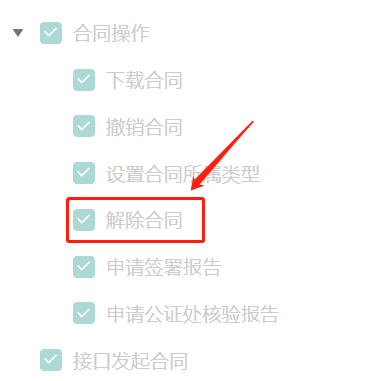
|
|
1091
|
-
*/
|
|
1092
|
-
async CreateReleaseFlow(
|
|
1093
|
-
req: CreateReleaseFlowRequest,
|
|
1094
|
-
cb?: (error: string, rep: CreateReleaseFlowResponse) => void
|
|
1095
|
-
): Promise<CreateReleaseFlowResponse> {
|
|
1096
|
-
return this.request("CreateReleaseFlow", req, cb)
|
|
1097
|
-
}
|
|
1098
|
-
|
|
1099
|
-
/**
|
|
1100
|
-
* 该接口用于获取创建法人章的二维码,需要通过微信扫描。扫描后将跳转到腾讯电子签署,进入到创建法人章的流程。
|
|
1101
|
-
|
|
1102
|
-
**注意**
|
|
1103
|
-
1. 该二维码**有效期为7天**,过期后将失效,可重新创建 。
|
|
1104
|
-
2. 每个公司**只能有1个法人章**,无法重复创建或者创建多个
|
|
1105
|
-
|
|
1106
|
-
法人章的样式可以参考下图索引(也可以自己上传法人印章图片):
|
|
1107
|
-
|
|
1108
|
-
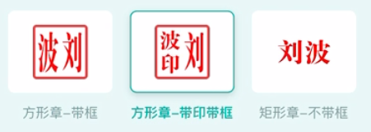
|
|
1109
|
-
*/
|
|
1110
|
-
async CreateLegalSealQrCode(
|
|
1111
|
-
req: CreateLegalSealQrCodeRequest,
|
|
1112
|
-
cb?: (error: string, rep: CreateLegalSealQrCodeResponse) => void
|
|
1113
|
-
): Promise<CreateLegalSealQrCodeResponse> {
|
|
1114
|
-
return this.request("CreateLegalSealQrCode", req, cb)
|
|
1115
|
-
}
|
|
1116
|
-
|
|
1117
|
-
/**
|
|
1118
|
-
* 本接口(CreateSeal)用于创建企业电子印章,支持创建企业公章,合同章,财务专用章和人事专用章创建。
|
|
1119
|
-
|
|
1120
|
-
1. 可以**通过图片**创建印章,图片最大5MB
|
|
1121
|
-
2. 可以**系统创建**创建印章, 系统创建的印章样子下图(样式可以调整)
|
|
1122
|
-
|
|
1123
|
-
|
|
1124
|
-
*/
|
|
1125
|
-
async CreateSeal(
|
|
1126
|
-
req: CreateSealRequest,
|
|
1127
|
-
cb?: (error: string, rep: CreateSealResponse) => void
|
|
1128
|
-
): Promise<CreateSealResponse> {
|
|
1129
|
-
return this.request("CreateSeal", req, cb)
|
|
1130
|
-
}
|
|
1131
|
-
|
|
1132
|
-
/**
|
|
1133
|
-
* 此接口(CreateMultiFlowSignQRCode)用于创建一码多签签署码。
|
|
1134
|
-
|
|
1135
|
-
**适用场景**:
|
|
1136
|
-
签署人可通过扫描二维码补充签署信息进行实名签署。常用于提前不知道签署人的身份信息场景,例如:劳务工招工、大批量员工入职等场景。
|
|
1137
|
-
|
|
1138
|
-
**注意**:
|
|
1139
|
-
1.满足以下条件的模板支持创建签署码:
|
|
1140
|
-
- 签署对象:企业与个人(无序签署)、企业与个人(顺序签署&企业非首位)、 仅个人签署。
|
|
1141
|
-
- 其发起方没有填写控件,签署方(B端或C端)可以有填写控件。
|
|
1142
|
-
- 如签署对象中含企业方,企业方签署区只能由发起方企业签署。
|
|
1143
|
-
|
|
1144
|
-
2. 通过一码多签签署码发起的合同,合同涉及到的回调消息可参考文档[合同发起及签署相关回调
|
|
1145
|
-
]( https://qian.tencent.com/developers/company/callback_types_contracts_sign)
|
|
1146
|
-
3. 用户通过一码多签签署码发起合同时,因企业额度不足导致失败 会触发签署二维码相关回调,具体参考文档[签署二维码相关回调](https://qian.tencent.com/developers/company/callback_types_commons#%E7%AD%BE%E7%BD%B2%E4%BA%8C%E7%BB%B4%E7%A0%81%E7%9B%B8%E5%85%B3%E5%9B%9E%E8%B0%83)
|
|
1147
|
-
|
|
1148
|
-
签署码的样式如下图:
|
|
1149
|
-
|
|
1150
|
-
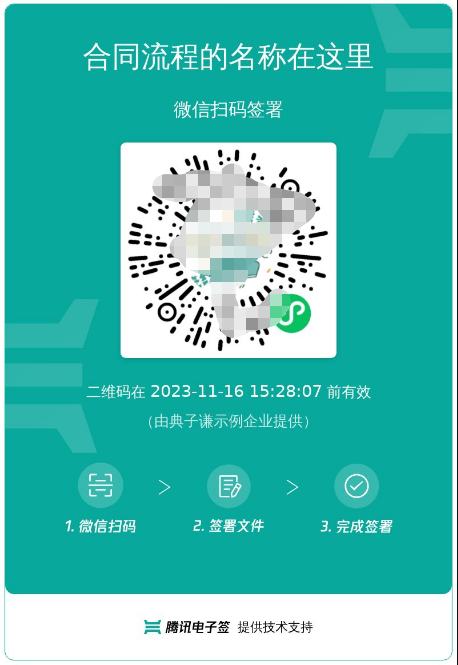
|
|
1151
|
-
*/
|
|
1152
|
-
async CreateMultiFlowSignQRCode(
|
|
1153
|
-
req: CreateMultiFlowSignQRCodeRequest,
|
|
1154
|
-
cb?: (error: string, rep: CreateMultiFlowSignQRCodeResponse) => void
|
|
1155
|
-
): Promise<CreateMultiFlowSignQRCodeResponse> {
|
|
1156
|
-
return this.request("CreateMultiFlowSignQRCode", req, cb)
|
|
1157
|
-
}
|
|
1158
|
-
|
|
1159
|
-
/**
|
|
1160
|
-
* 查询企业扩展服务的授权详情(列表),当前支持查询以下内容:
|
|
1161
|
-
1. 企业自动签(本企业授权、集团企业授权、合作企业授权)
|
|
1162
|
-
2. 批量签署能力
|
|
1163
|
-
|
|
1164
|
-
|
|
1165
|
-
注: <font color='red'>所在企业的超管、法人才有权限调用此接口</font>(Agent.ProxyOperator.OpenId 需要传递超管或者法人的OpenId)
|
|
1166
|
-
*/
|
|
1167
|
-
async DescribeExtendedServiceAuthDetail(
|
|
1168
|
-
req: DescribeExtendedServiceAuthDetailRequest,
|
|
1169
|
-
cb?: (error: string, rep: DescribeExtendedServiceAuthDetailResponse) => void
|
|
1170
|
-
): Promise<DescribeExtendedServiceAuthDetailResponse> {
|
|
1171
|
-
return this.request("DescribeExtendedServiceAuthDetail", req, cb)
|
|
1172
|
-
}
|
|
1173
|
-
|
|
1174
|
-
/**
|
|
1175
|
-
* 此接口(CancelMultiFlowSignQRCode)用于废除一码多签签署码。
|
|
1176
|
-
该接口所需的二维码ID,源自[创建一码多签签署码](https://qian.tencent.com/developers/companyApis/startFlows/CreateMultiFlowSignQRCode)生成的。
|
|
1177
|
-
如果该签署码尚处于有效期内,可通过本接口将其设置为失效状态。
|
|
1178
|
-
*/
|
|
1179
|
-
async CancelMultiFlowSignQRCode(
|
|
1180
|
-
req: CancelMultiFlowSignQRCodeRequest,
|
|
1181
|
-
cb?: (error: string, rep: CancelMultiFlowSignQRCodeResponse) => void
|
|
1182
|
-
): Promise<CancelMultiFlowSignQRCodeResponse> {
|
|
1183
|
-
return this.request("CancelMultiFlowSignQRCode", req, cb)
|
|
1184
|
-
}
|
|
1185
|
-
|
|
1186
|
-
/**
|
|
1187
|
-
* 查询流程基础信息,主要用于<font color="red">查询合同的状态</font>信息。可以配合回调通知使用。
|
|
1188
|
-
|
|
1189
|
-
注: `每个企业限制日调用量限制:100W,当日超过此限制后再调用接口返回错误`
|
|
1190
|
-
*/
|
|
1191
|
-
async DescribeFlowBriefs(
|
|
1192
|
-
req: DescribeFlowBriefsRequest,
|
|
1193
|
-
cb?: (error: string, rep: DescribeFlowBriefsResponse) => void
|
|
1194
|
-
): Promise<DescribeFlowBriefsResponse> {
|
|
1195
|
-
return this.request("DescribeFlowBriefs", req, cb)
|
|
1196
|
-
}
|
|
1197
|
-
|
|
1198
|
-
/**
|
|
1199
|
-
* 该接口用于在使用视频认证方式签署合同后,获取用户的签署人脸认证视频。
|
|
1200
|
-
|
|
1201
|
-
1. 该接口**仅适用于在H5端签署**的合同,**在通过视频认证后**获取人脸视频。
|
|
1202
|
-
2. 该接口**不支持小程序端**的签署人脸视频获取。
|
|
1203
|
-
3. 请在**签署完成后的三天内**获取人脸视频,**过期后将无法获取**。
|
|
1204
|
-
|
|
1205
|
-
**注意:该接口需要开通白名单,请联系客户经理开通后使用。**
|
|
1206
|
-
*/
|
|
1207
|
-
async DescribeSignFaceVideo(
|
|
1208
|
-
req: DescribeSignFaceVideoRequest,
|
|
1209
|
-
cb?: (error: string, rep: DescribeSignFaceVideoResponse) => void
|
|
1210
|
-
): Promise<DescribeSignFaceVideoResponse> {
|
|
1211
|
-
return this.request("DescribeSignFaceVideo", req, cb)
|
|
1212
|
-
}
|
|
1213
|
-
|
|
1214
|
-
/**
|
|
1215
|
-
* 该接口用于发起合同后,生成用户的签署链接 <br/>
|
|
1216
|
-
|
|
1217
|
-
**注意**
|
|
1218
|
-
1. 该签署**链接有效期为30分钟**,过期后将失效,如需签署可重新创建签署链接 。
|
|
1219
|
-
2. 该接口返回的签署链接适用于APP集成的场景,支持APP打开或浏览器直接打开,**不支持微信小程序嵌入**。配置方式请参考:<a href="https://qian.tencent.com/developers/company/openqianh5/">跳转电子签H5</a>。
|
|
1220
|
-
如需跳转到小程序的实现,参考微信官方文档(分为<a href="https://developers.weixin.qq.com/miniprogram/dev/api/navigate/wx.navigateToMiniProgram.html">全屏</a>、<a href="https://developers.weixin.qq.com/miniprogram/dev/framework/open-ability/openEmbeddedMiniProgram.html">半屏</a>两种方式),如何配置也可以请参考: <a href="https://qian.tencent.com/developers/company/openwxminiprogram">跳转电子签小程序配置</a>。
|
|
1221
|
-
3. 因h5涉及人脸身份认证能力基于慧眼人脸核身,对Android和iOS系统均有一定要求, 因此<font color='red'>App嵌入H5签署合同需要按照慧眼提供的<a href="https://cloud.tencent.com/document/product/1007/61076">慧眼人脸核身兼容性文档</a>做兼容性适配</font>。
|
|
1222
|
-
*/
|
|
1223
|
-
async CreateFlowSignUrl(
|
|
1224
|
-
req: CreateFlowSignUrlRequest,
|
|
1225
|
-
cb?: (error: string, rep: CreateFlowSignUrlResponse) => void
|
|
1226
|
-
): Promise<CreateFlowSignUrlResponse> {
|
|
1227
|
-
return this.request("CreateFlowSignUrl", req, cb)
|
|
1228
|
-
}
|
|
1229
|
-
|
|
1230
|
-
/**
|
|
1231
|
-
* 支持企业进行批量初始化操作:
|
|
1232
|
-
|
|
1233
|
-
此接口存在以下限制:
|
|
1234
|
-
1. 若批量操作中包含<font color="red">加入集团企业</font>操作,则调用此接口的员工须有<font color="red">集团企业管理权限</font>。
|
|
1235
|
-
2. 批量操作的企业需要已经完成电子签的认证流程。
|
|
1236
|
-
3. 通过此接口生成的链接在小程序端进行操作时,操作人需要是<font color="red">所有企业的超管或法人</font>。
|
|
1237
|
-
4. 批量操作的企业,需要是<a href="https://qian.tencent.com/developers/companyApis/organizations/CreateOrganizationAuthUrl" target="_blank">通过平台方引导认证</a>的企业。
|
|
1238
|
-
5. <font color="red">操作链接过期时间默认为生成链接后7天。</font>
|
|
1239
|
-
*/
|
|
1240
|
-
async CreateBatchInitOrganizationUrl(
|
|
1241
|
-
req: CreateBatchInitOrganizationUrlRequest,
|
|
1242
|
-
cb?: (error: string, rep: CreateBatchInitOrganizationUrlResponse) => void
|
|
1243
|
-
): Promise<CreateBatchInitOrganizationUrlResponse> {
|
|
1244
|
-
return this.request("CreateBatchInitOrganizationUrl", req, cb)
|
|
1245
|
-
}
|
|
1246
|
-
|
|
1247
|
-
/**
|
|
1248
|
-
* 用来撤销<a href="https://qian.tencent.com/developers/companyApis/users/CreateUserAutoSignEnableUrl" target="_blank">获取个人用户自动签的开通状态</a>生成的开通链接,撤销生成的链接失效。
|
|
1249
|
-
|
|
1250
|
-
注:
|
|
1251
|
-
<ul><li>若个人用户已经用生成的完成自动签署的开通,撤销链接无效不会对开通结果产生影响(此情况接口会报错)。</li>
|
|
1252
|
-
<li>处方单等特殊场景专用,此接口为白名单功能,使用前请联系对接的客户经理沟通。</li></ul>
|
|
1253
|
-
*/
|
|
1254
|
-
async CancelUserAutoSignEnableUrl(
|
|
1255
|
-
req: CancelUserAutoSignEnableUrlRequest,
|
|
1256
|
-
cb?: (error: string, rep: CancelUserAutoSignEnableUrlResponse) => void
|
|
1257
|
-
): Promise<CancelUserAutoSignEnableUrlResponse> {
|
|
1258
|
-
return this.request("CancelUserAutoSignEnableUrl", req, cb)
|
|
1259
|
-
}
|
|
1260
|
-
|
|
1261
|
-
/**
|
|
1262
|
-
* 通过此接口(DescribeBillUsageDetail)查询该企业的套餐消耗详情。
|
|
1263
|
-
*/
|
|
1264
|
-
async DescribeBillUsageDetail(
|
|
1265
|
-
req: DescribeBillUsageDetailRequest,
|
|
1266
|
-
cb?: (error: string, rep: DescribeBillUsageDetailResponse) => void
|
|
1267
|
-
): Promise<DescribeBillUsageDetailResponse> {
|
|
1268
|
-
return this.request("DescribeBillUsageDetail", req, cb)
|
|
1269
|
-
}
|
|
1270
|
-
|
|
1271
|
-
/**
|
|
1272
|
-
* 此接口(DescribeIntegrationDepartments)用于查询企业的部门信息列表,支持查询单个部门节点或单个部门节点及一级子节点部门列表。
|
|
1273
|
-
*/
|
|
1274
|
-
async DescribeIntegrationDepartments(
|
|
1275
|
-
req: DescribeIntegrationDepartmentsRequest,
|
|
1276
|
-
cb?: (error: string, rep: DescribeIntegrationDepartmentsResponse) => void
|
|
1277
|
-
): Promise<DescribeIntegrationDepartmentsResponse> {
|
|
1278
|
-
return this.request("DescribeIntegrationDepartments", req, cb)
|
|
1279
|
-
}
|
|
1280
|
-
|
|
1281
|
-
/**
|
|
1282
|
-
* 此接口(ModifyIntegrationDepartment)用于更新企业的部门信息,支持更新部门名称、客户系统部门ID和部门序号等信息。
|
|
1283
|
-
*/
|
|
1284
|
-
async ModifyIntegrationDepartment(
|
|
1285
|
-
req: ModifyIntegrationDepartmentRequest,
|
|
1286
|
-
cb?: (error: string, rep: ModifyIntegrationDepartmentResponse) => void
|
|
1287
|
-
): Promise<ModifyIntegrationDepartmentResponse> {
|
|
1288
|
-
return this.request("ModifyIntegrationDepartment", req, cb)
|
|
1289
|
-
}
|
|
1290
|
-
|
|
1291
|
-
/**
|
|
1292
|
-
* 此API接口用来查询加入集团的成员企业信息
|
|
1293
|
-
适用场景:子企业在加入集团后,主企业可能通过此接口获取到所有的子企业列表,方便进行展示和统计
|
|
1294
|
-
*/
|
|
1295
|
-
async DescribeOrganizationGroupOrganizations(
|
|
1296
|
-
req: DescribeOrganizationGroupOrganizationsRequest,
|
|
1297
|
-
cb?: (error: string, rep: DescribeOrganizationGroupOrganizationsResponse) => void
|
|
1298
|
-
): Promise<DescribeOrganizationGroupOrganizationsResponse> {
|
|
1299
|
-
return this.request("DescribeOrganizationGroupOrganizations", req, cb)
|
|
1300
|
-
}
|
|
1301
|
-
|
|
1302
|
-
/**
|
|
1303
|
-
* 该接口会生成一个手机号变更的链接,用户可以通过该链接进入电子签系统进行手机号的变更。
|
|
1304
|
-
该接口支持员工和个人端手机号的变更。
|
|
1305
|
-
*/
|
|
1306
|
-
async CreateUserMobileChangeUrl(
|
|
1307
|
-
req: CreateUserMobileChangeUrlRequest,
|
|
1308
|
-
cb?: (error: string, rep: CreateUserMobileChangeUrlResponse) => void
|
|
1309
|
-
): Promise<CreateUserMobileChangeUrlResponse> {
|
|
1310
|
-
return this.request("CreateUserMobileChangeUrl", req, cb)
|
|
1311
|
-
}
|
|
1312
|
-
|
|
1313
|
-
/**
|
|
1314
|
-
* 本接口(DeleteSealPolicies)用于撤销企业员工持有的印章权限
|
|
1315
|
-
*/
|
|
1316
|
-
async DeleteSealPolicies(
|
|
1317
|
-
req: DeleteSealPoliciesRequest,
|
|
1318
|
-
cb?: (error: string, rep: DeleteSealPoliciesResponse) => void
|
|
1319
|
-
): Promise<DeleteSealPoliciesResponse> {
|
|
1320
|
-
return this.request("DeleteSealPolicies", req, cb)
|
|
1321
|
-
}
|
|
1322
|
-
|
|
1323
|
-
/**
|
|
1324
|
-
* 本接口(DescribeFileUrls)用于查询文件的下载URL。
|
|
1325
|
-
适用场景:通过传参合同流程编号,下载对应的合同PDF文件流到本地。
|
|
1326
|
-
|
|
1327
|
-
|
|
1328
|
-
### 2. 确保合同的PDF已经合成后,再调用本接口。
|
|
1329
|
-
|
|
1330
|
-
用户创建合同或者提交签署动作后,后台需要1~3秒的时间就进行合同PDF合成或者签名,为了确保您下载的是签署完成的完整合同文件,我们建议采取下面两种方式的一种来<font color="red"><b>确保PDF已经合成完成,然后在调用本接口</b></font>。
|
|
1331
|
-
|
|
1332
|
-
**第一种**:请确保您的系统配置了[接收合同完成通知的回调](https://qian.tencent.com/developers/company/callback_types_contracts_sign)功能。一旦所有参与方签署完毕,我们的系统将自动向您提供的回调地址发送完成通知。
|
|
1333
|
-
|
|
1334
|
-
**第二种**:通过调用我们的[获取合同信息](https://qian.tencent.com/developers/companyApis/queryFlows/DescribeFlowBriefs)接口来主动检查合同的签署状态。请仅在确认合同状态为“签署完成”后,进行文件的下载操作。
|
|
1335
|
-
|
|
1336
|
-
### 3. 链接具有有效期限
|
|
1337
|
-
<font color="red"><b>生成的链接是有时间限制的,过期后将无法访问</b></font>。您可以在接口返回的信息中查看具体的过期时间。为避免错误,请确保在链接过期之前进行下载操作。
|
|
1338
|
-
*/
|
|
1339
|
-
async DescribeFileUrls(
|
|
1340
|
-
req: DescribeFileUrlsRequest,
|
|
1341
|
-
cb?: (error: string, rep: DescribeFileUrlsResponse) => void
|
|
1342
|
-
): Promise<DescribeFileUrlsResponse> {
|
|
1343
|
-
return this.request("DescribeFileUrls", req, cb)
|
|
1344
|
-
}
|
|
1345
|
-
|
|
1346
|
-
/**
|
|
1347
|
-
* 此接口(CreateIntegrationRole)用来创建企业自定义的SaaS角色或集团角色。
|
|
1348
|
-
|
|
1349
|
-
适用场景1:创建当前企业的自定义SaaS角色或集团角色,并且创建时不进行权限的设置(PermissionGroups 参数不传),角色中的权限内容可通过控制台编辑角色或通过接口 ModifyIntegrationRole 完成更新。
|
|
1350
|
-
|
|
1351
|
-
适用场景2:创建当前企业的自定义SaaS角色或集团角色,并且创建时进行权限的设置(PermissionGroups 参数要传),权限树内容 PermissionGroups 可参考接口 DescribeIntegrationRoles 的输出。此处注意权限树内容可能会更新,需尽量拉取最新的权限树内容,并且权限树内容 PermissionGroups 必须是一颗完整的权限树。
|
|
1352
|
-
|
|
1353
|
-
适用场景3:创建集团角色时可同时设置角色管理的子企业列表,可通过设置 SubOrganizationIds 参数达到此效果。
|
|
1354
|
-
|
|
1355
|
-
适用场景4:主企业代理子企业操作的场景,需要设置Agent参数,并且ProxyOrganizationId设置为子企业的id即可。
|
|
1356
|
-
|
|
1357
|
-
注意事项:SaaS角色和集团角色对应的权限树是不一样的。
|
|
1358
|
-
*/
|
|
1359
|
-
async CreateIntegrationRole(
|
|
1360
|
-
req: CreateIntegrationRoleRequest,
|
|
1361
|
-
cb?: (error: string, rep: CreateIntegrationRoleResponse) => void
|
|
1362
|
-
): Promise<CreateIntegrationRoleResponse> {
|
|
1363
|
-
return this.request("CreateIntegrationRole", req, cb)
|
|
1364
|
-
}
|
|
1365
|
-
|
|
1366
|
-
/**
|
|
1367
|
-
* 管理企业扩展服务
|
|
1368
|
-
|
|
1369
|
-
- **直接开通的情形:** 若在操作过程中接口没有返回跳转链接,这表明无需进行任何跳转操作。此时,相应的企业拓展服务将会直接被开通或关闭。
|
|
1370
|
-
|
|
1371
|
-
- **需要法人或者超管签署开通协议的情形:** 当需要开通以下企业拓展服务时, 系统将返回一个操作链接。贵方需要主动联系并通知企业的超级管理员(超管)或法人。由他们点击该链接,完成服务的开通操作。
|
|
1372
|
-
- **OPEN_SERVER_SIGN(企业自动签)**
|
|
1373
|
-
|
|
1374
|
-
注意: `在调用此接口以管理企业扩展服务时,操作者(入参中的Operator)必须是企业的超级管理员(超管)或法人`
|
|
1375
|
-
|
|
1376
|
-
|
|
1377
|
-
对应的扩展服务能力可以在控制台的【扩展服务】中找到
|
|
1378
|
-
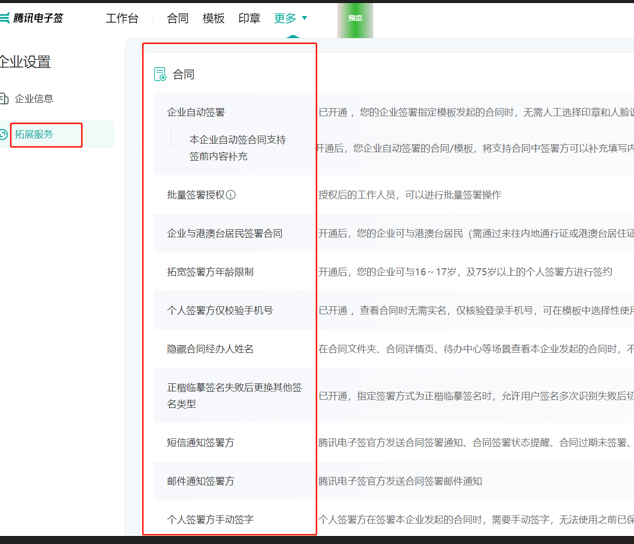
|
|
1379
|
-
*/
|
|
1380
|
-
async ModifyExtendedService(
|
|
1381
|
-
req: ModifyExtendedServiceRequest,
|
|
1382
|
-
cb?: (error: string, rep: ModifyExtendedServiceResponse) => void
|
|
1383
|
-
): Promise<ModifyExtendedServiceResponse> {
|
|
1384
|
-
return this.request("ModifyExtendedService", req, cb)
|
|
1385
|
-
}
|
|
1386
|
-
|
|
1387
|
-
/**
|
|
1388
|
-
* 生成员工信息变更链接,当前仅支持变更手机号
|
|
1389
|
-
|
|
1390
|
-
注:
|
|
1391
|
-
1. 目前仅支持修改员工手机号,待修改员工必须已经实名且在职
|
|
1392
|
-
2. 仅支持返回小程序链接
|
|
1393
|
-
*/
|
|
1394
|
-
async CreateEmployeeChangeUrl(
|
|
1395
|
-
req: CreateEmployeeChangeUrlRequest,
|
|
1396
|
-
cb?: (error: string, rep: CreateEmployeeChangeUrlResponse) => void
|
|
1397
|
-
): Promise<CreateEmployeeChangeUrlResponse> {
|
|
1398
|
-
return this.request("CreateEmployeeChangeUrl", req, cb)
|
|
1399
|
-
}
|
|
1400
|
-
|
|
1401
|
-
/**
|
|
1402
|
-
* 在已启动的签署流程中,可对签署截止日期进行延期操作,主要分为以下两个层面:
|
|
1403
|
-
1. <b> 合同(流程)层面</b>:仅需提供签署流程ID。此操作将对整个签署流程以及未单独设置签署截止时间的签署人进行延期。
|
|
1404
|
-
2. <b> 签署人层面</b> :需提供流程ID和签署人ID。此操作针对特定签署人进行延期,特别是对于有序合同(流程),签署截止时间不得超过后续签署人的流程截止时间。
|
|
1405
|
-
|
|
1406
|
-
此接口存在以下限制:
|
|
1407
|
-
1. 执行操作的员工须为<font color="red">发起方企业的超级管理员、法定代表人或签署流程发起人</font>。
|
|
1408
|
-
2. 延长整个签署流程时,<font color="red">应至少有一方尚未签署</font>(即签署流程不能处于已全部签署完成、已拒签、已过期、已撤回、拒绝填写、已解除等状态)。
|
|
1409
|
-
3. 延长整个签署流程时,新的签署截止日期应晚于已设定的签署截止日期和当前日期。
|
|
1410
|
-
4. 延长签署方截止时间时,<font color="red">签署方不能处于流程完结或已终止状态</font>(即签署人不能处于已签署、已拒签、已过期、已撤回、拒绝填写、已解除等状态)。
|
|
1411
|
-
5. 延长签署方截止时间时,新的签署截止日期应晚于当前日期和已设定的截止日期。若为有序合同,还需早于或等于下一签署人的截止日期,且早于签署流程整体的截止日期。
|
|
1412
|
-
6. <font color="red">不支持操作合同组合同</font>。
|
|
1413
|
-
|
|
1414
|
-
合同(流程)层面 截止时间控制台展示的位置:
|
|
1415
|
-
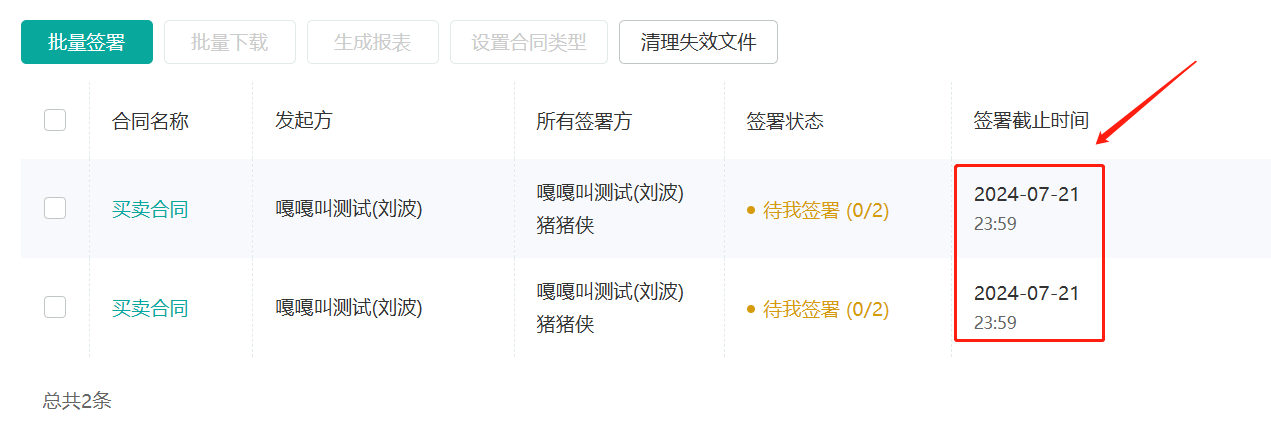
|
|
1416
|
-
*/
|
|
1417
|
-
async ModifyFlowDeadline(
|
|
1418
|
-
req: ModifyFlowDeadlineRequest,
|
|
1419
|
-
cb?: (error: string, rep: ModifyFlowDeadlineResponse) => void
|
|
1420
|
-
): Promise<ModifyFlowDeadlineResponse> {
|
|
1421
|
-
return this.request("ModifyFlowDeadline", req, cb)
|
|
1422
|
-
}
|
|
1423
|
-
|
|
1424
|
-
/**
|
|
1425
|
-
* 获取区块链存证证书查看链接/二维码接口
|
|
1426
|
-
|
|
1427
|
-
适用场景:企业员工可以通过此接口生成合同区块链存证证书的查看链接/二维码,以供他人扫码打开腾讯电子签小程序查看。
|
|
1428
|
-
|
|
1429
|
-
[点击查看区块链存证证书样式](https://qcloudimg.tencent-cloud.cn/raw/47d5e9c2ffa90ad4e27b3cd14095aa08.jpg)
|
|
1430
|
-
|
|
1431
|
-
注:
|
|
1432
|
-
<ul><li>1. 二维码下载链接过期时间为5分钟,请尽快下载保存。二维码/短链的过期时间为<font color="red">7天</font>,超过有效期则不可用。</li>
|
|
1433
|
-
<li>2. 合同状态需为<font color="red">签署完成</font> 、<font color="red">已解除</font>才能生成证书查看二维码/短链。</li>
|
|
1434
|
-
<li>3. 调用接口时,需确保接口调用身份拥有此合同的访问数据权限或为合同参与方。</li>
|
|
1435
|
-
<li>4. 通过扫码或者点击链接,用户无需登录或者鉴权即可查看对应合同的区块链存证证书,请妥善保管好二维码或链接。</li></ul>
|
|
1436
|
-
*/
|
|
1437
|
-
async CreateFlowBlockchainEvidenceUrl(
|
|
1438
|
-
req: CreateFlowBlockchainEvidenceUrlRequest,
|
|
1439
|
-
cb?: (error: string, rep: CreateFlowBlockchainEvidenceUrlResponse) => void
|
|
1440
|
-
): Promise<CreateFlowBlockchainEvidenceUrlResponse> {
|
|
1441
|
-
return this.request("CreateFlowBlockchainEvidenceUrl", req, cb)
|
|
1442
|
-
}
|
|
1443
|
-
|
|
1444
|
-
/**
|
|
1445
|
-
* 本接口(CreateBatchOrganizationRegistrationTasks)用于批量创建企业认证链接
|
|
1446
|
-
该接口为异步提交任务接口,需要跟查询企业批量认证链接(DescribeBatchOrganizationRegistrationUrls) 配合使用.
|
|
1447
|
-
|
|
1448
|
-
批量创建链接有以下限制:
|
|
1449
|
-
|
|
1450
|
-
1. 单次最多创建10个企业。
|
|
1451
|
-
2. 一天同一家企业最多创建8000家企业。
|
|
1452
|
-
3. 同一批创建的企业不能重复 其中包括 企业名称,企业统一信用代码
|
|
1453
|
-
4. 跳转到小程序的实现,参考微信官方文档(分为全屏、半屏两种方式),如何配置也可以请参考: 跳转电子签小程序配置
|
|
1454
|
-
|
|
1455
|
-
注:
|
|
1456
|
-
|
|
1457
|
-
1. 此接口需要 <font color="red"><b>购买单独的实名套餐包</b></font>方可调用,如有需求请联系对接人员评估
|
|
1458
|
-
|
|
1459
|
-
2. 如果生成的链接是APP链接,跳转到小程序的实现,参考微信官方文档(分为<a href="https://developers.weixin.qq.com/miniprogram/dev/api/navigate/wx.navigateToMiniProgram.html">全屏</a>、<a href="https://developers.weixin.qq.com/miniprogram/dev/framework/open-ability/openEmbeddedMiniProgram.html">半屏</a>两种方式),如何配置也可以请参考: <a href="https://qian.tencent.com/developers/company/openwxminiprogram">跳转电子签小程序配置</a>
|
|
1460
|
-
|
|
1461
|
-
|
|
1462
|
-
**腾讯电子签小程序的AppID 和 原始Id如下:**
|
|
1463
|
-
|
|
1464
|
-
| 小程序 | AppID | 原始ID |
|
|
1465
|
-
| --- | --- | --- |
|
|
1466
|
-
| 腾讯电子签(正式版) | wxa023b292fd19d41d | gh_da88f6188665 |
|
|
1467
|
-
| 腾讯电子签Demo | wx371151823f6f3edf | gh_39a5d3de69fa |
|
|
1468
|
-
*/
|
|
1469
|
-
async CreateBatchOrganizationRegistrationTasks(
|
|
1470
|
-
req: CreateBatchOrganizationRegistrationTasksRequest,
|
|
1471
|
-
cb?: (error: string, rep: CreateBatchOrganizationRegistrationTasksResponse) => void
|
|
1472
|
-
): Promise<CreateBatchOrganizationRegistrationTasksResponse> {
|
|
1473
|
-
return this.request("CreateBatchOrganizationRegistrationTasks", req, cb)
|
|
1474
|
-
}
|
|
1475
|
-
|
|
1476
|
-
/**
|
|
1477
|
-
* 检测个人用户是否已经实名。
|
|
1478
|
-
|
|
1479
|
-
在调用生成C端用户实名链接([CreateUserVerifyUrl](https://qian.tencent.com/developers/companyApis/users/CreateUserVerifyUrl))接口之前,客户企业应首先调用本接口判断C端用户是否已经完成实名认证。如果用户已经实名,那么无需再次调用([CreateUserVerifyUrl](https://qian.tencent.com/developers/companyApis/users/CreateUserVerifyUrl))生成链接并走实名认证流程。
|
|
1480
|
-
|
|
1481
|
-
注意:
|
|
1482
|
-
|
|
1483
|
-
- 此接口<font color="red">仅用于确认通过本公司生成[C端用户实名链接(CreateUserVerifyUrl)](https://qian.tencent.com/developers/companyApis/users/CreateUserVerifyUrl)接口注册认证的用户,不包括其他途径(如主动注册认证、在签署合同中注册认证等)在电子签平台上进行的实名认证</font>。
|
|
1484
|
-
|
|
1485
|
-
- 调用此接口需要购买单独的实名套餐包。<font color="red">使用前请联系对接的客户经理沟通</font>。
|
|
1486
|
-
*/
|
|
1487
|
-
async DescribeUserVerifyStatus(
|
|
1488
|
-
req: DescribeUserVerifyStatusRequest,
|
|
1489
|
-
cb?: (error: string, rep: DescribeUserVerifyStatusResponse) => void
|
|
1490
|
-
): Promise<DescribeUserVerifyStatusResponse> {
|
|
1491
|
-
return this.request("DescribeUserVerifyStatus", req, cb)
|
|
1492
|
-
}
|
|
1493
|
-
|
|
1494
|
-
/**
|
|
1495
|
-
* 此接口(ModifyIntegrationRole)用来更新企业自定义的SaaS角色或集团角色。
|
|
1496
|
-
|
|
1497
|
-
适用场景1:更新当前企业的自定义SaaS角色或集团角色,并且更新时不进行角色中权限的更新(PermissionGroups 参数不传)。
|
|
1498
|
-
|
|
1499
|
-
适用场景2:更新当前企业的自定义SaaS角色或集团角色,并且更新时进行角色中权限的设置(PermissionGroups 参数要传),权限树内容 PermissionGroups 可参考接口 DescribeIntegrationRoles 的输出。此处注意权限树内容可能会更新,需尽量拉取最新的权限树内容,并且权限树内容 PermissionGroups 必须是一颗完整的权限树。
|
|
1500
|
-
|
|
1501
|
-
适用场景3:更新集团角色管理的子企业列表,可通过设置 SubOrganizationIds 参数达到此效果。
|
|
1502
|
-
|
|
1503
|
-
适用场景4:主企业代理子企业操作的场景,需要设置Agent参数,并且ProxyOrganizationId设置为子企业的id即可。
|
|
1504
|
-
|
|
1505
|
-
注意事项:SaaS角色和集团角色对应的权限树是不一样的。
|
|
1506
|
-
*/
|
|
1507
|
-
async ModifyIntegrationRole(
|
|
1508
|
-
req: ModifyIntegrationRoleRequest,
|
|
1509
|
-
cb?: (error: string, rep: ModifyIntegrationRoleResponse) => void
|
|
1510
|
-
): Promise<ModifyIntegrationRoleResponse> {
|
|
1511
|
-
return this.request("ModifyIntegrationRole", req, cb)
|
|
1512
|
-
}
|
|
1513
|
-
|
|
1514
|
-
/**
|
|
1515
|
-
* 此接口用于获取企业批量认证链接-单链接包含多条认证流。
|
|
1516
|
-
|
|
1517
|
-
前提条件:已调用 [CreateBatchOrganizationRegistrationTasks创建企业批量认证链接任务接口](https://qian.tencent.com/developers/companyApis/organizations/CreateBatchOrganizationRegistrationTasks) 和[查询企业批量认证链接DescribeBatchOrganizationRegistrationUrls](https://qian.tencent.com/developers/companyApis/organizations/DescribeBatchOrganizationRegistrationUrls) 确保认证任务已经完成。
|
|
1518
|
-
|
|
1519
|
-
异步任务的处理完成时间视当前已提交的任务量、任务的复杂程度等因素决定,正常情况下 3~5 秒即可完成,但也可能需要更长的时间。
|
|
1520
|
-
此链接包含多条认证流程,使用该链接可以批量的对企业进行认证。
|
|
1521
|
-
*/
|
|
1522
|
-
async CreateBatchOrganizationAuthorizationUrl(
|
|
1523
|
-
req: CreateBatchOrganizationAuthorizationUrlRequest,
|
|
1524
|
-
cb?: (error: string, rep: CreateBatchOrganizationAuthorizationUrlResponse) => void
|
|
1525
|
-
): Promise<CreateBatchOrganizationAuthorizationUrlResponse> {
|
|
1526
|
-
return this.request("CreateBatchOrganizationAuthorizationUrl", req, cb)
|
|
1527
|
-
}
|
|
1528
|
-
|
|
1529
|
-
/**
|
|
1530
|
-
* 该接口用于获取个人授权执业章给企业的微信二维码,需要个人用户通过微信扫码。
|
|
1531
|
-
|
|
1532
|
-
扫描后将跳转到腾讯电子签小程序,进入到授权执业章的流程。
|
|
1533
|
-
|
|
1534
|
-
个人用户授权成功后,企业印章管理员需对印章进行审核,审核通过后,即可使用个人授权的执业章进行盖章操作。
|
|
1535
|
-
|
|
1536
|
-
|
|
1537
|
-
**注意**
|
|
1538
|
-
1. 该二维码**有效期为7天**,过期后将失效,可重新创建。
|
|
1539
|
-
|
|
1540
|
-
整体流程入下图
|
|
1541
|
-
|
|
1542
|
-
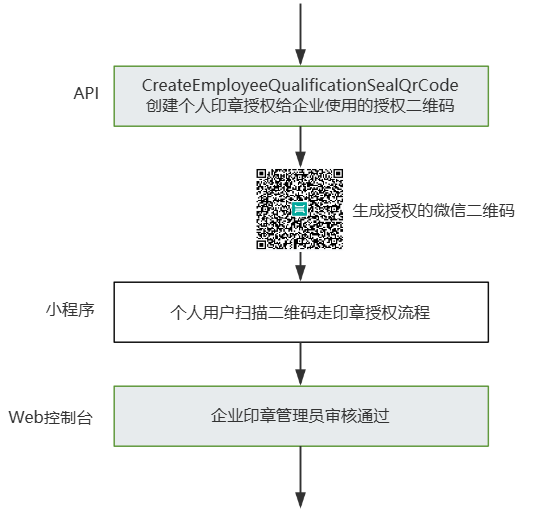
|
|
1543
|
-
*/
|
|
1544
|
-
async CreateEmployeeQualificationSealQrCode(
|
|
1545
|
-
req: CreateEmployeeQualificationSealQrCodeRequest,
|
|
1546
|
-
cb?: (error: string, rep: CreateEmployeeQualificationSealQrCodeResponse) => void
|
|
1547
|
-
): Promise<CreateEmployeeQualificationSealQrCodeResponse> {
|
|
1548
|
-
return this.request("CreateEmployeeQualificationSealQrCode", req, cb)
|
|
1549
|
-
}
|
|
1550
|
-
|
|
1551
|
-
/**
|
|
1552
|
-
* 创建企业扩展服务授权,当前仅支持授权 “企业自动签” 和 “批量签署” 给企业员工。
|
|
1553
|
-
该接口作用和电子签控制台 企业设置-扩展服务-企业自动签署和批量签署授权 两个模块功能相同,可通过该接口授权给企业员工。
|
|
1554
|
-
|
|
1555
|
-
注:“企业自动签授权”支持集团代子企业操作,请联系运营开通此功能。
|
|
1556
|
-
*/
|
|
1557
|
-
async CreateExtendedServiceAuthInfos(
|
|
1558
|
-
req: CreateExtendedServiceAuthInfosRequest,
|
|
1559
|
-
cb?: (error: string, rep: CreateExtendedServiceAuthInfosResponse) => void
|
|
1560
|
-
): Promise<CreateExtendedServiceAuthInfosResponse> {
|
|
1561
|
-
return this.request("CreateExtendedServiceAuthInfos", req, cb)
|
|
1562
|
-
}
|
|
1563
|
-
|
|
1564
|
-
/**
|
|
1565
|
-
* 此接口(CreateOrganizationInfoChangeUrl)用于创建企业信息变更链接,支持创建企业超管变更链接或企业基础信息变更链接,通过入参ChangeType指定。
|
|
1566
|
-
|
|
1567
|
-
需要企业的<font color="red">现有的超级管理员、法人来点击</font>链接执行变动操作。
|
|
1568
|
-
|
|
1569
|
-
### 2. 企业基础信息
|
|
1570
|
-
#### A. 可变动的信息
|
|
1571
|
-
- **企业名称**
|
|
1572
|
-
- **法定代表人姓名**(新法人将收到邀请链接)
|
|
1573
|
-
- **企业地址和所在地**
|
|
1574
|
-
- **企业超级管理员变更** (此变更将企业超级管理员的职责转移给企业的其他员工)
|
|
1575
|
-
|
|
1576
|
-
#### B. 不可变动的信息
|
|
1577
|
-
- **统一社会信用代码**
|
|
1578
|
-
- **企业主体类型**
|
|
1579
|
-
|
|
1580
|
-
### 3.变更影响
|
|
1581
|
-
|
|
1582
|
-
如果企业的名字变更将导致下面的影响:
|
|
1583
|
-
|
|
1584
|
-
- **合同**:已存在的合同将保持不变。新发起的合同需使用新的企业名称作为签署方,否则无法签署。
|
|
1585
|
-
- **印章**:所有现有的机构公章和合同专用章将被删除,并将根据新的企业名称重新生成。法人章、财务专用章和人事专用章将不做处理。
|
|
1586
|
-
- **证书**:企业证书将重新由CA机构使用新的企业名称生成。
|
|
1587
|
-
*/
|
|
1588
|
-
async CreateOrganizationInfoChangeUrl(
|
|
1589
|
-
req: CreateOrganizationInfoChangeUrlRequest,
|
|
1590
|
-
cb?: (error: string, rep: CreateOrganizationInfoChangeUrlResponse) => void
|
|
1591
|
-
): Promise<CreateOrganizationInfoChangeUrlResponse> {
|
|
1592
|
-
return this.request("CreateOrganizationInfoChangeUrl", req, cb)
|
|
1593
|
-
}
|
|
1594
|
-
|
|
1595
|
-
/**
|
|
1596
|
-
* 此接口(CreateConvertTaskApi)用来将word、excel、html、图片、txt类型文件转换为PDF文件。<br />
|
|
1597
|
-
前提条件:源文件已经通过 <a href="https://qian.tencent.com/developers/companyApis/templatesAndFiles/UploadFiles" target="_blank">文件上传接口</a>完成上传,并得到了源文件的资源Id。<br />
|
|
1598
|
-
适用场景1:已经上传了一个word文件,希望将该word文件转换成pdf文件后发起合同
|
|
1599
|
-
适用场景2:已经上传了一个jpg图片文件,希望将该图片文件转换成pdf文件后发起合同<br />
|
|
1600
|
-
转换文件是一个耗时操作,若想查看转换任务是否完成,可以通过<a href="https://qian.tencent.com/developers/companyApis/templatesAndFiles/GetTaskResultApi" target="_blank">查询转换任务状态</a>接口获取任务状态。<br />
|
|
1601
|
-
注:
|
|
1602
|
-
1. `支持的文件类型有doc、docx、xls、xlsx、html、jpg、jpeg、png、bmp、txt`
|
|
1603
|
-
2. `可通过发起合同时设置预览来检查转换文件是否达到预期效果`
|
|
1604
|
-
*/
|
|
1605
|
-
async CreateConvertTaskApi(
|
|
1606
|
-
req: CreateConvertTaskApiRequest,
|
|
1607
|
-
cb?: (error: string, rep: CreateConvertTaskApiResponse) => void
|
|
1608
|
-
): Promise<CreateConvertTaskApiResponse> {
|
|
1609
|
-
return this.request("CreateConvertTaskApi", req, cb)
|
|
1610
|
-
}
|
|
1611
|
-
|
|
1612
|
-
/**
|
|
1613
|
-
* 本接口(CreateOrganizationAuthUrl)的主要功能是生成合作企业的认证链接。
|
|
1614
|
-
|
|
1615
|
-
在生成链接的过程中,可以提供一部分已知信息,以便为对方进行认证流程提供便利。
|
|
1616
|
-
|
|
1617
|
-
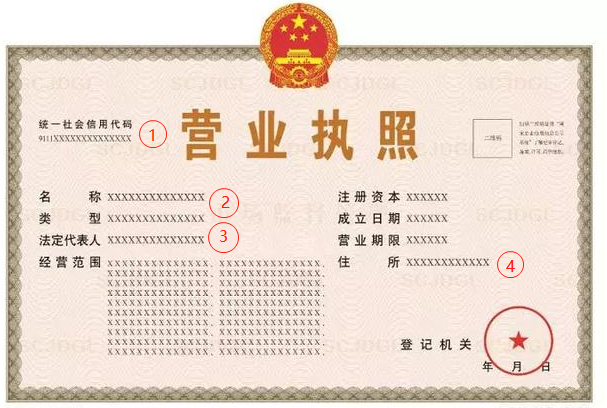
|
|
1618
|
-
|
|
1619
|
-
|
|
1620
|
-
- **企业统一社会信用代码**: 对应上图中的**1**
|
|
1621
|
-
- **企业名称**: 对应上图中的**2**
|
|
1622
|
-
- **企业法定代表人的名字**:对应上图中的**3**
|
|
1623
|
-
- **企业详细住所**:对应上图中的**4**
|
|
1624
|
-
|
|
1625
|
-
|
|
1626
|
-
|
|
1627
|
-
|
|
1628
|
-
<b>注</b>:此接口需要 <font color="red"><b>购买单独的实名套餐包</b></font>方可调用,如有需求请联系对接人员评估
|
|
1629
|
-
*/
|
|
1630
|
-
async CreateOrganizationAuthUrl(
|
|
1631
|
-
req: CreateOrganizationAuthUrlRequest,
|
|
1632
|
-
cb?: (error: string, rep: CreateOrganizationAuthUrlResponse) => void
|
|
1633
|
-
): Promise<CreateOrganizationAuthUrlResponse> {
|
|
1634
|
-
return this.request("CreateOrganizationAuthUrl", req, cb)
|
|
1635
|
-
}
|
|
1636
|
-
|
|
1637
|
-
/**
|
|
1638
|
-
* 此接口(UploadFiles)文件上传。<br/>
|
|
1639
|
-
|
|
1640
|
-
适用场景:用于合同,印章的文件上传。文件上传以后,
|
|
1641
|
-
如果是PDF格式文件可配合<a href="https://qian.tencent.com/developers/companyApis/startFlows/CreateFlowByFiles" target="_blank">用PDF文件创建签署流程</a>接口进行合同流程的发起
|
|
1642
|
-
如果是其他类型可以配合<a href="https://qian.tencent.com/developers/companyApis/templatesAndFiles/CreateConvertTaskApi" target="_blank">创建文件转换任务</a>接口转换成PDF文件
|
|
1643
|
-
|
|
1644
|
-
注:
|
|
1645
|
-
1. 图片类型(png/jpg/jpeg)限制大小为5M以下, PDF/word/excel等其他格式限制大小为60M以下
|
|
1646
|
-
2. 调用此接口时需要设置单独的Domain请求域名,<font color="red">联调开发环境为: file.test.ess.tencent.cn,正式环境需要设置为:file.ess.tencent.cn</font>,代码示例
|
|
1647
|
-
```
|
|
1648
|
-
HttpProfile httpProfile = new HttpProfile();
|
|
1649
|
-
httpProfile.setEndpoint("file.test.ess.tencent.cn");
|
|
1650
|
-
```
|
|
1651
|
-
|
|
1652
|
-
<font color="red">相关视频指引</font> <br>
|
|
1653
|
-
1. <a href="https://dyn.ess.tencent.cn/guide/apivideo/ess_uploadfiles.mp4" target="_blank">上传用于合同发起的PDF文件代码编写示例</a><br>
|
|
1654
|
-
*/
|
|
1655
|
-
async UploadFiles(
|
|
1656
|
-
req: UploadFilesRequest,
|
|
1657
|
-
cb?: (error: string, rep: UploadFilesResponse) => void
|
|
1658
|
-
): Promise<UploadFilesResponse> {
|
|
1659
|
-
return this.request("UploadFiles", req, cb)
|
|
1660
|
-
}
|
|
1661
|
-
|
|
1662
|
-
/**
|
|
1663
|
-
* 使用此接口,可创建子企业激活记录。<font color="red">集团企业管理员</font>可以针对尚未激活的成员企业进行激活操作。
|
|
1664
|
-
|
|
1665
|
-
|
|
1666
|
-
这个操作与页面端激活成员企业操作类似
|
|
1667
|
-
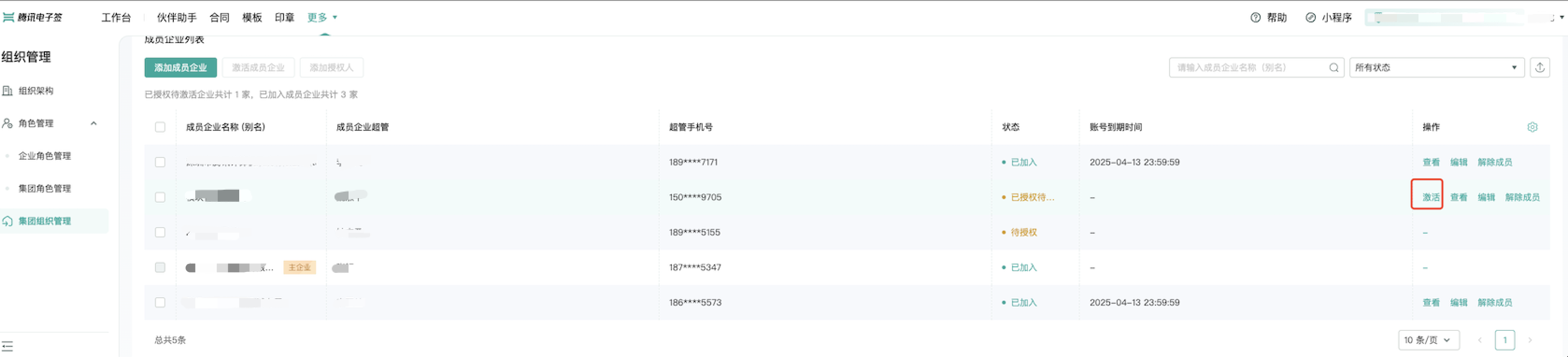
|
|
1668
|
-
|
|
1669
|
-
注意:
|
|
1670
|
-
1. 此接口只能用于激活,**不能用于续期**。
|
|
1671
|
-
2. 在激活子企业时,**请确保子企业的许可证数量充足**。
|
|
1672
|
-
*/
|
|
1673
|
-
async CreateIntegrationSubOrganizationActiveRecord(
|
|
1674
|
-
req: CreateIntegrationSubOrganizationActiveRecordRequest,
|
|
1675
|
-
cb?: (error: string, rep: CreateIntegrationSubOrganizationActiveRecordResponse) => void
|
|
1676
|
-
): Promise<CreateIntegrationSubOrganizationActiveRecordResponse> {
|
|
1677
|
-
return this.request("CreateIntegrationSubOrganizationActiveRecord", req, cb)
|
|
1678
|
-
}
|
|
1679
|
-
|
|
1680
|
-
/**
|
|
1681
|
-
* 您可以通过合同流程ID查询相关的<font color="red"><b>填写控件</b></font>信息及其内容。这包括控件的归属方、控件的填写状态(是否已填写)以及具体的填写内容。
|
|
1682
|
-
|
|
1683
|
-
无论是发起方还是签署方填写的控件,均包含在查询结果中。
|
|
1684
|
-
|
|
1685
|
-
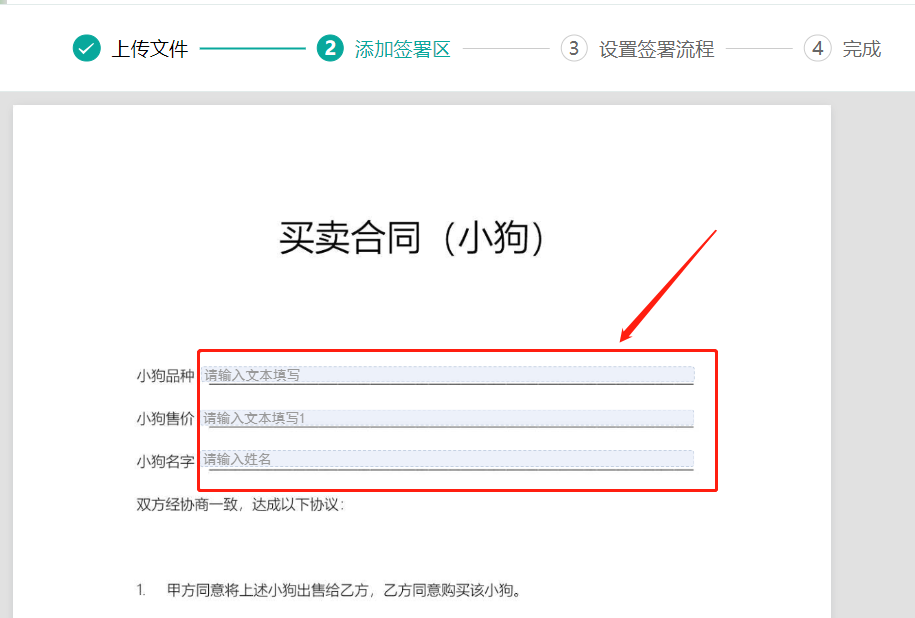
|
|
1686
|
-
|
|
1687
|
-
|
|
1688
|
-
### 2. 那些控件会出现在结果里边?
|
|
1689
|
-
**A.不返回的控件类型:**
|
|
1690
|
-
- 动态表格
|
|
1691
|
-
- 附件控件
|
|
1692
|
-
- 水印控件
|
|
1693
|
-
|
|
1694
|
-
**B.返回的控件类型:**
|
|
1695
|
-
- 单行文本
|
|
1696
|
-
- 多行文本
|
|
1697
|
-
- 勾选框控件
|
|
1698
|
-
- 数字控件
|
|
1699
|
-
- 日期控件
|
|
1700
|
-
- 图片控件(图片下载地址)
|
|
1701
|
-
- 邮箱控件
|
|
1702
|
-
- 地址控件
|
|
1703
|
-
- 学历控件
|
|
1704
|
-
- 性别控件
|
|
1705
|
-
- 省市区控件
|
|
1706
|
-
*/
|
|
1707
|
-
async DescribeFlowComponents(
|
|
1708
|
-
req: DescribeFlowComponentsRequest,
|
|
1709
|
-
cb?: (error: string, rep: DescribeFlowComponentsResponse) => void
|
|
1710
|
-
): Promise<DescribeFlowComponentsResponse> {
|
|
1711
|
-
return this.request("DescribeFlowComponents", req, cb)
|
|
1712
|
-
}
|
|
1713
|
-
|
|
1714
|
-
/**
|
|
1715
|
-
* 用来设置本企业嵌入式页面个性化主题配置(例如是否展示电子签logo、定义主题色等),设置后获取的web签署界面都会使用此配置进行展示。
|
|
1716
|
-
|
|
1717
|
-
如果多次调用,会以最后一次的配置为准
|
|
1718
|
-
*/
|
|
1719
|
-
async CreateWebThemeConfig(
|
|
1720
|
-
req: CreateWebThemeConfigRequest,
|
|
1721
|
-
cb?: (error: string, rep: CreateWebThemeConfigResponse) => void
|
|
1722
|
-
): Promise<CreateWebThemeConfigResponse> {
|
|
1723
|
-
return this.request("CreateWebThemeConfig", req, cb)
|
|
1724
|
-
}
|
|
1725
|
-
|
|
1726
|
-
/**
|
|
1727
|
-
* 此接口(CreateDynamicFlowApprover)接口主要用于补充动态签署方2.0合同的签署方信息,包括但不限于名字、手机号和签署区域等信息。
|
|
1728
|
-
|
|
1729
|
-
|
|
1730
|
-
**功能开通**
|
|
1731
|
-
动态签署方2.0功能的使用需要先<font color="red">联系产品经理开通模块化计费功能</font>,然后到控制台中打开此功能。详细的使用说明请参考<a href="https://qian.tencent.com/developers/company/dynamic_signer_v2" target="_blank">动态签署方2.0</a>文档。
|
|
1732
|
-
|
|
1733
|
-
**使用条件**
|
|
1734
|
-
- 在发起合同时,必须将OpenDynamicSignFlow参数设置为true,以确保合同以动态签署方2.0的方式处理,否则默认处理为普通合同。
|
|
1735
|
-
- 此接口只能在合同处于非终态时调用。一旦合同进入终态(例如:过期、拒签或撤销),将无法通过此接口添加新的签署方。
|
|
1736
|
-
|
|
1737
|
-
|
|
1738
|
-
动态签署方2.0合同<font color="red">不会自动结束(整个合同变为签署完成)</font>,需要通过调用<a href="https://qian.tencent.com/developers/companyApis/operateFlows/ArchiveDynamicFlow/" target="_blank">结束动态签署合同</a>来手动结束签署流程。整体的流程如下图
|
|
1739
|
-
|
|
1740
|
-
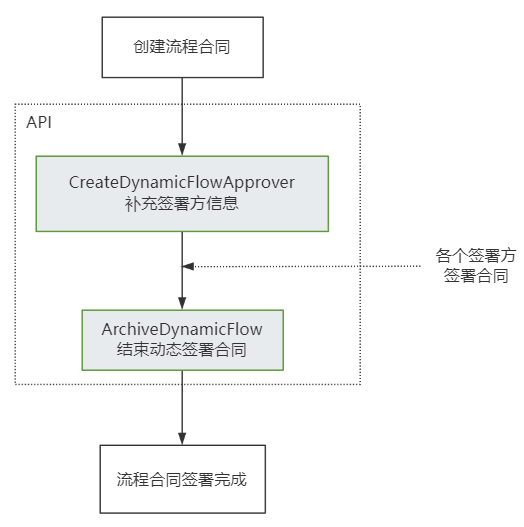
|
|
1741
|
-
*/
|
|
1742
|
-
async CreateDynamicFlowApprover(
|
|
1743
|
-
req: CreateDynamicFlowApproverRequest,
|
|
1744
|
-
cb?: (error: string, rep: CreateDynamicFlowApproverResponse) => void
|
|
1745
|
-
): Promise<CreateDynamicFlowApproverResponse> {
|
|
1746
|
-
return this.request("CreateDynamicFlowApprover", req, cb)
|
|
1747
|
-
}
|
|
1748
|
-
|
|
1749
|
-
/**
|
|
1750
|
-
* 查询用户模版类型,分为两种模式:
|
|
1751
|
-
<ul>
|
|
1752
|
-
<li>QueryBindTemplate:false,查询用户合同模版类型,返回用户合同模版类型ID,用户合同模版类型名称,用户合同模版类型描述信息</li>
|
|
1753
|
-
<li>QueryBindTemplate:false,查询用户合同模版类型,返回用户合同模版类型ID,用户合同模版类型名称,用户合同模版类型描述信息,被绑定的模版数量</li>
|
|
1754
|
-
</ul>
|
|
1755
|
-
*/
|
|
1756
|
-
async DescribeUserFlowType(
|
|
1757
|
-
req: DescribeUserFlowTypeRequest,
|
|
1758
|
-
cb?: (error: string, rep: DescribeUserFlowTypeResponse) => void
|
|
1759
|
-
): Promise<DescribeUserFlowTypeResponse> {
|
|
1760
|
-
return this.request("DescribeUserFlowType", req, cb)
|
|
1761
|
-
}
|
|
1762
|
-
|
|
1763
|
-
/**
|
|
1764
|
-
* 此接口(CreateIntegrationEmployees)用于创建企业员工。创建的员工初始化为未实名,如下图所示。
|
|
1765
|
-
|
|
1766
|
-

|
|
1767
|
-
|
|
1768
|
-
支持以下场景
|
|
1769
|
-
<table>
|
|
1770
|
-
<tbody>
|
|
1771
|
-
<tr>
|
|
1772
|
-
<td>生成端</td>
|
|
1773
|
-
<td >入参</td>
|
|
1774
|
-
<td>提醒方式</td>
|
|
1775
|
-
</tr>
|
|
1776
|
-
<tr>
|
|
1777
|
-
<td>普通saas员工</td>
|
|
1778
|
-
<td>将Employees中的DisplayName设置员工的名字,Mobile设置成员工的手机号</td>
|
|
1779
|
-
<td>发送短信通知员工(短信中带有认证加入企业的链接) </td>
|
|
1780
|
-
</tr>
|
|
1781
|
-
<tr>
|
|
1782
|
-
<td>企微员工</td>
|
|
1783
|
-
<td>将Employees 中的WeworkOpenId字段设置为企微员工明文的openid,需<font color="red">确保该企微员工在应用的可见范围内</font></td>
|
|
1784
|
-
<td>企微内部实名消息</td>
|
|
1785
|
-
</tr>
|
|
1786
|
-
<tr>
|
|
1787
|
-
<td>H5端 saas员工</td>
|
|
1788
|
-
<td>传递 InvitationNotifyType = H5,将Employees中的DisplayName设置员工的名字,Mobile设置成员工的手机号,<font color="red">此场景不支持企微</font></td>
|
|
1789
|
-
<td>生成认证加入企业的H5链接,贵方可以通过自己的渠道触达到此员工</td>
|
|
1790
|
-
</tr>
|
|
1791
|
-
</tbody>
|
|
1792
|
-
</table>
|
|
1793
|
-
注意:
|
|
1794
|
-
|
|
1795
|
-
- <b> 新增员工的手机号、OpenId不能与已加入员工重复</b>, 不管已加入员工的手机号、OpenId是否已经实名
|
|
1796
|
-
- <b>若通过手机号发现员工已经创建且信息一致(名字,openId等),则不会重复创建,但会发送短信或者生成链接提醒员工实名。</b>
|
|
1797
|
-
- jumpUrl 仅支持H5的邀请方式,回跳的url,使用前请联系对接的客户经理沟通,进行域名的配置。
|
|
1798
|
-
|
|
1799
|
-
|
|
1800
|
-
|
|
1801
|
-
短信的样式
|
|
1802
|
-
|
|
1803
|
-
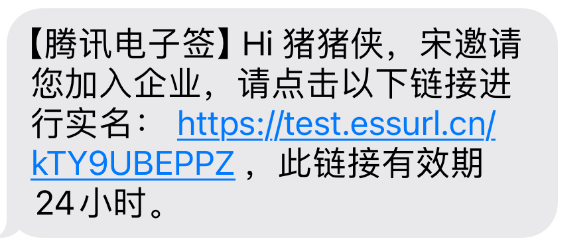
|
|
1804
|
-
*/
|
|
1805
|
-
async CreateIntegrationEmployees(
|
|
1806
|
-
req: CreateIntegrationEmployeesRequest,
|
|
1807
|
-
cb?: (error: string, rep: CreateIntegrationEmployeesResponse) => void
|
|
1808
|
-
): Promise<CreateIntegrationEmployeesResponse> {
|
|
1809
|
-
return this.request("CreateIntegrationEmployees", req, cb)
|
|
1810
|
-
}
|
|
1811
|
-
|
|
1812
|
-
/**
|
|
1813
|
-
* 批量清理未认证的企业认证流程。
|
|
1814
|
-
|
|
1815
|
-
此接口用来清除企业方认证信息填写错误,批量清理认证中的认证流信息。
|
|
1816
|
-
为接口[创建企业批量认证链接](https://qian.tencent.com/developers/companyApis/organizations/CreateBatchOrganizationRegistrationTasks) 和[查询企业批量认证链接](https://qian.tencent.com/developers/companyApis/organizations/DescribeBatchOrganizationRegistrationUrls) 接口的扩展接口。即在批量认证过程中,当发起认证企业发现超管信息错误的时候,可以将当前超管下的所有认证流企业清除。
|
|
1817
|
-
|
|
1818
|
-
注意:
|
|
1819
|
-
**这个接口的操作人必须跟生成批量认证链接接口的操作人一致,才可以调用,否则会返回当前操作人没有认证中的企业认证流**
|
|
1820
|
-
*/
|
|
1821
|
-
async DeleteOrganizationAuthorizations(
|
|
1822
|
-
req: DeleteOrganizationAuthorizationsRequest,
|
|
1823
|
-
cb?: (error: string, rep: DeleteOrganizationAuthorizationsResponse) => void
|
|
1824
|
-
): Promise<DeleteOrganizationAuthorizationsResponse> {
|
|
1825
|
-
return this.request("DeleteOrganizationAuthorizations", req, cb)
|
|
1826
|
-
}
|
|
1827
|
-
|
|
1828
|
-
/**
|
|
1829
|
-
* 该接口用于发起合同后,生成个人/企业用户的批量待办链接。
|
|
1830
|
-
**注意:**
|
|
1831
|
-
1. 该接口可生成签署人的批量、合同组签署/查看链接 。
|
|
1832
|
-
2. 该签署链接**有效期为30分钟**,过期后将失效,如需签署可重新创建批量签署链接 。
|
|
1833
|
-
3. 该接口返回的签署链接适用于APP集成的场景,支持APP打开或浏览器直接打开,**不支持微信小程序嵌入**。
|
|
1834
|
-
跳转到小程序的实现,参考微信官方文档(分为<a href="https://developers.weixin.qq.com/miniprogram/dev/api/navigate/wx.navigateToMiniProgram.html">全屏</a>、<a href="https://developers.weixin.qq.com/miniprogram/dev/framework/open-ability/openEmbeddedMiniProgram.html">半屏</a>两种方式),如何配置也可以请参考: <a href="https://qian.tencent.com/developers/company/openwxminiprogram">跳转电子签小程序配置</a>。
|
|
1835
|
-
4. 因h5涉及人脸身份认证能力基于慧眼人脸核身,对Android和iOS系统均有一定要求, 因此<font color='red'>App嵌入H5签署合同需要按照慧眼提供的<a href="https://cloud.tencent.com/document/product/1007/61076">慧眼人脸核身兼容性文档</a>做兼容性适配</font>。
|
|
1836
|
-
*/
|
|
1837
|
-
async CreateBatchQuickSignUrl(
|
|
1838
|
-
req: CreateBatchQuickSignUrlRequest,
|
|
1839
|
-
cb?: (error: string, rep: CreateBatchQuickSignUrlResponse) => void
|
|
1840
|
-
): Promise<CreateBatchQuickSignUrlResponse> {
|
|
1841
|
-
return this.request("CreateBatchQuickSignUrl", req, cb)
|
|
1842
|
-
}
|
|
1843
|
-
|
|
1844
|
-
/**
|
|
1845
|
-
* 新增/删除企业应用集成中的回调配置。
|
|
1846
|
-
新增回调配置只会增加不存在的CallbackUrl;删除操作将针对找到的相同CallbackUrl的配置进行删除。
|
|
1847
|
-
请确保回调地址能够接收并处理 HTTP POST 请求,并返回状态码 200 以表示处理正常。
|
|
1848
|
-
更多回调相关的说明参考文档[回调通知能力](https://qian.tencent.com/developers/company/callback_types_v2)
|
|
1849
|
-
*/
|
|
1850
|
-
async ModifyApplicationCallbackInfo(
|
|
1851
|
-
req: ModifyApplicationCallbackInfoRequest,
|
|
1852
|
-
cb?: (error: string, rep: ModifyApplicationCallbackInfoResponse) => void
|
|
1853
|
-
): Promise<ModifyApplicationCallbackInfoResponse> {
|
|
1854
|
-
return this.request("ModifyApplicationCallbackInfo", req, cb)
|
|
1855
|
-
}
|
|
1856
|
-
|
|
1857
|
-
/**
|
|
1858
|
-
* 用于撤销合同流程<br/>
|
|
1859
|
-
适用场景:如果某个合同流程当前至少还有一方没有签署,则可通过该接口取消该合同流程。常用于合同发错、内容填错,需要及时撤销的场景。<br/>
|
|
1860
|
-
- **可撤回合同状态**:未全部签署完成
|
|
1861
|
-
- **不撤回合同状态**:已全部签署完成、已拒签、已过期、已撤回、拒绝填写、已解除等合同状态。
|
|
1862
|
-
|
|
1863
|
-
注:
|
|
1864
|
-
1. 如果合同流程中的参与方均已签署完毕,则无法通过该接口撤销合同,签署完毕的合同需要双方走解除流程将合同作废,可以参考<a href="https://qian.tencent.com/developers/companyApis/operateFlows/CreateReleaseFlow" target="_blank">发起解除合同流程</a>接口。
|
|
1865
|
-
|
|
1866
|
-
2. 有对应合同撤销权限的人: <font color='red'>合同的发起人(并已经授予撤销权限)或者发起人所在企业的超管、法人</font>
|
|
1867
|
-
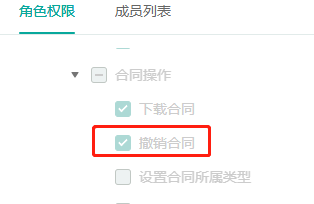
|
|
1868
|
-
|
|
1869
|
-
3. <font color='red'>只有撤销没有参与方签署过或只有自动签署签署过的合同,才会返还合同额度。</font>
|
|
1870
|
-
|
|
1871
|
-
4. 撤销后可以看合同PDF内容的人员: 发起方的超管, 发起方自己,发起方撤销合同的操作人员,已经签署合同、已经填写合同、邀请填写已经补充信息的参与人员, 其他参与人员看不到合同的内容。
|
|
1872
|
-
*/
|
|
1873
|
-
async CancelFlow(
|
|
1874
|
-
req: CancelFlowRequest,
|
|
1875
|
-
cb?: (error: string, rep: CancelFlowResponse) => void
|
|
1876
|
-
): Promise<CancelFlowResponse> {
|
|
1877
|
-
return this.request("CancelFlow", req, cb)
|
|
1878
|
-
}
|
|
1879
|
-
|
|
1880
|
-
/**
|
|
1881
|
-
* 此接口(UnbindEmployeeUserIdWithClientOpenId)用于解除电子签系统员工UserId与客户系统员工OpenId之间的绑定关系。
|
|
1882
|
-
|
|
1883
|
-
注:`在调用此接口时,需确保OpenId已通过调用`<a href="https://qian.tencent.com/developers/companyApis/staffs/BindEmployeeUserIdWithClientOpenId" target="_blank">BindEmployeeUserIdWithClientOpenId</a>`接口与电子签系统的UserId绑定过。若OpenId未经过绑定,则无法使用此接口进行解绑操作。`
|
|
1884
|
-
*/
|
|
1885
|
-
async UnbindEmployeeUserIdWithClientOpenId(
|
|
1886
|
-
req: UnbindEmployeeUserIdWithClientOpenIdRequest,
|
|
1887
|
-
cb?: (error: string, rep: UnbindEmployeeUserIdWithClientOpenIdResponse) => void
|
|
1888
|
-
): Promise<UnbindEmployeeUserIdWithClientOpenIdResponse> {
|
|
1889
|
-
return this.request("UnbindEmployeeUserIdWithClientOpenId", req, cb)
|
|
1890
|
-
}
|
|
1891
|
-
|
|
1892
|
-
/**
|
|
1893
|
-
* 指定需要批量撤回的签署流程Id,以获取批量撤销链接。
|
|
1894
|
-
客户需指定要撤回的签署流程Id,最多可指定100个,超过100则不处理。
|
|
1895
|
-
接口调用成功后,将返回批量撤回合同的链接。通过点击链接,可跳转至电子签小程序完成批量撤回操作。
|
|
1896
|
-
|
|
1897
|
-
- **可撤回合同状态**:未全部签署完成
|
|
1898
|
-
- **不撤回合同状态**:已全部签署完成、已拒签、已过期、已撤回、拒绝填写、已解除等合同状态。
|
|
1899
|
-
|
|
1900
|
-
批量撤销结果可以通过接口返回的TaskId关联[批量撤销任务结果回调](https://qian.tencent.com/developers/company/callback_types_contracts_sign#%E4%B9%9D-%E6%89%B9%E9%87%8F%E6%92%A4%E9%94%80%E7%BB%93%E6%9E%9C%E5%9B%9E%E8%B0%83)或通过接口[查询批量撤销签署流程任务结果](https://qian.tencent.com/developers/companyApis/operateFlows/CreateBatchCancelFlowUrl)
|
|
1901
|
-
|
|
1902
|
-
|
|
1903
|
-
注:
|
|
1904
|
-
1. 如果合同流程中的参与方均已签署完毕,则无法通过该接口撤销合同,签署完毕的合同需要双方走解除流程将合同作废,可以参考<a href="https://qian.tencent.com/developers/companyApis/operateFlows/CreateReleaseFlow" target="_blank">发起解除合同流程</a>接口。
|
|
1905
|
-
|
|
1906
|
-
2. 有对应合同撤销权限的人: <font color='red'>合同的发起人(并已经授予撤销权限)或者发起人所在企业的超管、法人</font>
|
|
1907
|
-

|
|
1908
|
-
|
|
1909
|
-
3. <font color='red'>只有撤销没有参与方签署过或只有自动签署签署过的合同,才会返还合同额度。</font>
|
|
1910
|
-
|
|
1911
|
-
4. 撤销后可以看合同PDF内容的人员: 发起方的超管, 发起方自己,发起方撤销合同的操作人员,已经签署合同、已经填写合同、邀请填写已经补充信息的参与人员, 其他参与人员看不到合同的内容。
|
|
1912
|
-
*/
|
|
1913
|
-
async CreateBatchCancelFlowUrl(
|
|
1914
|
-
req: CreateBatchCancelFlowUrlRequest,
|
|
1915
|
-
cb?: (error: string, rep: CreateBatchCancelFlowUrlResponse) => void
|
|
1916
|
-
): Promise<CreateBatchCancelFlowUrlResponse> {
|
|
1917
|
-
return this.request("CreateBatchCancelFlowUrl", req, cb)
|
|
1918
|
-
}
|
|
1919
|
-
|
|
1920
|
-
/**
|
|
1921
|
-
* 此接口(DeleteIntegrationDepartment)用于删除企业的部门信息。
|
|
1922
|
-
*/
|
|
1923
|
-
async DeleteIntegrationDepartment(
|
|
1924
|
-
req: DeleteIntegrationDepartmentRequest,
|
|
1925
|
-
cb?: (error: string, rep: DeleteIntegrationDepartmentResponse) => void
|
|
1926
|
-
): Promise<DeleteIntegrationDepartmentResponse> {
|
|
1927
|
-
return this.request("DeleteIntegrationDepartment", req, cb)
|
|
1928
|
-
}
|
|
1929
|
-
|
|
1930
|
-
/**
|
|
1931
|
-
* **适用场景 :**
|
|
1932
|
-
|
|
1933
|
-
当通过模板或文件发起合同时, 签署人不制定, 等合同发起后再指定 可以用下面2种方案
|
|
1934
|
-
|
|
1935
|
-
<b><font color="red">1. 或签合同</font>: 若未指定企业签署人信息(只指定企业的名字),合同变成或签合同(个人签署方不支持或签合同)</b>。需调用此接口补充或添加签署人。或签签署人在控制台上的展示样式如下(会带有<b>或签</b>标识):
|
|
1936
|
-
|
|
1937
|
-
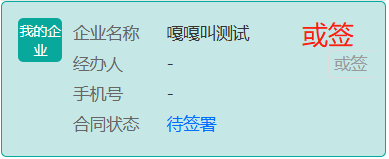
|
|
1938
|
-
|
|
1939
|
-
<b><font color="red">2. 动态签署人合同</font>: 若未指定具体签署人的信息,则合同变成动态签署人合同</b>。需调用此接口补充或添加签署人。可以参考文档 <a href="https://qian.tencent.com/developers/company/dynamic_signer/" target="_blank">动态签署人合同</a> 。动态签署人在控制台上的展示样式如下:
|
|
1940
|
-
|
|
1941
|
-
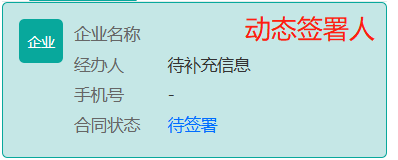
|
|
1942
|
-
|
|
1943
|
-
实际签署人需要通过[获取跳转至腾讯电子签小程序的签署链接](https://qian.tencent.com/developers/companyApis/startFlows/CreateSchemeUrl/)生成的链接进入小程序,领取合同并签署。同一签署环节可补充多个员工作为或签署人,最终实际签署人取决于谁先领取合同完成签署。
|
|
1944
|
-
|
|
1945
|
-
**接口使用说明**:
|
|
1946
|
-
|
|
1947
|
-
1.本接口现已支持批量补充签署人
|
|
1948
|
-
|
|
1949
|
-
2.当<a href="https://qian.tencent.com/developers/companyApis/dataTypes/#fillapproverinfo/" target="_blank">补充签署人结构体</a>中指定需要补充的FlowId时,可以对指定合同补充签署人;可以指定多个相同发起方的不同合同在完成批量补充
|
|
1950
|
-
|
|
1951
|
-
3.当<a href="https://qian.tencent.com/developers/companyApis/operateFlows/CreateFlowApprovers/" target="_blank">补充签署人接口入参</a>中指定需要补充的FlowId时,是对指定的合同补充多个指定的签署人
|
|
1952
|
-
|
|
1953
|
-
4.如果同时指定了<a href="https://qian.tencent.com/developers/companyApis/dataTypes/#fillapproverinfo/" target="_blank">补充签署人结构体</a>中的FlowId和<a href="https://qian.tencent.com/developers/companyApis/operateFlows/CreateFlowApprovers/" target="_blank">补充签署人接口入参</a>中的FlowId,仅使用<a href="https://qian.tencent.com/developers/companyApis/dataTypes/#fillapproverinfo/" target="_blank">补充签署人结构体</a>中的FlowId作为补充的合同
|
|
1954
|
-
|
|
1955
|
-
5.如果部分指定了<a href="https://qian.tencent.com/developers/companyApis/dataTypes/#fillapproverinfo/" target="_blank">补充签署人结构体</a>中的FlowId,又指定了<a href="https://qian.tencent.com/developers/companyApis/operateFlows/CreateFlowApprovers/" target="_blank">补充签署人接口入参</a>中的FlowId;那么<a href="https://qian.tencent.com/developers/companyApis/dataTypes/#fillapproverinfo/" target="_blank">补充签署人结构体</a>存在指定的FlowId,则使用<a href="https://qian.tencent.com/developers/companyApis/dataTypes/#fillapproverinfo/" target="_blank">补充签署人结构体</a>中的FlowId,不存在则使用<a href="https://qian.tencent.com/developers/companyApis/operateFlows/CreateFlowApprovers/" target="_blank">补充签署人接口入参</a>中的FlowId作为补充的合同
|
|
1956
|
-
|
|
1957
|
-
|
|
1958
|
-
6.如果同时未指定了<a href="https://qian.tencent.com/developers/companyApis/dataTypes/#fillapproverinfo/" target="_blank">补充签署人结构体</a>中的FlowId和<a href="https://qian.tencent.com/developers/companyApis/operateFlows/CreateFlowApprovers/" target="_blank">补充签署人接口入参</a>中的FlowId,则传参错误。
|
|
1959
|
-
|
|
1960
|
-
7.新加入的签署方<font color="red">平台不会发送短信</font>通知。请您生成相应的链接,并将该链接发送给签署方以便完成签署过程。
|
|
1961
|
-
|
|
1962
|
-
**限制条件**:
|
|
1963
|
-
|
|
1964
|
-
1.本企业(发起方企业)企业微信签署人仅支持通过企业微信UserId或姓名+手机号进行补充。
|
|
1965
|
-
|
|
1966
|
-
2.本企业(发起方企业)非企业微信签署人仅支持通过姓名+手机号进行补充。
|
|
1967
|
-
|
|
1968
|
-
3.他方企业仅支持通过姓名+手机号进行补充。
|
|
1969
|
-
|
|
1970
|
-
4.个人签署人支持通过姓名+手机号进行补充(若<b>个人用户已完成实名</b>,动态签署人合同也可以可通过姓名+证件号码进行补充)
|
|
1971
|
-
|
|
1972
|
-
|
|
1973
|
-
**整体流程如下图:**
|
|
1974
|
-
|
|
1975
|
-
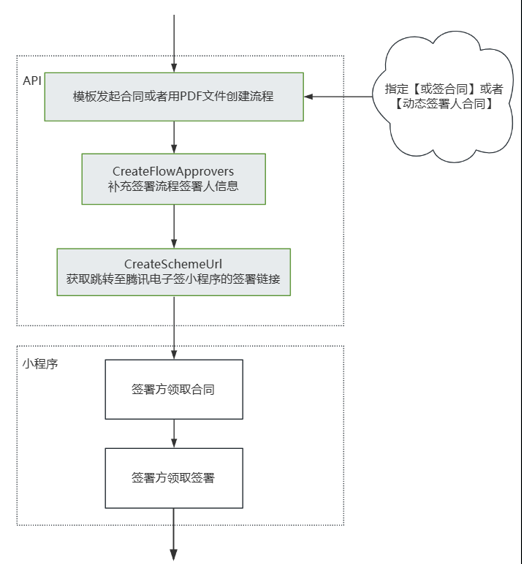
|
|
1976
|
-
*/
|
|
1977
|
-
async CreateFlowApprovers(
|
|
1978
|
-
req: CreateFlowApproversRequest,
|
|
1979
|
-
cb?: (error: string, rep: CreateFlowApproversResponse) => void
|
|
1980
|
-
): Promise<CreateFlowApproversResponse> {
|
|
1981
|
-
return this.request("CreateFlowApprovers", req, cb)
|
|
1982
|
-
}
|
|
1983
|
-
|
|
1984
|
-
/**
|
|
1985
|
-
* 创建发起流程Web页面,通过该接口可以获取发起流程的可嵌入web页面的URL(此web页面可以通过iframe方式嵌入到贵方系统的网页中)。在页面上完成签署控件等信息的编辑与确认后,可快速发起流程。
|
|
1986
|
-
|
|
1987
|
-
<br/>注意:调用接口后,<font color="red">流程不会立即发起,需在嵌入页面上点击【发起合同】按钮来发起流程</font>。
|
|
1988
|
-
|
|
1989
|
-
嵌入页面长相如下:
|
|
1990
|
-
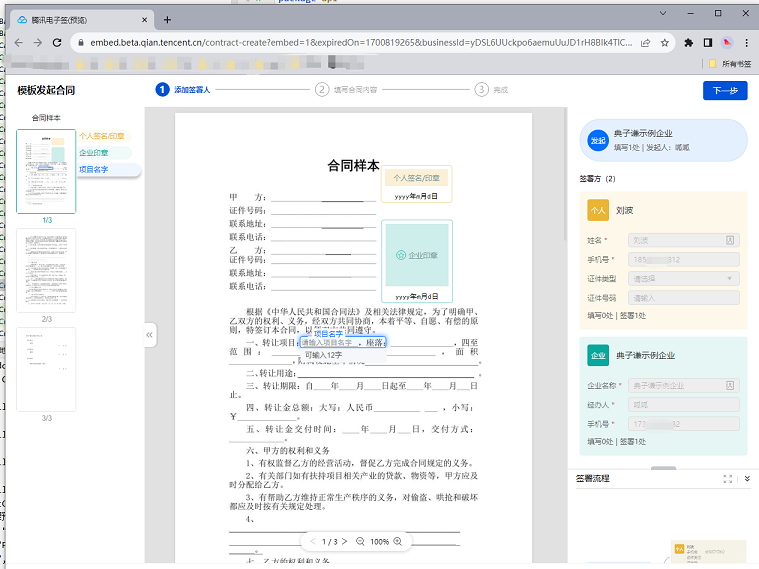
|
|
1991
|
-
*/
|
|
1992
|
-
async CreatePrepareFlow(
|
|
1993
|
-
req: CreatePrepareFlowRequest,
|
|
1994
|
-
cb?: (error: string, rep: CreatePrepareFlowResponse) => void
|
|
1995
|
-
): Promise<CreatePrepareFlowResponse> {
|
|
1996
|
-
return this.request("CreatePrepareFlow", req, cb)
|
|
1997
|
-
}
|
|
1998
|
-
|
|
1999
|
-
/**
|
|
2000
|
-
* 通过此接口(DescribeBillUsage)查询该企业的套餐套餐使用情况。
|
|
2001
|
-
*/
|
|
2002
|
-
async DescribeBillUsage(
|
|
2003
|
-
req: DescribeBillUsageRequest,
|
|
2004
|
-
cb?: (error: string, rep: DescribeBillUsageResponse) => void
|
|
2005
|
-
): Promise<DescribeBillUsageResponse> {
|
|
2006
|
-
return this.request("DescribeBillUsage", req, cb)
|
|
2007
|
-
}
|
|
2008
|
-
|
|
2009
|
-
/**
|
|
2010
|
-
* 此接口用于查询合同流程的详情信息,支持查询多个(数量不能超过100)。
|
|
2011
|
-
|
|
2012
|
-
适用场景:可用于主动查询某个合同详情信息。
|
|
2013
|
-
*/
|
|
2014
|
-
async DescribeFlowInfo(
|
|
2015
|
-
req: DescribeFlowInfoRequest,
|
|
2016
|
-
cb?: (error: string, rep: DescribeFlowInfoResponse) => void
|
|
2017
|
-
): Promise<DescribeFlowInfoResponse> {
|
|
2018
|
-
return this.request("DescribeFlowInfo", req, cb)
|
|
2019
|
-
}
|
|
2020
|
-
|
|
2021
|
-
/**
|
|
2022
|
-
* 本接口(CreateSealPolicy)用于对企业员工进行印章授权
|
|
2023
|
-
*/
|
|
2024
|
-
async CreateSealPolicy(
|
|
2025
|
-
req: CreateSealPolicyRequest,
|
|
2026
|
-
cb?: (error: string, rep: CreateSealPolicyResponse) => void
|
|
2027
|
-
): Promise<CreateSealPolicyResponse> {
|
|
2028
|
-
return this.request("CreateSealPolicy", req, cb)
|
|
2029
|
-
}
|
|
2030
|
-
|
|
2031
|
-
/**
|
|
2032
|
-
* 通过[获取批量撤销签署流程腾讯电子签小程序链接](https://qian.tencent.com/developers/companyApis/operateFlows/CreateBatchCancelFlowUrl)发起批量撤销任务后,可通过此接口查询批量撤销任务的结果。
|
|
2033
|
-
*/
|
|
2034
|
-
async DescribeCancelFlowsTask(
|
|
2035
|
-
req: DescribeCancelFlowsTaskRequest,
|
|
2036
|
-
cb?: (error: string, rep: DescribeCancelFlowsTaskResponse) => void
|
|
2037
|
-
): Promise<DescribeCancelFlowsTaskResponse> {
|
|
2038
|
-
return this.request("DescribeCancelFlowsTask", req, cb)
|
|
2039
|
-
}
|
|
2040
|
-
|
|
2041
|
-
/**
|
|
2042
|
-
* 仅且仅能查询企业本身在电子签的认证状态
|
|
2043
|
-
*/
|
|
2044
|
-
async DescribeOrganizationVerifyStatus(
|
|
2045
|
-
req: DescribeOrganizationVerifyStatusRequest,
|
|
2046
|
-
cb?: (error: string, rep: DescribeOrganizationVerifyStatusResponse) => void
|
|
2047
|
-
): Promise<DescribeOrganizationVerifyStatusResponse> {
|
|
2048
|
-
return this.request("DescribeOrganizationVerifyStatus", req, cb)
|
|
2049
|
-
}
|
|
2050
|
-
|
|
2051
|
-
/**
|
|
2052
|
-
* 生成集团加入链接,分享至子企业超管或者法人,子企业管理员可通过链接加入集团。
|
|
2053
|
-
注意:调用当前接口的企业 必须为集团企业。如何成为集团企业可以参考下面的文档[集团操作文档](https://qian.tencent.com/document/86707)
|
|
2054
|
-
*/
|
|
2055
|
-
async CreateOrganizationGroupInvitationLink(
|
|
2056
|
-
req: CreateOrganizationGroupInvitationLinkRequest,
|
|
2057
|
-
cb?: (error: string, rep: CreateOrganizationGroupInvitationLinkResponse) => void
|
|
2058
|
-
): Promise<CreateOrganizationGroupInvitationLinkResponse> {
|
|
2059
|
-
return this.request("CreateOrganizationGroupInvitationLink", req, cb)
|
|
2060
|
-
}
|
|
2061
|
-
|
|
2062
|
-
/**
|
|
2063
|
-
* 获取出证报告任务执行结果,返回报告 URL。
|
|
2064
|
-
|
|
2065
|
-
|
|
2066
|
-
|
|
2067
|
-
注意:
|
|
2068
|
-
<ul><li>使用此功能`需搭配出证套餐` ,使用前请联系对接的客户经理沟通。</li>
|
|
2069
|
-
<li>需调用创建并返回出证报告接口<a href="https://qian.tencent.com/developers/companyApis/certificate/CreateFlowEvidenceReport" target="_blank">提交申请出证报告任务</a>获取报告编号后调用当前接口获取报告链接。</li></ul>
|
|
2070
|
-
|
|
2071
|
-
<svg id="SvgjsSvg1006" width="262" height="229" xmlns="http://www.w3.org/2000/svg" version="1.1" xmlns:xlink="http://www.w3.org/1999/xlink" xmlns:svgjs="http://svgjs.com/svgjs"><defs id="SvgjsDefs1007"><pattern patternUnits="userSpaceOnUse" id="pattern_mark_0" width="300" height="300"><text x="150" y="100" fill="rgba(229,229,229,0.8)" font-size="18" transform="rotate(-45, 150, 150)" style="dominant-baseline: middle; text-anchor: middle;"></text></pattern><pattern patternUnits="userSpaceOnUse" id="pattern_mark_1" width="300" height="300"><text x="150" y="200" fill="rgba(229,229,229,0.8)" font-size="18" transform="rotate(-45, 150, 150)" style="dominant-baseline: middle; text-anchor: middle;"></text></pattern><marker id="SvgjsMarker1021" markerWidth="12" markerHeight="8" refX="9" refY="4" viewBox="0 0 12 8" orient="auto" markerUnits="userSpaceOnUse" stroke-dasharray="0,0"><path id="SvgjsPath1022" d="M0,0 L12,4 L0,8 L0,0" fill="#323232" stroke="#323232" stroke-width="1"></path></marker></defs><rect id="svgbackgroundid" width="262" height="229" fill="transparent"></rect><rect id="SvgjsRect1009" width="262" height="229" fill="url(#pattern_mark_0)"></rect><rect id="SvgjsRect1010" width="262" height="229" fill="url(#pattern_mark_1)"></rect><g id="SvgjsG1011" transform="translate(31.75,25)"><path id="SvgjsPath1012" d="M 0 0L 198 0L 198 59L 0 59Z" stroke="rgba(86,146,48,1)" stroke-width="1" fill-opacity="1" fill="#e7ebed"></path><g id="SvgjsG1013"><text id="SvgjsText1014" font-family="微软雅黑" text-anchor="middle" font-size="13px" width="178px" fill="#323232" font-weight="400" align="middle" lineHeight="125%" anchor="middle" family="微软雅黑" size="13px" weight="400" font-style="" opacity="1" y="10.375" transform="rotate(0)"><tspan id="SvgjsTspan1015" dy="16" x="99"><tspan id="SvgjsTspan1016" style="text-decoration:;fill: rgb(28, 30, 33);">CreateFlowEvidenceReport</tspan></tspan><tspan id="SvgjsTspan1017" dy="16" x="99"><tspan id="SvgjsTspan1018" style="text-decoration:;fill: rgb(51, 51, 51);">提交申请出证报告任务</tspan></tspan></text></g></g><g id="SvgjsG1019"><path id="SvgjsPath1020" d="M130.75 84.5L130.75 114.5L130.75 114.5L130.75 143.2" stroke="#323232" stroke-width="1" fill="none" marker-end="url(#SvgjsMarker1021)"></path></g><g id="SvgjsG1023" transform="translate(25,145)"><path id="SvgjsPath1024" d="M 0 0L 211.5 0L 211.5 59L 0 59Z" stroke="rgba(86,146,48,1)" stroke-width="1" fill-opacity="1" fill="#e7ebed"></path><g id="SvgjsG1025"><text id="SvgjsText1026" font-family="微软雅黑" text-anchor="middle" font-size="13px" width="192px" fill="#323232" font-weight="400" align="middle" lineHeight="125%" anchor="middle" family="微软雅黑" size="13px" weight="400" font-style="" opacity="1" y="10.375" transform="rotate(0)"><tspan id="SvgjsTspan1027" dy="16" x="106"><tspan id="SvgjsTspan1028" style="text-decoration:;fill: rgb(28, 30, 33);">DescribeFlowEvidenceReport</tspan></tspan><tspan id="SvgjsTspan1029" dy="16" x="106"><tspan id="SvgjsTspan1030" style="text-decoration:;fill: rgb(51, 51, 51);">获取出证报告任务执行结果</tspan></tspan></text></g></g></svg>
|
|
2072
|
-
*/
|
|
2073
|
-
async DescribeFlowEvidenceReport(
|
|
2074
|
-
req: DescribeFlowEvidenceReportRequest,
|
|
2075
|
-
cb?: (error: string, rep: DescribeFlowEvidenceReportResponse) => void
|
|
2076
|
-
): Promise<DescribeFlowEvidenceReportResponse> {
|
|
2077
|
-
return this.request("DescribeFlowEvidenceReport", req, cb)
|
|
2078
|
-
}
|
|
2079
|
-
|
|
2080
|
-
/**
|
|
2081
|
-
* 文件CA加签任务结果查询接口,用于查询 CreateFileCounterSign接口 发起的异步加签任务。
|
|
2082
|
-
|
|
2083
|
-
注意:`此接口为『数字文件CA加签服务』白名单功能,使用前请联系对接的客户经理沟通。`
|
|
2084
|
-
*/
|
|
2085
|
-
async DescribeFileCounterSignResult(
|
|
2086
|
-
req: DescribeFileCounterSignResultRequest,
|
|
2087
|
-
cb?: (error: string, rep: DescribeFileCounterSignResultResponse) => void
|
|
2088
|
-
): Promise<DescribeFileCounterSignResultResponse> {
|
|
2089
|
-
return this.request("DescribeFileCounterSignResult", req, cb)
|
|
2090
|
-
}
|
|
2091
|
-
|
|
2092
|
-
/**
|
|
2093
|
-
* 此接口(GetTaskResultApi)用来查询转换任务的状态。如需发起转换任务,请使用<a href="https://qian.tencent.com/developers/companyApis/templatesAndFiles/CreateConvertTaskApi" target="_blank">创建文件转换任务接口</a>进行资源文件的转换操作<br />
|
|
2094
|
-
前提条件:已调用 <a href="https://qian.tencent.com/developers/companyApis/templatesAndFiles/CreateConvertTaskApi" target="_blank">创建文件转换任务接口</a>进行文件转换,并得到了返回的转换任务Id。<br />
|
|
2095
|
-
|
|
2096
|
-
适用场景:已创建一个文件转换任务,想查询该文件转换任务的状态,或获取转换后的文件资源Id。<br />
|
|
2097
|
-
注:
|
|
2098
|
-
1. `大文件转换所需的时间可能会比较长`
|
|
2099
|
-
2. `本接口返回的文件资源ID就是PDF资源ID,可以直接用于【用PDF文件创建签署流程】接口发起合同。`
|
|
2100
|
-
*/
|
|
2101
|
-
async GetTaskResultApi(
|
|
2102
|
-
req: GetTaskResultApiRequest,
|
|
2103
|
-
cb?: (error: string, rep: GetTaskResultApiResponse) => void
|
|
2104
|
-
): Promise<GetTaskResultApiResponse> {
|
|
2105
|
-
return this.request("GetTaskResultApi", req, cb)
|
|
2106
|
-
}
|
|
2107
|
-
|
|
2108
|
-
/**
|
|
2109
|
-
* 该接口用于结束动态签署方2.0的合同流程。
|
|
2110
|
-
|
|
2111
|
-
|
|
2112
|
-
**功能开通**
|
|
2113
|
-
- 动态签署方2.0功能的使用需要先<font color="red">联系产品经理开通模块化计费功能</font>,然后到控制台中打开此功能。详细的使用说明请参考<a href="https://qian.tencent.com/developers/company/dynamic_signer_v2" target="_blank">动态签署方2.0</a>文档。
|
|
2114
|
-
|
|
2115
|
-
**使用条件**
|
|
2116
|
-
- 此接口只能在<font color="red">合同处于非终态且<b>所有的签署方都已经完成签署</b></font>。一旦合同进入终态(例如:过期、拒签、撤销或者调用过此接口成功过),将无法通过此接口结束合同流程。
|
|
2117
|
-
|
|
2118
|
-
**整体流程**
|
|
2119
|
-

|
|
2120
|
-
*/
|
|
2121
|
-
async ArchiveDynamicFlow(
|
|
2122
|
-
req: ArchiveDynamicFlowRequest,
|
|
2123
|
-
cb?: (error: string, rep: ArchiveDynamicFlowResponse) => void
|
|
2124
|
-
): Promise<ArchiveDynamicFlowResponse> {
|
|
2125
|
-
return this.request("ArchiveDynamicFlow", req, cb)
|
|
2126
|
-
}
|
|
2127
|
-
|
|
2128
|
-
/**
|
|
2129
|
-
* 此接口(UpdateIntegrationEmployees)<font color="red"><b>用于修改未实名企业员工信息(姓名,手机号,邮件、部门)</b></font>。
|
|
2130
|
-
如果企业员工已经实名, 姓名,手机号,邮件等需要企业员工到小程序或者控制台自己修改, 部门则需要超管到控制台分配
|
|
2131
|
-
|
|
2132
|
-
修改手机号的时候,支持以下场景进行提醒通知
|
|
2133
|
-
<table>
|
|
2134
|
-
<tbody>
|
|
2135
|
-
<tr>
|
|
2136
|
-
<td>生成端</td>
|
|
2137
|
-
<td >入参</td>
|
|
2138
|
-
<td>提醒方式</td>
|
|
2139
|
-
</tr>
|
|
2140
|
-
<tr>
|
|
2141
|
-
<td>普通saas员工</td>
|
|
2142
|
-
<td>将Employees中的DisplayName设置员工的名字,Mobile设置成员工的手机号</td>
|
|
2143
|
-
<td>发送短信通知员工(短信中带有认证加入企业的链接)</td>
|
|
2144
|
-
</tr>
|
|
2145
|
-
<tr>
|
|
2146
|
-
<td>企微员工</td>
|
|
2147
|
-
<td>将Employees 中的WeworkOpenId字段设置为企微员工明文的openid,需<font color="red">确保该企微员工在应用的可见范围内</font></td>
|
|
2148
|
-
<td>企微内部实名消息</td>
|
|
2149
|
-
</tr>
|
|
2150
|
-
<tr>
|
|
2151
|
-
<td>H5端 saas员工</td>
|
|
2152
|
-
<td>传递 InvitationNotifyType = H5,将Employees中的DisplayName设置员工的名字,Mobile设置成员工的手机号,<font color="red">此场景不支持企微</font></td>
|
|
2153
|
-
<td>生成认证加入企业的H5链接,贵方可以通过自己的渠道触达到此员工</td>
|
|
2154
|
-
</tr>
|
|
2155
|
-
</tbody>
|
|
2156
|
-
</table>
|
|
2157
|
-
注意:
|
|
2158
|
-
|
|
2159
|
-
- <b>若通过手机号发现员工已经创建,则不会重复创建,但会发送短信或者生成链接提醒员工实名。</b>
|
|
2160
|
-
- jumpUrl 仅支持H5的邀请方式,回跳的url,使用前请联系对接的客户经理沟通,进行域名的配置。
|
|
2161
|
-
*/
|
|
2162
|
-
async UpdateIntegrationEmployees(
|
|
2163
|
-
req: UpdateIntegrationEmployeesRequest,
|
|
2164
|
-
cb?: (error: string, rep: UpdateIntegrationEmployeesResponse) => void
|
|
2165
|
-
): Promise<UpdateIntegrationEmployeesResponse> {
|
|
2166
|
-
return this.request("UpdateIntegrationEmployees", req, cb)
|
|
2167
|
-
}
|
|
2168
|
-
|
|
2169
|
-
/**
|
|
2170
|
-
* 使用此接口,您可以创建企业批量签署链接,员工只需点击链接即可跳转至控制台进行批量签署。<br/>
|
|
2171
|
-
|
|
2172
|
-
注:
|
|
2173
|
-
<ul>
|
|
2174
|
-
<li>员工必须需作为批量签署合同的签署方,或者是或签合同的候选人之一。</li>
|
|
2175
|
-
<li><b>本方企业签署链接</b>:如有UserId,应以UserId为主要标识;如果没有UserId,则必须填写Name和Mobile信息。</li>
|
|
2176
|
-
<li><b>他方企业签署链接</b>:传RecipientIds,且必须是合同发起方调用此接口。打开链接后需要他方签署人登录电子签系统。(<b>如果签署人没有加入对方企业则会引导加入;如果对方企业还没有注册认证,会引导企业注册和认证</b>)</li>
|
|
2177
|
-
<li>只支持待签署、待填写状态的合同生成签署链接。</li>
|
|
2178
|
-
</ul>
|
|
2179
|
-
|
|
2180
|
-
签署的嵌入页面长相如下:
|
|
2181
|
-
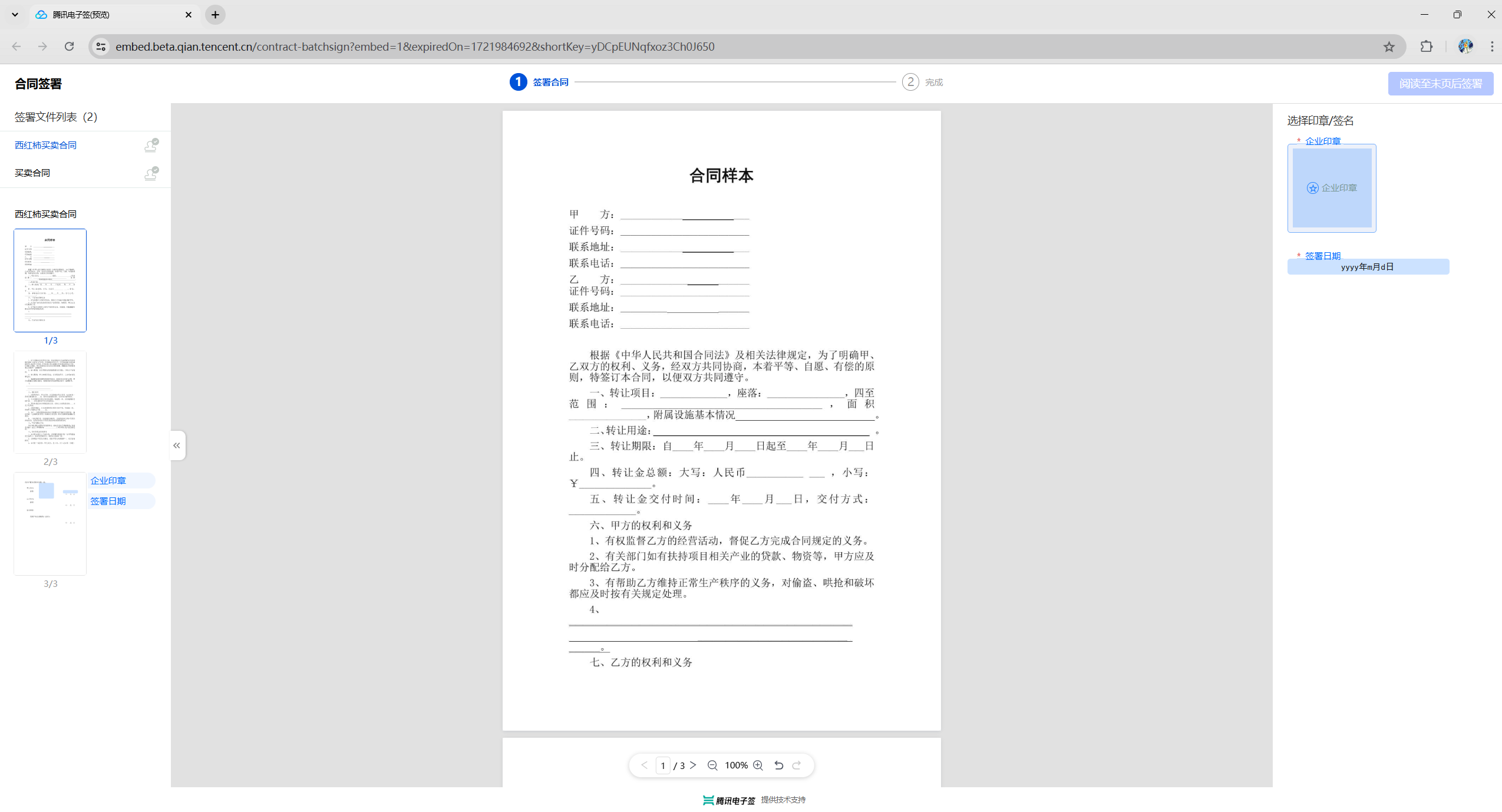
|
|
2182
|
-
*/
|
|
2183
|
-
async CreateOrganizationBatchSignUrl(
|
|
2184
|
-
req: CreateOrganizationBatchSignUrlRequest,
|
|
2185
|
-
cb?: (error: string, rep: CreateOrganizationBatchSignUrlResponse) => void
|
|
2186
|
-
): Promise<CreateOrganizationBatchSignUrlResponse> {
|
|
2187
|
-
return this.request("CreateOrganizationBatchSignUrl", req, cb)
|
|
2188
|
-
}
|
|
2189
|
-
|
|
2190
|
-
/**
|
|
2191
|
-
* 通过AuthCode查询个人用户是否实名
|
|
2192
|
-
|
|
2193
|
-
|
|
2194
|
-
注意:
|
|
2195
|
-
<ul>
|
|
2196
|
-
<li>此接口为合作引流场景使用,使用<b>有白名单限制</b>,使用前请联系对接的客户经理沟通。</li>
|
|
2197
|
-
<li><b>AuthCode 只能使用一次</b>,查询一次再次查询会返回错误</li>
|
|
2198
|
-
</ul>
|
|
2199
|
-
*/
|
|
2200
|
-
async DescribeThirdPartyAuthCode(
|
|
2201
|
-
req: DescribeThirdPartyAuthCodeRequest,
|
|
2202
|
-
cb?: (error: string, rep: DescribeThirdPartyAuthCodeResponse) => void
|
|
2203
|
-
): Promise<DescribeThirdPartyAuthCodeResponse> {
|
|
2204
|
-
return this.request("DescribeThirdPartyAuthCode", req, cb)
|
|
2205
|
-
}
|
|
2206
|
-
|
|
2207
|
-
/**
|
|
2208
|
-
* 此接口用于发起数字文件CA加签操作。可以使用同步或者异步模式进行。
|
|
2209
|
-
|
|
2210
|
-
**注意: 1. 文件类型暂时仅支持PDF类型文件。2. 此接口为『数字文件CA加签服务』白名单功能,使用前请联系对接的客户经理沟通。**
|
|
2211
|
-
*/
|
|
2212
|
-
async CreateFileCounterSign(
|
|
2213
|
-
req: CreateFileCounterSignRequest,
|
|
2214
|
-
cb?: (error: string, rep: CreateFileCounterSignResponse) => void
|
|
2215
|
-
): Promise<CreateFileCounterSignResponse> {
|
|
2216
|
-
return this.request("CreateFileCounterSign", req, cb)
|
|
2217
|
-
}
|
|
2218
|
-
|
|
2219
|
-
/**
|
|
2220
|
-
* 查询企业印章列表。
|
|
2221
|
-
|
|
2222
|
-
注:
|
|
2223
|
-
1. 此操作要求操作者具备<b>印章查询权限</b>(若调用者尚无此权限,请联系超级管理员前往Web控制台【组织管理】->【角色管理】添加相应权限)。
|
|
2224
|
-
*/
|
|
2225
|
-
async DescribeOrganizationSeals(
|
|
2226
|
-
req: DescribeOrganizationSealsRequest,
|
|
2227
|
-
cb?: (error: string, rep: DescribeOrganizationSealsResponse) => void
|
|
2228
|
-
): Promise<DescribeOrganizationSealsResponse> {
|
|
2229
|
-
return this.request("DescribeOrganizationSeals", req, cb)
|
|
2230
|
-
}
|
|
2231
|
-
|
|
2232
|
-
/**
|
|
2233
|
-
* 获取跳转至腾讯电子签小程序的签署链接
|
|
2234
|
-
|
|
2235
|
-
适用场景:如果需要签署人在自己的APP、小程序、H5应用中签署,可以通过此接口获取跳转腾讯电子签小程序的签署跳转链接。
|
|
2236
|
-
|
|
2237
|
-
跳转到小程序的实现,参考微信官方文档(分为<a href="https://developers.weixin.qq.com/miniprogram/dev/api/navigate/wx.navigateToMiniProgram.html">全屏</a>、<a href="https://developers.weixin.qq.com/miniprogram/dev/framework/open-ability/openEmbeddedMiniProgram.html">半屏</a>两种方式),如何配置也可以请参考: <a href="https://qian.tencent.com/developers/company/openwxminiprogram">跳转电子签小程序配置</a>
|
|
2238
|
-
|
|
2239
|
-
注:
|
|
2240
|
-
<ul><li>1. 如果签署人是在PC端扫码签署,可以通过生成跳转链接自主转换成二维码,让签署人在PC端扫码签署</li>
|
|
2241
|
-
<li>2. 签署链接的有效期为<font color="red">90天</font>,超过有效期链接不可用</li>
|
|
2242
|
-
<li>3. 如果需跳转详情页(即PathType值为1)进行填写或签署合同,需指定签署方信息:姓名、手机号码、企业名称等,才能生成正确的跳转链接</li>
|
|
2243
|
-
<li>4. <font color="red">生成的链路后面不能再增加参数</font>(会出现覆盖链接中已有参数导致错误)</li></ul>
|
|
2244
|
-
|
|
2245
|
-
其中小程序的原始Id如下,或者查看小程序信息自助获取。
|
|
2246
|
-
|
|
2247
|
-
| 小程序 | AppID | 原始ID |
|
|
2248
|
-
| ------------ | ------------ | ------------ |
|
|
2249
|
-
| 腾讯电子签(正式版) | wxa023b292fd19d41d | gh_da88f6188665 |
|
|
2250
|
-
| 腾讯电子签Demo | wx371151823f6f3edf | gh_39a5d3de69fa |
|
|
2251
|
-
*/
|
|
2252
|
-
async CreateSchemeUrl(
|
|
2253
|
-
req: CreateSchemeUrlRequest,
|
|
2254
|
-
cb?: (error: string, rep: CreateSchemeUrlResponse) => void
|
|
2255
|
-
): Promise<CreateSchemeUrlResponse> {
|
|
2256
|
-
return this.request("CreateSchemeUrl", req, cb)
|
|
2257
|
-
}
|
|
2258
|
-
|
|
2259
|
-
/**
|
|
2260
|
-
* 删除企业扩展服务授权,当前仅支持 “企业自动签” 和“批量签署” 的取消授权。
|
|
2261
|
-
该接口作用和电子签控制台 企业设置-扩展服务-企业自动签署和批量签署授权 两个模块功能相同,可通过该接口取消企业员工授权。
|
|
2262
|
-
|
|
2263
|
-
注:支持集团代子企业操作,请联系运营开通此功能。
|
|
2264
|
-
*/
|
|
2265
|
-
async DeleteExtendedServiceAuthInfos(
|
|
2266
|
-
req: DeleteExtendedServiceAuthInfosRequest,
|
|
2267
|
-
cb?: (error: string, rep: DeleteExtendedServiceAuthInfosResponse) => void
|
|
2268
|
-
): Promise<DeleteExtendedServiceAuthInfosResponse> {
|
|
2269
|
-
return this.request("DeleteExtendedServiceAuthInfos", req, cb)
|
|
2270
|
-
}
|
|
2271
|
-
}
|