tencentcloud-sdk-nodejs-ess 4.0.1050 → 4.0.1053
This diff represents the content of publicly available package versions that have been released to one of the supported registries. The information contained in this diff is provided for informational purposes only and reflects changes between package versions as they appear in their respective public registries.
package/package.json
CHANGED
|
@@ -1,7 +1,7 @@
|
|
|
1
1
|
{
|
|
2
2
|
"name": "tencentcloud-sdk-nodejs-ess",
|
|
3
|
-
"version": "4.0.
|
|
4
|
-
"description": "
|
|
3
|
+
"version": "4.0.1053",
|
|
4
|
+
"description": "Tencent Cloud API NODEJS SDK",
|
|
5
5
|
"main": "tencentcloud/index.js",
|
|
6
6
|
"scripts": {
|
|
7
7
|
"test": "mocha -t 10000",
|
|
@@ -22,7 +22,7 @@
|
|
|
22
22
|
"author": "tencentcloudapi",
|
|
23
23
|
"license": "Apache-2.0",
|
|
24
24
|
"dependencies": {
|
|
25
|
-
"tencentcloud-sdk-nodejs-common": "
|
|
25
|
+
"tencentcloud-sdk-nodejs-common": "^4.0.488",
|
|
26
26
|
"tslib": "1.13.0"
|
|
27
27
|
},
|
|
28
28
|
"directories": {
|
|
@@ -35,19 +35,14 @@
|
|
|
35
35
|
},
|
|
36
36
|
"devDependencies": {
|
|
37
37
|
"@types/form-data": "^2.5.0",
|
|
38
|
-
"@types/json-bigint": "^1.0.1",
|
|
39
38
|
"@types/node": "^14.0.26",
|
|
40
39
|
"@types/node-fetch": "^2.5.7",
|
|
41
|
-
"@types/uuid": "^9.0.8",
|
|
42
40
|
"@typescript-eslint/eslint-plugin": "^2.34.0",
|
|
43
41
|
"@typescript-eslint/parser": "^2.34.0",
|
|
44
|
-
"babel-eslint": "^10.0.2",
|
|
45
42
|
"chai": "^4.2.0",
|
|
46
43
|
"eslint": "^6.8.0",
|
|
47
|
-
"eslint-plugin-react": "^7.17.0",
|
|
48
44
|
"mocha": "^8.1.1",
|
|
49
|
-
"prettier": "^2.3.0",
|
|
50
45
|
"ts-node": "^8.10.2",
|
|
51
46
|
"typescript": "^3.9.7"
|
|
52
47
|
}
|
|
53
|
-
}
|
|
48
|
+
}
|
|
@@ -2703,6 +2703,22 @@ export interface DescribeIntegrationEmployeesRequest {
|
|
|
2703
2703
|
Offset?: number
|
|
2704
2704
|
}
|
|
2705
2705
|
|
|
2706
|
+
/**
|
|
2707
|
+
* 签署控件的配置信息,用在嵌入式发起的页面配置,包括
|
|
2708
|
+
|
|
2709
|
+
- 签署控件是否默认展示日期.
|
|
2710
|
+
*/
|
|
2711
|
+
export interface SignComponentConfig {
|
|
2712
|
+
/**
|
|
2713
|
+
* 签署控件默认属性配置,是否默认展示签署日期, 在页面中可以进行修改。
|
|
2714
|
+
|
|
2715
|
+
- false 展示签署日期(默认)
|
|
2716
|
+
- true 不展示签署日期
|
|
2717
|
+
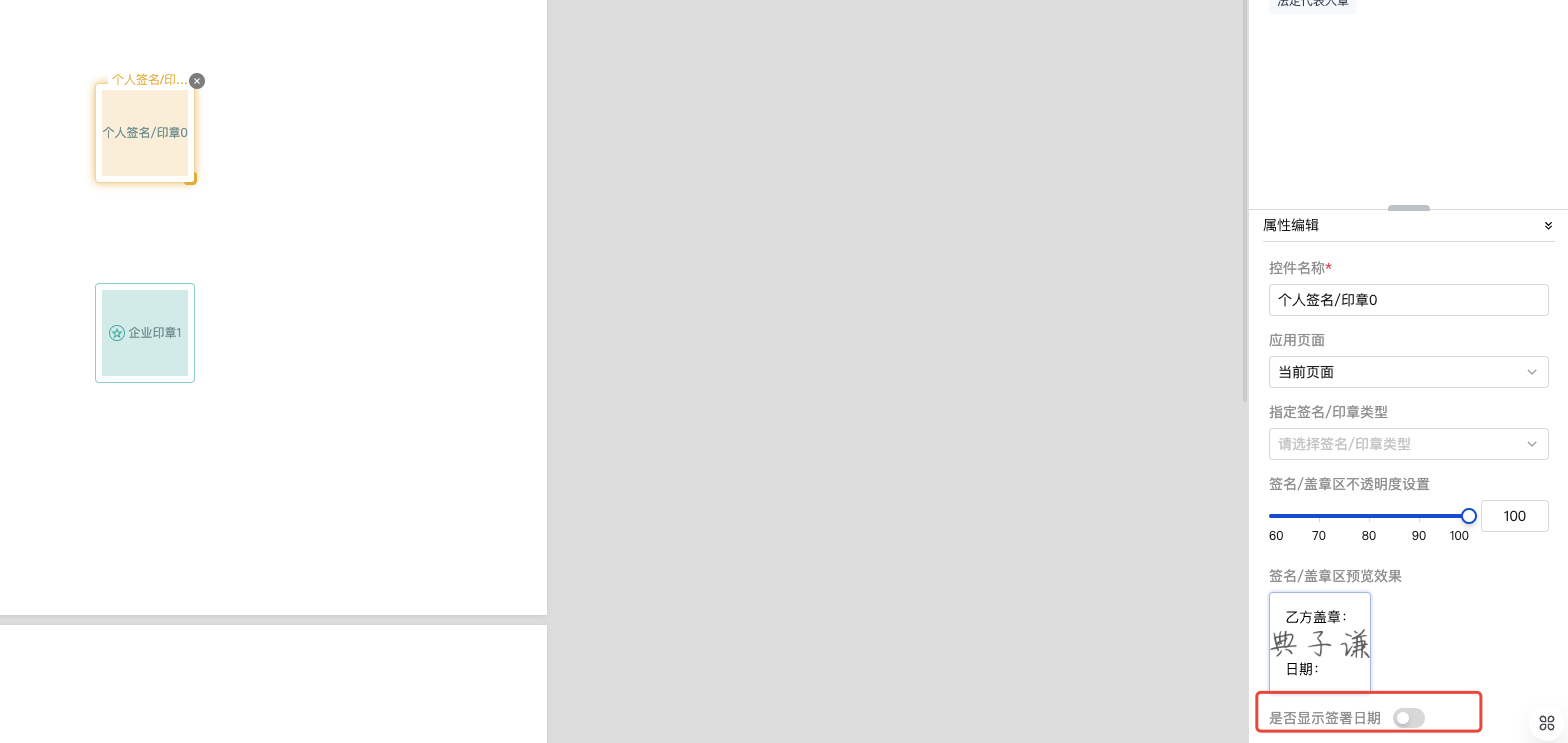。
|
|
2718
|
+
*/
|
|
2719
|
+
HideDate?: boolean
|
|
2720
|
+
}
|
|
2721
|
+
|
|
2706
2722
|
/**
|
|
2707
2723
|
* UnbindEmployeeUserIdWithClientOpenId返回参数结构体
|
|
2708
2724
|
*/
|
|
@@ -4608,7 +4624,7 @@ false:有序签
|
|
|
4608
4624
|
*/
|
|
4609
4625
|
AutoSignScene?: string
|
|
4610
4626
|
/**
|
|
4611
|
-
* 在短信通知、填写、签署流程中,若标题、按钮、合同详情等地方存在“合同”字样时,可根据此配置指定文案,可选文案如下: <ul><li> <b>0</b> :合同(默认值)</li> <li> <b>1</b> :文件</li> <li> <b>2</b> :协议</li></ul>效果如下: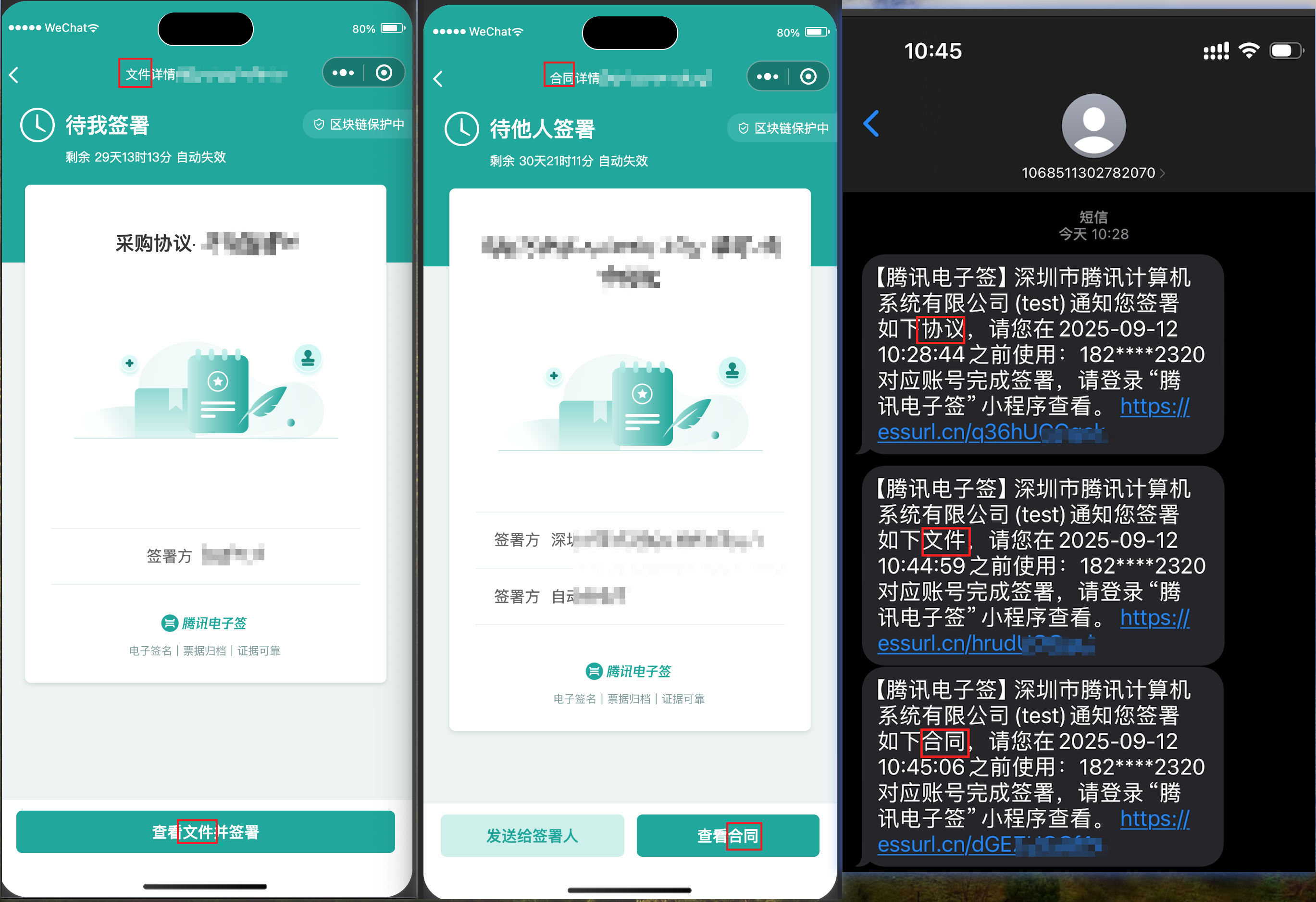
|
|
4627
|
+
* 在短信通知、填写、签署流程中,若标题、按钮、合同详情等地方存在“合同”字样时,可根据此配置指定文案,可选文案如下: <ul><li> <b>0</b> :合同(默认值)</li> <li> <b>1</b> :文件</li> <li> <b>2</b> :协议</li><li> <b>3</b> :文书</li></ul>效果如下:
|
|
4612
4628
|
*/
|
|
4613
4629
|
FlowDisplayType?: number
|
|
4614
4630
|
}
|
|
@@ -8171,6 +8187,12 @@ export interface CreatePrepareFlowRequest {
|
|
|
8171
8187
|
* 在短信通知、填写、签署流程中,若标题、按钮、合同详情等地方存在“合同”字样时,可根据此配置指定文案,可选文案如下: <ul><li> <b>0</b> :合同(默认值)</li> <li> <b>1</b> :文件</li> <li> <b>2</b> :协议</li></ul>效果如下:
|
|
8172
8188
|
*/
|
|
8173
8189
|
FlowDisplayType?: number
|
|
8190
|
+
/**
|
|
8191
|
+
* 签署控件的配置信息,用在嵌入式发起的页面配置,包括
|
|
8192
|
+
|
|
8193
|
+
- 签署控件 是否默认展示日期.
|
|
8194
|
+
*/
|
|
8195
|
+
SignComponentConfig?: SignComponentConfig
|
|
8174
8196
|
}
|
|
8175
8197
|
|
|
8176
8198
|
/**
|
|
@@ -2599,6 +2599,21 @@ export interface DescribeIntegrationEmployeesRequest {
|
|
|
2599
2599
|
*/
|
|
2600
2600
|
Offset?: number;
|
|
2601
2601
|
}
|
|
2602
|
+
/**
|
|
2603
|
+
* 签署控件的配置信息,用在嵌入式发起的页面配置,包括
|
|
2604
|
+
|
|
2605
|
+
- 签署控件是否默认展示日期.
|
|
2606
|
+
*/
|
|
2607
|
+
export interface SignComponentConfig {
|
|
2608
|
+
/**
|
|
2609
|
+
* 签署控件默认属性配置,是否默认展示签署日期, 在页面中可以进行修改。
|
|
2610
|
+
|
|
2611
|
+
- false 展示签署日期(默认)
|
|
2612
|
+
- true 不展示签署日期
|
|
2613
|
+
。
|
|
2614
|
+
*/
|
|
2615
|
+
HideDate?: boolean;
|
|
2616
|
+
}
|
|
2602
2617
|
/**
|
|
2603
2618
|
* UnbindEmployeeUserIdWithClientOpenId返回参数结构体
|
|
2604
2619
|
*/
|
|
@@ -4451,7 +4466,7 @@ export interface FlowGroupInfo {
|
|
|
4451
4466
|
*/
|
|
4452
4467
|
AutoSignScene?: string;
|
|
4453
4468
|
/**
|
|
4454
|
-
* 在短信通知、填写、签署流程中,若标题、按钮、合同详情等地方存在“合同”字样时,可根据此配置指定文案,可选文案如下: <ul><li> <b>0</b> :合同(默认值)</li> <li> <b>1</b> :文件</li> <li> <b>2</b> :协议</li></ul>效果如下:
|
|
4469
|
+
* 在短信通知、填写、签署流程中,若标题、按钮、合同详情等地方存在“合同”字样时,可根据此配置指定文案,可选文案如下: <ul><li> <b>0</b> :合同(默认值)</li> <li> <b>1</b> :文件</li> <li> <b>2</b> :协议</li><li> <b>3</b> :文书</li></ul>效果如下:
|
|
4455
4470
|
*/
|
|
4456
4471
|
FlowDisplayType?: number;
|
|
4457
4472
|
}
|
|
@@ -7915,6 +7930,12 @@ export interface CreatePrepareFlowRequest {
|
|
|
7915
7930
|
* 在短信通知、填写、签署流程中,若标题、按钮、合同详情等地方存在“合同”字样时,可根据此配置指定文案,可选文案如下: <ul><li> <b>0</b> :合同(默认值)</li> <li> <b>1</b> :文件</li> <li> <b>2</b> :协议</li></ul>效果如下:
|
|
7916
7931
|
*/
|
|
7917
7932
|
FlowDisplayType?: number;
|
|
7933
|
+
/**
|
|
7934
|
+
* 签署控件的配置信息,用在嵌入式发起的页面配置,包括
|
|
7935
|
+
|
|
7936
|
+
- 签署控件 是否默认展示日期.
|
|
7937
|
+
*/
|
|
7938
|
+
SignComponentConfig?: SignComponentConfig;
|
|
7918
7939
|
}
|
|
7919
7940
|
/**
|
|
7920
7941
|
* DescribeUserFlowType请求参数结构体
|