task-ledger 1.3.59 → 1.3.61
This diff represents the content of publicly available package versions that have been released to one of the supported registries. The information contained in this diff is provided for informational purposes only and reflects changes between package versions as they appear in their respective public registries.
- package/README.en.md +131 -0
- package/README.md +87 -113
- package/SKILL.md +6 -8
- package/package.json +1 -1
- package/references/troubleshooting.md +2 -2
- package/scripts/bin/ledger-darwin-amd64 +0 -0
- package/scripts/bin/ledger-darwin-arm64 +0 -0
- package/scripts/bin/ledger-linux-amd64 +0 -0
- package/scripts/bin/ledger-windows-amd64.exe +0 -0
- package/scripts/progress +9 -2
- package/README.zh-CN.md +0 -157
package/README.en.md
ADDED
|
@@ -0,0 +1,131 @@
|
|
|
1
|
+
# task-ledger
|
|
2
|
+
|
|
3
|
+
[简体中文](README.md) · **English**
|
|
4
|
+
|
|
5
|
+
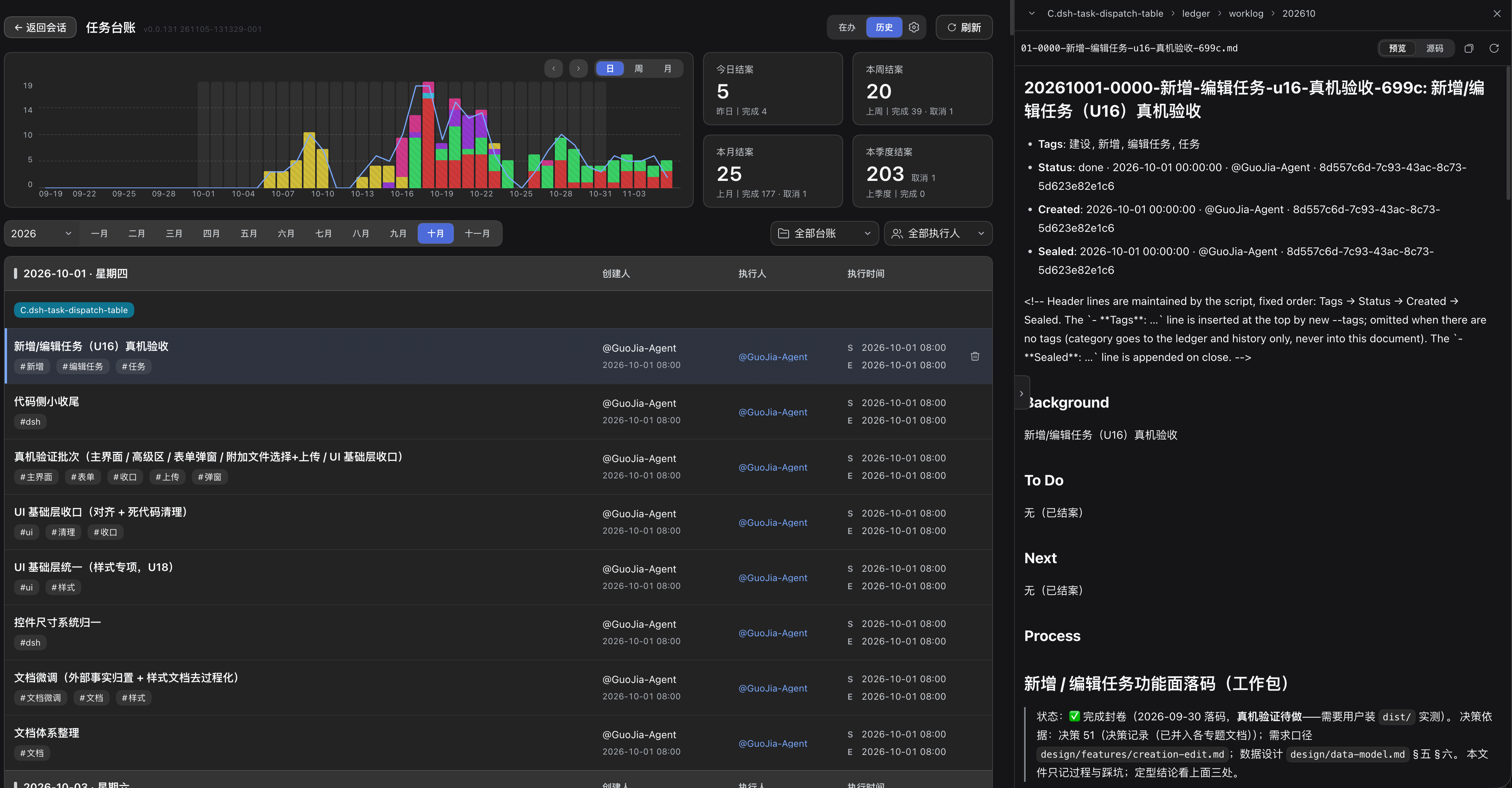
A task ledger that lives in your workspace: any kind of task is fair game — not just development work, but research, documentation, presentations and video production. The agent records what it is working on — who owns it, how far it has got, when it was opened and when it was closed — as plain text inside the repository, so the answers survive the end of the conversation.
|
|
6
|
+
|
|
7
|
+
This package is an Agent Skill: a `SKILL.md` instruction file, a prebuilt command-line tool and reference material. It is loaded by any agent that supports the open `SKILL.md` format, and several agents can install the same skill and record work in one shared ledger.
|
|
8
|
+
|
|
9
|
+
Four properties define it:
|
|
10
|
+
|
|
11
|
+
| Property | What it means |
|
|
12
|
+
|---|---|
|
|
13
|
+
| **Task lifecycle tracking** | Tasks are created, claimed, resumed, handed over and closed. Every transition carries a timestamp and an owner; progress, the conclusion and open issues are written into the task document. |
|
|
14
|
+
| **Local by design** | No account, no hosted backend, no service marketplace. The ledger is JSON and Markdown committed with the repository; it works offline and can be reviewed line by line. |
|
|
15
|
+
| **Single-user and multi-user** | One person on one machine, or a team sharing one repository. Ownership state is sharded per person, so concurrent work never writes the same file. |
|
|
16
|
+
| **Version control as the sync layer** | Git is the transport. Push, pull and merge carry the ledger between machines and contributors. |
|
|
17
|
+
|
|
18
|
+
|
|
19
|
+
|
|
20
|
+
## Install
|
|
21
|
+
|
|
22
|
+
If you use [DeepSeek Harness](https://github.com/deepseek-ai/deepseek-harness), you **do not need to install this skill separately** — the `dsh-task-ledger` plugin bundles it. For plugin installation, see the [root README](https://github.com/cq-guojia/dsh-task-ledger#readme).
|
|
23
|
+
|
|
24
|
+
The rest is for other agents. Claude Code, Cursor, Codex, CodeBuddy, WorkBuddy, Trae, Doubao Work and any agent that loads `SKILL.md` are supported; the same skill installed in different agents still writes to this project's ledger.
|
|
25
|
+
|
|
26
|
+
### 1. Install the skill
|
|
27
|
+
|
|
28
|
+
One command installs it for every agent already on this machine — the [skills CLI](https://skills.sh) (Vercel) detects them, so you never pick a directory:
|
|
29
|
+
|
|
30
|
+
```bash
|
|
31
|
+
npx skills add cq-guojia/dsh-task-ledger -g
|
|
32
|
+
```
|
|
33
|
+
|
|
34
|
+
Or send this line to any agent and let it install:
|
|
35
|
+
|
|
36
|
+
> Install the task-ledger skill (npm package task-ledger, GitHub repo cq-guojia/dsh-task-ledger).
|
|
37
|
+
|
|
38
|
+
The argument is a GitHub repository coordinate: `-g` installs at user level so the skill applies to every project; omit it to install for the current project only, and add `--agent` to restrict the targets. The CLI does not accept an npm package name as a source.
|
|
39
|
+
|
|
40
|
+
### 2. Inject the rules (optional)
|
|
41
|
+
|
|
42
|
+
Add this to `AGENTS.md` in the project root so the agent follows the ledger convention:
|
|
43
|
+
|
|
44
|
+
```markdown
|
|
45
|
+
Usage rules for the task-ledger tool [task-ledger skill]:
|
|
46
|
+
|
|
47
|
+
- **Task progress, work items and work logs**: (create / advance / query / close) go through the task-ledger skill; answer questions about progress and task history from it, never from conversation memory or a hand-rolled list.
|
|
48
|
+
- **Creation anchor**: register a task only when the user explicitly asks for a new one ("open a task", "log this first", "create a task"); questions, queries, discussion and small incidental edits do not count — ask when unsure, and never create a task without an explicit instruction.
|
|
49
|
+
- **How to create and in what order**: the authorization and confirmation rules all follow the task-ledger skill's own instructions.
|
|
50
|
+
- **Ask in passing**: when the user is pushing forward work that spans turns (this turn ends with actions still on your plate) and has never mentioned tracking it, ask once after answering: "Want me to open a ledger for this task? (Ignore this if not needed — no reply necessary.)"; once asked in a session, do not ask again; no reply means ignore it.
|
|
51
|
+
```
|
|
52
|
+
|
|
53
|
+
With session rules injection enabled (the default), dsh sessions do not need this block; other agents do.
|
|
54
|
+
|
|
55
|
+
### 3. Manage it on the board
|
|
56
|
+
|
|
57
|
+
The board is currently available only as a [DeepSeek Harness](https://github.com/deepseek-ai/deepseek-harness) plugin board. To view and manage these tasks on a board, install the `dsh-task-ledger` plugin in dsh as described in the [root README](https://github.com/cq-guojia/dsh-task-ledger#readme).
|
|
58
|
+
|
|
59
|
+
## Using it
|
|
60
|
+
|
|
61
|
+
There are no commands for you to type. The ledger is driven by what you say to the agent: when a request matches one of the intents below, the agent runs the corresponding operation and records it.
|
|
62
|
+
|
|
63
|
+
| You say | What the agent does | Result |
|
|
64
|
+
|---|---|---|
|
|
65
|
+
| "Open a task: get the release pipeline working" | creates the task with the tags you gave | In the shared pool, state `open`, unclaimed |
|
|
66
|
+
| "Open a task and start on it" | creates and claims it | Owned by you, state `doing` |
|
|
67
|
+
| "I'll take that one" / "continue with X" | claims the task | Moved to your name, state `doing` |
|
|
68
|
+
| *(while working)* | writes the task document, then appends an execution record | Progress, conclusions and blockers on record |
|
|
69
|
+
| "Blocked for now" / "leave it for a while" | records the blocker, leaves the state alone | Still `doing` — a pause is neither a release nor a cancellation |
|
|
70
|
+
| "Hand it back" | releases it | Returns to the shared pool for anyone to claim |
|
|
71
|
+
| "Close this task" | closes it with your summary | One row written to history; read-only afterwards |
|
|
72
|
+
| "Cancel it" | closes it as void, with the reason | Closed, not completed |
|
|
73
|
+
| "Delete it" | asks you to confirm, then deletes | Removed permanently — no undo, no restore |
|
|
74
|
+
| "What should I be doing?" / "what did we close last week?" | lists in-flight tasks, one task, or history | Query only, nothing written |
|
|
75
|
+
|
|
76
|
+
Creating a task requires two inputs: **what the work is** — one sentence, without category or project prefixes — and **what it touches** — one to five tags. A category may be given at creation; it is immutable afterwards.
|
|
77
|
+
|
|
78
|
+
Four rules bind the agent:
|
|
79
|
+
|
|
80
|
+
- It never creates, claims, releases, closes or deletes a task on its own initiative. Each of those needs an explicit instruction from you, and a vague "done" is answered with a question rather than a closure.
|
|
81
|
+
- It never edits state files, the history file or the execution log. Only the task document's first five sections are its to write.
|
|
82
|
+
- It completes the written record before closing: a closed task cannot be written to again.
|
|
83
|
+
- When it cannot find a task for the work at hand, it asks whether to create one instead of registering work you did not ask for.
|
|
84
|
+
|
|
85
|
+
## What gets written
|
|
86
|
+
|
|
87
|
+
```
|
|
88
|
+
ledger/
|
|
89
|
+
├── pool.json unclaimed tasks (shared)
|
|
90
|
+
├── owners.json index: identity → shard file
|
|
91
|
+
├── owners/<hash>.json one shard per person: the tasks they own
|
|
92
|
+
├── worklog/<YYYYMM>/*.md task documents, six fixed sections
|
|
93
|
+
└── history/<YYYYMM>.md closed tasks, one row each
|
|
94
|
+
```
|
|
95
|
+
|
|
96
|
+
State and prose are kept apart: JSON records ownership and state, Markdown records the reasoning. Only the CLI writes state, history and the execution log; the agent writes the first five sections of a task document and nothing else. All timestamps are stored in UTC and rendered in local time.
|
|
97
|
+
|
|
98
|
+
## Commands
|
|
99
|
+
|
|
100
|
+
| Command | Purpose |
|
|
101
|
+
|---|---|
|
|
102
|
+
| `init` | Initialise or claim the machine identity (once per machine) |
|
|
103
|
+
| `new` | Create a task |
|
|
104
|
+
| `claim` | Take ownership of a task |
|
|
105
|
+
| `set` | Release a task, hand it to someone, or replace its tags |
|
|
106
|
+
| `log` | Append an execution record to a task document |
|
|
107
|
+
| `close` | Close a task and write its history row |
|
|
108
|
+
| `delete` | Delete a task created in error |
|
|
109
|
+
| `list` | List in-flight tasks |
|
|
110
|
+
| `show` | Show one task |
|
|
111
|
+
| `history` | List closed tasks |
|
|
112
|
+
| `stats` | Aggregate counters and trend |
|
|
113
|
+
| `owners` | List known identities |
|
|
114
|
+
| `root` | Detect whether a directory holds a ledger |
|
|
115
|
+
| `whoami` | Show the current identity |
|
|
116
|
+
| `validate` | Check ledger consistency |
|
|
117
|
+
|
|
118
|
+
Run `scripts/progress <command> --help` for parameters. The agent-facing workflow lives in `SKILL.md`.
|
|
119
|
+
|
|
120
|
+
## Multiple users
|
|
121
|
+
|
|
122
|
+
Ownership is sharded: each person's tasks live in their own file, so two people advancing two tasks never touch the same file. Git merges the shards, the worklog documents and the history file. Where two people edit the same task document, the conflict is confined to that one file.
|
|
123
|
+
|
|
124
|
+
## Links
|
|
125
|
+
|
|
126
|
+
- Repository and full documentation: <https://github.com/cq-guojia/dsh-task-ledger>
|
|
127
|
+
- The dsh plugin, which bundles this skill with a board UI: [`dsh-task-ledger`](https://www.npmjs.com/package/dsh-task-ledger)
|
|
128
|
+
|
|
129
|
+
## Licence
|
|
130
|
+
|
|
131
|
+
MIT
|
package/README.md
CHANGED
|
@@ -1,157 +1,131 @@
|
|
|
1
1
|
# task-ledger
|
|
2
2
|
|
|
3
|
-
|
|
3
|
+
**简体中文** · [English](README.en.md)
|
|
4
4
|
|
|
5
|
-
|
|
5
|
+
一本放在工作区里的任务台账:什么任务都可以用,不限于开发工作,调研、文档、演示、视频制作都能建任务。Agent 把正在做的事 —— 谁在做、做到哪一步、何时开始、何时结束 —— 以纯文本形式记录在仓库内,答案不会随对话结束而丢失。
|
|
6
6
|
|
|
7
|
-
|
|
7
|
+
本包是一份 Agent Skill:包含 `SKILL.md` 执行说明、预编译命令行工具与参考资料。凡支持开放 `SKILL.md` 格式的 Agent 均可加载;多个 Agent 可同时安装同一份技能并写入同一本台账。
|
|
8
8
|
|
|
9
|
-
|
|
9
|
+
它的定位由四点界定:
|
|
10
10
|
|
|
11
|
-
|
|
|
11
|
+
| 特性 | 具体含义 |
|
|
12
12
|
|---|---|
|
|
13
|
-
|
|
|
14
|
-
|
|
|
15
|
-
|
|
|
16
|
-
|
|
|
13
|
+
| **任务全生命周期跟踪** | 任务可创建、认领、续做、移交、结案。每次状态变更都带时间与责任人;过程、结论与遗留问题写入任务正文。 |
|
|
14
|
+
| **本地化工具** | 不需要账号、不需要托管后端、不依赖任何服务市场。台账是与仓库一同提交的 JSON 与 Markdown,离线可用,可在评审中审阅。 |
|
|
15
|
+
| **单人可用,多人亦可用** | 单机单人可直接使用;团队共用一个仓库同样成立。归属状态按人分片存储,并发推进时不会写同一份文件。 |
|
|
16
|
+
| **以 Git 承载版本同步** | Git 即传输通道。push、pull、merge 把台账带到其他机器与其他人。 |
|
|
17
17
|
|
|
18
|
-

|
|
19
19
|
|
|
20
|
-
##
|
|
20
|
+
## 安装
|
|
21
21
|
|
|
22
|
-
|
|
22
|
+
使用 [DeepSeek Harness](https://github.com/deepseek-ai/deepseek-harness) 的用户**无需重复安装本 skill** —— `dsh-task-ledger` 插件已内置这份 skill,插件的安装办法见[根 README](https://github.com/cq-guojia/dsh-task-ledger/blob/main/README.md)。
|
|
23
23
|
|
|
24
|
-
|
|
24
|
+
以下面向其他 Agent。支持 Claude Code、Cursor、Codex、CodeBuddy、WorkBuddy、Trae、豆包工作,以及任何加载 `SKILL.md` 的 Agent;同一份 skill 装在不同 Agent 上,记录的仍是同一个项目的台账。
|
|
25
25
|
|
|
26
|
-
|
|
27
|
-
npx skills add https://github.com/cq-guojia/dsh-task-ledger/tree/main/packages/skill
|
|
28
|
-
```
|
|
29
|
-
|
|
30
|
-
The path is part of the command: this repository is a monorepo holding two copies of the skill, and `packages/skill` selects the source. Add `-g` to install for every project rather than the current one, and `--agent` to restrict the targets.
|
|
31
|
-
|
|
32
|
-
[SkillHub](https://skillhub.cn) — the market behind CodeBuddy and WorkBuddy — installs a skill once it is listed there. When search does not find `task-ledger`, use the client's local import and point it at `packages/skill`, or add this repository as a GitHub source in the SkillHub desktop application.
|
|
33
|
-
|
|
34
|
-
### Manually
|
|
26
|
+
### 1. 安装 Skill
|
|
35
27
|
|
|
36
|
-
|
|
28
|
+
一条命令装到本机所有已装的 Agent —— [skills CLI](https://skills.sh)(Vercel)会自动识别它们,无需你指定目录:
|
|
37
29
|
|
|
38
30
|
```bash
|
|
39
|
-
|
|
31
|
+
npx skills add cq-guojia/dsh-task-ledger -g
|
|
40
32
|
```
|
|
41
33
|
|
|
42
|
-
|
|
34
|
+
也可以把这句话发给任意 Agent,让它自己装:
|
|
43
35
|
|
|
44
|
-
|
|
45
|
-
|---|---|---|
|
|
46
|
-
| **Claude Code** | `~/.claude/skills/` | `mkdir -p ~/.claude/skills && cp -R /tmp/task-ledger-src/packages/skill ~/.claude/skills/task-ledger` |
|
|
47
|
-
| **Cursor** | `~/.cursor/skills/` | `mkdir -p ~/.cursor/skills && cp -R /tmp/task-ledger-src/packages/skill ~/.cursor/skills/task-ledger` |
|
|
48
|
-
| **Codex CLI** | `~/.codex/skills/` | `mkdir -p ~/.codex/skills && cp -R /tmp/task-ledger-src/packages/skill ~/.codex/skills/task-ledger` |
|
|
49
|
-
| **CodeBuddy** | `~/.codebuddy/skills/` | `mkdir -p ~/.codebuddy/skills && cp -R /tmp/task-ledger-src/packages/skill ~/.codebuddy/skills/task-ledger` |
|
|
50
|
-
| **WorkBuddy** | `~/.workbuddy/skills/` | `mkdir -p ~/.workbuddy/skills && cp -R /tmp/task-ledger-src/packages/skill ~/.workbuddy/skills/task-ledger` |
|
|
51
|
-
| **Trae** | `~/.trae/skills/` (Trae CN: `~/.trae-cn/skills/`) | `mkdir -p ~/.trae/skills && cp -R /tmp/task-ledger-src/packages/skill ~/.trae/skills/task-ledger` |
|
|
52
|
-
|
|
53
|
-
**Project-level installation.** The same copy works inside a repository: `.claude/skills/`, `.cursor/skills/`, `.codebuddy/skills/`, `.trae/skills/`, or `.agents/skills/` — the cross-agent convention read by Codex and Cursor. Committed alongside the code, it gives every contributor the same instructions.
|
|
36
|
+
> 帮我安装 task-ledger 这个 skill(npm 包名 task-ledger,GitHub 包名 cq-guojia/dsh-task-ledger)。
|
|
54
37
|
|
|
55
|
-
|
|
38
|
+
参数为 GitHub 仓库坐标:`-g` 表示用户级安装、对所有项目生效;省略则仅作用于当前项目,`--agent` 可限定目标 Agent。该工具不接受 npm 包名作为来源。
|
|
56
39
|
|
|
57
|
-
|
|
40
|
+
### 2. 注入规则文件(可选)
|
|
58
41
|
|
|
59
|
-
|
|
42
|
+
把下面这段加进项目根目录的 `AGENTS.md`,让 Agent 按台账口径跟进任务:
|
|
60
43
|
|
|
61
|
-
|
|
62
|
-
|
|
63
|
-
Once per machine, initialise the identity that signs every ledger entry. The step is interactive and must be run by you — the agent is not allowed to create or rewrite an identity on your behalf:
|
|
44
|
+
```markdown
|
|
45
|
+
任务台账工具[task-ledger skill]使用规则:
|
|
64
46
|
|
|
65
|
-
|
|
66
|
-
|
|
47
|
+
- **凡任务进度、工作事项与工作日志**:(新建 / 推进 / 查询 / 结案)一律调用 task-ledger skill 管理;进度 / 历史任务类问题一律走它作答,不凭对话记忆或自建清单顶替。
|
|
48
|
+
- **开工锚点**:仅当用户明确说要新建(如「开个新坑」「先记一下」「建个任务」)才登记;提问 / 查询 / 讨论 / 顺手小改不算,拿不准先问,未经明确指令不得擅自新建任务。
|
|
49
|
+
- **怎么建、按什么顺序**:命令的授权与确认口径,一律以 task-ledger skill 的说明为准。
|
|
50
|
+
- **顺手问一句**:用户在推进一件跨轮的事(这轮答完、手上还有下一步动作没做完)、却从没提过记账时,答完问一次「你现在这个任务是需要帮你建一个台账吗?(如果无需,忽略这句话,也不用去回复。)」;本会话问过一次就别再问,用户不接就当他不需要。
|
|
67
51
|
```
|
|
68
52
|
|
|
69
|
-
|
|
70
|
-
|
|
71
|
-
No runtime, package manager or network access is required afterwards. Multi-user synchronisation requires Git 2.27 or newer.
|
|
72
|
-
|
|
73
|
-
## Using it
|
|
74
|
-
|
|
75
|
-
There are no commands for you to type. The ledger is driven by what you say to the agent: when a request matches one of the intents below, the agent runs the corresponding operation and records it.
|
|
53
|
+
会话规则注入默认开启时,dsh 会话无需再写入该片段;其他 Agent 仍需写入。
|
|
76
54
|
|
|
77
|
-
|
|
78
|
-
|---|---|---|
|
|
79
|
-
| "Open a task: get the release pipeline working" | creates the task with the tags you gave | In the shared pool, state `open`, unclaimed |
|
|
80
|
-
| "Open a task and start on it" | creates and claims it | Owned by you, state `doing` |
|
|
81
|
-
| "I'll take that one" / "continue with X" | claims the task | Moved to your name, state `doing` |
|
|
82
|
-
| *(while working)* | writes the task document, then appends an execution record | Progress, conclusions and blockers on record |
|
|
83
|
-
| "Blocked for now" / "leave it for a while" | records the blocker, leaves the state alone | Still `doing` — a pause is neither a release nor a cancellation |
|
|
84
|
-
| "Hand it back" | releases it | Returns to the shared pool for anyone to claim |
|
|
85
|
-
| "Close this task" | closes it with your summary | One row written to history; read-only afterwards |
|
|
86
|
-
| "Cancel it" | closes it as void, with the reason | Closed, not completed |
|
|
87
|
-
| "Delete it" | asks you to confirm, then deletes | Removed permanently — no undo, no restore |
|
|
88
|
-
| "What should I be doing?" / "what did we close last week?" | lists in-flight tasks, one task, or history | Query only, nothing written |
|
|
55
|
+
### 3. 到看板管理
|
|
89
56
|
|
|
90
|
-
|
|
57
|
+
看板目前仅支持 [DeepSeek Harness](https://github.com/deepseek-ai/deepseek-harness) 的插件看板。想用看板统一查看管理,按[根 README](https://github.com/cq-guojia/dsh-task-ledger/blob/main/README.md)在 DSH 里装好 `dsh-task-ledger` 插件即可。
|
|
91
58
|
|
|
92
|
-
|
|
59
|
+
## 怎么用
|
|
93
60
|
|
|
94
|
-
|
|
95
|
-
- It never edits state files, the history file or the execution log. Only the task document's first five sections are its to write.
|
|
96
|
-
- It completes the written record before closing: a closed task cannot be written to again.
|
|
97
|
-
- When it cannot find a task for the work at hand, it asks whether to create one instead of registering work you did not ask for.
|
|
61
|
+
不需要你敲任何命令。台账由你对 Agent 说的话驱动:请求命中下列意图时,Agent 执行对应操作并留痕。
|
|
98
62
|
|
|
99
|
-
|
|
63
|
+
| 你说 | Agent 做什么 | 结果 |
|
|
64
|
+
|---|---|---|
|
|
65
|
+
| 「新建一个任务:把发布流程走通」 | 按你给的标签建任务 | 落公共池,状态「待认领」 |
|
|
66
|
+
| 「新建个任务并开始做」 | 建并认领 | 归你名下,状态「进行中」 |
|
|
67
|
+
| 「这活我领了」/「接着做 X」 | 认领该任务 | 转到你名下,状态「进行中」 |
|
|
68
|
+
| (干活过程中) | 写任务正文,再追加一条执行记录 | 进度、结论、卡点全程留痕 |
|
|
69
|
+
| 「卡住了」/「先放一放」 | 记下卡点,状态不动 | 仍是「进行中」—— 暂停既不是释放,也不是取消 |
|
|
70
|
+
| 「退回去」 | 释放任务 | 回公共池,任何人可认领 |
|
|
71
|
+
| 「这个任务结束掉」 | 带摘要结案 | 写入历史,此后只读 |
|
|
72
|
+
| 「取消 / 作废」 | 作废结案,记下原因 | 已关闭,但不算完成 |
|
|
73
|
+
| 「删除」 | 先请你确认,再删除 | 彻底删除,无撤销、无恢复 |
|
|
74
|
+
| 「现在该做什么」/「上周结了什么」 | 列在办、看单条、查历史 | 只读查询,不写任何东西 |
|
|
100
75
|
|
|
101
|
-
|
|
76
|
+
建任务需要两项输入:**做什么** —— 一句话,不加分类或项目名前缀;**涉及什么** —— 一到五个标签。分类可在建任务时给出,此后不可更改。
|
|
102
77
|
|
|
103
|
-
|
|
104
|
-
- **Every piece of task progress, work item and work log (create / advance / query / close) goes through the `task-ledger` skill**; answer progress and history questions from it, never from conversation memory or a hand-rolled list.
|
|
105
|
-
- **Creation anchor**: hand something to `task-ledger` only when the user explicitly asks for a new task ("open a task", "log this first", "create a task"). Questions, queries, discussion and small incidental edits do not count — ask when unsure, and never create a task without an explicit instruction.
|
|
106
|
-
- **Ask in passing**: when the user is pushing forward work that spans turns (this turn ends with actions still on your plate) and has never mentioned tracking it, ask once after answering: "Want me to open a ledger for this task? (Ignore this if not needed — no reply necessary.)" Once asked in a session, do not ask again; no reply means ignore it.
|
|
107
|
-
```
|
|
78
|
+
四条约束对 Agent 生效:
|
|
108
79
|
|
|
109
|
-
|
|
80
|
+
- 建、认领、释放、结案、删除,没有一项由 Agent 自行发起。每一项都需要你的明确指令;你只说了「做完了」这类含糊的话,它回问,而不是直接结案。
|
|
81
|
+
- 状态文件、历史文件、执行记录一律不由 Agent 改动。它只能写任务正文的前五节。
|
|
82
|
+
- 结案前必须先把记录写完 —— 已结案的任务不能再写。
|
|
83
|
+
- 找不到对应任务时,它问你要不要新建,而不是替你登记你没要求登记的工作。
|
|
110
84
|
|
|
111
|
-
##
|
|
85
|
+
## 落盘的数据
|
|
112
86
|
|
|
113
87
|
```
|
|
114
88
|
ledger/
|
|
115
|
-
├── pool.json
|
|
116
|
-
├── owners.json
|
|
117
|
-
├── owners/<hash>.json
|
|
118
|
-
├── worklog
|
|
119
|
-
└── history
|
|
89
|
+
├── pool.json 公共池:未认领任务
|
|
90
|
+
├── owners.json 索引:身份 → 分片文件
|
|
91
|
+
├── owners/<hash>.json 每人一份分片:其名下任务
|
|
92
|
+
├── worklog/<年月>/*.md 任务正文,固定六节
|
|
93
|
+
└── history/<年月>.md 已结案任务,一行一条
|
|
120
94
|
```
|
|
121
95
|
|
|
122
|
-
|
|
96
|
+
状态与正文分离:JSON 记录归属与状态,Markdown 记录来龙去脉。只有命令行工具可写状态、历史与执行记录;Agent 只能写任务正文的前五节,其余一律不改。所有存盘时间一律为 UTC,输出时转换为本机时区。
|
|
123
97
|
|
|
124
|
-
##
|
|
98
|
+
## 命令
|
|
125
99
|
|
|
126
|
-
|
|
|
100
|
+
| 命令 | 用途 |
|
|
127
101
|
|---|---|
|
|
128
|
-
| `init` |
|
|
129
|
-
| `new` |
|
|
130
|
-
| `claim` |
|
|
131
|
-
| `set` |
|
|
132
|
-
| `log` |
|
|
133
|
-
| `close` |
|
|
134
|
-
| `delete` |
|
|
135
|
-
| `list` |
|
|
136
|
-
| `show` |
|
|
137
|
-
| `history` |
|
|
138
|
-
| `stats` |
|
|
139
|
-
| `owners` |
|
|
140
|
-
| `root` |
|
|
141
|
-
| `whoami` |
|
|
142
|
-
| `validate` |
|
|
143
|
-
|
|
144
|
-
|
|
145
|
-
|
|
146
|
-
##
|
|
147
|
-
|
|
148
|
-
|
|
149
|
-
|
|
150
|
-
##
|
|
151
|
-
|
|
152
|
-
-
|
|
153
|
-
-
|
|
154
|
-
|
|
155
|
-
##
|
|
102
|
+
| `init` | 初始化或认领本机身份(一台机器一次) |
|
|
103
|
+
| `new` | 新建任务 |
|
|
104
|
+
| `claim` | 认领任务 |
|
|
105
|
+
| `set` | 释放任务、转交他人或整组替换标签 |
|
|
106
|
+
| `log` | 向任务正文追加一条执行记录 |
|
|
107
|
+
| `close` | 结案,并写入历史 |
|
|
108
|
+
| `delete` | 删除建错的任务 |
|
|
109
|
+
| `list` | 列出在办任务 |
|
|
110
|
+
| `show` | 查看单个任务 |
|
|
111
|
+
| `history` | 列出已结案任务 |
|
|
112
|
+
| `stats` | 汇总计数与趋势 |
|
|
113
|
+
| `owners` | 列出已知身份 |
|
|
114
|
+
| `root` | 判断某目录是否含台账 |
|
|
115
|
+
| `whoami` | 显示当前身份 |
|
|
116
|
+
| `validate` | 检查台账一致性 |
|
|
117
|
+
|
|
118
|
+
参数见 `scripts/progress <子命令> --help`;面向 Agent 的工作流写在 `SKILL.md`。
|
|
119
|
+
|
|
120
|
+
## 多人协作
|
|
121
|
+
|
|
122
|
+
归属按人分片:每人名下的任务保存在各自的分片文件中,两人各自推进各自的任务时不会写同一份文件。Git 负责合并分片、任务正文与历史文件。若两人同时修改同一份任务正文,冲突范围仅限于该文件。
|
|
123
|
+
|
|
124
|
+
## 链接
|
|
125
|
+
|
|
126
|
+
- 仓库与完整文档:<https://github.com/cq-guojia/dsh-task-ledger>
|
|
127
|
+
- 内置本 skill 并提供看板界面的 dsh 插件:[`dsh-task-ledger`](https://www.npmjs.com/package/dsh-task-ledger)
|
|
128
|
+
|
|
129
|
+
## 许可
|
|
156
130
|
|
|
157
131
|
MIT
|
package/SKILL.md
CHANGED
|
@@ -1,7 +1,7 @@
|
|
|
1
1
|
---
|
|
2
2
|
name: task-ledger
|
|
3
3
|
description: 本地任务台账,跨会话记录在办任务的归属、进度与起止。当用户要登记一件新的事(新建任务 / 建个坑 / 这活我领了)、记录已有任务的进展(接着做 / 记一条进展 / 这轮先记下)、查看任务状态或历史(现在该做什么 / 这活谁在做 / 上周做过什么)、给任务结案 / 取消作废 / 退回(做完了 / 验收通过 / 取消 / 作废 / 退回待认领)、删除建错的或垃圾任务(只认「删除」二字)、整理标签或检查台账一致性时加载;同一件事做了多轮、用户始终没提记账时也加载,问一句要不要建台账(只提醒一次,无需就忽略)。
|
|
4
|
-
version: 1.3.
|
|
4
|
+
version: 1.3.61
|
|
5
5
|
allowed-tools: Read,Edit,Bash,Grep
|
|
6
6
|
---
|
|
7
7
|
|
|
@@ -131,17 +131,15 @@ allowed-tools: Read,Edit,Bash,Grep
|
|
|
131
131
|
|
|
132
132
|
**只认一个触发词:用户原话明确说「删除」。**「删掉 / 清掉 / 清理 / 移除」都不算,**不要推测意图、也不要用反问把它们转成删除**,只回一句「要删除请明确说『删除』」;「取消 / 作废」走第 9 条,「不做了 / 先放一放」走第 5 条。
|
|
133
133
|
|
|
134
|
-
|
|
134
|
+
**二次确认(硬门槛,一次一条)**:即使用户明确说了「删除」,也**不许直接跑**。先复述要删的是哪一条(一律任务号 + 标题),再问一句「确定要删除这个东西吗?」;**只有用户明确答复确认**(「确定」「删吧」「是」)才执行 `delete`。含糊、改口、没答复、答非所问 ⇒ 不删、停下,不反复追问、不替用户脑补同意。一次确认只对这一条、这一次有效;删下一条要重新问。删了没有恢复入口,原始数据仍留在台账文件里。
|
|
135
135
|
|
|
136
136
|
| 参数 | 含义 |
|
|
137
137
|
|---|---|
|
|
138
|
-
| `--id <任务号>` |
|
|
139
|
-
| `--src <历史文件> --line <行号>` | 删除历史表格里那一行。`--src` 收相对 `ledger/` 的路径(如 `history/202610.md`),`--line` 是 `history --json` 给出的 `line`;行上原来的结果列与摘要一律不动 |
|
|
140
|
-
| `--expect <指纹>` | 可省,配 `--src` 用:把 `history --json` 的 `fingerprint` 原样回传。写前核对这一行还是不是它(行号只是坐标,文件被改写过就会漂移),**对不上就整条拒绝、一个字节都不写**。建议凡拿过 `fingerprint` 就带上 |
|
|
138
|
+
| `--id <任务号>` | **在办与历史通用**:在办(公共池 / 自己名下分片)走结案写序移进历史,结果列留空、删除四列落值;已结案则按任务号对应的过程文档(`worklog/YYYYMM/DD-HHMM-xxx.md`,由 `core.WorklogName` 推出)反查历史行,原地打删除四格。行号 / 指纹不跨进程传 |
|
|
141
139
|
| `--summary <留言>` | 可省;只进过程文档执行记录,不写历史摘要 |
|
|
142
140
|
| `--repo <工作区根>` | 同上 |
|
|
143
141
|
|
|
144
|
-
|
|
142
|
+
按任务号定位:历史里匹配 0 条 / 多条都拒绝、零写入;重复删已删除的行按幂等回「已经删除过了」。删除后该行从所有列表、统计、趋势中整行消失,**没有开关、没有恢复、没有查询入口**;原始数据仍留在台账文件里。删除是数据纠错,取消仍是「这单被正式作废」的业务事实、照常计入结案统计 —— 别把两者混用。
|
|
145
143
|
|
|
146
144
|
### list — 查在办
|
|
147
145
|
|
|
@@ -314,7 +312,7 @@ allowed-tools: Read,Edit,Bash,Grep
|
|
|
314
312
|
<本 SKILL.md 所在目录>/scripts/progress <子命令> --repo <工作区根>
|
|
315
313
|
```
|
|
316
314
|
|
|
317
|
-
`scripts/progress` 是个薄 shell 包装,按平台 exec `scripts/bin/ledger-<os>-<arch>`(自带运行时的静态二进制;已提供 linux/amd64、darwin/arm64 与 windows/amd64
|
|
315
|
+
`scripts/progress` 是个薄 shell 包装,按平台 exec `scripts/bin/ledger-<os>-<arch>`(自带运行时的静态二进制;已提供 linux/amd64、darwin/arm64、darwin/amd64 与 windows/amd64,Intel 与 Apple Silicon 的 macOS 都覆盖)。平台或架构没有对应产物时,它会明确报错,不会静默失败。
|
|
318
316
|
|
|
319
317
|
- **不需要安装任何东西**(不装解释器、不装运行时、不往 PATH 里加命令):直接执行上面那条绝对路径即可。
|
|
320
318
|
- 若报 `Permission denied`(某些安装环节会丢可执行位),前面加 `sh `:`sh <本 SKILL.md 所在目录>/scripts/progress <子命令> …`。
|
|
@@ -349,7 +347,7 @@ allowed-tools: Read,Edit,Bash,Grep
|
|
|
349
347
|
7. **释放**:仅当用户明确说「退回去 / 释放掉」→ `set --id <任务号> --release`。任务回公共池,别人可认领。
|
|
350
348
|
8. **正常结案(做完了)**:仅当用户明确说「把这个任务结束掉 / close 掉」→ `close --id <任务号> --summary "…"`,**不带 `--cancel`**;说得含糊(「做完了」「验收通过」)先反问「是要结束这个任务吗?」。收尾顺序:**先补完正文 + 记 log,最后才 close** —— 关了就不能再写。
|
|
351
349
|
9. **取消(作废)**:**只有**用户明确说「取消 / 作废」→ `close --id <任务号> --cancel [--summary "原因"]`。用户说「关闭 / 结案 / 结束」一律走第 8 条,**不许加 `--cancel`**;「不做了 / 先放一放 / 以后再做」是一暂停、不是取消(走第 5 条,状态不动);「需求不成立」只是理由、不是命令。含糊先问「是要**取消(作废)**还是**正常结案(做完了)**?」。公共池任务(未认领)只有这条入口 —— 想正常结案得先 `claim`。
|
|
352
|
-
10. **删除**:**只有**用户原话明确说「删除」才进入这条;「删掉 / 清掉 / 清理 / 移除」不算(判定见「delete」节),「取消 / 作废」走第 9 条,「不做了 / 先放一放」走第 5 条。**先二次确认**:复述要删哪条 → 问「确定要删除这个东西吗?」→
|
|
350
|
+
10. **删除**:**只有**用户原话明确说「删除」才进入这条;「删掉 / 清掉 / 清理 / 移除」不算(判定见「delete」节),「取消 / 作废」走第 9 条,「不做了 / 先放一放」走第 5 条。**先二次确认**:复述要删哪条 → 问「确定要删除这个东西吗?」→ 拿到用户明确答复确认,才跑 `delete --id <任务号> [--summary "留言"]`(在办与历史通用;公共池不必先 claim,历史行由 skill 按任务号对应过程文档反查)。删了就删了,没有开关、恢复或查询入口;一次确认只对这一条这一次有效。
|
|
353
351
|
11. **查询**:在办 `list` / 单条 `show` / 已结案 `history`(默认只近 3 个自然月,更早的要 `--months` / `--since`)。
|
|
354
352
|
|
|
355
353
|
## 过程文档
|
package/package.json
CHANGED
|
@@ -1,6 +1,6 @@
|
|
|
1
1
|
{
|
|
2
2
|
"name": "task-ledger",
|
|
3
|
-
"version": "1.3.
|
|
3
|
+
"version": "1.3.61",
|
|
4
4
|
"description": "Task-ledger skill for coding agents: per-workspace progress tracking (ledger/pool.json + owners/<hash>.json shards + owners.json index, history, worklog) driven by a CLI script. Standalone install for CodeBuddy and other agents; also bundled inside the dsh-task-ledger DSH plugin.",
|
|
5
5
|
"keywords": [
|
|
6
6
|
"skill",
|
|
@@ -70,7 +70,7 @@
|
|
|
70
70
|
|
|
71
71
|
### 并发 / 锁(退 1 或提示)
|
|
72
72
|
|
|
73
|
-
- **「另一个会话正在同步同一份台账(已等
|
|
73
|
+
- **「另一个会话正在同步同一份台账(已等 120 秒),请稍后重试」**:同仓库另一个 agent 正在写。等它跑完再重跑,不要并行重试。
|
|
74
74
|
- **「拿不到同步锁 …(本次未做任何写入)。处理:确认 git 目录可写;只需写本地文件可加 --no-sync,之后手动提交」**:锁文件是 git 公共目录里的 `dsh-task-ledger.sync.lock`,同仓库所有 worktree 共享;`--no-sync` 也跳不过这把锁。
|
|
75
75
|
- **「X 在本命令执行期间被改动过(可能是编辑器或 git 操作),已中止、未写入任何内容;重跑一次即可」**:写前发现目标文件被改,重跑。(目前只有 `close` 会做这项核对。)
|
|
76
76
|
|
|
@@ -114,7 +114,7 @@ notices(只提示):历史解析警告、历史有结案行但任务还在
|
|
|
114
114
|
|
|
115
115
|
## 写前取最新与写后同步(机制)
|
|
116
116
|
|
|
117
|
-
- 写命令全程持仓级锁(git 公共目录里的 `dsh-task-ledger.sync.lock`,同仓库所有 worktree 共享,最多等
|
|
117
|
+
- 写命令全程持仓级锁(git 公共目录里的 `dsh-task-ledger.sync.lock`,同仓库所有 worktree 共享,最多等 120 秒;`--no-sync` 也跳不过这把锁)。只读命令不排队。
|
|
118
118
|
- **写前**:先 guard 三查 —— scope 内非 worklog 台账文件有未提交改动 / 有未推送的台账提交 / 有未入库的同名文件,命中即中止;再定向取最新:自举 scope(`owners.json` + `pool.json` + 我的分片)加动作 scope(`new` 加目标文件与当月 worklog 目录;`claim` / `set` 还加索引里其他人的全部分片;`close` 加当月 `history/`;任务没有 `worklog` 字段时退整个 `worklog/`)。干净就刷成远端最新,本地有未提交手写改动就 stash → 快进 → 叠回,冲突即中止。`worklog/` 目录只刷新本地已存在的文件(上游新增的不会自动补下来)。
|
|
119
119
|
- **写后**:只 `git add` 台账路径,然后 `commit --no-verify` —— 提交失败退 1;push 失败只提示、退 0,被拒时自动 `rebase --autostash` 合并一次:不同任务自动合并,同一任务两边都改留冲突标记让人定;本地有非台账提交时不 rebase。
|
|
120
120
|
- **回滚**:命令失败时,写前刷下来的内容按字节还原、本次新建的文件删掉;业务写的自补偿只有两处 —— `new`(删任务行 + 删文档)、`close`(三个文件按字节还原)。
|
|
Binary file
|
|
Binary file
|
|
Binary file
|
|
Binary file
|
package/scripts/progress
CHANGED
|
@@ -35,8 +35,15 @@ if [ ! -x "$bin" ]; then
|
|
|
35
35
|
fi
|
|
36
36
|
|
|
37
37
|
if [ ! -x "$bin" ]; then
|
|
38
|
-
|
|
39
|
-
|
|
38
|
+
# 两种原因分开说:文件在但起不来(丢了可执行位 / noexec)与根本没有这个平台的产物
|
|
39
|
+
if [ -f "$bin" ]; then
|
|
40
|
+
echo "错误:$bin 存在但跑不起来(可执行位丢了,或所在分区不允许执行)" >&2
|
|
41
|
+
echo " 处理:chmod +x \"$bin\" 后重跑;仍不行就把 skill 装到普通本地目录。" >&2
|
|
42
|
+
else
|
|
43
|
+
echo "错误:当前平台($os/$arch)没有配套的台账二进制:$bin" >&2
|
|
44
|
+
echo " 处理:在装有 Go 的机器上按 packages/skill/src 的源码交叉编译出 ledger-$os-$arch,放进 scripts/bin/。" >&2
|
|
45
|
+
echo " 进度见 https://github.com/cq-guojia/dsh-task-ledger/issues" >&2
|
|
46
|
+
fi
|
|
40
47
|
exit 1
|
|
41
48
|
fi
|
|
42
49
|
|
package/README.zh-CN.md
DELETED
|
@@ -1,157 +0,0 @@
|
|
|
1
|
-
# task-ledger
|
|
2
|
-
|
|
3
|
-
[English](README.md) · **简体中文**
|
|
4
|
-
|
|
5
|
-
面向 AI 编码代理的任务台账。代理把正在做的事 —— 谁在做、做到哪一步、何时开始、何时结束 —— 以纯文本形式记录在仓库内,答案不会随对话结束而丢失。
|
|
6
|
-
|
|
7
|
-
本包是一个 skill:一份 `SKILL.md`、一个预编译命令行工具,以及若干参考资料。凡加载开放 `SKILL.md` 格式的代理均可使用:Claude Code、Cursor、Codex、CodeBuddy、WorkBuddy、Trae、豆包工作等。
|
|
8
|
-
|
|
9
|
-
它的定位由四点界定:
|
|
10
|
-
|
|
11
|
-
| 特性 | 具体含义 |
|
|
12
|
-
|---|---|
|
|
13
|
-
| **任务全生命周期跟踪** | 任务可创建、认领、续做、移交、结案。每次状态变更都带时间与责任人;过程、结论与遗留问题写入任务正文。 |
|
|
14
|
-
| **本地化工具** | 不需要账号、不需要托管后端、不依赖任何服务市场。台账是与仓库一同提交的 JSON 与 Markdown,离线可用,可在代码评审中审阅。 |
|
|
15
|
-
| **单人可用,多人亦可用** | 单机单人可直接使用;团队共用一个仓库同样成立。归属状态按人分片存储,并发推进时不会写同一份文件。 |
|
|
16
|
-
| **以 Git 承载版本同步** | Git 即传输通道。push、pull、merge 把台账带到其他机器与其他人。 |
|
|
17
|
-
|
|
18
|
-

|
|
19
|
-
|
|
20
|
-
## 安装
|
|
21
|
-
|
|
22
|
-
### 用技能管理器安装
|
|
23
|
-
|
|
24
|
-
[skills CLI](https://skills.sh)(Vercel)会识别本机已装的 agent,把 skill 写入各自目录,并支持后续更新:
|
|
25
|
-
|
|
26
|
-
```bash
|
|
27
|
-
npx skills add https://github.com/cq-guojia/dsh-task-ledger/tree/main/packages/skill
|
|
28
|
-
```
|
|
29
|
-
|
|
30
|
-
路径是命令的一部分:本仓库是 monorepo,内含两份同名副本,`packages/skill` 才是真源。加 `-g` 装到全局而非当前项目,加 `--agent` 限定目标 agent。
|
|
31
|
-
|
|
32
|
-
[SkillHub](https://skillhub.cn) 是 CodeBuddy 与 WorkBuddy 背后的技能市场,skill 上架后可直接安装。检索不到 `task-ledger` 时,改用客户端「导入本地技能」指向 `packages/skill`,或在 SkillHub 桌面版中把本仓库添加为 GitHub 来源。
|
|
33
|
-
|
|
34
|
-
### 手动安装
|
|
35
|
-
|
|
36
|
-
安装即:把 skill 目录复制到你所使用代理读取的技能目录。先取一份源码:
|
|
37
|
-
|
|
38
|
-
```bash
|
|
39
|
-
git clone --depth 1 https://github.com/cq-guojia/dsh-task-ledger.git /tmp/task-ledger-src
|
|
40
|
-
```
|
|
41
|
-
|
|
42
|
-
再按代理复制到对应位置。用户级目录对所有项目生效;项目级目录只对单个仓库生效,可随仓库提交,这是团队共用同一份 skill 的方式。
|
|
43
|
-
|
|
44
|
-
| 代理 | 用户级目录 | 命令 |
|
|
45
|
-
|---|---|---|
|
|
46
|
-
| **Claude Code** | `~/.claude/skills/` | `mkdir -p ~/.claude/skills && cp -R /tmp/task-ledger-src/packages/skill ~/.claude/skills/task-ledger` |
|
|
47
|
-
| **Cursor** | `~/.cursor/skills/` | `mkdir -p ~/.cursor/skills && cp -R /tmp/task-ledger-src/packages/skill ~/.cursor/skills/task-ledger` |
|
|
48
|
-
| **Codex CLI** | `~/.codex/skills/` | `mkdir -p ~/.codex/skills && cp -R /tmp/task-ledger-src/packages/skill ~/.codex/skills/task-ledger` |
|
|
49
|
-
| **CodeBuddy** | `~/.codebuddy/skills/` | `mkdir -p ~/.codebuddy/skills && cp -R /tmp/task-ledger-src/packages/skill ~/.codebuddy/skills/task-ledger` |
|
|
50
|
-
| **WorkBuddy** | `~/.workbuddy/skills/` | `mkdir -p ~/.workbuddy/skills && cp -R /tmp/task-ledger-src/packages/skill ~/.workbuddy/skills/task-ledger` |
|
|
51
|
-
| **Trae** | `~/.trae/skills/`(Trae 国内版:`~/.trae-cn/skills/`) | `mkdir -p ~/.trae/skills && cp -R /tmp/task-ledger-src/packages/skill ~/.trae/skills/task-ledger` |
|
|
52
|
-
|
|
53
|
-
**项目级安装。** 同样的复制方式也适用于仓库内:`.claude/skills/`、`.cursor/skills/`、`.codebuddy/skills/`、`.trae/skills/`,以及 Codex 与 Cursor 都能读取的跨代理约定目录 `.agents/skills/`。随代码一同提交,每位协作者便获得同一份执行说明。
|
|
54
|
-
|
|
55
|
-
**豆包工作。** 在应用内导入:打开侧栏,进入「技能」,将 `packages/skill` 作为本地技能导入。该应用未公开用户级技能目录,应用内导入是受支持的方式。
|
|
56
|
-
|
|
57
|
-
**其他代理。** 将目录放到 `.agents/skills/task-ledger/`,或该代理扫描 `SKILL.md` 的位置。本包不依赖任何宿主:命令行是静态二进制,内容均为 Markdown。
|
|
58
|
-
|
|
59
|
-
**Windows。** 将路径中的 `~` 替换为 `%USERPROFILE%\`;下面所有 `scripts/progress` 都要换成 `scripts\bin\ledger-windows-amd64.exe`(无扩展名的 sh 包装在 Windows 上不可执行:CreateProcessW 会按扩展名补 `.exe` 去找,然后报找不到)。在 Git Bash / WSL 里仍可用 `scripts/progress`。命令行提供 Linux(amd64)、macOS(arm64)与 Windows(amd64)三个平台的二进制。
|
|
60
|
-
|
|
61
|
-
## 首次使用
|
|
62
|
-
|
|
63
|
-
每台机器需执行一次身份初始化,此后所有台账记录均以该身份署名。该步骤为交互式,必须由你本人执行 —— 代理不得代为创建或改写身份:
|
|
64
|
-
|
|
65
|
-
```bash
|
|
66
|
-
~/.claude/skills/task-ledger/scripts/progress init
|
|
67
|
-
```
|
|
68
|
-
|
|
69
|
-
在第二台机器上,直接运行 `init` 并从台账名册中认领已有身份,两台机器便以同一账号写入。
|
|
70
|
-
|
|
71
|
-
此后无需任何运行时、包管理器或网络;多人同步需 Git 2.27 及以上。
|
|
72
|
-
|
|
73
|
-
## 怎么用
|
|
74
|
-
|
|
75
|
-
不需要你敲任何命令。台账由你对代理说的话驱动:请求命中下列意图时,代理执行对应操作并留痕。
|
|
76
|
-
|
|
77
|
-
| 你说 | 代理做什么 | 结果 |
|
|
78
|
-
|---|---|---|
|
|
79
|
-
| 「新建一个任务:把发布流程走通」 | 按你给的标签建任务 | 落公共池,状态「待认领」 |
|
|
80
|
-
| 「新建个任务并开始做」 | 建并认领 | 归你名下,状态「进行中」 |
|
|
81
|
-
| 「这活我领了」/「接着做 X」 | 认领该任务 | 转到你名下,状态「进行中」 |
|
|
82
|
-
| (干活过程中) | 写任务正文,再追加一条执行记录 | 进度、结论、卡点全程留痕 |
|
|
83
|
-
| 「卡住了」/「先放一放」 | 记下卡点,状态不动 | 仍是「进行中」—— 暂停既不是释放,也不是取消 |
|
|
84
|
-
| 「退回去」 | 释放任务 | 回公共池,任何人可认领 |
|
|
85
|
-
| 「这个任务结束掉」 | 带摘要结案 | 写入历史,此后只读 |
|
|
86
|
-
| 「取消 / 作废」 | 作废结案,记下原因 | 已关闭,但不算完成 |
|
|
87
|
-
| 「删除」 | 先请你确认,再删除 | 彻底删除,无撤销、无恢复 |
|
|
88
|
-
| 「现在该做什么」/「上周结了什么」 | 列在办、看单条、查历史 | 只读查询,不写任何东西 |
|
|
89
|
-
|
|
90
|
-
建任务需要两项输入:**做什么** —— 一句话,不加分类或项目名前缀;**涉及什么** —— 一到五个标签。分类可在建任务时给出,此后不可更改。
|
|
91
|
-
|
|
92
|
-
四条约束对代理生效:
|
|
93
|
-
|
|
94
|
-
- 建、认领、释放、结案、删除,没有一项由代理自行发起。每一项都需要你的明确指令;你只说了「做完了」这类含糊的话,它回问,而不是直接结案。
|
|
95
|
-
- 状态文件、历史文件、执行记录一律不由代理改动。它只能写任务正文的前五节。
|
|
96
|
-
- 结案前必须先把记录写完 —— 已结案的任务不能再写。
|
|
97
|
-
- 找不到对应任务时,它问你要不要新建,而不是替你登记你没要求登记的工作。
|
|
98
|
-
|
|
99
|
-
### 建议把它写进规则文件
|
|
100
|
-
|
|
101
|
-
skill 只在请求命中意图时才加载 —— 你手上这件活该不该记账,不在这几个触发词里。所以在项目的 `AGENTS.md`(或等价的代理规则文件)里放一段常驻规则,比只装 skill 稳得多。复制下面这块即可:
|
|
102
|
-
|
|
103
|
-
```markdown
|
|
104
|
-
- **凡任务进度、工作事项与工作日志(新建 / 推进 / 查询 / 结案)一律调用 `task-ledger` skill 管理**;进度 / 历史类问题一律走它作答,不凭对话记忆或自建清单顶替。
|
|
105
|
-
- **开工锚点**:仅当用户明确说要新建(如「开个新坑」「先记一下」「建个任务」)才交给 `task-ledger` 登记;提问 / 查询 / 讨论 / 顺手小改不算,拿不准先问,未经用户明确指令不得擅自新建任务。
|
|
106
|
-
- **顺手问一句**:用户在推进一件跨轮的事(这轮答完、手上还有下一步动作没做完)、却从没提过记账时,答完问一次「你现在这个任务是需要帮你建一个台账吗?(如果无需,忽略这句话,也不用去回复。)」;本会话问过一次就别再问,无回复就忽略。
|
|
107
|
-
```
|
|
108
|
-
|
|
109
|
-
不写这段也能用,只是它只在你明确提到任务时才会动。
|
|
110
|
-
|
|
111
|
-
## 落盘的数据
|
|
112
|
-
|
|
113
|
-
```
|
|
114
|
-
ledger/
|
|
115
|
-
├── pool.json 公共池:未认领任务
|
|
116
|
-
├── owners.json 索引:身份 → 分片文件
|
|
117
|
-
├── owners/<hash>.json 每人一份分片:其名下任务
|
|
118
|
-
├── worklog/<年月>/*.md 任务正文,固定六节
|
|
119
|
-
└── history/<年月>.md 已结案任务,一行一条
|
|
120
|
-
```
|
|
121
|
-
|
|
122
|
-
状态与正文分离:JSON 记录归属与状态,Markdown 记录来龙去脉。只有命令行工具可写状态、历史与执行记录;代理只能写任务正文的前五节,其余一律不改。所有存盘时间一律为 UTC,输出时转换为本机时区。
|
|
123
|
-
|
|
124
|
-
## 命令
|
|
125
|
-
|
|
126
|
-
| 命令 | 用途 |
|
|
127
|
-
|---|---|
|
|
128
|
-
| `init` | 初始化或认领本机身份(一台机器一次) |
|
|
129
|
-
| `new` | 新建任务 |
|
|
130
|
-
| `claim` | 认领任务 |
|
|
131
|
-
| `set` | 释放任务、转交他人或整组替换标签 |
|
|
132
|
-
| `log` | 向任务正文追加一条执行记录 |
|
|
133
|
-
| `close` | 结案,并写入历史 |
|
|
134
|
-
| `delete` | 删除建错的任务 |
|
|
135
|
-
| `list` | 列出在办任务 |
|
|
136
|
-
| `show` | 查看单个任务 |
|
|
137
|
-
| `history` | 列出已结案任务 |
|
|
138
|
-
| `stats` | 汇总计数与趋势 |
|
|
139
|
-
| `owners` | 列出已知身份 |
|
|
140
|
-
| `root` | 判断某目录是否含台账 |
|
|
141
|
-
| `whoami` | 显示当前身份 |
|
|
142
|
-
| `validate` | 检查台账一致性 |
|
|
143
|
-
|
|
144
|
-
参数见 `scripts/progress <子命令> --help`;面向代理的工作流写在 `SKILL.md`。
|
|
145
|
-
|
|
146
|
-
## 多人协作
|
|
147
|
-
|
|
148
|
-
归属按人分片:每人名下的任务保存在各自的分片文件中,两人各自推进各自的任务时不会写同一份文件。Git 负责合并分片、任务正文与历史文件。若两人同时修改同一份任务正文,冲突范围仅限于该文件。
|
|
149
|
-
|
|
150
|
-
## 链接
|
|
151
|
-
|
|
152
|
-
- 仓库与完整文档:<https://github.com/cq-guojia/dsh-task-ledger>
|
|
153
|
-
- 内置本 skill 并提供看板界面的 dsh 插件:[`dsh-task-ledger`](https://www.npmjs.com/package/dsh-task-ledger)
|
|
154
|
-
|
|
155
|
-
## 许可
|
|
156
|
-
|
|
157
|
-
MIT
|