targetj 1.0.83 → 1.0.85
This diff represents the content of publicly available package versions that have been released to one of the supported registries. The information contained in this diff is provided for informational purposes only and reflects changes between package versions as they appear in their respective public registries.
- package/README.md +111 -28
- package/build/App.js +1 -1
- package/build/TUtil.js +14 -6
- package/package.json +1 -1
package/README.md
CHANGED
|
@@ -85,7 +85,7 @@ This is only property. It defines the initial value of the actual value.
|
|
|
85
85
|
|
|
86
86
|
In the example below, we incrementally increase the value of width, height, and opacity in 30 steps, with a 50-milliseconds pause between each step.
|
|
87
87
|
|
|
88
|
-

|
|
89
89
|
|
|
90
90
|
|
|
91
91
|
```bash
|
|
@@ -136,7 +136,7 @@ By combining both declarative and imperative targets, you gain a powerful toolse
|
|
|
136
136
|
|
|
137
137
|
The following example demonstrates the use of both declarative and imperative approaches. In the animate target, we set two imperative targets to move a square across the screen. When x reaches the end of the screen, onImperativeEnd is triggered, reactivating the target and restarting the animation.
|
|
138
138
|
|
|
139
|
-

|
|
140
140
|
|
|
141
141
|
```bash
|
|
142
142
|
import { App, TModel, getScreenWidth, getScreenHeight } from "targetj";
|
|
@@ -173,33 +173,45 @@ App(new TModel('declarative', {
|
|
|
173
173
|
|
|
174
174
|
Calling backend APIs is simplified through the use of targets in TargetJ. It includes a loader that streamlines API integration.
|
|
175
175
|
|
|
176
|
-
In the example below, we define a target named 'load' that attempts to fetch a
|
|
176
|
+
In the example below, we define a target named 'load' that attempts to fetch a specific user with an ID . Within the value() function, we initialize the API call. The first parameter specifies an ID that identifies the API call, which can also be used to access cached data. We chose to be the same as the uer ID.
|
|
177
177
|
|
|
178
|
-
The target will remain active using the loop function, with value() continuing to return undefined while polling the system every
|
|
178
|
+
The target will remain active using the loop function, with value() continuing to return undefined while polling the system every 50ms (as specified in the interval property) until the loader retrieves the API result. When the API result arrives, it triggers onValueChange, which creates a user object based on the retrieved data. Additionally, we define two targets to handle scenarios for both fast and slow connections. The slow target is enabled if polling exceeds 100 times, while the fast target is enabled if the API result is retrieved in less than 600ms. The fast target will reactivate the load target till it fetches 10 users.
|
|
179
179
|
|
|
180
|
-

|
|
181
181
|
|
|
182
182
|
```bash
|
|
183
|
-
import { App, TModel, getLoader,
|
|
183
|
+
import { App, TModel, getLoader, getScreenHeight, getScreenWidth } from "targetj";
|
|
184
184
|
|
|
185
185
|
App(
|
|
186
186
|
new TModel("apiCall", {
|
|
187
|
+
start() { this.users = 0; },
|
|
188
|
+
width() { return getScreenWidth(); },
|
|
189
|
+
height() { return getScreenHeight(); },
|
|
187
190
|
load: {
|
|
188
191
|
loop() { return !this.val(this.key); },
|
|
189
|
-
interval:
|
|
190
|
-
value
|
|
191
|
-
|
|
192
|
-
getLoader().initSingleLoad(fetchId, {
|
|
192
|
+
interval: 50,
|
|
193
|
+
value() {
|
|
194
|
+
const fetchId = `user${this.users}`;
|
|
195
|
+
getLoader().initSingleLoad(fetchId, {
|
|
196
|
+
url: "https://targetj.io/api/randomUser",
|
|
197
|
+
data: { id: fetchId },
|
|
198
|
+
});
|
|
193
199
|
return getLoader().fetchResult(fetchId);
|
|
194
200
|
},
|
|
195
201
|
onValueChange(newValue) {
|
|
196
|
-
|
|
197
|
-
|
|
198
|
-
|
|
202
|
+
if (!newValue) return;
|
|
203
|
+
const user = newValue.result;
|
|
204
|
+
this.addChild(
|
|
205
|
+
new TModel("userApi", {
|
|
206
|
+
width: 100,
|
|
199
207
|
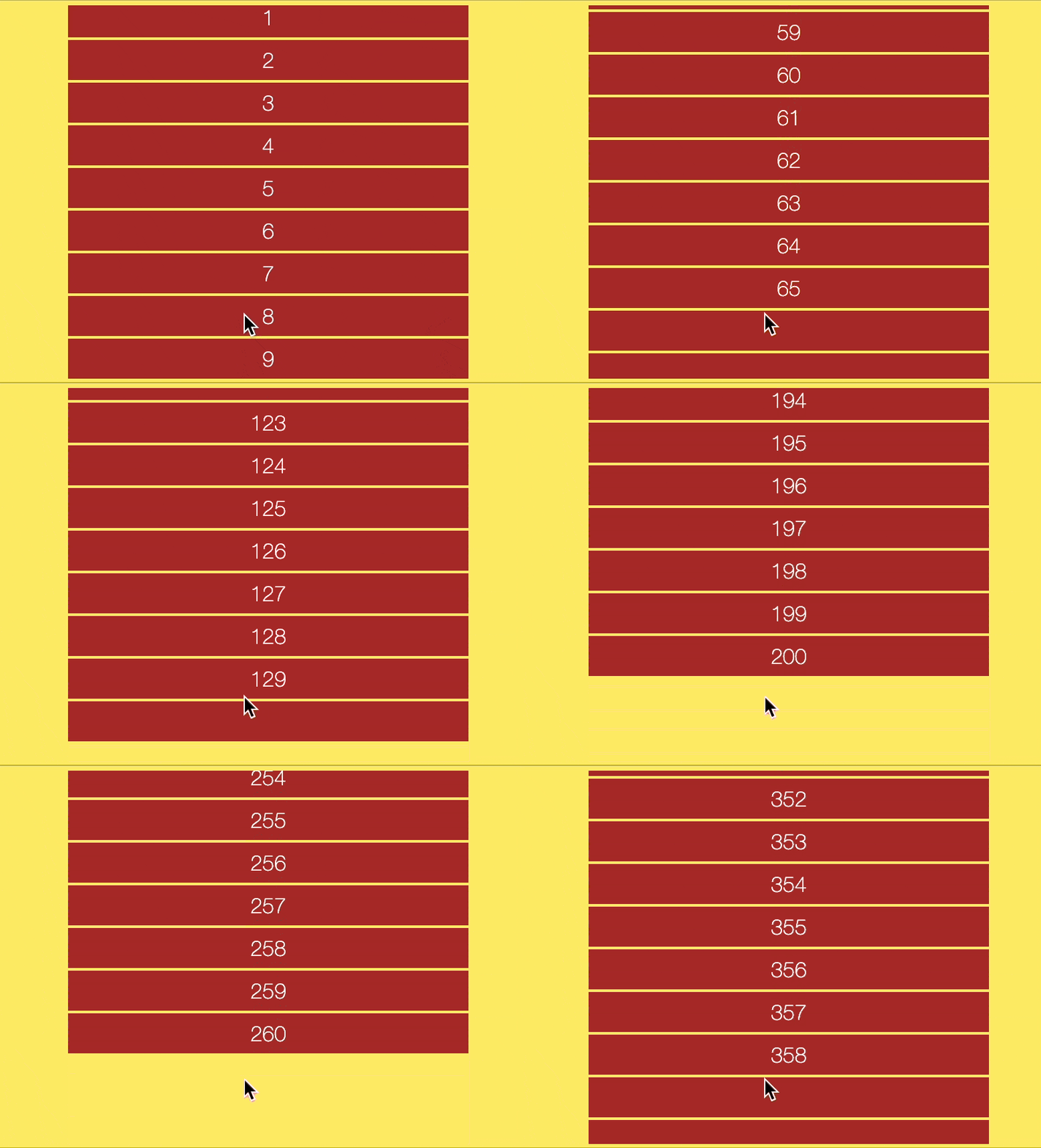
height: 30,
|
|
208
|
+
rightMargin: 5,
|
|
209
|
+
bottomMargin: 5,
|
|
210
|
+
lineHeight: 30,
|
|
200
211
|
html: user.name,
|
|
201
|
-
background: "
|
|
202
|
-
|
|
212
|
+
background: "yellow",
|
|
213
|
+
})
|
|
214
|
+
);
|
|
203
215
|
},
|
|
204
216
|
},
|
|
205
217
|
slowLoad: {
|
|
@@ -207,29 +219,33 @@ App(
|
|
|
207
219
|
console.log("Connection issue: please try again later.");
|
|
208
220
|
},
|
|
209
221
|
enabledOn() {
|
|
210
|
-
return this.getTargetExecutionCount("load") >
|
|
211
|
-
}
|
|
222
|
+
return this.getTargetExecutionCount("load") > 30;
|
|
223
|
+
},
|
|
212
224
|
},
|
|
213
225
|
fastLoad: {
|
|
226
|
+
loop() { return this.users <= 9; },
|
|
214
227
|
value() {
|
|
215
|
-
//Loading is fast: We can load additional details about the user.
|
|
216
|
-
|
|
217
|
-
|
|
218
|
-
|
|
228
|
+
//Loading is fast: We can load additional details about the user or more users.
|
|
229
|
+
this.users++;
|
|
230
|
+
this.targetValues['load'].executionCount = 0;
|
|
231
|
+
this.activateTarget("load");
|
|
219
232
|
},
|
|
220
233
|
enabledOn() {
|
|
221
|
-
return
|
|
222
|
-
|
|
223
|
-
|
|
234
|
+
return (
|
|
235
|
+
this.isTargetComplete("load") && this.val("load").loadingTime < 600
|
|
236
|
+
);
|
|
237
|
+
},
|
|
238
|
+
},
|
|
224
239
|
})
|
|
225
240
|
);
|
|
241
|
+
|
|
226
242
|
```
|
|
227
243
|
|
|
228
244
|
## Event handling example
|
|
229
245
|
|
|
230
246
|
In the following example, the background color of the pane changes randomly whenever you click on it. The `canHandleEvents` target ensures that the object can handle touch events, such as clicks. However, we’ve set a limit of 10 executions for the background change. After reaching this limit, the component will no longer respond to click events. The `onClickEvent` is a system target that activates all associated targets when a click occurs. The `html` target tracks the number of executions and displays it within the pane.
|
|
231
247
|
|
|
232
|
-

|
|
233
249
|
|
|
234
250
|
```bash
|
|
235
251
|
import { App, TModel } from "targetj";
|
|
@@ -260,7 +276,7 @@ App(
|
|
|
260
276
|
|
|
261
277
|
TargetJ offers efficient and easy-to-control UI animation and manipulation through special targets such as x, y, width, height, scale, rotate, and opacity, which directly impact the UI. A complete list of these targets can be found in the "Special target names" section. For very intensive UI animations, you can leverage the Animation API. An example is provided below.
|
|
262
278
|
|
|
263
|
-

|
|
264
280
|
|
|
265
281
|
```bash
|
|
266
282
|
import { App, TModel } from "targetj";
|
|
@@ -331,11 +347,78 @@ App(
|
|
|
331
347
|
);
|
|
332
348
|
```
|
|
333
349
|
|
|
350
|
+
## Infinite scrolling
|
|
351
|
+
|
|
352
|
+
This example demonstrates how to handle scroll events and develop a simple infinite scrolling application.
|
|
353
|
+
|
|
354
|
+
|
|
355
|
+
|
|
356
|
+
```bash
|
|
357
|
+
import { App, TModel, getEvents, getScreenHeight, getScreenWidth } from "targetj";
|
|
358
|
+
|
|
359
|
+
App(
|
|
360
|
+
new TModel("scroller", {
|
|
361
|
+
canHandleEvents: "scrollTop",
|
|
362
|
+
innerXEast: 0,
|
|
363
|
+
addChildren() {
|
|
364
|
+
const childrenCount = this.getChildren().length;
|
|
365
|
+
for (let i = 0; i < 10; i++) {
|
|
366
|
+
this.addChild(
|
|
367
|
+
new TModel("scrollItem", {
|
|
368
|
+
width: 300,
|
|
369
|
+
background: "brown",
|
|
370
|
+
height: 30,
|
|
371
|
+
lineHeight: "30",
|
|
372
|
+
color: "#fff",
|
|
373
|
+
style: { textAlign: "center" },
|
|
374
|
+
bottomMargin: 2,
|
|
375
|
+
x() {
|
|
376
|
+
return (this.getParentValue("width") - this.getWidth()) / 2;
|
|
377
|
+
},
|
|
378
|
+
html: childrenCount + i + 1,
|
|
379
|
+
domParent() {
|
|
380
|
+
return this.getParent();
|
|
381
|
+
},
|
|
382
|
+
})
|
|
383
|
+
);
|
|
384
|
+
}
|
|
385
|
+
},
|
|
386
|
+
scrollTop: {
|
|
387
|
+
value(cycle, lastValue) {
|
|
388
|
+
return Math.max(0, lastValue + getEvents().currentTouch.deltaY);
|
|
389
|
+
},
|
|
390
|
+
enabledOn() {
|
|
391
|
+
return getEvents().isScrollTopHandler(this);
|
|
392
|
+
},
|
|
393
|
+
},
|
|
394
|
+
addOnOverflow: {
|
|
395
|
+
loop() {
|
|
396
|
+
return this.inFlowVisibles.length * 32 < this.getHeight();
|
|
397
|
+
},
|
|
398
|
+
value() {
|
|
399
|
+
this.activateTarget("addChildren");
|
|
400
|
+
},
|
|
401
|
+
enabledOn() {
|
|
402
|
+
return this.inFlowVisibles.length * 32 < this.getHeight();
|
|
403
|
+
},
|
|
404
|
+
},
|
|
405
|
+
width() {
|
|
406
|
+
return getScreenWidth();
|
|
407
|
+
},
|
|
408
|
+
height() {
|
|
409
|
+
return getScreenHeight();
|
|
410
|
+
},
|
|
411
|
+
onResize: ["width", "height"],
|
|
412
|
+
onScrollEvent: ["scrollTop", "addOnOverflow"],
|
|
413
|
+
})
|
|
414
|
+
);
|
|
415
|
+
```
|
|
416
|
+
|
|
334
417
|
## Simple Single Page App Example
|
|
335
418
|
|
|
336
|
-
Below is a simple single-page app that demonstrates how to develop a
|
|
419
|
+
Below is a simple single-page app that demonstrates how to develop a fully-fledged application using TargetJ. You can now assemble your app by incorporating code segments from the examples on animation, event handling, API integration, and infinite scrolling provided above.
|
|
337
420
|
|
|
338
|
-

|
|
339
422
|
|
|
340
423
|
```bash
|
|
341
424
|
import { App, TModel, getScreenHeight, getScreenWidth, getEvents, getPager } from "targetj";
|
package/build/App.js
CHANGED
|
@@ -44,7 +44,7 @@ var AppFn = function AppFn(firstChild) {
|
|
|
44
44
|
my.targetManager = new _TargetManager.TargetManager();
|
|
45
45
|
my.manager = new _TModelManager.TModelManager();
|
|
46
46
|
my.tRootFactory = function () {
|
|
47
|
-
var tRoot = new _TModel.TModel('
|
|
47
|
+
var tRoot = new _TModel.TModel('tRoot');
|
|
48
48
|
tRoot.addChild = function (child, index) {
|
|
49
49
|
if (!_TUtil.TUtil.isDefined(child.targets['domHolder'])) {
|
|
50
50
|
child.addTarget('domHolder', {
|
package/build/TUtil.js
CHANGED
|
@@ -29,12 +29,20 @@ var TUtil = exports.TUtil = /*#__PURE__*/function () {
|
|
|
29
29
|
value: function getBoundingRect(tmodel) {
|
|
30
30
|
var left, top, right, bottom, oid;
|
|
31
31
|
if (tmodel.actualValues.domHolder && tmodel.actualValues.domHolder.exists()) {
|
|
32
|
-
|
|
33
|
-
|
|
34
|
-
|
|
35
|
-
|
|
36
|
-
|
|
37
|
-
|
|
32
|
+
if (tmodel.getParent() === (0, _App.tRoot)()) {
|
|
33
|
+
left = tmodel.getX();
|
|
34
|
+
top = tmodel.getY();
|
|
35
|
+
right = left + tmodel.getWidth();
|
|
36
|
+
bottom = top + tmodel.getHeight();
|
|
37
|
+
oid = tmodel.oid;
|
|
38
|
+
} else {
|
|
39
|
+
var rect = tmodel.actualValues.domHolder.getBoundingClientRect();
|
|
40
|
+
left = rect.left;
|
|
41
|
+
top = rect.top;
|
|
42
|
+
right = rect.right;
|
|
43
|
+
bottom = rect.bottom;
|
|
44
|
+
oid = tmodel.actualValues.domHolder.attr('id');
|
|
45
|
+
}
|
|
38
46
|
} else {
|
|
39
47
|
var parent = tmodel.getDomParent() ? tmodel.getDomParent() : _SearchUtil.SearchUtil.findParentByTarget(tmodel, 'domHolder');
|
|
40
48
|
if (parent) {
|