targetj 1.0.139 → 1.0.141
This diff represents the content of publicly available package versions that have been released to one of the supported registries. The information contained in this diff is provided for informational purposes only and reflects changes between package versions as they appear in their respective public registries.
- package/README.md +76 -35
- package/build/BaseModel.js +1 -1
- package/build/EventListener.js +14 -6
- package/build/SearchUtil.js +3 -0
- package/build/TargetUtil.js +35 -5
- package/package.json +1 -1
package/README.md
CHANGED
|
@@ -2,32 +2,44 @@
|
|
|
2
2
|
|
|
3
3
|
Welcome to TargetJS, a powerful JavaScript UI framework and library that you might find redefines front-end development. (https://targetjs.io)
|
|
4
4
|
|
|
5
|
-
TargetJS distinguishes itself by introducing a novel concept known as
|
|
5
|
+
**TargetJS** distinguishes itself by introducing a novel concept known as **"targets,"** which form its core. Targets provide methods and variable assignments with life cycles, allowing them to operate independently and autonomously. They include various callbacks to adapt to changes, mimicking the behavior of living cells.
|
|
6
6
|
|
|
7
|
-
|
|
7
|
+
Additionally, **TargetJS** executes targets in the exact order they appear in the code. Each target can process new data based on the outcome of the previous one, creating a structured flow. Each target can also conditionally opt out of execution or re-execute a number of times when specific conditions are met.
|
|
8
|
+
|
|
9
|
+
Targets cannot be called directly; instead, they are **activated** and then executed sequentially in the order of their activation. This approach ensures **predictable execution** and a consistent flow.
|
|
10
|
+
|
|
11
|
+
## TargetJ: A Unique Computational Paradigm
|
|
12
|
+
|
|
13
|
+
TargetJ introduces a unique paradigm by blending multiple computational models:
|
|
14
|
+
|
|
15
|
+
- **Turing Completeness**: targets can execute continuously, modify values dynamically, and conditionally skip execution.
|
|
16
|
+
- **Von Neumann Execution Model**: Targets are executed in the order they appear in the code or based on their activation order.
|
|
17
|
+
- **Functional Programming**: Targets can be composed to transform data in a pipeline-like manner, similar to functional programming constructs.
|
|
18
|
+
|
|
19
|
+
We believe TargetJS' new programming paradigm will enhance productivity and make the coding experience more enjoyable and user-centric.
|
|
8
20
|
|
|
9
21
|
---
|
|
10
22
|
|
|
11
23
|
## Table of Contents
|
|
12
24
|
|
|
13
25
|
1. [Installation](#installation)
|
|
14
|
-
2. [
|
|
15
|
-
3.
|
|
26
|
+
2. [Comparison with Other UI Frameworks](#Comparison-with-other-ui-frameworks)
|
|
27
|
+
3. [What are Targets?](#what-are-targets)
|
|
28
|
+
4. Two Quick Examples:
|
|
16
29
|
- [Draggable Animation Example](#draggable-animation-example)
|
|
17
30
|
- [Infinite Scrolling Example](#infinite-scrolling-example)
|
|
18
|
-
|
|
19
|
-
|
|
20
|
-
|
|
21
|
-
|
|
22
|
-
|
|
23
|
-
|
|
31
|
+
5. [Why TargetJS?](#why-targetjs)
|
|
32
|
+
6. [Integration with Existing Pages](#integration-with-existing-pages)
|
|
33
|
+
7. [Anatomy of a Target](#anatomy-of-a-target)
|
|
34
|
+
8. [How TargetJS Operates](#how-targetjs-operates)
|
|
35
|
+
9. [Target Methods](#target-methods)
|
|
36
|
+
10. Examples:
|
|
24
37
|
- [Simple Example](#simple-example)
|
|
25
38
|
- [Declarative and Imperative Targets Example](#declarative-and-imperative-targets-example)
|
|
26
39
|
- [Loading Data Example](#loading-data-example)
|
|
27
40
|
- [Animation API Comparison Example](#animation-api-comparison-example)
|
|
28
41
|
- [Simple Single Page App Example](#simple-single-page-app-example)
|
|
29
|
-
- [Using TargetJS as a Library Example](#using-targetjs-as-a-library-example)
|
|
30
|
-
10. [Features](#features)
|
|
42
|
+
- [Using TargetJS as a Library Example](#using-targetjs-as-a-library-example)
|
|
31
43
|
11. [Special Target Names](#special-target-names)
|
|
32
44
|
12. [How to Debug in TargetJS](#how-to-debug-in-targetjs)
|
|
33
45
|
13. [Documentation](#documentation)
|
|
@@ -38,6 +50,49 @@ We believe TargetJS not only increases productivity but also enhances the develo
|
|
|
38
50
|
|
|
39
51
|
---
|
|
40
52
|
|
|
53
|
+
## Comparison with Other UI Frameworks
|
|
54
|
+
|
|
55
|
+
### A Target-Based Approach
|
|
56
|
+
|
|
57
|
+
Unlike traditional UI frameworks that rely on direct method calls and variables, TargetJS structures its code around targets. Targets get executed sequentially in the order they appear in the code,
|
|
58
|
+
which can also form an **assembly line** where each target processes data based on the results of the previous one.
|
|
59
|
+
Additionally, targets operate autonomously, each with its own life cycle. There are also **no direct calls** to targets. They can only be **activated** for execution, and the **task cycle** executes targets in the order of activation, ensuring a consistent flow and predictable access to data.
|
|
60
|
+
|
|
61
|
+
### Minimal Dependence on HTML and CSS
|
|
62
|
+
|
|
63
|
+
- **HTML is optional**: We believe traditional HTML introduces unnecessary complexity and rigidity. While **TargetJS** can be integrated into existing HTML pages, it is **not required** when developing new ones.
|
|
64
|
+
- **CSS is optional**: Instead of relying on external stylesheets, **styles can be incorporated directly as targets**. This allows styles to be **dynamically updated** and easily accessible from the rest of the code.
|
|
65
|
+
- **Dynamic HTML nesting**: TargetJ generates a flat HTML structure by default. When HTML element nesting is necessary, it is handled as a **target**, making it **dynamic** and easy to update.
|
|
66
|
+
|
|
67
|
+
### Synchronous Event Handling
|
|
68
|
+
|
|
69
|
+
Events in **TargetJS** are handled **synchronously** and made available to **all active targets** within visible components. This approach ensures **flexible, consistent event handling** and less error prone.
|
|
70
|
+
|
|
71
|
+
### Execution Control with Time
|
|
72
|
+
|
|
73
|
+
TargetJS enables developers to control the execution timing of targets, allowing for the sequencing and parallelization of numerous actions, which simplifies the development of complex UI behaviors.
|
|
74
|
+
|
|
75
|
+
### Unified Approach for Development
|
|
76
|
+
|
|
77
|
+
Targets offer a **unified solution** for UI, animation, event handling, API calls, and state management, rather than working with multiple technologies,
|
|
78
|
+
commands, and approaches. This simplifies development and makes **TargetJS** easier to learn.
|
|
79
|
+
|
|
80
|
+
### High Performance for large Lists
|
|
81
|
+
|
|
82
|
+
**TargetJS** optimizes performance by internally building a **tree structure** where there is a long list of components. The TargetJS task cycle monitors only
|
|
83
|
+
the **visible branch** of the tree, ensuring high performance of pages with large lists of UI items.
|
|
84
|
+
|
|
85
|
+
### Enhanced User Experience
|
|
86
|
+
|
|
87
|
+
With its simplified and unified approach, eliminating the need for a static HTML layer and CSS files, along with the dynamic nature of targets, we believe TargetJS enables developers
|
|
88
|
+
to focus on the user experience more than other frameworks.
|
|
89
|
+
|
|
90
|
+
### Future Enhancements
|
|
91
|
+
|
|
92
|
+
Currently, TargetJ generates HTML elements with styles. We plan to support additional rendering APIs, such as the Canvas API and the Animation API, directly within targets to make them easily accessible. This will also enable highly interactive UIs capable of efficiently handling a large number of objects.
|
|
93
|
+
|
|
94
|
+
---
|
|
95
|
+
|
|
41
96
|
## Installation
|
|
42
97
|
|
|
43
98
|
To install TargetJS, run the following command in your terminal:
|
|
@@ -51,7 +106,7 @@ npm install targetj
|
|
|
51
106
|
|
|
52
107
|
In TargetJS, **targets** serve as the core building blocks of components, replacing traditional variables and methods. Each component is composed of a set of targets.
|
|
53
108
|
|
|
54
|
-
Targets provide a **unified approach** for
|
|
109
|
+
Targets provide a **unified approach** for addressing **animation**, **user interface**, **program flow control**, **state management**, **event handling**, **API calls**, and more. They achieve this by offering a consistent interface for variable assignments and methods, enabling them to operate autonomously and manage their own life cycles.
|
|
55
110
|
|
|
56
111
|
### For example:
|
|
57
112
|
- **Variables**:
|
|
@@ -67,7 +122,9 @@ Targets provide a **unified approach** for solving challenges in **animation**,
|
|
|
67
122
|
|
|
68
123
|
### Draggable Animation Example
|
|
69
124
|
|
|
70
|
-
In our first example, `color`, `html`, `textAlign`, `moves`, and `animate` are all targets. These targets are executed in the same order they appear in the program. `color`, `html`, `textAlign`, `moves` get competed and their life cycle end.
|
|
125
|
+
In our first example, `color`, `html`, `textAlign`, `moves`, and `animate` are all targets. These targets are executed in the same order they appear in the program. `color`, `html`, `textAlign`, `moves` get competed and their life cycle end.
|
|
126
|
+
The `moves` target prepares the data required for the `animate` target before execution. The `animate` target accesses the moves generated by the previous target using `this.prevTargetValue`, then generates a list of imperative targets for each style included in each move.
|
|
127
|
+
The target `animate` remains active with an indefinite lifecycle specified by the `loop` property. After each animation cycle, there is a one-second pause, defined by the `interval` property. Both `loop` and `interval` can also be defined as methods, which will be explained further below. The `setTarget` method defines an imperative target, which is also explained in more detail below, executes the assigment in 30 steps. The `animate` target starts a new cycle after all the imperative targets have been completed or at least one second pass specified in the interval value given that the imperative targets get executed less than 1 second.
|
|
71
128
|
|
|
72
129
|
You'll also find `quickStart`, the first argument in the `TModel` constructor. If an HTML element with the same ID already exists on the page, it will be used in the new instance of `TModel`, and the animation will be applied to it. If no such element exists, TargetJS will create one.
|
|
73
130
|
|
|
@@ -91,8 +148,8 @@ App(new TModel('quickStart', {
|
|
|
91
148
|
loop: true,
|
|
92
149
|
cycles: 2,
|
|
93
150
|
interval: 1000,
|
|
94
|
-
value() {
|
|
95
|
-
const move = this.
|
|
151
|
+
value(cycle) {
|
|
152
|
+
const move = this.prevTargetValue[cycle];
|
|
96
153
|
const x = (this.getParentValue('width') - move.width) / 2;
|
|
97
154
|
const y = (this.getParentValue('height') - move.height) / 2;
|
|
98
155
|
this.setTarget({ ...move, x, y }, 30);
|
|
@@ -115,7 +172,7 @@ Internally, TargetJS maintains a tree-like structure to track the visible branch
|
|
|
115
172
|
|
|
116
173
|
If you inspect the HTML elements in the browser's developer tools, you'll notice that the scroller's elements are not nested inside the container. This is because nesting is another target that can dynamically control how elements are nested. This facilitates the reuse of HTML elements and opens the door to new user experiences.
|
|
117
174
|
|
|
118
|
-

|
|
119
176
|
|
|
120
177
|
```bash
|
|
121
178
|
import { App, TModel, getEvents, getScreenHeight, getScreenWidth, } from "targetj";
|
|
@@ -573,7 +630,7 @@ Here is an example that creates 1000 rows. The first argument, 'rows,' is used t
|
|
|
573
630
|
|
|
574
631
|
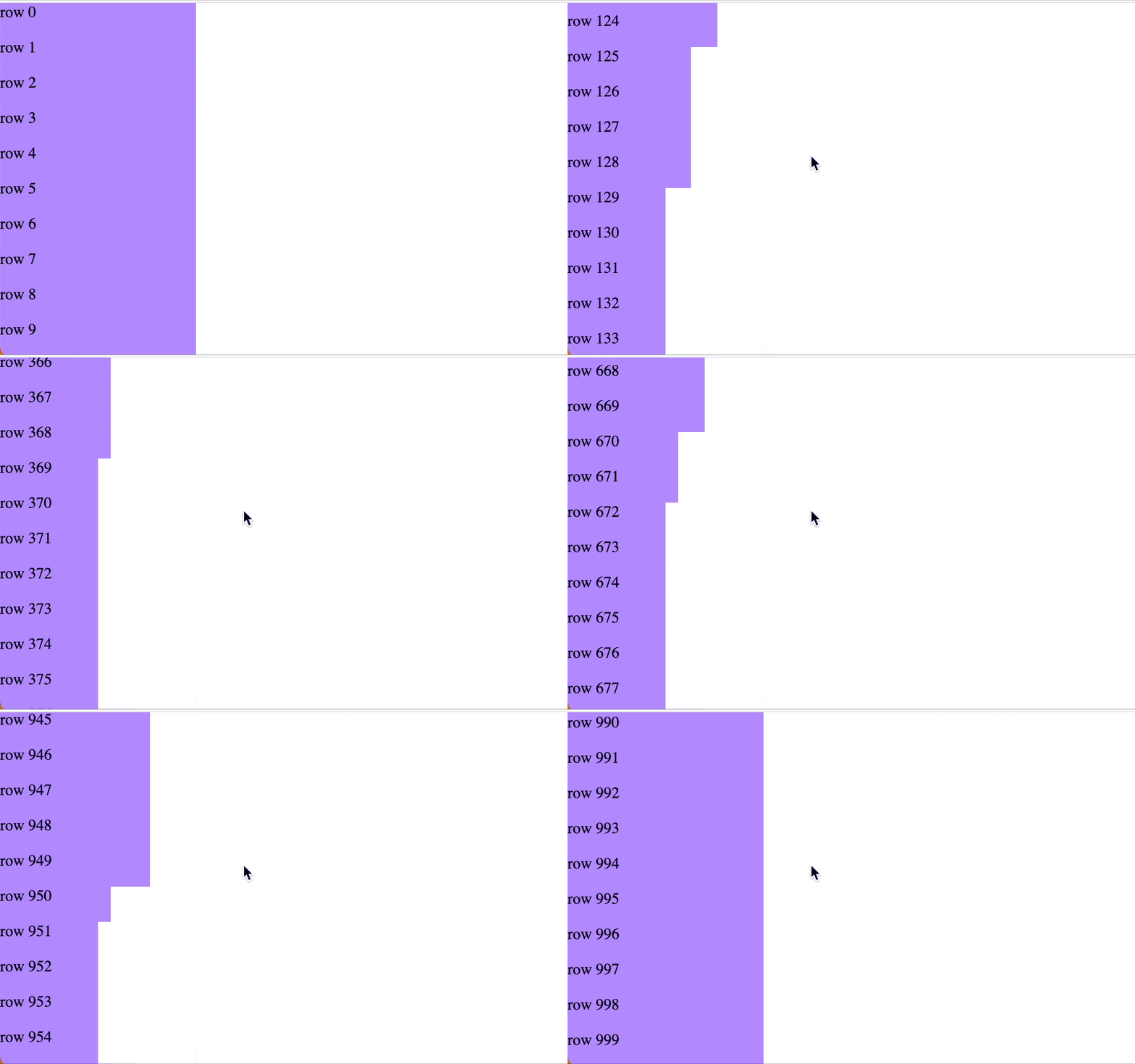
The `rectTop`, `absY`, and `onWindowScroll` targets are used to track the visible rows during scrolling. TargetJS automatically divides a long list into a tree structure, efficiently managing only the visible branch. The `onWindowScroll` target updates the `absY` of the table, enabling TargetJS to identify the branch visible to the user. You can opt out of this algorithm by setting the `shouldBeBracketed` target to `false`.
|
|
575
632
|
|
|
576
|
-
|
|
633
|
+

|
|
577
634
|
|
|
578
635
|
```bash
|
|
579
636
|
import { App, TModel, $Dom } from "targetj";
|
|
@@ -582,7 +639,7 @@ App(new TModel("rows", {
|
|
|
582
639
|
isVisible: true,
|
|
583
640
|
containerOverflowMode: "always",
|
|
584
641
|
rectTop() { return this.$dom.getBoundingClientRect().top; },
|
|
585
|
-
absY() { return this.
|
|
642
|
+
absY() { return this.prevTargetValue - $Dom.getWindowScrollTop(); },
|
|
586
643
|
defaultStyling: false,
|
|
587
644
|
domHolder: true,
|
|
588
645
|
onDomEvent: ["rectTop", "absY"],
|
|
@@ -608,22 +665,6 @@ App(new TModel("rows", {
|
|
|
608
665
|
```
|
|
609
666
|
---
|
|
610
667
|
|
|
611
|
-
## Features
|
|
612
|
-
|
|
613
|
-
As a result of using targets, we can develop web sites or apps with the following features:
|
|
614
|
-
|
|
615
|
-
- **No HTML required**: HTML tags are seldom necessary.
|
|
616
|
-
- **No CSS required**: Most popular styles are incorporated directly into targets.
|
|
617
|
-
- **No HTML nesting**: HTML nesting is seldom required in TargetJS. If it is required, nesting is done at runtime. Elements can be dynamically detached and incorporated into other elements, facilitating the easy reuse of components regardless of their location or attachment. It also opens the door for a new user experiences.
|
|
618
|
-
- **Next-level animation**: Users can program objects to move at varying speeds, pause at certain intervals, and repeat sequences based on various conditions. It allows the creation of complicated animations.
|
|
619
|
-
- **Control the flow of execution with time**: TargetJS simplifies the execution of various program segments at specific times, making it easy to sequence or parallelize numerous actions.
|
|
620
|
-
- **Handle events effortlessly**: In TargetJS, events are triggered synchronously and are designed so that any component can detect when an event occurs.
|
|
621
|
-
- **Easy to learn**: TargetJS simplifies development by employing the single concept of \'targets\' making it easy to learn.
|
|
622
|
-
- **Handle 100,000s of items**: TargetJS efficiently manages large collections of objects on a single page. This is done by its data structure and optimization algorithm. It divides a long list into a tree structure, monitoring only the branches that are visible to the user at any given time.
|
|
623
|
-
- **AI friendly**: With a unified concept of targets for all development, the ability to add and remove targets at runtime, and the capability to inspect various statuses of running objects, TargetJS is a strong candidate for AI-powered UI development.
|
|
624
|
-
|
|
625
|
-
---
|
|
626
|
-
|
|
627
668
|
## Special target names
|
|
628
669
|
|
|
629
670
|
All HTML style names and attributes are treated as special target names. The most commonly used style names and attributes have already been added to the framework, with the possibility of adding more in the future.
|
package/build/BaseModel.js
CHANGED
|
@@ -112,7 +112,7 @@ var BaseModel = exports.BaseModel = /*#__PURE__*/function () {
|
|
|
112
112
|
this.delVal('key');
|
|
113
113
|
return;
|
|
114
114
|
}
|
|
115
|
-
_TargetUtil.TargetUtil.bindTargetName(this
|
|
115
|
+
_TargetUtil.TargetUtil.bindTargetName(this, key);
|
|
116
116
|
if (_TargetUtil.TargetUtil.allEventMap[key] || _TargetUtil.TargetUtil.internalEventMap[key]) {
|
|
117
117
|
if (!this.eventTargetMap[key]) {
|
|
118
118
|
this.eventTargetList.push(key);
|
package/build/EventListener.js
CHANGED
|
@@ -28,6 +28,8 @@ var EventListener = exports.EventListener = /*#__PURE__*/function () {
|
|
|
28
28
|
this.currentTouch = {
|
|
29
29
|
deltaY: 0,
|
|
30
30
|
deltaX: 0,
|
|
31
|
+
prevDeltaX: 0,
|
|
32
|
+
prevDeltaY: 0,
|
|
31
33
|
pinchDelta: 0,
|
|
32
34
|
key: '',
|
|
33
35
|
manualMomentumFlag: false,
|
|
@@ -410,6 +412,8 @@ var EventListener = exports.EventListener = /*#__PURE__*/function () {
|
|
|
410
412
|
}, {
|
|
411
413
|
key: "captureEvents",
|
|
412
414
|
value: function captureEvents() {
|
|
415
|
+
this.currentTouch.prevDeltaX = 0;
|
|
416
|
+
this.currentTouch.prevDeltaY = 0;
|
|
413
417
|
this.currentHandlers.enterEvent = undefined;
|
|
414
418
|
this.currentHandlers.leaveEvent = undefined;
|
|
415
419
|
this.currentHandlers.justFocused = undefined;
|
|
@@ -568,10 +572,8 @@ var EventListener = exports.EventListener = /*#__PURE__*/function () {
|
|
|
568
572
|
}
|
|
569
573
|
this.end0 = this.getTouch(event);
|
|
570
574
|
if (this.start0) {
|
|
571
|
-
var
|
|
572
|
-
|
|
573
|
-
var _period = this.end0 ? Math.abs(this.end0.timeStamp - this.start0.timeStamp) : 300;
|
|
574
|
-
if (_deltaX <= 1 && _deltaY <= 1 && _period <= 300) {
|
|
575
|
+
var touchHandler = _SearchUtil.SearchUtil.findFirstTouchHandler(tmodel);
|
|
576
|
+
if (touchHandler && touchHandler === this.currentHandlers.touch) {
|
|
575
577
|
this.eventQueue.length = 0;
|
|
576
578
|
this.eventQueue.push({
|
|
577
579
|
eventName: eventName,
|
|
@@ -648,6 +650,8 @@ var EventListener = exports.EventListener = /*#__PURE__*/function () {
|
|
|
648
650
|
this.currentTouch = {
|
|
649
651
|
deltaY: 0,
|
|
650
652
|
deltaX: 0,
|
|
653
|
+
prevDeltaX: 0,
|
|
654
|
+
prevDeltaY: 0,
|
|
651
655
|
pinchDelta: 0,
|
|
652
656
|
key: '',
|
|
653
657
|
manualMomentumFlag: false,
|
|
@@ -982,8 +986,12 @@ var EventListener = exports.EventListener = /*#__PURE__*/function () {
|
|
|
982
986
|
this.currentTouch.dir = deltaY <= -1 ? "up" : deltaY >= 1 ? "down" : this.currentTouch.dir;
|
|
983
987
|
this.currentTouch.source = source;
|
|
984
988
|
}
|
|
985
|
-
|
|
986
|
-
|
|
989
|
+
|
|
990
|
+
// Accumulate movement deltas before they get reset in `captureEvents` to sync with the task cycle when movement is too fast
|
|
991
|
+
this.currentTouch.prevDeltaX += deltaX;
|
|
992
|
+
this.currentTouch.prevDeltaY += deltaY;
|
|
993
|
+
this.currentTouch.deltaX = this.currentTouch.prevDeltaX;
|
|
994
|
+
this.currentTouch.deltaY = this.currentTouch.prevDeltaY;
|
|
987
995
|
}
|
|
988
996
|
}, {
|
|
989
997
|
key: "wheel",
|
package/build/SearchUtil.js
CHANGED
|
@@ -36,6 +36,9 @@ var SearchUtil = exports.SearchUtil = /*#__PURE__*/function () {
|
|
|
36
36
|
}, {
|
|
37
37
|
key: "findFirstHandler",
|
|
38
38
|
value: function findFirstHandler(tmodel, options) {
|
|
39
|
+
if (!tmodel) {
|
|
40
|
+
return;
|
|
41
|
+
}
|
|
39
42
|
var eventName = options.eventName,
|
|
40
43
|
eventType = options.eventType;
|
|
41
44
|
var handlerKey = "".concat(tmodel.oid, " ").concat(eventName, " ").concat(eventType);
|
package/build/TargetUtil.js
CHANGED
|
@@ -73,8 +73,28 @@ var TargetUtil = exports.TargetUtil = /*#__PURE__*/function () {
|
|
|
73
73
|
}
|
|
74
74
|
}, {
|
|
75
75
|
key: "bindTargetName",
|
|
76
|
-
value: function bindTargetName(
|
|
77
|
-
var target =
|
|
76
|
+
value: function bindTargetName(instance, key) {
|
|
77
|
+
var target = instance.targets[key];
|
|
78
|
+
var keys = Object.keys(instance.targets);
|
|
79
|
+
var keyIndex = keys.indexOf(key);
|
|
80
|
+
var prevKey = keyIndex > 0 ? keys[keyIndex - 1] : undefined;
|
|
81
|
+
var getPrevValue = function getPrevValue() {
|
|
82
|
+
return prevKey !== undefined ? instance.val(prevKey) : undefined;
|
|
83
|
+
};
|
|
84
|
+
var lastPrevUpdateTime = prevKey !== undefined ? instance.getActualValueLastUpdate(prevKey) : undefined;
|
|
85
|
+
var getPrevUpdateTime = function getPrevUpdateTime() {
|
|
86
|
+
return prevKey !== undefined ? instance.getActualValueLastUpdate(prevKey) : undefined;
|
|
87
|
+
};
|
|
88
|
+
var isPrevTargetUpdated = function isPrevTargetUpdated() {
|
|
89
|
+
var currentPrevUpdateTime = getPrevUpdateTime();
|
|
90
|
+
if (lastPrevUpdateTime === undefined && currentPrevUpdateTime === undefined) {
|
|
91
|
+
return false;
|
|
92
|
+
}
|
|
93
|
+
if (lastPrevUpdateTime === undefined && currentPrevUpdateTime !== undefined) {
|
|
94
|
+
return true;
|
|
95
|
+
}
|
|
96
|
+
return currentPrevUpdateTime !== lastPrevUpdateTime;
|
|
97
|
+
};
|
|
78
98
|
if (_typeof(target) === 'object') {
|
|
79
99
|
var stepPattern = /^on[A-Za-z]+Step$/;
|
|
80
100
|
var endPattern = /^on[A-Za-z]+End$/;
|
|
@@ -83,16 +103,26 @@ var TargetUtil = exports.TargetUtil = /*#__PURE__*/function () {
|
|
|
83
103
|
if (typeof target[method] === 'function' && (methods.includes(method) || stepPattern.test(method) || endPattern.test(method))) {
|
|
84
104
|
var originalMethod = target[method];
|
|
85
105
|
target[method] = function () {
|
|
106
|
+
var _getPrevUpdateTime;
|
|
86
107
|
this.key = key;
|
|
87
|
-
|
|
108
|
+
this.prevTargetValue = getPrevValue();
|
|
109
|
+
this.isPrevTargetUpdated = isPrevTargetUpdated;
|
|
110
|
+
var result = originalMethod.apply(this, arguments);
|
|
111
|
+
lastPrevUpdateTime = (_getPrevUpdateTime = getPrevUpdateTime()) !== null && _getPrevUpdateTime !== void 0 ? _getPrevUpdateTime : lastPrevUpdateTime;
|
|
112
|
+
return result;
|
|
88
113
|
};
|
|
89
114
|
}
|
|
90
115
|
});
|
|
91
116
|
} else if (typeof target === 'function') {
|
|
92
117
|
var originalFunction = target;
|
|
93
|
-
|
|
118
|
+
instance.targets[key] = function () {
|
|
119
|
+
var _getPrevUpdateTime2;
|
|
94
120
|
this.key = key;
|
|
95
|
-
|
|
121
|
+
this.prevTargetValue = getPrevValue();
|
|
122
|
+
this.isPrevTargetUpdated = isPrevTargetUpdated;
|
|
123
|
+
var result = originalFunction.apply(this, arguments);
|
|
124
|
+
lastPrevUpdateTime = (_getPrevUpdateTime2 = getPrevUpdateTime()) !== null && _getPrevUpdateTime2 !== void 0 ? _getPrevUpdateTime2 : lastPrevUpdateTime;
|
|
125
|
+
return result;
|
|
96
126
|
};
|
|
97
127
|
}
|
|
98
128
|
}
|