targetj 1.0.131 → 1.0.133
This diff represents the content of publicly available package versions that have been released to one of the supported registries. The information contained in this diff is provided for informational purposes only and reflects changes between package versions as they appear in their respective public registries.
- package/README.md +173 -99
- package/build/BaseModel.js +9 -2
- package/build/Bracket.js +5 -0
- package/build/RunScheduler.js +5 -8
- package/build/TModelUtil.js +1 -1
- package/build/TargetUtil.js +12 -1
- package/package.json +5 -5
package/README.md
CHANGED
|
@@ -1,36 +1,74 @@
|
|
|
1
|
-
#
|
|
2
|
-
|
|
3
|
-
Welcome to
|
|
4
|
-
|
|
5
|
-
|
|
1
|
+
# TargetJS: JavaScript UI framework and library - Programming the Front-End with a New Paradigm
|
|
2
|
+
|
|
3
|
+
Welcome to TargetJS, a powerful JavaScript UI framework and library that you might find redefines front-end development. (https://targetj.io)
|
|
4
|
+
|
|
5
|
+
TargetJS distinguishes itself by introducing a novel concept known as 'targets,' which forms its core. Targets give methods and variable assignments life cycles and the autonomy to operate independently, with various callbacks to adapt to changes, mimicking the behavior of living cells. This opens a new paradigm in programming.
|
|
6
|
+
|
|
7
|
+
---
|
|
8
|
+
|
|
9
|
+
## Table of Contents
|
|
10
|
+
|
|
11
|
+
1. [Installation](#installation)
|
|
12
|
+
2. [What are Targets?](#what-are-targets)
|
|
13
|
+
3. Quick Examples:
|
|
14
|
+
- [Draggable Animation Example](#draggable-animation-example)
|
|
15
|
+
- [Infinite Scrolling Example](#infinite-scrolling-example)
|
|
16
|
+
4. [Why TargetJS?](#why-targetjs)
|
|
17
|
+
5. [Integration with Existing Pages](#integration-with-existing-pages)
|
|
18
|
+
6. [Anatomy of a Target](#anatomy-of-a-target)
|
|
19
|
+
7. [How TargetJS Operates](#how-targetjs-operates)
|
|
20
|
+
8. [Target Methods](#target-methods)
|
|
21
|
+
9. Examples:
|
|
22
|
+
- [Simple Example](#simple-example)
|
|
23
|
+
- [Declarative and Imperative Targets Example](#declarative-and-imperative-targets-example)
|
|
24
|
+
- [Loading Data Example](#loading-data-example)
|
|
25
|
+
- [Animation API Comparison Example](#animation-api-comparison-example)
|
|
26
|
+
- [Simple Single Page App Example](#simple-single-page-app-example)
|
|
27
|
+
- [Using TargetJS as a Library Example](#using-targetjs-as-a-library-example)
|
|
28
|
+
10. [Special Target Names](#special-target-names)
|
|
29
|
+
11. [TargetJS Features](#features)
|
|
30
|
+
12. [How to Debug in TargetJS](#how-to-debug-in-targetjs)
|
|
31
|
+
13. [Documentation](#documentation)
|
|
32
|
+
14. [License](#license)
|
|
33
|
+
15. [Contact](#contact)
|
|
6
34
|
|
|
7
35
|
⭐ We appreciate your star, it helps!
|
|
8
36
|
|
|
9
|
-
|
|
37
|
+
---
|
|
38
|
+
|
|
39
|
+
## Installation
|
|
10
40
|
|
|
11
|
-
To install
|
|
41
|
+
To install TargetJS, run the following command in your terminal:
|
|
12
42
|
|
|
13
43
|
```bash
|
|
14
44
|
npm install targetj
|
|
15
45
|
```
|
|
46
|
+
---
|
|
47
|
+
|
|
16
48
|
## What are targets?
|
|
17
49
|
|
|
18
|
-
Targets are used as the main building blocks of components instead of direct variables and methods. Each component in
|
|
50
|
+
Targets are used as the main building blocks of components instead of direct variables and methods. Each component in TargetJS is a set of targets. Targets are employed across all aspects of the program. They are used in animation, controlling program flow, loading data from external APIs, handling user events, and more.
|
|
19
51
|
|
|
20
52
|
Targets provide a unified interface for variable assignments and methods, enabling them to operate autonomously. For example, targets give variables the ability to iterate in steps until reaching a specified value, rather than being immediately assigned. Targets can include pauses between these steps, track the progress of other variables, and manage their life cycles dynamically. Methods can execute themselves under specific conditions, control the number of executions, and more.
|
|
21
53
|
|
|
22
|
-
|
|
54
|
+
---
|
|
55
|
+
|
|
56
|
+
## Quick examples
|
|
57
|
+
|
|
58
|
+
This section provides a few quick demonstrations of what TargetJS can do.
|
|
23
59
|
|
|
24
|
-
|
|
60
|
+
## Draggable Animation Example
|
|
25
61
|
|
|
26
|
-
|
|
62
|
+
In our first example, `color`, `html`, `textAlign`, `moves`, and `animate` are all targets. These targets are executed in the same order they appear in the program. `color`, `html`, `textAlign`, `moves` get competed and their life cycle end. The main target `animate` remains active with an indefinite lifecycle specified by the `loop` property. After each animation cycle, there is a one-second pause, defined by the `interval` property in the `animate` target. Both `loop` and `interval` can also be defined as methods, which will be explained further below. The `setTarget` method defines an imperative target, which is also explained in more detail below, executes the assigment in 30 steps. The `animate` target starts a new cycle after all the imperative targets have been completed or at least one second pass specified in the interval value given that the imperative targets get executed less than 1 second.
|
|
63
|
+
|
|
64
|
+
You'll also find `quickStart`, the first argument in the `TModel` constructor. If an HTML element with the same ID already exists on the page, it will be used in the new instance of `TModel`, and the animation will be applied to it. If no such element exists, TargetJS will create one.
|
|
27
65
|
|
|
28
66
|
You can view the live example at [https://targetj.io/examples/quick.html](https://targetj.io/examples/quick.html). Click on "Show Code" to see how the code is executed.
|
|
29
67
|
|
|
30
|
-

|
|
31
69
|
|
|
32
70
|
```bash
|
|
33
|
-
import { App, TModel, getEvents } from "
|
|
71
|
+
import { App, TModel, getEvents } from "targetjs";
|
|
34
72
|
|
|
35
73
|
App(new TModel('quickStart', {
|
|
36
74
|
color: '#fff',
|
|
@@ -61,25 +99,77 @@ App(new TModel('quickStart', {
|
|
|
61
99
|
}));
|
|
62
100
|
```
|
|
63
101
|
|
|
102
|
+
## Infinite Scrolling Example
|
|
103
|
+
|
|
104
|
+
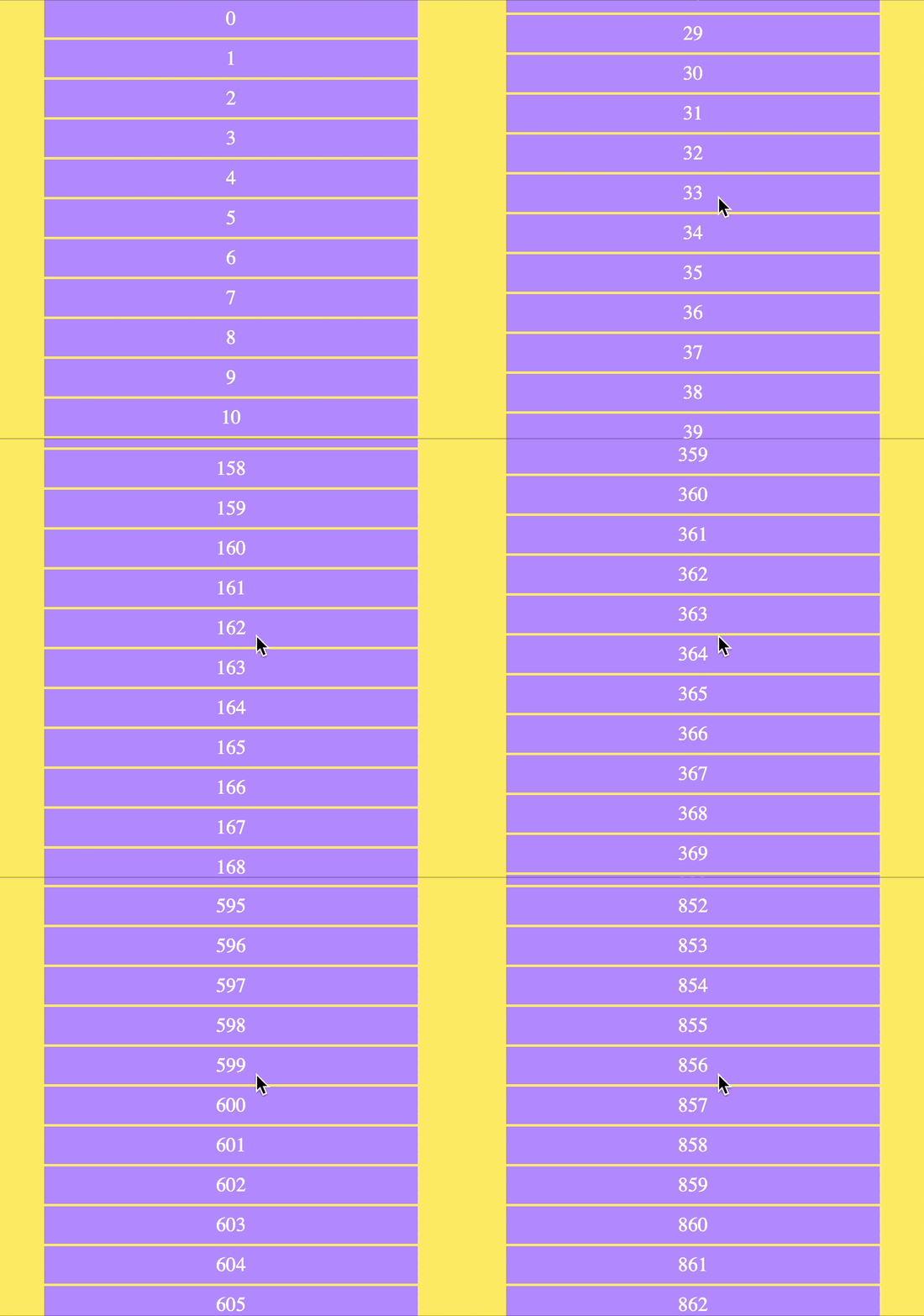
This example demonstrates how to handle scroll events and implement a simple infinite scrolling application. The `containerOverflowMode` system target ensures that all items in the scroller overflow and stack beneath each other seamlessly. The `children` system target dynamically adds items to the container's children. The `onVisibleChildrenChange` event function detects changes in the visible children and activates the `children` target to create new items that fill the gaps.
|
|
105
|
+
|
|
106
|
+
Internally, TargetJS maintains a tree-like structure to track the visible branches of the tree, optimizing the performance of the scroller. You can opt out of tree-structure optimization by setting shouldBeBracketed target to false.
|
|
107
|
+
|
|
108
|
+
If you inspect the HTML elements in the browser's developer tools, you'll notice that the scroller's elements are not nested inside the container. This is because nesting is another target that can dynamically control how elements are nested.
|
|
109
|
+
|
|
110
|
+
|
|
111
|
+
|
|
112
|
+
```bash
|
|
113
|
+
import { App, TModel, getEvents, getScreenHeight, getScreenWidth, } from "targetjs";
|
|
114
|
+
|
|
115
|
+
App(new TModel({
|
|
116
|
+
containerOverflowMode: 'always',
|
|
117
|
+
children() {
|
|
118
|
+
const childrenCount = this.getChildren().length;
|
|
119
|
+
return Array.from({ length: 10 }, (_, i) =>
|
|
120
|
+
new TModel('scrollItem', {
|
|
121
|
+
width: 300,
|
|
122
|
+
background: '#B388FF',
|
|
123
|
+
height: 32,
|
|
124
|
+
color: '#C2FC61',
|
|
125
|
+
textAlign: 'center',
|
|
126
|
+
lineHeight: 32,
|
|
127
|
+
bottomMargin: 2,
|
|
128
|
+
x() { return this.getCenterX(); },
|
|
129
|
+
html: childrenCount + i
|
|
130
|
+
})
|
|
131
|
+
);
|
|
132
|
+
},
|
|
133
|
+
width() { return getScreenWidth(); },
|
|
134
|
+
height() { return getScreenHeight(); },
|
|
135
|
+
onResize: [ 'width', 'height' ],
|
|
136
|
+
onScroll() {
|
|
137
|
+
this.setTarget('scrollTop', Math.max(0, this.getScrollTop() + getEvents().deltaY()));
|
|
138
|
+
},
|
|
139
|
+
onVisibleChildrenChange() {
|
|
140
|
+
if (getEvents().dir() !== 'up' && this.visibleChildren.length * 34 < this.getHeight()) {
|
|
141
|
+
this.activateTarget('children');
|
|
142
|
+
}
|
|
143
|
+
}
|
|
144
|
+
}));
|
|
145
|
+
```
|
|
146
|
+
|
|
147
|
+
---
|
|
148
|
+
|
|
149
|
+
## Why TargetJS?
|
|
64
150
|
|
|
65
|
-
|
|
151
|
+
Imagine building a single-page web app using a unified approach for API integration, animations, event handling, and more—without having to manage asynchronous calls, loops, callbacks, promises, timeouts, state management, CSS, HTML attributes, tags, or HTML nesting. That’s exactly what TargetJS offers: it simplifies the entire development process with a new, simplified approach.
|
|
66
152
|
|
|
67
|
-
|
|
153
|
+
---
|
|
68
154
|
|
|
69
|
-
##
|
|
155
|
+
## Integration with Existing Pages
|
|
70
156
|
|
|
71
|
-
Yes, you can integrate
|
|
157
|
+
Yes, you can integrate TargetJS as a library into your existing page! TargetJS is designed to work as either a library or a framework. It was developed to be flexible and compatible with other libraries and frameworks, allowing you to enhance your page with minimal changes. You can find an example at the end of this page.
|
|
72
158
|
|
|
73
|
-
|
|
159
|
+
---
|
|
160
|
+
|
|
161
|
+
## Anatomy of a Target
|
|
74
162
|
|
|
75
163
|
Each target consists of the following:
|
|
76
|
-
1. Target Value and Actual Value. The target value is the value assigned to a variable or the result produced by a method. The actual value is typically the value used by the rest of the application. When the target value differs from the actual value,
|
|
164
|
+
1. Target Value and Actual Value. The target value is the value assigned to a variable or the result produced by a method. The actual value is typically the value used by the rest of the application. When the target value differs from the actual value, TargetJS iteratively updates the actual value until it matches the target value. This process is managed by two additional variables: Step, which dictates the number of iterations, and Interval, which specifies the duration (in milliseconds) the system waits before executing the next iteration.
|
|
77
165
|
|
|
78
166
|
2. State: Targets have four states that control their lifecycle: Active, Inactive, Updating, and Complete. Active: This is the default state for all targets. It indicates that the target is ready to be executed, and the target value needs to be initialized from the variable it represents or its value() method needs to be executed to calculate its output. Inactive: Indicates that the target is not ready to be executed. Updating: Indicates that the actual value is being adjusted to reach the target value. Complete: Indicates that the target execution is finished, and the actual value has matched the target value.
|
|
79
167
|
|
|
80
168
|
3. Target Methods: All methods are optional. They are used to control the lifecycle of targets or serve as callbacks to reflect changes. The controlling methods are: enabledOn, loop, steps, cycles. The callbacks are: onValueChange, onStepsEnd, onImperativeStep, onImperativeEnd. More details in the method section.
|
|
81
169
|
|
|
82
|
-
|
|
170
|
+
---
|
|
171
|
+
|
|
172
|
+
## How TargetJS Operates
|
|
83
173
|
|
|
84
174
|
All targets are in the active state by default and ready to be executed. They can include an enabledOn function that delays their execution until the specified conditions are met. Targets can also be set to inactive and activated externally when needed.
|
|
85
175
|
|
|
@@ -89,6 +179,8 @@ If the target has loop or cycle methods defined, its value method will be re-exe
|
|
|
89
179
|
|
|
90
180
|
A target can reactivate itself in the `onStepsEnd` callback once all steps are completed, or in the `onImperativeEnd` callback when all imperative targets initiated by that target are finished, allowing it to re-execute. It can also be reactivated externally, either directly or through an event.
|
|
91
181
|
|
|
182
|
+
---
|
|
183
|
+
|
|
92
184
|
## Target methods
|
|
93
185
|
|
|
94
186
|
All methods and properties are optional, but they play integral roles in making targets useful for animation, API loading, event handling, and more:
|
|
@@ -132,8 +224,13 @@ This is only property. It indicates that the target is in an inactive state and
|
|
|
132
224
|
13. **initialValue**
|
|
133
225
|
This is only property. It defines the initial value of the actual value.
|
|
134
226
|
|
|
227
|
+
---
|
|
135
228
|
|
|
136
|
-
|
|
229
|
+
## More examples
|
|
230
|
+
|
|
231
|
+
Below are examples of various TargetJS use cases:
|
|
232
|
+
|
|
233
|
+
## Simple example
|
|
137
234
|
|
|
138
235
|
In the example below, we incrementally increase the values of width, height, and opacity in 30 steps, with a 50-millisecond pause between each step. You can view a live example here: https://targetj.io/examples/overview.html.
|
|
139
236
|
|
|
@@ -141,7 +238,7 @@ In the example below, we incrementally increase the values of width, height, and
|
|
|
141
238
|
|
|
142
239
|
|
|
143
240
|
```bash
|
|
144
|
-
import { App, TModel } from '
|
|
241
|
+
import { App, TModel } from 'targetjs';
|
|
145
242
|
|
|
146
243
|
App(new TModel({
|
|
147
244
|
background: '#fff',
|
|
@@ -166,7 +263,7 @@ App(new TModel({
|
|
|
166
263
|
It can also be written in a more compact form using arrays (view a live example at https://targetj.io/examples/overview2.html):
|
|
167
264
|
|
|
168
265
|
```bash
|
|
169
|
-
import { App, TModel } from '
|
|
266
|
+
import { App, TModel } from 'targetjs';
|
|
170
267
|
|
|
171
268
|
App(new TModel({
|
|
172
269
|
background: '#fff',
|
|
@@ -176,22 +273,22 @@ App(new TModel({
|
|
|
176
273
|
}));
|
|
177
274
|
```
|
|
178
275
|
|
|
179
|
-
|
|
276
|
+
---
|
|
180
277
|
|
|
181
|
-
|
|
278
|
+
## Declarative and Imperative Targets Example
|
|
182
279
|
|
|
183
|
-
|
|
280
|
+
Targets in TargetJS can be defined in two ways: declaratively or imperatively.
|
|
184
281
|
|
|
185
|
-
|
|
282
|
+
The declarative approach offers a structured method for defining targets, as seen in the previous example. However, orchestrating multiple targets with varying speeds and timings can be challenging. For instance, tracking the completion of multiple targets to trigger a new set of targets is not easily done using only declarative targets. To address this, TargetJS provides the setTarget function, allowing you to define multiple imperative targets from within a single declarative target. Additionally, the onImperativeStep and onImperativeEnd callbacks, defined in the declarative target, enable you to track each step of the imperative targets or just their completion.
|
|
186
283
|
|
|
187
|
-
|
|
284
|
+
By combining both declarative and imperative targets, you gain a powerful toolset for designing complex interactions.
|
|
188
285
|
|
|
189
286
|
The following example demonstrates both declarative and imperative approaches. In the `animate` target, two imperative targets are set to move a square across the screen. Once both `x` and `y` targets are completed, the `animate` target will re-execute because `loop` is defined as `true`, causing it to continue indefinitely. Additionally, we can add `onImperativeEnd()` to trigger when either the `x` or `y` target completes. We can also use `onXEnd` or `onYEnd` to listen specifically for the completion of the `x` or `y` target, respectively.
|
|
190
287
|
|
|
191
288
|

|
|
192
289
|
|
|
193
290
|
```bash
|
|
194
|
-
import { App, TModel, getScreenWidth, getScreenHeight } from "
|
|
291
|
+
import { App, TModel, getScreenWidth, getScreenHeight } from "targetjs";
|
|
195
292
|
|
|
196
293
|
App(
|
|
197
294
|
new TModel("declarative", {
|
|
@@ -220,9 +317,11 @@ App(
|
|
|
220
317
|
);
|
|
221
318
|
```
|
|
222
319
|
|
|
320
|
+
---
|
|
321
|
+
|
|
223
322
|
## Loading data example
|
|
224
323
|
|
|
225
|
-
Calling backend APIs is simplified through the use of targets in
|
|
324
|
+
Calling backend APIs is simplified through the use of targets in TargetJS. Additionally, TargetJS provides a Loader class, accessible via getLoader(), which streamlines API integration.
|
|
226
325
|
|
|
227
326
|
In the example below, we define a target named load. Inside the value function, we make the API call using fetch(). The second argument specifies the API URL, and the third argument contains the query parameters passed to the API. A fourth optional parameter, omitted in this example, can specify a cache ID if we want to cache the result. This cache ID can also be used to retrieve the cached data. If it’s not specified, the result will always come from the API. Once the API response is received, it triggers either onSuccess or onError, depending on the outcome.
|
|
228
327
|
|
|
@@ -231,7 +330,7 @@ In this example, we set the cycles to 9, triggering the API call 10 times at int
|
|
|
231
330
|

|
|
232
331
|
|
|
233
332
|
```bash
|
|
234
|
-
import { App, TModel, getLoader, getScreenHeight, getScreenWidth, Moves } from "
|
|
333
|
+
import { App, TModel, getLoader, getScreenHeight, getScreenWidth, Moves } from "targetjs";
|
|
235
334
|
|
|
236
335
|
App(new TModel("apiCall", {
|
|
237
336
|
width: 160,
|
|
@@ -262,19 +361,20 @@ App(new TModel("apiCall", {
|
|
|
262
361
|
}
|
|
263
362
|
}));
|
|
264
363
|
```
|
|
364
|
+
---
|
|
265
365
|
|
|
266
|
-
## Animation API
|
|
366
|
+
## Animation API Comparison Example
|
|
267
367
|
|
|
268
|
-
|
|
368
|
+
TargetJS provides efficient, easy-to-control UI animation and manipulation through special targets that reflect HTML style names, such as `width`, `height`, `scale`, `rotate`, and `opacity`.
|
|
269
369
|
|
|
270
|
-
Below is a comparison between implementing animations in
|
|
370
|
+
Below is a comparison between implementing animations in TargetJS versus using the Animation API. While the Animation API may still offer a slight performance edge, TargetJS comes very close.
|
|
271
371
|
|
|
272
372
|

|
|
273
373
|
|
|
274
374
|
```bash
|
|
275
|
-
import { App, TModel, getScreenHeight, getScreenWidth } from "
|
|
375
|
+
import { App, TModel, getScreenHeight, getScreenWidth } from "targetjs";
|
|
276
376
|
|
|
277
|
-
App(new TModel('
|
|
377
|
+
App(new TModel('TargetJS vs Animation Api', {
|
|
278
378
|
addAnimateChild() {
|
|
279
379
|
this.addChild(new TModel('animation', {
|
|
280
380
|
width: 150,
|
|
@@ -316,7 +416,7 @@ App(new TModel('TargetJ vs Animation Api', {
|
|
|
316
416
|
addDomChild() {
|
|
317
417
|
this.addChild(new TModel('dom', {
|
|
318
418
|
color: 'white',
|
|
319
|
-
html: '
|
|
419
|
+
html: 'TargetJS',
|
|
320
420
|
animate: {
|
|
321
421
|
cycles: 3,
|
|
322
422
|
value(cycle) {
|
|
@@ -354,59 +454,21 @@ App(new TModel('TargetJ vs Animation Api', {
|
|
|
354
454
|
}));
|
|
355
455
|
```
|
|
356
456
|
|
|
357
|
-
|
|
358
|
-
|
|
359
|
-
This example demonstrates how to handle scroll events and develop a simple infinite scrolling application.
|
|
457
|
+
---
|
|
360
458
|
|
|
361
|
-

|
|
362
459
|
|
|
363
|
-
|
|
364
|
-
import { App, TModel, getEvents, getScreenHeight, getScreenWidth, } from "targetj";
|
|
365
|
-
|
|
366
|
-
App(new TModel("scroller", {
|
|
367
|
-
domHolder: true,
|
|
368
|
-
overflow: 'hidden',
|
|
369
|
-
containerOverflowMode: 'always',
|
|
370
|
-
children() {
|
|
371
|
-
const childrenCount = this.getChildren().length;
|
|
372
|
-
return Array.from({ length: 10 }, (_, i) =>
|
|
373
|
-
new TModel('scrollItem', {
|
|
374
|
-
width: 300,
|
|
375
|
-
background: '#B388FF',
|
|
376
|
-
height: 32,
|
|
377
|
-
color: '#C2FC61',
|
|
378
|
-
textAlign: 'center',
|
|
379
|
-
lineHeight: 32,
|
|
380
|
-
bottomMargin: 2,
|
|
381
|
-
x() { return this.getCenterX(); },
|
|
382
|
-
html: childrenCount + i
|
|
383
|
-
})
|
|
384
|
-
);
|
|
385
|
-
},
|
|
386
|
-
width() { return getScreenWidth(); },
|
|
387
|
-
height() { return getScreenHeight(); },
|
|
388
|
-
onResize: [ 'width', 'height' ],
|
|
389
|
-
onScroll() {
|
|
390
|
-
this.setTarget('scrollTop', Math.max(0, this.getScrollTop() + getEvents().deltaY()));
|
|
391
|
-
},
|
|
392
|
-
onVisibleChildrenChange() {
|
|
393
|
-
if (getEvents().dir() !== 'up' && this.visibleChildren.length * 34 < this.getHeight()) {
|
|
394
|
-
this.activateTarget('children');
|
|
395
|
-
}
|
|
396
|
-
}
|
|
397
|
-
}));
|
|
398
|
-
```
|
|
460
|
+
---
|
|
399
461
|
|
|
400
462
|
## Simple Single Page App Example
|
|
401
463
|
|
|
402
|
-
Below is a simple single-page application that demonstrates how to build a fully-featured app using
|
|
464
|
+
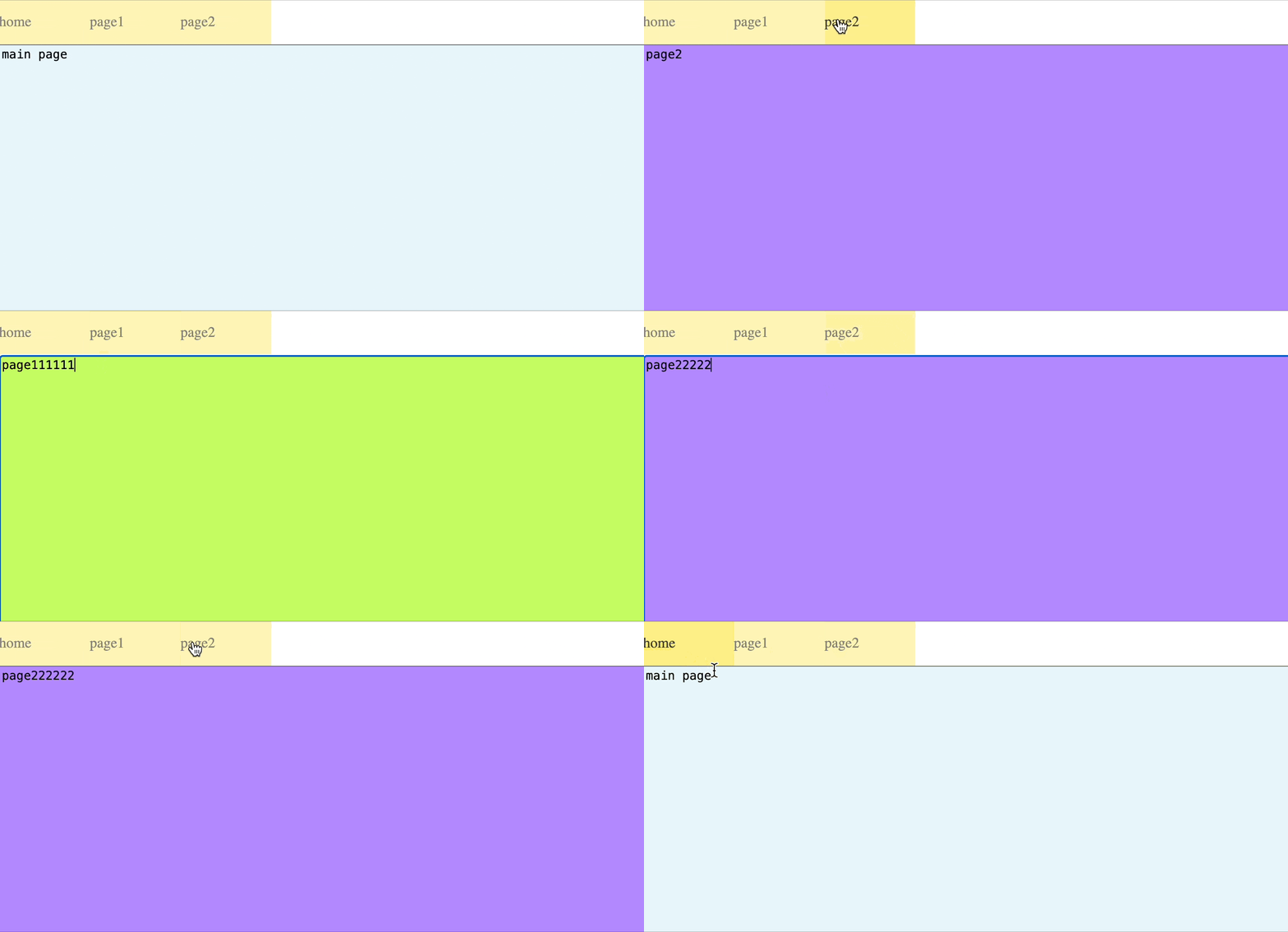
Below is a simple single-page application that demonstrates how to build a fully-featured app using TargetJS. Each page is represented by a textarea. You’ll notice that when you type something, switch to another page, and then return to the same page, your input remains preserved. This also applies to the page's scroll position—when you return, the page will open at the same scroll position where you left it, rather than defaulting to the top.
|
|
403
465
|
|
|
404
466
|
You can now assemble your app by incorporating code segments from the examples on animation, event handling, API integration, and infinite scrolling provided above.
|
|
405
467
|
|
|
406
468
|
|
|
407
469
|
|
|
408
470
|
```bash
|
|
409
|
-
import { App, TModel, getScreenHeight, getScreenWidth, getEvents, getPager } from "
|
|
471
|
+
import { App, TModel, getScreenHeight, getScreenWidth, getEvents, getPager } from "targetjs";
|
|
410
472
|
|
|
411
473
|
App(new TModel("simpleApp", {
|
|
412
474
|
width() { return getScreenWidth(); },
|
|
@@ -490,17 +552,18 @@ App(new TModel("simpleApp", {
|
|
|
490
552
|
onResize: ["width", "height"]
|
|
491
553
|
}));
|
|
492
554
|
```
|
|
555
|
+
---
|
|
493
556
|
|
|
494
|
-
## Using
|
|
557
|
+
## Using TargetJS as a Library Example
|
|
495
558
|
|
|
496
559
|
Here is an example that creates 1000 rows. The first argument, 'rows,' is used to find an element with the ID 'rows.' If no such element exists, it will be created at the top of the page. The OnDomEvent target activates the targets defined in its value when the DOM is found or created, eliminating the need for conditions to verify the DOM's availability before executing the target. Additionally, the parallel property creates subtasks, which improve browser performance.
|
|
497
560
|
|
|
498
|
-
The `rectTop`, `absY`, and `onWindowScroll` targets are used to track the visible rows during scrolling.
|
|
561
|
+
The `rectTop`, `absY`, and `onWindowScroll` targets are used to track the visible rows during scrolling. TargetJS automatically divides a long list into a tree structure, efficiently managing only the visible branch. The `onWindowScroll` target updates the `absY` of the table, enabling TargetJS to identify the branch visible to the user. You can opt out of this algorithm by setting the `shouldBeBracketed` target to `false`.
|
|
499
562
|
|
|
500
|
-

|
|
501
564
|
|
|
502
565
|
```bash
|
|
503
|
-
import { App, TModel, $Dom } from "
|
|
566
|
+
import { App, TModel, $Dom } from "targetjs";
|
|
504
567
|
|
|
505
568
|
App(new TModel("rows", {
|
|
506
569
|
isVisible: true,
|
|
@@ -530,6 +593,7 @@ App(new TModel("rows", {
|
|
|
530
593
|
}
|
|
531
594
|
}));
|
|
532
595
|
```
|
|
596
|
+
---
|
|
533
597
|
|
|
534
598
|
## Special target names
|
|
535
599
|
|
|
@@ -552,7 +616,7 @@ In addition to styles and attribute names, we have the following special names:
|
|
|
552
616
|
8. **children**: Sets the `TModel` children of the object.
|
|
553
617
|
9. **domHolder**: Assigned by the container to hold children or descendants without a `domParent`.
|
|
554
618
|
10. **domParent**: Set by the container or children to control which DOM container they are embedded in.
|
|
555
|
-
11. **isVisible**: An optional boolean to explicitly control the visibility of the object, bypassing
|
|
619
|
+
11. **isVisible**: An optional boolean to explicitly control the visibility of the object, bypassing TargetJS’s automatic calculation.
|
|
556
620
|
12. **canHaveDom**: A boolean flag that determines if the object can have a DOM element on the page.
|
|
557
621
|
13. **canHandleEvents**: Specifies which events the object can handle.
|
|
558
622
|
14. **widthFromDom** and **heightFromDom**: Boolean flags to control if the width and height should be derived from the DOM element.
|
|
@@ -591,35 +655,45 @@ Here are all the event targets:
|
|
|
591
655
|
14. **onChildrenChange**: Triggered when the children count changes.
|
|
592
656
|
15. **onVisibleChildrenChange**: Triggered when the count of visible children changes.
|
|
593
657
|
|
|
658
|
+
---
|
|
659
|
+
|
|
594
660
|
## Features
|
|
595
661
|
|
|
596
662
|
As a result of using targets, we can develop web sites or apps with the following features:
|
|
597
663
|
|
|
598
664
|
- **No HTML required**: HTML tags are seldom necessary.
|
|
599
665
|
- **No CSS required**: Most popular styles are incorporated directly into targets.
|
|
600
|
-
- **No HTML nesting**: HTML nesting is seldom required in
|
|
666
|
+
- **No HTML nesting**: HTML nesting is seldom required in TargetJS. If it is required, nesting is done at runtime. Elements can be dynamically detached and incorporated into other elements, facilitating the easy reuse of components regardless of their location or attachment. It also opens the door for a new user experiences.
|
|
601
667
|
- **Next-level animation**: Users can program objects to move at varying speeds, pause at certain intervals, and repeat sequences based on various conditions. It allows the creation of complicated animations.
|
|
602
|
-
- **Control the flow of execution with time**:
|
|
603
|
-
- **Handle events effortlessly**: In
|
|
604
|
-
- **Easy to learn**:
|
|
605
|
-
- **Handle 100,000s of items**:
|
|
606
|
-
- **AI friendly**: With a unified concept of targets for all development, the ability to add and remove targets at runtime, and the capability to inspect various statuses of running objects,
|
|
607
|
-
|
|
608
|
-
|
|
609
|
-
|
|
610
|
-
|
|
611
|
-
|
|
612
|
-
|
|
613
|
-
|
|
668
|
+
- **Control the flow of execution with time**: TargetJS simplifies the execution of various program segments at specific times, making it easy to sequence or parallelize numerous actions.
|
|
669
|
+
- **Handle events effortlessly**: In TargetJS, events are triggered synchronously and are designed so that any component can detect when an event occurs. Event handling can be simply implemented as conditions in the enabling functions of \'targets.\' This ensures that managing events is both simple and effective.
|
|
670
|
+
- **Easy to learn**: TargetJS simplifies development by employing the single concept of \'targets\' making it easy to learn.
|
|
671
|
+
- **Handle 100,000s of items**: TargetJS efficiently manages large collections of objects on a single page. This is done by its data structure and optimization algorithm. It divides a long list into a tree structure, monitoring only the branches that are visible to the user at any given time.
|
|
672
|
+
- **AI friendly**: With a unified concept of targets for all development, the ability to add and remove targets at runtime, and the capability to inspect various statuses of running objects, TargetJS is a strong candidate for AI-powered UI development.
|
|
673
|
+
|
|
674
|
+
---
|
|
675
|
+
|
|
676
|
+
## How to debug in TargetJS
|
|
677
|
+
1. TargetJS.tApp.stop(): Stops the application.
|
|
678
|
+
2. TargetJS.tApp.start(): Restarts the application
|
|
679
|
+
3. TargetJS.tApp.throttle: Slows down the application. This represents the pause in milliseconds before starting another TargetJS task cycle. It is zero by default.
|
|
680
|
+
4. TargetJS.tApp.debugLevel: Logs information about the TargetJS task cycle and its efficiency. It is zero by default. Set it to 1 to log the name of the caller of each cycle.
|
|
614
681
|
5. Use `t()` to find an object from the browser console using its `oid`.
|
|
615
|
-
6. Inspect all the vital properities
|
|
682
|
+
6. t(oid).bug(): Inspect all the vital properities of an object.
|
|
683
|
+
7. t(oid).logTree(): allows you to inspect the internal children structure including brackets
|
|
684
|
+
|
|
685
|
+
---
|
|
616
686
|
|
|
617
687
|
## Documentation
|
|
618
|
-
Explore the full potential of
|
|
688
|
+
Explore the full potential of TargetJS and dive into our interactive documentation at www.targetj.io.
|
|
689
|
+
|
|
690
|
+
---
|
|
619
691
|
|
|
620
692
|
## License
|
|
621
693
|
Distributed under the MIT License. See LICENSE for more information.
|
|
622
694
|
|
|
695
|
+
---
|
|
696
|
+
|
|
623
697
|
## Contact
|
|
624
698
|
Ahmad Wasfi - wasfi2@gmail.com
|
|
625
699
|
|
package/build/BaseModel.js
CHANGED
|
@@ -685,15 +685,20 @@ var BaseModel = exports.BaseModel = /*#__PURE__*/function () {
|
|
|
685
685
|
}, {
|
|
686
686
|
key: "deleteTargetValue",
|
|
687
687
|
value: function deleteTargetValue(key) {
|
|
688
|
+
var targetValue = this.targetValues[key];
|
|
688
689
|
delete this.targetValues[key];
|
|
689
690
|
this.addToActiveTargets(key);
|
|
690
691
|
this.removeFromUpdatingTargets(key);
|
|
691
|
-
|
|
692
|
+
if (targetValue) {
|
|
693
|
+
(0, _App.getRunScheduler)().schedule(1, 'deleteTargetValue-' + this.oid + "-" + key);
|
|
694
|
+
}
|
|
695
|
+
return this;
|
|
692
696
|
}
|
|
693
697
|
}, {
|
|
694
698
|
key: "resetImperative",
|
|
695
699
|
value: function resetImperative(key) {
|
|
696
700
|
var targetValue = this.targetValues[key];
|
|
701
|
+
var isImperative = targetValue === null || targetValue === void 0 ? void 0 : targetValue.isImperative;
|
|
697
702
|
if (targetValue) {
|
|
698
703
|
targetValue.isImperative = false;
|
|
699
704
|
targetValue.executionFlag = false;
|
|
@@ -704,7 +709,9 @@ var BaseModel = exports.BaseModel = /*#__PURE__*/function () {
|
|
|
704
709
|
targetValue.cycles = 0;
|
|
705
710
|
targetValue.interval = 0;
|
|
706
711
|
}
|
|
707
|
-
|
|
712
|
+
if (isImperative) {
|
|
713
|
+
(0, _App.getRunScheduler)().schedule(1, 'resetImperative-' + this.oid + "-" + key);
|
|
714
|
+
}
|
|
708
715
|
return this;
|
|
709
716
|
}
|
|
710
717
|
}, {
|
package/build/Bracket.js
CHANGED
|
@@ -87,6 +87,11 @@ var Bracket = exports.Bracket = /*#__PURE__*/function (_TModel) {
|
|
|
87
87
|
value: function isVisible() {
|
|
88
88
|
return this.visibilityStatus.top && this.visibilityStatus.bottom;
|
|
89
89
|
}
|
|
90
|
+
}, {
|
|
91
|
+
key: "getBracketThreshold",
|
|
92
|
+
value: function getBracketThreshold() {
|
|
93
|
+
return this.getRealParent().getBracketSize();
|
|
94
|
+
}
|
|
90
95
|
}, {
|
|
91
96
|
key: "addToParentVisibleChildren",
|
|
92
97
|
value: function addToParentVisibleChildren() {}
|
package/build/RunScheduler.js
CHANGED
|
@@ -207,19 +207,16 @@ var RunScheduler = exports.RunScheduler = /*#__PURE__*/function () {
|
|
|
207
207
|
}, {
|
|
208
208
|
key: "executeNextRun",
|
|
209
209
|
value: function executeNextRun() {
|
|
210
|
-
|
|
211
|
-
|
|
210
|
+
while (this.nextRuns.length > 0) {
|
|
211
|
+
var nextRun = this.nextRuns.shift();
|
|
212
212
|
var now = _TUtil.TUtil.now();
|
|
213
213
|
var newDelay = nextRun.delay - (now - nextRun.insertTime);
|
|
214
214
|
if (newDelay >= 0 || this.nextRuns.length === 0) {
|
|
215
|
-
this.setDelayProcess(nextRun.runId, nextRun.insertTime, now + newDelay, newDelay);
|
|
216
|
-
|
|
217
|
-
this.delayProcess = undefined;
|
|
218
|
-
this.executeNextRun();
|
|
215
|
+
this.setDelayProcess(nextRun.runId, nextRun.insertTime, now + newDelay, Math.max(newDelay, 0));
|
|
216
|
+
return;
|
|
219
217
|
}
|
|
220
|
-
} else {
|
|
221
|
-
this.delayProcess = undefined;
|
|
222
218
|
}
|
|
219
|
+
this.delayProcess = undefined;
|
|
223
220
|
}
|
|
224
221
|
}, {
|
|
225
222
|
key: "delayRun",
|
package/build/TModelUtil.js
CHANGED
|
@@ -46,7 +46,7 @@ var TModelUtil = exports.TModelUtil = /*#__PURE__*/function () {
|
|
|
46
46
|
widthFromDom: false,
|
|
47
47
|
heightFromDom: false,
|
|
48
48
|
isIncluded: true,
|
|
49
|
-
bracketThreshold:
|
|
49
|
+
bracketThreshold: 10,
|
|
50
50
|
bracketSize: 5,
|
|
51
51
|
keepEventDefault: undefined,
|
|
52
52
|
canDeleteDom: undefined
|
package/build/TargetUtil.js
CHANGED
|
@@ -530,18 +530,29 @@ _defineProperty(TargetUtil, "internalEventMap", {
|
|
|
530
530
|
var lastUpdateHeight = tmodel.getActualValueLastUpdate('height');
|
|
531
531
|
var resizeLastUpdate = (0, _App.getLocationManager)().resizeLastUpdate;
|
|
532
532
|
if (lastUpdateWidth && lastUpdateHeight) {
|
|
533
|
+
tmodel.setActualValueLastUpdate('width');
|
|
534
|
+
tmodel.setActualValueLastUpdate('height');
|
|
533
535
|
return resizeLastUpdate > Math.max(lastUpdateWidth, lastUpdateHeight);
|
|
534
536
|
}
|
|
535
537
|
if (lastUpdateWidth) {
|
|
538
|
+
tmodel.setActualValueLastUpdate('width');
|
|
536
539
|
return resizeLastUpdate > lastUpdateWidth;
|
|
537
540
|
}
|
|
538
541
|
if (lastUpdateHeight) {
|
|
542
|
+
tmodel.setActualValueLastUpdate('height');
|
|
539
543
|
return resizeLastUpdate > lastUpdateHeight;
|
|
540
544
|
}
|
|
541
545
|
return (0, _App.getLocationManager)().resizeFlag;
|
|
542
546
|
},
|
|
543
547
|
onParentResize: function onParentResize(tmodel) {
|
|
544
|
-
|
|
548
|
+
if (tmodel.getParent().getActualValueLastUpdate('width') > tmodel.getActualValueLastUpdate('width')) {
|
|
549
|
+
tmodel.setActualValueLastUpdate('width');
|
|
550
|
+
return true;
|
|
551
|
+
}
|
|
552
|
+
if (tmodel.getParent().getActualValueLastUpdate('height') > tmodel.getActualValueLastUpdate('height')) {
|
|
553
|
+
tmodel.setActualValueLastUpdate('height');
|
|
554
|
+
return true;
|
|
555
|
+
}
|
|
545
556
|
}
|
|
546
557
|
});
|
|
547
558
|
_defineProperty(TargetUtil, "allEventMap", _objectSpread(_objectSpread({}, _TargetUtil.touchEventMap), {}, {
|
package/package.json
CHANGED
|
@@ -1,21 +1,21 @@
|
|
|
1
1
|
{
|
|
2
2
|
"name": "targetj",
|
|
3
|
-
"version": "1.0.
|
|
3
|
+
"version": "1.0.133",
|
|
4
4
|
"keywords": [
|
|
5
|
-
"
|
|
5
|
+
"targetjs"
|
|
6
6
|
],
|
|
7
7
|
"main": "Export.js",
|
|
8
8
|
"contributors": [
|
|
9
9
|
"ahmad.wasfi"
|
|
10
10
|
],
|
|
11
|
-
"description": "
|
|
11
|
+
"description": "TargetJS is a JavaScript framework designed for creating animated and efficient web user interfaces.",
|
|
12
12
|
"repository": {
|
|
13
13
|
"type": "git",
|
|
14
|
-
"url": "git+https://github.com/livetrails/
|
|
14
|
+
"url": "git+https://github.com/livetrails/targetjs.io.git"
|
|
15
15
|
},
|
|
16
16
|
"license": "MIT",
|
|
17
17
|
"bugs": {
|
|
18
|
-
"url": "https://github.com/livetrails/
|
|
18
|
+
"url": "https://github.com/livetrails/targetjs.io/issues"
|
|
19
19
|
},
|
|
20
20
|
"scripts": {
|
|
21
21
|
"prod": "webpack --mode production",
|