targetj 1.0.109 → 1.0.111
This diff represents the content of publicly available package versions that have been released to one of the supported registries. The information contained in this diff is provided for informational purposes only and reflects changes between package versions as they appear in their respective public registries.
- package/README.md +273 -253
- package/build/$Dom.js +2 -2
- package/build/BaseModel.js +1 -6
- package/build/Bracket.js +16 -23
- package/build/EventListener.js +52 -22
- package/build/LocationManager.js +33 -33
- package/build/SearchUtil.js +17 -4
- package/build/TModel.js +107 -79
- package/build/TModelManager.js +3 -13
- package/build/TUtil.js +0 -17
- package/build/TargetManager.js +2 -2
- package/build/TargetUtil.js +13 -4
- package/build/Viewport.js +23 -22
- package/package.json +1 -1
package/README.md
CHANGED
|
@@ -59,31 +59,31 @@ Determines whether the target is eligible for execution. If enabledOn() returns
|
|
|
59
59
|
Controls the repetition of target execution. If loop() returns true, the target will continue to execute indefinitely. It can also be defined as a boolean instead of a method.
|
|
60
60
|
|
|
61
61
|
4. **cycles**
|
|
62
|
-
|
|
62
|
+
It works similarly to `loop`, but it specifies an explicit number of repetitions. It can also be combined with `loop`, in which case, once the specified cycles complete, they will rerun as long as `loop` returns true.
|
|
63
63
|
|
|
64
|
-
|
|
64
|
+
6. **interval**
|
|
65
65
|
It specifies the pause between each target execution or each actual value update when steps are defined.
|
|
66
66
|
|
|
67
|
-
|
|
67
|
+
7. **steps**
|
|
68
68
|
By default, the actual value is updated immediately after the target value. The steps option allows the actual value to be updated in iterations specified by the number of steps.
|
|
69
69
|
|
|
70
|
-
|
|
70
|
+
8. **easing**
|
|
71
71
|
An easing function that operates when steps are defined. It controls how the actual value is updated in relation to the steps.
|
|
72
72
|
|
|
73
|
-
|
|
73
|
+
9. **onValueChange**
|
|
74
74
|
This callbak is triggered whenever there is a change returned by the target method, which is called value().
|
|
75
75
|
|
|
76
|
-
|
|
76
|
+
10. **onStepsEnd**
|
|
77
77
|
This method is invoked only after the final step of updating the actual value is completed, assuming the target has a defined steps value.
|
|
78
78
|
|
|
79
|
-
|
|
80
|
-
onImperativeStep() This callback tracks the progress of imperative targets defined
|
|
79
|
+
11. **onImperativeStep**
|
|
80
|
+
- `onImperativeStep()`: This callback tracks the progress of imperative targets defined within a declarative target. If there are multiple imperative targets, this method is called at each step, identifiable by their target name. You can also use `on${targetName}Step` to track individual targets with their own callbacks. For example, `onWidthStep()` is called on each update of the `width` target.
|
|
81
81
|
|
|
82
82
|
11. **onImperativeEnd**
|
|
83
|
-
|
|
83
|
+
- Similar to `onImperativeStep`, but it is triggered when an imperative target completes. If multiple targets are expected to complete, you can use `on${targetName}End` instead. For example, `onWidthEnd` is called when the `width` target gets completed.
|
|
84
84
|
|
|
85
85
|
12. **active**
|
|
86
|
-
This is only property. It indicates that the target is in an inactive state and is ready to be executed.
|
|
86
|
+
This is only property. It indicates that the target is in an inactive state and is not ready to be executed.
|
|
87
87
|
|
|
88
88
|
13. **initialValue**
|
|
89
89
|
This is only property. It defines the initial value of the actual value.
|
|
@@ -142,7 +142,7 @@ By combining both declarative and imperative targets, you gain a powerful toolse
|
|
|
142
142
|
|
|
143
143
|
## Declarative an imperative example
|
|
144
144
|
|
|
145
|
-
The following example demonstrates
|
|
145
|
+
The following example demonstrates both declarative and imperative approaches. In the `animate` target, two imperative targets are set to move a square across the screen. Once both `x` and `y` targets are completed, the `animate` target will re-execute because `loop` is defined as `true`, causing it to continue indefinitely. Additionally, we can add `onImperativeEnd()` to trigger when either the `x` or `y` target completes. We can also use `onXEnd` or `onYEnd` to listen specifically for the completion of the `x` or `y` target, respectively.
|
|
146
146
|
|
|
147
147
|

|
|
148
148
|
|
|
@@ -160,17 +160,13 @@ App(
|
|
|
160
160
|
height: 50,
|
|
161
161
|
background: "brown",
|
|
162
162
|
animate: {
|
|
163
|
+
loop: true,
|
|
163
164
|
value() {
|
|
164
165
|
const width = this.getWidth();
|
|
165
166
|
const parentWidth = this.getParentValue("width");
|
|
166
167
|
this.setTarget("x", { list: [-width, parentWidth + width] }, Math.floor(30 + parentWidth * Math.random()));
|
|
167
168
|
this.setTarget("y", Math.floor(Math.random() * (this.getParentValue("height") - this.getHeight())), 30);
|
|
168
|
-
}
|
|
169
|
-
onImperativeEnd(key) {
|
|
170
|
-
if (!this.hasTargetUpdates()) {
|
|
171
|
-
this.activateTarget(this.key);
|
|
172
|
-
}
|
|
173
|
-
},
|
|
169
|
+
}
|
|
174
170
|
},
|
|
175
171
|
}),
|
|
176
172
|
},
|
|
@@ -182,179 +178,157 @@ App(
|
|
|
182
178
|
|
|
183
179
|
## Loading data example
|
|
184
180
|
|
|
185
|
-
Calling backend APIs is simplified through the use of targets in TargetJ.
|
|
181
|
+
Calling backend APIs is simplified through the use of targets in TargetJ. Additionally, TargetJ provides a Loader class, accessible via getLoader(), which streamlines API integration.
|
|
186
182
|
|
|
187
|
-
In the example below, we define a target named
|
|
183
|
+
In the example below, we define a target named load. Inside the value function, we make the API call using fetch(). The second argument specifies the API URL, and the third argument contains the query parameters passed to the API. A fourth optional parameter, omitted in this example, can specify a cache ID if we want to cache the result. This cache ID can also be used to retrieve the cached data. If it’s not specified, the result will always come from the API. Once the API response is received, it triggers either onSuccess or onError, depending on the outcome.
|
|
188
184
|
|
|
189
|
-
|
|
185
|
+
In this example, we set the cycles to 9, triggering the API call 10 times at intervals of 1 second (interval set to 1000). Each API response is appended as a separate object in the output. Because we didn’t specify the fourth argument, the response is always fetched directly from the API rather than from the cache.
|
|
190
186
|
|
|
191
|
-

|
|
192
188
|
|
|
193
189
|
```bash
|
|
194
190
|
import { App, TModel, getLoader, getScreenHeight, getScreenWidth, Moves } from "targetj";
|
|
195
191
|
|
|
196
|
-
App(
|
|
197
|
-
|
|
198
|
-
|
|
199
|
-
|
|
200
|
-
|
|
201
|
-
|
|
202
|
-
|
|
203
|
-
|
|
204
|
-
|
|
205
|
-
}
|
|
206
|
-
onSuccess(res) {
|
|
207
|
-
this.addChild(new TModel("user", {
|
|
208
|
-
bounce: {
|
|
209
|
-
value() {
|
|
210
|
-
this.setTarget("move",
|
|
211
|
-
Moves.bounceSimple(this, {
|
|
212
|
-
xStart: this.getX() || Math.random() * 300,
|
|
213
|
-
yStart: 200,
|
|
214
|
-
from: 0,
|
|
215
|
-
to: 200,
|
|
216
|
-
widthStart: 50,
|
|
217
|
-
heightStart: 50,
|
|
218
|
-
}), 20);
|
|
219
|
-
},
|
|
220
|
-
onImperativeEnd() {
|
|
221
|
-
if (!this.hasUpdatingTargets(this)) {
|
|
222
|
-
this.activateTarget(this.key);
|
|
223
|
-
}
|
|
224
|
-
},
|
|
225
|
-
},
|
|
226
|
-
lineHeight: 50,
|
|
227
|
-
textAlign: "center",
|
|
228
|
-
html: res.result.name,
|
|
229
|
-
background: "yellow",
|
|
230
|
-
})
|
|
231
|
-
);
|
|
232
|
-
},
|
|
233
|
-
},
|
|
234
|
-
})
|
|
235
|
-
);
|
|
236
|
-
```
|
|
237
|
-
|
|
238
|
-
## Event handling example
|
|
239
|
-
|
|
240
|
-
In the following example, the background color of the pane changes randomly whenever you click on it. The `canHandleEvents` target ensures that the object can handle touch events, such as clicks. However, we’ve set a limit of 10 executions for the background change. After reaching this limit, the component will no longer respond to click events. The `onClickEvent` is a system target that activates all associated targets when a click occurs. The `html` target tracks the number of executions and displays it within the pane.
|
|
241
|
-
|
|
242
|
-

|
|
243
|
-
|
|
244
|
-
```bash
|
|
245
|
-
import { App, TModel } from "targetj";
|
|
246
|
-
|
|
247
|
-
App(
|
|
248
|
-
new TModel("events", {
|
|
249
|
-
canHandleEvents() {
|
|
250
|
-
return this.getTargetExecutionCount("background") < 10 ? "touch" : "";
|
|
251
|
-
},
|
|
252
|
-
width: 120,
|
|
253
|
-
height: 120,
|
|
254
|
-
background: {
|
|
255
|
-
active: false,
|
|
256
|
-
initialValue: "#f00",
|
|
257
|
-
value() {
|
|
258
|
-
return "#" + Math.random().toString(16).slice(-6);
|
|
259
|
-
},
|
|
260
|
-
},
|
|
261
|
-
html() {
|
|
262
|
-
return this.getTargetExecutionCount("background");
|
|
192
|
+
App(new TModel("apiCall", {
|
|
193
|
+
width: 160,
|
|
194
|
+
height: getScreenHeight,
|
|
195
|
+
load: {
|
|
196
|
+
interval: 1000,
|
|
197
|
+
cycles: 8,
|
|
198
|
+
value: function (cycle) {
|
|
199
|
+
return getLoader().fetch(this, "https://targetj.io/api/randomUser", {
|
|
200
|
+
id: `user${cycle}`,
|
|
201
|
+
});
|
|
263
202
|
},
|
|
264
|
-
|
|
265
|
-
|
|
266
|
-
|
|
203
|
+
onSuccess(res) {
|
|
204
|
+
this.addChild(
|
|
205
|
+
new TModel("user", {
|
|
206
|
+
lineHeight: 50,
|
|
207
|
+
textAlign: "center",
|
|
208
|
+
html: res.result.name,
|
|
209
|
+
width: 50,
|
|
210
|
+
height: 50,
|
|
211
|
+
rightMargin: 5,
|
|
212
|
+
bottomMargin: 5,
|
|
213
|
+
color: "#fff",
|
|
214
|
+
background: "#B388FF",
|
|
215
|
+
})
|
|
216
|
+
);
|
|
217
|
+
}
|
|
218
|
+
}
|
|
219
|
+
}));
|
|
267
220
|
```
|
|
268
221
|
|
|
269
222
|
## Animation API example
|
|
270
223
|
|
|
271
|
-
TargetJ
|
|
224
|
+
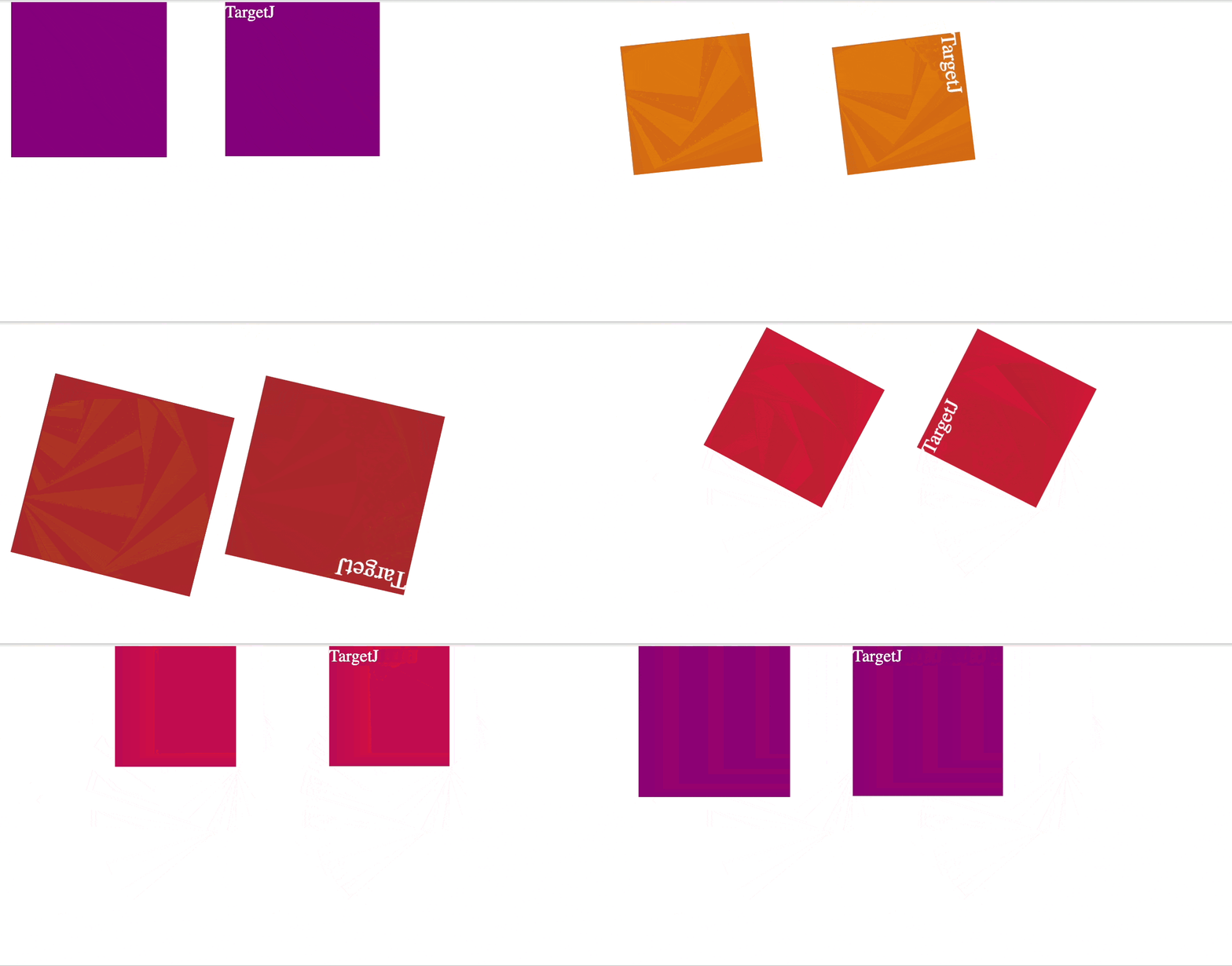
TargetJ provides efficient, easy-to-control UI animation and manipulation through special targets that reflect HTML style names, such as `width`, `height`, `scale`, `rotate`, and `opacity`.
|
|
272
225
|
|
|
273
|
-
|
|
226
|
+
Below is a comparison between implementing animations in TargetJ versus using the Animation API. While the Animation API may still offer a slight performance edge, TargetJ comes very close.
|
|
274
227
|
|
|
275
|
-
|
|
276
|
-
import { App, TModel } from "targetj";
|
|
228
|
+
|
|
277
229
|
|
|
278
|
-
|
|
279
|
-
|
|
280
|
-
|
|
281
|
-
|
|
282
|
-
|
|
283
|
-
|
|
284
|
-
|
|
285
|
-
|
|
286
|
-
|
|
287
|
-
|
|
288
|
-
|
|
289
|
-
|
|
290
|
-
|
|
291
|
-
|
|
292
|
-
|
|
293
|
-
|
|
294
|
-
|
|
295
|
-
|
|
296
|
-
|
|
297
|
-
|
|
298
|
-
|
|
299
|
-
|
|
300
|
-
|
|
301
|
-
|
|
302
|
-
|
|
303
|
-
|
|
304
|
-
|
|
305
|
-
|
|
306
|
-
|
|
307
|
-
|
|
308
|
-
|
|
309
|
-
|
|
310
|
-
|
|
311
|
-
|
|
312
|
-
|
|
313
|
-
|
|
314
|
-
|
|
315
|
-
|
|
316
|
-
|
|
317
|
-
|
|
318
|
-
|
|
319
|
-
}
|
|
230
|
+
```bash
|
|
231
|
+
import { App, TModel, getScreenHeight, getScreenWidth } from "targetj";
|
|
232
|
+
|
|
233
|
+
App(new TModel('TargetJ vs Animation Api', {
|
|
234
|
+
addAnimateChild() {
|
|
235
|
+
this.addChild(new TModel('animation', {
|
|
236
|
+
width: 150,
|
|
237
|
+
height: 150,
|
|
238
|
+
animate: {
|
|
239
|
+
value() {
|
|
240
|
+
var keyframes = [{
|
|
241
|
+
transform: 'translate(0, 0) rotate(0deg) scale(1)',
|
|
242
|
+
width: '80px',
|
|
243
|
+
height: '80px',
|
|
244
|
+
background: 'orange'
|
|
245
|
+
}, {
|
|
246
|
+
transform: 'translate(50px, 100px) rotate(180deg) scale(1.5)',
|
|
247
|
+
width: '120px',
|
|
248
|
+
height: '120px',
|
|
249
|
+
background: 'brown'
|
|
250
|
+
}, {
|
|
251
|
+
transform: 'translate(150px, 0) rotate(360deg) scale(1)',
|
|
252
|
+
width: '100px',
|
|
253
|
+
height: '100px',
|
|
254
|
+
background: 'crimson'
|
|
255
|
+
}, {
|
|
256
|
+
transform: 'translate(0, 0) rotate(360deg) scale(1)',
|
|
257
|
+
width: '150px',
|
|
258
|
+
height: '150px',
|
|
259
|
+
background: 'purple'
|
|
260
|
+
}];
|
|
261
|
+
|
|
262
|
+
return this.$dom.animate(keyframes, {
|
|
263
|
+
duration: 4500,
|
|
264
|
+
iterations: 1
|
|
265
|
+
});
|
|
266
|
+
}, enabledOn: function() {
|
|
267
|
+
return this.hasDom();
|
|
268
|
+
}
|
|
269
|
+
}
|
|
270
|
+
}));
|
|
320
271
|
},
|
|
321
|
-
|
|
322
|
-
|
|
323
|
-
|
|
324
|
-
|
|
325
|
-
|
|
326
|
-
|
|
327
|
-
|
|
328
|
-
|
|
272
|
+
addDomChild() {
|
|
273
|
+
this.addChild(new TModel('dom', {
|
|
274
|
+
color: 'white',
|
|
275
|
+
html: 'TargetJ',
|
|
276
|
+
animate: {
|
|
277
|
+
cycles: 3,
|
|
278
|
+
value(cycle) {
|
|
279
|
+
return [
|
|
280
|
+
{ x: 200, y: 0, rotate: 0, scale: 1, width: 80, height: 80, background: 'orange' },
|
|
281
|
+
{ x: 250, y: 100, rotate: 180, scale: 1.5, width: 120, height: 120, background: 'brown' },
|
|
282
|
+
{ x: 350, y: 0, rotate: 360, scale: 1, width: 100, height: 100, background: 'crimson' },
|
|
283
|
+
{ x: 200, y: 0, rotate: 360, scale: 1, width: 150, height: 150, background: 'purple' }
|
|
284
|
+
][cycle];
|
|
285
|
+
},
|
|
286
|
+
onValueChange(newValue) {
|
|
287
|
+
const steps = this.getTargetCycle(this.key) === 0 ? 0 : 180;
|
|
288
|
+
this.setTarget("move", newValue, steps);
|
|
289
|
+
}
|
|
290
|
+
}
|
|
291
|
+
}));
|
|
292
|
+
},
|
|
293
|
+
restartOnBothComplete: {
|
|
294
|
+
loop: true,
|
|
295
|
+
interval: 50,
|
|
296
|
+
value() {
|
|
297
|
+
const animation = this.getChild(0).val('animate');
|
|
298
|
+
if (animation.currentTime === animation.effect.getComputedTiming().duration
|
|
299
|
+
&& this.getChild(1).isTargetComplete('animate')) {
|
|
300
|
+
this.getChild(0).activateTarget('animate');
|
|
301
|
+
this.getChild(1).activateTarget('animate');
|
|
302
|
+
}
|
|
303
|
+
},
|
|
304
|
+
enabledOn: function() {
|
|
305
|
+
return this.getChildren().length === 2 && this.getChild(0).val('animate');
|
|
329
306
|
}
|
|
330
|
-
|
|
331
|
-
|
|
332
|
-
|
|
333
|
-
|
|
334
|
-
}
|
|
335
|
-
})
|
|
336
|
-
);
|
|
307
|
+
},
|
|
308
|
+
width() { return getScreenWidth(); },
|
|
309
|
+
height() { return getScreenHeight(); }
|
|
310
|
+
}));
|
|
337
311
|
```
|
|
338
312
|
|
|
339
313
|
## Infinite scrolling
|
|
340
314
|
|
|
341
315
|
This example demonstrates how to handle scroll events and develop a simple infinite scrolling application.
|
|
342
316
|
|
|
343
|
-

|
|
344
318
|
|
|
345
319
|
```bash
|
|
346
320
|
import { App, TModel, getEvents, getScreenHeight, getScreenWidth, } from "targetj";
|
|
347
321
|
|
|
348
322
|
App(new TModel("scroller", {
|
|
349
323
|
canHandleEvents: "scrollTop",
|
|
350
|
-
|
|
324
|
+
containerOverflowMode: 'always',
|
|
351
325
|
children: {
|
|
352
326
|
value() {
|
|
353
327
|
const childrenCount = this.getChildren().length;
|
|
354
328
|
return Array.from({ length: 5 }, (_, i) =>
|
|
355
329
|
new TModel("scrollItem", {
|
|
356
330
|
width: 300,
|
|
357
|
-
background: "
|
|
331
|
+
background: "#B388FF",
|
|
358
332
|
height: 30,
|
|
359
333
|
color: "#fff",
|
|
360
334
|
textAlign: "center",
|
|
@@ -383,111 +357,157 @@ App(new TModel("scroller", {
|
|
|
383
357
|
|
|
384
358
|
## Simple Single Page App Example
|
|
385
359
|
|
|
386
|
-
Below is a simple single-page
|
|
360
|
+
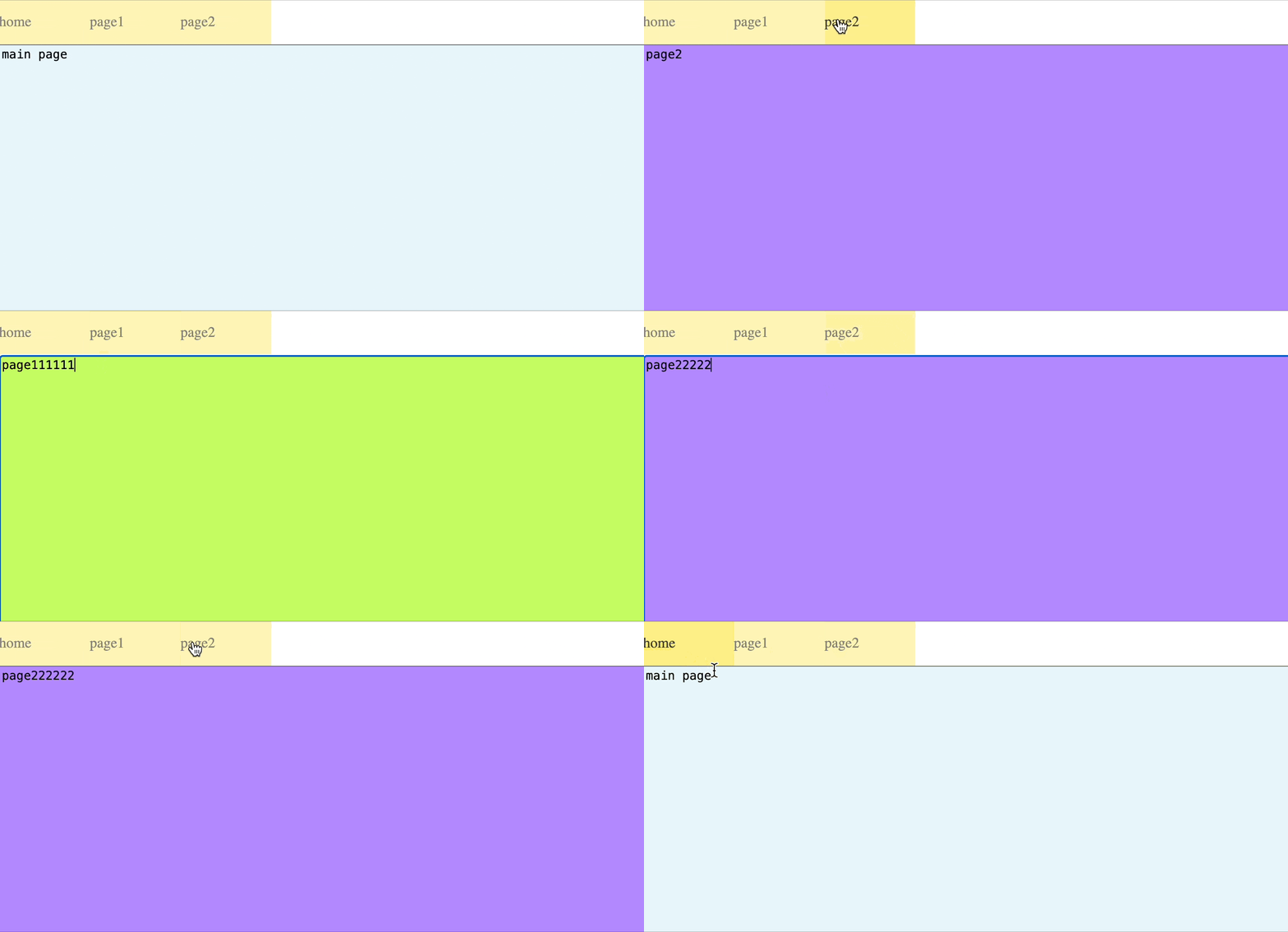
Below is a simple single-page application that demonstrates how to build a fully-featured app using TargetJ. Each page is represented by a textarea. You’ll notice that when you type something, switch to another page, and then return to the same page, your input remains preserved. This also applies to the page's scroll position—when you return, the page will open at the same scroll position where you left it, rather than defaulting to the top.
|
|
387
361
|
|
|
388
|
-
|
|
362
|
+
You can now assemble your app by incorporating code segments from the examples on animation, event handling, API integration, and infinite scrolling provided above.
|
|
363
|
+
|
|
364
|
+
|
|
389
365
|
|
|
390
366
|
```bash
|
|
391
367
|
import { App, TModel, getScreenHeight, getScreenWidth, getEvents, getPager } from "targetj";
|
|
392
368
|
|
|
393
|
-
App(new TModel("
|
|
394
|
-
width
|
|
395
|
-
height
|
|
396
|
-
|
|
397
|
-
|
|
398
|
-
|
|
399
|
-
|
|
400
|
-
|
|
401
|
-
|
|
402
|
-
|
|
403
|
-
|
|
404
|
-
|
|
405
|
-
|
|
406
|
-
|
|
407
|
-
|
|
408
|
-
|
|
409
|
-
|
|
410
|
-
|
|
411
|
-
|
|
412
|
-
|
|
413
|
-
|
|
414
|
-
|
|
415
|
-
|
|
416
|
-
|
|
417
|
-
|
|
418
|
-
|
|
419
|
-
|
|
420
|
-
|
|
421
|
-
|
|
422
|
-
opacity: 0.5,
|
|
423
|
-
cursor: "pointer",
|
|
424
|
-
html: menu,
|
|
425
|
-
onEnterEvent() { this.setTarget("opacity", 1, 20); },
|
|
426
|
-
onLeaveEvent() { this.setTarget("opacity", 0.5, 20); },
|
|
427
|
-
onClickEvent() {
|
|
428
|
-
this.setTarget("opacity", 0.5);
|
|
429
|
-
getPager().openLink(menu);
|
|
369
|
+
App(new TModel("simpleApp", {
|
|
370
|
+
width() { return getScreenWidth(); },
|
|
371
|
+
height() { return getScreenHeight(); },
|
|
372
|
+
menubar() {
|
|
373
|
+
return new TModel("menubar", {
|
|
374
|
+
children() {
|
|
375
|
+
return ["home", "page1", "page2"].map(menu => {
|
|
376
|
+
return new TModel("toolItem", {
|
|
377
|
+
canHandleEvents: "touch",
|
|
378
|
+
background: "#fce961",
|
|
379
|
+
width: 100,
|
|
380
|
+
height: 50,
|
|
381
|
+
lineHeight: 50,
|
|
382
|
+
itemOverflowMode: 'never',
|
|
383
|
+
opacity: 0.5,
|
|
384
|
+
cursor: "pointer",
|
|
385
|
+
html: menu,
|
|
386
|
+
onEnterEvent() {
|
|
387
|
+
this.setTarget("opacity", 1, 20);
|
|
388
|
+
},
|
|
389
|
+
onLeaveEvent() {
|
|
390
|
+
this.setTarget("opacity", 0.5, 20);
|
|
391
|
+
},
|
|
392
|
+
onClickEvent() {
|
|
393
|
+
this.setTarget("opacity", 0.5);
|
|
394
|
+
getPager().openLink(menu);
|
|
395
|
+
}
|
|
396
|
+
});
|
|
397
|
+
});
|
|
430
398
|
},
|
|
431
|
-
|
|
432
|
-
|
|
433
|
-
|
|
399
|
+
height: 50,
|
|
400
|
+
width() { return getScreenWidth(); },
|
|
401
|
+
onResize: ["width"]
|
|
402
|
+
});
|
|
434
403
|
},
|
|
435
|
-
|
|
436
|
-
|
|
437
|
-
|
|
438
|
-
|
|
439
|
-
|
|
440
|
-
|
|
441
|
-
|
|
442
|
-
|
|
443
|
-
|
|
444
|
-
|
|
445
|
-
|
|
446
|
-
|
|
404
|
+
page() {
|
|
405
|
+
return new TModel({
|
|
406
|
+
width() { return getScreenWidth(); },
|
|
407
|
+
height() { return getScreenHeight() - 50; },
|
|
408
|
+
baseElement: 'textarea',
|
|
409
|
+
keepEventDefault: [ 'touchstart', 'touchend', 'mousedown', 'mouseup' ],
|
|
410
|
+
boxSizing: 'border-box',
|
|
411
|
+
html: "main page",
|
|
412
|
+
onKeyEvent() { this.setTarget('html', this.$dom.value()); },
|
|
413
|
+
onResize: [ "width", "height" ]
|
|
414
|
+
});
|
|
415
|
+
},
|
|
416
|
+
mainPage() {
|
|
417
|
+
return new TModel({
|
|
418
|
+
...this.val('page').targets,
|
|
419
|
+
background: "#e6f6fb",
|
|
420
|
+
html: 'main page'
|
|
421
|
+
});
|
|
422
|
+
},
|
|
423
|
+
page1() {
|
|
424
|
+
return new TModel({
|
|
425
|
+
...this.val('page').targets,
|
|
426
|
+
background: "#C2FC61",
|
|
427
|
+
html: 'page1'
|
|
428
|
+
});
|
|
429
|
+
},
|
|
430
|
+
page2() {
|
|
431
|
+
return new TModel({
|
|
432
|
+
...this.val('page').targets,
|
|
433
|
+
background: "#B388FF",
|
|
434
|
+
html: 'page2'
|
|
435
|
+
});
|
|
436
|
+
},
|
|
437
|
+
children() {
|
|
438
|
+
const pageName = window.location.pathname.split("/").pop();
|
|
439
|
+
switch (pageName) {
|
|
440
|
+
case "page1":
|
|
441
|
+
return [ this.val('menubar'), this.val('page1')];
|
|
442
|
+
case "page2":
|
|
443
|
+
return [ this.val('menubar'), this.val('page2')];
|
|
444
|
+
default:
|
|
445
|
+
return [ this.val('menubar'), this.val('mainPage') ];
|
|
446
|
+
}
|
|
447
|
+
},
|
|
448
|
+
onResize: ["width", "height"]
|
|
449
|
+
}));
|
|
450
|
+
```
|
|
447
451
|
|
|
448
|
-
|
|
449
|
-
background: "blue",
|
|
450
|
-
width: getScreenWidth,
|
|
451
|
-
height: getScreenHeight,
|
|
452
|
-
html: "page 1",
|
|
453
|
-
onResize: ["width", "height"],
|
|
454
|
-
});
|
|
452
|
+
## Special target names
|
|
455
453
|
|
|
456
|
-
|
|
457
|
-
|
|
458
|
-
|
|
459
|
-
|
|
460
|
-
|
|
461
|
-
|
|
462
|
-
|
|
454
|
+
All HTML style names and attributes are treated as special target names. The most commonly used style names and attributes have already been added to the framework, with the possibility of adding more in the future.
|
|
455
|
+
|
|
456
|
+
Examples:
|
|
457
|
+
- `width`, `height`: Set the dimensions of the object.
|
|
458
|
+
- `opacity`, `scale`, `rotate`: Adjust the opacity, scale, and rotation of the object.
|
|
459
|
+
- `zIndex`: Sets the z-order of the object.
|
|
460
|
+
|
|
461
|
+
In addition to styles and attribute names, we have the following special names:
|
|
462
|
+
|
|
463
|
+
1. **html**: Sets the content of the object, interpreted as text by default.
|
|
464
|
+
2. **style**: An object to set the HTML style of the object, especially for style names that aren’t built-in.
|
|
465
|
+
3. **css**: A string that sets the CSS of the object.
|
|
466
|
+
4. **baseElement**: Sets the HTML tag of the object, defaulting to `div`.
|
|
467
|
+
5. **x** and **y*: Sets the location of the object.
|
|
468
|
+
6. **scrollLeft** and **scrollTop**: Control the scrolling position of the object.
|
|
469
|
+
7. **leftMargin**, **rightMargin**, **topMargin**, **bottomMargin**: Set margins between objects.
|
|
470
|
+
8. **children**: Sets the `TModel` children of the object.
|
|
471
|
+
9. **domHolder**: Assigned by the container to hold children or descendants without a `domParent`.
|
|
472
|
+
10. **domParent**: Set by the container or children to control which DOM container they are embedded in.
|
|
473
|
+
11. **isVisible**: An optional boolean to explicitly control the visibility of the object, bypassing TargetJ’s automatic calculation.
|
|
474
|
+
12. **canHaveDom**: A boolean flag that determines if the object can have a DOM element on the page.
|
|
475
|
+
13. **canHandleEvents**: Specifies which events the object can handle.
|
|
476
|
+
14. **widthFromDom** and **heightFromDom**: Boolean flags to control if the width and height should be derived from the DOM element.
|
|
477
|
+
15. **textOnly**: A boolean flag to set content type as text or HTML.
|
|
478
|
+
16. **isInFlow**: A boolean flag that determines if the object will contribute to the content height and width of its parent.
|
|
479
|
+
|
|
480
|
+
Lastly, we have the event targets which their values can be an array of targets to activate on specific events or may implement the event handler directly.
|
|
481
|
+
|
|
482
|
+
**Example with Target Array:**
|
|
483
|
+
```javascript
|
|
484
|
+
onResize: [ 'width', 'height' ] // Activates 'width' and 'height' targets on screen resize.
|
|
463
485
|
```
|
|
464
486
|
|
|
465
|
-
|
|
487
|
+
**Example with Event handler:**
|
|
488
|
+
```javascript
|
|
489
|
+
onResize() {
|
|
490
|
+
this.setTarget('width', getScreenWidth());
|
|
491
|
+
this.setTarget('height', getScreenHeight());
|
|
492
|
+
}
|
|
493
|
+
```
|
|
466
494
|
|
|
467
|
-
|
|
468
|
-
|
|
469
|
-
|
|
470
|
-
|
|
471
|
-
|
|
472
|
-
|
|
473
|
-
|
|
474
|
-
|
|
475
|
-
|
|
476
|
-
|
|
477
|
-
|
|
478
|
-
|
|
479
|
-
|
|
480
|
-
|
|
481
|
-
|
|
482
|
-
|
|
483
|
-
15. textOnly: A boolean flag that sets the type of content to be text or HTML.
|
|
484
|
-
16. isInFlow: A boolean flag that determines if the object will be used to calculate the content height and width of its parent.
|
|
485
|
-
17. onResize: An array of targets that will be activated and executed after a resize event.
|
|
486
|
-
18. onClickEvent: An array of targets that will be activated and executed after a click event.
|
|
487
|
-
19. onTouchEvent: An array of targets that will be activated and executed after a touch event.
|
|
488
|
-
20. onScrollEvent: An array of targets that will be activated and executed after a scroll event.
|
|
489
|
-
21. onKeyEvent: An array of targets that will be activated and executed after a key event.
|
|
490
|
-
22. onInvisibleEvent: An array of targets that will be activated and executed after the component becomes invisisble.
|
|
495
|
+
Here are all the event targets:
|
|
496
|
+
1. **onResize**: Triggered on screen resize events.
|
|
497
|
+
2. **onParentResize**: Activated when the parent’s width or height is updated.
|
|
498
|
+
3. **onFocusEvent**: Triggered on focus events.
|
|
499
|
+
4. **onBlurEvent**: Triggered on blur events.
|
|
500
|
+
5. **onClickEvent**: Activated on click events.
|
|
501
|
+
6. **onTouchEvent**: Generic handler for all touch events.
|
|
502
|
+
7. **onTouchEnd**: Called when `touchend` or `mouseup` events occur.
|
|
503
|
+
8. **onSwipeEvent**: Activated on swipe events.
|
|
504
|
+
9. **onEnterEvent**: Triggered when the mouse cursor enters the object’s DOM.
|
|
505
|
+
10. **onLeaveEvent**: Triggered when the mouse cursor leaves the object’s DOM.
|
|
506
|
+
11. **onScrollEvent**: Called on scroll events.
|
|
507
|
+
12. **onKeyEvent**: Triggered by key events.
|
|
508
|
+
13. **onInvisibleEvent**: Activated when the object becomes invisible.
|
|
509
|
+
14. **onChildrenChange**: Triggered when the children count changes.
|
|
510
|
+
15. **onVisibleChildrenChange**: Triggered when the count of visible children changes.
|
|
491
511
|
|
|
492
512
|
## Features
|
|
493
513
|
|
|
@@ -504,12 +524,12 @@ As a result of using targets, we can develop web sites or apps with the followin
|
|
|
504
524
|
|
|
505
525
|
|
|
506
526
|
## How to debug in TargetJ
|
|
507
|
-
1. TargetJ.
|
|
508
|
-
2. TargetJ.
|
|
509
|
-
3. TargetJ.
|
|
510
|
-
4. TargetJ.
|
|
527
|
+
1. TargetJ.tApp.stop(): Stops the application.
|
|
528
|
+
2. TargetJ.tApp.start(): Restarts the application
|
|
529
|
+
3. TargetJ.tApp.throttle: Slows down the application. This represents the pause in milliseconds before starting another TargetJ task cycle. It is zero by default.
|
|
530
|
+
4. TargetJ.tApp.debugLevel: Logs information about the TargetJ task cycle and its efficiency. It is zero by default. Set it to 1 to log any cycle that takes more than 10ms and 2 to log the name of the caller of each cycle.
|
|
511
531
|
5. Use `t()` to find an object from the browser console using its `oid`.
|
|
512
|
-
6. Inspect all the vital properities using `t(oid).bug`.
|
|
532
|
+
6. Inspect all the vital properities using `t(oid).bug()`.
|
|
513
533
|
|
|
514
534
|
## Documentation
|
|
515
535
|
Explore the full potential of TargetJ and dive into our interactive documentation at www.targetj.io.
|