targetj 1.0.105 → 1.0.106
This diff represents the content of publicly available package versions that have been released to one of the supported registries. The information contained in this diff is provided for informational purposes only and reflects changes between package versions as they appear in their respective public registries.
- package/README.md +9 -5
- package/build/TargetManager.js +9 -2
- package/build/TargetUtil.js +2 -1
- package/package.json +1 -1
package/README.md
CHANGED
|
@@ -1,4 +1,4 @@
|
|
|
1
|
-
# TargetJ: JavaScript UI framework
|
|
1
|
+
# TargetJ: JavaScript UI framework Redefining Front-End Development
|
|
2
2
|
|
|
3
3
|
Welcome to TargetJ, a powerful JavaScript UI framework designed to simplify development and animation. (https://targetj.io)
|
|
4
4
|
|
|
@@ -14,7 +14,7 @@ npm install targetj
|
|
|
14
14
|
|
|
15
15
|
## Why TargetJ?
|
|
16
16
|
|
|
17
|
-
Imagine building a
|
|
17
|
+
Imagine building a single-page web app using a unified approach for API integration, animations, event handling, and more—without having to manage asynchronous calls, loops, callbacks, promises, timeouts, state management, CSS, HTML attributes, tags, or HTML nesting. That’s exactly what TargetJ offers: it simplifies the entire development process with a new, simplified paradigm.
|
|
18
18
|
|
|
19
19
|
## What are targets?
|
|
20
20
|
|
|
@@ -22,10 +22,14 @@ Targets provide a unified interface for variable assignments and methods, giving
|
|
|
22
22
|
|
|
23
23
|
For variable assignments, targets enhance functionality by giving them the ability to iterate in steps until they reach the specified value, rather than being immediately assigned their values. They can introduce pauses between iterations and offer callbacks to monitor progress, track the progress of other variables, and manage their life cycles accordingly. Similarly, targets enhance methods by allowing them to manage their own life cycles. They can execute themselves under specific conditions, control the number of executions, and offer the same capabilities as those provided to variables.
|
|
24
24
|
|
|
25
|
+
## Do I still need HTML and CSS files?
|
|
26
|
+
|
|
27
|
+
No, static HTML or CSS files are not necessary. We believe they introduce complexity, brittleness, and act as an intermediary that diverts focus from the end application. It's better to reduce the gap between the application and the user experience. In TargetJ, HTML elements, styles, and attributes are written as targets, enabling them to function independently while at the same time being well integrated with the other logic targets of the application. This provides a flexible and fluid medium for creating new user experiences that would otherwise be difficult to achieve.
|
|
28
|
+
|
|
25
29
|
## What does a target consist of?
|
|
26
30
|
|
|
27
31
|
Each target consists of the following:
|
|
28
|
-
1. Target Value and Actual Value. The target value is the value assigned to a variable or the result produced by a method
|
|
32
|
+
1. Target Value and Actual Value. The target value is the value assigned to a variable or the result produced by a method. The actual value is typically the value used by the rest of the application. When the target value differs from the actual value, TargetJ iteratively updates the actual value until it matches the target value. This process is managed by two additional variables: Step, which dictates the number of iterations, and Interval, which specifies the duration (in milliseconds) the system waits before executing the next iteration.
|
|
29
33
|
|
|
30
34
|
2. State: Targets have four states that control their lifecycle: Active, Inactive, Updating, and Complete. Active: This is the default state for all targets. It indicates that the target is ready to be executed, and the target value needs to be initialized from the variable it represents or its value() method needs to be executed to calculate its output. Inactive: Indicates that the target is not ready to be executed. Updating: Indicates that the actual value is being adjusted to reach the target value. Complete: Indicates that the target execution is finished, and the actual value has matched the target value.
|
|
31
35
|
|
|
@@ -87,7 +91,7 @@ This is only property. It defines the initial value of the actual value.
|
|
|
87
91
|
|
|
88
92
|
### Simple example
|
|
89
93
|
|
|
90
|
-
In the example below, we incrementally increase the
|
|
94
|
+
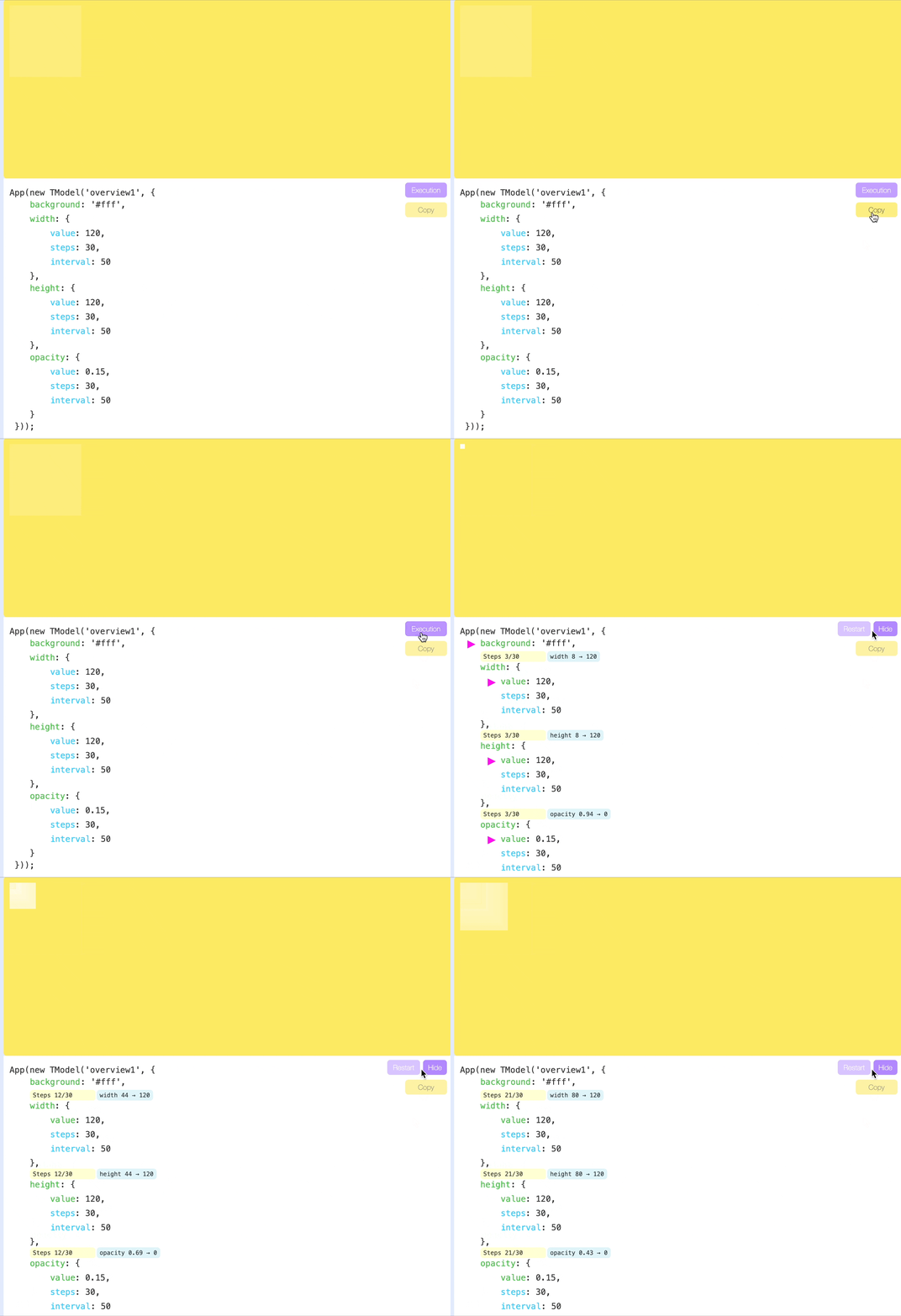
In the example below, we incrementally increase the values of width, height, and opacity in 30 steps, with a 50-millisecond pause between each step. You can view a live example here: https://targetj.io/examples/overview.html, and click on the execution button to see how it works.
|
|
91
95
|
|
|
92
96
|
|
|
93
97
|
|
|
@@ -115,7 +119,7 @@ App(new TModel({
|
|
|
115
119
|
}));
|
|
116
120
|
```
|
|
117
121
|
|
|
118
|
-
It can also be written in a more compact form using arrays:
|
|
122
|
+
It can also be written in a more compact form using arrays (view a live example at https://targetj.io/examples/overview2.html):
|
|
119
123
|
|
|
120
124
|
```bash
|
|
121
125
|
import { App, TModel } from 'targetj';
|
package/build/TargetManager.js
CHANGED
|
@@ -59,6 +59,9 @@ var TargetManager = exports.TargetManager = /*#__PURE__*/function () {
|
|
|
59
59
|
if (!tmodel.isTargetEnabled(key)) {
|
|
60
60
|
return;
|
|
61
61
|
}
|
|
62
|
+
if (tmodel.isExecuted(key) && tmodel.hasUpdatingTargets(key)) {
|
|
63
|
+
return;
|
|
64
|
+
}
|
|
62
65
|
if (tmodel.isExecuted(key) && tmodel.getTargetStep(key) === tmodel.getTargetSteps(key)) {
|
|
63
66
|
var schedulePeriod = _TargetUtil.TargetUtil.scheduleExecution(tmodel, key);
|
|
64
67
|
if (schedulePeriod > 0) {
|
|
@@ -67,8 +70,12 @@ var TargetManager = exports.TargetManager = /*#__PURE__*/function () {
|
|
|
67
70
|
}
|
|
68
71
|
}
|
|
69
72
|
tmodel.resetScheduleTimeStamp(key);
|
|
70
|
-
if (tmodel.isExecuted(key) && tmodel.
|
|
71
|
-
tmodel.
|
|
73
|
+
if (tmodel.isExecuted(key) && tmodel.getTargetCycles(key) > 0) {
|
|
74
|
+
if (tmodel.getTargetCycle(key) < tmodel.getTargetCycles(key)) {
|
|
75
|
+
tmodel.incrementTargetCycle(key, tmodel.getTargetCycle(key));
|
|
76
|
+
} else {
|
|
77
|
+
tmodel.resetTargetCycle(key);
|
|
78
|
+
}
|
|
72
79
|
tmodel.resetTargetStep(key);
|
|
73
80
|
tmodel.resetTargetInitialValue(key);
|
|
74
81
|
}
|
package/build/TargetUtil.js
CHANGED
|
@@ -339,7 +339,8 @@ _defineProperty(TargetUtil, "styleTargetMap", _objectSpread(_objectSpread(_objec
|
|
|
339
339
|
cursor: true,
|
|
340
340
|
fontFamily: true,
|
|
341
341
|
overflow: true,
|
|
342
|
-
textDecoration: true
|
|
342
|
+
textDecoration: true,
|
|
343
|
+
boxShadow: true
|
|
343
344
|
}));
|
|
344
345
|
_defineProperty(TargetUtil, "scaleMap", {
|
|
345
346
|
scale: true,
|