tabby-profile-share 0.1.4 → 0.1.5
This diff represents the content of publicly available package versions that have been released to one of the supported registries. The information contained in this diff is provided for informational purposes only and reflects changes between package versions as they appear in their respective public registries.
- package/CHANGELOG.md +6 -0
- package/README.md +27 -3
- package/README.pt-BR.md +27 -3
- package/package.json +1 -1
package/CHANGELOG.md
CHANGED
|
@@ -2,6 +2,12 @@
|
|
|
2
2
|
|
|
3
3
|
## Unreleased
|
|
4
4
|
|
|
5
|
+
## 0.1.5 — npm README and screenshot updates (2026-10-24)
|
|
6
|
+
|
|
7
|
+
- Republish the current English and Brazilian Portuguese documentation, including the project tagline and four authentic screenshots captured with fictional SSH profiles.
|
|
8
|
+
- Use absolute raw GitHub URLs for screenshot assets so the npm package page can render images even though image binaries are not bundled in the npm tarball.
|
|
9
|
+
- Keep the prior v0.1.4 plugin functionality, compatibility, and dependencies unchanged.
|
|
10
|
+
|
|
5
11
|
## 0.1.4 — Documentation, discovery and GitHub release (2026-10-24)
|
|
6
12
|
|
|
7
13
|
- Improve npm package description and focused discovery keywords for SSH profile export/import.
|
package/README.md
CHANGED
|
@@ -1,5 +1,7 @@
|
|
|
1
1
|
# Tabby Profile Share
|
|
2
2
|
|
|
3
|
+
**Share Tabby SSH profiles, not SSH credentials.**
|
|
4
|
+
|
|
3
5
|
**Share SSH profiles and their folder hierarchy safely with your team.**
|
|
4
6
|
|
|
5
7
|
[](https://github.com/gugahartmann/Tabby_Profile_Share/actions/workflows/test.yml)
|
|
@@ -52,11 +54,33 @@ If you prefer a compiled, standalone package, check [GitHub Releases](https://gi
|
|
|
52
54
|
|
|
53
55
|
Do not install the directory one level too high, or nest `tabby-profile-share` twice.
|
|
54
56
|
|
|
55
|
-
## Screenshots
|
|
57
|
+
## Screenshots
|
|
58
|
+
|
|
59
|
+
These screenshots were taken from **Tabby using [synthetic demo SSH profiles](examples/demo-profiles.yaml)**. No real infrastructure, passwords or private keys appear in the examples.
|
|
60
|
+
|
|
61
|
+
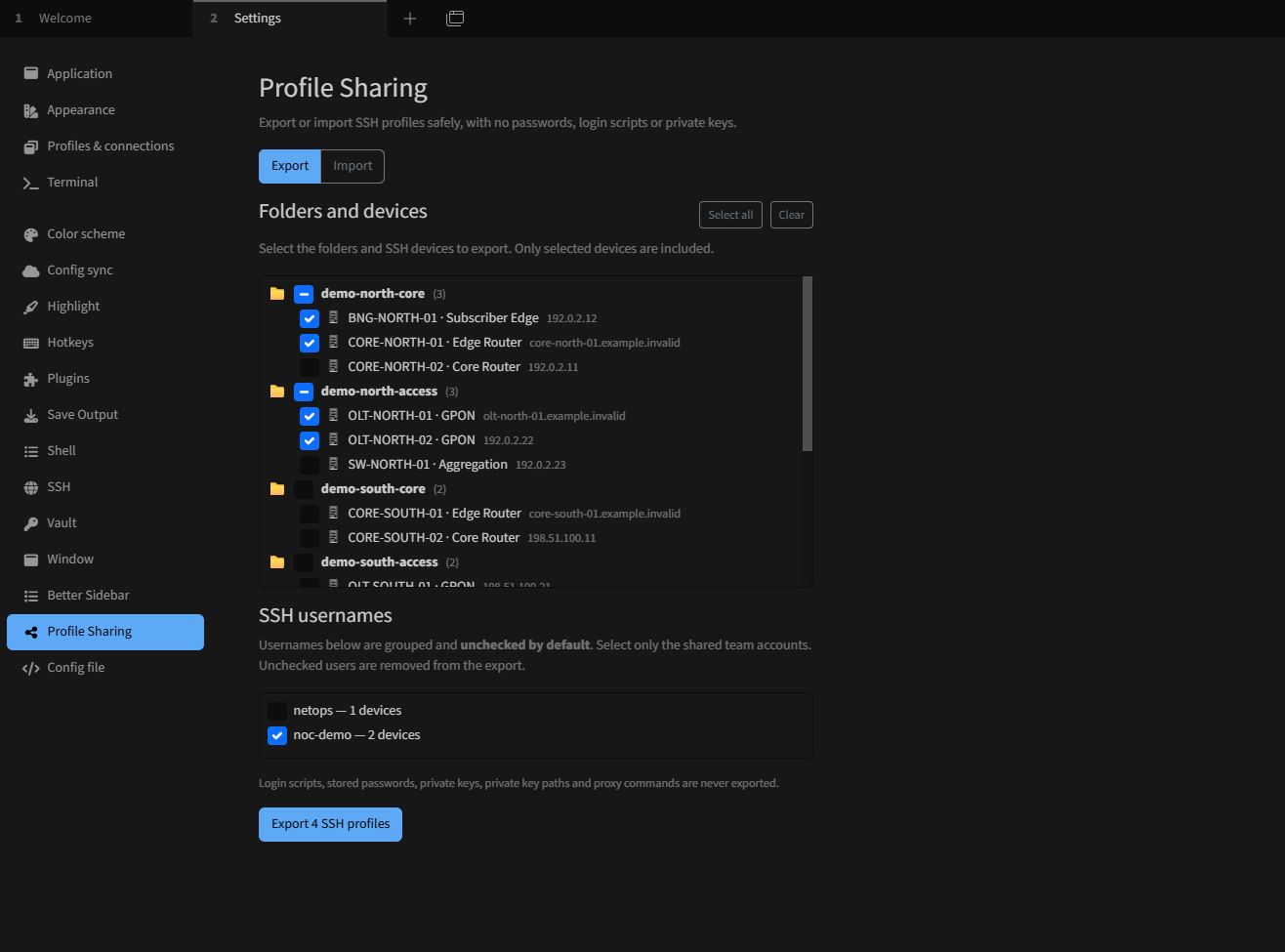
### 1. Select folders, devices and shared usernames
|
|
62
|
+
|
|
63
|
+
Choose only the folders and devices to export. Username sharing is **opt-in**: accounts are unchecked by default, and in this example only `noc-demo` is selected.
|
|
64
|
+
|
|
65
|
+
|
|
66
|
+
|
|
67
|
+
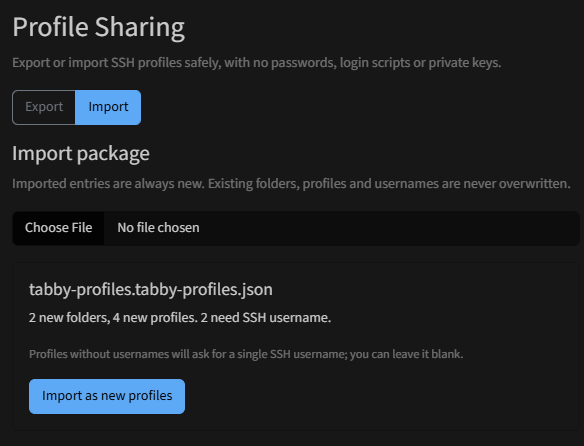
### 2. Review the import before creating profiles
|
|
68
|
+
|
|
69
|
+
Import a `.tabby-profiles.json` package and review the number of new folders, new SSH profiles and missing usernames. Imported entries are created as new items; existing entries are not overwritten.
|
|
70
|
+
|
|
71
|
+
|
|
72
|
+
|
|
73
|
+
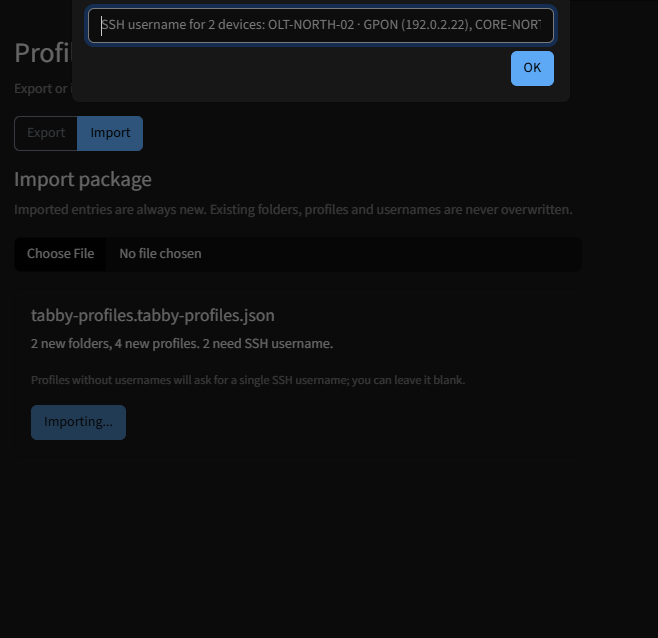
### 3. Supply missing SSH usernames
|
|
74
|
+
|
|
75
|
+
When imported profiles lack usernames, Tabby Profile Share asks for a shared SSH username and shows example devices. The field can be left empty.
|
|
76
|
+
|
|
77
|
+
|
|
78
|
+
|
|
79
|
+
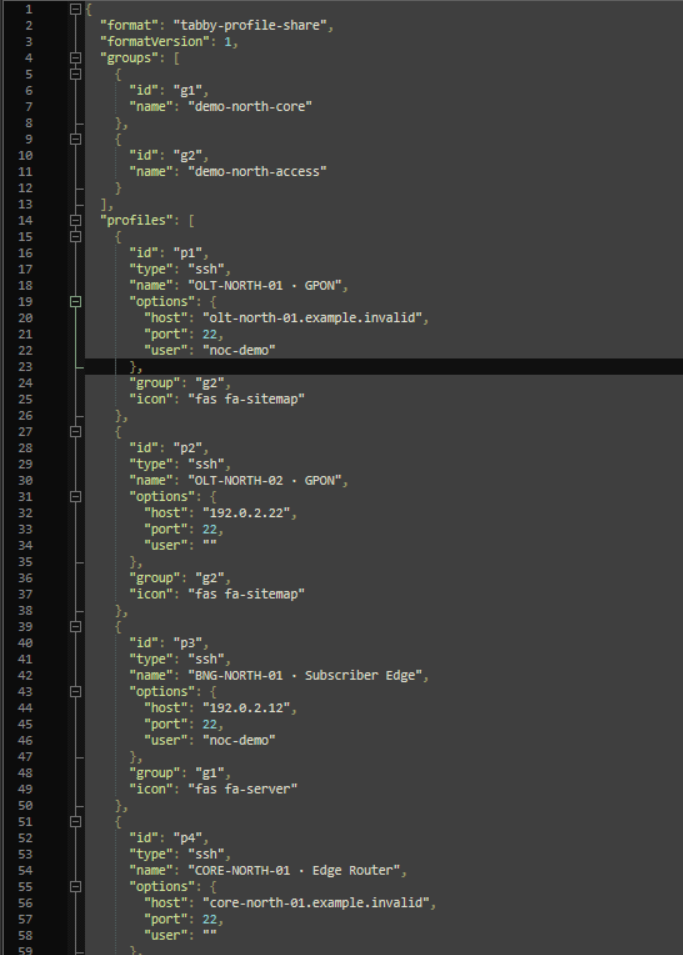
### 4. Inspect the portable JSON export
|
|
56
80
|
|
|
57
|
-
|
|
81
|
+
The export contains versioned `groups` and `profiles` data, with sanitized connection options. It intentionally excludes passwords, private key files and login scripts.
|
|
58
82
|
|
|
59
|
-
|
|
83
|
+
|
|
60
84
|
|
|
61
85
|
## Use
|
|
62
86
|
|
package/README.pt-BR.md
CHANGED
|
@@ -1,5 +1,7 @@
|
|
|
1
1
|
# Tabby Profile Share
|
|
2
2
|
|
|
3
|
+
**Compartilhe perfis SSH do Tabby, não suas credenciais.**
|
|
4
|
+
|
|
3
5
|
**Compartilhe perfis SSH e a hierarquia de pastas do Tabby com segurança.**
|
|
4
6
|
|
|
5
7
|
[](https://github.com/gugahartmann/Tabby_Profile_Share/actions/workflows/test.yml)
|
|
@@ -49,11 +51,33 @@ Também oferecemos arquivos compilados em [Releases](https://github.com/gugahart
|
|
|
49
51
|
|
|
50
52
|
Evite colocar a pasta diretamente em `plugins` ou aninhar duas pastas `tabby-profile-share`.
|
|
51
53
|
|
|
52
|
-
## Capturas de tela
|
|
54
|
+
## Capturas de tela
|
|
55
|
+
|
|
56
|
+
Estas imagens foram capturadas no **Tabby com [perfis SSH demonstrativos e fictícios](examples/demo-profiles.yaml)**, sem infraestrutura real, senhas ou chaves privadas.
|
|
57
|
+
|
|
58
|
+
### 1. Seleção de pastas, equipamentos e usuários compartilhados
|
|
59
|
+
|
|
60
|
+
Escolha quais pastas e equipamentos serão exportados. O compartilhamento de usernames é **opcional e desmarcado por padrão**. Neste exemplo, apenas o usuário `noc-demo` foi selecionado.
|
|
61
|
+
|
|
62
|
+

|
|
63
|
+
|
|
64
|
+
### 2. Prévia dos dados a importar
|
|
65
|
+
|
|
66
|
+
Carregue um arquivo `.tabby-profiles.json` e confira a quantidade de novas pastas, perfis SSH e equipamentos sem username. Os itens importados são novos e não substituem os já cadastrados.
|
|
67
|
+
|
|
68
|
+

|
|
69
|
+
|
|
70
|
+
### 3. Preenchimento de usernames ausentes
|
|
71
|
+
|
|
72
|
+
Quando os perfis importados estão sem usuário SSH, o plugin solicita um username, exibindo exemplos dos equipamentos afetados. É possível continuar sem preencher.
|
|
73
|
+
|
|
74
|
+

|
|
75
|
+
|
|
76
|
+
### 4. Estrutura do JSON exportado
|
|
53
77
|
|
|
54
|
-
|
|
78
|
+
O arquivo inclui `groups` e `profiles` com versão de formato e opções SSH sanitizadas. Senhas, chaves privadas e scripts de login ficam de fora.
|
|
55
79
|
|
|
56
|
-
|
|
80
|
+

|
|
57
81
|
|
|
58
82
|
## Como utilizar
|
|
59
83
|
|
package/package.json
CHANGED