tabby-ai-tools 0.9.3 → 0.9.4
This diff represents the content of publicly available package versions that have been released to one of the supported registries. The information contained in this diff is provided for informational purposes only and reflects changes between package versions as they appear in their respective public registries.
- package/README.md +5 -3
- package/README.zh-CN.md +5 -1
- package/VALIDATION.md +13 -0
- package/dist/index.js +1 -1
- package/docs/assets/overview.png +0 -0
- package/docs/assets/overview.svg +11 -5
- package/docs/codex-installation-recovery.md +6 -2
- package/docs/development.md +4 -0
- package/docs/guide.md +13 -6
- package/docs/releases/0.9.4.md +27 -0
- package/docs/releases/unreleased.md +1 -15
- package/package.json +1 -1
- package/skills/tabby/SKILL.md +4 -0
- package/skills/tabby/references/operations.md +4 -0
package/README.md
CHANGED
|
@@ -18,13 +18,15 @@
|
|
|
18
18
|
|
|
19
19
|
</div>
|
|
20
20
|
|
|
21
|
+
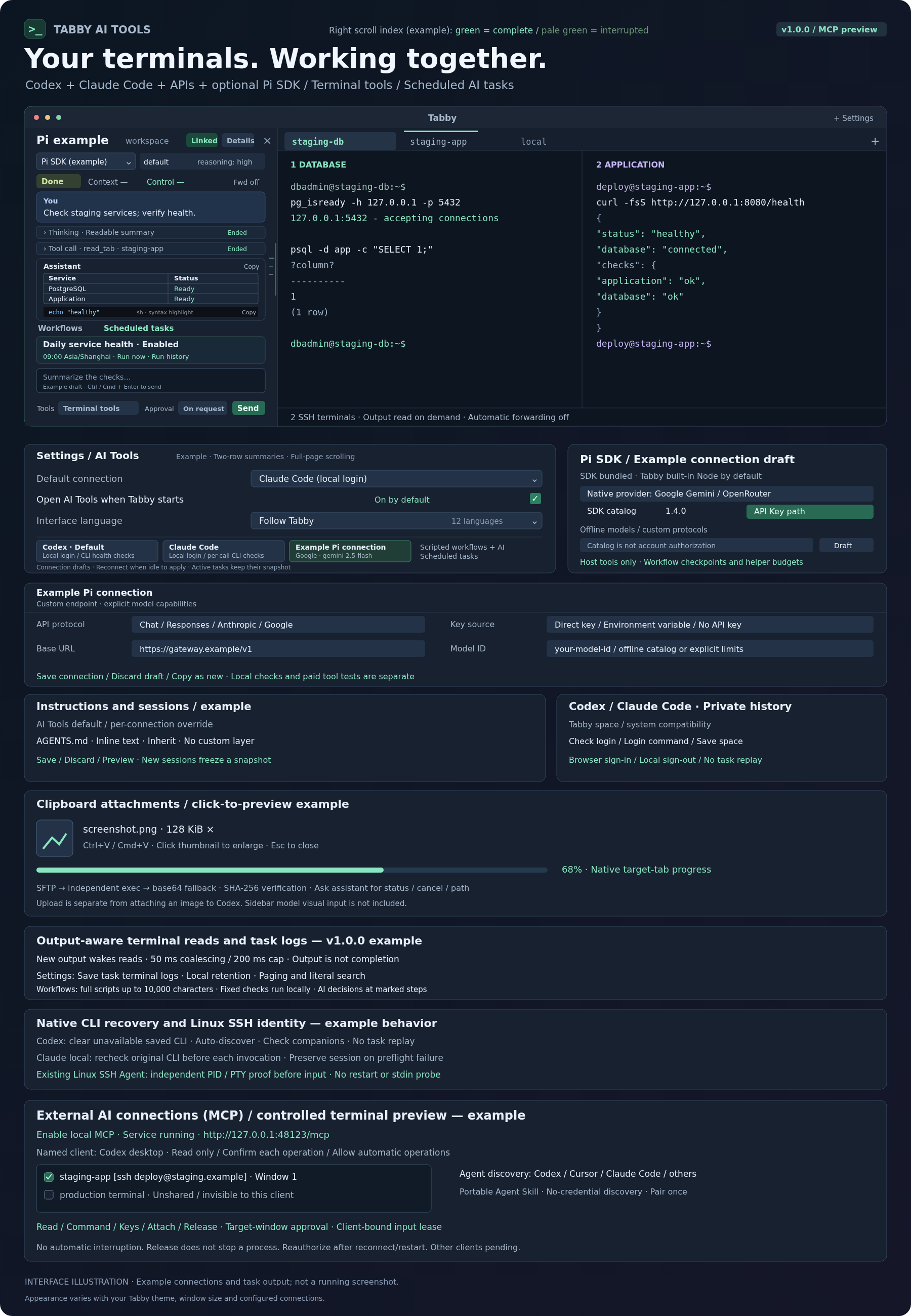
**v0.9.4: conversation navigation and safer CLI recovery.** The shared Agent panel has a question index in the right scrollbar strip: hover or focus to preview a question, click to jump, and use “latest” to resume streaming follow. The centered, compact 1px lines share an 18px right strip with a draggable conversation scroll thumb, freeing the former left gutter. Previews open to the left; theme-aware ↑ / ↓ buttons appear when needed. Green means confirmed completion; pale green means an ordinary interruption without a user Stop. Blue means running or waiting for an external prerequisite. Red means a confirmed user Stop, unfinished task, or execution limit. Completed turns wait for goal confirmation; automatic continuation returns to blue. History with no known execution result remains neutral.
|
|
22
|
+
|
|
21
23
|
<br>
|
|
22
24
|
|
|
23
25
|
Tabby AI Tools is an AI assistant inside [Tabby](https://github.com/Eugeny/tabby). It reads terminal output, sends commands, and uses the results to decide what to do next. Describe your goal in the sidebar, follow the work in your terminals, and reclaim terminal input whenever needed.
|
|
24
26
|
|
|
25
27
|
|
|
26
28
|
|
|
27
|
-
**Markdown replies.** Assistant messages and scheduled AI explanations render tables, headings, lists, quotes, links and code blocks. Wide tables and code scroll within the message; code blocks highlight labeled languages and have their own copy button, and message copy preserves the original Markdown. Formatting updates during streaming and applies to restored history. [
|
|
29
|
+
**Markdown replies.** Assistant messages and scheduled AI explanations render tables, headings, lists, quotes, links and code blocks. Wide tables and code scroll within the message; code blocks highlight labeled languages and have their own copy button, and message copy preserves the original Markdown. Formatting updates during streaming and applies to restored history. [v0.9.4 details](docs/releases/0.9.4.md).
|
|
28
30
|
|
|
29
31
|
**Fixed in v0.9.2:** Codex checks known Windows companion files and permits one idle-boundary installation recovery without replaying tasks. Claude local rechecks its configured CLI before each invocation and distinguishes installation faults from logout. Existing native Linux SSH agents can be attached after independent process/PTY verification. [Release notes and limits](docs/releases/0.9.2.md).
|
|
30
32
|
|
|
@@ -113,7 +115,7 @@ Automatic discovery covers standalone installations (including `CODEX_INSTALL_DI
|
|
|
113
115
|
|
|
114
116
|
On Windows, leave the Codex CLI executable blank (or `codex`) to compare actual versions across PATH, desktop, standalone and known npm installations and select the newest discovered CLI. Upgrades are rescanned on each new connection. Explicit file paths keep a fixed version; a stable `OpenAI\Codex\bin` directory limits comparison to that installation. See the [discovery guide](docs/guide.md#cli-自动发现与启动排查).
|
|
115
117
|
|
|
116
|
-
|
|
118
|
+
Valid explicit CLI selectors keep their priority. In v0.9.4, unavailable saved Codex paths or commands are cleared and saved, then automatic discovery runs once; existing session history is retained. New configurations leave the CLI field blank; `codex` has the same discovery behavior. See [recovery behavior and limits](docs/codex-installation-recovery.md).
|
|
117
119
|
|
|
118
120
|
## Orchestrate tasks in natural language
|
|
119
121
|
|
|
@@ -123,7 +125,7 @@ Describe the targets, order, conditions, and verification criteria. The assistan
|
|
|
123
125
|
|
|
124
126
|
Workflows can branch based on observed results and interact with other terminal Agents. Start a recording with `/remember TASK`. After successful completion, give the workflow an alias such as `task1` (in the sidebar or by asking the assistant to save it); send `/task1` to execute it again with fresh environment checks. Each step retains the server IP, stable connection/server ID, operation path and completion checks. Multi-server steps follow their saved order; a result checkpoint must confirm the preceding step before the next operation. The assistant can query recording/archive status and save aliases with `workflow_status` / `workflow_set_alias`; checkpoint success alone does not guarantee archival, and rejection reasons are shown. Ordinary tasks are not recorded and cannot be saved retroactively. Workflows containing sudo ask you to authenticate with `sudo -v` or `sudo ls` in each execution terminal, then keep that terminal’s credentials refreshed during the task. [Orchestration and reuse guide (中文)](docs/guide.md#任务编排与多服务器协作).
|
|
125
127
|
|
|
126
|
-
Interactive `/remember` workflows retain conditional rules and response intent for stdin, keys, process attachment and sidebar questions. The runtime handles saved if/else conditions locally, uses an optional helper model on the current connection for uncertain interactions, and resumes the pending step. Configure it in **AI Tools → Workflows & preferences → Interaction helper model**. Helper usage counts toward the task budget; missing machine checks return to the main model for verification. [Conditional workflow details (中文)](docs/task-workflows.md#条件与交互流程).
|
|
128
|
+
Interactive `/remember` workflows retain conditional rules and response intent for stdin, keys, process attachment and sidebar questions. The runtime handles saved if/else conditions locally, uses an optional helper model on the current connection for uncertain interactions, and resumes the pending step. Configure it in **AI Tools → Workflows & preferences → Interaction helper model**. Helper usage counts toward the task budget; missing machine checks return to the main model for verification. [Conditional workflow details (中文)](docs/task-workflows.md#条件与交互流程). In v0.9.4, recordings preserve complete commands and multiline scripts up to the terminal’s 10,000-character limit. Fixed steps use machine checks; `policy.decision` returns to the main AI before a step that requires live judgment, then scripted execution resumes.
|
|
127
129
|
|
|
128
130
|
## Schedule checks, decisions, actions, and verification
|
|
129
131
|
|
package/README.zh-CN.md
CHANGED
|
@@ -18,13 +18,15 @@
|
|
|
18
18
|
|
|
19
19
|
</div>
|
|
20
20
|
|
|
21
|
+
**v0.9.4:会话内问题导航与更安全的 CLI 恢复。** 通用 Agent 面板在右侧滚动条区域提供问题索引:悬停或聚焦预览原问题,点击跳转,回到最新消息恢复流式跟随。居中的紧凑 1px 短线不附加符号,与聊天滚动滑块共用右侧 18px 窄区域,去掉左侧占位;预览向左展开,过多时使用主题一致的 ↑ / ↓ 按钮翻动。绿色表示确认完成,淡绿色表示没有用户 Stop 证据的普通中断,蓝色表示执行中或等待外部条件,红色表示确认主动 Stop、任务未完成便终止或达到执行上限。回合结束后等待 Goal 确认,自动续行恢复蓝色;证据不足的历史保持灰色。
|
|
22
|
+
|
|
21
23
|
<br>
|
|
22
24
|
|
|
23
25
|
Tabby AI Tools 是集成在 [Tabby](https://github.com/Eugeny/tabby) 中的 AI 助手插件。它可以读取终端输出、发送命令,并根据执行结果继续分析和操作。你在侧栏描述目标,在终端查看过程,也可以随时取回输入控制。
|
|
24
26
|
|
|
25
27
|

|
|
26
28
|
|
|
27
|
-
**Markdown 回复。** 助手消息和定时任务 AI 说明支持表格、标题、列表、引用、链接和代码块。宽表格与代码在消息内滚动,带语言标记的代码块支持语法高亮和单独复制,整条消息复制保留原始 Markdown;流式输出与恢复的历史消息使用同一套排版。[说明](docs/releases/
|
|
29
|
+
**Markdown 回复。** 助手消息和定时任务 AI 说明支持表格、标题、列表、引用、链接和代码块。宽表格与代码在消息内滚动,带语言标记的代码块支持语法高亮和单独复制,整条消息复制保留原始 Markdown;流式输出与恢复的历史消息使用同一套排版。[v0.9.4 说明](docs/releases/0.9.4.md)。
|
|
28
30
|
|
|
29
31
|
**v0.9.2 修复:** Codex 检查已知 Windows 配套程序,允许在空闲边界恢复安装连接一次,不重放任务。Claude 本机登录在每次调用前重新检查配置的 CLI,并区分安装故障与未登录。Linux SSH 中已有原生 Agent 可经独立进程/PTY 核验接管。[发布说明与限制](docs/releases/0.9.2.md)。
|
|
30
32
|
|
|
@@ -144,3 +146,5 @@ Windows 默认留空(或填 `codex`)即可比较 PATH、桌面版、standalo
|
|
|
144
146
|
插件自带一个供模型使用的 [Tabby skill](skills/tabby/SKILL.md),保留全部功能入口。构建时自动内嵌,随插件安装并提供给 Codex 和 API 模型,无需另行安装。
|
|
145
147
|
|
|
146
148
|
[开发与验证](docs/development.md) · [验证范围](VALIDATION.md) · [问题反馈](https://github.com/Hanlen/tabby-ai-tools/issues) · [MIT](LICENSE)
|
|
149
|
+
|
|
150
|
+
v0.9.4 起,Codex CLI 默认留空自动查找,填写 `codex` 效果相同。已保存的路径或命令确认不可用时,自动清空并保存,再查找可用安装;有效显式入口保留优先级。登录、模型及工具协议错误不会触发清空,也不会重发任务。
|
package/VALIDATION.md
CHANGED
|
@@ -503,3 +503,16 @@ The first branch CI passed Linux/macOS but exposed two Windows race-test fixture
|
|
|
503
503
|
- Claude local review: existing native/npm discovery, original-selector re-resolution before invocation, flags/auth error classification, loopback MCP, stop, session preservation and no-replay fixtures passed separately. No shared Codex helper layout is assumed. Real Claude login/keychain, desktop and platform behavior remain pending.
|
|
504
504
|
- No paid-model smoke, real account/desktop/SSH test, remote CI, commit, tag, deployment or publication was performed. The prior published v0.9.2 remains separate from these local changes; previously discarded recording commands cannot be reconstructed from this fix alone.
|
|
505
505
|
- Logs: `/tmp/tabby-workflow-20261108-{tests,typecheck,build}.log`; documentation evidence: `/tmp/tabby-workflow-20261108/docs-evidence.json`.
|
|
506
|
+
|
|
507
|
+
|
|
508
|
+
## v0.9.4 question navigation outcomes — 2026-11-10
|
|
509
|
+
|
|
510
|
+
Node 22.23.4: 997 tests, 991 passed, six platform skips, no failures. Typecheck, production build, skill bundle/check and diff checks passed. Actual Angular navigation in Chromium passed light/dark themes, 320/480/800 widths and 100/125/150% zoom: 1px normal/current lines, distinct outcome colors, preserved hit areas, hover/click and keyboard navigation. Local evidence: `/tmp/tabby-nav-semantics/`.
|
|
511
|
+
|
|
512
|
+
Regressions cover confirmed user Stop versus ordinary interruption, Stop failure, unfinished/blocked/limited goals, automatic continuation, legacy snapshots, saved causes, and late goal/turn observations. Local HTTP API and native Claude CLI fixtures verify round/repetition limits and native max-turn cause propagation without inference replay. Default Codex discovery/installation recovery and Claude per-invocation discovery, MCP, stop and session-preservation fixtures pass in the full suite; these do not establish real default-account or desktop end-to-end usability. Real Tabby, account, Windows/macOS and user SSH checks remain pending. No paid model smoke, package installation or publication was performed.
|
|
513
|
+
|
|
514
|
+
### v0.9.4 release candidate — 2026-11-11
|
|
515
|
+
|
|
516
|
+
Node 22.23.4 release checks pass: skill bundle/check, typecheck, 997 tests (991 passed, six platform skips, zero failures), production webpack/Pi build and `git diff --check`. A separate 91-test Codex/Claude CLI and runtime selection covers default discovery, removed selectors, update paths, authenticated loopback MCP, stop, session retention and no replay with zero failures. Chromium rendered both READMEs, verified the animated robot and reduced-motion fallback, and regenerated the 1800×2250 overview PNG from the synchronized SVG without text overflow; the final image was visually inspected.
|
|
517
|
+
|
|
518
|
+
The exact release tarball is checked for package identity, entrypoints, `dist`, docs, bilingual README, assets, bundled skill and private-file exclusions, then installed with lifecycle scripts enabled and no `node` on `PATH`. Release-script state, logs, tarball path and its final SHA-256 remain outside the repository under `/tmp/tabby-release-0.9.4-20261111/`; the GitHub Release records the immutable artifact digest. No paid-model inference or new real-account request was run. Real Tabby desktop, Windows/macOS desktop, user SSH and OS-keychain-only Claude login remain pending; Linux/macOS/Windows CI is tracked separately before tag and publication.
|