tabby-ai-tools 0.7.0 → 0.7.1
This diff represents the content of publicly available package versions that have been released to one of the supported registries. The information contained in this diff is provided for informational purposes only and reflects changes between package versions as they appear in their respective public registries.
- package/README.md +5 -1
- package/README.zh-CN.md +5 -1
- package/VALIDATION.md +6 -0
- package/dist/index.js +1 -1
- package/dist/pi/sidecar.mjs +4320 -4320
- package/docs/assets/overview.png +0 -0
- package/docs/assets/overview.svg +4 -4
- package/docs/development.md +2 -0
- package/docs/guide.md +11 -3
- package/docs/releases/0.7.1.md +11 -0
- package/package.json +1 -1
- package/skills/tabby/SKILL.md +2 -0
- package/skills/tabby/references/operations.md +2 -0
package/README.md
CHANGED
|
@@ -22,12 +22,14 @@
|
|
|
22
22
|
|
|
23
23
|
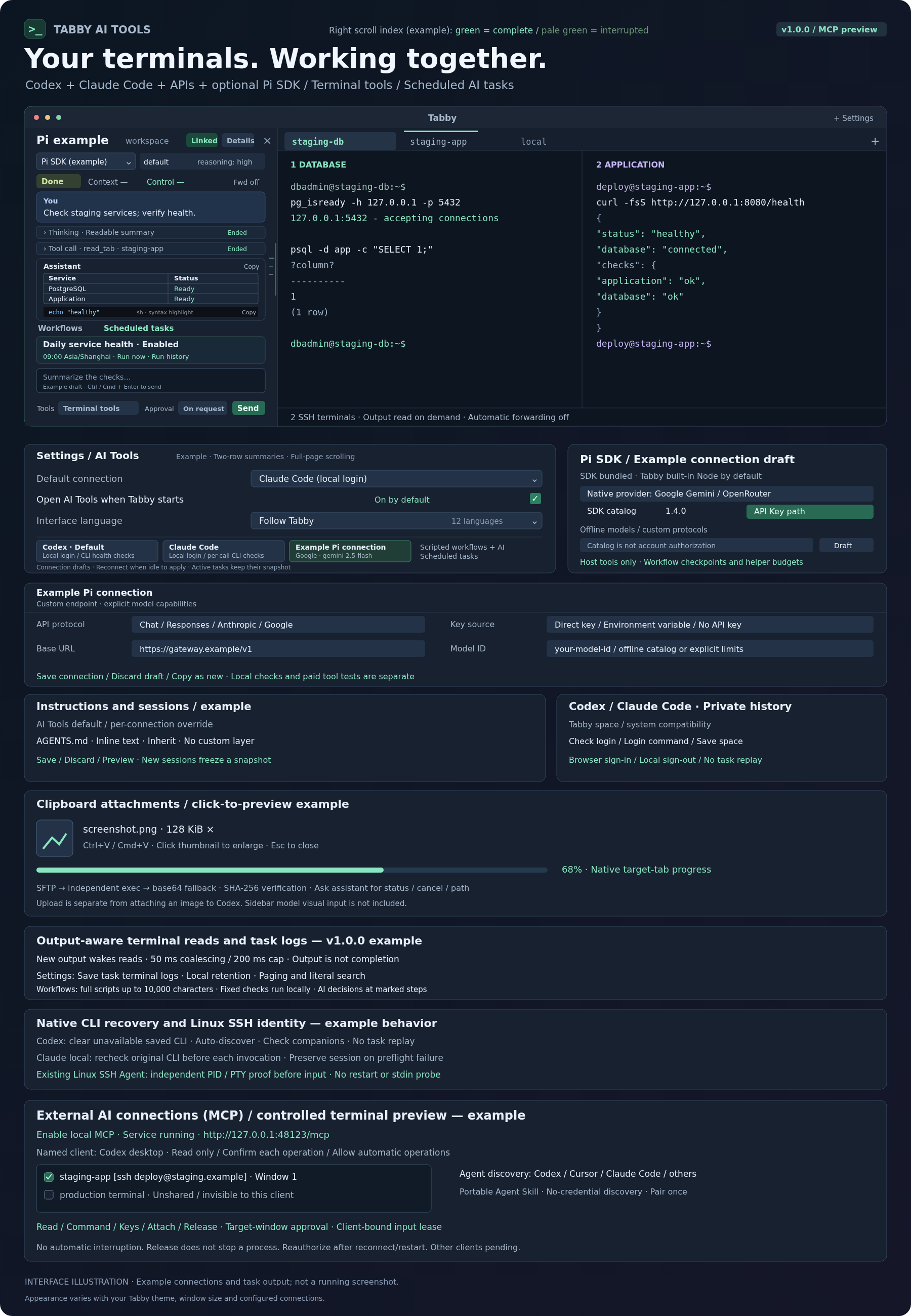
Tabby AI Tools is an AI assistant inside [Tabby](https://github.com/Eugeny/tabby). It reads terminal output, sends commands, and uses the results to decide what to do next. Describe your goal in the sidebar, follow the work in your terminals, and reclaim terminal input whenever needed.
|
|
24
24
|
|
|
25
|
-
|
|
26
26
|
|
|
27
27
|
<sub>Interface illustration with example tasks and connections; appearance varies with your Tabby theme and window size.</sub>
|
|
28
28
|
|
|
29
29
|
Thinking and tool activity stream into collapsed entries in the conversation. Expand an entry to inspect the text returned by the service, tool arguments and results; replies stay visible. Terminal reads return early when shell integration confirms a command has finished, instead of waiting out the requested timeout. Thinking entries appear only after readable text arrives; Codex and supported OpenAI reasoning requests enable summaries. Selecting and copying sidebar text does not send Ctrl+C to the active terminal.
|
|
30
30
|
|
|
31
|
+
**Fixed in v0.7.1:** Windows default discovery compares installed Codex CLI versions, so an older PATH entry no longer hides a newer desktop installation. Desktop upgrade paths recover automatically. See the [release notes](docs/releases/0.7.1.md).
|
|
32
|
+
|
|
31
33
|
**New in v0.7.0:** readable thinking/tool activity, safe sidebar copying and earlier terminal readback after verified command completion. See the [release notes](docs/releases/0.7.0.md) for validation and limits.
|
|
32
34
|
|
|
33
35
|
Terminal takeover is automatic: unavailable foreground-process detection (including SSH) does not require a confirmation click. The agent inspects terminal output, preserves needed tasks, and can interrupt detected unrelated tasks.
|
|
@@ -93,6 +95,8 @@ Only your computer needs this Codex installation and login. The assistant can th
|
|
|
93
95
|
|
|
94
96
|
Automatic discovery covers standalone installations (including `CODEX_INSTALL_DIR` and `CODEX_HOME/packages/standalone/current/bin`), Homebrew and npm global prefixes, and compatible Codex binaries in VS Code extensions as a final fallback. On macOS, it checks `ChatGPT.app/Contents/Resources/codex-cli/bin/codex` and the older `Contents/Resources/codex` entry under `/Applications` and `~/Applications`, including the former `Codex.app` name. For other locations, set the full path in **Settings → AI Tools → Codex CLI executable**. See the [discovery matrix (中文)](docs/guide.md#cli-自动发现与启动排查).
|
|
95
97
|
|
|
98
|
+
On Windows, leave the Codex CLI executable blank (or `codex`) to compare actual versions across PATH, desktop, standalone and known npm installations and select the newest discovered CLI. Upgrades are rescanned on each new connection. Explicit file paths keep a fixed version; a stable `OpenAI\Codex\bin` directory limits comparison to that installation. See the [discovery guide](docs/guide.md#cli-自动发现与启动排查).
|
|
99
|
+
|
|
96
100
|
## Orchestrate tasks in natural language
|
|
97
101
|
|
|
98
102
|
Describe the targets, order, conditions, and verification criteria. The assistant can work through multiple servers and steps, using terminal feedback to guide each action. For example:
|
package/README.zh-CN.md
CHANGED
|
@@ -22,12 +22,14 @@
|
|
|
22
22
|
|
|
23
23
|
Tabby AI Tools 是集成在 [Tabby](https://github.com/Eugeny/tabby) 中的 AI 助手插件。它可以读取终端输出、发送命令,并根据执行结果继续分析和操作。你在侧栏描述目标,在终端查看过程,也可以随时取回输入控制。
|
|
24
24
|
|
|
25
|
-

|
|
26
26
|
|
|
27
27
|
<sub>根据当前功能绘制的英文界面示意,任务和连接均为示例;实际外观随 Tabby 主题与窗口尺寸变化。</sub>
|
|
28
28
|
|
|
29
29
|
对话中实时显示默认折叠的思考过程与工具调用,展开可查看服务返回的思考文本、工具参数和结果,正文回复直接显示。Shell 集成确认命令完成后,读屏会提前返回,无需等满指定时间。收到可读文本后才显示思考记录,Codex 与支持的 OpenAI 推理请求会开启摘要;在侧栏选中文字并复制时,不会向活动终端发送 Ctrl+C。
|
|
30
30
|
|
|
31
|
+
**v0.7.1 修复:** Windows 默认查找会比较已安装 Codex CLI 的真实版本,避免 PATH 中的旧版遮住桌面新版,并支持桌面升级后的路径恢复。详见[发布说明](docs/releases/0.7.1.md)。
|
|
32
|
+
|
|
31
33
|
**v0.7.0 新增:** 可读的思考/工具过程、安全的侧栏复制,以及确认命令完成后的提前读屏。验证范围与限制见[发布说明](docs/releases/0.7.0.md)。
|
|
32
34
|
|
|
33
35
|
终端接管自动完成:前台进程检测不可用(包括 SSH)时不再要求点击确认。AI 先读取终端输出,保留当前任务需要的进程,并可自动中断已检测到的无关任务。
|
|
@@ -93,6 +95,8 @@ v0.4.1 已支持自定义连接。Base URL 示例为 `https://gateway.example/v1
|
|
|
93
95
|
|
|
94
96
|
自动查找覆盖 standalone 安装(含 `CODEX_INSTALL_DIR` 和 `CODEX_HOME/packages/standalone/current/bin`)、Homebrew/npm 全局 prefix,并以 VS Code 扩展中的兼容 Codex 作为最后兜底。macOS 检查 `/Applications` 和 `~/Applications` 下的 `ChatGPT.app/Contents/Resources/codex-cli/bin/codex` 及旧 `Contents/Resources/codex` 入口,也兼容原 `Codex.app` 名称。其他位置可在 **Settings → AI Tools → Codex CLI 可执行文件** 中填写完整路径。[查看完整发现矩阵](docs/guide.md#cli-自动发现与启动排查)。
|
|
95
97
|
|
|
98
|
+
Windows 默认留空(或填 `codex`)即可比较 PATH、桌面版、standalone 和已知 npm 安装的实际版本,选择已发现的最新 CLI,每次新连接重新扫描。明确填写文件路径可固定版本;填写稳定的 `OpenAI\Codex\bin` 目录则只比较这套安装。[查看路径查找说明](docs/guide.md#cli-自动发现与启动排查)。
|
|
99
|
+
|
|
96
100
|
## 用自然语言编排任务
|
|
97
101
|
|
|
98
102
|
把目标、执行顺序、条件和验证要求一次说清,AI 就可以根据终端反馈推进跨服务器、多步骤任务。例如:
|
package/VALIDATION.md
CHANGED
|
@@ -338,3 +338,9 @@ The implementation branch configures the full check matrix on Ubuntu, macOS and
|
|
|
338
338
|
Seven new regressions reproduced the three review findings before the fix. They exercise real SDK `steer → interrupt → /compact → restart → continue` sequences with both actual and no-op compaction; truncated streaming responses with and without an active Goal; and request construction at Kimi Coding mainland, international and proxy URLs by intercepting the SDK fetch boundary without network access. Assertions cover queued corrections and unknown-outcome recovery reaching the next model request exactly once, unchanged compaction acknowledgement cursors, retained partial text/token usage with a failed turn, no silent truncation continuation, and explicit system/max_tokens compatibility with thinking enabled.
|
|
339
339
|
|
|
340
340
|
The fixes change context acknowledgement, error classification and provider wire configuration; the existing settings and interface illustration remain accurate. No real model requests or quota-consuming smoke tests were used. Skill bundle/check, both type checks, production build and diff checks passed locally. The updated full suite reports 750 tests: 744 pass and 6 platform-specific skips on Linux. Current-head cross-platform results are recorded in the implementation PR checks.
|
|
341
|
+
|
|
342
|
+
## 0.7.1 Windows Codex discovery release validation
|
|
343
|
+
|
|
344
|
+
The isolated release includes only the Windows CLI selection/path recovery fix and its documentation/tests. On Linux with Node 22.19.0: skill bundle/check, typecheck, all 812 tests (806 passed, 6 platform-specific skips), production build and diff checks passed. Tests compare actual fixture CLI versions across old PATH/new desktop installs, deliberately reversed file times, numeric and prerelease versions, invalid/oversized/timed-out output, synchronous Windows process-launch rejection and cancellation. README Markdown was rendered to HTML and checked; the synchronized overview PNG was previewed. Robot GIF and reduced-motion static fallback remain unchanged.
|
|
345
|
+
|
|
346
|
+
Version probes run only --version and make no model requests. Account model entitlements and an interactive Windows desktop remain outside local validation. The release requires Linux/macOS/Windows branch and tag CI, package installation without node on PATH with lifecycle scripts enabled, and registry artifact-integrity verification. GitHub Actions results are recorded on the tag and release rather than represented as local desktop evidence.
|