tabby-ai-tools 0.3.1 → 0.3.2
This diff represents the content of publicly available package versions that have been released to one of the supported registries. The information contained in this diff is provided for informational purposes only and reflects changes between package versions as they appear in their respective public registries.
- package/README.md +2 -2
- package/README.zh-CN.md +2 -2
- package/VALIDATION.md +9 -0
- package/dist/index.js +1 -1
- package/docs/assets/overview.png +0 -0
- package/docs/assets/overview.svg +3 -3
- package/docs/development.md +1 -1
- package/docs/guide.md +20 -4
- package/docs/releases/0.3.2.md +13 -0
- package/package.json +1 -1
package/README.md
CHANGED
|
@@ -22,7 +22,7 @@
|
|
|
22
22
|
|
|
23
23
|
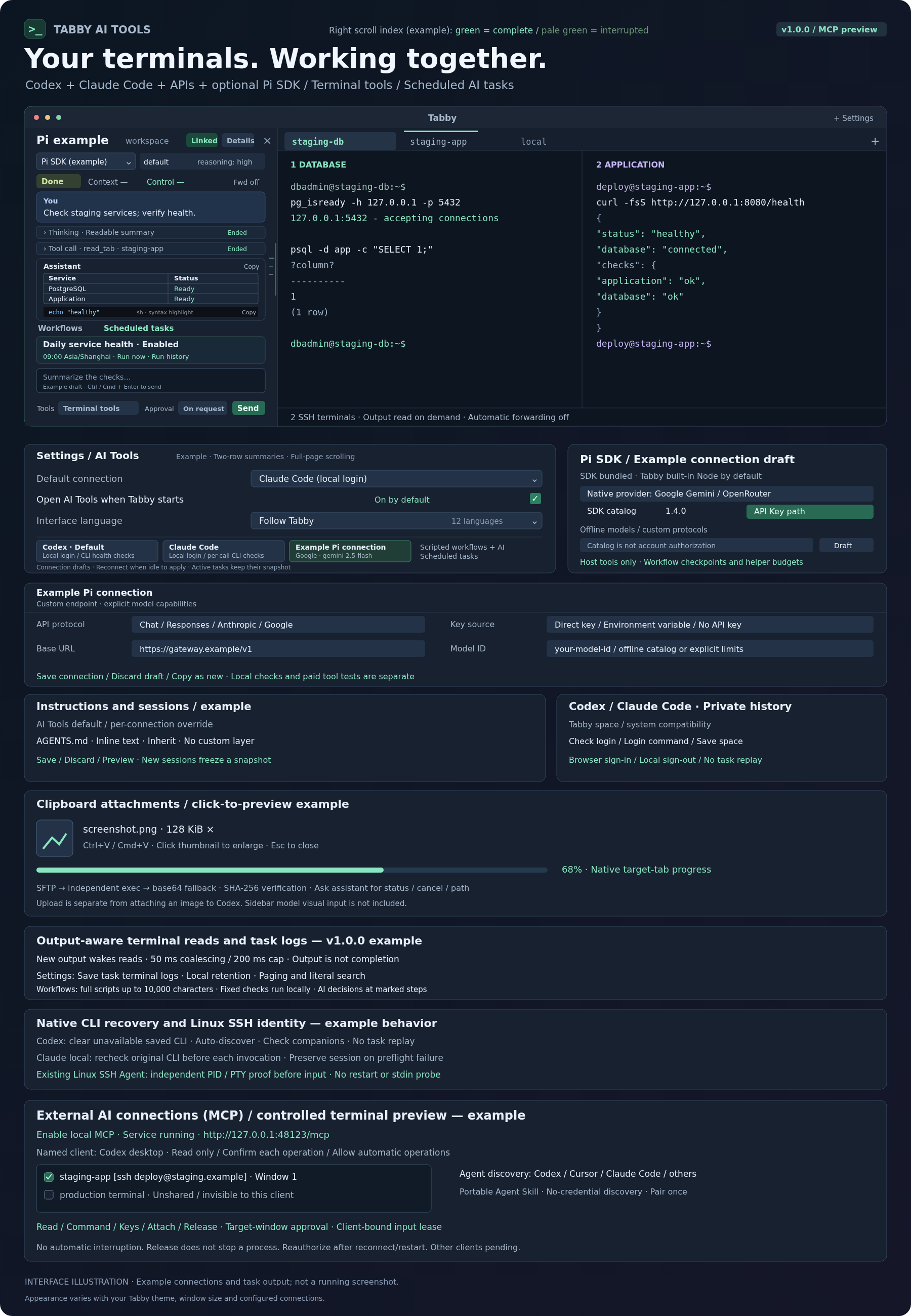
Tabby AI Tools is an AI assistant inside [Tabby](https://github.com/Eugeny/tabby). It reads terminal output, sends commands, and uses the results to decide what to do next. Describe your goal in the sidebar, follow the work in your terminals, and reclaim terminal input whenever needed.
|
|
24
24
|
|
|
25
|
-
|
|
26
26
|
|
|
27
27
|
<sub>Interface illustration with example tasks and connections; appearance varies with your Tabby theme and window size.</sub>
|
|
28
28
|
|
|
@@ -68,7 +68,7 @@ When elevated access is needed, manually run `sudo ls` or `sudo -v` in the same
|
|
|
68
68
|
|
|
69
69
|
Only your computer needs this Codex installation and login. The assistant can then use your existing Tabby SSH terminals to work on servers; those servers do not need their own ChatGPT login or AI Agent installation.
|
|
70
70
|
|
|
71
|
-
On macOS,
|
|
71
|
+
Automatic discovery covers standalone installations (including `CODEX_INSTALL_DIR` and `CODEX_HOME/packages/standalone/current/bin`), Homebrew and npm global prefixes, and compatible Codex binaries in VS Code extensions as a final fallback. On macOS, it checks `ChatGPT.app/Contents/Resources/codex-cli/bin/codex` and the older `Contents/Resources/codex` entry under `/Applications` and `~/Applications`, including the former `Codex.app` name. For other locations, set the full path in **Settings → AI Tools → Codex CLI executable**. See the [discovery matrix (中文)](docs/guide.md#cli-自动发现与启动排查).
|
|
72
72
|
|
|
73
73
|
## Orchestrate tasks in natural language
|
|
74
74
|
|
package/README.zh-CN.md
CHANGED
|
@@ -22,7 +22,7 @@
|
|
|
22
22
|
|
|
23
23
|
Tabby AI Tools 是集成在 [Tabby](https://github.com/Eugeny/tabby) 中的 AI 助手插件。它可以读取终端输出、发送命令,并根据执行结果继续分析和操作。你在侧栏描述目标,在终端查看过程,也可以随时取回输入控制。
|
|
24
24
|
|
|
25
|
-

|
|
26
26
|
|
|
27
27
|
<sub>根据当前功能绘制的英文界面示意,任务和连接均为示例;实际外观随 Tabby 主题与窗口尺寸变化。</sub>
|
|
28
28
|
|
|
@@ -68,7 +68,7 @@ Tabby AI Tools 是集成在 [Tabby](https://github.com/Eugeny/tabby) 中的 AI
|
|
|
68
68
|
|
|
69
69
|
只需在本机安装和登录 Codex,即可沿用 Tabby 已连接的 SSH 终端协助操作服务器;服务器无需逐台登录 ChatGPT 或安装 AI Agent。
|
|
70
70
|
|
|
71
|
-
macOS
|
|
71
|
+
自动查找覆盖 standalone 安装(含 `CODEX_INSTALL_DIR` 和 `CODEX_HOME/packages/standalone/current/bin`)、Homebrew/npm 全局 prefix,并以 VS Code 扩展中的兼容 Codex 作为最后兜底。macOS 检查 `/Applications` 和 `~/Applications` 下的 `ChatGPT.app/Contents/Resources/codex-cli/bin/codex` 及旧 `Contents/Resources/codex` 入口,也兼容原 `Codex.app` 名称。其他位置可在 **Settings → AI Tools → Codex CLI 可执行文件** 中填写完整路径。[查看完整发现矩阵](docs/guide.md#cli-自动发现与启动排查)。
|
|
72
72
|
|
|
73
73
|
## 用自然语言编排任务
|
|
74
74
|
|
package/VALIDATION.md
CHANGED
|
@@ -226,3 +226,12 @@ HTTP 服务工作目录只含 tabby-codex-windows-validation.tar.gz,日志和
|
|
|
226
226
|
默认发现补充 `~/Applications/ChatGPT.app/Contents/Resources/codex` 和 `/Applications/ChatGPT.app/Contents/Resources/codex`,保留 PATH、Shell、NVM 及常见安装目录优先级。回归验证用户应用目录、替代系统应用目录、带空格显式路径、无执行权限拒绝、自定义命令不降级,以及 Linux 不扫描 macOS 用户应用目录。
|
|
227
227
|
|
|
228
228
|
本地 Linux:469 项测试,464 通过、5 项平台跳过;类型检查、skill 一致性和生产构建通过。真实 ChatGPT.app 安装布局及 Tabby macOS 桌面端到端未在本机验证;不调用收费模型烟测。跨平台分支与标签 CI 结果由 GitHub Actions 单独核验。
|
|
229
|
+
|
|
230
|
+
|
|
231
|
+
## 完整 Codex 安装来源发现(0.3.2)
|
|
232
|
+
|
|
233
|
+
按跨平台路径表补齐 standalone 内部 current/bin 与旧 current 入口、动态 Homebrew/npm prefix、macOS 新 codex-cli/bin 与 Codex.app 兼容入口,以及 VS Code/Insiders/远程扩展兜底。候选逐个验证,IDE 按 OS/架构筛选并按扩展版本降序;显式路径、自定义命令和已选 CLI 不被替换。包管理器查询独立限时、限输出,失败后继续其他来源,取消会回收进程树;查询输出不写入诊断。
|
|
234
|
+
|
|
235
|
+
新增路径矩阵测试、prefix 故障/超时/取消测试,以及 Windows 真实 npm.cmd 查询和 codex.cmd JSONL 连接夹具。源路径固定为临时目录;不访问真实模型,不将本机发现规则模拟报告为 macOS/Windows 桌面端到端验证。完整结果见发布说明和本次 GitHub Actions 分支/标签运行记录。
|
|
236
|
+
|
|
237
|
+
本地 Linux 结果:501 项测试,495 通过、6 项平台跳过;skill bundle/check、TypeScript、生产构建及 git diff --check 通过。Windows 专用 npm.cmd 连接测试仅在真实 Windows CI 上执行,本机明确跳过。
|