tabby-ai-tools 0.2.3 → 0.3.2
This diff represents the content of publicly available package versions that have been released to one of the supported registries. The information contained in this diff is provided for informational purposes only and reflects changes between package versions as they appear in their respective public registries.
- package/README.md +6 -2
- package/README.zh-CN.md +6 -2
- package/VALIDATION.md +33 -0
- package/dist/index.js +1 -1
- package/docs/assets/overview.png +0 -0
- package/docs/assets/overview.svg +10 -9
- package/docs/development.md +7 -1
- package/docs/guide.md +29 -11
- package/docs/multi-provider-agent.md +1 -1
- package/docs/releases/0.2.3.md +1 -2
- package/docs/releases/0.3.0.md +12 -0
- package/docs/releases/0.3.1.md +9 -0
- package/docs/releases/0.3.2.md +13 -0
- package/docs/scheduled-tasks.md +1 -1
- package/docs/task-workflows.md +41 -20
- package/package.json +1 -1
- package/skills/tabby/SKILL.md +9 -3
- package/skills/tabby/references/operations.md +10 -1
package/README.md
CHANGED
|
@@ -22,10 +22,12 @@
|
|
|
22
22
|
|
|
23
23
|
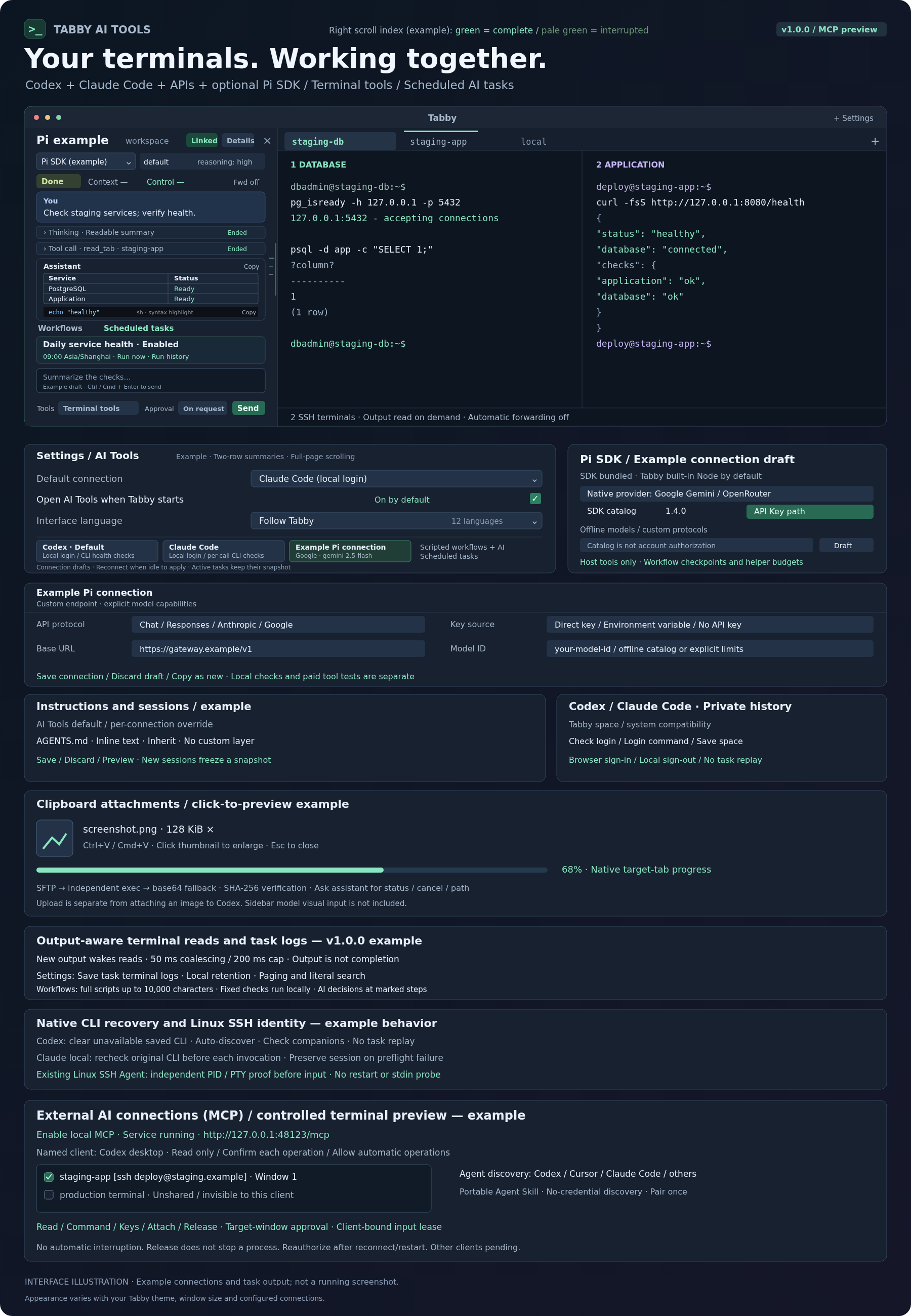
Tabby AI Tools is an AI assistant inside [Tabby](https://github.com/Eugeny/tabby). It reads terminal output, sends commands, and uses the results to decide what to do next. Describe your goal in the sidebar, follow the work in your terminals, and reclaim terminal input whenever needed.
|
|
24
24
|
|
|
25
|
-
|
|
26
26
|
|
|
27
27
|
<sub>Interface illustration with example tasks and connections; appearance varies with your Tabby theme and window size.</sub>
|
|
28
28
|
|
|
29
|
+
Terminal takeover is automatic: unavailable foreground-process detection (including SSH) does not require a confirmation click. The agent inspects terminal output, preserves needed tasks, and can interrupt detected unrelated tasks.
|
|
30
|
+
|
|
29
31
|
## Multiple model providers, including your ChatGPT subscription
|
|
30
32
|
|
|
31
33
|
**Have a ChatGPT subscription with Codex access? Use your existing account through Codex CLI on your own computer, with no separate API key for this mode.** The plugin reuses the local Codex login. Model availability and usage limits follow your account and workspace permissions. See [OpenAI's authentication documentation](https://learn.chatgpt.com/docs/auth).
|
|
@@ -66,13 +68,15 @@ When elevated access is needed, manually run `sudo ls` or `sudo -v` in the same
|
|
|
66
68
|
|
|
67
69
|
Only your computer needs this Codex installation and login. The assistant can then use your existing Tabby SSH terminals to work on servers; those servers do not need their own ChatGPT login or AI Agent installation.
|
|
68
70
|
|
|
71
|
+
Automatic discovery covers standalone installations (including `CODEX_INSTALL_DIR` and `CODEX_HOME/packages/standalone/current/bin`), Homebrew and npm global prefixes, and compatible Codex binaries in VS Code extensions as a final fallback. On macOS, it checks `ChatGPT.app/Contents/Resources/codex-cli/bin/codex` and the older `Contents/Resources/codex` entry under `/Applications` and `~/Applications`, including the former `Codex.app` name. For other locations, set the full path in **Settings → AI Tools → Codex CLI executable**. See the [discovery matrix (中文)](docs/guide.md#cli-自动发现与启动排查).
|
|
72
|
+
|
|
69
73
|
## Orchestrate tasks in natural language
|
|
70
74
|
|
|
71
75
|
Describe the targets, order, conditions, and verification criteria. The assistant can work through multiple servers and steps, using terminal feedback to guide each action. For example:
|
|
72
76
|
|
|
73
77
|
> Check application-to-database connectivity on staging-app and staging-db. Verify the database first, then inspect the application configuration. Explain any issue before asking me to authorize a fix, and verify the application health check afterward.
|
|
74
78
|
|
|
75
|
-
Workflows can branch based on observed results and interact with other terminal Agents.
|
|
79
|
+
Workflows can branch based on observed results and interact with other terminal Agents. Start a recording with `/remember TASK`. After successful completion, give the workflow an alias such as `task1`; send `/task1` to execute it again with fresh environment checks. Each step retains the server IP, stable connection/server ID, operation path and completion checks. Multi-server steps follow their saved order; a result checkpoint must confirm the preceding step before the next operation. Ordinary tasks are not recorded. Workflows containing sudo ask you to authenticate with `sudo -v` or `sudo ls` in each execution terminal, then keep that terminal’s credentials refreshed during the task. [Orchestration and reuse guide (中文)](docs/guide.md#任务编排与多服务器协作).
|
|
76
80
|
|
|
77
81
|
## Schedule checks, decisions, actions, and verification
|
|
78
82
|
|
package/README.zh-CN.md
CHANGED
|
@@ -22,10 +22,12 @@
|
|
|
22
22
|
|
|
23
23
|
Tabby AI Tools 是集成在 [Tabby](https://github.com/Eugeny/tabby) 中的 AI 助手插件。它可以读取终端输出、发送命令,并根据执行结果继续分析和操作。你在侧栏描述目标,在终端查看过程,也可以随时取回输入控制。
|
|
24
24
|
|
|
25
|
-

|
|
26
26
|
|
|
27
27
|
<sub>根据当前功能绘制的英文界面示意,任务和连接均为示例;实际外观随 Tabby 主题与窗口尺寸变化。</sub>
|
|
28
28
|
|
|
29
|
+
终端接管自动完成:前台进程检测不可用(包括 SSH)时不再要求点击确认。AI 先读取终端输出,保留当前任务需要的进程,并可自动中断已检测到的无关任务。
|
|
30
|
+
|
|
29
31
|
## 多模型适配,支持本机 ChatGPT 订阅登录
|
|
30
32
|
|
|
31
33
|
**已有具备 Codex 使用权限的 ChatGPT 订阅账号,可以通过本机 Codex CLI 登录直接使用,无需为此模式额外配置 API Key。** 插件复用本机 Codex 登录,可用模型、用量限制和工作区权限以账号实际权益为准。参见 [OpenAI 官方认证说明](https://learn.chatgpt.com/docs/auth)。
|
|
@@ -66,13 +68,15 @@ Tabby AI Tools 是集成在 [Tabby](https://github.com/Eugeny/tabby) 中的 AI
|
|
|
66
68
|
|
|
67
69
|
只需在本机安装和登录 Codex,即可沿用 Tabby 已连接的 SSH 终端协助操作服务器;服务器无需逐台登录 ChatGPT 或安装 AI Agent。
|
|
68
70
|
|
|
71
|
+
自动查找覆盖 standalone 安装(含 `CODEX_INSTALL_DIR` 和 `CODEX_HOME/packages/standalone/current/bin`)、Homebrew/npm 全局 prefix,并以 VS Code 扩展中的兼容 Codex 作为最后兜底。macOS 检查 `/Applications` 和 `~/Applications` 下的 `ChatGPT.app/Contents/Resources/codex-cli/bin/codex` 及旧 `Contents/Resources/codex` 入口,也兼容原 `Codex.app` 名称。其他位置可在 **Settings → AI Tools → Codex CLI 可执行文件** 中填写完整路径。[查看完整发现矩阵](docs/guide.md#cli-自动发现与启动排查)。
|
|
72
|
+
|
|
69
73
|
## 用自然语言编排任务
|
|
70
74
|
|
|
71
75
|
把目标、执行顺序、条件和验证要求一次说清,AI 就可以根据终端反馈推进跨服务器、多步骤任务。例如:
|
|
72
76
|
|
|
73
77
|
> 在 staging-app 和 staging-db 上检查应用与数据库连接。先确认数据库正常,再检查应用配置;发现问题先说明原因,在我授权后修复,最后验证应用健康检查。
|
|
74
78
|
|
|
75
|
-
支持按执行结果决定下一步,也可以操作终端中的其他交互式 Agent
|
|
79
|
+
支持按执行结果决定下一步,也可以操作终端中的其他交互式 Agent。用 `/remember 任务描述` 开始录制,任务成功结束后提示设置别名(如 `task1`),下次发送 `/task1` 即执行该流程,并重新核对当前环境。各步骤保存服务器 IP、持久连接/服务器 ID、操作路径及验收条件;多服务器按顺序执行,前一步通过结果验收后才放行下一步。普通任务不再默认固化。含 sudo 的流程会提前提示在各执行终端运行 `sudo -v` 或 `sudo ls`,任务期间保持认证有效。[查看编排与复用方法](docs/guide.md#任务编排与多服务器协作)。
|
|
76
80
|
|
|
77
81
|
## 定时任务:到点检查、判断、执行与验证
|
|
78
82
|
|
package/VALIDATION.md
CHANGED
|
@@ -1,3 +1,13 @@
|
|
|
1
|
+
# v0.3.0 release validation (2026-10-24)
|
|
2
|
+
|
|
3
|
+
Automatic terminal takeover removes the foreground-detection confirmation dialog for ordinary and scheduled tasks. SSH/unknown enumeration proceeds without a confirmation callback or blind Ctrl+C. Detected unrelated processes are interrupted only after the agent marks them unnecessary, with stop/session/ownership checks and verification that the process ended. Needed processes and other owners remain protected.
|
|
4
|
+
|
|
5
|
+
This release also includes explicit `/remember TASK` recording, workspace-scoped workflow aliases, structured server/path identity and ordered result checkpoints, and same-terminal sudo preflight/refresh. Documentation and SVG/PNG illustrations are synchronized. Model-facing skill sources and the generated knowledge bundle are updated.
|
|
6
|
+
|
|
7
|
+
Local Linux validation passed: `skill:bundle`, `skill:check`, `typecheck`, all 467 tests (462 passed, 5 platform skips), production build and `git diff --check`. Both READMEs were rendered with CommonMark and the updated illustration was previewed.
|
|
8
|
+
|
|
9
|
+
Local validation uses simulated terminals/backends, a real PTY fixture and fake sudo; no paid model requests or real sudo credentials are used. The Linux run does not establish real Tabby desktop/SSH compatibility. Existing unknown processes still require verified identity to attach; API tool approvals and sudo authentication are separate from automatic terminal takeover. Sudo refresh requires a compatible POSIX shell/policy, and immediate cleanup may be unavailable in an occupied remote terminal without shell integration. Semantic completion evidence remains model-evaluated.
|
|
10
|
+
|
|
1
11
|
# Codex 定位与启动验证
|
|
2
12
|
|
|
3
13
|
## 默认启动与高清介绍动画(0.2.3)
|
|
@@ -202,3 +212,26 @@ node scripts/smoke-codex.cjs --executable 'C:\Path With Spaces\codex.cmd' --stre
|
|
|
202
212
|
压缩包按文件白名单制作:源码、测试、脚本、构建输出、项目构建清单、README/本报告、许可证和 CI 定义;不含 node_modules、.git、artifacts、旧 tgz、用户配置、.codex、.aws、.env、.npmrc 或凭据。src/config.ts 为插件公开默认设置定义,不是用户凭据配置。
|
|
203
213
|
|
|
204
214
|
HTTP 服务工作目录只含 tabby-codex-windows-validation.tar.gz,日志和 PID 放在目录外。
|
|
215
|
+
|
|
216
|
+
|
|
217
|
+
## 显式流程别名、服务器身份与步骤验收(2026-10-24)
|
|
218
|
+
|
|
219
|
+
流程由 `/remember TASK` 显式录制,完成后配置别名,`/task1` 调用。步骤保存服务器连接/持久 ID、已确认 IP、账户、端口、绝对操作路径、串行依赖、验收条件与证据。增加 `workflow_checkpoint` 与 `verificationFor`,对同终端的新观察、未完成前置步骤、并行发送、身份/目录不符和弱化验收条件进行门禁;业务结果语义仍由模型判断。旧格式可读,缺失结构建议重新录制。
|
|
220
|
+
|
|
221
|
+
验证使用真实流程存储与模拟后端/终端:覆盖两台服务器相同命令不合并、跨服务器阻断、旧读/错误终端/运行中结果不能确认、检查命令不推进步骤、目标及路径不符、显式身份探测和绑定。sudo 用假命令测试,不使用真实凭据;未进行真实 Tabby 桌面、SSH、多供应商模型端到端或耗时/token 对比测试。
|
|
222
|
+
|
|
223
|
+
|
|
224
|
+
## macOS ChatGPT.app 路径修复(0.3.1)
|
|
225
|
+
|
|
226
|
+
默认发现补充 `~/Applications/ChatGPT.app/Contents/Resources/codex` 和 `/Applications/ChatGPT.app/Contents/Resources/codex`,保留 PATH、Shell、NVM 及常见安装目录优先级。回归验证用户应用目录、替代系统应用目录、带空格显式路径、无执行权限拒绝、自定义命令不降级,以及 Linux 不扫描 macOS 用户应用目录。
|
|
227
|
+
|
|
228
|
+
本地 Linux:469 项测试,464 通过、5 项平台跳过;类型检查、skill 一致性和生产构建通过。真实 ChatGPT.app 安装布局及 Tabby macOS 桌面端到端未在本机验证;不调用收费模型烟测。跨平台分支与标签 CI 结果由 GitHub Actions 单独核验。
|
|
229
|
+
|
|
230
|
+
|
|
231
|
+
## 完整 Codex 安装来源发现(0.3.2)
|
|
232
|
+
|
|
233
|
+
按跨平台路径表补齐 standalone 内部 current/bin 与旧 current 入口、动态 Homebrew/npm prefix、macOS 新 codex-cli/bin 与 Codex.app 兼容入口,以及 VS Code/Insiders/远程扩展兜底。候选逐个验证,IDE 按 OS/架构筛选并按扩展版本降序;显式路径、自定义命令和已选 CLI 不被替换。包管理器查询独立限时、限输出,失败后继续其他来源,取消会回收进程树;查询输出不写入诊断。
|
|
234
|
+
|
|
235
|
+
新增路径矩阵测试、prefix 故障/超时/取消测试,以及 Windows 真实 npm.cmd 查询和 codex.cmd JSONL 连接夹具。源路径固定为临时目录;不访问真实模型,不将本机发现规则模拟报告为 macOS/Windows 桌面端到端验证。完整结果见发布说明和本次 GitHub Actions 分支/标签运行记录。
|
|
236
|
+
|
|
237
|
+
本地 Linux 结果:501 项测试,495 通过、6 项平台跳过;skill bundle/check、TypeScript、生产构建及 git diff --check 通过。Windows 专用 npm.cmd 连接测试仅在真实 Windows CI 上执行,本机明确跳过。
|