tabby-ai-tools 0.1.0 → 0.3.1
This diff represents the content of publicly available package versions that have been released to one of the supported registries. The information contained in this diff is provided for informational purposes only and reflects changes between package versions as they appear in their respective public registries.
- package/README.md +57 -126
- package/README.zh-CN.md +99 -0
- package/VALIDATION.md +80 -0
- package/dist/index.js +1 -1
- package/docs/assets/overview.png +0 -0
- package/docs/assets/overview.svg +134 -97
- package/docs/assets/robot-multitask.gif +0 -0
- package/docs/assets/robot-multitask.png +0 -0
- package/docs/assets/robot-multitask.prompt.md +47 -0
- package/docs/development.md +49 -1
- package/docs/guide.md +159 -6
- package/docs/incidents/2026-10-22-review-fix.md +91 -0
- package/docs/multi-provider-agent.md +1 -1
- package/docs/releases/0.2.1.md +31 -0
- package/docs/releases/0.2.2.md +12 -0
- package/docs/releases/0.2.3.md +12 -0
- package/docs/releases/0.3.0.md +12 -0
- package/docs/releases/0.3.1.md +9 -0
- package/docs/scheduled-tasks.md +88 -0
- package/docs/task-workflows.md +41 -20
- package/package.json +7 -1
- package/skills/tabby/SKILL.md +49 -0
- package/skills/tabby/references/operations.md +75 -0
- package/skills/tabby/references/upstream.json +552 -0
package/README.md
CHANGED
|
@@ -1,168 +1,99 @@
|
|
|
1
1
|
<div align="center">
|
|
2
2
|
|
|
3
|
-
|
|
3
|
+
<h1>Tabby AI Tools</h1>
|
|
4
|
+
<p>Let AI work through your terminal, across your computer and multiple servers.</p>
|
|
4
5
|
|
|
5
|
-
|
|
6
|
+
[](https://github.com/Hanlen/tabby-ai-tools/releases/latest)
|
|
7
|
+
[](#install-and-start)
|
|
8
|
+
[](LICENSE)
|
|
6
9
|
|
|
7
|
-
|
|
10
|
+
[Download](https://github.com/Hanlen/tabby-ai-tools/releases/latest) · [Quick start](#install-and-start) · [Models](#multiple-model-providers-including-your-chatgpt-subscription) · [User guide](docs/guide.md) · [简体中文](README.zh-CN.md)
|
|
8
11
|
|
|
9
|
-
|
|
10
|
-
[](https://www.npmjs.com/package/tabby-ai-tools)
|
|
11
|
-
[](https://github.com/Eugeny/tabby)
|
|
12
|
-
[](LICENSE)
|
|
12
|
+
<br>
|
|
13
13
|
|
|
14
|
-
|
|
15
|
-
|
|
16
|
-
|
|
17
|
-
|
|
18
|
-
<sub>根据现有面板功能绘制的界面示意,内容为示例;实际外观随 Tabby 主题和窗口尺寸变化。</sub>
|
|
14
|
+
<picture>
|
|
15
|
+
<source media="(prefers-reduced-motion: reduce)" srcset="https://raw.githubusercontent.com/Hanlen/tabby-ai-tools/main/docs/assets/robot-multitask.png">
|
|
16
|
+
<img src="https://raw.githubusercontent.com/Hanlen/tabby-ai-tools/main/docs/assets/robot-multitask.gif" alt="A cheerful little robot typing while coordinating tasks across multiple terminal windows" width="560" height="280">
|
|
17
|
+
</picture>
|
|
19
18
|
|
|
20
19
|
</div>
|
|
21
20
|
|
|
22
|
-
|
|
23
|
-
|
|
24
|
-
排查报错时,直接让 Codex 读取终端;切换项目时,回到该目录的会话;需要执行操作时,在同一个窗口里查看输出、回答问题和处理审批。
|
|
25
|
-
|
|
26
|
-
插件通过本机的 `codex app-server` 工作。每个 Tabby 窗口复用一个后台进程,收起侧栏后仍保留面板与会话,连接异常时自动重连。
|
|
27
|
-
|
|
28
|
-
也支持直接连接 **DeepSeek、GLM、OpenAI API 和 Claude API**。API 模式由插件管理工具调用与本地历史,无需安装 Codex CLI;现有 Codex 登录方式继续保留。
|
|
29
|
-
|
|
30
|
-
重复的 Shell 任务可以自动归档为[可复用流程](docs/task-workflows.md)。下一次相似任务在当前工作目录中匹配此前步骤;使用 `/remember` 保存明确的操作偏好,在设置中编辑流程和偏好。归档和匹配不额外调用模型。
|
|
31
|
-
|
|
32
|
-
## 快速开始
|
|
33
|
-
|
|
34
|
-
### 1. 准备环境
|
|
35
|
-
|
|
36
|
-
- 安装 [Tabby](https://github.com/Eugeny/tabby)。
|
|
37
|
-
- 使用 Codex 本机登录模式时,安装 Codex CLI,并在终端执行 `codex login` 完成登录。使用支持 `thread/goal/*` 的 CLI 版本;项目已有 `codex-cli 0.162.1` 的[验证记录](VALIDATION.md)。
|
|
38
|
-
- 使用 DeepSeek、GLM、OpenAI API 或 Claude API 时,只需准备对应的 API Key,无需安装 Codex CLI。
|
|
39
|
-
|
|
40
|
-
### 2. 安装插件
|
|
41
|
-
|
|
42
|
-
在 Tabby 打开 **Settings → Plugins**,搜索 **`tabby-ai-tools`**(或 `ai-tools`),点击安装,然后**完全退出并重启 Tabby**。
|
|
43
|
-
|
|
44
|
-
插件通过 [npm](https://www.npmjs.com/package/tabby-ai-tools) 分发。新版本发布后,插件列表可能需要等待搜索索引更新。
|
|
45
|
-
|
|
46
|
-
<details>
|
|
47
|
-
<summary>从源码构建并安装(开发者)</summary>
|
|
48
|
-
|
|
49
|
-
需要 Node.js 20+:
|
|
50
|
-
|
|
51
|
-
```bash
|
|
52
|
-
git clone https://github.com/Hanlen/tabby-ai-tools.git
|
|
53
|
-
cd tabby-ai-tools
|
|
54
|
-
npm ci
|
|
55
|
-
npm run build
|
|
56
|
-
```
|
|
21
|
+
<br>
|
|
57
22
|
|
|
58
|
-
|
|
23
|
+
Tabby AI Tools is an AI assistant inside [Tabby](https://github.com/Eugeny/tabby). It reads terminal output, sends commands, and uses the results to decide what to do next. Describe your goal in the sidebar, follow the work in your terminals, and reclaim terminal input whenever needed.
|
|
59
24
|
|
|
60
|
-
|
|
61
|
-
npm run install:tabby -- "<Tabby 插件目录路径>"
|
|
62
|
-
```
|
|
25
|
+
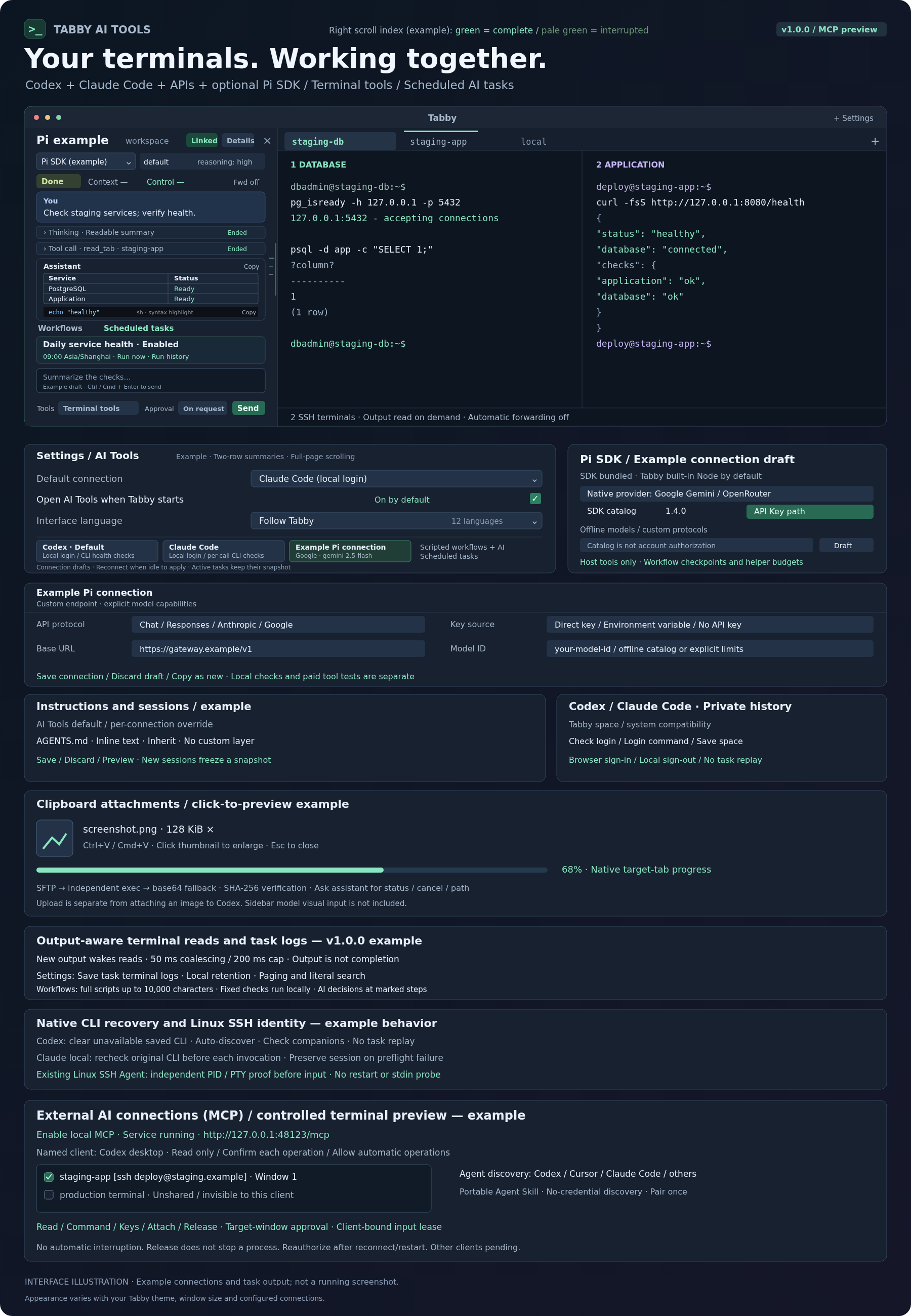
|
|
63
26
|
|
|
64
|
-
|
|
27
|
+
<sub>Interface illustration with example tasks and connections; appearance varies with your Tabby theme and window size.</sub>
|
|
65
28
|
|
|
66
|
-
|
|
29
|
+
Terminal takeover is automatic: unavailable foreground-process detection (including SSH) does not require a confirmation click. The agent inspects terminal output, preserves needed tasks, and can interrupt detected unrelated tasks.
|
|
67
30
|
|
|
68
|
-
|
|
31
|
+
## Multiple model providers, including your ChatGPT subscription
|
|
69
32
|
|
|
70
|
-
|
|
71
|
-
2. 点击 Tabby 工具栏的机器人图标,打开左侧 Codex 面板。
|
|
72
|
-
3. 输入任务,按 **Ctrl+Enter / Cmd+Enter** 发送。
|
|
33
|
+
**Have a ChatGPT subscription with Codex access? Use your existing account through Codex CLI on your own computer, with no separate API key for this mode.** The plugin reuses the local Codex login. Model availability and usage limits follow your account and workspace permissions. See [OpenAI's authentication documentation](https://learn.chatgpt.com/docs/auth).
|
|
73
34
|
|
|
74
|
-
|
|
75
|
-
|
|
76
|
-
|
|
35
|
+
| Connection | How to use it |
|
|
36
|
+
| --- | --- |
|
|
37
|
+
| **ChatGPT subscription → local Codex** | Install Codex CLI locally, run `codex login`, and select **Codex (local login)** in AI Tools. |
|
|
38
|
+
| **OpenAI API** | Add an OpenAI connection with an API key, Base URL, and model ID. |
|
|
39
|
+
| **DeepSeek** | Add a DeepSeek API connection and choose the model and Thinking settings. |
|
|
40
|
+
| **GLM / Zhipu** | Add a GLM API connection using the endpoint and model available to your account. |
|
|
41
|
+
| **Claude / Anthropic** | Add a Claude API connection with its API key and model ID. |
|
|
77
42
|
|
|
78
|
-
|
|
43
|
+
Save multiple named connections and switch them in the sidebar. Discover available models or enter a model ID manually. API connections use the selected provider's API credentials and usage-based billing; they can be used without Codex CLI. Compatible proxies must implement the selected provider's protocol.
|
|
79
44
|
|
|
80
|
-
|
|
45
|
+
## Work with servers on a private network
|
|
81
46
|
|
|
82
|
-
|
|
47
|
+
Your servers do not need internet access. If your computer can reach the AI service and connect to the servers through Tabby, the assistant can use their SSH terminals to inspect logs, troubleshoot, run commands, and verify results. No server-side AI Agent is required. Terminal content needed for analysis is sent from your computer to your selected model service.
|
|
83
48
|
|
|
84
|
-
|
|
85
|
-
2. 选择供应商,检查 Base URL。默认使用服务商官方端点,也可填写对应协议的代理地址。
|
|
86
|
-
3. 选择密钥来源:默认可**直接输入 API Key**,无需启用 Vault,密钥保存在本地 Tabby 插件配置中。也可使用 Tabby 进程可读取的环境变量,或已启用的 **Tabby Vault**。
|
|
87
|
-
4. 聚焦模型 ID 输入框会自动获取当前连接的模型列表,也可点击 **获取模型列表** 刷新,或手动填写完整模型 ID。获取列表无需先填写模型;若端点不提供列表,会显示错误原因并保留手动输入。
|
|
88
|
-
5. 将此连接设为默认连接,或在侧栏顶部选择它。修改连接参数后,点击侧栏的连接图标应用修改。侧栏点击模型摘要或输入 `/model` 会自动获取列表,可刷新、选择模型或手动输入 ID;切换时保留当前对话。
|
|
49
|
+
## Coordinate servers without installing an Agent on each one
|
|
89
50
|
|
|
90
|
-
|
|
91
|
-
| --- | --- | --- |
|
|
92
|
-
| OpenAI API | Responses | `OPENAI_API_KEY` |
|
|
93
|
-
| DeepSeek | Chat Completions | `DEEPSEEK_API_KEY` |
|
|
94
|
-
| GLM | Chat Completions | `ZAI_API_KEY` |
|
|
95
|
-
| Claude | Messages | `ANTHROPIC_API_KEY` |
|
|
51
|
+
Use Tabby's connections and signed-in accounts to inspect and operate different servers through tabs and split panes. There is no need to install an Agent, configure a model, or manage separate Agent login credentials on every server.
|
|
96
52
|
|
|
97
|
-
|
|
53
|
+
## Enter sudo passwords yourself, then continue
|
|
98
54
|
|
|
99
|
-
|
|
55
|
+
When elevated access is needed, manually run `sudo ls` or `sudo -v` in the same terminal on the target server and enter your password there. Let the assistant continue afterward without sharing the password with the model. Authentication reuse and expiry follow the server's sudo configuration.
|
|
100
56
|
|
|
101
|
-
|
|
57
|
+
## Start with your local ChatGPT subscription login
|
|
102
58
|
|
|
103
|
-
|
|
59
|
+
1. Install [Codex CLI](https://learn.chatgpt.com/docs/cli) on the computer running Tabby.
|
|
60
|
+
2. Run the following commands, sign in with your ChatGPT account in the browser, and confirm that the CLI is logged in:
|
|
104
61
|
|
|
105
|
-
|
|
62
|
+
```bash
|
|
63
|
+
codex login
|
|
64
|
+
codex login status
|
|
65
|
+
```
|
|
106
66
|
|
|
107
|
-
|
|
108
|
-
| :--- | :--- |
|
|
109
|
-
| **常驻侧栏** | 对话与终端并排显示,拖动边缘调整宽度,收起再打开继续使用。 |
|
|
110
|
-
| **按目录恢复会话** | 每个工作目录保存线程,重启后恢复上下文;`/resume` 可找回该目录的历史会话。 |
|
|
111
|
-
| **访问标签与分屏** | Codex 可列出标签、读取终端屏幕与滚屏、切换标签、向运行中的终端发送输入,也可读取普通标签的文本与控件。 |
|
|
112
|
-
| **终端输出自动转发** | 从目标终端打开侧栏即可绑定,只转发新增输出;可在「详情」中停止。 |
|
|
113
|
-
| **持续任务目标** | 每条新任务设置持久 Goal,跟踪完成状态;目标仍在进行时可以继续执行。 |
|
|
114
|
-
| **流式交互** | 实时显示回复、工具输出、提问选项与审批请求;执行中可追加指令。 |
|
|
115
|
-
| **模型与用量可见** | 切换模型及推理强度,在「详情」中查看上下文、额度、目标与权限。 |
|
|
116
|
-
| **终端控制可取回** | AI 执行命令时暂时锁定对应终端输入;点击「释放」即可取回输入权。 |
|
|
67
|
+
3. AI Tools opens automatically when Tabby starts, using **Codex (local login)** by default. Choose a model available to your account in the sidebar, or use the Codex default. No settings change is required.
|
|
117
68
|
|
|
118
|
-
|
|
69
|
+
Only your computer needs this Codex installation and login. The assistant can then use your existing Tabby SSH terminals to work on servers; those servers do not need their own ChatGPT login or AI Agent installation.
|
|
119
70
|
|
|
120
|
-
|
|
121
|
-
| :--- | :--- |
|
|
122
|
-
| `/` | 打开命令列表,使用 ↑ / ↓ 选择、Enter 执行、Esc 关闭。 |
|
|
123
|
-
| `/new` 或 `new` | 创建新线程,旧会话保留。 |
|
|
124
|
-
| `/resume` | 浏览并恢复当前目录下由插件创建的会话。 |
|
|
125
|
-
| `/model` | 选择模型,再选择推理强度;也支持 `/model 模型ID`。 |
|
|
126
|
-
| `/status` | 展开状态详情。 |
|
|
127
|
-
| `/help` | 查看面板帮助。 |
|
|
128
|
-
| Ctrl+Enter / Cmd+Enter | 发送消息;普通 Enter 换行。 |
|
|
129
|
-
| ↑ / ↓ | 回看当前会话的已发送消息;多行输入需位于首行 / 末行。 |
|
|
71
|
+
On macOS, automatic discovery also checks `ChatGPT.app/Contents/Resources/codex` under `/Applications` and `~/Applications`, when that executable exists. For a different installation location, set the full path in **Settings → AI Tools → Codex CLI executable**.
|
|
130
72
|
|
|
131
|
-
|
|
73
|
+
## Orchestrate tasks in natural language
|
|
132
74
|
|
|
133
|
-
|
|
75
|
+
Describe the targets, order, conditions, and verification criteria. The assistant can work through multiple servers and steps, using terminal feedback to guide each action. For example:
|
|
134
76
|
|
|
135
|
-
-
|
|
136
|
-
- **终端读取与自动转发分别工作。** 停止自动转发后,Codex 仍能通过 `tabby_tabs` 按需读取标签;展示敏感信息前应停止相应读取。
|
|
137
|
-
- **已有任务需要确认后再接管。** 检测到终端已有进程时会先判断是否仍需保留;状态不明时会请求用户确认,必要时确认中断后才发送新命令。
|
|
138
|
-
- **完成状态取决于回合与 Goal。** 只有回合为 `completed` 且 Goal 为 `complete` 才显示「任务已完成」;关键结果仍需结合文件、测试与输出核对。
|
|
77
|
+
> Check application-to-database connectivity on staging-app and staging-db. Verify the database first, then inspect the application configuration. Explain any issue before asking me to authorize a fix, and verify the application health check afterward.
|
|
139
78
|
|
|
140
|
-
|
|
79
|
+
Workflows can branch based on observed results and interact with other terminal Agents. Start a recording with `/remember TASK`. After successful completion, give the workflow an alias such as `task1`; send `/task1` to execute it again with fresh environment checks. Each step retains the server IP, stable connection/server ID, operation path and completion checks. Multi-server steps follow their saved order; a result checkpoint must confirm the preceding step before the next operation. Ordinary tasks are not recorded. Workflows containing sudo ask you to authenticate with `sudo -v` or `sudo ls` in each execution terminal, then keep that terminal’s credentials refreshed during the task. [Orchestration and reuse guide (中文)](docs/guide.md#任务编排与多服务器协作).
|
|
141
80
|
|
|
142
|
-
##
|
|
81
|
+
## Schedule checks, decisions, actions, and verification
|
|
143
82
|
|
|
144
|
-
|
|
145
|
-
| :--- | :--- |
|
|
146
|
-
| 目录、会话、模型、终端控制和自动转发 | [详细使用指南](docs/guide.md) |
|
|
147
|
-
| 找不到 CLI、桌面 PATH、NVM、Windows 启动路径 | [CLI 自动发现与启动排查](docs/guide.md#cli-自动发现与启动排查) |
|
|
148
|
-
| 构建、测试、真实 Codex 烟测及 Windows 验证 | [开发与验证](docs/development.md) |
|
|
149
|
-
| 已有实测结果与平台限制 | [VALIDATION.md](VALIDATION.md) |
|
|
150
|
-
| 反馈问题或提出改进建议 | [GitHub Issues](https://github.com/Hanlen/tabby-ai-tools/issues) |
|
|
83
|
+
Create one-time, interval, or daily tasks with an explicit timezone in chat. For example:
|
|
151
84
|
|
|
152
|
-
|
|
85
|
+
> Every day at 09:00 Asia/Shanghai, check service health on the server in the production profile. If unhealthy, analyze logs and attempt repairs within the authorized scope, at most three times. Recheck after each action and record the result.
|
|
153
86
|
|
|
154
|
-
|
|
87
|
+
Use `/schedules` to inspect plans and run records, pause or resume, run immediately, or stop a run. Delete tasks in Settings. Saved tasks reload after restart and **run only while Tabby is open**. Unattended runs stop and record the reason when secrets or additional authorization are required. [Scheduled task guide (中文)](docs/scheduled-tasks.md).
|
|
155
88
|
|
|
156
|
-
|
|
157
|
-
npm run typecheck
|
|
158
|
-
npm test
|
|
159
|
-
npm run build
|
|
160
|
-
```
|
|
89
|
+
## Install and start
|
|
161
90
|
|
|
162
|
-
|
|
91
|
+
1. In Tabby, open **Settings → Plugins**, find **`tabby-ai-tools`**, and install it. Click Tabby's **Restart the app to apply changes** prompt when ready; installations and updates take effect after the restart.
|
|
92
|
+
2. Use your local Codex login, or add an API connection under **Settings → AI Tools**.
|
|
93
|
+
3. AI Tools opens automatically after restart. Open the target terminal, describe a task in the sidebar, and send with **Ctrl+Enter / Cmd+Enter**. Use the robot icon to reopen a hidden sidebar. To disable automatic opening, uncheck **Open AI Tools when Tabby starts** in **Settings → AI Tools**; an existing opt-out is preserved.
|
|
163
94
|
|
|
164
|
-
|
|
95
|
+
**[Full configuration and user guide (中文) →](docs/guide.md)** covers prerequisites, source installation, connections, models, permissions, sudo, orchestration, all feature entry points, and troubleshooting.
|
|
165
96
|
|
|
166
|
-
|
|
97
|
+
One bundled [Tabby skill](skills/tabby/SKILL.md) retains all feature entry points for the model. The build embeds it, installation includes it, and the plugin supplies it to Codex and API models automatically. No separate skill installation is required.
|
|
167
98
|
|
|
168
|
-
[
|
|
99
|
+
[Development (中文)](docs/development.md) · [Validation scope (中文)](VALIDATION.md) · [Issues](https://github.com/Hanlen/tabby-ai-tools/issues) · [MIT](LICENSE)
|
package/README.zh-CN.md
ADDED
|
@@ -0,0 +1,99 @@
|
|
|
1
|
+
<div align="center">
|
|
2
|
+
|
|
3
|
+
<h1>Tabby AI Tools</h1>
|
|
4
|
+
<p>让 AI 通过你的终端,协助完成本机与多台服务器上的任务。</p>
|
|
5
|
+
|
|
6
|
+
[](https://github.com/Hanlen/tabby-ai-tools/releases/latest)
|
|
7
|
+
[](#安装与开始使用)
|
|
8
|
+
[](LICENSE)
|
|
9
|
+
|
|
10
|
+
[下载](https://github.com/Hanlen/tabby-ai-tools/releases/latest) · [快速开始](#安装与开始使用) · [模型适配](#多模型适配支持本机-chatgpt-订阅登录) · [使用指南](docs/guide.md) · [English](README.md)
|
|
11
|
+
|
|
12
|
+
<br>
|
|
13
|
+
|
|
14
|
+
<picture>
|
|
15
|
+
<source media="(prefers-reduced-motion: reduce)" srcset="https://raw.githubusercontent.com/Hanlen/tabby-ai-tools/main/docs/assets/robot-multitask.png">
|
|
16
|
+
<img src="https://raw.githubusercontent.com/Hanlen/tabby-ai-tools/main/docs/assets/robot-multitask.gif" alt="萌萌的小机器人敲着键盘,同时协调多个终端窗口中的任务" width="560" height="280">
|
|
17
|
+
</picture>
|
|
18
|
+
|
|
19
|
+
</div>
|
|
20
|
+
|
|
21
|
+
<br>
|
|
22
|
+
|
|
23
|
+
Tabby AI Tools 是集成在 [Tabby](https://github.com/Eugeny/tabby) 中的 AI 助手插件。它可以读取终端输出、发送命令,并根据执行结果继续分析和操作。你在侧栏描述目标,在终端查看过程,也可以随时取回输入控制。
|
|
24
|
+
|
|
25
|
+

|
|
26
|
+
|
|
27
|
+
<sub>根据当前功能绘制的英文界面示意,任务和连接均为示例;实际外观随 Tabby 主题与窗口尺寸变化。</sub>
|
|
28
|
+
|
|
29
|
+
终端接管自动完成:前台进程检测不可用(包括 SSH)时不再要求点击确认。AI 先读取终端输出,保留当前任务需要的进程,并可自动中断已检测到的无关任务。
|
|
30
|
+
|
|
31
|
+
## 多模型适配,支持本机 ChatGPT 订阅登录
|
|
32
|
+
|
|
33
|
+
**已有具备 Codex 使用权限的 ChatGPT 订阅账号,可以通过本机 Codex CLI 登录直接使用,无需为此模式额外配置 API Key。** 插件复用本机 Codex 登录,可用模型、用量限制和工作区权限以账号实际权益为准。参见 [OpenAI 官方认证说明](https://learn.chatgpt.com/docs/auth)。
|
|
34
|
+
|
|
35
|
+
| 连接方式 | 如何使用 |
|
|
36
|
+
| --- | --- |
|
|
37
|
+
| **ChatGPT 订阅 → 本机 Codex** | 本机安装 Codex CLI,执行 `codex login`,在插件中选择 **Codex(本机登录)**。 |
|
|
38
|
+
| **OpenAI API** | 添加 OpenAI 连接,配置 API Key、Base URL 和模型 ID。 |
|
|
39
|
+
| **DeepSeek** | 添加 DeepSeek API 连接,选择模型与 Thinking 设置。 |
|
|
40
|
+
| **GLM/智谱** | 添加 GLM API 连接,使用账号对应套餐的端点和模型。 |
|
|
41
|
+
| **Claude/Anthropic** | 添加 Claude API 连接,配置其 API Key 和模型 ID。 |
|
|
42
|
+
|
|
43
|
+
可保存多个命名连接,在侧栏切换;支持获取模型列表或手动填写模型 ID。API 连接使用对应供应商的 API 凭据和计费,无需安装 Codex CLI。使用代理时,端点须兼容所选供应商协议。
|
|
44
|
+
|
|
45
|
+
## 内网服务器,也能使用 AI
|
|
46
|
+
|
|
47
|
+
服务器无法访问外网时,只要你的电脑能连接 AI 服务,同时能通过 Tabby 连接服务器,就可以让 AI 通过 SSH 终端读取日志、排查问题、执行命令并验证结果。服务器无需访问模型服务,也无需安装 AI Agent;用于分析的终端内容由本机发送给所选模型服务。
|
|
48
|
+
|
|
49
|
+
## 多台服务器协同,无需逐台部署 Agent
|
|
50
|
+
|
|
51
|
+
沿用 Tabby 的连接和登录账户,让 AI 在不同服务器的标签页、分屏之间读取状态、执行操作、核对结果。无需在每台服务器上安装 Agent、配置模型或单独管理一套 Agent 登录凭据。
|
|
52
|
+
|
|
53
|
+
## sudo 密码由你输入,临时认证后继续
|
|
54
|
+
|
|
55
|
+
需要管理员权限时,先在目标服务器的同一终端中手动执行 `sudo ls` 或 `sudo -v` 并输入密码,再让 AI 继续。无需将 sudo 密码交给模型;认证的有效期与复用范围遵循服务器的 sudo 配置。
|
|
56
|
+
|
|
57
|
+
## ChatGPT 订阅用户如何开始
|
|
58
|
+
|
|
59
|
+
1. 在运行 Tabby 的本机安装 [Codex CLI](https://learn.chatgpt.com/docs/cli)。
|
|
60
|
+
2. 执行以下命令,在浏览器登录 ChatGPT 账号,并确认 CLI 已登录:
|
|
61
|
+
|
|
62
|
+
```bash
|
|
63
|
+
codex login
|
|
64
|
+
codex login status
|
|
65
|
+
```
|
|
66
|
+
|
|
67
|
+
3. 启动 Tabby 后 AI Tools 会自动打开,默认使用 **Codex(本机登录)**,无需先进入设置。直接在侧栏选择账号可用的模型,或沿用 Codex 默认模型。
|
|
68
|
+
|
|
69
|
+
只需在本机安装和登录 Codex,即可沿用 Tabby 已连接的 SSH 终端协助操作服务器;服务器无需逐台登录 ChatGPT 或安装 AI Agent。
|
|
70
|
+
|
|
71
|
+
macOS 自动查找也会检查 `/Applications` 和 `~/Applications` 下的 `ChatGPT.app/Contents/Resources/codex`(需实际存在且可执行)。安装位置不同时,可在 **Settings → AI Tools → Codex CLI 可执行文件** 中填写完整路径。
|
|
72
|
+
|
|
73
|
+
## 用自然语言编排任务
|
|
74
|
+
|
|
75
|
+
把目标、执行顺序、条件和验证要求一次说清,AI 就可以根据终端反馈推进跨服务器、多步骤任务。例如:
|
|
76
|
+
|
|
77
|
+
> 在 staging-app 和 staging-db 上检查应用与数据库连接。先确认数据库正常,再检查应用配置;发现问题先说明原因,在我授权后修复,最后验证应用健康检查。
|
|
78
|
+
|
|
79
|
+
支持按执行结果决定下一步,也可以操作终端中的其他交互式 Agent。用 `/remember 任务描述` 开始录制,任务成功结束后提示设置别名(如 `task1`),下次发送 `/task1` 即执行该流程,并重新核对当前环境。各步骤保存服务器 IP、持久连接/服务器 ID、操作路径及验收条件;多服务器按顺序执行,前一步通过结果验收后才放行下一步。普通任务不再默认固化。含 sudo 的流程会提前提示在各执行终端运行 `sudo -v` 或 `sudo ls`,任务期间保持认证有效。[查看编排与复用方法](docs/guide.md#任务编排与多服务器协作)。
|
|
80
|
+
|
|
81
|
+
## 定时任务:到点检查、判断、执行与验证
|
|
82
|
+
|
|
83
|
+
在对话中创建单次、固定间隔或指定时区的每日任务。例如:
|
|
84
|
+
|
|
85
|
+
> 每天北京时间 9 点检查 production 配置对应服务器的服务健康状态。异常时分析日志,在授权范围内尝试修复,最多三次;每次操作后重新检查,最后记录结果。
|
|
86
|
+
|
|
87
|
+
通过 `/schedules` 查看计划和执行记录、暂停或恢复、立即运行及停止;在设置中删除任务。任务重启后自动加载,**仅在 Tabby 保持打开时执行**。无人值守运行遇到需要额外授权或秘密信息的情况会停止留档。[查看定时任务用法](docs/scheduled-tasks.md)。
|
|
88
|
+
|
|
89
|
+
## 安装与开始使用
|
|
90
|
+
|
|
91
|
+
1. 在 Tabby 的 **Settings → Plugins** 搜索并安装 **`tabby-ai-tools`**,完成后点击设置页的重启提示(**Restart the app to apply changes**);安装和升级均在重启后生效。
|
|
92
|
+
2. 使用本机 Codex 登录,或在 **Settings → AI Tools** 添加 API 连接。
|
|
93
|
+
3. 重启后 AI Tools 会默认自动打开。打开目标终端,在侧栏输入任务,按 **Ctrl+Enter / Cmd+Enter** 发送。收起后可点击工具栏机器人图标重新打开;如需关闭自动打开,在 **Settings → AI Tools** 取消勾选 **启动 Tabby 时自动打开 AI Tools**。已明确关闭的配置会保留。
|
|
94
|
+
|
|
95
|
+
**[完整配置与使用指南 →](docs/guide.md)** 包含环境准备、源码安装、连接与模型配置、权限、sudo、任务编排、全部操作入口和常见问题。
|
|
96
|
+
|
|
97
|
+
插件自带一个供模型使用的 [Tabby skill](skills/tabby/SKILL.md),保留全部功能入口。构建时自动内嵌,随插件安装并提供给 Codex 和 API 模型,无需另行安装。
|
|
98
|
+
|
|
99
|
+
[开发与验证](docs/development.md) · [验证范围](VALIDATION.md) · [问题反馈](https://github.com/Hanlen/tabby-ai-tools/issues) · [MIT](LICENSE)
|
package/VALIDATION.md
CHANGED
|
@@ -1,5 +1,71 @@
|
|
|
1
|
+
# v0.3.0 release validation (2026-10-24)
|
|
2
|
+
|
|
3
|
+
Automatic terminal takeover removes the foreground-detection confirmation dialog for ordinary and scheduled tasks. SSH/unknown enumeration proceeds without a confirmation callback or blind Ctrl+C. Detected unrelated processes are interrupted only after the agent marks them unnecessary, with stop/session/ownership checks and verification that the process ended. Needed processes and other owners remain protected.
|
|
4
|
+
|
|
5
|
+
This release also includes explicit `/remember TASK` recording, workspace-scoped workflow aliases, structured server/path identity and ordered result checkpoints, and same-terminal sudo preflight/refresh. Documentation and SVG/PNG illustrations are synchronized. Model-facing skill sources and the generated knowledge bundle are updated.
|
|
6
|
+
|
|
7
|
+
Local Linux validation passed: `skill:bundle`, `skill:check`, `typecheck`, all 467 tests (462 passed, 5 platform skips), production build and `git diff --check`. Both READMEs were rendered with CommonMark and the updated illustration was previewed.
|
|
8
|
+
|
|
9
|
+
Local validation uses simulated terminals/backends, a real PTY fixture and fake sudo; no paid model requests or real sudo credentials are used. The Linux run does not establish real Tabby desktop/SSH compatibility. Existing unknown processes still require verified identity to attach; API tool approvals and sudo authentication are separate from automatic terminal takeover. Sudo refresh requires a compatible POSIX shell/policy, and immediate cleanup may be unavailable in an occupied remote terminal without shell integration. Semantic completion evidence remains model-evaluated.
|
|
10
|
+
|
|
1
11
|
# Codex 定位与启动验证
|
|
2
12
|
|
|
13
|
+
## 默认启动与高清介绍动画(0.2.3)
|
|
14
|
+
|
|
15
|
+
AI Tools 默认在 Tabby 启动后打开,兼容未保存该设置的已有配置,保留明确关闭。等待应用与配置就绪后延迟挂载,沿用目录优先级与单次打开规则。双语 README、指南、开发说明、内置 Skill 和效果图已同步。
|
|
16
|
+
|
|
17
|
+
本机 Linux / Node v20.20.2:`npm test` 共 458 项,453 通过、0 失败、5 项 Windows 专用测试跳过;`npm run skill:bundle`、`npm run skill:check`、`npm run typecheck`、`npm run build`、`git diff --check` 通过。启动回归覆盖默认配置、缺失配置、明确关闭、就绪顺序、目录、单次打开和销毁。
|
|
18
|
+
|
|
19
|
+
README 机器人 GIF 与降动态静态 PNG 同步更新为 1024 × 512,保留 12 帧无限循环和原有节奏,显示尺寸仍为 560 × 280。图像检查与最终包验证记录在发布产物校验中。未调用真实模型,未进行本轮 Tabby 桌面启动实测;跨平台执行结果以本次 GitHub Actions 为准。
|
|
20
|
+
|
|
21
|
+
## 无人值守定时任务、重启加载与配置页删除(2026-10-22)
|
|
22
|
+
|
|
23
|
+
定时会话统一使用不询问策略,保留保存的沙箱范围,不修改全局或普通对话设置。终端交互按任务目标和最新输出自主判断;后端 `requestUserInput` 使用本次实际模型的独立只读会话查找并选择具体答案,持久化依据后回传主会话。拒绝额外权限审批,无法查询或回答时留档暂停。自动决策用量计入预算,停止、退出、连接中断及查询卡住都能取消决策并关闭专用后端。插件移除 Vault 依赖和读写入口,密钥仅从插件配置或环境变量读取;旧 Vault 来源明确要求重新配置,不访问或弹出解锁界面。
|
|
24
|
+
|
|
25
|
+
设置 → AI Tools → 定时任务显示所有目录的计划,支持暂停/恢复、停止和页面内确认删除。删除任务及执行记录使用与触发相同的文件锁,运行中或被其他窗口领取的任务不能删除。重建调度服务的回归测试验证:配置已完成加载也能自动启动、关闭期间错过多次触发只运行一次、保留暂停计划、删除后不再加载、未完成运行记为中断并暂停而非重放。
|
|
26
|
+
|
|
27
|
+
Linux / Node v20.20.2:`npm test` 共 432 项,427 通过、0 失败、5 项 Windows 专用测试跳过;`npm run typecheck`、`npm run build`、`git diff --check` 通过。四种 API 的本地 HTTP/SSE 回归覆盖无人值守操作继续执行且不发布用户审批;自动回答使用模拟模型分别依据实际查询结果选择不同分支,并验证只读、日志、累计用量和取消。
|
|
28
|
+
|
|
29
|
+
真实 Angular 配置模板在 Chromium 的 220、320、420、600、1100 像素宽度下验证任务列表、暂停、运行中禁止删除、删除确认、停止后可删除、页面切换及无 Vault 入口,没有横向溢出、按钮越界或页面运行错误。脚本、截图与报告位于 `artifacts/unattended-settings-20261022/`。浏览器数据为模拟数据;未调用真实供应商,也未进行真实 Tabby 桌面端到端验证,不证明真实模型每次都能选出正确答案。
|
|
30
|
+
|
|
31
|
+
## 任务独立选模、预检与默认回退(2026-10-22)
|
|
32
|
+
|
|
33
|
+
对话可为单个任务选择已配置的连接、模型与推理强度,包括 Codex `gpt-6-sol` / `high`;调整仅影响后续任务运行,保留当前对话、全局默认及原有权限。先发送独立的工具调用预检,通过后保存;候选失败再测试插件默认模型,默认通过才回退,均失败则不变更原任务。运行前重新测试首选,临时回退保留首选供下次重试;取消测试不触发回退,已开始的任务操作不跨模型自动重放。执行记录包含实际模型、推理强度、测试结果、回退原因及已上报的测试用量。
|
|
34
|
+
|
|
35
|
+
Linux / Node v20.20.2 验证:`npm test` 共 368 项,363 通过、0 失败、5 项 Windows 专用测试跳过;`npm run typecheck`、`npm run build`、`git diff --check` 通过。覆盖配置隔离、未来运行快照、四种 API 协议的限流和缺少工具调用、默认同时失败、停止预检、首选恢复重试、测试结果不可伪造、凭据脱敏及 Codex 精确模型/effort 传参、超时和独立会话清理。与构建同时运行的一轮检查触发了原有 process-lifecycle 子进程回收时序断言;该文件独立复查及后续全量回归通过,未修改进程回收代码。
|
|
36
|
+
|
|
37
|
+
API 生成使用本地 HTTP/SSE,Codex 生成使用模拟 app-server。真实 `/usr/bin/codex` 另验证预检实际代码的 ephemeral 只读临时会话、关闭 shell/apps/web search 的配置、校验工具注册和模型参数;在本地拦截 `turn/start`,没有发送真实推理请求。此检查发现并修复预检 namespace 缺少必填 description;测试补充了相应约束。已有 `smoke:context` 验证工具版本 5 的注册及会话创建/恢复,不调用模型。没有验证账号实际可调用 `gpt-6-sol`,生产预检才会验证实时可用性并产生模型用量。
|
|
38
|
+
|
|
39
|
+
真实 Angular 模板配合模拟回退记录,在 Chromium 的 220、320、420、600 像素宽度验证实际模型与回退状态、审批、暂停、延迟加载记录及关闭,未见横向溢出、按钮越界或页面错误。报告、脚本及截图位于 `artifacts/task-model-fallback-20261022/`。未进行真实供应商定时流程或 Tabby 桌面端到端实测。
|
|
40
|
+
|
|
41
|
+
## 对话定时 AI 流程(2026-10-22)
|
|
42
|
+
|
|
43
|
+
新增单次、固定间隔和带时区的每日任务;由插件生命周期启动调度,复用 Codex / API 工具循环,按每轮结果继续判断与执行。每次独立会话、显式验证结论、持久化操作与结果、审批等待、暂停/恢复、立即运行、停止与记录查看一并接入。
|
|
44
|
+
|
|
45
|
+
Linux / Node v20.20.2 验证:`npm test` 共 315 项,310 通过、0 失败、5 项 Windows 专用测试跳过;`npm run typecheck`、`npm run build`、`git diff --check` 通过。新增测试覆盖时区与夏令时、多窗口原子领取、错过触发合并、租约失效不重放、后台启动、权限快照、输出分支、多回合继续、人工输入、审批拒绝、用户停止、token 预算、日志失败与脱敏,以及创建已持久化但界面刷新失败时不误报创建失败。
|
|
46
|
+
|
|
47
|
+
四种 API 使用本地 HTTP/SSE 模拟响应完整执行“检查异常 → 执行修复 → 再次验证 → 留档”。真实 `/usr/bin/codex` 的 `npm run smoke:context -- /usr/bin/codex` 验证新增工具注册、会话创建/恢复和上下文保留,不发送模型请求或执行工具。
|
|
48
|
+
|
|
49
|
+
真实 Angular 模板在 Chromium 的 220、320、420、600 像素宽度下验证打开面板、审批、暂停、展开/收起记录及关闭;无横向溢出、按钮越界或页面运行错误。脚本、报告与截图位于 `artifacts/scheduled-tasks-20261022/`,使用模拟任务和运行记录。未进行真实供应商定时运行或 Tabby 桌面端到端实测。
|
|
50
|
+
|
|
51
|
+
## 根据 Agent 最新输出动态响应(2026-10-22)
|
|
52
|
+
|
|
53
|
+
明确控制策略:用户给目标;外层模型每次读取被控 Agent 最新输出及选择状态,决定本次按键、文字回答或等待,操作后重新观察。创建定时任务时保存目标与判断要求,不根据示例生成固定按键顺序。Codex 和 API 共用的控制说明及定时运行提示均已更新。
|
|
54
|
+
|
|
55
|
+
新增四种 API × 三种输出场景的反馈测试。同一用户目标分别收到 Shift+Left 后 Enter、Down 后 Tab、直接询问分支三种不同提示;模拟模型从真实协议请求中的最新工具结果选取响应,等待状态不发送输入,最后验证结论及留档。测试使用本地 SSE 模拟模型,验证运行时反馈传递和分支衔接,不证明真实模型的推理判断能力。
|
|
56
|
+
|
|
57
|
+
最终全量测试共 338 项,333 通过、0 失败、5 项 Windows 专用测试跳过;类型检查、生产构建和差异格式检查通过。未调用真实供应商,未新增真实 Codex 交互实测。
|
|
58
|
+
|
|
59
|
+
## 交互式 Agent 控制补充(2026-10-22)
|
|
60
|
+
|
|
61
|
+
新增 `attach_process` 和 `send_keys`:不重启已运行 Agent,先核对进程再取得输入控制,支持 Shift+Left、方向键、回车、Tab、Shift+Tab、Escape 与 Ctrl+字母等终端按键。接管后的按键和文本输入会再次检查进程、会话、取消状态与所有权。`read_tab` 提供光标及高亮片段;控制提示要求逐步读屏、判断、操作、验证。原有审批和只读限制覆盖新工具,工具版本升至 4,让旧 Codex 会话保留上下文并升级工具。
|
|
62
|
+
|
|
63
|
+
模拟 Agent 界面配合真实 Tabby 工具路由及定时执行器验证“接管 → 读取提示 → Shift+Left → 检查选择 → 回车 → 读取问题 → 输入回答 → 验证完成 → 留档”。四种 API 的本地 SSE 测试验证接管、按键参数及逐次审批;额外覆盖错误进程、未知进程、Agent 退出、其他任务占用、只读和停止时不误发输入。
|
|
64
|
+
|
|
65
|
+
最终 `npm test` 共 326 项,321 通过、0 失败、5 项 Windows 专用测试跳过;类型检查、生产构建、差异格式检查通过。真实 Codex 的 `smoke:context` 验证新增工具注册和会话恢复,不发送模型请求。较早的并行验证曾触发原有进程回收测试读取 `/proc` 的时序竞态,该文件的独立回归及最终全量回归通过,未修改进程回收代码。
|
|
66
|
+
|
|
67
|
+
尚未在真实 Codex 或其他 Agent 的交互界面发送按键;实际快捷键、界面兼容性及远程进程检测仍以实测为准。
|
|
68
|
+
|
|
3
69
|
## Tabby AI Tools 0.1.0 发布检查(2026-10-18)
|
|
4
70
|
|
|
5
71
|
插件更名为 Tabby AI Tools,npm 包名为 `tabby-ai-tools`。同步更新设置页、工具栏、错误提示、文档和界面示意;保留内部 `codexAgent` 配置键与 `tabby_codex_agent` 会话来源标识,以兼容已保存的配置和会话。
|
|
@@ -146,3 +212,17 @@ node scripts/smoke-codex.cjs --executable 'C:\Path With Spaces\codex.cmd' --stre
|
|
|
146
212
|
压缩包按文件白名单制作:源码、测试、脚本、构建输出、项目构建清单、README/本报告、许可证和 CI 定义;不含 node_modules、.git、artifacts、旧 tgz、用户配置、.codex、.aws、.env、.npmrc 或凭据。src/config.ts 为插件公开默认设置定义,不是用户凭据配置。
|
|
147
213
|
|
|
148
214
|
HTTP 服务工作目录只含 tabby-codex-windows-validation.tar.gz,日志和 PID 放在目录外。
|
|
215
|
+
|
|
216
|
+
|
|
217
|
+
## 显式流程别名、服务器身份与步骤验收(2026-10-24)
|
|
218
|
+
|
|
219
|
+
流程由 `/remember TASK` 显式录制,完成后配置别名,`/task1` 调用。步骤保存服务器连接/持久 ID、已确认 IP、账户、端口、绝对操作路径、串行依赖、验收条件与证据。增加 `workflow_checkpoint` 与 `verificationFor`,对同终端的新观察、未完成前置步骤、并行发送、身份/目录不符和弱化验收条件进行门禁;业务结果语义仍由模型判断。旧格式可读,缺失结构建议重新录制。
|
|
220
|
+
|
|
221
|
+
验证使用真实流程存储与模拟后端/终端:覆盖两台服务器相同命令不合并、跨服务器阻断、旧读/错误终端/运行中结果不能确认、检查命令不推进步骤、目标及路径不符、显式身份探测和绑定。sudo 用假命令测试,不使用真实凭据;未进行真实 Tabby 桌面、SSH、多供应商模型端到端或耗时/token 对比测试。
|
|
222
|
+
|
|
223
|
+
|
|
224
|
+
## macOS ChatGPT.app 路径修复(0.3.1)
|
|
225
|
+
|
|
226
|
+
默认发现补充 `~/Applications/ChatGPT.app/Contents/Resources/codex` 和 `/Applications/ChatGPT.app/Contents/Resources/codex`,保留 PATH、Shell、NVM 及常见安装目录优先级。回归验证用户应用目录、替代系统应用目录、带空格显式路径、无执行权限拒绝、自定义命令不降级,以及 Linux 不扫描 macOS 用户应用目录。
|
|
227
|
+
|
|
228
|
+
本地 Linux:469 项测试,464 通过、5 项平台跳过;类型检查、skill 一致性和生产构建通过。真实 ChatGPT.app 安装布局及 Tabby macOS 桌面端到端未在本机验证;不调用收费模型烟测。跨平台分支与标签 CI 结果由 GitHub Actions 单独核验。
|