tabby-ai-panel 0.1.2
This diff represents the content of publicly available package versions that have been released to one of the supported registries. The information contained in this diff is provided for informational purposes only and reflects changes between package versions as they appear in their respective public registries.
- package/LICENSE +21 -0
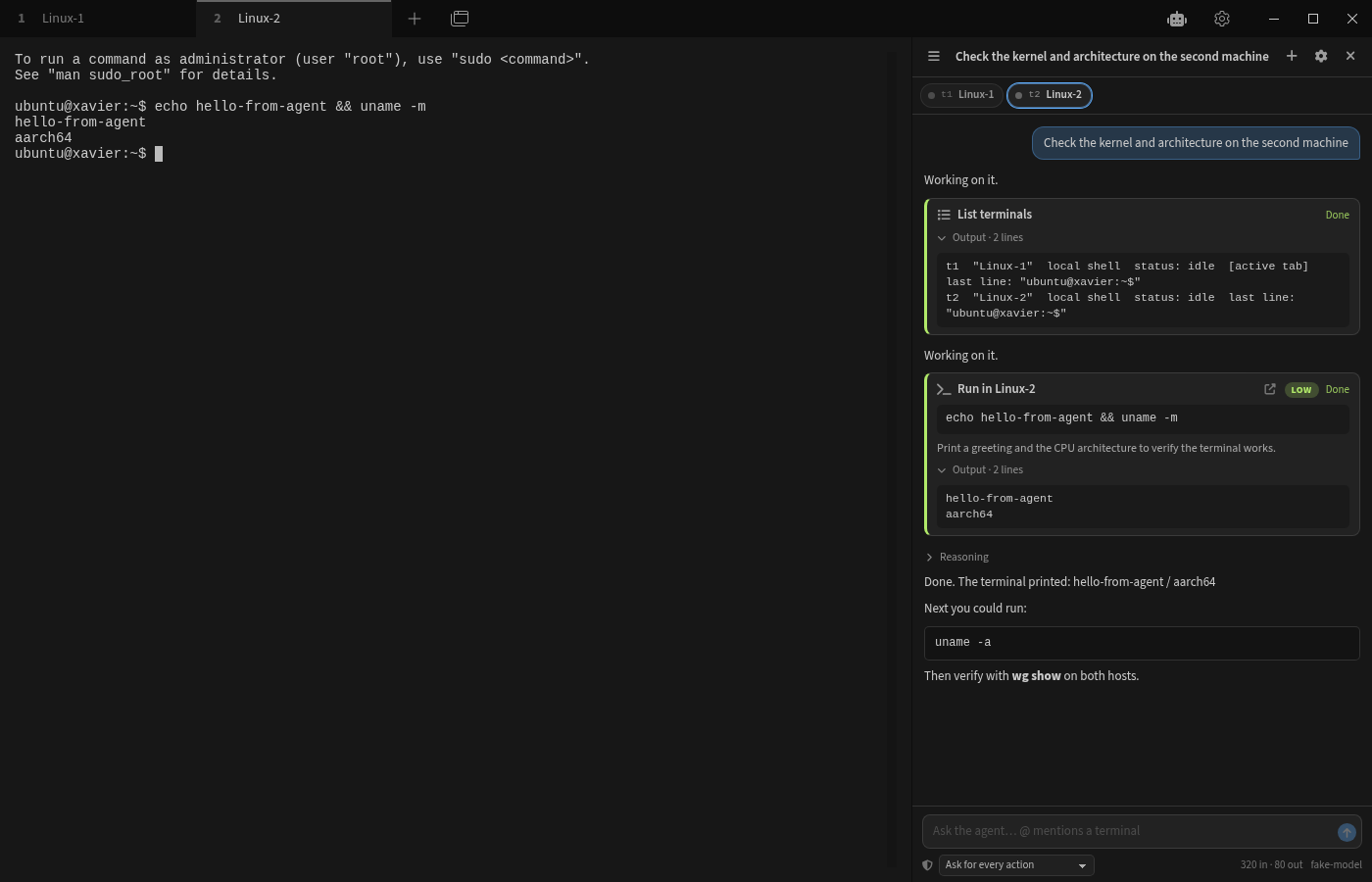
- package/README.md +96 -0
- package/dist/index.js +11477 -0
- package/dist/index.js.map +1 -0
- package/package.json +114 -0
package/LICENSE
ADDED
|
@@ -0,0 +1,21 @@
|
|
|
1
|
+
MIT License
|
|
2
|
+
|
|
3
|
+
Copyright (c) 2026 Qianfan Jiang
|
|
4
|
+
|
|
5
|
+
Permission is hereby granted, free of charge, to any person obtaining a copy
|
|
6
|
+
of this software and associated documentation files (the "Software"), to deal
|
|
7
|
+
in the Software without restriction, including without limitation the rights
|
|
8
|
+
to use, copy, modify, merge, publish, distribute, sublicense, and/or sell
|
|
9
|
+
copies of the Software, and to permit persons to whom the Software is
|
|
10
|
+
furnished to do so, subject to the following conditions:
|
|
11
|
+
|
|
12
|
+
The above copyright notice and this permission notice shall be included in all
|
|
13
|
+
copies or substantial portions of the Software.
|
|
14
|
+
|
|
15
|
+
THE SOFTWARE IS PROVIDED "AS IS", WITHOUT WARRANTY OF ANY KIND, EXPRESS OR
|
|
16
|
+
IMPLIED, INCLUDING BUT NOT LIMITED TO THE WARRANTIES OF MERCHANTABILITY,
|
|
17
|
+
FITNESS FOR A PARTICULAR PURPOSE AND NONINFRINGEMENT. IN NO EVENT SHALL THE
|
|
18
|
+
AUTHORS OR COPYRIGHT HOLDERS BE LIABLE FOR ANY CLAIM, DAMAGES OR OTHER
|
|
19
|
+
LIABILITY, WHETHER IN AN ACTION OF CONTRACT, TORT OR OTHERWISE, ARISING FROM,
|
|
20
|
+
OUT OF OR IN CONNECTION WITH THE SOFTWARE OR THE USE OR OTHER DEALINGS IN THE
|
|
21
|
+
SOFTWARE.
|
package/README.md
ADDED
|
@@ -0,0 +1,96 @@
|
|
|
1
|
+
# Tabby AI Panel
|
|
2
|
+
|
|
3
|
+
An autonomous AI agent for [Tabby](https://tabby.sh) that can **see and operate every open terminal tab** — local shells and SSH sessions on different machines — and keeps **persistent, resumable sessions**.
|
|
4
|
+
|
|
5
|
+
Ask for something like *"set up a WireGuard tunnel between @Linux-1 and @Linux-2"* and the agent inspects both hosts, plans, runs the commands in the right tabs (with your approval), reads the results, fixes problems, and verifies the tunnel from both sides.
|
|
6
|
+
|
|
7
|
+
|
|
8
|
+
|
|
9
|
+
## Features
|
|
10
|
+
|
|
11
|
+
- **Cross-tab context** – every terminal tab (including split panes) is addressable by a stable key (`t1`, `t2`, …) or by its label. Mention one with `@name`. The agent runs commands in background tabs without stealing your focus.
|
|
12
|
+
- **Persistent sessions** – every conversation is saved as a readable JSON file. Browse, search, rename, delete and **resume** sessions from the drawer. On resume, terminals are re-attached to matching open tabs; closed SSH hosts can be reconnected with one click.
|
|
13
|
+
- **Reviewable execution** – each command shows the target terminal, a risk badge, an explanation and live output. Choose per session whether to approve everything, only medium/high risk, or run fully autonomously. Catastrophic patterns (`rm -rf /`, `mkfs`, `reboot`, firewall flush, …) always ask.
|
|
14
|
+
- **Knows what the terminal is doing** – detects when the prompt is back, when a program is waiting for input (`[Y/n]`, passwords), when a full-screen app is open, and when a command is still running. Passwords are never typed by the agent.
|
|
15
|
+
- **Any OpenAI-compatible endpoint** – OpenRouter, LiteLLM, llama.cpp, vLLM, Ollama, LM Studio… Streaming, tool calling, and reasoning tokens (shown collapsibly). Requests go through Node's HTTP stack, so self-hosted servers need no CORS setup.
|
|
16
|
+
- **Native Tabby UI** – docked, resizable sidebar that follows your theme; toolbar button; configurable hotkeys; settings tab.
|
|
17
|
+
|
|
18
|
+
## Install
|
|
19
|
+
|
|
20
|
+
**From Tabby** – Settings → Plugins → search for `ai-panel` → Get, then restart Tabby.
|
|
21
|
+
|
|
22
|
+
**From the zip** (`npm run pack` → `release/tabby-ai-panel-<version>.zip`): unzip it inside Tabby's plugin folder so that you end up with `plugins/node_modules/tabby-ai-panel/package.json`:
|
|
23
|
+
|
|
24
|
+
| OS | Plugin folder |
|
|
25
|
+
|---|---|
|
|
26
|
+
| Linux | `~/.config/tabby/plugins/node_modules/` |
|
|
27
|
+
| macOS | `~/Library/Application Support/tabby/plugins/node_modules/` |
|
|
28
|
+
| Windows | `%APPDATA%\tabby\plugins\node_modules\` |
|
|
29
|
+
|
|
30
|
+
```bash
|
|
31
|
+
mkdir -p ~/.config/tabby/plugins/node_modules
|
|
32
|
+
unzip tabby-ai-panel-0.1.2.zip -d ~/.config/tabby/plugins/node_modules
|
|
33
|
+
```
|
|
34
|
+
|
|
35
|
+
**From source** (development): `npm install && npm run build && npm run link:tabby` symlinks the checkout into the same folder.
|
|
36
|
+
|
|
37
|
+
Restart Tabby, then open **Settings → AI Panel** and set your endpoint, API key and model. Use **Test** to verify the connection. Open the panel with the **AI Agent** toolbar button or `Ctrl+Alt+A` (`⌘⇧A` on macOS).
|
|
38
|
+
|
|
39
|
+
## Usage
|
|
40
|
+
|
|
41
|
+
- Type a request. Mention terminals with `@` (autocomplete lists open tabs).
|
|
42
|
+
- Commands appear as cards: **Approve** / **Deny**, or open the caret menu to approve and auto-approve low-risk actions for the rest of the session. Hotkeys: `Ctrl+Alt+Y` approve, `Ctrl+Alt+X` deny, `Ctrl+Alt+S` stop.
|
|
43
|
+
- The chip bar shows the terminals in this session with a live status dot. Click a chip to jump to that tab; right-click (or click a disconnected chip) to reconnect or attach it to another tab.
|
|
44
|
+
- `☰` opens the session drawer. Sessions are stored in `<Tabby config dir>/ai-panel/sessions/*.json`.
|
|
45
|
+
- Code blocks in answers have **Copy** and **Insert** (types into the active terminal without pressing Enter).
|
|
46
|
+
|
|
47
|
+
## Tools the agent has
|
|
48
|
+
|
|
49
|
+
| Tool | Purpose |
|
|
50
|
+
|---|---|
|
|
51
|
+
| `list_terminals` | keys, labels, connection, status, last line of every tab |
|
|
52
|
+
| `read_terminal` | last N lines of a tab's buffer |
|
|
53
|
+
| `run_command` | type a command, wait for prompt / input request / timeout, return output |
|
|
54
|
+
| `send_keys` | answer prompts, drive full-screen apps, `ctrl-c` |
|
|
55
|
+
| `wait_for_output` | keep waiting on a long-running command (optionally until a regex matches) |
|
|
56
|
+
| `ask_user` | ask a question in the panel (free text or choices) |
|
|
57
|
+
| `open_terminal` | open a new tab from a saved Tabby profile |
|
|
58
|
+
| `focus_terminal` | switch the user's view to a tab (e.g. to type a password) |
|
|
59
|
+
|
|
60
|
+
## Development
|
|
61
|
+
|
|
62
|
+
```bash
|
|
63
|
+
npm run watch # rebuild on change (TABBY_DEV=1 gives readable source maps)
|
|
64
|
+
npm test # unit tests for prompt detection, the command runner, the provider, context budgeting
|
|
65
|
+
npm run typecheck
|
|
66
|
+
```
|
|
67
|
+
|
|
68
|
+
`scripts/e2e/` runs a real Tabby headlessly under Xvfb with the plugin loaded and drives it over the
|
|
69
|
+
DevTools protocol against a scripted fake model — see [scripts/e2e/README.md](scripts/e2e/README.md).
|
|
70
|
+
|
|
71
|
+
Project layout:
|
|
72
|
+
|
|
73
|
+
```
|
|
74
|
+
src/
|
|
75
|
+
core/ framework-free logic (runner, registry, session store, agent loop, tools, LLM client)
|
|
76
|
+
ui/ Angular components: panel, transcript, tool cards, composer, terminal strip, sessions, settings
|
|
77
|
+
prompts/system.md the agent's instructions
|
|
78
|
+
types/ session schema + config
|
|
79
|
+
tests/ node:test suites (run with tsx)
|
|
80
|
+
scripts/e2e/ headless Tabby end-to-end harness
|
|
81
|
+
```
|
|
82
|
+
|
|
83
|
+
### How it works
|
|
84
|
+
|
|
85
|
+
- **Terminal registry** (`core/terminal-registry.service.ts`) – a `TerminalDecorator` registers every terminal tab; each gets a runtime id and a descriptor (profile, host, user, title) used to re-identify it after a restart. Reads go straight to the xterm buffer (wrapped rows are joined), writes go through `tab.sendInput`.
|
|
86
|
+
- **Command runner** (`core/terminal-runner.ts`) – learns the prompt from the line under the cursor before typing, then watches buffer activity: prompt back + quiet → done; last line looks like a question/password → `awaiting_input`; alternate screen → `alt_screen`; silence → `idle`; time budget → `timeout`. Returns only the new output (echo and prompt stripped).
|
|
87
|
+
- **Agent loop** (`core/agent.service.ts`) – streams the model, gates tool calls through the approval policy, executes tools, and persists after every step. Terminal keys (`t1`, `t2`) are session-scoped and bound to live tabs; on resume they are re-bound by descriptor similarity.
|
|
88
|
+
- **Prompt builder** (`core/prompt-builder.ts`) – converts the stored transcript to OpenAI messages, truncates long tool output (head + tail) and elides old output first when over the context budget.
|
|
89
|
+
|
|
90
|
+
## Safety
|
|
91
|
+
|
|
92
|
+
You are giving a language model the ability to type into your terminals. Review actions, keep "Ask for every action" on for machines that matter, and prefer self-hosted models for sensitive environments. The risk heuristics are a safety net, not a guarantee.
|
|
93
|
+
|
|
94
|
+
## License
|
|
95
|
+
|
|
96
|
+
MIT
|