synapse-orch-ai 1.4.6 → 1.5.0
This diff represents the content of publicly available package versions that have been released to one of the supported registries. The information contained in this diff is provided for informational purposes only and reflects changes between package versions as they appear in their respective public registries.
- package/README.md +41 -573
- package/backend/core/builder_tools.py +2 -2
- package/backend/core/models.py +1 -0
- package/backend/core/models_orchestration.py +4 -0
- package/backend/core/orchestration/context.py +198 -22
- package/backend/core/orchestration/engine.py +5 -1
- package/backend/core/orchestration/steps.py +251 -11
- package/backend/core/react_engine.py +252 -6
- package/backend/core/routes/agents.py +9 -0
- package/backend/core/routes/tools.py +20 -2
- package/backend/core/tools.py +1 -0
- package/backend/tools/sandbox.py +0 -4
- package/frontend-build/.next/BUILD_ID +1 -1
- package/frontend-build/.next/build-manifest.json +3 -3
- package/frontend-build/.next/prerender-manifest.json +3 -3
- package/frontend-build/.next/server/app/_global-error.html +1 -1
- package/frontend-build/.next/server/app/_global-error.rsc +1 -1
- package/frontend-build/.next/server/app/_global-error.segments/__PAGE__.segment.rsc +1 -1
- package/frontend-build/.next/server/app/_global-error.segments/_full.segment.rsc +1 -1
- package/frontend-build/.next/server/app/_global-error.segments/_head.segment.rsc +1 -1
- package/frontend-build/.next/server/app/_global-error.segments/_index.segment.rsc +1 -1
- package/frontend-build/.next/server/app/_global-error.segments/_tree.segment.rsc +1 -1
- package/frontend-build/.next/server/app/_not-found/page_client-reference-manifest.js +1 -1
- package/frontend-build/.next/server/app/_not-found.html +1 -1
- package/frontend-build/.next/server/app/_not-found.rsc +2 -2
- package/frontend-build/.next/server/app/_not-found.segments/_full.segment.rsc +2 -2
- package/frontend-build/.next/server/app/_not-found.segments/_head.segment.rsc +1 -1
- package/frontend-build/.next/server/app/_not-found.segments/_index.segment.rsc +2 -2
- package/frontend-build/.next/server/app/_not-found.segments/_not-found/__PAGE__.segment.rsc +1 -1
- package/frontend-build/.next/server/app/_not-found.segments/_not-found.segment.rsc +1 -1
- package/frontend-build/.next/server/app/_not-found.segments/_tree.segment.rsc +2 -2
- package/frontend-build/.next/server/app/index.html +1 -1
- package/frontend-build/.next/server/app/index.rsc +2 -2
- package/frontend-build/.next/server/app/index.segments/__PAGE__.segment.rsc +1 -1
- package/frontend-build/.next/server/app/index.segments/_full.segment.rsc +2 -2
- package/frontend-build/.next/server/app/index.segments/_head.segment.rsc +1 -1
- package/frontend-build/.next/server/app/index.segments/_index.segment.rsc +2 -2
- package/frontend-build/.next/server/app/index.segments/_tree.segment.rsc +2 -2
- package/frontend-build/.next/server/app/login/page_client-reference-manifest.js +1 -1
- package/frontend-build/.next/server/app/login.html +1 -1
- package/frontend-build/.next/server/app/login.rsc +2 -2
- package/frontend-build/.next/server/app/login.segments/_full.segment.rsc +2 -2
- package/frontend-build/.next/server/app/login.segments/_head.segment.rsc +1 -1
- package/frontend-build/.next/server/app/login.segments/_index.segment.rsc +2 -2
- package/frontend-build/.next/server/app/login.segments/_tree.segment.rsc +2 -2
- package/frontend-build/.next/server/app/login.segments/login/__PAGE__.segment.rsc +1 -1
- package/frontend-build/.next/server/app/login.segments/login.segment.rsc +1 -1
- package/frontend-build/.next/server/app/page_client-reference-manifest.js +1 -1
- package/frontend-build/.next/server/app/settings/[tab]/page_client-reference-manifest.js +1 -1
- package/frontend-build/.next/server/chunks/ssr/_0b~n.nn._.js +29 -25
- package/frontend-build/.next/server/middleware-build-manifest.js +3 -3
- package/frontend-build/.next/server/middleware-manifest.json +5 -5
- package/frontend-build/.next/server/pages/404.html +1 -1
- package/frontend-build/.next/server/pages/500.html +1 -1
- package/frontend-build/.next/server/server-reference-manifest.js +1 -1
- package/frontend-build/.next/server/server-reference-manifest.json +1 -1
- package/frontend-build/.next/static/chunks/0rvvhrm2gc.87.css +1 -0
- package/frontend-build/.next/static/chunks/{18b0o~cnvc.gn.js → 15z7zp13idekl.js} +29 -25
- package/package.json +1 -1
- package/frontend-build/.next/static/chunks/0yq31mtv7c.bs.css +0 -1
- /package/frontend-build/.next/static/{1CnDWQCYFXeeThoyEg-3O → 47MXNuH5FrJAfrk7sJf9l}/_buildManifest.js +0 -0
- /package/frontend-build/.next/static/{1CnDWQCYFXeeThoyEg-3O → 47MXNuH5FrJAfrk7sJf9l}/_clientMiddlewareManifest.js +0 -0
- /package/frontend-build/.next/static/{1CnDWQCYFXeeThoyEg-3O → 47MXNuH5FrJAfrk7sJf9l}/_ssgManifest.js +0 -0
package/README.md
CHANGED
|
@@ -5,6 +5,8 @@
|
|
|
5
5
|
</p>
|
|
6
6
|
|
|
7
7
|
<p align="center">
|
|
8
|
+
<a href="https://synapseorch.com"><img src="https://img.shields.io/badge/Website-synapseorch.com-0A0A0A?logo=vercel&logoColor=white" alt="Website"></a>
|
|
9
|
+
<a href="https://docs.synapseorch.com"><img src="https://img.shields.io/badge/Docs-docs.synapseorch.com-blue?logo=readthedocs&logoColor=white" alt="Docs"></a>
|
|
8
10
|
<a href="https://discord.gg/9UN45qyGh8"><img src="https://img.shields.io/badge/Discord-Join-5865F2?logo=discord&logoColor=white" alt="Discord"></a>
|
|
9
11
|
<a href="https://github.com/synapseorch-ai/synapse-ai"><img src="https://img.shields.io/github/stars/synapseorch-ai/synapse-ai?style=social" alt="GitHub stars"></a>
|
|
10
12
|
<a href="https://github.com/synapseorch-ai/synapse-ai?tab=AGPL-3.0-1-ov-file"><img src="https://img.shields.io/github/license/synapseorch-ai/synapse-ai" alt="License"></a>
|
|
@@ -15,26 +17,19 @@
|
|
|
15
17
|
|
|
16
18
|
*Build AI workflows that actually ship.*
|
|
17
19
|
|
|
18
|
-
**Wire agents, tools, and LLMs into deterministic pipelines — without the framework lock-in.** Synapse is an open-source platform for creating, connecting, and orchestrating AI agents powered by any LLM — local or cloud. Agents use real tools: browsing the web, querying databases, executing code, reading files, managing emails,
|
|
20
|
+
**Wire agents, tools, and LLMs into deterministic pipelines — without the framework lock-in.** Synapse is an open-source platform for creating, connecting, and orchestrating AI agents powered by any LLM — local or cloud. Agents use real tools: browsing the web, querying databases, executing code, reading files, managing emails, and anything else you can expose through an MCP server, a webhook, or a Python script.
|
|
19
21
|
|
|
20
|
-
|
|
21
|
-
|
|
22
|
-
|
|
23
|
-
|
|
24
|
-
|
|
25
|
-
|
|
26
|
-
- **Python 3.11+**
|
|
27
|
-
- **Node.js 22+**
|
|
28
|
-
- **uvx** — `pip install uv` (used to run MCP servers)
|
|
29
|
-
|
|
30
|
-
> Don't have these? The setup script will attempt to install any missing prerequisites automatically.
|
|
22
|
+
<p align="center">
|
|
23
|
+
<a href="https://synapseorch.com"><strong>🌐 Website</strong></a> ·
|
|
24
|
+
<a href="https://docs.synapseorch.com"><strong>📖 Documentation</strong></a> ·
|
|
25
|
+
<a href="https://discord.gg/9UN45qyGh8"><strong>💬 Discord</strong></a>
|
|
26
|
+
</p>
|
|
31
27
|
|
|
32
28
|
---
|
|
33
29
|
|
|
34
30
|
## Install
|
|
35
31
|
|
|
36
32
|
### Quick Setup Script (recommended)
|
|
37
|
-
The easiest way to get started. Clones the repository, installs all dependencies, and starts both servers automatically.
|
|
38
33
|
|
|
39
34
|
**macOS / Linux:**
|
|
40
35
|
```bash
|
|
@@ -59,46 +54,15 @@ synapse
|
|
|
59
54
|
```
|
|
60
55
|
|
|
61
56
|
### Docker
|
|
62
|
-
No Python or Node.js required on the host. Ideal for teams deploying on shared infrastructure or servers.
|
|
63
|
-
|
|
64
|
-
```bash
|
|
65
|
-
docker run -d \
|
|
66
|
-
-p 3000:3000 \
|
|
67
|
-
-v synapse-data:/data \
|
|
68
|
-
-v /var/run/docker.sock:/var/run/docker.sock \
|
|
69
|
-
synapseorchai/synapse-ai:latest
|
|
70
|
-
```
|
|
71
|
-
|
|
72
|
-
Then open `http://localhost:3000`. Pass your LLM API keys and any config as environment variables:
|
|
73
|
-
|
|
74
57
|
```bash
|
|
75
58
|
docker run -d \
|
|
76
59
|
-p 3000:3000 \
|
|
77
60
|
-v synapse-data:/data \
|
|
78
61
|
-v /var/run/docker.sock:/var/run/docker.sock \
|
|
79
|
-
-e ANTHROPIC_API_KEY=sk-ant-... \
|
|
80
|
-
-e OPENAI_API_KEY=sk-... \
|
|
81
|
-
-e OLLAMA_BASE_URL=http://host-gateway:11434 \
|
|
82
|
-
--add-host=host-gateway:host-gateway \
|
|
83
|
-
synapseorchai/synapse-ai:latest
|
|
84
|
-
```
|
|
85
|
-
|
|
86
|
-
#### Custom ports
|
|
87
|
-
|
|
88
|
-
Override the default ports (frontend `3000`, backend `8765`) with environment variables:
|
|
89
|
-
|
|
90
|
-
```bash
|
|
91
|
-
docker run -d \
|
|
92
|
-
-p 8080:8080 \
|
|
93
|
-
-p 9000:9000 \
|
|
94
|
-
-e SYNAPSE_FRONTEND_PORT=8080 \
|
|
95
|
-
-e SYNAPSE_BACKEND_PORT=9000 \
|
|
96
|
-
-v synapse-data:/data \
|
|
97
|
-
-v /var/run/docker.sock:/var/run/docker.sock \
|
|
98
62
|
synapseorchai/synapse-ai:latest
|
|
99
63
|
```
|
|
100
64
|
|
|
101
|
-
|
|
65
|
+
Then open `http://localhost:3000`. See the [Docker guide](https://docs.synapseorch.com/getting-started/installation#docker) in the docs for custom ports and environment variable configuration.
|
|
102
66
|
|
|
103
67
|
### Upgrading
|
|
104
68
|
|
|
@@ -109,68 +73,19 @@ The `-p HOST:CONTAINER` values must match the `-e` values.
|
|
|
109
73
|
| npm | `npm update -g synapse-orch-ai` |
|
|
110
74
|
| Docker | `docker pull synapseorchai/synapse-ai:latest` |
|
|
111
75
|
|
|
112
|
-
---
|
|
113
|
-
|
|
114
|
-
## CLI
|
|
115
|
-
|
|
116
|
-
Once installed, use the `synapse` command to manage the server:
|
|
117
|
-
|
|
118
|
-
```bash
|
|
119
|
-
synapse start # start backend + frontend, open browser
|
|
120
|
-
synapse stop # stop background processes
|
|
121
|
-
synapse upgrade # upgrade to the latest version
|
|
122
|
-
synapse uninstall # remove Synapse, wipe ~/.synapse, and uninstall the package
|
|
123
|
-
```
|
|
124
|
-
|
|
125
|
-
|
|
126
76
|
---
|
|
127
77
|
|
|
128
78
|
## What Makes Synapse Different
|
|
129
79
|
|
|
130
|
-
|
|
80
|
+
- **Multi-Model Orchestrations** — Run a different LLM at every step. Use a fast model for routing, a powerful one for analysis. You control where the compute goes.
|
|
81
|
+
- **Deterministic DAG Execution** — Orchestrations follow the exact path you designed. No hallucinated detours.
|
|
82
|
+
- **Turn Anything Into a Tool** — Python scripts, REST APIs, webhooks, MCP servers, or entire orchestrations — all become agent-callable tools.
|
|
83
|
+
- **Human-in-the-Loop** — Pause workflows for human review. Resumable across restarts. Connect via UI, Slack, Telegram, or any messaging channel.
|
|
84
|
+
- **Local-First, No Lock-In** — Full local operation with Ollama. Mix local and cloud models freely. Your data stays yours.
|
|
85
|
+
- **Built-In Scheduling & Messaging** — Cron-based automation with results pushed to Slack, Discord, Telegram, Teams, or WhatsApp.
|
|
86
|
+
- **14+ LLM Providers** — Cloud, local, and CLI providers including Ollama, OpenAI, Anthropic, Gemini, xAI, DeepSeek, AWS Bedrock, and more.
|
|
131
87
|
|
|
132
|
-
|
|
133
|
-
Run a different model at every step. Use a fast, cheap model for routing and classification; switch to a powerful model only for the steps that need it. One orchestration, many models — you control exactly where the compute goes.
|
|
134
|
-
|
|
135
|
-
### Workflows That Actually Do What You Designed
|
|
136
|
-
Orchestrations are strict DAGs. Execution follows the exact path you defined — no surprises, no hallucinated detours. For steps where the next action is already known (fetch this, parse that, write here), use **Tool** and **LLM** steps instead of full agents: zero reasoning overhead, deterministic output, and far cheaper to run.
|
|
137
|
-
|
|
138
|
-
### Turn Anything Into a Tool
|
|
139
|
-
Your existing systems are already the capability — Synapse just makes them available to agents:
|
|
140
|
-
- **Any Python program** → drop it in, it becomes a sandboxed agent tool
|
|
141
|
-
- **Any REST API or webhook** → describe its schema, agents call it natively
|
|
142
|
-
- **Any MCP server** → local subprocess or remote HTTP, connected in seconds
|
|
143
|
-
- **Any orchestration** → promote it to an agent; chain orchestrations like functions
|
|
144
|
-
|
|
145
|
-
This is the path most businesses take: existing CRM APIs, internal Python scripts, ML models, and third-party services all become agent-callable tools without a rewrite.
|
|
146
|
-
|
|
147
|
-
### Never Blocked on a Human Decision
|
|
148
|
-
**Human** steps pause execution mid-workflow and wait. When the person responds — via the UI, Slack, Telegram, or any connected messaging channel — the run resumes exactly where it left off. No polling, no timeouts you didn't set.
|
|
149
|
-
|
|
150
|
-
### Run It Anywhere, Own Your Data
|
|
151
|
-
Full local operation with Ollama. Or mix: local models for some agents, cloud APIs for others. No vendor lock-in on models, no data sent anywhere you didn't choose. Persistent vault stores files across agent sessions on your machine.
|
|
152
|
-
|
|
153
|
-
### Built-In Scheduling & Messaging
|
|
154
|
-
Schedule any agent or orchestration to run on a cron or interval. Results are pushed directly to Slack, Discord, Telegram, Teams, or WhatsApp — with multi-agent mode so users can switch agents mid-chat.
|
|
155
|
-
|
|
156
|
-
---
|
|
157
|
-
|
|
158
|
-
## Under the Hood
|
|
159
|
-
|
|
160
|
-
| Capability | Detail |
|
|
161
|
-
|---|---|
|
|
162
|
-
| **Multi-model orchestrations** | Per-step model override — mix Gemini Flash, Claude Opus, and local Ollama in one workflow |
|
|
163
|
-
| **Orchestrations as agents** | Promote any orchestration to an agent; nest pipelines inside pipelines |
|
|
164
|
-
| **Deterministic Tool steps** | Skip the ReAct loop entirely — call a specific tool directly with state values |
|
|
165
|
-
| **Resumable human gates** | Human steps survive server restarts; runs pick up exactly where they paused |
|
|
166
|
-
| **Docker-sandboxed Python** | Agents write and execute Python in an isolated container — safe by default |
|
|
167
|
-
| **Stealth web scraping** | Built-in anti-bot evasion; works on LinkedIn, financial sites, JS-heavy pages |
|
|
168
|
-
| **Semantic code search** | Index any repo; agents query it by natural language and get file + line results |
|
|
169
|
-
| **Cost limits per run** | Set a max-spend per orchestration run — execution halts if the budget is hit |
|
|
170
|
-
| **5 messaging platforms** | Slack, Discord, Telegram, Teams, WhatsApp — with per-channel agent binding |
|
|
171
|
-
| **14+ LLM providers** | Cloud, local, and CLI providers; no API key needed for Claude/Gemini/Codex CLI |
|
|
172
|
-
| **Import/Export packs** | Portable bundles of agents + orchestrations + MCP configs; 3 curated starter packs |
|
|
173
|
-
| **AI Builder** | Chat with a meta-agent that designs and materializes orchestrations for you |
|
|
88
|
+
📖 [**Learn more →**](https://docs.synapseorch.com)
|
|
174
89
|
|
|
175
90
|
---
|
|
176
91
|
|
|
@@ -178,516 +93,69 @@ Schedule any agent or orchestration to run on a cron or interval. Results are pu
|
|
|
178
93
|
|
|
179
94
|
https://github.com/user-attachments/assets/7a5ab42c-5fae-4f13-876c-13aa9b5a0366
|
|
180
95
|
|
|
181
|
-
##
|
|
96
|
+
## Demos
|
|
182
97
|
|
|
183
98
|
### Content Writing Orchestration
|
|
184
|
-
|
|
99
|
+
Multi-agent pipeline that researches a topic, drafts content in a Google Doc, and returns the shared link. *(Video is 2x speed)*
|
|
185
100
|
|
|
186
101
|
https://github.com/user-attachments/assets/4eec5db8-70d0-47b6-8608-f52b1f7b7d68
|
|
187
102
|
|
|
188
103
|
### Autonomous Code Development & PR Creation
|
|
189
|
-
|
|
104
|
+
Multi-agent system with human-in-the-loop that writes code and generates pull requests autonomously.
|
|
190
105
|
|
|
191
106
|
https://github.com/user-attachments/assets/95a511e1-e3e9-4812-b9ca-f7f4c28ef80f
|
|
192
107
|
|
|
193
108
|
### Native Orchestration Builder
|
|
194
|
-
|
|
109
|
+
Chat with the AI builder — describe what you want, and it creates the orchestration DAG for you.
|
|
195
110
|
|
|
196
111
|
https://github.com/user-attachments/assets/282cc99d-cdea-4ad0-b648-f22112c6e295
|
|
197
112
|
|
|
198
|
-
## The Tool Ecosystem
|
|
199
|
-
|
|
200
|
-
Synapse agents are powerful because of what they can do. Every tool is a separate MCP process — isolated, composable, and safe.
|
|
201
|
-
|
|
202
|
-
### Native Tool Servers
|
|
203
|
-
|
|
204
|
-
These run automatically when Synapse starts:
|
|
205
|
-
|
|
206
|
-
| Tool Server | What It Does |
|
|
207
|
-
|---|---|
|
|
208
|
-
| **Sandbox** | Execute Python code in an isolated Docker container (512 MB RAM, 1 CPU). Pre-loaded with pandas, numpy, matplotlib, scikit-learn, requests, and more. Read/write files in the persistent vault. |
|
|
209
|
-
| **Vault** | Persistent file storage for agents. Create, read, update, patch, and list files across sessions. JSON deep-merge, text find-replace, and directory listing built in. |
|
|
210
|
-
| **SQL Agent** | Connect to any database (PostgreSQL, MySQL, SQLite). List tables, introspect schemas, run read queries. Supports any SQLAlchemy-compatible connection string. |
|
|
211
|
-
| **Browser** | Full browser automation via Playwright MCP. Navigate pages, click, fill forms, take screenshots, extract content. Powered by Chromium. |
|
|
212
|
-
| **PDF Parser** | Extract text and tables from any PDF by URL. Tables converted to Markdown. Page-by-page extraction. |
|
|
213
|
-
| **Excel Parser** | Parse `.xlsx` files from URL. Multi-sheet support. Converts all sheets to Markdown tables. |
|
|
214
|
-
| **Collect Data** | Generate dynamic forms that pause execution and collect user input. Supports text, number, email, date, phone, and option fields. |
|
|
215
|
-
| **Time** | Natural language date/time parsing. Handles relative offsets, weekday targets, timezone conversions, and complex expressions like "next Friday at 3pm EST". |
|
|
216
|
-
| **Code Search** | Semantic code search across indexed repositories using vector embeddings. Search by natural language query, get back relevant code snippets with file paths and line numbers. |
|
|
217
|
-
| **Web Scraper** | Powerful web scraping powered by crawl4ai. Scrape any URL to clean markdown, extract structured data with CSS schemas, crawl multiple URLs in parallel, capture screenshots, handle infinite-scroll pages, and run multi-step authenticated sessions. Built-in stealth mode bypasses anti-bot protections — works on LinkedIn, financial sites, and JavaScript-heavy pages. |
|
|
218
|
-
|
|
219
|
-
### Built-in MCP Servers
|
|
220
|
-
|
|
221
|
-
Enabled automatically when configured:
|
|
222
|
-
|
|
223
|
-
| Server | What It Does |
|
|
224
|
-
|---|---|
|
|
225
|
-
| **Filesystem** (`@modelcontextprotocol/server-filesystem`) | Full read/write access to your local code repositories. Configure which paths to expose in Settings → Repos. |
|
|
226
|
-
| **Google Workspace** (`workspace-mcp`) | Gmail (read, search, send), Google Drive (list, read, create files), and Google Calendar (events, scheduling). One-click OAuth setup in Settings. |
|
|
227
|
-
| **Playwright** (`@playwright/mcp`) | Browser control — already included in the native Browser tool above, available separately for headless automation. |
|
|
228
|
-
| **Sequential Thinking** (`npx @modelcontextprotocol/server-sequential-thinking`) | Structured step-by-step reasoning for complex, multi-stage problems. Agents break tasks into explicit thought chains before acting. Enabled by default. |
|
|
229
|
-
| **Memory** (`npx @modelcontextprotocol/server-memory`) | Persistent knowledge graph memory across sessions. Agents store and retrieve facts, relationships, and context between runs. Enabled by default. |
|
|
230
|
-
|
|
231
|
-
### Remote MCP Servers
|
|
232
|
-
|
|
233
|
-
Connect to any MCP server over the network — no code needed. Synapse supports native OAuth and Personal Access Token (PAT) authentication.
|
|
234
|
-
|
|
235
|
-
**To add a remote server:**
|
|
236
|
-
|
|
237
|
-
1. Open **Settings → MCP Servers**
|
|
238
|
-
2. Click the **Remote (URL)** tab at the top of the form
|
|
239
|
-
3. Optionally select a **preset** (Vercel, GitHub Copilot, Jira, Zapier, Figma, Fetch) to auto-fill the URL and token fields
|
|
240
|
-
4. Enter a **Server Name** and the **Server URL**
|
|
241
|
-
5. **Bearer Token / PAT** — leave empty to use OAuth (a browser window will open for authorization), or paste a personal access token for PAT-based servers (GitHub, Figma)
|
|
242
|
-
6. Click **Connect Server**
|
|
243
|
-
|
|
244
|
-
Synapse prefixes external tools with `<server-unique-name>__` followed by the tool name to prevent naming collisions. Any MCP-compatible API becomes an agent tool instantly.
|
|
245
|
-
|
|
246
|
-
Find more on the [MCP servers registry](https://github.com/modelcontextprotocol/servers).
|
|
247
|
-
|
|
248
|
-
### Local (stdio) MCP Servers
|
|
249
|
-
|
|
250
|
-
For servers that run as local processes, click the **Local (stdio)** tab and enter the command and arguments:
|
|
251
|
-
|
|
252
|
-
```
|
|
253
|
-
Command: uvx
|
|
254
|
-
Arguments: mcp-server-git
|
|
255
|
-
```
|
|
256
|
-
|
|
257
|
-
Use the **Git** preset to auto-fill this. Add environment variables (API keys, secrets) directly in the form — no config file editing required.
|
|
258
|
-
|
|
259
|
-
### Custom Tools — Your APIs and Python Scripts
|
|
260
|
-
|
|
261
|
-
Turn any existing API or Python program into an agent tool — no rewrites, no new infrastructure.
|
|
262
|
-
|
|
263
|
-
**Register an API endpoint:**
|
|
264
|
-
1. Go to **Settings → Custom Tools** and add a tool with its name, description, endpoint, and parameter schema
|
|
265
|
-
2. Agents see the name and description to decide when to call it, and pass parameters automatically
|
|
266
|
-
3. Works with any REST API, internal service, or webhook — your CRM, billing system, ML inference endpoint, anything
|
|
267
|
-
|
|
268
|
-
**Register a Python script:**
|
|
269
|
-
1. Paste your existing Python function — it runs in Synapse's sandboxed Docker executor
|
|
270
|
-
2. Define its input parameters and expected output shape
|
|
271
|
-
3. It becomes a callable tool for any agent you assign it to
|
|
272
|
-
|
|
273
|
-
This is the fastest path for businesses: your existing Python scripts (ETL jobs, ML models, data processors) and internal APIs become your agents' extended toolkit. Build an n8n workflow, expose it as a webhook, and add it here — 400+ node integrations become one agent tool in minutes.
|
|
274
|
-
|
|
275
113
|
---
|
|
276
114
|
|
|
277
|
-
##
|
|
278
|
-
|
|
279
|
-
Create specialized agents in **Settings → Agents**. Each agent is an independent ReAct loop with its own:
|
|
280
|
-
|
|
281
|
-
- **System prompt** — define its persona, expertise, and constraints
|
|
282
|
-
- **Tool selection** — give it access to all tools, or restrict to a specific subset
|
|
283
|
-
- **Model override** — run different agents on different models (e.g., fast model for routing, capable model for analysis)
|
|
284
|
-
- **Code repositories** — link repos for semantic code search and filesystem access
|
|
285
|
-
- **LLM provider** — mix local Ollama models with cloud APIs per agent
|
|
286
|
-
|
|
287
|
-
### Example: Research Agent
|
|
115
|
+
## Key Concepts
|
|
288
116
|
|
|
289
|
-
|
|
290
|
-
{
|
|
291
|
-
"name": "Research Agent",
|
|
292
|
-
"description": "Deep research using web browsing and document parsing",
|
|
293
|
-
"tools": ["browser_navigate", "browser_snapshot", "parse_pdf", "parse_xlsx", "vault_write"],
|
|
294
|
-
"system_prompt": "You are a thorough research analyst. For any research task: browse primary sources, extract key data, parse any documents you find, and save a structured report to the vault."
|
|
295
|
-
}
|
|
296
|
-
```
|
|
297
|
-
|
|
298
|
-
### Example: Data Agent
|
|
299
|
-
|
|
300
|
-
```json
|
|
301
|
-
{
|
|
302
|
-
"name": "Data Agent",
|
|
303
|
-
"description": "Analyzes data files and databases, produces reports",
|
|
304
|
-
"tools": ["list_tables", "get_table_schema", "run_sql_query", "execute_python", "vault_write", "vault_read"],
|
|
305
|
-
"system_prompt": "You are a data analyst. Explore the database schema, write SQL queries to extract insights, then use Python (pandas/matplotlib) to analyze and visualize results. Save all outputs to the vault."
|
|
306
|
-
}
|
|
307
|
-
```
|
|
308
|
-
|
|
309
|
-
### Example: Developer Agent
|
|
310
|
-
|
|
311
|
-
```json
|
|
312
|
-
{
|
|
313
|
-
"name": "Strict Developer",
|
|
314
|
-
"description": "Writes production-ready code, creates APIs, and runs self-correcting tests",
|
|
315
|
-
"tools": ["execute_python", "mcp_github", "mcp_slack", "vault_write", "vault_read"],
|
|
316
|
-
"system_prompt": "You are a senior backend engineer. Write robust, functional code, execute it using the Python tool to verify logic, and save the final output to the vault."
|
|
317
|
-
}
|
|
318
|
-
```
|
|
319
|
-
|
|
320
|
-
---
|
|
321
|
-
|
|
322
|
-
## AI Builder
|
|
323
|
-
|
|
324
|
-
The **Synapse AI Builder** is a native multi-agent orchestration that helps you design, review, and create new orchestrations through a guided conversation — no canvas required.
|
|
325
|
-
|
|
326
|
-
Describe what you want to build in plain language. The builder will:
|
|
327
|
-
|
|
328
|
-
1. **Understand** your requirements (and ask clarifying questions if needed)
|
|
329
|
-
2. **Draft a plan** — structured markdown with a step-by-step breakdown and an ASCII flow diagram
|
|
330
|
-
3. **Present the plan** for your review — approve it or request revisions in plain text
|
|
331
|
-
4. **Create any new sub-agents** the orchestration needs (if enabled)
|
|
332
|
-
5. **Materialise the orchestration** by calling `create_orchestration` or `update_orchestration`
|
|
333
|
-
6. **Confirm** with a friendly summary and the new orchestration ID
|
|
334
|
-
|
|
335
|
-
The Builder can also **edit existing orchestrations** — point it at an orchestration you are viewing and describe your changes.
|
|
336
|
-
|
|
337
|
-
The builder is seeded automatically at startup and is always available in the orchestration picker.
|
|
338
|
-
|
|
339
|
-
---
|
|
340
|
-
|
|
341
|
-
## Orchestrating Agents
|
|
342
|
-
|
|
343
|
-
Individual agents are powerful. Orchestrations are transformative.
|
|
344
|
-
|
|
345
|
-
An orchestration is a directed graph (DAG) of steps — you wire agents together, add routing logic, run things in parallel, loop over datasets, and checkpoint for human review. Build them visually on the canvas or define them in JSON.
|
|
346
|
-
|
|
347
|
-
### Step Types
|
|
348
|
-
|
|
349
|
-
| Step | What It Does |
|
|
117
|
+
| Concept | Summary |
|
|
350
118
|
|---|---|
|
|
351
|
-
| **
|
|
352
|
-
| **
|
|
353
|
-
| **Tool** |
|
|
354
|
-
| **
|
|
355
|
-
| **
|
|
356
|
-
| **
|
|
357
|
-
| **
|
|
358
|
-
| **
|
|
359
|
-
| **Human** | Pause and ask a human for input via a generated form. Execution resumes when the user responds. Fully resumable. |
|
|
360
|
-
| **Extract JSON** | Parse JSON out of any text — handles raw JSON, markdown code fences, and multiple objects (stored as an array). No LLM call. Perfect for pulling structured data out of an agent's raw output. |
|
|
361
|
-
| **Print** | Render a text or Markdown template with `{state.key}` interpolation and store it in the shared state. Use for building formatted summaries, reports, or notification bodies without an LLM call. |
|
|
362
|
-
| **IF / Else** | Evaluate a Python expression against the shared state and branch to one of two steps — true path or false path. Supports dot-notation (`state.result.flag`). Missing keys evaluate to `None`. No LLM call. |
|
|
363
|
-
| **Switch** | Match a Python expression's string result against a set of named cases. Each case routes to a different step; unmatched values fall through to the default route. No LLM call. |
|
|
364
|
-
| **End** | Finalize the workflow. |
|
|
365
|
-
|
|
366
|
-
### Deterministic Control-Flow Steps
|
|
367
|
-
|
|
368
|
-
Four step types execute **without any LLM call** — they are fast, free, and completely predictable. Use them to add control flow and data handling between your agent steps.
|
|
369
|
-
|
|
370
|
-
#### Extract JSON
|
|
371
|
-
Finds and parses JSON from raw text. Works with:
|
|
372
|
-
- Plain JSON objects / arrays
|
|
373
|
-
- Markdown code fences (` ```json ... ``` `)
|
|
374
|
-
- Multiple JSON blocks in a single string (stored as an array)
|
|
375
|
-
|
|
376
|
-
```
|
|
377
|
-
Input key: llm_raw_output (e.g. "The answer is: ```json\n{\"score\": 8}\n```")
|
|
378
|
-
Output key: parsed (→ { "score": 8 })
|
|
379
|
-
```
|
|
380
|
-
|
|
381
|
-
#### Print
|
|
382
|
-
Renders a Markdown or plain-text template with `{state.key}` and `{state.key.nested}` placeholders resolved from the shared state, then stores the result.
|
|
383
|
-
|
|
384
|
-
```
|
|
385
|
-
print_content: "# Report\n\nScore: {state.score}\nCategory: {state.category}"
|
|
386
|
-
output_key: report_text
|
|
387
|
-
```
|
|
388
|
-
|
|
389
|
-
#### IF / Else
|
|
390
|
-
Evaluates a Python expression against the shared state and branches to one of two steps. Dot-notation is supported — missing keys are `None`.
|
|
391
|
-
|
|
392
|
-
```
|
|
393
|
-
if_condition: state.score > 7
|
|
394
|
-
if_true_step_id: step_approve
|
|
395
|
-
if_false_step_id: step_reject
|
|
396
|
-
```
|
|
397
|
-
|
|
398
|
-
Safe built-ins only (`len`, `str`, `int`, `float`, `bool`, `list`, `dict`, `max`, `min`, `abs`, `round`, `any`, `all`). No imports.
|
|
399
|
-
|
|
400
|
-
#### Switch
|
|
401
|
-
Converts a Python expression to a string and matches it against named cases. Unmatched values fall through to `switch_default_step_id`.
|
|
402
|
-
|
|
403
|
-
```
|
|
404
|
-
switch_expression: state.category
|
|
405
|
-
switch_cases:
|
|
406
|
-
"sports" → step_sports_handler
|
|
407
|
-
"politics" → step_politics_handler
|
|
408
|
-
"science" → step_science_handler
|
|
409
|
-
switch_default_step_id: step_general_handler
|
|
410
|
-
```
|
|
411
|
-
|
|
412
|
-
> **Tip:** Chain these steps to build lightweight classification pipelines — use an LLM step to classify, an **Extract JSON** step to parse its output, and a **Switch** step to route — all without extra LLM calls.
|
|
413
|
-
|
|
414
|
-
### Shared State
|
|
415
|
-
|
|
416
|
-
Every step reads from and writes to a shared state dictionary. Define the schema upfront:
|
|
417
|
-
|
|
418
|
-
```json
|
|
419
|
-
"state_schema": {
|
|
420
|
-
"query": { "type": "string", "description": "Initial user query" },
|
|
421
|
-
"research_results": { "type": "string", "description": "Raw research output" },
|
|
422
|
-
"analysis": { "type": "string", "description": "Structured analysis" },
|
|
423
|
-
"approved": { "type": "boolean", "default": false }
|
|
424
|
-
}
|
|
425
|
-
```
|
|
426
|
-
|
|
427
|
-
Steps use `input_keys` to pull from state and `output_key` to write back. This is how agents hand off work to each other.
|
|
119
|
+
| **Agents** | Independent ReAct loops with their own system prompt, tools, model, and repos. [Docs →](https://docs.synapseorch.com/agents/overview) |
|
|
120
|
+
| **Orchestrations** | DAGs of steps — wire agents together with routing, parallelism, loops, and human gates. [Docs →](https://docs.synapseorch.com/orchestrations/overview) |
|
|
121
|
+
| **Tool Ecosystem** | 10+ native tool servers, built-in MCP servers, remote MCP via OAuth/PAT, and custom HTTP/Python tools. [Docs →](https://docs.synapseorch.com/tools/overview) |
|
|
122
|
+
| **AI Builder** | A meta-agent that designs and materializes orchestrations from natural language. [Docs →](https://docs.synapseorch.com/orchestrations/ai-builder) |
|
|
123
|
+
| **Schedules** | Cron/interval automation with messaging notifications. [Docs →](https://docs.synapseorch.com/integrations/scheduling) |
|
|
124
|
+
| **Messaging** | Slack, Discord, Telegram, Teams, WhatsApp — with multi-agent mode. [Docs →](https://docs.synapseorch.com/integrations/messaging) |
|
|
125
|
+
| **REST API** | Trigger agents and orchestrations programmatically from any application. [Docs →](https://docs.synapseorch.com/api/overview) |
|
|
126
|
+
| **Vault** | Persistent file storage shared across agents and sessions. [Docs →](https://docs.synapseorch.com/vault) |
|
|
428
127
|
|
|
429
128
|
---
|
|
430
129
|
|
|
431
|
-
##
|
|
432
|
-
|
|
433
|
-
Here's a complete orchestration that combines 5 agents to go from a question to a published report with human approval:
|
|
434
|
-
|
|
435
|
-
```
|
|
436
|
-
User Query
|
|
437
|
-
│
|
|
438
|
-
▼
|
|
439
|
-
[1. Research Agent] → Browses web, parses PDFs, saves raw findings to vault
|
|
440
|
-
│ output: research_raw
|
|
441
|
-
▼
|
|
442
|
-
[2. Parallel Step]
|
|
443
|
-
├── [3. Data Agent] → Pulls supporting data from SQL, runs Python analysis
|
|
444
|
-
└── [4. Fact Checker] → Cross-references key claims via browser
|
|
445
|
-
│ output: data_analysis, verified_facts
|
|
446
|
-
▼
|
|
447
|
-
[5. Merge] → Combines data_analysis + verified_facts
|
|
448
|
-
│
|
|
449
|
-
▼
|
|
450
|
-
[6. Writer Agent] → Synthesizes all inputs into structured report, saves to vault
|
|
451
|
-
│ output: report_draft
|
|
452
|
-
▼
|
|
453
|
-
[7. Quality Evaluator] → Routes: "approved" → Human Review | "needs_revision" → Writer Agent
|
|
454
|
-
│
|
|
455
|
-
▼
|
|
456
|
-
[8. Human Review] → Shows draft, collects approval or revision notes
|
|
457
|
-
│
|
|
458
|
-
▼
|
|
459
|
-
[9. Publisher Agent] → Sends report via email (Gmail MCP), posts to Drive
|
|
460
|
-
│
|
|
461
|
-
▼
|
|
462
|
-
[END]
|
|
463
|
-
```
|
|
464
|
-
|
|
465
|
-
This orchestration:
|
|
466
|
-
- Runs 3 agents in parallel (saves time)
|
|
467
|
-
- Routes automatically based on quality assessment
|
|
468
|
-
- Loops the writer if revisions are needed
|
|
469
|
-
- Pauses for human approval before publishing
|
|
470
|
-
- Uses vault to pass files between agents
|
|
471
|
-
- Publishes via Gmail and Google Drive
|
|
472
|
-
|
|
473
|
-
Build this visually on the canvas in about 10 minutes.
|
|
474
|
-
|
|
475
|
-
---
|
|
476
|
-
|
|
477
|
-
## Example: Stock Analysis Orchestration
|
|
478
|
-
|
|
479
|
-
The included "Stock Intraday Trading" orchestration shows how to combine market data, risk analysis, and human decisions:
|
|
480
|
-
|
|
481
|
-
```
|
|
482
|
-
[1. Portfolio Analyzer] → Checks current positions via Zerodha MCP
|
|
483
|
-
│
|
|
484
|
-
▼
|
|
485
|
-
[2. Login Router] → Evaluator: logged in? → continue | not logged in? → prompt user
|
|
486
|
-
│
|
|
487
|
-
▼
|
|
488
|
-
[3. Parallel Analysis]
|
|
489
|
-
├── [NSE Stock Analyzer] → Technical analysis on watchlist
|
|
490
|
-
├── [Beta Data Fetcher] → Fetches beta/volatility data
|
|
491
|
-
└── [Current Events Agent] → Browses news, checks sentiment
|
|
492
|
-
│
|
|
493
|
-
▼
|
|
494
|
-
[4. Merge + Strategy Transform] → Python transform: compute risk-adjusted scores
|
|
495
|
-
│
|
|
496
|
-
▼
|
|
497
|
-
[5. Human Approval] → Shows recommended trades, waits for confirmation
|
|
498
|
-
│
|
|
499
|
-
▼
|
|
500
|
-
[END]
|
|
501
|
-
```
|
|
502
|
-
|
|
503
|
-
---
|
|
504
|
-
|
|
505
|
-
## Example: Business Workflow — API-Driven Orchestration
|
|
506
|
-
|
|
507
|
-
Businesses with existing APIs and Python scripts can wire them directly into orchestrations. Here is a customer renewal pipeline where every step calls your own systems:
|
|
508
|
-
|
|
509
|
-
```
|
|
510
|
-
Customer ID (triggered from your CRM or product event)
|
|
511
|
-
│
|
|
512
|
-
▼
|
|
513
|
-
[1. Customer Agent] → Calls your CRM API, usage metrics API, support ticket API
|
|
514
|
-
│ output: customer_profile
|
|
515
|
-
▼
|
|
516
|
-
[2. Parallel Analysis]
|
|
517
|
-
├── [Risk Analyst] → Runs your churn prediction Python model as a tool
|
|
518
|
-
└── [Finance Agent] → Calls your billing API for contract value and payment history
|
|
519
|
-
│ output: churn_score, contract_data
|
|
520
|
-
▼
|
|
521
|
-
[3. Merge + Transform] → Python transform: compute combined risk score
|
|
522
|
-
│
|
|
523
|
-
▼
|
|
524
|
-
[4. Evaluator] → Routes: "high_risk" → Human Review | "healthy" → Auto-Renew
|
|
525
|
-
│
|
|
526
|
-
▼
|
|
527
|
-
[5. Human Review] → Account exec reviews summary, approves outreach or escalation
|
|
528
|
-
│
|
|
529
|
-
▼
|
|
530
|
-
[6. Action Agent] → Updates CRM via API, sends personalized email, posts to Slack
|
|
531
|
-
│
|
|
532
|
-
▼
|
|
533
|
-
[END]
|
|
534
|
-
```
|
|
535
|
-
|
|
536
|
-
Every step in this pipeline calls **your APIs** and runs **your Python models**. Synapse handles the reasoning, routing, and coordination. You own the data, the tools, and the workflow.
|
|
537
|
-
|
|
538
|
-
---
|
|
539
|
-
|
|
540
|
-
## Build Products on the Synapse REST API
|
|
541
|
-
|
|
542
|
-
Synapse exposes a full REST API on port `8765`. Product and engineering teams can trigger agents and orchestrations programmatically from any application — internal dashboards, customer-facing features, or backend services — without building AI infrastructure from scratch.
|
|
543
|
-
|
|
544
|
-
**Run an agent:**
|
|
545
|
-
```bash
|
|
546
|
-
POST /api/chat/{agent_id}
|
|
547
|
-
{ "message": "Analyze Q3 sales data and flag anomalies" }
|
|
548
|
-
```
|
|
549
|
-
|
|
550
|
-
**Trigger an orchestration:**
|
|
551
|
-
```bash
|
|
552
|
-
POST /api/orchestrations/{orchestration_id}/run
|
|
553
|
-
{ "initial_state": { "customer_id": "cust_8812", "period": "Q3-2025" } }
|
|
554
|
-
```
|
|
130
|
+
## CLI
|
|
555
131
|
|
|
556
|
-
**Poll for results:**
|
|
557
132
|
```bash
|
|
558
|
-
|
|
133
|
+
synapse start # start backend + frontend, open browser
|
|
134
|
+
synapse stop # stop background processes
|
|
135
|
+
synapse upgrade # upgrade to the latest version
|
|
136
|
+
synapse uninstall # remove Synapse, wipe ~/.synapse, and uninstall the package
|
|
559
137
|
```
|
|
560
138
|
|
|
561
|
-
Your application controls the trigger and consumes the result. Synapse handles the agent reasoning, tool execution, LLM calls, and workflow state in between.
|
|
562
|
-
|
|
563
139
|
---
|
|
564
140
|
|
|
565
|
-
##
|
|
566
|
-
|
|
567
|
-
Automate agent and orchestration runs on a recurring schedule.
|
|
141
|
+
## Roadmap
|
|
568
142
|
|
|
569
|
-
- **
|
|
570
|
-
- **
|
|
571
|
-
- **
|
|
572
|
-
- **Messaging notifications** — If the selected agent has a connected messaging channel (Slack, Telegram, etc.), the result is sent there automatically after each run.
|
|
143
|
+
- **Spawn Sub-Agent Tool** — Agents natively spawn and delegate tasks to temporary sub-agents mid-execution.
|
|
144
|
+
- **Compact Conversations** — Automatic message history compression for large contexts.
|
|
145
|
+
- **Global Variables** — Dynamic variables injectable into prompts, orchestrations, tools, and MCP environments.
|
|
573
146
|
|
|
574
147
|
---
|
|
575
148
|
|
|
576
|
-
## Messaging
|
|
577
|
-
|
|
578
|
-
Connect your agents to Telegram, Discord, Slack, Teams, or WhatsApp.
|
|
579
|
-
|
|
580
|
-
Enable **Multi-Agent Mode** in a channel so users can switch agents mid-chat using `/agent <name>` and list them with `/agents`. The channel's bound agent is the default.
|
|
581
|
-
|
|
582
|
-
---
|
|
583
|
-
|
|
584
|
-
## Import / Export
|
|
585
|
-
|
|
586
|
-
Export your orchestrations, agents, MCP servers, and tools as a portable bundle, or import one from another Synapse instance.
|
|
587
|
-
|
|
588
|
-
**Example Packs:** Synapse includes curated collections of agents, orchestrations, and MCP servers. Select a pack to preview what will be imported before committing:
|
|
589
|
-
- **Starter Pack** — Get up and running fast, includes a Personal Assistant with full tool access and a Web Research Agent.
|
|
590
|
-
- **Developer Pack** — Built for engineering teams, includes a Code Review Agent, Software Engineer Agent, QA Engineer, and a Dev base orchestration.
|
|
591
|
-
- **Productivity Pack** — Business and content power-users, includes a Data Analyst, Content Writer, Jira Analyst, Slack Notifier.
|
|
592
|
-
|
|
593
|
-
---
|
|
594
|
-
|
|
595
|
-
## Vault Management
|
|
596
|
-
|
|
597
|
-
The **Vault** is a persistent file directory (`data/vault/`) that acts as shared storage for all your agents.
|
|
598
|
-
|
|
599
|
-
- **UI File Explorer** — Manage your vault directly in **Settings → Vault**. Create, edit, and delete `.md`, `.json`, and `.txt` files in a full-featured markdown and JSON editor.
|
|
600
|
-
- **Context Injection** — Instantly reference files inside agent system prompts or orchestration templates by typing `@`. The UI provides an intelligent dropdown that searches the vault, allowing you to seamlessly embed documents, guides, or skill configurations into LLM contexts as `@[path/to/file.md]`.
|
|
601
|
-
- **Agent Access** — Agents have built-in tool access to dynamically read, write, and patch files in the vault across sessions.
|
|
602
|
-
|
|
603
|
-
---
|
|
604
|
-
|
|
605
|
-
## Configuration
|
|
606
|
-
|
|
607
|
-
### Supported LLM Providers
|
|
608
|
-
|
|
609
|
-
| Provider | Mode | Model prefix | Notes |
|
|
610
|
-
|---|---|---|---|
|
|
611
|
-
| **Ollama** | Local | *(none — bare model name)* | Any model pulled via `ollama pull`. Default: `mistral-nemo` |
|
|
612
|
-
| **Anthropic** | Cloud | `claude-` | Claude 3.5, Claude 3 Opus, Claude 3.7 Sonnet, etc. |
|
|
613
|
-
| **OpenAI** | Cloud | `gpt-` | GPT-4o, GPT-4 Turbo, o1, o3-mini, etc. |
|
|
614
|
-
| **Gemini** | Cloud | `gemini-` / `gemma-` | Gemini 1.5 Pro, Gemini 2.0 Flash, etc. |
|
|
615
|
-
| **xAI (Grok)** | Cloud | `grok-` | Grok-2, Grok-3, Grok-3 Mini. Set `XAI_API_KEY`. |
|
|
616
|
-
| **DeepSeek** | Cloud | `deepseek-` | DeepSeek-V3, DeepSeek-R1 (reasoning). Set `DEEPSEEK_API_KEY`. |
|
|
617
|
-
| **AWS Bedrock** | Cloud | `bedrock.` | Any Bedrock model (Converse API). Set AWS credentials or a Bedrock API key in Settings. |
|
|
618
|
-
| **Ollama v1 Compatible** | Cloud | `oaic.<model>` | Any cloud OpenAI-compatible endpoint (OpenRouter, Together AI, Fireworks, etc.). Configure Base URL + API key in Settings → Model. |
|
|
619
|
-
| **Local v1 Compatible** | Local | `locv1.<model>` | Any local OpenAI-compatible server (vLLM, LM Studio, Jan, Ollama `/v1`, etc.). Configure Base URL (and optional key) in Settings → Model. |
|
|
620
|
-
| **Claude CLI** | CLI | `cli.claude` | Requires the [Claude Code](https://claude.ai/code) CLI (`claude`) installed and authenticated. No API key needed — uses your existing Claude subscription. |
|
|
621
|
-
| **Gemini CLI** | CLI | `cli.gemini` | Requires the [Gemini CLI](https://github.com/google-gemini/gemini-cli) (`gemini`) installed and authenticated. Supports `pro` and `flash` variants. |
|
|
622
|
-
| **Codex CLI** | CLI | `cli.codex` | Requires the [Codex CLI](https://github.com/openai/codex) (`codex`) installed and authenticated. No API key needed — uses your existing OpenAI subscription. |
|
|
623
|
-
| **GitHub Copilot CLI** | CLI | `cli.copilot` | Requires the [GitHub Copilot CLI extension](https://docs.github.com/en/copilot/github-copilot-in-the-cli) (`copilot`) installed and authenticated. No API key needed — uses your GitHub Copilot subscription. |
|
|
624
|
-
|
|
625
|
-
Switch providers per-agent or globally in **Settings → Model**.
|
|
626
|
-
|
|
627
|
-
|
|
628
149
|
## Star History
|
|
629
150
|
|
|
630
151
|
[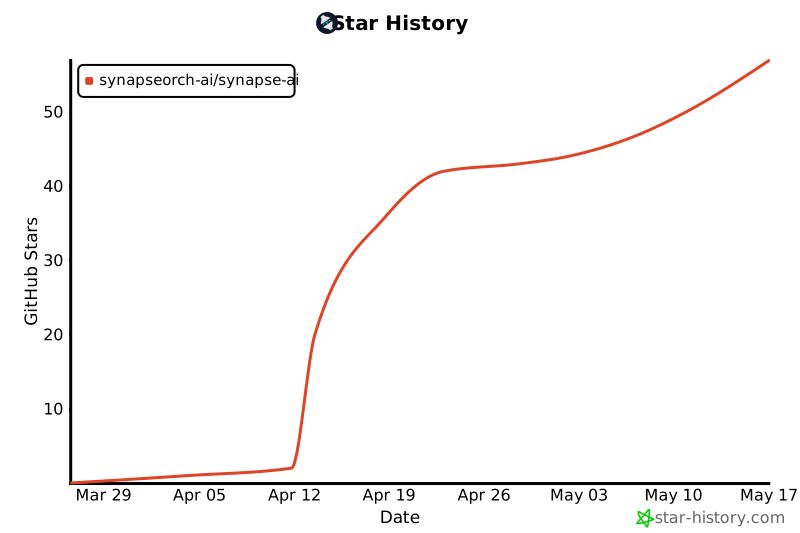](https://www.star-history.com/#synapseorch-ai/synapse-ai&type=date&legend=top-left)
|
|
631
152
|
|
|
632
153
|
---
|
|
633
154
|
|
|
634
|
-
### Environment Variables
|
|
635
|
-
|
|
636
|
-
```bash
|
|
637
|
-
# Copy and edit
|
|
638
|
-
cp .env.example .env
|
|
639
|
-
```
|
|
640
|
-
|
|
641
|
-
| Variable | Default | Description |
|
|
642
|
-
|---|---|---|
|
|
643
|
-
| `SYNAPSE_DATA_DIR` | `~/.synapse/data` | Where agents store files, memory, and state |
|
|
644
|
-
| `OLLAMA_BASE_URL` | `http://127.0.0.1:11434` | Local Ollama endpoint |
|
|
645
|
-
| `SYNAPSE_BACKEND_PORT` | `8765` | Backend API port |
|
|
646
|
-
| `SYNAPSE_FRONTEND_PORT` | `3000` | Frontend UI port |
|
|
647
|
-
| `BACKEND_URL` | `http://127.0.0.1:8765` | Backend URL as seen by Next.js server (set in Docker) |
|
|
648
|
-
| `CORS_ORIGINS` | `http://localhost:3000` | Allowed CORS origins |
|
|
649
|
-
|
|
650
|
-
---
|
|
651
|
-
|
|
652
|
-
## Manual Setup
|
|
653
|
-
|
|
654
|
-
### Backend
|
|
655
|
-
|
|
656
|
-
```bash
|
|
657
|
-
cd backend
|
|
658
|
-
python3.11 -m venv venv
|
|
659
|
-
source venv/bin/activate
|
|
660
|
-
pip install -r requirements.txt
|
|
661
|
-
python3.11 main.py
|
|
662
|
-
```
|
|
663
|
-
|
|
664
|
-
### Frontend
|
|
665
|
-
|
|
666
|
-
```bash
|
|
667
|
-
cd frontend
|
|
668
|
-
npm install
|
|
669
|
-
npm run dev
|
|
670
|
-
```
|
|
671
|
-
|
|
672
|
-
Open `http://localhost:<SYNAPSE_FRONTEND_PORT>` (default: `http://localhost:3000`)
|
|
673
|
-
|
|
674
|
-
---
|
|
675
|
-
|
|
676
|
-
## Upcoming Features (Roadmap)
|
|
677
|
-
|
|
678
|
-
We are constantly improving Synapse AI. Here are a few features currently in the pipeline:
|
|
679
|
-
|
|
680
|
-
- **Spawn Sub-Agent Tool:** Allow agents to natively spawn and delegate tasks to temporary sub-agents mid-execution.
|
|
681
|
-
- **Compact Conversations:** A conversation option optimized to handle large contexts smoothly, compressing message history automatically.
|
|
682
|
-
- **Global Variable:** Support for defining global variables that can be dynamically injected into agent prompts, orchestrations, custom tools, and MCP server environments.
|
|
683
|
-
---
|
|
684
|
-
|
|
685
155
|
## Contributing
|
|
686
156
|
|
|
687
157
|
See [CONTRIBUTING.md](CONTRIBUTING.md) for dev setup, architecture details, how to add MCP tool servers, and the PR checklist.
|
|
688
158
|
|
|
689
159
|
## License
|
|
690
160
|
|
|
691
|
-
Synapse AI is licensed under AGPL v3
|
|
692
|
-
|
|
693
|
-
AGPL-3.0-only — see [LICENSE](LICENSE)
|
|
161
|
+
Synapse AI is licensed under AGPL v3 — see [LICENSE](LICENSE)
|