summit-marker 2.0.0 → 3.0.2
This diff represents the content of publicly available package versions that have been released to one of the supported registries. The information contained in this diff is provided for informational purposes only and reflects changes between package versions as they appear in their respective public registries.
- package/README.md +425 -210
- package/package.json +2 -2
- package/src/backgrounds.js +16 -0
- package/src/box.js +73 -0
- package/src/colors.js +1 -1
- package/src/errors.js +34 -0
- package/src/gradients.js +84 -0
- package/src/index.js +73 -12
- package/src/logger.js +65 -0
- package/src/messages.js +39 -4
- package/src/progress.js +67 -0
- package/src/rgbGradient.js +48 -0
- package/src/spinner.js +83 -0
- package/src/table.js +57 -0
- package/src/text.js +16 -0
- package/src/themes.js +25 -0
- package/LICENSE +0 -47
package/README.md
CHANGED
|
@@ -5,376 +5,591 @@
|
|
|
5
5
|

|
|
6
6
|

|
|
7
7
|
|
|
8
|
-
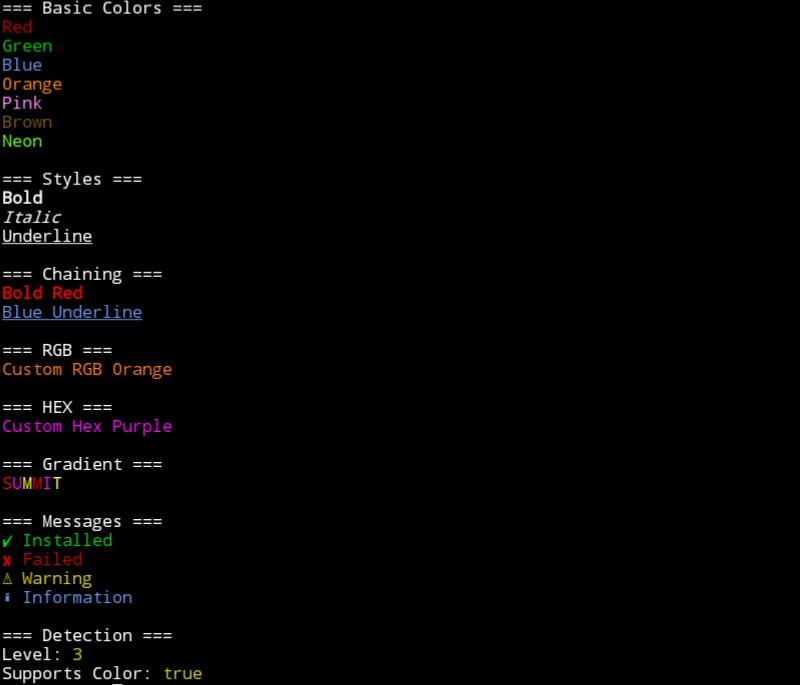
|
|
9
9
|
|
|
10
|
-
|
|
10
|
+
A zero-dependency terminal styling and CLI presentation toolkit for Node.js.
|
|
11
11
|
|
|
12
|
-
|
|
12
|
+
Marker gives developers everything needed to create beautiful terminal applications without installing multiple packages.
|
|
13
13
|
|
|
14
14
|
Built by **Summit**.
|
|
15
15
|
|
|
16
16
|
---
|
|
17
17
|
|
|
18
|
-
|
|
18
|
+
# Features
|
|
19
|
+
|
|
20
|
+
- Terminal colors
|
|
21
|
+
- Text styles
|
|
22
|
+
- RGB colors
|
|
23
|
+
- Full HEX colors
|
|
24
|
+
- True RGB gradients
|
|
25
|
+
- Gradient presets
|
|
26
|
+
- Themes
|
|
27
|
+
- Terminal boxes
|
|
28
|
+
- Styled messages
|
|
29
|
+
- Symbols
|
|
30
|
+
- Text utilities
|
|
31
|
+
- Progress bars
|
|
32
|
+
- Spinners
|
|
33
|
+
- Tables
|
|
34
|
+
- Logger system
|
|
35
|
+
- Terminal detection
|
|
36
|
+
- Developer utilities
|
|
19
37
|
|
|
20
|
-
|
|
21
|
-
import marker from "summit-marker";
|
|
38
|
+
---
|
|
22
39
|
|
|
23
|
-
|
|
40
|
+
# Why Marker?
|
|
24
41
|
|
|
25
|
-
|
|
26
|
-
```
|
|
42
|
+
Most terminal applications need multiple libraries for:
|
|
27
43
|
|
|
28
|
-
|
|
44
|
+
- colors
|
|
45
|
+
- formatting
|
|
46
|
+
- symbols
|
|
47
|
+
- loading states
|
|
48
|
+
- tables
|
|
49
|
+
- logging
|
|
50
|
+
- CLI presentation
|
|
29
51
|
|
|
30
|
-
|
|
52
|
+
Marker combines these features into one lightweight package.
|
|
31
53
|
|
|
32
|
-
|
|
33
|
-
- Runtime: Node.js
|
|
34
|
-
- Color support: True RGB
|
|
35
|
-
- Color range: 16,777,216 colors
|
|
54
|
+
Instead of:
|
|
36
55
|
|
|
37
|
-
|
|
56
|
+
```js
|
|
57
|
+
"\x1b[31mError\x1b[0m"
|
|
38
58
|
|
|
39
|
-
|
|
40
|
-
- Linux terminals ✅
|
|
41
|
-
- macOS terminals ✅
|
|
42
|
-
- Windows terminals ✅
|
|
43
|
-
- Termux/Android Node.js ✅
|
|
59
|
+
You can write:
|
|
44
60
|
|
|
45
|
-
|
|
61
|
+
marker.red("Error");
|
|
46
62
|
|
|
47
|
-
|
|
63
|
+
or:
|
|
48
64
|
|
|
49
|
-
|
|
50
|
-
- Added colors
|
|
51
|
-
- Added styles
|
|
52
|
-
- Added RGB/hex support
|
|
53
|
-
- Added gradients
|
|
54
|
-
- Added message helpers
|
|
65
|
+
marker.error("Build failed");
|
|
55
66
|
|
|
56
|
-
|
|
67
|
+
Marker focuses on:
|
|
57
68
|
|
|
58
|
-
|
|
69
|
+
simple APIs
|
|
59
70
|
|
|
60
|
-
|
|
61
|
-
|---|---|
|
|
62
|
-
| Colors | ✅ |
|
|
63
|
-
| RGB | ✅ |
|
|
64
|
-
| Hex | ✅ |
|
|
65
|
-
| Gradients | ✅ |
|
|
66
|
-
| Chaining | ✅ |
|
|
67
|
-
| Zero dependencies | ✅ |
|
|
68
|
-
| Manual ANSI codes | ❌ |
|
|
71
|
+
zero dependencies
|
|
69
72
|
|
|
70
|
-
|
|
73
|
+
cross-platform support
|
|
71
74
|
|
|
72
|
-
|
|
75
|
+
fast installation
|
|
73
76
|
|
|
74
|
-
|
|
77
|
+
beautiful CLI output
|
|
75
78
|
|
|
76
|
-
Instead of:
|
|
77
79
|
|
|
78
|
-
```js
|
|
79
|
-
"\x1b[31mError\x1b[0m"
|
|
80
|
-
```
|
|
81
80
|
|
|
82
|
-
|
|
81
|
+
---
|
|
83
82
|
|
|
84
|
-
|
|
85
|
-
marker.red("Error")
|
|
86
|
-
```
|
|
83
|
+
Marker vs Chalk
|
|
87
84
|
|
|
88
|
-
Marker
|
|
85
|
+
Feature Marker Chalk
|
|
89
86
|
|
|
90
|
-
|
|
87
|
+
Colors ✅ ✅
|
|
88
|
+
Styles ✅ ✅
|
|
89
|
+
RGB ✅ ✅
|
|
90
|
+
HEX colors ✅ ❌
|
|
91
|
+
True RGB gradients ✅ ❌
|
|
92
|
+
Gradient presets ✅ ❌
|
|
93
|
+
Themes ✅ ❌
|
|
94
|
+
Boxes ✅ ❌
|
|
95
|
+
Messages ✅ ❌
|
|
96
|
+
Symbols ✅ ❌
|
|
97
|
+
Text utilities ✅ ❌
|
|
98
|
+
Spinners ✅ ❌
|
|
99
|
+
Tables ✅ ❌
|
|
100
|
+
Logger ✅ ❌
|
|
101
|
+
Dependencies 0 Depends
|
|
91
102
|
|
|
92
|
-
## Features
|
|
93
|
-
|
|
94
|
-
- 🎨 Basic terminal colors
|
|
95
|
-
- 🌈 Extended color palette
|
|
96
|
-
- 🔗 Chainable styles
|
|
97
|
-
- ✨ Bold, italic, underline, and more
|
|
98
|
-
- 🎯 RGB true-color support
|
|
99
|
-
- 🔢 Hex color support
|
|
100
|
-
- 🌈 Gradient text
|
|
101
|
-
- ✅ Success, error, warning, and info messages
|
|
102
|
-
- 🖥️ Automatic color detection
|
|
103
|
-
- 📦 Zero dependencies
|
|
104
|
-
- ⚡ Lightweight and fast
|
|
105
|
-
- 🟦 TypeScript support
|
|
106
103
|
|
|
107
|
-
---
|
|
108
104
|
|
|
109
|
-
|
|
105
|
+
---
|
|
110
106
|
|
|
111
|
-
|
|
107
|
+
Installation
|
|
112
108
|
|
|
113
|
-
```bash
|
|
114
109
|
npm install summit-marker
|
|
115
|
-
|
|
110
|
+
|
|
116
111
|
|
|
117
112
|
---
|
|
118
113
|
|
|
119
|
-
|
|
114
|
+
Quick Start
|
|
120
115
|
|
|
121
|
-
```js
|
|
122
116
|
import marker from "summit-marker";
|
|
123
117
|
|
|
124
|
-
console.log(
|
|
125
|
-
|
|
126
|
-
|
|
127
|
-
```
|
|
118
|
+
console.log(
|
|
119
|
+
marker.green("Success")
|
|
120
|
+
);
|
|
128
121
|
|
|
129
|
-
|
|
122
|
+
console.log(
|
|
123
|
+
marker.bold.blue("Hello Marker")
|
|
124
|
+
);
|
|
130
125
|
|
|
131
|
-
|
|
126
|
+
console.log(
|
|
127
|
+
marker.success("Installed")
|
|
128
|
+
);
|
|
132
129
|
|
|
133
|
-
|
|
130
|
+
Output:
|
|
134
131
|
|
|
135
|
-
|
|
136
|
-
|
|
137
|
-
|
|
138
|
-
marker.bold.blue("Hello TypeScript");
|
|
132
|
+
Success
|
|
133
|
+
Hello Marker
|
|
134
|
+
✔ Installed
|
|
139
135
|
|
|
140
|
-
marker.rgb(255, 0, 0)("Red");
|
|
141
|
-
```
|
|
142
136
|
|
|
143
137
|
---
|
|
144
138
|
|
|
145
|
-
|
|
146
|
-
|
|
147
|
-
Marker includes many built-in colors:
|
|
139
|
+
Colors
|
|
148
140
|
|
|
149
|
-
```js
|
|
150
141
|
marker.red("Red");
|
|
142
|
+
|
|
151
143
|
marker.green("Green");
|
|
144
|
+
|
|
152
145
|
marker.blue("Blue");
|
|
146
|
+
|
|
153
147
|
marker.orange("Orange");
|
|
148
|
+
|
|
154
149
|
marker.pink("Pink");
|
|
155
|
-
|
|
150
|
+
|
|
156
151
|
marker.neon("Neon");
|
|
157
152
|
|
|
158
|
-
marker.gold("Gold");
|
|
159
|
-
marker.lime("Lime");
|
|
160
|
-
marker.teal("Teal");
|
|
161
|
-
marker.violet("Violet");
|
|
162
|
-
marker.magenta("Magenta");
|
|
163
|
-
marker.navy("Navy");
|
|
164
|
-
marker.skyBlue("Sky Blue");
|
|
165
|
-
marker.emerald("Emerald");
|
|
166
|
-
```
|
|
167
153
|
|
|
168
154
|
---
|
|
169
155
|
|
|
170
|
-
|
|
156
|
+
Styles
|
|
171
157
|
|
|
172
|
-
```js
|
|
173
158
|
marker.bold("Bold");
|
|
174
159
|
|
|
175
160
|
marker.italic("Italic");
|
|
176
161
|
|
|
177
162
|
marker.underline("Underline");
|
|
178
|
-
|
|
163
|
+
|
|
164
|
+
Combine styles:
|
|
165
|
+
|
|
166
|
+
marker.bold.red(
|
|
167
|
+
"Critical Error"
|
|
168
|
+
);
|
|
169
|
+
|
|
179
170
|
|
|
180
171
|
---
|
|
181
172
|
|
|
182
|
-
|
|
173
|
+
RGB
|
|
183
174
|
|
|
184
|
-
|
|
175
|
+
Marker supports true 24-bit RGB.
|
|
185
176
|
|
|
186
|
-
|
|
187
|
-
marker.bold.red("Critical Error");
|
|
177
|
+
That means:
|
|
188
178
|
|
|
189
|
-
|
|
179
|
+
16,777,216 possible colors
|
|
190
180
|
|
|
191
|
-
|
|
192
|
-
```
|
|
181
|
+
Example:
|
|
193
182
|
|
|
194
|
-
|
|
183
|
+
marker.rgb(
|
|
184
|
+
255,
|
|
185
|
+
120,
|
|
186
|
+
0
|
|
187
|
+
)(
|
|
188
|
+
"Orange"
|
|
189
|
+
);
|
|
195
190
|
|
|
196
|
-
## RGB Colors
|
|
197
191
|
|
|
198
|
-
|
|
192
|
+
---
|
|
199
193
|
|
|
200
|
-
|
|
201
|
-
marker.rgb(255, 120, 0)("Custom Orange");
|
|
202
|
-
```
|
|
194
|
+
HEX Colors
|
|
203
195
|
|
|
204
|
-
|
|
196
|
+
marker.hex(
|
|
197
|
+
"#ff8800"
|
|
198
|
+
)(
|
|
199
|
+
"Orange"
|
|
200
|
+
);
|
|
205
201
|
|
|
206
|
-
```
|
|
207
|
-
16,777,216 possible colors
|
|
208
|
-
```
|
|
209
202
|
|
|
210
203
|
---
|
|
211
204
|
|
|
212
|
-
|
|
205
|
+
Gradients
|
|
213
206
|
|
|
214
|
-
|
|
207
|
+
Basic gradient:
|
|
215
208
|
|
|
216
|
-
|
|
217
|
-
|
|
218
|
-
|
|
209
|
+
marker.gradient(
|
|
210
|
+
"SUMMIT"
|
|
211
|
+
);
|
|
219
212
|
|
|
220
|
-
|
|
213
|
+
True RGB gradient:
|
|
221
214
|
|
|
222
|
-
|
|
223
|
-
|
|
215
|
+
marker.rgbGradient(
|
|
216
|
+
"SUMMIT"
|
|
217
|
+
);
|
|
218
|
+
|
|
219
|
+
Gradient presets:
|
|
220
|
+
|
|
221
|
+
marker.gradients.rainbow(
|
|
222
|
+
"Rainbow"
|
|
223
|
+
);
|
|
224
|
+
|
|
225
|
+
marker.gradients.sunset(
|
|
226
|
+
"Sunset"
|
|
227
|
+
);
|
|
228
|
+
|
|
229
|
+
marker.gradients.ocean(
|
|
230
|
+
"Ocean"
|
|
231
|
+
);
|
|
224
232
|
|
|
225
|
-
marker.
|
|
233
|
+
marker.gradients.fire(
|
|
234
|
+
"Fire"
|
|
235
|
+
);
|
|
236
|
+
|
|
237
|
+
marker.gradients.neon(
|
|
238
|
+
"Neon"
|
|
239
|
+
);
|
|
226
240
|
|
|
227
|
-
marker.hex("#0000ff")("Blue");
|
|
228
|
-
```
|
|
229
241
|
|
|
230
242
|
---
|
|
231
243
|
|
|
232
|
-
|
|
244
|
+
Themes
|
|
233
245
|
|
|
234
|
-
Create
|
|
246
|
+
Create reusable terminal styles.
|
|
247
|
+
|
|
248
|
+
const theme =
|
|
249
|
+
marker.themes.default;
|
|
250
|
+
|
|
251
|
+
theme.primary(
|
|
252
|
+
"Primary"
|
|
253
|
+
);
|
|
254
|
+
|
|
255
|
+
theme.success(
|
|
256
|
+
"Success"
|
|
257
|
+
);
|
|
235
258
|
|
|
236
|
-
```js
|
|
237
|
-
marker.gradient("SUMMIT");
|
|
238
|
-
```
|
|
239
259
|
|
|
240
260
|
---
|
|
241
261
|
|
|
242
|
-
|
|
262
|
+
Boxes
|
|
243
263
|
|
|
244
|
-
|
|
264
|
+
Create terminal boxes:
|
|
245
265
|
|
|
246
|
-
|
|
247
|
-
|
|
266
|
+
marker.box(
|
|
267
|
+
"Hello Marker"
|
|
268
|
+
);
|
|
248
269
|
|
|
249
|
-
|
|
270
|
+
Example:
|
|
271
|
+
|
|
272
|
+
┌──────────────┐
|
|
273
|
+
│ Hello Marker │
|
|
274
|
+
└──────────────┘
|
|
275
|
+
|
|
276
|
+
|
|
277
|
+
---
|
|
278
|
+
|
|
279
|
+
Messages
|
|
280
|
+
|
|
281
|
+
Success
|
|
282
|
+
|
|
283
|
+
marker.success(
|
|
284
|
+
"Build complete"
|
|
285
|
+
);
|
|
250
286
|
|
|
251
|
-
|
|
287
|
+
Output:
|
|
252
288
|
|
|
253
|
-
|
|
254
|
-
```
|
|
289
|
+
✔ Build complete
|
|
255
290
|
|
|
256
|
-
|
|
291
|
+
Error
|
|
292
|
+
|
|
293
|
+
marker.error(
|
|
294
|
+
"Build failed"
|
|
295
|
+
);
|
|
296
|
+
|
|
297
|
+
Output:
|
|
257
298
|
|
|
258
|
-
```
|
|
259
|
-
✔ Package installed
|
|
260
299
|
✖ Build failed
|
|
261
|
-
|
|
262
|
-
|
|
263
|
-
|
|
300
|
+
|
|
301
|
+
Warning
|
|
302
|
+
|
|
303
|
+
marker.warning(
|
|
304
|
+
"Deprecated"
|
|
305
|
+
);
|
|
306
|
+
|
|
307
|
+
Output:
|
|
308
|
+
|
|
309
|
+
⚠ Deprecated
|
|
310
|
+
|
|
311
|
+
Info
|
|
312
|
+
|
|
313
|
+
marker.info(
|
|
314
|
+
"Searching"
|
|
315
|
+
);
|
|
316
|
+
|
|
317
|
+
Output:
|
|
318
|
+
|
|
319
|
+
ℹ Searching
|
|
320
|
+
|
|
264
321
|
|
|
265
322
|
---
|
|
266
323
|
|
|
267
|
-
|
|
324
|
+
Symbols
|
|
268
325
|
|
|
269
|
-
|
|
326
|
+
marker.symbols.success;
|
|
270
327
|
|
|
271
|
-
|
|
272
|
-
|
|
328
|
+
marker.symbols.error;
|
|
329
|
+
|
|
330
|
+
marker.symbols.loading;
|
|
331
|
+
|
|
332
|
+
Available symbols:
|
|
333
|
+
|
|
334
|
+
check
|
|
335
|
+
cross
|
|
336
|
+
star
|
|
337
|
+
arrowRight
|
|
338
|
+
loading
|
|
339
|
+
block
|
|
340
|
+
|
|
341
|
+
|
|
342
|
+
---
|
|
343
|
+
|
|
344
|
+
Text Utilities
|
|
345
|
+
|
|
346
|
+
CAPS:
|
|
273
347
|
|
|
274
|
-
|
|
275
|
-
|
|
348
|
+
marker.caps(
|
|
349
|
+
"hello marker"
|
|
350
|
+
);
|
|
351
|
+
|
|
352
|
+
Lowercase:
|
|
353
|
+
|
|
354
|
+
marker.lower(
|
|
355
|
+
"HELLO"
|
|
356
|
+
);
|
|
357
|
+
|
|
358
|
+
Title case:
|
|
359
|
+
|
|
360
|
+
marker.title(
|
|
361
|
+
"hello marker"
|
|
362
|
+
);
|
|
363
|
+
|
|
364
|
+
|
|
365
|
+
---
|
|
366
|
+
|
|
367
|
+
Progress
|
|
368
|
+
|
|
369
|
+
Marker supports terminal progress displays.
|
|
370
|
+
|
|
371
|
+
Example:
|
|
372
|
+
|
|
373
|
+
████████░░ 80%
|
|
374
|
+
|
|
375
|
+
|
|
376
|
+
---
|
|
377
|
+
|
|
378
|
+
Spinners
|
|
379
|
+
|
|
380
|
+
Marker includes npm-style loading spinners.
|
|
381
|
+
|
|
382
|
+
Example:
|
|
383
|
+
|
|
384
|
+
const spinner =
|
|
385
|
+
marker.spinner(
|
|
386
|
+
"Installing"
|
|
387
|
+
);
|
|
388
|
+
|
|
389
|
+
spinner.start();
|
|
390
|
+
|
|
391
|
+
setTimeout(() => {
|
|
392
|
+
spinner.success(
|
|
393
|
+
"Installed"
|
|
394
|
+
);
|
|
395
|
+
}, 2000);
|
|
396
|
+
|
|
397
|
+
Useful for:
|
|
398
|
+
|
|
399
|
+
installers
|
|
400
|
+
|
|
401
|
+
build tools
|
|
402
|
+
|
|
403
|
+
package managers
|
|
404
|
+
|
|
405
|
+
CLI applications
|
|
406
|
+
|
|
407
|
+
|
|
408
|
+
|
|
409
|
+
---
|
|
410
|
+
|
|
411
|
+
Tables
|
|
412
|
+
|
|
413
|
+
Create terminal tables:
|
|
414
|
+
|
|
415
|
+
marker.table([
|
|
416
|
+
[
|
|
417
|
+
"Package",
|
|
418
|
+
"Status"
|
|
419
|
+
],
|
|
420
|
+
[
|
|
421
|
+
"Marker",
|
|
422
|
+
"Ready"
|
|
423
|
+
]
|
|
424
|
+
]);
|
|
425
|
+
|
|
426
|
+
Useful for:
|
|
427
|
+
|
|
428
|
+
dashboards
|
|
429
|
+
|
|
430
|
+
reports
|
|
431
|
+
|
|
432
|
+
developer tools
|
|
433
|
+
|
|
434
|
+
|
|
435
|
+
|
|
436
|
+
---
|
|
437
|
+
|
|
438
|
+
Logger
|
|
439
|
+
|
|
440
|
+
Marker includes a developer-focused logger.
|
|
441
|
+
|
|
442
|
+
marker.logger.info(
|
|
443
|
+
"Starting server"
|
|
444
|
+
);
|
|
445
|
+
|
|
446
|
+
marker.logger.success(
|
|
447
|
+
"Connected"
|
|
448
|
+
);
|
|
449
|
+
|
|
450
|
+
marker.logger.warning(
|
|
451
|
+
"Using fallback"
|
|
452
|
+
);
|
|
453
|
+
|
|
454
|
+
marker.logger.error(
|
|
455
|
+
"Failed"
|
|
456
|
+
);
|
|
457
|
+
|
|
458
|
+
Logger levels:
|
|
459
|
+
|
|
460
|
+
info
|
|
461
|
+
success
|
|
462
|
+
warning
|
|
463
|
+
error
|
|
464
|
+
debug
|
|
465
|
+
|
|
466
|
+
|
|
467
|
+
---
|
|
468
|
+
|
|
469
|
+
Terminal Detection
|
|
470
|
+
|
|
471
|
+
marker.level;
|
|
472
|
+
|
|
473
|
+
marker.supportsColor;
|
|
276
474
|
|
|
277
475
|
Levels:
|
|
278
476
|
|
|
279
|
-
```
|
|
280
477
|
0 - Disabled
|
|
281
478
|
1 - Basic colors
|
|
282
479
|
2 - 256 colors
|
|
283
|
-
3 - True RGB
|
|
284
|
-
|
|
480
|
+
3 - True RGB
|
|
481
|
+
|
|
482
|
+
|
|
483
|
+
---
|
|
484
|
+
|
|
485
|
+
Environment Variables
|
|
285
486
|
|
|
286
487
|
Disable colors:
|
|
287
488
|
|
|
288
|
-
```bash
|
|
289
489
|
NO_COLOR=1 node app.js
|
|
290
|
-
```
|
|
291
490
|
|
|
292
|
-
Force
|
|
491
|
+
Force colors:
|
|
293
492
|
|
|
294
|
-
```bash
|
|
295
493
|
FORCE_COLOR=3 node app.js
|
|
296
|
-
|
|
494
|
+
|
|
297
495
|
|
|
298
496
|
---
|
|
299
497
|
|
|
300
|
-
|
|
498
|
+
Zero Dependencies
|
|
301
499
|
|
|
302
|
-
|
|
500
|
+
Marker uses:
|
|
303
501
|
|
|
304
|
-
|
|
305
|
-
node examples/BestColors.js
|
|
306
|
-
```
|
|
502
|
+
Dependencies: 0
|
|
307
503
|
|
|
308
|
-
|
|
504
|
+
Benefits:
|
|
309
505
|
|
|
310
|
-
|
|
311
|
-
=== Basic Colors ===
|
|
312
|
-
Red
|
|
313
|
-
Green
|
|
314
|
-
Blue
|
|
315
|
-
Orange
|
|
316
|
-
Pink
|
|
317
|
-
Brown
|
|
318
|
-
Neon
|
|
506
|
+
smaller installs
|
|
319
507
|
|
|
320
|
-
|
|
321
|
-
Bold
|
|
322
|
-
Italic
|
|
323
|
-
Underline
|
|
508
|
+
fewer security risks
|
|
324
509
|
|
|
325
|
-
|
|
326
|
-
Bold Red
|
|
327
|
-
Blue Underline
|
|
510
|
+
faster setup
|
|
328
511
|
|
|
329
|
-
|
|
330
|
-
Custom RGB Orange
|
|
512
|
+
fewer dependency conflicts
|
|
331
513
|
|
|
332
|
-
=== HEX ===
|
|
333
|
-
Custom Hex Purple
|
|
334
514
|
|
|
335
|
-
=== Gradient ===
|
|
336
|
-
SUMMIT
|
|
337
|
-
```
|
|
338
515
|
|
|
339
516
|
---
|
|
340
517
|
|
|
341
|
-
|
|
518
|
+
Project Structure
|
|
342
519
|
|
|
343
|
-
```
|
|
344
520
|
summit-marker/
|
|
521
|
+
│
|
|
345
522
|
├── src/
|
|
346
523
|
│ ├── index.js
|
|
347
524
|
│ ├── colors.js
|
|
348
525
|
│ ├── styles.js
|
|
349
526
|
│ ├── messages.js
|
|
350
|
-
│
|
|
527
|
+
│ ├── gradients.js
|
|
528
|
+
│ ├── themes.js
|
|
529
|
+
│ ├── box.js
|
|
530
|
+
│ ├── text.js
|
|
531
|
+
│ ├── spinner.js
|
|
532
|
+
│ ├── table.js
|
|
533
|
+
│ └── logger.js
|
|
534
|
+
│
|
|
351
535
|
├── examples/
|
|
352
|
-
│ └── BestColors.js
|
|
353
536
|
├── README.md
|
|
537
|
+
├── EULA.md
|
|
354
538
|
└── package.json
|
|
355
|
-
|
|
539
|
+
|
|
356
540
|
|
|
357
541
|
---
|
|
358
542
|
|
|
359
|
-
|
|
543
|
+
Changelog
|
|
544
|
+
|
|
545
|
+
3.0.2
|
|
546
|
+
|
|
547
|
+
Added:
|
|
548
|
+
|
|
549
|
+
Spinner system
|
|
550
|
+
|
|
551
|
+
Terminal tables
|
|
552
|
+
|
|
553
|
+
Logger utilities
|
|
554
|
+
|
|
555
|
+
Developer utilities
|
|
556
|
+
|
|
557
|
+
Improved CLI output
|
|
558
|
+
|
|
559
|
+
|
|
560
|
+
3.0.0
|
|
360
561
|
|
|
361
|
-
|
|
562
|
+
Added:
|
|
563
|
+
|
|
564
|
+
Theme system
|
|
565
|
+
|
|
566
|
+
Gradient presets
|
|
567
|
+
|
|
568
|
+
True RGB gradients
|
|
569
|
+
|
|
570
|
+
Box formatting
|
|
571
|
+
|
|
572
|
+
Text utilities
|
|
573
|
+
|
|
574
|
+
Expanded symbols
|
|
362
575
|
|
|
363
|
-
- Node.js
|
|
364
|
-
- JavaScript ES Modules
|
|
365
|
-
- ANSI terminal formatting
|
|
366
|
-
- TypeScript declarations
|
|
367
576
|
|
|
368
|
-
No external dependencies are required.
|
|
369
577
|
|
|
370
578
|
---
|
|
371
579
|
|
|
372
|
-
|
|
580
|
+
License
|
|
581
|
+
|
|
582
|
+
Marker is licensed under the Summit EULA.
|
|
583
|
+
|
|
584
|
+
See:
|
|
585
|
+
|
|
586
|
+
EULA.md
|
|
373
587
|
|
|
374
|
-
UNLICENSED
|
|
375
588
|
|
|
376
589
|
---
|
|
377
590
|
|
|
378
|
-
|
|
591
|
+
Built By Summit
|
|
592
|
+
|
|
593
|
+
Marker is developed and maintained by Summit.
|
|
379
594
|
|
|
380
|
-
|
|
595
|
+
Creating lightweight developer tools with simple, powerful APIs.
|