stream-deck-profile-generator 1.0.0
This diff represents the content of publicly available package versions that have been released to one of the supported registries. The information contained in this diff is provided for informational purposes only and reflects changes between package versions as they appear in their respective public registries.
- package/LICENSE +21 -0
- package/README.md +232 -0
- package/dist/cli.js +164 -0
- package/dist/index.d.ts +85 -0
- package/dist/index.js +6 -0
- package/dist/shared/chunk-kjhm4njg.js +5247 -0
- package/package.json +91 -0
package/LICENSE
ADDED
|
@@ -0,0 +1,21 @@
|
|
|
1
|
+
MIT License
|
|
2
|
+
|
|
3
|
+
Copyright (c) 2026 David Taylor
|
|
4
|
+
|
|
5
|
+
Permission is hereby granted, free of charge, to any person obtaining a copy
|
|
6
|
+
of this software and associated documentation files (the "Software"), to deal
|
|
7
|
+
in the Software without restriction, including without limitation the rights
|
|
8
|
+
to use, copy, modify, merge, publish, distribute, sublicense, and/or sell
|
|
9
|
+
copies of the Software, and to permit persons to whom the Software is
|
|
10
|
+
furnished to do so, subject to the following conditions:
|
|
11
|
+
|
|
12
|
+
The above copyright notice and this permission notice shall be included in all
|
|
13
|
+
copies or substantial portions of the Software.
|
|
14
|
+
|
|
15
|
+
THE SOFTWARE IS PROVIDED "AS IS", WITHOUT WARRANTY OF ANY KIND, EXPRESS OR
|
|
16
|
+
IMPLIED, INCLUDING BUT NOT LIMITED TO THE WARRANTIES OF MERCHANTABILITY,
|
|
17
|
+
FITNESS FOR A PARTICULAR PURPOSE AND NONINFRINGEMENT. IN NO EVENT SHALL THE
|
|
18
|
+
AUTHORS OR COPYRIGHT HOLDERS BE LIABLE FOR ANY CLAIM, DAMAGES OR OTHER
|
|
19
|
+
LIABILITY, WHETHER IN AN ACTION OF CONTRACT, TORT OR OTHERWISE, ARISING FROM,
|
|
20
|
+
OUT OF OR IN CONNECTION WITH THE SOFTWARE OR THE USE OR OTHER DEALINGS IN THE
|
|
21
|
+
SOFTWARE.
|
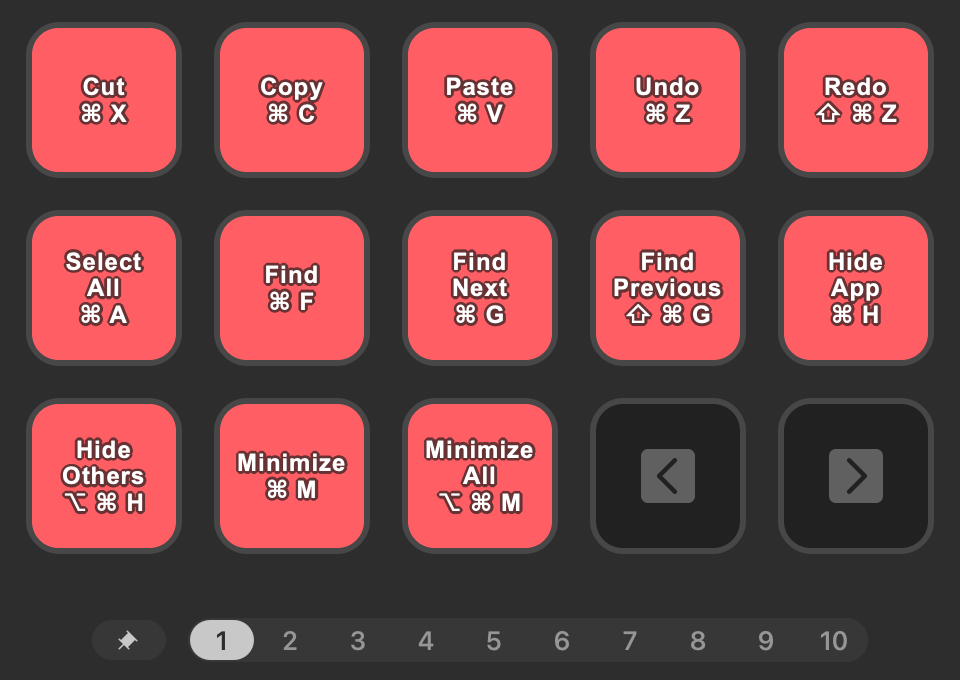
package/README.md
ADDED
|
@@ -0,0 +1,232 @@
|
|
|
1
|
+
# Stream Deck Profile Generator
|
|
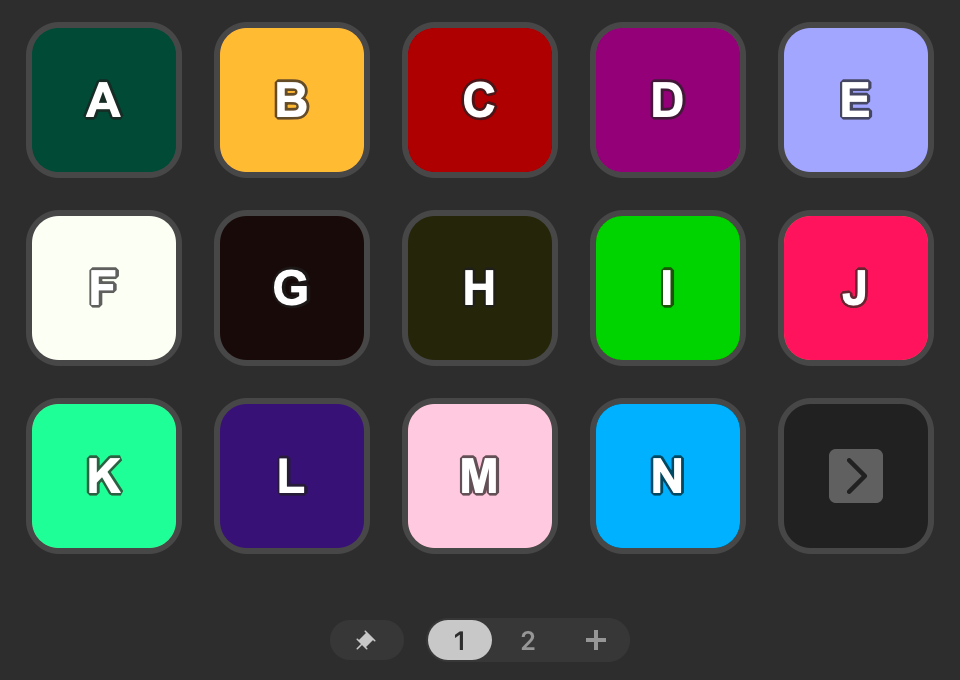
2
|
+
|
|
3
|
+
|
|
4
|
+
|
|
5
|
+
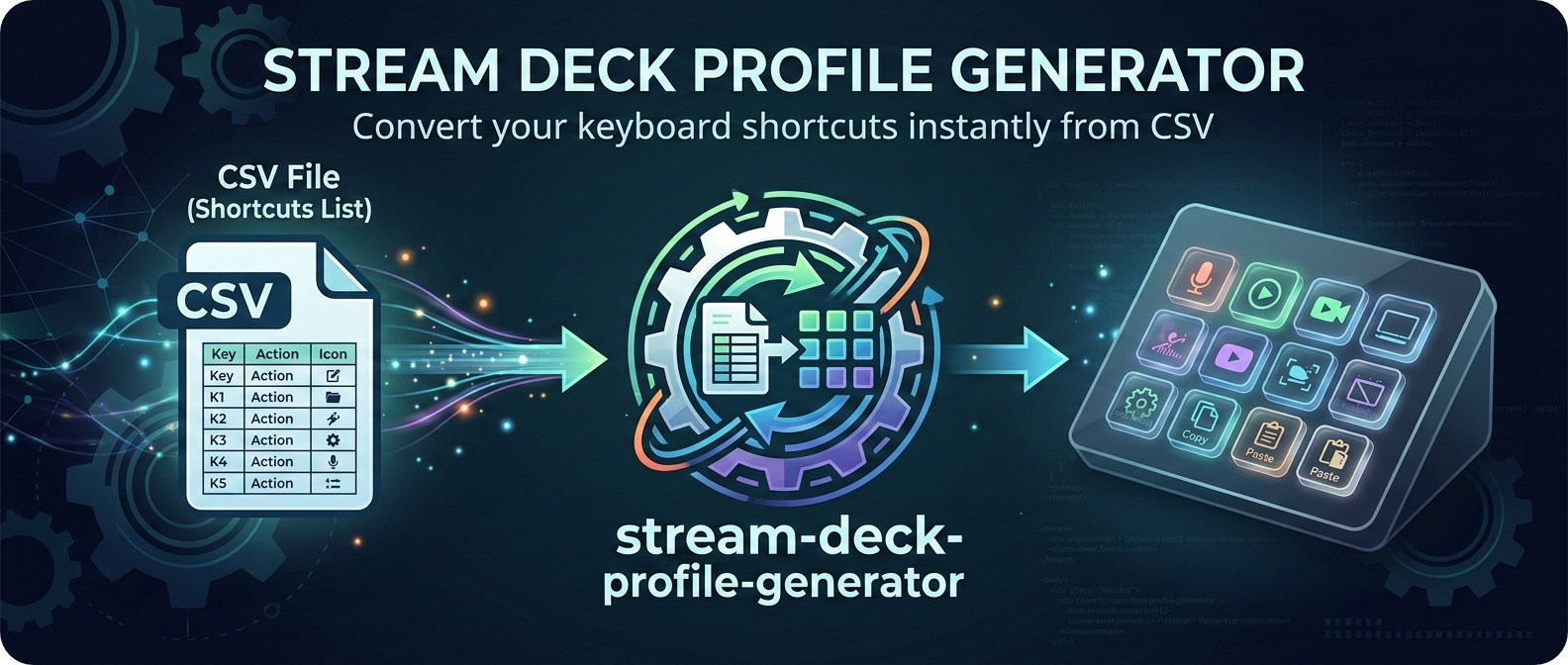
Generate custom Stream Deck profiles for any application by importing a CSV of hotkeys / keyboard shortcuts.
|
|
6
|
+
|
|
7
|
+
## Usage
|
|
8
|
+
|
|
9
|
+
Create a CSV file with the following columns:
|
|
10
|
+
|
|
11
|
+
- `Hotkey`: The keyboard shortcut (e.g. `Ctrl C`)
|
|
12
|
+
- `Label`: The label to display on the button (e.g. `Copy`)
|
|
13
|
+
- `Page`: The name of the page to place the button on (e.g. `Page One`) _(optional)_
|
|
14
|
+
- `Id`: A unique identifier for the button (e.g. `copy`) _(optional)_
|
|
15
|
+
- `Color`: The button color (e.g. `red` or `#FF0000`) _(optional)_
|
|
16
|
+
|
|
17
|
+
If any of these optional columns are omitted, sensible defaults will be used:
|
|
18
|
+
|
|
19
|
+
- `Page`: Pages will be created as needed to fit all buttons (including space for navigation buttons)
|
|
20
|
+
- `Id`: A unique ID will be generated based on the label
|
|
21
|
+
- `Color`: Default button color will be used
|
|
22
|
+
|
|
23
|
+
Run the generator with your CSV file:
|
|
24
|
+
|
|
25
|
+
```shell
|
|
26
|
+
stream-deck-profile-generator --input hotkeys.csv
|
|
27
|
+
```
|
|
28
|
+
|
|
29
|
+
Or specify any of the available options:
|
|
30
|
+
|
|
31
|
+
```shell
|
|
32
|
+
stream-deck-profile-generator \
|
|
33
|
+
--input hotkeys.csv \
|
|
34
|
+
--output MyProfile.streamDeckProfile \
|
|
35
|
+
--profile-name "My Custom Profile" \
|
|
36
|
+
--app-path '/Applications/YourApp.app' \
|
|
37
|
+
--device mk \
|
|
38
|
+
--button-style basic \
|
|
39
|
+
--label-style both \
|
|
40
|
+
--label-position middle \
|
|
41
|
+
--bg-color black \
|
|
42
|
+
--text-color white \
|
|
43
|
+
--font-size 14 \
|
|
44
|
+
--icons-dir ~/path/to/icons
|
|
45
|
+
```
|
|
46
|
+
|
|
47
|
+
## CLI Options
|
|
48
|
+
|
|
49
|
+
| Option | Description | Default |
|
|
50
|
+
| ----------------------------- | ----------------------------------------------------------------------------------------- | ------------------------------------ |
|
|
51
|
+
| `--input <path>` | Path to the input CSV file | _(required)_ |
|
|
52
|
+
| `--output <path>` | Path to the output `.streamDeckProfile` file | `<input-filename>.streamDeckProfile` |
|
|
53
|
+
| `--profile-name <name>` | Name of the profile | `<input-filename>` |
|
|
54
|
+
| `--app-path <path>` | Path to the application to switch to for this profile | _(optional)_ |
|
|
55
|
+
| `--device <type>` | Stream Deck model (e.g. `mk`, `xl`, `mini`) | `mk` |
|
|
56
|
+
| `--button-style <style>` | Button style (e.g. `basic`, `border`, `rainbow`, `fill`) | `basic` |
|
|
57
|
+
| `--label-style <style>` | Label style (e.g. `label`, `hotkey`, `both`, `none`) | `both` |
|
|
58
|
+
| `--label-position <position>` | Label vertical position (e.g. `top`, `middle`, `bottom`) | `middle` |
|
|
59
|
+
| `--bg-color <color>` | Default button background color (e.g. `red`, `#FF0000`) | `black` |
|
|
60
|
+
| `--text-color <color>` | Default button text color (e.g. `white`, `#FFFFFF`) | `white` |
|
|
61
|
+
| `--font-size <size>` | Default button font size | `14` |
|
|
62
|
+
| `--icons-dir <path>` | Path to a directory containing SVG, PNG, JPG, GIF or WEBP icons. Matches on the hotkey id | _(optional)_ |
|
|
63
|
+
| `--icon-padding <percent>` | Padding around icons as a percentage of the button size | `10` |
|
|
64
|
+
|
|
65
|
+
## Button Styles
|
|
66
|
+
|
|
67
|
+
Button styles are defined in [docs/button-styles/](docs/button-styles/):
|
|
68
|
+
|
|
69
|
+
| Preview | Style | Description |
|
|
70
|
+
| ---------------------------------------------------------------------------------------------------------------------- | --------- | --------------------------------------------------------------- |
|
|
71
|
+
|  | `basic` | Button with a dark gradient background color |
|
|
72
|
+
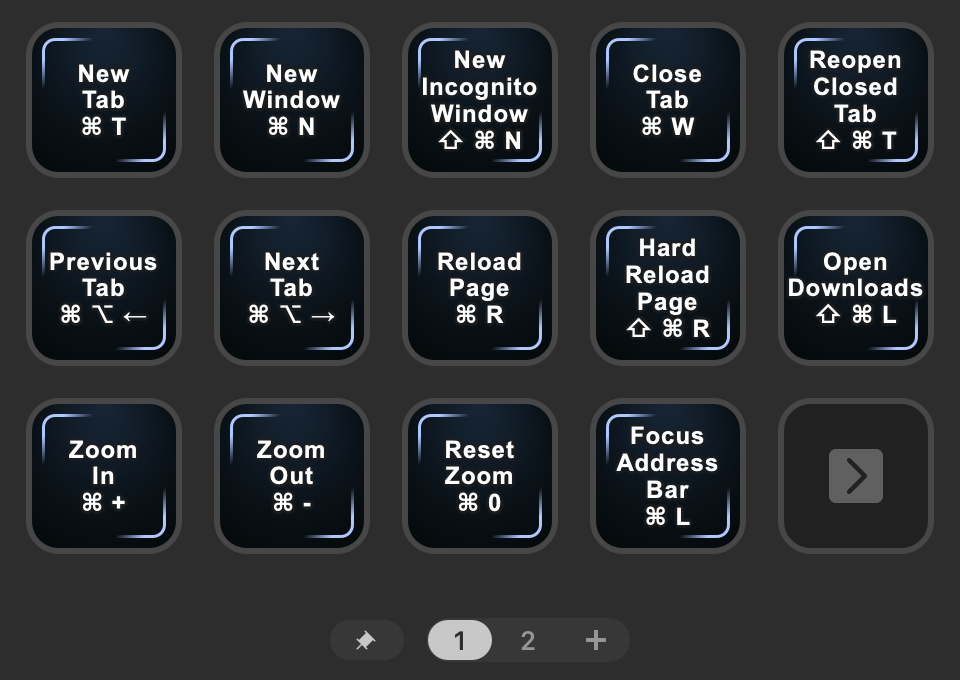
| 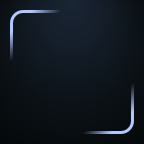 | `border` | Button with a border around the label |
|
|
73
|
+
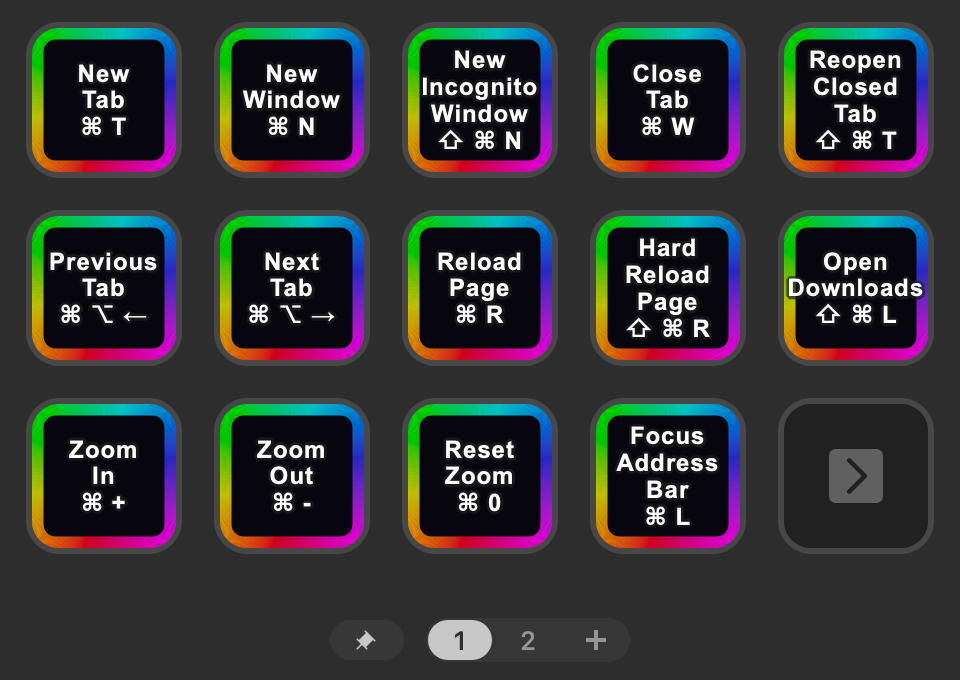
| 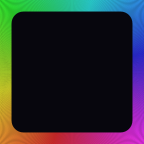 | `rainbow` | Button with a rainbow border |
|
|
74
|
+
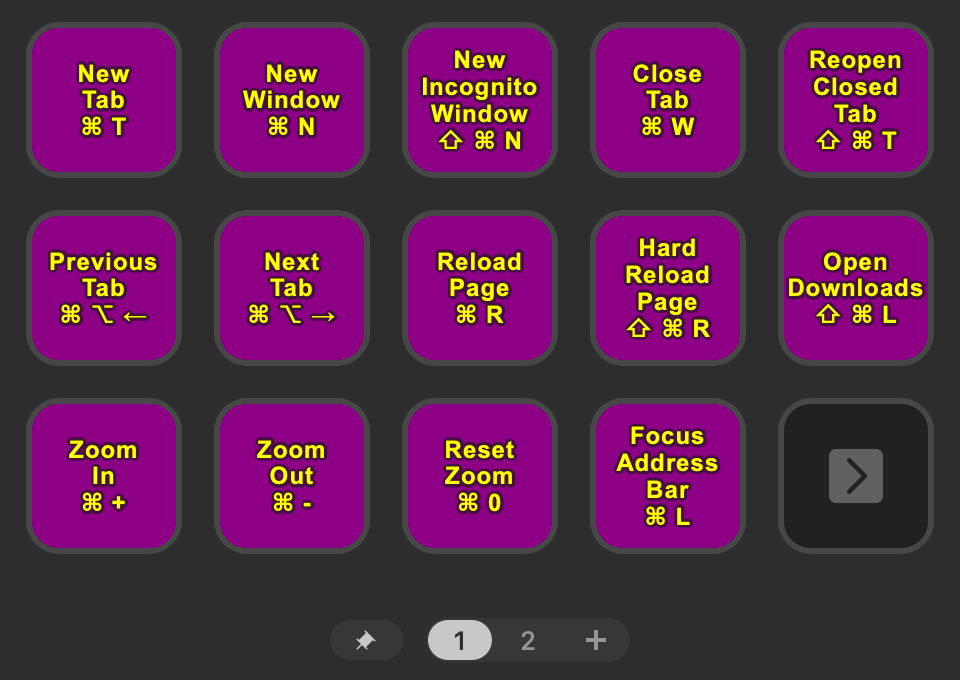
|  | `fill` | Button with a filled background color (defined by `--bg-color`) |
|
|
75
|
+
|
|
76
|
+
## Examples
|
|
77
|
+
|
|
78
|
+
Some example profiles are available in the [examples/](examples/) directory.
|
|
79
|
+
|
|
80
|
+
### Chrome Hotkeys (macOS)
|
|
81
|
+
|
|
82
|
+
- Input: [chrome-hotkeys-macos.csv](examples/chrome-hotkeys-macos.csv)
|
|
83
|
+
- Generated Profile: [chrome-hotkeys-macos.streamDeckProfile](examples/chrome-hotkeys-macos.streamDeckProfile)
|
|
84
|
+
|
|
85
|
+
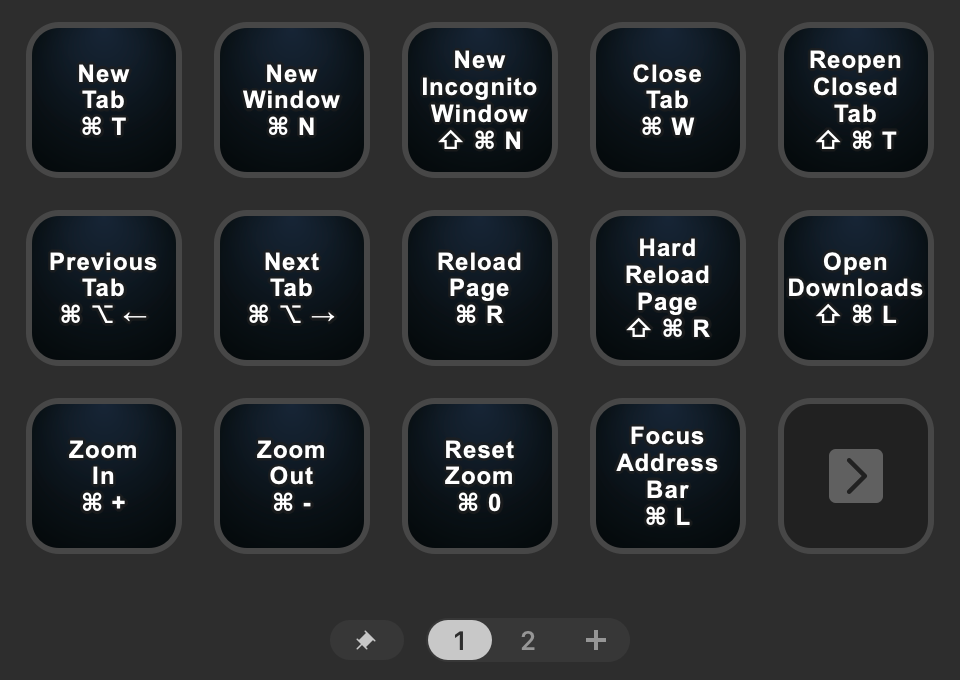
#### Basic Button Style
|
|
86
|
+
|
|
87
|
+
|
|
88
|
+
|
|
89
|
+
```shell
|
|
90
|
+
stream-deck-profile-generator --input examples/chrome-hotkeys-macos.csv --profile-name "Chrome Hotkeys (macOS)" --app-path "/Applications/Google Chrome.app"
|
|
91
|
+
```
|
|
92
|
+
|
|
93
|
+
#### Border Button Style
|
|
94
|
+
|
|
95
|
+
|
|
96
|
+
|
|
97
|
+
```shell
|
|
98
|
+
stream-deck-profile-generator --input examples/chrome-hotkeys-macos.csv --button-style border
|
|
99
|
+
```
|
|
100
|
+
|
|
101
|
+
#### Rainbow Button Style
|
|
102
|
+
|
|
103
|
+
|
|
104
|
+
|
|
105
|
+
```shell
|
|
106
|
+
stream-deck-profile-generator --input examples/chrome-hotkeys-macos.csv --button-style rainbow
|
|
107
|
+
```
|
|
108
|
+
|
|
109
|
+
#### Fill Button Style (Custom Colors)
|
|
110
|
+
|
|
111
|
+
|
|
112
|
+
|
|
113
|
+
```shell
|
|
114
|
+
stream-deck-profile-generator --input examples/chrome-hotkeys-macos.csv --bg-color purple --text-color yellow
|
|
115
|
+
```
|
|
116
|
+
|
|
117
|
+
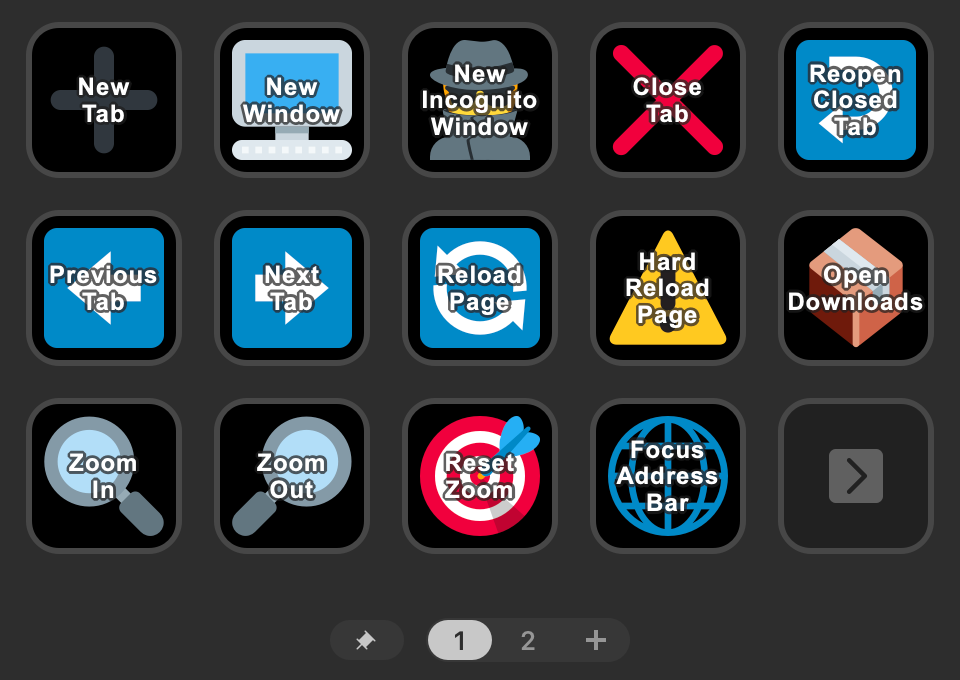
### Chrome Hotkeys (Windows) with Icons
|
|
118
|
+
|
|
119
|
+
- Input: [chrome-hotkeys-windows.csv](examples/chrome-hotkeys-windows.csv)
|
|
120
|
+
- Generated Profile: [chrome-hotkeys-windows.streamDeckProfile](examples/chrome-hotkeys-windows.streamDeckProfile)
|
|
121
|
+
|
|
122
|
+
This includes an `Id` column to match against icon filenames in the `--icon-path` directory.
|
|
123
|
+
|
|
124
|
+
This example uses [Twemoji](https://github.com/twitter/twemoji) SVG icons from [boywithkeyboard-archive/twemoji_svg](https://github.com/boywithkeyboard-archive/twemoji_svg):
|
|
125
|
+
|
|
126
|
+
|
|
127
|
+
|
|
128
|
+
```shell
|
|
129
|
+
stream-deck-profile-generator --input examples/chrome-hotkeys-windows.csv --icons-dir ~/path/to/twemoji_svg/files --label-style label
|
|
130
|
+
```
|
|
131
|
+
|
|
132
|
+
### Navigation Buttons
|
|
133
|
+
|
|
134
|
+
- Input: [macos-hotkeys.csv](examples/macos-hotkeys.csv)
|
|
135
|
+
- Generated Profile: [macos-hotkeys.streamDeckProfile](examples/macos-hotkeys.streamDeckProfile)
|
|
136
|
+
|
|
137
|
+
If there are more than 2 pages, Previous/Next navigation buttons will be automatically added to each page in the bottom right corner. This example also demonstrates using a `Page` column to group buttons onto different pages:
|
|
138
|
+
|
|
139
|
+
|
|
140
|
+
|
|
141
|
+
```shell
|
|
142
|
+
stream-deck-profile-generator --input examples/macos-hotkeys.csv
|
|
143
|
+
```
|
|
144
|
+
|
|
145
|
+
### Customising Individual Buttons
|
|
146
|
+
|
|
147
|
+
- Input: [rainbow-virtual-keyboard.csv](examples/rainbow-virtual-keyboard.csv)
|
|
148
|
+
- Generated Profile: [rainbow-virtual-keyboard.streamDeckProfile](examples/rainbow-virtual-keyboard.streamDeckProfile)
|
|
149
|
+
|
|
150
|
+
This includes a `Color` column to customise individual button colors:
|
|
151
|
+
|
|
152
|
+
|
|
153
|
+
|
|
154
|
+
```shell
|
|
155
|
+
stream-deck-profile-generator --input examples/rainbow-virtual-keyboard.csv --font-size 24 --label-style label
|
|
156
|
+
```
|
|
157
|
+
|
|
158
|
+
## Hotkeys
|
|
159
|
+
|
|
160
|
+
The parser accepts various formats and aliases. Use either a space or `+` to separate keys.
|
|
161
|
+
|
|
162
|
+
Some common supported keys are:
|
|
163
|
+
|
|
164
|
+
- `Meta`, `Cmd`, `Command`, `Windows`, `Win`, `⌘`, `⊞`
|
|
165
|
+
- `Control`, `Ctrl`, `^`
|
|
166
|
+
- `Alt`, `Option`, `⌥`
|
|
167
|
+
- `Shift`, `⇧`
|
|
168
|
+
- `Enter`, `Return`, `↵`
|
|
169
|
+
- `Escape`, `Esc`, `⎋`
|
|
170
|
+
- `Backspace`, `⌫`
|
|
171
|
+
- `Tab`, `⇥`
|
|
172
|
+
- `ArrowUp`, `ArrowDown`, `ArrowLeft`, `ArrowRight`, `↑`, `↓`, `←`, `→`
|
|
173
|
+
- `Space`, `␣`
|
|
174
|
+
- `CapsLock`, `⇪`
|
|
175
|
+
- `PageUp`, `PageDown`, `Home`, `End`, `⇞`, `⇟`, `⇱`, `⇲`
|
|
176
|
+
- `MediaPlayPause`, `MediaPlayPause`, `MediaPause`, `MediaStop`, `MediaTrackPrevious`, `MediaTrackNext`, `▶`, `⏯`, `⏸`, `⏹`, `⏮`, `⏭`
|
|
177
|
+
|
|
178
|
+
For example, all of the following are equivalent:
|
|
179
|
+
|
|
180
|
+
- `Meta + C`
|
|
181
|
+
- `Cmd C`
|
|
182
|
+
- `Command C`
|
|
183
|
+
- `⌘ C` - _(unicode characters supported)_
|
|
184
|
+
- `Windows C`
|
|
185
|
+
- `Win C`
|
|
186
|
+
- `⊞ C`
|
|
187
|
+
- `cmd c` - _(case insensitive)_
|
|
188
|
+
- `Command + C` - _(using `+` instead of space)_
|
|
189
|
+
|
|
190
|
+
See [Key values for keyboard events on MDN](https://developer.mozilla.org/en-US/docs/Web/API/UI_Events/Keyboard_event_key_values) for a list of valid key values and [`hotkey-aliases.ts`](src/utils/hotkey-aliases.ts) for a list of supported aliases.
|
|
191
|
+
|
|
192
|
+
## Development
|
|
193
|
+
|
|
194
|
+
To install dependencies:
|
|
195
|
+
|
|
196
|
+
```shell
|
|
197
|
+
bun install
|
|
198
|
+
```
|
|
199
|
+
|
|
200
|
+
To run:
|
|
201
|
+
|
|
202
|
+
```shell
|
|
203
|
+
bun run generate --input path/to/hotkeys.csv --output MyProfile.streamDeckProfile
|
|
204
|
+
```
|
|
205
|
+
|
|
206
|
+
To test:
|
|
207
|
+
|
|
208
|
+
```shell
|
|
209
|
+
bun test
|
|
210
|
+
```
|
|
211
|
+
|
|
212
|
+
To run linting and formatting checks (with auto-fixing):
|
|
213
|
+
|
|
214
|
+
```shell
|
|
215
|
+
bun fix
|
|
216
|
+
```
|
|
217
|
+
|
|
218
|
+
To regenerate example profiles:
|
|
219
|
+
|
|
220
|
+
```shell
|
|
221
|
+
bun run generate:examples
|
|
222
|
+
```
|
|
223
|
+
|
|
224
|
+
To generate button style images:
|
|
225
|
+
|
|
226
|
+
```shell
|
|
227
|
+
bun run generate:button-styles
|
|
228
|
+
```
|
|
229
|
+
|
|
230
|
+
## Maintainers
|
|
231
|
+
|
|
232
|
+
- [David Taylor](https://github.com/tayles)
|
package/dist/cli.js
ADDED
|
@@ -0,0 +1,164 @@
|
|
|
1
|
+
#!/usr/bin/env node
|
|
2
|
+
import {
|
|
3
|
+
DEVICES,
|
|
4
|
+
generateStreamDeckProfile
|
|
5
|
+
} from "./shared/chunk-kjhm4njg.js";
|
|
6
|
+
|
|
7
|
+
// src/cli.ts
|
|
8
|
+
import { parseArgs } from "node:util";
|
|
9
|
+
|
|
10
|
+
// src/types/types.ts
|
|
11
|
+
var BUTTON_STYLES = ["basic", "border", "rainbow", "fill"];
|
|
12
|
+
var LABEL_STYLES = ["none", "label", "hotkey", "both"];
|
|
13
|
+
var LABEL_POSITIONS = ["top", "middle", "bottom"];
|
|
14
|
+
|
|
15
|
+
// src/cli.ts
|
|
16
|
+
var USAGE = `
|
|
17
|
+
Usage: stream-deck-profile-generator [options]
|
|
18
|
+
|
|
19
|
+
Generate a Stream Deck profile from a CSV file.
|
|
20
|
+
|
|
21
|
+
Required Options:
|
|
22
|
+
--input <path> Path to the input CSV file
|
|
23
|
+
|
|
24
|
+
Optional:
|
|
25
|
+
--output <path> Path to the output .streamDeckProfile file
|
|
26
|
+
(defaults to <input-filename>.streamDeckProfile)
|
|
27
|
+
--profile-name <name> Name of the profile
|
|
28
|
+
--app-path <path> Path to the application to switch to for this profile
|
|
29
|
+
--device <type> Stream Deck model: ${Object.keys(DEVICES).join(", ")}
|
|
30
|
+
(default: mk)
|
|
31
|
+
--button-style <style> Button style: ${BUTTON_STYLES.join(", ")}
|
|
32
|
+
(default: basic)
|
|
33
|
+
--label-style <style> Label style: ${LABEL_STYLES.join(", ")}
|
|
34
|
+
(default: both)
|
|
35
|
+
--label-position <pos> Label position: ${LABEL_POSITIONS.join(", ")}
|
|
36
|
+
(default: middle)
|
|
37
|
+
--bg-color <color> Default button background color
|
|
38
|
+
(default: black)
|
|
39
|
+
--text-color <color> Default button text color
|
|
40
|
+
(default: white)
|
|
41
|
+
--font-size <size> Default button font size (1-72)
|
|
42
|
+
(default: 14)
|
|
43
|
+
--icons-dir <path> Path to directory containing custom icons
|
|
44
|
+
--icon-padding <percent> Padding around icons as a percentage of button size
|
|
45
|
+
(default: 10)
|
|
46
|
+
--help, -h Show this help message
|
|
47
|
+
|
|
48
|
+
Examples:
|
|
49
|
+
stream-deck-profile-generator --input hotkeys.csv
|
|
50
|
+
stream-deck-profile-generator --input hotkeys.csv --output MyProfile.streamDeckProfile
|
|
51
|
+
stream-deck-profile-generator --input hotkeys.csv --profile-name 'My Custom Profile' --app-path '/Applications/SomeApp.app'
|
|
52
|
+
stream-deck-profile-generator --input hotkeys.csv --device xl --button-style rainbow
|
|
53
|
+
stream-deck-profile-generator --input hotkeys.csv --icons-dir ./icons --bg-color blue
|
|
54
|
+
`;
|
|
55
|
+
async function main() {
|
|
56
|
+
try {
|
|
57
|
+
const { values } = parseArgs({
|
|
58
|
+
args: process.argv.slice(2),
|
|
59
|
+
options: {
|
|
60
|
+
input: { type: "string" },
|
|
61
|
+
output: { type: "string" },
|
|
62
|
+
"profile-name": { type: "string" },
|
|
63
|
+
"app-path": { type: "string" },
|
|
64
|
+
device: { type: "string" },
|
|
65
|
+
"button-style": { type: "string" },
|
|
66
|
+
"label-style": { type: "string" },
|
|
67
|
+
"label-position": { type: "string" },
|
|
68
|
+
"bg-color": { type: "string" },
|
|
69
|
+
"text-color": { type: "string" },
|
|
70
|
+
"font-size": { type: "string" },
|
|
71
|
+
"icons-dir": { type: "string" },
|
|
72
|
+
"icon-padding": { type: "string" },
|
|
73
|
+
help: { type: "boolean", short: "h" }
|
|
74
|
+
},
|
|
75
|
+
allowPositionals: false
|
|
76
|
+
});
|
|
77
|
+
if (values.help) {
|
|
78
|
+
console.log(USAGE);
|
|
79
|
+
process.exit(0);
|
|
80
|
+
}
|
|
81
|
+
if (!values.input) {
|
|
82
|
+
console.error(`❌ Error: --input is required
|
|
83
|
+
`);
|
|
84
|
+
console.log(USAGE);
|
|
85
|
+
process.exit(1);
|
|
86
|
+
}
|
|
87
|
+
const options = {
|
|
88
|
+
inputPath: values.input
|
|
89
|
+
};
|
|
90
|
+
if (values.output) {
|
|
91
|
+
options.outputPath = values.output;
|
|
92
|
+
}
|
|
93
|
+
if (values["profile-name"]) {
|
|
94
|
+
options.profileName = values["profile-name"];
|
|
95
|
+
}
|
|
96
|
+
if (values["app-path"]) {
|
|
97
|
+
options.appPath = values["app-path"];
|
|
98
|
+
}
|
|
99
|
+
if (values.device) {
|
|
100
|
+
if (!Object.keys(DEVICES).includes(values.device)) {
|
|
101
|
+
console.error(`❌ Error: Invalid device ID: ${values.device}`);
|
|
102
|
+
console.error(`Valid options: ${Object.keys(DEVICES).join(", ")}`);
|
|
103
|
+
process.exit(1);
|
|
104
|
+
}
|
|
105
|
+
options.deviceId = values.device;
|
|
106
|
+
}
|
|
107
|
+
if (values["button-style"]) {
|
|
108
|
+
if (!BUTTON_STYLES.includes(values["button-style"])) {
|
|
109
|
+
console.error(`❌ Error: Invalid button style: ${values["button-style"]}`);
|
|
110
|
+
console.error(`Valid options: ${BUTTON_STYLES.join(", ")}`);
|
|
111
|
+
process.exit(1);
|
|
112
|
+
}
|
|
113
|
+
options.buttonStyle = values["button-style"];
|
|
114
|
+
}
|
|
115
|
+
if (values["label-style"]) {
|
|
116
|
+
if (!LABEL_STYLES.includes(values["label-style"])) {
|
|
117
|
+
console.error(`❌ Error: Invalid label style: ${values["label-style"]}`);
|
|
118
|
+
console.error(`Valid options: ${LABEL_STYLES.join(", ")}`);
|
|
119
|
+
process.exit(1);
|
|
120
|
+
}
|
|
121
|
+
options.labelStyle = values["label-style"];
|
|
122
|
+
}
|
|
123
|
+
if (values["label-position"]) {
|
|
124
|
+
if (!LABEL_POSITIONS.includes(values["label-position"])) {
|
|
125
|
+
console.error(`❌ Error: Invalid label position: ${values["label-position"]}`);
|
|
126
|
+
console.error(`Valid options: ${LABEL_POSITIONS.join(", ")}`);
|
|
127
|
+
process.exit(1);
|
|
128
|
+
}
|
|
129
|
+
options.labelPosition = values["label-position"];
|
|
130
|
+
}
|
|
131
|
+
if (values["bg-color"]) {
|
|
132
|
+
options.bgColor = values["bg-color"];
|
|
133
|
+
}
|
|
134
|
+
if (values["text-color"]) {
|
|
135
|
+
options.textColor = values["text-color"];
|
|
136
|
+
}
|
|
137
|
+
if (values["font-size"]) {
|
|
138
|
+
const fontSize = parseInt(values["font-size"], 10);
|
|
139
|
+
if (isNaN(fontSize) || fontSize < 1 || fontSize > 72) {
|
|
140
|
+
console.error("❌ Error: Font size must be a number between 1 and 72");
|
|
141
|
+
process.exit(1);
|
|
142
|
+
}
|
|
143
|
+
options.fontSize = fontSize;
|
|
144
|
+
}
|
|
145
|
+
if (values["icons-dir"]) {
|
|
146
|
+
options.iconsDir = values["icons-dir"];
|
|
147
|
+
}
|
|
148
|
+
if (values["icon-padding"]) {
|
|
149
|
+
const padding = parseInt(values["icon-padding"], 10);
|
|
150
|
+
if (isNaN(padding) || padding < 0 || padding > 50) {
|
|
151
|
+
console.error("❌ Error: Icon padding must be a number between 0 and 50");
|
|
152
|
+
process.exit(1);
|
|
153
|
+
}
|
|
154
|
+
options.iconPaddingPercent = padding;
|
|
155
|
+
}
|
|
156
|
+
console.log(`\uD83D\uDE80 Generating Stream Deck profile...
|
|
157
|
+
`);
|
|
158
|
+
await generateStreamDeckProfile(options);
|
|
159
|
+
} catch (error) {
|
|
160
|
+
console.error("❌ Error:", error instanceof Error ? error.message : String(error));
|
|
161
|
+
process.exit(1);
|
|
162
|
+
}
|
|
163
|
+
}
|
|
164
|
+
await main();
|
package/dist/index.d.ts
ADDED
|
@@ -0,0 +1,85 @@
|
|
|
1
|
+
declare const DEVICES: {
|
|
2
|
+
readonly mk: {
|
|
3
|
+
readonly name: "Stream Deck";
|
|
4
|
+
readonly model: "20GBA9901";
|
|
5
|
+
readonly rows: 3;
|
|
6
|
+
readonly columns: 5;
|
|
7
|
+
};
|
|
8
|
+
readonly xl: {
|
|
9
|
+
readonly name: "Stream Deck XL";
|
|
10
|
+
readonly model: "20GAT9901";
|
|
11
|
+
readonly rows: 4;
|
|
12
|
+
readonly columns: 8;
|
|
13
|
+
};
|
|
14
|
+
readonly mini: {
|
|
15
|
+
readonly name: "Stream Deck Mini";
|
|
16
|
+
readonly model: "20GAI9901";
|
|
17
|
+
readonly rows: 2;
|
|
18
|
+
readonly columns: 3;
|
|
19
|
+
};
|
|
20
|
+
readonly plus: {
|
|
21
|
+
readonly name: "Stream Deck +";
|
|
22
|
+
readonly model: "20GBD9901";
|
|
23
|
+
readonly rows: 2;
|
|
24
|
+
readonly columns: 4;
|
|
25
|
+
};
|
|
26
|
+
readonly neo: {
|
|
27
|
+
readonly name: "Stream Deck Neo";
|
|
28
|
+
readonly model: "20GBJ9901";
|
|
29
|
+
readonly rows: 2;
|
|
30
|
+
readonly columns: 4;
|
|
31
|
+
};
|
|
32
|
+
readonly mobile: {
|
|
33
|
+
readonly name: "Stream Deck Mobile";
|
|
34
|
+
readonly model: "VSD/WiFi";
|
|
35
|
+
readonly rows: 3;
|
|
36
|
+
readonly columns: 5;
|
|
37
|
+
};
|
|
38
|
+
};
|
|
39
|
+
type DeviceId = keyof typeof DEVICES;
|
|
40
|
+
declare const BUTTON_STYLES: readonly ["basic", "border", "rainbow", "fill"];
|
|
41
|
+
type ButtonStyle = (typeof BUTTON_STYLES)[number];
|
|
42
|
+
declare const LABEL_STYLES: readonly ["none", "label", "hotkey", "both"];
|
|
43
|
+
type LabelStyle = (typeof LABEL_STYLES)[number];
|
|
44
|
+
declare const LABEL_POSITIONS: readonly ["top", "middle", "bottom"];
|
|
45
|
+
type LabelPosition = (typeof LABEL_POSITIONS)[number];
|
|
46
|
+
interface Options {
|
|
47
|
+
inputPath: string;
|
|
48
|
+
outputPath?: string;
|
|
49
|
+
deviceId?: DeviceId;
|
|
50
|
+
buttonStyle?: ButtonStyle;
|
|
51
|
+
labelStyle?: LabelStyle;
|
|
52
|
+
labelPosition?: LabelPosition;
|
|
53
|
+
bgColor?: string;
|
|
54
|
+
textColor?: string;
|
|
55
|
+
fontSize?: number;
|
|
56
|
+
iconsDir?: string;
|
|
57
|
+
iconPaddingPercent?: number;
|
|
58
|
+
profileName?: string;
|
|
59
|
+
appPath?: string;
|
|
60
|
+
}
|
|
61
|
+
/**
|
|
62
|
+
* Create this file structure in the out/ dir:
|
|
63
|
+
*
|
|
64
|
+
* @example
|
|
65
|
+
* <profile-uuid>.sdProfile/
|
|
66
|
+
* ├── manifest.json
|
|
67
|
+
* └── Profiles/
|
|
68
|
+
* ├── <pinned-page-folder-id>/
|
|
69
|
+
* │ ├── manifest.json
|
|
70
|
+
* │ └── Images/
|
|
71
|
+
* ├── <page-1-folder-id>/
|
|
72
|
+
* │ ├── manifest.json
|
|
73
|
+
* │ └── Images/
|
|
74
|
+
* │ ├── <hotkey-1-id>.png
|
|
75
|
+
* │ ├── <hotkey-2-id>.png
|
|
76
|
+
* │ └── ...
|
|
77
|
+
* └── <page-2-folder-id>/
|
|
78
|
+
* ├── manifest.json
|
|
79
|
+
* └── Images/
|
|
80
|
+
* ├── <hotkey-5-id>.png
|
|
81
|
+
* ├── <hotkey-6-id>.png
|
|
82
|
+
* └── ...
|
|
83
|
+
*/
|
|
84
|
+
declare function generateStreamDeckProfile(options: Options): Promise<void>;
|
|
85
|
+
export { generateStreamDeckProfile };
|