storybook-addon-vis 0.0.9 → 0.0.11
This diff represents the content of publicly available package versions that have been released to one of the supported registries. The information contained in this diff is provided for informational purposes only and reflects changes between package versions as they appear in their respective public registries.
- package/package.json +1 -1
- package/readme.md +93 -216
package/package.json
CHANGED
package/readme.md
CHANGED
|
@@ -13,7 +13,7 @@ Since it is running in actual browser, [jest-image-snapshot] does not work.
|
|
|
13
13
|
This add-on provides similar functionality to [jest-image-snapshot].
|
|
14
14
|
In addition, you can capture image snapshot manually.
|
|
15
15
|
|
|
16
|
-
##
|
|
16
|
+
## Install
|
|
17
17
|
|
|
18
18
|
```sh
|
|
19
19
|
npm install --save-dev storybook-addon-vis
|
|
@@ -23,264 +23,141 @@ pnpm add --save-dev storybook-addon-vis
|
|
|
23
23
|
yarn add --save-dev storybook-addon-vis
|
|
24
24
|
```
|
|
25
25
|
|
|
26
|
-
##
|
|
26
|
+
## Config
|
|
27
27
|
|
|
28
28
|
This add-on provides features on both [storybook] and [vitest],
|
|
29
29
|
thus you need to add it to both [storybook] and [vitest].
|
|
30
30
|
|
|
31
|
-
|
|
32
|
-
// .storybook/main.ts
|
|
33
|
-
const config: StorybookConfig = {
|
|
34
|
-
addons: ['storybook-addon-vis'],
|
|
35
|
-
}
|
|
31
|
+
On [vitest], you need to add `storybook-addon-vis/vitest-plugin` plugin in `vitest.config.ts`.
|
|
36
32
|
|
|
37
|
-
|
|
33
|
+
```ts
|
|
34
|
+
// vite.config.ts or vitest.config.ts
|
|
35
|
+
import { storybookTest } from '@storybook/experimental-addon-test/vitest-plugin'
|
|
38
36
|
import { defineConfig } from 'vitest/config'
|
|
39
37
|
import { storybookVis } from 'storybook-addon-vis/vitest-plugin'
|
|
40
38
|
|
|
41
39
|
export default defineConfig({
|
|
42
|
-
plugins: [
|
|
40
|
+
plugins: [
|
|
41
|
+
storybookTest(),
|
|
42
|
+
storybookVis()],
|
|
43
43
|
test: {
|
|
44
|
+
browser: {
|
|
45
|
+
// ...
|
|
46
|
+
}
|
|
44
47
|
setupFiles: ['./vitest.setup.ts'],
|
|
45
48
|
}
|
|
46
49
|
})
|
|
47
|
-
|
|
48
|
-
// vitest.setup.ts
|
|
49
|
-
import 'storybook-addon-vis/vitest-setup'
|
|
50
50
|
```
|
|
51
51
|
|
|
52
|
-
|
|
53
|
-
|
|
54
|
-
- `npm run start` runs babel in watch mode and starts Storybook
|
|
55
|
-
- `npm run build` build and package your addon code
|
|
56
|
-
|
|
57
|
-
### Switch from TypeScript to JavaScript
|
|
58
|
-
|
|
59
|
-
Don't want to use TypeScript? We offer a handy eject command: `npm run eject-ts`
|
|
60
|
-
|
|
61
|
-
This will convert all code to JS. It is a destructive process, so we recommended running this before you start writing any code.
|
|
62
|
-
|
|
63
|
-
## What's included?
|
|
64
|
-
|
|
65
|
-
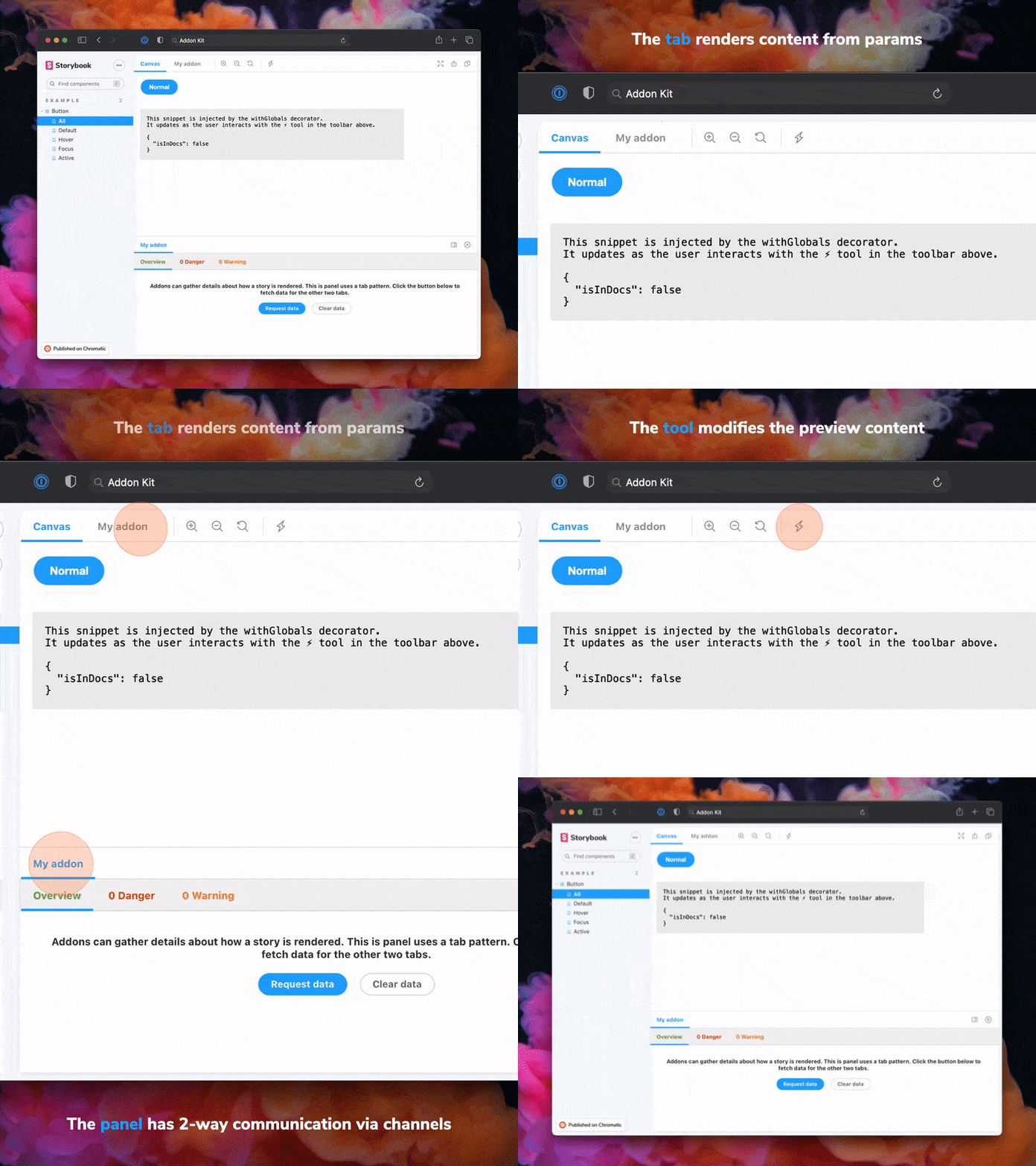
|
|
66
|
-
|
|
67
|
-
The addon code lives in `src`. It demonstrates all core addon related concepts. The three [UI paradigms](https://storybook.js.org/docs/react/addons/addon-types#ui-based-addons)
|
|
68
|
-
|
|
69
|
-
- `src/Tool.tsx`
|
|
70
|
-
- `src/Panel.tsx`
|
|
71
|
-
- `src/Tab.tsx`
|
|
72
|
-
|
|
73
|
-
Which, along with the addon itself, are registered in `src/manager.ts`.
|
|
74
|
-
|
|
75
|
-
Managing State and interacting with a story:
|
|
76
|
-
|
|
77
|
-
- `src/withGlobals.ts` & `src/Tool.tsx` demonstrates how to use `useGlobals` to manage global state and modify the contents of a Story.
|
|
78
|
-
- `src/withRoundTrip.ts` & `src/Panel.tsx` demonstrates two-way communication using channels.
|
|
79
|
-
- `src/Tab.tsx` demonstrates how to use `useParameter` to access the current story's parameters.
|
|
80
|
-
|
|
81
|
-
Your addon might use one or more of these patterns. Feel free to delete unused code. Update `src/manager.ts` and `src/preview.ts` accordingly.
|
|
82
|
-
|
|
83
|
-
Lastly, configure you addon name in `src/constants.ts`.
|
|
84
|
-
|
|
85
|
-
### Bundling
|
|
86
|
-
|
|
87
|
-
Addons can interact with a Storybook project in multiple ways. It is recommended to familiarize yourself with [the basics](https://storybook.js.org/docs/react/addons/introduction) before getting started.
|
|
88
|
-
|
|
89
|
-
- Manager entries are used to add UI or behavior to the Storybook manager UI.
|
|
90
|
-
- Preview entries are used to add UI or behavior to the preview iframe where stories are rendered.
|
|
91
|
-
- Presets are used to modify the Storybook configuration, similar to how [users can configure their `main.ts` configurations](https://storybook.js.org/docs/react/api/main-config).
|
|
52
|
+
Also note that you need to add `vitest.setup.ts` file to set up the test environment.
|
|
53
|
+
You need to do that anyway when you set up [storybook] with [vitest].
|
|
92
54
|
|
|
93
|
-
|
|
55
|
+
In `vitest.setup.ts`, you need to extend [vitest] `expect` and register lifecycle hooks so that [storybook-addon-vis] can access the test context info to capture image snapshot.
|
|
94
56
|
|
|
95
|
-
|
|
96
|
-
|
|
97
|
-
|
|
98
|
-
|
|
99
|
-
|
|
100
|
-
|
|
101
|
-
|
|
102
|
-
|
|
103
|
-
|
|
104
|
-
|
|
105
|
-
|
|
106
|
-
|
|
107
|
-
|
|
108
|
-
|
|
109
|
-
|
|
110
|
-
|
|
111
|
-
|
|
112
|
-
|
|
113
|
-
|
|
114
|
-
|
|
115
|
-
|
|
116
|
-
|
|
117
|
-
To help the community use your addon and understand its capabilities, please document it thoroughly.
|
|
118
|
-
|
|
119
|
-
To get started, replace this README with the content in this sample template, modeled after how essential addons (like [Actions](https://storybook.js.org/docs/essentials/actions)) are documented. Then update the content to describe your addon.
|
|
120
|
-
|
|
121
|
-
### Sample documentation template
|
|
122
|
-
|
|
123
|
-
````md
|
|
124
|
-
# My Addon
|
|
57
|
+
```ts
|
|
58
|
+
// vitest.setup.ts
|
|
59
|
+
import { type StoryContext, setProjectAnnotations } from '@storybook/react'
|
|
60
|
+
import { afterEach, beforeAll, beforeEach, expect } from 'vitest'
|
|
61
|
+
import {
|
|
62
|
+
configureSnapshotBeforeAll,
|
|
63
|
+
configureSnapshotBeforeEach,
|
|
64
|
+
page,
|
|
65
|
+
shouldTakeSnapshot,
|
|
66
|
+
toMatchImageSnapshot,
|
|
67
|
+
} from 'storybook-addon-vis/vitest-setup.js'
|
|
68
|
+
import * as projectAnnotations from './preview'
|
|
69
|
+
|
|
70
|
+
const project = setProjectAnnotations([projectAnnotations])
|
|
71
|
+
|
|
72
|
+
expect.extend({ toMatchImageSnapshot })
|
|
73
|
+
|
|
74
|
+
beforeAll((suite) => {
|
|
75
|
+
project.beforeAll()
|
|
76
|
+
configureSnapshotBeforeAll(suite)
|
|
77
|
+
})
|
|
125
78
|
|
|
126
|
-
|
|
79
|
+
beforeEach(configureSnapshotBeforeEach)
|
|
127
80
|
|
|
128
|
-
|
|
81
|
+
afterEach<{ story?: StoryContext }>(async (ctx) => {
|
|
82
|
+
if (!shouldTakeSnapshot(ctx)) return
|
|
129
83
|
|
|
130
|
-
|
|
131
|
-
|
|
84
|
+
await expect(page.imageSnapshot()).toMatchImageSnapshot()
|
|
85
|
+
})
|
|
132
86
|
```
|
|
133
87
|
|
|
134
|
-
|
|
135
|
-
|
|
136
|
-
```js
|
|
137
|
-
// .storybook/main.ts
|
|
88
|
+
On [storybook], you need to extend the `expect` from `@storybook/test`
|
|
138
89
|
|
|
139
|
-
|
|
140
|
-
|
|
90
|
+
```ts
|
|
91
|
+
// .storybook/preview.tsx
|
|
92
|
+
import { expect } from '@storybook/test'
|
|
93
|
+
import { toMatchImageSnapshot } from '../src/index.js'
|
|
141
94
|
|
|
142
|
-
|
|
143
|
-
// ...rest of config
|
|
144
|
-
addons: [
|
|
145
|
-
'@storybook/addon-essentials'
|
|
146
|
-
'my-addon', // 👈 register the addon here
|
|
147
|
-
],
|
|
148
|
-
};
|
|
95
|
+
expect.extend({ toMatchImageSnapshot })
|
|
149
96
|
|
|
150
|
-
|
|
97
|
+
// ...
|
|
151
98
|
```
|
|
152
99
|
|
|
153
|
-
## Usage
|
|
154
|
-
|
|
155
|
-
The primary way to use this addon is to define the `exampleParameter` parameter. You can do this the
|
|
156
|
-
component level, as below, to affect all stories in the file, or you can do it for a single story.
|
|
157
|
-
|
|
158
|
-
```js
|
|
159
|
-
// Button.stories.ts
|
|
100
|
+
## Usage - automatic snapshot
|
|
160
101
|
|
|
161
|
-
|
|
162
|
-
|
|
102
|
+
The `afterEach` hook above is how to capture the image snapshot automatically,
|
|
103
|
+
when you add a `snapshot` tag to the story.
|
|
163
104
|
|
|
164
|
-
|
|
165
|
-
|
|
166
|
-
|
|
167
|
-
|
|
168
|
-
|
|
169
|
-
|
|
170
|
-
|
|
171
|
-
// See API section below for available parameters
|
|
172
|
-
}
|
|
173
|
-
}
|
|
174
|
-
};
|
|
105
|
+
```ts
|
|
106
|
+
// story.tsx
|
|
107
|
+
export default {
|
|
108
|
+
title: 'Button',
|
|
109
|
+
// Take image snapshot automatically for all stories in this file
|
|
110
|
+
tags: ['snapshot']
|
|
111
|
+
}
|
|
175
112
|
|
|
176
|
-
export
|
|
113
|
+
export const MyStory = {
|
|
114
|
+
// Take image snapshot automatically for this story
|
|
115
|
+
tags: ['snapshot'],
|
|
116
|
+
// ...
|
|
117
|
+
}
|
|
177
118
|
```
|
|
178
119
|
|
|
179
|
-
|
|
180
|
-
|
|
181
|
-
## API
|
|
182
|
-
|
|
183
|
-
### Parameters
|
|
184
|
-
|
|
185
|
-
This addon contributes the following parameters to Storybook, under the `myAddon` namespace:
|
|
186
|
-
|
|
187
|
-
#### `disable`
|
|
188
|
-
|
|
189
|
-
Type: `boolean`
|
|
190
|
-
|
|
191
|
-
Disable this addon's behavior. This parameter is most useful to allow overriding at more specific
|
|
192
|
-
levels. For example, if this parameter is set to true at the project level, it could then be
|
|
193
|
-
re-enabled by setting it to false at the meta (component) or story level.
|
|
194
|
-
|
|
195
|
-
### Options
|
|
196
|
-
|
|
197
|
-
When registering this addon, you can configure it with the following options, which are passed when
|
|
198
|
-
registering the addon, like so:
|
|
120
|
+
You can disable snapshot capturing with the `!snapshot` tag,
|
|
121
|
+
much like `!test`.
|
|
199
122
|
|
|
200
123
|
```ts
|
|
201
|
-
|
|
202
|
-
|
|
203
|
-
|
|
204
|
-
|
|
205
|
-
|
|
206
|
-
const config: StorybookConfig = {
|
|
207
|
-
// ...rest of config
|
|
208
|
-
addons: [
|
|
209
|
-
'@storybook/essentials',
|
|
210
|
-
{
|
|
211
|
-
name: 'my-addon',
|
|
212
|
-
options: {
|
|
213
|
-
// 👈 options for my-addon go here
|
|
214
|
-
},
|
|
215
|
-
},
|
|
216
|
-
],
|
|
217
|
-
};
|
|
218
|
-
|
|
219
|
-
export default config;
|
|
220
|
-
```
|
|
221
|
-
|
|
222
|
-
#### `useExperimentalBehavior`
|
|
223
|
-
|
|
224
|
-
Type: `boolean`
|
|
225
|
-
|
|
226
|
-
Enable experimental behavior to...
|
|
227
|
-
|
|
228
|
-
````
|
|
229
|
-
|
|
230
|
-
## Release Management
|
|
231
|
-
|
|
232
|
-
### Setup
|
|
233
|
-
|
|
234
|
-
This project is configured to use [auto](https://github.com/intuit/auto) for release management. It generates a changelog and pushes it to both GitHub and npm. Therefore, you need to configure access to both:
|
|
235
|
-
|
|
236
|
-
- [`NPM_TOKEN`](https://docs.npmjs.com/creating-and-viewing-access-tokens#creating-access-tokens) Create a token with both _Read and Publish_ permissions.
|
|
237
|
-
- [`GH_TOKEN`](https://github.com/settings/tokens) Create a token with the `repo` scope.
|
|
238
|
-
|
|
239
|
-
Then open your `package.json` and edit the following fields:
|
|
240
|
-
|
|
241
|
-
- `name`
|
|
242
|
-
- `author`
|
|
243
|
-
- `repository`
|
|
244
|
-
|
|
245
|
-
#### Local
|
|
246
|
-
|
|
247
|
-
To use `auto` locally create a `.env` file at the root of your project and add your tokens to it:
|
|
248
|
-
|
|
249
|
-
```bash
|
|
250
|
-
GH_TOKEN=<value you just got from GitHub>
|
|
251
|
-
NPM_TOKEN=<value you just got from npm>
|
|
252
|
-
```
|
|
253
|
-
|
|
254
|
-
Lastly, **create labels on GitHub**. You’ll use these labels in the future when making changes to the package.
|
|
124
|
+
export default {
|
|
125
|
+
title: 'Button',
|
|
126
|
+
tags: ['snapshot']
|
|
127
|
+
}
|
|
255
128
|
|
|
256
|
-
|
|
257
|
-
|
|
129
|
+
export const MyStory = {
|
|
130
|
+
// Disable image snapshot for this story
|
|
131
|
+
tags: ['!snapshot'],
|
|
132
|
+
// ...
|
|
133
|
+
}
|
|
258
134
|
```
|
|
259
135
|
|
|
260
|
-
|
|
261
|
-
|
|
262
|
-
#### GitHub Actions
|
|
136
|
+
## Usage - manual snapshot
|
|
263
137
|
|
|
264
|
-
|
|
138
|
+
Besides automatic snapshot, you can capture image snapshot manually.
|
|
265
139
|
|
|
266
|
-
|
|
267
|
-
|
|
268
|
-
|
|
140
|
+
```ts
|
|
141
|
+
import { page } from 'storybook-addon-vis'
|
|
142
|
+
import { expect } from '@storybook/test'
|
|
269
143
|
|
|
270
|
-
|
|
144
|
+
export const PageSnapshot = {
|
|
145
|
+
// ...
|
|
146
|
+
async play() {
|
|
147
|
+
expect(page.imageSnapshot()).toMatchImageSnapshot()
|
|
148
|
+
}
|
|
149
|
+
}
|
|
271
150
|
|
|
272
|
-
|
|
273
|
-
|
|
151
|
+
export const ElementSnapshot = {
|
|
152
|
+
// ...
|
|
153
|
+
async play({ canvas }) {
|
|
154
|
+
const element = await canvas.getByTestid('subject')
|
|
155
|
+
await expect(page.imageSnapshot([ element ])).toMatchImageSnapshot()
|
|
156
|
+
}
|
|
157
|
+
}
|
|
274
158
|
```
|
|
275
159
|
|
|
276
|
-
That will:
|
|
277
|
-
|
|
278
|
-
- Build and package the addon code
|
|
279
|
-
- Bump the version
|
|
280
|
-
- Push a release to GitHub and npm
|
|
281
|
-
- Push a changelog to GitHub
|
|
282
|
-
|
|
283
|
-
|
|
284
160
|
[jest-image-snapshot]: https://github.com/americanexpress/jest-image-snapshot
|
|
161
|
+
[storybook-addon-vis]: https://github.com/repobuddy/storybook-addon-vis
|
|
285
162
|
[storybook]: https://storybook.js.org
|
|
286
163
|
[vitest]: https://vitest.dev/
|