storybook-addon-designbook 0.0.1
This diff represents the content of publicly available package versions that have been released to one of the supported registries. The information contained in this diff is provided for informational purposes only and reflects changes between package versions as they appear in their respective public registries.
- package/LICENSE +21 -0
- package/README.md +262 -0
- package/dist/components/DeboSection.jsx +79 -0
- package/dist/components/Panel.tsx +64 -0
- package/dist/components/Tool.tsx +34 -0
- package/dist/components/designbookApi.js +68 -0
- package/dist/components/display/DeboDataModel.jsx +67 -0
- package/dist/components/display/DeboDesignTokens.jsx +108 -0
- package/dist/components/display/DeboProductOverview.jsx +28 -0
- package/dist/components/display/DeboSampleData.jsx +74 -0
- package/dist/components/display/index.js +5 -0
- package/dist/components/index.js +34 -0
- package/dist/components/pages/DeboExportPage.jsx +295 -0
- package/dist/components/pages/DeboSectionDetailPage.jsx +117 -0
- package/dist/components/pages/DeboSectionsOverview.jsx +121 -0
- package/dist/components/pages/index.js +4 -0
- package/dist/components/parsers.js +63 -0
- package/dist/components/ui/DeboAlert.jsx +16 -0
- package/dist/components/ui/DeboBulletList.jsx +21 -0
- package/dist/components/ui/DeboCollapsible.jsx +25 -0
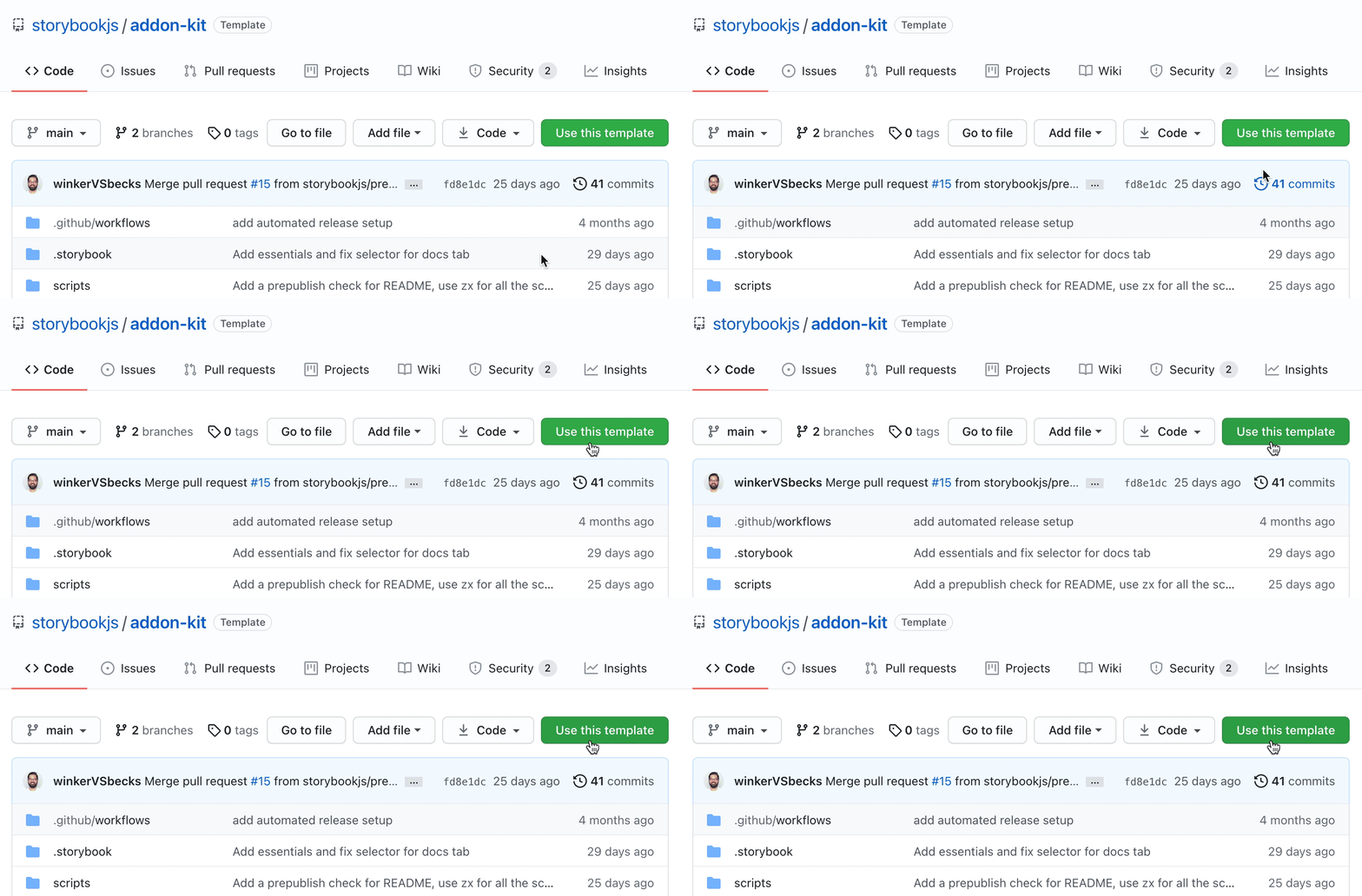
- package/dist/components/ui/DeboEmptyState.jsx +30 -0
- package/dist/components/ui/DeboLoading.jsx +10 -0
- package/dist/components/ui/DeboMockupWindow.jsx +15 -0
- package/dist/components/ui/DeboNumberedList.jsx +85 -0
- package/dist/components/ui/DeboPageLayout.jsx +14 -0
- package/dist/components/ui/DeboSourceFooter.jsx +21 -0
- package/dist/components/ui/DeboStepIndicator.jsx +81 -0
- package/dist/components/ui/index.js +11 -0
- package/dist/components/utils.js +24 -0
- package/dist/hooks/useDesignbookData.js +42 -0
- package/dist/index.css +1929 -0
- package/dist/index.d.ts +257 -0
- package/dist/index.js +736 -0
- package/dist/manager-helpers.js +18 -0
- package/dist/manager.js +77 -0
- package/dist/onboarding/01-product-vision.mdx +15 -0
- package/dist/onboarding/02-data-model.mdx +19 -0
- package/dist/onboarding/03-design-system.mdx +52 -0
- package/dist/onboarding/04-export.mdx +13 -0
- package/dist/onboarding/sections.mdx +14 -0
- package/dist/preset.js +221 -0
- package/dist/preview.d.ts +15 -0
- package/dist/preview.js +76 -0
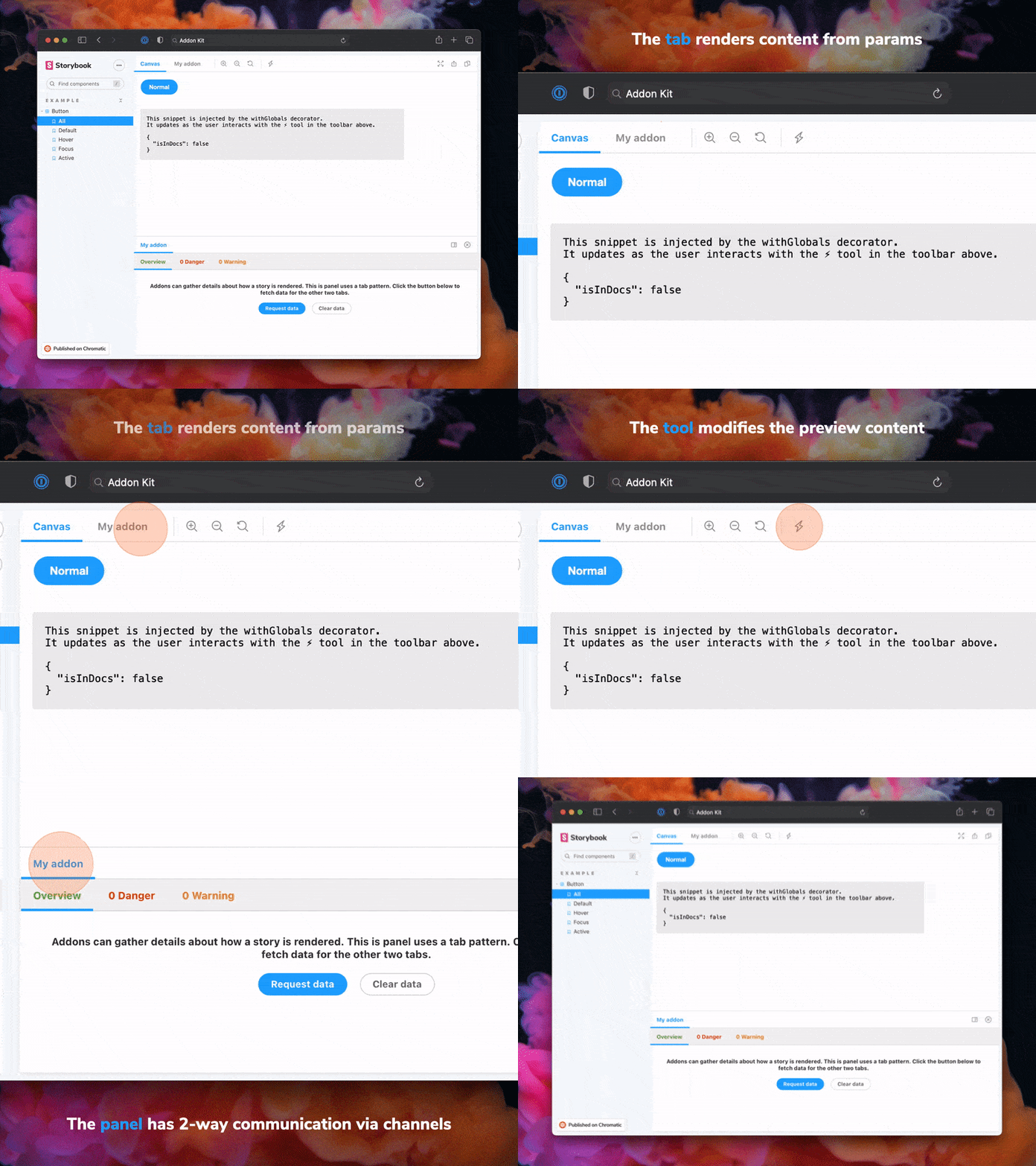
- package/eslint.config.js +37 -0
- package/manager.js +1 -0
- package/package.json +119 -0
- package/preset.js +1 -0
- package/preview.js +1 -0
package/LICENSE
ADDED
|
@@ -0,0 +1,21 @@
|
|
|
1
|
+
MIT License
|
|
2
|
+
|
|
3
|
+
Copyright (c) 2023 Storybook contributors
|
|
4
|
+
|
|
5
|
+
Permission is hereby granted, free of charge, to any person obtaining a copy
|
|
6
|
+
of this software and associated documentation files (the "Software"), to deal
|
|
7
|
+
in the Software without restriction, including without limitation the rights
|
|
8
|
+
to use, copy, modify, merge, publish, distribute, sublicense, and/or sell
|
|
9
|
+
copies of the Software, and to permit persons to whom the Software is
|
|
10
|
+
furnished to do so, subject to the following conditions:
|
|
11
|
+
|
|
12
|
+
The above copyright notice and this permission notice shall be included in all
|
|
13
|
+
copies or substantial portions of the Software.
|
|
14
|
+
|
|
15
|
+
THE SOFTWARE IS PROVIDED "AS IS", WITHOUT WARRANTY OF ANY KIND, EXPRESS OR
|
|
16
|
+
IMPLIED, INCLUDING BUT NOT LIMITED TO THE WARRANTIES OF MERCHANTABILITY,
|
|
17
|
+
FITNESS FOR A PARTICULAR PURPOSE AND NONINFRINGEMENT. IN NO EVENT SHALL THE
|
|
18
|
+
AUTHORS OR COPYRIGHT HOLDERS BE LIABLE FOR ANY CLAIM, DAMAGES OR OTHER
|
|
19
|
+
LIABILITY, WHETHER IN AN ACTION OF CONTRACT, TORT OR OTHERWISE, ARISING FROM,
|
|
20
|
+
OUT OF OR IN CONNECTION WITH THE SOFTWARE OR THE USE OR OTHER DEALINGS IN THE
|
|
21
|
+
SOFTWARE.
|
package/README.md
ADDED
|
@@ -0,0 +1,262 @@
|
|
|
1
|
+
<!-- README START -->
|
|
2
|
+
|
|
3
|
+
# Storybook Addon Kit ([demo](https://main--601ada52c3d4040021afdc30.chromatic.com))
|
|
4
|
+
|
|
5
|
+
Simplify the creation of Storybook addons
|
|
6
|
+
|
|
7
|
+
- 📝 Live-editing in development
|
|
8
|
+
- ⚛️ React/JSX support
|
|
9
|
+
- 📦 Transpiling and bundling with [tsup](https://tsup.egoist.dev/)
|
|
10
|
+
- 🏷 Plugin metadata
|
|
11
|
+
- 🚢 Release management with [Auto](https://github.com/intuit/auto)
|
|
12
|
+
- 🧺 Boilerplate and sample code
|
|
13
|
+
- 🛄 ESM support
|
|
14
|
+
- 🛂 TypeScript by default with option to eject to JS
|
|
15
|
+
|
|
16
|
+
### Migrating to a later Storybook version
|
|
17
|
+
|
|
18
|
+
If you have an existing addon that you want to migrate to support the latest version of Storyboook, you can check out the [addon migration guide](https://storybook.js.org/docs/addons/addon-migration-guide).
|
|
19
|
+
|
|
20
|
+
## Getting Started
|
|
21
|
+
|
|
22
|
+
Click the **Use this template** button to get started.
|
|
23
|
+
|
|
24
|
+
|
|
25
|
+
|
|
26
|
+
Clone your repository and install dependencies.
|
|
27
|
+
|
|
28
|
+
```sh
|
|
29
|
+
npm install
|
|
30
|
+
```
|
|
31
|
+
|
|
32
|
+
<!-- README END -->
|
|
33
|
+
|
|
34
|
+
### Development scripts
|
|
35
|
+
|
|
36
|
+
- `npm run start` runs babel in watch mode and starts Storybook
|
|
37
|
+
- `npm run build` build and package your addon code
|
|
38
|
+
|
|
39
|
+
### Switch from TypeScript to JavaScript
|
|
40
|
+
|
|
41
|
+
Don't want to use TypeScript? We offer a handy eject command: `npm run eject-ts`
|
|
42
|
+
|
|
43
|
+
This will convert all code to JS. It is a destructive process, so we recommended running this before you start writing any code.
|
|
44
|
+
|
|
45
|
+
## What's included?
|
|
46
|
+
|
|
47
|
+
|
|
48
|
+
|
|
49
|
+
The addon code lives in `src`. It demonstrates all core addon related concepts. The three [UI paradigms](https://storybook.js.org/docs/react/addons/addon-types#ui-based-addons)
|
|
50
|
+
|
|
51
|
+
- `src/Tool.tsx`
|
|
52
|
+
- `src/Panel.tsx`
|
|
53
|
+
- `src/Tab.tsx`
|
|
54
|
+
|
|
55
|
+
Which, along with the addon itself, are registered in `src/manager.ts`.
|
|
56
|
+
|
|
57
|
+
Managing State and interacting with a story:
|
|
58
|
+
|
|
59
|
+
- `src/withGlobals.ts` & `src/Tool.tsx` demonstrates how to use `useGlobals` to manage global state and modify the contents of a Story.
|
|
60
|
+
- `src/withRoundTrip.ts` & `src/Panel.tsx` demonstrates two-way communication using channels.
|
|
61
|
+
- `src/Tab.tsx` demonstrates how to use `useParameter` to access the current story's parameters.
|
|
62
|
+
|
|
63
|
+
Your addon might use one or more of these patterns. Feel free to delete unused code. Update `src/manager.ts` and `src/preview.ts` accordingly.
|
|
64
|
+
|
|
65
|
+
Lastly, configure you addon name in `src/constants.ts`.
|
|
66
|
+
|
|
67
|
+
### Bundling
|
|
68
|
+
|
|
69
|
+
Addons can interact with a Storybook project in multiple ways. It is recommended to familiarize yourself with [the basics](https://storybook.js.org/docs/react/addons/introduction) before getting started.
|
|
70
|
+
|
|
71
|
+
- Manager entries are used to add UI or behavior to the Storybook manager UI.
|
|
72
|
+
- Preview entries are used to add UI or behavior to the preview iframe where stories are rendered.
|
|
73
|
+
- Presets are used to modify the Storybook configuration, similar to how [users can configure their `main.ts` configurations](https://storybook.js.org/docs/react/api/main-config).
|
|
74
|
+
|
|
75
|
+
Since each of these places represents a different environment with different features and modules, it is also recommended to split and build your modules accordingly. This addon-kit comes with a preconfigured [bundling configuration](./tsup.config.ts) that supports this split, and you are free to modify and extend it as needed.
|
|
76
|
+
|
|
77
|
+
You can define which modules match which environments in the [`package.json#bundler`](./package.json) property:
|
|
78
|
+
|
|
79
|
+
- `exportEntries` is a list of module entries that users can manually import from anywhere they need to. For example, you could have decorators that users need to import into their `preview.ts` file or utility functions that can be used in their `main.ts` files.
|
|
80
|
+
- `managerEntries` is a list of module entries meant only for the manager UI. These modules will be bundled to ESM and won't include types since they are mostly loaded by Storybook directly.
|
|
81
|
+
- `previewEntries` is a list of module entries meant only for the preview UI. These modules will be bundled to ESM and won't include types since they are mostly loaded by Storybook directly.
|
|
82
|
+
|
|
83
|
+
Manager and preview entries are only used in the browser so they only output ESM modules. Export entries could be used both in the browser and in Node depending on their use case, so they both output ESM and CJS modules.
|
|
84
|
+
|
|
85
|
+
#### Globalized packages
|
|
86
|
+
|
|
87
|
+
Storybook provides a predefined set of packages that are available in the manager UI and the preview UI. In the final bundle of your addon, these packages should not be included. Instead, the imports should stay in place, allowing Storybook to replace those imports with the actual packages during the Storybook build process.
|
|
88
|
+
|
|
89
|
+
The list of packages differs between the manager and the preview, which is why there is a slight difference between `managerEntries` and `previewEntries`. Most notably, `react` and `react-dom` are prebundled in the manager but not in the preview. This means that your manager entries can use React to build UI without bundling it or having a direct reference to it. Therefore, it is safe to have React as a `devDependency` even though you are using it in production. _Requiring React as a peer dependency would unnecessarily force your users to install React._
|
|
90
|
+
|
|
91
|
+
An exception to this rule is if you are using React to inject UI into the preview, which does not come prebundled with React. In such cases, you need to move `react` and `react-dom` to a peer dependency. However, we generally advise against this pattern since it would limit the usage of your addon to React-based Storybooks.
|
|
92
|
+
|
|
93
|
+
### Metadata
|
|
94
|
+
|
|
95
|
+
Storybook addons are listed in the [catalog](https://storybook.js.org/addons) and distributed via npm. The catalog is populated by querying npm's registry for Storybook-specific metadata in `package.json`. This project has been configured with sample data. Learn more about available options in the [Addon metadata docs](https://storybook.js.org/docs/react/addons/addon-catalog#addon-metadata).
|
|
96
|
+
|
|
97
|
+
## Documentation
|
|
98
|
+
|
|
99
|
+
To help the community use your addon and understand its capabilities, please document it thoroughly.
|
|
100
|
+
|
|
101
|
+
To get started, replace this README with the content in this sample template.
|
|
102
|
+
|
|
103
|
+
### Sample documentation template
|
|
104
|
+
|
|
105
|
+
````md
|
|
106
|
+
# My Addon
|
|
107
|
+
|
|
108
|
+
## Installation
|
|
109
|
+
|
|
110
|
+
First, install the package.
|
|
111
|
+
|
|
112
|
+
```sh
|
|
113
|
+
npm install --save-dev my-addon
|
|
114
|
+
```
|
|
115
|
+
|
|
116
|
+
Then, register it as an addon in `.storybook/main.js`.
|
|
117
|
+
|
|
118
|
+
```ts
|
|
119
|
+
// .storybook/main.ts
|
|
120
|
+
|
|
121
|
+
// Replace your-framework with the framework you are using (e.g., react-webpack5, vue3-vite)
|
|
122
|
+
import type { StorybookConfig } from '@storybook/your-framework';
|
|
123
|
+
|
|
124
|
+
const config: StorybookConfig = {
|
|
125
|
+
// ...rest of config
|
|
126
|
+
addons: [
|
|
127
|
+
'@storybook/addon-docs'
|
|
128
|
+
'my-addon', // 👈 register the addon here
|
|
129
|
+
],
|
|
130
|
+
};
|
|
131
|
+
|
|
132
|
+
export default config;
|
|
133
|
+
```
|
|
134
|
+
|
|
135
|
+
## Usage
|
|
136
|
+
|
|
137
|
+
The primary way to use this addon is to define the `exampleParameter` parameter. You can do this the
|
|
138
|
+
component level, as below, to affect all stories in the file, or you can do it for a single story.
|
|
139
|
+
|
|
140
|
+
```ts
|
|
141
|
+
// Button.stories.ts
|
|
142
|
+
|
|
143
|
+
// Replace your-framework with the name of your framework
|
|
144
|
+
import type { Meta } from '@storybook/your-framework';
|
|
145
|
+
|
|
146
|
+
import { Button } from './Button';
|
|
147
|
+
|
|
148
|
+
const meta: Meta<typeof Button> = {
|
|
149
|
+
component: Button,
|
|
150
|
+
parameters: {
|
|
151
|
+
myAddon: {
|
|
152
|
+
exampleParameter: true,
|
|
153
|
+
// See API section below for available parameters
|
|
154
|
+
},
|
|
155
|
+
},
|
|
156
|
+
};
|
|
157
|
+
|
|
158
|
+
export default meta;
|
|
159
|
+
```
|
|
160
|
+
|
|
161
|
+
Another way to use the addon is...
|
|
162
|
+
|
|
163
|
+
## API
|
|
164
|
+
|
|
165
|
+
### Parameters
|
|
166
|
+
|
|
167
|
+
This addon contributes the following parameters to Storybook, under the `myAddon` namespace:
|
|
168
|
+
|
|
169
|
+
#### `disable`
|
|
170
|
+
|
|
171
|
+
Type: `boolean`
|
|
172
|
+
|
|
173
|
+
Disable this addon's behavior. This parameter is most useful to allow overriding at more specific
|
|
174
|
+
levels. For example, if this parameter is set to true at the project level, it could then be
|
|
175
|
+
re-enabled by setting it to false at the meta (component) or story level.
|
|
176
|
+
|
|
177
|
+
### Options
|
|
178
|
+
|
|
179
|
+
When registering this addon, you can configure it with the following options, which are passed when
|
|
180
|
+
registering the addon, like so:
|
|
181
|
+
|
|
182
|
+
```ts
|
|
183
|
+
// .storybook/main.ts
|
|
184
|
+
|
|
185
|
+
// Replace your-framework with the framework you are using (e.g., react-webpack5, vue3-vite)
|
|
186
|
+
import type { StorybookConfig } from '@storybook/your-framework';
|
|
187
|
+
|
|
188
|
+
const config: StorybookConfig = {
|
|
189
|
+
// ...rest of config
|
|
190
|
+
addons: [
|
|
191
|
+
'@storybook/addon-docs',
|
|
192
|
+
{
|
|
193
|
+
name: 'my-addon',
|
|
194
|
+
options: {
|
|
195
|
+
// 👈 options for my-addon go here
|
|
196
|
+
},
|
|
197
|
+
},
|
|
198
|
+
],
|
|
199
|
+
};
|
|
200
|
+
|
|
201
|
+
export default config;
|
|
202
|
+
```
|
|
203
|
+
|
|
204
|
+
#### `useExperimentalBehavior`
|
|
205
|
+
|
|
206
|
+
Type: `boolean`
|
|
207
|
+
|
|
208
|
+
Enable experimental behavior to...
|
|
209
|
+
````
|
|
210
|
+
|
|
211
|
+
## Release Management
|
|
212
|
+
|
|
213
|
+
### Setup
|
|
214
|
+
|
|
215
|
+
This project is configured to use [auto](https://github.com/intuit/auto) for release management. It generates a changelog and pushes it to both GitHub and npm. Therefore, you need to configure access to both:
|
|
216
|
+
|
|
217
|
+
- [`NPM_TOKEN`](https://docs.npmjs.com/creating-and-viewing-access-tokens#creating-access-tokens) Create a token with both _Read and Publish_ permissions.
|
|
218
|
+
- [`GH_TOKEN`](https://github.com/settings/tokens) Create a token with the `repo` scope.
|
|
219
|
+
|
|
220
|
+
Then open your `package.json` and edit the following fields:
|
|
221
|
+
|
|
222
|
+
- `name`
|
|
223
|
+
- `author`
|
|
224
|
+
- `repository`
|
|
225
|
+
|
|
226
|
+
#### Local
|
|
227
|
+
|
|
228
|
+
To use `auto` locally create a `.env` file at the root of your project and add your tokens to it:
|
|
229
|
+
|
|
230
|
+
```bash
|
|
231
|
+
GH_TOKEN=<value you just got from GitHub>
|
|
232
|
+
NPM_TOKEN=<value you just got from npm>
|
|
233
|
+
```
|
|
234
|
+
|
|
235
|
+
Lastly, **create labels on GitHub**. You’ll use these labels in the future when making changes to the package.
|
|
236
|
+
|
|
237
|
+
```bash
|
|
238
|
+
npx auto create-labels
|
|
239
|
+
```
|
|
240
|
+
|
|
241
|
+
If you check on GitHub, you’ll now see a set of labels that `auto` would like you to use. Use these to tag future pull requests.
|
|
242
|
+
|
|
243
|
+
#### GitHub Actions
|
|
244
|
+
|
|
245
|
+
This template comes with GitHub actions already set up to publish your addon anytime someone pushes to your repository.
|
|
246
|
+
|
|
247
|
+
Go to `Settings > Secrets`, click `New repository secret`, and add your `NPM_TOKEN`.
|
|
248
|
+
|
|
249
|
+
### Creating a release
|
|
250
|
+
|
|
251
|
+
To create a release locally you can run the following command, otherwise the GitHub action will make the release for you.
|
|
252
|
+
|
|
253
|
+
```sh
|
|
254
|
+
npm run release
|
|
255
|
+
```
|
|
256
|
+
|
|
257
|
+
That will:
|
|
258
|
+
|
|
259
|
+
- Build and package the addon code
|
|
260
|
+
- Bump the version
|
|
261
|
+
- Push a release to GitHub and npm
|
|
262
|
+
- Push a changelog to GitHub
|
|
@@ -0,0 +1,79 @@
|
|
|
1
|
+
import { useDesignbookData } from '../hooks/useDesignbookData.js';
|
|
2
|
+
import { DeboEmptyState } from './ui/DeboEmptyState.jsx';
|
|
3
|
+
import { DeboLoading } from './ui/DeboLoading.jsx';
|
|
4
|
+
import { DeboPageLayout } from './ui/DeboPageLayout.jsx';
|
|
5
|
+
import { DeboSourceFooter } from './ui/DeboSourceFooter.jsx';
|
|
6
|
+
import { DeboAlert } from './ui/DeboAlert.jsx';
|
|
7
|
+
|
|
8
|
+
/**
|
|
9
|
+
* DeboSection — Page section that combines data loading, empty state,
|
|
10
|
+
* content rendering, reload button, and AI command reference.
|
|
11
|
+
*
|
|
12
|
+
* @param {Object} props
|
|
13
|
+
* @param {string} props.dataPath — Relative path within designbook/ to load
|
|
14
|
+
* @param {(markdown: string) => any} props.parser — Markdown-to-data parser
|
|
15
|
+
* @param {string} props.command — AI command name (e.g., "/product-roadmap")
|
|
16
|
+
* @param {string} props.emptyMessage — Displayed when no data exists
|
|
17
|
+
* @param {(data: any) => React.ReactNode} props.renderContent — How to render the loaded data
|
|
18
|
+
* @param {string} [props.title] — Section heading displayed above the content
|
|
19
|
+
* @param {string} [props.filePath] — Full file path for display in empty state
|
|
20
|
+
* @param {boolean} [props.bare=false] — If true, renders content/loading/error/empty
|
|
21
|
+
* without DeboPageLayout, DeboSourceFooter, or command hint. Use when composing
|
|
22
|
+
* inside an outer layout (e.g., DeboStepIndicator or DeboPageLayout).
|
|
23
|
+
*/
|
|
24
|
+
export function DeboSection({ dataPath, parser, command, emptyMessage, renderContent, title, filePath, bare = false }) {
|
|
25
|
+
const { data, loading, error, reload } = useDesignbookData(dataPath, parser);
|
|
26
|
+
|
|
27
|
+
const displayPath = filePath || `designbook/${dataPath}`;
|
|
28
|
+
|
|
29
|
+
const heading = title ? (
|
|
30
|
+
<h2 className="debo:text-lg debo:font-semibold debo:text-base-content debo:pb-2 debo:mb-4 debo:border-b debo:border-base-300">
|
|
31
|
+
{title}
|
|
32
|
+
</h2>
|
|
33
|
+
) : null;
|
|
34
|
+
|
|
35
|
+
if (loading) return <>{heading}<DeboLoading /></>;
|
|
36
|
+
|
|
37
|
+
if (error) {
|
|
38
|
+
return (
|
|
39
|
+
<>
|
|
40
|
+
{heading}
|
|
41
|
+
<DeboAlert type="error" className="debo:font-sans debo:my-4">
|
|
42
|
+
<svg xmlns="http://www.w3.org/2000/svg" className="debo:h-5 debo:w-5 debo:shrink-0" fill="none" viewBox="0 0 24 24" stroke="currentColor">
|
|
43
|
+
<path strokeLinecap="round" strokeLinejoin="round" strokeWidth={2} d="M10 14l2-2m0 0l2-2m-2 2l-2-2m2 2l2 2m7-2a9 9 0 11-18 0 9 9 0 0118 0z" />
|
|
44
|
+
</svg>
|
|
45
|
+
<span>Failed to load data: {error}</span>
|
|
46
|
+
</DeboAlert>
|
|
47
|
+
</>
|
|
48
|
+
);
|
|
49
|
+
}
|
|
50
|
+
|
|
51
|
+
if (!data) {
|
|
52
|
+
const empty = (
|
|
53
|
+
<>
|
|
54
|
+
{heading}
|
|
55
|
+
<DeboEmptyState
|
|
56
|
+
message={emptyMessage}
|
|
57
|
+
command={command}
|
|
58
|
+
filePath={displayPath}
|
|
59
|
+
/>
|
|
60
|
+
</>
|
|
61
|
+
);
|
|
62
|
+
return bare ? empty : <DeboPageLayout gap="8">{empty}</DeboPageLayout>;
|
|
63
|
+
}
|
|
64
|
+
|
|
65
|
+
if (bare) {
|
|
66
|
+
return <>{heading}{renderContent(data)}</>;
|
|
67
|
+
}
|
|
68
|
+
|
|
69
|
+
return (
|
|
70
|
+
<DeboPageLayout>
|
|
71
|
+
{heading}
|
|
72
|
+
{renderContent(data)}
|
|
73
|
+
<DeboSourceFooter path={displayPath} onReload={reload} />
|
|
74
|
+
<span className="debo:text-base-content/30 debo:text-xs debo:leading-loose">
|
|
75
|
+
Update with <code className="debo:text-base-content/40">{command}</code>
|
|
76
|
+
</span>
|
|
77
|
+
</DeboPageLayout>
|
|
78
|
+
);
|
|
79
|
+
}
|
|
@@ -0,0 +1,64 @@
|
|
|
1
|
+
import React, { memo } from 'react';
|
|
2
|
+
import { AddonPanel } from 'storybook/internal/components';
|
|
3
|
+
import { styled } from 'storybook/theming';
|
|
4
|
+
|
|
5
|
+
interface PanelProps {
|
|
6
|
+
active?: boolean;
|
|
7
|
+
}
|
|
8
|
+
|
|
9
|
+
const Container = styled.div(({ theme }) => ({
|
|
10
|
+
padding: '1rem',
|
|
11
|
+
fontFamily: theme.typography.fonts.base,
|
|
12
|
+
fontSize: theme.typography.size.s2,
|
|
13
|
+
}));
|
|
14
|
+
|
|
15
|
+
const Title = styled.h3(({ theme }) => ({
|
|
16
|
+
marginTop: 0,
|
|
17
|
+
marginBottom: '0.5rem',
|
|
18
|
+
fontWeight: theme.typography.weight.bold,
|
|
19
|
+
}));
|
|
20
|
+
|
|
21
|
+
const List = styled.ul({
|
|
22
|
+
listStyleType: 'none',
|
|
23
|
+
padding: 0,
|
|
24
|
+
margin: 0,
|
|
25
|
+
});
|
|
26
|
+
|
|
27
|
+
const Item = styled.li(({ theme }) => ({
|
|
28
|
+
padding: '0.5rem 0',
|
|
29
|
+
borderBottom: `1px solid ${theme.appBorderColor}`,
|
|
30
|
+
}));
|
|
31
|
+
|
|
32
|
+
const Command = styled.code(({ theme }) => ({
|
|
33
|
+
background: theme.background.hoverable,
|
|
34
|
+
padding: '0.2em 0.4em',
|
|
35
|
+
borderRadius: '4px',
|
|
36
|
+
fontFamily: theme.typography.fonts.mono,
|
|
37
|
+
}));
|
|
38
|
+
|
|
39
|
+
export const Panel: React.FC<PanelProps> = memo(function DesignbookPanel(props: PanelProps) {
|
|
40
|
+
return (
|
|
41
|
+
<AddonPanel active={props.active ?? false}>
|
|
42
|
+
<Container>
|
|
43
|
+
<Title>Designbook Active</Title>
|
|
44
|
+
<p>Use AI commands in your editor to interact with Designbook.</p>
|
|
45
|
+
|
|
46
|
+
<Title style={{ marginTop: '1rem' }}>Available Commands</Title>
|
|
47
|
+
<List>
|
|
48
|
+
<Item>
|
|
49
|
+
<Command>/debo-product-vision</Command> - Define product vision
|
|
50
|
+
</Item>
|
|
51
|
+
<Item>
|
|
52
|
+
<Command>/debo-product-roadmap</Command> - Create roadmap
|
|
53
|
+
</Item>
|
|
54
|
+
<Item>
|
|
55
|
+
<Command>/debo-data-model</Command> - Define data model
|
|
56
|
+
</Item>
|
|
57
|
+
<Item>
|
|
58
|
+
<Command>/debo-design-tokens</Command> - Design-Tokens document
|
|
59
|
+
</Item>
|
|
60
|
+
</List>
|
|
61
|
+
</Container>
|
|
62
|
+
</AddonPanel>
|
|
63
|
+
);
|
|
64
|
+
});
|
|
@@ -0,0 +1,34 @@
|
|
|
1
|
+
import React, { memo, useCallback, useEffect } from 'react';
|
|
2
|
+
import { useGlobals, type API } from 'storybook/manager-api';
|
|
3
|
+
import { IconButton } from 'storybook/internal/components';
|
|
4
|
+
import { ADDON_ID, KEY, TOOL_ID } from '../constants';
|
|
5
|
+
import { LightningIcon } from '@storybook/icons';
|
|
6
|
+
|
|
7
|
+
export const Tool = memo(function MyAddonSelector({ api }: { api: API }) {
|
|
8
|
+
const [globals, updateGlobals, storyGlobals] = useGlobals();
|
|
9
|
+
|
|
10
|
+
const isLocked = KEY in storyGlobals;
|
|
11
|
+
const isActive = !!globals[KEY];
|
|
12
|
+
|
|
13
|
+
const toggle = useCallback(() => {
|
|
14
|
+
updateGlobals({
|
|
15
|
+
[KEY]: !isActive,
|
|
16
|
+
});
|
|
17
|
+
}, [isActive]);
|
|
18
|
+
|
|
19
|
+
useEffect(() => {
|
|
20
|
+
api.setAddonShortcut(ADDON_ID, {
|
|
21
|
+
label: 'Toggle Measure [O]',
|
|
22
|
+
defaultShortcut: ['O'],
|
|
23
|
+
actionName: 'outline',
|
|
24
|
+
showInMenu: false,
|
|
25
|
+
action: toggle,
|
|
26
|
+
});
|
|
27
|
+
}, [toggle, api]);
|
|
28
|
+
|
|
29
|
+
return (
|
|
30
|
+
<IconButton key={TOOL_ID} active={isActive} disabled={isLocked} title="Enable my addon" onClick={toggle}>
|
|
31
|
+
<LightningIcon />
|
|
32
|
+
</IconButton>
|
|
33
|
+
);
|
|
34
|
+
});
|
|
@@ -0,0 +1,68 @@
|
|
|
1
|
+
/**
|
|
2
|
+
* designbookApi — Low-level fetch helpers for the /__designbook/load middleware.
|
|
3
|
+
*
|
|
4
|
+
* These functions handle the middleware protocol (JSON wrapping, exists checks)
|
|
5
|
+
* exactly once. All other code should use these instead of raw fetch().
|
|
6
|
+
*/
|
|
7
|
+
|
|
8
|
+
const ENDPOINT = '/__designbook/load';
|
|
9
|
+
|
|
10
|
+
/**
|
|
11
|
+
* Fetch a file from the designbook middleware. Returns the raw content string,
|
|
12
|
+
* or null if the file does not exist.
|
|
13
|
+
*
|
|
14
|
+
* @param {string} path — Relative path within designbook/ (e.g. "product/product-overview.md")
|
|
15
|
+
* @returns {Promise<string|null>}
|
|
16
|
+
*/
|
|
17
|
+
export async function loadDesignbookFile(path) {
|
|
18
|
+
try {
|
|
19
|
+
// eslint-disable-next-line no-undef
|
|
20
|
+
const res = await fetch(`${ENDPOINT}?path=${encodeURIComponent(path)}`);
|
|
21
|
+
if (!res.ok) return null;
|
|
22
|
+
|
|
23
|
+
const text = await res.text();
|
|
24
|
+
try {
|
|
25
|
+
const json = JSON.parse(text);
|
|
26
|
+
if (json.exists === false) return null;
|
|
27
|
+
if (json.content != null) return json.content;
|
|
28
|
+
// It's actual JSON data returned as a JSON response
|
|
29
|
+
return text;
|
|
30
|
+
} catch {
|
|
31
|
+
// Not JSON — plain text response
|
|
32
|
+
return text;
|
|
33
|
+
}
|
|
34
|
+
} catch {
|
|
35
|
+
return null;
|
|
36
|
+
}
|
|
37
|
+
}
|
|
38
|
+
|
|
39
|
+
/**
|
|
40
|
+
* Fetch and parse a JSON file from the designbook middleware.
|
|
41
|
+
* Returns the parsed object, or null if the file does not exist or is invalid.
|
|
42
|
+
*
|
|
43
|
+
* @param {string} path — Relative path within designbook/ (e.g. "sections/blog/data.json")
|
|
44
|
+
* @returns {Promise<object|null>}
|
|
45
|
+
*/
|
|
46
|
+
export async function loadDesignbookJson(path) {
|
|
47
|
+
const raw = await loadDesignbookFile(path);
|
|
48
|
+
if (raw == null) return null;
|
|
49
|
+
|
|
50
|
+
try {
|
|
51
|
+
// If loadDesignbookFile already returned the raw JSON string,
|
|
52
|
+
// or a JSON-wrapped content string, parse it
|
|
53
|
+
return typeof raw === 'string' ? JSON.parse(raw) : raw;
|
|
54
|
+
} catch {
|
|
55
|
+
return null;
|
|
56
|
+
}
|
|
57
|
+
}
|
|
58
|
+
|
|
59
|
+
/**
|
|
60
|
+
* Check if a file exists via the designbook middleware.
|
|
61
|
+
*
|
|
62
|
+
* @param {string} path — Relative path within designbook/
|
|
63
|
+
* @returns {Promise<boolean>}
|
|
64
|
+
*/
|
|
65
|
+
export async function designbookFileExists(path) {
|
|
66
|
+
const result = await loadDesignbookFile(path);
|
|
67
|
+
return result != null;
|
|
68
|
+
}
|
|
@@ -0,0 +1,67 @@
|
|
|
1
|
+
|
|
2
|
+
import { DeboCollapsible } from '../ui/DeboCollapsible.jsx';
|
|
3
|
+
import { DeboAlert } from '../ui/DeboAlert.jsx';
|
|
4
|
+
|
|
5
|
+
function BundleSummary({ name, bundle }) {
|
|
6
|
+
const fieldCount = bundle.fields ? Object.keys(bundle.fields).length : 0;
|
|
7
|
+
return (
|
|
8
|
+
<div className="debo:mb-2 debo:last:mb-0">
|
|
9
|
+
<div className="debo:flex debo:justify-between debo:text-sm">
|
|
10
|
+
<span className="debo:font-medium debo:text-base-content">{name}</span>
|
|
11
|
+
<span className="debo:badge debo:badge-ghost debo:badge-sm">{fieldCount} fields</span>
|
|
12
|
+
</div>
|
|
13
|
+
{bundle.description && (
|
|
14
|
+
<p className="debo:text-xs debo:text-base-content/40 debo:mt-0.5">{bundle.description}</p>
|
|
15
|
+
)}
|
|
16
|
+
</div>
|
|
17
|
+
);
|
|
18
|
+
}
|
|
19
|
+
|
|
20
|
+
function EntityGroup({ type, bundles }) {
|
|
21
|
+
const bundleEntries = Object.entries(bundles || {});
|
|
22
|
+
|
|
23
|
+
if (bundleEntries.length === 0) return null;
|
|
24
|
+
|
|
25
|
+
const content = (
|
|
26
|
+
<div className="debo:pl-2 debo:space-y-2">
|
|
27
|
+
{bundleEntries.map(([key, def]) => (
|
|
28
|
+
<BundleSummary key={key} name={def.title || key} bundle={def} />
|
|
29
|
+
))}
|
|
30
|
+
</div>
|
|
31
|
+
);
|
|
32
|
+
|
|
33
|
+
return (
|
|
34
|
+
<DeboCollapsible title={type} count={bundleEntries.length} defaultOpen={true}>
|
|
35
|
+
{content}
|
|
36
|
+
</DeboCollapsible>
|
|
37
|
+
);
|
|
38
|
+
}
|
|
39
|
+
|
|
40
|
+
/**
|
|
41
|
+
* DeboDataModel — Displays the data model definition with entity groups.
|
|
42
|
+
*
|
|
43
|
+
* @param {Object} props
|
|
44
|
+
* @param {Object} props.data - Data model data with content property
|
|
45
|
+
*/
|
|
46
|
+
export function DeboDataModel({ data }) {
|
|
47
|
+
if (!data || !data.content) return null;
|
|
48
|
+
|
|
49
|
+
const content = data.content;
|
|
50
|
+
const entityTypes = Object.entries(content);
|
|
51
|
+
|
|
52
|
+
return (
|
|
53
|
+
<div>
|
|
54
|
+
<DeboAlert className="debo:mb-4">
|
|
55
|
+
<svg xmlns="http://www.w3.org/2000/svg" fill="none" viewBox="0 0 24 24" className="debo:h-5 debo:w-5 debo:shrink-0 debo:stroke-info">
|
|
56
|
+
<path strokeLinecap="round" strokeLinejoin="round" strokeWidth={2} d="M13 16h-1v-4h-1m1-4h.01M21 12a9 9 0 11-18 0 9 9 0 0118 0z" />
|
|
57
|
+
</svg>
|
|
58
|
+
<span className="debo:text-sm"><strong>Read Only:</strong> Run <kbd className="debo:kbd debo:kbd-sm">/debo-data-model</kbd> to make changes.</span>
|
|
59
|
+
</DeboAlert>
|
|
60
|
+
<div className="debo:space-y-2">
|
|
61
|
+
{entityTypes.map(([type, bundles]) => (
|
|
62
|
+
<EntityGroup key={type} type={type} bundles={bundles} />
|
|
63
|
+
))}
|
|
64
|
+
</div>
|
|
65
|
+
</div>
|
|
66
|
+
);
|
|
67
|
+
}
|