spiega 0.0.0-stage → 0.1.0
This diff represents the content of publicly available package versions that have been released to one of the supported registries. The information contained in this diff is provided for informational purposes only and reflects changes between package versions as they appear in their respective public registries.
- package/LICENSE +31 -0
- package/README.md +408 -2
- package/bin/spiega +155 -0
- package/docs/README.md +9 -0
- package/docs/logo/spiega-mark-on-dark.svg +1 -0
- package/docs/logo/spiega-mark.svg +1 -0
- package/docs/shapes.md +122 -0
- package/docs/skill.md +104 -0
- package/docs/vocabulary.md +223 -0
- package/examples/order-flow.json +34 -0
- package/integrations/README.md +92 -0
- package/integrations/cursor/spiega.mdc +68 -0
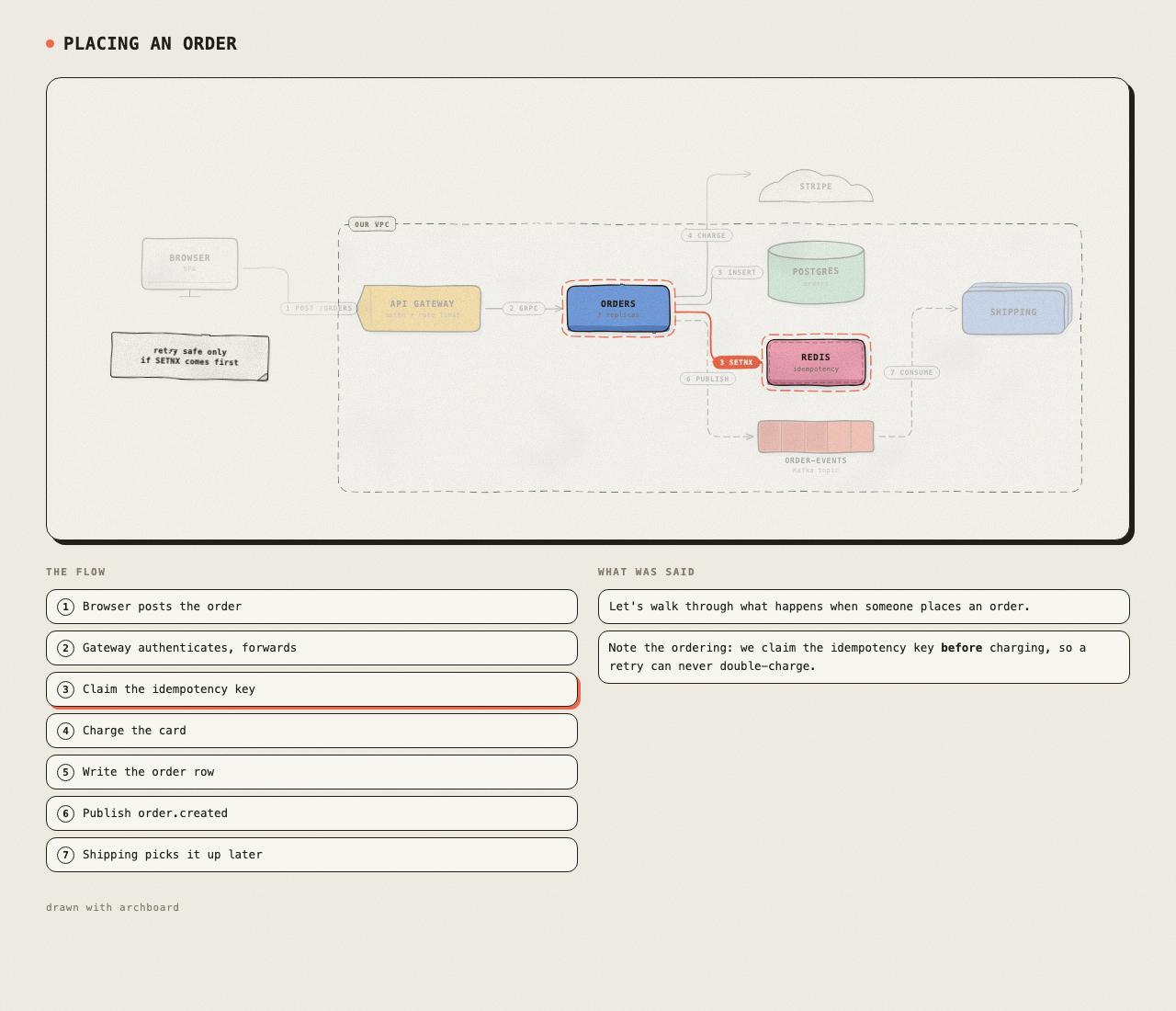
- package/integrations/herdr/README.md +61 -0
- package/integrations/herdr/bin/_pane-cwd.sh +19 -0
- package/integrations/herdr/bin/focus.sh +11 -0
- package/integrations/herdr/bin/list.sh +9 -0
- package/integrations/herdr/bin/open-list.sh +3 -0
- package/integrations/herdr/bin/open.sh +7 -0
- package/integrations/herdr/herdr-plugin.toml +51 -0
- package/package.json +58 -4
- package/skills/spiega/SKILL.md +268 -0
- package/src/agents-block.js +118 -0
- package/src/bench.js +246 -0
- package/src/board/board.html +876 -0
- package/src/board/camera.js +99 -0
- package/src/board/draw-on.js +95 -0
- package/src/board/log.js +175 -0
- package/src/board/narrate.js +291 -0
- package/src/board/open.js +144 -0
- package/src/board/script.js +166 -0
- package/src/board/server.js +644 -0
- package/src/board/snapshot.js +108 -0
- package/src/board/state.js +499 -0
- package/src/cli.js +726 -0
- package/src/doctor.js +469 -0
- package/src/index.js +7 -0
- package/src/install.js +598 -0
- package/src/mcp/server.js +304 -0
- package/src/migrate.js +271 -0
- package/src/render/callout.js +107 -0
- package/src/render/edges.js +213 -0
- package/src/render/glyphs.js +394 -0
- package/src/render/ink.js +227 -0
- package/src/render/layout.js +286 -0
- package/src/render/math.js +368 -0
- package/src/render/render.js +154 -0
- package/src/render/theme.js +84 -0
- package/src/term.js +79 -0
- package/src/toml.js +34 -0
- package/test/persist.mjs +362 -0
- package/test/saving.mjs +131 -0
- package/test/smoke.mjs +1856 -0
package/LICENSE
ADDED
|
@@ -0,0 +1,31 @@
|
|
|
1
|
+
MIT License
|
|
2
|
+
|
|
3
|
+
Copyright (c) 2026 Pierangelo Cecchetto - TulipLogic
|
|
4
|
+
|
|
5
|
+
The spiega icon (docs/logo/spiega-mark.svg and spiega-mark-on-dark.svg) is
|
|
6
|
+
original work under the copyright above, and not part of the visual language
|
|
7
|
+
credited below.
|
|
8
|
+
|
|
9
|
+
The visual language (palette, hand-drawn ink and grain treatment, flat
|
|
10
|
+
three-band bodies, cobalt cast shadow) follows Colorfigures and ISO-GLOW:
|
|
11
|
+
Copyright (c) 2026 April Zhu — MIT
|
|
12
|
+
and iso-figure, on which ISO-GLOW is based:
|
|
13
|
+
Copyright (c) 2026 Tolga Cohce — MIT
|
|
14
|
+
|
|
15
|
+
Permission is hereby granted, free of charge, to any person obtaining a copy
|
|
16
|
+
of this software and associated documentation files (the "Software"), to deal
|
|
17
|
+
in the Software without restriction, including without limitation the rights
|
|
18
|
+
to use, copy, modify, merge, publish, distribute, sublicense, and/or sell
|
|
19
|
+
copies of the Software, and to permit persons to whom the Software is
|
|
20
|
+
furnished to do so, subject to the following conditions:
|
|
21
|
+
|
|
22
|
+
The above copyright notice and this permission notice shall be included in all
|
|
23
|
+
copies or substantial portions of the Software.
|
|
24
|
+
|
|
25
|
+
THE SOFTWARE IS PROVIDED "AS IS", WITHOUT WARRANTY OF ANY KIND, EXPRESS OR
|
|
26
|
+
IMPLIED, INCLUDING BUT NOT LIMITED TO THE WARRANTIES OF MERCHANTABILITY,
|
|
27
|
+
FITNESS FOR A PARTICULAR PURPOSE AND NONINFRINGEMENT. IN NO EVENT SHALL THE
|
|
28
|
+
AUTHORS OR COPYRIGHT HOLDERS BE LIABLE FOR ANY CLAIM, DAMAGES OR OTHER
|
|
29
|
+
LIABILITY, WHETHER IN AN ACTION OF CONTRACT, TORT OR OTHERWISE, ARISING FROM,
|
|
30
|
+
OUT OF OR IN CONNECTION WITH THE SOFTWARE OR THE USE OR OTHER DEALINGS IN THE
|
|
31
|
+
SOFTWARE.
|
package/README.md
CHANGED
|
@@ -1,3 +1,409 @@
|
|
|
1
|
-
|
|
1
|
+
<img src="https://raw.githubusercontent.com/pierangeloc/spiega/main/docs/logo/spiega-mark.svg" alt="" width="72" align="left" hspace="12">
|
|
2
2
|
|
|
3
|
-
|
|
3
|
+
# spiega
|
|
4
|
+
|
|
5
|
+
A hand-drawn board an AI agent draws on **while it explains**.
|
|
6
|
+
|
|
7
|
+
*spiega* is Italian for *explain* — and for *unfold*, which is what this does
|
|
8
|
+
to a long document: spreads it out until you can see the whole shape at once.
|
|
9
|
+
|
|
10
|
+
Say it **SPYEH-ga** (/ˈspjɛɡa/): two syllables, stress on the first, and the
|
|
11
|
+
`i` is a glide rather than a vowel — *spyeh*, not *spee-eh*. It is the sound
|
|
12
|
+
English keeps missing in *piano*, which Italian says the same way.
|
|
13
|
+
|
|
14
|
+
You ask how something works. The agent answers in the terminal, as usual — and
|
|
15
|
+
beside it, a board fills in: boxes for the services, labelled arrows for the
|
|
16
|
+
calls, a dashed enclosure round the VPC, a note where the gotcha is. Then it
|
|
17
|
+
walks the request through, one numbered hop at a time.
|
|
18
|
+
|
|
19
|
+
It is meant for the thing a terminal is bad at: holding six nouns and the
|
|
20
|
+
arrows between them in your head while you read a paragraph about them.
|
|
21
|
+
|
|
22
|
+
|
|
23
|
+
|
|
24
|
+
## Why not Miro, or Mermaid
|
|
25
|
+
|
|
26
|
+
Miro is a place you go. This is a pane beside the conversation that the agent
|
|
27
|
+
is already having, and the board is gone when you are done unless you keep it.
|
|
28
|
+
|
|
29
|
+
Mermaid renders a finished diagram. This is drawn incrementally, in the order
|
|
30
|
+
the explanation goes, which is most of what makes it followable — and it looks
|
|
31
|
+
drawn, not generated, so it reads as somebody thinking rather than a document.
|
|
32
|
+
|
|
33
|
+
## Install
|
|
34
|
+
|
|
35
|
+
Node 20 or newer. No dependencies and no build step, so there is nothing to
|
|
36
|
+
compile and nothing to wait for.
|
|
37
|
+
|
|
38
|
+
Developed and used on **macOS**, and tested on macOS and Linux across Node 20,
|
|
39
|
+
22 and 24. Windows paths are in the code and nobody has run them in anger — if
|
|
40
|
+
you are on Windows, expect to file the first issue, and say so and it will get
|
|
41
|
+
fixed.
|
|
42
|
+
|
|
43
|
+
### 1. Get it on your PATH
|
|
44
|
+
|
|
45
|
+
```bash
|
|
46
|
+
npm install -g spiega
|
|
47
|
+
```
|
|
48
|
+
|
|
49
|
+
Or from a clone, if you want to change it:
|
|
50
|
+
|
|
51
|
+
```bash
|
|
52
|
+
git clone https://github.com/pierangeloc/spiega.git
|
|
53
|
+
cd spiega
|
|
54
|
+
npm link # `spiega` now points at this checkout
|
|
55
|
+
```
|
|
56
|
+
|
|
57
|
+
`npm link` rather than a copy on purpose: the CLI, the MCP server and the agent
|
|
58
|
+
skill all resolve to that directory, so `git pull` updates every one of them at
|
|
59
|
+
once.
|
|
60
|
+
|
|
61
|
+
Check it:
|
|
62
|
+
|
|
63
|
+
```bash
|
|
64
|
+
spiega help
|
|
65
|
+
```
|
|
66
|
+
|
|
67
|
+
### 2. Wire it into your agents
|
|
68
|
+
|
|
69
|
+
```bash
|
|
70
|
+
spiega install --detect # what it would do, touching nothing
|
|
71
|
+
spiega install # do it
|
|
72
|
+
```
|
|
73
|
+
|
|
74
|
+
`install` with no arguments does only what it finds on this machine, because
|
|
75
|
+
writing a config for a harness you do not use is how you end up with a file you
|
|
76
|
+
never asked for. `--list` shows every target and what it writes.
|
|
77
|
+
|
|
78
|
+
It also links the command into a directory an agent's shell can see. That link
|
|
79
|
+
is the one write it makes outside a config file of its own, and when
|
|
80
|
+
`~/.local/bin` is not already on a non-interactive `PATH` it **asks** before
|
|
81
|
+
adding a line to your `~/.zshenv`:
|
|
82
|
+
|
|
83
|
+
```
|
|
84
|
+
spiega needs to be where an agent can find it.
|
|
85
|
+
~/.local/bin is not on the PATH a non-interactive shell gets.
|
|
86
|
+
|
|
87
|
+
This would add one line to ~/.zshenv, after backing it up:
|
|
88
|
+
export PATH="$HOME/.local/bin:$PATH"
|
|
89
|
+
|
|
90
|
+
Add it? [y/N]
|
|
91
|
+
```
|
|
92
|
+
|
|
93
|
+
Anything but yes is no. Where there is nobody to ask — a script, CI, an agent's
|
|
94
|
+
own tool call — the answer is no and the line is printed instead, so an install
|
|
95
|
+
never hangs on a prompt and never edits a shell file unattended. `--path` and
|
|
96
|
+
`--no-path` answer in advance.
|
|
97
|
+
|
|
98
|
+
**Saying no withholds nothing else.** The skills and the MCP entries still
|
|
99
|
+
install, and MCP runs spiega by its full path, so it works. What you lose is
|
|
100
|
+
the fallback: an agent whose MCP server has died cannot find the command, and
|
|
101
|
+
writes prose instead of drawing with nothing on screen to say it meant to.
|
|
102
|
+
Install says so when you decline, and `spiega doctor` keeps saying so.
|
|
103
|
+
|
|
104
|
+
| target | what it gets |
|
|
105
|
+
|---|---|
|
|
106
|
+
| `claude` | the skill, linked into `~/.claude/skills/` |
|
|
107
|
+
| `codex` | the skill, an `AGENTS.md` block, an `mcp_servers` table |
|
|
108
|
+
| `gemini` | the skill, a `GEMINI.md` block, an `mcpServers` entry |
|
|
109
|
+
| `opencode` | `mcp.spiega` in `opencode.json`, and an `AGENTS.md` block |
|
|
110
|
+
| `copilot` `cursor` `windsurf` `zed` `vscode` `claude_desktop` | the MCP server, in each one's own config shape |
|
|
111
|
+
| `herdr` | a plugin: reach this task's board from its pane |
|
|
112
|
+
| `project` | an `AGENTS.md` block in the repo you are in — ask for it by name |
|
|
113
|
+
|
|
114
|
+
Everything is idempotent and backs up what it rewrites. Skills are
|
|
115
|
+
**symlinked**, so they track the checkout instead of going stale. Instruction
|
|
116
|
+
files get a delimited `SPIEGA_START`/`SPIEGA_END` block that leaves your own
|
|
117
|
+
text alone. For a harness nothing here knows about, `spiega mcp-config`
|
|
118
|
+
prints the entry to paste.
|
|
119
|
+
|
|
120
|
+
### 3. See that it works
|
|
121
|
+
|
|
122
|
+
```bash
|
|
123
|
+
spiega draw '[{"op":"title","text":"Hello"},
|
|
124
|
+
{"op":"node","id":"gw","kind":"gateway","label":"API Gateway"},
|
|
125
|
+
{"op":"node","id":"db","kind":"datastore","label":"Postgres"},
|
|
126
|
+
{"op":"edge","from":"gw","to":"db","label":"SQL"}]'
|
|
127
|
+
spiega open # a window of its own
|
|
128
|
+
```
|
|
129
|
+
|
|
130
|
+
Two boxes and a line, drawn on. If you see them, every layer is working: the
|
|
131
|
+
board, the renderer and the CLI.
|
|
132
|
+
|
|
133
|
+
### 4. Restart your agent
|
|
134
|
+
|
|
135
|
+
A running agent session holds the MCP process it started, and that process has
|
|
136
|
+
the code it was launched with. **Start a fresh session after installing**, or
|
|
137
|
+
the agent will be reading an older spiega than the one on disk. The symlink
|
|
138
|
+
keeps files current; it cannot do anything about processes already running.
|
|
139
|
+
|
|
140
|
+
Then ask for something architectural — "walk me through how X talks to Y, on
|
|
141
|
+
the board" — and watch the pane.
|
|
142
|
+
|
|
143
|
+
### Updating, and checking that it took
|
|
144
|
+
|
|
145
|
+
```bash
|
|
146
|
+
cd spiega && git pull && npm test
|
|
147
|
+
spiega install # only the copies need this: AGENTS.md blocks, the Cursor rule
|
|
148
|
+
spiega doctor # is what is running the thing that is on disk?
|
|
149
|
+
```
|
|
150
|
+
|
|
151
|
+
spiega reaches an agent through four kinds of thing, and they go stale
|
|
152
|
+
differently:
|
|
153
|
+
|
|
154
|
+
| | goes stale when |
|
|
155
|
+
|---|---|
|
|
156
|
+
| the CLI, via `npm link` | never — it is this checkout |
|
|
157
|
+
| a skill, symlinked | never — but the agent loaded it when its session started |
|
|
158
|
+
| an `AGENTS.md` block, a Cursor rule | the wording changes — re-run `spiega install` |
|
|
159
|
+
| **a running process** | **immediately — it holds the code it was launched with** |
|
|
160
|
+
|
|
161
|
+
The last one is the trap, and it is the one that looks like a feature that was
|
|
162
|
+
never built. `spiega doctor` finds it:
|
|
163
|
+
|
|
164
|
+
```
|
|
165
|
+
spiega doctor ──────────────────────────────────────────
|
|
166
|
+
|
|
167
|
+
✓ spiega on PATH ~/.nvm/…/spiega → this checkout
|
|
168
|
+
✓ claude skill linked — tracks the checkout
|
|
169
|
+
✓ opencode AGENTS.md block is current
|
|
170
|
+
✗ agent MCP server 16 running, 16 started before the current commit
|
|
171
|
+
|
|
172
|
+
To fix
|
|
173
|
+
→ start a fresh agent session — a running one keeps the server it launched
|
|
174
|
+
```
|
|
175
|
+
|
|
176
|
+
It exits non-zero when something is wrong, so it can go in a shell prompt or a
|
|
177
|
+
pre-flight check. It makes no network calls and changes nothing.
|
|
178
|
+
|
|
179
|
+
### If you use herdr
|
|
180
|
+
|
|
181
|
+
```bash
|
|
182
|
+
spiega install herdr
|
|
183
|
+
```
|
|
184
|
+
|
|
185
|
+
Then bind a key, in `~/.config/herdr/config.toml`:
|
|
186
|
+
|
|
187
|
+
```toml
|
|
188
|
+
[[keys.command]]
|
|
189
|
+
key = "prefix+alt+h"
|
|
190
|
+
type = "plugin_action"
|
|
191
|
+
command = "spiega.board.focus"
|
|
192
|
+
```
|
|
193
|
+
|
|
194
|
+
`herdr server reload-config`, and that key brings the board for whatever pane
|
|
195
|
+
you are in to the front — starting one if there is none.
|
|
196
|
+
|
|
197
|
+
## Use it yourself
|
|
198
|
+
|
|
199
|
+
```bash
|
|
200
|
+
spiega draw '{"op":"title","text":"Placing an order"}' # starts a board, prints its URL
|
|
201
|
+
spiega draw '{"op":"node","id":"gw","kind":"gateway","label":"API Gateway","sub":"authn"}'
|
|
202
|
+
spiega draw '{"op":"node","id":"orders","kind":"service","label":"Orders"}'
|
|
203
|
+
spiega draw '{"op":"edge","from":"gw","to":"orders","label":"gRPC"}'
|
|
204
|
+
spiega say "The gateway does **authn** and rate limiting, then hands off."
|
|
205
|
+
```
|
|
206
|
+
|
|
207
|
+
Give the board a window of its own — chromeless, no tabs, its own Dock entry,
|
|
208
|
+
so it sits beside your terminal like a native panel:
|
|
209
|
+
|
|
210
|
+
```bash
|
|
211
|
+
spiega open --size 1200x900 --pos 60,60
|
|
212
|
+
```
|
|
213
|
+
|
|
214
|
+
Render a whole spec with no server, or keep what is on the board:
|
|
215
|
+
|
|
216
|
+
```bash
|
|
217
|
+
spiega render examples/order-flow.json -o order-flow.html
|
|
218
|
+
spiega snapshot -o docs/board.html
|
|
219
|
+
```
|
|
220
|
+
|
|
221
|
+
`spiega help` lists the rest.
|
|
222
|
+
|
|
223
|
+
**Replay.** A board holds the order it was drawn in, not just its final state,
|
|
224
|
+
so press **replay** (or `r`) and the session plays back as it happened: the
|
|
225
|
+
line that was said, then the thing it was about being drawn, with the camera
|
|
226
|
+
moving to wherever the work is and the words captioned over the picture. On
|
|
227
|
+
anything complex the finished board is a wall; the replay is the explanation.
|
|
228
|
+
It ends on a wide shot of the whole thing.
|
|
229
|
+
|
|
230
|
+
The log lives on the board, so a replay can also be asked for from outside —
|
|
231
|
+
`spiega replay`, or `board_replay` over MCP. An agent that has just finished
|
|
232
|
+
an explanation can offer to play it back without thinking the drawing out a
|
|
233
|
+
second time, and nothing is re-sent: it is the same session, run again.
|
|
234
|
+
|
|
235
|
+
**Clicking the script.** A line tagged with a step is a way into that step:
|
|
236
|
+
click it and the board walks there, so you can read a sentence and go straight
|
|
237
|
+
to the hop it describes rather than hunting for the number. Clicking the step
|
|
238
|
+
already lit clears it, so one gesture goes both ways. Lines tied to no step are
|
|
239
|
+
not clickable and do not pretend to be.
|
|
240
|
+
|
|
241
|
+
**Keys on the board:** `←` `→` walk the flow, `space` plays it, `r` replays the
|
|
242
|
+
session, `+` `-` zoom a step at a time, `0` or `f` fits, `esc` stops.
|
|
243
|
+
|
|
244
|
+
**Where to put the board.** `spiega open` gives it a real window and is the
|
|
245
|
+
right answer for anything interactive. A terminal pane (`terminal-browser
|
|
246
|
+
open "$(spiega url)"`) is good for *glancing* while you work and for stepping
|
|
247
|
+
a flow with the arrow keys — those repaint once per keypress. It is poor at
|
|
248
|
+
continuous zoom and dragging, because every frame has to be encoded and pushed
|
|
249
|
+
through the TTY however fast the page itself is. Both can watch the same board
|
|
250
|
+
at once.
|
|
251
|
+
|
|
252
|
+
## One board per conversation
|
|
253
|
+
|
|
254
|
+
A board belongs to an explanation, and people hold more than one at a time. Two
|
|
255
|
+
agents drawing on the same board interleave two explanations into one picture,
|
|
256
|
+
which is worse than either having none — so boards have names.
|
|
257
|
+
|
|
258
|
+
```bash
|
|
259
|
+
spiega boards # every board, and which one this shell uses
|
|
260
|
+
spiega focus # bring this session's board window forward
|
|
261
|
+
spiega --board api draw '...' # or SPIEGA_BOARD=api
|
|
262
|
+
spiega stop # drop this board; the others keep drawing
|
|
263
|
+
spiega stop --all # all of them, and the server with them
|
|
264
|
+
```
|
|
265
|
+
|
|
266
|
+
A board names itself after the task: the working directory's own name, which
|
|
267
|
+
for a worktree is the thing you called it — `domain-modeling-for-rights`, not a
|
|
268
|
+
uuid. A session keeps the board it already has, matched on whichever identity
|
|
269
|
+
its harness exposes (the conversation id, else the terminal pane, else the
|
|
270
|
+
directory). Two conversations about one repo get `name` and `name-2`, and
|
|
271
|
+
`spiega boards` prints each board's directory so they can be told apart.
|
|
272
|
+
|
|
273
|
+
Not per harness, per task: four opencode sessions and four Claude Code sessions
|
|
274
|
+
at once is the normal case, and a board per harness would put four
|
|
275
|
+
explanations on one drawing. Note that an MCP server started by a long-lived
|
|
276
|
+
daemon inherits that daemon's environment, so the CLI — which runs in the pane
|
|
277
|
+
— resolves the session correctly where MCP may not.
|
|
278
|
+
|
|
279
|
+
A board is registered by the process serving it and pruned when that process is
|
|
280
|
+
gone, so a name never resolves to a socket nobody is listening on.
|
|
281
|
+
|
|
282
|
+
## One server, all the boards
|
|
283
|
+
|
|
284
|
+
They all live in one process, on port 4777, each under `/b/<name>`. It used to
|
|
285
|
+
be a process and a port per board, and the arithmetic was indefensible: the
|
|
286
|
+
Node runtime is 55-70 MB and a board with nine boxes is a few KB of state, so
|
|
287
|
+
eight parallel tasks spent ~600 MB holding a few hundred KB of drawing.
|
|
288
|
+
|
|
289
|
+
The second reason is staleness, and it is the one that actually bit. A server
|
|
290
|
+
per board meant a board started before an update kept serving the old page for
|
|
291
|
+
as long as it lived — one of them 404'd on a route the code on disk had — while
|
|
292
|
+
the isolation that a process per board bought had never once been needed.
|
|
293
|
+
|
|
294
|
+
So: one port, no scanning upward, one copy of the renderer served to every
|
|
295
|
+
board, and every board running the code that is on disk. Starting a board is a
|
|
296
|
+
map entry on a process that is almost certainly already up; the port itself is
|
|
297
|
+
the lock, so two agents drawing at the same moment do not end up with two
|
|
298
|
+
servers. `spiega stop` drops one board and leaves the rest drawing;
|
|
299
|
+
`spiega stop --server` ends the process and everything on it.
|
|
300
|
+
|
|
301
|
+
`spiega serve --solo` gives a board its own process and its own port if an
|
|
302
|
+
isolation case ever turns up. Clients cannot tell the difference: the url shape
|
|
303
|
+
is the same either way, and `spiega boards` says which boards are on their own.
|
|
304
|
+
|
|
305
|
+
If you run your sessions in [herdr](https://herdr.dev), `spiega install herdr`
|
|
306
|
+
links a plugin that goes from the pane you are working in to that task's board —
|
|
307
|
+
bind a key to **spiega: show this task's board**. It reads the pane's working
|
|
308
|
+
directory rather than the conversation, so it needs nothing from the agent.
|
|
309
|
+
See [`integrations/herdr/`](integrations/herdr/).
|
|
310
|
+
|
|
311
|
+
## Compare how models use it
|
|
312
|
+
|
|
313
|
+
```bash
|
|
314
|
+
spiega bench --list # models you can reach right now
|
|
315
|
+
spiega bench "how a write-through cache works" \
|
|
316
|
+
--models github-copilot/claude-opus-5.5,github-copilot/gpt-6-sol
|
|
317
|
+
```
|
|
318
|
+
|
|
319
|
+
Runs the same brief through each model via `opencode run`, parses the ops out of
|
|
320
|
+
whatever it replied with, renders each board, and writes `bench/index.html`
|
|
321
|
+
comparing them side by side — boxes, lines, steps, how many edges it bothered to
|
|
322
|
+
label, how many kinds it reached for. Each model's raw reply is kept next to its
|
|
323
|
+
board. Runs are isolated and never touch a live board.
|
|
324
|
+
|
|
325
|
+
|
|
326
|
+
|
|
327
|
+
A Claude skill, a Cursor rule and an MCP server, all driving the same board —
|
|
328
|
+
see [`integrations/`](integrations/). The agent needs no new vocabulary: it
|
|
329
|
+
emits small JSON ops as it talks.
|
|
330
|
+
|
|
331
|
+
Every op, every node kind and every layout hint is in
|
|
332
|
+
[`docs/vocabulary.md`](docs/vocabulary.md), along with what the board does
|
|
333
|
+
*not* model — worth reading before asking for a sequence diagram. The
|
|
334
|
+
instructions the agent itself reads are in [`docs/skill.md`](docs/skill.md).
|
|
335
|
+
|
|
336
|
+
```jsonc
|
|
337
|
+
{"op":"node","id":"db","kind":"datastore","label":"Postgres","sub":"orders"}
|
|
338
|
+
{"op":"edge","from":"orders","to":"bus","label":"publish","async":true}
|
|
339
|
+
{"op":"note","label":"idempotency key\nlives 24h"}
|
|
340
|
+
{"op":"boundary","label":"our VPC","members":["gw","orders","db"]}
|
|
341
|
+
{"op":"step","edge":"gw>orders","step":"Gateway authenticates and forwards"}
|
|
342
|
+
{"op":"say","text":"The gateway checks the token first.","step":2}
|
|
343
|
+
```
|
|
344
|
+
|
|
345
|
+
A board has two halves, and a `say` can name the step it explains. Walking the
|
|
346
|
+
flow then lights the matching lines of the script while the others recede, so
|
|
347
|
+
the words and the picture move together. Lines about the board as a whole carry
|
|
348
|
+
no step and never dim; a line said while a step was lit is attributed for free.
|
|
349
|
+
Nothing is inferred beyond that — an untagged script does not highlight rather
|
|
350
|
+
than highlighting the wrong thing.
|
|
351
|
+
|
|
352
|
+
Which lines went with which step is often clear only afterwards, so tags can be
|
|
353
|
+
set on lines already said. The board keeps them; nothing is drawn again.
|
|
354
|
+
|
|
355
|
+
```bash
|
|
356
|
+
spiega script # the lines, numbered, and what each is tied to
|
|
357
|
+
spiega tag --match "Flyway V25" --step 6
|
|
358
|
+
spiega tag 1 --step off # an opening remark belongs to no step
|
|
359
|
+
```
|
|
360
|
+
|
|
361
|
+
The rail shows what was said, in the order it was said. So a script narrated
|
|
362
|
+
topic by topic, with each line tagged by whichever step it touches, comes out
|
|
363
|
+
`2, 1, 3, 3, 4, 3, 6` — which looks like a sort gone wrong, though nothing
|
|
364
|
+
sorted anything. `spiega script` says so when it happens, because from the
|
|
365
|
+
board you cannot tell the difference between that and a bug.
|
|
366
|
+
|
|
367
|
+
Nothing is ever placed by hand. Columns are derived from the edges — a node
|
|
368
|
+
sits one column right of whatever points at it — so the agent draws a box, then
|
|
369
|
+
the arrow into it, and the layout follows.
|
|
370
|
+
|
|
371
|
+
## How it is put together
|
|
372
|
+
|
|
373
|
+
| | |
|
|
374
|
+
|---|---|
|
|
375
|
+
| `src/render/ink.js` | seeded wobble: the geometry that makes a line look drawn |
|
|
376
|
+
| `src/render/glyphs.js` | one drawing per kind — service, cylinder, queue, cloud, note |
|
|
377
|
+
| `src/render/edges.js` | gutter routing, fan-out anchors, numbered tags |
|
|
378
|
+
| `src/render/layout.js` | columns from the flow, order-stable so nothing jumps |
|
|
379
|
+
| `src/board/state.js` | the board as an op log |
|
|
380
|
+
| `src/board/server.js` | one process, every board; HTTP + SSE, and the renderer as plain ES modules |
|
|
381
|
+
| `src/board/board.html` | the pane: transcript rail, step strip, pan and zoom |
|
|
382
|
+
| `src/board/draw-on.js` | the hand: variable pen speed, uneven pauses, ink then colour |
|
|
383
|
+
| `src/mcp/server.js` | the same board as MCP tools |
|
|
384
|
+
|
|
385
|
+
Two separate things make it look hand-drawn, and both are needed. The geometry
|
|
386
|
+
is off true — `waver()` in `ink.js` pushes every point around a seeded wobble,
|
|
387
|
+
so a line bows rather than buzzing. And the *motion* is off true: a stroke is
|
|
388
|
+
drawn with keyframes whose progress runs ahead of and behind the clock, so the
|
|
389
|
+
pen hurries down a straight and slows coming round a corner, strokes start
|
|
390
|
+
before the one before has finished, and the colour only goes on once the
|
|
391
|
+
outline is closed. A constant-speed dashoffset tween reads as a machine tracing
|
|
392
|
+
a path, which is exactly what it is.
|
|
393
|
+
|
|
394
|
+
The wobble lives in the path data rather than in an SVG filter, so the board can
|
|
395
|
+
animate without recomputing a filter every frame. Snapshots, which are rendered
|
|
396
|
+
once and never animate, do get the full ink-and-paper filter on top.
|
|
397
|
+
|
|
398
|
+
## Credits
|
|
399
|
+
|
|
400
|
+
The look — warm paper, flat three-band bodies, the cobalt cast shadow, the
|
|
401
|
+
ink-and-grain filter — follows [Colorfigures](https://april-zhu.com/colorfigures)
|
|
402
|
+
by April Zhu (MIT), which is built on ISO-GLOW by April Zhu and
|
|
403
|
+
[iso-figure](https://github.com/MrBongoC/ai-iso-skill) by Tolga Cohce, both MIT.
|
|
404
|
+
Colorfigures draws machines in isometric 3D; spiega borrows its palette and
|
|
405
|
+
its hand, and points them at software architecture in 2D.
|
|
406
|
+
|
|
407
|
+
## License
|
|
408
|
+
|
|
409
|
+
MIT.
|
package/bin/spiega
ADDED
|
@@ -0,0 +1,155 @@
|
|
|
1
|
+
#!/bin/sh
|
|
2
|
+
# spiega — a launcher, not a node script.
|
|
3
|
+
#
|
|
4
|
+
# `#!/usr/bin/env node` is a lottery on a machine with nvm: the shebang resolves
|
|
5
|
+
# `node` from the caller's PATH, and an agent's non-interactive shell may find a
|
|
6
|
+
# brew node missing its dylibs or a node from 2016. So this resolves a node that
|
|
7
|
+
# is new enough for the engines floor, preferring the one `spiega install` ran
|
|
8
|
+
# under, and execs the real CLI with it. It is /bin/sh so it runs before any
|
|
9
|
+
# node does.
|
|
10
|
+
#
|
|
11
|
+
# The guesses below are nvm-shaped, which is no use to a node from brew, asdf,
|
|
12
|
+
# volta or mise. The record is what makes the first run after install work
|
|
13
|
+
# there: install only gets that far on a node the engines guard has accepted.
|
|
14
|
+
#
|
|
15
|
+
# The one thing it must never do is guess silently: if no usable node is found,
|
|
16
|
+
# it says so in one sentence and exits non-zero.
|
|
17
|
+
|
|
18
|
+
set -u
|
|
19
|
+
|
|
20
|
+
# Resolve this script through any symlinks. npm and `spiega install` both link
|
|
21
|
+
# to it, so $0 is usually the link and not the file next to src/.
|
|
22
|
+
target=$0
|
|
23
|
+
while [ -h "$target" ]; do
|
|
24
|
+
dir=$(CDPATH= cd -- "$(dirname -- "$target")" && pwd -P)
|
|
25
|
+
link=$(readlink "$target")
|
|
26
|
+
case $link in
|
|
27
|
+
/*) target=$link ;;
|
|
28
|
+
*) target=$dir/$link ;;
|
|
29
|
+
esac
|
|
30
|
+
done
|
|
31
|
+
root=$(CDPATH= cd -- "$(dirname -- "$target")/.." && pwd -P)
|
|
32
|
+
cli=$root/src/cli.js
|
|
33
|
+
|
|
34
|
+
# The floor lives in package.json; this only repeats it if the read fails.
|
|
35
|
+
floor=$(sed -n 's/.*"node"[[:space:]]*:[[:space:]]*">=[[:space:]]*\([0-9][0-9]*\).*/\1/p' \
|
|
36
|
+
"$root/package.json" 2>/dev/null | head -n 1)
|
|
37
|
+
[ -n "${floor:-}" ] || floor=20
|
|
38
|
+
|
|
39
|
+
# A node is usable only if it actually runs and clears the floor. A binary that
|
|
40
|
+
# exists but cannot load its libraries fails here rather than inside the CLI.
|
|
41
|
+
usable() {
|
|
42
|
+
[ -n "${1:-}" ] && [ -x "$1" ] || return 1
|
|
43
|
+
v=$("$1" -p 'process.versions.node' 2>/dev/null) || return 1
|
|
44
|
+
[ -n "$v" ] || return 1
|
|
45
|
+
major=${v%%.*}
|
|
46
|
+
case $major in ''|*[!0-9]*) return 1 ;; esac
|
|
47
|
+
[ "$major" -ge "$floor" ]
|
|
48
|
+
}
|
|
49
|
+
|
|
50
|
+
nvm=${NVM_DIR:-$HOME/.nvm}
|
|
51
|
+
|
|
52
|
+
# The node `spiega install` was running under when it wrote this install. It
|
|
53
|
+
# lives in the state directory rather than in this file, because this is a
|
|
54
|
+
# tracked file: an install that wrote into it would dirty the checkout, and a
|
|
55
|
+
# `git pull` would either revert it or refuse. It is per HOME, so a checkout
|
|
56
|
+
# shared between machines keeps one answer each.
|
|
57
|
+
#
|
|
58
|
+
# A recorded path can be gone — a deleted nvm version, an upgraded brew. It is
|
|
59
|
+
# a candidate like any other and goes through usable() below, so staleness
|
|
60
|
+
# costs a shell call, not the run.
|
|
61
|
+
record_file=$HOME/.spiega/node
|
|
62
|
+
recorded=''
|
|
63
|
+
if [ -f "$record_file" ]; then
|
|
64
|
+
IFS= read -r recorded < "$record_file" 2>/dev/null || true
|
|
65
|
+
fi
|
|
66
|
+
|
|
67
|
+
# nvm's default alias, followed through links like lts/* and node. The alias
|
|
68
|
+
# file may name a version (`26.10.0`, `v26.10.0`) or another alias.
|
|
69
|
+
from_alias() {
|
|
70
|
+
a=$1
|
|
71
|
+
i=0
|
|
72
|
+
while [ "$i" -lt 5 ] && [ -f "$nvm/alias/$a" ]; do
|
|
73
|
+
a=$(cat "$nvm/alias/$a" 2>/dev/null) || return 1
|
|
74
|
+
i=$((i + 1))
|
|
75
|
+
done
|
|
76
|
+
case $a in
|
|
77
|
+
v[0-9]*) printf '%s\n' "$nvm/versions/node/$a/bin/node" ;;
|
|
78
|
+
[0-9]*) printf '%s\n' "$nvm/versions/node/v$a/bin/node" ;;
|
|
79
|
+
esac
|
|
80
|
+
}
|
|
81
|
+
|
|
82
|
+
node=''
|
|
83
|
+
# Which rung answered, so `spiega doctor` can say why rather than only which.
|
|
84
|
+
via=''
|
|
85
|
+
|
|
86
|
+
# 1. An explicit choice, for a machine whose right node is not nvm's default.
|
|
87
|
+
if [ -n "${SPIEGA_NODE:-}" ] && usable "$SPIEGA_NODE"; then
|
|
88
|
+
node=$SPIEGA_NODE
|
|
89
|
+
via=override
|
|
90
|
+
fi
|
|
91
|
+
|
|
92
|
+
# 2. The node that installed this, remembered because install ran under a node
|
|
93
|
+
# it had already checked against the floor. This is the rung that works
|
|
94
|
+
# when the node came from somewhere the guesses below have never heard of.
|
|
95
|
+
if [ -z "$node" ] && [ -n "$recorded" ] && usable "$recorded"; then
|
|
96
|
+
node=$recorded
|
|
97
|
+
via=recorded
|
|
98
|
+
fi
|
|
99
|
+
|
|
100
|
+
# 3. What nvm calls the default — the node someone actually uses in a terminal.
|
|
101
|
+
if [ -z "$node" ]; then
|
|
102
|
+
alias_node=$(from_alias default 2>/dev/null) || alias_node=''
|
|
103
|
+
if [ -n "$alias_node" ] && usable "$alias_node"; then
|
|
104
|
+
node=$alias_node
|
|
105
|
+
via=nvm-default
|
|
106
|
+
fi
|
|
107
|
+
fi
|
|
108
|
+
|
|
109
|
+
# 4. Any installed nvm version that clears the floor, newest first.
|
|
110
|
+
if [ -z "$node" ] && [ -d "$nvm/versions/node" ]; then
|
|
111
|
+
while IFS= read -r candidate; do
|
|
112
|
+
if usable "$candidate"; then node=$candidate; via=nvm-any; break; fi
|
|
113
|
+
done <<EOF
|
|
114
|
+
$(ls -1d "$nvm"/versions/node/*/bin/node 2>/dev/null | sort -r)
|
|
115
|
+
EOF
|
|
116
|
+
fi
|
|
117
|
+
|
|
118
|
+
# 5. Whatever the PATH has, if it is usable.
|
|
119
|
+
if [ -z "$node" ]; then
|
|
120
|
+
candidate=$(command -v node 2>/dev/null) || candidate=''
|
|
121
|
+
if [ -n "$candidate" ] && usable "$candidate"; then node=$candidate; via=path; fi
|
|
122
|
+
fi
|
|
123
|
+
|
|
124
|
+
# 6. The usual places, for a shell whose PATH is as bare as an agent's.
|
|
125
|
+
if [ -z "$node" ]; then
|
|
126
|
+
for candidate in /opt/homebrew/bin/node /usr/local/bin/node /usr/bin/node; do
|
|
127
|
+
if usable "$candidate"; then node=$candidate; via=known; break; fi
|
|
128
|
+
done
|
|
129
|
+
fi
|
|
130
|
+
|
|
131
|
+
if [ -z "$node" ]; then
|
|
132
|
+
echo "spiega needs Node $floor or newer and found no node on this machine that can run it; install one with nvm (nvm install --lts) or point SPIEGA_NODE at it." >&2
|
|
133
|
+
exit 1
|
|
134
|
+
fi
|
|
135
|
+
|
|
136
|
+
# `spiega doctor` asks the launcher which node an agent would really get,
|
|
137
|
+
# because the node on PATH and the node nvm calls default are not the same
|
|
138
|
+
# thing, and only the second one runs this.
|
|
139
|
+
if [ "${SPIEGA_NODE_VERSION:-}" = "1" ]; then
|
|
140
|
+
printf '%s %s %s\n' "$node" "$("$node" -p 'process.versions.node')" "$via"
|
|
141
|
+
# The record is a second answer to a second question: which node was
|
|
142
|
+
# installed against, and is it still there? It can be stale while the
|
|
143
|
+
# launcher is fine, so doctor cannot infer it from the node above. No line
|
|
144
|
+
# at all means there is no record; that is not the same as a broken one.
|
|
145
|
+
if [ -n "$recorded" ]; then
|
|
146
|
+
if usable "$recorded"; then
|
|
147
|
+
printf 'recorded %s ok\n' "$recorded"
|
|
148
|
+
else
|
|
149
|
+
printf 'recorded %s stale\n' "$recorded"
|
|
150
|
+
fi
|
|
151
|
+
fi
|
|
152
|
+
exit 0
|
|
153
|
+
fi
|
|
154
|
+
|
|
155
|
+
exec "$node" "$cli" "$@"
|
package/docs/README.md
ADDED
|
@@ -0,0 +1,9 @@
|
|
|
1
|
+
# docs
|
|
2
|
+
|
|
3
|
+
| page | what is in it |
|
|
4
|
+
|---|---|
|
|
5
|
+
| [skill.md](skill.md) | the instructions an agent reads, and the three routes they travel |
|
|
6
|
+
| [vocabulary.md](vocabulary.md) | every op, kind and layout hint — and what the board does not model |
|
|
7
|
+
| [shapes.md](shapes.md) | what each of them is drawn as, rendered from the renderer itself |
|
|
8
|
+
|
|
9
|
+
The README covers installing and using spiega. These cover steering it.
|
|
@@ -0,0 +1 @@
|
|
|
1
|
+
<svg xmlns="http://www.w3.org/2000/svg" viewBox="31 31 138 138" role="img" aria-label="Spiega"><rect x="31" y="31" width="138" height="138" rx="28" fill="#1E1C17"/><path d="M139.9 52.5 A62 62 0 1 1 49.2 135.6" fill="none" stroke="#C4823A" stroke-width="14" stroke-linecap="round"/><path d="M41.0 119.2 A62 62 0 0 1 110.8 38.9" fill="none" stroke="#76AE62" stroke-width="14" stroke-linecap="round"/><path d="M142.2 80.4 L142.0 79.9 L141.9 79.4 L141.8 78.9 L141.7 78.3 L141.6 77.8 L141.5 77.2 L141.4 76.6 L141.3 76.1 L141.3 75.5 L141.2 74.9 L141.1 74.3 L141.0 73.7 L140.9 73.1 L140.9 72.5 L140.8 71.9 L140.7 71.3 L140.6 70.7 L140.5 70.0 L140.4 69.4 L140.3 68.8 L140.2 68.1 L140.1 67.5 L140.0 66.8 L139.9 66.2 L139.8 65.5 L139.6 64.9 L139.5 64.2 L139.4 63.5 L139.2 62.8 L139.1 62.2 L138.9 61.5 L138.8 60.8 L138.6 60.1 L138.4 59.4 L138.2 58.7 L138.0 58.0 L137.9 57.3 L137.6 56.6 L137.4 55.8 L137.2 55.1 L137.0 54.4 L136.8 53.7 L136.5 52.9 L136.3 52.2 L136.0 51.4 L135.7 50.7 L135.4 50.0 L135.1 49.2 L134.8 48.5 L134.5 47.7 L134.2 46.9 L133.9 46.2 L133.5 45.4 L133.2 44.6 L132.8 43.9 L132.5 43.1 L132.1 42.3 L131.7 41.6 L131.3 40.8 L130.9 40.0 L121.5 47.6 L122.1 48.1 L122.7 48.5 L123.3 49.0 L123.9 49.5 L124.4 50.0 L124.9 50.5 L125.5 51.0 L126.0 51.5 L126.5 52.0 L127.0 52.5 L127.5 53.0 L128.0 53.6 L128.5 54.1 L128.9 54.6 L129.4 55.2 L129.9 55.7 L130.3 56.2 L130.7 56.8 L131.2 57.3 L131.6 57.9 L132.0 58.5 L132.4 59.0 L132.7 59.6 L133.1 60.2 L133.5 60.7 L133.8 61.3 L134.2 61.9 L134.5 62.4 L134.9 63.0 L135.2 63.6 L135.5 64.2 L135.8 64.8 L136.1 65.3 L136.4 65.9 L136.6 66.5 L136.9 67.1 L137.2 67.7 L137.4 68.3 L137.6 68.8 L137.9 69.4 L138.1 70.0 L138.3 70.6 L138.5 71.2 L138.7 71.7 L138.9 72.3 L139.1 72.9 L139.3 73.5 L139.4 74.0 L139.6 74.6 L139.8 75.2 L139.9 75.7 L140.1 76.3 L140.2 76.9 L140.4 77.4 L140.5 78.0 L140.6 78.5 L140.8 79.1 L140.9 79.6 L141.0 80.2 L141.2 80.7 Z" fill="#B52D6A"/><circle cx="126.2" cy="43.8" r="10" fill="#B52D6A"/></svg>
|
|
@@ -0,0 +1 @@
|
|
|
1
|
+
<svg xmlns="http://www.w3.org/2000/svg" viewBox="31 31 138 138" role="img" aria-label="Spiega"><path d="M139.9 52.5 A62 62 0 1 1 49.2 135.6" fill="none" stroke="#C4823A" stroke-width="14" stroke-linecap="round"/><path d="M41.0 119.2 A62 62 0 0 1 110.8 38.9" fill="none" stroke="#76AE62" stroke-width="14" stroke-linecap="round"/><path d="M142.2 80.4 L142.0 79.9 L141.9 79.4 L141.8 78.9 L141.7 78.3 L141.6 77.8 L141.5 77.2 L141.4 76.6 L141.3 76.1 L141.3 75.5 L141.2 74.9 L141.1 74.3 L141.0 73.7 L140.9 73.1 L140.9 72.5 L140.8 71.9 L140.7 71.3 L140.6 70.7 L140.5 70.0 L140.4 69.4 L140.3 68.8 L140.2 68.1 L140.1 67.5 L140.0 66.8 L139.9 66.2 L139.8 65.5 L139.6 64.9 L139.5 64.2 L139.4 63.5 L139.2 62.8 L139.1 62.2 L138.9 61.5 L138.8 60.8 L138.6 60.1 L138.4 59.4 L138.2 58.7 L138.0 58.0 L137.9 57.3 L137.6 56.6 L137.4 55.8 L137.2 55.1 L137.0 54.4 L136.8 53.7 L136.5 52.9 L136.3 52.2 L136.0 51.4 L135.7 50.7 L135.4 50.0 L135.1 49.2 L134.8 48.5 L134.5 47.7 L134.2 46.9 L133.9 46.2 L133.5 45.4 L133.2 44.6 L132.8 43.9 L132.5 43.1 L132.1 42.3 L131.7 41.6 L131.3 40.8 L130.9 40.0 L121.5 47.6 L122.1 48.1 L122.7 48.5 L123.3 49.0 L123.9 49.5 L124.4 50.0 L124.9 50.5 L125.5 51.0 L126.0 51.5 L126.5 52.0 L127.0 52.5 L127.5 53.0 L128.0 53.6 L128.5 54.1 L128.9 54.6 L129.4 55.2 L129.9 55.7 L130.3 56.2 L130.7 56.8 L131.2 57.3 L131.6 57.9 L132.0 58.5 L132.4 59.0 L132.7 59.6 L133.1 60.2 L133.5 60.7 L133.8 61.3 L134.2 61.9 L134.5 62.4 L134.9 63.0 L135.2 63.6 L135.5 64.2 L135.8 64.8 L136.1 65.3 L136.4 65.9 L136.6 66.5 L136.9 67.1 L137.2 67.7 L137.4 68.3 L137.6 68.8 L137.9 69.4 L138.1 70.0 L138.3 70.6 L138.5 71.2 L138.7 71.7 L138.9 72.3 L139.1 72.9 L139.3 73.5 L139.4 74.0 L139.6 74.6 L139.8 75.2 L139.9 75.7 L140.1 76.3 L140.2 76.9 L140.4 77.4 L140.5 78.0 L140.6 78.5 L140.8 79.1 L140.9 79.6 L141.0 80.2 L141.2 80.7 Z" fill="#B52D6A"/><circle cx="126.2" cy="43.8" r="10" fill="#B52D6A"/></svg>
|