spequi 0.1.0 → 0.1.1
This diff represents the content of publicly available package versions that have been released to one of the supported registries. The information contained in this diff is provided for informational purposes only and reflects changes between package versions as they appear in their respective public registries.
- package/CHANGELOG.md +8 -0
- package/README.md +25 -23
- package/bin/spequi.mjs +51 -18
- package/docs/agent-workflow.md +24 -35
- package/package.json +14 -5
- package/public/app.css +114 -5
- package/public/app.js +119 -19
- package/public/diff.css +1 -1
- package/public/requests.js +328 -0
- package/public/review.css +27 -13
- package/public/review.js +5 -2
- package/public/session.js +134 -23
- package/public/studio.css +120 -22
- package/public/studio.js +2 -11
- package/public/{lifecycle.js → workflow.js} +30 -9
- package/skills/spequi/SKILL.md +11 -6
- package/src/agent-client.mjs +17 -0
- package/src/agent-session.mjs +3 -2
- package/src/analytics.mjs +63 -0
- package/src/commands.mjs +35 -11
- package/src/comment-view.mjs +3 -2
- package/src/creation-view.mjs +7 -7
- package/src/diff-view.mjs +11 -2
- package/src/direct-preview.mjs +4 -3
- package/src/drafts.mjs +83 -0
- package/src/files.mjs +79 -6
- package/src/job-dialogue.mjs +2 -2
- package/src/jobs.mjs +138 -43
- package/src/lifecycle.mjs +18 -23
- package/src/openspec-cli.mjs +5 -5
- package/src/preview-view.mjs +20 -7
- package/src/previews.mjs +6 -2
- package/src/project.mjs +2 -0
- package/src/requests.mjs +80 -0
- package/src/server.mjs +151 -21
- package/src/studio-view.mjs +31 -16
- package/src/views.mjs +39 -23
- package/src/workspace-state.mjs +48 -0
- package/public/lifecycle.css +0 -93
- package/src/lifecycle-view.mjs +0 -58
package/CHANGELOG.md
ADDED
|
@@ -0,0 +1,8 @@
|
|
|
1
|
+
# Changelog
|
|
2
|
+
|
|
3
|
+
## 0.1.1 — 2026-11-14
|
|
4
|
+
|
|
5
|
+
- Group requests by spec, prioritize unresolved work, and mark pending inbox items in the header.
|
|
6
|
+
- Refine agent and MCP connection panels, contextual commands, and planning document selection.
|
|
7
|
+
- Simplify review comments and file preview states; add GitHub contribution links and creator credit.
|
|
8
|
+
- Add usage and failure analytics for project activity, spec creation, and file diffs. Events include project names, Git user names when available, and a persistent identifier shared across projects on the same machine account. Source files, prompts, and comments are excluded.
|
package/README.md
CHANGED
|
@@ -10,33 +10,30 @@ A local workspace for planning, implementing, and reviewing [OpenSpec](https://o
|
|
|
10
10
|
[](LICENSE)
|
|
11
11
|
[](#stack)
|
|
12
12
|
|
|
13
|
-
[Get started](#get-started) · [
|
|
13
|
+
[Get started](#get-started) · [Planning and review](#planning-and-review) · [Features](#features) · [How it works](#how-it-works) · [Agent setup](#attach-your-agent)
|
|
14
14
|
|
|
15
15
|
</div>
|
|
16
16
|
|
|
17
|
-
##
|
|
17
|
+
## Planning and review
|
|
18
18
|
|
|
19
|
-
|
|
19
|
+
Start with **New spec** to shape an idea with your agent. Ideas save automatically under **Drafts** in the left panel; return there to resume unfinished planning or delete a draft. Draft deletion can also remove its generated planning files after confirmation.
|
|
20
20
|
|
|
21
|
-
|
|
22
|
-
| ------------------------------ | --------------------------------------------------------------------------------------------------------------------------- |
|
|
23
|
-
| **Build — Plan & implement** | Start a spec from an idea, revise the plan with your agent, preview and apply an implementation, then validate and archive. |
|
|
24
|
-
| **Review — Inspect & comment** | Read planning documents, inspect actual code diffs and dependency impact, and leave precise feedback for the next revision. |
|
|
21
|
+
Select an existing change to read documents, inspect proposed code, and leave feedback. The planning workspace provides spec refinement, implementation preview, validation, and archive. New specs and existing changes use the same planning workspace, retained previews, and conversation. Applying reviewed files always requires explicit confirmation.
|
|
25
22
|
|
|
26
|
-
|
|
23
|
+
Open **Requests** in the header for an inbox grouped by spec. Questions, failures, and stalled work appear first, followed by running and queued work. The badge counts specs needing attention. A collapsed **Recent** section holds the latest five completed specs; cancelled and older work stays in **All history**, with status filters and pagination. **Dismiss** clears settled items from the inbox while preserving requests, previews, and comments. Cancel and supported retry actions remain available; destructive deletion is confined to history. Active work stays visible while you browse another spec. Partially edited planning work must be reviewed before continuing.
|
|
27
24
|
|
|
28
|
-
|
|
29
26
|
|
|
30
|
-
|
|
27
|
+
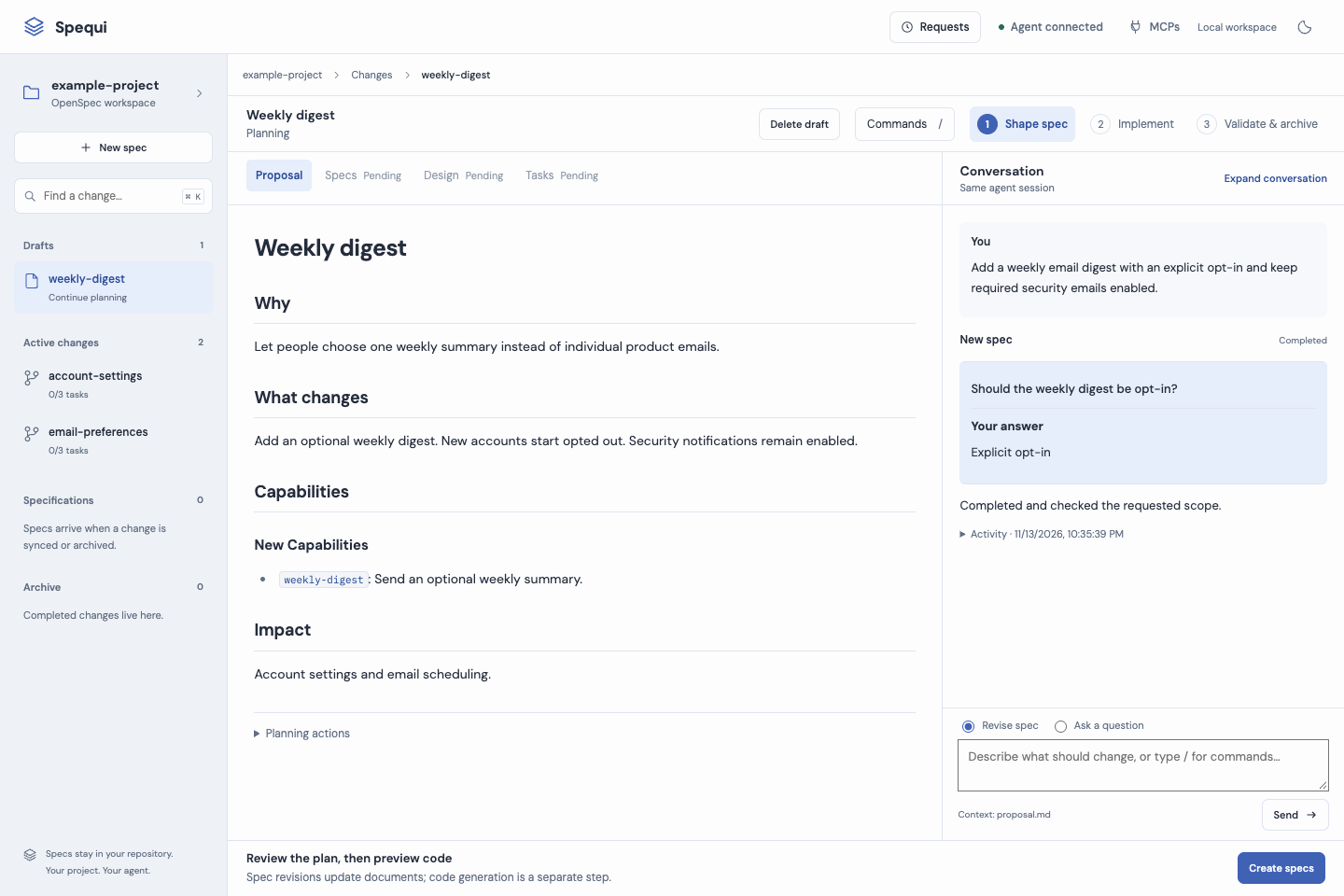
_New spec: shape the plan beside your agent conversation and resume it from Drafts._
|
|
31
28
|
|
|
32
29
|
|
|
33
30
|
|
|
34
31
|
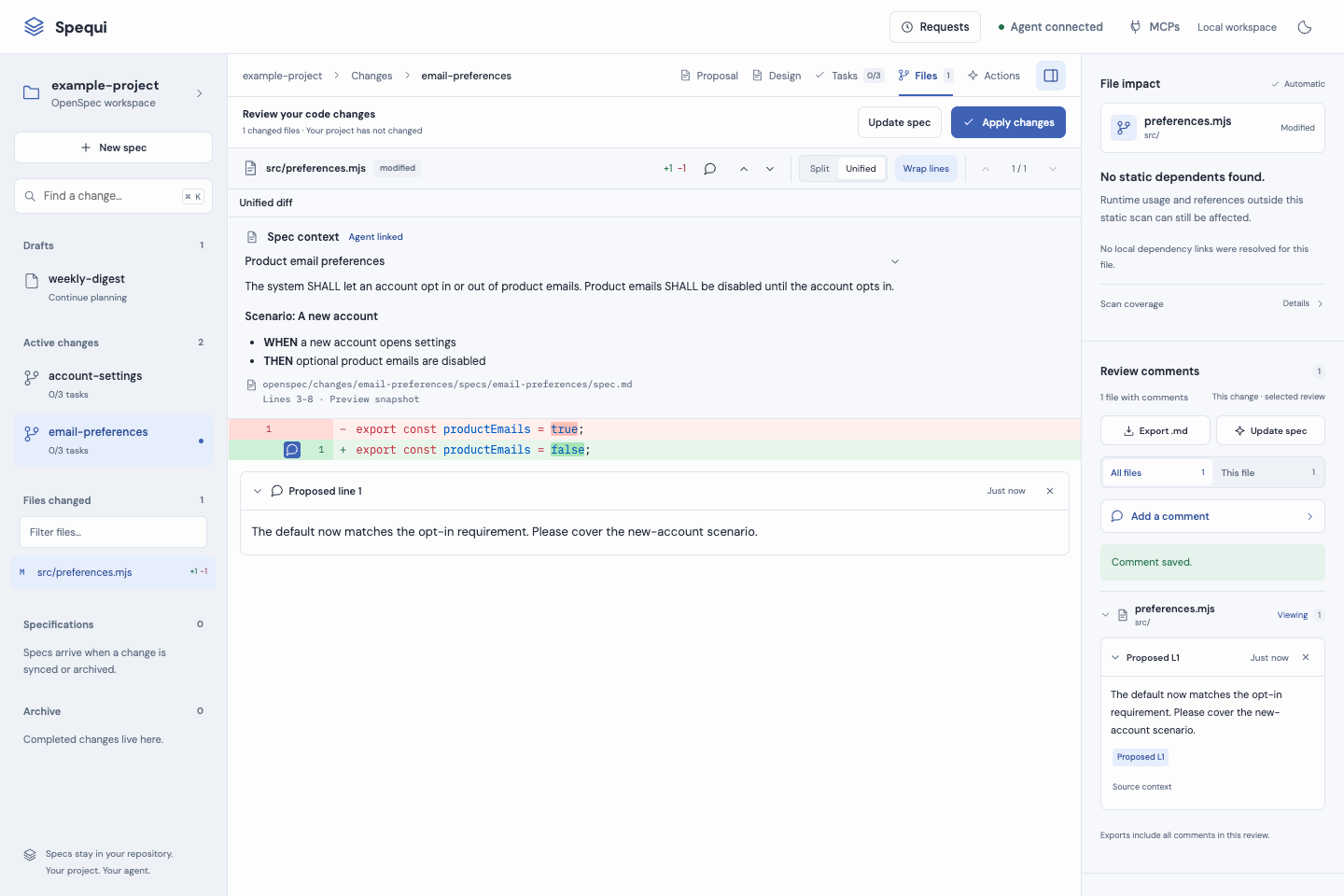
_Review: inspect a saved implementation and leave feedback. Screenshots use a local example project._
|
|
35
32
|
|
|
36
33
|
<details>
|
|
37
|
-
<summary>See
|
|
34
|
+
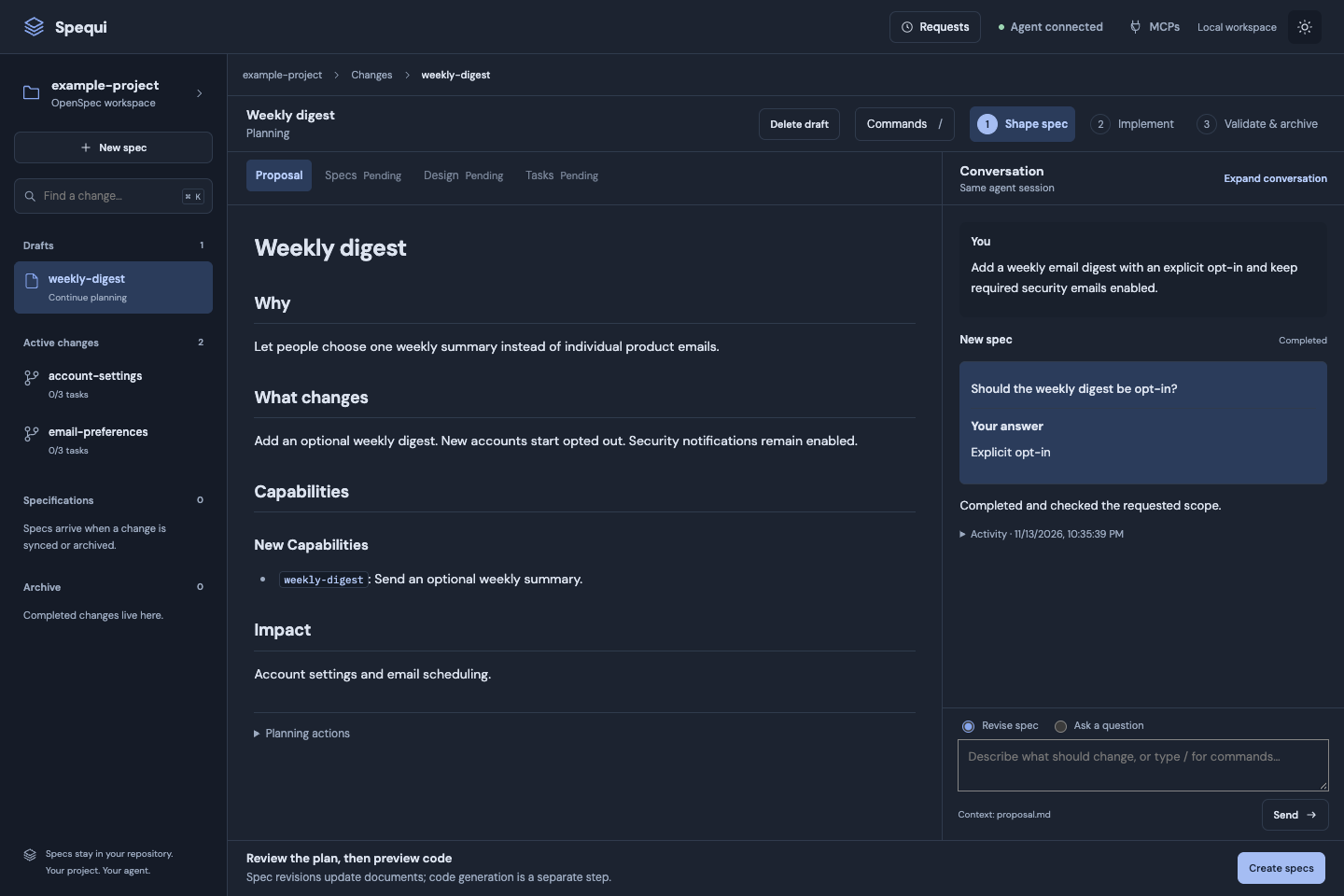
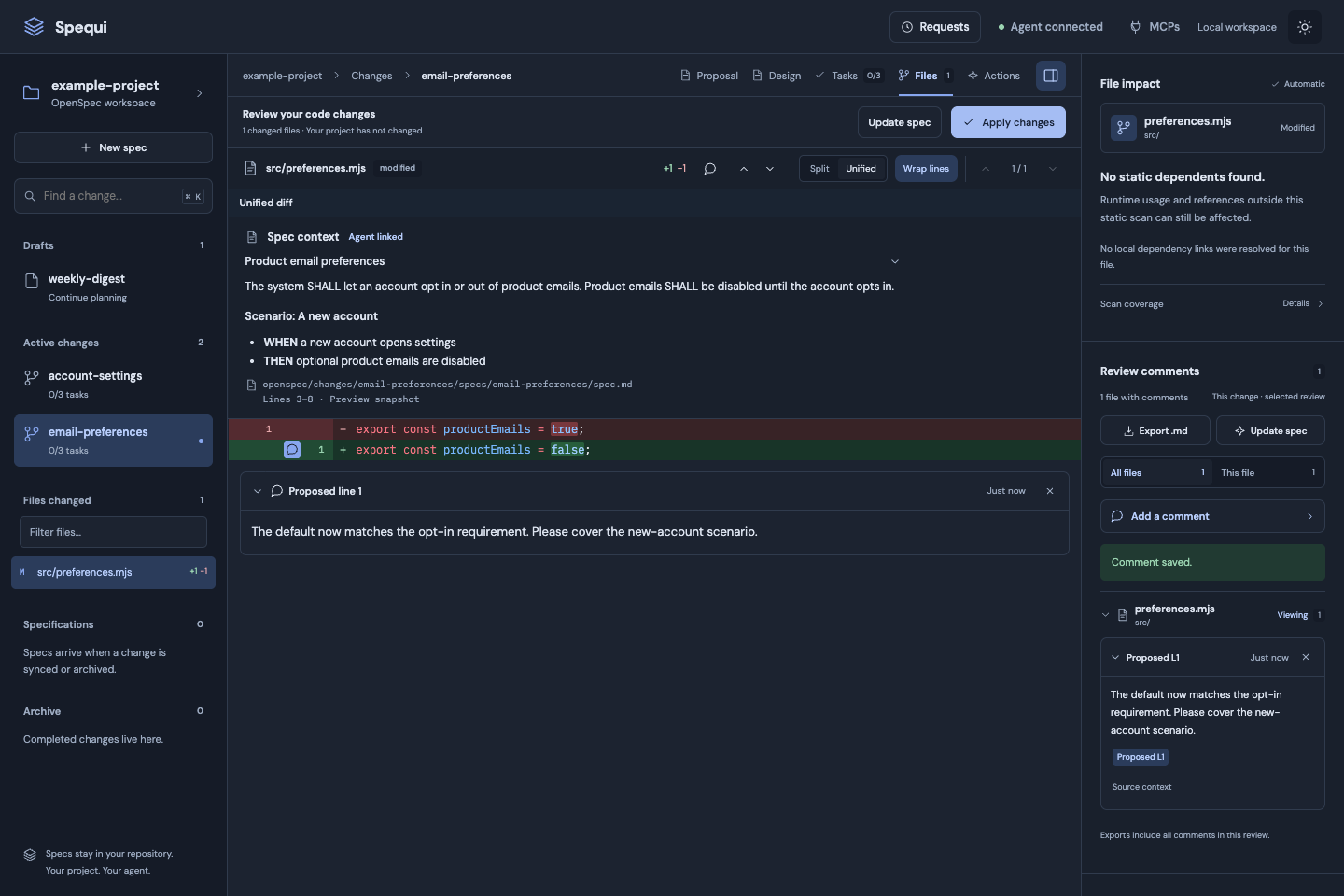
<summary>See planning and review in dark theme</summary>
|
|
38
35
|
|
|
39
|
-
|
|
40
37
|
|
|
41
38
|
|
|
42
39
|
|
|
@@ -46,7 +43,7 @@ _Review: inspect a saved implementation and leave feedback. Screenshots use a lo
|
|
|
46
43
|
|
|
47
44
|
| | What you can do |
|
|
48
45
|
| ---------------------------- | ----------------------------------------------------------------------------------------------------------------------------------------------------------------------- |
|
|
49
|
-
| **Run the lifecycle** |
|
|
46
|
+
| **Run the lifecycle** | Create and resume drafts, or open an existing change’s Build workspace to refine the spec, preview and apply code, then validate and archive. Answer agent questions in the app. |
|
|
50
47
|
| **Read the plan** | Browse Proposal, Design, Tasks, active changes, archived changes, and specifications. Switch between rendered Markdown and source. |
|
|
51
48
|
| **Review real code** | Compare the current project with an agent's isolated implementation. Use highlighted Unified or Split diffs, changed-word emphasis, context folding, and line wrapping. |
|
|
52
49
|
| **Trace changes to the spec** | Read quoted requirements beside changed code blocks, with source lines from the preview’s saved plan. Agent links and suggested file context are labelled separately. |
|
|
@@ -59,7 +56,7 @@ _Review: inspect a saved implementation and leave feedback. Screenshots use a lo
|
|
|
59
56
|
|
|
60
57
|
Requires **Node.js 20+**, npm, and a target project containing OpenSpec files.
|
|
61
58
|
|
|
62
|
-
For
|
|
59
|
+
For agent-driven planning and implementation, also install the OpenSpec CLI and make the required OpenSpec workflow skills available to your coding agent, then attach it with the `spequi` skill. Initializing this package installs the UI skill and command wrappers; OpenSpec setup and its workflow skills are separate. Browsing, review, offline affected-file analysis, and patch import work without an attached agent.
|
|
63
60
|
|
|
64
61
|
The current OpenSpec CLI [requires Node.js 22.12+](https://github.com/Fission-AI/OpenSpec/blob/main/package.json), independently of this UI’s Node.js 20 minimum. Use Node.js 22.12+ for the complete setup with current OpenSpec.
|
|
65
62
|
|
|
@@ -103,6 +100,9 @@ Point the viewer at your own project. This repository keeps its runtime source a
|
|
|
103
100
|
|
|
104
101
|
## Attach your agent
|
|
105
102
|
|
|
103
|
+
GigaCode uses monitored Shell calls with `is_background: true` for the server and five-minute `agent wait` calls. Waiting does not claim a job; the agent claims it in the foreground after receiving the result. Background completion must resume the host session for unattended idle attachment to work. The skill includes a check and a foreground fallback. Closing the coding agent pauses consumption and leaves requests saved.
|
|
104
|
+
|
|
105
|
+
|
|
106
106
|
The viewer uses **your existing coding agent**. It does not launch a model or require a separate provider API key.
|
|
107
107
|
|
|
108
108
|
| Agent | Invoke after initialization |
|
|
@@ -159,27 +159,27 @@ GigaCode registration follows its documented [skill discovery](https://gitverse.
|
|
|
159
159
|
|
|
160
160
|
Repeat initialization preserves Spequi configuration, comments, previews, application files, and custom launchers. An explicit reinitialization refreshes managed launchers and agent registration. If the original cached package disappears, the launcher can retrieve the initialized version through npm; registry access is needed for that recovery.
|
|
161
161
|
|
|
162
|
-
##
|
|
162
|
+
## Planning workflow
|
|
163
163
|
|
|
164
164
|
### Start a spec from an idea
|
|
165
165
|
|
|
166
|
-
Choose **New spec** in the left panel. Describe the idea and give it an unused lowercase change name. **Start with the next artifact** is the default; **Generate the full plan** requests all required planning artifacts. Continue queues one owned planning request for the attached agent. Its questions stay in the app, replies survive reloads, and the generated change opens in
|
|
166
|
+
Choose **New spec** in the left panel. Describe the idea and give it an unused lowercase change name. **Start with the next artifact** is the default; **Generate the full plan** requests all required planning artifacts. Continue queues one owned planning request for the attached agent. Its questions stay in the app, replies survive reloads, and the generated change opens in its draft planning workspace when the request completes. Partial plans offer the next schema-ready artifact; planning never automatically starts implementation.
|
|
167
167
|
|
|
168
|
-
The **Commands** picker in
|
|
168
|
+
The **Commands** picker in the planning workspace and slash commands use the same guarded operations. Supported commands are `/new`, `/explore <question>`, `/continue`, `/propose`, `/update <revision>`, `/apply`, `/status`, `/validate`, `/verify`, `/sync`, and `/archive`. `/opsx:<name>` and `/opsx-<name>` aliases also work inside the app. These are app commands, independent of the host's slash-command installation. `/apply` generates an isolated implementation preview; writing reviewed files still requires the separate Apply confirmation. Status and validation use the installed local OpenSpec CLI. Other commands wait for the existing agent session.
|
|
169
169
|
|
|
170
|
-
|
|
170
|
+
Planning versions are retained under `.spequi/studio/`. A revision stores exact Markdown before a planning request and after it completes; pending writes are not shown as completed revisions. The most recent 40 versions are retained, with at most 8 MiB of planning documents per version. This is local review evidence; the files under `openspec/` remain the source of truth.
|
|
171
171
|
|
|
172
|
-
|
|
172
|
+
New specs and unfinished drafts keep **Shape spec**, **Implement**, and **Validate & archive** in their header, with the plan beside its retained conversation. Select an existing change in the left panel for document and code review; open **Build** to refine it or run the remaining lifecycle steps. The project panel keeps the same layout in both flows.
|
|
173
173
|
|
|
174
174
|
In **Shape spec**, select a planning artifact tab and use **Revise spec** to request an update, or **Ask a question** for a read-only exploration. Changes appear as highlighted sections and a document summary. Capabilities with multiple documents show file tabs below their artifact tab. **Planning actions** offers the next artifact or full plan. Documents remain read-only.
|
|
175
175
|
|
|
176
|
-
In **Implement**, generate an isolated preview and choose its version. Browse changed files directly beneath the selected change in the left panel; filenames show their folder and edit counts, with no file search field. The **Files** button brings that list into view
|
|
176
|
+
In **Implement**, generate an isolated preview and choose its version. Browse changed files directly beneath the selected change in the left panel; filenames show their folder and edit counts, with no file search field. The **Files** button brings that list into view for the selected preview. Previous/next file controls, the selected file and diff tools stay above the independently scrolling code. Selecting a file keeps the same preview and planning workspace. Inspect the actual diff, then explicitly confirm **Apply reviewed preview**. A changed spec or source conflict prevents application. **Validate & archive** distinguishes local spec validation from agent implementation verification and exposes sync and archive with their normal prerequisites. Archive confirmations appear in the conversation. **New spec** starts the idea-to-plan flow; old lifecycle URLs redirect to the shared planning workspace.
|
|
177
177
|
|
|
178
178
|
Status, task readiness, and strict specification validation use the installed `openspec` CLI locally, with no agent required. Missing/incompatible CLI capabilities disable those actions with an explanation while documents and saved diffs remain readable. Spec validation checks requirements; checked task boxes alone do not prove implementation correctness. Setup and administration stay outside this UI.
|
|
179
179
|
|
|
180
|
-
Reasoning and writing requests use the current session running the viewer skill. Refresh the project skill after upgrading with `node .spequi/cli.mjs skill install`. Required workflows must already be installed; the viewer never launches another agent for a skill handoff. The agent uses `agent ask <id> --token <token> --message "question" [--options '["Yes","No"]']`, then `agent input <id> --token <token> --wait
|
|
180
|
+
Reasoning and writing requests use the current session running the viewer skill. Refresh the project skill after upgrading with `node .spequi/cli.mjs skill install`. Required workflows must already be installed; the viewer never launches another agent for a skill handoff. The agent uses `agent ask <id> --token <token> --message "question" [--options '["Yes","No"]']`, then `agent input <id> --token <token> --wait 300` until the app replies. The existing job resumes with the same ownership token; queued and awaiting-input requests can be cancelled. A running request can be ended only after its owning session’s heartbeat expires; stop the old agent in your coding tool first, since ending a request does not terminate its process or undo edits. Keep the agent session attached to continue waiting work.
|
|
181
181
|
|
|
182
|
-
Implementation previews still use isolated copies and apply only through an explicit, conflict-checked action. Offline affected-file analysis, optional model proposals, and patch import are available in
|
|
182
|
+
Implementation previews still use isolated copies and apply only through an explicit, conflict-checked action. Offline affected-file analysis, optional model proposals, and patch import are available in the shared Implement stage; generated source remains reviewable in Files.
|
|
183
183
|
|
|
184
184
|
A saved preview becomes stale when its planning documents change. Generate a fresh preview before applying. Spec updates stay in the same page, with active questions and results shown in the main flow.
|
|
185
185
|
|
|
@@ -232,6 +232,8 @@ docs/ README screenshots; excluded from the npm package
|
|
|
232
232
|
|
|
233
233
|
## Local data and boundaries
|
|
234
234
|
|
|
235
|
+
Spequi sends usage and failure events to `https://sber.eval.best/spequi/event`. These include a persistent identifier shared across projects on the same machine account, the project folder name, Git `user.name` when configured, timestamps, and event-specific identifiers, counts, and failure categories. Source files, prompts, and review comments are excluded. Delivery is best effort, with no retries. See [release notes](CHANGELOG.md).
|
|
236
|
+
|
|
235
237
|
- The server binds to `127.0.0.1`; mutations require local Host/Origin checks and a session token.
|
|
236
238
|
- `.spequi/` contains local configuration, requests, previews, feedback, and backups. Keep it out of Git.
|
|
237
239
|
- Browsing and offline analysis do not upload project source. Explicit model generation sends the planning documents and selected source to the configured endpoint. Your attached agent retains its own provider and permission settings.
|
|
@@ -267,7 +269,7 @@ The header's agent indicator reflects a recent agent heartbeat, independently of
|
|
|
267
269
|
The agent can write a credential-free report under `.spequi`, then run:
|
|
268
270
|
|
|
269
271
|
```sh
|
|
270
|
-
node .spequi/cli.mjs agent report --file .spequi/session-report.json --name "
|
|
272
|
+
node .spequi/cli.mjs agent report --file .spequi/session-report.json --name "Spequi Agent"
|
|
271
273
|
```
|
|
272
274
|
|
|
273
275
|
For example, when the host provides authoritative connection status:
|
package/bin/spequi.mjs
CHANGED
|
@@ -5,13 +5,25 @@ import { reportSession } from '../src/agent-session.mjs';
|
|
|
5
5
|
import { setTimeout as delay } from 'node:timers/promises';
|
|
6
6
|
import { initProject, installSkill, viewerVersion } from '../src/project.mjs';
|
|
7
7
|
import { startServer } from '../src/server.mjs';
|
|
8
|
-
import { claimNext, updateJob, listJobs } from '../src/jobs.mjs';
|
|
8
|
+
import { claimNext, updateJob, listJobs, heartbeat, stopPolling, queueStatus } from '../src/jobs.mjs';
|
|
9
9
|
import { askJob, jobInput } from '../src/job-dialogue.mjs';
|
|
10
|
+
import { agentRequest } from '../src/agent-client.mjs';
|
|
10
11
|
|
|
11
12
|
const argv = process.argv.slice(2);
|
|
12
13
|
function option(name, fallback) { const position = argv.indexOf(`--${name}`); return position >= 0 ? argv[position + 1] : fallback; }
|
|
13
14
|
function print(value) { process.stdout.write(JSON.stringify(value, null, 2) + '\n'); }
|
|
14
15
|
const root = path.resolve(option('root', process.cwd()));
|
|
16
|
+
const agentName = () => option('name', 'Spequi Agent');
|
|
17
|
+
function waitSeconds(fallback = 0) {
|
|
18
|
+
const value = Number(option('wait', fallback));
|
|
19
|
+
if (!Number.isFinite(value) || value < 0 || value > 300) throw new Error('Wait must be between 0 and 300 seconds');
|
|
20
|
+
return value;
|
|
21
|
+
}
|
|
22
|
+
async function agentCall(operation, payload, fallback) {
|
|
23
|
+
const connection = await agentRequest(root, operation, { name: agentName(), sessionId: option('session-id'), ...payload });
|
|
24
|
+
if (connection.available) return operation === 'list' ? connection.result.jobs : connection.result;
|
|
25
|
+
return fallback();
|
|
26
|
+
}
|
|
15
27
|
try {
|
|
16
28
|
const [command, subcommand, id] = argv;
|
|
17
29
|
if (command === 'init') {
|
|
@@ -26,22 +38,43 @@ try {
|
|
|
26
38
|
if (!reportFile || (await fs.stat(reportFile)).size > 32768) throw new Error('Use --file with a session report under 32 KiB');
|
|
27
39
|
const report = JSON.parse(await fs.readFile(reportFile, 'utf8'));
|
|
28
40
|
if (!report || Object.keys(report).some(key => !['sessionId', 'mcps'].includes(key))) throw new Error('Session reports accept sessionId and mcps only');
|
|
29
|
-
print(await reportSession(root, {...report, agent:
|
|
30
|
-
} else if (
|
|
31
|
-
const wait =
|
|
32
|
-
|
|
33
|
-
|
|
34
|
-
|
|
35
|
-
|
|
36
|
-
|
|
37
|
-
|
|
38
|
-
|
|
39
|
-
|
|
40
|
-
|
|
41
|
-
|
|
42
|
-
|
|
43
|
-
|
|
44
|
-
|
|
41
|
+
print(await agentCall('report', { report }, () => reportSession(root, { ...report, agent: agentName() })));
|
|
42
|
+
} else if (['next', 'wait'].includes(subcommand)) {
|
|
43
|
+
const wait = waitSeconds(subcommand === 'wait' ? 300 : 0);
|
|
44
|
+
print(await agentCall(subcommand, { wait }, async () => {
|
|
45
|
+
const deadline = Date.now() + wait * 1000;
|
|
46
|
+
const pollId = String(process.pid);
|
|
47
|
+
try {
|
|
48
|
+
do {
|
|
49
|
+
await heartbeat(root, agentName(), option('session-id'), { polling: true, pollId });
|
|
50
|
+
const queue = await queueStatus(root);
|
|
51
|
+
if (subcommand === 'wait' && queue.queued && !queue.active) return { available: true, queue };
|
|
52
|
+
if (subcommand === 'next') {
|
|
53
|
+
const job = await claimNext(root, agentName(), option('session-id'));
|
|
54
|
+
if (job) return { job };
|
|
55
|
+
}
|
|
56
|
+
if (queue.status === 'blocked') throw new Error(queue.message);
|
|
57
|
+
if (Date.now() >= deadline) return subcommand === 'wait' ? { available: false, queue } : { job: null, queue };
|
|
58
|
+
await delay(250);
|
|
59
|
+
} while (true);
|
|
60
|
+
} finally { await stopPolling(root, agentName(), option('session-id'), pollId); }
|
|
61
|
+
}));
|
|
62
|
+
} else if (subcommand === 'ask') {
|
|
63
|
+
const payload = { id, token: option('token'), message: option('message', ''), options: JSON.parse(option('options', '[]')) };
|
|
64
|
+
print(await agentCall('ask', payload, () => askJob(root, id, payload.token, payload)));
|
|
65
|
+
} else if (subcommand === 'input') {
|
|
66
|
+
const wait = waitSeconds();
|
|
67
|
+
print(await agentCall('input', { id, token: option('token'), wait }, async () => {
|
|
68
|
+
const deadline = Date.now() + wait * 1000;
|
|
69
|
+
let result;
|
|
70
|
+
do { result = await jobInput(root, id, option('token')); if (result.status !== 'awaiting-input' || Date.now() >= deadline) break; await delay(250); } while (true);
|
|
71
|
+
return result;
|
|
72
|
+
}));
|
|
73
|
+
} else if (['log', 'finish', 'fail'].includes(subcommand)) {
|
|
74
|
+
const payload = { id, token: option('token'), message: option('message', '') };
|
|
75
|
+
print(await agentCall(subcommand, payload, () => updateJob(root, id, payload.token, subcommand, payload.message)));
|
|
76
|
+
} else if (subcommand === 'list') print(await agentCall('list', {}, async () => (await listJobs(root)).map(({ claimToken, instructions, ...job }) => job)));
|
|
77
|
+
else throw new Error('Use agent report, wait, next, ask, input, log, finish, fail, or list');
|
|
45
78
|
} else if (command === '--version' || command === '-v') process.stdout.write(viewerVersion + '\n');
|
|
46
|
-
else process.stdout.write(`spequi\n\n spequi init [--start] Scaffold .spequi and install project skills\n spequi start [--port 4310] Open the local project workspace\n spequi skill install --global Install the skill for future projects\n spequi agent
|
|
79
|
+
else process.stdout.write(`spequi\n\n spequi init [--start] Scaffold .spequi and install project skills\n spequi start [--port 4310] Open the local project workspace\n spequi skill install --global Install the skill for future projects\n spequi agent wait --wait 300 Wait for work without claiming it\n spequi agent next Claim when the current agent is ready\n spequi agent log|finish|fail <id> --token <token> --message "result"\n spequi agent ask <id> --token <token> --message "question" [--options '["Yes","No"]']\n spequi agent input <id> --token <token> --wait 300\n spequi agent report --file <session.json> [--name "Spequi Agent"]\n spequi agent list\n\nEvery command accepts --root <project>. No build step or agent API key required.\n`);
|
|
47
80
|
} catch (error) { process.stderr.write(`spequi: ${error.message}\n`); process.exitCode = 1; }
|
package/docs/agent-workflow.md
CHANGED
|
@@ -10,7 +10,7 @@ There is no `await invokeSkill()` implementation. A skill is an instruction docu
|
|
|
10
10
|
|
|
11
11
|
| Component | Responsibility | Implementation |
|
|
12
12
|
| --- | --- | --- |
|
|
13
|
-
| Browser UI | Submit actions, display progress, collect answers | [public/
|
|
13
|
+
| Browser UI | Submit actions, display progress, collect answers | [public/workflow.js](../public/workflow.js), [src/studio-view.mjs](../src/studio-view.mjs) |
|
|
14
14
|
| Local server | Protect browser mutations, route actions and replies, notify the UI | [src/server.mjs](../src/server.mjs) |
|
|
15
15
|
| Lifecycle layer | Check readiness and enqueue the requested action | [src/lifecycle.mjs](../src/lifecycle.mjs) |
|
|
16
16
|
| Job queue | Persist requests, claim ownership, choose workflows, store results | [src/jobs.mjs](../src/jobs.mjs) |
|
|
@@ -19,7 +19,7 @@ There is no `await invokeSkill()` implementation. A skill is an instruction docu
|
|
|
19
19
|
| Question storage | Retain questions and answers on the same owned job | [src/job-dialogue.mjs](../src/job-dialogue.mjs) |
|
|
20
20
|
| Agent skill | Instruct the current agent to coordinate the loop | [spequi SKILL.md](../skills/spequi/SKILL.md) |
|
|
21
21
|
|
|
22
|
-
The browser talks to the server over local HTTP and receives WebSocket notifications. The agent
|
|
22
|
+
The browser talks to the server over local HTTP and receives WebSocket notifications. The agent’s CLI commands use the project server’s authenticated loopback protocol when it is running. `.spequi/server.json` binds that connection to the project root; an unavailable saved connection is an explicit restart error. Headless commands without a server retain the file protocol. They do not send prompts over the browser's WebSocket connection.
|
|
23
23
|
|
|
24
24
|
Typical retained state looks like:
|
|
25
25
|
|
|
@@ -27,6 +27,8 @@ Typical retained state looks like:
|
|
|
27
27
|
.spequi/
|
|
28
28
|
cli.mjs Project launcher for the initialized package
|
|
29
29
|
server.mjs Project server launcher
|
|
30
|
+
server.json Private root-bound agent protocol connection
|
|
31
|
+
drafts/ Autosaved ideas and unfinished planning references
|
|
30
32
|
agent.json Latest agent heartbeat
|
|
31
33
|
agent-session.json Session ID and reported MCP metadata
|
|
32
34
|
jobs/
|
|
@@ -104,38 +106,25 @@ Source: [`reportSession()`](../src/agent-session.mjs).
|
|
|
104
106
|
|
|
105
107
|
This session ID belongs to the viewer attachment. It is not a provider API credential or an integration with the coding tool's internal conversation ID. The agent retains it and uses it on subsequent polls.
|
|
106
108
|
|
|
107
|
-
###
|
|
109
|
+
### Wait, then claim
|
|
108
110
|
|
|
109
111
|
```bash
|
|
110
|
-
node .spequi/cli.mjs agent
|
|
111
|
-
--
|
|
112
|
-
--name Codex \
|
|
113
|
-
--session-id example-attachment
|
|
112
|
+
node .spequi/cli.mjs agent wait --wait 300 \
|
|
113
|
+
--name Codex --session-id example-attachment
|
|
114
114
|
```
|
|
115
115
|
|
|
116
|
-
|
|
116
|
+
In GigaCode, launch this bounded wait and the retained server using the host Shell tool’s `is_background: true` argument. Keep the task ID and monitor the completion result. The wait refreshes consumer liveness and returns `available: true` when work is available, without claiming it. Once this session receives the output, claim in the foreground:
|
|
117
117
|
|
|
118
|
-
|
|
119
|
-
|
|
120
|
-
|
|
121
|
-
const wait = Math.min(60, Math.max(0, Number(option('wait', 0)) || 0));
|
|
122
|
-
const deadline = Date.now() + wait * 1000;
|
|
123
|
-
let job;
|
|
124
|
-
|
|
125
|
-
do {
|
|
126
|
-
job = await claimNext(
|
|
127
|
-
root,
|
|
128
|
-
option('name', 'Skill agent'),
|
|
129
|
-
option('session-id')
|
|
130
|
-
);
|
|
131
|
-
if (job || Date.now() >= deadline) break;
|
|
132
|
-
await delay(1000);
|
|
133
|
-
} while (true);
|
|
134
|
-
|
|
135
|
-
print({ job });
|
|
118
|
+
```bash
|
|
119
|
+
node .spequi/cli.mjs agent next --wait 0 \
|
|
120
|
+
--name Codex --session-id example-attachment
|
|
136
121
|
```
|
|
137
122
|
|
|
138
|
-
|
|
123
|
+
A first-attachment `agent wait --wait 1` checks host completion delivery. If GigaCode does not resume the session automatically, use its task monitor or retained foreground polling; a background process alone cannot wake the model. Attachment lasts while the coding session remains open, including idle periods supported by that notification mechanism.
|
|
124
|
+
|
|
125
|
+
Waits are bounded at five minutes and check for work every 250 ms. An empty result includes queue state. Contention and blocked locks are errors, never an empty queue. An owned active request blocks additional claims. Finish or answer it before claiming another; review partial planning work before any retry.
|
|
126
|
+
|
|
127
|
+
Source: [agent CLI](../bin/spequi.mjs), [root-bound client](../src/agent-client.mjs), and [agent protocol routes](../src/server.mjs).
|
|
139
128
|
|
|
140
129
|
## 3. A UI action becomes a durable job
|
|
141
130
|
|
|
@@ -175,7 +164,7 @@ Source: [`requestLifecycle()`](../src/lifecycle.mjs) and [`createJob()` / `enque
|
|
|
175
164
|
|
|
176
165
|
## 4. Claiming establishes ownership and selects the skill
|
|
177
166
|
|
|
178
|
-
`claimNext()` updates the heartbeat, acquires the queue lock and selects the oldest queued request. It changes the job to `running`, assigns a random claim token and records the agent attachment identity.
|
|
167
|
+
`claimNext()` updates the heartbeat, acquires the queue lock and selects the oldest queued request. It changes the job to `running`, assigns a random claim token and records the agent attachment identity. Only one workflow runs per project. The short claim releases the queue lock before snapshot copying or plan capture; preparation failures are retained as failed requests. Locks record their process owner and recover abandoned dead-owner or aged legacy empty files. Live lock contention remains explicit.
|
|
179
168
|
|
|
180
169
|
The claim token is required for the agent's subsequent log, question, input and completion commands. A second agent cannot complete the same job just by knowing its ID.
|
|
181
170
|
|
|
@@ -338,10 +327,10 @@ The agent then waits with:
|
|
|
338
327
|
|
|
339
328
|
```bash
|
|
340
329
|
node .spequi/cli.mjs agent input JOB_ID \
|
|
341
|
-
--token CLAIM_TOKEN --wait
|
|
330
|
+
--token CLAIM_TOKEN --wait 300
|
|
342
331
|
```
|
|
343
332
|
|
|
344
|
-
The CLI
|
|
333
|
+
The CLI checks the owned job every 250 ms until the status changes or the bounded wait expires. If it is still `awaiting-input`, the agent repeats the bounded wait. It does not release the job or make a second claim.
|
|
345
334
|
|
|
346
335
|
The user answers through this protected browser route:
|
|
347
336
|
|
|
@@ -396,7 +385,7 @@ job.result = message || 'Completed';
|
|
|
396
385
|
|
|
397
386
|
The app waits for this explicit completion. It does not infer completion because the agent read a skill, produced a chat response, checked some task boxes, or stopped polling. The checks also do not prove every instruction was followed or every behavior is correct; verification and code review still matter.
|
|
398
387
|
|
|
399
|
-
After finishing or failing, the agent returns to `agent
|
|
388
|
+
After finishing or failing, the agent returns to `agent wait`, then claims in the foreground while attached.
|
|
400
389
|
|
|
401
390
|
Source: [`updateJob()`](../src/jobs.mjs).
|
|
402
391
|
|
|
@@ -410,7 +399,7 @@ const connected = Boolean(state && Date.now() - state.at < 45000);
|
|
|
410
399
|
|
|
411
400
|
A recent heartbeat means the attachment has recently communicated. It does not prove a particular model request is progressing. Likewise, a missing heartbeat does not prove the coding process crashed: a long tool call or an agent that stopped running the loop can also make the attachment appear unresponsive.
|
|
412
401
|
|
|
413
|
-
Polling and owned log/input/question calls refresh the heartbeat. The agent must keep communicating during work; the implementation does not start an independent background heartbeat daemon.
|
|
402
|
+
Polling and owned log/input/question calls refresh the heartbeat. A session report alone means connected, not ready. Ready additionally requires a current consumer wait lease; finishing or disconnecting that wait clears readiness. Working and awaiting-input states follow the owned request. The header exposes queued counts, last heartbeat and blocked/stalled ownership separately. The agent must keep communicating during work; the implementation does not start an independent background heartbeat daemon.
|
|
414
403
|
|
|
415
404
|
MCP status is a separate report. The host must supply authoritative connection evidence; a configured server or a tool catalog alone is insufficient. Reports contain display names and allowed connection states, not credentials or transport configuration. MCP evidence also expires after five minutes and must match the current attachment.
|
|
416
405
|
|
|
@@ -437,7 +426,7 @@ sequenceDiagram
|
|
|
437
426
|
participant Skill as Installed SKILL.md
|
|
438
427
|
|
|
439
428
|
User->>Agent: Invoke spequi
|
|
440
|
-
Agent->>App: agent report and agent
|
|
429
|
+
Agent->>App: agent report and monitored agent wait
|
|
441
430
|
User->>UI: Request a workflow
|
|
442
431
|
UI->>App: POST lifecycle action
|
|
443
432
|
App->>App: Persist queued job
|
|
@@ -451,7 +440,7 @@ sequenceDiagram
|
|
|
451
440
|
App-->>UI: Question available
|
|
452
441
|
par Agent waits
|
|
453
442
|
loop While awaiting-input
|
|
454
|
-
Agent->>App: agent input --wait
|
|
443
|
+
Agent->>App: agent input --wait 300
|
|
455
444
|
App-->>Agent: Current question and status
|
|
456
445
|
end
|
|
457
446
|
and User answers
|
|
@@ -464,7 +453,7 @@ sequenceDiagram
|
|
|
464
453
|
Agent->>App: agent finish or agent fail
|
|
465
454
|
App->>App: Validate completion and persist result
|
|
466
455
|
App-->>UI: Updated status and result
|
|
467
|
-
Agent->>App: Return to agent
|
|
456
|
+
Agent->>App: Return to monitored agent wait
|
|
468
457
|
```
|
|
469
458
|
|
|
470
459
|
The queue, ownership, persistence, questions and status checks are application code. Carrying out a selected skill is the cooperating agent's work in its existing session. Keeping those responsibilities explicit explains both why the flow works across skill-capable coding tools and why it pauses when the agent stops serving the queue.
|
package/package.json
CHANGED
|
@@ -1,6 +1,6 @@
|
|
|
1
1
|
{
|
|
2
2
|
"name": "spequi",
|
|
3
|
-
"version": "0.1.
|
|
3
|
+
"version": "0.1.1",
|
|
4
4
|
"description": "A local workspace for planning, implementation previews, and OpenSpec code review",
|
|
5
5
|
"repository": {
|
|
6
6
|
"type": "git",
|
|
@@ -35,21 +35,27 @@
|
|
|
35
35
|
"public/diff.css",
|
|
36
36
|
"public/review.css",
|
|
37
37
|
"public/review.js",
|
|
38
|
-
"public/
|
|
39
|
-
"public/lifecycle.js",
|
|
38
|
+
"public/workflow.js",
|
|
40
39
|
"public/studio.css",
|
|
41
40
|
"public/studio.js",
|
|
42
41
|
"skills/",
|
|
43
42
|
"templates/",
|
|
44
43
|
"README.md",
|
|
44
|
+
"CHANGELOG.md",
|
|
45
45
|
"LICENSE",
|
|
46
46
|
"public/session.js",
|
|
47
|
-
"docs/agent-workflow.md"
|
|
47
|
+
"docs/agent-workflow.md",
|
|
48
|
+
"public/requests.js"
|
|
48
49
|
],
|
|
49
50
|
"scripts": {
|
|
50
51
|
"prepublishOnly": "npm run check",
|
|
51
52
|
"start": "node bin/spequi.mjs start",
|
|
52
|
-
"check": "node --check bin/spequi.mjs && node --check src/server.mjs && node --check src/project.mjs && node --check src/openspec-cli.mjs && node --check src/spec-context.mjs && node --check src/spec-context-view.mjs && node --check templates/cli.mjs && node --check public/app.js && node --check public/review.js && node --check public/
|
|
53
|
+
"check": "node --check bin/spequi.mjs && node --check src/server.mjs && node --check src/project.mjs && node --check src/openspec-cli.mjs && node --check src/spec-context.mjs && node --check src/spec-context-view.mjs && node --check templates/cli.mjs && node --check public/app.js && node --check public/review.js && node --check public/workflow.js && node --check public/studio.js && node --check src/studio-view.mjs && node --check src/studio-plans.mjs && node --check src/studio-documents.mjs && node --check src/creation-view.mjs && node --check src/commands.mjs && node --check src/agent-session.mjs && node --check public/session.js && node --check src/files.mjs && node --check src/jobs.mjs && node --check src/drafts.mjs && node --check src/requests.mjs && node --check src/agent-client.mjs && node --check src/workspace-state.mjs && node --check public/requests.js",
|
|
54
|
+
"test": "node --test test/*.test.mjs",
|
|
55
|
+
"check:package": "node scripts/check-package.mjs",
|
|
56
|
+
"smoke:package": "node scripts/smoke-package.mjs",
|
|
57
|
+
"smoke:npx": "node scripts/smoke-npx.mjs",
|
|
58
|
+
"prepare:test-cli": "node scripts/prepare-test-cli.mjs"
|
|
53
59
|
},
|
|
54
60
|
"engines": {
|
|
55
61
|
"node": ">=20"
|
|
@@ -68,5 +74,8 @@
|
|
|
68
74
|
"marked": "^17.0.1",
|
|
69
75
|
"shiki": "^4.6.0",
|
|
70
76
|
"ws": "^8.18.3"
|
|
77
|
+
},
|
|
78
|
+
"devDependencies": {
|
|
79
|
+
"linkedom": "^0.18.12"
|
|
71
80
|
}
|
|
72
81
|
}
|
package/public/app.css
CHANGED
|
@@ -33,10 +33,17 @@
|
|
|
33
33
|
.diff-version-form select{font-size:10px;max-width:220px;padding:7px 24px 7px 8px}
|
|
34
34
|
.generate-diff-form{margin:0}
|
|
35
35
|
.generate-diff-form .button{white-space:nowrap}
|
|
36
|
-
.diff-empty-state
|
|
37
|
-
.diff-empty-state .empty-state
|
|
38
|
-
.diff-
|
|
39
|
-
.diff-
|
|
36
|
+
.diff-empty-state{display:flex;align-items:center;justify-content:center;flex:1;min-width:0;padding:32px 16px}
|
|
37
|
+
.diff-empty-state .empty-state{width:100%;max-width:560px;min-height:0;padding:24px 20px}
|
|
38
|
+
.diff-empty-state .empty-state>svg{width:30px;height:30px;margin-bottom:16px}
|
|
39
|
+
.diff-empty-state .empty-state h2{font-size:22px;line-height:1.3;margin:0 0 10px;text-wrap:balance}
|
|
40
|
+
.diff-empty-state .empty-state>p{font-size:13px;line-height:1.7;margin:0;max-width:52ch}
|
|
41
|
+
.diff-empty-actions{display:flex;align-items:center;justify-content:center;gap:10px;flex-wrap:wrap;margin-top:20px}
|
|
42
|
+
.diff-empty-actions form{margin:0}
|
|
43
|
+
.diff-empty-actions .button{min-height:36px;padding:8px 12px;font-size:12px;line-height:18px}
|
|
44
|
+
.diff-empty-state .empty-state>.diff-agent-note{margin-top:16px;font-size:11px;line-height:1.6}
|
|
45
|
+
.diff-empty-state .empty-state>.error-message{margin-top:16px;font-size:12px;text-align:left;padding:10px 12px}
|
|
46
|
+
.diff-empty-state [role=status]:empty{display:none}
|
|
40
47
|
.diff-generation-status{width:100%;max-width:55ch;background:var(--panel);padding:15px;margin-top:18px;text-align:left;border-radius:6px}
|
|
41
48
|
.diff-generation-status p{font-size:11px;line-height:1.7;margin:8px 0 0}
|
|
42
49
|
.diff-pending-note{font-size:11px;margin-top:12px!important}
|
|
@@ -54,9 +61,111 @@
|
|
|
54
61
|
.split-diff-table .addition{background:var(--green-bg);color:var(--green)}
|
|
55
62
|
.split-diff-table .deletion{background:var(--red-bg);color:var(--red)}
|
|
56
63
|
.split-diff-table .diff-gap{background:var(--panel)}
|
|
57
|
-
@media(max-width:760px){.changed-files-nav{max-height:45dvh}.file-review-intro{padding:20px 16px}.diff-version-form select{max-width:210px}.diff-empty-state .empty-state{min-height:
|
|
64
|
+
@media(max-width:760px){.changed-files-nav{max-height:45dvh}.file-review-intro{padding:20px 16px}.diff-version-form select{max-width:210px}.diff-empty-state{padding:24px 12px}.diff-empty-state .empty-state{padding:20px 8px}.diff-empty-actions .button{min-height:44px}.file-review-intro .preview-actions{gap:8px}.file-review-intro .preview-actions>span{flex-basis:100%;margin-bottom:2px}.file-review-intro .button{min-height:36px}}
|
|
58
65
|
/* Markdown task checkboxes stay legible even though they are read-only. */
|
|
59
66
|
.prose input[type=checkbox]{appearance:none;-webkit-appearance:none;display:inline-grid;place-content:center;inline-size:15px;block-size:15px;padding:0;border:1px solid var(--muted);border-radius:3px;background:var(--surface);opacity:1;vertical-align:-2px}
|
|
60
67
|
.prose input[type=checkbox]:checked{border-color:var(--green);background:var(--green)}
|
|
61
68
|
.prose input[type=checkbox]:checked::after{content:"";display:block;inline-size:12px;block-size:12px;background:var(--surface);-webkit-mask:url("data:image/svg+xml,%3Csvg xmlns='http://www.w3.org/2000/svg' viewBox='0 0 16 16'%3E%3Cpath d='m3 8.5 3.5 3.5L13 4.5' fill='none' stroke='black' stroke-width='2.2' stroke-linecap='round' stroke-linejoin='round'/%3E%3C/svg%3E") center/contain no-repeat;mask:url("data:image/svg+xml,%3Csvg xmlns='http://www.w3.org/2000/svg' viewBox='0 0 16 16'%3E%3Cpath d='m3 8.5 3.5 3.5L13 4.5' fill='none' stroke='black' stroke-width='2.2' stroke-linecap='round' stroke-linejoin='round'/%3E%3C/svg%3E") center/contain no-repeat}
|
|
62
69
|
@media(forced-colors:active){.prose input[type=checkbox],.prose input[type=checkbox]:checked{appearance:auto;-webkit-appearance:auto;background:Canvas;color:CanvasText;border-color:CanvasText}.prose input[type=checkbox]:checked::after{content:none}}
|
|
70
|
+
/* Requests and saved ideas extend the existing desktop workspace. */
|
|
71
|
+
.requests-toggle{gap:7px;font-size:12px}.requests-icon{position:relative;display:inline-flex;align-items:center;flex-shrink:0}.requests-icon>svg{width:16px;height:16px}.requests-icon .requests-attention{position:absolute;top:-3px;right:-3px;width:8px;height:8px;border:2px solid var(--surface);border-radius:50%;background:var(--red);font-size:0;overflow:hidden}.requests-attention[hidden]{display:none}
|
|
72
|
+
[data-drafts-navigation]:not([hidden]){margin-bottom:24px}.nav-change [data-job-state]:empty{display:none}.nav-change [data-job-state]:not(:empty){color:var(--accent-text);font-size:10px;margin-top:3px}
|
|
73
|
+
.requests-panel{position:fixed;z-index:80;right:16px;top:64px;width:min(440px,calc(100vw - 32px));max-height:min(640px,calc(100dvh - 80px));background:var(--surface);border:1px solid var(--line);border-radius:10px;display:flex;flex-direction:column;overflow:hidden}
|
|
74
|
+
.requests-panel[hidden],.requests-panel [hidden]{display:none}
|
|
75
|
+
.requests-panel>header{display:flex;align-items:center;justify-content:space-between;gap:16px;min-height:54px;padding:10px 14px;border-bottom:1px solid var(--line);flex-shrink:0}
|
|
76
|
+
.requests-panel h2{font-size:15px;font-weight:600;margin:0;line-height:1.4}
|
|
77
|
+
.requests-tools{display:flex;align-items:center;gap:8px;min-width:0}
|
|
78
|
+
.requests-tools select{width:130px;min-height:30px;padding:5px 25px 5px 9px;font-size:11px;line-height:18px;background:var(--panel);border-color:transparent;border-radius:5px}
|
|
79
|
+
.requests-panel .icon-button{display:inline-flex;align-items:center;justify-content:center;width:28px;min-height:28px;padding:5px;border:0;border-radius:5px;background:transparent;color:var(--muted)}
|
|
80
|
+
.requests-panel .icon-button:hover{background:var(--rail);color:var(--text)}
|
|
81
|
+
.requests-panel .icon-button svg{width:16px;height:16px}
|
|
82
|
+
.requests-panel [data-request-list]{overflow:auto;min-height:0;overscroll-behavior:contain;scrollbar-color:var(--line) var(--surface)}
|
|
83
|
+
.requests-panel>footer{display:flex;align-items:center;justify-content:space-between;gap:12px;min-height:34px;padding:5px 14px;border-top:1px solid var(--line);background:var(--panel);color:var(--muted);font-size:11px;flex-shrink:0;font-variant-numeric:tabular-nums}
|
|
84
|
+
.requests-panel>footer nav{display:flex;gap:4px}
|
|
85
|
+
.requests-panel [data-request-page=previous] svg{transform:rotate(180deg)}
|
|
86
|
+
.requests-panel [data-requests-feedback]:not(:empty){padding:10px 14px;margin:0;border-bottom:1px solid var(--line);font-size:12px;line-height:1.6}
|
|
87
|
+
.requests-loading{padding:32px 16px;margin:0;text-align:center;font-size:12px;color:var(--muted)}
|
|
88
|
+
.request-row{padding:12px 14px;border-top:1px solid var(--line)}
|
|
89
|
+
.request-row:first-child{border-top:0}
|
|
90
|
+
.request-heading{display:flex;justify-content:space-between;gap:12px;align-items:center}
|
|
91
|
+
.request-heading strong{flex:1;min-width:0;overflow:hidden;text-overflow:ellipsis;white-space:nowrap;font-size:13px;font-weight:600;line-height:20px}
|
|
92
|
+
.request-state{display:inline-flex;align-items:center;gap:5px;padding:2px 6px;border-radius:4px;background:var(--panel);color:var(--muted);font-size:10px;font-weight:500;line-height:16px;white-space:nowrap;flex-shrink:0}
|
|
93
|
+
.request-state::before{content:"";width:4px;height:4px;border-radius:50%;background:currentColor;flex-shrink:0}
|
|
94
|
+
.request-state[data-state=completed]{background:var(--green-bg);color:var(--green)}
|
|
95
|
+
.request-state[data-state=failed],.request-state[data-state=stalled]{background:var(--red-bg);color:var(--red)}
|
|
96
|
+
.request-state[data-state=running],.request-state[data-state=awaiting-input]{background:var(--accent-soft);color:var(--accent-text)}
|
|
97
|
+
.request-row details{min-width:0;font-size:12px;line-height:1.65;overflow-wrap:anywhere}
|
|
98
|
+
.request-row summary{display:flex;align-items:flex-start;gap:8px;min-height:24px;margin:6px 0 4px;padding:2px 0;list-style:none;cursor:pointer;color:var(--muted);border-radius:3px}
|
|
99
|
+
.request-row summary::-webkit-details-marker{display:none}
|
|
100
|
+
.request-summary-text{flex:1;min-width:0;white-space:nowrap;overflow:hidden;text-overflow:ellipsis}
|
|
101
|
+
.request-row summary:hover{color:var(--text)}
|
|
102
|
+
.request-row summary .request-action-icon{margin-top:3px}
|
|
103
|
+
.request-row summary svg{width:12px;height:12px;transition:transform .15s}
|
|
104
|
+
.request-row details[open] summary svg{transform:rotate(90deg)}
|
|
105
|
+
.request-row details[open] .request-summary-text{white-space:pre-wrap;color:var(--text)}
|
|
106
|
+
.request-detail-body{padding:2px 0 6px}
|
|
107
|
+
.request-detail-body h3{font-size:11px;font-weight:600;color:var(--muted);margin:8px 0 4px}
|
|
108
|
+
.request-detail-body ol{max-height:160px;overflow:auto;padding-left:18px;margin:4px 0 10px;color:var(--muted);font-size:11px}
|
|
109
|
+
.request-detail-body li+li{margin-top:4px}
|
|
110
|
+
.request-result{white-space:pre-wrap;max-height:200px;overflow:auto;margin:4px 0;font-size:12px}
|
|
111
|
+
.request-footer{display:flex;align-items:center;justify-content:space-between;gap:12px;flex-wrap:wrap}
|
|
112
|
+
.request-meta{display:flex;align-items:center;min-width:0;flex:1 1 130px;color:var(--muted);font-size:11px;line-height:18px}
|
|
113
|
+
.request-kind{overflow:hidden;text-overflow:ellipsis;white-space:nowrap}
|
|
114
|
+
.request-meta time{white-space:nowrap;flex-shrink:0;font-variant-numeric:tabular-nums}
|
|
115
|
+
.request-meta time::before{content:"·";padding:0 6px}
|
|
116
|
+
.request-controls{display:flex;align-items:center;gap:4px;flex-wrap:wrap}
|
|
117
|
+
.request-controls .button{font-size:11px;padding:4px 6px;min-height:28px;border-color:transparent;background:transparent;white-space:nowrap;line-height:18px}
|
|
118
|
+
.request-controls .button:hover{background:var(--rail)}
|
|
119
|
+
.request-controls .request-open{gap:4px;color:var(--accent-text)}
|
|
120
|
+
.request-controls .request-open:hover{background:var(--accent-soft)}
|
|
121
|
+
.request-action-icon{display:inline-flex;align-items:center;justify-content:center;flex-shrink:0}
|
|
122
|
+
.request-controls .request-delete,.request-controls .request-dismiss{width:28px;padding:5px;color:var(--muted)}
|
|
123
|
+
.request-controls .request-delete:hover{color:var(--red);background:var(--red-bg)}
|
|
124
|
+
.request-controls .request-delete:focus-visible{outline-color:var(--red)}
|
|
125
|
+
.request-group-count{font-size:10px;color:var(--muted);white-space:nowrap;flex-shrink:0}
|
|
126
|
+
.requests-section-title{font-size:11px;font-weight:600;color:var(--muted);margin:0;padding:10px 14px 2px}
|
|
127
|
+
.requests-section-title+.request-row{border-top:0}
|
|
128
|
+
.requests-recent{border-top:1px solid var(--line)}
|
|
129
|
+
.requests-recent>summary{display:flex;align-items:center;gap:8px;cursor:pointer;list-style:none;padding:10px 14px;font-size:12px;font-weight:550;color:var(--muted)}
|
|
130
|
+
.requests-recent>summary::-webkit-details-marker{display:none}
|
|
131
|
+
.requests-recent>summary:hover{background:var(--panel);color:var(--text)}
|
|
132
|
+
.requests-recent>summary small{margin-left:auto;font-size:10px;font-weight:400;font-variant-numeric:tabular-nums}
|
|
133
|
+
.requests-recent>summary svg{width:12px;height:12px;transition:transform .15s}
|
|
134
|
+
.requests-recent[open]>summary svg{transform:rotate(90deg)}
|
|
135
|
+
.requests-recent>.request-row:nth-child(2){border-top:0}
|
|
136
|
+
.request-controls .request-dismiss:hover{background:var(--rail);color:var(--text)}
|
|
137
|
+
.requests-empty{max-width:300px;margin:32px auto;padding:0 24px;text-align:center;color:var(--muted)}
|
|
138
|
+
.requests-empty-icon{display:block;margin-bottom:12px}
|
|
139
|
+
.requests-empty h3{font-size:15px;font-weight:600;color:var(--text);margin:0 0 8px}
|
|
140
|
+
.requests-empty p{font-size:12px;line-height:1.65;margin:0;text-wrap:pretty}
|
|
141
|
+
.requests-empty .button{margin-top:16px}
|
|
142
|
+
@media(max-width:520px){.requests-panel{right:8px;width:calc(100vw - 16px);max-height:calc(100dvh - 72px)}.requests-tools select{font-size:12px;min-height:36px}.requests-panel .icon-button,.request-controls .button{min-height:36px}.requests-panel .icon-button,.request-controls .request-delete,.request-controls .request-dismiss{width:36px}.request-meta{font-size:11px}.request-row summary{font-size:13px}}
|
|
143
|
+
@media(pointer:coarse){.requests-panel .icon-button,.request-controls .button,.requests-tools select{min-height:44px}.requests-panel .icon-button,.request-controls .request-delete,.request-controls .request-dismiss{width:44px}.request-row summary{min-height:36px}}
|
|
144
|
+
#request-delete-dialog label,#draft-delete-dialog label{display:flex;align-items:start;gap:9px;line-height:1.6}#draft-delete-dialog [hidden]{display:none}#request-delete-dialog input,#draft-delete-dialog input{margin-top:4px}
|
|
145
|
+
.studio-message form .button{margin-top:12px}.studio-action .text-button,.studio-change-summary .text-button{padding:7px 10px;min-height:32px}.studio-creation-scroll [data-draft-delete]{margin:8px 0 16px}.studio-header>[data-draft-delete]{margin-left:auto;font-size:11px;white-space:nowrap}
|
|
146
|
+
|
|
147
|
+
.studio-creation-actions{display:flex;align-items:center;justify-content:flex-end;gap:8px;flex-wrap:wrap}.studio-creation-actions form{margin:0}.studio-creation-actions .button{width:auto;white-space:nowrap}
|
|
148
|
+
/* Destructive actions share one treatment in toolbars and confirmation dialogs. */
|
|
149
|
+
.button.danger{color:var(--red);border-color:color-mix(in srgb,var(--red) 45%,var(--line));background:var(--surface)}
|
|
150
|
+
.button.danger:hover{background:var(--red-bg);border-color:var(--red)}
|
|
151
|
+
.button.danger-solid{color:var(--surface);border-color:var(--red);background:var(--red)}
|
|
152
|
+
.button.danger-solid:hover{background:color-mix(in srgb,var(--red) 88%,var(--text));border-color:var(--red)}
|
|
153
|
+
.button.danger:focus-visible,.button.danger-solid:focus-visible{outline-color:var(--red)}
|
|
154
|
+
#toast{z-index:100;display:flex;align-items:center;gap:16px;line-height:1.6}
|
|
155
|
+
#toast.visible{pointer-events:auto}#toast a{color:inherit;text-decoration:underline;text-underline-offset:3px;white-space:nowrap}
|
|
156
|
+
|
|
157
|
+
.new-change-link{margin-bottom:16px;justify-content:center}
|
|
158
|
+
.sidebar-community{margin-top:auto;padding:20px 8px 4px;font-size:11px;line-height:1.6}
|
|
159
|
+
.sidebar-community-invite{display:flex;align-items:center;gap:10px;padding:12px 0;border-top:1px solid var(--line);color:var(--text);text-decoration:none}
|
|
160
|
+
.sidebar-community-invite>svg{flex-shrink:0;width:17px;height:17px;color:var(--muted)}
|
|
161
|
+
.sidebar-community-invite>svg:last-child{margin-left:auto;width:14px;height:14px;transition:transform .15s ease}
|
|
162
|
+
.sidebar-community-invite strong{display:block;font-size:12px;font-weight:550}
|
|
163
|
+
.sidebar-community-invite small{display:block;margin-top:2px;font-size:10px;color:var(--muted)}
|
|
164
|
+
.sidebar-community-invite:hover{color:var(--accent-text)}
|
|
165
|
+
.sidebar-community-invite:hover>svg:last-child{transform:translateX(3px)}
|
|
166
|
+
.sidebar-community-credit{display:flex;align-items:center;justify-content:space-between;gap:8px;color:var(--muted);font-size:10px}
|
|
167
|
+
.sidebar-community-credit a{color:inherit;text-decoration:none;text-underline-offset:3px}
|
|
168
|
+
.sidebar-community-credit a:hover{color:var(--accent-text);text-decoration:underline}
|
|
169
|
+
@media(prefers-reduced-motion:reduce){.sidebar-community-invite>svg:last-child{transition:none;transform:none}}
|
|
170
|
+
.preview-blocker{font-size:11px;color:var(--muted);line-height:1.6;margin:7px 0 12px}
|
|
171
|
+
.guided-file-actions{gap:12px;flex-wrap:wrap}.guided-file-actions>span{margin-right:auto}.guided-file-actions .preview-followup{display:flex;align-items:center;gap:10px;flex-wrap:wrap}.guided-file-actions .preview-blocker{flex-basis:100%;margin:0}
|