spacepal-mcp 0.1.0 → 0.3.0
This diff represents the content of publicly available package versions that have been released to one of the supported registries. The information contained in this diff is provided for informational purposes only and reflects changes between package versions as they appear in their respective public registries.
- package/README.md +24 -4
- package/index.js +326 -40
- package/package.json +33 -7
- package/server.json +5 -3
package/README.md
CHANGED
|
@@ -4,6 +4,8 @@ Lets Claude, Cursor and other MCP clients work with your macOS Spaces through
|
|
|
4
4
|
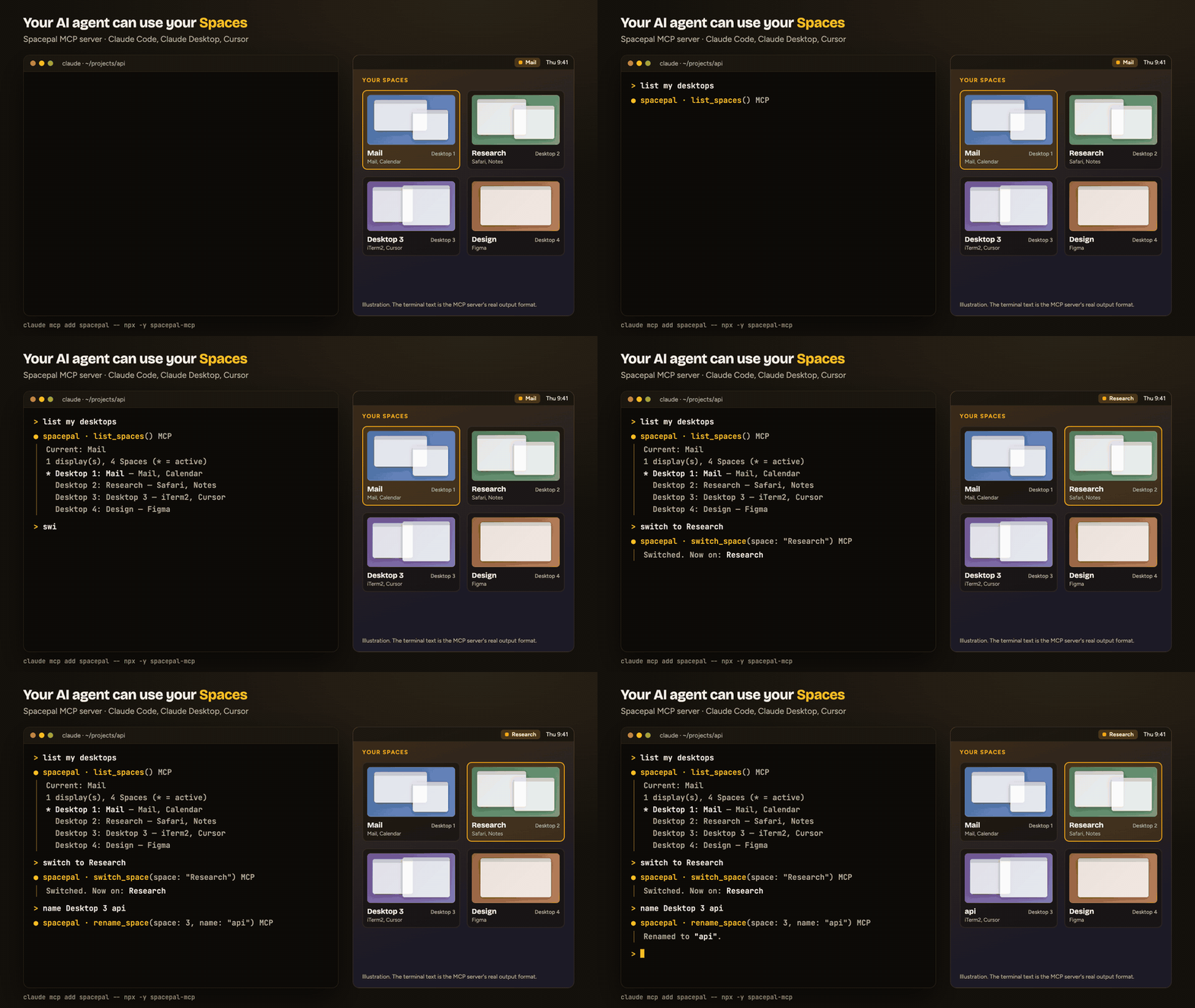
[Spacepal](https://getspacepal.com): "switch to my Mail Space", "what's on Desktop 3?",
|
|
5
5
|
"name this desktop Research".
|
|
6
6
|
|
|
7
|
+
|
|
8
|
+
|
|
7
9
|
It runs locally over stdio. It reads the Space list Spacepal writes to
|
|
8
10
|
`~/Library/Application Support/Spacepal/state.json` and sends commands through the
|
|
9
11
|
`spacepal://` URL scheme. It makes no network calls.
|
|
@@ -17,17 +19,35 @@ It runs locally over stdio. It reads the Space list Spacepal writes to
|
|
|
17
19
|
|
|
18
20
|
| Tool | What it does |
|
|
19
21
|
|---|---|
|
|
20
|
-
| `list_spaces` | Every Space with its number, name, display, apps, and which one is active |
|
|
22
|
+
| `list_spaces` | Every Space with its number, name, display, apps, note, and which one is active |
|
|
21
23
|
| `current_space` | The Space you are on |
|
|
22
24
|
| `switch_space` | Switch by number or name, or step with `next`, `previous`, `back` |
|
|
23
25
|
| `move_window_to_space` | Send the frontmost window to a Space by number or name, or to `next` or `previous` |
|
|
24
26
|
| `rename_space` | Name a Space; an empty name restores "Desktop N" |
|
|
25
|
-
| `open_overview` | Open Spacepal's overview grid |
|
|
26
27
|
| `set_space_note` | Attach a short note to a Space |
|
|
27
|
-
| `
|
|
28
|
+
| `open_overview` | Open Spacepal's overview grid |
|
|
29
|
+
| `list_profiles` | Names of your saved profiles |
|
|
30
|
+
| `apply_profile` | Apply a saved profile (names, colours, notes and automations) |
|
|
31
|
+
| `apply_template` | Name the Spaces from a starter template: Developer, Designer, Freelancer, Student, Streamer |
|
|
32
|
+
| `set_up_space` | Switch to a Space and run its automations: open its apps, URLs and files |
|
|
33
|
+
| `save_window_layout` | Save which Space and position every window is in |
|
|
34
|
+
| `restore_window_layout` | Put windows back from the last saved layout |
|
|
35
|
+
| `save_sessions` | Save terminal sessions and Chrome windows on one Space or all of them |
|
|
36
|
+
| `restore_sessions` | Reopen saved sessions on their Spaces |
|
|
37
|
+
| `add_desktop` | Add a desktop on the current display |
|
|
38
|
+
| `remove_desktop` | Remove a desktop; its windows move to another one |
|
|
39
|
+
|
|
40
|
+
Every tool is marked with MCP hints, so clients can tell the read-only tools apart and ask
|
|
41
|
+
before `remove_desktop` or `apply_template`, which change your setup.
|
|
28
42
|
|
|
29
43
|
`move_window_to_space` acts on the frontmost window. In Claude Desktop that is usually
|
|
30
|
-
Claude's own window.
|
|
44
|
+
Claude's own window. It moves the window directly on macOS 14.0–14.4 and 26.4+, and by
|
|
45
|
+
dragging it on other versions. `restore_window_layout` can only move windows between
|
|
46
|
+
Spaces on 14.0–14.4 and 26.4+.
|
|
47
|
+
|
|
48
|
+
The MCP server is free. The tools follow the app's own limits: after Spacepal's 14-day
|
|
49
|
+
trial, names and notes stay free, while the overview, sessions and other Pro features need a
|
|
50
|
+
license.
|
|
31
51
|
|
|
32
52
|
## Install
|
|
33
53
|
|
package/index.js
CHANGED
|
@@ -13,13 +13,17 @@ import { join } from "node:path";
|
|
|
13
13
|
import { promisify } from "node:util";
|
|
14
14
|
|
|
15
15
|
const run = promisify(execFile);
|
|
16
|
-
const VERSION = "0.
|
|
16
|
+
const VERSION = "0.3.0";
|
|
17
17
|
|
|
18
18
|
// Direct build writes to Application Support; the App Store build is sandboxed.
|
|
19
|
-
const
|
|
20
|
-
join(homedir(), "Library/Application Support/Spacepal
|
|
21
|
-
join(homedir(), "Library/Containers/com.halberd.spacepal/Data/Library/Application Support/Spacepal
|
|
19
|
+
const SUPPORT_DIRS = [
|
|
20
|
+
join(homedir(), "Library/Application Support/Spacepal"),
|
|
21
|
+
join(homedir(), "Library/Containers/com.halberd.spacepal/Data/Library/Application Support/Spacepal"),
|
|
22
22
|
];
|
|
23
|
+
const STATE_FILES = SUPPORT_DIRS.map((d) => join(d, "state.json"));
|
|
24
|
+
const PROFILE_FILES = SUPPORT_DIRS.map((d) => join(d, "profiles.json"));
|
|
25
|
+
// Built into the app (Profiles.swift, SpaceTemplate.all()).
|
|
26
|
+
const TEMPLATES = ["Developer", "Designer", "Freelancer", "Student", "Streamer"];
|
|
23
27
|
|
|
24
28
|
const NOT_RUNNING = "Spacepal is not running. Open Spacepal (getspacepal.com) and try again.";
|
|
25
29
|
|
|
@@ -32,16 +36,30 @@ async function isRunning() {
|
|
|
32
36
|
}
|
|
33
37
|
}
|
|
34
38
|
|
|
35
|
-
async function
|
|
39
|
+
async function newestFile(paths) {
|
|
36
40
|
let newest = null;
|
|
37
|
-
for (const path of
|
|
41
|
+
for (const path of paths) {
|
|
38
42
|
try {
|
|
39
43
|
const { mtimeMs } = await stat(path);
|
|
40
44
|
if (!newest || mtimeMs > newest.mtimeMs) newest = { path, mtimeMs };
|
|
41
45
|
} catch {}
|
|
42
46
|
}
|
|
43
|
-
|
|
44
|
-
|
|
47
|
+
return newest?.path ?? null;
|
|
48
|
+
}
|
|
49
|
+
|
|
50
|
+
async function readState() {
|
|
51
|
+
const path = await newestFile(STATE_FILES);
|
|
52
|
+
return path ? JSON.parse(await readFile(path, "utf8")) : null;
|
|
53
|
+
}
|
|
54
|
+
|
|
55
|
+
async function readProfiles() {
|
|
56
|
+
const path = await newestFile(PROFILE_FILES);
|
|
57
|
+
if (!path) return [];
|
|
58
|
+
try {
|
|
59
|
+
return JSON.parse(await readFile(path, "utf8")).map((p) => p.name);
|
|
60
|
+
} catch {
|
|
61
|
+
return [];
|
|
62
|
+
}
|
|
45
63
|
}
|
|
46
64
|
|
|
47
65
|
async function send(path, query = {}) {
|
|
@@ -95,18 +113,53 @@ function guarded(fn) {
|
|
|
95
113
|
};
|
|
96
114
|
}
|
|
97
115
|
|
|
98
|
-
const
|
|
116
|
+
const INSTRUCTIONS = `Spacepal MCP server: work with macOS Spaces (desktops) through the Spacepal app on this Mac.
|
|
117
|
+
|
|
118
|
+
Start with list_spaces to learn the Spaces, their numbers, names, notes and the apps on each; most tools take a Space by desktop number or by name from that list. Use current_space when you only need the active one.
|
|
119
|
+
|
|
120
|
+
Tools that only read: list_spaces, current_space, list_profiles. Tools that change the user's screen or setup: everything else. Ask the user before remove_desktop, apply_template and apply_profile, which replace or remove things; rename_space and set_space_note are easy to undo by calling them again.
|
|
121
|
+
|
|
122
|
+
Every action goes through Spacepal, so it must be running (macOS 14 or later). Nothing is sent over the network. If a tool says Spacepal is not running, tell the user to open it. The overview and sessions need Spacepal's trial or a license; names, notes and switching work in the free version.`;
|
|
123
|
+
|
|
124
|
+
const server = new McpServer({ name: "spacepal", version: VERSION }, { instructions: INSTRUCTIONS });
|
|
125
|
+
|
|
99
126
|
const spaceArg = z
|
|
100
127
|
.union([z.number().int().positive(), z.string().min(1)])
|
|
101
|
-
.describe(
|
|
128
|
+
.describe(
|
|
129
|
+
'Which Space: its desktop number (1 = leftmost on the display) or its name as list_spaces shows it, e.g. "Mail". Names match without regard to case.',
|
|
130
|
+
);
|
|
131
|
+
const optionalSpaceArg = spaceArg.optional().describe(
|
|
132
|
+
'Which Space: desktop number or name from list_spaces. Leave it out for the Space the user is on now.',
|
|
133
|
+
);
|
|
134
|
+
|
|
135
|
+
const spaceEntry = z
|
|
136
|
+
.object({
|
|
137
|
+
id: z.string().describe("Stable id of the Space"),
|
|
138
|
+
name: z.string().describe("Name shown in Spacepal, or \"Desktop N\" if unnamed"),
|
|
139
|
+
number: z.number().int().optional().describe("Desktop number on its display; absent for full-screen Spaces"),
|
|
140
|
+
display: z.string().describe("Id of the display the Space is on"),
|
|
141
|
+
isActive: z.boolean().describe("True for the Space currently shown on its display"),
|
|
142
|
+
isFullscreen: z.boolean().describe("True for an app's full-screen Space"),
|
|
143
|
+
apps: z.array(z.string()).describe("Apps with a window on this Space"),
|
|
144
|
+
note: z.string().optional().describe("The user's note about what the Space is for"),
|
|
145
|
+
color: z.string().optional().describe("Colour as #RRGGBB"),
|
|
146
|
+
})
|
|
147
|
+
.passthrough();
|
|
148
|
+
|
|
149
|
+
const RO = { readOnlyHint: true, destructiveHint: false, idempotentHint: true, openWorldHint: false };
|
|
150
|
+
const CHANGE = { readOnlyHint: false, destructiveHint: false, idempotentHint: false, openWorldHint: false };
|
|
102
151
|
|
|
103
152
|
server.registerTool(
|
|
104
153
|
"list_spaces",
|
|
105
154
|
{
|
|
106
155
|
title: "List Spaces",
|
|
107
|
-
description:
|
|
156
|
+
description:
|
|
157
|
+
"List every macOS Space (desktop) on every display: desktop number, name, note, the apps with windows on it, and which one is active. " +
|
|
158
|
+
"Read-only. Call this first to get valid Space numbers and names for the other tools. " +
|
|
159
|
+
"Fails if Spacepal is not running or has not written its list yet.",
|
|
108
160
|
inputSchema: {},
|
|
109
|
-
|
|
161
|
+
outputSchema: { current: z.string().describe("Name of the active Space"), spaces: z.array(spaceEntry) },
|
|
162
|
+
annotations: { title: "List Spaces", ...RO },
|
|
110
163
|
},
|
|
111
164
|
guarded(async () => {
|
|
112
165
|
if (!(await isRunning())) return fail(NOT_RUNNING);
|
|
@@ -115,14 +168,15 @@ server.registerTool(
|
|
|
115
168
|
const lines = state.spaces.map((s) => {
|
|
116
169
|
const label = s.isFullscreen ? "full screen" : `Desktop ${s.number ?? "?"}`;
|
|
117
170
|
const apps = s.apps?.length ? ` — ${s.apps.join(", ")}` : "";
|
|
118
|
-
|
|
171
|
+
const note = s.note ? ` (note: ${s.note})` : "";
|
|
172
|
+
return `${s.isActive ? "*" : " "} ${label}: ${s.name}${apps}${note}`;
|
|
119
173
|
});
|
|
120
174
|
const displays = new Set(state.spaces.map((s) => s.display)).size;
|
|
121
175
|
return {
|
|
122
176
|
content: [
|
|
123
177
|
{ type: "text", text: `Current: ${state.current}\n${displays} display(s), ${state.spaces.length} Spaces (* = active)\n${lines.join("\n")}` },
|
|
124
178
|
],
|
|
125
|
-
structuredContent: state,
|
|
179
|
+
structuredContent: { current: state.current ?? "", spaces: state.spaces },
|
|
126
180
|
};
|
|
127
181
|
}),
|
|
128
182
|
);
|
|
@@ -131,16 +185,22 @@ server.registerTool(
|
|
|
131
185
|
"current_space",
|
|
132
186
|
{
|
|
133
187
|
title: "Current Space",
|
|
134
|
-
description:
|
|
188
|
+
description:
|
|
189
|
+
"Return the Space the user is on now: its name and desktop number (one per display). " +
|
|
190
|
+
"Read-only and cheaper than list_spaces when you only need the active Space.",
|
|
135
191
|
inputSchema: {},
|
|
136
|
-
|
|
192
|
+
outputSchema: { spaces: z.array(spaceEntry).describe("The active Space on each display") },
|
|
193
|
+
annotations: { title: "Current Space", ...RO },
|
|
137
194
|
},
|
|
138
195
|
guarded(async () => {
|
|
139
196
|
if (!(await isRunning())) return fail(NOT_RUNNING);
|
|
140
197
|
const state = await readState();
|
|
141
|
-
|
|
142
|
-
|
|
143
|
-
|
|
198
|
+
if (!state) return fail("Spacepal has not written its Space list yet. Open the Spacepal menu once and try again.");
|
|
199
|
+
const active = state.spaces.filter((s) => s.isActive);
|
|
200
|
+
const t = active.length
|
|
201
|
+
? active.map((s) => `${s.name} (Desktop ${s.number ?? "full screen"})`).join("\n")
|
|
202
|
+
: `Current: ${state.current || "unknown"}`;
|
|
203
|
+
return { content: [{ type: "text", text: t }], structuredContent: { spaces: active } };
|
|
144
204
|
}),
|
|
145
205
|
);
|
|
146
206
|
|
|
@@ -148,8 +208,16 @@ server.registerTool(
|
|
|
148
208
|
"switch_space",
|
|
149
209
|
{
|
|
150
210
|
title: "Switch Space",
|
|
151
|
-
description:
|
|
152
|
-
|
|
211
|
+
description:
|
|
212
|
+
"Show another Space on the user's screen, instantly and without the slide animation. " +
|
|
213
|
+
'Give a desktop number or name from list_spaces, or "next", "previous" (neighbouring desktop) or "back" (the Space shown before). ' +
|
|
214
|
+
"Changes only what is visible; no windows move. Undo with space=\"back\". Returns the Space now shown; fails if no Space has that name.",
|
|
215
|
+
inputSchema: {
|
|
216
|
+
space: spaceArg.describe(
|
|
217
|
+
'Desktop number or name from list_spaces, or one of "next", "previous", "back".',
|
|
218
|
+
),
|
|
219
|
+
},
|
|
220
|
+
annotations: { title: "Switch Space", ...CHANGE, idempotentHint: true },
|
|
153
221
|
},
|
|
154
222
|
guarded(async ({ space }) => {
|
|
155
223
|
const before = (await readState())?.current;
|
|
@@ -174,9 +242,16 @@ server.registerTool(
|
|
|
174
242
|
{
|
|
175
243
|
title: "Move window to Space",
|
|
176
244
|
description:
|
|
177
|
-
"
|
|
178
|
-
|
|
179
|
-
|
|
245
|
+
"Move the user's frontmost window to another Space; the window keeps its size and position. " +
|
|
246
|
+
'Target is a desktop number or name from list_spaces, or "next"/"previous". ' +
|
|
247
|
+
"The frontmost window is the one the user last focused: from a terminal client that is usually the window they worked in, " +
|
|
248
|
+
"from Claude Desktop it is Claude's own window. On macOS 14.0-14.4 and 26.4+ the window moves directly; on other versions " +
|
|
249
|
+
"Spacepal drags it, which takes a moment. Depending on the user's settings the screen may follow the window. " +
|
|
250
|
+
"Undo by moving it back. Fails if no Space has that name.",
|
|
251
|
+
inputSchema: {
|
|
252
|
+
space: spaceArg.describe('Target desktop number or name from list_spaces, or "next" / "previous".'),
|
|
253
|
+
},
|
|
254
|
+
annotations: { title: "Move window to Space", ...CHANGE },
|
|
180
255
|
},
|
|
181
256
|
guarded(async ({ space }) => {
|
|
182
257
|
const s = String(space).toLowerCase();
|
|
@@ -194,11 +269,15 @@ server.registerTool(
|
|
|
194
269
|
"rename_space",
|
|
195
270
|
{
|
|
196
271
|
title: "Rename Space",
|
|
197
|
-
description:
|
|
272
|
+
description:
|
|
273
|
+
"Set the name Spacepal shows for a Space in its menu bar, overview and Mission Control. " +
|
|
274
|
+
"Replaces the old name; an empty name goes back to \"Desktop N\". The name stays with the Space even if desktops are reordered. " +
|
|
275
|
+
"Reversible: call again with the old name (get it from list_spaces first). Fails if the Space does not exist.",
|
|
198
276
|
inputSchema: {
|
|
199
|
-
space:
|
|
200
|
-
name: z.string().max(60).describe(
|
|
277
|
+
space: optionalSpaceArg,
|
|
278
|
+
name: z.string().max(60).describe('New name, up to 60 characters. Empty text ("") restores the default "Desktop N".'),
|
|
201
279
|
},
|
|
280
|
+
annotations: { title: "Rename Space", ...CHANGE, idempotentHint: true },
|
|
202
281
|
},
|
|
203
282
|
guarded(async ({ space, name }) => {
|
|
204
283
|
if (space !== undefined && !(await findSpace(space))) return fail(`No Space called "${space}".`);
|
|
@@ -208,29 +287,61 @@ server.registerTool(
|
|
|
208
287
|
}),
|
|
209
288
|
);
|
|
210
289
|
|
|
290
|
+
server.registerTool(
|
|
291
|
+
"set_space_note",
|
|
292
|
+
{
|
|
293
|
+
title: "Set Space note",
|
|
294
|
+
description:
|
|
295
|
+
"Set the short note that says what a Space is for, e.g. \"Client B invoices\"; list_spaces returns it and Spacepal shows it in its overview. " +
|
|
296
|
+
"Replaces any existing note; empty text removes the note. Reversible by setting the old note again (read it from list_spaces first). " +
|
|
297
|
+
"Fails if the Space does not exist.",
|
|
298
|
+
inputSchema: {
|
|
299
|
+
space: optionalSpaceArg,
|
|
300
|
+
text: z.string().max(500).describe('The note, up to 500 characters. Empty text ("") removes the note.'),
|
|
301
|
+
},
|
|
302
|
+
annotations: { title: "Set Space note", ...CHANGE, idempotentHint: true },
|
|
303
|
+
},
|
|
304
|
+
guarded(async ({ space, text: note }) => {
|
|
305
|
+
if (space !== undefined && !(await findSpace(space))) return fail(`No Space called "${space}".`);
|
|
306
|
+
await send(`note/${ref(space)}`, { text: note });
|
|
307
|
+
return text(note ? "Note saved." : "Note removed.");
|
|
308
|
+
}),
|
|
309
|
+
);
|
|
310
|
+
|
|
211
311
|
server.registerTool(
|
|
212
312
|
"open_overview",
|
|
213
313
|
{
|
|
214
314
|
title: "Open overview",
|
|
215
|
-
description:
|
|
315
|
+
description:
|
|
316
|
+
"Show Spacepal's full-screen overview of every Space with live previews, for the user to look at and pick from. " +
|
|
317
|
+
"It is a toggle: calling it while the overview is open closes it. Changes nothing else. " +
|
|
318
|
+
"Needs Spacepal's trial or a license; without one Spacepal shows its license window instead. To get the Space list as data, use list_spaces.",
|
|
216
319
|
inputSchema: {},
|
|
320
|
+
annotations: { title: "Open overview", ...CHANGE },
|
|
217
321
|
},
|
|
218
322
|
guarded(async () => {
|
|
219
323
|
await send("overview");
|
|
220
|
-
return text("
|
|
324
|
+
return text("Asked Spacepal to open the overview. It opens if the trial is running or Spacepal is licensed; otherwise Spacepal shows its license window.");
|
|
221
325
|
}),
|
|
222
326
|
);
|
|
223
327
|
|
|
224
328
|
server.registerTool(
|
|
225
|
-
"
|
|
329
|
+
"list_profiles",
|
|
226
330
|
{
|
|
227
|
-
title: "
|
|
228
|
-
description:
|
|
229
|
-
|
|
331
|
+
title: "List profiles",
|
|
332
|
+
description:
|
|
333
|
+
"List the names of the user's saved Spacepal profiles. A profile is a saved set of Space names, colours, notes and automations, such as \"Work\" and \"Home\". " +
|
|
334
|
+
"Read-only. Use it to get a valid name for apply_profile.",
|
|
335
|
+
inputSchema: {},
|
|
336
|
+
outputSchema: { profiles: z.array(z.string()).describe("Saved profile names") },
|
|
337
|
+
annotations: { title: "List profiles", ...RO },
|
|
230
338
|
},
|
|
231
|
-
guarded(async (
|
|
232
|
-
|
|
233
|
-
return
|
|
339
|
+
guarded(async () => {
|
|
340
|
+
const names = await readProfiles();
|
|
341
|
+
return {
|
|
342
|
+
content: [{ type: "text", text: names.length ? names.join("\n") : "No saved profiles yet." }],
|
|
343
|
+
structuredContent: { profiles: names },
|
|
344
|
+
};
|
|
234
345
|
}),
|
|
235
346
|
);
|
|
236
347
|
|
|
@@ -238,12 +349,187 @@ server.registerTool(
|
|
|
238
349
|
"apply_profile",
|
|
239
350
|
{
|
|
240
351
|
title: "Apply profile",
|
|
241
|
-
description:
|
|
242
|
-
|
|
352
|
+
description:
|
|
353
|
+
"Switch to one of the user's saved profiles, replacing the names, colours, notes and automations of every Space with the profile's. " +
|
|
354
|
+
"If a profile was active, Spacepal first saves the current set under it, so the user can switch back. If none was active, the current names are not saved anywhere and are lost, so ask the user to save them as a profile first. " +
|
|
355
|
+
"Windows and desktops are not changed. Unlike apply_template, which uses built-in starter names, this uses the user's own saved sets. " +
|
|
356
|
+
"Get valid names from list_profiles; fails with the list of names if the profile does not exist. Ask the user first.",
|
|
357
|
+
inputSchema: {
|
|
358
|
+
name: z.string().min(1).describe("Profile name from list_profiles. Matching ignores case."),
|
|
359
|
+
},
|
|
360
|
+
annotations: { title: "Apply profile", ...CHANGE, destructiveHint: true, idempotentHint: true },
|
|
361
|
+
},
|
|
362
|
+
guarded(async ({ name }) => {
|
|
363
|
+
const names = await readProfiles();
|
|
364
|
+
const match = names.find((n) => n.toLowerCase() === name.toLowerCase());
|
|
365
|
+
if (!match) {
|
|
366
|
+
return fail(names.length ? `No profile called "${name}". Profiles: ${names.join(", ")}.` : "No saved profiles yet. Save one in Spacepal Settings, Profiles.");
|
|
367
|
+
}
|
|
368
|
+
await send(`profile/${encodeURIComponent(match)}`);
|
|
369
|
+
return text(`Applied profile "${match}".`);
|
|
370
|
+
}),
|
|
371
|
+
);
|
|
372
|
+
|
|
373
|
+
server.registerTool(
|
|
374
|
+
"apply_template",
|
|
375
|
+
{
|
|
376
|
+
title: "Apply template",
|
|
377
|
+
description:
|
|
378
|
+
`Name and colour the user's desktops from one of Spacepal's built-in starter templates: ${TEMPLATES.join(", ")}. ` +
|
|
379
|
+
"Overwrites the names, colours and notes of the desktops it covers, so ask the user first; to keep the current names they can save them as a profile in Spacepal. " +
|
|
380
|
+
"If the template needs more desktops than exist, Spacepal shows a dialog on screen asking the user whether to add them. " +
|
|
381
|
+
"For the user's own saved sets use apply_profile instead.",
|
|
382
|
+
inputSchema: { name: z.enum(TEMPLATES).describe("Template name, exactly as listed") },
|
|
383
|
+
annotations: { title: "Apply template", ...CHANGE, destructiveHint: true, idempotentHint: true },
|
|
243
384
|
},
|
|
244
385
|
guarded(async ({ name }) => {
|
|
245
|
-
await send(`
|
|
246
|
-
|
|
386
|
+
await send(`template/${encodeURIComponent(name)}`);
|
|
387
|
+
await settle();
|
|
388
|
+
return text(`Applied the ${name} template.`);
|
|
389
|
+
}),
|
|
390
|
+
);
|
|
391
|
+
|
|
392
|
+
server.registerTool(
|
|
393
|
+
"set_up_space",
|
|
394
|
+
{
|
|
395
|
+
title: "Set up Space",
|
|
396
|
+
description:
|
|
397
|
+
"Switch to a Space and open the apps, URLs and files its Spacepal automation lists, even if they were opened before. " +
|
|
398
|
+
"Entering the Space also runs its usual on-enter actions, such as a Shortcut. Use it to prepare a workspace; to only change the visible Space use switch_space. " +
|
|
399
|
+
"Opens apps on the user's Mac, so it cannot be undone automatically. Does nothing beyond switching if the Space has no automation. Fails if the Space does not exist.",
|
|
400
|
+
inputSchema: { space: optionalSpaceArg },
|
|
401
|
+
annotations: { title: "Set up Space", ...CHANGE },
|
|
402
|
+
},
|
|
403
|
+
guarded(async ({ space }) => {
|
|
404
|
+
const target = space === undefined ? null : await findSpace(space);
|
|
405
|
+
if (space !== undefined && !target) return fail(`No Space called "${space}".`);
|
|
406
|
+
await send(`setup/${ref(space)}`);
|
|
407
|
+
return text(`Setting up ${target?.name ?? "the current Space"}.`);
|
|
408
|
+
}),
|
|
409
|
+
);
|
|
410
|
+
|
|
411
|
+
server.registerTool(
|
|
412
|
+
"save_window_layout",
|
|
413
|
+
{
|
|
414
|
+
title: "Save window layout",
|
|
415
|
+
description:
|
|
416
|
+
"Record which Space and screen position every open window has, for the current display setup, so restore_window_layout can put them back. " +
|
|
417
|
+
"Overwrites the previous manual save for these displays (Spacepal also saves automatically in the background). Moves nothing.",
|
|
418
|
+
inputSchema: {},
|
|
419
|
+
annotations: { title: "Save window layout", ...CHANGE, idempotentHint: true },
|
|
420
|
+
},
|
|
421
|
+
guarded(async () => {
|
|
422
|
+
await send("save-layout");
|
|
423
|
+
return text("Saved the window layout.");
|
|
424
|
+
}),
|
|
425
|
+
);
|
|
426
|
+
|
|
427
|
+
server.registerTool(
|
|
428
|
+
"restore_window_layout",
|
|
429
|
+
{
|
|
430
|
+
title: "Restore window layout",
|
|
431
|
+
description:
|
|
432
|
+
"Move open windows back to the Spaces and positions recorded by save_window_layout (or Spacepal's automatic save) for the current display setup. " +
|
|
433
|
+
"Moving windows between Spaces only works on macOS 14.0-14.4 and 26.4+; on other versions positions are restored but windows stay on their Space. " +
|
|
434
|
+
"Windows of apps that are not open are skipped; to reopen terminals and Chrome windows use restore_sessions. Spacepal shows how many windows it moved.",
|
|
435
|
+
inputSchema: {},
|
|
436
|
+
annotations: { title: "Restore window layout", ...CHANGE, idempotentHint: true },
|
|
437
|
+
},
|
|
438
|
+
guarded(async () => {
|
|
439
|
+
await send("restore-layout");
|
|
440
|
+
return text("Asked Spacepal to restore the saved layout. It shows how many windows it moved.");
|
|
441
|
+
}),
|
|
442
|
+
);
|
|
443
|
+
|
|
444
|
+
server.registerTool(
|
|
445
|
+
"save_sessions",
|
|
446
|
+
{
|
|
447
|
+
title: "Save sessions",
|
|
448
|
+
description:
|
|
449
|
+
"Save the terminal windows (with their folders) and Chrome windows (with their tabs) on one Space, or on every Space with all=true, " +
|
|
450
|
+
"so restore_sessions can reopen them on the right Space after a restart. Replaces the earlier save for those Spaces and drops windows that were closed. " +
|
|
451
|
+
"Needs Spacepal's trial or a license; without one nothing is saved.",
|
|
452
|
+
inputSchema: {
|
|
453
|
+
space: optionalSpaceArg,
|
|
454
|
+
all: z.boolean().optional().describe("true to save every Space; then space is ignored. Default false."),
|
|
455
|
+
},
|
|
456
|
+
annotations: { title: "Save sessions", ...CHANGE, idempotentHint: true },
|
|
457
|
+
},
|
|
458
|
+
guarded(async ({ space, all }) => {
|
|
459
|
+
if (all) {
|
|
460
|
+
await send("session-save/all");
|
|
461
|
+
return text("Asked Spacepal to save sessions on every Space. It shows how many windows it saved.");
|
|
462
|
+
}
|
|
463
|
+
if (space !== undefined && !(await findSpace(space))) return fail(`No Space called "${space}".`);
|
|
464
|
+
await send(`session-save/${ref(space)}`);
|
|
465
|
+
return text("Asked Spacepal to save the sessions. It shows how many windows it saved.");
|
|
466
|
+
}),
|
|
467
|
+
);
|
|
468
|
+
|
|
469
|
+
server.registerTool(
|
|
470
|
+
"restore_sessions",
|
|
471
|
+
{
|
|
472
|
+
title: "Restore sessions",
|
|
473
|
+
description:
|
|
474
|
+
"Reopen the terminal and Chrome windows saved by save_sessions, each on the Space it was saved from. " +
|
|
475
|
+
"Opens new windows, so calling it twice can open duplicates. Needs Spacepal's trial or a license. " +
|
|
476
|
+
"To move windows that are already open, use restore_window_layout instead.",
|
|
477
|
+
inputSchema: {},
|
|
478
|
+
annotations: { title: "Restore sessions", ...CHANGE },
|
|
479
|
+
},
|
|
480
|
+
guarded(async () => {
|
|
481
|
+
await send("session-restore");
|
|
482
|
+
return text("Asked Spacepal to reopen the saved sessions.");
|
|
483
|
+
}),
|
|
484
|
+
);
|
|
485
|
+
|
|
486
|
+
server.registerTool(
|
|
487
|
+
"add_desktop",
|
|
488
|
+
{
|
|
489
|
+
title: "Add desktop",
|
|
490
|
+
description:
|
|
491
|
+
"Create a new empty desktop at the end of the display the pointer is on. Mission Control opens for a moment while Spacepal adds it. " +
|
|
492
|
+
"Undo with remove_desktop. Returns the new number of Spaces once Spacepal confirms it.",
|
|
493
|
+
inputSchema: {},
|
|
494
|
+
annotations: { title: "Add desktop", ...CHANGE },
|
|
495
|
+
},
|
|
496
|
+
guarded(async () => {
|
|
497
|
+
const before = (await readState())?.spaces.length ?? 0;
|
|
498
|
+
await send("add-desktop");
|
|
499
|
+
const end = Date.now() + 4000;
|
|
500
|
+
while (Date.now() < end) {
|
|
501
|
+
await new Promise((r) => setTimeout(r, 250));
|
|
502
|
+
const after = (await readState())?.spaces.length ?? 0;
|
|
503
|
+
if (after > before) return text(`Added a desktop. ${after} Spaces now.`);
|
|
504
|
+
}
|
|
505
|
+
return text("Asked Spacepal to add a desktop; it has not confirmed it yet.");
|
|
506
|
+
}),
|
|
507
|
+
);
|
|
508
|
+
|
|
509
|
+
server.registerTool(
|
|
510
|
+
"remove_desktop",
|
|
511
|
+
{
|
|
512
|
+
title: "Remove desktop",
|
|
513
|
+
description:
|
|
514
|
+
"Close a desktop, as with its close button in Mission Control. Its windows move to another desktop and are not closed, " +
|
|
515
|
+
"but its Spacepal name, note and automation are lost and cannot be restored automatically. Full-screen Spaces cannot be removed this way. " +
|
|
516
|
+
"Always ask the user before calling this. Fails if the Space does not exist.",
|
|
517
|
+
inputSchema: { space: spaceArg.describe("Desktop number or name from list_spaces") },
|
|
518
|
+
annotations: { title: "Remove desktop", ...CHANGE, destructiveHint: true },
|
|
519
|
+
},
|
|
520
|
+
guarded(async ({ space }) => {
|
|
521
|
+
const target = await findSpace(space);
|
|
522
|
+
if (!target) return fail(`No Space called "${space}". Call list_spaces to see the names.`);
|
|
523
|
+
if (target.isFullscreen) return fail(`${target.name} is a full-screen Space. Leave full screen in that app instead.`);
|
|
524
|
+
const before = (await readState())?.spaces.length ?? 0;
|
|
525
|
+
await send(`remove-desktop/${ref(space)}`);
|
|
526
|
+
const end = Date.now() + 4000;
|
|
527
|
+
while (Date.now() < end) {
|
|
528
|
+
await new Promise((r) => setTimeout(r, 250));
|
|
529
|
+
const after = (await readState())?.spaces.length ?? 0;
|
|
530
|
+
if (after < before) return text(`Removed ${target.name}. ${after} Spaces now.`);
|
|
531
|
+
}
|
|
532
|
+
return text(`Asked Spacepal to remove ${target.name}; it has not confirmed it yet.`);
|
|
247
533
|
}),
|
|
248
534
|
);
|
|
249
535
|
|
package/package.json
CHANGED
|
@@ -1,19 +1,45 @@
|
|
|
1
1
|
{
|
|
2
2
|
"name": "spacepal-mcp",
|
|
3
|
-
"version": "0.
|
|
3
|
+
"version": "0.3.0",
|
|
4
4
|
"description": "MCP server for Spacepal: list, switch, rename macOS Spaces and move windows between them from Claude, Cursor or any MCP client.",
|
|
5
5
|
"mcpName": "com.getspacepal/spacepal",
|
|
6
6
|
"type": "module",
|
|
7
|
-
"bin": {
|
|
8
|
-
|
|
9
|
-
|
|
10
|
-
"
|
|
11
|
-
|
|
7
|
+
"bin": {
|
|
8
|
+
"spacepal-mcp": "index.js"
|
|
9
|
+
},
|
|
10
|
+
"files": [
|
|
11
|
+
"index.js",
|
|
12
|
+
"README.md",
|
|
13
|
+
"LICENSE",
|
|
14
|
+
"server.json"
|
|
15
|
+
],
|
|
16
|
+
"engines": {
|
|
17
|
+
"node": ">=18"
|
|
18
|
+
},
|
|
19
|
+
"os": [
|
|
20
|
+
"darwin"
|
|
21
|
+
],
|
|
22
|
+
"keywords": [
|
|
23
|
+
"mcp",
|
|
24
|
+
"model-context-protocol",
|
|
25
|
+
"macos",
|
|
26
|
+
"spaces",
|
|
27
|
+
"mission-control",
|
|
28
|
+
"spacepal",
|
|
29
|
+
"claude"
|
|
30
|
+
],
|
|
12
31
|
"homepage": "https://getspacepal.com/integrations/mcp/",
|
|
32
|
+
"repository": {
|
|
33
|
+
"type": "git",
|
|
34
|
+
"url": "git+https://github.com/TanKucukhas/spacepal-mcp.git"
|
|
35
|
+
},
|
|
13
36
|
"author": "Halberd LLC",
|
|
14
37
|
"license": "MIT",
|
|
15
38
|
"dependencies": {
|
|
16
39
|
"@modelcontextprotocol/sdk": "^1.17.0",
|
|
17
|
-
"zod": "^
|
|
40
|
+
"zod": "^4.6.7"
|
|
41
|
+
},
|
|
42
|
+
"scripts": {
|
|
43
|
+
"test": "node test/smoke.mjs"
|
|
18
44
|
}
|
|
19
45
|
}
|
package/server.json
CHANGED
|
@@ -3,14 +3,16 @@
|
|
|
3
3
|
"name": "com.getspacepal/spacepal",
|
|
4
4
|
"title": "Spacepal",
|
|
5
5
|
"description": "List, switch and rename macOS Spaces and move windows between them. Needs the Spacepal app.",
|
|
6
|
-
"version": "0.
|
|
6
|
+
"version": "0.3.0",
|
|
7
7
|
"websiteUrl": "https://getspacepal.com/integrations/mcp/",
|
|
8
8
|
"packages": [
|
|
9
9
|
{
|
|
10
10
|
"registryType": "npm",
|
|
11
11
|
"identifier": "spacepal-mcp",
|
|
12
|
-
"version": "0.
|
|
13
|
-
"transport": {
|
|
12
|
+
"version": "0.3.0",
|
|
13
|
+
"transport": {
|
|
14
|
+
"type": "stdio"
|
|
15
|
+
}
|
|
14
16
|
}
|
|
15
17
|
]
|
|
16
18
|
}
|