slidev-theme-watabegg 1.1.2 → 1.1.4
This diff represents the content of publicly available package versions that have been released to one of the supported registries. The information contained in this diff is provided for informational purposes only and reflects changes between package versions as they appear in their respective public registries.
- package/README.ja.md +21 -17
- package/README.md +21 -16
- package/components/KaTexReveal.vue +25 -24
- package/components/QuestionList.vue +246 -120
- package/components/TextBox.vue +5 -5
- package/global-bottom.vue +15 -7
- package/layouts/cover.vue +14 -3
- package/layouts/image-scroll.vue +89 -274
- package/layouts/image.vue +9 -3
- package/package.json +41 -12
- package/styles/globals.css.d.ts +3 -0
- package/styles/layout.css.d.ts +3 -0
- package/utils/colors.ts +1 -3
- package/utils/link.ts +11 -8
- package/utils/render.ts +42 -4
- package/utils/safeUrl.ts +27 -0
- package/utils/themeConfig.ts +18 -0
- package/utils/useThemePalette.ts +21 -25
- package/example.md +0 -187
package/README.ja.md
CHANGED
|
@@ -2,7 +2,7 @@
|
|
|
2
2
|
|
|
3
3
|
[](https://www.npmjs.com/package/slidev-theme-watabegg)
|
|
4
4
|
|
|
5
|
-
|
|
5
|
+
watabegg 向けに作っている個人用 Slidev テーマです。日本語表示、構造化されたコンテンツ、キーボード操作を重視しています。
|
|
6
6
|
|
|
7
7
|
## 特徴
|
|
8
8
|
- 教育特化のミニマルデザイン
|
|
@@ -31,16 +31,21 @@ theme: ./
|
|
|
31
31
|
|
|
32
32
|
## フロントマター例
|
|
33
33
|
```yaml
|
|
34
|
+
themeConfig:
|
|
35
|
+
watabegg:
|
|
36
|
+
color: green
|
|
37
|
+
link: 'https://example.com'
|
|
38
|
+
|
|
34
39
|
title: Theme Demo
|
|
35
40
|
subtitle: サブタイトル
|
|
36
41
|
author: 講師名
|
|
37
42
|
date: '2025/08/03'
|
|
38
|
-
color:
|
|
39
|
-
link: 'https://example.com' #
|
|
43
|
+
color: blue # スライド単位の上書き(省略可)
|
|
44
|
+
link: 'https://example.com/slide' # スライド単位の上書き(省略可)
|
|
40
45
|
transition: fade
|
|
41
46
|
```
|
|
42
47
|
|
|
43
|
-
`color`
|
|
48
|
+
`themeConfig.watabegg.color` と `themeConfig.watabegg.link` で deck 全体の既定値を設定できます。スライド側に `color` や `link` があればそちらが優先されます。
|
|
44
49
|
|
|
45
50
|
下図は`blue`指定の例。
|
|
46
51
|
|
|
@@ -52,7 +57,7 @@ transition: fade
|
|
|
52
57
|
| cover | 表紙 | グラデーション波 + title/subtitle/author |
|
|
53
58
|
| two-cols | 2カラム | `::left::` / `::right::` スロット |
|
|
54
59
|
| image | 背景画像 | `image:` 指定 + `TextBox` で自由配置 |
|
|
55
|
-
| image-scroll |
|
|
60
|
+
| image-scroll | 背景画像(縦スクロール) | `image:` 指定 + 縦長背景 + `TextBox` |
|
|
56
61
|
| end | 終了スライド | シンプルな終了画面 |
|
|
57
62
|
|
|
58
63
|
### two-cols 例
|
|
@@ -82,31 +87,27 @@ image: /path/to/bg.jpg
|
|
|
82
87
|
---
|
|
83
88
|
layout: image-scroll
|
|
84
89
|
image: /path/to/long-bg.jpg
|
|
90
|
+
imageScroll:
|
|
91
|
+
offsetY: -120
|
|
85
92
|
---
|
|
86
93
|
```
|
|
87
94
|
|
|
88
95
|
|
|
89
96
|
|
|
90
97
|
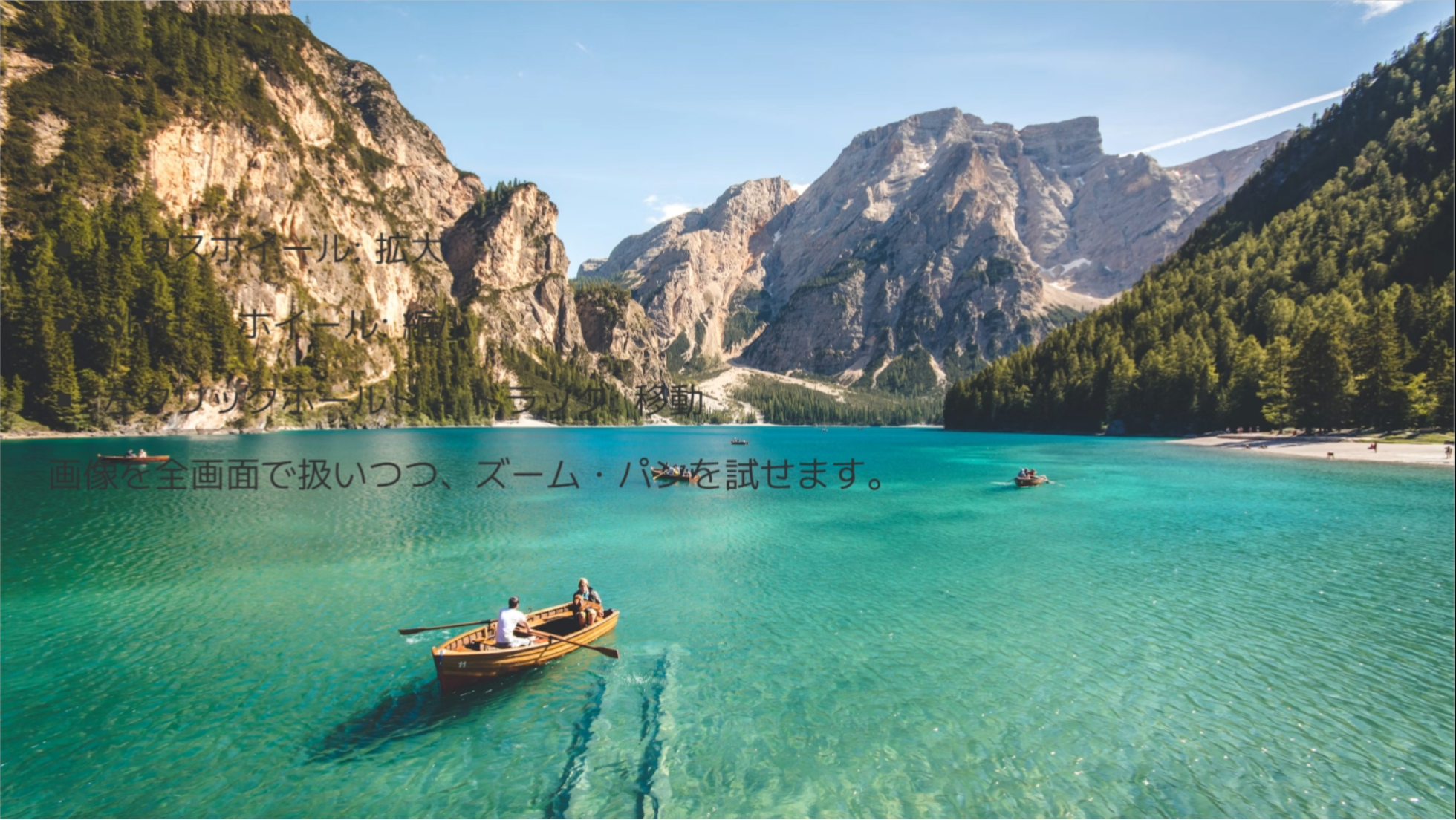
image-scroll オプション(frontmatter `imageScroll`):
|
|
91
|
-
- `
|
|
92
|
-
- `position`: `center | top | bottom | left | right` もしくは組み合わせ(例: `top left`)
|
|
93
|
-
- `offset`: `[x, y]` または `{ x, y }`(px)
|
|
98
|
+
- `offsetY`: 画像の中心からの初期スクロール量(px)
|
|
94
99
|
|
|
95
100
|
操作:
|
|
96
|
-
- Wheel
|
|
97
|
-
-
|
|
98
|
-
- Alt + Wheel: 10% ずつ拡大縮小
|
|
99
|
-
- タッチ: ドラッグでパン、ピンチでズーム
|
|
101
|
+
- Wheel / トラックパッド: 縦スクロール
|
|
102
|
+
- タッチ: 縦スクロール
|
|
100
103
|
|
|
101
|
-
|
|
104
|
+
初期位置の例:
|
|
102
105
|
```markdown
|
|
103
106
|
---
|
|
104
107
|
layout: image-scroll
|
|
105
108
|
image: /path/to/long-bg.jpg
|
|
106
109
|
imageScroll:
|
|
107
|
-
|
|
108
|
-
position: center
|
|
109
|
-
offset: [0, -120]
|
|
110
|
+
offsetY: 180
|
|
110
111
|
---
|
|
111
112
|
```
|
|
112
113
|
|
|
@@ -122,7 +123,7 @@ imageScroll:
|
|
|
122
123
|
```
|
|
123
124
|
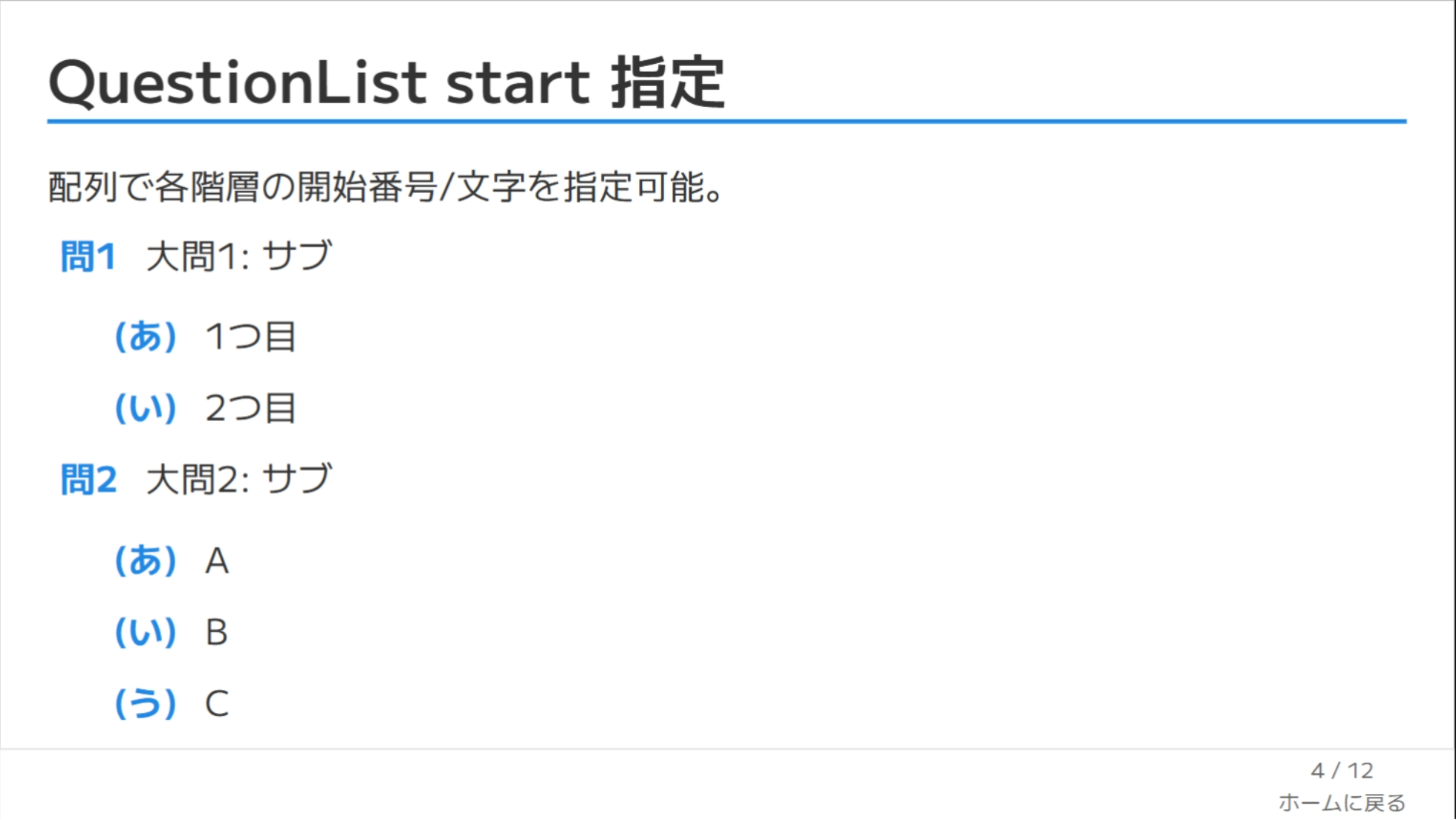
カウンター種別: `decimal | hiragana | katakana | kanji | upperalpha | loweralpha | none`
|
|
124
125
|
デコレータ: `circle | square | paren | dot | q | big-q | none`
|
|
125
|
-
アイテム内 `label`
|
|
126
|
+
アイテム内 `label` があればそれを優先表示。`text` 内の生 HTML はエスケープされ、Markdown リンクも `http` / `https` / `mailto` / `tel` と相対 URL のみ許可されます。
|
|
126
127
|
|
|
127
128
|
|
|
128
129
|
|
|
@@ -158,11 +159,14 @@ Props: `formula`(必須), `block`(既定 false), `tag`(省略時 `div`/`span`
|
|
|
158
159
|
```bash
|
|
159
160
|
pnpm install
|
|
160
161
|
pnpm dev
|
|
162
|
+
pnpm dev:polling
|
|
161
163
|
pnpm build
|
|
162
164
|
pnpm export
|
|
163
165
|
pnpm screenshot
|
|
164
166
|
```
|
|
165
167
|
|
|
168
|
+
Linux で `pnpm dev` が file watcher 上限 (`ENOSPC`) に当たる場合は `pnpm dev:polling` を使用してください。
|
|
169
|
+
|
|
166
170
|
## FAQ
|
|
167
171
|
**Q. フォント設定は必要?** → いいえ、テーマ内で Google Fonts を読み込みます。
|
|
168
172
|
|
package/README.md
CHANGED
|
@@ -5,7 +5,7 @@
|
|
|
5
5
|
English README (Japanese version: see `README.ja.md`).
|
|
6
6
|
|
|
7
7
|
## Overview
|
|
8
|
-
|
|
8
|
+
A personal Slidev theme for watabegg, tuned for Japanese typography, structured content, and keyboard-first navigation.
|
|
9
9
|
|
|
10
10
|
## Features
|
|
11
11
|
- Minimal design specialized for teaching
|
|
@@ -35,16 +35,21 @@ theme: ./
|
|
|
35
35
|
|
|
36
36
|
## Frontmatter Example
|
|
37
37
|
```yaml
|
|
38
|
+
themeConfig:
|
|
39
|
+
watabegg:
|
|
40
|
+
color: green
|
|
41
|
+
link: 'https://example.com'
|
|
42
|
+
|
|
38
43
|
title: Theme Demo
|
|
39
44
|
subtitle: Subtitle
|
|
40
45
|
author: Instructor Name
|
|
41
46
|
date: '2025/08/03'
|
|
42
|
-
color:
|
|
43
|
-
link: 'https://example.com' # optional
|
|
47
|
+
color: blue # optional slide-level override
|
|
48
|
+
link: 'https://example.com/slide' # optional slide-level override
|
|
44
49
|
transition: fade
|
|
45
50
|
```
|
|
46
51
|
|
|
47
|
-
|
|
52
|
+
`themeConfig.watabegg.color` and `themeConfig.watabegg.link` define deck-level defaults. Slide-level `color` and `link` override them when present.
|
|
48
53
|
|
|
49
54
|
Below: `color: blue` example.
|
|
50
55
|
|
|
@@ -56,7 +61,7 @@ Below: `color: blue` example.
|
|
|
56
61
|
| cover | Title slide | Gradient wave + title/subtitle/author |
|
|
57
62
|
| two-cols | Two columns | Slots: `::left::` / `::right::` |
|
|
58
63
|
| image | Background image | Use `image:` + absolutely placed `TextBox` |
|
|
59
|
-
| image-scroll | Background image (
|
|
64
|
+
| image-scroll | Background image (vertical scroll) | Use `image:` with tall background + `TextBox` |
|
|
60
65
|
| end | Ending slide | Simple finish screen |
|
|
61
66
|
|
|
62
67
|
### two-cols Example
|
|
@@ -86,31 +91,27 @@ image: /path/to/bg.jpg
|
|
|
86
91
|
---
|
|
87
92
|
layout: image-scroll
|
|
88
93
|
image: /path/to/long-bg.jpg
|
|
94
|
+
imageScroll:
|
|
95
|
+
offsetY: -120
|
|
89
96
|
---
|
|
90
97
|
```
|
|
91
98
|
|
|
92
99
|

|
|
93
100
|
|
|
94
101
|
image-scroll options (frontmatter `imageScroll`):
|
|
95
|
-
- `
|
|
96
|
-
- `position`: `center | top | bottom | left | right` or combined (e.g. `top left`)
|
|
97
|
-
- `offset`: `[x, y]` or `{ x, y }` in px
|
|
102
|
+
- `offsetY`: initial scroll offset from image center in px
|
|
98
103
|
|
|
99
104
|
Controls:
|
|
100
|
-
- Wheel:
|
|
101
|
-
-
|
|
102
|
-
- Alt + Wheel: zoom in/out by 10%
|
|
103
|
-
- Touch: drag to pan, pinch to zoom
|
|
105
|
+
- Wheel / trackpad: vertical scroll
|
|
106
|
+
- Touch: vertical scroll
|
|
104
107
|
|
|
105
|
-
Example with initial
|
|
108
|
+
Example with initial position:
|
|
106
109
|
```markdown
|
|
107
110
|
---
|
|
108
111
|
layout: image-scroll
|
|
109
112
|
image: /path/to/long-bg.jpg
|
|
110
113
|
imageScroll:
|
|
111
|
-
|
|
112
|
-
position: center
|
|
113
|
-
offset: [0, -120]
|
|
114
|
+
offsetY: 180
|
|
114
115
|
---
|
|
115
116
|
```
|
|
116
117
|
|
|
@@ -127,6 +128,7 @@ Nested questions/answers with per-level styles and Markdown rendering.
|
|
|
127
128
|
Counter types: `decimal | hiragana | katakana | kanji | upperalpha | loweralpha | none`
|
|
128
129
|
Decorators: `circle | square | paren | dot | q | big-q | none`
|
|
129
130
|
If an item includes a `label`, it overrides the computed label.
|
|
131
|
+
Raw HTML inside `text` is escaped. Markdown links only allow safe protocols (`http`, `https`, `mailto`, `tel`) plus relative URLs.
|
|
130
132
|
|
|
131
133
|

|
|
132
134
|
|
|
@@ -162,11 +164,14 @@ Props: `formula` (required), `block` (default `false`), `tag` (auto `div`/`span`
|
|
|
162
164
|
```bash
|
|
163
165
|
pnpm install
|
|
164
166
|
pnpm dev
|
|
167
|
+
pnpm dev:polling
|
|
165
168
|
pnpm build
|
|
166
169
|
pnpm export
|
|
167
170
|
pnpm screenshot
|
|
168
171
|
```
|
|
169
172
|
|
|
173
|
+
If `pnpm dev` hits Linux file watcher limits (`ENOSPC`), use `pnpm dev:polling`.
|
|
174
|
+
|
|
170
175
|
## FAQ
|
|
171
176
|
**Q. Do I need to configure fonts manually?**
|
|
172
177
|
No. Google Fonts are loaded inside the theme.
|
|
@@ -8,53 +8,54 @@
|
|
|
8
8
|
</template>
|
|
9
9
|
|
|
10
10
|
<script setup lang="ts">
|
|
11
|
-
import { computed, onMounted, onUpdated, ref, useAttrs } from 'vue'
|
|
12
|
-
import katex from 'katex'
|
|
13
|
-
import 'katex/dist/katex.min.css'
|
|
11
|
+
import { computed, onMounted, onUpdated, ref, useAttrs } from 'vue'
|
|
12
|
+
import katex from 'katex'
|
|
13
|
+
import 'katex/dist/katex.min.css'
|
|
14
14
|
|
|
15
|
-
defineOptions({ inheritAttrs: false })
|
|
15
|
+
defineOptions({ inheritAttrs: false })
|
|
16
16
|
|
|
17
17
|
const props = withDefaults(defineProps<{
|
|
18
|
-
formula: string
|
|
19
|
-
block?: boolean
|
|
20
|
-
tag?: string
|
|
18
|
+
formula: string
|
|
19
|
+
block?: boolean
|
|
20
|
+
tag?: string
|
|
21
21
|
}>(), {
|
|
22
22
|
block: false,
|
|
23
23
|
tag: undefined,
|
|
24
|
-
})
|
|
24
|
+
})
|
|
25
25
|
|
|
26
|
-
const attrs = useAttrs()
|
|
27
|
-
const root = ref<HTMLElement | null>(null)
|
|
26
|
+
const attrs = useAttrs()
|
|
27
|
+
const root = ref<HTMLElement | null>(null)
|
|
28
28
|
|
|
29
29
|
const forwardedAttrs = computed(() => {
|
|
30
|
-
const { class: _class, ...rest } = attrs as Record<string,
|
|
31
|
-
return rest
|
|
32
|
-
})
|
|
30
|
+
const { class: _class, ...rest } = attrs as Record<string, unknown>
|
|
31
|
+
return rest
|
|
32
|
+
})
|
|
33
33
|
|
|
34
|
-
const resolvedTag = computed(() => props.tag ?? (props.block ? 'div' : 'span'))
|
|
34
|
+
const resolvedTag = computed(() => props.tag ?? (props.block ? 'div' : 'span'))
|
|
35
35
|
|
|
36
36
|
const renderFormula = () => {
|
|
37
|
-
const target = root.value
|
|
38
|
-
if (!target)
|
|
37
|
+
const target = root.value
|
|
38
|
+
if (!target)
|
|
39
|
+
return
|
|
39
40
|
|
|
40
41
|
if (!props.formula) {
|
|
41
|
-
target.innerHTML = ''
|
|
42
|
-
return
|
|
42
|
+
target.innerHTML = ''
|
|
43
|
+
return
|
|
43
44
|
}
|
|
44
45
|
|
|
45
46
|
try {
|
|
46
47
|
katex.render(props.formula, target, {
|
|
47
48
|
displayMode: props.block,
|
|
48
49
|
throwOnError: false,
|
|
49
|
-
})
|
|
50
|
+
})
|
|
50
51
|
} catch (error) {
|
|
51
|
-
console.warn('[KaTexReveal] failed to render formula', error)
|
|
52
|
-
target.textContent = props.formula
|
|
52
|
+
console.warn('[KaTexReveal] failed to render formula', error)
|
|
53
|
+
target.textContent = props.formula
|
|
53
54
|
}
|
|
54
|
-
}
|
|
55
|
+
}
|
|
55
56
|
|
|
56
|
-
onMounted(renderFormula)
|
|
57
|
-
onUpdated(renderFormula)
|
|
57
|
+
onMounted(renderFormula)
|
|
58
|
+
onUpdated(renderFormula)
|
|
58
59
|
</script>
|
|
59
60
|
|
|
60
61
|
<style scoped>
|