sitespeed.io 30.9.0 → 30.11.0
This diff represents the content of publicly available package versions that have been released to one of the supported registries. The information contained in this diff is provided for informational purposes only and reflects changes between package versions as they appear in their respective public registries.
- package/.github/CONTRIBUTING.md +1 -1
- package/.github/ISSUE_TEMPLATE/FEATURE_IMPROVEMENT.yml +1 -1
- package/.github/ISSUE_TEMPLATE/QUESTION.yml +1 -1
- package/CHANGELOG.md +12 -0
- package/Dockerfile +1 -1
- package/HELP.md +1 -1
- package/LICENSE +1 -1
- package/README.md +160 -99
- package/ROADMAP.md +2 -2
- package/SUPPORT.md +1 -1
- package/lib/cli/cli.js +3 -3
- package/lib/plugins/compare/helper.js +4 -0
- package/lib/plugins/compare/index.js +15 -3
- package/lib/plugins/compare/pug/index.pug +4 -4
- package/lib/plugins/compare/statistical.py +6 -6
- package/lib/plugins/sustainable/helper.js +104 -0
- package/lib/plugins/sustainable/index.js +16 -7
- package/npm-shrinkwrap.json +32 -32
- package/package.json +4 -4
package/.github/CONTRIBUTING.md
CHANGED
|
@@ -10,6 +10,6 @@ body:
|
|
|
10
10
|
id: your-idea
|
|
11
11
|
attributes:
|
|
12
12
|
label: Feature/improvement
|
|
13
|
-
description: You can also disuss new features/improvements in the [sitespeed.io Slack channel](https://
|
|
13
|
+
description: You can also disuss new features/improvements in the [sitespeed.io Slack channel](https://join.slack.com/t/sitespeedio/shared_invite/zt-296jzr7qs-d6DId2KpEnMPJSQ8_R~WFw).
|
|
14
14
|
validations:
|
|
15
15
|
required: true
|
|
@@ -10,6 +10,6 @@ body:
|
|
|
10
10
|
id: your-question
|
|
11
11
|
attributes:
|
|
12
12
|
label: Your question
|
|
13
|
-
description: Please double check that this question hasn't already answered in the [documentation](https://www.sitespeed.io/documentation/sitespeed.io/) (use the `Search`) or [old GitHub issues](https://github.com/sitespeedio/sitespeed.io/issues?q=is%3Aissue+is%3Aclosed). You can also ask questions in the [sitespeed.io Slack channel](https://
|
|
13
|
+
description: Please double check that this question hasn't already answered in the [documentation](https://www.sitespeed.io/documentation/sitespeed.io/) (use the `Search`) or [old GitHub issues](https://github.com/sitespeedio/sitespeed.io/issues?q=is%3Aissue+is%3Aclosed). You can also ask questions in the [sitespeed.io Slack channel](https://join.slack.com/t/sitespeedio/shared_invite/zt-296jzr7qs-d6DId2KpEnMPJSQ8_R~WFw). And if your question is more like a bug, please [use the bug report form](https://github.com/sitespeedio/sitespeed.io/issues/new?assignees=&labels=bug&template=BUG_REPORT.yml)
|
|
14
14
|
validations:
|
|
15
15
|
required: true
|
package/CHANGELOG.md
CHANGED
|
@@ -1,5 +1,17 @@
|
|
|
1
1
|
# CHANGELOG - sitespeed.io (we use [semantic versioning](https://semver.org))
|
|
2
2
|
|
|
3
|
+
## 30.11.0 - 2023-12-21
|
|
4
|
+
### Fixed
|
|
5
|
+
* Moved functionality from co2 to sitespeed.io see [#4034](https://github.com/sitespeedio/sitespeed.io/pull/4034).
|
|
6
|
+
|
|
7
|
+
### Added
|
|
8
|
+
* Upgraded the Docker container to use Firefox 121 [#4033](https://github.com/sitespeedio/sitespeed.io/pull/4033).
|
|
9
|
+
* Updated to [Browsertime 19.3.0](https://github.com/sitespeedio/browsertime/blob/main/CHANGELOG.md#1931---2023-12-18) [#4031](https://github.com/sitespeedio/sitespeed.io/pull/4031).
|
|
10
|
+
|
|
11
|
+
## 30.10.0 - 2023-12-15
|
|
12
|
+
### Added
|
|
13
|
+
* Add isSignificant metric to send to Graphite when using the compare plugin. Will send 0 if there's no siginificant change, else send the Cliffs delta to know how large the change is [#4030](https://github.com/sitespeedio/sitespeed.io/pull/4030).
|
|
14
|
+
|
|
3
15
|
## 30.9.0 - 2023-12-12
|
|
4
16
|
### Added
|
|
5
17
|
* Chrome and Edge 120 in the Docker container [#4027](https://github.com/sitespeedio/sitespeed.io/pull/4027).
|
package/Dockerfile
CHANGED
package/HELP.md
CHANGED
|
@@ -2,7 +2,7 @@
|
|
|
2
2
|
We want to make sitespeed.io one of the best web performance tool in the world and we hope you can help us!
|
|
3
3
|
|
|
4
4
|
## Developers
|
|
5
|
-
We love to have more people involved in improving sitespeed.io. We are constantly working on adding more documentation and trying to write more information in the issues so its easier to help out. If there's an [issue](https://github.com/sitespeedio/sitespeed.io/issues) that you want to take on, ping the the issue and we can help you get started. You can also [join our Slack channel](https://
|
|
5
|
+
We love to have more people involved in improving sitespeed.io. We are constantly working on adding more documentation and trying to write more information in the issues so its easier to help out. If there's an [issue](https://github.com/sitespeedio/sitespeed.io/issues) that you want to take on, ping the the issue and we can help you get started. You can also [join our Slack channel](https://join.slack.com/t/sitespeedio/shared_invite/zt-296jzr7qs-d6DId2KpEnMPJSQ8_R~WFw) if you need help!
|
|
6
6
|
|
|
7
7
|
## Designers
|
|
8
8
|
As a designer there's a lot you can do: You can help us improve the HTML result pages. Maybe we should restructure the metrics ? Or could the header/footer look better? You could also have look at [https://www.sitespeed.io](https://www.sitespeed.io/) where we have all the documentation. You can pretty much help us with everything, no one in the core team got design skills :)
|
package/LICENSE
CHANGED
|
@@ -1,6 +1,6 @@
|
|
|
1
1
|
The MIT License (MIT)
|
|
2
2
|
|
|
3
|
-
Copyright (c) 2012
|
|
3
|
+
Copyright (c) 2012-2023 Peter Hedenskog
|
|
4
4
|
|
|
5
5
|
Permission is hereby granted, free of charge, to any person obtaining a copy
|
|
6
6
|
of this software and associated documentation files (the "Software"), to deal
|
package/README.md
CHANGED
|
@@ -12,161 +12,222 @@
|
|
|
12
12
|
[![Changelog #212][changelog-image]][changelog-url]
|
|
13
13
|
|
|
14
14
|
|
|
15
|
-
[Website](https://www.sitespeed.io/) | [Documentation](https://www.sitespeed.io/documentation/sitespeed.io/) | [Changelog](https://github.com/sitespeedio/sitespeed.io/blob/main/CHANGELOG.md) | [
|
|
15
|
+
[Website](https://www.sitespeed.io/) | [Documentation](https://www.sitespeed.io/documentation/sitespeed.io/) | [Changelog](https://github.com/sitespeedio/sitespeed.io/blob/main/CHANGELOG.md) | [Mastodon](https://fosstodon.org/@sitespeedio)
|
|
16
16
|
|
|
17
|
-
## Welcome to the wonderful world of web performance!
|
|
18
17
|
|
|
19
|
-
|
|
18
|
+
# Table of Contents
|
|
19
|
+
- [Welcome to the Wonderful World of Web Performance](#welcome-to-the-wonderful-world-of-web-performance)
|
|
20
|
+
- [What is sitespeed.io?](#what-is-sitespeedio)
|
|
21
|
+
- [Why Choose sitespeed.io?](#why-choose-sitespeedio)
|
|
22
|
+
- [Dive Into Our Documentation](#dive-into-our-documentation)
|
|
23
|
+
- [Installation](#installation)
|
|
24
|
+
- [Docker](#docker)
|
|
25
|
+
- [NodeJS](#nodejs)
|
|
26
|
+
- [Usage](#usage)
|
|
27
|
+
- [Basic Usage](#basic-usage)
|
|
28
|
+
- [Advanced Configuration](#advanced-configuration)
|
|
29
|
+
- [Mobile Performance Testing](#mobile-performance-testing)
|
|
30
|
+
- [Examples](#examples)
|
|
31
|
+
- [Contributing](#contributing)
|
|
32
|
+
- [Reporting Issues](#reporting-issues)
|
|
33
|
+
- [Community and Support](#community-and-support)
|
|
34
|
+
- [License](#license)
|
|
20
35
|
|
|
21
|
-
**Sitespeed.io is a *complete web performance tool* that helps you measure the performance of your website. What exactly does that mean?**
|
|
22
36
|
|
|
23
|
-
Before we start telling you all about sitespeed.io you should just try it out:
|
|
24
37
|
|
|
38
|
+
# Welcome to the wonderful world of web performance!
|
|
25
39
|
|
|
26
|
-
|
|
40
|
+
Welcome to `sitespeed.io`, the comprehensive web performance tool designed for everyone passionate about web speed. Whether you're a developer, a site owner, or just someone curious about website performance, `sitespeed.io` offers a powerful yet user-friendly way to analyze and optimize your website.
|
|
27
41
|
|
|
28
|
-
|
|
29
|
-
npm i -g sitespeed.io && sitespeed.io https://www.sitespeed.io/
|
|
30
|
-
```
|
|
42
|
+
## What is sitespeed.io?
|
|
31
43
|
|
|
32
|
-
|
|
44
|
+
`sitespeed.io` is more than just a tool; it's a complete solution for measuring, monitoring, and improving your website's performance. Built with simplicity and efficiency in mind, it enables you to:
|
|
33
45
|
|
|
34
|
-
|
|
35
|
-
|
|
36
|
-
|
|
46
|
+
- **Test Websites Using Real Browsers**: Simulate real user interactions and conditions to get accurate performance data.
|
|
47
|
+
- **Speed Optimization Feedback**: Get detailed insights into your website's construction and discover opportunities for enhancing speed.
|
|
48
|
+
- **Track Performance Over Time**: Monitor changes and trends in your website's performance to stay ahead of potential issues.
|
|
37
49
|
|
|
50
|
+
Use cases on when to use `sitespeed.io`.
|
|
51
|
+
- **Web performance audit**: Run performance tests from your terminal.
|
|
52
|
+
- **Continuous Integration**: Detect web performance regressions early in the development cycle.
|
|
53
|
+
- **Production Monitoring**: Monitor performance in production and get alerted on regressions.
|
|
38
54
|
|
|
55
|
+
## Why Choose sitespeed.io?
|
|
39
56
|
|
|
40
|
-
|
|
57
|
+
- **Open Source and Community-Driven**: Built and maintained by a community, ensuring continuous improvement and innovation.
|
|
58
|
+
- **Versatile and Extensible**: Whether you're running a simple blog or a complex e-commerce site, `sitespeed.io` adapts to your needs.
|
|
59
|
+
- **Seamless Integration**: Easily incorporate `sitespeed.io` into your development workflow, continuous integration systems, and monitoring setups.
|
|
41
60
|
|
|
42
|
-
|
|
43
|
-
- It analyse how your page is built and give feedback how you can make it faster for the end user.
|
|
44
|
-
- It collect and keep data how your pages is built so you easily can track changes.
|
|
61
|
+
## Dive Into Our Documentation
|
|
45
62
|
|
|
46
|
-
|
|
63
|
+
We've put countless hours into our [documentation](https://www.sitespeed.io/documentation/sitespeed.io/) to help you get the most out of `sitespeed.io`. From installation guides to advanced usage scenarios, our documentation is a treasure trove of information and tips.
|
|
47
64
|
|
|
48
|
-
It is usually used in two different areas:
|
|
49
65
|
|
|
50
|
-
|
|
51
|
-
- Monitoring your performance in production, alerting on regressions.
|
|
66
|
+
# Installation
|
|
52
67
|
|
|
53
|
-
|
|
68
|
+
Getting started with `sitespeed.io` is straightforward. You can install it using Docker or NodeJS, depending on your preference and setup. Follow these simple steps to begin optimizing your website's performance.
|
|
54
69
|
|
|
55
|
-
|
|
70
|
+
## Docker
|
|
56
71
|
|
|
57
|
-
|
|
58
|
-
- [Browsertime](https://github.com/sitespeedio/browsertime) is the tool that drives the browser and collect metrics.
|
|
59
|
-
- [The Coach](https://github.com/sitespeedio/coach) knows how to build fast websites and analyse your page and give you feedback what you should change.
|
|
60
|
-
- Visual Metrics is metrics collected from a video recording of the browser screen.
|
|
61
|
-
- Everything in sitespeed.io is a [plugin](https://www.sitespeed.io/documentation/sitespeed.io/plugins/) and they communicate by passing messages on a queue.
|
|
72
|
+
Using Docker is the easiest way to get started with `sitespeed.io`, especially if you don't want to handle dependencies manually. Run the following command to use `sitespeed.io` in a Docker container:
|
|
62
73
|
|
|
63
|
-
|
|
74
|
+
```bash
|
|
75
|
+
docker run --rm -v "$(pwd)":/sitespeed.io sitespeedio/sitespeed.io https://www.sitespeed.io/
|
|
76
|
+
```
|
|
64
77
|
|
|
65
|
-
|
|
66
|
-
2. The URL is passed around the plugins through the queue.
|
|
67
|
-
1. Browsertime gets the URL and opens the browser.
|
|
68
|
-
2. It starts to record a video of the browser screen.
|
|
69
|
-
3. The browser access the URL.
|
|
70
|
-
4. When the page is finished, Browsertime takes a screenshot of the page.
|
|
71
|
-
5. Then run some JavaScripts to analyse the page (using Coach and Browsertime scripts).
|
|
72
|
-
6. Stop the video and close the browser.
|
|
73
|
-
7. Analyse the video to get Visual Metrics like First Visual Change and Speed Index.
|
|
74
|
-
8. Browsertime passes all metrics and data on the queue so other plugins can use it.
|
|
75
|
-
3. The HTML/Graphite/InfluxDB plugin collects the metrics in queue.
|
|
76
|
-
4. When all URLs are tested, sitespeed sends a message telling plugins to summarise the metrics and then render it.
|
|
77
|
-
5. Plugins pickup the render message and the HTML plugin writes the HTML to disk.
|
|
78
|
+
This command pulls the latest sitespeed.io Docker image and runs a test on the sitespeed.io website. The **-v "$(pwd)":/sitespeed.io** part mounts the current directory into the container, allowing you to easily access test results.
|
|
78
79
|
|
|
79
|
-
|
|
80
|
+
## NodeJS
|
|
80
81
|
|
|
81
|
-
|
|
82
|
+
If you prefer installing `sitespeed.io` as an npm package, ensure you have NodeJS installed on your system. Then, install `sitespeed.io` globally using npm:
|
|
82
83
|
|
|
83
84
|
```bash
|
|
84
|
-
|
|
85
|
+
npm i -g sitespeed.io
|
|
85
86
|
```
|
|
86
87
|
|
|
87
|
-
|
|
88
|
+
After installation, you can start using sitespeed.io by running:
|
|
89
|
+
|
|
90
|
+
```bash
|
|
91
|
+
sitespeed.io https://www.example.com
|
|
92
|
+
```
|
|
93
|
+
|
|
94
|
+
Replace https://www.example.com with the URL you wish to test. Note that using NodeJS might require additional dependencies like FFmpeg and Python. Detailed installation instructions for these dependencies can be found [here](https://www.sitespeed.io/documentation/sitespeed.io/installation/).
|
|
95
|
+
|
|
96
|
+
Choose the method that best suits your environment and get ready to dive into web performance optimization with sitespeed.io!
|
|
97
|
+
|
|
98
|
+
# Usage
|
|
99
|
+
|
|
100
|
+
`sitespeed.io` is tailored to be user-friendly, making web performance testing accessible regardless of your technical expertise. Here's a straightforward guide to help you begin your web performance optimization journey.
|
|
101
|
+
|
|
102
|
+
## Basic Usage
|
|
103
|
+
|
|
104
|
+
To start testing your website, simply run `sitespeed.io` with the URL of the site you want to analyze. For example:
|
|
88
105
|
|
|
89
106
|
```bash
|
|
90
|
-
|
|
107
|
+
sitespeed.io https://www.example.com --browser chrome -n 5
|
|
91
108
|
```
|
|
92
109
|
|
|
93
|
-
|
|
110
|
+
This command tests https://www.example.com using Chrome and performs 5 iterations of the test. This approach helps in obtaining a more accurate median performance measurement by testing the site multiple times.
|
|
94
111
|
|
|
95
|
-
|
|
96
|
-
|
|
97
|
-
|
|
98
|
-
|
|
99
|
-
|
|
100
|
-
|
|
112
|
+
## Advanced Configuration
|
|
113
|
+
|
|
114
|
+
sitespeed.io offers a wide range of configuration options to tailor the tests to your specific needs. You can specify different browsers, adjust connectivity settings, and much more. For a comprehensive list of all available options, visit our [configuration documentation](https://www.sitespeed.io/documentation/sitespeed.io/configuration/).
|
|
115
|
+
|
|
116
|
+
Additionally, for a quick overview of all command-line options, you can run:
|
|
117
|
+
|
|
118
|
+
```bash
|
|
119
|
+
sitespeed.io --help
|
|
101
120
|
```
|
|
102
121
|
|
|
103
|
-
|
|
122
|
+
This command displays all the available flags and settings you can use with sitespeed.io, helping you fine-tune your performance testing to fit your unique requirements.
|
|
104
123
|
|
|
105
|
-
|
|
106
|
-
* Test your web site against Web Performance best practices using the [Coach](https://github.com/sitespeedio/coach).
|
|
107
|
-
* Collect Navigation Timing API, User Timing API and Visual Metrics from Firefox/Chrome using [Browsertime](https://github.com/sitespeedio/browsertime).
|
|
108
|
-
* Run your custom-made JavaScript and collect whichever metric(s) you need.
|
|
109
|
-
* Test one or multiple pages, across one or many runs to get more-accurate metrics.
|
|
110
|
-
* Create HTML-result pages or store the metrics in Graphite.
|
|
111
|
-
* Write your own plugins that can do whatever tests you want/need.
|
|
124
|
+
Whether you're running a quick check or a detailed analysis, sitespeed.io provides the flexibility and power you need to deeply understand and improve your website's performance.
|
|
112
125
|
|
|
113
|
-
|
|
126
|
+
## Mobile Performance Testing
|
|
114
127
|
|
|
115
|
-
|
|
128
|
+
In today's mobile-first world, ensuring your website performs optimally on smartphones and tablets is crucial. With `sitespeed.io`, you can simulate and analyze the performance of your website on mobile devices, helping you understand and improve the user experience for mobile audiences.
|
|
116
129
|
|
|
117
|
-
|
|
118
|
-
<img src="https://raw.githubusercontent.com/sitespeedio/sitespeed.io/main/docs/img/start-readme.jpg">
|
|
130
|
+
### Why Test on Mobile?
|
|
119
131
|
|
|
120
|
-
|
|
121
|
-
|
|
132
|
+
- **User Experience**: A significant portion of web traffic comes from mobile devices. Testing on mobile ensures your site is optimized for these users.
|
|
133
|
+
- **Search Engine Ranking**: Search engines like Google prioritize mobile-friendly websites in their search results.
|
|
134
|
+
- **Performance Insights**: Mobile devices have different performance characteristics than desktops, such as CPU limitations and network variability.
|
|
122
135
|
|
|
123
|
-
|
|
124
|
-
<img src="https://raw.githubusercontent.com/sitespeedio/sitespeed.io/main/docs/img/grafana-readme.jpg">
|
|
136
|
+
### How sitespeed.io Helps
|
|
125
137
|
|
|
126
|
-
|
|
127
|
-
|
|
138
|
+
- **Real Browser Testing**: Simulate mobile browsers to get accurate performance data as experienced by real users.
|
|
139
|
+
- **Device-Specific Metrics**: Gain insights into how your site performs on different mobile devices and networks.
|
|
140
|
+
- **Responsive Design Analysis**: Test how well your site adapts to various screen sizes and orientations.
|
|
128
141
|
|
|
129
|
-
|
|
142
|
+
### Getting Started
|
|
130
143
|
|
|
131
|
-
|
|
144
|
+
To start testing your website’s mobile performance, you need to setup your mobile phone for testing. We got [documentation for setting up your Android phone](https://www.sitespeed.io/documentation/sitespeed.io/mobile-phones/#test-on-android) and [iOS](https://www.sitespeed.io/documentation/sitespeed.io/mobile-phones/#test-on-ios).
|
|
132
145
|
|
|
133
|
-
|
|
134
|
-
We have a special Docker container that comes with [WebPageReplay](https://github.com/catapult-project/catapult/blob/main/web_page_replay_go/README.md) installed. This is a really early alpha release but we think you should try it out.
|
|
146
|
+
When your setup is ready, you can run tests on your Android phone.
|
|
135
147
|
|
|
136
|
-
|
|
148
|
+
```bash
|
|
149
|
+
sitespeed.io https://www.example.com --android
|
|
150
|
+
```
|
|
137
151
|
|
|
138
|
-
|
|
139
|
-
1. WebPageReplay is started in record mode
|
|
140
|
-
2. Browsertime access the URLs you choose one time (so it is recorded)
|
|
141
|
-
3. WebPageReplay is closed down
|
|
142
|
-
4. WebPageReplay in replay mode is started
|
|
143
|
-
5. Sitespeed.io (using Browsertime) test the URL so many times you choose
|
|
144
|
-
6. WebPageReplay in replay mode is closed down
|
|
152
|
+
## Examples
|
|
145
153
|
|
|
146
|
-
|
|
154
|
+
`sitespeed.io` provides insightful HTML reports that help you visualize and understand your website's performance. Here are some examples to illustrate what you can achieve:
|
|
147
155
|
|
|
148
|
-
|
|
156
|
+
### Summary Report
|
|
149
157
|
|
|
150
|
-
|
|
151
|
-
docker run --cap-add=NET_ADMIN --rm -v "$(pwd)":/sitespeed.io -e REPLAY=true -e LATENCY=100 sitespeedio/sitespeed.io -n 5 -b chrome https://en.wikipedia.org/wiki/Barack_Obama
|
|
152
|
-
```
|
|
158
|
+
Here's an example of a summary report in HTML, offering a comprehensive overview of your site's performance metrics:
|
|
153
159
|
|
|
154
|
-
|
|
160
|
+
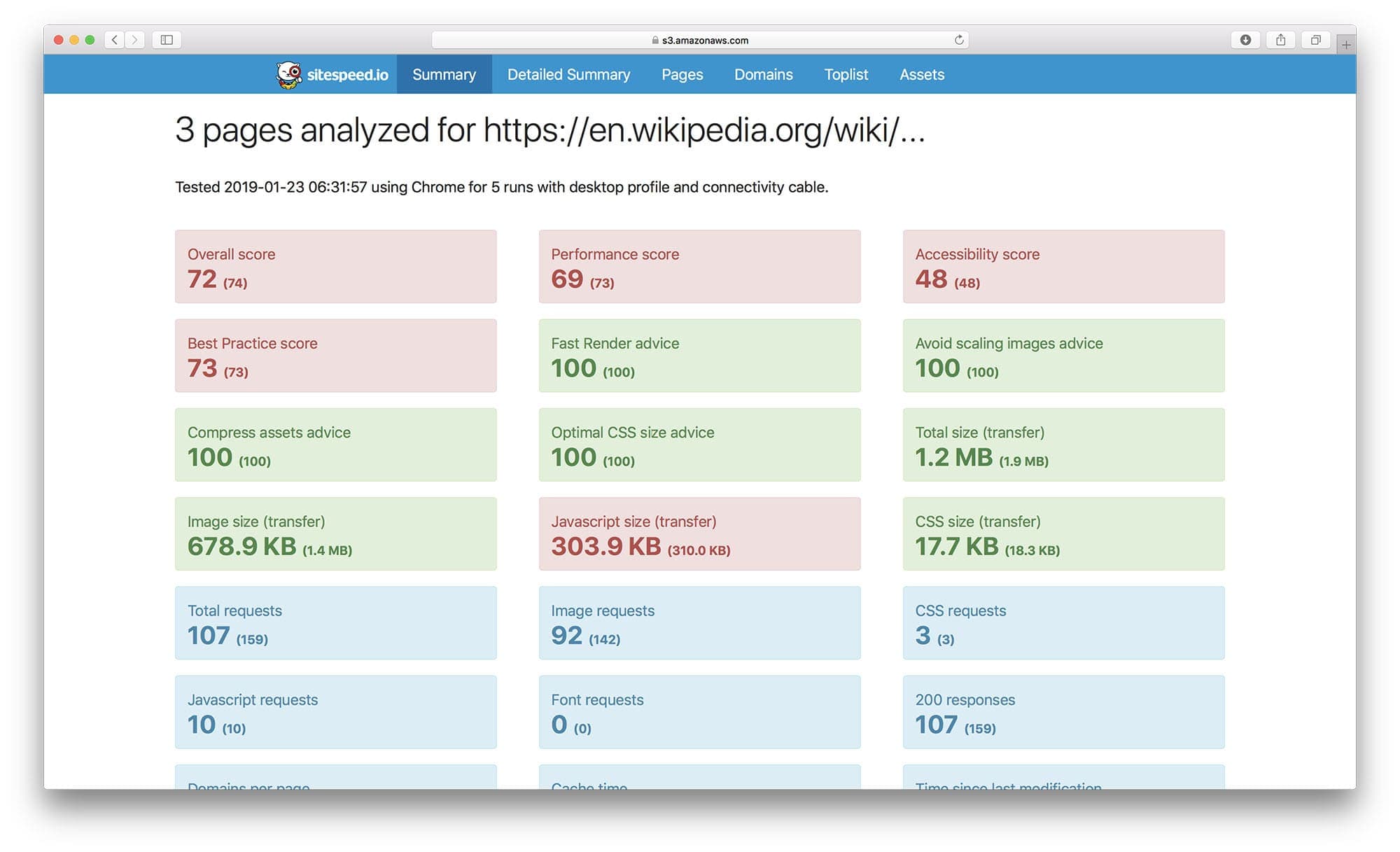
|
|
155
161
|
|
|
156
|
-
|
|
157
|
-
|
|
158
|
-
|
|
162
|
+
This report includes key performance indicators like load times, page size, and request counts, giving you a quick snapshot of your site’s overall health.
|
|
163
|
+
|
|
164
|
+
### Individual Page Report
|
|
165
|
+
|
|
166
|
+
For more detailed analysis, here's an individual page report:
|
|
167
|
+
|
|
168
|
+

|
|
169
|
+
|
|
170
|
+
This report dives deeper into a single page's performance, providing metrics on aspects like scripting, rendering, and network activity, crucial for pinpointing specific areas of improvement.
|
|
171
|
+
|
|
172
|
+
### Performance Monitoring Dashboard
|
|
173
|
+
|
|
174
|
+
To monitor your website’s performance over time, check out our live setup at [dashboard.sitespeed.io](https://dashboard.sitespeed.io/), which integrates `sitespeed.io` with Graphite and Grafana.
|
|
175
|
+
|
|
176
|
+
#### Metrics in Graphite/Grafana
|
|
177
|
+
|
|
178
|
+
Collected metrics from a URL visualized in Graphite/Grafana:
|
|
179
|
+
|
|
180
|
+

|
|
181
|
+
|
|
182
|
+
This setup allows for continuous tracking of performance, helping you identify trends and potential issues.
|
|
183
|
+
|
|
184
|
+
#### Trends in Grafana
|
|
185
|
+
|
|
186
|
+
Trends over time in Grafana provide a long-term view of your site's performance:
|
|
187
|
+
|
|
188
|
+

|
|
189
|
+
|
|
190
|
+
With these insights, you can make informed decisions about optimizations and track the impact of changes you make.
|
|
191
|
+
|
|
192
|
+
### Video Performance Analysis
|
|
193
|
+
|
|
194
|
+
For visual feedback, `sitespeed.io` can generate videos, making it easier to see how your site loads in real-time. Here's an sample video:
|
|
195
|
+
|
|
196
|
+

|
|
197
|
+
|
|
198
|
+
Video analysis is most easily done using Docker and offers a unique perspective on user experience, highlighting areas that need attention.
|
|
199
|
+
|
|
200
|
+
|
|
201
|
+
# Contributing
|
|
202
|
+
|
|
203
|
+
We welcome contributions from the community! Whether you're fixing a bug, adding a feature, or improving documentation, your help is valuable. Here’s how you can contribute:
|
|
204
|
+
|
|
205
|
+
1. **Create an Issue**: Create an issue and discuss with us how to implement the issue.
|
|
206
|
+
2. **Fork and Clone**: Fork the repository and clone it locally.
|
|
207
|
+
3. **Create a Branch**: Create a new branch for your feature or bug fix.
|
|
208
|
+
4. **Develop**: Make your changes. Ensure you adhere to the coding standards and write tests if applicable.
|
|
209
|
+
5. **Test**: Run tests to ensure everything works as expected.
|
|
210
|
+
6. **Submit a Pull Request**: Push your changes to your fork and submit a pull request to the main repository.
|
|
211
|
+
|
|
212
|
+
Before contributing, please read our [CONTRIBUTING.md](.gitub/CONTRIBUTING.md) for more detailed information on how to contribute.
|
|
213
|
+
|
|
214
|
+
# Reporting Issues
|
|
215
|
+
Found a bug or have a feature request? Please use the [GitHub Issues](https://github.com/sitespeedio/sitespeed.io/issues) to report them. Be sure to check existing issues to avoid duplicates.
|
|
216
|
+
|
|
217
|
+
# Community and Support
|
|
159
218
|
|
|
160
|
-
|
|
219
|
+
Join our community! Whether you need help, want to share your experience, or discuss potential improvements, there are several ways to get involved:
|
|
161
220
|
|
|
162
|
-
|
|
221
|
+
- **Slack**: Connect with fellow users and the development team on [Slack](https://join.slack.com/t/sitespeedio/shared_invite/zt-296jzr7qs-d6DId2KpEnMPJSQ8_R~WFw).
|
|
222
|
+
- **GitHub Issues**: For technical questions, feature requests, and bug reports, use our [GitHub issues](https://github.com/sitespeedio/sitespeed.io/issues).
|
|
223
|
+
- **RSS/Changelog**: Latest releases and information can always be found in our [RSS feed](https://github.com/sitespeedio/sitespeed.io/releases.atom) and in our [changelog](https://github.com/sitespeedio/sitespeed.io/blob/main/CHANGELOG.md).
|
|
224
|
+
- **Mastodon**: Follow us on Mastodon [https://fosstodon.org/@sitespeedio](https://fosstodon.org/@sitespeedio).
|
|
163
225
|
|
|
164
|
-
|
|
226
|
+
We're excited to have you in our community and look forward to your contributions and interactions!
|
|
165
227
|
|
|
166
|
-
|
|
228
|
+
# License
|
|
229
|
+
[The MIT License (MIT)](LICENSE).
|
|
167
230
|
|
|
168
|
-
[travis-image]: https://img.shields.io/travis/sitespeedio/sitespeed.io.svg?style=flat-square
|
|
169
|
-
[travis-url]: https://travis-ci.org/sitespeedio/sitespeed.io
|
|
170
231
|
[stars-url]: https://github.com/sitespeedio/sitespeed.io/stargazers
|
|
171
232
|
[stars-image]: https://img.shields.io/github/stars/sitespeedio/sitespeed.io.svg?style=flat-square
|
|
172
233
|
[downloads-image]: https://img.shields.io/npm/dt/sitespeed.io.svg?style=flat-square
|
package/ROADMAP.md
CHANGED
|
@@ -2,6 +2,6 @@
|
|
|
2
2
|
|
|
3
3
|
This roadmap is the plan for the core team, priorities can and and will change over time. This will give you a view of our current vision and plan.
|
|
4
4
|
|
|
5
|
-
###
|
|
5
|
+
### 2024
|
|
6
6
|
|
|
7
|
-
|
|
7
|
+
Lets get the online version if sitespeed.io up and running.
|
package/SUPPORT.md
CHANGED
|
@@ -2,7 +2,7 @@
|
|
|
2
2
|
------------------
|
|
3
3
|
First, check the official [sitespeed.io documentation](https://www.sitespeed.io/documentation/).
|
|
4
4
|
|
|
5
|
-
If you require further help or support then check [new and old issues on GitHub](https://github.com/sitespeedio/sitespeed.io/issues) or join the [sitespeed.io Slack](https://
|
|
5
|
+
If you require further help or support then check [new and old issues on GitHub](https://github.com/sitespeedio/sitespeed.io/issues) or join the [sitespeed.io Slack](https://join.slack.com/t/sitespeedio/shared_invite/zt-296jzr7qs-d6DId2KpEnMPJSQ8_R~WFw).
|
|
6
6
|
|
|
7
7
|
**Please note:**
|
|
8
8
|
- The sitespeed.io project uses GitHub for tracking bugs and feature requests.
|
package/lib/cli/cli.js
CHANGED
|
@@ -1558,18 +1558,18 @@ export async function parseCommandLine() {
|
|
|
1558
1558
|
})
|
|
1559
1559
|
.option('slack.type', {
|
|
1560
1560
|
describe:
|
|
1561
|
-
'Send summary for a
|
|
1561
|
+
'Send summary for a tested URL, metrics from all URLs (summary), only on errors from your tests or all to Slack.',
|
|
1562
1562
|
default: slackConfig.type,
|
|
1563
1563
|
choices: ['summary', 'url', 'error', 'all'],
|
|
1564
1564
|
group: 'Slack'
|
|
1565
1565
|
})
|
|
1566
1566
|
.option('slack.limitWarning', {
|
|
1567
|
-
describe: 'The limit to get a warning in Slack using the limitMetric',
|
|
1567
|
+
describe: 'The limit to get a warning in Slack using the limitMetric.',
|
|
1568
1568
|
default: slackConfig.limitWarning,
|
|
1569
1569
|
group: 'Slack'
|
|
1570
1570
|
})
|
|
1571
1571
|
.option('slack.limitError', {
|
|
1572
|
-
describe: 'The limit to get a error in Slack using the limitMetric',
|
|
1572
|
+
describe: 'The limit to get a error in Slack using the limitMetric.',
|
|
1573
1573
|
default: slackConfig.limitError,
|
|
1574
1574
|
group: 'Slack'
|
|
1575
1575
|
})
|
|
@@ -11,7 +11,8 @@ import {
|
|
|
11
11
|
getStatistics,
|
|
12
12
|
runStatisticalTests,
|
|
13
13
|
getMetrics,
|
|
14
|
-
cliffsDelta
|
|
14
|
+
cliffsDelta,
|
|
15
|
+
getIsSignificant
|
|
15
16
|
} from './helper.js';
|
|
16
17
|
import { getBaseline, saveBaseline } from './baseline.js';
|
|
17
18
|
|
|
@@ -39,7 +40,16 @@ const DEFAULT_METRICS_PAGESUMMARY = [
|
|
|
39
40
|
'metrics.renderBlocking.*.statisticalTestU',
|
|
40
41
|
'metrics.elementTimings.*.statisticalTestU',
|
|
41
42
|
'metrics.userTimings.*.statisticalTestU',
|
|
42
|
-
'metrics.extras.*.statisticalTestU'
|
|
43
|
+
'metrics.extras.*.statisticalTestU',
|
|
44
|
+
'metrics.timings.*.isSignificant',
|
|
45
|
+
'metrics.cpu.*.isSignificant',
|
|
46
|
+
'metrics.cdp.*.isSignificant',
|
|
47
|
+
'metrics.visualMetrics.*.isSignificant',
|
|
48
|
+
'metrics.googleWebVitals.*.isSignificant',
|
|
49
|
+
'metrics.renderBlocking.*.isSignificant',
|
|
50
|
+
'metrics.elementTimings.*.isSignificant',
|
|
51
|
+
'metrics.userTimings.*.isSignificant',
|
|
52
|
+
'metrics.extras.*.isSignificant'
|
|
43
53
|
];
|
|
44
54
|
|
|
45
55
|
export default class ComparePlugin extends SitespeedioPlugin {
|
|
@@ -174,6 +184,7 @@ export default class ComparePlugin extends SitespeedioPlugin {
|
|
|
174
184
|
baselineMetrics[group][metricName].getValues()
|
|
175
185
|
);
|
|
176
186
|
|
|
187
|
+
const cliffs = cliffsDelta(currentStats.data, baselineStats.data);
|
|
177
188
|
finalResult[group][metricName] = {
|
|
178
189
|
current: {
|
|
179
190
|
stdev: currentStats.stddev(),
|
|
@@ -188,7 +199,8 @@ export default class ComparePlugin extends SitespeedioPlugin {
|
|
|
188
199
|
values: baselineStats.data
|
|
189
200
|
},
|
|
190
201
|
statisticalTestU: result['p-value'],
|
|
191
|
-
cliffsDelta:
|
|
202
|
+
cliffsDelta: cliffs,
|
|
203
|
+
isSignificant: getIsSignificant(result['p-value'], cliffs)
|
|
192
204
|
};
|
|
193
205
|
}
|
|
194
206
|
}
|
|
@@ -74,8 +74,8 @@ table
|
|
|
74
74
|
td
|
|
75
75
|
a(href=createGraphLink(groupName, metricName))
|
|
76
76
|
b #{groupName + '.' + metricName}
|
|
77
|
-
if values.statisticalTestU === "N/A"
|
|
78
|
-
td
|
|
77
|
+
if values.statisticalTestU === "N/A" || values.statisticalTestU === "Datasets are identical"
|
|
78
|
+
td #{values.statisticalTestU}
|
|
79
79
|
else
|
|
80
80
|
td #{h.decimals(values.statisticalTestU)}
|
|
81
81
|
td #{h.decimals(values.baseline.mean)}
|
|
@@ -84,7 +84,7 @@ table
|
|
|
84
84
|
td #{h.decimals(values.current.median)}
|
|
85
85
|
td #{h.decimals(values.baseline.stdev)}
|
|
86
86
|
td #{h.decimals(values.current.stdev)}
|
|
87
|
-
if values.statisticalTestU === "N/A"
|
|
87
|
+
if values.statisticalTestU === "N/A" || values.statisticalTestU === "Datasets are identical"
|
|
88
88
|
td No Test Conducted
|
|
89
89
|
else
|
|
90
90
|
td #{values.statisticalTestU < 0.05 ? 'Yes - ' + cliffDeltaHelper(values.cliffsDelta) : 'No'}
|
|
@@ -96,7 +96,7 @@ each metricGroup, groupName in compare.metrics
|
|
|
96
96
|
each values, metricName in metricGroup
|
|
97
97
|
- var fullMetricName = groupName + '.' + metricName
|
|
98
98
|
- var metricId = fullMetricName.replace(/\./g, '_')
|
|
99
|
-
h3 #{fullMetricName} #{values.statisticalTestU === "N/A"? '' : values.statisticalTestU < 0.05 ? '(significant change)' : ''}
|
|
99
|
+
h3 #{fullMetricName} #{values.statisticalTestU === "N/A" || values.statisticalTestU === "Datasets are identical" ? '' : values.statisticalTestU < 0.05 ? '(significant change)' : ''}
|
|
100
100
|
.ct-chart(id=`chart-${metricId}`)
|
|
101
101
|
.ct-legend
|
|
102
102
|
span.ct-legend-item
|
|
@@ -2,16 +2,17 @@ import sys
|
|
|
2
2
|
import json
|
|
3
3
|
from scipy.stats import wilcoxon, mannwhitneyu
|
|
4
4
|
|
|
5
|
-
|
|
6
5
|
def has_variability(sample):
|
|
7
6
|
"""Check if the sample has more than one unique value."""
|
|
8
7
|
return len(set(sample)) > 1
|
|
9
8
|
|
|
10
|
-
|
|
11
9
|
def perform_test(test_type, baseline, current, **kwargs):
|
|
12
10
|
"""Perform the statistical test based on the test type."""
|
|
13
11
|
if not has_variability(baseline) or not has_variability(current):
|
|
14
|
-
|
|
12
|
+
if baseline == current:
|
|
13
|
+
return None, "Datasets are identical"
|
|
14
|
+
else:
|
|
15
|
+
return None, "No variability"
|
|
15
16
|
|
|
16
17
|
if test_type == 'wilcoxon':
|
|
17
18
|
return wilcoxon(current, baseline, **kwargs)
|
|
@@ -20,7 +21,6 @@ def perform_test(test_type, baseline, current, **kwargs):
|
|
|
20
21
|
else:
|
|
21
22
|
raise ValueError("Invalid test type. Choose 'wilcoxon' or 'mannwhitneyu'.")
|
|
22
23
|
|
|
23
|
-
|
|
24
24
|
input_data = json.loads(sys.stdin.read())
|
|
25
25
|
options = input_data['options']
|
|
26
26
|
test_type = options.pop('test_type')
|
|
@@ -31,8 +31,8 @@ for group_name, metrics in input_data['metrics'].items():
|
|
|
31
31
|
group_results = {}
|
|
32
32
|
for metric_name, metric_data in metrics.items():
|
|
33
33
|
stat, p = perform_test(test_type, metric_data['baseline'], metric_data['current'], **options)
|
|
34
|
-
if p == "No variability":
|
|
35
|
-
group_results[metric_name] = {'statistic': "N/A", 'p-value':
|
|
34
|
+
if p == "No variability" or p == "Datasets are identical":
|
|
35
|
+
group_results[metric_name] = {'statistic': "N/A", 'p-value': p}
|
|
36
36
|
else:
|
|
37
37
|
group_results[metric_name] = {'statistic': stat, 'p-value': p}
|
|
38
38
|
final_results[group_name] = group_results
|
|
@@ -0,0 +1,104 @@
|
|
|
1
|
+
// Moved from the co2.js project
|
|
2
|
+
// see https://github.com/thegreenwebfoundation/co2.js/issues/182
|
|
3
|
+
|
|
4
|
+
export function perDomain(pageXray, greenDomains, CO2) {
|
|
5
|
+
const co2PerDomain = [];
|
|
6
|
+
for (let domain of Object.keys(pageXray.domains)) {
|
|
7
|
+
let co2;
|
|
8
|
+
co2 =
|
|
9
|
+
greenDomains && greenDomains.includes(domain)
|
|
10
|
+
? CO2.perByte(pageXray.domains[domain].transferSize, true)
|
|
11
|
+
: CO2.perByte(pageXray.domains[domain].transferSize);
|
|
12
|
+
co2PerDomain.push({
|
|
13
|
+
domain,
|
|
14
|
+
co2,
|
|
15
|
+
transferSize: pageXray.domains[domain].transferSize
|
|
16
|
+
});
|
|
17
|
+
}
|
|
18
|
+
co2PerDomain.sort((a, b) => b.co2 - a.co2);
|
|
19
|
+
|
|
20
|
+
return co2PerDomain;
|
|
21
|
+
}
|
|
22
|
+
|
|
23
|
+
export function perPage(pageXray, green, CO2) {
|
|
24
|
+
// Accept an xray object, and if we receive a boolean as the second
|
|
25
|
+
// argument, we assume every request we make is sent to a server
|
|
26
|
+
// running on renwewable power.
|
|
27
|
+
|
|
28
|
+
// if we receive an array of domains, return a number accounting the
|
|
29
|
+
// reduced CO2 from green hosted domains
|
|
30
|
+
|
|
31
|
+
const domainCO2 = perDomain(pageXray, green, CO2);
|
|
32
|
+
let totalCO2 = 0;
|
|
33
|
+
for (let domain of domainCO2) {
|
|
34
|
+
totalCO2 += domain.co2;
|
|
35
|
+
}
|
|
36
|
+
return totalCO2;
|
|
37
|
+
}
|
|
38
|
+
|
|
39
|
+
export function perContentType(pageXray, greenDomains, CO2) {
|
|
40
|
+
const co2PerContentType = {};
|
|
41
|
+
for (let asset of pageXray.assets) {
|
|
42
|
+
const domain = new URL(asset.url).domain;
|
|
43
|
+
const transferSize = asset.transferSize;
|
|
44
|
+
const co2ForTransfer = CO2.perByte(
|
|
45
|
+
transferSize,
|
|
46
|
+
greenDomains && greenDomains.includes(domain)
|
|
47
|
+
);
|
|
48
|
+
const contentType = asset.type;
|
|
49
|
+
if (!co2PerContentType[contentType]) {
|
|
50
|
+
co2PerContentType[contentType] = { co2: 0, transferSize: 0 };
|
|
51
|
+
}
|
|
52
|
+
co2PerContentType[contentType].co2 += co2ForTransfer;
|
|
53
|
+
co2PerContentType[contentType].transferSize += transferSize;
|
|
54
|
+
}
|
|
55
|
+
// restructure and sort
|
|
56
|
+
const all = [];
|
|
57
|
+
for (let type of Object.keys(co2PerContentType)) {
|
|
58
|
+
all.push({
|
|
59
|
+
type,
|
|
60
|
+
co2: co2PerContentType[type].co2,
|
|
61
|
+
transferSize: co2PerContentType[type].transferSize
|
|
62
|
+
});
|
|
63
|
+
}
|
|
64
|
+
all.sort((a, b) => b.co2 - a.co2);
|
|
65
|
+
return all;
|
|
66
|
+
}
|
|
67
|
+
|
|
68
|
+
export function getDirtiestResources(pageXray, greenDomains, CO2) {
|
|
69
|
+
const allAssets = [];
|
|
70
|
+
for (let asset of pageXray.assets) {
|
|
71
|
+
const domain = new URL(asset.url).domain;
|
|
72
|
+
const transferSize = asset.transferSize;
|
|
73
|
+
const co2ForTransfer = CO2.perByte(
|
|
74
|
+
transferSize,
|
|
75
|
+
greenDomains && greenDomains.includes(domain)
|
|
76
|
+
);
|
|
77
|
+
allAssets.push({ url: asset.url, co2: co2ForTransfer, transferSize });
|
|
78
|
+
}
|
|
79
|
+
allAssets.sort((a, b) => b.co2 - a.co2);
|
|
80
|
+
|
|
81
|
+
return allAssets.slice(0, allAssets.length > 10 ? 10 : allAssets.length);
|
|
82
|
+
}
|
|
83
|
+
|
|
84
|
+
export function perParty(pageXray, greenDomains, CO2) {
|
|
85
|
+
let firstParty = 0;
|
|
86
|
+
let thirdParty = 0;
|
|
87
|
+
// calculate co2 per first/third party
|
|
88
|
+
const firstPartyRegEx = pageXray.firstPartyRegEx;
|
|
89
|
+
for (let d of Object.keys(pageXray.domains)) {
|
|
90
|
+
// eslint-disable-next-line unicorn/prefer-regexp-test
|
|
91
|
+
if (d.match(firstPartyRegEx)) {
|
|
92
|
+
thirdParty += CO2.perByte(
|
|
93
|
+
pageXray.domains[d].transferSize,
|
|
94
|
+
greenDomains && greenDomains.includes(d)
|
|
95
|
+
);
|
|
96
|
+
} else {
|
|
97
|
+
firstParty += CO2.perByte(
|
|
98
|
+
pageXray.domains[d].transferSize,
|
|
99
|
+
greenDomains && greenDomains.includes(d)
|
|
100
|
+
);
|
|
101
|
+
}
|
|
102
|
+
}
|
|
103
|
+
return { firstParty, thirdParty };
|
|
104
|
+
}
|
|
@@ -8,6 +8,13 @@ import intel from 'intel';
|
|
|
8
8
|
import { co2, hosting } from '@tgwf/co2';
|
|
9
9
|
import { SitespeedioPlugin } from '@sitespeed.io/plugin';
|
|
10
10
|
import { Aggregator } from './aggregator.js';
|
|
11
|
+
import {
|
|
12
|
+
getDirtiestResources,
|
|
13
|
+
perParty,
|
|
14
|
+
perContentType,
|
|
15
|
+
perPage,
|
|
16
|
+
perDomain
|
|
17
|
+
} from './helper.js';
|
|
11
18
|
|
|
12
19
|
const fsp = fs.promises;
|
|
13
20
|
const __dirname = fileURLToPath(new URL('.', import.meta.url));
|
|
@@ -129,7 +136,7 @@ export default class SustainablePlugin extends SitespeedioPlugin {
|
|
|
129
136
|
}
|
|
130
137
|
|
|
131
138
|
const CO2 = new co2(this.sustainableOptions.model);
|
|
132
|
-
const co2PerDomain =
|
|
139
|
+
const co2PerDomain = perDomain(message.data, hostingGreenCheck, CO2);
|
|
133
140
|
const baseDomain = message.data.baseDomain;
|
|
134
141
|
|
|
135
142
|
const hostingInfo = {
|
|
@@ -142,21 +149,23 @@ export default class SustainablePlugin extends SitespeedioPlugin {
|
|
|
142
149
|
hostingInfo.green = true;
|
|
143
150
|
}
|
|
144
151
|
|
|
145
|
-
const co2PerParty =
|
|
152
|
+
const co2PerParty = perParty(message.data, hostingGreenCheck, CO2);
|
|
146
153
|
// Fetch the resources with the largest CO2 impact. ie,
|
|
147
154
|
// the resources to optimise, host somewhere green, or contact
|
|
148
155
|
// a supplier about
|
|
149
|
-
const dirtiestResources =
|
|
156
|
+
const dirtiestResources = getDirtiestResources(
|
|
150
157
|
message.data,
|
|
151
|
-
hostingGreenCheck
|
|
158
|
+
hostingGreenCheck,
|
|
159
|
+
CO2
|
|
152
160
|
);
|
|
153
161
|
|
|
154
|
-
const co2PerContentType =
|
|
162
|
+
const co2PerContentType = perContentType(
|
|
155
163
|
message.data,
|
|
156
|
-
hostingGreenCheck
|
|
164
|
+
hostingGreenCheck,
|
|
165
|
+
CO2
|
|
157
166
|
);
|
|
158
167
|
|
|
159
|
-
const co2PerPageView =
|
|
168
|
+
const co2PerPageView = perPage(message.data, hostingGreenCheck, CO2);
|
|
160
169
|
|
|
161
170
|
const totalCO2 = this.sustainableOptions.pageViews
|
|
162
171
|
? this.sustainableOptions.pageViews * co2PerPageView
|
package/npm-shrinkwrap.json
CHANGED
|
@@ -1,21 +1,21 @@
|
|
|
1
1
|
{
|
|
2
2
|
"name": "sitespeed.io",
|
|
3
|
-
"version": "30.
|
|
3
|
+
"version": "30.11.0",
|
|
4
4
|
"lockfileVersion": 2,
|
|
5
5
|
"requires": true,
|
|
6
6
|
"packages": {
|
|
7
7
|
"": {
|
|
8
8
|
"name": "sitespeed.io",
|
|
9
|
-
"version": "30.
|
|
9
|
+
"version": "30.11.0",
|
|
10
10
|
"license": "MIT",
|
|
11
11
|
"dependencies": {
|
|
12
12
|
"@google-cloud/storage": "6.9.5",
|
|
13
13
|
"@influxdata/influxdb-client": "1.33.2",
|
|
14
14
|
"@sitespeed.io/plugin": "0.0.6",
|
|
15
|
-
"@tgwf/co2": "0.13.
|
|
15
|
+
"@tgwf/co2": "0.13.10",
|
|
16
16
|
"aws-sdk": "2.1327.0",
|
|
17
17
|
"axe-core": "4.8.2",
|
|
18
|
-
"browsertime": "19.
|
|
18
|
+
"browsertime": "19.3.1",
|
|
19
19
|
"cli-color": "2.0.3",
|
|
20
20
|
"coach-core": "8.0.2",
|
|
21
21
|
"concurrent-queue": "7.0.2",
|
|
@@ -943,9 +943,9 @@
|
|
|
943
943
|
}
|
|
944
944
|
},
|
|
945
945
|
"node_modules/@sitespeed.io/chromedriver": {
|
|
946
|
-
"version": "
|
|
947
|
-
"resolved": "https://registry.npmjs.org/@sitespeed.io/chromedriver/-/chromedriver-
|
|
948
|
-
"integrity": "sha512-
|
|
946
|
+
"version": "120.0.6099-71",
|
|
947
|
+
"resolved": "https://registry.npmjs.org/@sitespeed.io/chromedriver/-/chromedriver-120.0.6099-71.tgz",
|
|
948
|
+
"integrity": "sha512-45hQNdnZRisMobAuq+tPdwUV0Dr69LBNalm7FY33fTFf9koqOHWbJf+s2GKeEoSfvxGo++Y0UijlsuBJzQpH8w==",
|
|
949
949
|
"hasInstallScript": true,
|
|
950
950
|
"dependencies": {
|
|
951
951
|
"node-downloader-helper": "2.1.9",
|
|
@@ -964,9 +964,9 @@
|
|
|
964
964
|
}
|
|
965
965
|
},
|
|
966
966
|
"node_modules/@sitespeed.io/edgedriver": {
|
|
967
|
-
"version": "
|
|
968
|
-
"resolved": "https://registry.npmjs.org/@sitespeed.io/edgedriver/-/edgedriver-
|
|
969
|
-
"integrity": "sha512
|
|
967
|
+
"version": "120.0.2210-77",
|
|
968
|
+
"resolved": "https://registry.npmjs.org/@sitespeed.io/edgedriver/-/edgedriver-120.0.2210-77.tgz",
|
|
969
|
+
"integrity": "sha512-vltszaEdgi667M8taVXv9DCTNP08NQtEnyof5/ypcMeFnBCJNGX5lsXzBjuRyVMaaZiU4LXXWQpj90VD12VEfg==",
|
|
970
970
|
"hasInstallScript": true,
|
|
971
971
|
"dependencies": {
|
|
972
972
|
"node-downloader-helper": "2.1.7",
|
|
@@ -1026,9 +1026,9 @@
|
|
|
1026
1026
|
}
|
|
1027
1027
|
},
|
|
1028
1028
|
"node_modules/@tgwf/co2": {
|
|
1029
|
-
"version": "0.13.
|
|
1030
|
-
"resolved": "https://registry.npmjs.org/@tgwf/co2/-/co2-0.13.
|
|
1031
|
-
"integrity": "sha512-
|
|
1029
|
+
"version": "0.13.10",
|
|
1030
|
+
"resolved": "https://registry.npmjs.org/@tgwf/co2/-/co2-0.13.10.tgz",
|
|
1031
|
+
"integrity": "sha512-iQZMYdLP+l1Kyi03EEE4jAZgzlAA8HRAbfgT3GgN6sUgbSoNS/UHijICUqgkum9aHIkDSOrtwkgbB/x3Gc/cQA==",
|
|
1032
1032
|
"engines": {
|
|
1033
1033
|
"node": ">=14.0.0"
|
|
1034
1034
|
}
|
|
@@ -1759,14 +1759,14 @@
|
|
|
1759
1759
|
}
|
|
1760
1760
|
},
|
|
1761
1761
|
"node_modules/browsertime": {
|
|
1762
|
-
"version": "19.
|
|
1763
|
-
"resolved": "https://registry.npmjs.org/browsertime/-/browsertime-19.
|
|
1764
|
-
"integrity": "sha512-
|
|
1762
|
+
"version": "19.3.1",
|
|
1763
|
+
"resolved": "https://registry.npmjs.org/browsertime/-/browsertime-19.3.1.tgz",
|
|
1764
|
+
"integrity": "sha512-MjS3YvbfFMMzZcKNZjdzRMxqIC/fUiNgJ8GiLgOhit1OmqaPPFSHjWv5vZxyjIl3zzzMVgQDv+u3MGDrLGSkPw==",
|
|
1765
1765
|
"dependencies": {
|
|
1766
1766
|
"@cypress/xvfb": "1.2.4",
|
|
1767
1767
|
"@devicefarmer/adbkit": "3.2.5",
|
|
1768
|
-
"@sitespeed.io/chromedriver": "
|
|
1769
|
-
"@sitespeed.io/edgedriver": "
|
|
1768
|
+
"@sitespeed.io/chromedriver": "120.0.6099-71",
|
|
1769
|
+
"@sitespeed.io/edgedriver": "120.0.2210-77",
|
|
1770
1770
|
"@sitespeed.io/geckodriver": "0.33.0-c",
|
|
1771
1771
|
"@sitespeed.io/throttle": "5.0.0",
|
|
1772
1772
|
"@sitespeed.io/tracium": "0.3.3",
|
|
@@ -9985,9 +9985,9 @@
|
|
|
9985
9985
|
}
|
|
9986
9986
|
},
|
|
9987
9987
|
"@sitespeed.io/chromedriver": {
|
|
9988
|
-
"version": "
|
|
9989
|
-
"resolved": "https://registry.npmjs.org/@sitespeed.io/chromedriver/-/chromedriver-
|
|
9990
|
-
"integrity": "sha512-
|
|
9988
|
+
"version": "120.0.6099-71",
|
|
9989
|
+
"resolved": "https://registry.npmjs.org/@sitespeed.io/chromedriver/-/chromedriver-120.0.6099-71.tgz",
|
|
9990
|
+
"integrity": "sha512-45hQNdnZRisMobAuq+tPdwUV0Dr69LBNalm7FY33fTFf9koqOHWbJf+s2GKeEoSfvxGo++Y0UijlsuBJzQpH8w==",
|
|
9991
9991
|
"requires": {
|
|
9992
9992
|
"node-downloader-helper": "2.1.9",
|
|
9993
9993
|
"node-stream-zip": "1.15.0"
|
|
@@ -10001,9 +10001,9 @@
|
|
|
10001
10001
|
}
|
|
10002
10002
|
},
|
|
10003
10003
|
"@sitespeed.io/edgedriver": {
|
|
10004
|
-
"version": "
|
|
10005
|
-
"resolved": "https://registry.npmjs.org/@sitespeed.io/edgedriver/-/edgedriver-
|
|
10006
|
-
"integrity": "sha512
|
|
10004
|
+
"version": "120.0.2210-77",
|
|
10005
|
+
"resolved": "https://registry.npmjs.org/@sitespeed.io/edgedriver/-/edgedriver-120.0.2210-77.tgz",
|
|
10006
|
+
"integrity": "sha512-vltszaEdgi667M8taVXv9DCTNP08NQtEnyof5/ypcMeFnBCJNGX5lsXzBjuRyVMaaZiU4LXXWQpj90VD12VEfg==",
|
|
10007
10007
|
"requires": {
|
|
10008
10008
|
"node-downloader-helper": "2.1.7",
|
|
10009
10009
|
"node-stream-zip": "1.15.0"
|
|
@@ -10048,9 +10048,9 @@
|
|
|
10048
10048
|
}
|
|
10049
10049
|
},
|
|
10050
10050
|
"@tgwf/co2": {
|
|
10051
|
-
"version": "0.13.
|
|
10052
|
-
"resolved": "https://registry.npmjs.org/@tgwf/co2/-/co2-0.13.
|
|
10053
|
-
"integrity": "sha512-
|
|
10051
|
+
"version": "0.13.10",
|
|
10052
|
+
"resolved": "https://registry.npmjs.org/@tgwf/co2/-/co2-0.13.10.tgz",
|
|
10053
|
+
"integrity": "sha512-iQZMYdLP+l1Kyi03EEE4jAZgzlAA8HRAbfgT3GgN6sUgbSoNS/UHijICUqgkum9aHIkDSOrtwkgbB/x3Gc/cQA=="
|
|
10054
10054
|
},
|
|
10055
10055
|
"@tokenizer/token": {
|
|
10056
10056
|
"version": "0.3.0",
|
|
@@ -10601,14 +10601,14 @@
|
|
|
10601
10601
|
}
|
|
10602
10602
|
},
|
|
10603
10603
|
"browsertime": {
|
|
10604
|
-
"version": "19.
|
|
10605
|
-
"resolved": "https://registry.npmjs.org/browsertime/-/browsertime-19.
|
|
10606
|
-
"integrity": "sha512-
|
|
10604
|
+
"version": "19.3.1",
|
|
10605
|
+
"resolved": "https://registry.npmjs.org/browsertime/-/browsertime-19.3.1.tgz",
|
|
10606
|
+
"integrity": "sha512-MjS3YvbfFMMzZcKNZjdzRMxqIC/fUiNgJ8GiLgOhit1OmqaPPFSHjWv5vZxyjIl3zzzMVgQDv+u3MGDrLGSkPw==",
|
|
10607
10607
|
"requires": {
|
|
10608
10608
|
"@cypress/xvfb": "1.2.4",
|
|
10609
10609
|
"@devicefarmer/adbkit": "3.2.5",
|
|
10610
|
-
"@sitespeed.io/chromedriver": "
|
|
10611
|
-
"@sitespeed.io/edgedriver": "
|
|
10610
|
+
"@sitespeed.io/chromedriver": "120.0.6099-71",
|
|
10611
|
+
"@sitespeed.io/edgedriver": "120.0.2210-77",
|
|
10612
10612
|
"@sitespeed.io/geckodriver": "0.33.0-c",
|
|
10613
10613
|
"@sitespeed.io/throttle": "5.0.0",
|
|
10614
10614
|
"@sitespeed.io/tracium": "0.3.3",
|
package/package.json
CHANGED
|
@@ -5,8 +5,8 @@
|
|
|
5
5
|
"sitespeed.io": "./bin/sitespeed.js",
|
|
6
6
|
"sitespeed.io-wpr": "./bin/browsertimeWebPageReplay.js"
|
|
7
7
|
},
|
|
8
|
-
"version": "30.
|
|
9
|
-
"description": "
|
|
8
|
+
"version": "30.11.0",
|
|
9
|
+
"description": "sitespeed.io is an open-source tool for comprehensive web performance analysis, enabling you to test, monitor, and optimize your website’s speed using real browsers in various environments.",
|
|
10
10
|
"keywords": [
|
|
11
11
|
"performance",
|
|
12
12
|
"web",
|
|
@@ -80,10 +80,10 @@
|
|
|
80
80
|
"dependencies": {
|
|
81
81
|
"@google-cloud/storage": "6.9.5",
|
|
82
82
|
"@influxdata/influxdb-client": "1.33.2",
|
|
83
|
-
"@tgwf/co2": "0.13.
|
|
83
|
+
"@tgwf/co2": "0.13.10",
|
|
84
84
|
"aws-sdk": "2.1327.0",
|
|
85
85
|
"axe-core": "4.8.2",
|
|
86
|
-
"browsertime": "19.
|
|
86
|
+
"browsertime": "19.3.1",
|
|
87
87
|
"coach-core": "8.0.2",
|
|
88
88
|
"cli-color": "2.0.3",
|
|
89
89
|
"concurrent-queue": "7.0.2",
|