sillytavern 1.6.4 → 1.6.6
This diff represents the content of publicly available package versions that have been released to one of the supported registries. The information contained in this diff is provided for informational purposes only and reflects changes between package versions as they appear in their respective public registries.
- package/.github/readme.md +297 -0
- package/.github/workflows/update-docs.yml +43 -0
- package/docker/docker-entrypoint.sh +1 -1
- package/faq.md +1 -1
- package/package.json +1 -1
- package/public/group chats/README.md +1 -0
- package/public/groups/README.md +1 -0
- package/public/script.js +11 -9
- package/public/scripts/group-chats.js +9 -1
- package/readme.md +41 -270
- package/server.js +4 -3
|
@@ -0,0 +1,297 @@
|
|
|
1
|
+
|
|
2
|
+
|
|
3
|
+
Mobile-friendly, Multi-API (KoboldAI/CPP, Horde, NovelAI, Ooba, OpenAI+proxies, Poe, WindowAI(Claude!)), VN-like Waifu Mode, Horde SD, System TTS, WorldInfo (lorebooks), customizable UI, auto-translate, and more prompt options than you'd ever want or need. Optional Extras server for more SD/TTS options + ChromaDB/Summarize.
|
|
4
|
+
|
|
5
|
+
Based on a fork of TavernAI 1.2.8
|
|
6
|
+
|
|
7
|
+
### Brought to you by Cohee, RossAscends and the SillyTavern community
|
|
8
|
+
|
|
9
|
+
NOTE: We have added [a FAQ](faq.md) to answer most of your questions and help you get started.
|
|
10
|
+
|
|
11
|
+
### What is SillyTavern or TavernAI?
|
|
12
|
+
|
|
13
|
+
Tavern is a user interface you can install on your computer (and Android phones) that allows you to interact with text generation AIs and chat/roleplay with characters you or the community create.
|
|
14
|
+
|
|
15
|
+
SillyTavern is a fork of TavernAI 1.2.8 which is under more active development and has added many major features. At this point, they can be thought of as completely independent programs.
|
|
16
|
+
|
|
17
|
+
### What do I need other than Tavern?
|
|
18
|
+
|
|
19
|
+
On its own Tavern is useless, as it's just a user interface. You have to have access to an AI system backend that can act as the roleplay character. There are various supported backends: OpenAPI API (GPT), KoboldAI (either running locally or on Google Colab), and more. You can read more about this in [the FAQ](faq.md).
|
|
20
|
+
|
|
21
|
+
### Do I need a powerful PC to run Tavern?
|
|
22
|
+
|
|
23
|
+
Since Tavern is only a user interface, it has tiny hardware requirements, it will run on anything. It's the AI system backend that needs to be powerful.
|
|
24
|
+
|
|
25
|
+
## Mobile support
|
|
26
|
+
|
|
27
|
+
> **Note**
|
|
28
|
+
|
|
29
|
+
> **This fork can be run natively on Android phones using Termux. Please refer to this guide by ArroganceComplex#2659:**
|
|
30
|
+
|
|
31
|
+
<https://rentry.org/STAI-Termux>
|
|
32
|
+
|
|
33
|
+
**.webp character cards import/export is not supported in Termux. Use either JSON or PNG formats instead.**
|
|
34
|
+
|
|
35
|
+
## Questions or suggestions?
|
|
36
|
+
|
|
37
|
+
### We now have a community Discord server
|
|
38
|
+
|
|
39
|
+
Get support, share favorite characters and prompts:
|
|
40
|
+
|
|
41
|
+
### [Join](https://discord.gg/RZdyAEUPvj)
|
|
42
|
+
|
|
43
|
+
***
|
|
44
|
+
|
|
45
|
+
Get in touch with the developers directly:
|
|
46
|
+
|
|
47
|
+
* Discord: Cohee#1207 or RossAscends#1779
|
|
48
|
+
* Reddit: /u/RossAscends or /u/sillylossy
|
|
49
|
+
* [Post a GitHub issue](https://github.com/Cohee1207/SillyTavern/issues)
|
|
50
|
+
|
|
51
|
+
## This version includes
|
|
52
|
+
|
|
53
|
+
* A heavily modified TavernAI 1.2.8 (more than 50% of code rewritten or optimized)
|
|
54
|
+
* Swipes
|
|
55
|
+
* Group chats: multi-bot rooms for characters to talk to you or each other
|
|
56
|
+
* Chat bookmarks / branching (duplicates the dialogue in its current state)
|
|
57
|
+
* Advanced KoboldAI / TextGen generation settings with a lot of community-made presets
|
|
58
|
+
* World Info support: create a rich lore or save tokens on your character card
|
|
59
|
+
* Window AI browser extension support (run models like Claude, GPT 4): https://windowai.io/
|
|
60
|
+
* [Oobabooga's TextGen WebUI](https://github.com/oobabooga/text-generation-webui) API connection
|
|
61
|
+
* [AI Horde](https://horde.koboldai.net/) connection
|
|
62
|
+
* [Poe.com](https://poe.com) (ChatGPT / Claude) connection
|
|
63
|
+
* Soft prompts selector for KoboldAI
|
|
64
|
+
* Prompt generation formatting tweaking
|
|
65
|
+
* webp character card interoperability (PNG is still an internal format)
|
|
66
|
+
|
|
67
|
+
## Extensions
|
|
68
|
+
|
|
69
|
+
SillyTavern has an extensibility support, with some additional AI modules hosted via [SillyTavern Extras API](https://github.com/SillyTavern/SillyTavern-extras)
|
|
70
|
+
|
|
71
|
+
* Author's Note / Character Bias
|
|
72
|
+
* Character emotional expressions
|
|
73
|
+
* Auto-Summary of the chat history
|
|
74
|
+
* Sending images to chat, and the AI interpreting the content.
|
|
75
|
+
* Stable Diffusion image generation (5 chat-related presets plus 'free mode')
|
|
76
|
+
* Text-to-speech for AI response messages (via ElevenLabs, Silero, or the OS's System TTS)
|
|
77
|
+
|
|
78
|
+
Full list of included extenisons and tutorials how to use them can be found on [Wiki](https://github.com/SillyTavern/SillyTavern/wiki).
|
|
79
|
+
|
|
80
|
+
## UI/CSS/Quality of Life tweaks by RossAscends
|
|
81
|
+
|
|
82
|
+
* Mobile UI with optimized for iOS, and supports saving a shortcut to home screen and opening in fullscreen mode.
|
|
83
|
+
* HotKeys
|
|
84
|
+
* Up = Edit last message in chat
|
|
85
|
+
* Ctrl+Up = Edit last USER message in chat
|
|
86
|
+
* Left = swipe left
|
|
87
|
+
* Right = swipe right (NOTE: swipe hotkeys are disabled when chatbar has something typed into it)
|
|
88
|
+
* Ctrl+Left = view locally stored variables (in the browser console window)
|
|
89
|
+
* Enter (with chat bar selected) = send your message to AI
|
|
90
|
+
* Ctrl+Enter = Regenerate the last AI response
|
|
91
|
+
|
|
92
|
+
* User Name Changes and Character Deletion no longer force the page to refresh.
|
|
93
|
+
|
|
94
|
+
* Toggle option to automatically connect to API on page load.
|
|
95
|
+
* Toggle option to automatically load the most recently viewed character on page load.
|
|
96
|
+
* Better Token Counter - works on unsaved characters, and shows both permanent and temporary tokens.
|
|
97
|
+
|
|
98
|
+
* Better Past Chats View
|
|
99
|
+
* New Chat filenames are saved in a readable format of "(character) - (when it was created)"
|
|
100
|
+
* Chat preview increased from 40 characters to 300.
|
|
101
|
+
* Multiple options for characters list sorting (by name, creation date, chat sizes).
|
|
102
|
+
|
|
103
|
+
* By default the left and right settings panel will close when you click away from it.
|
|
104
|
+
* Clicking the Lock on the nav panel will hold the panel open, and this setting be remembered across sessions.
|
|
105
|
+
* Nav panel status of open or closed will also be saved across sessions.
|
|
106
|
+
|
|
107
|
+
* Customizable chat UI:
|
|
108
|
+
* Play a sound when a new message arrives
|
|
109
|
+
* Switch between round or rectangle avatar styles
|
|
110
|
+
* Have a wider chat window on the desktop
|
|
111
|
+
* Optional semi-transparent glass-like panels
|
|
112
|
+
* Customizable page colors for 'main text', 'quoted text' 'italics text'.
|
|
113
|
+
* Customizable UI background color and blur amount
|
|
114
|
+
|
|
115
|
+
## Installation
|
|
116
|
+
|
|
117
|
+
*NOTE: This software is intended for local install purposes, and has not been thoroughly tested on a colab or other cloud notebook service.*
|
|
118
|
+
|
|
119
|
+
> **Warning**
|
|
120
|
+
|
|
121
|
+
> DO NOT INSTALL INTO ANY WINDOWS CONTROLLED FOLDER (Program Files, System32, etc).
|
|
122
|
+
|
|
123
|
+
> DO NOT RUN START.BAT WITH ADMIN PERMISSIONS
|
|
124
|
+
|
|
125
|
+
### Windows
|
|
126
|
+
|
|
127
|
+
Installing via Git (recommended for easy updating)
|
|
128
|
+
|
|
129
|
+
Easy to follow guide with pretty pictures:
|
|
130
|
+
<https://docs.alpindale.dev/pygmalion-extras/sillytavern/#windows-installation>
|
|
131
|
+
|
|
132
|
+
1. Install [NodeJS](https://nodejs.org/en) (latest LTS version is recommended)
|
|
133
|
+
2. Install [GitHub Desktop](https://central.github.com/deployments/desktop/desktop/latest/win32)
|
|
134
|
+
3. Open Windows Explorer (`Win+E`)
|
|
135
|
+
4. Browse to or Create a folder that is not controlled or monitored by Windows. (ex: C:\MySpecialFolder\)
|
|
136
|
+
5. Open a Command Prompt inside that folder by clicking in the 'Address Bar' at the top, typing `cmd`, and pressing Enter.
|
|
137
|
+
6. Once the black box (Command Prompt) pops up, type ONE of the following into it and press Enter:
|
|
138
|
+
|
|
139
|
+
* for Main Branch: `git clone https://github.com/Cohee1207/SillyTavern -b main`
|
|
140
|
+
* for Dev Branch: `git clone https://github.com/Cohee1207/SillyTavern -b dev`
|
|
141
|
+
|
|
142
|
+
7. Once everything is cloned, double click `Start.bat` to make NodeJS install its requirements.
|
|
143
|
+
8. The server will then start, and SillyTavern will popup in your browser.
|
|
144
|
+
|
|
145
|
+
Installing via zip download
|
|
146
|
+
|
|
147
|
+
1. Install [NodeJS](https://nodejs.org/en) (latest LTS version is recommended)
|
|
148
|
+
2. Download the zip from this GitHub repo. (Get the `Source code (zip)` from [Releases](https://github.com/Cohee1207/SillyTavern/releases/latest))
|
|
149
|
+
3. Unzip it into a folder of your choice
|
|
150
|
+
4. Run `Start.bat` via double-clicking or in a command line.
|
|
151
|
+
5. Once the server has prepared everything for you, it will open a tab in your browser.
|
|
152
|
+
|
|
153
|
+
### Linux
|
|
154
|
+
|
|
155
|
+
1. Run the `start.sh` script.
|
|
156
|
+
2. Enjoy.
|
|
157
|
+
|
|
158
|
+
## API keys management
|
|
159
|
+
|
|
160
|
+
SillyTavern saves your API keys to a `secrets.json` file in the server directory.
|
|
161
|
+
|
|
162
|
+
By default they will not be exposed to a frontend after you enter them and reload the page.
|
|
163
|
+
|
|
164
|
+
In order to enable viewing your keys by clicking a button in the API block:
|
|
165
|
+
|
|
166
|
+
1. Set the value of `allowKeysExposure` to `true` in `config.conf` file.
|
|
167
|
+
2. Restart the SillyTavern server.
|
|
168
|
+
|
|
169
|
+
## Remote connections
|
|
170
|
+
|
|
171
|
+
Most often this is for people who want to use SillyTavern on their mobile phones while their PC runs the ST server on the same wifi network.
|
|
172
|
+
|
|
173
|
+
However, it can be used to allow remote connections from anywhere as well.
|
|
174
|
+
|
|
175
|
+
**IMPORTANT: SillyTavern is a single-user program, so anyone who logs in will be able to see all characters and chats, and be able to change any settings inside the UI.**
|
|
176
|
+
|
|
177
|
+
### 1. Managing whitelisted IPs
|
|
178
|
+
|
|
179
|
+
* Create a new text file inside your SillyTavern base install folder called `whitelist.txt`.
|
|
180
|
+
* Open the file in a text editor, add a list of IPs you want to be allowed to connect.
|
|
181
|
+
|
|
182
|
+
*Both indidivual IPs, and wildcard IP ranges are accepted. Examples:*
|
|
183
|
+
|
|
184
|
+
```txt
|
|
185
|
+
192.168.0.1
|
|
186
|
+
192.168.0.20
|
|
187
|
+
```
|
|
188
|
+
|
|
189
|
+
or
|
|
190
|
+
|
|
191
|
+
```txt
|
|
192
|
+
192.168.0.*
|
|
193
|
+
```
|
|
194
|
+
|
|
195
|
+
(the above wildcard IP range will allow any device on the local network to connect)
|
|
196
|
+
|
|
197
|
+
CIDR masks are also accepted (eg. 10.0.0.0/24).
|
|
198
|
+
|
|
199
|
+
* Save the `whitelist.txt` file.
|
|
200
|
+
* Restart your TAI server.
|
|
201
|
+
|
|
202
|
+
Now devices which have the IP specified in the file will be able to connect.
|
|
203
|
+
|
|
204
|
+
*Note: `config.conf` also has a `whitelist` array, which you can use in the same way, but this array will be ignored if `whitelist.txt` exists.*
|
|
205
|
+
|
|
206
|
+
### 2. Getting the IP for the ST host machine
|
|
207
|
+
|
|
208
|
+
After the whitelist has been setup, you'll need the IP of the ST-hosting device.
|
|
209
|
+
|
|
210
|
+
If the ST-hosting device is on the same wifi network, you will use the ST-host's internal wifi IP:
|
|
211
|
+
|
|
212
|
+
* For Windows: windows button > type `cmd.exe` in the search bar > type `ipconfig` in the console, hit Enter > look for `IPv4` listing.
|
|
213
|
+
|
|
214
|
+
If you (or someone else) wants to connect to your hosted ST while not being on the same network, you will need the public IP of your ST-hosting device.
|
|
215
|
+
|
|
216
|
+
* While using the ST-hosting device, access [this page](https://whatismyipaddress.com/) and look for for `IPv4`. This is what you would use to connect from the remote device.
|
|
217
|
+
|
|
218
|
+
### 3. Connect the remote device to the ST host machine.
|
|
219
|
+
|
|
220
|
+
Whatever IP you ended up with for your situation, you will put that IP address and port number into the remote device's web browser.
|
|
221
|
+
|
|
222
|
+
A typical address for an ST host on the same wifi network would look like:
|
|
223
|
+
|
|
224
|
+
`http://192.168.0.5:8000`
|
|
225
|
+
|
|
226
|
+
Use http:// NOT https://
|
|
227
|
+
|
|
228
|
+
### Opening your ST to all IPs
|
|
229
|
+
|
|
230
|
+
We do not recommend doing this, but you can open `config.conf` and change `whitelist` to `false`.
|
|
231
|
+
|
|
232
|
+
You must remove (or rename) `whitelist.txt` in the SillyTavern base install folder, if it exists.
|
|
233
|
+
|
|
234
|
+
This is usually an insecure practice, so we require you to set a username and password when you do this.
|
|
235
|
+
|
|
236
|
+
The username and password are set in `config.conf`.
|
|
237
|
+
|
|
238
|
+
After restarting your ST server, any device will be able to connect to it, regardless of their IP as long as they know the username and password.
|
|
239
|
+
|
|
240
|
+
### Still Unable To Connect?
|
|
241
|
+
|
|
242
|
+
* Create an inbound/outbound firewall rule for the port found in `config.conf`. Do NOT mistake this for portforwarding on your router, otherwise someone could find your chat logs and that's a big no-no.
|
|
243
|
+
* Enable the Private Network profile type in Settings > Network and Internet > Ethernet. This is VERY important for Windows 11, otherwise you would be unable to connect even with the aforementioned firewall rules.
|
|
244
|
+
|
|
245
|
+
## Performance issues?
|
|
246
|
+
|
|
247
|
+
Try enabling the No Blur Effect (Fast UI) mode on the User settings panel.
|
|
248
|
+
|
|
249
|
+
## I like your project! How do I contribute?
|
|
250
|
+
|
|
251
|
+
### DO's
|
|
252
|
+
|
|
253
|
+
1. Send pull requests
|
|
254
|
+
2. Send feature suggestions and issue reports using established templates
|
|
255
|
+
3. Read the readme file and built-in documentation before asking anything
|
|
256
|
+
|
|
257
|
+
### DONT's
|
|
258
|
+
|
|
259
|
+
1. Offer monetary donations
|
|
260
|
+
2. Send bug reports without providing any context
|
|
261
|
+
3. Ask the questions that were already answered numerous times
|
|
262
|
+
|
|
263
|
+
## Where can I find the old backgrounds?
|
|
264
|
+
|
|
265
|
+
We're moving to 100% original content only policy, so old background images have been removed from this repository.
|
|
266
|
+
|
|
267
|
+
You can find them archived here:
|
|
268
|
+
|
|
269
|
+
<https://files.catbox.moe/1xevnc.zip>
|
|
270
|
+
|
|
271
|
+
## Screenshots
|
|
272
|
+
|
|
273
|
+
<img width="400" alt="image" src="https://user-images.githubusercontent.com/18619528/228649245-8061c60f-63dc-488e-9325-f151b7a3ec2d.png">
|
|
274
|
+
<img width="400" alt="image" src="https://user-images.githubusercontent.com/18619528/228649856-fbdeef05-d727-4d5a-be80-266cbbc6b811.png">
|
|
275
|
+
|
|
276
|
+
## License and credits
|
|
277
|
+
|
|
278
|
+
**This program is distributed in the hope that it will be useful,
|
|
279
|
+
but WITHOUT ANY WARRANTY; without even the implied warranty of
|
|
280
|
+
MERCHANTABILITY or FITNESS FOR A PARTICULAR PURPOSE. See the
|
|
281
|
+
GNU Affero General Public License for more details.**
|
|
282
|
+
|
|
283
|
+
* TAI Base by Humi: Unknown license
|
|
284
|
+
* Cohee's modifications and derived code: AGPL v3
|
|
285
|
+
* RossAscends' additions: AGPL v3
|
|
286
|
+
* Portions of CncAnon's TavernAITurbo mod: Unknown license
|
|
287
|
+
* Waifu mode inspired by the work of PepperTaco (<https://github.com/peppertaco/Tavern/>)
|
|
288
|
+
* Thanks Pygmalion University for being awesome testers and suggesting cool features!
|
|
289
|
+
* Thanks oobabooga for compiling presets for TextGen
|
|
290
|
+
* poe-api client adapted from <https://github.com/ading2210/poe-api> (GPL v3)
|
|
291
|
+
* GraphQL files for poe: <https://github.com/muharamdani/poe> (ISC License)
|
|
292
|
+
* KoboldAI Presets from KAI Lite: <https://lite.koboldai.net/>
|
|
293
|
+
* Noto Sans font by Google (OFL license)
|
|
294
|
+
* Icon theme by Font Awesome <https://fontawesome.com> (Icons: CC BY 4.0, Fonts: SIL OFL 1.1, Code: MIT License)
|
|
295
|
+
* AI Horde client library by ZeldaFan0225: https://github.com/ZeldaFan0225/ai_horde
|
|
296
|
+
* Linux startup script by AlpinDale
|
|
297
|
+
* Thanks paniphons for providing a FAQ document
|
|
@@ -0,0 +1,43 @@
|
|
|
1
|
+
name: Update SillyTavern-Docs
|
|
2
|
+
|
|
3
|
+
on:
|
|
4
|
+
push:
|
|
5
|
+
branches:
|
|
6
|
+
- main
|
|
7
|
+
|
|
8
|
+
jobs:
|
|
9
|
+
update_docs:
|
|
10
|
+
runs-on: ubuntu-latest
|
|
11
|
+
|
|
12
|
+
steps:
|
|
13
|
+
- name: Checkout current repository
|
|
14
|
+
uses: actions/checkout@v2
|
|
15
|
+
|
|
16
|
+
- name: Checkout SillyTavern-Docs repository
|
|
17
|
+
uses: actions/checkout@v2
|
|
18
|
+
with:
|
|
19
|
+
repository: SillyTavern/SillyTavern-Docs
|
|
20
|
+
path: SillyTavern-Docs
|
|
21
|
+
|
|
22
|
+
- name: Clone SillyTavern wiki into SillyTavern-Docs/extensions
|
|
23
|
+
run: rm -rf SillyTavern-Docs/extensions && git clone https://github.com/SillyTavern/SillyTavern.wiki.git SillyTavern-Docs/extensions && rm -rf SillyTavern-Docs/extensions/.git
|
|
24
|
+
|
|
25
|
+
- name: Copy files
|
|
26
|
+
run: |
|
|
27
|
+
cp public/notes/content.md SillyTavern-Docs/guidebook.md
|
|
28
|
+
cp faq.md SillyTavern-Docs/faq.md
|
|
29
|
+
cp readme.md SillyTavern-Docs/readme.md
|
|
30
|
+
cp public/notes/update.md SillyTavern-Docs/update.md
|
|
31
|
+
|
|
32
|
+
- name: Deploy to external repository
|
|
33
|
+
uses: cpina/github-action-push-to-another-repository@main
|
|
34
|
+
env:
|
|
35
|
+
SSH_DEPLOY_KEY: ${{ secrets.SSH_DEPLOY_KEY }}
|
|
36
|
+
with:
|
|
37
|
+
# GitHub Action output files
|
|
38
|
+
source-directory: SillyTavern-Docs/
|
|
39
|
+
destination-github-username: SillyTavern
|
|
40
|
+
destination-repository-name: SillyTavern-Docs
|
|
41
|
+
user-email: github-actions[bot]@users.noreply.github.com
|
|
42
|
+
user-name: "GitHub Actions"
|
|
43
|
+
target-branch: "main"
|
|
@@ -1,7 +1,7 @@
|
|
|
1
1
|
#!/bin/sh
|
|
2
2
|
|
|
3
3
|
# Initialize missing user files
|
|
4
|
-
IFS="," RESOURCES="characters,groups,group chats,chats,User Avatars,settings.json"
|
|
4
|
+
IFS="," RESOURCES="characters,groups,group chats,chats,User Avatars,worlds,settings.json"
|
|
5
5
|
for R in $RESOURCES; do
|
|
6
6
|
if [ ! -e "config/$R" ]; then
|
|
7
7
|
echo "Resource not found, copying from defaults: $R"
|
package/faq.md
CHANGED
|
@@ -91,7 +91,7 @@ These base instructions are only for OpenAI, which is a paid service. You can fi
|
|
|
91
91
|
|
|
92
92
|
### Install Tavern
|
|
93
93
|
|
|
94
|
-
1. Install the
|
|
94
|
+
1. Install the NodeJS LTS from https://nodejs.org/en/download
|
|
95
95
|
1. If you know how to use git, clone https://github.com/Cohee1207/SillyTavern. Otherwise, browse to https://github.com/Cohee1207/SillyTavern/releases , download the zip file containing the source code, then extract it locally.
|
|
96
96
|
1. Run Start.bat on Windows, or start.sh on OSX/Linux
|
|
97
97
|
1. Your browser should have opened to the Tavern UI. This webpage is running locally on your computer.
|
package/package.json
CHANGED
|
@@ -0,0 +1 @@
|
|
|
1
|
+
# Put Group Chat JSONL files here
|
|
@@ -0,0 +1 @@
|
|
|
1
|
+
# Put Group JSON files here
|
package/public/script.js
CHANGED
|
@@ -26,6 +26,7 @@ import {
|
|
|
26
26
|
setWorldInfoSettings,
|
|
27
27
|
deleteWorldInfo,
|
|
28
28
|
world_info_recursive,
|
|
29
|
+
world_info_case_sensitive,
|
|
29
30
|
} from "./scripts/world-info.js";
|
|
30
31
|
|
|
31
32
|
import {
|
|
@@ -1764,8 +1765,9 @@ async function Generate(type, { automatic_trigger, force_name2, resolve, reject,
|
|
|
1764
1765
|
abortController = new AbortController();
|
|
1765
1766
|
}
|
|
1766
1767
|
|
|
1768
|
+
// OpenAI doesn't need instruct mode. Use OAI main prompt instead.
|
|
1769
|
+
const isInstruct = power_user.instruct.enabled && main_api !== 'openai';
|
|
1767
1770
|
const isImpersonate = type == "impersonate";
|
|
1768
|
-
const isInstruct = power_user.instruct.enabled;
|
|
1769
1771
|
|
|
1770
1772
|
message_already_generated = isImpersonate ? `${name1}: ` : `${name2}: `;
|
|
1771
1773
|
// Name for the multigen prefix
|
|
@@ -2031,7 +2033,7 @@ async function Generate(type, { automatic_trigger, force_name2, resolve, reject,
|
|
|
2031
2033
|
let mesSend = [];
|
|
2032
2034
|
console.log('calling runGenerate');
|
|
2033
2035
|
streamingProcessor = isStreamingEnabled() ? new StreamingProcessor(type, force_name2) : false;
|
|
2034
|
-
|
|
2036
|
+
runGenerate();
|
|
2035
2037
|
|
|
2036
2038
|
async function runGenerate(cycleGenerationPromt = '') {
|
|
2037
2039
|
is_send_press = true;
|
|
@@ -2385,7 +2387,7 @@ async function Generate(type, { automatic_trigger, force_name2, resolve, reject,
|
|
|
2385
2387
|
$('#send_textarea').val(extract.getMessage).trigger('input');
|
|
2386
2388
|
}
|
|
2387
2389
|
|
|
2388
|
-
if (shouldContinueMultigen(getMessage, isImpersonate)) {
|
|
2390
|
+
if (shouldContinueMultigen(getMessage, isImpersonate, isInstruct)) {
|
|
2389
2391
|
hideSwipeButtons();
|
|
2390
2392
|
tokens_already_generated += this_amount_gen; // add new gen amt to any prev gen counter..
|
|
2391
2393
|
getMessage = message_already_generated;
|
|
@@ -3024,8 +3026,8 @@ function getGenerateUrl() {
|
|
|
3024
3026
|
return generate_url;
|
|
3025
3027
|
}
|
|
3026
3028
|
|
|
3027
|
-
function shouldContinueMultigen(getMessage, isImpersonate) {
|
|
3028
|
-
if (
|
|
3029
|
+
function shouldContinueMultigen(getMessage, isImpersonate, isInstruct) {
|
|
3030
|
+
if (isInstruct && power_user.instruct.stop_sequence) {
|
|
3029
3031
|
if (message_already_generated.indexOf(power_user.instruct.stop_sequence) !== -1) {
|
|
3030
3032
|
return false;
|
|
3031
3033
|
}
|
|
@@ -3151,17 +3153,17 @@ function cleanUpMessage(getMessage, isImpersonate, displayIncompleteSentences =
|
|
|
3151
3153
|
}
|
|
3152
3154
|
if (getMessage.indexOf('<|endoftext|>') != -1) {
|
|
3153
3155
|
getMessage = getMessage.substr(0, getMessage.indexOf('<|endoftext|>'));
|
|
3154
|
-
|
|
3155
3156
|
}
|
|
3156
|
-
|
|
3157
|
+
const isInstruct = power_user.instruct.enabled && main_api !== 'openai';
|
|
3158
|
+
if (isInstruct && power_user.instruct.stop_sequence) {
|
|
3157
3159
|
if (getMessage.indexOf(power_user.instruct.stop_sequence) != -1) {
|
|
3158
3160
|
getMessage = getMessage.substring(0, getMessage.indexOf(power_user.instruct.stop_sequence));
|
|
3159
3161
|
}
|
|
3160
3162
|
}
|
|
3161
|
-
if (
|
|
3163
|
+
if (isInstruct && power_user.instruct.input_sequence && isImpersonate) {
|
|
3162
3164
|
getMessage = getMessage.replaceAll(power_user.instruct.input_sequence, '');
|
|
3163
3165
|
}
|
|
3164
|
-
if (
|
|
3166
|
+
if (isInstruct && power_user.instruct.output_sequence && !isImpersonate) {
|
|
3165
3167
|
getMessage = getMessage.replaceAll(power_user.instruct.output_sequence, '');
|
|
3166
3168
|
}
|
|
3167
3169
|
// clean-up group message from excessive generations
|
|
@@ -512,7 +512,7 @@ async function generateGroupWrapper(by_auto_mode, type = null, params = {}) {
|
|
|
512
512
|
setCharacterId(chId);
|
|
513
513
|
setCharacterName(characters[chId].name)
|
|
514
514
|
|
|
515
|
-
Generate(generateType, { automatic_trigger: by_auto_mode, ...(params || {}) });
|
|
515
|
+
await Generate(generateType, { automatic_trigger: by_auto_mode, ...(params || {}) });
|
|
516
516
|
|
|
517
517
|
if (type !== "swipe" && type !== "impersonate" && !isMultigenEnabled() && !isStreamingEnabled()) {
|
|
518
518
|
// update indicator and scroll down
|
|
@@ -602,6 +602,14 @@ async function generateGroupWrapper(by_auto_mode, type = null, params = {}) {
|
|
|
602
602
|
await delay(100);
|
|
603
603
|
}
|
|
604
604
|
}
|
|
605
|
+
else if (isStreamingEnabled()) {
|
|
606
|
+
if (streamingProcessor && !streamingProcessor.isFinished) {
|
|
607
|
+
await delay(100);
|
|
608
|
+
} else {
|
|
609
|
+
messagesBefore++;
|
|
610
|
+
break;
|
|
611
|
+
}
|
|
612
|
+
}
|
|
605
613
|
else {
|
|
606
614
|
messagesBefore++;
|
|
607
615
|
break;
|
package/readme.md
CHANGED
|
@@ -1,72 +1,35 @@
|
|
|
1
|
-
|
|
1
|
+
# What is SillyTavern?
|
|
2
2
|
|
|
3
|
-
|
|
3
|
+

|
|
4
4
|
|
|
5
|
-
|
|
5
|
+
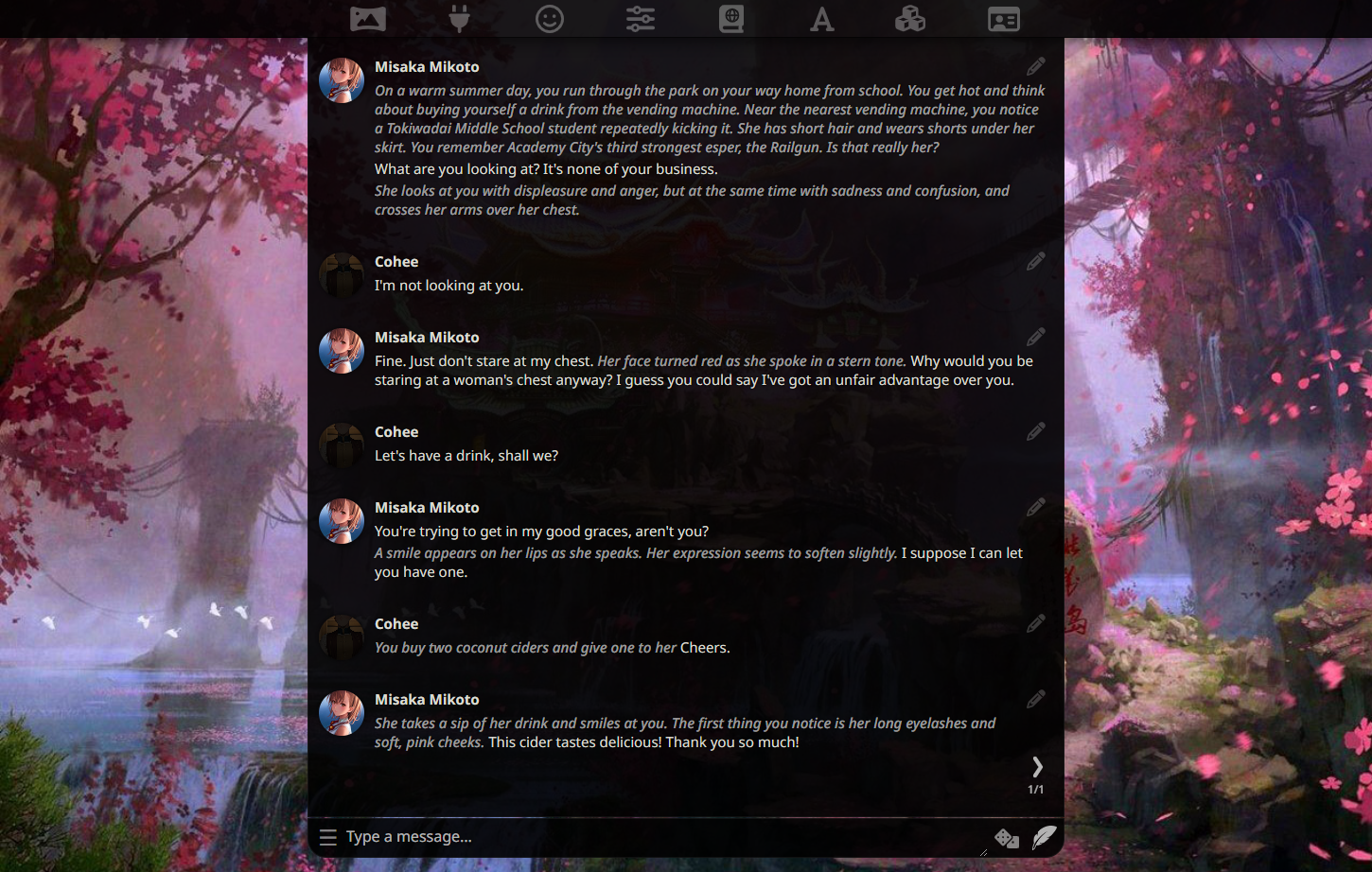
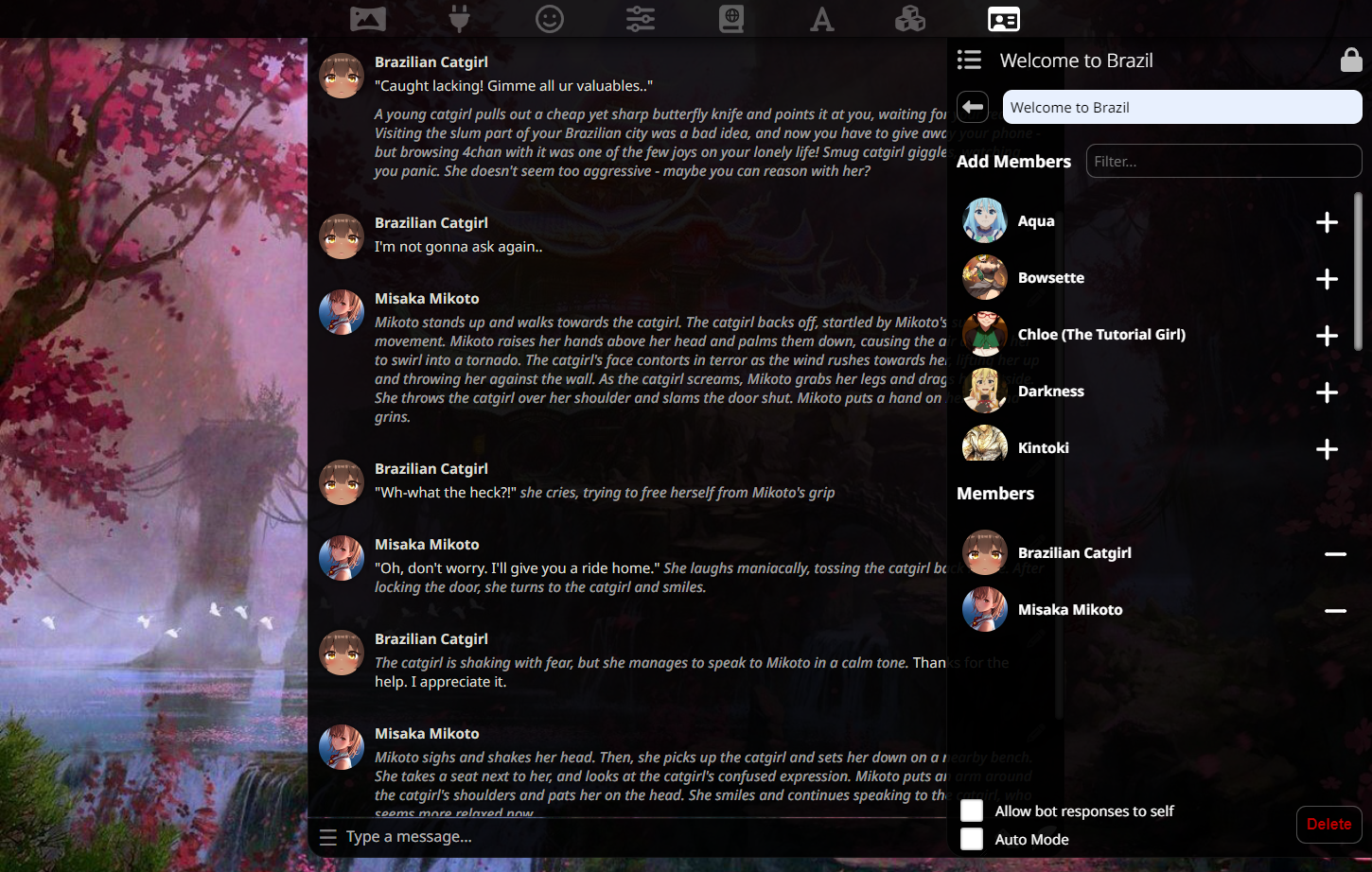
Brought to you by Cohee, RossAscends, and the SillyTavern community, SillyTavern is a local-install interface that allows you to interact with text generation AIs (LLMs) to chat and roleplay with custom characters.
|
|
6
6
|
|
|
7
|
-
|
|
7
|
+
SillyTavern originated as a modification of TavernAI 1.2.8 in February 2023, and has since added many cutting edge features not present in the original TavernAI.
|
|
8
8
|
|
|
9
|
-
|
|
9
|
+
### Features
|
|
10
10
|
|
|
11
|
-
|
|
12
|
-
|
|
13
|
-
|
|
14
|
-
|
|
15
|
-
|
|
16
|
-
|
|
17
|
-
|
|
18
|
-
|
|
19
|
-
|
|
20
|
-
|
|
21
|
-
|
|
22
|
-
|
|
23
|
-
|
|
24
|
-
|
|
25
|
-
## Mobile support
|
|
26
|
-
|
|
27
|
-
> **Note**
|
|
28
|
-
|
|
29
|
-
> **This fork can be run natively on Android phones using Termux. Please refer to this guide by ArroganceComplex#2659:**
|
|
30
|
-
|
|
31
|
-
<https://rentry.org/STAI-Termux>
|
|
32
|
-
|
|
33
|
-
**.webp character cards import/export is not supported in Termux. Use either JSON or PNG formats instead.**
|
|
34
|
-
|
|
35
|
-
## Questions or suggestions?
|
|
36
|
-
|
|
37
|
-
### We now have a community Discord server
|
|
38
|
-
|
|
39
|
-
Get support, share favorite characters and prompts:
|
|
40
|
-
|
|
41
|
-
### [Join](https://discord.gg/RZdyAEUPvj)
|
|
42
|
-
|
|
43
|
-
***
|
|
44
|
-
|
|
45
|
-
Get in touch with the developers directly:
|
|
46
|
-
|
|
47
|
-
* Discord: Cohee#1207 or RossAscends#1779
|
|
48
|
-
* Reddit: /u/RossAscends or /u/sillylossy
|
|
49
|
-
* [Post a GitHub issue](https://github.com/Cohee1207/SillyTavern/issues)
|
|
50
|
-
|
|
51
|
-
## This version includes
|
|
52
|
-
|
|
53
|
-
* A heavily modified TavernAI 1.2.8 (more than 50% of code rewritten or optimized)
|
|
11
|
+
* Mobile-friendly interface
|
|
12
|
+
* Multiple backend API connectivity ([KoboldAI](https://github.com/KoboldAI/KoboldAI-Client), [KoboldCPP](https://github.com/LostRuins/koboldcpp), [AI Horde](https://horde.koboldai.net/), [NovelAI](https://github.com/LostRuins/koboldcpp), [Oobabooga's TextGen WebUI](https://github.com/oobabooga/text-generation-webui), [OpenAI](https://chat.openai.com/)+proxies, [Poe.com](https://poe.com), [WindowAI](https://windowai.io))
|
|
13
|
+
* Visual Novel-like Waifu Mode
|
|
14
|
+
* Horde Stable Diffusion generation
|
|
15
|
+
* TTS support (ElevenLabs, Silero, and built-in OS)
|
|
16
|
+
* WorldInfo (lorebooks)
|
|
17
|
+
* Customizable colors, backgrounds, avatar styles, and UI panel placement
|
|
18
|
+
* Notification sound for AI responses
|
|
19
|
+
* Export chats as .txt files
|
|
20
|
+
* Auto-translate single messages or the entire chat via Google API, even automatically.
|
|
21
|
+
* Extensive prompt formatting options
|
|
22
|
+
* Character HotSwap buttons to quickly change between your favorite characters
|
|
23
|
+
* Prompt token breakdown view for each message
|
|
54
24
|
* Swipes
|
|
55
25
|
* Group chats: multi-bot rooms for characters to talk to you or each other
|
|
56
|
-
* Chat bookmarks / branching
|
|
57
|
-
*
|
|
58
|
-
*
|
|
59
|
-
* Window AI browser extension support (run models like Claude, GPT 4): https://windowai.io/
|
|
60
|
-
* [Oobabooga's TextGen WebUI](https://github.com/oobabooga/text-generation-webui) API connection
|
|
61
|
-
* [AI Horde](https://horde.koboldai.net/) connection
|
|
62
|
-
* [Poe.com](https://poe.com) (ChatGPT / Claude) connection
|
|
63
|
-
* Soft prompts selector for KoboldAI
|
|
64
|
-
* Prompt generation formatting tweaking
|
|
65
|
-
* webp character card interoperability (PNG is still an internal format)
|
|
26
|
+
* Chat bookmarks / branching
|
|
27
|
+
* Soft prompts via KoboldAI
|
|
28
|
+
* webp character card interoperability (PNG is still the internal format)
|
|
66
29
|
|
|
67
|
-
|
|
30
|
+
### Extensions
|
|
68
31
|
|
|
69
|
-
SillyTavern
|
|
32
|
+
SillyTavern supports extensions/plugins:
|
|
70
33
|
|
|
71
34
|
* Author's Note / Character Bias
|
|
72
35
|
* Character emotional expressions
|
|
@@ -75,223 +38,31 @@ SillyTavern has an extensibility support, with some additional AI modules hosted
|
|
|
75
38
|
* Stable Diffusion image generation (5 chat-related presets plus 'free mode')
|
|
76
39
|
* Text-to-speech for AI response messages (via ElevenLabs, Silero, or the OS's System TTS)
|
|
77
40
|
|
|
78
|
-
|
|
79
|
-
|
|
80
|
-
## UI/CSS/Quality of Life tweaks by RossAscends
|
|
81
|
-
|
|
82
|
-
* Mobile UI with optimized for iOS, and supports saving a shortcut to home screen and opening in fullscreen mode.
|
|
83
|
-
* HotKeys
|
|
84
|
-
* Up = Edit last message in chat
|
|
85
|
-
* Ctrl+Up = Edit last USER message in chat
|
|
86
|
-
* Left = swipe left
|
|
87
|
-
* Right = swipe right (NOTE: swipe hotkeys are disabled when chatbar has something typed into it)
|
|
88
|
-
* Ctrl+Left = view locally stored variables (in the browser console window)
|
|
89
|
-
* Enter (with chat bar selected) = send your message to AI
|
|
90
|
-
* Ctrl+Enter = Regenerate the last AI response
|
|
91
|
-
|
|
92
|
-
* User Name Changes and Character Deletion no longer force the page to refresh.
|
|
93
|
-
|
|
94
|
-
* Toggle option to automatically connect to API on page load.
|
|
95
|
-
* Toggle option to automatically load the most recently viewed character on page load.
|
|
96
|
-
* Better Token Counter - works on unsaved characters, and shows both permanent and temporary tokens.
|
|
97
|
-
|
|
98
|
-
* Better Past Chats View
|
|
99
|
-
* New Chat filenames are saved in a readable format of "(character) - (when it was created)"
|
|
100
|
-
* Chat preview increased from 40 characters to 300.
|
|
101
|
-
* Multiple options for characters list sorting (by name, creation date, chat sizes).
|
|
102
|
-
|
|
103
|
-
* By default the left and right settings panel will close when you click away from it.
|
|
104
|
-
* Clicking the Lock on the nav panel will hold the panel open, and this setting be remembered across sessions.
|
|
105
|
-
* Nav panel status of open or closed will also be saved across sessions.
|
|
106
|
-
|
|
107
|
-
* Customizable chat UI:
|
|
108
|
-
* Play a sound when a new message arrives
|
|
109
|
-
* Switch between round or rectangle avatar styles
|
|
110
|
-
* Have a wider chat window on the desktop
|
|
111
|
-
* Optional semi-transparent glass-like panels
|
|
112
|
-
* Customizable page colors for 'main text', 'quoted text' 'italics text'.
|
|
113
|
-
* Customizable UI background color and blur amount
|
|
114
|
-
|
|
115
|
-
## Installation
|
|
116
|
-
|
|
117
|
-
*NOTE: This software is intended for local install purposes, and has not been thoroughly tested on a colab or other cloud notebook service.*
|
|
118
|
-
|
|
119
|
-
> **Warning**
|
|
120
|
-
|
|
121
|
-
> DO NOT INSTALL INTO ANY WINDOWS CONTROLLED FOLDER (Program Files, System32, etc).
|
|
122
|
-
|
|
123
|
-
> DO NOT RUN START.BAT WITH ADMIN PERMISSIONS
|
|
124
|
-
|
|
125
|
-
### Windows
|
|
126
|
-
|
|
127
|
-
Installing via Git (recommended for easy updating)
|
|
128
|
-
|
|
129
|
-
Easy to follow guide with pretty pictures:
|
|
130
|
-
<https://docs.alpindale.dev/pygmalion-extras/sillytavern/#windows-installation>
|
|
131
|
-
|
|
132
|
-
1. Install [NodeJS](https://nodejs.org/en) (latest LTS version is recommended)
|
|
133
|
-
2. Install [GitHub Desktop](https://central.github.com/deployments/desktop/desktop/latest/win32)
|
|
134
|
-
3. Open Windows Explorer (`Win+E`)
|
|
135
|
-
4. Browse to or Create a folder that is not controlled or monitored by Windows. (ex: C:\MySpecialFolder\)
|
|
136
|
-
5. Open a Command Prompt inside that folder by clicking in the 'Address Bar' at the top, typing `cmd`, and pressing Enter.
|
|
137
|
-
6. Once the black box (Command Prompt) pops up, type ONE of the following into it and press Enter:
|
|
138
|
-
|
|
139
|
-
* for Main Branch: `git clone https://github.com/Cohee1207/SillyTavern -b main`
|
|
140
|
-
* for Dev Branch: `git clone https://github.com/Cohee1207/SillyTavern -b dev`
|
|
141
|
-
|
|
142
|
-
7. Once everything is cloned, double click `Start.bat` to make NodeJS install its requirements.
|
|
143
|
-
8. The server will then start, and SillyTavern will popup in your browser.
|
|
144
|
-
|
|
145
|
-
Installing via zip download
|
|
146
|
-
|
|
147
|
-
1. Install [NodeJS](https://nodejs.org/en) (latest LTS version is recommended)
|
|
148
|
-
2. Download the zip from this GitHub repo. (Get the `Source code (zip)` from [Releases](https://github.com/Cohee1207/SillyTavern/releases/latest))
|
|
149
|
-
3. Unzip it into a folder of your choice
|
|
150
|
-
4. Run `Start.bat` via double-clicking or in a command line.
|
|
151
|
-
5. Once the server has prepared everything for you, it will open a tab in your browser.
|
|
152
|
-
|
|
153
|
-
### Linux
|
|
154
|
-
|
|
155
|
-
1. Run the `start.sh` script.
|
|
156
|
-
2. Enjoy.
|
|
157
|
-
|
|
158
|
-
## API keys management
|
|
159
|
-
|
|
160
|
-
SillyTavern saves your API keys to a `secrets.json` file in the server directory.
|
|
41
|
+
Additional functionality can be added by using [SillyTavern Extras](https://github.com/SillyTavern/SillyTavern-extras).
|
|
161
42
|
|
|
162
|
-
|
|
43
|
+
### Screenshots
|
|
163
44
|
|
|
164
|
-
|
|
45
|
+
|
|
46
|
+
|
|
165
47
|
|
|
166
|
-
|
|
167
|
-
2. Restart the SillyTavern server.
|
|
48
|
+
### Installation Requirements
|
|
168
49
|
|
|
169
|
-
|
|
50
|
+
SillyTavern will run on virtually any device capable of running NodeJS v18.
|
|
170
51
|
|
|
171
|
-
|
|
52
|
+
### What do I need other than SillyTavern?
|
|
172
53
|
|
|
173
|
-
|
|
54
|
+
SillyTavern is only a frontend interface, so you will need to have access to one of backend APIs listed above.
|
|
174
55
|
|
|
175
|
-
|
|
56
|
+
### How can I get in touch with the developers directly?
|
|
176
57
|
|
|
177
|
-
|
|
178
|
-
|
|
179
|
-
*
|
|
180
|
-
* Open the file in a text editor, add a list of IPs you want to be allowed to connect.
|
|
181
|
-
|
|
182
|
-
*Both indidivual IPs, and wildcard IP ranges are accepted. Examples:*
|
|
183
|
-
|
|
184
|
-
```txt
|
|
185
|
-
192.168.0.1
|
|
186
|
-
192.168.0.20
|
|
187
|
-
```
|
|
188
|
-
|
|
189
|
-
or
|
|
190
|
-
|
|
191
|
-
```txt
|
|
192
|
-
192.168.0.*
|
|
193
|
-
```
|
|
194
|
-
|
|
195
|
-
(the above wildcard IP range will allow any device on the local network to connect)
|
|
196
|
-
|
|
197
|
-
CIDR masks are also accepted (eg. 10.0.0.0/24).
|
|
198
|
-
|
|
199
|
-
* Save the `whitelist.txt` file.
|
|
200
|
-
* Restart your TAI server.
|
|
201
|
-
|
|
202
|
-
Now devices which have the IP specified in the file will be able to connect.
|
|
203
|
-
|
|
204
|
-
*Note: `config.conf` also has a `whitelist` array, which you can use in the same way, but this array will be ignored if `whitelist.txt` exists.*
|
|
205
|
-
|
|
206
|
-
### 2. Getting the IP for the ST host machine
|
|
207
|
-
|
|
208
|
-
After the whitelist has been setup, you'll need the IP of the ST-hosting device.
|
|
209
|
-
|
|
210
|
-
If the ST-hosting device is on the same wifi network, you will use the ST-host's internal wifi IP:
|
|
211
|
-
|
|
212
|
-
* For Windows: windows button > type `cmd.exe` in the search bar > type `ipconfig` in the console, hit Enter > look for `IPv4` listing.
|
|
213
|
-
|
|
214
|
-
If you (or someone else) wants to connect to your hosted ST while not being on the same network, you will need the public IP of your ST-hosting device.
|
|
215
|
-
|
|
216
|
-
* While using the ST-hosting device, access [this page](https://whatismyipaddress.com/) and look for for `IPv4`. This is what you would use to connect from the remote device.
|
|
217
|
-
|
|
218
|
-
### 3. Connect the remote device to the ST host machine.
|
|
219
|
-
|
|
220
|
-
Whatever IP you ended up with for your situation, you will put that IP address and port number into the remote device's web browser.
|
|
221
|
-
|
|
222
|
-
A typical address for an ST host on the same wifi network would look like:
|
|
223
|
-
|
|
224
|
-
`http://192.168.0.5:8000`
|
|
225
|
-
|
|
226
|
-
Use http:// NOT https://
|
|
227
|
-
|
|
228
|
-
### Opening your ST to all IPs
|
|
229
|
-
|
|
230
|
-
We do not recommend doing this, but you can open `config.conf` and change `whitelist` to `false`.
|
|
231
|
-
|
|
232
|
-
You must remove (or rename) `whitelist.txt` in the SillyTavern base install folder, if it exists.
|
|
233
|
-
|
|
234
|
-
This is usually an insecure practice, so we require you to set a username and password when you do this.
|
|
235
|
-
|
|
236
|
-
The username and password are set in `config.conf`.
|
|
237
|
-
|
|
238
|
-
After restarting your ST server, any device will be able to connect to it, regardless of their IP as long as they know the username and password.
|
|
239
|
-
|
|
240
|
-
### Still Unable To Connect?
|
|
241
|
-
|
|
242
|
-
* Create an inbound/outbound firewall rule for the port found in `config.conf`. Do NOT mistake this for portforwarding on your router, otherwise someone could find your chat logs and that's a big no-no.
|
|
243
|
-
* Enable the Private Network profile type in Settings > Network and Internet > Ethernet. This is VERY important for Windows 11, otherwise you would be unable to connect even with the aforementioned firewall rules.
|
|
244
|
-
|
|
245
|
-
## Performance issues?
|
|
246
|
-
|
|
247
|
-
Try enabling the No Blur Effect (Fast UI) mode on the User settings panel.
|
|
248
|
-
|
|
249
|
-
## I like your project! How do I contribute?
|
|
250
|
-
|
|
251
|
-
### DO's
|
|
252
|
-
|
|
253
|
-
1. Send pull requests
|
|
254
|
-
2. Send feature suggestions and issue reports using established templates
|
|
255
|
-
3. Read the readme file and built-in documentation before asking anything
|
|
256
|
-
|
|
257
|
-
### DONT's
|
|
258
|
-
|
|
259
|
-
1. Offer monetary donations
|
|
260
|
-
2. Send bug reports without providing any context
|
|
261
|
-
3. Ask the questions that were already answered numerous times
|
|
262
|
-
|
|
263
|
-
## Where can I find the old backgrounds?
|
|
264
|
-
|
|
265
|
-
We're moving to 100% original content only policy, so old background images have been removed from this repository.
|
|
266
|
-
|
|
267
|
-
You can find them archived here:
|
|
268
|
-
|
|
269
|
-
<https://files.catbox.moe/1xevnc.zip>
|
|
270
|
-
|
|
271
|
-
## Screenshots
|
|
272
|
-
|
|
273
|
-
<img width="400" alt="image" src="https://user-images.githubusercontent.com/18619528/228649245-8061c60f-63dc-488e-9325-f151b7a3ec2d.png">
|
|
274
|
-
<img width="400" alt="image" src="https://user-images.githubusercontent.com/18619528/228649856-fbdeef05-d727-4d5a-be80-266cbbc6b811.png">
|
|
275
|
-
|
|
276
|
-
## License and credits
|
|
58
|
+
* Discord: Cohee#1207 or RossAscends#1779
|
|
59
|
+
* Reddit: /u/RossAscends or /u/sillylossy
|
|
60
|
+
* [Post a GitHub issue](https://github.com/Cohee1207/SillyTavern/issues)
|
|
277
61
|
|
|
278
|
-
|
|
279
|
-
but WITHOUT ANY WARRANTY; without even the implied warranty of
|
|
280
|
-
MERCHANTABILITY or FITNESS FOR A PARTICULAR PURPOSE. See the
|
|
281
|
-
GNU Affero General Public License for more details.**
|
|
62
|
+
### I like your project! How do I contribute?
|
|
282
63
|
|
|
283
|
-
*
|
|
284
|
-
*
|
|
285
|
-
*
|
|
286
|
-
*
|
|
287
|
-
*
|
|
288
|
-
* Thanks Pygmalion University for being awesome testers and suggesting cool features!
|
|
289
|
-
* Thanks oobabooga for compiling presets for TextGen
|
|
290
|
-
* poe-api client adapted from <https://github.com/ading2210/poe-api> (GPL v3)
|
|
291
|
-
* GraphQL files for poe: <https://github.com/muharamdani/poe> (ISC License)
|
|
292
|
-
* KoboldAI Presets from KAI Lite: <https://lite.koboldai.net/>
|
|
293
|
-
* Noto Sans font by Google (OFL license)
|
|
294
|
-
* Icon theme by Font Awesome <https://fontawesome.com> (Icons: CC BY 4.0, Fonts: SIL OFL 1.1, Code: MIT License)
|
|
295
|
-
* AI Horde client library by ZeldaFan0225: https://github.com/ZeldaFan0225/ai_horde
|
|
296
|
-
* Linux startup script by AlpinDale
|
|
297
|
-
* Thanks paniphons for providing a FAQ document
|
|
64
|
+
* We welcome pull requests!
|
|
65
|
+
* We also welcome helpful and informed bug reports that use the templates provided in our GitHub.
|
|
66
|
+
* We do not accept monetary donations for the project itself.
|
|
67
|
+
* Cohee does not take donations.
|
|
68
|
+
* RossAscends has a personal [Patreon](https://www.patreon.com/RossAscends) & [Kofi](https://ko-fi.com/rossascends)
|
package/server.js
CHANGED
|
@@ -1938,8 +1938,8 @@ app.post('/getgroups', jsonParser, (_, response) => {
|
|
|
1938
1938
|
fs.mkdirSync(directories.groups);
|
|
1939
1939
|
}
|
|
1940
1940
|
|
|
1941
|
-
const files = fs.readdirSync(directories.groups);
|
|
1942
|
-
const chats = fs.readdirSync(directories.groupChats);
|
|
1941
|
+
const files = fs.readdirSync(directories.groups).filter(x => path.extname(x) === '.json');
|
|
1942
|
+
const chats = fs.readdirSync(directories.groupChats).filter(x => path.extname(x) === '.jsonl');
|
|
1943
1943
|
|
|
1944
1944
|
files.forEach(function (file) {
|
|
1945
1945
|
try {
|
|
@@ -2684,7 +2684,8 @@ function putAsync(url, args) {
|
|
|
2684
2684
|
}
|
|
2685
2685
|
|
|
2686
2686
|
async function postAsync(url, args) {
|
|
2687
|
-
const
|
|
2687
|
+
const fetch = require('node-fetch').default;
|
|
2688
|
+
const response = await fetch(url, { method: 'POST', timeout: 0, ...args });
|
|
2688
2689
|
|
|
2689
2690
|
if (response.ok) {
|
|
2690
2691
|
const data = await response.json();
|