signalk-polar-performance-plugin 0.0.59 → 1.2.0
This diff represents the content of publicly available package versions that have been released to one of the supported registries. The information contained in this diff is provided for informational purposes only and reflects changes between package versions as they appear in their respective public registries.
- package/CHANGELOG.md +168 -0
- package/README.md +267 -82
- package/docs/developer-reference.md +148 -0
- package/docs/import.png +0 -0
- package/docs/inputs.png +0 -0
- package/docs/outputs.png +0 -0
- package/docs/overview.png +0 -0
- package/docs/plotter.png +0 -0
- package/docs/polar.png +0 -0
- package/docs/polar_management.png +0 -0
- package/icon.png +0 -0
- package/package.json +37 -6
- package/plugin/PolarFileStore.js +133 -0
- package/plugin/PolarTable.js +897 -0
- package/plugin/SI.js +21 -0
- package/plugin/import/ExpeditionImporter.js +152 -0
- package/plugin/import/FormatRegistry.js +21 -0
- package/plugin/import/ImportService.js +199 -0
- package/plugin/import/JieterImporter.js +18 -0
- package/plugin/import/OrcSource.js +396 -0
- package/plugin/import/SourceRegistry.js +17 -0
- package/plugin/import/canonical.js +73 -0
- package/plugin/import/matrixText.js +133 -0
- package/plugin/index.js +1045 -887
- package/plugin/index.js.bak +1003 -0
- package/public/app.js +1342 -0
- package/public/icon.png +0 -0
- package/public/index.html +81 -399
- package/public/main.css +86 -0
- package/public/plotter.html +445 -0
- package/public/polar-canvas.js +507 -0
- package/test/PolarFileStore.test.js +216 -0
- package/test/PolarTable.test.js +349 -0
- package/test/api.test.js +502 -0
- package/test/lifecycle.test.js +114 -0
- package/test/migration.test.js +164 -0
- package/doc/BandG_Laylines_Target_TWA_to_Active.png +0 -0
- package/doc/BandG_Sailsteer_with_laylines.png +0 -0
- package/doc/BandG_Target_TWA_to_SignalK.png +0 -0
- package/doc/BandG_polar.png +0 -0
- package/public/Chart.min.js +0 -14
- package/public/jquery-3.7.1-min.js +0 -2
package/CHANGELOG.md
ADDED
|
@@ -0,0 +1,168 @@
|
|
|
1
|
+
# Changelog
|
|
2
|
+
|
|
3
|
+
All notable changes to this project will be documented in this file.
|
|
4
|
+
|
|
5
|
+
The format is based on [Keep a Changelog](https://keepachangelog.com/en/1.0.0/), and this project adheres to [Semantic Versioning](https://semver.org/spec/v2.0.0.html).
|
|
6
|
+
|
|
7
|
+
## [1.1.0] - 2026-07-21
|
|
8
|
+
|
|
9
|
+
### Added
|
|
10
|
+
- Plotter webapp (plotter.html) now has a settings panel accessible via a gear button: active polar selector, performance percentage stepper (±5%, range 50–200%), and a toggle to show or hide all TWS library curves.
|
|
11
|
+
- `PolarCanvas.setShowAllTwsLines()` method to toggle library curve visibility at runtime; when off, only the live (current-TWS) curve is drawn.
|
|
12
|
+
|
|
13
|
+
### Fixed
|
|
14
|
+
- `perfAdjust` was not applied to the `/polars/:id/queries/curve` (and `/speed`, `/targets`, `/performance`) endpoints because each request loaded a fresh `PolarTable` from disk without calling `setPerformanceAdjustment()`. Polar curves in the webapp now correctly scale when performance is changed.
|
|
15
|
+
- App Store icon was missing (monogram fallback shown): added `icon.png` at the package root so the App Store CDN can fetch it from the npm tarball via unpkg.com. The runtime `signalk.appIcon: ./icon.png` path is unchanged - the server still serves it from `public/icon.png` via the webapp mount.
|
|
16
|
+
|
|
17
|
+
### Changed
|
|
18
|
+
- Polar query endpoints (`/queries/curve`, `/speed`, `/targets`, `/performance`) now use a size-1 in-memory cache keyed by polar ID, avoiding repeated disk reads when consecutive requests target the same polar (e.g. the parallel curve fetches on startup). The cache is invalidated on `PUT` or `DELETE` for that polar ID.
|
|
19
|
+
|
|
20
|
+
## [1.0.1] - 2026-07-20
|
|
21
|
+
|
|
22
|
+
### Fixed
|
|
23
|
+
- `plotter.html` updated to use the current `/polars/:id/axes/tws` and `/polars/:id/queries/curve` API routes; the TWS line was no longer rendered after the polar management API redesign in 1.0.0.
|
|
24
|
+
|
|
25
|
+
## [1.0.0] - 2026-07-20
|
|
26
|
+
|
|
27
|
+
### Added
|
|
28
|
+
- Full polar file management: store, activate, copy, delete, and hot-swap polar files without restarting the plugin.
|
|
29
|
+
- Import polars from the ORC (Offshore Racing Congress) database by sail number, boat name, or boat type.
|
|
30
|
+
- Redesigned webapp polar management UI for canonical polar files and ORC imports.
|
|
31
|
+
- OpenAPI spec covering polar-manager, polar-query, and legacy polar-data endpoints.
|
|
32
|
+
- Custom plugin icon assets.
|
|
33
|
+
|
|
34
|
+
### Fixed
|
|
35
|
+
- Legacy `csvTable` in v0 settings is now converted to a canonical polar file during the v0→v1 migration; if conversion fails the migration retries on next start rather than silently discarding the data.
|
|
36
|
+
- ORC availability check now short-circuits immediately when the certificate cache is already fresh, avoiding a redundant network round-trip; status check timeout raised from 2 s to 15 s.
|
|
37
|
+
- Sidebar toggler was unreachable on mobile viewports.
|
|
38
|
+
|
|
39
|
+
### Changed
|
|
40
|
+
- `trueWindSpeedPath` legacy field is now removed during v0→v1 migration.
|
|
41
|
+
- README and developer reference updated for canonical polar management and import flow.
|
|
42
|
+
- Developer reference split into a separate file from the user guide.
|
|
43
|
+
- Version bumped to 1.0.0 to reflect the stable, production-ready polar management API.
|
|
44
|
+
|
|
45
|
+
## [0.0.60] - 2026-07-06
|
|
46
|
+
|
|
47
|
+
### Added
|
|
48
|
+
- Added runtime configuration of the plugin via the webapp.
|
|
49
|
+
- Added support for managing multiple polar files — switch between polars directly from the webapp.
|
|
50
|
+
- Added runtime inspection of the plugin via the webapp.
|
|
51
|
+
- Added ability to import polars from the ORC (Offshore Racing Congress) database by searching on sail number, boat name or boat type.
|
|
52
|
+
- Added extrapolation of the polar beyond the boundaries of the polar file.
|
|
53
|
+
- Added comprehensive warnings in the webapp.
|
|
54
|
+
- Added a full-screen polar diagram plotter page for a clean, chart-plotter-style view of your polar.
|
|
55
|
+
- Added new smoother types for sensor input smoothing: Moving Average and Kalman filter, in addition to the existing Exponential smoother.
|
|
56
|
+
- Added GitHub Actions CI workflow for automated testing across multiple platforms and Node.js versions.
|
|
57
|
+
- Added support for display units. Polar data and polar diagrams now use the preferred units.
|
|
58
|
+
|
|
59
|
+
### Changed
|
|
60
|
+
- Polar diagram changed to a rader style diagram.
|
|
61
|
+
- The separate damping settings for True Wind Speed, True Wind Angle, and Boat Speed have been replaced by a single smoother type with one tuning parameter. Existing settings are migrated automatically on first start.
|
|
62
|
+
- source selection replaced by source priorities.
|
|
63
|
+
|
|
64
|
+
## [0.0.59] - 2026-06-03
|
|
65
|
+
|
|
66
|
+
### Added
|
|
67
|
+
- Added informative error messages in the plugin log when polar or wind data is missing or unavailable.
|
|
68
|
+
|
|
69
|
+
### Fixed
|
|
70
|
+
- Fixed incorrect tack/gybe true wind angle calculation.
|
|
71
|
+
- Improved reliability of CSV polar file loading with strengthened parsing.
|
|
72
|
+
|
|
73
|
+
## [0.0.58] - 2026-01-21
|
|
74
|
+
|
|
75
|
+
### Added
|
|
76
|
+
- Added Signal K metadata (units and descriptions) for all plugin output paths, making values easier to read in compatible displays.
|
|
77
|
+
|
|
78
|
+
## [0.0.57] - 2026-01-03
|
|
79
|
+
|
|
80
|
+
### Added
|
|
81
|
+
- Added ability to select which True Wind Speed source ID to use for calculations.
|
|
82
|
+
- Added option to specify which GPS/SOG source to use for boat speed calculations.
|
|
83
|
+
- Added an example CSV polar file to help with initial setup.
|
|
84
|
+
|
|
85
|
+
### Changed
|
|
86
|
+
- Performance data is now only sent when values actually change, reducing network traffic.
|
|
87
|
+
|
|
88
|
+
### Fixed
|
|
89
|
+
- Fixed incorrect units for target velocity made good (VMG).
|
|
90
|
+
- Updated dashboard webapp jQuery dependency for compatibility.
|
|
91
|
+
|
|
92
|
+
## [0.0.45] - 2024-06-22
|
|
93
|
+
|
|
94
|
+
### Changed
|
|
95
|
+
- Signal K metadata is now sent only once at startup rather than with every update, reducing bandwidth usage.
|
|
96
|
+
|
|
97
|
+
## [0.0.44] - 2024-06-22
|
|
98
|
+
|
|
99
|
+
### Added
|
|
100
|
+
- Added target boat speed output based on the current polar and wind conditions.
|
|
101
|
+
- The performance dashboard now automatically reconnects when the server connection is lost.
|
|
102
|
+
|
|
103
|
+
### Changed
|
|
104
|
+
- Beat angle, gybe angle, and target true wind angle are now shown as signed values (positive/negative depending on tack).
|
|
105
|
+
- True wind angle in the dashboard is now displayed as an absolute value for clarity.
|
|
106
|
+
|
|
107
|
+
## [0.0.40] - 2023-05-30
|
|
108
|
+
|
|
109
|
+
### Added
|
|
110
|
+
- Added Signal K logo to the performance dashboard webapp.
|
|
111
|
+
- Added visual dots on the polar diagram showing current boat speed and polar target speed.
|
|
112
|
+
|
|
113
|
+
### Changed
|
|
114
|
+
- When sailing beyond the fastest polar heading, the plugin now uses the highest available polar speed.
|
|
115
|
+
- Polar diagram speed values are rounded for a cleaner display.
|
|
116
|
+
|
|
117
|
+
### Fixed
|
|
118
|
+
- Fixed plugin not restarting correctly after configuration changes are applied.
|
|
119
|
+
- Fixed plugin not stopping cleanly when disabled.
|
|
120
|
+
- Fixed erratic Speed over Ground and Boat Speed readings caused by damping misconfiguration.
|
|
121
|
+
|
|
122
|
+
## [0.0.35] - 2023-05-21
|
|
123
|
+
|
|
124
|
+
### Added
|
|
125
|
+
- Added interactive polar diagram visualization in the performance dashboard webapp.
|
|
126
|
+
- Added Velocity Made Good (VMG), polar VMG, and VMG ratio as Signal K output paths.
|
|
127
|
+
- Added configurable damping (smoothing) for True Wind Speed, True Wind Angle, and Boat Speed, using time constants for consistent behaviour.
|
|
128
|
+
- Added configurable polar adjustment ratio for fine-tuning performance targets to your specific boat.
|
|
129
|
+
- Added tack true wind angle and beat/run angle calculations, including automatic estimation when not present in the polar file.
|
|
130
|
+
- Added polar speed extrapolation towards zero wind speed.
|
|
131
|
+
|
|
132
|
+
### Changed
|
|
133
|
+
- Polar VMG is now calculated using the optimal true wind angle for improved accuracy.
|
|
134
|
+
- Polar diagram now displays all wind speeds in distinct colours.
|
|
135
|
+
- Polar diagram has a dark theme.
|
|
136
|
+
|
|
137
|
+
### Fixed
|
|
138
|
+
- Fixed beat and run angle errors when the polar file does not include them.
|
|
139
|
+
- Fixed polar diagram generation bug at the zero-wind baseline.
|
|
140
|
+
- Fixed CSV polar file loading and chart display precision.
|
|
141
|
+
- Fixed heading damping instability near ±180°.
|
|
142
|
+
|
|
143
|
+
## [0.0.9] - 2023-04-30
|
|
144
|
+
|
|
145
|
+
### Fixed
|
|
146
|
+
- Fixed optimum wind angle calculation producing incorrect results.
|
|
147
|
+
|
|
148
|
+
## [0.0.7] - 2023-04-29
|
|
149
|
+
|
|
150
|
+
### Added
|
|
151
|
+
- Added option to use Speed over Ground (SOG) instead of Speed through Water (STW) for performance calculations.
|
|
152
|
+
- Added polar maximum speed and the wind angle at which it occurs as output paths.
|
|
153
|
+
|
|
154
|
+
### Changed
|
|
155
|
+
- Renamed Signal K paths from 'optimal' to 'optimum' to align with B&G instrument terminology.
|
|
156
|
+
|
|
157
|
+
---
|
|
158
|
+
|
|
159
|
+
[0.0.60]: https://github.com/htool/signalk-polar-performance-plugin/compare/3593e2b...d051c34
|
|
160
|
+
[0.0.59]: https://github.com/htool/signalk-polar-performance-plugin/compare/c0a8958...3593e2b
|
|
161
|
+
[0.0.58]: https://github.com/htool/signalk-polar-performance-plugin/compare/ad9c8b5...c0a8958
|
|
162
|
+
[0.0.57]: https://github.com/htool/signalk-polar-performance-plugin/compare/ed1217d...ad9c8b5
|
|
163
|
+
[0.0.45]: https://github.com/htool/signalk-polar-performance-plugin/compare/a1d99ec...ed1217d
|
|
164
|
+
[0.0.44]: https://github.com/htool/signalk-polar-performance-plugin/compare/51ba34f...a1d99ec
|
|
165
|
+
[0.0.40]: https://github.com/htool/signalk-polar-performance-plugin/compare/858cd66...51ba34f
|
|
166
|
+
[0.0.35]: https://github.com/htool/signalk-polar-performance-plugin/compare/21de4ab...858cd66
|
|
167
|
+
[0.0.9]: https://github.com/htool/signalk-polar-performance-plugin/compare/0d1eb6a...21de4ab
|
|
168
|
+
[0.0.7]: https://github.com/htool/signalk-polar-performance-plugin/compare/cd2e367...0d1eb6a
|
package/README.md
CHANGED
|
@@ -1,31 +1,182 @@
|
|
|
1
|
-
# Polar
|
|
2
|
-
Generate performance information based on a polar diagram.
|
|
1
|
+
# Polar Performance — Signal K Plugin
|
|
3
2
|
|
|
4
|
-
|
|
5
|
-
It's assumed data is already corrected when it's read by this plugin. This can be sometimes be done by the sensor, sometimes upon entry into SignalK using the [calibration plugin](https://www.npmjs.com/package/@signalk/calibration).
|
|
3
|
+
Polar Performance reads your boat's true wind speed, true wind angle, and boat speed from Signal K, looks up the corresponding target values from your polar diagram, and publishes performance metrics — beat angle, run angle, VMG, polar speed ratio, and others — back to the Signal K bus in real time. An integrated webapp lets you inspect the live values, manage polars, and configure the plugin while it is running.
|
|
6
4
|
|
|
7
|
-
|
|
8
|
-
The following paths are read
|
|
9
|
-
- navigation.speedThroughWater
|
|
10
|
-
- environment.wind.speedTrue
|
|
11
|
-
- environment.wind.angleTrueWater
|
|
12
|
-
- navigation.speedOverGround (optional)
|
|
5
|
+
---
|
|
13
6
|
|
|
14
|
-
##
|
|
15
|
-
### Polar diagram
|
|
16
|
-
The polar diagram can be configured through CSV notation as used on [ORC sailboat data](https://jieter.github.io/orc-data/site/).
|
|
7
|
+
## Installation
|
|
17
8
|
|
|
18
|
-
|
|
9
|
+
Install from the Signal K App Store, or manually:
|
|
10
|
+
|
|
11
|
+
```sh
|
|
12
|
+
cd ~/.signalk
|
|
13
|
+
npm install signalk-polar-performance-plugin
|
|
14
|
+
```
|
|
15
|
+
|
|
16
|
+
Then restart Signal K and enable the plugin in **Server → Plugin Config → Polar Performance**.
|
|
17
|
+
|
|
18
|
+
---
|
|
19
|
+
|
|
20
|
+
## Quick start
|
|
21
|
+
|
|
22
|
+
1. Open the webapp from **Webapps → Polar Performance**.
|
|
23
|
+
2. Go to the **Polars** tab and either import a polar from the ORC database or import a text polar.
|
|
24
|
+
3. Go to the **Settings** tab and select the polar you just added as the active polar.
|
|
25
|
+
4. The **Overview** tab now shows live performance numbers and a polar diagram.
|
|
26
|
+
5. Enable the outputs you want in the **Outputs** tab.
|
|
27
|
+
|
|
28
|
+
---
|
|
29
|
+
|
|
30
|
+
## The webapp
|
|
31
|
+
|
|
32
|
+
The webapp is the primary interface for the plugin. Open it from the Signal K dashboard.
|
|
33
|
+
|
|
34
|
+
### Overview
|
|
35
|
+
|
|
36
|
+
A polar diagram on the left and live performance numbers on the right. The diagram shows a live TWS curve interpolated for the current wind speed, and two dots — the polar target speed (what the polar says you should be doing) and your actual boat speed — both at the current TWA. The targets section shows the beat and run angle and VMG interpolated from the polar for the current wind speed. Any data quality warnings appear at the bottom.
|
|
37
|
+
|
|
38
|
+
### Inputs
|
|
39
|
+
|
|
40
|
+
Shows the raw instrument values as they arrive from Signal K (before smoothing) and the smoothed values actually used for computation, side by side. Useful for spotting stale sensors or checking whether the smoother settings make sense for your data. Any missing inputs are listed as warnings.
|
|
41
|
+
|
|
42
|
+
### Outputs
|
|
43
|
+
|
|
44
|
+
Shows the current value of each output path and lets you enable or disable each group with a toggle. Only enabled outputs are published to the Signal K bus.
|
|
45
|
+
|
|
46
|
+
### Settings
|
|
47
|
+
|
|
48
|
+
Lets you alter the settings of the plugin. Polar selection, performance adjustment, smoother type and parameter, and speed source. The polar diagram of the selected polar is shown.
|
|
49
|
+
|
|
50
|
+
### Polars
|
|
51
|
+
|
|
52
|
+
Manage stored polars, import polars from the ORC database, and import text polars in supported formats.
|
|
53
|
+
---
|
|
54
|
+
|
|
55
|
+
## Configuration
|
|
56
|
+
|
|
57
|
+
All configuration is done through the webapp. The settings available are:
|
|
58
|
+
|
|
59
|
+
### Active polar
|
|
60
|
+
|
|
61
|
+
Select the polar to use for calculations. The polar diagram in the Settings tab updates when you change this. If no polar is selected the plugin runs but publishes nothing; any previously published values are nullified immediately.
|
|
62
|
+
|
|
63
|
+
### Performance adjustment
|
|
64
|
+
|
|
65
|
+
A multiplier applied to all polar speeds before they are used. `1.0` means use the polar as-is. `0.90` means the plugin assumes your boat achieves 90 % of the polar values — useful when your polar is optimistic or you are sailing conservatively. The polar diagram in the Settings tab reflects this adjustment. Step size is 0.05.
|
|
66
|
+
|
|
67
|
+
### Smoother
|
|
68
|
+
|
|
69
|
+
Input smoothing prevents noisy instrument data from producing erratic outputs. The available smoothers are:
|
|
70
|
+
|
|
71
|
+
| Type | Parameter | Best for |
|
|
72
|
+
|------|-----------|----------|
|
|
73
|
+
| **Exponential (EMA)** | Time constant τ (seconds) | General use. Smooth but responsive. |
|
|
74
|
+
| **Moving average** | Window size (seconds) | Uniform weighting over a fixed time window. |
|
|
75
|
+
| **Kalman filter** | Steady-state gain (0–1) | Automatically balances noise and responsiveness. |
|
|
76
|
+
| **None** | — | When your instruments already filter their output. |
|
|
77
|
+
|
|
78
|
+
All three input channels — true wind speed, true wind angle, and boat speed — use the same smoother type and parameter.
|
|
79
|
+
|
|
80
|
+
### Speed source
|
|
81
|
+
|
|
82
|
+
Choose between **speed through water** (`navigation.speedThroughWater`) and **speed over ground** (`navigation.speedOverGround`). Use SOG when a working paddlewheel is not available, but be aware that SOG includes current — this makes boat speed appear higher or lower depending on the tidal state.
|
|
83
|
+
|
|
84
|
+
---
|
|
85
|
+
|
|
86
|
+
## Outputs
|
|
87
|
+
|
|
88
|
+
Enable each group in the **Outputs** tab.
|
|
89
|
+
|
|
90
|
+
### Beat and run angles
|
|
91
|
+
|
|
92
|
+
| Path | Description |
|
|
93
|
+
|------|-------------|
|
|
94
|
+
| `performance.beatAngle` | Optimal upwind TWA for the current TWS. Negative = port tack. |
|
|
95
|
+
| `performance.gybeAngle` | Optimal downwind TWA for the current TWS. Negative = port tack. |
|
|
96
|
+
|
|
97
|
+
These are the angles at which VMG is maximised, read directly from the polar. Use these as target wind angles for optimal upwind and downwind sailing.
|
|
98
|
+
|
|
99
|
+
### Beat and run VMG
|
|
100
|
+
|
|
101
|
+
| Path | Description |
|
|
102
|
+
|------|-------------|
|
|
103
|
+
| `performance.beatAngleVelocityMadeGood` | Best achievable VMG upwind for the current TWS. |
|
|
104
|
+
| `performance.gybeAngleVelocityMadeGood` | Best achievable VMG downwind for the current TWS. |
|
|
105
|
+
|
|
106
|
+
### Target TWA and VMG
|
|
107
|
+
|
|
108
|
+
Automatically selects between beat and run depending on whether you are sailing upwind or downwind (TWA < 90° = upwind).
|
|
109
|
+
|
|
110
|
+
| Path | Description |
|
|
111
|
+
|------|-------------|
|
|
112
|
+
| `performance.targetAngle` | Target TWA for the current point of sail. Negative = port. |
|
|
113
|
+
| `performance.targetVelocityMadeGood` | Target VMG for the current point of sail. |
|
|
114
|
+
|
|
115
|
+
### Optimum wind angle
|
|
116
|
+
|
|
117
|
+
| Path | Description |
|
|
118
|
+
|------|-------------|
|
|
119
|
+
| `performance.optimumWindAngle` | Difference between your current TWA and the optimal angle. Negative = bear away, positive = head up. Zero means you are sailing at the optimal angle. |
|
|
120
|
+
|
|
121
|
+
### VMG and polar VMG ratio
|
|
122
|
+
|
|
123
|
+
| Path | Description |
|
|
124
|
+
|------|-------------|
|
|
125
|
+
| `performance.velocityMadeGood` | Your actual VMG: `boatSpeed × cos(TWA)`. |
|
|
126
|
+
| `performance.polarVelocityMadeGood` | Polar target VMG for the current TWS. |
|
|
127
|
+
| `performance.polarVelocityMadeGoodRatio` | Actual VMG divided by polar VMG. `1.0` = perfect; `0.85` = 85 % of theoretical optimum. |
|
|
128
|
+
|
|
129
|
+
### Polar speed and speed ratio
|
|
130
|
+
|
|
131
|
+
| Path | Description |
|
|
132
|
+
|------|-------------|
|
|
133
|
+
| `performance.polarSpeed` | The polar target boat speed for the current TWS and TWA. |
|
|
134
|
+
| `performance.targetSpeed` | The boat speed you would need at the optimal angle to achieve target VMG. |
|
|
135
|
+
| `performance.polarSpeedRatio` | Actual boat speed divided by polar speed. `1.0` = on target; `<1.0` = below target. |
|
|
136
|
+
|
|
137
|
+
### Maximum speed
|
|
138
|
+
|
|
139
|
+
| Path | Description |
|
|
140
|
+
|------|-------------|
|
|
141
|
+
| `performance.maxSpeed` | Maximum polar boat speed achievable at the current TWS. |
|
|
142
|
+
| `performance.maxSpeedAngle` | The TWA at which maximum speed is achieved. |
|
|
143
|
+
|
|
144
|
+
### Opposite tack heading
|
|
145
|
+
|
|
146
|
+
| Path | Description |
|
|
147
|
+
|------|-------------|
|
|
148
|
+
| `performance.tackTrue` | True heading on the opposite tack, calculated from the beat angle and current heading. Useful for tactical displays and layline charts. |
|
|
149
|
+
|
|
150
|
+
Requires `navigation.headingTrue` to be available.
|
|
151
|
+
|
|
152
|
+
### Smoothed inputs
|
|
153
|
+
|
|
154
|
+
| Path | Description |
|
|
155
|
+
|------|-------------|
|
|
156
|
+
| `environment.wind.angleTrueWaterDamped` | Smoothed TWA as used internally by the plugin. |
|
|
157
|
+
| `performance.boatSpeedDamped` | Smoothed boat speed as used internally by the plugin. |
|
|
158
|
+
|
|
159
|
+
Useful when you want downstream instruments to use the same smoothed values that drive the performance calculation.
|
|
160
|
+
|
|
161
|
+
---
|
|
162
|
+
|
|
163
|
+
## Managing polars
|
|
164
|
+
|
|
165
|
+
### Importing from ORC
|
|
166
|
+
|
|
167
|
+
The plugin can search the official ORC active certificate source directly. Go to **Polars → Import ORC Certificate**, type part of the certificate RefNo, boat name, class, or sail number and click Search. When you find your boat, click Import. The polar is saved locally and immediately available for selection.
|
|
168
|
+
|
|
169
|
+
Internet access is required only while searching or importing from ORC. In an isolated Signal K installation the ORC source is simply shown as unavailable; that is not treated as a plugin error. After import the polar is stored locally and no further internet access is needed.
|
|
170
|
+
|
|
171
|
+
### Importing text polars
|
|
172
|
+
|
|
173
|
+
If you have a polar in a supported text format, you can import it directly from the **Polars** tab. The plugin currently supports Jieter-style semicolon CSV and Expedition-style delimited text. Optional metadata such as display name, sail number, boat type, year, source label, and notes can be added during text import.
|
|
174
|
+
|
|
175
|
+
The Jieter CSV format uses semicolons as separators. The first row is a header with `twa/tws` in the first column followed by wind speeds in knots. Each subsequent row is a TWA in degrees followed by boat speeds in knots. Beat and run angles appear as separate rows with one non-zero speed per row (the VMG for that wind speed column).
|
|
176
|
+
|
|
177
|
+
**Example:**
|
|
19
178
|
```
|
|
20
179
|
twa/tws;6;8;10;12;14;16;20
|
|
21
|
-
0;0;0;0;0;0;0;0
|
|
22
|
-
46.9;4.23;0;0;0;0;0;0
|
|
23
|
-
44.8;0;5.09;0;0;0;0;0
|
|
24
|
-
43.5;0;0;5.72;0;0;0;0
|
|
25
|
-
42.6;0;0;0;6.22;0;0;0
|
|
26
|
-
41.8;0;0;0;0;6.57;0;0
|
|
27
|
-
40.8;0;0;0;0;0;6.75;0
|
|
28
|
-
41.1;0;0;0;0;0;0;6.93
|
|
29
180
|
52;4.57;5.59;6.33;6.87;7.23;7.45;7.65
|
|
30
181
|
60;4.93;5.93;6.66;7.15;7.47;7.68;7.94
|
|
31
182
|
75;5.17;6.18;6.91;7.37;7.68;7.92;8.31
|
|
@@ -34,70 +185,104 @@ twa/tws;6;8;10;12;14;16;20
|
|
|
34
185
|
120;5.2;6.38;7.23;7.76;8.16;8.55;9.36
|
|
35
186
|
135;4.65;5.84;6.78;7.43;7.87;8.25;9.03
|
|
36
187
|
150;3.92;5.05;5.97;6.7;7.2;7.58;8.17
|
|
188
|
+
46.9;4.23;0;0;0;0;0;0
|
|
189
|
+
44.8;0;5.09;0;0;0;0;0
|
|
37
190
|
144.2;4.19;0;0;0;0;0;0
|
|
38
191
|
146.4;0;5.25;0;0;0;0;0
|
|
39
|
-
146.9;0;0;6.17;0;0;0;0
|
|
40
|
-
147.1;0;0;0;6.91;0;0;0
|
|
41
|
-
148.3;0;0;0;0;7.33;0;0
|
|
42
|
-
171.2;0;0;0;0;0;6.76;0
|
|
43
|
-
176.3;0;0;0;0;0;0;7.59
|
|
44
192
|
```
|
|
45
193
|
|
|
46
|
-
|
|
47
|
-
|
|
48
|
-
|
|
49
|
-
|
|
50
|
-
|
|
51
|
-
|
|
52
|
-
|
|
53
|
-
|
|
54
|
-
|
|
55
|
-
|
|
56
|
-
|
|
57
|
-
|
|
58
|
-
|
|
59
|
-
|
|
60
|
-
|
|
61
|
-
|
|
62
|
-
|
|
63
|
-
|
|
64
|
-
|
|
65
|
-
|
|
66
|
-
|
|
67
|
-
|
|
68
|
-
|
|
69
|
-
|
|
70
|
-
|
|
71
|
-
|
|
72
|
-
|
|
73
|
-
|
|
74
|
-
|
|
75
|
-
|
|
76
|
-
|
|
77
|
-
|
|
78
|
-
|
|
79
|
-
|
|
80
|
-
|
|
81
|
-
|
|
82
|
-
|
|
83
|
-
|
|
84
|
-
|
|
85
|
-
|
|
86
|
-
|
|
87
|
-
|
|
88
|
-
|
|
89
|
-
|
|
90
|
-
|
|
91
|
-
|
|
92
|
-
|
|
93
|
-
|
|
94
|
-
|
|
95
|
-
|
|
96
|
-
|
|
97
|
-
|
|
98
|
-
|
|
99
|
-
|
|
100
|
-
|
|
194
|
+
### Extrapolation
|
|
195
|
+
|
|
196
|
+
The polar table covers a finite range of TWA values. The plugin extrapolates outside this range in two ways:
|
|
197
|
+
|
|
198
|
+
- **Close to the wind (beat zone):** A quadratic curve fitted to ensure continuity with the first measured point. The boat speed reaches zero at 25° (the assumed hard pinching angle).
|
|
199
|
+
- **Deep downwind (run zone):** A cosine-VMG model extending 30 % of the angular gap between the run angle and dead downwind. Beyond this limit the plugin returns no value rather than extrapolate further.
|
|
200
|
+
|
|
201
|
+
Values derived from extrapolated regions are indicated in the webapp warnings.
|
|
202
|
+
|
|
203
|
+
### Performance adjustment
|
|
204
|
+
|
|
205
|
+
The performance adjustment multiplier scales all polar speeds proportionally. Use it to calibrate the polar to your boat's actual performance. A value of `0.95` tells the plugin your boat achieves 95 % of the published polar — the polar diagram in Settings reflects this visually.
|
|
206
|
+
|
|
207
|
+
---
|
|
208
|
+
|
|
209
|
+
## Connecting to plotters and instruments
|
|
210
|
+
|
|
211
|
+
### B&G / Navico
|
|
212
|
+
|
|
213
|
+
Install the [B&G Performance Plugin](https://www.npmjs.com/package/signalk-bandg-performance-plugin). Map at minimum:
|
|
214
|
+
|
|
215
|
+
| Signal K path | B&G label |
|
|
216
|
+
|---------------|-----------|
|
|
217
|
+
| `performance.polarSpeed` | Polar Speed (POL SPD) |
|
|
218
|
+
| `performance.polarSpeedRatio` | Polar Performance (POL PERF) |
|
|
219
|
+
| `performance.targetAngle` | Target TWA (TARG TWA) |
|
|
220
|
+
| `performance.beatAngle` | Beat Angle |
|
|
221
|
+
| `performance.gybeAngle` | Gybe Angle |
|
|
222
|
+
|
|
223
|
+
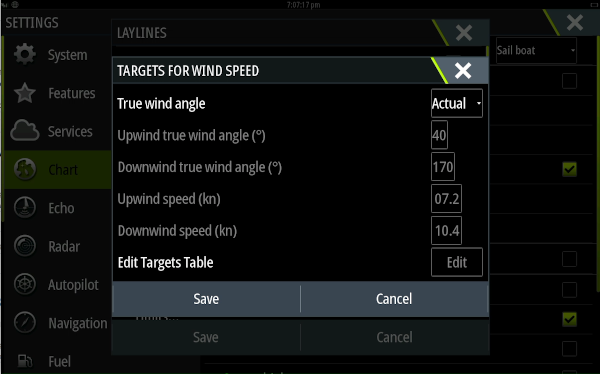
For laylines on charts: **Settings → Chart → Laylines → Targets → True wind angle → Actual**.
|
|
224
|
+
|
|
225
|
+
### Garmin / Raymarine / other NMEA 2000
|
|
226
|
+
|
|
227
|
+
Use a Signal K → NMEA 2000 gateway plugin (such as `canboat` or `signalk-to-n2k`) to forward paths to the PGN fields your plotter expects for performance data. Consult your plotter's documentation for the relevant PGNs — most support Polar Speed, Target TWA, and VMG.
|
|
228
|
+
|
|
229
|
+
### OpenCPN / KIP / other Signal K displays
|
|
230
|
+
|
|
231
|
+
Subscribe directly to the paths listed in the Outputs section above.
|
|
232
|
+
|
|
233
|
+
### Full-screen polar plotter
|
|
234
|
+
|
|
235
|
+
The plugin includes a separate full-screen polar plotter page at:
|
|
236
|
+
|
|
237
|
+
```
|
|
238
|
+
http://<your-server>:<port>/signalk-polar-performance-plugin/plotter.html
|
|
239
|
+
```
|
|
240
|
+
|
|
241
|
+
This is a dark-themed, full-screen canvas display suitable for a chartplotter or secondary monitor. It shows all library curves, the live TWS curve, and the performance dots, and updates in real time.
|
|
242
|
+
|
|
243
|
+
---
|
|
244
|
+
|
|
245
|
+
## Data quality and warnings
|
|
246
|
+
|
|
247
|
+
The webapp shows warnings whenever something prevents accurate calculation:
|
|
248
|
+
|
|
249
|
+
| Warning | Cause |
|
|
250
|
+
|---------|-------|
|
|
251
|
+
| *True wind speed — no data* | `environment.wind.speedTrue` is not arriving from Signal K. |
|
|
252
|
+
| *True wind angle — no data* | `environment.wind.angleTrueWater` is not arriving. |
|
|
253
|
+
| *Boat speed — no data* | `navigation.speedThroughWater` (or SOG) is not arriving. |
|
|
254
|
+
| *No polar loaded* | No active polar is configured. Select a polar from the settings tab. Or go to the Polars tab and store a canonical polar resource first. |
|
|
255
|
+
| *Sailing in irons* | TWA is below the minimum angle in the polar. No output is produced. |
|
|
256
|
+
| *Pinching* | TWA is between the minimum polar angle and the beat angle. Values come from the extrapolated beat zone. |
|
|
257
|
+
| *Extrapolated beyond run angle* | TWA is deeper than the run angle. Values come from the cosine-VMG extrapolation model. |
|
|
258
|
+
| *Wind speed below/above polar range* | TWS is outside the range covered by the polar. Values are extrapolated from the nearest TWS entry. |
|
|
259
|
+
|
|
260
|
+
---
|
|
261
|
+
|
|
262
|
+
## Input data quality
|
|
263
|
+
|
|
264
|
+
Performance calculations are only as good as the inputs. A few things are worth checking before relying on the output:
|
|
265
|
+
|
|
266
|
+
- **True wind** must already be correctly calculated. If your setup uses a basic instrument or the Signal K Derived Data plugin, check that the calculation is using the right boat speed source and that heading is calibrated. The [Advanced Wind plugin](https://github.com/htool/advancedWind) provides additional corrections for sensor mounting angle, heel, mast movement, and upwash if your true wind data quality is poor.
|
|
267
|
+
- **Boat speed calibration** has a direct effect on polar ratio calculations. A 3 % paddlewheel error produces a 3 % offset in `performance.polarSpeedRatio`. The [Speed and Current plugin](https://github.com/htool/speedandcurrent) can automate paddlewheel calibration.
|
|
268
|
+
- **Data consistency:** the plugin uses its own internal smoother for all inputs.
|
|
269
|
+
|
|
270
|
+
---
|
|
271
|
+
|
|
272
|
+
## For integrators and API users
|
|
273
|
+
|
|
274
|
+
If you want to automate polar management or consume the plugin as a canonical polar provider, use the developer reference:
|
|
275
|
+
|
|
276
|
+
- [Developer reference](docs/developer-reference.md) for the canonical `polarTable` structure and the plugin REST API.
|
|
277
|
+
- [openApi.json](openApi.json) for the authoritative machine-readable contract.
|
|
278
|
+
|
|
279
|
+
---
|
|
280
|
+
|
|
281
|
+
## Known limitations
|
|
282
|
+
|
|
283
|
+
- Heel angle is not taken into account in the polar lookup. Most ORC polars are upright polars.
|
|
284
|
+
- Polar storage is canonical-only. Text and ORC imports are conversion inputs; they are stored internally as canonical `polarTable` resources.
|
|
285
|
+
|
|
101
286
|
|
|
102
287
|
|
|
103
288
|
|