sidekick-agent-hub 0.26.4 → 0.26.6
This diff represents the content of publicly available package versions that have been released to one of the supported registries. The information contained in this diff is provided for informational purposes only and reflects changes between package versions as they appear in their respective public registries.
- package/README.md +62 -45
- package/dist/sidekick-cli.mjs +18 -10
- package/dist/sidekick-main.mjs +612 -651
- package/package.json +1 -1
package/README.md
CHANGED
|
@@ -4,10 +4,12 @@ Full-screen terminal dashboard for monitoring AI agent sessions — standalone,
|
|
|
4
4
|
|
|
5
5
|
|
|
6
6
|
|
|
7
|
-
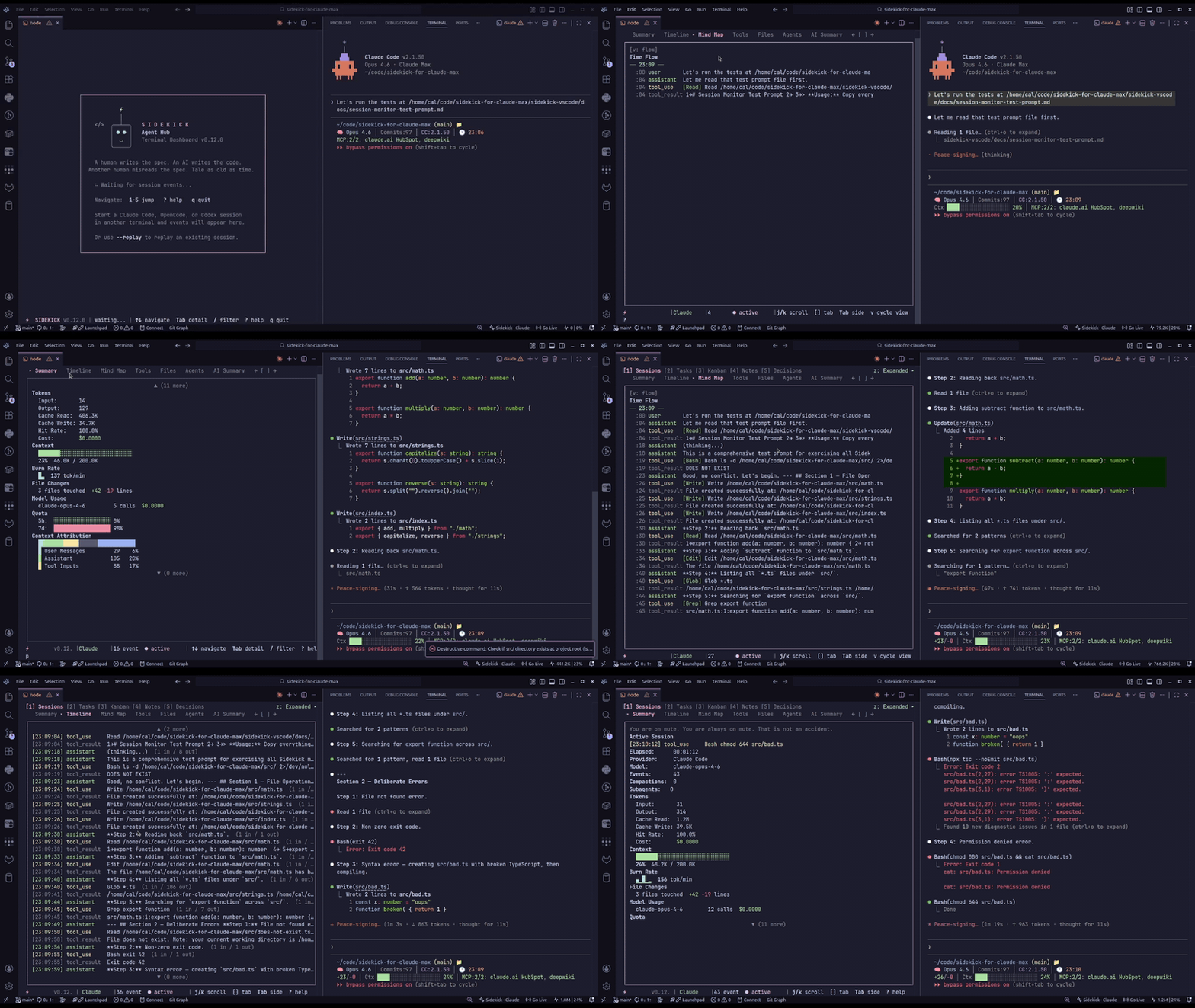
Sidekick CLI reads from `~/.config/sidekick/` — the same data files the [VS Code extension](https://marketplace.visualstudio.com/items?itemName=CesarAndresLopez.sidekick-for-max) writes. Browse sessions, tasks, decisions, knowledge notes, mind maps, and more in an interactive terminal UI.
|
|
7
|
+
Sidekick CLI reads from `~/.config/sidekick/` (`%APPDATA%\sidekick\` on Windows) — the same data files the [VS Code extension](https://marketplace.visualstudio.com/items?itemName=CesarAndresLopez.sidekick-for-max) writes. Browse sessions, tasks, decisions, knowledge notes, mind maps, and more in an interactive terminal UI.
|
|
8
8
|
|
|
9
9
|
## What's New
|
|
10
10
|
|
|
11
|
+
- **0.26.6: `sidekick accounts`** — an interactive picker plus `list`, `add`, `switch`, `login`, `remove`, `shell`, `env`, `undo`, `doctor`, and `config` subcommands. Logins you already use are registered automatically, every switch is verified against the live credential store and undoable, expired credentials are refused with a sign-in hint, running apps that keep the previous login are named, and `env` / `shell` run a second account side by side on bash, zsh, fish, PowerShell, and cmd. The dashboard gains an accounts overlay (`A`) and a health-coloured status bar account. `sidekick account --…` flags remain as a deprecated alias.
|
|
12
|
+
- **0.26.5: cheaper dashboard watching** — newer-session detection reconciles each watched-file event with one stat, and catch-up polls cost one stat per unchanged directory instead of walking every session file.
|
|
11
13
|
- **0.26.4: sharper authentication and policy guidance** — AI summary failures recognize expired-login and re-authentication messages with guidance matched to the credential kind, distinguish a rejected refresh token from an expired conversation, and treat `Permission denied by policy` (including HTTP 403) as an execution-policy denial.
|
|
12
14
|
- **0.26.3: provider failure diagnosis and status evidence** — AI summary failures distinguish authentication, provider sessions, service, connection, timeout, rate-limit, execution-policy, runtime, and context-limit problems with provider-specific guidance, without signing in, switching providers, or replaying. `sidekick status`, the dashboard, and `doctor` show unavailable or partial public status instead of implying normal operation, and `status --json` adds `serviceStatus` with an `availability` discriminator.
|
|
13
15
|
- **0.26.2: reliable dashboard replay** — complete-line checkpoints preserve Unicode and parser context. Live-only runs leave complete-history caches intact; OpenCode replays history when requested.
|
|
@@ -55,7 +57,7 @@ OpenCode session data lives in OpenCode's platform-specific data directory:
|
|
|
55
57
|
|
|
56
58
|
- Linux: `~/.local/share/opencode/`
|
|
57
59
|
- macOS: `~/Library/Application Support/opencode/`
|
|
58
|
-
- Windows: `%APPDATA
|
|
60
|
+
- Windows: `%LOCALAPPDATA%\opencode\` (falls back to `%APPDATA%`)
|
|
59
61
|
|
|
60
62
|
If `sqlite3` is missing or not executable in the current shell environment, Sidekick prints an actionable OpenCode-specific notice instead of silently failing session detection.
|
|
61
63
|
|
|
@@ -63,22 +65,22 @@ If `sqlite3` is missing or not executable in the current shell environment, Side
|
|
|
63
65
|
|
|
64
66
|
```bash
|
|
65
67
|
sidekick dashboard [options]
|
|
66
|
-
sidekick tasks|decisions|notes|stats|import|blocks|daily|weekly|monthly|sessions|quota|status|
|
|
67
|
-
sidekick today|doctor|statusline|mcp [options]
|
|
68
|
+
sidekick tasks|decisions|notes|stats|import|blocks|daily|weekly|monthly|sessions|quota|status|accounts|handoff|search|context|extract [options]
|
|
69
|
+
sidekick dump|history|report|peak|today|doctor|statusline|mcp [options]
|
|
68
70
|
sidekick tasks add|tasks done|note add|decision add [args]
|
|
69
71
|
```
|
|
70
72
|
|
|
71
|
-
The standalone commands
|
|
73
|
+
The standalone commands run one-shot queries and print to stdout; only `dashboard` opens the TUI. All accept the global `--project` and `--provider` flags.
|
|
72
74
|
|
|
73
|
-
| Flag | Description
|
|
74
|
-
| ---------------------- |
|
|
75
|
-
| `--project <path>` | Override project path (default: current working directory)
|
|
76
|
-
| `--provider <id>` | Session provider: `claude-code`, `opencode`, `codex`, or `auto` (default)
|
|
77
|
-
| `--no-color` | Disable colored output (also honors `NO_COLOR`)
|
|
78
|
-
| `--offline` | Price from the cached catalog only (also `SIDEKICK_OFFLINE=1`)
|
|
79
|
-
| `--output-file <path>` | Write a command's stdout to a file, without colour codes
|
|
80
|
-
| `--session <id>` | Follow a specific session by ID
|
|
81
|
-
| `--replay` | Replay existing events from the beginning before streaming live
|
|
75
|
+
| Flag | Description |
|
|
76
|
+
| ---------------------- | ---------------------------------------------------------------------------------- |
|
|
77
|
+
| `--project <path>` | Override project path (default: current working directory) |
|
|
78
|
+
| `--provider <id>` | Session provider: `claude-code`, `opencode`, `codex`, or `auto` (default) |
|
|
79
|
+
| `--no-color` | Disable colored output (also honors `NO_COLOR`) |
|
|
80
|
+
| `--offline` | Price from the cached catalog only (also `SIDEKICK_OFFLINE=1`) |
|
|
81
|
+
| `--output-file <path>` | Write a command's stdout to a file, without colour codes |
|
|
82
|
+
| `--session <id>` | Follow a specific session by ID (`dashboard`, `dump`, `report`, `handoff open`) |
|
|
83
|
+
| `--replay` | Replay existing events from the beginning before streaming live (`dashboard` only) |
|
|
82
84
|
|
|
83
85
|
## Daily Brief & Statusline
|
|
84
86
|
|
|
@@ -95,12 +97,12 @@ sidekick statusline
|
|
|
95
97
|
sidekick doctor
|
|
96
98
|
```
|
|
97
99
|
|
|
98
|
-
Diagnose project identity, sessions, accounts, providers, and dependencies in one typed health report — the same diagnostics behind the VS Code `Sidekick: Run Doctor` command. Global flags `--project
|
|
100
|
+
Diagnose project identity, sessions, accounts, providers, and dependencies in one typed health report — the same diagnostics behind the VS Code `Sidekick: Run Doctor` command. Global flags `--project`, `--provider`, and `--json` also apply.
|
|
99
101
|
|
|
100
102
|
## Billing Blocks
|
|
101
103
|
|
|
102
104
|
```bash
|
|
103
|
-
sidekick blocks [--active | --recent | --since <time>] [--csv]
|
|
105
|
+
sidekick blocks [--active | --recent | --since <time>] [--csv] [--no-cache]
|
|
104
106
|
```
|
|
105
107
|
|
|
106
108
|
Five-hour billing blocks computed from session logs (ccusage-style: a block opens at the first usage event, aligned to the UTC hour, lasts five hours, and a longer gap opens a new one). Each block shows its cache-inclusive token total, cost with provenance, burn rate, and — for the open block — projected end-of-block tokens and cost plus the time remaining. Sessions are read once and cached by size and mtime under the Sidekick config directory. When the status line has persisted an official Claude Code rate-limit sample, it is shown beneath the local estimate for comparison. `--since` accepts an ISO date, `YYYY-MM-DD`, or a relative window such as `7d`; `--json` prints the full report and `--csv` one row per block.
|
|
@@ -116,7 +118,7 @@ Fold finished sessions from every provider into the history store that `sidekick
|
|
|
116
118
|
## Usage Reports
|
|
117
119
|
|
|
118
120
|
```bash
|
|
119
|
-
sidekick daily|weekly|monthly|sessions [--since <time>] [--until <time>] [--breakdown] [--by-project] [--utc] [--csv]
|
|
121
|
+
sidekick daily|weekly|monthly|sessions [--since <time>] [--until <time>] [--breakdown] [--by-project] [--utc] [--csv] [--no-cache]
|
|
120
122
|
```
|
|
121
123
|
|
|
122
124
|
Usage computed straight from session logs — no VS Code extension or history store required — for every provider with session data side by side (`--provider` narrows to one). Rows are bucketed by the time of each usage event on the local calendar (`--utc` for UTC), so a session that crosses midnight is split across both days; weeks start on Monday. `--breakdown` adds per-model sub-rows, `--by-project` groups by project, `sessions` prints one row per session, and `--json` / `--csv` feed scripts. Defaults: 30 days, 12 weeks, 12 calendar months, 30 days.
|
|
@@ -132,12 +134,12 @@ sidekick decision add "Store history as JSONL" --rationale "Append-only, crash-s
|
|
|
132
134
|
|
|
133
135
|
Capture tasks, knowledge notes, and decisions from the terminal without opening the dashboard. Writes use the shared atomic merge writers, so concurrent captures from VS Code or other terminals are never lost (the extension's Kanban board picks them up live).
|
|
134
136
|
|
|
135
|
-
| Command | Flags
|
|
136
|
-
| ---------------------------- |
|
|
137
|
-
| `tasks add <subject>` | `--description <text>`, `--tags <csv>`
|
|
138
|
-
| `tasks done <id>` | Accepts a task ID or unique prefix
|
|
139
|
-
| `note add <content>` | `--file <path>`, `--title <title>`, `--type <type>` (`gotcha`/`pattern`/`guideline`/`tip`), `--importance <level
|
|
140
|
-
| `decision add <description>` | `--rationale <text>`, `--chosen <text>`, `--alternatives <csv>`, `--tags <csv>`
|
|
137
|
+
| Command | Flags |
|
|
138
|
+
| ---------------------------- | -------------------------------------------------------------------------------------------------------------------------------------------------------------------------------------------------------------------------------- |
|
|
139
|
+
| `tasks add <subject>` | `--description <text>`, `--tags <csv>` |
|
|
140
|
+
| `tasks done <id>` | Accepts a task ID or unique prefix |
|
|
141
|
+
| `note add <content>` | `--file <path>`, `--title <title>`, `--type <type>` (`gotcha`/`pattern`/`guideline`/`tip`, default `tip`), `--importance <level>` (`critical`/`high`/`medium`/`low`, default `medium`), `--tags <csv>`; `--file` defaults to `.` |
|
|
142
|
+
| `decision add <description>` | `--rationale <text>`, `--chosen <text>`, `--alternatives <csv>`, `--tags <csv>` |
|
|
141
143
|
|
|
142
144
|
The global flag `--project` also applies.
|
|
143
145
|
|
|
@@ -172,6 +174,7 @@ Export session data as text, markdown, or JSON.
|
|
|
172
174
|
| `--session <id>` | Target a specific session (default: most recent) |
|
|
173
175
|
| `--list` | List available sessions and exit |
|
|
174
176
|
| `--limit <n>` | Maximum sessions listed with `--list` (default: 50) |
|
|
177
|
+
| `--csv` | With `--list`, print the session table as CSV |
|
|
175
178
|
|
|
176
179
|
Global flags `--project` and `--provider` also apply.
|
|
177
180
|
|
|
@@ -290,7 +293,7 @@ Codex quota commands and `sidekick mcp`'s `get_quota_status` always ask the API
|
|
|
290
293
|
|
|
291
294
|
Use `--json` for machine-readable output; it includes `resolution`, `source`, `capturedSource`, `freshness`, and `ageMs`, plus `failureKind`, `httpStatus`, and `retryAfterMs` on unavailable responses. The `failure` descriptor explains an API failure even when fallback data is available. Claude Code requires active credentials (read from the system Keychain on macOS, or `~/.claude/.credentials.json` on Linux/Windows).
|
|
292
295
|
|
|
293
|
-
|
|
296
|
+
`sidekick quota` shows the currently logged-in account email above the quota bars — resolved live from the provider's auth, so it stays correct even after a native `claude login` / `codex login`.
|
|
294
297
|
|
|
295
298
|
Use `sidekick quota --all` to show Claude and Codex quota together in a single run, plus z.ai when API quota is available or z.ai traffic is active. Each provider degrades independently — if one provider's quota can't be fetched, its error is shown inline and the others still render (the command never aborts on a single provider's failure). The combined view uses the same policy as the single-provider view; live values can change between calls. `--all --json` emits a provider-keyed payload for dashboards and automation.
|
|
296
299
|
|
|
@@ -310,36 +313,48 @@ Mon ··▒▒▓█▒░· ·░░·· ·▒▓
|
|
|
310
313
|
Peak 92% · Avg 38% · Samples 612
|
|
311
314
|
```
|
|
312
315
|
|
|
313
|
-
Flags: `--weeks <n>` (1-26, default 13), `--provider claude|codex|zai` (default all available, stacked), `--workspace <path>` (default `cwd`), `--window 5h|7d|max` (default `5h`), `--csv`. `--json` emits a `{ workspaceId, weeks, window, providers, generatedAt }` payload — the same shape consumed by the VS Code dashboard's Quota History panel. Cells are local calendar days.
|
|
316
|
+
Flags: `--weeks <n>` (1-26, default 13), `--provider claude|codex|zai` (`claude-code` and `z.ai` are accepted aliases; default all available, stacked), `--workspace <path>` (default `cwd`), `--window 5h|7d|max` (default `5h`), `--csv`. `--json` emits a `{ workspaceId, weeks, window, providers, generatedAt }` payload — the same shape consumed by the VS Code dashboard's Quota History panel. Cells are local calendar days.
|
|
314
317
|
|
|
315
318
|
History is stored at `~/.config/sidekick/quota-history/<workspaceId>/<provider>.jsonl` (mode `0600`, 60-second debounce, 91-day retention). The workspace id is `sha256(realpath)[0..16]`, so the same folder yields the same store whether sampled from the CLI or VS Code.
|
|
316
319
|
|
|
317
320
|
## Account Management
|
|
318
321
|
|
|
319
322
|
```bash
|
|
320
|
-
sidekick
|
|
323
|
+
sidekick accounts [command]
|
|
321
324
|
```
|
|
322
325
|
|
|
323
|
-
|
|
326
|
+
Keep several Claude Code and Codex logins on one machine and switch between them without `/logout` cycles. Sidekick registers the login you are already using automatically (labelled with its email), verifies every switch by reading the live credential store back, warns about running apps that still hold the previous login, and flags expiring credentials before they fail. Account data is stored in `~/.config/sidekick/accounts/` with strict file permissions and atomic writes with rollback on failure. See the [Account Switcher](https://cesarandreslopez.github.io/sidekick-agent-hub/features/account-switcher/) guide for the per-app reachability table and platform notes.
|
|
327
|
+
|
|
328
|
+
| Command | Description |
|
|
329
|
+
| ------------------------------------------------ | ------------------------------------------------------------------------------------------------------------------------------------------------------------ |
|
|
330
|
+
| `sidekick accounts` | Interactive picker (arrow keys, `Enter` switch, `a` add, `l` sign in again, `r` remove, `s` shell, `u` undo, `?` help, `q` quit). Prints the list when piped |
|
|
331
|
+
| `accounts list` | Saved accounts with health and expiry |
|
|
332
|
+
| `accounts add [--label <name>] [--current] [-y]` | Sign in to a new account in an isolated profile; `--current` registers or relabels the live login |
|
|
333
|
+
| `accounts switch <name> \| --next [--force]` | Make an account active (label, email, id, or unique prefix); `--force` ignores an expired health verdict |
|
|
334
|
+
| `accounts login <name>` | Sign in again to an existing (expired) account, keeping its id and label |
|
|
335
|
+
| `accounts remove <name> [-y]` | Delete a saved account and its credentials (prompts unless `--yes`/`--force`; required for `--json`/non-TTY) |
|
|
336
|
+
| `accounts shell <name> [-- <cmd…>]` | Subshell, or one command, where `claude`/`codex` use the account |
|
|
337
|
+
| `accounts env <name> [--shell <kind>]` | Print the environment for `eval` (`bash`, `zsh`, `fish`, `powershell`, `cmd`; default detected) |
|
|
338
|
+
| `accounts undo` | Revert the last switch |
|
|
339
|
+
| `accounts doctor` | Credential expiry, running apps, Codex credential store, keep-alive state |
|
|
340
|
+
| `accounts config auto-switch <pct\|off>` | Persist the auto-switch quota threshold (continuous auto-switching runs in a long-running host such as VS Code) |
|
|
341
|
+
| `accounts config keep-alive <on\|off\|run>` | Refresh inactive accounts through the official CLIs (the dashboard runs it hourly); `run` executes one pass now |
|
|
342
|
+
|
|
343
|
+
`sidekick accounts` and `accounts list` accept `--provider claude-code|codex|all`; the per-account subcommands accept `claude-code|codex`; `config` takes no provider. The global `--json` applies everywhere. A switch prints `✓ verified` once the live store reads back the new credential, one `!` line per running app that still holds the previous login, and the undo command. A switch to an `expired` or `missing` account is refused with a sign-in hint unless you pass `--force`.
|
|
324
344
|
|
|
325
|
-
|
|
326
|
-
|
|
327
|
-
|
|
328
|
-
|
|
329
|
-
|
|
330
|
-
|
|
331
|
-
|
|
332
|
-
|
|
333
|
-
|
|
334
|
-
| `--switch-to <id>` | Switch to a specific account by email, label, or ID |
|
|
335
|
-
| `--remove <id>` | Remove a saved account by email, label, or ID (prompts for y/N confirmation first) |
|
|
336
|
-
| `-y`, `--yes` / `--force` | Skip the `--remove` confirmation prompt (required for `--json` or non-interactive runs) |
|
|
337
|
-
| `--launcher <name>` | Create an opt-in per-account terminal launcher for the active account |
|
|
338
|
-
| `--auto-switch <pct\|off>` | Persist the auto-switch quota threshold (1–100), or `off` to disable. Continuous auto-switching runs in a long-running host such as VS Code |
|
|
345
|
+
```bash
|
|
346
|
+
sidekick accounts # interactive picker
|
|
347
|
+
sidekick accounts list --json # { accounts, activeByProvider, registeredNow }
|
|
348
|
+
sidekick accounts add --label Work # sign in to a second account; current login untouched
|
|
349
|
+
sidekick accounts switch work # switch by label, email, or id
|
|
350
|
+
eval "$(sidekick accounts env work)" # this shell only: claude/codex use Work
|
|
351
|
+
sidekick accounts shell work -- claude # one claude session as Work
|
|
352
|
+
sidekick accounts doctor # what would break a switch right now
|
|
353
|
+
```
|
|
339
354
|
|
|
340
|
-
|
|
355
|
+
`remove` prints the resolved account and asks for an interactive y/N answer (default No). Pass `-y`/`--yes` to skip the prompt; `--json` and non-TTY contexts require the flag and exit `1` without it — **unattended automation that removes accounts must add `--yes`**.
|
|
341
356
|
|
|
342
|
-
|
|
357
|
+
The legacy `sidekick account --add | --login | --switch | --switch-to <id> | --remove <id> | --launcher <name> | --auto-switch <pct|off>` flags still work and print the equivalent `sidekick accounts …` command on stderr. `--launcher` writes a POSIX launcher script; `accounts shell` and `accounts env` are the cross-platform replacements.
|
|
343
358
|
|
|
344
359
|
## Dashboard Panels
|
|
345
360
|
|
|
@@ -352,7 +367,7 @@ The dashboard is a two-pane terminal UI. The left side shows a navigable list, t
|
|
|
352
367
|
| 3 | **Kanban** | Task board with status columns |
|
|
353
368
|
| 4 | **Notes** | Knowledge notes attached to files |
|
|
354
369
|
| 5 | **Decisions** | Architectural decisions from sessions |
|
|
355
|
-
| 6 | **Plans** |
|
|
370
|
+
| 6 | **Plans** | Agent plans persisted in the project store from Claude Code, OpenCode, and Codex sessions |
|
|
356
371
|
| 7 | **Events** | Live event stream with type badges, timestamps, and keyword-highlighted summaries |
|
|
357
372
|
| 8 | **Charts** | Tool frequency bars, event distribution, activity heatmap, and pattern analysis |
|
|
358
373
|
|
|
@@ -424,10 +439,12 @@ Press `z` to cycle through layout modes:
|
|
|
424
439
|
| `/` | Open filter overlay (supports substring, fuzzy, regex, and date modes — Tab cycles modes) |
|
|
425
440
|
| `x` | Open context menu for selected item |
|
|
426
441
|
| `M` | Toggle mouse capture (turn off to restore terminal text selection/copy) |
|
|
442
|
+
| `A` | Open the accounts overlay (`Enter` switches, `u` undoes the last switch) |
|
|
427
443
|
| `?` | Show help |
|
|
428
444
|
| `R` | Refresh persisted project data (tasks, notes, decisions, plans) from disk |
|
|
429
445
|
| `r` | Generate HTML report for the current session |
|
|
430
446
|
| `V` | Show version / changelog |
|
|
447
|
+
| `Esc` | Clear the filter, close an overlay, or return focus to the side list |
|
|
431
448
|
| `q` / `Ctrl+C` | Quit |
|
|
432
449
|
|
|
433
450
|
## Mouse Support
|
|
@@ -447,7 +464,7 @@ Auto-detects the most recently active session provider:
|
|
|
447
464
|
|
|
448
465
|
- **Claude Code** — `~/.claude/projects/`
|
|
449
466
|
- **OpenCode** — OpenCode's data directory:
|
|
450
|
-
Linux `~/.local/share/opencode/`, macOS `~/Library/Application Support/opencode/`, Windows `%APPDATA
|
|
467
|
+
Linux `~/.local/share/opencode/`, macOS `~/Library/Application Support/opencode/`, Windows `%LOCALAPPDATA%\opencode\` (falls back to `%APPDATA%`)
|
|
451
468
|
- **Codex** — `~/.codex/`
|
|
452
469
|
|
|
453
470
|
Override with `--provider claude-code`, `--provider opencode`, or `--provider codex`.
|