si-overnight 0.1.2 → 0.1.3
This diff represents the content of publicly available package versions that have been released to one of the supported registries. The information contained in this diff is provided for informational purposes only and reflects changes between package versions as they appear in their respective public registries.
- package/README.md +33 -249
- package/docs/tr/README.md +32 -239
- package/package.json +1 -1
package/README.md
CHANGED
|
@@ -2,276 +2,60 @@
|
|
|
2
2
|
|
|
3
3
|
**English** · [Türkçe](https://github.com/siguelabs/si/blob/main/docs/tr/README.md)
|
|
4
4
|
|
|
5
|
-
Give your coding agent a
|
|
6
|
-
|
|
5
|
+
Give your coding agent a few tasks before bed. It asks what it needs to know,
|
|
6
|
+
works and tests while you're away, and leaves you a report.
|
|
7
7
|
|
|
8
|
-
|
|
9
|
-
Codex, Claude Code, Google Antigravity, and pi. The skill supplies the workflow;
|
|
10
|
-
your agent host supplies the tools, permissions, and execution time.
|
|
8
|
+
## Install
|
|
11
9
|
|
|
12
|
-
|
|
13
|
-
|
|
14
|
-
*Illustrative workflow diagram, not a recording of an agent session. Parallel
|
|
15
|
-
workers are optional and require host support.*
|
|
16
|
-
|
|
17
|
-
[Quick start](#quick-start) · [How it works](#how-it-works) ·
|
|
18
|
-
[Hosts and paths](#hosts-and-installation-paths) · [Resume](#resume-a-run) ·
|
|
19
|
-
[Development](#development-and-contributing)
|
|
20
|
-
|
|
21
|
-
## Quick start
|
|
22
|
-
|
|
23
|
-
Install [Node.js](https://nodejs.org/en/download) **20 or newer**, then run this
|
|
24
|
-
one command in your terminal:
|
|
10
|
+
You'll need [Node.js 20 or newer](https://nodejs.org/en/download) and one of the
|
|
11
|
+
coding apps below. Run this command in your terminal.
|
|
25
12
|
|
|
26
13
|
```bash
|
|
27
14
|
npx si-overnight
|
|
28
15
|
```
|
|
29
16
|
|
|
30
|
-
|
|
31
|
-
|
|
32
|
-
1. Choose **Codex**, **Claude Code**, **Antigravity**, **pi**, or **All**.
|
|
33
|
-
2. Choose **All projects** (recommended) or **Current project**.
|
|
34
|
-
3. Open your coding agent's chat and run the skill command printed by the installer.
|
|
35
|
-
|
|
36
|
-
No repository clone, Python, or CLI flags are required. All projects installs the
|
|
37
|
-
skill in your user directory so you can use it across projects. Current project
|
|
38
|
-
installs it in the directory where you ran the command. You can also spell the
|
|
39
|
-
installer command as `npx si-overnight install`.
|
|
40
|
-
|
|
41
|
-
For example, in Codex:
|
|
42
|
-
|
|
43
|
-
```text
|
|
44
|
-
$si-overnight
|
|
45
|
-
Tonight, fix the checkout bugs in issues #12 and #18.
|
|
46
|
-
Ask me for the remaining decisions before I leave.
|
|
47
|
-
Work for at most six hours from the start of this run.
|
|
48
|
-
```
|
|
49
|
-
|
|
50
|
-
Replace the tasks and deadline with your own. The agent inspects the project and
|
|
51
|
-
collects the missing decisions before implementation starts. A bare invocation
|
|
52
|
-
starts intake; it does not authorize an unspecified night of changes.
|
|
53
|
-
|
|
54
|
-
### Scripted and source installation
|
|
55
|
-
|
|
56
|
-
For automation, choose the host and scope explicitly:
|
|
57
|
-
|
|
58
|
-
```bash
|
|
59
|
-
npx --yes si-overnight --platform all --project /absolute/path/to/project
|
|
60
|
-
npx --yes si-overnight --platform codex --scope user
|
|
61
|
-
```
|
|
62
|
-
|
|
63
|
-
To try the current package without a registry release, run from this repository:
|
|
64
|
-
|
|
65
|
-
```bash
|
|
66
|
-
npm pack --ignore-scripts
|
|
67
|
-
npm exec --yes --package ./si-overnight-0.1.2.tgz -- si-overnight --platform codex --project /absolute/path/to/project
|
|
68
|
-
```
|
|
69
|
-
|
|
70
|
-
Installing the npm package, including globally, only makes the installer command
|
|
71
|
-
available. It does not install skills automatically or launch an agent. Run the
|
|
72
|
-
installer explicitly, then invoke the skill in your host.
|
|
17
|
+
If npm asks whether to install the package, press Enter to continue.
|
|
73
18
|
|
|
74
|
-
|
|
19
|
+
1. Pick your coding app. Choose **All** if you use more than one.
|
|
20
|
+
2. Pick **All projects** to use the skill across your projects, or **Current project** for the folder you're in.
|
|
21
|
+
3. Open your project in your coding app. In its chat, enter the command the installer shows you.
|
|
75
22
|
|
|
76
|
-
|
|
77
|
-
|
|
78
|
-
The agent reads project instructions, existing changes, build commands, and test
|
|
79
|
-
setup. For **each new night**, it asks you to choose a mode unless you have already
|
|
80
|
-
chosen one for that run:
|
|
81
|
-
|
|
82
|
-
| Mode | After the primary tasks |
|
|
23
|
+
| Coding app | Command to enter in the app's chat |
|
|
83
24
|
| --- | --- |
|
|
84
|
-
|
|
|
85
|
-
|
|
|
86
|
-
|
|
87
|
-
|
|
88
|
-
that run's mode and scope.
|
|
89
|
-
|
|
90
|
-
Before you leave, the agent batches the consequential questions:
|
|
91
|
-
|
|
92
|
-
- What outcomes matter most, and what proves they are done?
|
|
93
|
-
- Which backup tasks or discovery areas are allowed? Are dependency changes or broad refactors included?
|
|
94
|
-
- Which paths, APIs, behavior, data, or design decisions must remain unchanged?
|
|
95
|
-
- When should work stop, with a date and timezone or duration? Is there a known spend or token cap?
|
|
96
|
-
- Which tests and services are available? Are access or permission prompts likely?
|
|
97
|
-
- Should delivery be local edits and a report, or are commits, a push/PR, deployment, or other external actions authorized?
|
|
98
|
-
|
|
99
|
-
It reuses answers already in the conversation and checks likely blockers while
|
|
100
|
-
you can still respond. Your answers authorize the agreed work; no extra start
|
|
101
|
-
confirmation is needed. Unanswered questions remain unanswered when you go offline.
|
|
102
|
-
|
|
103
|
-
### 2. Implement, test, review, checkpoint
|
|
104
|
-
|
|
105
|
-
The agent saves the run contract and repeats this loop while useful authorized
|
|
106
|
-
work and time remain:
|
|
107
|
-
|
|
108
|
-
1. Read the checkpoint; check scope, time, and any observable budget.
|
|
109
|
-
2. Pick the highest-priority unblocked task and implement a bounded change.
|
|
110
|
-
3. Run focused tests, fix demonstrated regressions, and run required broader checks.
|
|
111
|
-
4. Review the diff for correctness, scope, and unrelated changes.
|
|
112
|
-
5. Save the evidence, work in progress, and next action before continuing.
|
|
113
|
-
|
|
114
|
-
Existing user edits are preserved. A blocked task is recorded while independent
|
|
115
|
-
work continues. Repeated attempts without new evidence are bounded. Passing tests
|
|
116
|
-
are not rerun merely to consume tokens, and unavailable checks are not reported
|
|
117
|
-
as passing.
|
|
118
|
-
|
|
119
|
-
**Optional subagents:** on hosts that support them, the main agent can coordinate
|
|
120
|
-
independent tasks and assign nonoverlapping file ownership. It may also delegate
|
|
121
|
-
tests or a review, then verify the results. These are task assignments chosen for
|
|
122
|
-
the run, not a built-in team of always-on agents. Every worker shares the same
|
|
123
|
-
scope, deadline, and permissions.
|
|
124
|
-
|
|
125
|
-
### 3. Stop with a useful handoff
|
|
25
|
+
| Codex | `$si-overnight` or pick `si-overnight` from `/skills` |
|
|
26
|
+
| Claude Code | `/si-overnight` |
|
|
27
|
+
| Google Antigravity | `/si-overnight` |
|
|
28
|
+
| pi | `/skill:si-overnight` |
|
|
126
29
|
|
|
127
|
-
|
|
128
|
-
candidate left, the deadline or an observable budget/provider limit is reached,
|
|
129
|
-
all remaining work is blocked, you request a stop, or the host ends execution.
|
|
30
|
+
## Use it tonight
|
|
130
31
|
|
|
131
|
-
|
|
132
|
-
|
|
133
|
-
| File | Contents |
|
|
134
|
-
| --- | --- |
|
|
135
|
-
| `.si-overnight/<run-id>/run.md` | Scope, answers, baseline, task queue, latest checkpoint, and verification evidence. |
|
|
136
|
-
| `.si-overnight/<run-id>/report.md` | Completed outcomes, changed files, test results, unfinished work, stop reason, and a resume prompt. |
|
|
137
|
-
|
|
138
|
-
Run files stay local and out of staging unless you ask to version them. Checkpoints
|
|
139
|
-
are saved after completed tasks, material failed attempts, and permission blockers,
|
|
140
|
-
and before risky operations or context handoffs. See the
|
|
141
|
-
[checkpoint template](skills/si-overnight/references/run-template.md).
|
|
142
|
-
|
|
143
|
-
## Hosts and installation paths
|
|
144
|
-
|
|
145
|
-
`--scope project` installs below the selected project; `--scope user` installs
|
|
146
|
-
below your home directory. Each destination contains `SKILL.md` and its references.
|
|
147
|
-
|
|
148
|
-
| Host / `--platform` | Project path | User path | Invocation |
|
|
149
|
-
| --- | --- | --- | --- |
|
|
150
|
-
| Codex / `codex` | `.agents/skills/si-overnight/` | `~/.agents/skills/si-overnight/` | `$si-overnight` or select via `/skills` |
|
|
151
|
-
| Claude Code / `claude` | `.claude/skills/si-overnight/` | `~/.claude/skills/si-overnight/` | `/si-overnight` |
|
|
152
|
-
| Google Antigravity / `antigravity` | `.agents/skills/si-overnight/` | `~/.gemini/config/skills/si-overnight/` | `/si-overnight` |
|
|
153
|
-
| pi / `pi` | `.pi/skills/si-overnight/` | `~/.pi/agent/skills/si-overnight/` | `/skill:si-overnight` |
|
|
154
|
-
|
|
155
|
-
Codex and Antigravity share a project destination, so `all` installs one copy
|
|
156
|
-
there. For other Agent Skills-compatible hosts, copy `skills/si-overnight/` into
|
|
157
|
-
the host's documented skill directory and use its invocation mechanism. If a host
|
|
158
|
-
can read files but has no native skill support, explicitly ask it to read and
|
|
159
|
-
follow `SKILL.md`; that does not register a slash command.
|
|
160
|
-
|
|
161
|
-
Paths and commands depend on the installed host version. See
|
|
162
|
-
[compatibility notes and official sources](skills/si-overnight/references/platforms.md).
|
|
163
|
-
|
|
164
|
-
### Installer options
|
|
165
|
-
|
|
166
|
-
```bash
|
|
167
|
-
node bin/si-overnight.mjs --platform claude --platform pi --dry-run
|
|
168
|
-
node bin/si-overnight.mjs --platform codex --scope user
|
|
169
|
-
node bin/si-overnight.mjs --help
|
|
170
|
-
```
|
|
171
|
-
|
|
172
|
-
| Option | Behavior |
|
|
173
|
-
| --- | --- |
|
|
174
|
-
| `--platform <name>` | For scripted installation: `codex`, `claude`, `antigravity`, `pi`, or `all`; repeatable. |
|
|
175
|
-
| `--scope <scope>` | Explicit flags default to `project`; guided setup recommends `user` (All projects). |
|
|
176
|
-
| `--project <path>` | Existing project directory; defaults to the current directory. Used for project scope. |
|
|
177
|
-
| `--dry-run` | Validate and show destinations without writing files. |
|
|
178
|
-
| `--help`, `-h` | Show CLI help. |
|
|
179
|
-
|
|
180
|
-
Guided setup needs an interactive terminal. In CI or scripts, pass `--platform`
|
|
181
|
-
and the desired `--scope` explicitly.
|
|
182
|
-
|
|
183
|
-
The installer leaves identical installations untouched and refuses to overwrite
|
|
184
|
-
different content. To update, review and move the existing skill directory, then
|
|
185
|
-
install again. It checks all destinations before writing, rejects symbolic links
|
|
186
|
-
inside the source or destination tree and below the selected installation root,
|
|
187
|
-
and prevents source/destination overlap. The selected project or home root itself
|
|
188
|
-
may be a directory alias. Avoid concurrent changes to installation directories.
|
|
189
|
-
Installation does not change host permissions or start background processes.
|
|
190
|
-
|
|
191
|
-
A **Python 3 alternative** is available from the repository, with the same
|
|
192
|
-
destinations, dry-run behavior, and protection for existing content:
|
|
193
|
-
|
|
194
|
-
```bash
|
|
195
|
-
python3 scripts/install.py --platform all --project /absolute/path/to/project
|
|
196
|
-
python3 scripts/install.py --platform codex --scope user --dry-run
|
|
197
|
-
```
|
|
198
|
-
|
|
199
|
-
## Execution time and budgets
|
|
200
|
-
|
|
201
|
-
The skill cannot keep a computer awake, restart a stopped agent, renew a quota,
|
|
202
|
-
or create new turns after the host stops. Leave the local machine, session, agent,
|
|
203
|
-
and required services available, or use a host that actually executes remotely.
|
|
204
|
-
A sudden termination may leave only the latest checkpoint; a stopped process
|
|
205
|
-
cannot write a new morning report.
|
|
206
|
-
|
|
207
|
-
A token or spend cap can only be monitored when the host exposes reliable usage
|
|
208
|
-
data. Otherwise usage is recorded as unknown. The skill does not promise to
|
|
209
|
-
consume every available token or wait for quota resets.
|
|
210
|
-
|
|
211
|
-
On Codex versions with Goal mode, you can explicitly start `/goal` with the agreed
|
|
212
|
-
overnight plan. Invoking this skill does not create a goal or schedule. Other
|
|
213
|
-
hosts may need a separately configured runner for repeated invocations; this
|
|
214
|
-
package does not include one. Host approval requirements still apply.
|
|
215
|
-
|
|
216
|
-
## Resume a run
|
|
217
|
-
|
|
218
|
-
Invoke the skill in your host and name the saved checkpoint:
|
|
32
|
+
Here's an example for Codex. Use your app's command on the first line.
|
|
219
33
|
|
|
220
34
|
```text
|
|
221
|
-
|
|
222
|
-
|
|
223
|
-
|
|
35
|
+
$si-overnight
|
|
36
|
+
Fix the bug where clicking Save twice creates two copies.
|
|
37
|
+
Ask me any questions before I leave. Work for up to two hours.
|
|
224
38
|
```
|
|
225
39
|
|
|
226
|
-
|
|
227
|
-
|
|
228
|
-
is retained; an interrupted command is not assumed to have succeeded.
|
|
229
|
-
|
|
230
|
-
## Development and contributing
|
|
231
|
-
|
|
232
|
-
The workflow lives in [`skills/si-overnight/SKILL.md`](skills/si-overnight/SKILL.md).
|
|
233
|
-
Its `references/` directory holds host guidance and the checkpoint template.
|
|
234
|
-
`bin/` and `lib/` contain the dependency-free Node installer; `scripts/install.py`
|
|
235
|
-
is the Python alternative. Installer tests live in `tests/`.
|
|
40
|
+
Before you go, the agent checks your project and asks about the tasks, what to
|
|
41
|
+
leave alone, and when to stop. You choose what it does after the main tasks.
|
|
236
42
|
|
|
237
|
-
|
|
238
|
-
|
|
239
|
-
|
|
240
|
-
Keep changes focused, update both READMEs when behavior changes, and include
|
|
241
|
-
verification evidence with your contribution. Run from the repository root:
|
|
242
|
-
|
|
243
|
-
```bash
|
|
244
|
-
npm test
|
|
245
|
-
python3 -m unittest discover -s tests -v
|
|
246
|
-
```
|
|
43
|
+
- **Queue** works through the backup tasks you agreed on, then stops.
|
|
44
|
+
- **Discover** looks for useful fixes or improvements in the areas you allowed.
|
|
247
45
|
|
|
248
|
-
|
|
249
|
-
|
|
250
|
-
cache, checks the CLI, and compares every installed skill resource byte for byte.
|
|
251
|
-
The tested tarball and SHA-256 digest are retained in the `npm-package` artifact
|
|
252
|
-
for 14 days. No dependency installation or lockfile is needed.
|
|
46
|
+
It works through the tasks, runs tests, and saves its progress. If your app
|
|
47
|
+
supports additional agents, it can give them separate tasks and check their work.
|
|
253
48
|
|
|
254
|
-
|
|
49
|
+
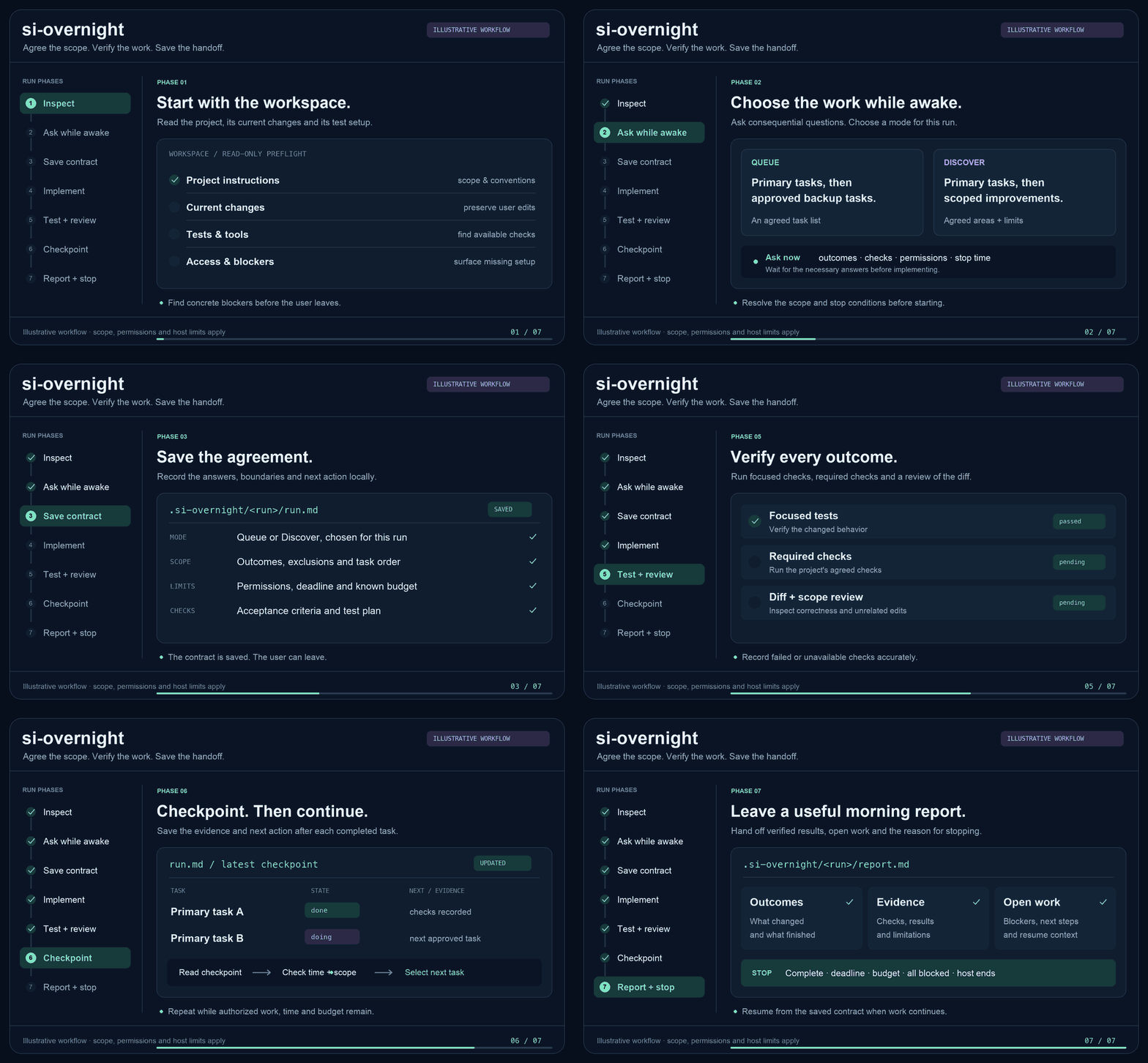
|
|
255
50
|
|
|
256
|
-
|
|
257
|
-
verifies the artifact's checksum, and publishes that same tarball with public
|
|
258
|
-
access and provenance. Prerelease tags are rejected. Only the publish job gets
|
|
259
|
-
OIDC permission; it uses Node.js 24 and checks for npm 11.5.1 or newer. Actions
|
|
260
|
-
are pinned to full commit SHAs and lifecycle scripts are disabled.
|
|
51
|
+
## Check what happened
|
|
261
52
|
|
|
262
|
-
|
|
263
|
-
filename **release.yml**, with no environment, and enable **Allow npm publish**.
|
|
264
|
-
The package record must exist first, and the repository must be public with the
|
|
265
|
-
matching `repository.url`. This workflow requires no `NPM_TOKEN`. Restrict who
|
|
266
|
-
can create release tags through GitHub repository rulesets.
|
|
53
|
+
Look in `.si-overnight/` inside your project. Each run has its own folder.
|
|
267
54
|
|
|
268
|
-
|
|
269
|
-
|
|
270
|
-
See [npm staged publishing](https://docs.npmjs.com/staged-publishing/),
|
|
271
|
-
[Trusted Publishers](https://docs.npmjs.com/trusted-publishers/), and
|
|
272
|
-
[provenance requirements](https://docs.npmjs.com/generating-provenance-statements/).
|
|
55
|
+
- `report.md` tells you what changed, which tests ran, and what's left.
|
|
56
|
+
- `run.md` saves the plan and progress. To resume, run the skill again and give it this file's path.
|
|
273
57
|
|
|
274
|
-
|
|
58
|
+
Keep your coding session running. If your computer sleeps or the app stops, you
|
|
59
|
+
can pick up from `run.md` when you return.
|
|
275
60
|
|
|
276
|
-
|
|
277
|
-
is included in this repository.
|
|
61
|
+
[Installation options, platform details, and development](https://github.com/siguelabs/si/blob/main/docs/development.md)
|
package/docs/tr/README.md
CHANGED
|
@@ -2,268 +2,61 @@
|
|
|
2
2
|
|
|
3
3
|
[English](https://github.com/siguelabs/si/blob/main/README.md) · **Türkçe**
|
|
4
4
|
|
|
5
|
-
|
|
5
|
+
Yatmadan önce kod yazan yapay zekâ aracınla yapılacak işleri belirle.
|
|
6
|
+
`si-overnight`, sen uyurken aracın proje üzerinde çalışmasına ve sabaha bir rapor bırakmasına yardımcı olur.
|
|
6
7
|
|
|
7
|
-
|
|
8
|
-
bir [Agent Skill](https://agentskills.io/). Önce projeyi inceler, sen hâlâ
|
|
9
|
-
çevrimiçiyken gerekli soruları toplar; ardından kararlaştırılan kapsamda çalışır.
|
|
10
|
-
Codex, Claude Code, Google Antigravity ve pi için kurulum aracı içerir.
|
|
8
|
+
## Nasıl kurulur?
|
|
11
9
|
|
|
12
|
-
|
|
10
|
+
Önce Node.js 20 veya üzerini kur. [Node.js’i indir](https://nodejs.org/en/download)
|
|
13
11
|
|
|
14
|
-
|
|
15
|
-
|
|
16
|
-
## Hızlı başlangıç
|
|
17
|
-
|
|
18
|
-
Önce [Node.js](https://nodejs.org/en/download) **20 veya üzerini** kur. Ardından
|
|
19
|
-
terminalde tek komut çalıştır:
|
|
12
|
+
Terminali aç ve şu komutu çalıştır.
|
|
20
13
|
|
|
21
14
|
```bash
|
|
22
15
|
npx si-overnight
|
|
23
16
|
```
|
|
24
17
|
|
|
25
|
-
|
|
26
|
-
|
|
27
|
-
1. **Codex**, **Claude Code**, **Antigravity**, **pi** veya **All** seç.
|
|
28
|
-
2. **All projects** (önerilen) ya da **Current project** seç.
|
|
29
|
-
3. Coding agent'ının sohbetini açıp kurucunun gösterdiği skill komutunu yaz.
|
|
30
|
-
|
|
31
|
-
Repo klonlaman, Python kurman veya CLI bayraklarını bilmen gerekmez. All projects
|
|
32
|
-
skill'i kullanıcı dizinine kurar ve farklı projelerde kullanmanı sağlar. Current
|
|
33
|
-
project komutu çalıştırdığın dizine kurar. Aynı akışı `npx si-overnight install`
|
|
34
|
-
ile de başlatabilirsin.
|
|
35
|
-
|
|
36
|
-
### Betiklerden veya kaynak koddan kurulum
|
|
37
|
-
|
|
38
|
-
Otomasyonda platform ve kapsamı açıkça seç. Bu deponun kök dizininde:
|
|
39
|
-
|
|
40
|
-
```bash
|
|
41
|
-
# Önce kurulum hedeflerini gör.
|
|
42
|
-
node bin/si-overnight.mjs --platform all --project /tam/yol/projen --dry-run
|
|
43
|
-
|
|
44
|
-
# Seçtiğin projeye kur.
|
|
45
|
-
node bin/si-overnight.mjs --platform all --project /tam/yol/projen
|
|
46
|
-
|
|
47
|
-
# Ya da yalnız Codex için kullanıcı genelinde kur.
|
|
48
|
-
node bin/si-overnight.mjs --platform codex --scope user
|
|
49
|
-
```
|
|
50
|
-
|
|
51
|
-
`--project` mevcut bir dizin olmalıdır. Kurulumdan sonra hedef projeyi agent'ında
|
|
52
|
-
aç ve aşağıdaki platform komutlarından biriyle skill'i çağır.
|
|
53
|
-
|
|
54
|
-
### Npm üzerinden kurulum
|
|
55
|
-
|
|
56
|
-
En son yayımlanan sürümü kurmak için:
|
|
57
|
-
|
|
58
|
-
```bash
|
|
59
|
-
npx --yes si-overnight --platform all --project /tam/yol/projen
|
|
60
|
-
```
|
|
61
|
-
|
|
62
|
-
`npm install` tek başına skill'i agent dizinine kopyalamaz; kurulum CLI'sini
|
|
63
|
-
ayrıca çalıştırmalısın.
|
|
64
|
-
|
|
65
|
-
## Hangi platformda nasıl çağırılır?
|
|
66
|
-
|
|
67
|
-
| Platform | Skill'i çağırma | Proje içindeki kurulum dizini |
|
|
68
|
-
| --- | --- | --- |
|
|
69
|
-
| Codex | `$si-overnight` veya `/skills` içinden seç | `.agents/skills/si-overnight/` |
|
|
70
|
-
| Claude Code | `/si-overnight` | `.claude/skills/si-overnight/` |
|
|
71
|
-
| Google Antigravity | `/si-overnight` | `.agents/skills/si-overnight/` |
|
|
72
|
-
| pi | `/skill:si-overnight` | `.pi/skills/si-overnight/` |
|
|
73
|
-
|
|
74
|
-
Kullanıcı genelinde kurulum Codex için `~/.agents/skills/`, Claude Code için
|
|
75
|
-
`~/.claude/skills/`, Antigravity için `~/.gemini/config/skills/`, pi için
|
|
76
|
-
`~/.pi/agent/skills/` altında aynı `si-overnight/` klasörünü oluşturur.
|
|
77
|
-
|
|
78
|
-
Diğer Agent Skills uyumlu araçlarda `skills/si-overnight/` klasörünü aracın
|
|
79
|
-
belgelediği konuma kopyala. Dosya okuyabilen başka bir agente `SKILL.md` dosyasını
|
|
80
|
-
okuyup uygulamasını da söyleyebilirsin. Komutların ve alt agent desteğinin bütün
|
|
81
|
-
platformlarda aynı olduğu varsayılmaz.
|
|
82
|
-
|
|
83
|
-
## Bir gece nasıl ilerler?
|
|
84
|
-
|
|
85
|
-
### 1. Sen uyumadan önce
|
|
86
|
-
|
|
87
|
-
Agent önce proje talimatlarını, mevcut değişiklikleri ve test düzenini inceler.
|
|
88
|
-
Ardından cevabı projeden veya konuşmadan çıkmayan önemli soruları birlikte sorar:
|
|
89
|
-
|
|
90
|
-
- Ana hedefler, öncelikleri ve işin bittiğini gösterecek ölçütler.
|
|
91
|
-
- Bu gece **Liste** mi, **Keşif** mi kullanılacağı.
|
|
92
|
-
- Yedek işler veya keşfe izin verilen alanlar.
|
|
93
|
-
- Dokunulmayacak dosyalar, API davranışları ve tasarım kararları.
|
|
94
|
-
- Çalışma süresi veya saat dilimiyle birlikte bitiş saati; varsa bilinen bütçe.
|
|
95
|
-
- Beklenen testler, gerekli servisler ve erişimler.
|
|
96
|
-
- Teslim biçimi ve commit, PR veya deployment gibi işlemlere verilen yetkiler.
|
|
97
|
-
|
|
98
|
-
Bu gece için cevapladığın soruları yeniden sormaz. Gerekli kararlar tamamlanınca
|
|
99
|
-
kısa planı kaydeder ve ayrıca bir başlama onayı turu üretmeden işe geçer.
|
|
100
|
-
|
|
101
|
-
### 2. Gece modu seçilir
|
|
102
|
-
|
|
103
|
-
| Mod | Ana işler bitince | Ne zaman durur? |
|
|
104
|
-
| --- | --- | --- |
|
|
105
|
-
| **Liste / Queue** | Önceden kararlaştırılan yedek işleri yapar. | Onaylı liste bitince veya başka bir durma koşulu oluşunca. |
|
|
106
|
-
| **Keşif / Discover** | İzin verilen alanlarda kanıta dayalı iyileştirmeler bulur, önceliklendirir ve tek tek uygular. | Yararlı aday kalmayınca veya başka bir durma koşulu oluşunca. |
|
|
107
|
-
|
|
108
|
-
**Her yeni gece bu seçim yeniden sorulur.** Önceki gecenin modu kendiliğinden
|
|
109
|
-
taşınmaz. Kesilen aynı çalışmaya devam ederken mevcut gece sözleşmesi korunur.
|
|
110
|
-
|
|
111
|
-
Keşif modu için somut bir sınır örneği: “`src/cart/` ve `tests/cart/` içinde
|
|
112
|
-
doğrulanabilir bug fix ve regresyon testi yap; bağımlılık veya ödeme API'si
|
|
113
|
-
değiştirme.” Token tüketme isteği tek başına sınırsız proje kapsamı sayılmaz.
|
|
114
|
-
|
|
115
|
-
### 3. Uygula → test et → incele → kaydet
|
|
116
|
-
|
|
117
|
-
Agent sıradaki en önemli, engellenmemiş işi seçer; değişikliği yapar, uygun
|
|
118
|
-
testleri çalıştırır, sonucu inceler ve ilerlemeyi kaydeder. Anlamlı bir hata
|
|
119
|
-
kanıtı varsa düzeltir. Önceden bozuk testleri yeni hatalardan ayırır; çalışmayan
|
|
120
|
-
veya çalıştırılamayan kontrolü geçti diye raporlamaz.
|
|
121
|
-
|
|
122
|
-
Bir iş yeni bir karar ya da erişim gerektiriyorsa onu engeliyle birlikte kaydeder
|
|
123
|
-
ve bağımsız, yetkilendirilmiş işlere devam eder. Aynı engelde yeni kanıt olmadan
|
|
124
|
-
üç başarısız denemeden sonra başka işe geçer. Sırf token harcamak için aynı
|
|
125
|
-
başarılı testleri tekrar tekrar çalıştırmaz.
|
|
18
|
+
npm paketi kurmak için onay isterse Enter’a bas.
|
|
126
19
|
|
|
127
|
-
|
|
20
|
+
1. Kullandığın aracı seç. Hepsine kurmak için **All** seçeneğini kullan.
|
|
21
|
+
2. Tüm projelerinde kullanmak için **All projects**, yalnızca terminalde bulunduğun projeye kurmak için **Current project** seç.
|
|
22
|
+
3. Çalışılacak projeyi yapay zekâ aracında aç ve aşağıdaki komutu aracın **sohbetine** yaz.
|
|
128
23
|
|
|
129
|
-
|
|
130
|
-
bağımsız işler için görev dağıtabilir. Örneğin:
|
|
131
|
-
|
|
132
|
-
| Görev | Sorumluluk |
|
|
24
|
+
| Araç | Sohbette kullanacağın komut |
|
|
133
25
|
| --- | --- |
|
|
134
|
-
|
|
|
135
|
-
|
|
|
136
|
-
|
|
|
137
|
-
|
|
138
|
-
Bu tablo sabit bir agent kadrosu tanımlamaz; görevler ihtiyaca göre seçilir.
|
|
139
|
-
Çakışan dosya yazımlarından kaçınılır, bütün çalışanlar aynı kapsam ve süreye
|
|
140
|
-
tabidir ve ana agent dönen sonuçları doğrular. Alt agent desteği yoksa aynı akış
|
|
141
|
-
tek agent ile yürütülür. Skill bu desteği platforma sonradan eklemez.
|
|
142
|
-
|
|
143
|
-
## Örnek gece isteği
|
|
26
|
+
| Codex | `$si-overnight` veya `/skills` menüsünden `si-overnight` |
|
|
27
|
+
| Claude Code | `/si-overnight` |
|
|
28
|
+
| Google Antigravity | `/si-overnight` |
|
|
29
|
+
| pi | `/skill:si-overnight` |
|
|
144
30
|
|
|
145
|
-
Codex
|
|
31
|
+
Örneğin Codex’te şöyle başlayabilirsin.
|
|
146
32
|
|
|
147
33
|
```text
|
|
148
34
|
$si-overnight
|
|
149
|
-
|
|
150
|
-
|
|
151
|
-
Dokunma: ödeme API kontratları ve mevcut kullanıcı değişiklikleri.
|
|
152
|
-
En fazla 6 saat çalış. Teslim: yerel değişiklikler ve sabah raporu.
|
|
153
|
-
Gerekli diğer kararları ben çevrimiçiyken birlikte sor.
|
|
154
|
-
```
|
|
155
|
-
|
|
156
|
-
Diğer platformlarda ilk satırı o platformun çağırma komutuyla değiştir.
|
|
157
|
-
|
|
158
|
-
## Kayıtlar, sabah raporu ve devam etme
|
|
159
|
-
|
|
160
|
-
Her çalışma hedef projede ayrı bir klasöre yazılır:
|
|
161
|
-
|
|
162
|
-
```text
|
|
163
|
-
.si-overnight/
|
|
164
|
-
└── <run-id>/
|
|
165
|
-
├── run.md # Kapsam, kararlar, işler, son kontrol ve sıradaki adım
|
|
166
|
-
└── report.md # Tamamlananlar, test kanıtları, eksikler ve durma nedeni
|
|
35
|
+
Kaydet düğmesine iki kez basınca oluşan çift kayıt hatasını düzelt.
|
|
36
|
+
Gitmeden önce gerekli soruları sor. En fazla iki saat çalış.
|
|
167
37
|
```
|
|
168
38
|
|
|
169
|
-
|
|
170
|
-
Skill sırf bu dosyaları gizlemek için `.gitignore` veya repo ayarlarını değiştirmez.
|
|
171
|
-
Gizli anahtarlar ve hassas komut çıktıları kayıtlara yazılmaz.
|
|
172
|
-
|
|
173
|
-
Devam örneği:
|
|
174
|
-
|
|
175
|
-
```text
|
|
176
|
-
$si-overnight
|
|
177
|
-
.si-overnight/<run-id>/run.md dosyasındaki çalışmaya devam et.
|
|
178
|
-
Önce kaydı mevcut dosyalarla karşılaştır. Aynı kapsamı koru.
|
|
179
|
-
Eski süre dolduysa bu andan itibaren 2 saatlik yeni pencere kullan.
|
|
180
|
-
```
|
|
181
|
-
|
|
182
|
-
Agent bir komutun kesintiden önce başarıyla bittiğini varsaymaz; mevcut dosyaları,
|
|
183
|
-
sonuçları ve diğer kişilerin değişikliklerini kayıtla karşılaştırır.
|
|
184
|
-
|
|
185
|
-
## Çalışma ne zaman biter?
|
|
186
|
-
|
|
187
|
-
Onaylı işler bittiğinde, kapsam içinde yararlı keşif kalmadığında, süre veya
|
|
188
|
-
gözlemlenebilir kota sınırı dolduğunda, bütün kalan işler engellendiğinde ya da sen
|
|
189
|
-
durmasını istediğinde çalışmayı sonlandırır. Ölçülemeyen kalan kotayı tahmin diye
|
|
190
|
-
sunmaz.
|
|
39
|
+
## Gece neler olur?
|
|
191
40
|
|
|
192
|
-
|
|
193
|
-
|
|
194
|
-
makine/oturum veya gerçekten uzakta çalışan ortam kullanılabilir kalmalıdır.
|
|
195
|
-
Ani kesintide son kayıttan devam edilebilir; durmuş süreç sonradan rapor yazamaz.
|
|
196
|
-
Host'un uzun çalışma özelliği ayrıca kullanılabilir; bu skill kendiliğinden bir
|
|
197
|
-
Goal, zamanlanmış görev veya arka plan runner'ı oluşturmaz.
|
|
41
|
+
Araç önce projeyi inceler. Sen yatmadan eksik kararları sorar. Hangi işin önce
|
|
42
|
+
yapılacağını, nerelere dokunabileceğini ve ne kadar çalışacağını birlikte belirlersiniz.
|
|
198
43
|
|
|
199
|
-
|
|
200
|
-
|
|
201
|
-
| Seçenek | Değer / davranış |
|
|
202
|
-
| --- | --- |
|
|
203
|
-
| `--platform` | Betik kurulumunda `codex`, `claude`, `antigravity`, `pi` veya `all`; tekrarlanabilir. |
|
|
204
|
-
| `--scope` | Bayraklı kurulumda varsayılan `project`; rehberli kurulum `user` (All projects) önerir. |
|
|
205
|
-
| `--project` | Mevcut proje dizini; varsayılan geçerli dizin. Kullanıcı kapsamını değiştirmez. |
|
|
206
|
-
| `--dry-run` | Hedefleri gösterir, dosya yazmaz. |
|
|
207
|
-
| `--help` | Yardımı gösterir. |
|
|
208
|
-
|
|
209
|
-
Rehberli kurulum etkileşimli terminal gerektirir. CI veya betiklerde `--platform`
|
|
210
|
-
ve istediğin `--scope` değerini açıkça ver.
|
|
211
|
-
|
|
212
|
-
Npm CLI'sinde birden fazla platform için bayrağı tekrarla:
|
|
213
|
-
|
|
214
|
-
```bash
|
|
215
|
-
node bin/si-overnight.mjs --platform claude --platform pi --dry-run
|
|
216
|
-
```
|
|
217
|
-
|
|
218
|
-
Kurucu farklı bir mevcut skill'in üzerine yazmaz; içerik aynıysa dosyaları
|
|
219
|
-
değiştirmez. Seçtiğin kökün altındaki kurulum yollarında sembolik bağlantılar
|
|
220
|
-
reddedilir. Açıkça seçilen kökün kendisi bir dizin takma adı olabilir. Güncellemede
|
|
221
|
-
mevcut kurulumu inceleyip taşıdıktan sonra yeniden kur. Kurulum agent izinlerini
|
|
222
|
-
değiştirmez veya çalışmayı başlatmaz.
|
|
223
|
-
|
|
224
|
-
Kaynak kod deposunda Python 3 alternatifi de bulunur:
|
|
225
|
-
|
|
226
|
-
```bash
|
|
227
|
-
python3 scripts/install.py --platform all --project /tam/yol/projen
|
|
228
|
-
```
|
|
229
|
-
|
|
230
|
-
## Geliştirme ve sürüm yayımlama
|
|
231
|
-
|
|
232
|
-
```bash
|
|
233
|
-
npm test
|
|
234
|
-
python3 -m unittest discover -s tests -v
|
|
235
|
-
node .github/scripts/pack-smoke.mjs /tmp/si-overnight-package-check
|
|
236
|
-
```
|
|
44
|
+
Ana işler bitince ne yapacağını her yeni gece için seçersin.
|
|
237
45
|
|
|
238
|
-
|
|
239
|
-
|
|
46
|
+
- **Liste (Queue)** ile araç önceden belirlediğin yedek işleri de yapar ve liste bitince durur.
|
|
47
|
+
- **Keşif (Discover)** ile araç izin verdiğin alanlarda iyileştirmeler bulup uygular.
|
|
240
48
|
|
|
241
|
-
|
|
242
|
-
|
|
243
|
-
değildir.
|
|
49
|
+
Araç değişiklikleri yapar, testleri çalıştırır ve ilerlemesini kaydeder.
|
|
50
|
+
Kullandığın araç destekliyorsa birbirinden bağımsız birkaç işi aynı anda yürütebilir.
|
|
244
51
|
|
|
245
|
-
|
|
246
|
-
SHA-256 özeti `npm-package` artifact'i olarak hazırlanır. Sürümle eşleşen
|
|
247
|
-
`vMAJOR.MINOR.PATCH` etiketi, testler geçtikten sonra aynı paketi npm'e yayımlar.
|
|
248
|
-
Ön sürüm etiketleri mevcut release akışında desteklenmez.
|
|
52
|
+

|
|
249
53
|
|
|
250
|
-
|
|
251
|
-
profilindeki **Staged Packages** üzerinden inceleyip 2FA ile onayla. Yayımlanmış
|
|
252
|
-
aynı isim/sürüm yeniden kullanılamaz. [Staged publishing belgesi](https://docs.npmjs.com/staged-publishing/).
|
|
54
|
+
Kendi bilgisayarında çalışıyorsan gece boyunca bilgisayarın uyanık, yapay zekâ aracın açık kalmalı.
|
|
253
55
|
|
|
254
|
-
|
|
255
|
-
ayarında owner `siguelabs`, repo `si`, workflow `release.yml`, environment boş ve
|
|
256
|
-
**Allow npm publish** açık olmalıdır. Bu OIDC akışı `NPM_TOKEN` secret'ı
|
|
257
|
-
gerektirmez. Yeni bağlantının ilk yayını iki gün içinde yapılmalıdır. Provenance
|
|
258
|
-
için kaynak repo public ve `repository.url` aynı GitHub deposuna bağlı olmalıdır.
|
|
259
|
-
Yayın işi Node.js 24 ve npm ≥11.5.1 kullanır/kontrol eder.
|
|
260
|
-
[Trusted publishing belgesi](https://docs.npmjs.com/trusted-publishers/).
|
|
56
|
+
## Raporu nerede bulurum?
|
|
261
57
|
|
|
262
|
-
|
|
263
|
-
|
|
264
|
-
|
|
265
|
-
[uyumluluk notlarında](../../skills/si-overnight/references/platforms.md) bulunur.
|
|
58
|
+
Projedeki `.si-overnight/<run-id>/report.md` dosyasında tamamlanan işleri, test
|
|
59
|
+
sonuçlarını ve varsa kalan işleri görebilirsin. Çalışma yarıda kalırsa araçtan
|
|
60
|
+
aynı klasördeki `run.md` dosyasını okuyup devam etmesini iste.
|
|
266
61
|
|
|
267
|
-
|
|
268
|
-
değişikliklerinde iki dildeki README'yi birlikte güncelle. Paket şu anda
|
|
269
|
-
**`UNLICENSED`** olarak tanımlıdır; açık kaynak kullanım lisansı verilmemiştir.
|
|
62
|
+
[Platformlara göre kurulum yerleri](https://github.com/siguelabs/si/blob/main/skills/si-overnight/references/platforms.md) · [Geliştirici rehberi](https://github.com/siguelabs/si/blob/main/docs/development.md)
|