shipthis 0.0.22 → 0.0.24
This diff represents the content of publicly available package versions that have been released to one of the supported registries. The information contained in this diff is provided for informational purposes only and reflects changes between package versions as they appear in their respective public registries.
- package/README.md +13 -64
- package/docs/README.md +12 -10
- package/docs/apple/login.md +12 -1
- package/docs/apple/status.md +6 -2
- package/docs/apple.md +1 -1
- package/docs/dashboard.md +13 -1
- package/docs/game/build.md +8 -3
- package/docs/game/create.md +16 -3
- package/docs/game/details.md +21 -4
- package/docs/game/ios.md +13 -236
- package/docs/game.md +15 -12
- package/docs/help.md +1 -1
- package/docs/status.md +4 -4
- package/oclif.manifest.json +37 -37
- package/package.json +1 -1
package/README.md
CHANGED
|
@@ -1,72 +1,21 @@
|
|
|
1
|
-
|
|
2
|
-
=================
|
|
1
|
+
# ShipThis CLI
|
|
3
2
|
|
|
4
|
-
|
|
3
|
+
## Introduction
|
|
5
4
|
|
|
6
|
-
|
|
5
|
+
ShipThis is a platform that helps you manage shipping your [Godot](https://godotengine.org/) games on iOS to the App Store.
|
|
7
6
|
|
|
8
|
-
|
|
9
|
-
[](https://npmjs.org/package/shipthis)
|
|
7
|
+
This is all done with an easy to use command line tool called `shipthis`.
|
|
10
8
|
|
|
9
|
+
You can discover **ShipThis in less than 5 minutes** via our [Quick Start Guide](https://shipthis.cc/docs/quickstart).
|
|
11
10
|
|
|
12
|
-
|
|
13
|
-
* [Introduction](#introduction)
|
|
14
|
-
* [Usage](#usage)
|
|
15
|
-
* [Command Topics](#command-topics)
|
|
16
|
-
<!-- tocstop -->
|
|
11
|
+
## Topics
|
|
17
12
|
|
|
18
|
-
|
|
19
|
-
|
|
20
|
-
```sh-session
|
|
21
|
-
$ npm install -g shipthis
|
|
22
|
-
$ shipthis COMMAND
|
|
23
|
-
running command...
|
|
24
|
-
$ shipthis (--version)
|
|
25
|
-
shipthis/0.0.9 linux-x64 node-v20.17.0
|
|
26
|
-
$ shipthis --help [COMMAND]
|
|
27
|
-
USAGE
|
|
28
|
-
$ shipthis COMMAND
|
|
29
|
-
...
|
|
30
|
-
```
|
|
31
|
-
<!-- usagestop -->
|
|
13
|
+
- [apple](https://shipthis.cc/docs/reference/apple) - Commands that relate to linking your ShipThis account with your Apple Developer Account
|
|
14
|
+
- [game](https://shipthis.cc/docs/reference/game) - Commands that relate to configuring the specific game in the current working directory.
|
|
32
15
|
|
|
33
|
-
|
|
34
|
-
# Command Topics
|
|
16
|
+
## Commands
|
|
35
17
|
|
|
36
|
-
|
|
37
|
-
|
|
38
|
-
|
|
39
|
-
|
|
40
|
-
* [`shipthis apple apiKey import`](docs/apple/apiKey/import.md) - Imports an App Store Connect API Key ZIP file into your ShipThis account
|
|
41
|
-
* [`shipthis apple apiKey status`](docs/apple/apiKey/status.md) - Displays the status of the App Store Connect API Keys in your Apple and ShipThis accounts. The API key is used to automatically publish your games to the App Store.
|
|
42
|
-
* [`shipthis apple certificate`](docs/apple/certificate.md) - Creates an iOS Distribution Certificate in your Apple Developer account and saves it with the private key to your ShipThis account
|
|
43
|
-
* [`shipthis apple certificate create`](docs/apple/certificate/create.md) - Creates an iOS Distribution Certificate in your Apple Developer account and saves it with the private key to your ShipThis account
|
|
44
|
-
* [`shipthis apple certificate export`](docs/apple/certificate/export.md) - Saves the current Apple Distribution Certificate to a ZIP file.
|
|
45
|
-
* [`shipthis apple certificate import`](docs/apple/certificate/import.md) - Imports an iOS Distribution Certificate to your ShipThis account
|
|
46
|
-
* [`shipthis apple certificate status`](docs/apple/certificate/status.md) - Displays the status of the iOS Distribution certificates in your Apple and ShipThis accounts. These are used to sign all of your iOS apps.
|
|
47
|
-
* [`shipthis apple login`](docs/apple/login.md) - Authenticate with Apple - saves the session to the auth file
|
|
48
|
-
* [`shipthis apple status`](docs/apple/status.md) - Shows the status of the Apple authentication and integration
|
|
49
|
-
* [`shipthis dashboard`](docs/dashboard.md) - Opens the web-browser to your ShipThis dashboard
|
|
50
|
-
* [`shipthis game`](docs/game.md) - Commands related to Game Management
|
|
51
|
-
* [`shipthis game build`](docs/game/build.md) - Commands related to builds for a specific game
|
|
52
|
-
* [`shipthis game build download`](docs/game/build/download.md) - Downloads the given build artifact to the specified file
|
|
53
|
-
* [`shipthis game build list`](docs/game/build/list.md) - Lists the builds for successful jobs of a game.
|
|
54
|
-
* [`shipthis game create`](docs/game/create.md) - Create a new game
|
|
55
|
-
* [`shipthis game details`](docs/game/details.md) - Shows and sets the details of a game. If --gameId is not provided it will look in the current directory.
|
|
56
|
-
* [`shipthis game export`](docs/game/export.md) - Downloads the shipthis.json file for a given game into the current directory.
|
|
57
|
-
* [`shipthis game ios`](docs/game/ios.md) - Commands related to the iOS platform for a specific game
|
|
58
|
-
* [`shipthis game ios app`](docs/game/ios/app.md) - Commands related to the App Store App for a specific game
|
|
59
|
-
* [`shipthis game ios profile`](docs/game/ios/profile.md) - Commands related to the App Store Provisioning Profiles for this Game
|
|
60
|
-
* [`shipthis game ios status`](docs/game/ios/status.md) - Shows the Game iOS Platform status. If --gameId is not provided it will look in the current directory.
|
|
61
|
-
* [`shipthis game job`](docs/game/job.md) - Commands related to jobs for a specific game
|
|
62
|
-
* [`shipthis game job list`](docs/game/job/list.md) - Lists the jobs for a game. If --gameId is not provided it will look in the current directory.
|
|
63
|
-
* [`shipthis game job status`](docs/game/job/status.md) - Shows the real-time status of a job.
|
|
64
|
-
* [`shipthis game list`](docs/game/list.md) - Shows a list of all your games
|
|
65
|
-
* [`shipthis game ship`](docs/game/ship.md) - Builds the app (for all platforms with valid credentials) and ships it to the stores
|
|
66
|
-
* [`shipthis game status`](docs/game/status.md) - Shows the Game status. If --gameId is not provided it will look in the current directory.
|
|
67
|
-
* [`shipthis game wizard`](docs/game/wizard.md) - Runs all the steps for the specific platform
|
|
68
|
-
* [`shipthis help`](docs/help.md) - Display help for shipthis.
|
|
69
|
-
* [`shipthis login`](docs/login.md) - Authenticate - will create a new account if one does not exist.
|
|
70
|
-
* [`shipthis status`](docs/status.md) - Displays the current overall status.
|
|
71
|
-
|
|
72
|
-
<!-- commandsstop -->
|
|
18
|
+
- [dashboard](https://shipthis.cc/docs/reference/dashboard) - Opens the web browser to your shipthis.cc dashboard
|
|
19
|
+
- [login](https://shipthis.cc/docs/reference/login) - Signin or create a new account
|
|
20
|
+
- [status](https://shipthis.cc/docs/reference/status) - Display your overall ShipThis account status
|
|
21
|
+
- [help](https://shipthis.cc/docs/reference/help) - Display help for a specific topic or command
|
package/docs/README.md
CHANGED
|
@@ -1,20 +1,22 @@
|
|
|
1
|
-
# CLI Reference
|
|
1
|
+
# ShipThis CLI Reference
|
|
2
2
|
|
|
3
|
-
|
|
3
|
+
## Introduction
|
|
4
4
|
|
|
5
|
-
ShipThis is a platform that helps you manage shipping your [Godot](https://godotengine.org/)
|
|
6
|
-
stores. Currently it supports the Apple App Store however more platforms being developed.
|
|
5
|
+
ShipThis is a platform that helps you manage shipping your [Godot](https://godotengine.org/) games on iOS to the App Store.
|
|
7
6
|
|
|
8
7
|
This is all done with an easy to use command line tool called `shipthis`.
|
|
9
8
|
|
|
10
9
|
You can discover **ShipThis in less than 5 minutes** via our [Quick Start Guide](https://shipthis.cc/docs/quickstart).
|
|
11
10
|
|
|
12
11
|
## Topics
|
|
13
|
-
|
|
14
|
-
- [
|
|
12
|
+
|
|
13
|
+
- [apple](https://shipthis.cc/docs/reference/apple) - Commands that relate to linking your ShipThis account with your Apple Developer Account
|
|
14
|
+
- [game](https://shipthis.cc/docs/reference/game) - Commands that relate to configuring the specific game in the current working directory.
|
|
15
15
|
|
|
16
16
|
## Commands
|
|
17
|
-
|
|
18
|
-
- [
|
|
19
|
-
- [
|
|
20
|
-
- [
|
|
17
|
+
|
|
18
|
+
- [dashboard](https://shipthis.cc/docs/reference/dashboard) - Opens the web browser to your shipthis.cc dashboard
|
|
19
|
+
- [login](https://shipthis.cc/docs/reference/login) - Signin or create a new account
|
|
20
|
+
- [status](https://shipthis.cc/docs/reference/status) - Display your overall ShipThis account status
|
|
21
|
+
- [help](https://shipthis.cc/docs/reference/help) - Display help for a specific topic or command
|
|
22
|
+
|
package/docs/apple/login.md
CHANGED
|
@@ -4,9 +4,20 @@
|
|
|
4
4
|
|
|
5
5
|
Authenticate with Apple - saves the session to the auth file.
|
|
6
6
|
|
|
7
|
+
:::note
|
|
8
|
+
Your Apple Developer credentials never leave your local computer. We recommend
|
|
9
|
+
enabling [two-factor authentication (2FA)](https://support.apple.com/kb/HT204915)
|
|
10
|
+
for your Apple ID.
|
|
11
|
+
:::
|
|
12
|
+
|
|
13
|
+
ShipThis makes use of Apple's APIs to manage your signing certificates, API keys,
|
|
14
|
+
provisioning profiles, bundleIds and apps within the Apple Developer Portal on
|
|
15
|
+
your behalf. To do this, ShipThis generates temporary session cookies which it re-uses between the various
|
|
16
|
+
[apple commands](/docs/reference/apple).
|
|
17
|
+
|
|
7
18
|
## Example
|
|
8
19
|
|
|
9
|
-
[](https://asciinema.org/a/h2wLhEFVy8mLA5dE6hb1gHDyD)
|
|
10
21
|
|
|
11
22
|
|
|
12
23
|
## Help Output
|
package/docs/apple/status.md
CHANGED
|
@@ -2,11 +2,15 @@
|
|
|
2
2
|
|
|
3
3
|
## Description
|
|
4
4
|
|
|
5
|
-
Shows the status of the Apple authentication and integration
|
|
5
|
+
Shows the status of the Apple authentication and integration.
|
|
6
|
+
|
|
7
|
+
If you have authenticated against Apple, it will show **"YES"** for "Authenticated on Apple Developer Portal".
|
|
8
|
+
|
|
9
|
+
To authenticate, please run [`shipthis apple login`](/docs/reference/apple/login).
|
|
6
10
|
|
|
7
11
|
## Example
|
|
8
12
|
|
|
9
|
-
[](https://asciinema.org/a/PPSZ5EUxbdnd3IqCk6vtb2Bmw)
|
|
10
14
|
|
|
11
15
|
## Help Output
|
|
12
16
|
```
|
package/docs/apple.md
CHANGED
|
@@ -1,6 +1,6 @@
|
|
|
1
1
|
# Apple Commands
|
|
2
2
|
|
|
3
|
-
Commands in the Apple topic are prefixed `shithis apple`. They relate to linking your ShipThis account with your Apple Developer Account. You need to be authenticated against ShipThis (by running `shipthis login`) before running the Apple commands.
|
|
3
|
+
Commands in the Apple topic are prefixed `shithis apple`. They relate to linking your ShipThis account with your Apple Developer Account. You need to be authenticated against ShipThis (by running [`shipthis login`](/docs/reference/login)) before running the Apple commands.
|
|
4
4
|
|
|
5
5
|
## Status
|
|
6
6
|
|
package/docs/dashboard.md
CHANGED
|
@@ -2,7 +2,19 @@
|
|
|
2
2
|
|
|
3
3
|
## Description
|
|
4
4
|
|
|
5
|
-
Opens the web-browser to your ShipThis dashboard
|
|
5
|
+
Opens the web-browser to your ShipThis dashboard.
|
|
6
|
+
|
|
7
|
+
:::note
|
|
8
|
+
ShipThis generates single-use links which will automatically log you into shipthis.cc in your browser.
|
|
9
|
+
:::
|
|
10
|
+
|
|
11
|
+
|
|
12
|
+
|
|
13
|
+
You need to have authenticated with [`shipthis login`](/docs/reference/login) first.
|
|
14
|
+
|
|
15
|
+
## Example
|
|
16
|
+
|
|
17
|
+
[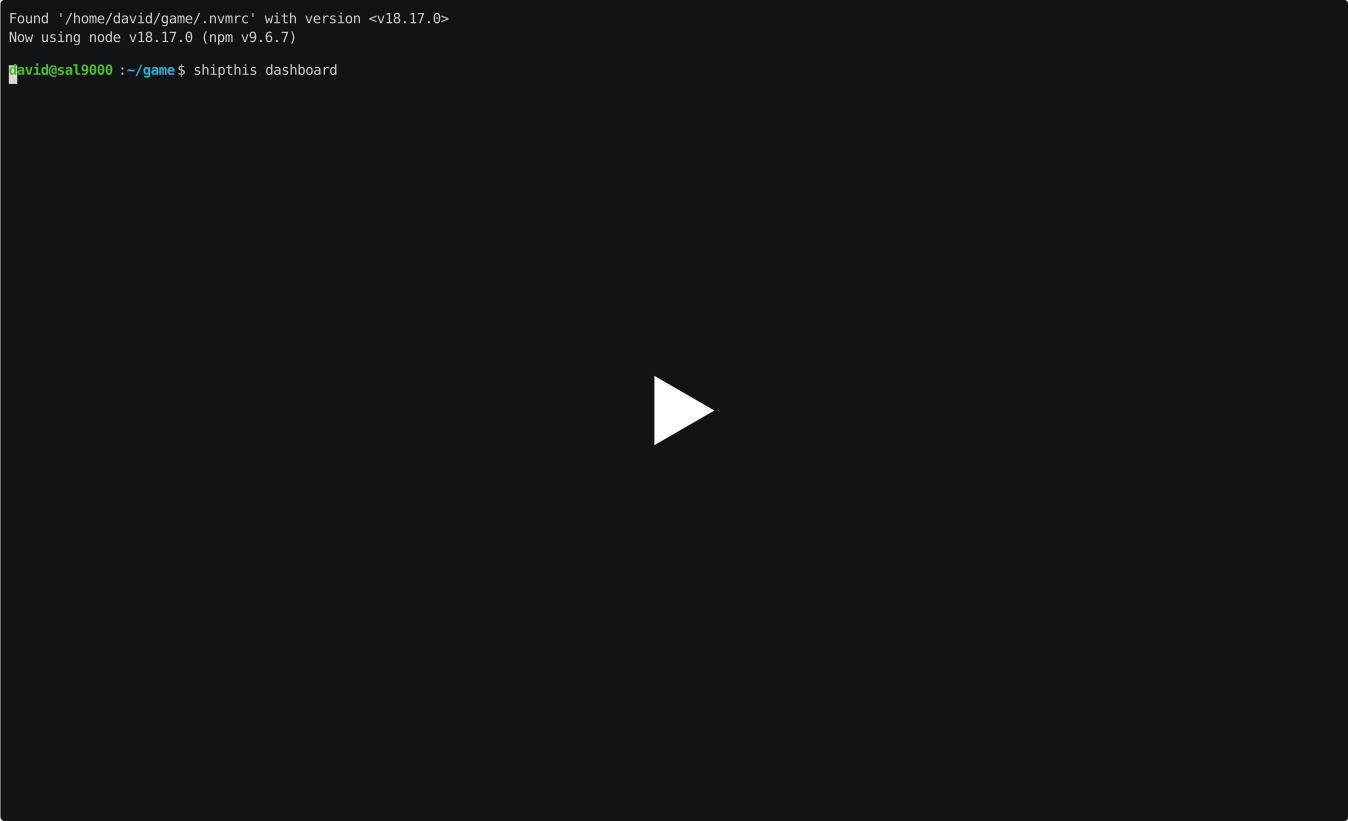](https://asciinema.org/a/J7A5mafE3kCM6yGLpuVBmEQgh)
|
|
6
18
|
|
|
7
19
|
## Help Output
|
|
8
20
|
|
package/docs/game/build.md
CHANGED
|
@@ -1,10 +1,15 @@
|
|
|
1
|
-
#
|
|
1
|
+
# Topic: Game Build
|
|
2
2
|
|
|
3
|
-
Commands
|
|
3
|
+
Commands in the Game Build topic are prefixed `shipthis game build`. They relate
|
|
4
|
+
to managing completed builds of your game.
|
|
4
5
|
|
|
6
|
+
ShipThis allows you to list and download your builds.
|
|
5
7
|
|
|
6
|
-
##
|
|
8
|
+
## Example
|
|
9
|
+
|
|
10
|
+
[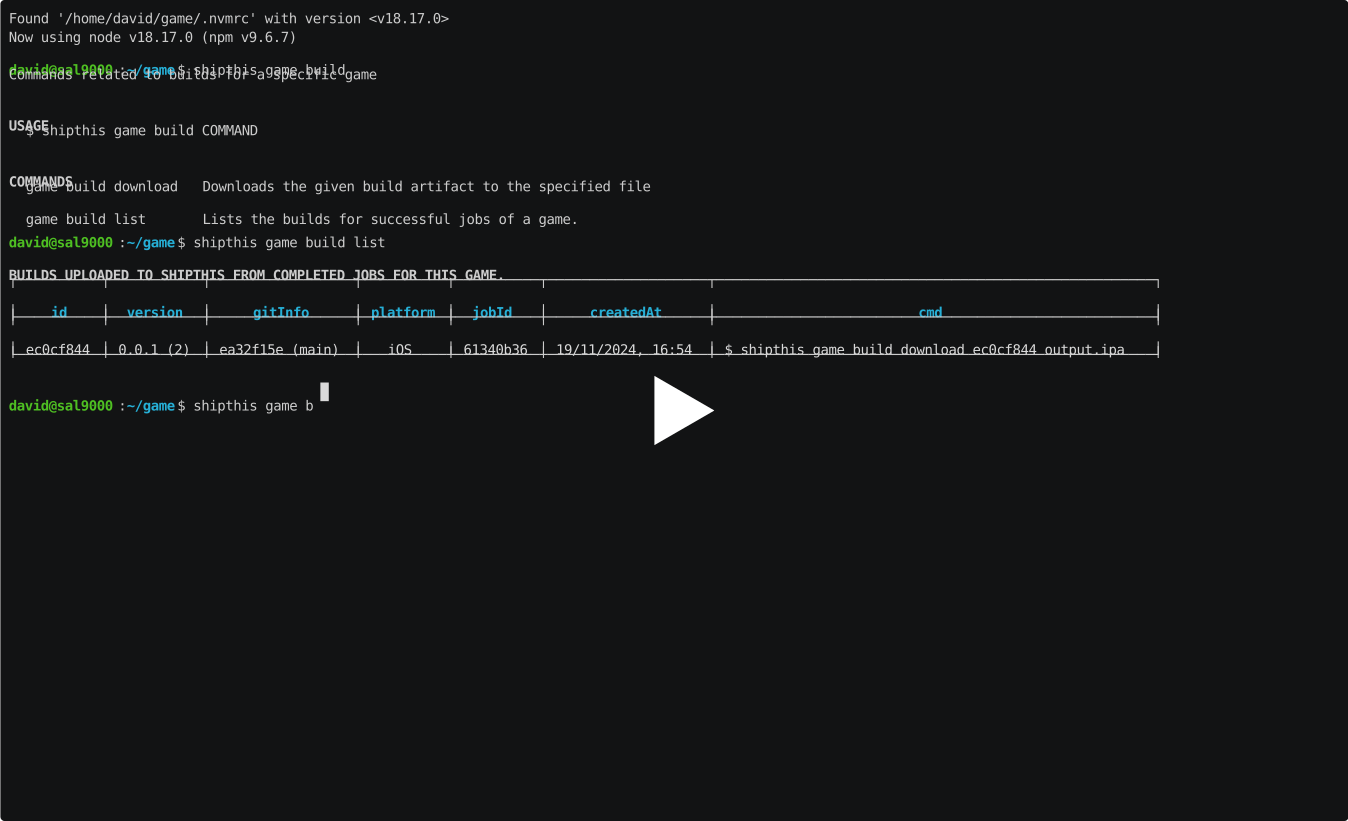](https://asciinema.org/a/m2i3bOvZHUpQXFWtYXc7UnaKQ)
|
|
7
11
|
|
|
12
|
+
## Commands
|
|
8
13
|
|
|
9
14
|
### game build download
|
|
10
15
|
|
package/docs/game/create.md
CHANGED
|
@@ -1,12 +1,25 @@
|
|
|
1
1
|
# game create
|
|
2
2
|
|
|
3
|
+
## Description
|
|
4
|
+
|
|
5
|
+
Creates a new game in your [ShipThis account](https://shipthis.cc/games).
|
|
6
|
+
|
|
7
|
+
It will read the name of your game from your `project.godot` file. You will be
|
|
8
|
+
prompted to confirm this name, or you can specify one with the `--name` flag.
|
|
9
|
+
|
|
10
|
+
If there is already a ShipThis game config file (`shithis.json`) in the current
|
|
11
|
+
directory then you will need to use the `--force` flag to create a new game and
|
|
12
|
+
overwrite this file with the config for the new game.
|
|
13
|
+
|
|
14
|
+
ShipThis will detect the version of Godot you are using from your `project.godot`
|
|
15
|
+
file. This can be changed with the [`shipthis game details`](/docs/reference/game/details)
|
|
16
|
+
command.
|
|
17
|
+
|
|
3
18
|
## Example
|
|
4
19
|
|
|
5
20
|
[](https://asciinema.org/a/Oxf8qnYoVViPNVA40EXKBWG36)
|
|
6
21
|
|
|
7
|
-
## Description
|
|
8
22
|
|
|
9
|
-
Create a new game in ShipThis.
|
|
10
23
|
|
|
11
24
|
## Help Output
|
|
12
25
|
|
|
@@ -24,4 +37,4 @@ DESCRIPTION
|
|
|
24
37
|
|
|
25
38
|
EXAMPLES
|
|
26
39
|
$ shipthis game create
|
|
27
|
-
```
|
|
40
|
+
```
|
package/docs/game/details.md
CHANGED
|
@@ -1,12 +1,29 @@
|
|
|
1
1
|
# game details
|
|
2
2
|
|
|
3
|
-
##
|
|
3
|
+
## Description
|
|
4
4
|
|
|
5
|
-
|
|
5
|
+
Shows and sets the details of the current game.
|
|
6
6
|
|
|
7
|
-
|
|
7
|
+
If you run the command without any flags it will show the details of the current
|
|
8
|
+
game.
|
|
9
|
+
|
|
10
|
+
You can edit any of the values using the appropriate flag. After changing the
|
|
11
|
+
value, it will output all the values again.
|
|
12
|
+
|
|
13
|
+
The following fields can only be changed if you have the `--force` flag set:
|
|
8
14
|
|
|
9
|
-
|
|
15
|
+
- `--gameEngine` - Change the Game Engine (currently only "godot" is supported)
|
|
16
|
+
- `--gameEngineVersion` - Change the version of the Game Engine (currently only 3.6 and 4.3 are supported)
|
|
17
|
+
- `--iosBundleId` - iOS Bundle ID
|
|
18
|
+
- `--androidPackageName` Android Package Name (not currently used)
|
|
19
|
+
|
|
20
|
+
:::tip
|
|
21
|
+
After changing these values, you will need to trigger a new build of your game with [`shipthis game ship`](/docs/reference/game/ship)
|
|
22
|
+
:::
|
|
23
|
+
|
|
24
|
+
## Example
|
|
25
|
+
|
|
26
|
+
[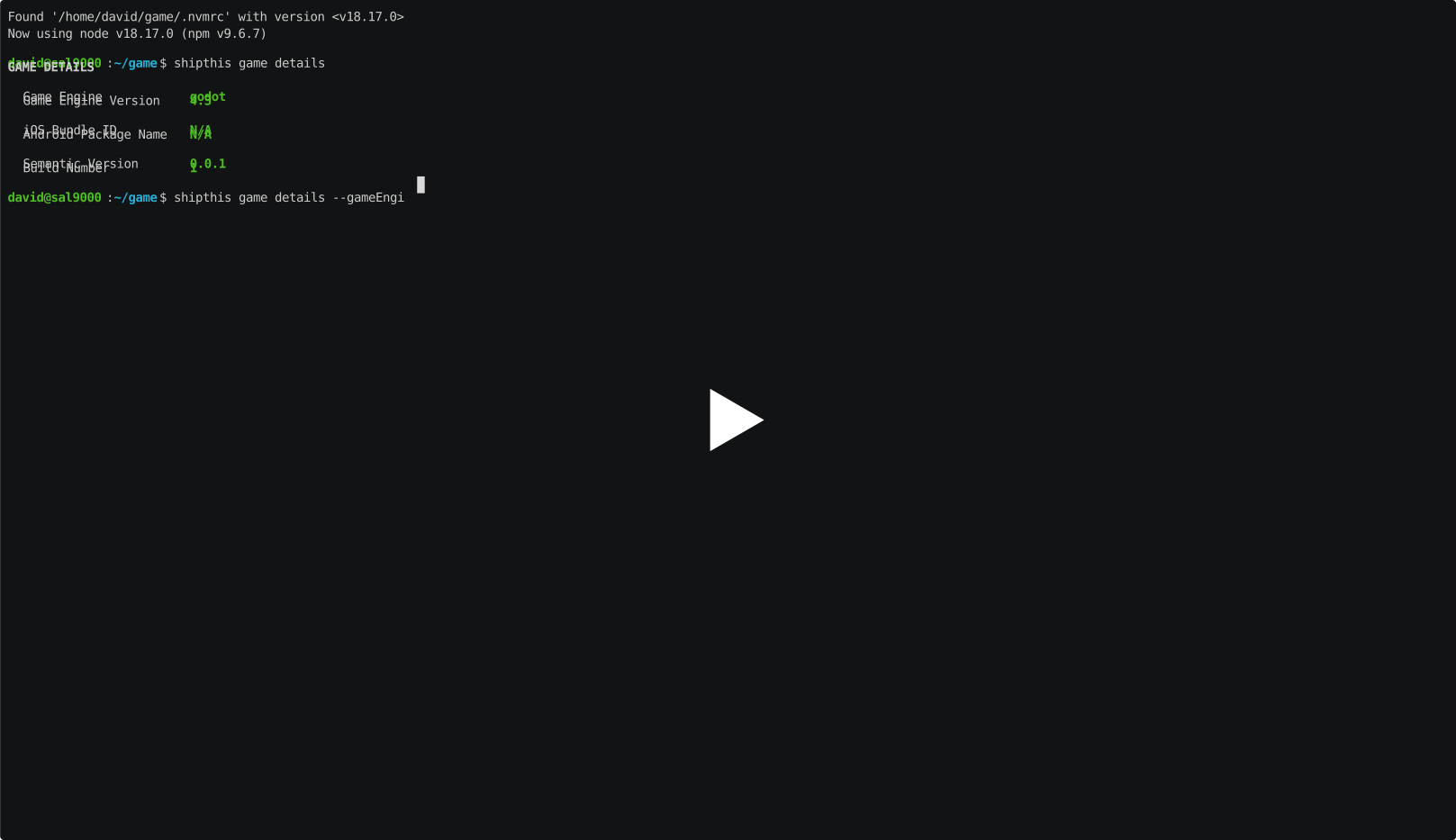](https://asciinema.org/a/5eIVmJYQ6MxDAlFVoVKXhGkYr)
|
|
10
27
|
|
|
11
28
|
## Help Output
|
|
12
29
|
|
package/docs/game/ios.md
CHANGED
|
@@ -1,247 +1,24 @@
|
|
|
1
|
-
#
|
|
1
|
+
# Topic: Game iOS
|
|
2
2
|
|
|
3
|
-
Commands
|
|
3
|
+
Commands in the Game iOS topic are prefixed `shipthis game ios`. They relate to
|
|
4
|
+
managing the iOS platform configuration for the game in the current directory.
|
|
4
5
|
|
|
5
|
-
|
|
6
|
-
|
|
7
|
-
|
|
8
|
-
# game ios app
|
|
9
|
-
|
|
10
|
-
Commands related to the App Store App for a specific game
|
|
11
|
-
|
|
12
|
-
|
|
13
|
-
## Commands
|
|
14
|
-
|
|
15
|
-
|
|
16
|
-
### game ios app addTester
|
|
17
|
-
|
|
18
|
-
#### Description
|
|
19
|
-
|
|
20
|
-
Adds a test user to the game in App Store Connect.
|
|
21
|
-
|
|
22
|
-
#### Help Output
|
|
23
|
-
|
|
24
|
-
```
|
|
25
|
-
USAGE
|
|
26
|
-
$ shipthis game ios app addTester [-g <value>] [-e <value>] [-f <value>] [-l <value>]
|
|
27
|
-
|
|
28
|
-
FLAGS
|
|
29
|
-
-e, --email=<value> The email address of the tester
|
|
30
|
-
-f, --firstName=<value> The first name of the tester
|
|
31
|
-
-g, --gameId=<value> The ID of the game
|
|
32
|
-
-l, --lastName=<value> The last name of the tester
|
|
33
|
-
|
|
34
|
-
DESCRIPTION
|
|
35
|
-
Adds a test user to the game in App Store Connect.
|
|
36
|
-
|
|
37
|
-
EXAMPLES
|
|
38
|
-
$ shipthis game ios app addTester
|
|
39
|
-
```
|
|
40
|
-
|
|
41
|
-
### game ios app create
|
|
42
|
-
|
|
43
|
-
#### Description
|
|
44
|
-
|
|
45
|
-
Creates an App and BundleId in the Apple Developer Portal.
|
|
46
|
-
|
|
47
|
-
#### Help Output
|
|
48
|
-
|
|
49
|
-
```
|
|
50
|
-
USAGE
|
|
51
|
-
$ shipthis game ios app create [-q] [-g <value>] [-n <value>] [-b <value>] [-f]
|
|
52
|
-
|
|
53
|
-
FLAGS
|
|
54
|
-
-b, --bundleId=<value> The BundleId in the Apple Developer Portal
|
|
55
|
-
-f, --force
|
|
56
|
-
-g, --gameId=<value> The ID of the game
|
|
57
|
-
-n, --appName=<value> The name of the App in the Apple Developer Portal
|
|
58
|
-
-q, --quiet Avoid output except for interactions and errors
|
|
59
|
-
|
|
60
|
-
DESCRIPTION
|
|
61
|
-
Creates an App and BundleId in the Apple Developer Portal.
|
|
62
|
-
|
|
63
|
-
EXAMPLES
|
|
64
|
-
$ shipthis game ios app create
|
|
65
|
-
```
|
|
66
|
-
|
|
67
|
-
### game ios app status
|
|
68
|
-
|
|
69
|
-
#### Description
|
|
70
|
-
|
|
71
|
-
Shows the Game iOS App status.
|
|
72
|
-
|
|
73
|
-
#### Help Output
|
|
74
|
-
|
|
75
|
-
```
|
|
76
|
-
USAGE
|
|
77
|
-
$ shipthis game ios app status [-g <value>]
|
|
78
|
-
|
|
79
|
-
FLAGS
|
|
80
|
-
-g, --gameId=<value> The ID of the game
|
|
81
|
-
|
|
82
|
-
DESCRIPTION
|
|
83
|
-
Shows the Game iOS App status.
|
|
84
|
-
|
|
85
|
-
EXAMPLES
|
|
86
|
-
$ shipthis game ios app status
|
|
87
|
-
```
|
|
88
|
-
|
|
89
|
-
### game ios app sync
|
|
90
|
-
|
|
91
|
-
#### Description
|
|
92
|
-
|
|
93
|
-
Synchronies the Apple App "BundleId" with the capabilities from the local project.
|
|
94
|
-
|
|
95
|
-
#### Help Output
|
|
96
|
-
|
|
97
|
-
```
|
|
98
|
-
USAGE
|
|
99
|
-
$ shipthis game ios app sync [-q] [-g <value>] [-f]
|
|
100
|
-
|
|
101
|
-
FLAGS
|
|
102
|
-
-f, --force
|
|
103
|
-
-g, --gameId=<value> The ID of the game
|
|
104
|
-
-q, --quiet Avoid output except for interactions and errors
|
|
105
|
-
|
|
106
|
-
DESCRIPTION
|
|
107
|
-
Synchronies the Apple App "BundleId" with the capabilities from the local project.
|
|
108
|
-
|
|
109
|
-
EXAMPLES
|
|
110
|
-
$ shipthis game ios app sync
|
|
111
|
-
```
|
|
112
|
-
|
|
113
|
-
|
|
114
|
-
# game ios profile
|
|
115
|
-
|
|
116
|
-
Commands related to the App Store Provisioning Profiles for this Game
|
|
6
|
+
:::tip Info
|
|
7
|
+
You will need to be authenticated against ShipThis and Apple before you can use
|
|
8
|
+
these commands. To do that please run the following commands first:
|
|
117
9
|
|
|
10
|
+
- [`shipthis login`](/docs/reference/login)
|
|
11
|
+
- [`shipthis apple login`](/docs/reference/apple/login)
|
|
12
|
+
:::
|
|
118
13
|
|
|
119
|
-
## Commands
|
|
120
|
-
|
|
121
|
-
|
|
122
|
-
### game ios profile create
|
|
123
|
-
|
|
124
|
-
#### Description
|
|
125
|
-
|
|
126
|
-
Creates a Mobile Provisioning Profile in the Apple Developer Portal.
|
|
127
|
-
|
|
128
|
-
#### Help Output
|
|
129
|
-
|
|
130
|
-
```
|
|
131
|
-
USAGE
|
|
132
|
-
$ shipthis game ios profile create [-q] [-g <value>] [-f]
|
|
133
|
-
|
|
134
|
-
FLAGS
|
|
135
|
-
-f, --force
|
|
136
|
-
-g, --gameId=<value> The ID of the game
|
|
137
|
-
-q, --quiet Avoid output except for interactions and errors
|
|
138
|
-
|
|
139
|
-
DESCRIPTION
|
|
140
|
-
Creates a Mobile Provisioning Profile in the Apple Developer Portal.
|
|
141
|
-
|
|
142
|
-
EXAMPLES
|
|
143
|
-
$ shipthis game ios profile create
|
|
144
|
-
```
|
|
145
|
-
|
|
146
|
-
### game ios profile export
|
|
147
|
-
|
|
148
|
-
#### Description
|
|
149
|
-
|
|
150
|
-
Saves the current Mobile Provisioning Profile to a ZIP file
|
|
151
|
-
|
|
152
|
-
#### Help Output
|
|
153
|
-
|
|
154
|
-
```
|
|
155
|
-
USAGE
|
|
156
|
-
$ shipthis game ios profile export FILE [-g <value>] [-f]
|
|
157
|
-
|
|
158
|
-
ARGUMENTS
|
|
159
|
-
FILE Name of the ZIP file to create
|
|
160
|
-
|
|
161
|
-
FLAGS
|
|
162
|
-
-f, --force Overwrite the file if it already exists
|
|
163
|
-
-g, --gameId=<value> The ID of the game
|
|
164
|
-
|
|
165
|
-
DESCRIPTION
|
|
166
|
-
Saves the current Mobile Provisioning Profile to a ZIP file
|
|
167
|
-
|
|
168
|
-
EXAMPLES
|
|
169
|
-
$ shipthis game ios profile export userProfile.zip
|
|
170
|
-
```
|
|
171
|
-
|
|
172
|
-
### game ios profile import
|
|
173
|
-
|
|
174
|
-
#### Description
|
|
175
|
-
|
|
176
|
-
Imports an Mobile Provisioning Profile to your ShipThis account
|
|
177
14
|
|
|
178
|
-
|
|
179
|
-
|
|
180
|
-
```
|
|
181
|
-
USAGE
|
|
182
|
-
$ shipthis game ios profile import FILE [-g <value>] [-f]
|
|
183
|
-
|
|
184
|
-
ARGUMENTS
|
|
185
|
-
FILE Name of the ZIP file to import (must be in the same format as the export)
|
|
186
|
-
|
|
187
|
-
FLAGS
|
|
188
|
-
-f, --force
|
|
189
|
-
-g, --gameId=<value> The ID of the game
|
|
190
|
-
|
|
191
|
-
DESCRIPTION
|
|
192
|
-
Imports an Mobile Provisioning Profile to your ShipThis account
|
|
193
|
-
|
|
194
|
-
EXAMPLES
|
|
195
|
-
$ shipthis game ios profile import profile.zip
|
|
196
|
-
```
|
|
197
|
-
|
|
198
|
-
### game ios profile status
|
|
199
|
-
|
|
200
|
-
#### Description
|
|
201
|
-
|
|
202
|
-
Shows the Game iOS Mobile Provisioning Profile Status.
|
|
203
|
-
|
|
204
|
-
#### Help Output
|
|
205
|
-
|
|
206
|
-
```
|
|
207
|
-
USAGE
|
|
208
|
-
$ shipthis game ios profile status [-g <value>] [-f]
|
|
209
|
-
|
|
210
|
-
FLAGS
|
|
211
|
-
-f, --noAppleAuth
|
|
212
|
-
-g, --gameId=<value> The ID of the game
|
|
213
|
-
|
|
214
|
-
DESCRIPTION
|
|
215
|
-
Shows the Game iOS Mobile Provisioning Profile Status.
|
|
15
|
+
## Topics
|
|
216
16
|
|
|
217
|
-
|
|
218
|
-
|
|
219
|
-
```
|
|
17
|
+
- [game ios app](/docs/reference/game/ios/app)
|
|
18
|
+
- [game ios profile](/docs/reference/game/ios/profile)
|
|
220
19
|
|
|
221
20
|
|
|
222
21
|
## Commands
|
|
223
22
|
|
|
23
|
+
- [game ios status](/docs/reference/game/ios/status)
|
|
224
24
|
|
|
225
|
-
### game ios status
|
|
226
|
-
|
|
227
|
-
#### Description
|
|
228
|
-
|
|
229
|
-
Shows the Game iOS Platform status. If --gameId is not provided it will look in the current directory.
|
|
230
|
-
|
|
231
|
-
#### Help Output
|
|
232
|
-
|
|
233
|
-
```
|
|
234
|
-
USAGE
|
|
235
|
-
$ shipthis game ios status [-g <value>]
|
|
236
|
-
|
|
237
|
-
FLAGS
|
|
238
|
-
-g, --gameId=<value> The ID of the game
|
|
239
|
-
|
|
240
|
-
DESCRIPTION
|
|
241
|
-
Shows the Game iOS Platform status. If --gameId is not provided it will look in the current directory.
|
|
242
|
-
|
|
243
|
-
EXAMPLES
|
|
244
|
-
$ shipthis game ios status
|
|
245
|
-
|
|
246
|
-
$ shipthis game ios status --gameId 0c179fc4
|
|
247
|
-
```
|
package/docs/game.md
CHANGED
|
@@ -1,19 +1,22 @@
|
|
|
1
|
-
#
|
|
1
|
+
# Game Commands
|
|
2
2
|
|
|
3
|
-
Commands
|
|
3
|
+
Commands in the Game topic are prefixed `shipthis game`. They relate to configuring
|
|
4
|
+
the specific game in the current working directory.
|
|
5
|
+
|
|
6
|
+
You will need to be authenticated against ShipThis (by running [`shipthis login`](login)) before running the Game commands.
|
|
4
7
|
|
|
5
8
|
## Topics
|
|
6
9
|
|
|
7
|
-
- [game
|
|
8
|
-
- [game
|
|
9
|
-
- [game
|
|
10
|
+
- [game build](/docs/reference/game/build)
|
|
11
|
+
- [game ios](/docs/reference/game/ios)
|
|
12
|
+
- [game job](/docs/reference/game/job)
|
|
10
13
|
|
|
11
14
|
## Commands
|
|
12
15
|
|
|
13
|
-
- [game create](game/create
|
|
14
|
-
- [game details](game/details
|
|
15
|
-
- [game export](game/export
|
|
16
|
-
- [game list](game/list
|
|
17
|
-
- [game ship](game/ship
|
|
18
|
-
- [game status](game/status
|
|
19
|
-
- [game wizard](game/wizard
|
|
16
|
+
- [game create](/docs/reference/game/create)
|
|
17
|
+
- [game details](/docs/reference/game/details)
|
|
18
|
+
- [game export](/docs/reference/game/export)
|
|
19
|
+
- [game list](/docs/reference/game/list)
|
|
20
|
+
- [game ship](/docs/reference/game/ship)
|
|
21
|
+
- [game status](/docs/reference/game/status)
|
|
22
|
+
- [game wizard](/docs/reference/game/wizard)
|
package/docs/help.md
CHANGED
package/docs/status.md
CHANGED
|
@@ -1,9 +1,5 @@
|
|
|
1
1
|
# status
|
|
2
2
|
|
|
3
|
-
## Example
|
|
4
|
-
|
|
5
|
-
[](https://asciinema.org/a/GsqLxzyvFApORKUDfJl5DsNo7)
|
|
6
|
-
|
|
7
3
|
## Description
|
|
8
4
|
|
|
9
5
|
Displays the current overall status.
|
|
@@ -19,6 +15,10 @@ Displays the current overall status.
|
|
|
19
15
|
- Will be "YES" if ShipThis detects that there is an active git project
|
|
20
16
|
- ShipThis will tag your uploads with the current git information (branch and commit hash)
|
|
21
17
|
|
|
18
|
+
## Example
|
|
19
|
+
|
|
20
|
+
[](https://asciinema.org/a/GsqLxzyvFApORKUDfJl5DsNo7)
|
|
21
|
+
|
|
22
22
|
## Help Output
|
|
23
23
|
|
|
24
24
|
```
|
package/oclif.manifest.json
CHANGED
|
@@ -514,10 +514,10 @@
|
|
|
514
514
|
"wizard.js"
|
|
515
515
|
]
|
|
516
516
|
},
|
|
517
|
-
"apple:
|
|
517
|
+
"apple:apiKey:create": {
|
|
518
518
|
"aliases": [],
|
|
519
519
|
"args": {},
|
|
520
|
-
"description": "Creates an
|
|
520
|
+
"description": "Creates an App Store Connect API Key in your Apple Developer account.\nSaves the private key in your ShipThis account.",
|
|
521
521
|
"examples": [
|
|
522
522
|
"<%= config.bin %> <%= command.id %>",
|
|
523
523
|
"<%= config.bin %> <%= command.id %> --force"
|
|
@@ -539,7 +539,7 @@
|
|
|
539
539
|
},
|
|
540
540
|
"hasDynamicHelp": false,
|
|
541
541
|
"hiddenAliases": [],
|
|
542
|
-
"id": "apple:
|
|
542
|
+
"id": "apple:apiKey:create",
|
|
543
543
|
"pluginAlias": "shipthis",
|
|
544
544
|
"pluginName": "shipthis",
|
|
545
545
|
"pluginType": "core",
|
|
@@ -549,11 +549,11 @@
|
|
|
549
549
|
"dist",
|
|
550
550
|
"commands",
|
|
551
551
|
"apple",
|
|
552
|
-
"
|
|
552
|
+
"apiKey",
|
|
553
553
|
"create.js"
|
|
554
554
|
]
|
|
555
555
|
},
|
|
556
|
-
"apple:
|
|
556
|
+
"apple:apiKey:export": {
|
|
557
557
|
"aliases": [],
|
|
558
558
|
"args": {
|
|
559
559
|
"file": {
|
|
@@ -562,9 +562,9 @@
|
|
|
562
562
|
"required": true
|
|
563
563
|
}
|
|
564
564
|
},
|
|
565
|
-
"description": "Saves the current
|
|
565
|
+
"description": "Saves the current App Store Connect API Key to a ZIP file",
|
|
566
566
|
"examples": [
|
|
567
|
-
"<%= config.bin %> <%= command.id %>
|
|
567
|
+
"<%= config.bin %> <%= command.id %> userApiKey.zip"
|
|
568
568
|
],
|
|
569
569
|
"flags": {
|
|
570
570
|
"force": {
|
|
@@ -577,7 +577,7 @@
|
|
|
577
577
|
},
|
|
578
578
|
"hasDynamicHelp": false,
|
|
579
579
|
"hiddenAliases": [],
|
|
580
|
-
"id": "apple:
|
|
580
|
+
"id": "apple:apiKey:export",
|
|
581
581
|
"pluginAlias": "shipthis",
|
|
582
582
|
"pluginName": "shipthis",
|
|
583
583
|
"pluginType": "core",
|
|
@@ -588,11 +588,11 @@
|
|
|
588
588
|
"dist",
|
|
589
589
|
"commands",
|
|
590
590
|
"apple",
|
|
591
|
-
"
|
|
591
|
+
"apiKey",
|
|
592
592
|
"export.js"
|
|
593
593
|
]
|
|
594
594
|
},
|
|
595
|
-
"apple:
|
|
595
|
+
"apple:apiKey:import": {
|
|
596
596
|
"aliases": [],
|
|
597
597
|
"args": {
|
|
598
598
|
"file": {
|
|
@@ -601,9 +601,9 @@
|
|
|
601
601
|
"required": true
|
|
602
602
|
}
|
|
603
603
|
},
|
|
604
|
-
"description": "Imports an
|
|
604
|
+
"description": "Imports an App Store Connect API Key ZIP file into your ShipThis account",
|
|
605
605
|
"examples": [
|
|
606
|
-
"<%= config.bin %> <%= command.id %>
|
|
606
|
+
"<%= config.bin %> <%= command.id %> userApiKey.zip"
|
|
607
607
|
],
|
|
608
608
|
"flags": {
|
|
609
609
|
"force": {
|
|
@@ -615,7 +615,7 @@
|
|
|
615
615
|
},
|
|
616
616
|
"hasDynamicHelp": false,
|
|
617
617
|
"hiddenAliases": [],
|
|
618
|
-
"id": "apple:
|
|
618
|
+
"id": "apple:apiKey:import",
|
|
619
619
|
"pluginAlias": "shipthis",
|
|
620
620
|
"pluginName": "shipthis",
|
|
621
621
|
"pluginType": "core",
|
|
@@ -626,14 +626,14 @@
|
|
|
626
626
|
"dist",
|
|
627
627
|
"commands",
|
|
628
628
|
"apple",
|
|
629
|
-
"
|
|
629
|
+
"apiKey",
|
|
630
630
|
"import.js"
|
|
631
631
|
]
|
|
632
632
|
},
|
|
633
|
-
"apple:
|
|
633
|
+
"apple:apiKey:status": {
|
|
634
634
|
"aliases": [],
|
|
635
635
|
"args": {},
|
|
636
|
-
"description": "Displays the status of
|
|
636
|
+
"description": "Displays the status of App Store Connect API Keys in your Apple and ShipThis accounts.\nThis API key is used to automatically publish your games to the App Store.",
|
|
637
637
|
"examples": [
|
|
638
638
|
"<%= config.bin %> <%= command.id %>",
|
|
639
639
|
"<%= config.bin %> <%= command.id %> --noAppleAuth"
|
|
@@ -648,7 +648,7 @@
|
|
|
648
648
|
},
|
|
649
649
|
"hasDynamicHelp": false,
|
|
650
650
|
"hiddenAliases": [],
|
|
651
|
-
"id": "apple:
|
|
651
|
+
"id": "apple:apiKey:status",
|
|
652
652
|
"pluginAlias": "shipthis",
|
|
653
653
|
"pluginName": "shipthis",
|
|
654
654
|
"pluginType": "core",
|
|
@@ -659,14 +659,14 @@
|
|
|
659
659
|
"dist",
|
|
660
660
|
"commands",
|
|
661
661
|
"apple",
|
|
662
|
-
"
|
|
662
|
+
"apiKey",
|
|
663
663
|
"status.js"
|
|
664
664
|
]
|
|
665
665
|
},
|
|
666
|
-
"apple:
|
|
666
|
+
"apple:certificate:create": {
|
|
667
667
|
"aliases": [],
|
|
668
668
|
"args": {},
|
|
669
|
-
"description": "Creates an
|
|
669
|
+
"description": "Creates an iOS Distribution Certificate in your Apple Developer account.\nSaves the certificate with the private key to your ShipThis account",
|
|
670
670
|
"examples": [
|
|
671
671
|
"<%= config.bin %> <%= command.id %>",
|
|
672
672
|
"<%= config.bin %> <%= command.id %> --force"
|
|
@@ -688,7 +688,7 @@
|
|
|
688
688
|
},
|
|
689
689
|
"hasDynamicHelp": false,
|
|
690
690
|
"hiddenAliases": [],
|
|
691
|
-
"id": "apple:
|
|
691
|
+
"id": "apple:certificate:create",
|
|
692
692
|
"pluginAlias": "shipthis",
|
|
693
693
|
"pluginName": "shipthis",
|
|
694
694
|
"pluginType": "core",
|
|
@@ -698,11 +698,11 @@
|
|
|
698
698
|
"dist",
|
|
699
699
|
"commands",
|
|
700
700
|
"apple",
|
|
701
|
-
"
|
|
701
|
+
"certificate",
|
|
702
702
|
"create.js"
|
|
703
703
|
]
|
|
704
704
|
},
|
|
705
|
-
"apple:
|
|
705
|
+
"apple:certificate:export": {
|
|
706
706
|
"aliases": [],
|
|
707
707
|
"args": {
|
|
708
708
|
"file": {
|
|
@@ -711,9 +711,9 @@
|
|
|
711
711
|
"required": true
|
|
712
712
|
}
|
|
713
713
|
},
|
|
714
|
-
"description": "Saves the current
|
|
714
|
+
"description": "Saves the current Apple Distribution Certificate to a ZIP file.",
|
|
715
715
|
"examples": [
|
|
716
|
-
"<%= config.bin %> <%= command.id %>
|
|
716
|
+
"<%= config.bin %> <%= command.id %> userCert.zip"
|
|
717
717
|
],
|
|
718
718
|
"flags": {
|
|
719
719
|
"force": {
|
|
@@ -726,7 +726,7 @@
|
|
|
726
726
|
},
|
|
727
727
|
"hasDynamicHelp": false,
|
|
728
728
|
"hiddenAliases": [],
|
|
729
|
-
"id": "apple:
|
|
729
|
+
"id": "apple:certificate:export",
|
|
730
730
|
"pluginAlias": "shipthis",
|
|
731
731
|
"pluginName": "shipthis",
|
|
732
732
|
"pluginType": "core",
|
|
@@ -737,11 +737,11 @@
|
|
|
737
737
|
"dist",
|
|
738
738
|
"commands",
|
|
739
739
|
"apple",
|
|
740
|
-
"
|
|
740
|
+
"certificate",
|
|
741
741
|
"export.js"
|
|
742
742
|
]
|
|
743
743
|
},
|
|
744
|
-
"apple:
|
|
744
|
+
"apple:certificate:import": {
|
|
745
745
|
"aliases": [],
|
|
746
746
|
"args": {
|
|
747
747
|
"file": {
|
|
@@ -750,9 +750,9 @@
|
|
|
750
750
|
"required": true
|
|
751
751
|
}
|
|
752
752
|
},
|
|
753
|
-
"description": "Imports an
|
|
753
|
+
"description": "Imports an iOS Distribution Certificate to your ShipThis account",
|
|
754
754
|
"examples": [
|
|
755
|
-
"<%= config.bin %> <%= command.id %>
|
|
755
|
+
"<%= config.bin %> <%= command.id %> userCert.zip"
|
|
756
756
|
],
|
|
757
757
|
"flags": {
|
|
758
758
|
"force": {
|
|
@@ -764,7 +764,7 @@
|
|
|
764
764
|
},
|
|
765
765
|
"hasDynamicHelp": false,
|
|
766
766
|
"hiddenAliases": [],
|
|
767
|
-
"id": "apple:
|
|
767
|
+
"id": "apple:certificate:import",
|
|
768
768
|
"pluginAlias": "shipthis",
|
|
769
769
|
"pluginName": "shipthis",
|
|
770
770
|
"pluginType": "core",
|
|
@@ -775,14 +775,14 @@
|
|
|
775
775
|
"dist",
|
|
776
776
|
"commands",
|
|
777
777
|
"apple",
|
|
778
|
-
"
|
|
778
|
+
"certificate",
|
|
779
779
|
"import.js"
|
|
780
780
|
]
|
|
781
781
|
},
|
|
782
|
-
"apple:
|
|
782
|
+
"apple:certificate:status": {
|
|
783
783
|
"aliases": [],
|
|
784
784
|
"args": {},
|
|
785
|
-
"description": "Displays the status of
|
|
785
|
+
"description": "Displays the status of the iOS Distribution certificates in your Apple and ShipThis accounts.\nThese are used to sign all of your iOS apps.",
|
|
786
786
|
"examples": [
|
|
787
787
|
"<%= config.bin %> <%= command.id %>",
|
|
788
788
|
"<%= config.bin %> <%= command.id %> --noAppleAuth"
|
|
@@ -797,7 +797,7 @@
|
|
|
797
797
|
},
|
|
798
798
|
"hasDynamicHelp": false,
|
|
799
799
|
"hiddenAliases": [],
|
|
800
|
-
"id": "apple:
|
|
800
|
+
"id": "apple:certificate:status",
|
|
801
801
|
"pluginAlias": "shipthis",
|
|
802
802
|
"pluginName": "shipthis",
|
|
803
803
|
"pluginType": "core",
|
|
@@ -808,7 +808,7 @@
|
|
|
808
808
|
"dist",
|
|
809
809
|
"commands",
|
|
810
810
|
"apple",
|
|
811
|
-
"
|
|
811
|
+
"certificate",
|
|
812
812
|
"status.js"
|
|
813
813
|
]
|
|
814
814
|
},
|
|
@@ -1508,5 +1508,5 @@
|
|
|
1508
1508
|
]
|
|
1509
1509
|
}
|
|
1510
1510
|
},
|
|
1511
|
-
"version": "0.0.
|
|
1511
|
+
"version": "0.0.24"
|
|
1512
1512
|
}
|