shipthis 0.0.21 → 0.0.23
This diff represents the content of publicly available package versions that have been released to one of the supported registries. The information contained in this diff is provided for informational purposes only and reflects changes between package versions as they appear in their respective public registries.
- package/README.md +13 -64
- package/docs/README.md +12 -10
- package/docs/apple/apiKey/create +26 -0
- package/docs/apple/apiKey/export +24 -0
- package/docs/apple/apiKey/import +24 -0
- package/docs/apple/apiKey/status +25 -0
- package/docs/apple/certificate/create +26 -0
- package/docs/apple/certificate/export +24 -0
- package/docs/apple/certificate/import +24 -0
- package/docs/apple/certificate/status +25 -0
- package/docs/apple/login +25 -0
- package/docs/apple/login.md +1 -1
- package/docs/apple/status +18 -0
- package/docs/dashboard +18 -0
- package/docs/game/build/download +28 -0
- package/docs/game/build/list +31 -0
- package/docs/game/build.md +8 -3
- package/docs/game/create +23 -0
- package/docs/game/create.md +4 -0
- package/docs/game/details +35 -0
- package/docs/game/details.md +4 -0
- package/docs/game/export +26 -0
- package/docs/game/ios/app/addTester +24 -0
- package/docs/game/ios/app/create +25 -0
- package/docs/game/ios/app/status +21 -0
- package/docs/game/ios/app/sync +23 -0
- package/docs/game/ios/profile/create +23 -0
- package/docs/game/ios/profile/export +25 -0
- package/docs/game/ios/profile/import +25 -0
- package/docs/game/ios/profile/status +22 -0
- package/docs/game/ios/status +23 -0
- package/docs/game/ios.md +13 -236
- package/docs/game/job/list +29 -0
- package/docs/game/job/status +30 -0
- package/docs/game/list +26 -0
- package/docs/game/ship +21 -0
- package/docs/game/status +23 -0
- package/docs/game/wizard +23 -0
- package/docs/game.md +15 -12
- package/docs/help +21 -0
- package/docs/login +24 -0
- package/docs/login.md +1 -1
- package/docs/status +18 -0
- package/docs/status.md +4 -4
- package/oclif.manifest.json +37 -37
- package/package.json +1 -1
package/README.md
CHANGED
|
@@ -1,72 +1,21 @@
|
|
|
1
|
-
|
|
2
|
-
=================
|
|
1
|
+
# ShipThis CLI
|
|
3
2
|
|
|
4
|
-
|
|
3
|
+
## Introduction
|
|
5
4
|
|
|
6
|
-
|
|
5
|
+
ShipThis is a platform that helps you manage shipping your [Godot](https://godotengine.org/) games on iOS to the App Store.
|
|
7
6
|
|
|
8
|
-
|
|
9
|
-
[](https://npmjs.org/package/shipthis)
|
|
7
|
+
This is all done with an easy to use command line tool called `shipthis`.
|
|
10
8
|
|
|
9
|
+
You can discover **ShipThis in less than 5 minutes** via our [Quick Start Guide](https://shipthis.cc/docs/quickstart).
|
|
11
10
|
|
|
12
|
-
|
|
13
|
-
* [Introduction](#introduction)
|
|
14
|
-
* [Usage](#usage)
|
|
15
|
-
* [Command Topics](#command-topics)
|
|
16
|
-
<!-- tocstop -->
|
|
11
|
+
## Topics
|
|
17
12
|
|
|
18
|
-
|
|
19
|
-
|
|
20
|
-
```sh-session
|
|
21
|
-
$ npm install -g shipthis
|
|
22
|
-
$ shipthis COMMAND
|
|
23
|
-
running command...
|
|
24
|
-
$ shipthis (--version)
|
|
25
|
-
shipthis/0.0.9 linux-x64 node-v20.17.0
|
|
26
|
-
$ shipthis --help [COMMAND]
|
|
27
|
-
USAGE
|
|
28
|
-
$ shipthis COMMAND
|
|
29
|
-
...
|
|
30
|
-
```
|
|
31
|
-
<!-- usagestop -->
|
|
13
|
+
- [apple](https://shipthis.cc/docs/reference/apple) - Commands that relate to linking your ShipThis account with your Apple Developer Account
|
|
14
|
+
- [game](https://shipthis.cc/docs/reference/game) - Commands that relate to configuring the specific game in the current working directory.
|
|
32
15
|
|
|
33
|
-
|
|
34
|
-
# Command Topics
|
|
16
|
+
## Commands
|
|
35
17
|
|
|
36
|
-
|
|
37
|
-
|
|
38
|
-
|
|
39
|
-
|
|
40
|
-
* [`shipthis apple apiKey import`](docs/apple/apiKey/import.md) - Imports an App Store Connect API Key ZIP file into your ShipThis account
|
|
41
|
-
* [`shipthis apple apiKey status`](docs/apple/apiKey/status.md) - Displays the status of the App Store Connect API Keys in your Apple and ShipThis accounts. The API key is used to automatically publish your games to the App Store.
|
|
42
|
-
* [`shipthis apple certificate`](docs/apple/certificate.md) - Creates an iOS Distribution Certificate in your Apple Developer account and saves it with the private key to your ShipThis account
|
|
43
|
-
* [`shipthis apple certificate create`](docs/apple/certificate/create.md) - Creates an iOS Distribution Certificate in your Apple Developer account and saves it with the private key to your ShipThis account
|
|
44
|
-
* [`shipthis apple certificate export`](docs/apple/certificate/export.md) - Saves the current Apple Distribution Certificate to a ZIP file.
|
|
45
|
-
* [`shipthis apple certificate import`](docs/apple/certificate/import.md) - Imports an iOS Distribution Certificate to your ShipThis account
|
|
46
|
-
* [`shipthis apple certificate status`](docs/apple/certificate/status.md) - Displays the status of the iOS Distribution certificates in your Apple and ShipThis accounts. These are used to sign all of your iOS apps.
|
|
47
|
-
* [`shipthis apple login`](docs/apple/login.md) - Authenticate with Apple - saves the session to the auth file
|
|
48
|
-
* [`shipthis apple status`](docs/apple/status.md) - Shows the status of the Apple authentication and integration
|
|
49
|
-
* [`shipthis dashboard`](docs/dashboard.md) - Opens the web-browser to your ShipThis dashboard
|
|
50
|
-
* [`shipthis game`](docs/game.md) - Commands related to Game Management
|
|
51
|
-
* [`shipthis game build`](docs/game/build.md) - Commands related to builds for a specific game
|
|
52
|
-
* [`shipthis game build download`](docs/game/build/download.md) - Downloads the given build artifact to the specified file
|
|
53
|
-
* [`shipthis game build list`](docs/game/build/list.md) - Lists the builds for successful jobs of a game.
|
|
54
|
-
* [`shipthis game create`](docs/game/create.md) - Create a new game
|
|
55
|
-
* [`shipthis game details`](docs/game/details.md) - Shows and sets the details of a game. If --gameId is not provided it will look in the current directory.
|
|
56
|
-
* [`shipthis game export`](docs/game/export.md) - Downloads the shipthis.json file for a given game into the current directory.
|
|
57
|
-
* [`shipthis game ios`](docs/game/ios.md) - Commands related to the iOS platform for a specific game
|
|
58
|
-
* [`shipthis game ios app`](docs/game/ios/app.md) - Commands related to the App Store App for a specific game
|
|
59
|
-
* [`shipthis game ios profile`](docs/game/ios/profile.md) - Commands related to the App Store Provisioning Profiles for this Game
|
|
60
|
-
* [`shipthis game ios status`](docs/game/ios/status.md) - Shows the Game iOS Platform status. If --gameId is not provided it will look in the current directory.
|
|
61
|
-
* [`shipthis game job`](docs/game/job.md) - Commands related to jobs for a specific game
|
|
62
|
-
* [`shipthis game job list`](docs/game/job/list.md) - Lists the jobs for a game. If --gameId is not provided it will look in the current directory.
|
|
63
|
-
* [`shipthis game job status`](docs/game/job/status.md) - Shows the real-time status of a job.
|
|
64
|
-
* [`shipthis game list`](docs/game/list.md) - Shows a list of all your games
|
|
65
|
-
* [`shipthis game ship`](docs/game/ship.md) - Builds the app (for all platforms with valid credentials) and ships it to the stores
|
|
66
|
-
* [`shipthis game status`](docs/game/status.md) - Shows the Game status. If --gameId is not provided it will look in the current directory.
|
|
67
|
-
* [`shipthis game wizard`](docs/game/wizard.md) - Runs all the steps for the specific platform
|
|
68
|
-
* [`shipthis help`](docs/help.md) - Display help for shipthis.
|
|
69
|
-
* [`shipthis login`](docs/login.md) - Authenticate - will create a new account if one does not exist.
|
|
70
|
-
* [`shipthis status`](docs/status.md) - Displays the current overall status.
|
|
71
|
-
|
|
72
|
-
<!-- commandsstop -->
|
|
18
|
+
- [dashboard](https://shipthis.cc/docs/reference/dashboard) - Opens the web browser to your shipthis.cc dashboard
|
|
19
|
+
- [login](https://shipthis.cc/docs/reference/login) - Signin or create a new account
|
|
20
|
+
- [status](https://shipthis.cc/docs/reference/status) - Display your overall ShipThis account status
|
|
21
|
+
- [help](https://shipthis.cc/docs/reference/help) - Display help for a specific topic or command
|
package/docs/README.md
CHANGED
|
@@ -1,20 +1,22 @@
|
|
|
1
|
-
# CLI Reference
|
|
1
|
+
# ShipThis CLI Reference
|
|
2
2
|
|
|
3
|
-
|
|
3
|
+
## Introduction
|
|
4
4
|
|
|
5
|
-
ShipThis is a platform that helps you manage shipping your [Godot](https://godotengine.org/)
|
|
6
|
-
stores. Currently it supports the Apple App Store however more platforms being developed.
|
|
5
|
+
ShipThis is a platform that helps you manage shipping your [Godot](https://godotengine.org/) games on iOS to the App Store.
|
|
7
6
|
|
|
8
7
|
This is all done with an easy to use command line tool called `shipthis`.
|
|
9
8
|
|
|
10
9
|
You can discover **ShipThis in less than 5 minutes** via our [Quick Start Guide](https://shipthis.cc/docs/quickstart).
|
|
11
10
|
|
|
12
11
|
## Topics
|
|
13
|
-
|
|
14
|
-
- [
|
|
12
|
+
|
|
13
|
+
- [apple](https://shipthis.cc/docs/reference/apple) - Commands that relate to linking your ShipThis account with your Apple Developer Account
|
|
14
|
+
- [game](https://shipthis.cc/docs/reference/game) - Commands that relate to configuring the specific game in the current working directory.
|
|
15
15
|
|
|
16
16
|
## Commands
|
|
17
|
-
|
|
18
|
-
- [
|
|
19
|
-
- [
|
|
20
|
-
- [
|
|
17
|
+
|
|
18
|
+
- [dashboard](https://shipthis.cc/docs/reference/dashboard) - Opens the web browser to your shipthis.cc dashboard
|
|
19
|
+
- [login](https://shipthis.cc/docs/reference/login) - Signin or create a new account
|
|
20
|
+
- [status](https://shipthis.cc/docs/reference/status) - Display your overall ShipThis account status
|
|
21
|
+
- [help](https://shipthis.cc/docs/reference/help) - Display help for a specific topic or command
|
|
22
|
+
|
|
@@ -0,0 +1,26 @@
|
|
|
1
|
+
# apple apiKey create
|
|
2
|
+
|
|
3
|
+
## Description
|
|
4
|
+
|
|
5
|
+
Creates an App Store Connect API Key in your Apple Developer account.
|
|
6
|
+
Saves the private key in your ShipThis account.
|
|
7
|
+
|
|
8
|
+
## Help Output
|
|
9
|
+
|
|
10
|
+
```
|
|
11
|
+
USAGE
|
|
12
|
+
$ shipthis apple apiKey create [-f] [-q]
|
|
13
|
+
|
|
14
|
+
FLAGS
|
|
15
|
+
-f, --force
|
|
16
|
+
-q, --quiet Avoid output except for interactions and errors
|
|
17
|
+
|
|
18
|
+
DESCRIPTION
|
|
19
|
+
Creates an App Store Connect API Key in your Apple Developer account.
|
|
20
|
+
Saves the private key in your ShipThis account.
|
|
21
|
+
|
|
22
|
+
EXAMPLES
|
|
23
|
+
$ shipthis apple apiKey create
|
|
24
|
+
|
|
25
|
+
$ shipthis apple apiKey create --force
|
|
26
|
+
```
|
|
@@ -0,0 +1,24 @@
|
|
|
1
|
+
# apple apiKey export
|
|
2
|
+
|
|
3
|
+
## Description
|
|
4
|
+
|
|
5
|
+
Saves the current App Store Connect API Key to a ZIP file
|
|
6
|
+
|
|
7
|
+
## Help Output
|
|
8
|
+
|
|
9
|
+
```
|
|
10
|
+
USAGE
|
|
11
|
+
$ shipthis apple apiKey export FILE [-f]
|
|
12
|
+
|
|
13
|
+
ARGUMENTS
|
|
14
|
+
FILE Name of the ZIP file to create
|
|
15
|
+
|
|
16
|
+
FLAGS
|
|
17
|
+
-f, --force Overwrite the file if it already exists
|
|
18
|
+
|
|
19
|
+
DESCRIPTION
|
|
20
|
+
Saves the current App Store Connect API Key to a ZIP file
|
|
21
|
+
|
|
22
|
+
EXAMPLES
|
|
23
|
+
$ shipthis apple apiKey export userApiKey.zip
|
|
24
|
+
```
|
|
@@ -0,0 +1,24 @@
|
|
|
1
|
+
# apple apiKey import
|
|
2
|
+
|
|
3
|
+
## Description
|
|
4
|
+
|
|
5
|
+
Imports an App Store Connect API Key ZIP file into your ShipThis account
|
|
6
|
+
|
|
7
|
+
## Help Output
|
|
8
|
+
|
|
9
|
+
```
|
|
10
|
+
USAGE
|
|
11
|
+
$ shipthis apple apiKey import FILE [-f]
|
|
12
|
+
|
|
13
|
+
ARGUMENTS
|
|
14
|
+
FILE Name of the ZIP file to import (must be in the same format as the export)
|
|
15
|
+
|
|
16
|
+
FLAGS
|
|
17
|
+
-f, --force
|
|
18
|
+
|
|
19
|
+
DESCRIPTION
|
|
20
|
+
Imports an App Store Connect API Key ZIP file into your ShipThis account
|
|
21
|
+
|
|
22
|
+
EXAMPLES
|
|
23
|
+
$ shipthis apple apiKey import userApiKey.zip
|
|
24
|
+
```
|
|
@@ -0,0 +1,25 @@
|
|
|
1
|
+
# apple apiKey status
|
|
2
|
+
|
|
3
|
+
## Description
|
|
4
|
+
|
|
5
|
+
Displays the status of App Store Connect API Keys in your Apple and ShipThis accounts.
|
|
6
|
+
This API key is used to automatically publish your games to the App Store.
|
|
7
|
+
|
|
8
|
+
## Help Output
|
|
9
|
+
|
|
10
|
+
```
|
|
11
|
+
USAGE
|
|
12
|
+
$ shipthis apple apiKey status [-f]
|
|
13
|
+
|
|
14
|
+
FLAGS
|
|
15
|
+
-f, --noAppleAuth
|
|
16
|
+
|
|
17
|
+
DESCRIPTION
|
|
18
|
+
Displays the status of App Store Connect API Keys in your Apple and ShipThis accounts.
|
|
19
|
+
This API key is used to automatically publish your games to the App Store.
|
|
20
|
+
|
|
21
|
+
EXAMPLES
|
|
22
|
+
$ shipthis apple apiKey status
|
|
23
|
+
|
|
24
|
+
$ shipthis apple apiKey status --noAppleAuth
|
|
25
|
+
```
|
|
@@ -0,0 +1,26 @@
|
|
|
1
|
+
# apple certificate create
|
|
2
|
+
|
|
3
|
+
## Description
|
|
4
|
+
|
|
5
|
+
Creates an iOS Distribution Certificate in your Apple Developer account.
|
|
6
|
+
Saves the certificate with the private key to your ShipThis account
|
|
7
|
+
|
|
8
|
+
## Help Output
|
|
9
|
+
|
|
10
|
+
```
|
|
11
|
+
USAGE
|
|
12
|
+
$ shipthis apple certificate create [-f] [-q]
|
|
13
|
+
|
|
14
|
+
FLAGS
|
|
15
|
+
-f, --force
|
|
16
|
+
-q, --quiet Avoid output except for interactions and errors
|
|
17
|
+
|
|
18
|
+
DESCRIPTION
|
|
19
|
+
Creates an iOS Distribution Certificate in your Apple Developer account.
|
|
20
|
+
Saves the certificate with the private key to your ShipThis account
|
|
21
|
+
|
|
22
|
+
EXAMPLES
|
|
23
|
+
$ shipthis apple certificate create
|
|
24
|
+
|
|
25
|
+
$ shipthis apple certificate create --force
|
|
26
|
+
```
|
|
@@ -0,0 +1,24 @@
|
|
|
1
|
+
# apple certificate export
|
|
2
|
+
|
|
3
|
+
## Description
|
|
4
|
+
|
|
5
|
+
Saves the current Apple Distribution Certificate to a ZIP file.
|
|
6
|
+
|
|
7
|
+
## Help Output
|
|
8
|
+
|
|
9
|
+
```
|
|
10
|
+
USAGE
|
|
11
|
+
$ shipthis apple certificate export FILE [-f]
|
|
12
|
+
|
|
13
|
+
ARGUMENTS
|
|
14
|
+
FILE Name of the ZIP file to create
|
|
15
|
+
|
|
16
|
+
FLAGS
|
|
17
|
+
-f, --force Overwrite the file if it already exists
|
|
18
|
+
|
|
19
|
+
DESCRIPTION
|
|
20
|
+
Saves the current Apple Distribution Certificate to a ZIP file.
|
|
21
|
+
|
|
22
|
+
EXAMPLES
|
|
23
|
+
$ shipthis apple certificate export userCert.zip
|
|
24
|
+
```
|
|
@@ -0,0 +1,24 @@
|
|
|
1
|
+
# apple certificate import
|
|
2
|
+
|
|
3
|
+
## Description
|
|
4
|
+
|
|
5
|
+
Imports an iOS Distribution Certificate to your ShipThis account
|
|
6
|
+
|
|
7
|
+
## Help Output
|
|
8
|
+
|
|
9
|
+
```
|
|
10
|
+
USAGE
|
|
11
|
+
$ shipthis apple certificate import FILE [-f]
|
|
12
|
+
|
|
13
|
+
ARGUMENTS
|
|
14
|
+
FILE Name of the ZIP file to import (must be in the same format as the export)
|
|
15
|
+
|
|
16
|
+
FLAGS
|
|
17
|
+
-f, --force
|
|
18
|
+
|
|
19
|
+
DESCRIPTION
|
|
20
|
+
Imports an iOS Distribution Certificate to your ShipThis account
|
|
21
|
+
|
|
22
|
+
EXAMPLES
|
|
23
|
+
$ shipthis apple certificate import userCert.zip
|
|
24
|
+
```
|
|
@@ -0,0 +1,25 @@
|
|
|
1
|
+
# apple certificate status
|
|
2
|
+
|
|
3
|
+
## Description
|
|
4
|
+
|
|
5
|
+
Displays the status of the iOS Distribution certificates in your Apple and ShipThis accounts.
|
|
6
|
+
These are used to sign all of your iOS apps.
|
|
7
|
+
|
|
8
|
+
## Help Output
|
|
9
|
+
|
|
10
|
+
```
|
|
11
|
+
USAGE
|
|
12
|
+
$ shipthis apple certificate status [-f]
|
|
13
|
+
|
|
14
|
+
FLAGS
|
|
15
|
+
-f, --noAppleAuth
|
|
16
|
+
|
|
17
|
+
DESCRIPTION
|
|
18
|
+
Displays the status of the iOS Distribution certificates in your Apple and ShipThis accounts.
|
|
19
|
+
These are used to sign all of your iOS apps.
|
|
20
|
+
|
|
21
|
+
EXAMPLES
|
|
22
|
+
$ shipthis apple certificate status
|
|
23
|
+
|
|
24
|
+
$ shipthis apple certificate status --noAppleAuth
|
|
25
|
+
```
|
package/docs/apple/login
ADDED
|
@@ -0,0 +1,25 @@
|
|
|
1
|
+
# apple login
|
|
2
|
+
|
|
3
|
+
## Description
|
|
4
|
+
|
|
5
|
+
Authenticate with Apple - saves the session to the auth file
|
|
6
|
+
|
|
7
|
+
## Help Output
|
|
8
|
+
|
|
9
|
+
```
|
|
10
|
+
USAGE
|
|
11
|
+
$ shipthis apple login [-q] [-f] [-e <value>]
|
|
12
|
+
|
|
13
|
+
FLAGS
|
|
14
|
+
-e, --appleEmail=<value> Your Apple Developer email address
|
|
15
|
+
-f, --force
|
|
16
|
+
-q, --quiet Avoid output except for interactions and errors
|
|
17
|
+
|
|
18
|
+
DESCRIPTION
|
|
19
|
+
Authenticate with Apple - saves the session to the auth file
|
|
20
|
+
|
|
21
|
+
EXAMPLES
|
|
22
|
+
$ shipthis apple login
|
|
23
|
+
|
|
24
|
+
$ shipthis apple login --force --appleEmail me@email.nowhere
|
|
25
|
+
```
|
package/docs/apple/login.md
CHANGED
|
@@ -6,7 +6,7 @@ Authenticate with Apple - saves the session to the auth file.
|
|
|
6
6
|
|
|
7
7
|
## Example
|
|
8
8
|
|
|
9
|
-
[](https://asciinema.org/a/h2wLhEFVy8mLA5dE6hb1gHDyD)
|
|
10
10
|
|
|
11
11
|
|
|
12
12
|
## Help Output
|
|
@@ -0,0 +1,18 @@
|
|
|
1
|
+
# apple status
|
|
2
|
+
|
|
3
|
+
## Description
|
|
4
|
+
|
|
5
|
+
Shows the status of the Apple authentication and integration.
|
|
6
|
+
|
|
7
|
+
## Help Output
|
|
8
|
+
|
|
9
|
+
```
|
|
10
|
+
USAGE
|
|
11
|
+
$ shipthis apple status
|
|
12
|
+
|
|
13
|
+
DESCRIPTION
|
|
14
|
+
Shows the status of the Apple authentication and integration.
|
|
15
|
+
|
|
16
|
+
EXAMPLES
|
|
17
|
+
$ shipthis apple status
|
|
18
|
+
```
|
package/docs/dashboard
ADDED
|
@@ -0,0 +1,18 @@
|
|
|
1
|
+
# dashboard
|
|
2
|
+
|
|
3
|
+
## Description
|
|
4
|
+
|
|
5
|
+
Opens the web-browser to your ShipThis dashboard
|
|
6
|
+
|
|
7
|
+
## Help Output
|
|
8
|
+
|
|
9
|
+
```
|
|
10
|
+
USAGE
|
|
11
|
+
$ shipthis dashboard
|
|
12
|
+
|
|
13
|
+
DESCRIPTION
|
|
14
|
+
Opens the web-browser to your ShipThis dashboard
|
|
15
|
+
|
|
16
|
+
EXAMPLES
|
|
17
|
+
$ shipthis dashboard
|
|
18
|
+
```
|
|
@@ -0,0 +1,28 @@
|
|
|
1
|
+
# game build download
|
|
2
|
+
|
|
3
|
+
## Description
|
|
4
|
+
|
|
5
|
+
Downloads the given build artifact to the specified file
|
|
6
|
+
|
|
7
|
+
## Help Output
|
|
8
|
+
|
|
9
|
+
```
|
|
10
|
+
USAGE
|
|
11
|
+
$ shipthis game build download BUILD_ID FILE [-g <value>] [-f]
|
|
12
|
+
|
|
13
|
+
ARGUMENTS
|
|
14
|
+
BUILD_ID The ID of the build to download
|
|
15
|
+
FILE Name of the file to output
|
|
16
|
+
|
|
17
|
+
FLAGS
|
|
18
|
+
-f, --force Overwrite the file if it already exists
|
|
19
|
+
-g, --gameId=<value> The ID of the game
|
|
20
|
+
|
|
21
|
+
DESCRIPTION
|
|
22
|
+
Downloads the given build artifact to the specified file
|
|
23
|
+
|
|
24
|
+
EXAMPLES
|
|
25
|
+
$ shipthis game build download 7a3f5c92 output.ipa
|
|
26
|
+
|
|
27
|
+
$ shipthis game build download --gameId 0c179fc4 e4b9a3d7 output.apk
|
|
28
|
+
```
|
|
@@ -0,0 +1,31 @@
|
|
|
1
|
+
# game build list
|
|
2
|
+
|
|
3
|
+
## Description
|
|
4
|
+
|
|
5
|
+
Lists the builds for successful jobs of a game.
|
|
6
|
+
|
|
7
|
+
## Help Output
|
|
8
|
+
|
|
9
|
+
```
|
|
10
|
+
USAGE
|
|
11
|
+
$ shipthis game build list [-g <value>] [-p <value>] [-s <value>] [-o createdAt|updatedAt] [-r asc|desc]
|
|
12
|
+
|
|
13
|
+
FLAGS
|
|
14
|
+
-g, --gameId=<value> The ID of the game
|
|
15
|
+
-o, --orderBy=<option> [default: createdAt] The field to order by
|
|
16
|
+
<options: createdAt|updatedAt>
|
|
17
|
+
-p, --pageNumber=<value> The page number to show (starts at 0)
|
|
18
|
+
-r, --order=<option> [default: desc] The order to sort by
|
|
19
|
+
<options: asc|desc>
|
|
20
|
+
-s, --pageSize=<value> [default: 10] The number of items to show per page
|
|
21
|
+
|
|
22
|
+
DESCRIPTION
|
|
23
|
+
Lists the builds for successful jobs of a game.
|
|
24
|
+
|
|
25
|
+
EXAMPLES
|
|
26
|
+
$ shipthis game build list
|
|
27
|
+
|
|
28
|
+
$ shipthis game build list --gameId 0c179fc4
|
|
29
|
+
|
|
30
|
+
$ shipthis game build list --gameId 0c179fc4 --pageSize 20 --pageNumber 1
|
|
31
|
+
```
|
package/docs/game/build.md
CHANGED
|
@@ -1,10 +1,15 @@
|
|
|
1
|
-
#
|
|
1
|
+
# Topic: Game Build
|
|
2
2
|
|
|
3
|
-
Commands
|
|
3
|
+
Commands in the Game Build topic are prefixed `shipthis game build`. They relate
|
|
4
|
+
to managing completed builds of your game.
|
|
4
5
|
|
|
6
|
+
ShipThis allows you to list and download your builds.
|
|
5
7
|
|
|
6
|
-
##
|
|
8
|
+
## Example
|
|
9
|
+
|
|
10
|
+
[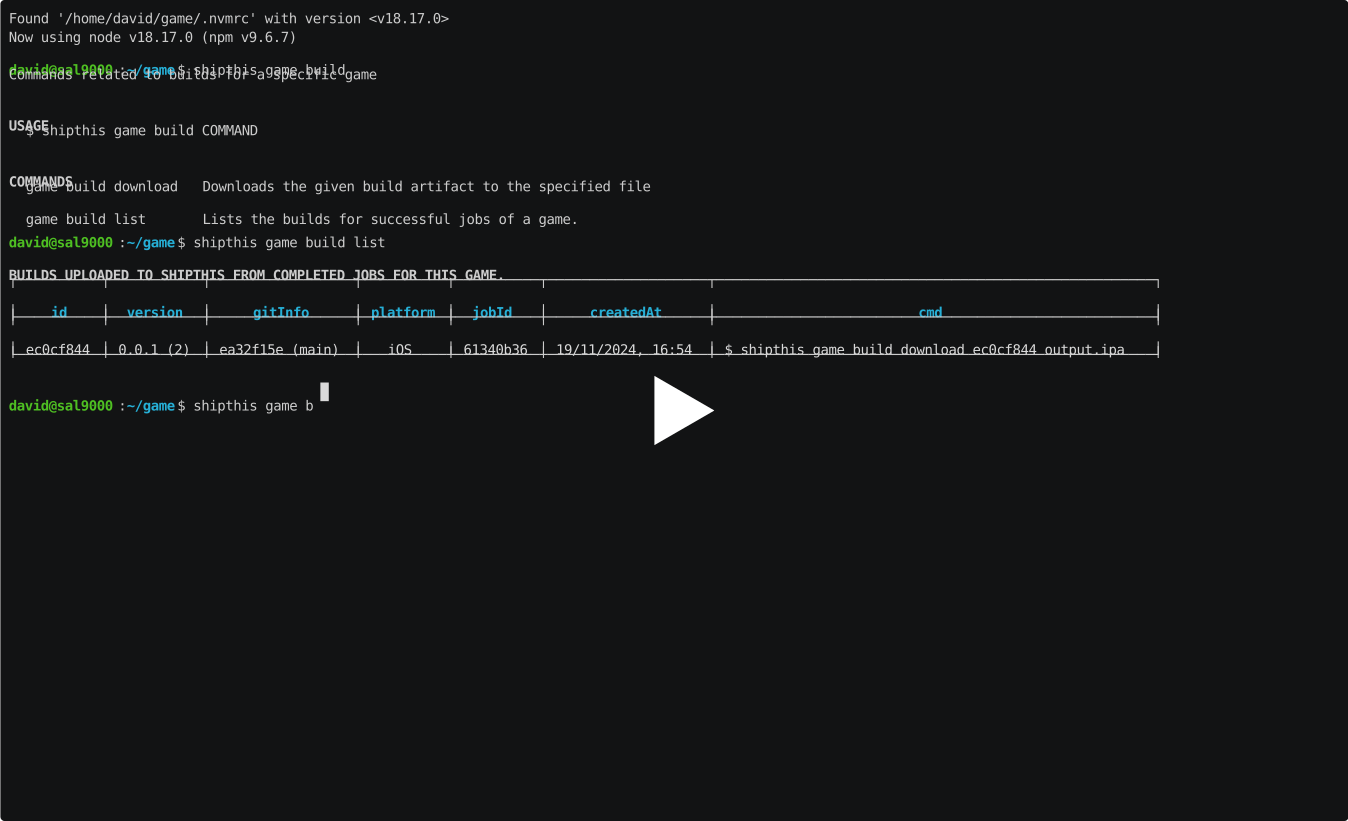](https://asciinema.org/a/m2i3bOvZHUpQXFWtYXc7UnaKQ)
|
|
7
11
|
|
|
12
|
+
## Commands
|
|
8
13
|
|
|
9
14
|
### game build download
|
|
10
15
|
|
package/docs/game/create
ADDED
|
@@ -0,0 +1,23 @@
|
|
|
1
|
+
# game create
|
|
2
|
+
|
|
3
|
+
## Description
|
|
4
|
+
|
|
5
|
+
Create a new game in ShipThis.
|
|
6
|
+
|
|
7
|
+
## Help Output
|
|
8
|
+
|
|
9
|
+
```
|
|
10
|
+
USAGE
|
|
11
|
+
$ shipthis game create [-q] [-f] [-n <value>]
|
|
12
|
+
|
|
13
|
+
FLAGS
|
|
14
|
+
-f, --force
|
|
15
|
+
-n, --name=<value> The name of the game
|
|
16
|
+
-q, --quiet Avoid output except for interactions and errors
|
|
17
|
+
|
|
18
|
+
DESCRIPTION
|
|
19
|
+
Create a new game in ShipThis.
|
|
20
|
+
|
|
21
|
+
EXAMPLES
|
|
22
|
+
$ shipthis game create
|
|
23
|
+
```
|
package/docs/game/create.md
CHANGED
|
@@ -0,0 +1,35 @@
|
|
|
1
|
+
# game details
|
|
2
|
+
|
|
3
|
+
## Description
|
|
4
|
+
|
|
5
|
+
Shows and sets the details of a game.
|
|
6
|
+
|
|
7
|
+
## Help Output
|
|
8
|
+
|
|
9
|
+
```
|
|
10
|
+
USAGE
|
|
11
|
+
$ shipthis game details [-g <value>] [-f] [-b <value>] [-s <value>] [-e <value>] [-v <value>] [-i <value>] [-a
|
|
12
|
+
<value>]
|
|
13
|
+
|
|
14
|
+
FLAGS
|
|
15
|
+
-a, --androidPackageName=<value> Set the Android package name
|
|
16
|
+
-b, --buildNumber=<value> Set the build number
|
|
17
|
+
-e, --gameEngine=<value> Set the game engine
|
|
18
|
+
-f, --force Force the command to run
|
|
19
|
+
-g, --gameId=<value> The ID of the game
|
|
20
|
+
-i, --iosBundleId=<value> Set the iOS bundle ID
|
|
21
|
+
-s, --semanticVersion=<value> Set the semantic version
|
|
22
|
+
-v, --gameEngineVersion=<value> Set the game engine version
|
|
23
|
+
|
|
24
|
+
DESCRIPTION
|
|
25
|
+
Shows and sets the details of a game.
|
|
26
|
+
|
|
27
|
+
EXAMPLES
|
|
28
|
+
$ shipthis game details
|
|
29
|
+
|
|
30
|
+
$ shipthis game details --gameId 0c179fc4
|
|
31
|
+
|
|
32
|
+
$ shipthis game details --buildNumber 5 --semanticVersion 1.2.3
|
|
33
|
+
|
|
34
|
+
$ shipthis game details --gameEngine godot --gameEngineVersion 4.2 --force
|
|
35
|
+
```
|
package/docs/game/details.md
CHANGED
package/docs/game/export
ADDED
|
@@ -0,0 +1,26 @@
|
|
|
1
|
+
# game export
|
|
2
|
+
|
|
3
|
+
## Description
|
|
4
|
+
|
|
5
|
+
Downloads the shipthis.json file for a given game into the current directory.
|
|
6
|
+
|
|
7
|
+
## Help Output
|
|
8
|
+
|
|
9
|
+
```
|
|
10
|
+
USAGE
|
|
11
|
+
$ shipthis game export GAME_ID [-f]
|
|
12
|
+
|
|
13
|
+
ARGUMENTS
|
|
14
|
+
GAME_ID The ID of the game to export (use "list" to get the ID)
|
|
15
|
+
|
|
16
|
+
FLAGS
|
|
17
|
+
-f, --force
|
|
18
|
+
|
|
19
|
+
DESCRIPTION
|
|
20
|
+
Downloads the shipthis.json file for a given game into the current directory.
|
|
21
|
+
|
|
22
|
+
EXAMPLES
|
|
23
|
+
$ shipthis game export abcd1234
|
|
24
|
+
|
|
25
|
+
$ shipthis game export abcd1234 --force
|
|
26
|
+
```
|
|
@@ -0,0 +1,24 @@
|
|
|
1
|
+
# game ios app addTester
|
|
2
|
+
|
|
3
|
+
## Description
|
|
4
|
+
|
|
5
|
+
Adds a test user to the game in App Store Connect.
|
|
6
|
+
|
|
7
|
+
## Help Output
|
|
8
|
+
|
|
9
|
+
```
|
|
10
|
+
USAGE
|
|
11
|
+
$ shipthis game ios app addTester [-g <value>] [-e <value>] [-f <value>] [-l <value>]
|
|
12
|
+
|
|
13
|
+
FLAGS
|
|
14
|
+
-e, --email=<value> The email address of the tester
|
|
15
|
+
-f, --firstName=<value> The first name of the tester
|
|
16
|
+
-g, --gameId=<value> The ID of the game
|
|
17
|
+
-l, --lastName=<value> The last name of the tester
|
|
18
|
+
|
|
19
|
+
DESCRIPTION
|
|
20
|
+
Adds a test user to the game in App Store Connect.
|
|
21
|
+
|
|
22
|
+
EXAMPLES
|
|
23
|
+
$ shipthis game ios app addTester
|
|
24
|
+
```
|
|
@@ -0,0 +1,25 @@
|
|
|
1
|
+
# game ios app create
|
|
2
|
+
|
|
3
|
+
## Description
|
|
4
|
+
|
|
5
|
+
Creates an App and BundleId in the Apple Developer Portal.
|
|
6
|
+
|
|
7
|
+
## Help Output
|
|
8
|
+
|
|
9
|
+
```
|
|
10
|
+
USAGE
|
|
11
|
+
$ shipthis game ios app create [-q] [-g <value>] [-n <value>] [-b <value>] [-f]
|
|
12
|
+
|
|
13
|
+
FLAGS
|
|
14
|
+
-b, --bundleId=<value> The BundleId in the Apple Developer Portal
|
|
15
|
+
-f, --force
|
|
16
|
+
-g, --gameId=<value> The ID of the game
|
|
17
|
+
-n, --appName=<value> The name of the App in the Apple Developer Portal
|
|
18
|
+
-q, --quiet Avoid output except for interactions and errors
|
|
19
|
+
|
|
20
|
+
DESCRIPTION
|
|
21
|
+
Creates an App and BundleId in the Apple Developer Portal.
|
|
22
|
+
|
|
23
|
+
EXAMPLES
|
|
24
|
+
$ shipthis game ios app create
|
|
25
|
+
```
|
|
@@ -0,0 +1,21 @@
|
|
|
1
|
+
# game ios app status
|
|
2
|
+
|
|
3
|
+
## Description
|
|
4
|
+
|
|
5
|
+
Shows the Game iOS App status.
|
|
6
|
+
|
|
7
|
+
## Help Output
|
|
8
|
+
|
|
9
|
+
```
|
|
10
|
+
USAGE
|
|
11
|
+
$ shipthis game ios app status [-g <value>]
|
|
12
|
+
|
|
13
|
+
FLAGS
|
|
14
|
+
-g, --gameId=<value> The ID of the game
|
|
15
|
+
|
|
16
|
+
DESCRIPTION
|
|
17
|
+
Shows the Game iOS App status.
|
|
18
|
+
|
|
19
|
+
EXAMPLES
|
|
20
|
+
$ shipthis game ios app status
|
|
21
|
+
```
|