sheet-happens 0.0.10 → 0.0.11
This diff represents the content of publicly available package versions that have been released to one of the supported registries. The information contained in this diff is provided for informational purposes only and reflects changes between package versions as they appear in their respective public registries.
- package/README.md +30 -2
- package/dist/index.d.ts +1 -0
- package/dist/index.js +45 -22
- package/dist/index.js.map +1 -1
- package/dist/index.modern.js +45 -22
- package/dist/index.modern.js.map +1 -1
- package/package.json +1 -1
package/README.md
CHANGED
|
@@ -4,15 +4,22 @@
|
|
|
4
4
|
|
|
5
5
|
[](https://www.npmjs.com/package/sheet-happens) [](https://standardjs.com)
|
|
6
6
|
|
|
7
|
+

|
|
8
|
+
|
|
9
|
+
## About
|
|
10
|
+
Canvas-based spreadsheet component for React. <br />
|
|
11
|
+
Super fast and responsive regardless of the dataset size because it draws only the data user currently sees.
|
|
12
|
+
|
|
13
|
+
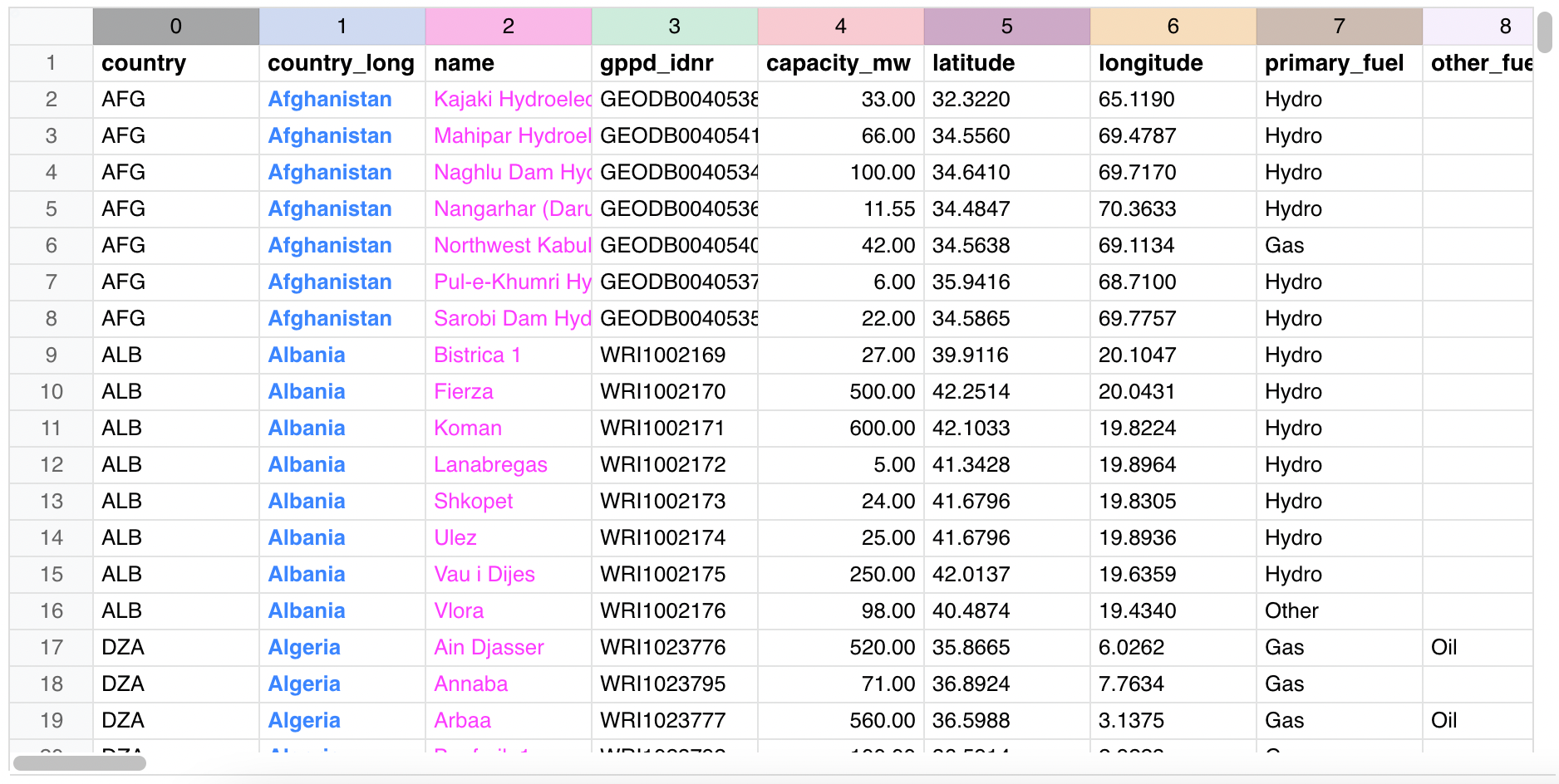
|
|
14
|
+
|
|
7
15
|
## Install
|
|
8
16
|
|
|
9
17
|
```bash
|
|
10
18
|
npm install --save sheet-happens
|
|
11
19
|
```
|
|
12
20
|
|
|
13
|
-

|
|
14
|
-
|
|
15
21
|
## Usage
|
|
22
|
+
To use our Sheet in your project, just import the component and its style and render it:
|
|
16
23
|
|
|
17
24
|
```jsx
|
|
18
25
|
import React, { Component } from 'react'
|
|
@@ -27,6 +34,27 @@ class Example extends Component {
|
|
|
27
34
|
}
|
|
28
35
|
```
|
|
29
36
|
|
|
37
|
+
Of course, you can also display some data in it:
|
|
38
|
+
```jsx
|
|
39
|
+
const [data, setData] = useState([[1,2,3], [10,20,30]]);
|
|
40
|
+
|
|
41
|
+
const displayData = (x, y) => {
|
|
42
|
+
return data?.[y]?.[x]?.toFixed?.(2);
|
|
43
|
+
};
|
|
44
|
+
|
|
45
|
+
return (
|
|
46
|
+
<div className="sheet-box">
|
|
47
|
+
<Sheet
|
|
48
|
+
sourceData={data}
|
|
49
|
+
displayData={displayData}
|
|
50
|
+
/>
|
|
51
|
+
</div>
|
|
52
|
+
);
|
|
53
|
+
```
|
|
54
|
+
|
|
55
|
+
Go to our [example page](https://farseerdev.github.io/sheet-happens/) to learn more about [features](https://farseerdev.github.io/sheet-happens#features) it has and checkout [documentation](https://farseerdev.github.io/sheet-happens#documentation) for detailed list of props you can send to this component. <br />
|
|
56
|
+
|
|
57
|
+
Along with descriptions, page also contains multiple Sheet components you can use to try out is it a good match for your needs. Edit some values, paste some data, drag columns and rows for resize, and so on.
|
|
30
58
|
|
|
31
59
|
|
|
32
60
|
## License
|
package/dist/index.d.ts
CHANGED
|
@@ -44,6 +44,7 @@ export interface SheetProps {
|
|
|
44
44
|
sourceData?: CellProperty<string | number | null>;
|
|
45
45
|
displayData?: CellProperty<CellContentType>;
|
|
46
46
|
editData?: CellProperty<string>;
|
|
47
|
+
editKeys?: CellProperty<string>;
|
|
47
48
|
inputComponent?: (x: number, y: number, props: SheetInputProps, commitEditingCell?: () => void) => ReactElement | undefined;
|
|
48
49
|
onSelectionChanged?: (x1: number, y1: number, x2: number, y2: number) => void;
|
|
49
50
|
onRightClick?: (e: SheetMouseEvent) => void;
|
package/dist/index.js
CHANGED
|
@@ -641,45 +641,49 @@ function Sheet(props) {
|
|
|
641
641
|
editValue = _useState6[0],
|
|
642
642
|
setEditValue = _useState6[1];
|
|
643
643
|
|
|
644
|
-
var _useState7 = React.useState(
|
|
645
|
-
|
|
646
|
-
|
|
644
|
+
var _useState7 = React.useState(''),
|
|
645
|
+
editKey = _useState7[0],
|
|
646
|
+
setEditKey = _useState7[1];
|
|
647
647
|
|
|
648
648
|
var _useState8 = React.useState(false),
|
|
649
|
-
|
|
650
|
-
|
|
649
|
+
arrowKeyCommitMode = _useState8[0],
|
|
650
|
+
setArrowKeyCommitMode = _useState8[1];
|
|
651
651
|
|
|
652
652
|
var _useState9 = React.useState(false),
|
|
653
|
-
|
|
654
|
-
|
|
653
|
+
shiftKeyDown = _useState9[0],
|
|
654
|
+
setShiftKeyDown = _useState9[1];
|
|
655
655
|
|
|
656
656
|
var _useState10 = React.useState(false),
|
|
657
|
-
|
|
658
|
-
|
|
657
|
+
knobDragInProgress = _useState10[0],
|
|
658
|
+
setKnobDragInProgress = _useState10[1];
|
|
659
659
|
|
|
660
|
-
var _useState11 = React.useState(
|
|
661
|
-
|
|
662
|
-
|
|
660
|
+
var _useState11 = React.useState(false),
|
|
661
|
+
selectionInProgress = _useState11[0],
|
|
662
|
+
setSelectionInProgress = _useState11[1];
|
|
663
663
|
|
|
664
664
|
var _useState12 = React.useState(null),
|
|
665
|
-
|
|
666
|
-
|
|
665
|
+
columnResize = _useState12[0],
|
|
666
|
+
setColumnResize = _useState12[1];
|
|
667
667
|
|
|
668
|
-
var _useState13 = React.useState(
|
|
669
|
-
|
|
670
|
-
|
|
668
|
+
var _useState13 = React.useState(null),
|
|
669
|
+
rowResize = _useState13[0],
|
|
670
|
+
setRowResize = _useState13[1];
|
|
671
671
|
|
|
672
672
|
var _useState14 = React.useState(false),
|
|
673
|
-
|
|
674
|
-
|
|
673
|
+
rowSelectionInProgress = _useState14[0],
|
|
674
|
+
setRowSelectionInProgress = _useState14[1];
|
|
675
675
|
|
|
676
|
-
var _useState15 = React.useState(
|
|
676
|
+
var _useState15 = React.useState(false),
|
|
677
|
+
columnSelectionInProgress = _useState15[0],
|
|
678
|
+
setColumnSelectionInProgress = _useState15[1];
|
|
679
|
+
|
|
680
|
+
var _useState16 = React.useState({
|
|
677
681
|
x: -1,
|
|
678
682
|
y: -1,
|
|
679
683
|
hitTarget: null
|
|
680
684
|
}),
|
|
681
|
-
buttonClickMouseDownCoordinates =
|
|
682
|
-
setButtonClickMouseDownCoordinates =
|
|
685
|
+
buttonClickMouseDownCoordinates = _useState16[0],
|
|
686
|
+
setButtonClickMouseDownCoordinates = _useState16[1];
|
|
683
687
|
|
|
684
688
|
var _useResizeObserver = useResizeObserver({
|
|
685
689
|
ref: canvasRef
|
|
@@ -715,9 +719,23 @@ function Sheet(props) {
|
|
|
715
719
|
var editData = React.useMemo(function () {
|
|
716
720
|
return createCellPropFunction(props.editData, '');
|
|
717
721
|
}, [props.editData]);
|
|
722
|
+
var editKeys = React.useMemo(function () {
|
|
723
|
+
return createCellPropFunction(props.editKeys, '');
|
|
724
|
+
}, [props.editKeys]);
|
|
718
725
|
var cellStyle = React.useMemo(function () {
|
|
719
726
|
return createCellPropFunction(props.cellStyle, defaultCellStyle);
|
|
720
727
|
}, [props.cellStyle]);
|
|
728
|
+
React.useEffect(function () {
|
|
729
|
+
var currEditKey = editKeys ? editKeys(editCell.x, editCell.y) : '';
|
|
730
|
+
|
|
731
|
+
if (currEditKey !== editKey) {
|
|
732
|
+
setEditCell({
|
|
733
|
+
x: -1,
|
|
734
|
+
y: -1
|
|
735
|
+
});
|
|
736
|
+
setEditKey('');
|
|
737
|
+
}
|
|
738
|
+
}, [editKeys]);
|
|
721
739
|
var columnSizes = React.useMemo(function () {
|
|
722
740
|
return calculateRowsOrColsSizes(freezeColumns, cellWidth, rowHeaderWidth, dataOffset.x, canvasWidth);
|
|
723
741
|
}, [props.freezeColumns, cellWidth, dataOffset.x, canvasWidth]);
|
|
@@ -1265,6 +1283,7 @@ function Sheet(props) {
|
|
|
1265
1283
|
x: -1,
|
|
1266
1284
|
y: -1
|
|
1267
1285
|
});
|
|
1286
|
+
setEditKey('');
|
|
1268
1287
|
};
|
|
1269
1288
|
|
|
1270
1289
|
var startEditingCell = function startEditingCell(editCell) {
|
|
@@ -1279,7 +1298,9 @@ function Sheet(props) {
|
|
|
1279
1298
|
val = editDataValue;
|
|
1280
1299
|
}
|
|
1281
1300
|
|
|
1301
|
+
var editDataKey = editKeys ? editKeys(editCell.x, editCell.y) : '';
|
|
1282
1302
|
setEditCell(editCell);
|
|
1303
|
+
setEditKey(editDataKey);
|
|
1283
1304
|
setEditValue(val);
|
|
1284
1305
|
};
|
|
1285
1306
|
|
|
@@ -1436,6 +1457,7 @@ function Sheet(props) {
|
|
|
1436
1457
|
x: -1,
|
|
1437
1458
|
y: -1
|
|
1438
1459
|
});
|
|
1460
|
+
setEditKey('');
|
|
1439
1461
|
};
|
|
1440
1462
|
|
|
1441
1463
|
var onMouseUp = function onMouseUp(e) {
|
|
@@ -1745,6 +1767,7 @@ function Sheet(props) {
|
|
|
1745
1767
|
x: -1,
|
|
1746
1768
|
y: -1
|
|
1747
1769
|
});
|
|
1770
|
+
setEditKey('');
|
|
1748
1771
|
return;
|
|
1749
1772
|
}
|
|
1750
1773
|
|