sfdx-hardis 6.5.4 → 6.5.5
This diff represents the content of publicly available package versions that have been released to one of the supported registries. The information contained in this diff is provided for informational purposes only and reflects changes between package versions as they appear in their respective public registries.
- package/CHANGELOG.md +3 -0
- package/README.md +19 -7
- package/oclif.manifest.json +360 -360
- package/package.json +1 -1
package/CHANGELOG.md
CHANGED
|
@@ -4,6 +4,9 @@
|
|
|
4
4
|
|
|
5
5
|
Note: Can be used with `sfdx plugins:install sfdx-hardis@beta` and docker image `hardisgroupcom/sfdx-hardis@beta`
|
|
6
6
|
|
|
7
|
+
- Update global variables documentation to add AI related ones
|
|
8
|
+
- Add more events about sfdx-hardis in the documentation
|
|
9
|
+
|
|
7
10
|
## [6.5.4] 2025-09-27
|
|
8
11
|
|
|
9
12
|
- Update installation instructions
|
package/README.md
CHANGED
|
@@ -144,6 +144,18 @@ sf hardis:<COMMAND> <OPTIONS>
|
|
|
144
144
|
|
|
145
145
|
<!-- events.md start -->
|
|
146
146
|
|
|
147
|
+
### Trailblazer User Group '25, Casablanca
|
|
148
|
+
|
|
149
|
+
Salesforce Org Documentation with Open-Source and Agentforce, by [Taha Basri](https://www.linkedin.com/in/tahabasri/)
|
|
150
|
+
|
|
151
|
+

|
|
152
|
+
|
|
153
|
+
### Trailblazer Developer Group '25, Berlin (online)
|
|
154
|
+
|
|
155
|
+
Summer of Docs – Auto-Document Your Salesforce Org Like a Pro, by [Mariia Pyvovarchuk](https://www.linkedin.com/in/mpyvo/) (Aspect) and [Roman Hentschke](https://www.linkedin.com/in/derroman/)
|
|
156
|
+
|
|
157
|
+

|
|
158
|
+
|
|
147
159
|
### London's Calling '25, London
|
|
148
160
|
|
|
149
161
|
Auto-generate your SF project Documentation site with open-source and Agentforce
|
|
@@ -158,43 +170,43 @@ Auto-generate your SF project Documentation site with open-source and Agentforce
|
|
|
158
170
|
|
|
159
171
|
### Trailblazer Admin Group '25, Lyon
|
|
160
172
|
|
|
161
|
-
Techs for Admins: Afterwork Salesforce Inspector Reloaded & sfdx-hardis, with Thomas Prouvot
|
|
173
|
+
Techs for Admins: Afterwork Salesforce Inspector Reloaded & sfdx-hardis, with [Thomas Prouvot](https://www.linkedin.com/in/thomasprouvot/)
|
|
162
174
|
|
|
163
175
|

|
|
164
176
|
|
|
165
177
|
### Dreamforce 2024, San Francisco
|
|
166
178
|
|
|
167
|
-
[Save the Day by Monitoring Your Org with Open-Source Tools](https://reg.salesforce.com/flow/plus/df24/sessioncatalog/page/catalog/session/1718915808069001Q7HH), with Olga Shirikova
|
|
179
|
+
[Save the Day by Monitoring Your Org with Open-Source Tools](https://reg.salesforce.com/flow/plus/df24/sessioncatalog/page/catalog/session/1718915808069001Q7HH), with [Olga Shirikova](https://www.linkedin.com/in/olga-shirokova/)
|
|
168
180
|
|
|
169
181
|
[](https://www.youtube.com/watch?v=NxiLiYeo11A)
|
|
170
182
|
|
|
171
183
|
### Wir Sind Ohana '24, Berlin
|
|
172
184
|
|
|
173
|
-
Automate the Monitoring of your Salesforce orgs with open-source tools only!, with Yosra Saidani
|
|
185
|
+
Automate the Monitoring of your Salesforce orgs with open-source tools only!, with [Yosra Saidani](https://www.linkedin.com/in/yosra-saidani-mvp/)
|
|
174
186
|
|
|
175
187
|
[](https://www.youtube.com/watch?v=xGbT6at7RZ0)
|
|
176
188
|
|
|
177
189
|
### Polish Dreamin '24, Wroclaw, Poland
|
|
178
190
|
|
|
179
|
-
[Easy and complete Salesforce CI/CD with open-source only!](https://coffeeforce.pl/dreamin/speaker/nicolas-vuillamy/), with Wojciech Suwiński
|
|
191
|
+
[Easy and complete Salesforce CI/CD with open-source only!](https://coffeeforce.pl/dreamin/speaker/nicolas-vuillamy/), with [Wojciech Suwiński](https://www.linkedin.com/in/wsuwinski/)
|
|
180
192
|
|
|
181
193
|

|
|
182
194
|
|
|
183
195
|
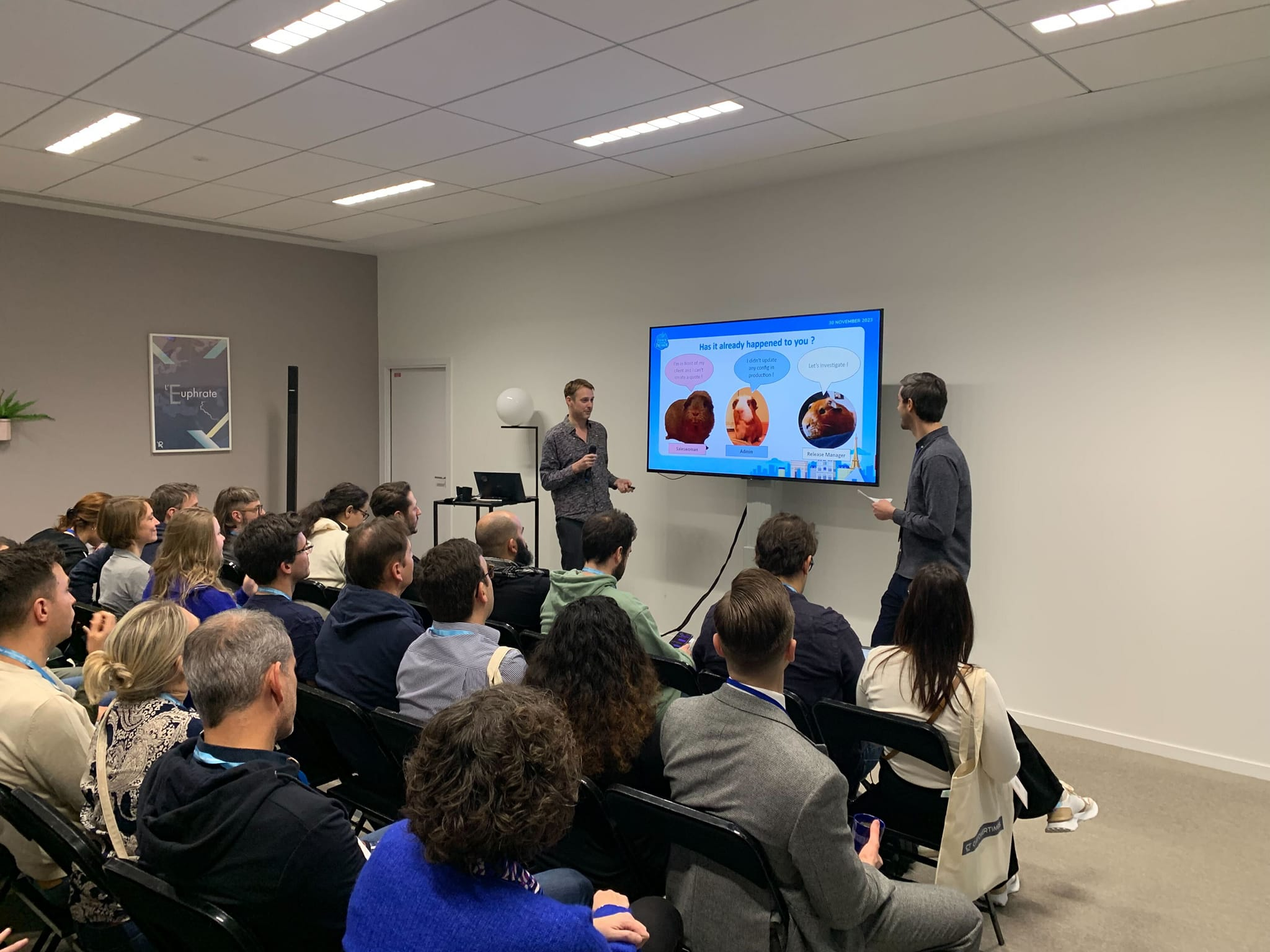
### French Touch Dreamin '23, Paris
|
|
184
196
|
|
|
185
|
-
[Automate the Monitoring of your Salesforce orgs with open-source tools only!](https://frenchtouchdreamin.com/index.php/schedule/), with Maxime Guenego
|
|
197
|
+
[Automate the Monitoring of your Salesforce orgs with open-source tools only!](https://frenchtouchdreamin.com/index.php/schedule/), with [Maxime Guenego](https://www.linkedin.com/in/maxime-guenego/)
|
|
186
198
|
|
|
187
199
|
|
|
188
200
|
|
|
189
201
|
### Dreamforce 2023, San Francisco
|
|
190
202
|
|
|
191
|
-
[Easy Salesforce CI/CD with open-source and clicks only thanks to sfdx-hardis!](https://reg.salesforce.com/flow/plus/df23/sessioncatalog/page/catalog/session/1684196389783001OqEl), with Jean-Pierre Rizzi
|
|
203
|
+
[Easy Salesforce CI/CD with open-source and clicks only thanks to sfdx-hardis!](https://reg.salesforce.com/flow/plus/df23/sessioncatalog/page/catalog/session/1684196389783001OqEl), with [Jean-Pierre Rizzi](https://www.linkedin.com/in/jprizzi/)
|
|
192
204
|
|
|
193
205
|
[](https://www.youtube.com/watch?v=o0Mm9F07UFs)
|
|
194
206
|
|
|
195
207
|
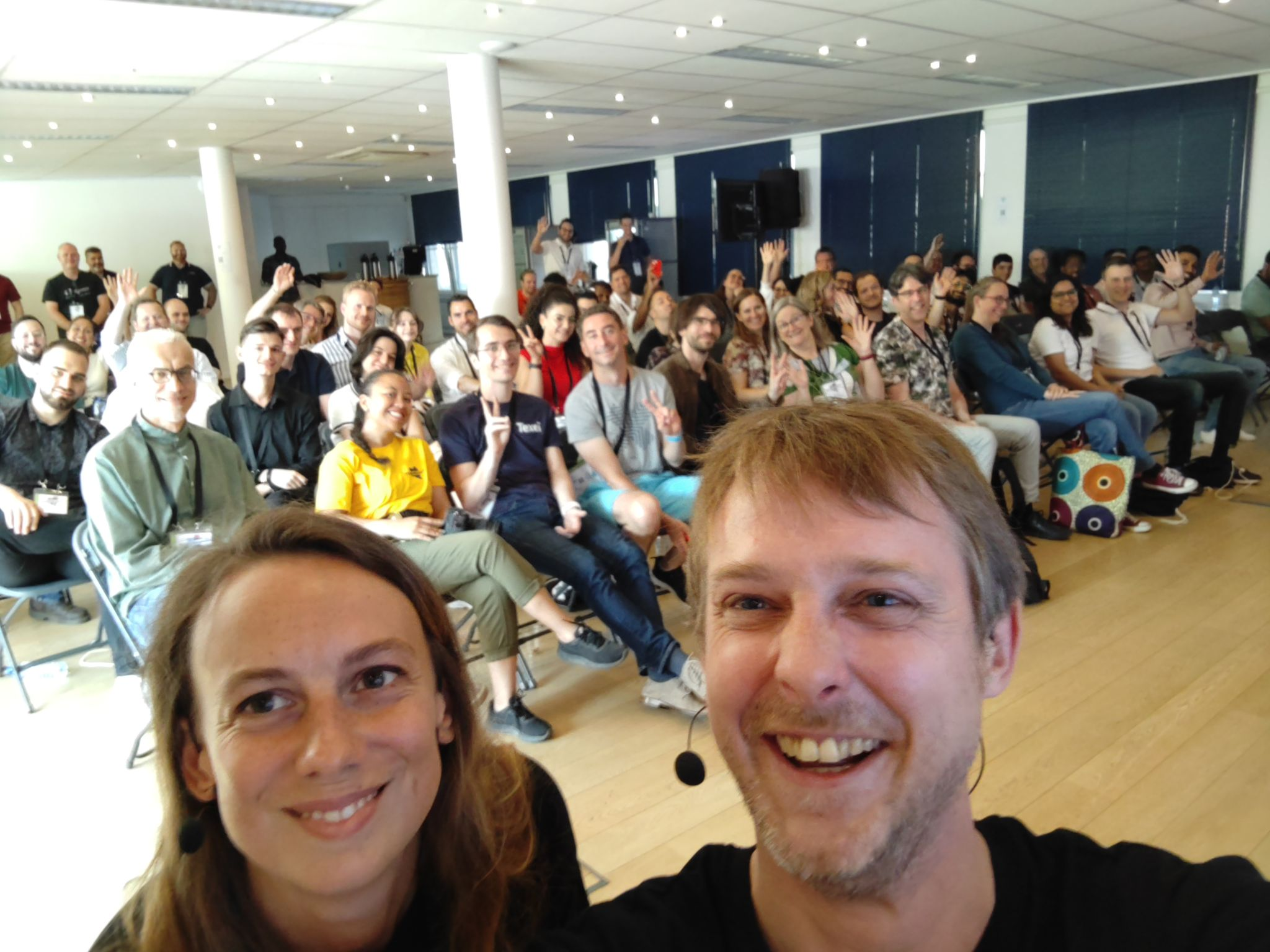
### Yeur Dreamin' 2023, Brussels
|
|
196
208
|
|
|
197
|
-
An easy and complete Salesforce CI/CD release management with open-source only !, with Angélique Picoreau
|
|
209
|
+
An easy and complete Salesforce CI/CD release management with open-source only !, with [Angélique Picoreau](https://www.linkedin.com/in/ang%C3%A9lique-picoreau-35328b36/)
|
|
198
210
|
|
|
199
211
|
[](https://www.linkedin.com/posts/nicolas-vuillamy_cicd-opensource-trailblazercommunity-activity-7076859027321704448-F1g-?utm_source=share&utm_medium=member_desktop)
|
|
200
212
|
|
package/oclif.manifest.json
CHANGED
|
@@ -57,13 +57,12 @@
|
|
|
57
57
|
"world:hello"
|
|
58
58
|
]
|
|
59
59
|
},
|
|
60
|
-
"hardis:
|
|
60
|
+
"hardis:cache:clear": {
|
|
61
61
|
"aliases": [],
|
|
62
62
|
"args": {},
|
|
63
|
-
"description": "\n## Command Behavior\n\n**
|
|
63
|
+
"description": "\n## Command Behavior\n\n**Clears the local cache generated by the sfdx-hardis plugin.**\n\nThis command is designed to remove temporary files, stored configurations, and other cached data that sfdx-hardis uses to optimize its operations. Clearing the cache can be beneficial for:\n\n- **Troubleshooting:** Resolving unexpected behavior or inconsistencies.\n- **Disk Space Management:** Freeing up storage on your local machine.\n- **Ensuring Fresh Data:** Guaranteeing that the plugin operates with the most current data and configurations.\n\n## Technical explanations\n\nThe command's technical implementation is straightforward:\n\n- **Direct Function Call:** It directly invokes the `clearCache()` function, which is imported from \buri../../../common/cache/index.js\buri.\n- **Cache Management Logic:** The \buriclearCache()` function encapsulates the logic for identifying and removing the specific files and directories that constitute the sfdx-hardis cache.\n",
|
|
64
64
|
"examples": [
|
|
65
|
-
"$ sf hardis:
|
|
66
|
-
"CI=true sf hardis:auth:login"
|
|
65
|
+
"$ sf hardis:cache:clear"
|
|
67
66
|
],
|
|
68
67
|
"flags": {
|
|
69
68
|
"json": {
|
|
@@ -81,28 +80,6 @@
|
|
|
81
80
|
"multiple": false,
|
|
82
81
|
"type": "option"
|
|
83
82
|
},
|
|
84
|
-
"instanceurl": {
|
|
85
|
-
"char": "r",
|
|
86
|
-
"description": "URL of org instance",
|
|
87
|
-
"name": "instanceurl",
|
|
88
|
-
"hasDynamicHelp": false,
|
|
89
|
-
"multiple": false,
|
|
90
|
-
"type": "option"
|
|
91
|
-
},
|
|
92
|
-
"devhub": {
|
|
93
|
-
"char": "h",
|
|
94
|
-
"description": "Also connect associated DevHub",
|
|
95
|
-
"name": "devhub",
|
|
96
|
-
"allowNo": false,
|
|
97
|
-
"type": "boolean"
|
|
98
|
-
},
|
|
99
|
-
"scratchorg": {
|
|
100
|
-
"char": "s",
|
|
101
|
-
"description": "Scratch org",
|
|
102
|
-
"name": "scratchorg",
|
|
103
|
-
"allowNo": false,
|
|
104
|
-
"type": "boolean"
|
|
105
|
-
},
|
|
106
83
|
"debug": {
|
|
107
84
|
"char": "d",
|
|
108
85
|
"description": "Activate debug mode (more logs)",
|
|
@@ -126,38 +103,42 @@
|
|
|
126
103
|
},
|
|
127
104
|
"hasDynamicHelp": false,
|
|
128
105
|
"hiddenAliases": [],
|
|
129
|
-
"id": "hardis:
|
|
106
|
+
"id": "hardis:cache:clear",
|
|
130
107
|
"pluginAlias": "sfdx-hardis",
|
|
131
108
|
"pluginName": "sfdx-hardis",
|
|
132
109
|
"pluginType": "core",
|
|
133
110
|
"strict": true,
|
|
134
111
|
"enableJsonFlag": true,
|
|
135
|
-
"title": "
|
|
112
|
+
"title": "Clear sfdx-hardis cache",
|
|
113
|
+
"uiConfig": {
|
|
114
|
+
"hide": true
|
|
115
|
+
},
|
|
136
116
|
"requiresProject": false,
|
|
137
117
|
"isESM": true,
|
|
138
118
|
"relativePath": [
|
|
139
119
|
"lib",
|
|
140
120
|
"commands",
|
|
141
121
|
"hardis",
|
|
142
|
-
"
|
|
143
|
-
"
|
|
122
|
+
"cache",
|
|
123
|
+
"clear.js"
|
|
144
124
|
],
|
|
145
125
|
"aliasPermutations": [],
|
|
146
126
|
"permutations": [
|
|
147
|
-
"hardis:
|
|
148
|
-
"
|
|
149
|
-
"
|
|
150
|
-
"hardis:
|
|
151
|
-
"
|
|
152
|
-
"
|
|
127
|
+
"hardis:cache:clear",
|
|
128
|
+
"cache:hardis:clear",
|
|
129
|
+
"cache:clear:hardis",
|
|
130
|
+
"hardis:clear:cache",
|
|
131
|
+
"clear:hardis:cache",
|
|
132
|
+
"clear:cache:hardis"
|
|
153
133
|
]
|
|
154
134
|
},
|
|
155
|
-
"hardis:
|
|
135
|
+
"hardis:auth:login": {
|
|
156
136
|
"aliases": [],
|
|
157
137
|
"args": {},
|
|
158
|
-
"description": "\n## Command Behavior\n\n**
|
|
138
|
+
"description": "\n## Command Behavior\n\n**Authenticates to a Salesforce org, primarily designed for CI/CD workflows.**\n\nThis command facilitates secure and automated logins to Salesforce organizations within continuous integration and continuous delivery pipelines. It leverages pre-configured authentication details, ensuring that CI/CD processes can interact with Salesforce without manual intervention.\n\nKey aspects:\n\n- **Configuration-Driven:** It relies on authentication variables and files set up by dedicated configuration commands:\n - For CI/CD repositories: [Configure Org CI Authentication](https://sfdx-hardis.cloudity.com/hardis/project/configure/auth/)\n - For Monitoring repositories: [Configure Org Monitoring](https://sfdx-hardis.cloudity.com/hardis/org/configure/monitoring/)\n- **Technical Org Support:** Supports authentication to a 'technical org' (e.g., for calling Agentforce from another org) by utilizing the `SFDX_AUTH_URL_TECHNICAL_ORG` environment variable. If this variable is set, the command authenticates to this org with the alias `TECHNICAL_ORG`.\n\nTo obtain the `SFDX_AUTH_URL_TECHNICAL_ORG` value, you can run `sf org display --verbose --json` and copy the `sfdxAuthUrl` field from the output.\n\n<details markdown=\"1\">\n<summary>Technical explanations</summary>\n\nThe command's technical flow involves:\n\n- **Flag Parsing:** It parses command-line flags such as `instanceurl`, `devhub`, `scratchorg`, and `debug` to determine the authentication context.\n- **Authentication Hook:** It triggers an internal authentication hook (`this.config.runHook('auth', ...`)) which is responsible for executing the actual authentication logic based on the provided flags (e.g., whether it's a Dev Hub or a scratch org).\n- **Environment Variable Check:** It checks for the presence of `SFDX_AUTH_URL_TECHNICAL_ORG` or `TECHNICAL_ORG_ALIAS` environment variables.\n- **`authOrg` Utility:** If a technical org is configured, it calls the `authOrg` utility function to perform the authentication for that specific org, ensuring it's connected and available for subsequent operations.\n- **Salesforce CLI Integration:** It integrates with the Salesforce CLI's authentication mechanisms to establish and manage org connections.\n</details>\n",
|
|
159
139
|
"examples": [
|
|
160
|
-
"$ sf hardis:
|
|
140
|
+
"$ sf hardis:auth:login",
|
|
141
|
+
"CI=true sf hardis:auth:login"
|
|
161
142
|
],
|
|
162
143
|
"flags": {
|
|
163
144
|
"json": {
|
|
@@ -175,6 +156,28 @@
|
|
|
175
156
|
"multiple": false,
|
|
176
157
|
"type": "option"
|
|
177
158
|
},
|
|
159
|
+
"instanceurl": {
|
|
160
|
+
"char": "r",
|
|
161
|
+
"description": "URL of org instance",
|
|
162
|
+
"name": "instanceurl",
|
|
163
|
+
"hasDynamicHelp": false,
|
|
164
|
+
"multiple": false,
|
|
165
|
+
"type": "option"
|
|
166
|
+
},
|
|
167
|
+
"devhub": {
|
|
168
|
+
"char": "h",
|
|
169
|
+
"description": "Also connect associated DevHub",
|
|
170
|
+
"name": "devhub",
|
|
171
|
+
"allowNo": false,
|
|
172
|
+
"type": "boolean"
|
|
173
|
+
},
|
|
174
|
+
"scratchorg": {
|
|
175
|
+
"char": "s",
|
|
176
|
+
"description": "Scratch org",
|
|
177
|
+
"name": "scratchorg",
|
|
178
|
+
"allowNo": false,
|
|
179
|
+
"type": "boolean"
|
|
180
|
+
},
|
|
178
181
|
"debug": {
|
|
179
182
|
"char": "d",
|
|
180
183
|
"description": "Activate debug mode (more logs)",
|
|
@@ -198,33 +201,30 @@
|
|
|
198
201
|
},
|
|
199
202
|
"hasDynamicHelp": false,
|
|
200
203
|
"hiddenAliases": [],
|
|
201
|
-
"id": "hardis:
|
|
204
|
+
"id": "hardis:auth:login",
|
|
202
205
|
"pluginAlias": "sfdx-hardis",
|
|
203
206
|
"pluginName": "sfdx-hardis",
|
|
204
207
|
"pluginType": "core",
|
|
205
208
|
"strict": true,
|
|
206
209
|
"enableJsonFlag": true,
|
|
207
|
-
"title": "
|
|
208
|
-
"uiConfig": {
|
|
209
|
-
"hide": true
|
|
210
|
-
},
|
|
210
|
+
"title": "Login",
|
|
211
211
|
"requiresProject": false,
|
|
212
212
|
"isESM": true,
|
|
213
213
|
"relativePath": [
|
|
214
214
|
"lib",
|
|
215
215
|
"commands",
|
|
216
216
|
"hardis",
|
|
217
|
-
"
|
|
218
|
-
"
|
|
217
|
+
"auth",
|
|
218
|
+
"login.js"
|
|
219
219
|
],
|
|
220
220
|
"aliasPermutations": [],
|
|
221
221
|
"permutations": [
|
|
222
|
-
"hardis:
|
|
223
|
-
"
|
|
224
|
-
"
|
|
225
|
-
"hardis:
|
|
226
|
-
"
|
|
227
|
-
"
|
|
222
|
+
"hardis:auth:login",
|
|
223
|
+
"auth:hardis:login",
|
|
224
|
+
"auth:login:hardis",
|
|
225
|
+
"hardis:login:auth",
|
|
226
|
+
"login:hardis:auth",
|
|
227
|
+
"login:auth:hardis"
|
|
228
228
|
]
|
|
229
229
|
},
|
|
230
230
|
"hardis:config:get": {
|
|
@@ -7788,13 +7788,16 @@
|
|
|
7788
7788
|
"limits:monitor:org:hardis"
|
|
7789
7789
|
]
|
|
7790
7790
|
},
|
|
7791
|
-
"hardis:org:
|
|
7791
|
+
"hardis:org:refresh:after-refresh": {
|
|
7792
7792
|
"aliases": [],
|
|
7793
7793
|
"args": {},
|
|
7794
|
-
"description": "\n**
|
|
7794
|
+
"description": "\n## Command Behavior\n\n**Restores all previously backed-up Connected Apps (including Consumer Secrets), certificates, custom settings, records and other metadata to a Salesforce org after a sandbox refresh.**\n\nThis command is the second step in the sandbox refresh process. It scans the backup folder created before the refresh, allows interactive or flag-driven selection of items to restore, and automates cleanup and redeployment to the refreshed org while preserving credentials and configuration.\n\nKey functionalities:\n\n- **Choose a backup to restore:** Lets you pick the saved sandbox project that contains the artifacts to restore.\n- **Select which items to restore:** Finds Connected App XMLs, certificates, custom settings and other artifacts and lets you pick what to restore (or restore all).\n- **Safety checks and validation:** Confirms files exist and prompts before making changes to the target org.\n- **Prepare org for restore:** Optionally cleans up existing Connected Apps so saved apps can be re-deployed without conflict.\n- **Redeploy saved artifacts:** Restores Connected Apps (with saved secrets), certificates, SAML SSO configs, custom settings and other metadata.\n- **Handle SAML configs:** Cleans and updates SAML XML files and helps you choose certificates to wire into restored configs.\n- **Restore records:** Optionally runs data import from selected SFDMU workspaces to restore record data.\n- **Reporting & persistence:** Sends restore reports and can update project config to record what was restored.\n\nThis command is part of [sfdx-hardis Sandbox Refresh](https://sfdx-hardis.cloudity.com/salesforce-sandbox-refresh/) and is intended to be run after a sandbox refresh to re-apply saved metadata, credentials and data.\n\n<details markdown=\"1\">\n<summary>Technical explanations</summary>\n\n- **Backup Folder Handling:** Reads the immediate subfolders of `scripts/sandbox-refresh/` and validates the chosen project contains the expected `manifest/` and `force-app` layout.\n- **Metadata & Deployment APIs:** Uses `sf project deploy start --manifest` for package-based deploys, `sf project deploy start --metadata-dir` for MDAPI artifacts (certificates), and utility functions for Connected App deployment that preserve consumer secrets.\n- **SAML Handling:** Queries active certificates via tooling API, updates SAML XML files, and deploys using `sf project deploy start -m SamlSsoConfig`.\n- **Records Handling:** Uses interactive selection of SFDMU workspaces and runs data import utilities to restore records.\n- **Error Handling & Summary:** Aggregates results, logs success/warnings/errors, and returns a structured result indicating which items were restored and any failures.\n\n</details>\n",
|
|
7795
7795
|
"examples": [
|
|
7796
|
-
"$ sf hardis:org:
|
|
7797
|
-
"$ sf hardis:org:
|
|
7796
|
+
"$ sf hardis:org:refresh:after-refresh",
|
|
7797
|
+
"$ sf hardis:org:refresh:after-refresh --name \"MyConnectedApp\" // Process specific app, no selection prompt",
|
|
7798
|
+
"$ sf hardis:org:refresh:after-refresh --name \"App1,App2,App3\" // Process multiple apps, no selection prompt",
|
|
7799
|
+
"$ sf hardis:org:refresh:after-refresh --all // Process all apps, no selection prompt",
|
|
7800
|
+
"$ sf hardis:org:refresh:after-refresh --target-org myDevOrg"
|
|
7798
7801
|
],
|
|
7799
7802
|
"flags": {
|
|
7800
7803
|
"json": {
|
|
@@ -7812,23 +7815,37 @@
|
|
|
7812
7815
|
"multiple": false,
|
|
7813
7816
|
"type": "option"
|
|
7814
7817
|
},
|
|
7815
|
-
"
|
|
7816
|
-
"char": "
|
|
7817
|
-
"
|
|
7818
|
-
"
|
|
7819
|
-
"
|
|
7820
|
-
"
|
|
7818
|
+
"target-org": {
|
|
7819
|
+
"char": "o",
|
|
7820
|
+
"name": "target-org",
|
|
7821
|
+
"noCacheDefault": true,
|
|
7822
|
+
"required": true,
|
|
7823
|
+
"summary": "Username or alias of the target org. Not required if the `target-org` configuration variable is already set.",
|
|
7824
|
+
"hasDynamicHelp": true,
|
|
7825
|
+
"multiple": false,
|
|
7826
|
+
"type": "option"
|
|
7821
7827
|
},
|
|
7822
|
-
"
|
|
7823
|
-
"char": "
|
|
7824
|
-
"description": "
|
|
7825
|
-
"name": "
|
|
7828
|
+
"name": {
|
|
7829
|
+
"char": "n",
|
|
7830
|
+
"description": "Connected App name(s) to process (bypasses selection prompt). For multiple apps, separate with commas (e.g., \"App1,App2\")",
|
|
7831
|
+
"name": "name",
|
|
7832
|
+
"summary": "Filter according to Name criteria",
|
|
7833
|
+
"hasDynamicHelp": false,
|
|
7834
|
+
"multiple": false,
|
|
7835
|
+
"type": "option"
|
|
7836
|
+
},
|
|
7837
|
+
"all": {
|
|
7838
|
+
"char": "a",
|
|
7839
|
+
"description": "If set, all Connected Apps from the local repository will be processed. Takes precedence over --name if both are specified.",
|
|
7840
|
+
"name": "all",
|
|
7841
|
+
"summary": "Process all Connected Apps without selection prompt",
|
|
7826
7842
|
"allowNo": false,
|
|
7827
7843
|
"type": "boolean"
|
|
7828
7844
|
},
|
|
7829
7845
|
"websocket": {
|
|
7830
7846
|
"description": "Websocket host:port for VsCode SFDX Hardis UI integration",
|
|
7831
7847
|
"name": "websocket",
|
|
7848
|
+
"summary": "Websocket host:port for VsCode SFDX Hardis UI integration",
|
|
7832
7849
|
"hasDynamicHelp": false,
|
|
7833
7850
|
"multiple": false,
|
|
7834
7851
|
"type": "option"
|
|
@@ -7836,80 +7853,68 @@
|
|
|
7836
7853
|
"skipauth": {
|
|
7837
7854
|
"description": "Skip authentication check when a default username is required",
|
|
7838
7855
|
"name": "skipauth",
|
|
7856
|
+
"summary": "Skip authentication check when a default username is required",
|
|
7839
7857
|
"allowNo": false,
|
|
7840
7858
|
"type": "boolean"
|
|
7841
|
-
},
|
|
7842
|
-
"target-org": {
|
|
7843
|
-
"aliases": [
|
|
7844
|
-
"targetusername",
|
|
7845
|
-
"u"
|
|
7846
|
-
],
|
|
7847
|
-
"char": "o",
|
|
7848
|
-
"deprecateAliases": true,
|
|
7849
|
-
"name": "target-org",
|
|
7850
|
-
"noCacheDefault": true,
|
|
7851
|
-
"required": true,
|
|
7852
|
-
"summary": "Username or alias of the target org. Not required if the `target-org` configuration variable is already set.",
|
|
7853
|
-
"hasDynamicHelp": true,
|
|
7854
|
-
"multiple": false,
|
|
7855
|
-
"type": "option"
|
|
7856
7859
|
}
|
|
7857
7860
|
},
|
|
7858
7861
|
"hasDynamicHelp": true,
|
|
7859
7862
|
"hiddenAliases": [],
|
|
7860
|
-
"id": "hardis:org:
|
|
7863
|
+
"id": "hardis:org:refresh:after-refresh",
|
|
7861
7864
|
"pluginAlias": "sfdx-hardis",
|
|
7862
7865
|
"pluginName": "sfdx-hardis",
|
|
7863
7866
|
"pluginType": "core",
|
|
7864
7867
|
"strict": true,
|
|
7865
7868
|
"enableJsonFlag": true,
|
|
7866
|
-
"title": "
|
|
7867
|
-
"requiresProject":
|
|
7869
|
+
"title": "Restore Connected Apps after org refresh",
|
|
7870
|
+
"requiresProject": true,
|
|
7868
7871
|
"isESM": true,
|
|
7869
7872
|
"relativePath": [
|
|
7870
7873
|
"lib",
|
|
7871
7874
|
"commands",
|
|
7872
7875
|
"hardis",
|
|
7873
7876
|
"org",
|
|
7874
|
-
"
|
|
7875
|
-
"
|
|
7877
|
+
"refresh",
|
|
7878
|
+
"after-refresh.js"
|
|
7876
7879
|
],
|
|
7877
7880
|
"aliasPermutations": [],
|
|
7878
7881
|
"permutations": [
|
|
7879
|
-
"hardis:org:
|
|
7880
|
-
"org:hardis:
|
|
7881
|
-
"org:
|
|
7882
|
-
"org:
|
|
7883
|
-
"hardis:
|
|
7884
|
-
"
|
|
7885
|
-
"
|
|
7886
|
-
"
|
|
7887
|
-
"hardis:
|
|
7888
|
-
"
|
|
7889
|
-
"
|
|
7890
|
-
"
|
|
7891
|
-
"hardis:org:
|
|
7892
|
-
"org:hardis:
|
|
7893
|
-
"org:
|
|
7894
|
-
"org:
|
|
7895
|
-
"hardis:
|
|
7896
|
-
"
|
|
7897
|
-
"
|
|
7898
|
-
"
|
|
7899
|
-
"hardis:
|
|
7900
|
-
"
|
|
7901
|
-
"
|
|
7902
|
-
"
|
|
7882
|
+
"hardis:org:refresh:after-refresh",
|
|
7883
|
+
"org:hardis:refresh:after-refresh",
|
|
7884
|
+
"org:refresh:hardis:after-refresh",
|
|
7885
|
+
"org:refresh:after-refresh:hardis",
|
|
7886
|
+
"hardis:refresh:org:after-refresh",
|
|
7887
|
+
"refresh:hardis:org:after-refresh",
|
|
7888
|
+
"refresh:org:hardis:after-refresh",
|
|
7889
|
+
"refresh:org:after-refresh:hardis",
|
|
7890
|
+
"hardis:refresh:after-refresh:org",
|
|
7891
|
+
"refresh:hardis:after-refresh:org",
|
|
7892
|
+
"refresh:after-refresh:hardis:org",
|
|
7893
|
+
"refresh:after-refresh:org:hardis",
|
|
7894
|
+
"hardis:org:after-refresh:refresh",
|
|
7895
|
+
"org:hardis:after-refresh:refresh",
|
|
7896
|
+
"org:after-refresh:hardis:refresh",
|
|
7897
|
+
"org:after-refresh:refresh:hardis",
|
|
7898
|
+
"hardis:after-refresh:org:refresh",
|
|
7899
|
+
"after-refresh:hardis:org:refresh",
|
|
7900
|
+
"after-refresh:org:hardis:refresh",
|
|
7901
|
+
"after-refresh:org:refresh:hardis",
|
|
7902
|
+
"hardis:after-refresh:refresh:org",
|
|
7903
|
+
"after-refresh:hardis:refresh:org",
|
|
7904
|
+
"after-refresh:refresh:hardis:org",
|
|
7905
|
+
"after-refresh:refresh:org:hardis"
|
|
7903
7906
|
]
|
|
7904
7907
|
},
|
|
7905
|
-
"hardis:org:
|
|
7908
|
+
"hardis:org:refresh:before-refresh": {
|
|
7906
7909
|
"aliases": [],
|
|
7907
7910
|
"args": {},
|
|
7908
|
-
"description": "\n**
|
|
7911
|
+
"description": "\n## Command Behavior\n\n**Backs up all Connected Apps (including Consumer Secrets), certificates, custom settings, records and other metadata from a Salesforce org before a sandbox refresh, enabling full restoration after the refresh.**\n\nThis command prepares a complete backup prior to a sandbox refresh. It creates a dedicated project under `scripts/sandbox-refresh/<sandbox-folder>`, retrieves metadata and data, attempts to capture Connected App consumer secrets, and can optionally delete the apps so they can be reuploaded after the refresh.\n\nKey functionalities:\n\n- **Create a save project:** Generates a dedicated project folder to store all artifacts for the sandbox backup.\n- **Find and select Connected Apps:** Lists Connected Apps in the org and lets you pick specific apps, use a name filter, or process all apps.\n- **Save metadata for restore:** Builds a manifest and retrieves the metadata types you choose so they can be restored after the refresh.\n- **Capture Consumer Secrets:** Attempts to capture Connected App consumer secrets automatically (opens a browser session when possible) and falls back to a short manual prompt when needed.\n- **Collect certificates:** Saves certificate files and their definitions so they can be redeployed later.\n- **Export custom settings & records:** Lets you pick custom settings to export as JSON and optionally export records using configured data workspaces.\n- **Persist choices & report:** Stores your backup choices in project config and sends report files for traceability.\n- **Optional cleanup:** Can delete backed-up Connected Apps from the org so they can be re-uploaded cleanly after the refresh.\n- **Interactive safety checks:** Prompts you to confirm package contents and other potentially destructive actions; sensible defaults are chosen where appropriate.\n\nThis command is part of [sfdx-hardis Sandbox Refresh](https://sfdx-hardis.cloudity.com/salesforce-sandbox-refresh/) and is intended to be run before a sandbox refresh so that all credentials, certificates, metadata and data can be restored afterwards.\n\n<details markdown=\"1\">\n<summary>Technical explanations</summary>\n\n- **Salesforce CLI Integration:** Uses `sf org list metadata`, `sf project retrieve start`, `sf project generate`, `sf project deploy start`, and `sf data tree export`/`import` where applicable.\n- **Metadata Handling:** Writes and reads package XML files under the generated project (`manifest/`), copies MDAPI certificate artifacts into `force-app/main/default/certs`, and produces `package-metadata-to-restore.xml` for post-refresh deployment.\n- **Consumer Secret Handling:** Uses `puppeteer-core` with an executable path from `getChromeExecutablePath()` (env var `PUPPETEER_EXECUTABLE_PATH` may be required). Falls back to manual prompt when browser automation cannot be used.\n- **Data & Records:** Exports custom settings to JSON and supports exporting records through SFDMU workspaces chosen interactively.\n- **Config & Reporting:** Updates project/user config under `config/.sfdx-hardis.yml#refreshSandboxConfig` and reports artifacts to the WebSocket client.\n- **Error Handling:** Provides clear error messages and a summary response object indicating success/failure and which secrets were captured.\n\n</details>\n",
|
|
7909
7912
|
"examples": [
|
|
7910
|
-
"$ sf hardis:org:
|
|
7911
|
-
"$ sf hardis:org:
|
|
7912
|
-
"$ sf hardis:org:
|
|
7913
|
+
"$ sf hardis:org:refresh:before-refresh",
|
|
7914
|
+
"$ sf hardis:org:refresh:before-refresh --name \"MyConnectedApp\"",
|
|
7915
|
+
"$ sf hardis:org:refresh:before-refresh --name \"App1,App2,App3\"",
|
|
7916
|
+
"$ sf hardis:org:refresh:before-refresh --all",
|
|
7917
|
+
"$ sf hardis:org:refresh:before-refresh --delete"
|
|
7913
7918
|
],
|
|
7914
7919
|
"flags": {
|
|
7915
7920
|
"json": {
|
|
@@ -7927,56 +7932,38 @@
|
|
|
7927
7932
|
"multiple": false,
|
|
7928
7933
|
"type": "option"
|
|
7929
7934
|
},
|
|
7930
|
-
"
|
|
7931
|
-
"char": "
|
|
7932
|
-
"
|
|
7933
|
-
"
|
|
7934
|
-
"
|
|
7935
|
+
"target-org": {
|
|
7936
|
+
"char": "o",
|
|
7937
|
+
"name": "target-org",
|
|
7938
|
+
"noCacheDefault": true,
|
|
7939
|
+
"required": true,
|
|
7940
|
+
"summary": "Username or alias of the target org. Not required if the `target-org` configuration variable is already set.",
|
|
7941
|
+
"hasDynamicHelp": true,
|
|
7942
|
+
"multiple": false,
|
|
7943
|
+
"type": "option"
|
|
7944
|
+
},
|
|
7945
|
+
"delete": {
|
|
7946
|
+
"char": "d",
|
|
7947
|
+
"description": "By default, Connected Apps are not deleted from the org after saving. Set this flag to force their deletion so they will be able to be reuploaded again after refreshing the org.",
|
|
7948
|
+
"name": "delete",
|
|
7949
|
+
"summary": "Delete Connected Apps from org after saving",
|
|
7950
|
+
"allowNo": false,
|
|
7935
7951
|
"type": "boolean"
|
|
7936
7952
|
},
|
|
7937
7953
|
"name": {
|
|
7938
7954
|
"char": "n",
|
|
7939
|
-
"description": "
|
|
7955
|
+
"description": "Connected App name(s) to process. For multiple apps, separate with commas (e.g., \"App1,App2\")",
|
|
7940
7956
|
"name": "name",
|
|
7957
|
+
"summary": "Filter according to Name criteria",
|
|
7941
7958
|
"hasDynamicHelp": false,
|
|
7942
7959
|
"multiple": false,
|
|
7943
7960
|
"type": "option"
|
|
7944
7961
|
},
|
|
7945
|
-
"
|
|
7946
|
-
"char": "
|
|
7947
|
-
"description": "
|
|
7948
|
-
"name": "
|
|
7949
|
-
"
|
|
7950
|
-
"multiple": false,
|
|
7951
|
-
"type": "option"
|
|
7952
|
-
},
|
|
7953
|
-
"delete-flow-interviews": {
|
|
7954
|
-
"char": "w",
|
|
7955
|
-
"description": "If the presence of Flow interviews prevent to delete flows versions, delete them before retrying to delete flow versions",
|
|
7956
|
-
"name": "delete-flow-interviews",
|
|
7957
|
-
"allowNo": false,
|
|
7958
|
-
"type": "boolean"
|
|
7959
|
-
},
|
|
7960
|
-
"allowpurgefailure": {
|
|
7961
|
-
"char": "f",
|
|
7962
|
-
"description": "Allows purges to fail without exiting with 1. Use --no-allowpurgefailure to disable",
|
|
7963
|
-
"name": "allowpurgefailure",
|
|
7964
|
-
"allowNo": true,
|
|
7965
|
-
"type": "boolean"
|
|
7966
|
-
},
|
|
7967
|
-
"instanceurl": {
|
|
7968
|
-
"char": "r",
|
|
7969
|
-
"description": "URL of org instance",
|
|
7970
|
-
"name": "instanceurl",
|
|
7971
|
-
"default": "https://login.salesforce.com",
|
|
7972
|
-
"hasDynamicHelp": false,
|
|
7973
|
-
"multiple": false,
|
|
7974
|
-
"type": "option"
|
|
7975
|
-
},
|
|
7976
|
-
"debug": {
|
|
7977
|
-
"char": "d",
|
|
7978
|
-
"description": "Activate debug mode (more logs)",
|
|
7979
|
-
"name": "debug",
|
|
7962
|
+
"all": {
|
|
7963
|
+
"char": "a",
|
|
7964
|
+
"description": "If set, all Connected Apps from the org will be processed. Takes precedence over --name if both are specified.",
|
|
7965
|
+
"name": "all",
|
|
7966
|
+
"summary": "Process all Connected Apps without selection prompt",
|
|
7980
7967
|
"allowNo": false,
|
|
7981
7968
|
"type": "boolean"
|
|
7982
7969
|
},
|
|
@@ -7992,80 +7979,61 @@
|
|
|
7992
7979
|
"name": "skipauth",
|
|
7993
7980
|
"allowNo": false,
|
|
7994
7981
|
"type": "boolean"
|
|
7995
|
-
},
|
|
7996
|
-
"target-org": {
|
|
7997
|
-
"aliases": [
|
|
7998
|
-
"targetusername",
|
|
7999
|
-
"u"
|
|
8000
|
-
],
|
|
8001
|
-
"char": "o",
|
|
8002
|
-
"deprecateAliases": true,
|
|
8003
|
-
"name": "target-org",
|
|
8004
|
-
"noCacheDefault": true,
|
|
8005
|
-
"required": true,
|
|
8006
|
-
"summary": "Username or alias of the target org. Not required if the `target-org` configuration variable is already set.",
|
|
8007
|
-
"hasDynamicHelp": true,
|
|
8008
|
-
"multiple": false,
|
|
8009
|
-
"type": "option"
|
|
8010
7982
|
}
|
|
8011
7983
|
},
|
|
8012
7984
|
"hasDynamicHelp": true,
|
|
8013
7985
|
"hiddenAliases": [],
|
|
8014
|
-
"id": "hardis:org:
|
|
7986
|
+
"id": "hardis:org:refresh:before-refresh",
|
|
8015
7987
|
"pluginAlias": "sfdx-hardis",
|
|
8016
7988
|
"pluginName": "sfdx-hardis",
|
|
8017
7989
|
"pluginType": "core",
|
|
8018
7990
|
"strict": true,
|
|
8019
7991
|
"enableJsonFlag": true,
|
|
8020
|
-
"
|
|
8021
|
-
"requiresProject": false,
|
|
7992
|
+
"requiresProject": true,
|
|
8022
7993
|
"isESM": true,
|
|
8023
7994
|
"relativePath": [
|
|
8024
7995
|
"lib",
|
|
8025
7996
|
"commands",
|
|
8026
7997
|
"hardis",
|
|
8027
7998
|
"org",
|
|
8028
|
-
"
|
|
8029
|
-
"
|
|
7999
|
+
"refresh",
|
|
8000
|
+
"before-refresh.js"
|
|
8030
8001
|
],
|
|
8031
8002
|
"aliasPermutations": [],
|
|
8032
8003
|
"permutations": [
|
|
8033
|
-
"hardis:org:
|
|
8034
|
-
"org:hardis:
|
|
8035
|
-
"org:
|
|
8036
|
-
"org:
|
|
8037
|
-
"hardis:
|
|
8038
|
-
"
|
|
8039
|
-
"
|
|
8040
|
-
"
|
|
8041
|
-
"hardis:
|
|
8042
|
-
"
|
|
8043
|
-
"
|
|
8044
|
-
"
|
|
8045
|
-
"hardis:org:
|
|
8046
|
-
"org:hardis:
|
|
8047
|
-
"org:
|
|
8048
|
-
"org:
|
|
8049
|
-
"hardis:
|
|
8050
|
-
"
|
|
8051
|
-
"
|
|
8052
|
-
"
|
|
8053
|
-
"hardis:
|
|
8054
|
-
"
|
|
8055
|
-
"
|
|
8056
|
-
"
|
|
8004
|
+
"hardis:org:refresh:before-refresh",
|
|
8005
|
+
"org:hardis:refresh:before-refresh",
|
|
8006
|
+
"org:refresh:hardis:before-refresh",
|
|
8007
|
+
"org:refresh:before-refresh:hardis",
|
|
8008
|
+
"hardis:refresh:org:before-refresh",
|
|
8009
|
+
"refresh:hardis:org:before-refresh",
|
|
8010
|
+
"refresh:org:hardis:before-refresh",
|
|
8011
|
+
"refresh:org:before-refresh:hardis",
|
|
8012
|
+
"hardis:refresh:before-refresh:org",
|
|
8013
|
+
"refresh:hardis:before-refresh:org",
|
|
8014
|
+
"refresh:before-refresh:hardis:org",
|
|
8015
|
+
"refresh:before-refresh:org:hardis",
|
|
8016
|
+
"hardis:org:before-refresh:refresh",
|
|
8017
|
+
"org:hardis:before-refresh:refresh",
|
|
8018
|
+
"org:before-refresh:hardis:refresh",
|
|
8019
|
+
"org:before-refresh:refresh:hardis",
|
|
8020
|
+
"hardis:before-refresh:org:refresh",
|
|
8021
|
+
"before-refresh:hardis:org:refresh",
|
|
8022
|
+
"before-refresh:org:hardis:refresh",
|
|
8023
|
+
"before-refresh:org:refresh:hardis",
|
|
8024
|
+
"hardis:before-refresh:refresh:org",
|
|
8025
|
+
"before-refresh:hardis:refresh:org",
|
|
8026
|
+
"before-refresh:refresh:hardis:org",
|
|
8027
|
+
"before-refresh:refresh:org:hardis"
|
|
8057
8028
|
]
|
|
8058
8029
|
},
|
|
8059
|
-
"hardis:org:
|
|
8030
|
+
"hardis:org:retrieve:packageconfig": {
|
|
8060
8031
|
"aliases": [],
|
|
8061
8032
|
"args": {},
|
|
8062
|
-
"description": "\n
|
|
8033
|
+
"description": "\n**Retrieves the installed package configuration from a Salesforce org and optionally updates the local project configuration.**\n\nThis command is useful for maintaining an accurate record of installed packages within your Salesforce project, which is crucial for managing dependencies and ensuring consistent deployments across environments.\n\nKey functionalities:\n\n- **Package Listing:** Connects to a specified Salesforce org (or prompts for one if not provided) and retrieves a list of all installed packages.\n- **Configuration Update:** Offers the option to update your local project's configuration with the retrieved list of installed packages. This can be beneficial for automating package installations during environment setup or CI/CD processes.\n\n<details markdown=\"1\">\n<summary>Technical explanations</summary>\n\nThe command's technical implementation involves:\n\n- **Org Connection:** It establishes a connection to the target Salesforce org using the provided or prompted username.\n- **Metadata Retrieval:** It utilizes `MetadataUtils.listInstalledPackages` to query the Salesforce org and obtain details about the installed packages.\n- **Interactive Prompt:** It uses the `prompts` library to ask the user whether they want to update their local project configuration with the retrieved package list.\n- **Configuration Management:** If the user confirms, it calls `managePackageConfig` to update the project's configuration file (likely `.sfdx-hardis.yml`) with the new package information.\n- **User Feedback:** Provides clear messages to the user about the success of the package retrieval and configuration update.\n</details>\n",
|
|
8063
8034
|
"examples": [
|
|
8064
|
-
"$ sf hardis:org:
|
|
8065
|
-
"
|
|
8066
|
-
"$ sf hardis:org:refresh:after-refresh --name \"App1,App2,App3\" // Process multiple apps, no selection prompt",
|
|
8067
|
-
"$ sf hardis:org:refresh:after-refresh --all // Process all apps, no selection prompt",
|
|
8068
|
-
"$ sf hardis:org:refresh:after-refresh --target-org myDevOrg"
|
|
8035
|
+
"$ sf hardis:org:retrieve:packageconfig",
|
|
8036
|
+
"sf hardis:org:retrieve:packageconfig -u myOrg"
|
|
8069
8037
|
],
|
|
8070
8038
|
"flags": {
|
|
8071
8039
|
"json": {
|
|
@@ -8083,37 +8051,16 @@
|
|
|
8083
8051
|
"multiple": false,
|
|
8084
8052
|
"type": "option"
|
|
8085
8053
|
},
|
|
8086
|
-
"
|
|
8087
|
-
"char": "
|
|
8088
|
-
"
|
|
8089
|
-
"
|
|
8090
|
-
"required": true,
|
|
8091
|
-
"summary": "Username or alias of the target org. Not required if the `target-org` configuration variable is already set.",
|
|
8092
|
-
"hasDynamicHelp": true,
|
|
8093
|
-
"multiple": false,
|
|
8094
|
-
"type": "option"
|
|
8095
|
-
},
|
|
8096
|
-
"name": {
|
|
8097
|
-
"char": "n",
|
|
8098
|
-
"description": "Connected App name(s) to process (bypasses selection prompt). For multiple apps, separate with commas (e.g., \"App1,App2\")",
|
|
8099
|
-
"name": "name",
|
|
8100
|
-
"summary": "Filter according to Name criteria",
|
|
8101
|
-
"hasDynamicHelp": false,
|
|
8102
|
-
"multiple": false,
|
|
8103
|
-
"type": "option"
|
|
8104
|
-
},
|
|
8105
|
-
"all": {
|
|
8106
|
-
"char": "a",
|
|
8107
|
-
"description": "If set, all Connected Apps from the local repository will be processed. Takes precedence over --name if both are specified.",
|
|
8108
|
-
"name": "all",
|
|
8109
|
-
"summary": "Process all Connected Apps without selection prompt",
|
|
8054
|
+
"debug": {
|
|
8055
|
+
"char": "d",
|
|
8056
|
+
"description": "Activate debug mode (more logs)",
|
|
8057
|
+
"name": "debug",
|
|
8110
8058
|
"allowNo": false,
|
|
8111
8059
|
"type": "boolean"
|
|
8112
8060
|
},
|
|
8113
8061
|
"websocket": {
|
|
8114
8062
|
"description": "Websocket host:port for VsCode SFDX Hardis UI integration",
|
|
8115
8063
|
"name": "websocket",
|
|
8116
|
-
"summary": "Websocket host:port for VsCode SFDX Hardis UI integration",
|
|
8117
8064
|
"hasDynamicHelp": false,
|
|
8118
8065
|
"multiple": false,
|
|
8119
8066
|
"type": "option"
|
|
@@ -8121,68 +8068,79 @@
|
|
|
8121
8068
|
"skipauth": {
|
|
8122
8069
|
"description": "Skip authentication check when a default username is required",
|
|
8123
8070
|
"name": "skipauth",
|
|
8124
|
-
"summary": "Skip authentication check when a default username is required",
|
|
8125
8071
|
"allowNo": false,
|
|
8126
8072
|
"type": "boolean"
|
|
8073
|
+
},
|
|
8074
|
+
"target-org": {
|
|
8075
|
+
"aliases": [
|
|
8076
|
+
"targetusername",
|
|
8077
|
+
"u"
|
|
8078
|
+
],
|
|
8079
|
+
"char": "o",
|
|
8080
|
+
"deprecateAliases": true,
|
|
8081
|
+
"name": "target-org",
|
|
8082
|
+
"noCacheDefault": true,
|
|
8083
|
+
"required": true,
|
|
8084
|
+
"summary": "Username or alias of the target org. Not required if the `target-org` configuration variable is already set.",
|
|
8085
|
+
"hasDynamicHelp": true,
|
|
8086
|
+
"multiple": false,
|
|
8087
|
+
"type": "option"
|
|
8127
8088
|
}
|
|
8128
8089
|
},
|
|
8129
8090
|
"hasDynamicHelp": true,
|
|
8130
8091
|
"hiddenAliases": [],
|
|
8131
|
-
"id": "hardis:org:
|
|
8092
|
+
"id": "hardis:org:retrieve:packageconfig",
|
|
8132
8093
|
"pluginAlias": "sfdx-hardis",
|
|
8133
8094
|
"pluginName": "sfdx-hardis",
|
|
8134
8095
|
"pluginType": "core",
|
|
8135
8096
|
"strict": true,
|
|
8136
8097
|
"enableJsonFlag": true,
|
|
8137
|
-
"title": "
|
|
8138
|
-
"requiresProject":
|
|
8098
|
+
"title": "Retrieve package configuration from an org",
|
|
8099
|
+
"requiresProject": false,
|
|
8139
8100
|
"isESM": true,
|
|
8140
8101
|
"relativePath": [
|
|
8141
8102
|
"lib",
|
|
8142
8103
|
"commands",
|
|
8143
8104
|
"hardis",
|
|
8144
8105
|
"org",
|
|
8145
|
-
"
|
|
8146
|
-
"
|
|
8106
|
+
"retrieve",
|
|
8107
|
+
"packageconfig.js"
|
|
8147
8108
|
],
|
|
8148
8109
|
"aliasPermutations": [],
|
|
8149
8110
|
"permutations": [
|
|
8150
|
-
"hardis:org:
|
|
8151
|
-
"org:hardis:
|
|
8152
|
-
"org:
|
|
8153
|
-
"org:
|
|
8154
|
-
"hardis:
|
|
8155
|
-
"
|
|
8156
|
-
"
|
|
8157
|
-
"
|
|
8158
|
-
"hardis:
|
|
8159
|
-
"
|
|
8160
|
-
"
|
|
8161
|
-
"
|
|
8162
|
-
"hardis:org:
|
|
8163
|
-
"org:hardis:
|
|
8164
|
-
"org:
|
|
8165
|
-
"org:
|
|
8166
|
-
"hardis:
|
|
8167
|
-
"
|
|
8168
|
-
"
|
|
8169
|
-
"
|
|
8170
|
-
"hardis:
|
|
8171
|
-
"
|
|
8172
|
-
"
|
|
8173
|
-
"
|
|
8111
|
+
"hardis:org:retrieve:packageconfig",
|
|
8112
|
+
"org:hardis:retrieve:packageconfig",
|
|
8113
|
+
"org:retrieve:hardis:packageconfig",
|
|
8114
|
+
"org:retrieve:packageconfig:hardis",
|
|
8115
|
+
"hardis:retrieve:org:packageconfig",
|
|
8116
|
+
"retrieve:hardis:org:packageconfig",
|
|
8117
|
+
"retrieve:org:hardis:packageconfig",
|
|
8118
|
+
"retrieve:org:packageconfig:hardis",
|
|
8119
|
+
"hardis:retrieve:packageconfig:org",
|
|
8120
|
+
"retrieve:hardis:packageconfig:org",
|
|
8121
|
+
"retrieve:packageconfig:hardis:org",
|
|
8122
|
+
"retrieve:packageconfig:org:hardis",
|
|
8123
|
+
"hardis:org:packageconfig:retrieve",
|
|
8124
|
+
"org:hardis:packageconfig:retrieve",
|
|
8125
|
+
"org:packageconfig:hardis:retrieve",
|
|
8126
|
+
"org:packageconfig:retrieve:hardis",
|
|
8127
|
+
"hardis:packageconfig:org:retrieve",
|
|
8128
|
+
"packageconfig:hardis:org:retrieve",
|
|
8129
|
+
"packageconfig:org:hardis:retrieve",
|
|
8130
|
+
"packageconfig:org:retrieve:hardis",
|
|
8131
|
+
"hardis:packageconfig:retrieve:org",
|
|
8132
|
+
"packageconfig:hardis:retrieve:org",
|
|
8133
|
+
"packageconfig:retrieve:hardis:org",
|
|
8134
|
+
"packageconfig:retrieve:org:hardis"
|
|
8174
8135
|
]
|
|
8175
8136
|
},
|
|
8176
|
-
"hardis:org:
|
|
8137
|
+
"hardis:org:purge:apexlog": {
|
|
8177
8138
|
"aliases": [],
|
|
8178
8139
|
"args": {},
|
|
8179
|
-
"description": "\n
|
|
8140
|
+
"description": "\n**Purges Apex debug logs from a Salesforce org.**\n\nThis command provides a quick and efficient way to clear out accumulated Apex debug logs from your Salesforce environment. This is particularly useful for:\n\n- **Storage Management:** Freeing up valuable data storage space in your Salesforce org.\n- **Performance Optimization:** Reducing the overhead associated with large volumes of debug logs.\n- **Troubleshooting:** Ensuring that new debug logs are generated cleanly without interference from old, irrelevant logs.\n\nKey functionalities:\n\n- **Log Identification:** Queries the `ApexLog` object to identify all existing debug logs.\n- **Confirmation Prompt:** Before deletion, it prompts for user confirmation, displaying the number of Apex logs that will be deleted.\n- **Bulk Deletion:** Uses the Salesforce Bulk API to efficiently delete a large number of Apex logs.\n\n<details markdown=\"1\">\n<summary>Technical explanations</summary>\n\nThe command's technical implementation involves:\n\n- **SOQL Query:** It executes a SOQL query (`SELECT Id FROM ApexLog LIMIT 50000`) to retrieve the IDs of Apex logs to be deleted. The limit is set to 50,000 to handle large volumes of logs.\n- **CSV Export:** The retrieved log IDs are temporarily exported to a CSV file (`ApexLogsToDelete_*.csv`) in the `./tmp` directory.\n- **User Confirmation:** It uses the `prompts` library to ask for user confirmation before proceeding with the deletion, displaying the count of logs to be purged.\n- **Bulk API Deletion:** It then uses the Salesforce CLI's `sf data delete bulk` command, pointing to the generated CSV file, to perform the mass deletion of Apex logs.\n- **File System Operations:** It uses `fs-extra` to create the temporary directory and manage the CSV file.\n- **Error Handling:** Includes error handling for the query and deletion operations.\n</details>\n",
|
|
8180
8141
|
"examples": [
|
|
8181
|
-
"$ sf hardis:org:
|
|
8182
|
-
"$ sf hardis:org:
|
|
8183
|
-
"$ sf hardis:org:refresh:before-refresh --name \"App1,App2,App3\"",
|
|
8184
|
-
"$ sf hardis:org:refresh:before-refresh --all",
|
|
8185
|
-
"$ sf hardis:org:refresh:before-refresh --delete"
|
|
8142
|
+
"$ sf hardis:org:purge:apexlog",
|
|
8143
|
+
"$ sf hardis:org:purge:apexlog --target-org nicolas.vuillamy@gmail.com"
|
|
8186
8144
|
],
|
|
8187
8145
|
"flags": {
|
|
8188
8146
|
"json": {
|
|
@@ -8200,38 +8158,17 @@
|
|
|
8200
8158
|
"multiple": false,
|
|
8201
8159
|
"type": "option"
|
|
8202
8160
|
},
|
|
8203
|
-
"
|
|
8204
|
-
"char": "
|
|
8205
|
-
"
|
|
8206
|
-
"
|
|
8207
|
-
"
|
|
8208
|
-
"summary": "Username or alias of the target org. Not required if the `target-org` configuration variable is already set.",
|
|
8209
|
-
"hasDynamicHelp": true,
|
|
8210
|
-
"multiple": false,
|
|
8211
|
-
"type": "option"
|
|
8212
|
-
},
|
|
8213
|
-
"delete": {
|
|
8214
|
-
"char": "d",
|
|
8215
|
-
"description": "By default, Connected Apps are not deleted from the org after saving. Set this flag to force their deletion so they will be able to be reuploaded again after refreshing the org.",
|
|
8216
|
-
"name": "delete",
|
|
8217
|
-
"summary": "Delete Connected Apps from org after saving",
|
|
8218
|
-
"allowNo": false,
|
|
8161
|
+
"prompt": {
|
|
8162
|
+
"char": "z",
|
|
8163
|
+
"description": "Prompt for confirmation (true by default, use --no-prompt to skip)",
|
|
8164
|
+
"name": "prompt",
|
|
8165
|
+
"allowNo": true,
|
|
8219
8166
|
"type": "boolean"
|
|
8220
8167
|
},
|
|
8221
|
-
"
|
|
8222
|
-
"char": "
|
|
8223
|
-
"description": "
|
|
8224
|
-
"name": "
|
|
8225
|
-
"summary": "Filter according to Name criteria",
|
|
8226
|
-
"hasDynamicHelp": false,
|
|
8227
|
-
"multiple": false,
|
|
8228
|
-
"type": "option"
|
|
8229
|
-
},
|
|
8230
|
-
"all": {
|
|
8231
|
-
"char": "a",
|
|
8232
|
-
"description": "If set, all Connected Apps from the org will be processed. Takes precedence over --name if both are specified.",
|
|
8233
|
-
"name": "all",
|
|
8234
|
-
"summary": "Process all Connected Apps without selection prompt",
|
|
8168
|
+
"debug": {
|
|
8169
|
+
"char": "d",
|
|
8170
|
+
"description": "Activate debug mode (more logs)",
|
|
8171
|
+
"name": "debug",
|
|
8235
8172
|
"allowNo": false,
|
|
8236
8173
|
"type": "boolean"
|
|
8237
8174
|
},
|
|
@@ -8247,61 +8184,78 @@
|
|
|
8247
8184
|
"name": "skipauth",
|
|
8248
8185
|
"allowNo": false,
|
|
8249
8186
|
"type": "boolean"
|
|
8187
|
+
},
|
|
8188
|
+
"target-org": {
|
|
8189
|
+
"aliases": [
|
|
8190
|
+
"targetusername",
|
|
8191
|
+
"u"
|
|
8192
|
+
],
|
|
8193
|
+
"char": "o",
|
|
8194
|
+
"deprecateAliases": true,
|
|
8195
|
+
"name": "target-org",
|
|
8196
|
+
"noCacheDefault": true,
|
|
8197
|
+
"required": true,
|
|
8198
|
+
"summary": "Username or alias of the target org. Not required if the `target-org` configuration variable is already set.",
|
|
8199
|
+
"hasDynamicHelp": true,
|
|
8200
|
+
"multiple": false,
|
|
8201
|
+
"type": "option"
|
|
8250
8202
|
}
|
|
8251
8203
|
},
|
|
8252
8204
|
"hasDynamicHelp": true,
|
|
8253
8205
|
"hiddenAliases": [],
|
|
8254
|
-
"id": "hardis:org:
|
|
8206
|
+
"id": "hardis:org:purge:apexlog",
|
|
8255
8207
|
"pluginAlias": "sfdx-hardis",
|
|
8256
8208
|
"pluginName": "sfdx-hardis",
|
|
8257
8209
|
"pluginType": "core",
|
|
8258
8210
|
"strict": true,
|
|
8259
8211
|
"enableJsonFlag": true,
|
|
8260
|
-
"
|
|
8212
|
+
"title": "Purge Apex Logs",
|
|
8213
|
+
"requiresProject": false,
|
|
8261
8214
|
"isESM": true,
|
|
8262
8215
|
"relativePath": [
|
|
8263
8216
|
"lib",
|
|
8264
8217
|
"commands",
|
|
8265
8218
|
"hardis",
|
|
8266
8219
|
"org",
|
|
8267
|
-
"
|
|
8268
|
-
"
|
|
8220
|
+
"purge",
|
|
8221
|
+
"apexlog.js"
|
|
8269
8222
|
],
|
|
8270
8223
|
"aliasPermutations": [],
|
|
8271
8224
|
"permutations": [
|
|
8272
|
-
"hardis:org:
|
|
8273
|
-
"org:hardis:
|
|
8274
|
-
"org:
|
|
8275
|
-
"org:
|
|
8276
|
-
"hardis:
|
|
8277
|
-
"
|
|
8278
|
-
"
|
|
8279
|
-
"
|
|
8280
|
-
"hardis:
|
|
8281
|
-
"
|
|
8282
|
-
"
|
|
8283
|
-
"
|
|
8284
|
-
"hardis:org:
|
|
8285
|
-
"org:hardis:
|
|
8286
|
-
"org:
|
|
8287
|
-
"org:
|
|
8288
|
-
"hardis:
|
|
8289
|
-
"
|
|
8290
|
-
"
|
|
8291
|
-
"
|
|
8292
|
-
"hardis:
|
|
8293
|
-
"
|
|
8294
|
-
"
|
|
8295
|
-
"
|
|
8225
|
+
"hardis:org:purge:apexlog",
|
|
8226
|
+
"org:hardis:purge:apexlog",
|
|
8227
|
+
"org:purge:hardis:apexlog",
|
|
8228
|
+
"org:purge:apexlog:hardis",
|
|
8229
|
+
"hardis:purge:org:apexlog",
|
|
8230
|
+
"purge:hardis:org:apexlog",
|
|
8231
|
+
"purge:org:hardis:apexlog",
|
|
8232
|
+
"purge:org:apexlog:hardis",
|
|
8233
|
+
"hardis:purge:apexlog:org",
|
|
8234
|
+
"purge:hardis:apexlog:org",
|
|
8235
|
+
"purge:apexlog:hardis:org",
|
|
8236
|
+
"purge:apexlog:org:hardis",
|
|
8237
|
+
"hardis:org:apexlog:purge",
|
|
8238
|
+
"org:hardis:apexlog:purge",
|
|
8239
|
+
"org:apexlog:hardis:purge",
|
|
8240
|
+
"org:apexlog:purge:hardis",
|
|
8241
|
+
"hardis:apexlog:org:purge",
|
|
8242
|
+
"apexlog:hardis:org:purge",
|
|
8243
|
+
"apexlog:org:hardis:purge",
|
|
8244
|
+
"apexlog:org:purge:hardis",
|
|
8245
|
+
"hardis:apexlog:purge:org",
|
|
8246
|
+
"apexlog:hardis:purge:org",
|
|
8247
|
+
"apexlog:purge:hardis:org",
|
|
8248
|
+
"apexlog:purge:org:hardis"
|
|
8296
8249
|
]
|
|
8297
8250
|
},
|
|
8298
|
-
"hardis:org:
|
|
8251
|
+
"hardis:org:purge:flow": {
|
|
8299
8252
|
"aliases": [],
|
|
8300
8253
|
"args": {},
|
|
8301
|
-
"description": "\n**
|
|
8254
|
+
"description": "\n**Purges old or unwanted Flow versions from a Salesforce org, with an option to delete related Flow Interviews.**\n\nThis command helps maintain a clean and performant Salesforce org by removing obsolete Flow versions. Over time, multiple versions of Flows can accumulate, consuming storage and potentially impacting performance. This tool provides a controlled way to clean up these versions.\n\nKey functionalities:\n\n- **Targeted Flow Selection:** Allows you to filter Flow versions to delete by name (`--name`) and status (`--status`, e.g., `Obsolete`, `Draft`, `Inactive`).\n- **Flow Interview Deletion:** If a Flow version cannot be deleted due to active Flow Interviews, the `--delete-flow-interviews` flag (or interactive prompt) allows you to delete these interviews first, then retry the Flow version deletion.\n- **Confirmation Prompt:** In interactive mode, it prompts for confirmation before proceeding with the deletion of Flow versions and Flow Interviews.\n- **Partial Success Handling:** The `--allowpurgefailure` flag (default `true`) allows the command to continue even if some deletions fail, reporting the errors.\n\n<details markdown=\"1\">\n<summary>Technical explanations</summary>\n\nThe command's technical implementation involves:\n\n- **SOQL Queries (Tooling API):** It queries the `Flow` object (using the Tooling API) to list Flow versions based on the provided filters (name, status, manageable state).\n- **Bulk Deletion (Tooling API):** It uses `bulkDeleteTooling` to perform mass deletions of Flow versions. If deletion fails due to active interviews, it extracts the interview IDs.\n- **Flow Interview Management:** If `delete-flow-interviews` is enabled, it queries `FlowInterview` objects, performs bulk deletion of the identified interviews using `bulkDelete`, and then retries the Flow version deletion.\n- **Interactive Prompts:** Uses the `prompts` library to interact with the user for selecting Flows, statuses, and confirming deletion actions.\n- **Error Reporting:** Logs detailed error messages for failed deletions, including the specific reasons.\n- **Command-Line Execution:** Uses `execSfdxJson` to execute Salesforce CLI commands for querying Flow data.\n</details>\n",
|
|
8302
8255
|
"examples": [
|
|
8303
|
-
"$ sf hardis:org:
|
|
8304
|
-
"sf hardis:org:
|
|
8256
|
+
"$ sf hardis:org:purge:flow",
|
|
8257
|
+
"$ sf hardis:org:purge:flow --target-org nicolas.vuillamy@gmail.com --no-prompt --delete-flow-interviews",
|
|
8258
|
+
"$ sf hardis:org:purge:flow --target-org nicolas.vuillamy@gmail.com --status \"Obsolete,Draft,InvalidDraft\" --name TestFlow"
|
|
8305
8259
|
],
|
|
8306
8260
|
"flags": {
|
|
8307
8261
|
"json": {
|
|
@@ -8319,6 +8273,52 @@
|
|
|
8319
8273
|
"multiple": false,
|
|
8320
8274
|
"type": "option"
|
|
8321
8275
|
},
|
|
8276
|
+
"prompt": {
|
|
8277
|
+
"char": "z",
|
|
8278
|
+
"description": "Prompt for confirmation (true by default, use --no-prompt to skip)",
|
|
8279
|
+
"name": "prompt",
|
|
8280
|
+
"allowNo": true,
|
|
8281
|
+
"type": "boolean"
|
|
8282
|
+
},
|
|
8283
|
+
"name": {
|
|
8284
|
+
"char": "n",
|
|
8285
|
+
"description": "Filter according to Name criteria",
|
|
8286
|
+
"name": "name",
|
|
8287
|
+
"hasDynamicHelp": false,
|
|
8288
|
+
"multiple": false,
|
|
8289
|
+
"type": "option"
|
|
8290
|
+
},
|
|
8291
|
+
"status": {
|
|
8292
|
+
"char": "s",
|
|
8293
|
+
"description": "Filter according to Status criteria",
|
|
8294
|
+
"name": "status",
|
|
8295
|
+
"hasDynamicHelp": false,
|
|
8296
|
+
"multiple": false,
|
|
8297
|
+
"type": "option"
|
|
8298
|
+
},
|
|
8299
|
+
"delete-flow-interviews": {
|
|
8300
|
+
"char": "w",
|
|
8301
|
+
"description": "If the presence of Flow interviews prevent to delete flows versions, delete them before retrying to delete flow versions",
|
|
8302
|
+
"name": "delete-flow-interviews",
|
|
8303
|
+
"allowNo": false,
|
|
8304
|
+
"type": "boolean"
|
|
8305
|
+
},
|
|
8306
|
+
"allowpurgefailure": {
|
|
8307
|
+
"char": "f",
|
|
8308
|
+
"description": "Allows purges to fail without exiting with 1. Use --no-allowpurgefailure to disable",
|
|
8309
|
+
"name": "allowpurgefailure",
|
|
8310
|
+
"allowNo": true,
|
|
8311
|
+
"type": "boolean"
|
|
8312
|
+
},
|
|
8313
|
+
"instanceurl": {
|
|
8314
|
+
"char": "r",
|
|
8315
|
+
"description": "URL of org instance",
|
|
8316
|
+
"name": "instanceurl",
|
|
8317
|
+
"default": "https://login.salesforce.com",
|
|
8318
|
+
"hasDynamicHelp": false,
|
|
8319
|
+
"multiple": false,
|
|
8320
|
+
"type": "option"
|
|
8321
|
+
},
|
|
8322
8322
|
"debug": {
|
|
8323
8323
|
"char": "d",
|
|
8324
8324
|
"description": "Activate debug mode (more logs)",
|
|
@@ -8357,13 +8357,13 @@
|
|
|
8357
8357
|
},
|
|
8358
8358
|
"hasDynamicHelp": true,
|
|
8359
8359
|
"hiddenAliases": [],
|
|
8360
|
-
"id": "hardis:org:
|
|
8360
|
+
"id": "hardis:org:purge:flow",
|
|
8361
8361
|
"pluginAlias": "sfdx-hardis",
|
|
8362
8362
|
"pluginName": "sfdx-hardis",
|
|
8363
8363
|
"pluginType": "core",
|
|
8364
8364
|
"strict": true,
|
|
8365
8365
|
"enableJsonFlag": true,
|
|
8366
|
-
"title": "
|
|
8366
|
+
"title": "Purge Flow versions",
|
|
8367
8367
|
"requiresProject": false,
|
|
8368
8368
|
"isESM": true,
|
|
8369
8369
|
"relativePath": [
|
|
@@ -8371,35 +8371,35 @@
|
|
|
8371
8371
|
"commands",
|
|
8372
8372
|
"hardis",
|
|
8373
8373
|
"org",
|
|
8374
|
-
"
|
|
8375
|
-
"
|
|
8374
|
+
"purge",
|
|
8375
|
+
"flow.js"
|
|
8376
8376
|
],
|
|
8377
8377
|
"aliasPermutations": [],
|
|
8378
8378
|
"permutations": [
|
|
8379
|
-
"hardis:org:
|
|
8380
|
-
"org:hardis:
|
|
8381
|
-
"org:
|
|
8382
|
-
"org:
|
|
8383
|
-
"hardis:
|
|
8384
|
-
"
|
|
8385
|
-
"
|
|
8386
|
-
"
|
|
8387
|
-
"hardis:
|
|
8388
|
-
"
|
|
8389
|
-
"
|
|
8390
|
-
"
|
|
8391
|
-
"hardis:org:
|
|
8392
|
-
"org:hardis:
|
|
8393
|
-
"org:
|
|
8394
|
-
"org:
|
|
8395
|
-
"hardis:
|
|
8396
|
-
"
|
|
8397
|
-
"
|
|
8398
|
-
"
|
|
8399
|
-
"hardis:
|
|
8400
|
-
"
|
|
8401
|
-
"
|
|
8402
|
-
"
|
|
8379
|
+
"hardis:org:purge:flow",
|
|
8380
|
+
"org:hardis:purge:flow",
|
|
8381
|
+
"org:purge:hardis:flow",
|
|
8382
|
+
"org:purge:flow:hardis",
|
|
8383
|
+
"hardis:purge:org:flow",
|
|
8384
|
+
"purge:hardis:org:flow",
|
|
8385
|
+
"purge:org:hardis:flow",
|
|
8386
|
+
"purge:org:flow:hardis",
|
|
8387
|
+
"hardis:purge:flow:org",
|
|
8388
|
+
"purge:hardis:flow:org",
|
|
8389
|
+
"purge:flow:hardis:org",
|
|
8390
|
+
"purge:flow:org:hardis",
|
|
8391
|
+
"hardis:org:flow:purge",
|
|
8392
|
+
"org:hardis:flow:purge",
|
|
8393
|
+
"org:flow:hardis:purge",
|
|
8394
|
+
"org:flow:purge:hardis",
|
|
8395
|
+
"hardis:flow:org:purge",
|
|
8396
|
+
"flow:hardis:org:purge",
|
|
8397
|
+
"flow:org:hardis:purge",
|
|
8398
|
+
"flow:org:purge:hardis",
|
|
8399
|
+
"hardis:flow:purge:org",
|
|
8400
|
+
"flow:hardis:purge:org",
|
|
8401
|
+
"flow:purge:hardis:org",
|
|
8402
|
+
"flow:purge:org:hardis"
|
|
8403
8403
|
]
|
|
8404
8404
|
},
|
|
8405
8405
|
"hardis:org:test:apex": {
|
|
@@ -15278,5 +15278,5 @@
|
|
|
15278
15278
|
]
|
|
15279
15279
|
}
|
|
15280
15280
|
},
|
|
15281
|
-
"version": "6.5.
|
|
15281
|
+
"version": "6.5.5"
|
|
15282
15282
|
}
|
package/package.json
CHANGED
|
@@ -3,7 +3,7 @@
|
|
|
3
3
|
"description": "Swiss-army-knife Toolbox for Salesforce.\n Allows you to define a complete CD/CD Pipeline.\n Orchestrate base commands and assist users with interactive wizards",
|
|
4
4
|
"author": "NicolasVuillamy @nvuillam",
|
|
5
5
|
"bugs": "https://github.com/hardisgroupcom/sfdx-hardis/issues",
|
|
6
|
-
"version": "6.5.
|
|
6
|
+
"version": "6.5.5",
|
|
7
7
|
"dependencies": {
|
|
8
8
|
"@actions/github": "^6.0.1",
|
|
9
9
|
"@cparra/apexdocs": "^3.14.1",
|