sfdx-hardis 6.1.5-beta202508282306.0 → 6.2.0
This diff represents the content of publicly available package versions that have been released to one of the supported registries. The information contained in this diff is provided for informational purposes only and reflects changes between package versions as they appear in their respective public registries.
- package/CHANGELOG.md +3 -0
- package/lib/commands/hardis/org/select.js +53 -6
- package/lib/commands/hardis/org/select.js.map +1 -1
- package/lib/common/metadata-utils/index.js +1 -1
- package/lib/common/metadata-utils/index.js.map +1 -1
- package/lib/common/utils/orgUtils.js +3 -3
- package/lib/common/utils/orgUtils.js.map +1 -1
- package/oclif.lock +18 -18
- package/oclif.manifest.json +533 -518
- package/package.json +5 -5
package/oclif.manifest.json
CHANGED
|
@@ -132,12 +132,13 @@
|
|
|
132
132
|
"clear:cache:hardis"
|
|
133
133
|
]
|
|
134
134
|
},
|
|
135
|
-
"hardis:
|
|
135
|
+
"hardis:auth:login": {
|
|
136
136
|
"aliases": [],
|
|
137
137
|
"args": {},
|
|
138
|
-
"description": "\n## Command Behavior\n\n**
|
|
138
|
+
"description": "\n## Command Behavior\n\n**Authenticates to a Salesforce org, primarily designed for CI/CD workflows.**\n\nThis command facilitates secure and automated logins to Salesforce organizations within continuous integration and continuous delivery pipelines. It leverages pre-configured authentication details, ensuring that CI/CD processes can interact with Salesforce without manual intervention.\n\nKey aspects:\n\n- **Configuration-Driven:** It relies on authentication variables and files set up by dedicated configuration commands:\n - For CI/CD repositories: [Configure Org CI Authentication](https://sfdx-hardis.cloudity.com/hardis/project/configure/auth/)\n - For Monitoring repositories: [Configure Org Monitoring](https://sfdx-hardis.cloudity.com/hardis/org/configure/monitoring/)\n- **Technical Org Support:** Supports authentication to a 'technical org' (e.g., for calling Agentforce from another org) by utilizing the `SFDX_AUTH_URL_TECHNICAL_ORG` environment variable. If this variable is set, the command authenticates to this org with the alias `TECHNICAL_ORG`.\n\nTo obtain the `SFDX_AUTH_URL_TECHNICAL_ORG` value, you can run `sf org display --verbose --json` and copy the `sfdxAuthUrl` field from the output.\n\n<details markdown=\"1\">\n<summary>Technical explanations</summary>\n\nThe command's technical flow involves:\n\n- **Flag Parsing:** It parses command-line flags such as `instanceurl`, `devhub`, `scratchorg`, and `debug` to determine the authentication context.\n- **Authentication Hook:** It triggers an internal authentication hook (`this.config.runHook('auth', ...`)) which is responsible for executing the actual authentication logic based on the provided flags (e.g., whether it's a Dev Hub or a scratch org).\n- **Environment Variable Check:** It checks for the presence of `SFDX_AUTH_URL_TECHNICAL_ORG` or `TECHNICAL_ORG_ALIAS` environment variables.\n- **`authOrg` Utility:** If a technical org is configured, it calls the `authOrg` utility function to perform the authentication for that specific org, ensuring it's connected and available for subsequent operations.\n- **Salesforce CLI Integration:** It integrates with the Salesforce CLI's authentication mechanisms to establish and manage org connections.\n</details>\n",
|
|
139
139
|
"examples": [
|
|
140
|
-
"$ sf hardis:
|
|
140
|
+
"$ sf hardis:auth:login",
|
|
141
|
+
"CI=true sf hardis:auth:login"
|
|
141
142
|
],
|
|
142
143
|
"flags": {
|
|
143
144
|
"json": {
|
|
@@ -155,20 +156,28 @@
|
|
|
155
156
|
"multiple": false,
|
|
156
157
|
"type": "option"
|
|
157
158
|
},
|
|
158
|
-
"
|
|
159
|
-
"char": "
|
|
160
|
-
"description": "
|
|
161
|
-
"name": "
|
|
162
|
-
"default": "project",
|
|
159
|
+
"instanceurl": {
|
|
160
|
+
"char": "r",
|
|
161
|
+
"description": "URL of org instance",
|
|
162
|
+
"name": "instanceurl",
|
|
163
163
|
"hasDynamicHelp": false,
|
|
164
164
|
"multiple": false,
|
|
165
|
-
"options": [
|
|
166
|
-
"project",
|
|
167
|
-
"branch",
|
|
168
|
-
"user"
|
|
169
|
-
],
|
|
170
165
|
"type": "option"
|
|
171
166
|
},
|
|
167
|
+
"devhub": {
|
|
168
|
+
"char": "h",
|
|
169
|
+
"description": "Also connect associated DevHub",
|
|
170
|
+
"name": "devhub",
|
|
171
|
+
"allowNo": false,
|
|
172
|
+
"type": "boolean"
|
|
173
|
+
},
|
|
174
|
+
"scratchorg": {
|
|
175
|
+
"char": "s",
|
|
176
|
+
"description": "Scratch org",
|
|
177
|
+
"name": "scratchorg",
|
|
178
|
+
"allowNo": false,
|
|
179
|
+
"type": "boolean"
|
|
180
|
+
},
|
|
172
181
|
"debug": {
|
|
173
182
|
"char": "d",
|
|
174
183
|
"description": "Activate debug mode (more logs)",
|
|
@@ -192,39 +201,38 @@
|
|
|
192
201
|
},
|
|
193
202
|
"hasDynamicHelp": false,
|
|
194
203
|
"hiddenAliases": [],
|
|
195
|
-
"id": "hardis:
|
|
204
|
+
"id": "hardis:auth:login",
|
|
196
205
|
"pluginAlias": "sfdx-hardis",
|
|
197
206
|
"pluginName": "sfdx-hardis",
|
|
198
207
|
"pluginType": "core",
|
|
199
208
|
"strict": true,
|
|
200
209
|
"enableJsonFlag": true,
|
|
201
|
-
"title": "
|
|
210
|
+
"title": "Login",
|
|
202
211
|
"requiresProject": false,
|
|
203
212
|
"isESM": true,
|
|
204
213
|
"relativePath": [
|
|
205
214
|
"lib",
|
|
206
215
|
"commands",
|
|
207
216
|
"hardis",
|
|
208
|
-
"
|
|
209
|
-
"
|
|
217
|
+
"auth",
|
|
218
|
+
"login.js"
|
|
210
219
|
],
|
|
211
220
|
"aliasPermutations": [],
|
|
212
221
|
"permutations": [
|
|
213
|
-
"hardis:
|
|
214
|
-
"
|
|
215
|
-
"
|
|
216
|
-
"hardis:
|
|
217
|
-
"
|
|
218
|
-
"
|
|
222
|
+
"hardis:auth:login",
|
|
223
|
+
"auth:hardis:login",
|
|
224
|
+
"auth:login:hardis",
|
|
225
|
+
"hardis:login:auth",
|
|
226
|
+
"login:hardis:auth",
|
|
227
|
+
"login:auth:hardis"
|
|
219
228
|
]
|
|
220
229
|
},
|
|
221
|
-
"hardis:
|
|
230
|
+
"hardis:config:get": {
|
|
222
231
|
"aliases": [],
|
|
223
232
|
"args": {},
|
|
224
|
-
"description": "\n## Command Behavior\n\n**
|
|
233
|
+
"description": "\n## Command Behavior\n\n**Retrieves and displays the sfdx-hardis configuration for a specified level.**\n\nThis command allows you to inspect the configuration that is currently in effect for your project, which is useful for debugging and understanding how sfdx-hardis will behave.\n\n- **Configuration levels:** It can retrieve configuration from three different levels:\n - **Project:** The configuration defined in the project's `.sfdx-hardis.yml` file.\n - **Branch:** The configuration defined in a branch-specific configuration file (e.g., `.sfdx-hardis.production.yml`).\n - **User:** The global user-level configuration.\n\n## Technical explanations\n\nThe command's logic is straightforward:\n\n- **`getConfig` function:** It calls the `getConfig` utility function, passing the desired configuration level as an argument.\n- **Configuration loading:** The `getConfig` function is responsible for finding the appropriate configuration file, reading its contents, and parsing it as YAML or JSON.\n- **Output:** The retrieved configuration is then displayed to the user as a JSON string.\n",
|
|
225
234
|
"examples": [
|
|
226
|
-
"$ sf hardis:
|
|
227
|
-
"CI=true sf hardis:auth:login"
|
|
235
|
+
"$ sf hardis:project:deploy:sources:metadata"
|
|
228
236
|
],
|
|
229
237
|
"flags": {
|
|
230
238
|
"json": {
|
|
@@ -242,28 +250,20 @@
|
|
|
242
250
|
"multiple": false,
|
|
243
251
|
"type": "option"
|
|
244
252
|
},
|
|
245
|
-
"
|
|
246
|
-
"char": "
|
|
247
|
-
"description": "
|
|
248
|
-
"name": "
|
|
253
|
+
"level": {
|
|
254
|
+
"char": "l",
|
|
255
|
+
"description": "project,branch or user",
|
|
256
|
+
"name": "level",
|
|
257
|
+
"default": "project",
|
|
249
258
|
"hasDynamicHelp": false,
|
|
250
259
|
"multiple": false,
|
|
260
|
+
"options": [
|
|
261
|
+
"project",
|
|
262
|
+
"branch",
|
|
263
|
+
"user"
|
|
264
|
+
],
|
|
251
265
|
"type": "option"
|
|
252
266
|
},
|
|
253
|
-
"devhub": {
|
|
254
|
-
"char": "h",
|
|
255
|
-
"description": "Also connect associated DevHub",
|
|
256
|
-
"name": "devhub",
|
|
257
|
-
"allowNo": false,
|
|
258
|
-
"type": "boolean"
|
|
259
|
-
},
|
|
260
|
-
"scratchorg": {
|
|
261
|
-
"char": "s",
|
|
262
|
-
"description": "Scratch org",
|
|
263
|
-
"name": "scratchorg",
|
|
264
|
-
"allowNo": false,
|
|
265
|
-
"type": "boolean"
|
|
266
|
-
},
|
|
267
267
|
"debug": {
|
|
268
268
|
"char": "d",
|
|
269
269
|
"description": "Activate debug mode (more logs)",
|
|
@@ -287,30 +287,30 @@
|
|
|
287
287
|
},
|
|
288
288
|
"hasDynamicHelp": false,
|
|
289
289
|
"hiddenAliases": [],
|
|
290
|
-
"id": "hardis:
|
|
290
|
+
"id": "hardis:config:get",
|
|
291
291
|
"pluginAlias": "sfdx-hardis",
|
|
292
292
|
"pluginName": "sfdx-hardis",
|
|
293
293
|
"pluginType": "core",
|
|
294
294
|
"strict": true,
|
|
295
295
|
"enableJsonFlag": true,
|
|
296
|
-
"title": "
|
|
296
|
+
"title": "Deploy metadata sources to org",
|
|
297
297
|
"requiresProject": false,
|
|
298
298
|
"isESM": true,
|
|
299
299
|
"relativePath": [
|
|
300
300
|
"lib",
|
|
301
301
|
"commands",
|
|
302
302
|
"hardis",
|
|
303
|
-
"
|
|
304
|
-
"
|
|
303
|
+
"config",
|
|
304
|
+
"get.js"
|
|
305
305
|
],
|
|
306
306
|
"aliasPermutations": [],
|
|
307
307
|
"permutations": [
|
|
308
|
-
"hardis:
|
|
309
|
-
"
|
|
310
|
-
"
|
|
311
|
-
"hardis:
|
|
312
|
-
"
|
|
313
|
-
"
|
|
308
|
+
"hardis:config:get",
|
|
309
|
+
"config:hardis:get",
|
|
310
|
+
"config:get:hardis",
|
|
311
|
+
"hardis:get:config",
|
|
312
|
+
"get:hardis:config",
|
|
313
|
+
"get:config:hardis"
|
|
314
314
|
]
|
|
315
315
|
},
|
|
316
316
|
"hardis:doc:fieldusage": {
|
|
@@ -2331,6 +2331,21 @@
|
|
|
2331
2331
|
"allowNo": false,
|
|
2332
2332
|
"type": "boolean"
|
|
2333
2333
|
},
|
|
2334
|
+
"username": {
|
|
2335
|
+
"char": "t",
|
|
2336
|
+
"description": "Username of the org you want to authenticate (overrides the interactive prompt)",
|
|
2337
|
+
"name": "username",
|
|
2338
|
+
"hasDynamicHelp": false,
|
|
2339
|
+
"multiple": false,
|
|
2340
|
+
"type": "option"
|
|
2341
|
+
},
|
|
2342
|
+
"prompt-default": {
|
|
2343
|
+
"char": "e",
|
|
2344
|
+
"description": "Prompt to set the selected org as default",
|
|
2345
|
+
"name": "prompt-default",
|
|
2346
|
+
"allowNo": false,
|
|
2347
|
+
"type": "boolean"
|
|
2348
|
+
},
|
|
2334
2349
|
"debug": {
|
|
2335
2350
|
"char": "d",
|
|
2336
2351
|
"description": "Activate debug mode (more logs)",
|
|
@@ -4406,135 +4421,6 @@
|
|
|
4406
4421
|
"ws:work:hardis"
|
|
4407
4422
|
]
|
|
4408
4423
|
},
|
|
4409
|
-
"hardis:git:pull-requests:extract": {
|
|
4410
|
-
"aliases": [],
|
|
4411
|
-
"args": {},
|
|
4412
|
-
"description": "\n## Command Behavior\n\n**Extracts pull request information from your Git server based on specified filtering criteria.**\n\nThis command provides a powerful way to query and retrieve details about pull requests (or merge requests, depending on your Git provider) in your repository. It's highly useful for reporting, auditing, and analyzing development workflows.\n\nKey functionalities include:\n\n- **Target Branch Filtering:** You can filter pull requests by their target branch using the `--target-branch` flag. If not specified, the command will prompt you to select one.\n- **Status Filtering:** Filter pull requests by their status: `open`, `merged`, or `abandoned` using the `--status` flag. An interactive prompt is provided if no status is specified.\n- **Minimum Date Filtering:** Use the `--min-date` flag to retrieve pull requests created or updated after a specific date.\n- **CSV Output:** The extracted pull request data is generated into a CSV file, which can be used for further analysis in spreadsheet software.\n\n<details markdown=\"1\">\n<summary>Technical explanations</summary>\n\nThe command's technical implementation involves interacting with a Git provider's API:\n\n- **Git Provider Abstraction:** It uses the `GitProvider.getInstance(true)` to abstract away the specifics of different Git platforms (e.g., GitHub, GitLab, Azure DevOps). This ensures the command can work across various environments.\n- **API Calls:** The `gitProvider.listPullRequests()` method is called with a `prConstraint` object that encapsulates the filtering criteria (target branch, minimum date, status).\n- **Interactive Prompts:** The `prompts` library is used to interactively gather input from the user for the target branch and pull request status if they are not provided as command-line flags.\n- **Date Handling:** The `moment` library is used to parse and handle date inputs for the `--min-date` flag.\n- **CSV Generation:** The `generateCsvFile` utility is responsible for converting the retrieved pull request data into a CSV format, and `generateReportPath` determines the output file location.\n- **Error Handling:** It includes error handling for cases where a Git provider cannot be identified.\n</details>\n",
|
|
4413
|
-
"examples": [
|
|
4414
|
-
"$ sf hardis:git:pull-requests:extract",
|
|
4415
|
-
"$ sf hardis:git:pull-requests:extract --target-branch main --status merged"
|
|
4416
|
-
],
|
|
4417
|
-
"flags": {
|
|
4418
|
-
"json": {
|
|
4419
|
-
"description": "Format output as json.",
|
|
4420
|
-
"helpGroup": "GLOBAL",
|
|
4421
|
-
"name": "json",
|
|
4422
|
-
"allowNo": false,
|
|
4423
|
-
"type": "boolean"
|
|
4424
|
-
},
|
|
4425
|
-
"flags-dir": {
|
|
4426
|
-
"helpGroup": "GLOBAL",
|
|
4427
|
-
"name": "flags-dir",
|
|
4428
|
-
"summary": "Import flag values from a directory.",
|
|
4429
|
-
"hasDynamicHelp": false,
|
|
4430
|
-
"multiple": false,
|
|
4431
|
-
"type": "option"
|
|
4432
|
-
},
|
|
4433
|
-
"target-branch": {
|
|
4434
|
-
"char": "t",
|
|
4435
|
-
"description": "Target branch of PRs",
|
|
4436
|
-
"name": "target-branch",
|
|
4437
|
-
"hasDynamicHelp": false,
|
|
4438
|
-
"multiple": false,
|
|
4439
|
-
"type": "option"
|
|
4440
|
-
},
|
|
4441
|
-
"status": {
|
|
4442
|
-
"char": "x",
|
|
4443
|
-
"description": "Status of the PR",
|
|
4444
|
-
"name": "status",
|
|
4445
|
-
"hasDynamicHelp": false,
|
|
4446
|
-
"multiple": false,
|
|
4447
|
-
"options": [
|
|
4448
|
-
"open",
|
|
4449
|
-
"merged",
|
|
4450
|
-
"abandoned"
|
|
4451
|
-
],
|
|
4452
|
-
"type": "option"
|
|
4453
|
-
},
|
|
4454
|
-
"min-date": {
|
|
4455
|
-
"char": "m",
|
|
4456
|
-
"description": "Minimum date for PR",
|
|
4457
|
-
"name": "min-date",
|
|
4458
|
-
"hasDynamicHelp": false,
|
|
4459
|
-
"multiple": false,
|
|
4460
|
-
"type": "option"
|
|
4461
|
-
},
|
|
4462
|
-
"outputfile": {
|
|
4463
|
-
"char": "f",
|
|
4464
|
-
"description": "Force the path and name of output report file. Must end with .csv",
|
|
4465
|
-
"name": "outputfile",
|
|
4466
|
-
"hasDynamicHelp": false,
|
|
4467
|
-
"multiple": false,
|
|
4468
|
-
"type": "option"
|
|
4469
|
-
},
|
|
4470
|
-
"debug": {
|
|
4471
|
-
"char": "d",
|
|
4472
|
-
"description": "Activate debug mode (more logs)",
|
|
4473
|
-
"name": "debug",
|
|
4474
|
-
"allowNo": false,
|
|
4475
|
-
"type": "boolean"
|
|
4476
|
-
},
|
|
4477
|
-
"websocket": {
|
|
4478
|
-
"description": "Websocket host:port for VsCode SFDX Hardis UI integration",
|
|
4479
|
-
"name": "websocket",
|
|
4480
|
-
"hasDynamicHelp": false,
|
|
4481
|
-
"multiple": false,
|
|
4482
|
-
"type": "option"
|
|
4483
|
-
},
|
|
4484
|
-
"skipauth": {
|
|
4485
|
-
"description": "Skip authentication check when a default username is required",
|
|
4486
|
-
"name": "skipauth",
|
|
4487
|
-
"allowNo": false,
|
|
4488
|
-
"type": "boolean"
|
|
4489
|
-
}
|
|
4490
|
-
},
|
|
4491
|
-
"hasDynamicHelp": false,
|
|
4492
|
-
"hiddenAliases": [],
|
|
4493
|
-
"id": "hardis:git:pull-requests:extract",
|
|
4494
|
-
"pluginAlias": "sfdx-hardis",
|
|
4495
|
-
"pluginName": "sfdx-hardis",
|
|
4496
|
-
"pluginType": "core",
|
|
4497
|
-
"strict": true,
|
|
4498
|
-
"enableJsonFlag": true,
|
|
4499
|
-
"title": "Extract pull requests",
|
|
4500
|
-
"requiresProject": true,
|
|
4501
|
-
"isESM": true,
|
|
4502
|
-
"relativePath": [
|
|
4503
|
-
"lib",
|
|
4504
|
-
"commands",
|
|
4505
|
-
"hardis",
|
|
4506
|
-
"git",
|
|
4507
|
-
"pull-requests",
|
|
4508
|
-
"extract.js"
|
|
4509
|
-
],
|
|
4510
|
-
"aliasPermutations": [],
|
|
4511
|
-
"permutations": [
|
|
4512
|
-
"hardis:git:pull-requests:extract",
|
|
4513
|
-
"git:hardis:pull-requests:extract",
|
|
4514
|
-
"git:pull-requests:hardis:extract",
|
|
4515
|
-
"git:pull-requests:extract:hardis",
|
|
4516
|
-
"hardis:pull-requests:git:extract",
|
|
4517
|
-
"pull-requests:hardis:git:extract",
|
|
4518
|
-
"pull-requests:git:hardis:extract",
|
|
4519
|
-
"pull-requests:git:extract:hardis",
|
|
4520
|
-
"hardis:pull-requests:extract:git",
|
|
4521
|
-
"pull-requests:hardis:extract:git",
|
|
4522
|
-
"pull-requests:extract:hardis:git",
|
|
4523
|
-
"pull-requests:extract:git:hardis",
|
|
4524
|
-
"hardis:git:extract:pull-requests",
|
|
4525
|
-
"git:hardis:extract:pull-requests",
|
|
4526
|
-
"git:extract:hardis:pull-requests",
|
|
4527
|
-
"git:extract:pull-requests:hardis",
|
|
4528
|
-
"hardis:extract:git:pull-requests",
|
|
4529
|
-
"extract:hardis:git:pull-requests",
|
|
4530
|
-
"extract:git:hardis:pull-requests",
|
|
4531
|
-
"extract:git:pull-requests:hardis",
|
|
4532
|
-
"hardis:extract:pull-requests:git",
|
|
4533
|
-
"extract:hardis:pull-requests:git",
|
|
4534
|
-
"extract:pull-requests:hardis:git",
|
|
4535
|
-
"extract:pull-requests:git:hardis"
|
|
4536
|
-
]
|
|
4537
|
-
},
|
|
4538
4424
|
"hardis:doc:extract:permsetgroups": {
|
|
4539
4425
|
"aliases": [],
|
|
4540
4426
|
"args": {},
|
|
@@ -4725,13 +4611,142 @@
|
|
|
4725
4611
|
"generate:plugin:doc:hardis"
|
|
4726
4612
|
]
|
|
4727
4613
|
},
|
|
4728
|
-
"hardis:
|
|
4614
|
+
"hardis:git:pull-requests:extract": {
|
|
4729
4615
|
"aliases": [],
|
|
4730
4616
|
"args": {},
|
|
4731
|
-
"description": "\n## Command Behavior\n\n**
|
|
4617
|
+
"description": "\n## Command Behavior\n\n**Extracts pull request information from your Git server based on specified filtering criteria.**\n\nThis command provides a powerful way to query and retrieve details about pull requests (or merge requests, depending on your Git provider) in your repository. It's highly useful for reporting, auditing, and analyzing development workflows.\n\nKey functionalities include:\n\n- **Target Branch Filtering:** You can filter pull requests by their target branch using the `--target-branch` flag. If not specified, the command will prompt you to select one.\n- **Status Filtering:** Filter pull requests by their status: `open`, `merged`, or `abandoned` using the `--status` flag. An interactive prompt is provided if no status is specified.\n- **Minimum Date Filtering:** Use the `--min-date` flag to retrieve pull requests created or updated after a specific date.\n- **CSV Output:** The extracted pull request data is generated into a CSV file, which can be used for further analysis in spreadsheet software.\n\n<details markdown=\"1\">\n<summary>Technical explanations</summary>\n\nThe command's technical implementation involves interacting with a Git provider's API:\n\n- **Git Provider Abstraction:** It uses the `GitProvider.getInstance(true)` to abstract away the specifics of different Git platforms (e.g., GitHub, GitLab, Azure DevOps). This ensures the command can work across various environments.\n- **API Calls:** The `gitProvider.listPullRequests()` method is called with a `prConstraint` object that encapsulates the filtering criteria (target branch, minimum date, status).\n- **Interactive Prompts:** The `prompts` library is used to interactively gather input from the user for the target branch and pull request status if they are not provided as command-line flags.\n- **Date Handling:** The `moment` library is used to parse and handle date inputs for the `--min-date` flag.\n- **CSV Generation:** The `generateCsvFile` utility is responsible for converting the retrieved pull request data into a CSV format, and `generateReportPath` determines the output file location.\n- **Error Handling:** It includes error handling for cases where a Git provider cannot be identified.\n</details>\n",
|
|
4732
4618
|
"examples": [
|
|
4733
|
-
"$ sf hardis:
|
|
4734
|
-
"$ sf hardis:
|
|
4619
|
+
"$ sf hardis:git:pull-requests:extract",
|
|
4620
|
+
"$ sf hardis:git:pull-requests:extract --target-branch main --status merged"
|
|
4621
|
+
],
|
|
4622
|
+
"flags": {
|
|
4623
|
+
"json": {
|
|
4624
|
+
"description": "Format output as json.",
|
|
4625
|
+
"helpGroup": "GLOBAL",
|
|
4626
|
+
"name": "json",
|
|
4627
|
+
"allowNo": false,
|
|
4628
|
+
"type": "boolean"
|
|
4629
|
+
},
|
|
4630
|
+
"flags-dir": {
|
|
4631
|
+
"helpGroup": "GLOBAL",
|
|
4632
|
+
"name": "flags-dir",
|
|
4633
|
+
"summary": "Import flag values from a directory.",
|
|
4634
|
+
"hasDynamicHelp": false,
|
|
4635
|
+
"multiple": false,
|
|
4636
|
+
"type": "option"
|
|
4637
|
+
},
|
|
4638
|
+
"target-branch": {
|
|
4639
|
+
"char": "t",
|
|
4640
|
+
"description": "Target branch of PRs",
|
|
4641
|
+
"name": "target-branch",
|
|
4642
|
+
"hasDynamicHelp": false,
|
|
4643
|
+
"multiple": false,
|
|
4644
|
+
"type": "option"
|
|
4645
|
+
},
|
|
4646
|
+
"status": {
|
|
4647
|
+
"char": "x",
|
|
4648
|
+
"description": "Status of the PR",
|
|
4649
|
+
"name": "status",
|
|
4650
|
+
"hasDynamicHelp": false,
|
|
4651
|
+
"multiple": false,
|
|
4652
|
+
"options": [
|
|
4653
|
+
"open",
|
|
4654
|
+
"merged",
|
|
4655
|
+
"abandoned"
|
|
4656
|
+
],
|
|
4657
|
+
"type": "option"
|
|
4658
|
+
},
|
|
4659
|
+
"min-date": {
|
|
4660
|
+
"char": "m",
|
|
4661
|
+
"description": "Minimum date for PR",
|
|
4662
|
+
"name": "min-date",
|
|
4663
|
+
"hasDynamicHelp": false,
|
|
4664
|
+
"multiple": false,
|
|
4665
|
+
"type": "option"
|
|
4666
|
+
},
|
|
4667
|
+
"outputfile": {
|
|
4668
|
+
"char": "f",
|
|
4669
|
+
"description": "Force the path and name of output report file. Must end with .csv",
|
|
4670
|
+
"name": "outputfile",
|
|
4671
|
+
"hasDynamicHelp": false,
|
|
4672
|
+
"multiple": false,
|
|
4673
|
+
"type": "option"
|
|
4674
|
+
},
|
|
4675
|
+
"debug": {
|
|
4676
|
+
"char": "d",
|
|
4677
|
+
"description": "Activate debug mode (more logs)",
|
|
4678
|
+
"name": "debug",
|
|
4679
|
+
"allowNo": false,
|
|
4680
|
+
"type": "boolean"
|
|
4681
|
+
},
|
|
4682
|
+
"websocket": {
|
|
4683
|
+
"description": "Websocket host:port for VsCode SFDX Hardis UI integration",
|
|
4684
|
+
"name": "websocket",
|
|
4685
|
+
"hasDynamicHelp": false,
|
|
4686
|
+
"multiple": false,
|
|
4687
|
+
"type": "option"
|
|
4688
|
+
},
|
|
4689
|
+
"skipauth": {
|
|
4690
|
+
"description": "Skip authentication check when a default username is required",
|
|
4691
|
+
"name": "skipauth",
|
|
4692
|
+
"allowNo": false,
|
|
4693
|
+
"type": "boolean"
|
|
4694
|
+
}
|
|
4695
|
+
},
|
|
4696
|
+
"hasDynamicHelp": false,
|
|
4697
|
+
"hiddenAliases": [],
|
|
4698
|
+
"id": "hardis:git:pull-requests:extract",
|
|
4699
|
+
"pluginAlias": "sfdx-hardis",
|
|
4700
|
+
"pluginName": "sfdx-hardis",
|
|
4701
|
+
"pluginType": "core",
|
|
4702
|
+
"strict": true,
|
|
4703
|
+
"enableJsonFlag": true,
|
|
4704
|
+
"title": "Extract pull requests",
|
|
4705
|
+
"requiresProject": true,
|
|
4706
|
+
"isESM": true,
|
|
4707
|
+
"relativePath": [
|
|
4708
|
+
"lib",
|
|
4709
|
+
"commands",
|
|
4710
|
+
"hardis",
|
|
4711
|
+
"git",
|
|
4712
|
+
"pull-requests",
|
|
4713
|
+
"extract.js"
|
|
4714
|
+
],
|
|
4715
|
+
"aliasPermutations": [],
|
|
4716
|
+
"permutations": [
|
|
4717
|
+
"hardis:git:pull-requests:extract",
|
|
4718
|
+
"git:hardis:pull-requests:extract",
|
|
4719
|
+
"git:pull-requests:hardis:extract",
|
|
4720
|
+
"git:pull-requests:extract:hardis",
|
|
4721
|
+
"hardis:pull-requests:git:extract",
|
|
4722
|
+
"pull-requests:hardis:git:extract",
|
|
4723
|
+
"pull-requests:git:hardis:extract",
|
|
4724
|
+
"pull-requests:git:extract:hardis",
|
|
4725
|
+
"hardis:pull-requests:extract:git",
|
|
4726
|
+
"pull-requests:hardis:extract:git",
|
|
4727
|
+
"pull-requests:extract:hardis:git",
|
|
4728
|
+
"pull-requests:extract:git:hardis",
|
|
4729
|
+
"hardis:git:extract:pull-requests",
|
|
4730
|
+
"git:hardis:extract:pull-requests",
|
|
4731
|
+
"git:extract:hardis:pull-requests",
|
|
4732
|
+
"git:extract:pull-requests:hardis",
|
|
4733
|
+
"hardis:extract:git:pull-requests",
|
|
4734
|
+
"extract:hardis:git:pull-requests",
|
|
4735
|
+
"extract:git:hardis:pull-requests",
|
|
4736
|
+
"extract:git:pull-requests:hardis",
|
|
4737
|
+
"hardis:extract:pull-requests:git",
|
|
4738
|
+
"extract:hardis:pull-requests:git",
|
|
4739
|
+
"extract:pull-requests:hardis:git",
|
|
4740
|
+
"extract:pull-requests:git:hardis"
|
|
4741
|
+
]
|
|
4742
|
+
},
|
|
4743
|
+
"hardis:org:community:update": {
|
|
4744
|
+
"aliases": [],
|
|
4745
|
+
"args": {},
|
|
4746
|
+
"description": "\n## Command Behavior\n\n**Updates the status of one or more Salesforce Experience Cloud (Community) networks.**\n\nThis command provides a way to programmatically change the status of your Salesforce Communities, allowing you to manage their availability. This is particularly useful for:\n\n- **Maintenance:** Taking communities offline for planned maintenance (`DownForMaintenance`).\n- **Activation/Deactivation:** Bringing communities online or offline (`Live`, `DownForMaintenance`).\n- **Automation:** Integrating community status changes into CI/CD pipelines or scheduled jobs.\n\nKey functionalities:\n\n- **Network Selection:** You can specify one or more community network names (separated by commas) using the `--name` flag.\n- **Status Update:** You can set the new status for the selected communities using the `--status` flag. Supported values are `Live` and `DownForMaintenance`.\n- **Confirmation Prompt:** In non-CI environments, it provides a confirmation prompt before executing the update, ensuring intentional changes.\n\n<details markdown=\"1\">\n<summary>Technical explanations</summary>\n\nThe command's technical implementation involves:\n\n- **Salesforce SOQL Query:** It first queries the Salesforce `Network` object using SOQL to retrieve the `Id`, `Name`, and `Status` of the specified communities. This ensures that only existing communities are targeted.\n- **SObject Update:** It then constructs an array of `Network` sObjects with their `Id` and the new `Status` and performs a DML update operation using `conn.sobject(\"Network\").update()`. The `allOrNone: false` option is used to allow partial success in case some updates fail.\n- **Error Handling and Reporting:** It iterates through the update results, logging success or failure for each community. It also provides a summary of successful and erroneous updates.\n- **User Interaction:** Uses `prompts` to confirm the update action with the user when not running in a CI environment.\n- **Salesforce Connection:** Establishes a connection to the target Salesforce org using the `target-org` flag.\n</details>\n",
|
|
4747
|
+
"examples": [
|
|
4748
|
+
"$ sf hardis:org:community:update --name 'MyNetworkName' --status DownForMaintenance",
|
|
4749
|
+
"$ sf hardis:org:community:update --name 'MyNetworkName,MySecondNetworkName' --status Live"
|
|
4735
4750
|
],
|
|
4736
4751
|
"flags": {
|
|
4737
4752
|
"json": {
|
|
@@ -9676,6 +9691,109 @@
|
|
|
9676
9691
|
"auth:configure:project:hardis"
|
|
9677
9692
|
]
|
|
9678
9693
|
},
|
|
9694
|
+
"hardis:project:convert:profilestopermsets": {
|
|
9695
|
+
"aliases": [],
|
|
9696
|
+
"args": {},
|
|
9697
|
+
"description": "\n## Command Behavior\n\n**Converts existing Salesforce Profiles into Permission Sets, facilitating a more granular and recommended security model.**\n\nThis command helps in migrating permissions from Profiles to Permission Sets, which is a best practice for managing user access in Salesforce. It creates a new Permission Set for each specified Profile, adopting a naming convention of `PS_PROFILENAME`.\n\nKey functionalities:\n\n- **Profile to Permission Set Conversion:** Automatically extracts permissions from a Profile and creates a corresponding Permission Set.\n- **Naming Convention:** New Permission Sets are named with a `PS_` prefix followed by the Profile name (e.g., `PS_Standard_User`).\n- **Exclusion Filter:** Allows you to exclude specific Profiles from the conversion process using the `--except` flag.\n\n<details markdown=\"1\">\n<summary>Technical explanations</summary>\n\nThe command's technical implementation involves:\n\n- **External Plugin Integration:** It relies on the `shane-sfdx-plugins` (specifically the `sf shane:profile:convert` command) to perform the actual conversion.\n- **File System Scan:** It reads the contents of the `force-app/main/default/profiles` directory to identify all available Profile metadata files.\n- **Command Execution:** For each identified Profile (that is not excluded), it constructs and executes the `sf shane:profile:convert` command with the appropriate Profile name and desired Permission Set name.\n- **Error Handling:** Includes basic error handling for the external command execution.\n</details>\n",
|
|
9698
|
+
"examples": [
|
|
9699
|
+
"$ sf hardis:project:convert:profilestopermsets"
|
|
9700
|
+
],
|
|
9701
|
+
"flags": {
|
|
9702
|
+
"json": {
|
|
9703
|
+
"description": "Format output as json.",
|
|
9704
|
+
"helpGroup": "GLOBAL",
|
|
9705
|
+
"name": "json",
|
|
9706
|
+
"allowNo": false,
|
|
9707
|
+
"type": "boolean"
|
|
9708
|
+
},
|
|
9709
|
+
"flags-dir": {
|
|
9710
|
+
"helpGroup": "GLOBAL",
|
|
9711
|
+
"name": "flags-dir",
|
|
9712
|
+
"summary": "Import flag values from a directory.",
|
|
9713
|
+
"hasDynamicHelp": false,
|
|
9714
|
+
"multiple": false,
|
|
9715
|
+
"type": "option"
|
|
9716
|
+
},
|
|
9717
|
+
"except": {
|
|
9718
|
+
"char": "e",
|
|
9719
|
+
"description": "List of filters",
|
|
9720
|
+
"name": "except",
|
|
9721
|
+
"default": [],
|
|
9722
|
+
"hasDynamicHelp": false,
|
|
9723
|
+
"multiple": true,
|
|
9724
|
+
"type": "option"
|
|
9725
|
+
},
|
|
9726
|
+
"debug": {
|
|
9727
|
+
"char": "d",
|
|
9728
|
+
"description": "Activate debug mode (more logs)",
|
|
9729
|
+
"name": "debug",
|
|
9730
|
+
"allowNo": false,
|
|
9731
|
+
"type": "boolean"
|
|
9732
|
+
},
|
|
9733
|
+
"websocket": {
|
|
9734
|
+
"description": "Websocket host:port for VsCode SFDX Hardis UI integration",
|
|
9735
|
+
"name": "websocket",
|
|
9736
|
+
"hasDynamicHelp": false,
|
|
9737
|
+
"multiple": false,
|
|
9738
|
+
"type": "option"
|
|
9739
|
+
},
|
|
9740
|
+
"skipauth": {
|
|
9741
|
+
"description": "Skip authentication check when a default username is required",
|
|
9742
|
+
"name": "skipauth",
|
|
9743
|
+
"allowNo": false,
|
|
9744
|
+
"type": "boolean"
|
|
9745
|
+
}
|
|
9746
|
+
},
|
|
9747
|
+
"hasDynamicHelp": false,
|
|
9748
|
+
"hiddenAliases": [],
|
|
9749
|
+
"id": "hardis:project:convert:profilestopermsets",
|
|
9750
|
+
"pluginAlias": "sfdx-hardis",
|
|
9751
|
+
"pluginName": "sfdx-hardis",
|
|
9752
|
+
"pluginType": "core",
|
|
9753
|
+
"strict": true,
|
|
9754
|
+
"enableJsonFlag": true,
|
|
9755
|
+
"title": "Convert Profiles into Permission Sets",
|
|
9756
|
+
"requiresProject": true,
|
|
9757
|
+
"requiresSfdxPlugins": [
|
|
9758
|
+
"shane-sfdx-plugins"
|
|
9759
|
+
],
|
|
9760
|
+
"isESM": true,
|
|
9761
|
+
"relativePath": [
|
|
9762
|
+
"lib",
|
|
9763
|
+
"commands",
|
|
9764
|
+
"hardis",
|
|
9765
|
+
"project",
|
|
9766
|
+
"convert",
|
|
9767
|
+
"profilestopermsets.js"
|
|
9768
|
+
],
|
|
9769
|
+
"aliasPermutations": [],
|
|
9770
|
+
"permutations": [
|
|
9771
|
+
"hardis:project:convert:profilestopermsets",
|
|
9772
|
+
"project:hardis:convert:profilestopermsets",
|
|
9773
|
+
"project:convert:hardis:profilestopermsets",
|
|
9774
|
+
"project:convert:profilestopermsets:hardis",
|
|
9775
|
+
"hardis:convert:project:profilestopermsets",
|
|
9776
|
+
"convert:hardis:project:profilestopermsets",
|
|
9777
|
+
"convert:project:hardis:profilestopermsets",
|
|
9778
|
+
"convert:project:profilestopermsets:hardis",
|
|
9779
|
+
"hardis:convert:profilestopermsets:project",
|
|
9780
|
+
"convert:hardis:profilestopermsets:project",
|
|
9781
|
+
"convert:profilestopermsets:hardis:project",
|
|
9782
|
+
"convert:profilestopermsets:project:hardis",
|
|
9783
|
+
"hardis:project:profilestopermsets:convert",
|
|
9784
|
+
"project:hardis:profilestopermsets:convert",
|
|
9785
|
+
"project:profilestopermsets:hardis:convert",
|
|
9786
|
+
"project:profilestopermsets:convert:hardis",
|
|
9787
|
+
"hardis:profilestopermsets:project:convert",
|
|
9788
|
+
"profilestopermsets:hardis:project:convert",
|
|
9789
|
+
"profilestopermsets:project:hardis:convert",
|
|
9790
|
+
"profilestopermsets:project:convert:hardis",
|
|
9791
|
+
"hardis:profilestopermsets:convert:project",
|
|
9792
|
+
"profilestopermsets:hardis:convert:project",
|
|
9793
|
+
"profilestopermsets:convert:hardis:project",
|
|
9794
|
+
"profilestopermsets:convert:project:hardis"
|
|
9795
|
+
]
|
|
9796
|
+
},
|
|
9679
9797
|
"hardis:project:clean:emptyitems": {
|
|
9680
9798
|
"aliases": [],
|
|
9681
9799
|
"args": {},
|
|
@@ -11161,12 +11279,14 @@
|
|
|
11161
11279
|
"xml:clean:project:hardis"
|
|
11162
11280
|
]
|
|
11163
11281
|
},
|
|
11164
|
-
"hardis:project:
|
|
11282
|
+
"hardis:project:deploy:notify": {
|
|
11165
11283
|
"aliases": [],
|
|
11166
11284
|
"args": {},
|
|
11167
|
-
"description": "
|
|
11285
|
+
"description": "Post notifications related to:\n\n- **Deployment simulation** _(use with --check-only)_\n\n- **Deployment process** _(to call only if your deployment is successful)_\n\n### Integrations\n\nAccording to the [integrations you configured](https://sfdx-hardis.cloudity.com/salesforce-ci-cd-setup-integrations-home/), notifications can contain deployment information and [Flow Visual Git Diff](https://sfdx-hardis.cloudity.com/salesforce-deployment-assistant-home/#flow-visual-git-diff)\n\n - GitHub, Gitlab, Azure DevOps, Bitbucket comments on Pull Requests (including Flows Visual Git Diff)\n\n - Slack, Microsoft Teams, Email deployment summary after a successful deployment\n\n - JIRA tags and comments on tickets that just has been deployed\n\n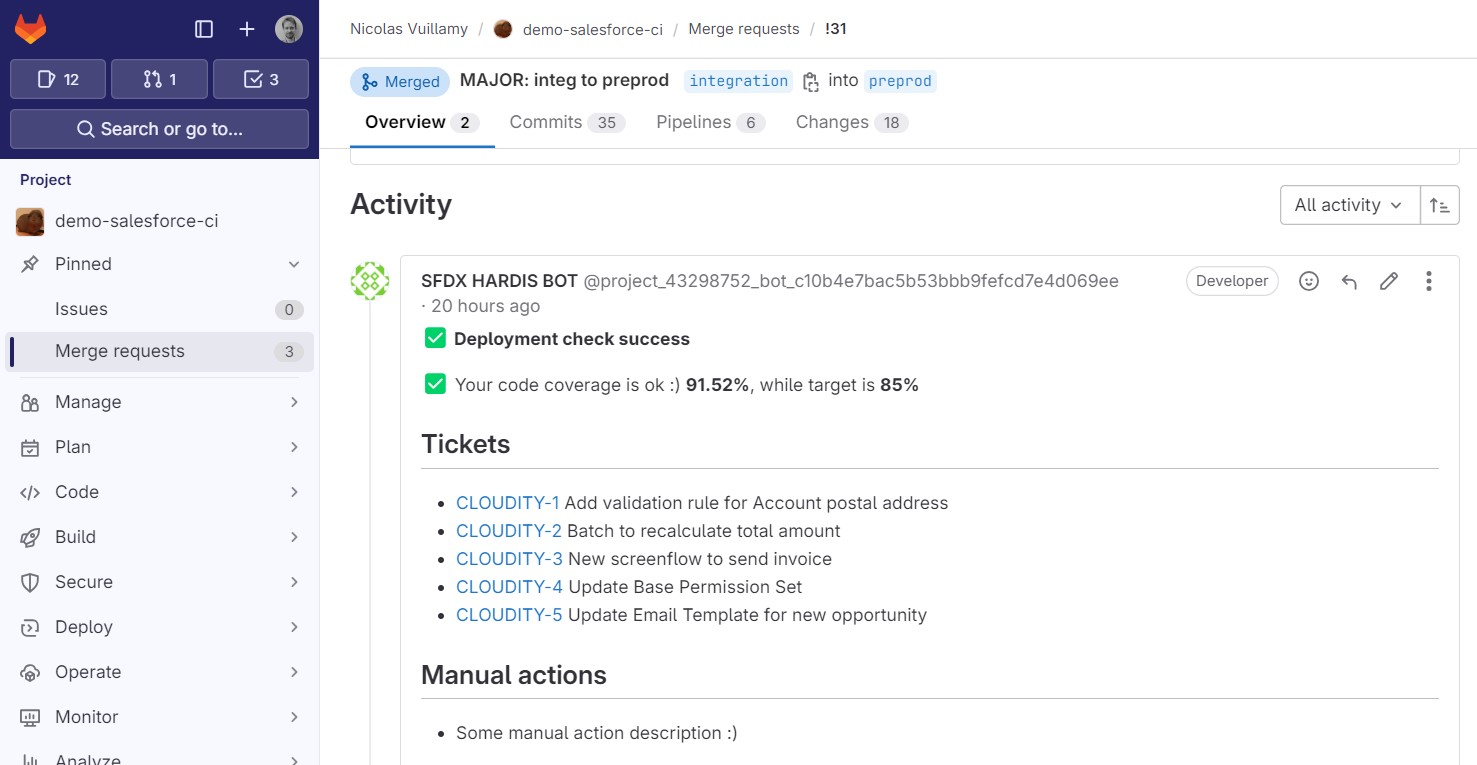\n\n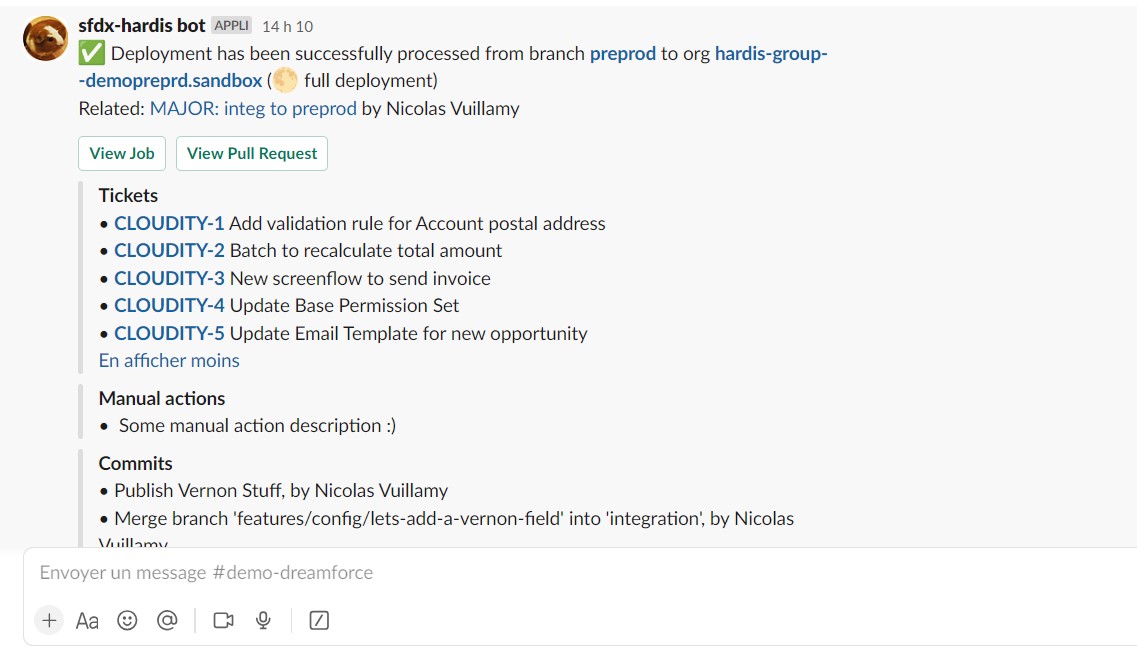\n\n### Flows Visual Git Diff\n\n- Visually show you the differences on a diagram\n\n- Display the update details without having to open any XML !\n\n🟩 = added\n\n🟥 = removed\n\n🟧 = updated\n\n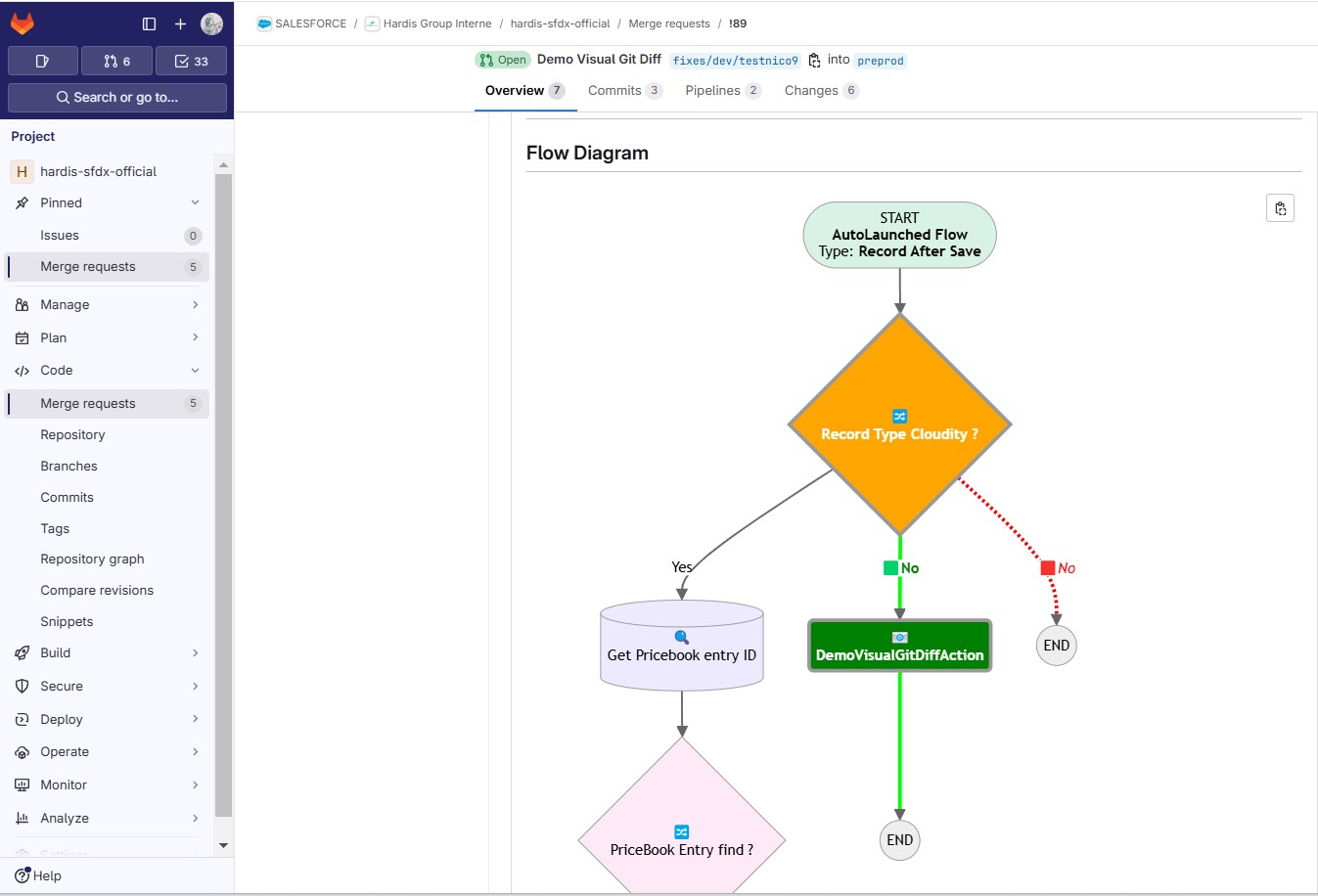\n\n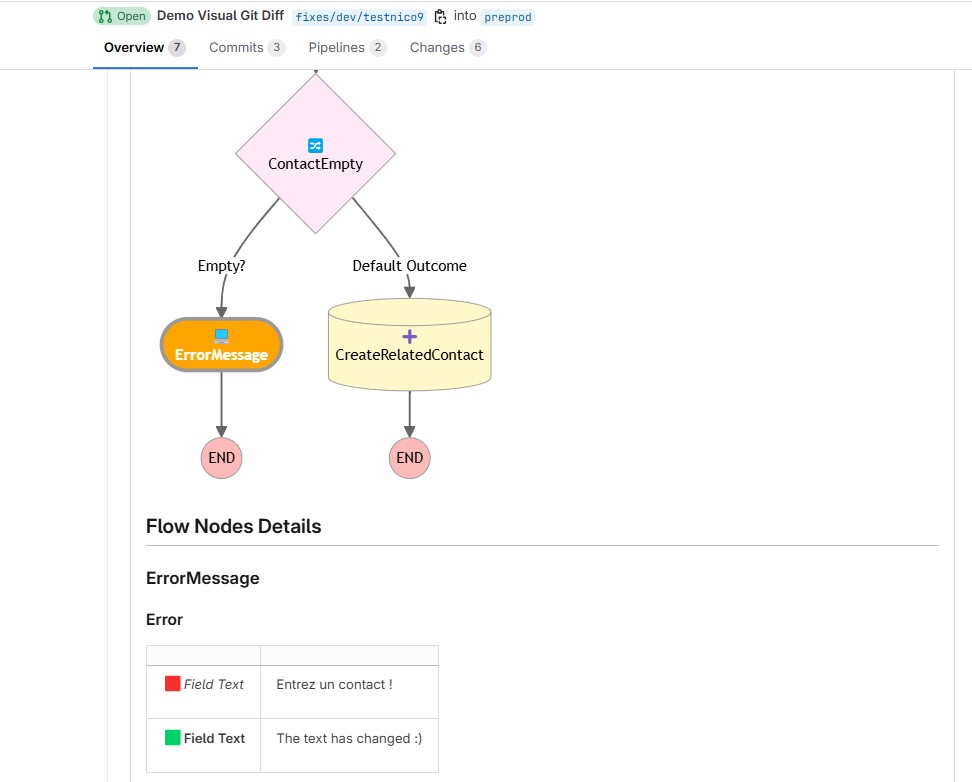\n\n### In custom CI/CD workflow\n\nExample of usage in a custom CI/CD pipeline:\n\n```bash\n# Disable exit-on-error temporarily\nset +e\n\n# Run the deploy command\nsf project deploy start [....]\nRET_CODE=$?\n\n# Re-enable exit-on-error\nset -e\n\n# Determine MYSTATUS based on return code\nif [ $RET_CODE -eq 0 ]; then\n MYSTATUS=\"valid\"\nelse\n MYSTATUS=\"invalid\"\nfi\n\n# Run the notify command with MYSTATUS\nsf hardis:project:deploy:notify --check-only --deploy-status \"$MYSTATUS\"\n```\n\n### Other usages\n\nThis command is for custom SF Cli pipelines, if you are a sfdx-hardis user, it is already embedded in sf hardis:deploy:smart.\n\nYou can also use [sfdx-hardis wrapper commands of SF deployment commands](https://sfdx-hardis.cloudity.com/salesforce-deployment-assistant-setup/#using-custom-cicd-pipeline)\n",
|
|
11168
11286
|
"examples": [
|
|
11169
|
-
"$ sf hardis:project:
|
|
11287
|
+
"$ sf hardis:project:deploy:notify --check-only --deploy-status valid --message \"This deployment check is valid\\n\\nYahooo !!\"",
|
|
11288
|
+
"$ sf hardis:project:deploy:notify --check-only --deploy-status invalid --message \"This deployment check has failed !\\n\\Oh no !!\"",
|
|
11289
|
+
"$ sf hardis:project:deploy:notify --deploy-status valid --message \"This deployment has been processed !\\n\\nYahooo !!\""
|
|
11170
11290
|
],
|
|
11171
11291
|
"flags": {
|
|
11172
11292
|
"json": {
|
|
@@ -11184,332 +11304,12 @@
|
|
|
11184
11304
|
"multiple": false,
|
|
11185
11305
|
"type": "option"
|
|
11186
11306
|
},
|
|
11187
|
-
"
|
|
11188
|
-
"char": "
|
|
11189
|
-
"description": "
|
|
11190
|
-
"name": "
|
|
11191
|
-
"
|
|
11192
|
-
"
|
|
11193
|
-
"multiple": true,
|
|
11194
|
-
"type": "option"
|
|
11195
|
-
},
|
|
11196
|
-
"debug": {
|
|
11197
|
-
"char": "d",
|
|
11198
|
-
"description": "Activate debug mode (more logs)",
|
|
11199
|
-
"name": "debug",
|
|
11200
|
-
"allowNo": false,
|
|
11201
|
-
"type": "boolean"
|
|
11202
|
-
},
|
|
11203
|
-
"websocket": {
|
|
11204
|
-
"description": "Websocket host:port for VsCode SFDX Hardis UI integration",
|
|
11205
|
-
"name": "websocket",
|
|
11206
|
-
"hasDynamicHelp": false,
|
|
11207
|
-
"multiple": false,
|
|
11208
|
-
"type": "option"
|
|
11209
|
-
},
|
|
11210
|
-
"skipauth": {
|
|
11211
|
-
"description": "Skip authentication check when a default username is required",
|
|
11212
|
-
"name": "skipauth",
|
|
11213
|
-
"allowNo": false,
|
|
11214
|
-
"type": "boolean"
|
|
11215
|
-
}
|
|
11216
|
-
},
|
|
11217
|
-
"hasDynamicHelp": false,
|
|
11218
|
-
"hiddenAliases": [],
|
|
11219
|
-
"id": "hardis:project:convert:profilestopermsets",
|
|
11220
|
-
"pluginAlias": "sfdx-hardis",
|
|
11221
|
-
"pluginName": "sfdx-hardis",
|
|
11222
|
-
"pluginType": "core",
|
|
11223
|
-
"strict": true,
|
|
11224
|
-
"enableJsonFlag": true,
|
|
11225
|
-
"title": "Convert Profiles into Permission Sets",
|
|
11226
|
-
"requiresProject": true,
|
|
11227
|
-
"requiresSfdxPlugins": [
|
|
11228
|
-
"shane-sfdx-plugins"
|
|
11229
|
-
],
|
|
11230
|
-
"isESM": true,
|
|
11231
|
-
"relativePath": [
|
|
11232
|
-
"lib",
|
|
11233
|
-
"commands",
|
|
11234
|
-
"hardis",
|
|
11235
|
-
"project",
|
|
11236
|
-
"convert",
|
|
11237
|
-
"profilestopermsets.js"
|
|
11238
|
-
],
|
|
11239
|
-
"aliasPermutations": [],
|
|
11240
|
-
"permutations": [
|
|
11241
|
-
"hardis:project:convert:profilestopermsets",
|
|
11242
|
-
"project:hardis:convert:profilestopermsets",
|
|
11243
|
-
"project:convert:hardis:profilestopermsets",
|
|
11244
|
-
"project:convert:profilestopermsets:hardis",
|
|
11245
|
-
"hardis:convert:project:profilestopermsets",
|
|
11246
|
-
"convert:hardis:project:profilestopermsets",
|
|
11247
|
-
"convert:project:hardis:profilestopermsets",
|
|
11248
|
-
"convert:project:profilestopermsets:hardis",
|
|
11249
|
-
"hardis:convert:profilestopermsets:project",
|
|
11250
|
-
"convert:hardis:profilestopermsets:project",
|
|
11251
|
-
"convert:profilestopermsets:hardis:project",
|
|
11252
|
-
"convert:profilestopermsets:project:hardis",
|
|
11253
|
-
"hardis:project:profilestopermsets:convert",
|
|
11254
|
-
"project:hardis:profilestopermsets:convert",
|
|
11255
|
-
"project:profilestopermsets:hardis:convert",
|
|
11256
|
-
"project:profilestopermsets:convert:hardis",
|
|
11257
|
-
"hardis:profilestopermsets:project:convert",
|
|
11258
|
-
"profilestopermsets:hardis:project:convert",
|
|
11259
|
-
"profilestopermsets:project:hardis:convert",
|
|
11260
|
-
"profilestopermsets:project:convert:hardis",
|
|
11261
|
-
"hardis:profilestopermsets:convert:project",
|
|
11262
|
-
"profilestopermsets:hardis:convert:project",
|
|
11263
|
-
"profilestopermsets:convert:hardis:project",
|
|
11264
|
-
"profilestopermsets:convert:project:hardis"
|
|
11265
|
-
]
|
|
11266
|
-
},
|
|
11267
|
-
"hardis:project:fix:profiletabs": {
|
|
11268
|
-
"aliases": [],
|
|
11269
|
-
"args": {},
|
|
11270
|
-
"description": "\n## Command Behavior\n\n**Interactively updates tab visibility settings in Salesforce profiles, addressing a common issue where tab visibilities are not correctly retrieved by `sf project retrieve start`.**\n\nThis command provides a user-friendly interface to manage tab settings within your profile XML files, ensuring that your local project accurately reflects the intended tab configurations in your Salesforce org.\n\nKey functionalities:\n\n- **Interactive Tab Selection:** Displays a multi-select menu of all available tabs in your org, allowing you to choose which tabs to update.\n- **Visibility Control:** Lets you set the visibility for the selected tabs to either `DefaultOn` (Visible) or `Hidden`.\n- **Profile Selection:** Presents a multi-select menu of all .profile-meta.xml files in your project, allowing you to apply the tab visibility changes to specific profiles.\n- **XML Updates:** Modifies the <tabVisibilities> section of the selected profile XML files to reflect the chosen tab settings. If a tab visibility setting already exists for a selected tab, it will be updated; otherwise, a new one will be added.\n- **Sorted Output:** The <tabVisibilities> in the updated profile XML files are sorted alphabetically for consistency and readability.\n\n<details markdown=\"1\">\n<summary>Technical explanations</summary>\n\nThe command's technical implementation involves:\n\n- **SOQL Queries (Tooling API):** It queries the `TabDefinition` object using `soqlQueryTooling` to retrieve a list of all available tabs in the target org.\n- **File Discovery:** Uses `glob` to find all .profile-meta.xml files within the specified project path.\n- **Interactive Prompts:** Leverages the `prompts` library to create interactive menus for selecting tabs, visibility settings, and profiles.\n- **XML Parsing and Manipulation:** Uses `parseXmlFile` to read the content of profile XML files and `writeXmlFile` to write the modified content back. It manipulates the `tabVisibilities` array within the parsed XML to add or update tab settings.\n- **Array Sorting:** Employs the `sort-array` library to sort the `tabVisibilities` alphabetically by tab name.\n- **Logging:** Provides feedback to the user about which profiles have been updated and a summary of the changes.\n</details>\n",
|
|
11271
|
-
"examples": [
|
|
11272
|
-
"$ sf hardis:project:fix:profiletabs"
|
|
11273
|
-
],
|
|
11274
|
-
"flags": {
|
|
11275
|
-
"json": {
|
|
11276
|
-
"description": "Format output as json.",
|
|
11277
|
-
"helpGroup": "GLOBAL",
|
|
11278
|
-
"name": "json",
|
|
11279
|
-
"allowNo": false,
|
|
11280
|
-
"type": "boolean"
|
|
11281
|
-
},
|
|
11282
|
-
"flags-dir": {
|
|
11283
|
-
"helpGroup": "GLOBAL",
|
|
11284
|
-
"name": "flags-dir",
|
|
11285
|
-
"summary": "Import flag values from a directory.",
|
|
11286
|
-
"hasDynamicHelp": false,
|
|
11287
|
-
"multiple": false,
|
|
11288
|
-
"type": "option"
|
|
11289
|
-
},
|
|
11290
|
-
"path": {
|
|
11291
|
-
"char": "p",
|
|
11292
|
-
"description": "Root folder",
|
|
11293
|
-
"name": "path",
|
|
11294
|
-
"default": "/home/runner/work/sfdx-hardis/sfdx-hardis",
|
|
11295
|
-
"hasDynamicHelp": false,
|
|
11296
|
-
"multiple": false,
|
|
11297
|
-
"type": "option"
|
|
11298
|
-
},
|
|
11299
|
-
"debug": {
|
|
11300
|
-
"char": "d",
|
|
11301
|
-
"description": "Activate debug mode (more logs)",
|
|
11302
|
-
"name": "debug",
|
|
11303
|
-
"allowNo": false,
|
|
11304
|
-
"type": "boolean"
|
|
11305
|
-
},
|
|
11306
|
-
"websocket": {
|
|
11307
|
-
"description": "Websocket host:port for VsCode SFDX Hardis UI integration",
|
|
11308
|
-
"name": "websocket",
|
|
11309
|
-
"hasDynamicHelp": false,
|
|
11310
|
-
"multiple": false,
|
|
11311
|
-
"type": "option"
|
|
11312
|
-
},
|
|
11313
|
-
"skipauth": {
|
|
11314
|
-
"description": "Skip authentication check when a default username is required",
|
|
11315
|
-
"name": "skipauth",
|
|
11316
|
-
"allowNo": false,
|
|
11317
|
-
"type": "boolean"
|
|
11318
|
-
},
|
|
11319
|
-
"target-org": {
|
|
11320
|
-
"aliases": [
|
|
11321
|
-
"targetusername",
|
|
11322
|
-
"u"
|
|
11323
|
-
],
|
|
11324
|
-
"char": "o",
|
|
11325
|
-
"deprecateAliases": true,
|
|
11326
|
-
"name": "target-org",
|
|
11327
|
-
"noCacheDefault": true,
|
|
11328
|
-
"required": true,
|
|
11329
|
-
"summary": "Username or alias of the target org. Not required if the `target-org` configuration variable is already set.",
|
|
11330
|
-
"hasDynamicHelp": true,
|
|
11331
|
-
"multiple": false,
|
|
11332
|
-
"type": "option"
|
|
11333
|
-
}
|
|
11334
|
-
},
|
|
11335
|
-
"hasDynamicHelp": true,
|
|
11336
|
-
"hiddenAliases": [],
|
|
11337
|
-
"id": "hardis:project:fix:profiletabs",
|
|
11338
|
-
"pluginAlias": "sfdx-hardis",
|
|
11339
|
-
"pluginName": "sfdx-hardis",
|
|
11340
|
-
"pluginType": "core",
|
|
11341
|
-
"strict": true,
|
|
11342
|
-
"enableJsonFlag": true,
|
|
11343
|
-
"title": "Fix profiles to add tabs that are not retrieved by SF CLI",
|
|
11344
|
-
"requiresProject": true,
|
|
11345
|
-
"isESM": true,
|
|
11346
|
-
"relativePath": [
|
|
11347
|
-
"lib",
|
|
11348
|
-
"commands",
|
|
11349
|
-
"hardis",
|
|
11350
|
-
"project",
|
|
11351
|
-
"fix",
|
|
11352
|
-
"profiletabs.js"
|
|
11353
|
-
],
|
|
11354
|
-
"aliasPermutations": [],
|
|
11355
|
-
"permutations": [
|
|
11356
|
-
"hardis:project:fix:profiletabs",
|
|
11357
|
-
"project:hardis:fix:profiletabs",
|
|
11358
|
-
"project:fix:hardis:profiletabs",
|
|
11359
|
-
"project:fix:profiletabs:hardis",
|
|
11360
|
-
"hardis:fix:project:profiletabs",
|
|
11361
|
-
"fix:hardis:project:profiletabs",
|
|
11362
|
-
"fix:project:hardis:profiletabs",
|
|
11363
|
-
"fix:project:profiletabs:hardis",
|
|
11364
|
-
"hardis:fix:profiletabs:project",
|
|
11365
|
-
"fix:hardis:profiletabs:project",
|
|
11366
|
-
"fix:profiletabs:hardis:project",
|
|
11367
|
-
"fix:profiletabs:project:hardis",
|
|
11368
|
-
"hardis:project:profiletabs:fix",
|
|
11369
|
-
"project:hardis:profiletabs:fix",
|
|
11370
|
-
"project:profiletabs:hardis:fix",
|
|
11371
|
-
"project:profiletabs:fix:hardis",
|
|
11372
|
-
"hardis:profiletabs:project:fix",
|
|
11373
|
-
"profiletabs:hardis:project:fix",
|
|
11374
|
-
"profiletabs:project:hardis:fix",
|
|
11375
|
-
"profiletabs:project:fix:hardis",
|
|
11376
|
-
"hardis:profiletabs:fix:project",
|
|
11377
|
-
"profiletabs:hardis:fix:project",
|
|
11378
|
-
"profiletabs:fix:hardis:project",
|
|
11379
|
-
"profiletabs:fix:project:hardis"
|
|
11380
|
-
]
|
|
11381
|
-
},
|
|
11382
|
-
"hardis:project:fix:v53flexipages": {
|
|
11383
|
-
"aliases": [],
|
|
11384
|
-
"args": {},
|
|
11385
|
-
"description": "\n## Command Behavior\n\n**Fixes Salesforce FlexiPages for compatibility with API Version 53.0 (Winter '22 release) by adding missing identifiers to component instances.**\n\nSalesforce introduced a change in API Version 53.0 that requires `identifier` tags within `componentInstance` and `fieldInstance` elements in FlexiPage metadata. If these identifiers are missing, deployments to orgs with API version 53.0 or higher will fail. This command automates the process of adding these missing identifiers, ensuring your FlexiPages remain deployable.\n\nKey functionalities:\n\n- **Targeted FlexiPage Processing:** Scans all .flexipage-meta.xml files within the specified root folder (defaults to current working directory).\n- **Identifier Injection:** Inserts a unique `identifier` tag (e.g., `SFDX_HARDIS_REPLACEMENT_ID`) into `componentInstance` and `fieldInstance` elements that lack one.\n\n**Important Note:** After running this command, ensure you update your `apiVersion` to `53.0` (or higher) in your `package.xml` and `sfdx-project.json` files.\n\n<details markdown=\"1\">\n<summary>Technical explanations</summary>\n\nThe command's technical implementation involves:\n\n- **File Discovery:** Uses `glob` to find all .flexipage-meta.xml files.\n- **Content Reading:** Reads the XML content of each FlexiPage file.\n- **Regular Expression Replacement:** Employs a set of regular expressions to identify specific XML patterns (componentName.../componentName.../componentInstance, componentName.../componentName.../visibilityRule, fieldItem.../fieldItem.../fieldInstance) that are missing the `identifier` tag.\n- **Dynamic ID Generation:** For each match, it generates a unique identifier (e.g., `sfdxHardisIdX`) and injects it into the XML structure.\n- **File Writing:** If changes are made, the modified XML content is written back to the FlexiPage file using `fs.writeFile`.\n- **Logging:** Provides messages about which FlexiPages are being processed and a summary of the total number of identifiers added.\n</details>\n",
|
|
11386
|
-
"examples": [
|
|
11387
|
-
"$ sf hardis:project:fix:v53flexipages"
|
|
11388
|
-
],
|
|
11389
|
-
"flags": {
|
|
11390
|
-
"json": {
|
|
11391
|
-
"description": "Format output as json.",
|
|
11392
|
-
"helpGroup": "GLOBAL",
|
|
11393
|
-
"name": "json",
|
|
11394
|
-
"allowNo": false,
|
|
11395
|
-
"type": "boolean"
|
|
11396
|
-
},
|
|
11397
|
-
"flags-dir": {
|
|
11398
|
-
"helpGroup": "GLOBAL",
|
|
11399
|
-
"name": "flags-dir",
|
|
11400
|
-
"summary": "Import flag values from a directory.",
|
|
11401
|
-
"hasDynamicHelp": false,
|
|
11402
|
-
"multiple": false,
|
|
11403
|
-
"type": "option"
|
|
11404
|
-
},
|
|
11405
|
-
"path": {
|
|
11406
|
-
"char": "p",
|
|
11407
|
-
"description": "Root folder",
|
|
11408
|
-
"name": "path",
|
|
11409
|
-
"default": "/home/runner/work/sfdx-hardis/sfdx-hardis",
|
|
11410
|
-
"hasDynamicHelp": false,
|
|
11411
|
-
"multiple": false,
|
|
11412
|
-
"type": "option"
|
|
11413
|
-
},
|
|
11414
|
-
"debug": {
|
|
11415
|
-
"char": "d",
|
|
11416
|
-
"description": "Activate debug mode (more logs)",
|
|
11417
|
-
"name": "debug",
|
|
11418
|
-
"allowNo": false,
|
|
11419
|
-
"type": "boolean"
|
|
11420
|
-
},
|
|
11421
|
-
"websocket": {
|
|
11422
|
-
"description": "Websocket host:port for VsCode SFDX Hardis UI integration",
|
|
11423
|
-
"name": "websocket",
|
|
11424
|
-
"hasDynamicHelp": false,
|
|
11425
|
-
"multiple": false,
|
|
11426
|
-
"type": "option"
|
|
11427
|
-
},
|
|
11428
|
-
"skipauth": {
|
|
11429
|
-
"description": "Skip authentication check when a default username is required",
|
|
11430
|
-
"name": "skipauth",
|
|
11431
|
-
"allowNo": false,
|
|
11432
|
-
"type": "boolean"
|
|
11433
|
-
}
|
|
11434
|
-
},
|
|
11435
|
-
"hasDynamicHelp": false,
|
|
11436
|
-
"hiddenAliases": [],
|
|
11437
|
-
"id": "hardis:project:fix:v53flexipages",
|
|
11438
|
-
"pluginAlias": "sfdx-hardis",
|
|
11439
|
-
"pluginName": "sfdx-hardis",
|
|
11440
|
-
"pluginType": "core",
|
|
11441
|
-
"strict": true,
|
|
11442
|
-
"enableJsonFlag": true,
|
|
11443
|
-
"title": "Fix flexipages for v53",
|
|
11444
|
-
"requiresProject": true,
|
|
11445
|
-
"isESM": true,
|
|
11446
|
-
"relativePath": [
|
|
11447
|
-
"lib",
|
|
11448
|
-
"commands",
|
|
11449
|
-
"hardis",
|
|
11450
|
-
"project",
|
|
11451
|
-
"fix",
|
|
11452
|
-
"v53flexipages.js"
|
|
11453
|
-
],
|
|
11454
|
-
"aliasPermutations": [],
|
|
11455
|
-
"permutations": [
|
|
11456
|
-
"hardis:project:fix:v53flexipages",
|
|
11457
|
-
"project:hardis:fix:v53flexipages",
|
|
11458
|
-
"project:fix:hardis:v53flexipages",
|
|
11459
|
-
"project:fix:v53flexipages:hardis",
|
|
11460
|
-
"hardis:fix:project:v53flexipages",
|
|
11461
|
-
"fix:hardis:project:v53flexipages",
|
|
11462
|
-
"fix:project:hardis:v53flexipages",
|
|
11463
|
-
"fix:project:v53flexipages:hardis",
|
|
11464
|
-
"hardis:fix:v53flexipages:project",
|
|
11465
|
-
"fix:hardis:v53flexipages:project",
|
|
11466
|
-
"fix:v53flexipages:hardis:project",
|
|
11467
|
-
"fix:v53flexipages:project:hardis",
|
|
11468
|
-
"hardis:project:v53flexipages:fix",
|
|
11469
|
-
"project:hardis:v53flexipages:fix",
|
|
11470
|
-
"project:v53flexipages:hardis:fix",
|
|
11471
|
-
"project:v53flexipages:fix:hardis",
|
|
11472
|
-
"hardis:v53flexipages:project:fix",
|
|
11473
|
-
"v53flexipages:hardis:project:fix",
|
|
11474
|
-
"v53flexipages:project:hardis:fix",
|
|
11475
|
-
"v53flexipages:project:fix:hardis",
|
|
11476
|
-
"hardis:v53flexipages:fix:project",
|
|
11477
|
-
"v53flexipages:hardis:fix:project",
|
|
11478
|
-
"v53flexipages:fix:hardis:project",
|
|
11479
|
-
"v53flexipages:fix:project:hardis"
|
|
11480
|
-
]
|
|
11481
|
-
},
|
|
11482
|
-
"hardis:project:deploy:notify": {
|
|
11483
|
-
"aliases": [],
|
|
11484
|
-
"args": {},
|
|
11485
|
-
"description": "Post notifications related to:\n\n- **Deployment simulation** _(use with --check-only)_\n\n- **Deployment process** _(to call only if your deployment is successful)_\n\n### Integrations\n\nAccording to the [integrations you configured](https://sfdx-hardis.cloudity.com/salesforce-ci-cd-setup-integrations-home/), notifications can contain deployment information and [Flow Visual Git Diff](https://sfdx-hardis.cloudity.com/salesforce-deployment-assistant-home/#flow-visual-git-diff)\n\n - GitHub, Gitlab, Azure DevOps, Bitbucket comments on Pull Requests (including Flows Visual Git Diff)\n\n - Slack, Microsoft Teams, Email deployment summary after a successful deployment\n\n - JIRA tags and comments on tickets that just has been deployed\n\n\n\n\n\n### Flows Visual Git Diff\n\n- Visually show you the differences on a diagram\n\n- Display the update details without having to open any XML !\n\n🟩 = added\n\n🟥 = removed\n\n🟧 = updated\n\n\n\n\n\n### In custom CI/CD workflow\n\nExample of usage in a custom CI/CD pipeline:\n\n```bash\n# Disable exit-on-error temporarily\nset +e\n\n# Run the deploy command\nsf project deploy start [....]\nRET_CODE=$?\n\n# Re-enable exit-on-error\nset -e\n\n# Determine MYSTATUS based on return code\nif [ $RET_CODE -eq 0 ]; then\n MYSTATUS=\"valid\"\nelse\n MYSTATUS=\"invalid\"\nfi\n\n# Run the notify command with MYSTATUS\nsf hardis:project:deploy:notify --check-only --deploy-status \"$MYSTATUS\"\n```\n\n### Other usages\n\nThis command is for custom SF Cli pipelines, if you are a sfdx-hardis user, it is already embedded in sf hardis:deploy:smart.\n\nYou can also use [sfdx-hardis wrapper commands of SF deployment commands](https://sfdx-hardis.cloudity.com/salesforce-deployment-assistant-setup/#using-custom-cicd-pipeline)\n",
|
|
11486
|
-
"examples": [
|
|
11487
|
-
"$ sf hardis:project:deploy:notify --check-only --deploy-status valid --message \"This deployment check is valid\\n\\nYahooo !!\"",
|
|
11488
|
-
"$ sf hardis:project:deploy:notify --check-only --deploy-status invalid --message \"This deployment check has failed !\\n\\Oh no !!\"",
|
|
11489
|
-
"$ sf hardis:project:deploy:notify --deploy-status valid --message \"This deployment has been processed !\\n\\nYahooo !!\""
|
|
11490
|
-
],
|
|
11491
|
-
"flags": {
|
|
11492
|
-
"json": {
|
|
11493
|
-
"description": "Format output as json.",
|
|
11494
|
-
"helpGroup": "GLOBAL",
|
|
11495
|
-
"name": "json",
|
|
11496
|
-
"allowNo": false,
|
|
11497
|
-
"type": "boolean"
|
|
11498
|
-
},
|
|
11499
|
-
"flags-dir": {
|
|
11500
|
-
"helpGroup": "GLOBAL",
|
|
11501
|
-
"name": "flags-dir",
|
|
11502
|
-
"summary": "Import flag values from a directory.",
|
|
11503
|
-
"hasDynamicHelp": false,
|
|
11504
|
-
"multiple": false,
|
|
11505
|
-
"type": "option"
|
|
11506
|
-
},
|
|
11507
|
-
"check-only": {
|
|
11508
|
-
"char": "c",
|
|
11509
|
-
"description": "Use this option to send notifications from a Deployment simulation job",
|
|
11510
|
-
"name": "check-only",
|
|
11511
|
-
"allowNo": false,
|
|
11512
|
-
"type": "boolean"
|
|
11307
|
+
"check-only": {
|
|
11308
|
+
"char": "c",
|
|
11309
|
+
"description": "Use this option to send notifications from a Deployment simulation job",
|
|
11310
|
+
"name": "check-only",
|
|
11311
|
+
"allowNo": false,
|
|
11312
|
+
"type": "boolean"
|
|
11513
11313
|
},
|
|
11514
11314
|
"deploy-status": {
|
|
11515
11315
|
"char": "s",
|
|
@@ -12654,6 +12454,221 @@
|
|
|
12654
12454
|
"validate:deploy:project:hardis"
|
|
12655
12455
|
]
|
|
12656
12456
|
},
|
|
12457
|
+
"hardis:project:fix:profiletabs": {
|
|
12458
|
+
"aliases": [],
|
|
12459
|
+
"args": {},
|
|
12460
|
+
"description": "\n## Command Behavior\n\n**Interactively updates tab visibility settings in Salesforce profiles, addressing a common issue where tab visibilities are not correctly retrieved by `sf project retrieve start`.**\n\nThis command provides a user-friendly interface to manage tab settings within your profile XML files, ensuring that your local project accurately reflects the intended tab configurations in your Salesforce org.\n\nKey functionalities:\n\n- **Interactive Tab Selection:** Displays a multi-select menu of all available tabs in your org, allowing you to choose which tabs to update.\n- **Visibility Control:** Lets you set the visibility for the selected tabs to either `DefaultOn` (Visible) or `Hidden`.\n- **Profile Selection:** Presents a multi-select menu of all .profile-meta.xml files in your project, allowing you to apply the tab visibility changes to specific profiles.\n- **XML Updates:** Modifies the <tabVisibilities> section of the selected profile XML files to reflect the chosen tab settings. If a tab visibility setting already exists for a selected tab, it will be updated; otherwise, a new one will be added.\n- **Sorted Output:** The <tabVisibilities> in the updated profile XML files are sorted alphabetically for consistency and readability.\n\n<details markdown=\"1\">\n<summary>Technical explanations</summary>\n\nThe command's technical implementation involves:\n\n- **SOQL Queries (Tooling API):** It queries the `TabDefinition` object using `soqlQueryTooling` to retrieve a list of all available tabs in the target org.\n- **File Discovery:** Uses `glob` to find all .profile-meta.xml files within the specified project path.\n- **Interactive Prompts:** Leverages the `prompts` library to create interactive menus for selecting tabs, visibility settings, and profiles.\n- **XML Parsing and Manipulation:** Uses `parseXmlFile` to read the content of profile XML files and `writeXmlFile` to write the modified content back. It manipulates the `tabVisibilities` array within the parsed XML to add or update tab settings.\n- **Array Sorting:** Employs the `sort-array` library to sort the `tabVisibilities` alphabetically by tab name.\n- **Logging:** Provides feedback to the user about which profiles have been updated and a summary of the changes.\n</details>\n",
|
|
12461
|
+
"examples": [
|
|
12462
|
+
"$ sf hardis:project:fix:profiletabs"
|
|
12463
|
+
],
|
|
12464
|
+
"flags": {
|
|
12465
|
+
"json": {
|
|
12466
|
+
"description": "Format output as json.",
|
|
12467
|
+
"helpGroup": "GLOBAL",
|
|
12468
|
+
"name": "json",
|
|
12469
|
+
"allowNo": false,
|
|
12470
|
+
"type": "boolean"
|
|
12471
|
+
},
|
|
12472
|
+
"flags-dir": {
|
|
12473
|
+
"helpGroup": "GLOBAL",
|
|
12474
|
+
"name": "flags-dir",
|
|
12475
|
+
"summary": "Import flag values from a directory.",
|
|
12476
|
+
"hasDynamicHelp": false,
|
|
12477
|
+
"multiple": false,
|
|
12478
|
+
"type": "option"
|
|
12479
|
+
},
|
|
12480
|
+
"path": {
|
|
12481
|
+
"char": "p",
|
|
12482
|
+
"description": "Root folder",
|
|
12483
|
+
"name": "path",
|
|
12484
|
+
"default": "/home/runner/work/sfdx-hardis/sfdx-hardis",
|
|
12485
|
+
"hasDynamicHelp": false,
|
|
12486
|
+
"multiple": false,
|
|
12487
|
+
"type": "option"
|
|
12488
|
+
},
|
|
12489
|
+
"debug": {
|
|
12490
|
+
"char": "d",
|
|
12491
|
+
"description": "Activate debug mode (more logs)",
|
|
12492
|
+
"name": "debug",
|
|
12493
|
+
"allowNo": false,
|
|
12494
|
+
"type": "boolean"
|
|
12495
|
+
},
|
|
12496
|
+
"websocket": {
|
|
12497
|
+
"description": "Websocket host:port for VsCode SFDX Hardis UI integration",
|
|
12498
|
+
"name": "websocket",
|
|
12499
|
+
"hasDynamicHelp": false,
|
|
12500
|
+
"multiple": false,
|
|
12501
|
+
"type": "option"
|
|
12502
|
+
},
|
|
12503
|
+
"skipauth": {
|
|
12504
|
+
"description": "Skip authentication check when a default username is required",
|
|
12505
|
+
"name": "skipauth",
|
|
12506
|
+
"allowNo": false,
|
|
12507
|
+
"type": "boolean"
|
|
12508
|
+
},
|
|
12509
|
+
"target-org": {
|
|
12510
|
+
"aliases": [
|
|
12511
|
+
"targetusername",
|
|
12512
|
+
"u"
|
|
12513
|
+
],
|
|
12514
|
+
"char": "o",
|
|
12515
|
+
"deprecateAliases": true,
|
|
12516
|
+
"name": "target-org",
|
|
12517
|
+
"noCacheDefault": true,
|
|
12518
|
+
"required": true,
|
|
12519
|
+
"summary": "Username or alias of the target org. Not required if the `target-org` configuration variable is already set.",
|
|
12520
|
+
"hasDynamicHelp": true,
|
|
12521
|
+
"multiple": false,
|
|
12522
|
+
"type": "option"
|
|
12523
|
+
}
|
|
12524
|
+
},
|
|
12525
|
+
"hasDynamicHelp": true,
|
|
12526
|
+
"hiddenAliases": [],
|
|
12527
|
+
"id": "hardis:project:fix:profiletabs",
|
|
12528
|
+
"pluginAlias": "sfdx-hardis",
|
|
12529
|
+
"pluginName": "sfdx-hardis",
|
|
12530
|
+
"pluginType": "core",
|
|
12531
|
+
"strict": true,
|
|
12532
|
+
"enableJsonFlag": true,
|
|
12533
|
+
"title": "Fix profiles to add tabs that are not retrieved by SF CLI",
|
|
12534
|
+
"requiresProject": true,
|
|
12535
|
+
"isESM": true,
|
|
12536
|
+
"relativePath": [
|
|
12537
|
+
"lib",
|
|
12538
|
+
"commands",
|
|
12539
|
+
"hardis",
|
|
12540
|
+
"project",
|
|
12541
|
+
"fix",
|
|
12542
|
+
"profiletabs.js"
|
|
12543
|
+
],
|
|
12544
|
+
"aliasPermutations": [],
|
|
12545
|
+
"permutations": [
|
|
12546
|
+
"hardis:project:fix:profiletabs",
|
|
12547
|
+
"project:hardis:fix:profiletabs",
|
|
12548
|
+
"project:fix:hardis:profiletabs",
|
|
12549
|
+
"project:fix:profiletabs:hardis",
|
|
12550
|
+
"hardis:fix:project:profiletabs",
|
|
12551
|
+
"fix:hardis:project:profiletabs",
|
|
12552
|
+
"fix:project:hardis:profiletabs",
|
|
12553
|
+
"fix:project:profiletabs:hardis",
|
|
12554
|
+
"hardis:fix:profiletabs:project",
|
|
12555
|
+
"fix:hardis:profiletabs:project",
|
|
12556
|
+
"fix:profiletabs:hardis:project",
|
|
12557
|
+
"fix:profiletabs:project:hardis",
|
|
12558
|
+
"hardis:project:profiletabs:fix",
|
|
12559
|
+
"project:hardis:profiletabs:fix",
|
|
12560
|
+
"project:profiletabs:hardis:fix",
|
|
12561
|
+
"project:profiletabs:fix:hardis",
|
|
12562
|
+
"hardis:profiletabs:project:fix",
|
|
12563
|
+
"profiletabs:hardis:project:fix",
|
|
12564
|
+
"profiletabs:project:hardis:fix",
|
|
12565
|
+
"profiletabs:project:fix:hardis",
|
|
12566
|
+
"hardis:profiletabs:fix:project",
|
|
12567
|
+
"profiletabs:hardis:fix:project",
|
|
12568
|
+
"profiletabs:fix:hardis:project",
|
|
12569
|
+
"profiletabs:fix:project:hardis"
|
|
12570
|
+
]
|
|
12571
|
+
},
|
|
12572
|
+
"hardis:project:fix:v53flexipages": {
|
|
12573
|
+
"aliases": [],
|
|
12574
|
+
"args": {},
|
|
12575
|
+
"description": "\n## Command Behavior\n\n**Fixes Salesforce FlexiPages for compatibility with API Version 53.0 (Winter '22 release) by adding missing identifiers to component instances.**\n\nSalesforce introduced a change in API Version 53.0 that requires `identifier` tags within `componentInstance` and `fieldInstance` elements in FlexiPage metadata. If these identifiers are missing, deployments to orgs with API version 53.0 or higher will fail. This command automates the process of adding these missing identifiers, ensuring your FlexiPages remain deployable.\n\nKey functionalities:\n\n- **Targeted FlexiPage Processing:** Scans all .flexipage-meta.xml files within the specified root folder (defaults to current working directory).\n- **Identifier Injection:** Inserts a unique `identifier` tag (e.g., `SFDX_HARDIS_REPLACEMENT_ID`) into `componentInstance` and `fieldInstance` elements that lack one.\n\n**Important Note:** After running this command, ensure you update your `apiVersion` to `53.0` (or higher) in your `package.xml` and `sfdx-project.json` files.\n\n<details markdown=\"1\">\n<summary>Technical explanations</summary>\n\nThe command's technical implementation involves:\n\n- **File Discovery:** Uses `glob` to find all .flexipage-meta.xml files.\n- **Content Reading:** Reads the XML content of each FlexiPage file.\n- **Regular Expression Replacement:** Employs a set of regular expressions to identify specific XML patterns (componentName.../componentName.../componentInstance, componentName.../componentName.../visibilityRule, fieldItem.../fieldItem.../fieldInstance) that are missing the `identifier` tag.\n- **Dynamic ID Generation:** For each match, it generates a unique identifier (e.g., `sfdxHardisIdX`) and injects it into the XML structure.\n- **File Writing:** If changes are made, the modified XML content is written back to the FlexiPage file using `fs.writeFile`.\n- **Logging:** Provides messages about which FlexiPages are being processed and a summary of the total number of identifiers added.\n</details>\n",
|
|
12576
|
+
"examples": [
|
|
12577
|
+
"$ sf hardis:project:fix:v53flexipages"
|
|
12578
|
+
],
|
|
12579
|
+
"flags": {
|
|
12580
|
+
"json": {
|
|
12581
|
+
"description": "Format output as json.",
|
|
12582
|
+
"helpGroup": "GLOBAL",
|
|
12583
|
+
"name": "json",
|
|
12584
|
+
"allowNo": false,
|
|
12585
|
+
"type": "boolean"
|
|
12586
|
+
},
|
|
12587
|
+
"flags-dir": {
|
|
12588
|
+
"helpGroup": "GLOBAL",
|
|
12589
|
+
"name": "flags-dir",
|
|
12590
|
+
"summary": "Import flag values from a directory.",
|
|
12591
|
+
"hasDynamicHelp": false,
|
|
12592
|
+
"multiple": false,
|
|
12593
|
+
"type": "option"
|
|
12594
|
+
},
|
|
12595
|
+
"path": {
|
|
12596
|
+
"char": "p",
|
|
12597
|
+
"description": "Root folder",
|
|
12598
|
+
"name": "path",
|
|
12599
|
+
"default": "/home/runner/work/sfdx-hardis/sfdx-hardis",
|
|
12600
|
+
"hasDynamicHelp": false,
|
|
12601
|
+
"multiple": false,
|
|
12602
|
+
"type": "option"
|
|
12603
|
+
},
|
|
12604
|
+
"debug": {
|
|
12605
|
+
"char": "d",
|
|
12606
|
+
"description": "Activate debug mode (more logs)",
|
|
12607
|
+
"name": "debug",
|
|
12608
|
+
"allowNo": false,
|
|
12609
|
+
"type": "boolean"
|
|
12610
|
+
},
|
|
12611
|
+
"websocket": {
|
|
12612
|
+
"description": "Websocket host:port for VsCode SFDX Hardis UI integration",
|
|
12613
|
+
"name": "websocket",
|
|
12614
|
+
"hasDynamicHelp": false,
|
|
12615
|
+
"multiple": false,
|
|
12616
|
+
"type": "option"
|
|
12617
|
+
},
|
|
12618
|
+
"skipauth": {
|
|
12619
|
+
"description": "Skip authentication check when a default username is required",
|
|
12620
|
+
"name": "skipauth",
|
|
12621
|
+
"allowNo": false,
|
|
12622
|
+
"type": "boolean"
|
|
12623
|
+
}
|
|
12624
|
+
},
|
|
12625
|
+
"hasDynamicHelp": false,
|
|
12626
|
+
"hiddenAliases": [],
|
|
12627
|
+
"id": "hardis:project:fix:v53flexipages",
|
|
12628
|
+
"pluginAlias": "sfdx-hardis",
|
|
12629
|
+
"pluginName": "sfdx-hardis",
|
|
12630
|
+
"pluginType": "core",
|
|
12631
|
+
"strict": true,
|
|
12632
|
+
"enableJsonFlag": true,
|
|
12633
|
+
"title": "Fix flexipages for v53",
|
|
12634
|
+
"requiresProject": true,
|
|
12635
|
+
"isESM": true,
|
|
12636
|
+
"relativePath": [
|
|
12637
|
+
"lib",
|
|
12638
|
+
"commands",
|
|
12639
|
+
"hardis",
|
|
12640
|
+
"project",
|
|
12641
|
+
"fix",
|
|
12642
|
+
"v53flexipages.js"
|
|
12643
|
+
],
|
|
12644
|
+
"aliasPermutations": [],
|
|
12645
|
+
"permutations": [
|
|
12646
|
+
"hardis:project:fix:v53flexipages",
|
|
12647
|
+
"project:hardis:fix:v53flexipages",
|
|
12648
|
+
"project:fix:hardis:v53flexipages",
|
|
12649
|
+
"project:fix:v53flexipages:hardis",
|
|
12650
|
+
"hardis:fix:project:v53flexipages",
|
|
12651
|
+
"fix:hardis:project:v53flexipages",
|
|
12652
|
+
"fix:project:hardis:v53flexipages",
|
|
12653
|
+
"fix:project:v53flexipages:hardis",
|
|
12654
|
+
"hardis:fix:v53flexipages:project",
|
|
12655
|
+
"fix:hardis:v53flexipages:project",
|
|
12656
|
+
"fix:v53flexipages:hardis:project",
|
|
12657
|
+
"fix:v53flexipages:project:hardis",
|
|
12658
|
+
"hardis:project:v53flexipages:fix",
|
|
12659
|
+
"project:hardis:v53flexipages:fix",
|
|
12660
|
+
"project:v53flexipages:hardis:fix",
|
|
12661
|
+
"project:v53flexipages:fix:hardis",
|
|
12662
|
+
"hardis:v53flexipages:project:fix",
|
|
12663
|
+
"v53flexipages:hardis:project:fix",
|
|
12664
|
+
"v53flexipages:project:hardis:fix",
|
|
12665
|
+
"v53flexipages:project:fix:hardis",
|
|
12666
|
+
"hardis:v53flexipages:fix:project",
|
|
12667
|
+
"v53flexipages:hardis:fix:project",
|
|
12668
|
+
"v53flexipages:fix:hardis:project",
|
|
12669
|
+
"v53flexipages:fix:project:hardis"
|
|
12670
|
+
]
|
|
12671
|
+
},
|
|
12657
12672
|
"hardis:project:generate:bypass": {
|
|
12658
12673
|
"aliases": [],
|
|
12659
12674
|
"args": {},
|
|
@@ -15136,5 +15151,5 @@
|
|
|
15136
15151
|
]
|
|
15137
15152
|
}
|
|
15138
15153
|
},
|
|
15139
|
-
"version": "6.
|
|
15154
|
+
"version": "6.2.0"
|
|
15140
15155
|
}
|