sf-dkim-tool 1.0.0
This diff represents the content of publicly available package versions that have been released to one of the supported registries. The information contained in this diff is provided for informational purposes only and reflects changes between package versions as they appear in their respective public registries.
- package/README.md +75 -0
- package/package.json +39 -0
- package/public/index.html +843 -0
- package/src/cli.js +137 -0
- package/src/dkim-helper.js +60 -0
- package/src/server.js +68 -0
package/README.md
ADDED
|
@@ -0,0 +1,75 @@
|
|
|
1
|
+
# SF DKIM Tool 📧
|
|
2
|
+
|
|
3
|
+
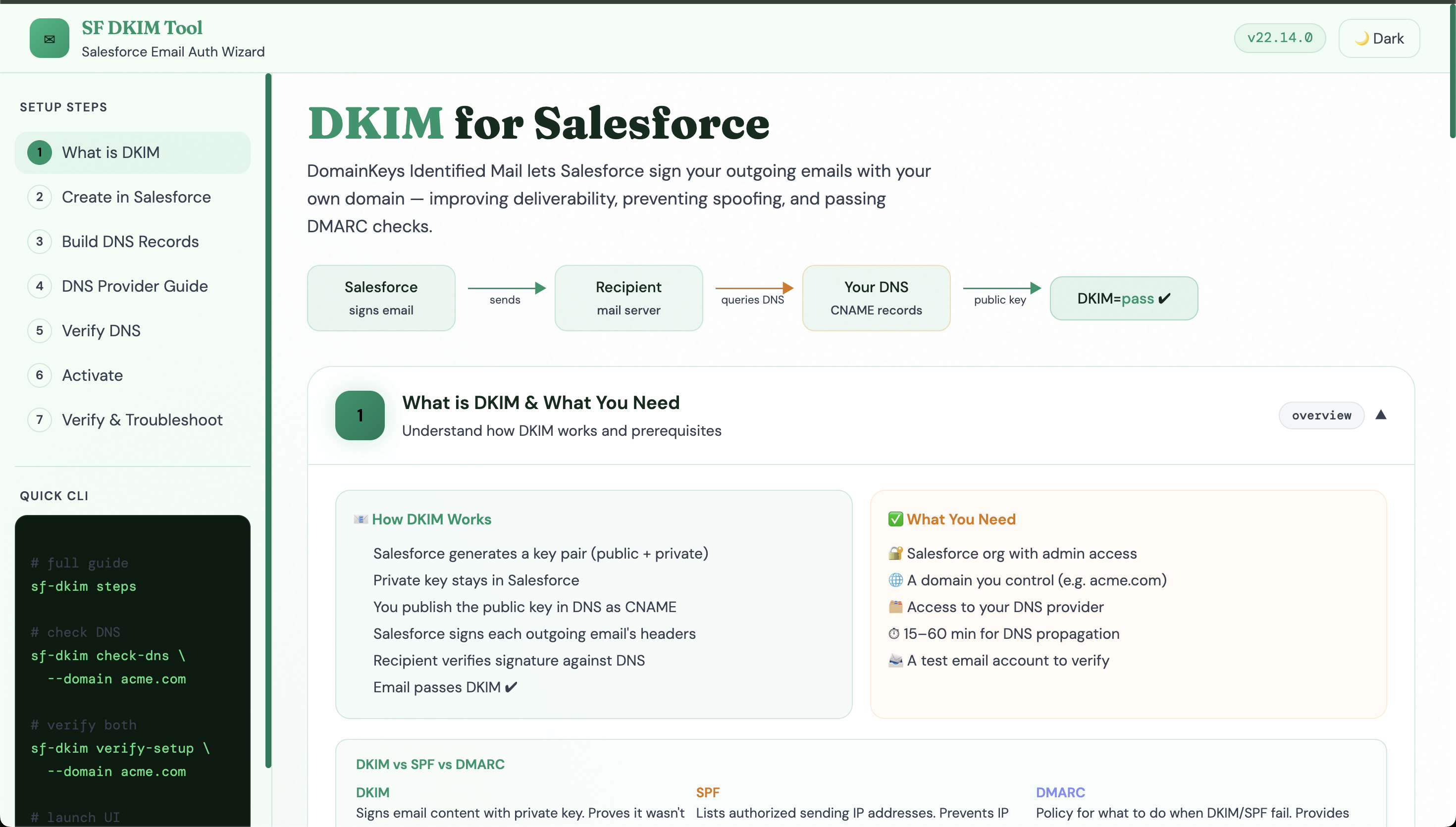
**Salesforce DKIM Setup Wizard** — a Node.js CLI + Express web UI that guides you through every step of setting up DomainKeys Identified Mail (DKIM) for your Salesforce org. Improve email deliverability, prevent spoofing, and pass DMARC checks.
|
|
4
|
+
|
|
5
|
+
## Screenshots
|
|
6
|
+
|
|
7
|
+
|
|
8
|
+
|
|
9
|
+
|
|
10
|
+
|
|
11
|
+
|
|
12
|
+
|
|
13
|
+
|
|
14
|
+
|
|
15
|
+
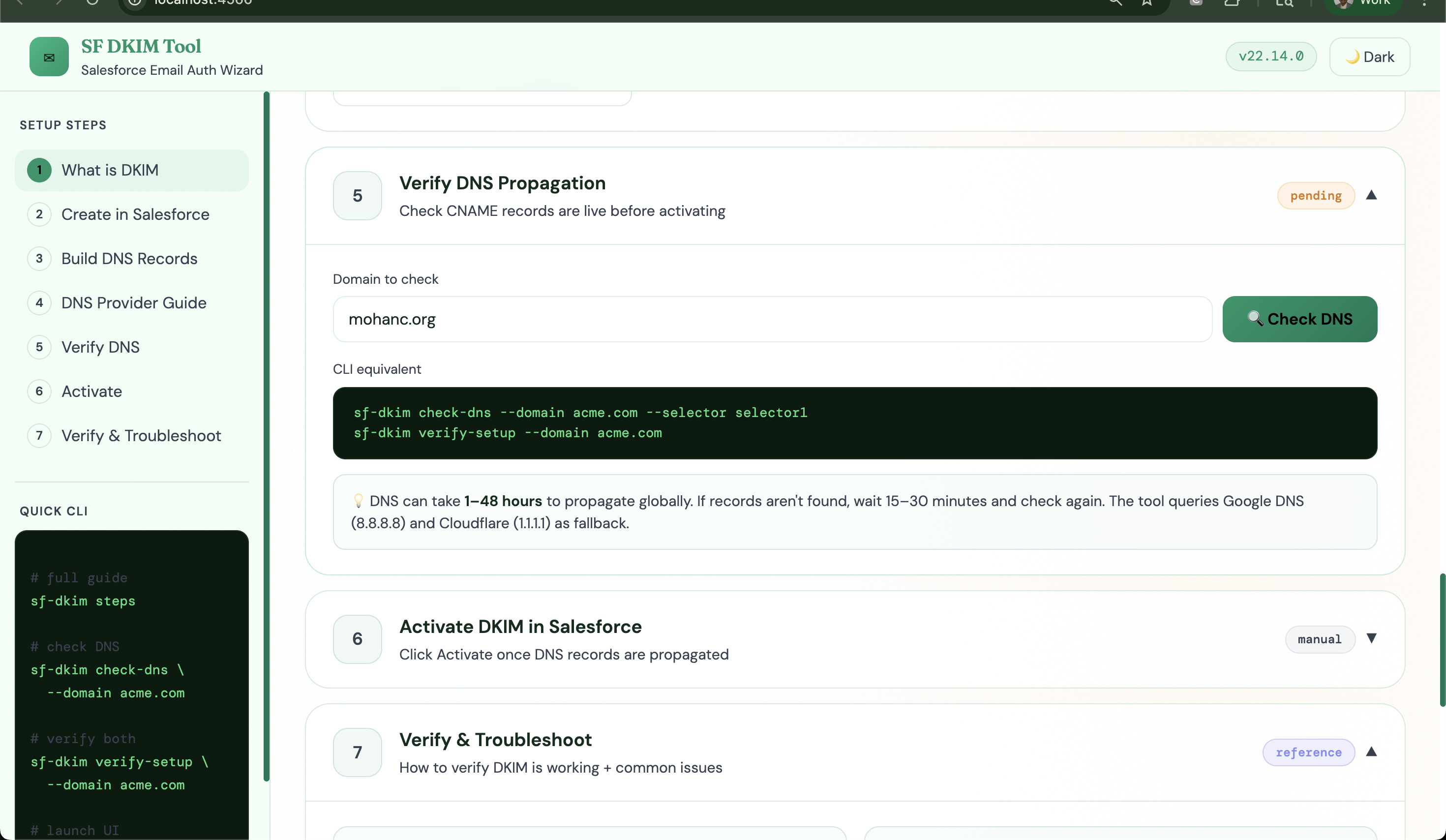
|
|
16
|
+
|
|
17
|
+
|
|
18
|
+
## Quick Start
|
|
19
|
+
|
|
20
|
+
```bash
|
|
21
|
+
npm install -g sf-dkim
|
|
22
|
+
```
|
|
23
|
+
|
|
24
|
+
|
|
25
|
+
## Usage
|
|
26
|
+
|
|
27
|
+
```
|
|
28
|
+
sf-dkim steps # full terminal guide
|
|
29
|
+
sf-dkim ui # launch web dashboard at http://localhost:4242
|
|
30
|
+
```
|
|
31
|
+
|
|
32
|
+
## CLI Commands
|
|
33
|
+
|
|
34
|
+
| Command | Description |
|
|
35
|
+
|---------|-------------|
|
|
36
|
+
| `sf-dkim steps` | Print complete setup walkthrough |
|
|
37
|
+
| `sf-dkim check-dns --domain acme.com` | Check selector1 CNAME propagation |
|
|
38
|
+
| `sf-dkim check-dns --domain acme.com --selector selector2` | Check selector2 |
|
|
39
|
+
| `sf-dkim verify-setup --domain acme.com` | Check both selectors at once |
|
|
40
|
+
| `sf-dkim generate-dns-records --domain acme.com --s1 <val> --s2 <val>` | Print DNS records |
|
|
41
|
+
| `sf-dkim ui --port 4242` | Launch web dashboard |
|
|
42
|
+
|
|
43
|
+
## Setup Overview
|
|
44
|
+
|
|
45
|
+
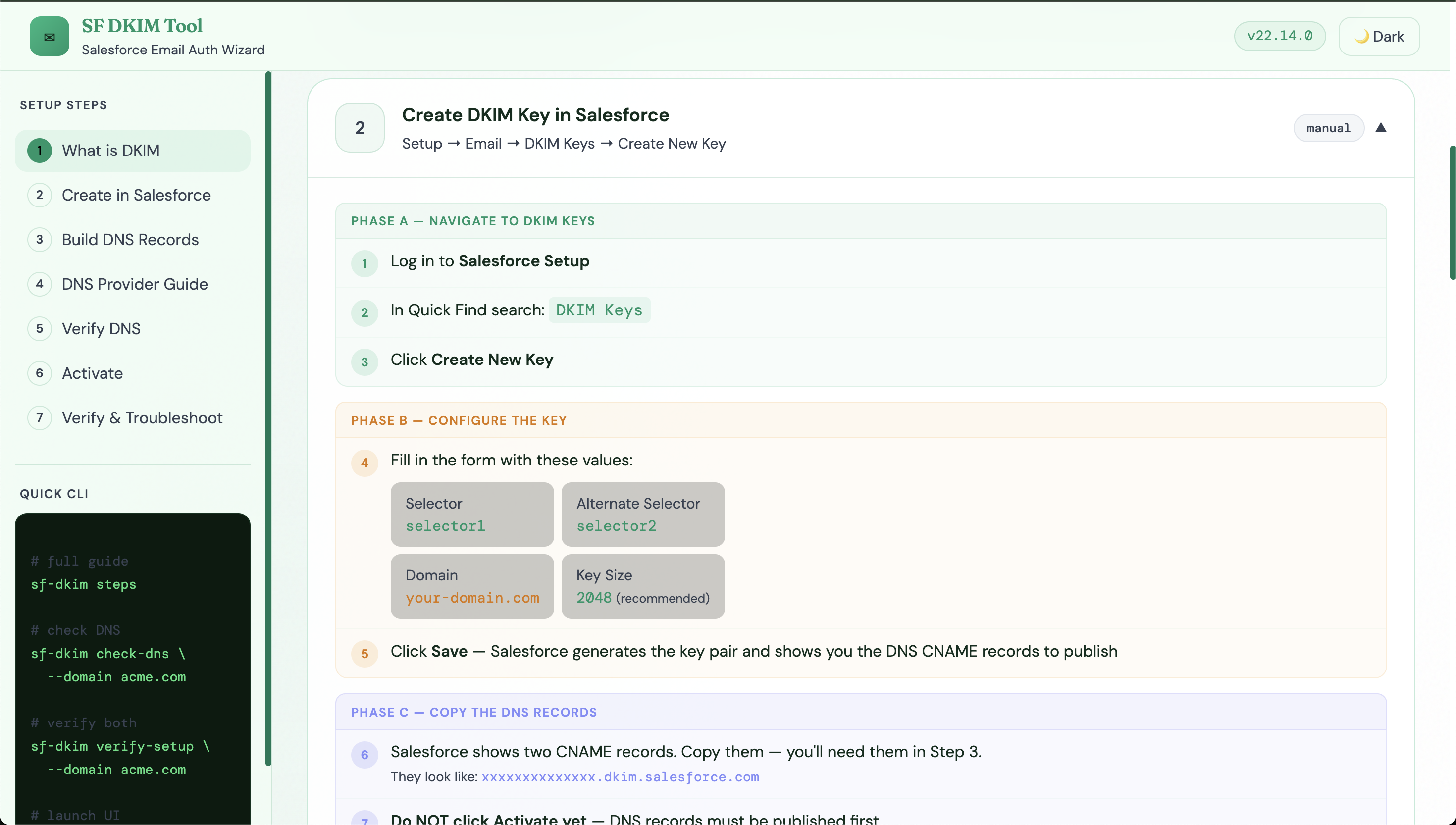
1. **Salesforce Setup → DKIM Keys → Create New Key** — Selector: `selector1`, Alternate: `selector2`, Key Size: 2048
|
|
46
|
+
2. Copy the two CNAME values Salesforce provides
|
|
47
|
+
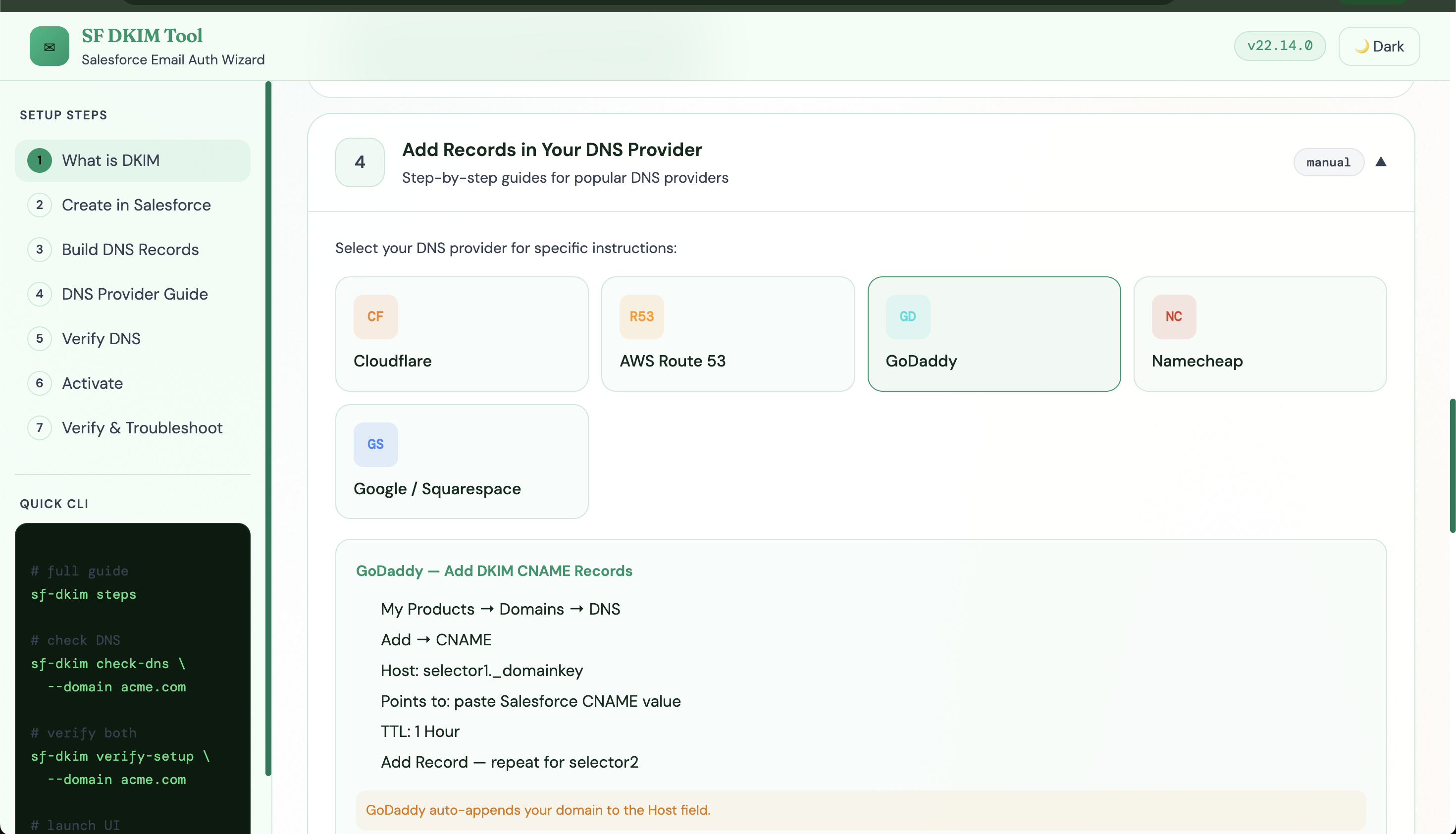
3. Add both CNAMEs to your DNS provider
|
|
48
|
+
4. Wait for DNS propagation (15 min–48 hours)
|
|
49
|
+
5. Verify with `sf-dkim verify-setup --domain your-domain.com`
|
|
50
|
+
6. Click **Activate** in Salesforce → status → Active
|
|
51
|
+
7. Send test email → check headers for `dkim=pass`
|
|
52
|
+
|
|
53
|
+
## DNS Records Format
|
|
54
|
+
|
|
55
|
+
```
|
|
56
|
+
Type Host Value TTL
|
|
57
|
+
CNAME selector1._domainkey.your-domain.com <hash>.dkim.salesforce.com 3600
|
|
58
|
+
CNAME selector2._domainkey.your-domain.com <hash>.dkim.salesforce.com 3600
|
|
59
|
+
```
|
|
60
|
+
|
|
61
|
+
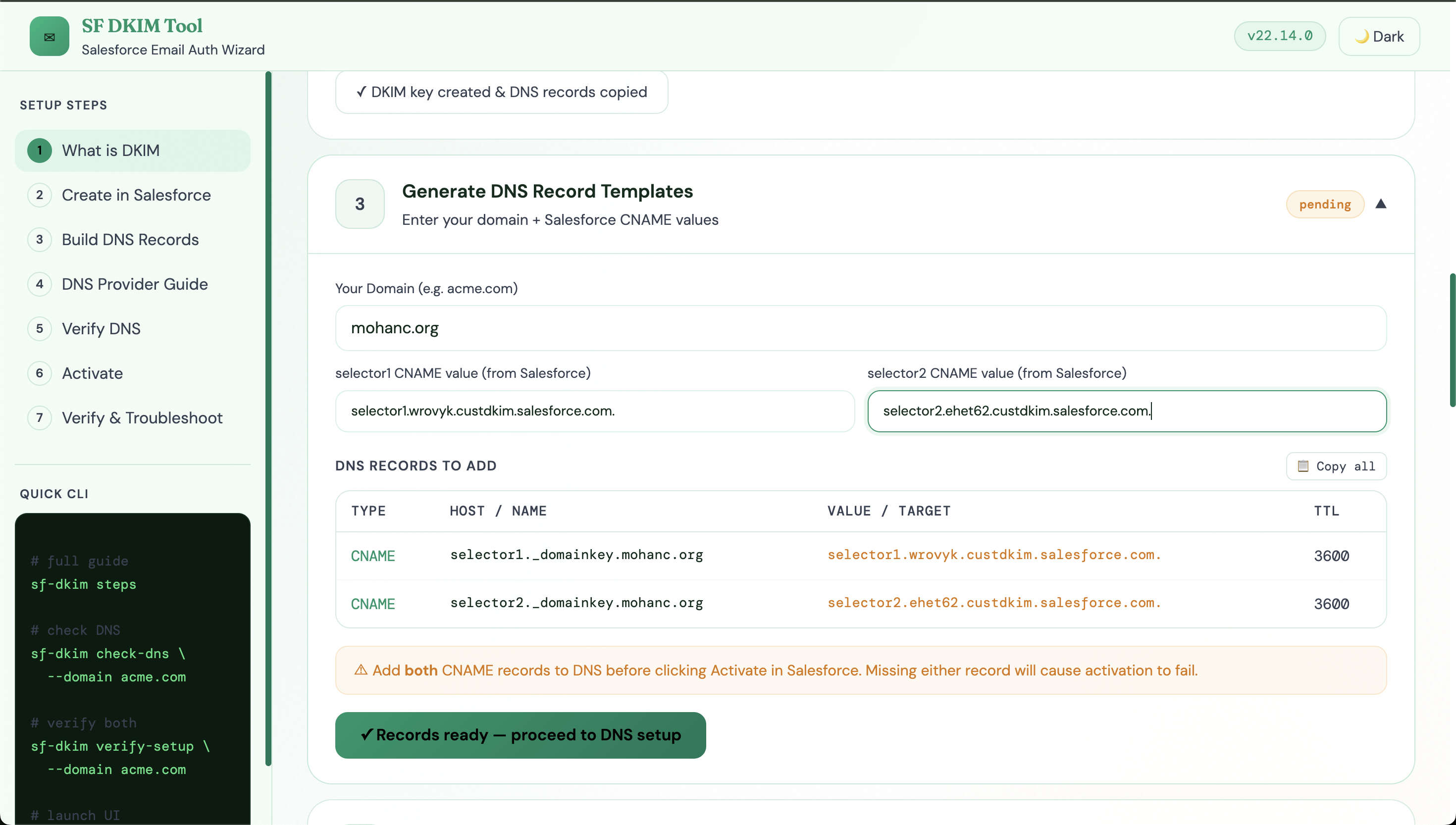
### Sample
|
|
62
|
+
```
|
|
63
|
+
Type Host Value TTL
|
|
64
|
+
CNAME selector1._domainkey.mohanc.org selector1.wrovyk.custdkim.salesforce.com. 3600
|
|
65
|
+
CNAME selector2._domainkey.mohanc.org selector2.ehet62.custdkim.salesforce.com. 3600
|
|
66
|
+
```
|
|
67
|
+
|
|
68
|
+
|
|
69
|
+
|
|
70
|
+
## References
|
|
71
|
+
- [Salesforce DKIM Complete Setup Guide](https://mchinnappan100.github.io/pages2/email/DKIM.html)
|
|
72
|
+
|
|
73
|
+
- [Salesforce DKIM Docs](https://help.salesforce.com/s/articleView?id=xcloud.security_user_email_verification_domain_auth.htm)
|
|
74
|
+
- [MXToolbox DKIM Lookup](https://mxtoolbox.com/dkim.aspx)
|
|
75
|
+
- [Mail-Tester.com](https://mail-tester.com)
|
package/package.json
ADDED
|
@@ -0,0 +1,39 @@
|
|
|
1
|
+
{
|
|
2
|
+
"name": "sf-dkim-tool",
|
|
3
|
+
"version": "1.0.0",
|
|
4
|
+
"description": "Salesforce DKIM Setup Wizard — CLI + Web UI",
|
|
5
|
+
"main": "src/server.js",
|
|
6
|
+
"bin": {
|
|
7
|
+
"sf-dkim": "src/cli.js"
|
|
8
|
+
},
|
|
9
|
+
"files": [
|
|
10
|
+
"src",
|
|
11
|
+
"public",
|
|
12
|
+
"README.md"
|
|
13
|
+
],
|
|
14
|
+
"scripts": {
|
|
15
|
+
"start": "node src/cli.js ui",
|
|
16
|
+
"ui": "node src/cli.js ui --port 4242",
|
|
17
|
+
"steps": "node src/cli.js steps"
|
|
18
|
+
},
|
|
19
|
+
"dependencies": {
|
|
20
|
+
"axios": "^1.6.0",
|
|
21
|
+
"chalk": "^4.1.2",
|
|
22
|
+
"commander": "^11.0.0",
|
|
23
|
+
"express": "^4.18.2",
|
|
24
|
+
"open": "^8.4.2",
|
|
25
|
+
"ora": "^5.4.1"
|
|
26
|
+
},
|
|
27
|
+
"engines": {
|
|
28
|
+
"node": ">=14.0.0"
|
|
29
|
+
},
|
|
30
|
+
"keywords": [
|
|
31
|
+
"salesforce",
|
|
32
|
+
"dkim",
|
|
33
|
+
"email",
|
|
34
|
+
"dns",
|
|
35
|
+
"deliverability"
|
|
36
|
+
],
|
|
37
|
+
"license": "MIT",
|
|
38
|
+
"author": "Mohan Chinnappan"
|
|
39
|
+
}
|
|
@@ -0,0 +1,843 @@
|
|
|
1
|
+
<!DOCTYPE html>
|
|
2
|
+
<html lang="en" data-theme="dark">
|
|
3
|
+
<head>
|
|
4
|
+
<meta charset="UTF-8"/>
|
|
5
|
+
<meta name="viewport" content="width=device-width,initial-scale=1.0"/>
|
|
6
|
+
<title>SF DKIM Tool — Salesforce Email Authentication Wizard</title>
|
|
7
|
+
<link rel="icon" type="image/x-icon" href="https://mohan-chinnappan-n5.github.io/dfv/img/mc_favIcon.ico" />
|
|
8
|
+
<script src="https://cdn.tailwindcss.com"></script>
|
|
9
|
+
<link href="https://fonts.googleapis.com/css2?family=DM+Mono:wght@400;500&family=Fraunces:ital,wght@0,300;0,600;0,800;1,300&family=DM+Sans:wght@300;400;500;600&display=swap" rel="stylesheet">
|
|
10
|
+
<style>
|
|
11
|
+
:root {
|
|
12
|
+
--em: #10b981; --em2: #059669; --em3: #34d399;
|
|
13
|
+
--acc: #f59e0b; --acc2: #d97706;
|
|
14
|
+
--ink: #e2f8f1; --ink2: #94a3b8;
|
|
15
|
+
--bg0: #030d0a; --bg1: #071a12; --bg2: #0d2a1c; --bg3: #122e1f;
|
|
16
|
+
--card: rgba(13,42,28,0.85); --border: rgba(16,185,129,0.15);
|
|
17
|
+
--glow: rgba(16,185,129,0.12);
|
|
18
|
+
}
|
|
19
|
+
[data-theme="light"] {
|
|
20
|
+
--em: #059669; --em2: #047857; --em3: #10b981;
|
|
21
|
+
--acc: #d97706; --acc2: #b45309;
|
|
22
|
+
--ink: #0f2d1e; --ink2: #374151;
|
|
23
|
+
--bg0: #f0fdf4; --bg1: #dcfce7; --bg2: #bbf7d0; --bg3: #d1fae5;
|
|
24
|
+
--card: rgba(255,255,255,0.9); --border: rgba(5,150,105,0.2);
|
|
25
|
+
--glow: rgba(16,185,129,0.08);
|
|
26
|
+
}
|
|
27
|
+
*{box-sizing:border-box;margin:0;padding:0;}
|
|
28
|
+
body{font-family:'DM Sans',sans-serif;background:var(--bg0);color:var(--ink);min-height:100vh;transition:background .3s,color .3s;}
|
|
29
|
+
.mono{font-family:'DM Mono',monospace;}
|
|
30
|
+
.serif{font-family:'Fraunces',serif;}
|
|
31
|
+
::-webkit-scrollbar{width:5px;}::-webkit-scrollbar-track{background:transparent;}::-webkit-scrollbar-thumb{background:var(--em2);border-radius:3px;}
|
|
32
|
+
|
|
33
|
+
/* grain overlay */
|
|
34
|
+
body::before{content:'';position:fixed;inset:0;background-image:url("data:image/svg+xml,%3Csvg viewBox='0 0 256 256' xmlns='http://www.w3.org/2000/svg'%3E%3Cfilter id='n'%3E%3CfeTurbulence type='fractalNoise' baseFrequency='.9' numOctaves='4' stitchTiles='stitch'/%3E%3C/filter%3E%3Crect width='100%25' height='100%25' filter='url(%23n)' opacity='.04'/%3E%3C/svg%3E");pointer-events:none;z-index:0;}
|
|
35
|
+
|
|
36
|
+
/* mesh bg */
|
|
37
|
+
.bg-mesh{background:radial-gradient(ellipse 70% 50% at 15% 30%,rgba(16,185,129,0.08) 0%,transparent 60%),radial-gradient(ellipse 50% 60% at 85% 70%,rgba(245,158,11,0.05) 0%,transparent 60%);}
|
|
38
|
+
[data-theme="light"] .bg-mesh{background:radial-gradient(ellipse 70% 50% at 15% 30%,rgba(16,185,129,0.1) 0%,transparent 60%),radial-gradient(ellipse 50% 60% at 85% 70%,rgba(245,158,11,0.07) 0%,transparent 60%);}
|
|
39
|
+
|
|
40
|
+
/* glass card */
|
|
41
|
+
.card{background:var(--card);border:1px solid var(--border);border-radius:16px;backdrop-filter:blur(16px);}
|
|
42
|
+
[data-theme="light"] .card{box-shadow:0 2px 20px rgba(0,0,0,0.06);}
|
|
43
|
+
|
|
44
|
+
/* topbar */
|
|
45
|
+
.topbar{position:fixed;top:0;left:0;right:0;z-index:50;background:rgba(3,13,10,0.85);border-bottom:1px solid var(--border);backdrop-filter:blur(20px);padding:0 24px;height:56px;display:flex;align-items:center;justify-content:space-between;}
|
|
46
|
+
[data-theme="light"] .topbar{background:rgba(240,253,244,0.92);}
|
|
47
|
+
|
|
48
|
+
/* sidebar */
|
|
49
|
+
.sidebar{position:fixed;left:0;top:56px;bottom:0;width:220px;padding:20px 12px;border-right:1px solid var(--border);overflow-y:auto;background:rgba(3,13,10,0.6);}
|
|
50
|
+
[data-theme="light"] .sidebar{background:rgba(240,253,244,0.8);}
|
|
51
|
+
.nav-item{display:flex;align-items:center;gap:8px;padding:7px 10px;border-radius:10px;font-size:13px;color:var(--ink2);cursor:pointer;transition:.15s;margin-bottom:2px;}
|
|
52
|
+
.nav-item:hover,.nav-item.active{background:rgba(16,185,129,0.1);color:var(--em);}
|
|
53
|
+
.nav-item.done{color:var(--em);font-weight:500;}
|
|
54
|
+
.nav-num{width:20px;height:20px;border-radius:50%;font-size:10px;font-weight:600;display:flex;align-items:center;justify-content:center;border:1px solid var(--border);flex-shrink:0;color:var(--ink2);}
|
|
55
|
+
.nav-num.active{background:var(--em);color:#000;border-color:var(--em);}
|
|
56
|
+
.nav-num.done{background:var(--em2);color:#fff;border-color:var(--em2);}
|
|
57
|
+
|
|
58
|
+
/* step card */
|
|
59
|
+
.step-card{background:var(--card);border:1px solid var(--border);border-radius:20px;margin-bottom:12px;overflow:hidden;transition:border-color .2s;}
|
|
60
|
+
.step-card:hover{border-color:rgba(16,185,129,0.3);}
|
|
61
|
+
.step-head{display:flex;align-items:center;justify-content:space-between;padding:18px 22px;cursor:pointer;}
|
|
62
|
+
.step-head:hover{background:rgba(16,185,129,0.03);}
|
|
63
|
+
.step-left{display:flex;align-items:center;gap:14px;}
|
|
64
|
+
.step-icon{width:40px;height:40px;border-radius:12px;display:flex;align-items:center;justify-content:center;font-size:14px;font-weight:700;flex-shrink:0;}
|
|
65
|
+
.icon-active{background:linear-gradient(135deg,var(--em),var(--em2));color:#000;box-shadow:0 0 20px rgba(16,185,129,0.3);}
|
|
66
|
+
.icon-done{background:linear-gradient(135deg,#10b981,#059669);color:#fff;}
|
|
67
|
+
.icon-idle{background:rgba(16,185,129,0.08);color:var(--ink2);border:1px solid var(--border);}
|
|
68
|
+
.step-title{font-size:15px;font-weight:600;color:var(--ink);}
|
|
69
|
+
.step-sub{font-size:12px;color:var(--ink2);margin-top:2px;}
|
|
70
|
+
.badge{font-size:10px;padding:3px 10px;border-radius:20px;font-weight:500;font-family:'DM Mono',monospace;}
|
|
71
|
+
.badge-pending{background:rgba(245,158,11,0.12);color:var(--acc);border:1px solid rgba(245,158,11,0.25);}
|
|
72
|
+
.badge-done{background:rgba(16,185,129,0.12);color:var(--em);border:1px solid rgba(16,185,129,0.3);}
|
|
73
|
+
.badge-manual{background:rgba(148,163,184,0.1);color:var(--ink2);border:1px solid rgba(148,163,184,0.2);}
|
|
74
|
+
.badge-optional{background:rgba(99,102,241,0.1);color:#818cf8;border:1px solid rgba(99,102,241,0.25);}
|
|
75
|
+
|
|
76
|
+
/* step body */
|
|
77
|
+
.step-body{border-top:1px solid var(--border);padding:20px 22px;}
|
|
78
|
+
|
|
79
|
+
/* inputs */
|
|
80
|
+
.em-input{background:rgba(16,185,129,0.05);border:1px solid rgba(16,185,129,0.2);border-radius:10px;padding:8px 12px;font-size:13px;color:var(--ink);width:100%;transition:.2s;font-family:'DM Sans',sans-serif;}
|
|
81
|
+
.em-input:focus{outline:none;border-color:var(--em);box-shadow:0 0 0 3px rgba(16,185,129,0.1);}
|
|
82
|
+
[data-theme="light"] .em-input{background:rgba(255,255,255,0.8);}
|
|
83
|
+
.em-input::placeholder{color:var(--ink2);}
|
|
84
|
+
|
|
85
|
+
/* buttons */
|
|
86
|
+
.btn-primary{background:linear-gradient(135deg,var(--em),var(--em2));color:#000;font-weight:600;font-size:13px;padding:9px 20px;border-radius:10px;border:none;cursor:pointer;transition:.2s;}
|
|
87
|
+
.btn-primary:hover{transform:translateY(-1px);box-shadow:0 4px 20px rgba(16,185,129,0.35);}
|
|
88
|
+
.btn-ghost{background:transparent;border:1px solid var(--border);color:var(--ink2);font-size:13px;padding:8px 16px;border-radius:10px;cursor:pointer;transition:.2s;}
|
|
89
|
+
.btn-ghost:hover{border-color:var(--em);color:var(--em);background:rgba(16,185,129,0.05);}
|
|
90
|
+
|
|
91
|
+
/* terminal */
|
|
92
|
+
.terminal{background:#020c07;border:1px solid rgba(16,185,129,0.15);border-radius:10px;padding:12px 16px;font-family:'DM Mono',monospace;font-size:12px;color:#34d399;white-space:pre-wrap;word-break:break-all;overflow-x:auto;}
|
|
93
|
+
[data-theme="light"] .terminal{background:#0a1a0f;color:#4ade80;}
|
|
94
|
+
|
|
95
|
+
/* progress */
|
|
96
|
+
.prog-track{height:3px;background:rgba(16,185,129,0.1);border-radius:2px;overflow:hidden;}
|
|
97
|
+
@keyframes shimmer{0%{background-position:-200% center}100%{background-position:200% center}}
|
|
98
|
+
.prog-fill{height:100%;border-radius:2px;background:linear-gradient(90deg,var(--em),var(--acc),var(--em));background-size:200% auto;animation:shimmer 1.4s linear infinite;transition:width .4s;}
|
|
99
|
+
|
|
100
|
+
/* dns record table */
|
|
101
|
+
.dns-table{width:100%;border-collapse:collapse;font-size:12px;}
|
|
102
|
+
.dns-table th{padding:8px 12px;text-align:left;color:var(--ink2);font-weight:500;border-bottom:1px solid var(--border);font-family:'DM Mono',monospace;font-size:11px;text-transform:uppercase;letter-spacing:.05em;}
|
|
103
|
+
.dns-table td{padding:10px 12px;border-bottom:1px solid rgba(16,185,129,0.05);vertical-align:top;}
|
|
104
|
+
.dns-table tr:last-child td{border-bottom:none;}
|
|
105
|
+
.dns-table tr:hover td{background:rgba(16,185,129,0.03);}
|
|
106
|
+
|
|
107
|
+
/* status indicator */
|
|
108
|
+
.dot-ok{width:8px;height:8px;border-radius:50%;background:var(--em);box-shadow:0 0 6px rgba(16,185,129,0.5);}
|
|
109
|
+
.dot-warn{width:8px;height:8px;border-radius:50%;background:var(--acc);}
|
|
110
|
+
.dot-err{width:8px;height:8px;border-radius:50%;background:#ef4444;}
|
|
111
|
+
@keyframes pulse{0%,100%{opacity:1}50%{opacity:.5}}
|
|
112
|
+
.dot-checking{width:8px;height:8px;border-radius:50%;background:var(--em);animation:pulse 1s ease infinite;}
|
|
113
|
+
|
|
114
|
+
/* toast */
|
|
115
|
+
.toast{position:fixed;bottom:20px;right:20px;z-index:100;padding:10px 16px;border-radius:12px;font-size:13px;font-weight:500;opacity:0;transition:opacity .3s;pointer-events:none;border:1px solid var(--border);backdrop-filter:blur(10px);}
|
|
116
|
+
.toast.show{opacity:1;}
|
|
117
|
+
.toast-ok{background:rgba(16,185,129,0.15);color:var(--em);}
|
|
118
|
+
.toast-err{background:rgba(239,68,68,0.12);color:#ef4444;}
|
|
119
|
+
|
|
120
|
+
/* phase headers */
|
|
121
|
+
.phase-head{font-size:10px;font-weight:600;letter-spacing:.08em;text-transform:uppercase;padding:7px 12px 6px;margin-bottom:0;}
|
|
122
|
+
.phase-em{color:var(--em);background:rgba(16,185,129,0.08);border-radius:8px 8px 0 0;border:1px solid rgba(16,185,129,0.15);}
|
|
123
|
+
.phase-amber{color:var(--acc);background:rgba(245,158,11,0.08);border-radius:8px 8px 0 0;border:1px solid rgba(245,158,11,0.15);}
|
|
124
|
+
.phase-blue{color:#818cf8;background:rgba(99,102,241,0.08);border-radius:8px 8px 0 0;border:1px solid rgba(99,102,241,0.15);}
|
|
125
|
+
|
|
126
|
+
/* sub-steps list */
|
|
127
|
+
.substep-list{list-style:none;}
|
|
128
|
+
.substep-list li{display:flex;gap:10px;padding:8px 12px;font-size:13px;border-bottom:1px solid rgba(16,185,129,0.05);}
|
|
129
|
+
.substep-list li:last-child{border-bottom:none;}
|
|
130
|
+
.substep-num{width:22px;height:22px;border-radius:50%;display:flex;align-items:center;justify-content:center;font-size:10px;font-weight:600;flex-shrink:0;margin-top:1px;}
|
|
131
|
+
|
|
132
|
+
/* DNS provider cards */
|
|
133
|
+
.provider-grid{display:grid;grid-template-columns:repeat(auto-fit,minmax(200px,1fr));gap:10px;margin-top:14px;}
|
|
134
|
+
.provider-card{background:rgba(16,185,129,0.04);border:1px solid var(--border);border-radius:12px;padding:14px;cursor:pointer;transition:.2s;}
|
|
135
|
+
.provider-card:hover,.provider-card.selected{border-color:var(--em);background:rgba(16,185,129,0.08);}
|
|
136
|
+
.provider-icon{width:36px;height:36px;border-radius:8px;display:flex;align-items:center;justify-content:center;font-size:11px;font-weight:700;font-family:'DM Mono',monospace;margin-bottom:8px;}
|
|
137
|
+
|
|
138
|
+
/* flow diagram */
|
|
139
|
+
.flow{display:flex;align-items:center;gap:0;flex-wrap:wrap;margin:12px 0;}
|
|
140
|
+
.flow-box{background:rgba(16,185,129,0.08);border:1px solid var(--border);border-radius:8px;padding:8px 14px;font-size:12px;font-weight:500;color:var(--ink);}
|
|
141
|
+
.flow-arrow{color:var(--em);font-size:18px;padding:0 4px;}
|
|
142
|
+
|
|
143
|
+
/* animations */
|
|
144
|
+
@keyframes fadeUp{from{opacity:0;transform:translateY(12px)}to{opacity:1;transform:translateY(0)}}
|
|
145
|
+
.fade-up{animation:fadeUp .4s ease both;}
|
|
146
|
+
|
|
147
|
+
/* arch diagram */
|
|
148
|
+
.arch-row{display:flex;align-items:center;gap:0;margin:6px 0;}
|
|
149
|
+
.arch-node{background:rgba(16,185,129,0.1);border:1px solid rgba(16,185,129,0.25);border-radius:10px;padding:8px 16px;font-size:12px;font-weight:500;min-width:120px;text-align:center;}
|
|
150
|
+
.arch-line{flex:1;height:1px;background:linear-gradient(90deg,var(--em),rgba(16,185,129,0.2));position:relative;}
|
|
151
|
+
.arch-line::after{content:'►';position:absolute;right:-2px;top:-9px;font-size:12px;color:var(--em);}
|
|
152
|
+
.arch-label{font-size:10px;color:var(--ink2);text-align:center;margin-top:2px;}
|
|
153
|
+
|
|
154
|
+
/* copy btn */
|
|
155
|
+
.copy-btn{font-size:10px;padding:3px 8px;border-radius:6px;border:1px solid var(--border);background:transparent;color:var(--ink2);cursor:pointer;transition:.2s;font-family:'DM Mono',monospace;}
|
|
156
|
+
.copy-btn:hover{border-color:var(--em);color:var(--em);}
|
|
157
|
+
|
|
158
|
+
/* light mode fixes */
|
|
159
|
+
[data-theme="light"] .step-title{color:#0f2d1e;}
|
|
160
|
+
[data-theme="light"] .step-sub{color:#374151;}
|
|
161
|
+
[data-theme="light"] .nav-item{color:#374151;}
|
|
162
|
+
</style>
|
|
163
|
+
</head>
|
|
164
|
+
<body class="bg-mesh">
|
|
165
|
+
|
|
166
|
+
<!-- TOPBAR -->
|
|
167
|
+
<header class="topbar">
|
|
168
|
+
<div style="display:flex;align-items:center;gap:10px;">
|
|
169
|
+
<div style="width:32px;height:32px;border-radius:9px;background:linear-gradient(135deg,#10b981,#059669);display:flex;align-items:center;justify-content:center;font-size:15px;">✉</div>
|
|
170
|
+
<div>
|
|
171
|
+
<div class="serif" style="font-size:15px;font-weight:600;color:var(--em);letter-spacing:-.3px;">SF DKIM Tool</div>
|
|
172
|
+
<div style="font-size:11px;color:var(--ink2);">Salesforce Email Auth Wizard</div>
|
|
173
|
+
</div>
|
|
174
|
+
</div>
|
|
175
|
+
<div style="display:flex;align-items:center;gap:10px;">
|
|
176
|
+
<div id="node-badge" style="font-size:11px;padding:3px 10px;border-radius:20px;font-family:'DM Mono',monospace;background:rgba(16,185,129,0.08);color:var(--em);border:1px solid var(--border);">node …</div>
|
|
177
|
+
<button id="theme-btn" onclick="toggleTheme()" class="btn-ghost" style="padding:6px 12px;font-size:12px;">☀ Light</button>
|
|
178
|
+
</div>
|
|
179
|
+
</header>
|
|
180
|
+
|
|
181
|
+
<!-- SIDEBAR -->
|
|
182
|
+
<aside class="sidebar">
|
|
183
|
+
<div style="font-size:10px;font-weight:600;letter-spacing:.08em;text-transform:uppercase;color:var(--ink2);margin-bottom:12px;padding:0 4px;">Setup Steps</div>
|
|
184
|
+
<div id="step-nav"></div>
|
|
185
|
+
|
|
186
|
+
<div style="margin-top:20px;padding-top:16px;border-top:1px solid var(--border);">
|
|
187
|
+
<div style="font-size:10px;font-weight:600;letter-spacing:.08em;text-transform:uppercase;color:var(--ink2);margin-bottom:8px;padding:0 4px;">Quick CLI</div>
|
|
188
|
+
<div class="terminal" style="font-size:11px;line-height:1.7;padding:10px 12px;">
|
|
189
|
+
<span style="color:var(--ink2)"># full guide</span>
|
|
190
|
+
sf-dkim steps
|
|
191
|
+
|
|
192
|
+
<span style="color:var(--ink2)"># check DNS</span>
|
|
193
|
+
sf-dkim check-dns \
|
|
194
|
+
--domain acme.com
|
|
195
|
+
|
|
196
|
+
<span style="color:var(--ink2)"># verify both</span>
|
|
197
|
+
sf-dkim verify-setup \
|
|
198
|
+
--domain acme.com
|
|
199
|
+
|
|
200
|
+
<span style="color:var(--ink2)"># launch UI</span>
|
|
201
|
+
sf-dkim ui</div>
|
|
202
|
+
</div>
|
|
203
|
+
</aside>
|
|
204
|
+
|
|
205
|
+
<!-- MAIN -->
|
|
206
|
+
<main style="margin-left:220px;padding:76px 28px 40px;max-width:960px;">
|
|
207
|
+
|
|
208
|
+
<!-- HERO -->
|
|
209
|
+
<div class="fade-up" style="margin-bottom:28px;">
|
|
210
|
+
<div class="serif" style="font-size:36px;font-weight:800;line-height:1.1;margin-bottom:8px;">
|
|
211
|
+
<span style="color:var(--em);">DKIM</span> <span style="color:var(--ink);">for Salesforce</span>
|
|
212
|
+
</div>
|
|
213
|
+
<p style="font-size:14px;color:var(--ink2);max-width:520px;line-height:1.6;">
|
|
214
|
+
DomainKeys Identified Mail lets Salesforce sign your outgoing emails with your own domain — improving deliverability, preventing spoofing, and passing DMARC checks.
|
|
215
|
+
</p>
|
|
216
|
+
|
|
217
|
+
<!-- Architecture diagram inline -->
|
|
218
|
+
<div style="margin-top:20px;display:flex;align-items:center;flex-wrap:wrap;gap:6px;">
|
|
219
|
+
<div class="arch-node">Salesforce<br><span style="font-size:10px;color:var(--ink2);">signs email</span></div>
|
|
220
|
+
<div style="display:flex;flex-direction:column;align-items:center;padding:0 4px;">
|
|
221
|
+
<div style="width:60px;height:1px;background:var(--em);position:relative;"><span style="position:absolute;right:-4px;top:-8px;font-size:12px;color:var(--em);">►</span></div>
|
|
222
|
+
<div style="font-size:9px;color:var(--ink2);margin-top:2px;">sends</div>
|
|
223
|
+
</div>
|
|
224
|
+
<div class="arch-node">Recipient<br><span style="font-size:10px;color:var(--ink2);">mail server</span></div>
|
|
225
|
+
<div style="display:flex;flex-direction:column;align-items:center;padding:0 4px;">
|
|
226
|
+
<div style="width:60px;height:1px;background:var(--acc);position:relative;"><span style="position:absolute;right:-4px;top:-8px;font-size:12px;color:var(--acc);">►</span></div>
|
|
227
|
+
<div style="font-size:9px;color:var(--ink2);margin-top:2px;">queries DNS</div>
|
|
228
|
+
</div>
|
|
229
|
+
<div class="arch-node" style="border-color:rgba(245,158,11,0.3);">Your DNS<br><span style="font-size:10px;color:var(--ink2);">CNAME records</span></div>
|
|
230
|
+
<div style="display:flex;flex-direction:column;align-items:center;padding:0 4px;">
|
|
231
|
+
<div style="width:60px;height:1px;background:var(--em);position:relative;"><span style="position:absolute;right:-4px;top:-8px;font-size:12px;color:var(--em);">►</span></div>
|
|
232
|
+
<div style="font-size:9px;color:var(--ink2);margin-top:2px;">public key</div>
|
|
233
|
+
</div>
|
|
234
|
+
<div class="arch-node" style="background:rgba(16,185,129,0.15);border-color:rgba(16,185,129,0.4);">DKIM=<span style="color:var(--em);">pass</span> ✔</div>
|
|
235
|
+
</div>
|
|
236
|
+
</div>
|
|
237
|
+
|
|
238
|
+
<!-- STEP 1: UNDERSTAND DKIM -->
|
|
239
|
+
<div class="step-card fade-up" id="card-1" style="animation-delay:.04s">
|
|
240
|
+
<div class="step-head" onclick="toggleStep(1)">
|
|
241
|
+
<div class="step-left">
|
|
242
|
+
<div class="step-icon icon-active" id="icon-1">1</div>
|
|
243
|
+
<div>
|
|
244
|
+
<div class="step-title">What is DKIM & What You Need</div>
|
|
245
|
+
<div class="step-sub">Understand how DKIM works and prerequisites</div>
|
|
246
|
+
</div>
|
|
247
|
+
</div>
|
|
248
|
+
<div style="display:flex;align-items:center;gap:8px;">
|
|
249
|
+
<span class="badge badge-manual" id="badge-1">overview</span>
|
|
250
|
+
<span id="ch-1" style="font-size:10px;color:var(--ink2);">▲</span>
|
|
251
|
+
</div>
|
|
252
|
+
</div>
|
|
253
|
+
<div id="body-1" class="step-body">
|
|
254
|
+
<div style="display:grid;grid-template-columns:1fr 1fr;gap:14px;margin-bottom:16px;">
|
|
255
|
+
<div style="background:rgba(16,185,129,0.05);border:1px solid var(--border);border-radius:12px;padding:14px;">
|
|
256
|
+
<div style="font-size:12px;font-weight:600;color:var(--em);margin-bottom:8px;">📧 How DKIM Works</div>
|
|
257
|
+
<ol style="font-size:12px;color:var(--ink2);line-height:1.8;padding-left:16px;">
|
|
258
|
+
<li>Salesforce generates a key pair (public + private)</li>
|
|
259
|
+
<li>Private key stays in Salesforce</li>
|
|
260
|
+
<li>You publish the public key in DNS as CNAME</li>
|
|
261
|
+
<li>Salesforce signs each outgoing email's headers</li>
|
|
262
|
+
<li>Recipient verifies signature against DNS</li>
|
|
263
|
+
<li>Email passes DKIM ✔</li>
|
|
264
|
+
</ol>
|
|
265
|
+
</div>
|
|
266
|
+
<div style="background:rgba(245,158,11,0.05);border:1px solid rgba(245,158,11,0.15);border-radius:12px;padding:14px;">
|
|
267
|
+
<div style="font-size:12px;font-weight:600;color:var(--acc);margin-bottom:8px;">✅ What You Need</div>
|
|
268
|
+
<ul style="font-size:12px;color:var(--ink2);line-height:1.8;list-style:none;">
|
|
269
|
+
<li>🔐 Salesforce org with admin access</li>
|
|
270
|
+
<li>🌐 A domain you control (e.g. acme.com)</li>
|
|
271
|
+
<li>🗂 Access to your DNS provider</li>
|
|
272
|
+
<li>⏱ 15–60 min for DNS propagation</li>
|
|
273
|
+
<li>📨 A test email account to verify</li>
|
|
274
|
+
</ul>
|
|
275
|
+
</div>
|
|
276
|
+
</div>
|
|
277
|
+
<div style="background:rgba(16,185,129,0.04);border:1px solid var(--border);border-radius:10px;padding:12px 16px;">
|
|
278
|
+
<div style="font-size:11px;font-weight:600;color:var(--em);margin-bottom:6px;">DKIM vs SPF vs DMARC</div>
|
|
279
|
+
<div style="display:grid;grid-template-columns:1fr 1fr 1fr;gap:8px;">
|
|
280
|
+
<div style="font-size:11px;color:var(--ink2);"><strong style="color:var(--em);">DKIM</strong><br>Signs email content with private key. Proves it wasn't tampered with.</div>
|
|
281
|
+
<div style="font-size:11px;color:var(--ink2);"><strong style="color:var(--acc);">SPF</strong><br>Lists authorized sending IP addresses. Prevents IP spoofing.</div>
|
|
282
|
+
<div style="font-size:11px;color:var(--ink2);"><strong style="color:#818cf8;">DMARC</strong><br>Policy for what to do when DKIM/SPF fail. Provides reports.</div>
|
|
283
|
+
</div>
|
|
284
|
+
</div>
|
|
285
|
+
<div style="margin-top:12px;font-size:12px;color:var(--ink2);">
|
|
286
|
+
The Salesforce DKIM implementation uses two selectors (<span class="mono" style="color:var(--em)">selector1</span> and <span class="mono" style="color:var(--em)">selector2</span>) so Salesforce can rotate keys without downtime. Both CNAME records must be present before activation.
|
|
287
|
+
</div>
|
|
288
|
+
</div>
|
|
289
|
+
</div>
|
|
290
|
+
|
|
291
|
+
<!-- STEP 2: CREATE DKIM IN SALESFORCE -->
|
|
292
|
+
<div class="step-card fade-up" id="card-2" style="animation-delay:.08s">
|
|
293
|
+
<div class="step-head" onclick="toggleStep(2)">
|
|
294
|
+
<div class="step-left">
|
|
295
|
+
<div class="step-icon icon-idle" id="icon-2">2</div>
|
|
296
|
+
<div>
|
|
297
|
+
<div class="step-title">Create DKIM Key in Salesforce</div>
|
|
298
|
+
<div class="step-sub">Setup → Email → DKIM Keys → Create New Key</div>
|
|
299
|
+
</div>
|
|
300
|
+
</div>
|
|
301
|
+
<div style="display:flex;align-items:center;gap:8px;">
|
|
302
|
+
<span class="badge badge-manual" id="badge-2">manual</span>
|
|
303
|
+
<span id="ch-2" style="font-size:10px;color:var(--ink2);">▼</span>
|
|
304
|
+
</div>
|
|
305
|
+
</div>
|
|
306
|
+
<div id="body-2" class="step-body" style="display:none;">
|
|
307
|
+
<div class="phase-head phase-em" style="margin-bottom:0;">Phase A — Navigate to DKIM Keys</div>
|
|
308
|
+
<div style="background:rgba(16,185,129,0.04);border:1px solid rgba(16,185,129,0.15);border-radius:0 0 10px 10px;border-top:none;margin-bottom:12px;">
|
|
309
|
+
<ul class="substep-list">
|
|
310
|
+
<li><div class="substep-num" style="background:rgba(16,185,129,0.15);color:var(--em);">1</div><div style="font-size:13px;color:var(--ink);">Log in to <strong>Salesforce Setup</strong></div></li>
|
|
311
|
+
<li><div class="substep-num" style="background:rgba(16,185,129,0.15);color:var(--em);">2</div><div style="font-size:13px;color:var(--ink);">In Quick Find search: <span class="mono" style="color:var(--em);background:rgba(16,185,129,0.1);padding:2px 6px;border-radius:4px;">DKIM Keys</span></div></li>
|
|
312
|
+
<li><div class="substep-num" style="background:rgba(16,185,129,0.15);color:var(--em);">3</div><div style="font-size:13px;color:var(--ink);">Click <strong>Create New Key</strong></div></li>
|
|
313
|
+
</ul>
|
|
314
|
+
</div>
|
|
315
|
+
|
|
316
|
+
<div class="phase-head phase-amber" style="margin-bottom:0;">Phase B — Configure the Key</div>
|
|
317
|
+
<div style="background:rgba(245,158,11,0.04);border:1px solid rgba(245,158,11,0.15);border-radius:0 0 10px 10px;border-top:none;margin-bottom:12px;">
|
|
318
|
+
<ul class="substep-list">
|
|
319
|
+
<li><div class="substep-num" style="background:rgba(245,158,11,0.15);color:var(--acc);">4</div>
|
|
320
|
+
<div>
|
|
321
|
+
<div style="font-size:13px;color:var(--ink);margin-bottom:8px;">Fill in the form with these values:</div>
|
|
322
|
+
<div style="display:grid;grid-template-columns:1fr 1fr;gap:6px;">
|
|
323
|
+
<div style="background:rgba(0,0,0,0.2);border-radius:8px;padding:8px 12px;font-size:12px;"><span style="color:var(--ink2);">Selector</span><br><span class="mono" style="color:var(--em);">selector1</span></div>
|
|
324
|
+
<div style="background:rgba(0,0,0,0.2);border-radius:8px;padding:8px 12px;font-size:12px;"><span style="color:var(--ink2);">Alternate Selector</span><br><span class="mono" style="color:var(--em);">selector2</span></div>
|
|
325
|
+
<div style="background:rgba(0,0,0,0.2);border-radius:8px;padding:8px 12px;font-size:12px;"><span style="color:var(--ink2);">Domain</span><br><span class="mono" style="color:var(--acc);">your-domain.com</span></div>
|
|
326
|
+
<div style="background:rgba(0,0,0,0.2);border-radius:8px;padding:8px 12px;font-size:12px;"><span style="color:var(--ink2);">Key Size</span><br><span class="mono" style="color:var(--em);">2048</span> <span style="color:var(--ink2);font-size:10px;">(recommended)</span></div>
|
|
327
|
+
</div>
|
|
328
|
+
</div>
|
|
329
|
+
</li>
|
|
330
|
+
<li><div class="substep-num" style="background:rgba(245,158,11,0.15);color:var(--acc);">5</div><div style="font-size:13px;color:var(--ink);">Click <strong>Save</strong> — Salesforce generates the key pair and shows you the DNS CNAME records to publish</div></li>
|
|
331
|
+
</ul>
|
|
332
|
+
</div>
|
|
333
|
+
|
|
334
|
+
<div class="phase-head phase-blue" style="margin-bottom:0;">Phase C — Copy the DNS Records</div>
|
|
335
|
+
<div style="background:rgba(99,102,241,0.04);border:1px solid rgba(99,102,241,0.15);border-radius:0 0 10px 10px;border-top:none;margin-bottom:12px;">
|
|
336
|
+
<ul class="substep-list">
|
|
337
|
+
<li><div class="substep-num" style="background:rgba(99,102,241,0.15);color:#818cf8;">6</div>
|
|
338
|
+
<div style="font-size:13px;color:var(--ink);">Salesforce shows two CNAME records. Copy them — you'll need them in Step 3.<br>
|
|
339
|
+
<span style="font-size:11px;color:var(--ink2);">They look like: <span class="mono" style="color:#818cf8;">xxxxxxxxxxxxxx.dkim.salesforce.com</span></span>
|
|
340
|
+
</div>
|
|
341
|
+
</li>
|
|
342
|
+
<li><div class="substep-num" style="background:rgba(99,102,241,0.15);color:#818cf8;">7</div><div style="font-size:13px;color:var(--ink);"><strong>Do NOT click Activate yet</strong> — DNS records must be published first</div></li>
|
|
343
|
+
</ul>
|
|
344
|
+
</div>
|
|
345
|
+
|
|
346
|
+
<button onclick="markDone(2);toast('Step 2 complete — proceed to Step 3','ok')" class="btn-ghost" style="font-size:12px;">
|
|
347
|
+
✓ DKIM key created & DNS records copied
|
|
348
|
+
</button>
|
|
349
|
+
</div>
|
|
350
|
+
</div>
|
|
351
|
+
|
|
352
|
+
<!-- STEP 3: BUILD & ENTER DNS RECORDS -->
|
|
353
|
+
<div class="step-card fade-up" id="card-3" style="animation-delay:.12s">
|
|
354
|
+
<div class="step-head" onclick="toggleStep(3)">
|
|
355
|
+
<div class="step-left">
|
|
356
|
+
<div class="step-icon icon-idle" id="icon-3">3</div>
|
|
357
|
+
<div>
|
|
358
|
+
<div class="step-title">Generate DNS Record Templates</div>
|
|
359
|
+
<div class="step-sub">Enter your domain + Salesforce CNAME values</div>
|
|
360
|
+
</div>
|
|
361
|
+
</div>
|
|
362
|
+
<div style="display:flex;align-items:center;gap:8px;">
|
|
363
|
+
<span class="badge badge-pending" id="badge-3">pending</span>
|
|
364
|
+
<span id="ch-3" style="font-size:10px;color:var(--ink2);">▼</span>
|
|
365
|
+
</div>
|
|
366
|
+
</div>
|
|
367
|
+
<div id="body-3" class="step-body" style="display:none;">
|
|
368
|
+
<div style="display:grid;grid-template-columns:1fr;gap:10px;margin-bottom:16px;">
|
|
369
|
+
<div>
|
|
370
|
+
<label style="font-size:11px;color:var(--ink2);display:block;margin-bottom:5px;">Your Domain <span style="color:var(--ink2);">(e.g. acme.com)</span></label>
|
|
371
|
+
<input id="r-domain" class="em-input" placeholder="acme.com" oninput="updateRecordPreview()">
|
|
372
|
+
</div>
|
|
373
|
+
<div style="display:grid;grid-template-columns:1fr 1fr;gap:10px;">
|
|
374
|
+
<div>
|
|
375
|
+
<label style="font-size:11px;color:var(--ink2);display:block;margin-bottom:5px;">selector1 CNAME value <span style="color:var(--ink2);">(from Salesforce)</span></label>
|
|
376
|
+
<input id="r-s1" class="em-input mono" placeholder="abc123.dkim.salesforce.com" style="font-size:11px;" oninput="updateRecordPreview()">
|
|
377
|
+
</div>
|
|
378
|
+
<div>
|
|
379
|
+
<label style="font-size:11px;color:var(--ink2);display:block;margin-bottom:5px;">selector2 CNAME value <span style="color:var(--ink2);">(from Salesforce)</span></label>
|
|
380
|
+
<input id="r-s2" class="em-input mono" placeholder="def456.dkim.salesforce.com" style="font-size:11px;" oninput="updateRecordPreview()">
|
|
381
|
+
</div>
|
|
382
|
+
</div>
|
|
383
|
+
</div>
|
|
384
|
+
|
|
385
|
+
<!-- DNS Record preview table -->
|
|
386
|
+
<div style="margin-bottom:14px;">
|
|
387
|
+
<div style="display:flex;justify-content:space-between;align-items:center;margin-bottom:8px;">
|
|
388
|
+
<div style="font-size:11px;font-weight:600;color:var(--ink2);text-transform:uppercase;letter-spacing:.06em;">DNS Records to Add</div>
|
|
389
|
+
<button onclick="copyDnsRecords()" class="copy-btn">📋 Copy all</button>
|
|
390
|
+
</div>
|
|
391
|
+
<div style="border:1px solid var(--border);border-radius:12px;overflow:hidden;">
|
|
392
|
+
<table class="dns-table" id="dns-preview">
|
|
393
|
+
<thead><tr><th>Type</th><th>Host / Name</th><th>Value / Target</th><th>TTL</th></tr></thead>
|
|
394
|
+
<tbody id="dns-tbody">
|
|
395
|
+
<tr><td class="mono" style="color:var(--em);">CNAME</td><td class="mono" id="p-host1" style="color:var(--ink);font-size:11px;">selector1._domainkey.your-domain.com</td><td class="mono" id="p-val1" style="color:var(--acc);font-size:11px;"><selector1 value></td><td class="mono" style="color:var(--ink2);">3600</td></tr>
|
|
396
|
+
<tr><td class="mono" style="color:var(--em);">CNAME</td><td class="mono" id="p-host2" style="color:var(--ink);font-size:11px;">selector2._domainkey.your-domain.com</td><td class="mono" id="p-val2" style="color:var(--acc);font-size:11px;"><selector2 value></td><td class="mono" style="color:var(--ink2);">3600</td></tr>
|
|
397
|
+
</tbody>
|
|
398
|
+
</table>
|
|
399
|
+
</div>
|
|
400
|
+
</div>
|
|
401
|
+
|
|
402
|
+
<div style="background:rgba(245,158,11,0.07);border:1px solid rgba(245,158,11,0.2);border-radius:10px;padding:10px 14px;font-size:12px;color:var(--acc);margin-bottom:14px;">
|
|
403
|
+
⚠ Add <strong>both</strong> CNAME records to DNS before clicking Activate in Salesforce. Missing either record will cause activation to fail.
|
|
404
|
+
</div>
|
|
405
|
+
|
|
406
|
+
<button onclick="markDone(3);toast('DNS records saved — add them to your DNS provider','ok')" class="btn-primary">
|
|
407
|
+
✓ Records ready — proceed to DNS setup
|
|
408
|
+
</button>
|
|
409
|
+
</div>
|
|
410
|
+
</div>
|
|
411
|
+
|
|
412
|
+
<!-- STEP 4: DNS PROVIDER GUIDE -->
|
|
413
|
+
<div class="step-card fade-up" id="card-4" style="animation-delay:.16s">
|
|
414
|
+
<div class="step-head" onclick="toggleStep(4)">
|
|
415
|
+
<div class="step-left">
|
|
416
|
+
<div class="step-icon icon-idle" id="icon-4">4</div>
|
|
417
|
+
<div>
|
|
418
|
+
<div class="step-title">Add Records in Your DNS Provider</div>
|
|
419
|
+
<div class="step-sub">Step-by-step guides for popular DNS providers</div>
|
|
420
|
+
</div>
|
|
421
|
+
</div>
|
|
422
|
+
<div style="display:flex;align-items:center;gap:8px;">
|
|
423
|
+
<span class="badge badge-manual" id="badge-4">manual</span>
|
|
424
|
+
<span id="ch-4" style="font-size:10px;color:var(--ink2);">▼</span>
|
|
425
|
+
</div>
|
|
426
|
+
</div>
|
|
427
|
+
<div id="body-4" class="step-body" style="display:none;">
|
|
428
|
+
<div style="font-size:12px;color:var(--ink2);margin-bottom:14px;">Select your DNS provider for specific instructions:</div>
|
|
429
|
+
|
|
430
|
+
<div class="provider-grid" id="provider-grid"></div>
|
|
431
|
+
|
|
432
|
+
<div id="provider-steps" style="display:none;margin-top:16px;background:rgba(16,185,129,0.04);border:1px solid var(--border);border-radius:12px;padding:16px;">
|
|
433
|
+
<div style="font-size:12px;font-weight:600;color:var(--em);margin-bottom:10px;" id="provider-name"></div>
|
|
434
|
+
<ol id="provider-ol" style="font-size:13px;color:var(--ink);line-height:1.9;padding-left:20px;"></ol>
|
|
435
|
+
<div id="provider-note" style="font-size:11px;color:var(--acc);margin-top:10px;padding:8px;background:rgba(245,158,11,0.08);border-radius:8px;"></div>
|
|
436
|
+
</div>
|
|
437
|
+
|
|
438
|
+
<div style="margin-top:14px;background:rgba(16,185,129,0.04);border:1px solid var(--border);border-radius:10px;padding:12px 14px;">
|
|
439
|
+
<div style="font-size:11px;font-weight:600;color:var(--em);margin-bottom:6px;">General guidance for any provider</div>
|
|
440
|
+
<ul style="font-size:12px;color:var(--ink2);line-height:1.8;list-style:disc;padding-left:16px;">
|
|
441
|
+
<li>Record type: <span class="mono" style="color:var(--em);">CNAME</span></li>
|
|
442
|
+
<li>The "Host/Name" field is the selector part only — many providers auto-append your domain</li>
|
|
443
|
+
<li>Set TTL to <span class="mono">3600</span> (1 hour) or lower</li>
|
|
444
|
+
<li>Do NOT proxy/orange-cloud the CNAME (Cloudflare users)</li>
|
|
445
|
+
<li>Repeat for both <span class="mono" style="color:var(--em)">selector1</span> and <span class="mono" style="color:var(--em)">selector2</span></li>
|
|
446
|
+
</ul>
|
|
447
|
+
</div>
|
|
448
|
+
<div style="margin-top:14px;">
|
|
449
|
+
<button onclick="markDone(4);toast('DNS records added — now verify propagation','ok')" class="btn-ghost" style="font-size:12px;">
|
|
450
|
+
✓ Both CNAME records added to DNS
|
|
451
|
+
</button>
|
|
452
|
+
</div>
|
|
453
|
+
</div>
|
|
454
|
+
</div>
|
|
455
|
+
|
|
456
|
+
<!-- STEP 5: VERIFY DNS -->
|
|
457
|
+
<div class="step-card fade-up" id="card-5" style="animation-delay:.2s">
|
|
458
|
+
<div class="step-head" onclick="toggleStep(5)">
|
|
459
|
+
<div class="step-left">
|
|
460
|
+
<div class="step-icon icon-idle" id="icon-5">5</div>
|
|
461
|
+
<div>
|
|
462
|
+
<div class="step-title">Verify DNS Propagation</div>
|
|
463
|
+
<div class="step-sub">Check CNAME records are live before activating</div>
|
|
464
|
+
</div>
|
|
465
|
+
</div>
|
|
466
|
+
<div style="display:flex;align-items:center;gap:8px;">
|
|
467
|
+
<span class="badge badge-pending" id="badge-5">pending</span>
|
|
468
|
+
<span id="ch-5" style="font-size:10px;color:var(--ink2);">▼</span>
|
|
469
|
+
</div>
|
|
470
|
+
</div>
|
|
471
|
+
<div id="body-5" class="step-body" style="display:none;">
|
|
472
|
+
<div style="margin-bottom:14px;">
|
|
473
|
+
<label style="font-size:11px;color:var(--ink2);display:block;margin-bottom:5px;">Domain to check</label>
|
|
474
|
+
<div style="display:flex;gap:8px;">
|
|
475
|
+
<input id="v-domain" class="em-input" placeholder="acme.com" style="flex:1;">
|
|
476
|
+
<button onclick="checkBothSelectors()" class="btn-primary">🔍 Check DNS</button>
|
|
477
|
+
</div>
|
|
478
|
+
</div>
|
|
479
|
+
|
|
480
|
+
<div id="dns-results" style="display:none;">
|
|
481
|
+
<div style="display:grid;grid-template-columns:1fr 1fr;gap:10px;margin-bottom:14px;">
|
|
482
|
+
<div style="background:rgba(16,185,129,0.05);border:1px solid var(--border);border-radius:12px;padding:14px;" id="r-sel1">
|
|
483
|
+
<div style="display:flex;align-items:center;justify-content:space-between;margin-bottom:8px;">
|
|
484
|
+
<div style="font-size:12px;font-weight:600;color:var(--ink);">selector1</div>
|
|
485
|
+
<div id="dot-1" class="dot-checking"></div>
|
|
486
|
+
</div>
|
|
487
|
+
<div class="mono" style="font-size:11px;color:var(--ink2);" id="val-1">checking…</div>
|
|
488
|
+
</div>
|
|
489
|
+
<div style="background:rgba(16,185,129,0.05);border:1px solid var(--border);border-radius:12px;padding:14px;" id="r-sel2">
|
|
490
|
+
<div style="display:flex;align-items:center;justify-content:space-between;margin-bottom:8px;">
|
|
491
|
+
<div style="font-size:12px;font-weight:600;color:var(--ink);">selector2</div>
|
|
492
|
+
<div id="dot-2" class="dot-checking"></div>
|
|
493
|
+
</div>
|
|
494
|
+
<div class="mono" style="font-size:11px;color:var(--ink2);" id="val-2">checking…</div>
|
|
495
|
+
</div>
|
|
496
|
+
</div>
|
|
497
|
+
<div id="dns-summary" style="font-size:12px;padding:10px 14px;border-radius:10px;"></div>
|
|
498
|
+
</div>
|
|
499
|
+
|
|
500
|
+
<div style="margin-top:14px;">
|
|
501
|
+
<div style="font-size:11px;color:var(--ink2);margin-bottom:6px;">CLI equivalent</div>
|
|
502
|
+
<div class="terminal" style="font-size:11px;">sf-dkim check-dns --domain acme.com --selector selector1
|
|
503
|
+
sf-dkim verify-setup --domain acme.com</div>
|
|
504
|
+
</div>
|
|
505
|
+
|
|
506
|
+
<div style="margin-top:12px;background:rgba(16,185,129,0.04);border:1px solid var(--border);border-radius:10px;padding:12px 14px;font-size:12px;color:var(--ink2);">
|
|
507
|
+
💡 DNS can take <strong style="color:var(--ink);">1–48 hours</strong> to propagate globally. If records aren't found, wait 15–30 minutes and check again. The tool queries Google DNS (8.8.8.8) and Cloudflare (1.1.1.1) as fallback.
|
|
508
|
+
</div>
|
|
509
|
+
</div>
|
|
510
|
+
</div>
|
|
511
|
+
|
|
512
|
+
<!-- STEP 6: ACTIVATE -->
|
|
513
|
+
<div class="step-card fade-up" id="card-6" style="animation-delay:.24s">
|
|
514
|
+
<div class="step-head" onclick="toggleStep(6)">
|
|
515
|
+
<div class="step-left">
|
|
516
|
+
<div class="step-icon icon-idle" id="icon-6">6</div>
|
|
517
|
+
<div>
|
|
518
|
+
<div class="step-title">Activate DKIM in Salesforce</div>
|
|
519
|
+
<div class="step-sub">Click Activate once DNS records are propagated</div>
|
|
520
|
+
</div>
|
|
521
|
+
</div>
|
|
522
|
+
<div style="display:flex;align-items:center;gap:8px;">
|
|
523
|
+
<span class="badge badge-manual" id="badge-6">manual</span>
|
|
524
|
+
<span id="ch-6" style="font-size:10px;color:var(--ink2);">▼</span>
|
|
525
|
+
</div>
|
|
526
|
+
</div>
|
|
527
|
+
<div id="body-6" class="step-body" style="display:none;">
|
|
528
|
+
<ol class="substep-list" style="border:1px solid var(--border);border-radius:12px;overflow:hidden;">
|
|
529
|
+
<li><div class="substep-num" style="background:rgba(16,185,129,0.15);color:var(--em);">1</div><div style="font-size:13px;color:var(--ink);">Return to <strong>Salesforce Setup → DKIM Keys</strong></div></li>
|
|
530
|
+
<li><div class="substep-num" style="background:rgba(16,185,129,0.15);color:var(--em);">2</div><div style="font-size:13px;color:var(--ink);">Find your domain's DKIM key — status should show <span class="mono" style="color:var(--acc);">Inactive</span></div></li>
|
|
531
|
+
<li><div class="substep-num" style="background:rgba(16,185,129,0.15);color:var(--em);">3</div><div style="font-size:13px;color:var(--ink);">Click <strong>Activate</strong></div></li>
|
|
532
|
+
<li><div class="substep-num" style="background:rgba(16,185,129,0.15);color:var(--em);">4</div><div style="font-size:13px;color:var(--ink);">Status changes to <strong style="color:var(--em);">Active</strong> — DKIM is now enabled</div></li>
|
|
533
|
+
<li><div class="substep-num" style="background:rgba(16,185,129,0.15);color:var(--em);">5</div>
|
|
534
|
+
<div style="font-size:13px;color:var(--ink);">Send a test email and inspect the raw headers — look for:
|
|
535
|
+
<div class="terminal" style="margin-top:8px;font-size:11px;color:#34d399;">Authentication-Results: mx.example.com;
|
|
536
|
+
dkim=<span style="color:#4ade80;font-weight:bold;">pass</span> header.i=@your-domain.com header.s=selector1</div>
|
|
537
|
+
</div>
|
|
538
|
+
</li>
|
|
539
|
+
</ol>
|
|
540
|
+
|
|
541
|
+
<div style="margin-top:14px;background:rgba(239,68,68,0.06);border:1px solid rgba(239,68,68,0.2);border-radius:10px;padding:12px 14px;">
|
|
542
|
+
<div style="font-size:11px;font-weight:600;color:#ef4444;margin-bottom:4px;">If activation fails</div>
|
|
543
|
+
<div style="font-size:12px;color:var(--ink2);">Salesforce checks DNS before activating. If it fails: verify both CNAMEs in Step 5, wait 30 more minutes, then retry. Check that your DNS provider isn't proxying the CNAME.</div>
|
|
544
|
+
</div>
|
|
545
|
+
|
|
546
|
+
<div style="margin-top:12px;">
|
|
547
|
+
<button onclick="markDone(6);toast('DKIM activated! Check test email headers for DKIM=pass','ok')" class="btn-primary">
|
|
548
|
+
🎉 DKIM is Active — Setup Complete!
|
|
549
|
+
</button>
|
|
550
|
+
</div>
|
|
551
|
+
</div>
|
|
552
|
+
</div>
|
|
553
|
+
|
|
554
|
+
<!-- STEP 7: VERIFY EMAIL -->
|
|
555
|
+
<div class="step-card fade-up" id="card-7" style="animation-delay:.28s">
|
|
556
|
+
<div class="step-head" onclick="toggleStep(7)">
|
|
557
|
+
<div class="step-left">
|
|
558
|
+
<div class="step-icon icon-idle" id="icon-7">7</div>
|
|
559
|
+
<div>
|
|
560
|
+
<div class="step-title">Verify & Troubleshoot</div>
|
|
561
|
+
<div class="step-sub">How to verify DKIM is working + common issues</div>
|
|
562
|
+
</div>
|
|
563
|
+
</div>
|
|
564
|
+
<div style="display:flex;align-items:center;gap:8px;">
|
|
565
|
+
<span class="badge badge-optional" id="badge-7">reference</span>
|
|
566
|
+
<span id="ch-7" style="font-size:10px;color:var(--ink2);">▼</span>
|
|
567
|
+
</div>
|
|
568
|
+
</div>
|
|
569
|
+
<div id="body-7" class="step-body" style="display:none;">
|
|
570
|
+
<div style="display:grid;grid-template-columns:1fr 1fr;gap:14px;margin-bottom:16px;">
|
|
571
|
+
<!-- Personnel involved -->
|
|
572
|
+
<div style="background:rgba(16,185,129,0.04);border:1px solid var(--border);border-radius:12px;padding:14px;">
|
|
573
|
+
<div style="font-size:12px;font-weight:600;color:var(--em);margin-bottom:10px;">👥 Personnel Involved</div>
|
|
574
|
+
<div style="display:flex;flex-direction:column;gap:8px;">
|
|
575
|
+
<div style="font-size:12px;"><strong style="color:var(--ink);">Salesforce Admin</strong><br><span style="color:var(--ink2);font-size:11px;">Creates key, provides DNS records, activates DKIM, verifies PASS</span></div>
|
|
576
|
+
<div style="font-size:12px;"><strong style="color:var(--ink);">DNS Admin</strong><br><span style="color:var(--ink2);font-size:11px;">Adds CNAME records, verifies propagation, troubleshoots DNS</span></div>
|
|
577
|
+
<div style="font-size:12px;"><strong style="color:var(--ink);">Security Team</strong><br><span style="color:var(--ink2);font-size:11px;">Approves setup, ensures DMARC compliance, monitors headers</span></div>
|
|
578
|
+
<div style="font-size:12px;"><strong style="color:var(--ink);">App / QA Team</strong><br><span style="color:var(--ink2);font-size:11px;">Sends test emails, confirms DKIM=pass, verifies deliverability</span></div>
|
|
579
|
+
</div>
|
|
580
|
+
</div>
|
|
581
|
+
<!-- Verify methods -->
|
|
582
|
+
<div style="background:rgba(16,185,129,0.04);border:1px solid var(--border);border-radius:12px;padding:14px;">
|
|
583
|
+
<div style="font-size:12px;font-weight:600;color:var(--em);margin-bottom:10px;">🔬 How to Verify DKIM=pass</div>
|
|
584
|
+
<div style="display:flex;flex-direction:column;gap:8px;font-size:12px;color:var(--ink2);">
|
|
585
|
+
<div><strong style="color:var(--ink);">Gmail</strong> — Open email → ⋮ → Show original → check Authentication-Results</div>
|
|
586
|
+
<div><strong style="color:var(--ink);">Mail Header Analyzer</strong> — mail-tester.com, mxtoolbox.com</div>
|
|
587
|
+
<div><strong style="color:var(--ink);">Send to yourself</strong> — use a Gmail/Outlook account and check raw headers</div>
|
|
588
|
+
<div><strong style="color:var(--ink);">CLI (macOS/Linux)</strong> — <span class="mono" style="color:var(--em);font-size:11px;">openssl s_client + smtp debug</span></div>
|
|
589
|
+
</div>
|
|
590
|
+
</div>
|
|
591
|
+
</div>
|
|
592
|
+
|
|
593
|
+
<!-- Common errors -->
|
|
594
|
+
<div style="margin-bottom:12px;">
|
|
595
|
+
<div style="font-size:12px;font-weight:600;color:var(--ink2);text-transform:uppercase;letter-spacing:.06em;margin-bottom:8px;">Common Errors</div>
|
|
596
|
+
<div style="display:flex;flex-direction:column;gap:6px;">
|
|
597
|
+
<div style="background:rgba(239,68,68,0.06);border:1px solid rgba(239,68,68,0.15);border-radius:10px;padding:10px 14px;">
|
|
598
|
+
<div class="mono" style="font-size:11px;color:#ef4444;margin-bottom:3px;">dkim=fail (signature did not verify)</div>
|
|
599
|
+
<div style="font-size:12px;color:var(--ink2);">The CNAME doesn't match the key in Salesforce. Recreate the DKIM key and re-publish DNS records.</div>
|
|
600
|
+
</div>
|
|
601
|
+
<div style="background:rgba(239,68,68,0.06);border:1px solid rgba(239,68,68,0.15);border-radius:10px;padding:10px 14px;">
|
|
602
|
+
<div class="mono" style="font-size:11px;color:#ef4444;margin-bottom:3px;">dkim=permerror (no key for signature)</div>
|
|
603
|
+
<div style="font-size:12px;color:var(--ink2);">CNAME record missing or wrong selector name. Check Step 5 DNS verification.</div>
|
|
604
|
+
</div>
|
|
605
|
+
<div style="background:rgba(239,68,68,0.06);border:1px solid rgba(239,68,68,0.15);border-radius:10px;padding:10px 14px;">
|
|
606
|
+
<div class="mono" style="font-size:11px;color:#ef4444;margin-bottom:3px;">Activation fails in Salesforce</div>
|
|
607
|
+
<div style="font-size:12px;color:var(--ink2);">DNS not propagated yet. Wait 30 min and retry. Ensure proxy is off in Cloudflare.</div>
|
|
608
|
+
</div>
|
|
609
|
+
</div>
|
|
610
|
+
</div>
|
|
611
|
+
|
|
612
|
+
<!-- References -->
|
|
613
|
+
<div style="background:rgba(16,185,129,0.04);border:1px solid var(--border);border-radius:10px;padding:12px 14px;">
|
|
614
|
+
<div style="font-size:11px;font-weight:600;color:var(--em);margin-bottom:6px;">📚 References</div>
|
|
615
|
+
<div style="display:flex;flex-direction:column;gap:4px;font-size:12px;">
|
|
616
|
+
<a href="https://help.salesforce.com/s/articleView?id=xcloud.security_user_email_verification_domain_auth.htm" target="_blank" style="color:var(--em);text-decoration:none;">→ Salesforce Official DKIM Documentation</a>
|
|
617
|
+
<a href="https://mxtoolbox.com/dkim.aspx" target="_blank" style="color:var(--em);text-decoration:none;">→ MXToolbox DKIM Lookup</a>
|
|
618
|
+
<a href="https://mail-tester.com" target="_blank" style="color:var(--em);text-decoration:none;">→ Mail-Tester.com (send & score your email)</a>
|
|
619
|
+
<a href="https://dmarcian.com/dkim-inspector/" target="_blank" style="color:var(--em);text-decoration:none;">→ DMARC DKIM Inspector</a>
|
|
620
|
+
</div>
|
|
621
|
+
</div>
|
|
622
|
+
</div>
|
|
623
|
+
</div>
|
|
624
|
+
|
|
625
|
+
</main>
|
|
626
|
+
|
|
627
|
+
<div class="toast" id="toast"></div>
|
|
628
|
+
|
|
629
|
+
<script>
|
|
630
|
+
// ── State ───────────────────────────────────────────────────────────────────
|
|
631
|
+
const state = { theme: 'dark', done: {} };
|
|
632
|
+
|
|
633
|
+
const STEPS = [
|
|
634
|
+
[1,'What is DKIM'], [2,'Create in Salesforce'], [3,'Build DNS Records'],
|
|
635
|
+
[4,'DNS Provider Guide'], [5,'Verify DNS'], [6,'Activate'], [7,'Verify & Troubleshoot']
|
|
636
|
+
];
|
|
637
|
+
|
|
638
|
+
// ── Build sidebar nav ───────────────────────────────────────────────────────
|
|
639
|
+
const nav = document.getElementById('step-nav');
|
|
640
|
+
STEPS.forEach(([n, label]) => {
|
|
641
|
+
const el = document.createElement('div');
|
|
642
|
+
el.className = 'nav-item' + (n===1?' active':'');
|
|
643
|
+
el.id = 'nav-' + n;
|
|
644
|
+
el.innerHTML = '<div class="nav-num ' + (n===1?'active':'') + '" id="navnum-' + n + '">' + n + '</div><span>' + label + '</span>';
|
|
645
|
+
el.onclick = () => document.getElementById('card-' + n).scrollIntoView({behavior:'smooth',block:'start'});
|
|
646
|
+
nav.appendChild(el);
|
|
647
|
+
});
|
|
648
|
+
|
|
649
|
+
// ── Open step 1 by default, others closed ──────────────────────────────────
|
|
650
|
+
// step 1 is already open (no display:none)
|
|
651
|
+
// Steps 2-7 are hidden
|
|
652
|
+
|
|
653
|
+
// ── Toggle step ─────────────────────────────────────────────────────────────
|
|
654
|
+
function toggleStep(n) {
|
|
655
|
+
const body = document.getElementById('body-' + n);
|
|
656
|
+
const ch = document.getElementById('ch-' + n);
|
|
657
|
+
if (!body) return;
|
|
658
|
+
const isOpen = body.style.display !== 'none';
|
|
659
|
+
body.style.display = isOpen ? 'none' : 'block';
|
|
660
|
+
ch.textContent = isOpen ? '▼' : '▲';
|
|
661
|
+
}
|
|
662
|
+
|
|
663
|
+
// ── Mark step done ───────────────────────────────────────────────────────────
|
|
664
|
+
function markDone(n) {
|
|
665
|
+
state.done[n] = true;
|
|
666
|
+
const icon = document.getElementById('icon-' + n);
|
|
667
|
+
if (icon) { icon.textContent = '✓'; icon.className = 'step-icon icon-done'; }
|
|
668
|
+
const badge = document.getElementById('badge-' + n);
|
|
669
|
+
if (badge) { badge.textContent = 'done'; badge.className = 'badge badge-done'; }
|
|
670
|
+
const navItem = document.getElementById('nav-' + n);
|
|
671
|
+
if (navItem) { navItem.className = 'nav-item done'; }
|
|
672
|
+
const navNum = document.getElementById('navnum-' + n);
|
|
673
|
+
if (navNum) { navNum.textContent = '✓'; navNum.className = 'nav-num done'; }
|
|
674
|
+
}
|
|
675
|
+
|
|
676
|
+
// ── Theme toggle ─────────────────────────────────────────────────────────────
|
|
677
|
+
function toggleTheme() {
|
|
678
|
+
state.theme = state.theme === 'dark' ? 'light' : 'dark';
|
|
679
|
+
document.documentElement.setAttribute('data-theme', state.theme);
|
|
680
|
+
document.getElementById('theme-btn').textContent = state.theme === 'dark' ? '☀ Light' : '🌙 Dark';
|
|
681
|
+
}
|
|
682
|
+
|
|
683
|
+
// ── Toast ─────────────────────────────────────────────────────────────────────
|
|
684
|
+
function toast(msg, type) {
|
|
685
|
+
type = type || 'ok';
|
|
686
|
+
const t = document.getElementById('toast');
|
|
687
|
+
t.textContent = msg;
|
|
688
|
+
t.className = 'toast show toast-' + type;
|
|
689
|
+
setTimeout(() => { t.className = 'toast toast-' + type; }, 3000);
|
|
690
|
+
}
|
|
691
|
+
|
|
692
|
+
// ── Status check ──────────────────────────────────────────────────────────────
|
|
693
|
+
async function checkStatus() {
|
|
694
|
+
try {
|
|
695
|
+
const r = await fetch('/api/status');
|
|
696
|
+
const d = await r.json();
|
|
697
|
+
document.getElementById('node-badge').textContent = d.node;
|
|
698
|
+
} catch {}
|
|
699
|
+
}
|
|
700
|
+
checkStatus();
|
|
701
|
+
|
|
702
|
+
// ── DNS record preview update ─────────────────────────────────────────────────
|
|
703
|
+
function updateRecordPreview() {
|
|
704
|
+
const domain = document.getElementById('r-domain').value.trim() || 'your-domain.com';
|
|
705
|
+
const s1 = document.getElementById('r-s1').value.trim() || '<selector1 value>';
|
|
706
|
+
const s2 = document.getElementById('r-s2').value.trim() || '<selector2 value>';
|
|
707
|
+
document.getElementById('p-host1').textContent = 'selector1._domainkey.' + domain;
|
|
708
|
+
document.getElementById('p-val1').textContent = s1;
|
|
709
|
+
document.getElementById('p-host2').textContent = 'selector2._domainkey.' + domain;
|
|
710
|
+
document.getElementById('p-val2').textContent = s2;
|
|
711
|
+
// Also prefill verify domain
|
|
712
|
+
document.getElementById('v-domain').value = domain;
|
|
713
|
+
}
|
|
714
|
+
|
|
715
|
+
function copyDnsRecords() {
|
|
716
|
+
const domain = document.getElementById('r-domain').value.trim() || 'your-domain.com';
|
|
717
|
+
const s1 = document.getElementById('r-s1').value.trim() || '<selector1-hash>.dkim.salesforce.com';
|
|
718
|
+
const s2 = document.getElementById('r-s2').value.trim() || '<selector2-hash>.dkim.salesforce.com';
|
|
719
|
+
const text = [
|
|
720
|
+
'Type\tHost\tValue\tTTL',
|
|
721
|
+
'CNAME\tselector1._domainkey.' + domain + '\t' + s1 + '\t3600',
|
|
722
|
+
'CNAME\tselector2._domainkey.' + domain + '\t' + s2 + '\t3600',
|
|
723
|
+
].join('\n');
|
|
724
|
+
navigator.clipboard.writeText(text).then(() => toast('DNS records copied to clipboard!', 'ok'));
|
|
725
|
+
}
|
|
726
|
+
|
|
727
|
+
// ── DNS Providers ─────────────────────────────────────────────────────────────
|
|
728
|
+
const providers = [
|
|
729
|
+
{ name:'Cloudflare', icon:'CF', color:'#f38020',
|
|
730
|
+
steps:['Login → select domain → DNS → Records','Click Add record','Type: CNAME','Name: selector1._domainkey (provider adds domain)','Target: paste Salesforce CNAME value','Proxy status: DNS only (grey cloud icon)','Save — repeat for selector2'],
|
|
731
|
+
note:'⚠ Proxy MUST be OFF (grey cloud). Orange cloud breaks DKIM.' },
|
|
732
|
+
{ name:'AWS Route 53', icon:'R53', color:'#FF9900',
|
|
733
|
+
steps:['AWS Console → Route 53 → Hosted Zones','Click your domain','Create Record','Record type: CNAME','Record name: selector1._domainkey.your-domain.com','Value: paste Salesforce CNAME value','TTL: 300','Create records — repeat for selector2'],
|
|
734
|
+
note:'Use simple routing policy. Full hostname required in name field.' },
|
|
735
|
+
{ name:'GoDaddy', icon:'GD', color:'#1bdbdb',
|
|
736
|
+
steps:['My Products → Domains → DNS','Add → CNAME','Host: selector1._domainkey','Points to: paste Salesforce CNAME value','TTL: 1 Hour','Add Record — repeat for selector2'],
|
|
737
|
+
note:'GoDaddy auto-appends your domain to the Host field.' },
|
|
738
|
+
{ name:'Namecheap', icon:'NC', color:'#de3723',
|
|
739
|
+
steps:['Domain List → Manage → Advanced DNS','Add New Record','Type: CNAME Record','Host: selector1._domainkey','Value: paste Salesforce CNAME value (with trailing dot)','TTL: Automatic','Save — repeat for selector2'],
|
|
740
|
+
note:'Include a trailing dot (.) at end of value if the field requires FQDN.' },
|
|
741
|
+
{ name:'Google / Squarespace', icon:'GS', color:'#4285F4',
|
|
742
|
+
steps:['Squarespace Domains → DNS Settings','Add Record','Type: CNAME','Host: selector1._domainkey','Data: paste Salesforce CNAME value','TTL: 3600','Save — repeat for selector2'],
|
|
743
|
+
note:'Google Domains migrated to Squarespace DNS in 2023.' }
|
|
744
|
+
];
|
|
745
|
+
|
|
746
|
+
const grid = document.getElementById('provider-grid');
|
|
747
|
+
providers.forEach((p, i) => {
|
|
748
|
+
const el = document.createElement('div');
|
|
749
|
+
el.className = 'provider-card';
|
|
750
|
+
el.id = 'pcard-' + i;
|
|
751
|
+
el.innerHTML = '<div class="provider-icon" style="background:' + p.color + '22;color:' + p.color + ';">' + p.icon + '</div><div style="font-size:13px;font-weight:500;color:var(--ink);">' + p.name + '</div>';
|
|
752
|
+
el.onclick = () => showProviderSteps(i);
|
|
753
|
+
grid.appendChild(el);
|
|
754
|
+
});
|
|
755
|
+
|
|
756
|
+
function showProviderSteps(i) {
|
|
757
|
+
document.querySelectorAll('.provider-card').forEach(c => c.classList.remove('selected'));
|
|
758
|
+
document.getElementById('pcard-' + i).classList.add('selected');
|
|
759
|
+
const p = providers[i];
|
|
760
|
+
document.getElementById('provider-name').textContent = p.name + ' — Add DKIM CNAME Records';
|
|
761
|
+
const ol = document.getElementById('provider-ol');
|
|
762
|
+
ol.innerHTML = p.steps.map(s => '<li>' + s + '</li>').join('');
|
|
763
|
+
document.getElementById('provider-note').textContent = p.note;
|
|
764
|
+
document.getElementById('provider-steps').style.display = 'block';
|
|
765
|
+
}
|
|
766
|
+
|
|
767
|
+
// ── Check DNS propagation ─────────────────────────────────────────────────────
|
|
768
|
+
async function checkBothSelectors() {
|
|
769
|
+
const domain = document.getElementById('v-domain').value.trim();
|
|
770
|
+
if (!domain) { toast('Enter a domain first', 'err'); return; }
|
|
771
|
+
|
|
772
|
+
document.getElementById('dns-results').style.display = 'block';
|
|
773
|
+
document.getElementById('dot-1').className = 'dot-checking';
|
|
774
|
+
document.getElementById('dot-2').className = 'dot-checking';
|
|
775
|
+
document.getElementById('val-1').textContent = 'checking…';
|
|
776
|
+
document.getElementById('val-2').textContent = 'checking…';
|
|
777
|
+
document.getElementById('dns-summary').style.display = 'none';
|
|
778
|
+
|
|
779
|
+
try {
|
|
780
|
+
const r = await fetch('/api/check-dns-both', {
|
|
781
|
+
method: 'POST',
|
|
782
|
+
headers: { 'Content-Type': 'application/json' },
|
|
783
|
+
body: JSON.stringify({ domain })
|
|
784
|
+
});
|
|
785
|
+
const d = await r.json();
|
|
786
|
+
|
|
787
|
+
function renderResult(result, dotId, valId, cardId) {
|
|
788
|
+
const dot = document.getElementById(dotId);
|
|
789
|
+
const val = document.getElementById(valId);
|
|
790
|
+
if (result.networkRestricted) {
|
|
791
|
+
dot.className = 'dot-warn';
|
|
792
|
+
val.textContent = 'Network restricted — use CLI: sf-dkim check-dns --domain ' + domain;
|
|
793
|
+
val.style.color = 'var(--acc)';
|
|
794
|
+
return false;
|
|
795
|
+
}
|
|
796
|
+
if (result.found) {
|
|
797
|
+
dot.className = 'dot-ok';
|
|
798
|
+
val.textContent = result.value;
|
|
799
|
+
val.style.color = 'var(--em)';
|
|
800
|
+
return true;
|
|
801
|
+
} else {
|
|
802
|
+
dot.className = 'dot-err';
|
|
803
|
+
val.textContent = 'Not found — not propagated yet';
|
|
804
|
+
val.style.color = '#ef4444';
|
|
805
|
+
return false;
|
|
806
|
+
}
|
|
807
|
+
}
|
|
808
|
+
|
|
809
|
+
const ok1 = renderResult(d.selector1, 'dot-1', 'val-1', 'r-sel1');
|
|
810
|
+
const ok2 = renderResult(d.selector2, 'dot-2', 'val-2', 'r-sel2');
|
|
811
|
+
|
|
812
|
+
const sumDiv = document.getElementById('dns-summary');
|
|
813
|
+
sumDiv.style.display = 'block';
|
|
814
|
+
|
|
815
|
+
if (d.selector1 && d.selector1.networkRestricted) {
|
|
816
|
+
sumDiv.style.background = 'rgba(245,158,11,0.08)';
|
|
817
|
+
sumDiv.style.border = '1px solid rgba(245,158,11,0.2)';
|
|
818
|
+
sumDiv.style.color = 'var(--acc)';
|
|
819
|
+
sumDiv.innerHTML = '⚠ DNS lookup unavailable in this network environment. Use the CLI tool on your local machine to verify propagation.';
|
|
820
|
+
} else if (ok1 && ok2) {
|
|
821
|
+
sumDiv.style.background = 'rgba(16,185,129,0.08)';
|
|
822
|
+
sumDiv.style.border = '1px solid rgba(16,185,129,0.25)';
|
|
823
|
+
sumDiv.style.color = 'var(--em)';
|
|
824
|
+
sumDiv.innerHTML = '✔ Both selectors found! DNS is propagated. You can now activate DKIM in Salesforce.';
|
|
825
|
+
markDone(5);
|
|
826
|
+
toast('DNS propagated! Proceed to Step 6 — Activate', 'ok');
|
|
827
|
+
} else {
|
|
828
|
+
sumDiv.style.background = 'rgba(245,158,11,0.06)';
|
|
829
|
+
sumDiv.style.border = '1px solid rgba(245,158,11,0.2)';
|
|
830
|
+
sumDiv.style.color = 'var(--acc)';
|
|
831
|
+
sumDiv.innerHTML = '⏳ Some records not found yet. DNS can take up to 48 hours. Try again in 15–30 minutes.';
|
|
832
|
+
toast('DNS not propagated yet — wait and retry', 'err');
|
|
833
|
+
}
|
|
834
|
+
} catch (e) {
|
|
835
|
+
toast('Check failed: ' + e.message, 'err');
|
|
836
|
+
}
|
|
837
|
+
}
|
|
838
|
+
|
|
839
|
+
// ── Kick things off ───────────────────────────────────────────────────────────
|
|
840
|
+
// Open step 1 by default (already visible), rest closed
|
|
841
|
+
</script>
|
|
842
|
+
</body>
|
|
843
|
+
</html>
|
package/src/cli.js
ADDED
|
@@ -0,0 +1,137 @@
|
|
|
1
|
+
#!/usr/bin/env node
|
|
2
|
+
'use strict';
|
|
3
|
+
|
|
4
|
+
const { Command } = require('commander');
|
|
5
|
+
const chalk = require('chalk');
|
|
6
|
+
const ora = require('ora');
|
|
7
|
+
|
|
8
|
+
const program = new Command();
|
|
9
|
+
|
|
10
|
+
const ok = m => console.log(chalk.green(' ✔'), chalk.green(m));
|
|
11
|
+
const warn = m => console.log(chalk.yellow(' ⚠'), chalk.yellow(m));
|
|
12
|
+
const err = m => console.log(chalk.red(' ✖'), chalk.red(m));
|
|
13
|
+
const box = t => console.log('\n' + chalk.bold.blue('═'.repeat(60)) + '\n' + chalk.bold.white(' ' + t) + '\n' + chalk.bold.blue('═'.repeat(60)));
|
|
14
|
+
|
|
15
|
+
program
|
|
16
|
+
.name('sf-dkim')
|
|
17
|
+
.description(chalk.bold('Salesforce DKIM Setup Wizard'))
|
|
18
|
+
.version('1.0.0');
|
|
19
|
+
|
|
20
|
+
program
|
|
21
|
+
.command('steps')
|
|
22
|
+
.description('Print the complete DKIM setup guide')
|
|
23
|
+
.action(() => {
|
|
24
|
+
box('Salesforce DKIM Setup — Complete Guide');
|
|
25
|
+
const steps = [
|
|
26
|
+
['Step 1', 'Understand Requirements',
|
|
27
|
+
' Domain access + Salesforce admin + DNS provider access'],
|
|
28
|
+
['Step 2', 'Create DKIM Key in Salesforce',
|
|
29
|
+
' Setup → DKIM Keys → Create New Key\n' +
|
|
30
|
+
' Selector: selector1 | Alternate: selector2\n' +
|
|
31
|
+
' Domain: your-domain.com | Key Size: 2048'],
|
|
32
|
+
['Step 3', 'Copy DNS CNAME Records from Salesforce',
|
|
33
|
+
' selector1._domainkey.your-domain.com → <hash>.dkim.salesforce.com\n' +
|
|
34
|
+
' selector2._domainkey.your-domain.com → <hash>.dkim.salesforce.com'],
|
|
35
|
+
['Step 4', 'Add DNS Records at Your Provider',
|
|
36
|
+
' Add both CNAME records. TTL: 3600. Wait for propagation.'],
|
|
37
|
+
['Step 5', 'Verify DNS Propagation',
|
|
38
|
+
' sf-dkim check-dns --domain your-domain.com --selector selector1'],
|
|
39
|
+
['Step 6', 'Activate DKIM in Salesforce',
|
|
40
|
+
' Setup → DKIM Keys → Click Activate → Status: Active\n' +
|
|
41
|
+
' Send test email → verify DKIM=pass in headers'],
|
|
42
|
+
];
|
|
43
|
+
steps.forEach(([step, title, cmd]) => {
|
|
44
|
+
console.log(chalk.bold.yellow('\n ' + step + ': ' + title));
|
|
45
|
+
console.log(chalk.dim(' ' + '─'.repeat(54)));
|
|
46
|
+
console.log(chalk.white(' ' + cmd.replace(/\n/g, '\n ')));
|
|
47
|
+
});
|
|
48
|
+
console.log('\n' + chalk.bold.green(' Run sf-dkim ui to open the visual dashboard!\n'));
|
|
49
|
+
});
|
|
50
|
+
|
|
51
|
+
program
|
|
52
|
+
.command('check-dns')
|
|
53
|
+
.description('Check DKIM DNS CNAME record propagation')
|
|
54
|
+
.option('-d, --domain <domain>', 'Your domain')
|
|
55
|
+
.option('-s, --selector <selector>', 'DKIM selector', 'selector1')
|
|
56
|
+
.action(async (opts) => {
|
|
57
|
+
if (!opts.domain) { err('--domain is required'); process.exit(1); }
|
|
58
|
+
box('Check DKIM DNS Propagation');
|
|
59
|
+
const dkimHelper = require('./dkim-helper');
|
|
60
|
+
const hostname = opts.selector + '._domainkey.' + opts.domain;
|
|
61
|
+
console.log(chalk.cyan(' ►'), 'Checking:', chalk.white(hostname));
|
|
62
|
+
const spinner = ora('Querying DNS...').start();
|
|
63
|
+
try {
|
|
64
|
+
const result = await dkimHelper.checkDns(opts.selector, opts.domain);
|
|
65
|
+
spinner.succeed('DNS query completed');
|
|
66
|
+
if (result.found) {
|
|
67
|
+
ok('CNAME found: ' + result.value);
|
|
68
|
+
ok('DNS record is propagated ✔');
|
|
69
|
+
} else {
|
|
70
|
+
warn('No CNAME record found for ' + hostname);
|
|
71
|
+
warn('DNS may not have propagated yet. Check again in a few minutes.');
|
|
72
|
+
}
|
|
73
|
+
} catch (e) {
|
|
74
|
+
spinner.fail('DNS check failed');
|
|
75
|
+
err(e.message);
|
|
76
|
+
}
|
|
77
|
+
});
|
|
78
|
+
|
|
79
|
+
program
|
|
80
|
+
.command('generate-dns-records')
|
|
81
|
+
.description('Print DNS CNAME record templates')
|
|
82
|
+
.option('-d, --domain <domain>', 'Your domain')
|
|
83
|
+
.option('--s1 <value>', 'Salesforce CNAME value for selector1')
|
|
84
|
+
.option('--s2 <value>', 'Salesforce CNAME value for selector2')
|
|
85
|
+
.action((opts) => {
|
|
86
|
+
if (!opts.domain) { err('--domain is required'); process.exit(1); }
|
|
87
|
+
box('DKIM DNS Records for ' + opts.domain);
|
|
88
|
+
const s1 = opts.s1 || '<selector1-hash>.dkim.salesforce.com';
|
|
89
|
+
const s2 = opts.s2 || '<selector2-hash>.dkim.salesforce.com';
|
|
90
|
+
console.log('\n Type Host' + ' '.repeat(44) + 'Value' + ' '.repeat(42) + 'TTL');
|
|
91
|
+
console.log(chalk.dim(' ' + '─'.repeat(110)));
|
|
92
|
+
console.log(' ' + chalk.cyan('CNAME') + ' ' + chalk.white(('selector1._domainkey.' + opts.domain).padEnd(48)) + chalk.green(s1.padEnd(46)) + '3600');
|
|
93
|
+
console.log(' ' + chalk.cyan('CNAME') + ' ' + chalk.white(('selector2._domainkey.' + opts.domain).padEnd(48)) + chalk.green(s2.padEnd(46)) + '3600');
|
|
94
|
+
console.log(chalk.yellow('\n ⚠ Add both records before clicking Activate in Salesforce.\n'));
|
|
95
|
+
});
|
|
96
|
+
|
|
97
|
+
program
|
|
98
|
+
.command('verify-setup')
|
|
99
|
+
.description('Run full DKIM verification for a domain')
|
|
100
|
+
.option('-d, --domain <domain>', 'Your domain')
|
|
101
|
+
.action(async (opts) => {
|
|
102
|
+
if (!opts.domain) { err('--domain is required'); process.exit(1); }
|
|
103
|
+
box('Full DKIM Verification: ' + opts.domain);
|
|
104
|
+
const dkimHelper = require('./dkim-helper');
|
|
105
|
+
for (const sel of ['selector1', 'selector2']) {
|
|
106
|
+
const spinner = ora('Checking ' + sel + '._domainkey.' + opts.domain).start();
|
|
107
|
+
try {
|
|
108
|
+
const result = await dkimHelper.checkDns(sel, opts.domain);
|
|
109
|
+
if (result.found) spinner.succeed(sel + ': ' + chalk.green(result.value));
|
|
110
|
+
else spinner.warn(sel + ': ' + chalk.yellow('Not found — not propagated yet'));
|
|
111
|
+
} catch (e) {
|
|
112
|
+
spinner.fail(sel + ': ' + chalk.red(e.message));
|
|
113
|
+
}
|
|
114
|
+
}
|
|
115
|
+
console.log('');
|
|
116
|
+
});
|
|
117
|
+
|
|
118
|
+
program
|
|
119
|
+
.command('ui')
|
|
120
|
+
.description('Launch the DKIM visual web dashboard')
|
|
121
|
+
.option('-p, --port <port>', 'Port to listen on', '4242')
|
|
122
|
+
.option('--no-open', 'Do not auto-open browser')
|
|
123
|
+
.action(async (opts) => {
|
|
124
|
+
const server = require('./server');
|
|
125
|
+
const port = parseInt(opts.port);
|
|
126
|
+
await server.start(port);
|
|
127
|
+
console.log('\n' + chalk.bold.green(' SF DKIM Dashboard → http://localhost:' + port + '\n'));
|
|
128
|
+
if (opts.open !== false) {
|
|
129
|
+
setTimeout(() => { try { require('open')('http://localhost:' + port); } catch {} }, 800);
|
|
130
|
+
}
|
|
131
|
+
});
|
|
132
|
+
|
|
133
|
+
program.parse(process.argv);
|
|
134
|
+
if (!process.argv.slice(2).length) {
|
|
135
|
+
console.log('\n' + chalk.bold.blue(' SF DKIM Tool') + chalk.dim(' — run steps for the full guide\n'));
|
|
136
|
+
program.outputHelp();
|
|
137
|
+
}
|
|
@@ -0,0 +1,60 @@
|
|
|
1
|
+
'use strict';
|
|
2
|
+
|
|
3
|
+
const axios = require('axios');
|
|
4
|
+
|
|
5
|
+
async function dohQuery(hostname, type) {
|
|
6
|
+
type = type || 'CNAME';
|
|
7
|
+
const url = 'https://dns.google/resolve?name=' + encodeURIComponent(hostname) + '&type=' + type;
|
|
8
|
+
try {
|
|
9
|
+
const resp = await axios.get(url, { timeout: 8000 });
|
|
10
|
+
return resp.data;
|
|
11
|
+
} catch (e) {
|
|
12
|
+
const url2 = 'https://cloudflare-dns.com/dns-query?name=' + encodeURIComponent(hostname) + '&type=' + type;
|
|
13
|
+
const resp2 = await axios.get(url2, { timeout: 8000, headers: { Accept: 'application/dns-json' } });
|
|
14
|
+
return resp2.data;
|
|
15
|
+
}
|
|
16
|
+
}
|
|
17
|
+
|
|
18
|
+
async function checkDns(selector, domain) {
|
|
19
|
+
const hostname = selector + '._domainkey.' + domain;
|
|
20
|
+
try {
|
|
21
|
+
const data = await dohQuery(hostname, 'CNAME');
|
|
22
|
+
const answers = data.Answer || [];
|
|
23
|
+
const cname = answers.find(a => a.type === 5);
|
|
24
|
+
if (cname) return { found: true, hostname, value: cname.data.replace(/\.$/, ''), ttl: cname.TTL, raw: data };
|
|
25
|
+
const txt = answers.find(a => a.type === 16);
|
|
26
|
+
if (txt) return { found: true, hostname, value: txt.data, ttl: txt.TTL, raw: data };
|
|
27
|
+
return { found: false, hostname, value: null, ttl: null, raw: data };
|
|
28
|
+
} catch (e) {
|
|
29
|
+
return { found: false, hostname, value: null, ttl: null, error: e.message, networkRestricted: true };
|
|
30
|
+
}
|
|
31
|
+
}
|
|
32
|
+
|
|
33
|
+
function buildDnsRecords(domain, s1val, s2val) {
|
|
34
|
+
return [
|
|
35
|
+
{ type: 'CNAME', host: 'selector1._domainkey.' + domain, value: s1val || '<selector1-hash>.dkim.salesforce.com', ttl: 3600, selector: 'selector1' },
|
|
36
|
+
{ type: 'CNAME', host: 'selector2._domainkey.' + domain, value: s2val || '<selector2-hash>.dkim.salesforce.com', ttl: 3600, selector: 'selector2' }
|
|
37
|
+
];
|
|
38
|
+
}
|
|
39
|
+
|
|
40
|
+
function getDnsProviders() {
|
|
41
|
+
return [
|
|
42
|
+
{ name: 'Cloudflare', icon: 'CF', color: '#f38020',
|
|
43
|
+
steps: ['DNS → Records → Add record', 'Type: CNAME', 'Name: selector1._domainkey', 'Target: paste Salesforce value', 'Proxy: DNS only (grey cloud)', 'Save'],
|
|
44
|
+
note: 'Proxy must be OFF for DKIM CNAMEs' },
|
|
45
|
+
{ name: 'AWS Route 53', icon: 'R53', color: '#FF9900',
|
|
46
|
+
steps: ['Hosted Zones → your domain', 'Create Record → CNAME', 'Name: selector1._domainkey', 'Value: paste Salesforce value', 'TTL: 300', 'Create records'],
|
|
47
|
+
note: 'Use simple routing policy' },
|
|
48
|
+
{ name: 'GoDaddy', icon: 'GD', color: '#1bdbdb',
|
|
49
|
+
steps: ['DNS → Manage Zones', 'Add → CNAME', 'Host: selector1._domainkey', 'Points to: paste Salesforce value', 'TTL: 1 hour', 'Save'],
|
|
50
|
+
note: 'GoDaddy auto-strips the domain suffix' },
|
|
51
|
+
{ name: 'Namecheap', icon: 'NC', color: '#de3723',
|
|
52
|
+
steps: ['Domain List → Manage → Advanced DNS', 'Add Record → CNAME', 'Host: selector1._domainkey', 'Value: paste Salesforce value', 'TTL: Automatic', 'Save'],
|
|
53
|
+
note: 'Include trailing dot in value if required' },
|
|
54
|
+
{ name: 'Google / Squarespace', icon: 'GS', color: '#4285F4',
|
|
55
|
+
steps: ['DNS → Custom records', 'Type: CNAME', 'Host: selector1._domainkey', 'Data: paste Salesforce value', 'TTL: 3600', 'Save'],
|
|
56
|
+
note: 'Google Domains migrated to Squarespace in 2023' }
|
|
57
|
+
];
|
|
58
|
+
}
|
|
59
|
+
|
|
60
|
+
module.exports = { checkDns, buildDnsRecords, getDnsProviders };
|
package/src/server.js
ADDED
|
@@ -0,0 +1,68 @@
|
|
|
1
|
+
'use strict';
|
|
2
|
+
|
|
3
|
+
const express = require('express');
|
|
4
|
+
const path = require('path');
|
|
5
|
+
const dkimHelper = require('./dkim-helper');
|
|
6
|
+
|
|
7
|
+
function start(port) {
|
|
8
|
+
port = port || 4242;
|
|
9
|
+
const app = express();
|
|
10
|
+
app.use(express.json());
|
|
11
|
+
app.use(express.static(path.join(__dirname, '../public')));
|
|
12
|
+
|
|
13
|
+
// GET /api/status
|
|
14
|
+
app.get('/api/status', (req, res) => {
|
|
15
|
+
res.json({ node: process.version, tool: 'sf-dkim', version: '1.0.0' });
|
|
16
|
+
});
|
|
17
|
+
|
|
18
|
+
// POST /api/check-dns
|
|
19
|
+
app.post('/api/check-dns', async (req, res) => {
|
|
20
|
+
const { domain, selector } = req.body;
|
|
21
|
+
if (!domain || !selector) return res.status(400).json({ error: 'domain and selector required' });
|
|
22
|
+
try {
|
|
23
|
+
const result = await dkimHelper.checkDns(selector, domain);
|
|
24
|
+
res.json({ success: true, result });
|
|
25
|
+
} catch (e) {
|
|
26
|
+
res.status(500).json({ error: e.message });
|
|
27
|
+
}
|
|
28
|
+
});
|
|
29
|
+
|
|
30
|
+
// POST /api/check-dns-both
|
|
31
|
+
app.post('/api/check-dns-both', async (req, res) => {
|
|
32
|
+
const { domain } = req.body;
|
|
33
|
+
if (!domain) return res.status(400).json({ error: 'domain required' });
|
|
34
|
+
try {
|
|
35
|
+
const [r1, r2] = await Promise.all([
|
|
36
|
+
dkimHelper.checkDns('selector1', domain),
|
|
37
|
+
dkimHelper.checkDns('selector2', domain)
|
|
38
|
+
]);
|
|
39
|
+
res.json({ success: true, selector1: r1, selector2: r2 });
|
|
40
|
+
} catch (e) {
|
|
41
|
+
res.status(500).json({ error: e.message });
|
|
42
|
+
}
|
|
43
|
+
});
|
|
44
|
+
|
|
45
|
+
// GET /api/dns-providers
|
|
46
|
+
app.get('/api/dns-providers', (req, res) => {
|
|
47
|
+
res.json({ providers: dkimHelper.getDnsProviders() });
|
|
48
|
+
});
|
|
49
|
+
|
|
50
|
+
// POST /api/build-records
|
|
51
|
+
app.post('/api/build-records', (req, res) => {
|
|
52
|
+
const { domain, selector1Value, selector2Value } = req.body;
|
|
53
|
+
if (!domain) return res.status(400).json({ error: 'domain required' });
|
|
54
|
+
const records = dkimHelper.buildDnsRecords(domain, selector1Value, selector2Value);
|
|
55
|
+
res.json({ success: true, records });
|
|
56
|
+
});
|
|
57
|
+
|
|
58
|
+
// catch-all → SPA
|
|
59
|
+
app.get('*', (req, res) => {
|
|
60
|
+
res.sendFile(path.join(__dirname, '../public/index.html'));
|
|
61
|
+
});
|
|
62
|
+
|
|
63
|
+
return new Promise(resolve => {
|
|
64
|
+
const srv = app.listen(port, () => resolve(srv));
|
|
65
|
+
});
|
|
66
|
+
}
|
|
67
|
+
|
|
68
|
+
module.exports = { start };
|