sf-data-extractor 1.0.0
This diff represents the content of publicly available package versions that have been released to one of the supported registries. The information contained in this diff is provided for informational purposes only and reflects changes between package versions as they appear in their respective public registries.
- package/README.md +222 -0
- package/index.js +682 -0
- package/load-plans/load-plan-account-oppty.json +28 -0
- package/package.json +30 -0
- package/sf-extract-output/Account.csv +1509 -0
- package/sf-extract-output/Opportunity.csv +709 -0
- package/sf-extract-output/data-export.zip +0 -0
- package/sf-extract-output/report.html +469 -0
package/README.md
ADDED
|
@@ -0,0 +1,222 @@
|
|
|
1
|
+
# 🚀 Salesforce Data Extractor
|
|
2
|
+
|
|
3
|
+
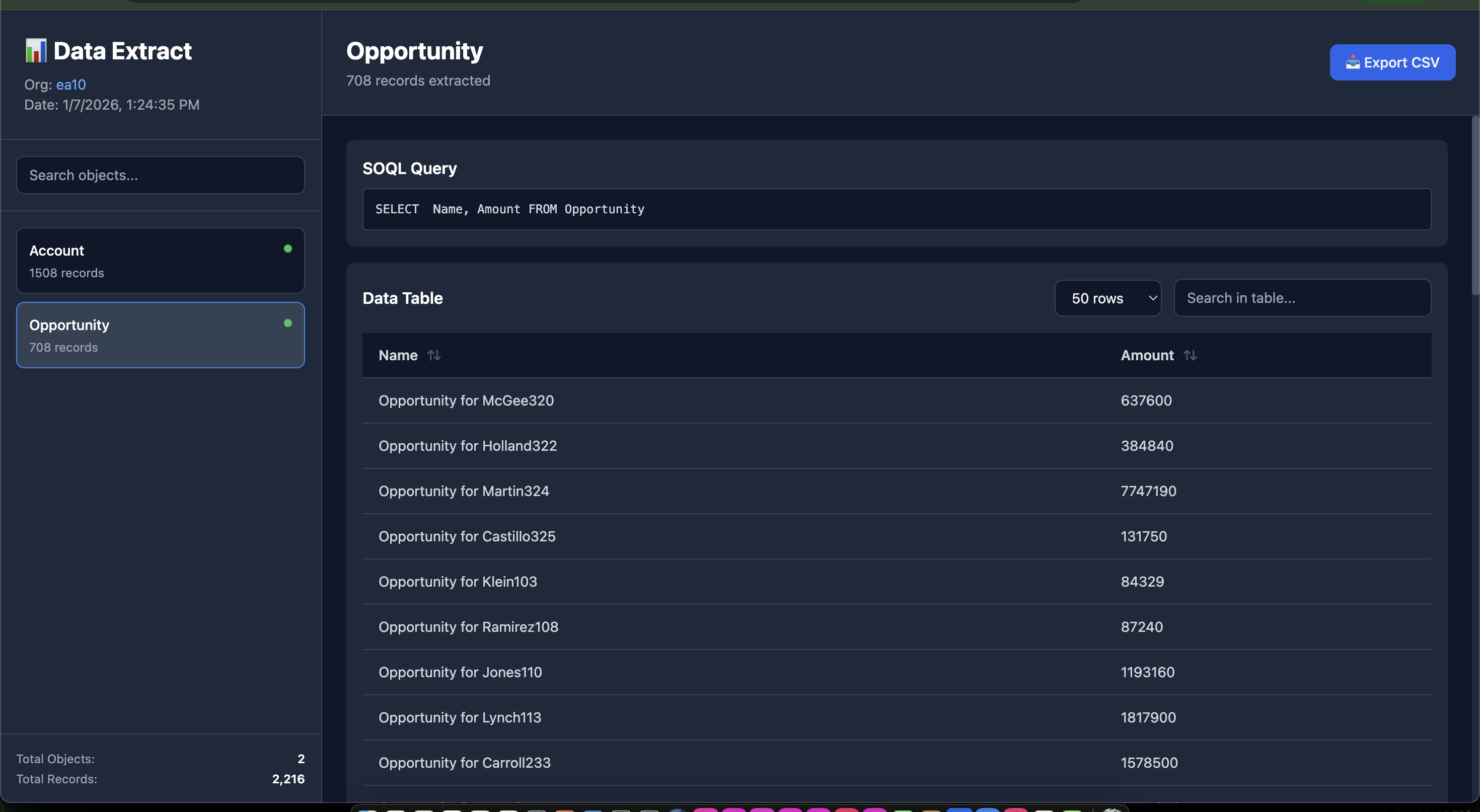
> A powerful Node.js CLI tool that extracts Salesforce data based on a load plan and generates beautiful, interactive HTML reports with dark theme.
|
|
4
|
+
|
|
5
|
+
## ✨ Features
|
|
6
|
+
|
|
7
|
+
- 📊 Extract data from multiple Salesforce objects using SOQL queries
|
|
8
|
+
- 🎨 Beautiful dark-themed HTML report with Tailwind CSS
|
|
9
|
+
- 📦 Optional ZIP archive of all CSV files
|
|
10
|
+
- 🔍 Searchable object list and data tables
|
|
11
|
+
- 📈 Column sorting and filtering
|
|
12
|
+
- 💾 CSV export functionality
|
|
13
|
+
- 🌳 Support for nested field names (e.g., `Parent.Name`, `Product2.StockKeepingUnit`)
|
|
14
|
+
- ⚡ Real-time progress tracking
|
|
15
|
+
- 📱 Responsive design
|
|
16
|
+
|
|
17
|
+
## Screenshots
|
|
18
|
+
|
|
19
|
+
- 
|
|
20
|
+
|
|
21
|
+
## 📋 Prerequisites
|
|
22
|
+
|
|
23
|
+
- Node.js >= 14.0.0
|
|
24
|
+
- Salesforce CLI (`sf`) installed and authenticated
|
|
25
|
+
- Valid Salesforce org access
|
|
26
|
+
|
|
27
|
+
## 🔧 Installation
|
|
28
|
+
|
|
29
|
+
### Global Installation
|
|
30
|
+
|
|
31
|
+
```bash
|
|
32
|
+
npm install -g sf-data-extractor
|
|
33
|
+
```
|
|
34
|
+
|
|
35
|
+
```
|
|
36
|
+
|
|
37
|
+
## 📖 Usage
|
|
38
|
+
|
|
39
|
+
### Basic Command
|
|
40
|
+
|
|
41
|
+
```bash
|
|
42
|
+
sf-data-extractor -o <salesforce-username> -l <load-plan.json>
|
|
43
|
+
```
|
|
44
|
+
|
|
45
|
+
### With Custom Output Directory
|
|
46
|
+
|
|
47
|
+
```bash
|
|
48
|
+
sf-data-extractor -o myorg@example.com -l load-plan.json -d ./my-reports
|
|
49
|
+
```
|
|
50
|
+
|
|
51
|
+
### With ZIP Archive
|
|
52
|
+
|
|
53
|
+
```bash
|
|
54
|
+
# Create a ZIP file containing all CSV files
|
|
55
|
+
sf-data-extractor -o myorg@example.com -l load-plan.json -z
|
|
56
|
+
|
|
57
|
+
# Combine with custom output directory
|
|
58
|
+
sf-data-extractor -o myorg@example.com -l load-plan.json -d ./my-reports -z
|
|
59
|
+
```
|
|
60
|
+
|
|
61
|
+
### Command Options
|
|
62
|
+
|
|
63
|
+
| Option | Alias | Description | Required |
|
|
64
|
+
|--------|-------|-------------|----------|
|
|
65
|
+
| `--org` | `-o` | Salesforce org username or alias | ✅ Yes |
|
|
66
|
+
| `--load-plan` | `-l` | Path to load-plan.json file | ✅ Yes |
|
|
67
|
+
| `--output-dir` | `-d` | Output directory for results | ❌ No (default: `./sf-extract-output`) |
|
|
68
|
+
| `--zip` | `-z` | Create a ZIP file containing all CSV files | ❌ No |
|
|
69
|
+
|
|
70
|
+
## 📄 Load Plan Format
|
|
71
|
+
|
|
72
|
+
Create a `load-plan.json` file with the following structure:
|
|
73
|
+
|
|
74
|
+
```json
|
|
75
|
+
|
|
76
|
+
[
|
|
77
|
+
{
|
|
78
|
+
"object": "Account",
|
|
79
|
+
"compositeKeys": [
|
|
80
|
+
"Id"
|
|
81
|
+
],
|
|
82
|
+
"query": "SELECT Name, Industry FROM Account",
|
|
83
|
+
"fieldMappings": {
|
|
84
|
+
"Name": "Name",
|
|
85
|
+
"Industry": "Industry",
|
|
86
|
+
"Id": "Id"
|
|
87
|
+
}
|
|
88
|
+
},
|
|
89
|
+
|
|
90
|
+
|
|
91
|
+
{
|
|
92
|
+
"object": "Opportunity",
|
|
93
|
+
"compositeKeys": [
|
|
94
|
+
"Id"
|
|
95
|
+
],
|
|
96
|
+
"query": "SELECT Name, Amount FROM Opportunity",
|
|
97
|
+
"fieldMappings": {
|
|
98
|
+
"Name": "Name",
|
|
99
|
+
"Id": "Id",
|
|
100
|
+
"Amount": "Amount"
|
|
101
|
+
}
|
|
102
|
+
}
|
|
103
|
+
]
|
|
104
|
+
|
|
105
|
+
```
|
|
106
|
+
|
|
107
|
+
### Anothe example
|
|
108
|
+
|
|
109
|
+
```json
|
|
110
|
+
[
|
|
111
|
+
{
|
|
112
|
+
"object": "AttributeCategory",
|
|
113
|
+
"compositeKeys": ["Code"],
|
|
114
|
+
"query": "SELECT Name, Description, Code FROM AttributeCategory WHERE Code != null",
|
|
115
|
+
"fieldMappings": {
|
|
116
|
+
"Name": "Name",
|
|
117
|
+
"Code": "Code",
|
|
118
|
+
"Description": "Description"
|
|
119
|
+
}
|
|
120
|
+
},
|
|
121
|
+
{
|
|
122
|
+
"object": "Product2",
|
|
123
|
+
"compositeKeys": ["StockKeepingUnit"],
|
|
124
|
+
"query": "SELECT StockKeepingUnit, Name, ProductCode, Description FROM Product2",
|
|
125
|
+
"fieldMappings": {
|
|
126
|
+
"StockKeepingUnit": "StockKeepingUnit",
|
|
127
|
+
"Name": "Name",
|
|
128
|
+
"ProductCode": "ProductCode"
|
|
129
|
+
}
|
|
130
|
+
}
|
|
131
|
+
]
|
|
132
|
+
```
|
|
133
|
+
|
|
134
|
+
### Load Plan Properties
|
|
135
|
+
|
|
136
|
+
- **object** (required): Salesforce object API name
|
|
137
|
+
- **compositeKeys** (optional): Keys used for identifying records
|
|
138
|
+
- **query** (required): SOQL query to extract data
|
|
139
|
+
- **fieldMappings** (optional): Field mappings for data transformation
|
|
140
|
+
|
|
141
|
+
## 🎯 Example
|
|
142
|
+
|
|
143
|
+
```bash
|
|
144
|
+
# Extract data from your org
|
|
145
|
+
sf-data-extractor -o myorg@example.com -l config/load-plan.json
|
|
146
|
+
|
|
147
|
+
# Extract and create ZIP archive
|
|
148
|
+
sf-data-extractor -o myorg@example.com -l config/load-plan.json -z
|
|
149
|
+
|
|
150
|
+
# Output:
|
|
151
|
+
# 🚀 Starting Salesforce Data Extraction...
|
|
152
|
+
# 📄 Reading load plan from: config/load-plan.json
|
|
153
|
+
# [1/5] Processing AttributeCategory...
|
|
154
|
+
# ⏳ Executing query...
|
|
155
|
+
# ✅ Extracted 25 records
|
|
156
|
+
# ...
|
|
157
|
+
# 📊 Generating HTML report...
|
|
158
|
+
# ✅ HTML report generated
|
|
159
|
+
# 📦 Creating ZIP archive...
|
|
160
|
+
# 📄 Adding 5 CSV files to archive...
|
|
161
|
+
# 📊 Total size: 2.34 MB
|
|
162
|
+
# ✅ ZIP file created: ./sf-extract-output/data-export.zip
|
|
163
|
+
# ✨ Extraction complete!
|
|
164
|
+
# 📁 Output directory: ./sf-extract-output
|
|
165
|
+
# 🌐 Open report: ./sf-extract-output/report.html
|
|
166
|
+
# 📦 ZIP archive: ./sf-extract-output/data-export.zip
|
|
167
|
+
```
|
|
168
|
+
|
|
169
|
+
## 📊 HTML Report Features
|
|
170
|
+
|
|
171
|
+
### Left Panel
|
|
172
|
+
- 📋 List of all extracted objects
|
|
173
|
+
- 🔍 Search functionality
|
|
174
|
+
- 🟢/🔴 Status indicators
|
|
175
|
+
- 📊 Record counts
|
|
176
|
+
- 📈 Summary statistics
|
|
177
|
+
|
|
178
|
+
### Right Panel
|
|
179
|
+
- 📝 SOQL query display
|
|
180
|
+
- 📊 Interactive data table
|
|
181
|
+
- 🔄 Column sorting (click headers)
|
|
182
|
+
- 🔍 Table search/filter
|
|
183
|
+
- 💾 Export to CSV
|
|
184
|
+
- 🎨 Nested field support
|
|
185
|
+
|
|
186
|
+
## 🎨 Screenshots
|
|
187
|
+
|
|
188
|
+
The HTML report features:
|
|
189
|
+
- Dark theme optimized for readability
|
|
190
|
+
- Responsive design for all screen sizes
|
|
191
|
+
- Smooth transitions and hover effects
|
|
192
|
+
- Professional data presentation
|
|
193
|
+
|
|
194
|
+
|
|
195
|
+
## 📝 Notes
|
|
196
|
+
|
|
197
|
+
- The tool uses the Salesforce CLI (`sf data query`) command
|
|
198
|
+
- All queries are executed in CSV format for efficient processing
|
|
199
|
+
- Large datasets are processed efficiently with streaming
|
|
200
|
+
- ZIP archive includes all CSV files organized in a `csv/` folder with maximum compression
|
|
201
|
+
- ZIP archive filename is always `data-export.zip` in the output directory
|
|
202
|
+
|
|
203
|
+
## 🐛 Troubleshooting
|
|
204
|
+
|
|
205
|
+
|
|
206
|
+
### Salesforce CLI errors
|
|
207
|
+
```bash
|
|
208
|
+
# Verify SF CLI is installed
|
|
209
|
+
sf --version
|
|
210
|
+
|
|
211
|
+
# Check org authentication
|
|
212
|
+
sf org list
|
|
213
|
+
```
|
|
214
|
+
|
|
215
|
+
|
|
216
|
+
## 📄 License
|
|
217
|
+
|
|
218
|
+
MIT License - (c) Mohan Chinnappan
|
|
219
|
+
|
|
220
|
+
---
|
|
221
|
+
|
|
222
|
+
Made with ❤️ for Salesforce developers
|