session-steward 0.11.0 → 0.11.1
This diff represents the content of publicly available package versions that have been released to one of the supported registries. The information contained in this diff is provided for informational purposes only and reflects changes between package versions as they appear in their respective public registries.
- package/CHANGELOG.md +7 -0
- package/README.md +101 -250
- package/bin/session-steward.mjs +62 -49
- package/package.json +7 -4
package/CHANGELOG.md
CHANGED
|
@@ -1,5 +1,11 @@
|
|
|
1
1
|
# Changelog
|
|
2
2
|
|
|
3
|
+
## [0.11.1] - 2026-09-14
|
|
4
|
+
|
|
5
|
+
### Added
|
|
6
|
+
|
|
7
|
+
- Added Official MCP Registry metadata and a package-name MCP launch command for registry clients.
|
|
8
|
+
|
|
3
9
|
## [0.11.0] - 2026-09-14
|
|
4
10
|
|
|
5
11
|
### Added
|
|
@@ -168,6 +174,7 @@
|
|
|
168
174
|
- Support for custom Codex home folders and a saved folder preference.
|
|
169
175
|
- Streaming and bounded-memory discovery for large session collections and transcripts.
|
|
170
176
|
|
|
177
|
+
[0.11.1]: https://github.com/mallikcheripally/session-steward/compare/v0.11.0...v0.11.1
|
|
171
178
|
[0.11.0]: https://github.com/mallikcheripally/session-steward/compare/v0.10.3...v0.11.0
|
|
172
179
|
[0.10.3]: https://github.com/mallikcheripally/session-steward/compare/v0.10.2...v0.10.3
|
|
173
180
|
[0.10.2]: https://github.com/mallikcheripally/session-steward/compare/v0.10.1...v0.10.2
|
package/README.md
CHANGED
|
@@ -4,355 +4,210 @@
|
|
|
4
4
|
[](https://github.com/mallikcheripally/session-steward/actions/workflows/validate.yml)
|
|
5
5
|
[](https://github.com/mallikcheripally/session-steward/blob/main/LICENSE)
|
|
6
6
|
|
|
7
|
-
|
|
7
|
+
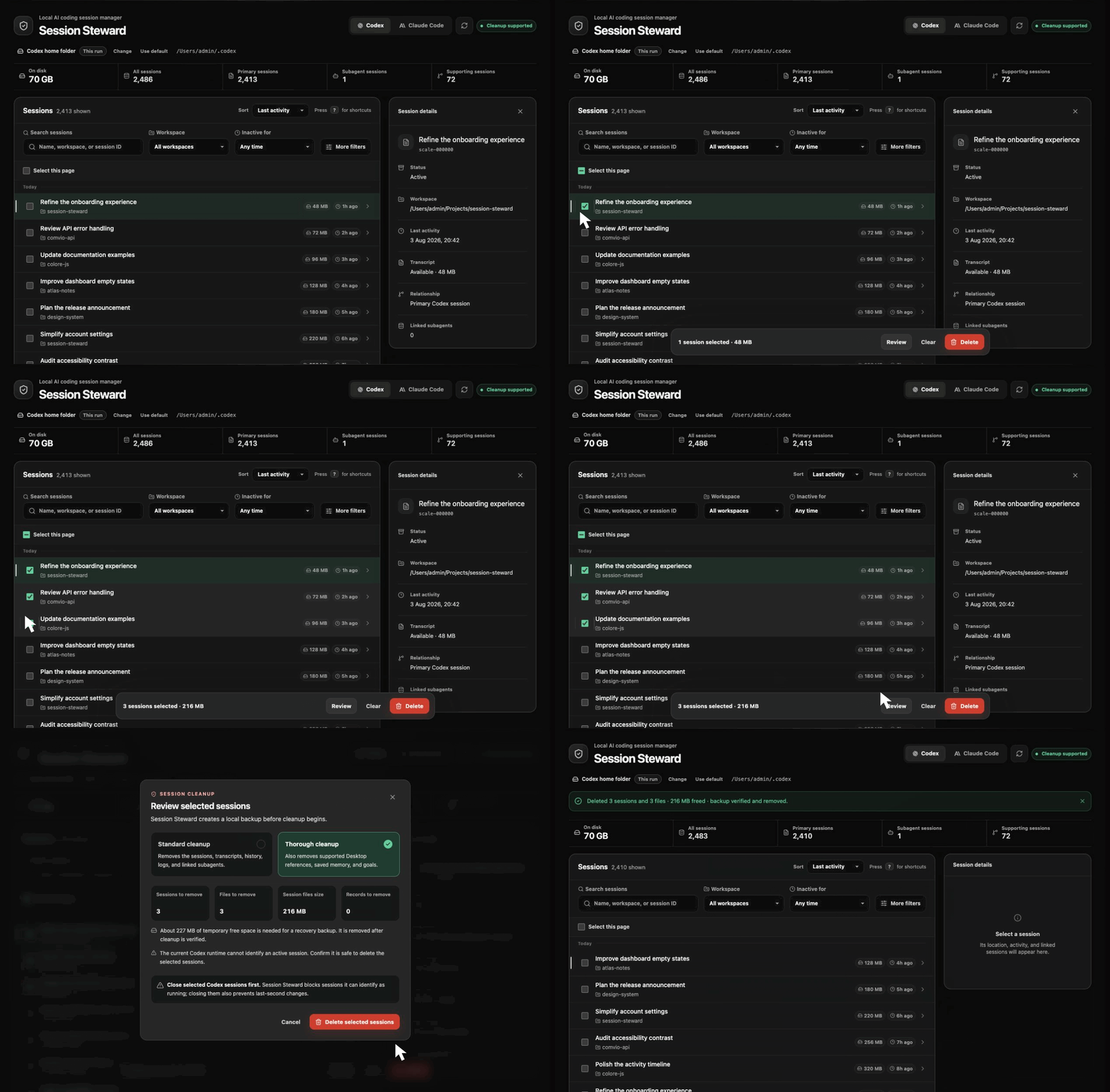
Session Steward is a local session manager for Codex and Claude Code. It helps you find old or large sessions across workspaces, decide what is worth keeping, and clean up the related records it recognizes. You can use it with browser UI or terminal CLI, or through MCP with ChatGPT or Claude.
|
|
8
8
|
|
|
9
|
-
|
|
9
|
+
Codex can delete a session, and Claude Code can purge a project. Built-in deletion works when you already know what should go. Session Steward helps when the hard part is reviewing many sessions across both tools.
|
|
10
10
|
|
|
11
|
-
|
|
11
|
+
- Find inactive or large sessions across workspaces. Switch between Codex and Claude Code, then filter by archive status, name, or session ID.
|
|
12
|
+
- Open a session before deciding. See a distilled timeline of recent messages, file changes, commands, and command results, plus recognized storage and token use.
|
|
13
|
+
- Clean selected sessions using a plan you review first, with a local backup, verification afterward, and recovery when cleanup needs attention.
|
|
12
14
|
|
|
13
|
-
|
|
14
|
-
|
|
15
|
-
## Manage local Codex and Claude Code sessions
|
|
16
|
-
|
|
17
|
-
- Review and clean up sessions from the browser, terminal, ChatGPT, or Claude through MCP.
|
|
18
|
-
- Switch between Codex and Claude Code without installing another package.
|
|
19
|
-
- See session counts and the storage used by recognized session files.
|
|
20
|
-
- Find sessions inactive for 30, 60, or 90 days.
|
|
21
|
-
- Filter active or archived sessions by workspace, name, or session ID.
|
|
22
|
-
- Mark important sessions or workspaces Keep so cleanup skips them.
|
|
23
|
-
- Inspect session details and affected records before deletion.
|
|
24
|
-
- Read a session timeline of what you asked, what changed, and which commands ran.
|
|
25
|
-
- See how many tokens a session used, split into fresh input, cached input, cache writes, and output.
|
|
26
|
-
- Choose standard or thorough cleanup.
|
|
27
|
-
- Use custom Codex or Claude home folders across browser and terminal sessions.
|
|
28
|
-
|
|
29
|
-
## Safe by default
|
|
30
|
-
|
|
31
|
-
- Cleanup happens entirely on your computer.
|
|
32
|
-
- Only records included in the reviewed cleanup plan are removed.
|
|
33
|
-
- A local recovery backup is created before anything changes.
|
|
34
|
-
- Cleanup is verified before the backup is removed.
|
|
35
|
-
- Unrecognized storage is reported and left untouched.
|
|
36
|
-
- Thorough cleanup is unavailable when the detected storage format is not supported.
|
|
37
|
-
- Cleanup stays local and does not upload session contents.
|
|
38
|
-
|
|
39
|
-
### Keep important sessions
|
|
40
|
-
|
|
41
|
-
Mark a session or workspace Keep and Session Steward skips it during manual and scheduled cleanup. A workspace Keep also covers descendant folders and future sessions there.
|
|
42
|
-
|
|
43
|
-
It protects against Session Steward cleanup only. Codex or Claude Code can still remove the data.
|
|
44
|
-
|
|
45
|
-
### Session Steward does not remove
|
|
46
|
-
|
|
47
|
-
- Sign-in data or saved API credentials
|
|
48
|
-
- Configuration, plugins, caches, or custom prompt files
|
|
49
|
-
- Project files, Git repositories, or worktrees
|
|
50
|
-
- Sessions outside the reviewed cleanup plan
|
|
51
|
-
- Conversations stored in your ChatGPT or Claude account
|
|
52
|
-
- Claude Code worktrees, branches, repositories, remote sessions, SSH sessions, or Cowork data
|
|
15
|
+
## Try Session Steward locally
|
|
53
16
|
|
|
54
|
-
|
|
17
|
+
Try the browser app for one run without installing it globally:
|
|
55
18
|
|
|
56
|
-
|
|
57
|
-
|
|
58
|
-
Session Steward supports macOS, Linux, and Windows and requires Node.js 24.15 or newer.
|
|
59
|
-
|
|
60
|
-
Install it globally:
|
|
19
|
+
Session Steward requires Node.js 24.15 or newer.
|
|
61
20
|
|
|
62
21
|
```bash
|
|
63
|
-
|
|
22
|
+
npx session-steward@latest
|
|
64
23
|
```
|
|
65
24
|
|
|
66
|
-
|
|
25
|
+
The browser app listens only on `127.0.0.1` and does not upload session contents.
|
|
67
26
|
|
|
68
|
-
|
|
69
|
-
session-steward
|
|
70
|
-
```
|
|
27
|
+
|
|
71
28
|
|
|
72
|
-
|
|
29
|
+
For ongoing use, install it globally:
|
|
73
30
|
|
|
74
31
|
```bash
|
|
75
|
-
|
|
32
|
+
npm install --global session-steward
|
|
76
33
|
```
|
|
77
34
|
|
|
78
|
-
|
|
79
|
-
|
|
80
|
-
When run inside WSL, Session Steward uses the Linux home folder and manages sessions stored there. Run it from Windows to manage sessions in your Windows profile.
|
|
35
|
+
The global install provides four commands:
|
|
81
36
|
|
|
82
|
-
|
|
37
|
+
| Command | Use it for |
|
|
38
|
+
| --- | --- |
|
|
39
|
+
| `session-steward` | Browser interface |
|
|
40
|
+
| `session-steward-cli` | Interactive terminal and JSON output |
|
|
41
|
+
| `session-steward-mcp` | MCP session management |
|
|
42
|
+
| `session-steward-scheduler` | Automatic session cleanup |
|
|
83
43
|
|
|
84
|
-
|
|
85
|
-
2. Select one or more sessions.
|
|
86
|
-
3. Choose a cleanup option.
|
|
87
|
-
4. Review exactly what will be removed.
|
|
88
|
-
5. Close any selected sessions that may still be active.
|
|
89
|
-
6. Confirm the cleanup.
|
|
44
|
+
Session Steward supports macOS, Linux, and Windows. Run `session-steward` to open the browser interface. Leave its terminal open while you use it; press `Ctrl+C` to stop it.
|
|
90
45
|
|
|
91
|
-
|
|
46
|
+
## Find old and large Codex and Claude Code sessions
|
|
92
47
|
|
|
93
|
-
|
|
48
|
+
Session Steward reads the local session folders already used by Codex and Claude Code. It looks for `~/.codex` and `~/.claude` by default and lets you switch providers from the same interface.
|
|
94
49
|
|
|
95
|
-
|
|
50
|
+
You can:
|
|
96
51
|
|
|
97
|
-
|
|
52
|
+
- filter by inactivity, exact workspace, active or archived status, name, or session ID;
|
|
53
|
+
- see recognized session-owned storage by session and workspace, then sort by size;
|
|
54
|
+
- browse session timeline of recent messages, file changes, commands, and command results;
|
|
55
|
+
- inspect fresh input, cached input, cache writes, output, and recorded reasoning tokens;
|
|
56
|
+
- mark a session or workspace **Keep** so manual and scheduled cleanup skip it.
|
|
98
57
|
|
|
99
|
-
|
|
58
|
+
A workspace Keep covers that folder, its descendants, and future sessions there. Keep affects Session Steward cleanup only. Codex or Claude Code can still remove their own data.
|
|
100
59
|
|
|
101
|
-
|
|
60
|
+
## Why not just delete sessions one at a time?
|
|
102
61
|
|
|
103
|
-
|
|
62
|
+
The native delete commands are useful when you already know what should go. They do not cover the same cross-workspace review and cleanup job.
|
|
104
63
|
|
|
105
|
-
|
|
64
|
+
A session can have more than its transcript. Depending on the provider and storage version, it may also have history or registry entries, logs, checkpoints, and other linked records. Removing a JSONL file by hand can leave those records behind.
|
|
106
65
|
|
|
107
|
-
|
|
66
|
+
Session Steward starts from the session instead of a file path. It finds supported related records, shows them in one cleanup plan, and leaves storage it does not recognize alone. You can review several candidates together without treating every old session as safe to delete.
|
|
108
67
|
|
|
109
|
-
|
|
68
|
+
## Use the browser, CLI, or MCP
|
|
110
69
|
|
|
111
|
-
|
|
70
|
+
### Browser
|
|
112
71
|
|
|
113
|
-
|
|
114
|
-
|
|
115
|
-
Start the interactive terminal interface:
|
|
116
|
-
|
|
117
|
-
```bash
|
|
118
|
-
session-steward-cli
|
|
119
|
-
```
|
|
120
|
-
|
|
121
|
-
Use Claude Code instead of Codex:
|
|
72
|
+
Run:
|
|
122
73
|
|
|
123
74
|
```bash
|
|
124
|
-
session-steward
|
|
75
|
+
session-steward
|
|
125
76
|
```
|
|
126
77
|
|
|
127
|
-
|
|
78
|
+
Choose Codex or Claude Code, filter or search the list, and open sessions you are unsure about. When you select sessions for cleanup, the browser shows the affected records before asking for confirmation.
|
|
128
79
|
|
|
129
|
-
|
|
130
|
-
session-steward-cli --json --limit 10
|
|
131
|
-
```
|
|
80
|
+
Use `session-steward --no-open` to start without opening a browser automatically. Open the local address printed in the terminal.
|
|
132
81
|
|
|
133
|
-
|
|
134
|
-
<summary>More terminal options</summary>
|
|
82
|
+
### Terminal CLI
|
|
135
83
|
|
|
136
|
-
|
|
84
|
+
Start the interactive terminal:
|
|
137
85
|
|
|
138
86
|
```bash
|
|
139
|
-
session-steward-cli
|
|
87
|
+
session-steward-cli
|
|
140
88
|
```
|
|
141
89
|
|
|
142
|
-
|
|
143
|
-
|
|
144
|
-
Find sessions inactive for at least 60 days:
|
|
90
|
+
Use Claude Code instead of Codex, or return a limited JSON result for another tool:
|
|
145
91
|
|
|
146
92
|
```bash
|
|
147
|
-
session-steward-cli --
|
|
93
|
+
session-steward-cli --provider claude-code
|
|
94
|
+
session-steward-cli --json --limit 10
|
|
148
95
|
```
|
|
149
96
|
|
|
150
|
-
|
|
97
|
+
Filter with options such as `--inactive-days 60`, `--archive-status archived`, or `--workspace /path/to/project`. Use `--events` for the timeline, `--tokens` for token use, and `--sort size` for the largest sessions first. Run `session-steward-cli --help` for every option.
|
|
151
98
|
|
|
152
|
-
|
|
153
|
-
session-steward-cli --archive-status archived
|
|
154
|
-
```
|
|
99
|
+
### MCP with ChatGPT, Codex, or Claude Code
|
|
155
100
|
|
|
156
|
-
|
|
101
|
+
Connect the local MCP server once:
|
|
157
102
|
|
|
158
103
|
```bash
|
|
159
|
-
session-steward
|
|
104
|
+
codex mcp add session-steward -- session-steward-mcp
|
|
160
105
|
```
|
|
161
106
|
|
|
162
|
-
|
|
163
|
-
|
|
164
|
-
Start with `--events` to read what happened inside a session — what you asked, what the assistant concluded, which files changed, and which commands ran or failed. In the interactive list, `inspect <number>` then shows that session's timeline:
|
|
107
|
+
Or connect it to Claude Code:
|
|
165
108
|
|
|
166
109
|
```bash
|
|
167
|
-
session-steward
|
|
110
|
+
claude mcp add --scope user session-steward -- session-steward-mcp
|
|
168
111
|
```
|
|
169
112
|
|
|
170
|
-
|
|
171
|
-
|
|
172
|
-
```bash
|
|
173
|
-
session-steward-cli --json --limit 5 --events
|
|
174
|
-
```
|
|
113
|
+
Registry installers can start the same server without a global install using `npx session-steward@latest mcp`.
|
|
175
114
|
|
|
176
|
-
|
|
115
|
+
You can then ask your client to find inactive sessions, compare recognized session storage between Codex and Claude Code, inspect a session, keep a workspace, clean exact sessions, restore a backup, or manage a cleanup schedule.
|
|
177
116
|
|
|
178
|
-
|
|
179
|
-
session-steward-cli --tokens
|
|
180
|
-
```
|
|
117
|
+
Session Steward marks cleanup, restore, and schedule management as destructive MCP actions so the client can apply its configured approval policy.
|
|
181
118
|
|
|
182
|
-
|
|
119
|
+
Scheduled cleanup continues in the background after you close the client. You can ask to pause, resume, run, change, or remove a schedule. Before uninstalling Session Steward, stop scheduled cleanup:
|
|
183
120
|
|
|
184
121
|
```bash
|
|
185
|
-
session-steward-
|
|
122
|
+
session-steward-scheduler --stop
|
|
186
123
|
```
|
|
187
124
|
|
|
188
|
-
|
|
189
|
-
|
|
190
|
-
The interactive terminal accepts the same filters:
|
|
191
|
-
|
|
192
|
-
```text
|
|
193
|
-
inactive 30
|
|
194
|
-
inactive 60
|
|
195
|
-
inactive 90
|
|
196
|
-
archive active
|
|
197
|
-
archive archived
|
|
198
|
-
workspace /path/to/project
|
|
199
|
-
internals
|
|
200
|
-
supporting
|
|
201
|
-
tokens
|
|
202
|
-
keep 3
|
|
203
|
-
unkeep 3
|
|
204
|
-
keep-workspace /path/to/project
|
|
205
|
-
unkeep-workspace /path/to/project
|
|
206
|
-
cleanup standard
|
|
207
|
-
cleanup thorough
|
|
208
|
-
overview
|
|
209
|
-
backups
|
|
210
|
-
```
|
|
125
|
+
For another MCP client, configure a local stdio server named `session-steward` with the command `session-steward-mcp`.
|
|
211
126
|
|
|
212
|
-
|
|
127
|
+
The MCP process uses Session Steward's saved provider folders or the defaults when none are saved. Its server command can set startup folders with `--codex-home` or `--claude-home`, and its `manage_settings` tool can change the saved folders. A one-time browser or CLI override does not carry into a later MCP process.
|
|
213
128
|
|
|
214
|
-
|
|
215
|
-
`unkeep-workspace` accept a full path.
|
|
129
|
+
The MCP server runs locally, but session details can contain messages, commands, file names, and workspace paths. Your MCP client may send that information to its AI provider.
|
|
216
130
|
|
|
217
|
-
|
|
131
|
+
## Review what will be deleted first
|
|
218
132
|
|
|
219
|
-
|
|
133
|
+
For a manual cleanup:
|
|
220
134
|
|
|
221
|
-
|
|
135
|
+
1. Select the sessions.
|
|
136
|
+
2. Close any selected sessions that may still be active.
|
|
137
|
+
3. Review the cleanup plan Session Steward builds.
|
|
138
|
+
4. Confirm the plan.
|
|
139
|
+
5. Session Steward creates a local recovery backup.
|
|
140
|
+
6. It removes only supported records in the reviewed plan.
|
|
141
|
+
7. It checks whether those records are gone.
|
|
222
142
|
|
|
223
|
-
|
|
143
|
+
Every interface revalidates the selected sessions before changing data. If Session Steward can detect that a selected session is active, preflight or cleanup stops. When detection is unavailable, it warns you to confirm that the selected sessions are closed.
|
|
224
144
|
|
|
225
|
-
|
|
226
|
-
sessions, delete them safely, restore a backup, or clean sessions automatically
|
|
227
|
-
on a schedule.
|
|
145
|
+
### Standard and thorough cleanup
|
|
228
146
|
|
|
229
|
-
|
|
147
|
+
**Standard cleanup** removes supported transcripts, history, registry entries, logs, and linked artifacts belonging to the selected sessions. It is the routine option.
|
|
230
148
|
|
|
231
|
-
|
|
232
|
-
codex mcp add session-steward -- session-steward-mcp
|
|
233
|
-
```
|
|
149
|
+
**Thorough cleanup** also removes additional recognized session-owned data. For Codex, that can include supported Desktop references, memory outputs, and goal records. For Claude Code, it includes recognized file checkpoints.
|
|
234
150
|
|
|
235
|
-
|
|
151
|
+
Thorough cleanup is unavailable when the detected storage layout is not supported. Standard cleanup can still remove records that Session Steward can identify safely.
|
|
236
152
|
|
|
237
|
-
|
|
238
|
-
|
|
239
|
-
```
|
|
240
|
-
|
|
241
|
-
You can then ask things like:
|
|
242
|
-
|
|
243
|
-
- “Find sessions I have not used in 60 days.”
|
|
244
|
-
- “Show sessions from this workspace, largest first.”
|
|
245
|
-
- “Delete those sessions.”
|
|
246
|
-
- “Keep this session from Session Steward cleanup.”
|
|
247
|
-
- “Keep every session in this workspace.”
|
|
248
|
-
- “Every 12 days, delete sessions I have not used in 45 days.”
|
|
249
|
-
- “Restore my latest backup.”
|
|
250
|
-
|
|
251
|
-
Cleanup uses the same local backup and verification checks as the browser and
|
|
252
|
-
terminal. Codex or Claude Code asks for approval before cleanup, restore, or
|
|
253
|
-
schedule changes.
|
|
254
|
-
|
|
255
|
-
Scheduled cleanup continues in the background after you close Codex or Claude
|
|
256
|
-
Code. You can ask to pause, resume, run, change, or remove a schedule. Before
|
|
257
|
-
uninstalling Session Steward, stop scheduled cleanup:
|
|
258
|
-
|
|
259
|
-
```bash
|
|
260
|
-
session-steward-scheduler --stop
|
|
261
|
-
```
|
|
262
|
-
|
|
263
|
-
Check or remove the MCP connection at any time:
|
|
264
|
-
|
|
265
|
-
```bash
|
|
266
|
-
codex mcp list
|
|
267
|
-
codex mcp remove session-steward
|
|
153
|
+
<details>
|
|
154
|
+
<summary>Backup and restore behavior</summary>
|
|
268
155
|
|
|
269
|
-
|
|
270
|
-
claude mcp remove --scope user session-steward
|
|
271
|
-
```
|
|
156
|
+
Recovery backups are stored under `session-steward-backups/` inside the active provider folder.
|
|
272
157
|
|
|
273
|
-
|
|
158
|
+
If cleanup from the browser or interactive terminal needs attention, the backup is kept until you decide whether to restore it. The browser offers **Restore**, and the terminal reports the backup for the `restore` command. MCP and scheduled cleanup try to restore automatically.
|
|
274
159
|
|
|
275
|
-
|
|
276
|
-
{
|
|
277
|
-
"mcpServers": {
|
|
278
|
-
"session-steward": {
|
|
279
|
-
"command": "session-steward-mcp"
|
|
280
|
-
}
|
|
281
|
-
}
|
|
282
|
-
}
|
|
283
|
-
```
|
|
160
|
+
After successful cleanup, Session Steward removes the recovery backup when it can. A restore first creates a temporary safety backup of the current files, then tries to remove both backups if the restore succeeds. If a restore or backup removal cannot complete, recovery data remains and Session Steward reports it.
|
|
284
161
|
|
|
285
|
-
|
|
286
|
-
terminal.
|
|
162
|
+
</details>
|
|
287
163
|
|
|
288
|
-
###
|
|
164
|
+
### What cleanup leaves alone
|
|
289
165
|
|
|
290
|
-
|
|
291
|
-
|
|
292
|
-
|
|
166
|
+
- Sign-in data and saved API credentials
|
|
167
|
+
- Configuration, plugins, caches, and custom prompt files
|
|
168
|
+
- Project files, Git repositories, and worktrees
|
|
169
|
+
- Sessions outside the reviewed cleanup plan
|
|
170
|
+
- Conversations stored in your ChatGPT or Claude account
|
|
171
|
+
- Claude Code worktrees, branches, repositories, remote sessions, SSH sessions, and Cowork data
|
|
293
172
|
|
|
294
|
-
##
|
|
173
|
+
## Provider folders and platform support
|
|
295
174
|
|
|
296
|
-
The browser
|
|
175
|
+
The browser shows the active provider folder. Select **Change** to choose another existing folder and save it for later browser, terminal, and MCP sessions.
|
|
297
176
|
|
|
298
|
-
For a one-time override:
|
|
177
|
+
For a one-time browser override:
|
|
299
178
|
|
|
300
179
|
```bash
|
|
301
180
|
session-steward --codex-home /path/to/.codex
|
|
302
|
-
```
|
|
303
|
-
|
|
304
|
-
For Claude Code:
|
|
305
|
-
|
|
306
|
-
```bash
|
|
307
181
|
session-steward --claude-home /path/to/.claude
|
|
308
182
|
```
|
|
309
183
|
|
|
310
|
-
The
|
|
184
|
+
The CLI and MCP commands accept the same flags. An override applies only to that process and does not replace the saved folder.
|
|
311
185
|
|
|
312
|
-
|
|
186
|
+
Codex and Claude Code CLI sessions are supported on macOS, Linux, and Windows. Local Claude Desktop sessions are also supported on macOS and Windows. On Windows, the default provider folders are `%USERPROFILE%\.codex` and `%USERPROFILE%\.claude`; both standalone and Microsoft Store Claude Desktop data locations are detected.
|
|
313
187
|
|
|
314
|
-
|
|
188
|
+
Inside WSL, Session Steward uses the Linux home folder. Run it from Windows to manage sessions in your Windows profile.
|
|
315
189
|
|
|
316
|
-
|
|
317
|
-
session-steward --no-open
|
|
318
|
-
```
|
|
190
|
+
Archiving a Claude Desktop session does not delete it. It remains available until it is explicitly included in cleanup. Session Steward does not remove Claude worktrees.
|
|
319
191
|
|
|
320
|
-
Update
|
|
192
|
+
## Update or uninstall
|
|
321
193
|
|
|
322
194
|
```bash
|
|
323
195
|
npm install --global session-steward@latest
|
|
324
|
-
```
|
|
325
|
-
|
|
326
|
-
Uninstall it:
|
|
327
|
-
|
|
328
|
-
```bash
|
|
329
196
|
npm uninstall --global session-steward
|
|
330
197
|
```
|
|
331
198
|
|
|
332
|
-
Uninstalling
|
|
199
|
+
Uninstalling does not remove provider sessions, recovery backups, or saved folder preferences.
|
|
333
200
|
|
|
334
201
|
## Troubleshooting
|
|
335
202
|
|
|
336
|
-
- **The browser did not open:** Run `session-steward --no-open`, then open the local address
|
|
203
|
+
- **The browser did not open:** Run `session-steward --no-open`, then open the local address printed in the terminal.
|
|
337
204
|
- **No sessions were found:** Check the selected provider and displayed home folder. Use **Change** or pass a one-time home-folder override.
|
|
338
|
-
- **Thorough cleanup is unavailable:**
|
|
205
|
+
- **Thorough cleanup is unavailable:** Unrecognized storage stays unchanged, while standard cleanup may still be available.
|
|
339
206
|
- **Your Node.js version is too old:** Install Node.js 24.15 or newer and run Session Steward again.
|
|
340
207
|
|
|
341
|
-
##
|
|
208
|
+
## Benchmarks
|
|
342
209
|
|
|
343
|
-
|
|
344
|
-
git clone https://github.com/mallikcheripally/session-steward.git
|
|
345
|
-
cd session-steward
|
|
346
|
-
npm install
|
|
347
|
-
npm test
|
|
348
|
-
npm run build
|
|
349
|
-
```
|
|
350
|
-
|
|
351
|
-
## Performance and scale
|
|
352
|
-
|
|
353
|
-
Session Steward uses paginated listings, incremental transcript reads, and bounded caches to remain responsive with large session libraries.
|
|
354
|
-
|
|
355
|
-
Current synthetic benchmarks on an arm64 Mac with Node.js 24.15.0:
|
|
210
|
+
Current benchmarks on an arm64 Mac with Node.js 24.15.0:
|
|
356
211
|
|
|
357
212
|
| Scenario | Scale | Time | Measured memory growth |
|
|
358
213
|
| --- | ---: | ---: | ---: |
|
|
@@ -374,11 +229,7 @@ Results vary with hardware, disk speed, and session layout. Tests and benchmarks
|
|
|
374
229
|
|
|
375
230
|
## Support
|
|
376
231
|
|
|
377
|
-
|
|
378
|
-
|
|
379
|
-
Use [GitHub Issues](https://github.com/mallikcheripally/session-steward/issues) to report a bug, request a provider, or share a storage format that Session Steward does not recognize.
|
|
380
|
-
|
|
381
|
-
See the [changelog](https://github.com/mallikcheripally/session-steward/blob/main/CHANGELOG.md) for published release history.
|
|
232
|
+
Use [GitHub Issues](https://github.com/mallikcheripally/session-steward/issues) to report a bug, request a provider, or share a storage format that Session Steward does not recognize. See the [changelog](https://github.com/mallikcheripally/session-steward/blob/main/CHANGELOG.md) for release history.
|
|
382
233
|
|
|
383
234
|
Session Steward is an independent project and is not affiliated with or endorsed by OpenAI or Anthropic.
|
|
384
235
|
|
package/bin/session-steward.mjs
CHANGED
|
@@ -10,20 +10,32 @@ import { findAvailableUpdate, formatUpdateNotice } from "../lib/update-check.mjs
|
|
|
10
10
|
|
|
11
11
|
assertSupportedNode();
|
|
12
12
|
|
|
13
|
-
|
|
14
|
-
|
|
15
|
-
|
|
16
|
-
|
|
17
|
-
|
|
18
|
-
|
|
19
|
-
|
|
20
|
-
|
|
21
|
-
|
|
22
|
-
|
|
23
|
-
|
|
24
|
-
|
|
25
|
-
|
|
26
|
-
|
|
13
|
+
if (process.argv[2] === "mcp") {
|
|
14
|
+
process.argv.splice(2, 1);
|
|
15
|
+
await import("./session-steward-mcp.mjs");
|
|
16
|
+
} else {
|
|
17
|
+
await startBrowser();
|
|
18
|
+
}
|
|
19
|
+
|
|
20
|
+
async function startBrowser() {
|
|
21
|
+
const { values } = parseArgs({
|
|
22
|
+
allowPositionals: false,
|
|
23
|
+
options: {
|
|
24
|
+
"codex-home": { type: "string" },
|
|
25
|
+
"claude-home": { type: "string" },
|
|
26
|
+
help: { short: "h", type: "boolean" },
|
|
27
|
+
"no-open": { type: "boolean", default: false },
|
|
28
|
+
port: { type: "string" },
|
|
29
|
+
version: { short: "v", type: "boolean" },
|
|
30
|
+
},
|
|
31
|
+
});
|
|
32
|
+
|
|
33
|
+
if (values.help) {
|
|
34
|
+
process.stdout.write(`Usage: session-steward [options]
|
|
35
|
+
session-steward mcp [options]
|
|
36
|
+
|
|
37
|
+
Commands:
|
|
38
|
+
mcp Run the MCP server over stdio
|
|
27
39
|
|
|
28
40
|
Options:
|
|
29
41
|
--codex-home <path> Use a custom Codex session folder
|
|
@@ -33,44 +45,45 @@ Options:
|
|
|
33
45
|
-h, --help Show this help
|
|
34
46
|
-v, --version Show the installed version
|
|
35
47
|
`);
|
|
36
|
-
|
|
37
|
-
}
|
|
48
|
+
return;
|
|
49
|
+
}
|
|
38
50
|
|
|
39
|
-
if (values.version) {
|
|
40
|
-
|
|
41
|
-
|
|
42
|
-
}
|
|
51
|
+
if (values.version) {
|
|
52
|
+
process.stdout.write(`${packageMetadata.version}\n`);
|
|
53
|
+
return;
|
|
54
|
+
}
|
|
43
55
|
|
|
44
|
-
const { startLocalServer } = await import("../lib/server.mjs");
|
|
45
|
-
const port = values.port === undefined ? 0 : Number.parseInt(values.port, 10);
|
|
46
|
-
const availableUpdate = await findAvailableUpdate({ packageMetadata });
|
|
56
|
+
const { startLocalServer } = await import("../lib/server.mjs");
|
|
57
|
+
const port = values.port === undefined ? 0 : Number.parseInt(values.port, 10);
|
|
58
|
+
const availableUpdate = await findAvailableUpdate({ packageMetadata });
|
|
47
59
|
|
|
48
|
-
if (availableUpdate) {
|
|
49
|
-
|
|
50
|
-
}
|
|
60
|
+
if (availableUpdate) {
|
|
61
|
+
process.stdout.write(`${formatUpdateNotice(availableUpdate)}\n`);
|
|
62
|
+
}
|
|
63
|
+
|
|
64
|
+
const server = await startLocalServer({
|
|
65
|
+
claudeHome: values["claude-home"],
|
|
66
|
+
codexHome: values["codex-home"],
|
|
67
|
+
port,
|
|
68
|
+
});
|
|
69
|
+
|
|
70
|
+
process.stdout.write(`Session Steward is running at http://127.0.0.1:${server.port}\n`);
|
|
51
71
|
|
|
52
|
-
|
|
53
|
-
|
|
54
|
-
|
|
55
|
-
|
|
56
|
-
|
|
57
|
-
|
|
58
|
-
|
|
59
|
-
|
|
60
|
-
|
|
61
|
-
|
|
62
|
-
|
|
63
|
-
|
|
64
|
-
|
|
65
|
-
|
|
66
|
-
detached: true,
|
|
67
|
-
stdio: "ignore",
|
|
68
|
-
windowsHide: invocation.windowsHide,
|
|
69
|
-
});
|
|
70
|
-
opener.unref();
|
|
71
|
-
} else {
|
|
72
|
-
process.stdout.write(`Open ${url} in a browser.\n`);
|
|
72
|
+
if (!values["no-open"]) {
|
|
73
|
+
const url = `http://127.0.0.1:${server.port}`;
|
|
74
|
+
const invocation = getBrowserOpenInvocation(url);
|
|
75
|
+
|
|
76
|
+
if (invocation) {
|
|
77
|
+
const opener = spawn(invocation.command, invocation.args, {
|
|
78
|
+
detached: true,
|
|
79
|
+
stdio: "ignore",
|
|
80
|
+
windowsHide: invocation.windowsHide,
|
|
81
|
+
});
|
|
82
|
+
opener.unref();
|
|
83
|
+
} else {
|
|
84
|
+
process.stdout.write(`Open ${url} in a browser.\n`);
|
|
85
|
+
}
|
|
73
86
|
}
|
|
74
|
-
}
|
|
75
87
|
|
|
76
|
-
process.stdout.write("Press Ctrl+C to stop.\n");
|
|
88
|
+
process.stdout.write("Press Ctrl+C to stop.\n");
|
|
89
|
+
}
|
package/package.json
CHANGED
|
@@ -1,7 +1,8 @@
|
|
|
1
1
|
{
|
|
2
2
|
"name": "session-steward",
|
|
3
|
-
"version": "0.11.
|
|
4
|
-
"
|
|
3
|
+
"version": "0.11.1",
|
|
4
|
+
"mcpName": "io.github.mallikcheripally/session-steward",
|
|
5
|
+
"description": "Codex and Claude Code session manager - browse and delete old sessions. Browser UI + CLI + MCP",
|
|
5
6
|
"license": "MIT",
|
|
6
7
|
"author": "Mallik Cheripally",
|
|
7
8
|
"type": "module",
|
|
@@ -22,17 +23,19 @@
|
|
|
22
23
|
"codex-cli",
|
|
23
24
|
"codex-sessions",
|
|
24
25
|
"codex-cleanup",
|
|
26
|
+
"codex-session-manager",
|
|
25
27
|
"openai-codex",
|
|
26
28
|
"chatgpt-desktop",
|
|
27
29
|
"claude-code",
|
|
28
30
|
"claude-code-sessions",
|
|
29
31
|
"claude-code-cleanup",
|
|
32
|
+
"claude-code-session-manager",
|
|
30
33
|
"claude-desktop",
|
|
31
34
|
"session-cleanup",
|
|
32
35
|
"session-history",
|
|
33
36
|
"session-manager",
|
|
34
|
-
"
|
|
35
|
-
"
|
|
37
|
+
"automatic-session-cleanup",
|
|
38
|
+
"mcp-server"
|
|
36
39
|
],
|
|
37
40
|
"os": [
|
|
38
41
|
"darwin",
|