session-steward 0.1.0 → 0.2.0
This diff represents the content of publicly available package versions that have been released to one of the supported registries. The information contained in this diff is provided for informational purposes only and reflects changes between package versions as they appear in their respective public registries.
- package/README.md +104 -106
- package/bin/session-steward-cli.mjs +12 -0
- package/bin/session-steward.mjs +23 -2
- package/dist/assets/index-kZ4XDVk-.js +9 -0
- package/dist/assets/index-pzaccjP4.css +2 -0
- package/dist/index.html +2 -2
- package/lib/cli.mjs +101 -5
- package/lib/providers/codex/index.mjs +4 -0
- package/lib/providers/codex/store.mjs +237 -39
- package/lib/server.mjs +181 -9
- package/package.json +12 -10
- package/dist/assets/index-DGVNvKX8.js +0 -9
- package/dist/assets/index-DTDZWQb9.css +0 -2
- package/docs/session-steward-overview.jpg +0 -0
package/README.md
CHANGED
|
@@ -1,36 +1,48 @@
|
|
|
1
1
|
# Session Steward
|
|
2
2
|
|
|
3
|
-
|
|
3
|
+
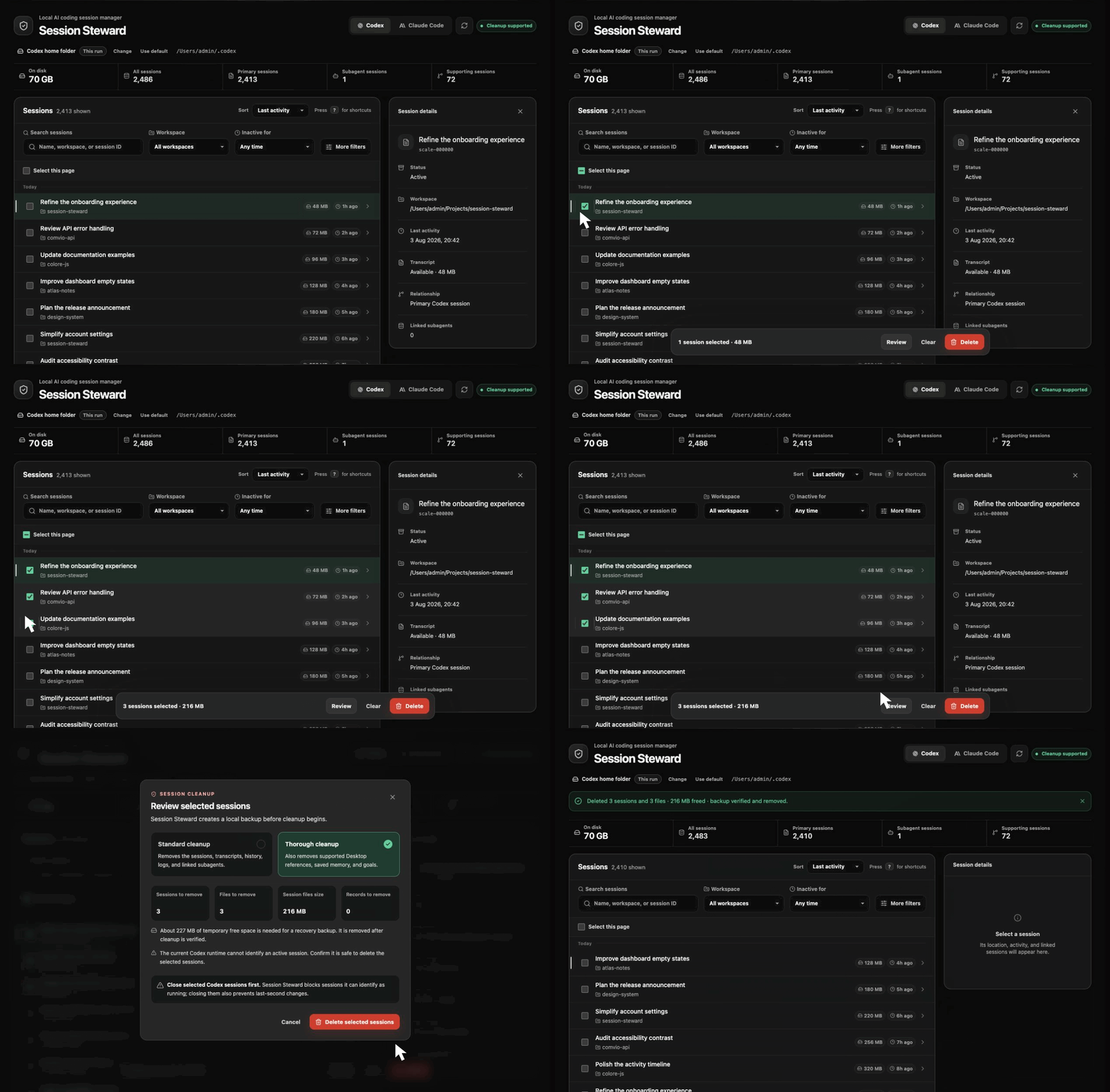
A local Codex session manager for safely reviewing, backing up, and deleting old sessions from a browser UI or terminal CLI.
|
|
4
4
|
|
|
5
|
-
|
|
5
|
+
Codex can accumulate hundreds of local sessions over time. A single session may leave behind a transcript, history and index entries, logs, and linked subagent records, so manual cleanup can easily miss related data.
|
|
6
6
|
|
|
7
|
-
|
|
7
|
+
Session Steward makes session cleanup safer by finding those records, showing what cleanup will affect, creating a local backup, removing supported data, and verifying the result afterward. Everything runs locally, and your session data stays on your computer.
|
|
8
8
|
|
|
9
|
-
|
|
10
10
|
|
|
11
|
-
##
|
|
11
|
+
## Manage and clean up local Codex sessions
|
|
12
12
|
|
|
13
|
-
- Review
|
|
14
|
-
- See
|
|
15
|
-
-
|
|
16
|
-
-
|
|
17
|
-
-
|
|
18
|
-
-
|
|
19
|
-
- Use
|
|
13
|
+
- Review sessions in a browser UI or terminal CLI.
|
|
14
|
+
- See total sessions, subagents, supporting sessions, and transcript storage.
|
|
15
|
+
- Find sessions inactive for 30, 60, or 90 days.
|
|
16
|
+
- Filter active or archived sessions by workspace, name, or session ID.
|
|
17
|
+
- Inspect linked sessions and affected records before deletion.
|
|
18
|
+
- Choose standard or thorough cleanup.
|
|
19
|
+
- Use a custom Codex folder across browser and terminal sessions.
|
|
20
20
|
|
|
21
|
-
|
|
21
|
+
## Safe by default
|
|
22
22
|
|
|
23
|
-
|
|
23
|
+
- Cleanup happens entirely on your computer.
|
|
24
|
+
- Only records included in the reviewed cleanup plan are removed.
|
|
25
|
+
- A local recovery backup is created before anything changes.
|
|
26
|
+
- Cleanup is verified before the backup is removed.
|
|
27
|
+
- Unrecognized storage is reported and left untouched.
|
|
28
|
+
- Thorough cleanup is unavailable when the detected storage format is not supported.
|
|
29
|
+
- Session contents and other Codex data are never sent over the network.
|
|
24
30
|
|
|
25
|
-
|
|
26
|
-
- [Node.js](https://nodejs.org/) 24.15 or newer
|
|
27
|
-
- Local sessions created by Codex
|
|
31
|
+
At startup, Session Steward may contact the public npm registry to check for a newer version.
|
|
28
32
|
|
|
29
|
-
|
|
33
|
+
### Session Steward does not remove
|
|
30
34
|
|
|
31
|
-
|
|
35
|
+
- Codex sign-in data or saved API credentials
|
|
36
|
+
- Configuration, plugins, caches, or custom prompt files
|
|
37
|
+
- Project files, Git repositories, or worktrees
|
|
38
|
+
- Sessions outside the reviewed cleanup plan
|
|
39
|
+
- Conversations stored in your ChatGPT account
|
|
32
40
|
|
|
33
|
-
Install
|
|
41
|
+
## Install and get started
|
|
42
|
+
|
|
43
|
+
Session Steward supports macOS and Linux and requires Node.js 24.15 or newer.
|
|
44
|
+
|
|
45
|
+
Install it globally:
|
|
34
46
|
|
|
35
47
|
```bash
|
|
36
48
|
npm install --global session-steward
|
|
@@ -42,173 +54,159 @@ Then launch it:
|
|
|
42
54
|
session-steward
|
|
43
55
|
```
|
|
44
56
|
|
|
45
|
-
|
|
46
|
-
|
|
47
|
-
Keep the terminal open while using Session Steward. Press `Ctrl+C` when you want to stop it.
|
|
48
|
-
|
|
49
|
-
To try it without a global installation:
|
|
57
|
+
Or try it without installing:
|
|
50
58
|
|
|
51
59
|
```bash
|
|
52
60
|
npx session-steward@latest
|
|
53
61
|
```
|
|
54
62
|
|
|
55
|
-
|
|
63
|
+
Session Steward opens in your browser, listens only on `127.0.0.1`, and uses `~/.codex` by default.
|
|
64
|
+
|
|
65
|
+
To clean up sessions:
|
|
56
66
|
|
|
57
|
-
1.
|
|
58
|
-
2.
|
|
59
|
-
3.
|
|
60
|
-
4.
|
|
67
|
+
1. Review the detected sessions.
|
|
68
|
+
2. Select one or more sessions.
|
|
69
|
+
3. Choose a cleanup option.
|
|
70
|
+
4. Review exactly what will be removed.
|
|
61
71
|
5. Close any selected sessions that may still be active.
|
|
62
72
|
6. Confirm the cleanup.
|
|
63
73
|
|
|
64
|
-
|
|
74
|
+
Keep the terminal open while using Session Steward. Press `Ctrl+C` to stop it.
|
|
65
75
|
|
|
66
|
-
##
|
|
76
|
+
## Cleanup and recovery
|
|
67
77
|
|
|
68
|
-
|
|
69
|
-
- Sort by recent activity, creation time, name, or workspace.
|
|
70
|
-
- Show subagent and supporting sessions when you need the additional detail.
|
|
71
|
-
- Choose standard or thorough cleanup for each deletion.
|
|
72
|
-
- Change the Codex session folder and save that choice for later runs.
|
|
78
|
+
### Standard cleanup
|
|
73
79
|
|
|
74
|
-
|
|
80
|
+
Recommended for routine session removal. It removes supported registry entries, transcripts, history and index entries, logs, and linked subagents belonging to the selected sessions.
|
|
75
81
|
|
|
76
|
-
|
|
82
|
+
### Thorough cleanup
|
|
77
83
|
|
|
78
|
-
|
|
79
|
-
- Only recognized Codex storage is changed.
|
|
80
|
-
- Unrecognized databases and changed storage layouts are reported but left untouched.
|
|
81
|
-
- Thorough cleanup is paused when the local storage layout is not supported.
|
|
82
|
-
- A backup is created before session data is changed.
|
|
83
|
-
- Cleanup is checked afterward for remaining selected artifacts.
|
|
84
|
-
- Authentication, plugins, caches, project files, worktrees, and unrelated sessions are not removed.
|
|
84
|
+
Includes standard cleanup and also removes supported local references and generated records, including recognized ChatGPT Desktop references, memory outputs, and goal records.
|
|
85
85
|
|
|
86
|
-
|
|
86
|
+
Thorough cleanup is unavailable when Session Steward finds storage it does not recognize. Standard cleanup remains available for supported records that can be identified safely.
|
|
87
87
|
|
|
88
|
-
|
|
88
|
+
### Recovery backups
|
|
89
89
|
|
|
90
|
-
|
|
90
|
+
A temporary backup is created inside your Codex folder under `session-steward-backups/`.
|
|
91
91
|
|
|
92
|
-
|
|
92
|
+
After cleanup is successfully verified, the backup is removed automatically. If cleanup fails, Session Steward keeps the backup and lets you restore the sessions, keep the backup, or delete it.
|
|
93
93
|
|
|
94
|
-
|
|
94
|
+
Before restoring, the current versions of affected files are saved separately to provide another recovery point.
|
|
95
95
|
|
|
96
|
-
|
|
96
|
+
## Terminal CLI
|
|
97
97
|
|
|
98
|
-
|
|
98
|
+
Start the interactive terminal interface:
|
|
99
99
|
|
|
100
|
-
|
|
100
|
+
```bash
|
|
101
|
+
session-steward-cli
|
|
102
|
+
```
|
|
103
|
+
|
|
104
|
+
List sessions as JSON:
|
|
101
105
|
|
|
102
|
-
|
|
106
|
+
```bash
|
|
107
|
+
session-steward-cli --json --limit 10
|
|
108
|
+
```
|
|
103
109
|
|
|
104
|
-
|
|
110
|
+
Find sessions inactive for at least 60 days:
|
|
105
111
|
|
|
106
|
-
|
|
112
|
+
```bash
|
|
113
|
+
session-steward-cli --inactive-days 60
|
|
114
|
+
```
|
|
107
115
|
|
|
108
|
-
|
|
116
|
+
Show only archived sessions:
|
|
109
117
|
|
|
110
|
-
|
|
118
|
+
```bash
|
|
119
|
+
session-steward-cli --archive-status archived
|
|
120
|
+
```
|
|
111
121
|
|
|
112
|
-
|
|
122
|
+
Show sessions from one exact workspace:
|
|
113
123
|
|
|
114
124
|
```bash
|
|
115
|
-
session-steward --
|
|
125
|
+
session-steward-cli --workspace /path/to/project
|
|
116
126
|
```
|
|
117
127
|
|
|
118
|
-
The
|
|
128
|
+
The interactive terminal accepts the same filters:
|
|
119
129
|
|
|
120
|
-
|
|
130
|
+
```text
|
|
131
|
+
inactive 30
|
|
132
|
+
inactive 60
|
|
133
|
+
inactive 90
|
|
134
|
+
archive active
|
|
135
|
+
archive archived
|
|
136
|
+
workspace /path/to/project
|
|
137
|
+
```
|
|
121
138
|
|
|
122
|
-
|
|
123
|
-
- Linux: `$XDG_CONFIG_HOME/session-steward/config.json`, or `~/.config/session-steward/config.json` when `XDG_CONFIG_HOME` is not set
|
|
139
|
+
Run `inactive`, `archive`, or `workspace` without a value to clear that filter.
|
|
124
140
|
|
|
125
|
-
|
|
141
|
+
Use `session-steward-cli --help` to see all available options.
|
|
126
142
|
|
|
127
|
-
|
|
143
|
+
## Use a custom Codex folder
|
|
128
144
|
|
|
129
|
-
|
|
130
|
-
session-steward-cli
|
|
131
|
-
```
|
|
145
|
+
The browser interface displays the active Codex session folder. Select **Change folder** to choose another existing Codex folder and remember it for later browser and terminal sessions.
|
|
132
146
|
|
|
133
|
-
|
|
147
|
+
For a one-time override:
|
|
134
148
|
|
|
135
149
|
```bash
|
|
136
|
-
session-steward
|
|
150
|
+
session-steward --codex-home /path/to/.codex
|
|
137
151
|
```
|
|
138
152
|
|
|
139
|
-
|
|
153
|
+
The command-line override applies only to that run and does not replace your saved folder.
|
|
140
154
|
|
|
141
|
-
##
|
|
155
|
+
## Other commands
|
|
142
156
|
|
|
143
|
-
Start without opening
|
|
157
|
+
Start without automatically opening the browser:
|
|
144
158
|
|
|
145
159
|
```bash
|
|
146
160
|
session-steward --no-open
|
|
147
161
|
```
|
|
148
162
|
|
|
149
|
-
Update
|
|
163
|
+
Update Session Steward:
|
|
150
164
|
|
|
151
165
|
```bash
|
|
152
166
|
npm install --global session-steward@latest
|
|
153
167
|
```
|
|
154
168
|
|
|
155
|
-
Uninstall
|
|
169
|
+
Uninstall it:
|
|
156
170
|
|
|
157
171
|
```bash
|
|
158
172
|
npm uninstall --global session-steward
|
|
159
173
|
```
|
|
160
174
|
|
|
161
|
-
Uninstalling
|
|
175
|
+
Uninstalling Session Steward does not remove Codex sessions, recovery backups, or your saved folder preference.
|
|
162
176
|
|
|
163
177
|
## Troubleshooting
|
|
164
178
|
|
|
165
|
-
|
|
166
|
-
|
|
167
|
-
|
|
168
|
-
|
|
169
|
-
### No sessions were found
|
|
170
|
-
|
|
171
|
-
Confirm that the displayed Codex folder contains your local session data. Use **Change folder** or pass `--codex-home` for a one-time override.
|
|
172
|
-
|
|
173
|
-
### Thorough cleanup is unavailable
|
|
174
|
-
|
|
175
|
-
Open the compatibility details in Session Steward. New or changed local storage is left untouched until that format is supported. You can still use standard cleanup when its recognized records are supported.
|
|
176
|
-
|
|
177
|
-
### Node.js is too old
|
|
178
|
-
|
|
179
|
-
Install Node.js 24.15 or newer, then run `session-steward` again.
|
|
179
|
+
- **The browser did not open:** Run `session-steward --no-open`, then open the local address shown in the terminal.
|
|
180
|
+
- **No sessions were found:** Check the displayed Codex folder. Use **Change folder** or pass `--codex-home` for a one-time override.
|
|
181
|
+
- **Thorough cleanup is unavailable:** Review the compatibility details. Unrecognized storage is left untouched, but standard cleanup may still be available.
|
|
182
|
+
- **Your Node.js version is too old:** Install Node.js 24.15 or newer and run Session Steward again.
|
|
180
183
|
|
|
181
184
|
## Development
|
|
182
185
|
|
|
183
|
-
Clone the repository and install its dependencies:
|
|
184
|
-
|
|
185
186
|
```bash
|
|
186
187
|
git clone https://github.com/mallikcheripally/session-steward.git
|
|
187
188
|
cd session-steward
|
|
188
189
|
npm install
|
|
190
|
+
npm test
|
|
191
|
+
npm run build
|
|
189
192
|
```
|
|
190
193
|
|
|
191
|
-
|
|
194
|
+
Scale benchmarks are also available:
|
|
192
195
|
|
|
193
196
|
```bash
|
|
194
|
-
npm start
|
|
195
|
-
npm test
|
|
196
197
|
npm run benchmark:scale
|
|
198
|
+
npm run benchmark:overview
|
|
197
199
|
npm run benchmark:discovery
|
|
198
200
|
npm run benchmark:transcripts
|
|
199
|
-
npm run build
|
|
200
|
-
npm pack --dry-run --cache .npm-cache
|
|
201
201
|
```
|
|
202
202
|
|
|
203
|
-
Tests use temporary synthetic Codex data. They do not read or
|
|
204
|
-
|
|
205
|
-
## Roadmap
|
|
206
|
-
|
|
207
|
-
Codex is supported today. Claude Code is planned as the next provider integration.
|
|
203
|
+
Tests and benchmarks use temporary synthetic Codex data. They do not read or modify your local sessions.
|
|
208
204
|
|
|
209
205
|
## Support
|
|
210
206
|
|
|
211
|
-
|
|
207
|
+
Codex is supported today. Claude Code support is planned.
|
|
208
|
+
|
|
209
|
+
Use [GitHub Issues](https://github.com/mallikcheripally/session-steward/issues) to report a bug, request a provider, or share a storage format that Session Steward does not recognize.
|
|
212
210
|
|
|
213
211
|
Session Steward is an independent project and is not affiliated with or endorsed by OpenAI.
|
|
214
212
|
|
|
@@ -11,6 +11,9 @@ const { runCli } = await import("../lib/cli.mjs");
|
|
|
11
11
|
const { values } = parseArgs({
|
|
12
12
|
allowPositionals: false,
|
|
13
13
|
options: {
|
|
14
|
+
"archive-status": {
|
|
15
|
+
type: "string",
|
|
16
|
+
},
|
|
14
17
|
"codex-home": {
|
|
15
18
|
type: "string",
|
|
16
19
|
},
|
|
@@ -18,6 +21,9 @@ const { values } = parseArgs({
|
|
|
18
21
|
short: "h",
|
|
19
22
|
type: "boolean",
|
|
20
23
|
},
|
|
24
|
+
"inactive-days": {
|
|
25
|
+
type: "string",
|
|
26
|
+
},
|
|
21
27
|
"include-internals": {
|
|
22
28
|
type: "boolean",
|
|
23
29
|
},
|
|
@@ -33,6 +39,9 @@ const { values } = parseArgs({
|
|
|
33
39
|
sort: {
|
|
34
40
|
type: "string",
|
|
35
41
|
},
|
|
42
|
+
workspace: {
|
|
43
|
+
type: "string",
|
|
44
|
+
},
|
|
36
45
|
},
|
|
37
46
|
});
|
|
38
47
|
|
|
@@ -54,13 +63,16 @@ async function main() {
|
|
|
54
63
|
}
|
|
55
64
|
|
|
56
65
|
await runCli({
|
|
66
|
+
archiveStatus: values["archive-status"],
|
|
57
67
|
codexHome,
|
|
58
68
|
help,
|
|
69
|
+
inactiveDays: values["inactive-days"],
|
|
59
70
|
includeInternals: values["include-internals"] ?? false,
|
|
60
71
|
json: values.json ?? false,
|
|
61
72
|
limit: numericLimit,
|
|
62
73
|
search: values.search ?? "",
|
|
63
74
|
sort: values.sort ?? "updated",
|
|
75
|
+
workspace: values.workspace,
|
|
64
76
|
});
|
|
65
77
|
}
|
|
66
78
|
|
package/bin/session-steward.mjs
CHANGED
|
@@ -9,15 +9,36 @@ import { findAvailableUpdate, formatUpdateNotice } from "../lib/update-check.mjs
|
|
|
9
9
|
|
|
10
10
|
assertSupportedNode();
|
|
11
11
|
|
|
12
|
-
const { startLocalServer } = await import("../lib/server.mjs");
|
|
13
|
-
|
|
14
12
|
const { values } = parseArgs({
|
|
13
|
+
allowPositionals: false,
|
|
15
14
|
options: {
|
|
16
15
|
"codex-home": { type: "string" },
|
|
16
|
+
help: { short: "h", type: "boolean" },
|
|
17
17
|
"no-open": { type: "boolean", default: false },
|
|
18
18
|
port: { type: "string" },
|
|
19
|
+
version: { short: "v", type: "boolean" },
|
|
19
20
|
},
|
|
20
21
|
});
|
|
22
|
+
|
|
23
|
+
if (values.help) {
|
|
24
|
+
process.stdout.write(`Usage: session-steward [options]
|
|
25
|
+
|
|
26
|
+
Options:
|
|
27
|
+
--codex-home <path> Use a custom Codex session folder
|
|
28
|
+
--port <number> Use a specific local port
|
|
29
|
+
--no-open Start without opening a browser
|
|
30
|
+
-h, --help Show this help
|
|
31
|
+
-v, --version Show the installed version
|
|
32
|
+
`);
|
|
33
|
+
process.exit(0);
|
|
34
|
+
}
|
|
35
|
+
|
|
36
|
+
if (values.version) {
|
|
37
|
+
process.stdout.write(`${packageMetadata.version}\n`);
|
|
38
|
+
process.exit(0);
|
|
39
|
+
}
|
|
40
|
+
|
|
41
|
+
const { startLocalServer } = await import("../lib/server.mjs");
|
|
21
42
|
const port = values.port === undefined ? 0 : Number.parseInt(values.port, 10);
|
|
22
43
|
const availableUpdate = await findAvailableUpdate({ packageMetadata });
|
|
23
44
|
|